key AUDI A5 COUPE 2018 Owner's Manual
[x] Cancel search | Manufacturer: AUDI, Model Year: 2018, Model line: A5 COUPE, Model: AUDI A5 COUPE 2018Pages: 409, PDF Size: 67.63 MB
Page 74 of 409
Sea ts and stor age
Operating
.. If you turn the m ultif unction bu tton CD
¢ page 71, fig . 72 to the left or to the right,
the possible seat settings @ are shown in the
Infotainment system
~ fig . 73 .
.. To se lect a seat setting, turn the multifunction
button
CD in the corresponding direction until
the des ired seat setting is outlined in red.
• The arrows @ represent the possible adjust
ments . Fo r example, to lower the lumbar sup
po rt, p ress the m ultifunction bu tton
CD down.
T he co rresponding arrow © lights up.
The fo llowing seat sett ings @ are possible :
Massage func tion * -select the massage type
Wave, St retch , Knead or Off . You can adjust the
i n tens ity of each massage from 1 to 3 . You can
sw itch the selected massage on/off using the
button @~ fig. 73 .
Lumb ar support -you can adjust t he lumbar sup
port up/down and to be stronger/weaker .
Side bolsters * -you can increase/decrease the
side support in the seat using the side bo lsters
on the seat backrest .
(I) Tips
-The massage function switches off a uto
matically after approx imately 10 minutes.
- The air in the side bo lsters* is released as
soon as the driver's door opens. This makes
i s possible to enter and exit the vehicle
mo re comfortab ly. As soon as you sta rt driv
i ng the veh icle, the s ide bo lsters fill.
1l Requ irem en t: the ve hicl e battery m ust have a suff icien t
c ha rge le v e l.
72
Easy seat entry
App lies to: vehicles with entry ass istance
Entry assistance makes it easier for the rear pas
sengers to enter and leave the vehicle .
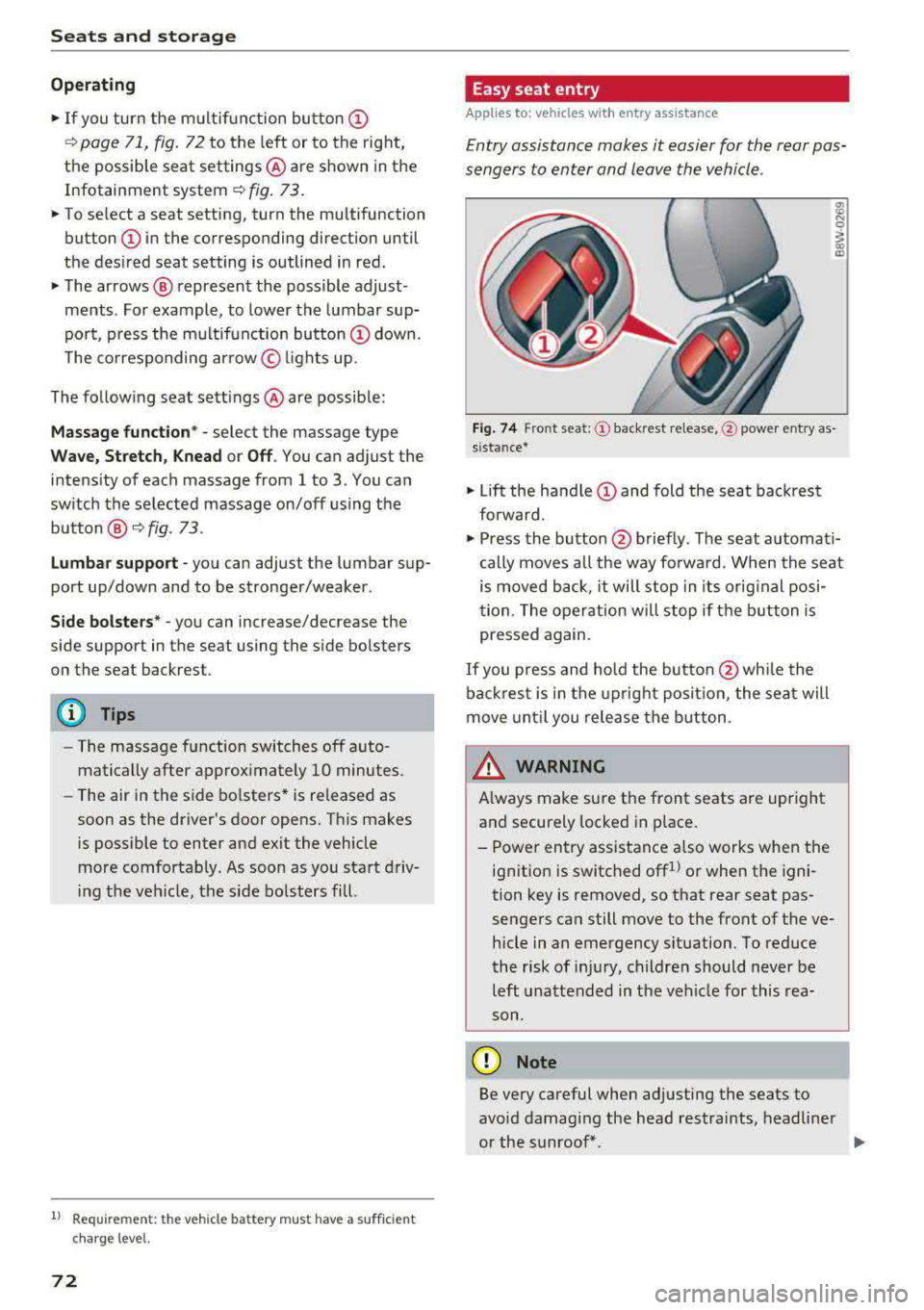
Fig . 7 4 Fro nt seat: © backrest re lease, @powe r entry as
s ista nce*
• Lift the hand le CD and fold the seat backrest
forward .
• Press the button@ briefly . T he seat automati
cally moves a ll the way fo rwa rd . When the seat
is moved back, it will stop in its o rig inal posi
tion . The operation will stop if t he b utton is
pressed again.
If you p ress and hold the butto n
@while the
bac kres t is in the upright posi tion, the sea t will
move unt il you release the b utton .
& WARNING
Always make su re the front seats are upright
and securely locked in p lace .
- Power entry assistance also works when the
ignit ion is switched off
1
) or when the igni
tion key is removed , so t hat rear seat pas
sengers can still move to the front of the ve
hicle in an emergency s ituation. To red uce
the risk of inj ury, childre n should never be
left unattended in the vehicle for this rea
son .
(D Note
Be very careful when adjusting the seats to
avo id damaging the head restraints, headline r
or the sunroof*.
Page 76 of 409
Sea ts and stor age
Rear head restraints
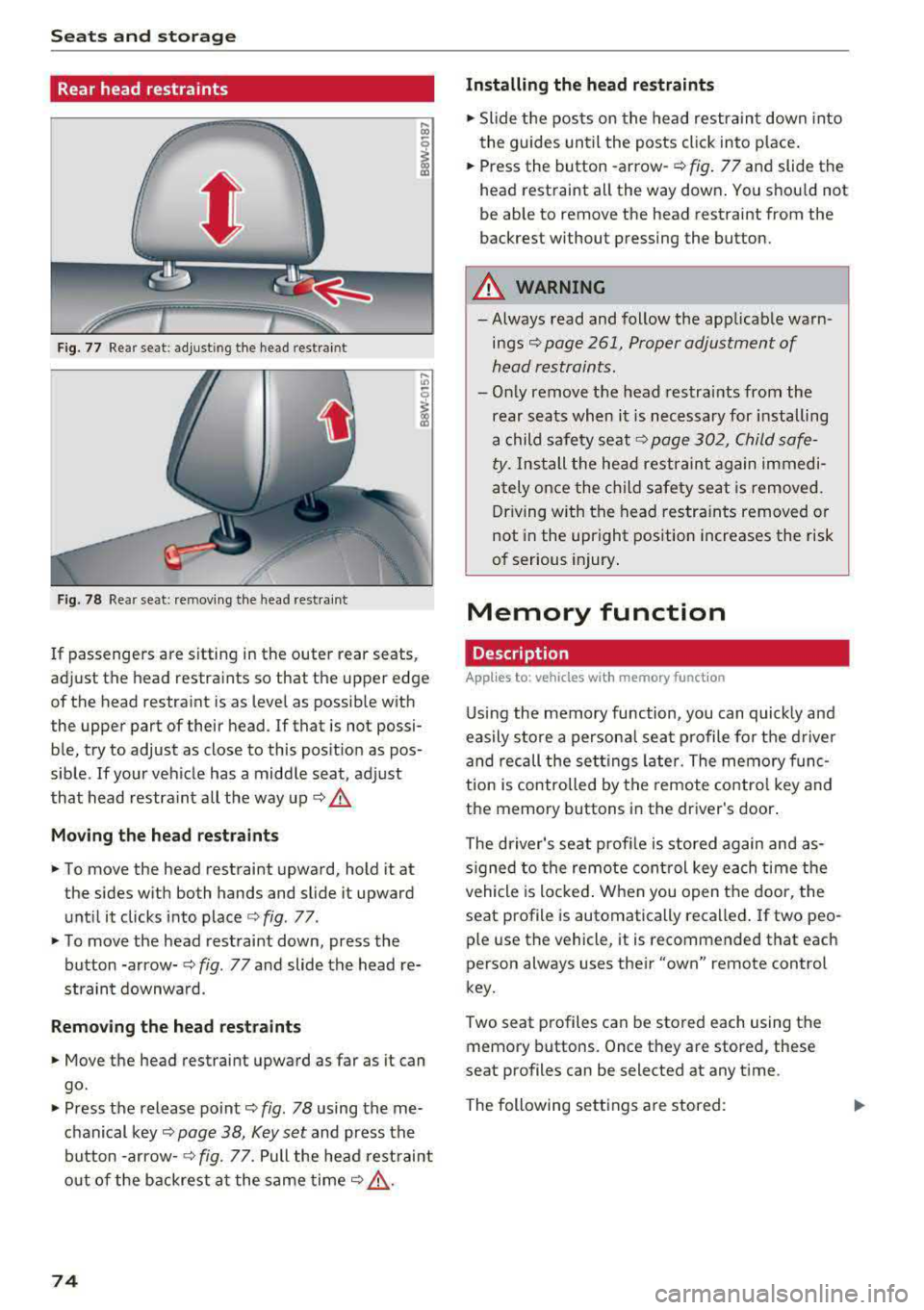
Fig. 77 Rear seat: adjust ing the head restraint
F ig. 78 Rear seat: remov ing the head rest rai nt
If passengers are s itting in the outer rear seats,
adjust the head restraints so that the upper edge
of the head restraint is as level as possible with
the upper part of their head . If that is not possi
ble, try to adjust as close to this position as pos
sible . If your vehicle has a middle seat, adjust
that head restra int all the way up
c::> .&.
Mov ing the he ad re st raints
• To move the head restraint upward, hold it at
the sides w ith both hands and slide it upward
unt il it clicks into place
c::> fig . 77.
• To move the head restraint down, press the
button -arrow-
c::> fig. 77 and slide the head re
straint downwa rd.
Remo ving the he ad rest raints
• Move the head restraint upward as far as it can
go.
• Press the release point c::> fig. 78 using the me
chanical
key~ page 38, Key set and press the
button -arrow-
c::> fig. 77. Pull the head rest raint
o ut of the backrest a t the same
time~ ,&..
74
Installing the head re straints
• Slide the posts on the head restraint down into
the guides until the posts click into place .
• Press the button -arrow-c::> fig. 77 and slide the
head restraint all the way down . You should not
be able to remove the head restraint from the
backrest without pressing the button.
A WARNING
-Always read and follow the applicable warn
ings~ page 261, Proper adjustment of
head restraints.
-Only remove the head restraints from the
rear seats when it is necessary for installing
a child safety seat
c::> page 302, Child safe
ty. Install the head restraint again immedi
ately once the ch ild safety seat is removed.
Driving w ith the head restra ints removed or
not in the upright position increases the risk
of serious injury .
Memory function
Description
Applies to: vehicles wit h memo ry funct ion
Using the memory function, you can quick ly and
easily store a persona l seat profile for t he driver
and recall the sett ings later. The memory func
tion is controlled by the remote control key and
the memory buttons in the driver's door.
The driver's seat prof ile is stored again and as
s igned to the remote control key each time the
vehicle is locked . When you open the door, the
seat profile is automatically recalled . If two peo
ple use the vehicle, it is recommended that each
person always uses their
"own" remote control
key.
Two seat profiles can be stored each using the
memory buttons. Once they are stored, these
seat profiles can be selected at any time.
The following sett ings a re stored:
Page 77 of 409
Remote con- Memory but-trol key ton
Driver Driver
Sea t X X
Both exterior
X X mirrors*
Remote control key
Applies to: vehicles with memory function
The driver's seat profile can be assigned to the
remote control key when the vehicle is locked .
.. Select in the Infotainment system: !MENUI but
ton
> Vehicle> left control button > Vehicle
settings
> Seats > Driver's seat > Store set
tings on remote control key.
@ Tips
If you do not wish to have the seat profile for
another driver assigned to the remote control
key, switch the memory function off in the In
fotainment system.
Memory buttons
Applies to: vehicles with memory function
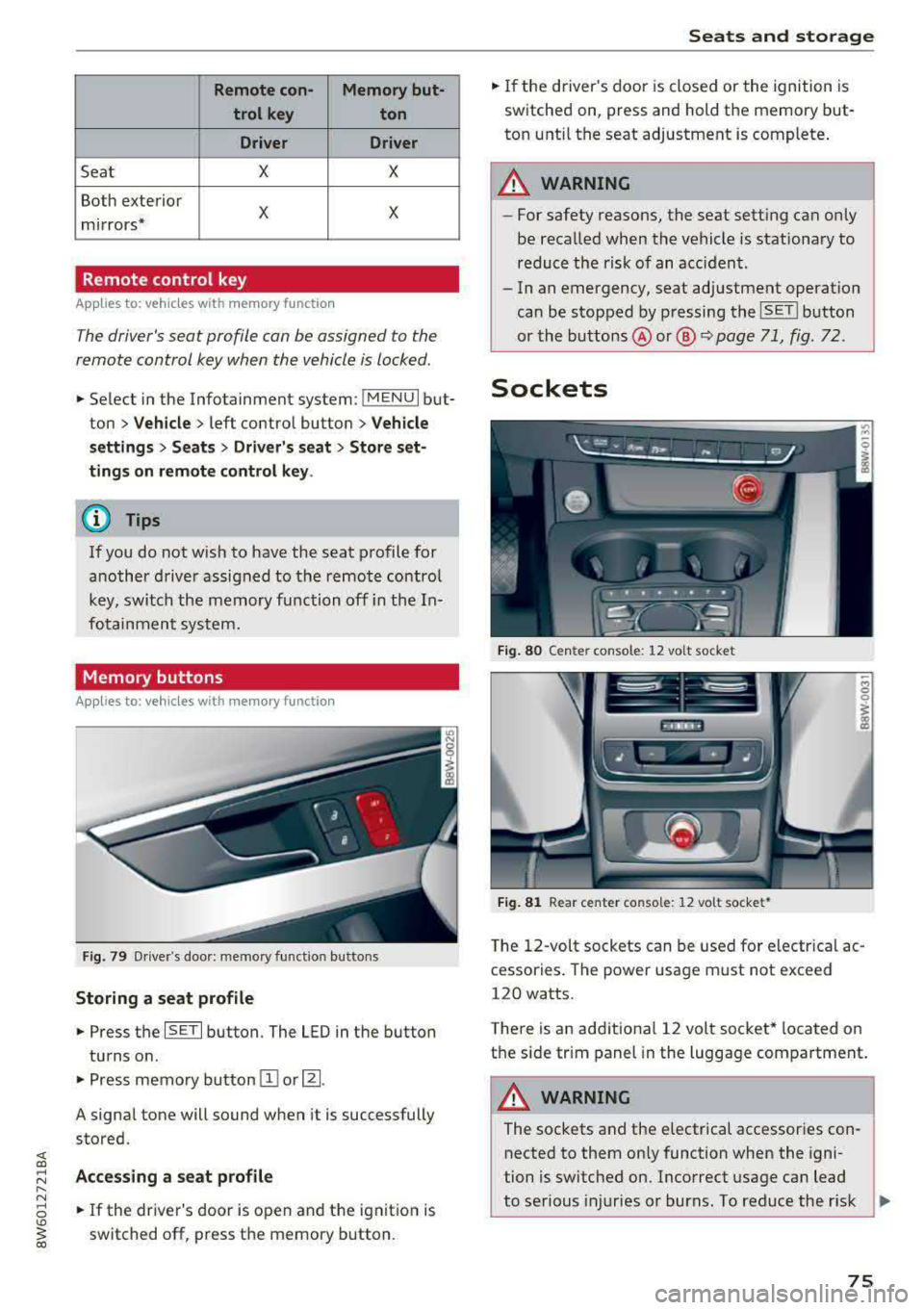
Fig. 79 Driver's door: memory functio n buttons
Storing a seat profile
.. Press the ISET I button. The LED in the button
turns o n .
.. Press memory button IT] or~ -
A signal tone will sound when it is successfully
stored.
;:::: Accessing a seat profile ...... N
8 .. If the driver's door is open and the ignition is
'° ~ switched off, press the memory b utton. co
Seats and storage
.. If the driver's door is closed or the ignition is
switched on, press and hold the memory but
ton until the seat adjustment is complete .
_& WARNING
-For safety reasons, the seat setting can only
be recalled when the vehicle is stationary to
reduce the risk of an accident.
- In an emergency, seat adjustment operat ion
can be stopped by pressing the
ISE TI button
or the buttons @ or@
~ page 71, fig. 72.
Sockets
Fig. 80 Cen ter console : 12 vo lt socket
Fig. 81 Rear center console: 12 volt socket •
The 12-volt sockets can be used for electr ical ac
cessories . The power usage must not exceed
120 watts.
T here is an additiona l 12 volt socket* located on
the side tr im panel in the luggage compartment.
A WARNING
The sockets and the e lectrical accessories con
nected to them only function when the igni
tion is switched on. Incorrect usage can lead
to serious injuries or burns. To reduce the r isk
Ji--
75
Page 78 of 409

Sea ts and stor age
of injuries, never leave ch ildren unattended in
the vehicle with the veh icle key.
CD Note
- To reduce the risk of damage to the vehicle
electrica l system, never attempt to charge
the vehicle battery by connecting accesso ries that prov ide power, such as solar panels
or battery chargers, to the 12 Volt sockets
or the cigarette lighter.
- To reduce the risk of damage to the sockets,
only use plugs that fit correct ly.
Storage
Cup holders
F ig . 8 2 Rear cente r armrest: cup holders•
Your vehicle has cup ho lders in the front cen ter
console, in the cente r of the rear bench seat* or
in the rea r center a rm rest * as well as on the right
and left side in t he rear*.
Cup hold ers in the rear c enter armrest*
• Fold the center armrest downward.
• To open the cup ho lders, pull th e top cover on
the cup holders forward
¢ fig. 82.
• Set yo ur beverage in the holde r.
• To close the cup holder, fold the cover back un
ti l it clicks into place .
&_ WARNING
-
-Do not put any hot beverages in the cup
holder w hile the vehicle is mov ing. Hot bev
erages could spill, wh ich increases the r isk
of injury.
-Do not use any breakable beverage contain
ers (for example, made out of glass or por-
76
celain). You could be injured by them in the
event of an accident.
CD Note
Beverage containers in the cup holders should
a lways have a lid .
If not, beverages could spill
and ca use damage to veh icle equipment, such
e lectron ics or seat covers.
Cooled glove compartment
Applies to: vehicles with cooled g love co mpartment
The cooled glove compartment only functions
when the AIC system is switched on.
F ig. 83 G love compartment: sw itch ing cooling mode on/
off
• Turn the knob @ counter-clockwise to switch
the cooling on . The symbols on the knob must
appear as they do in
¢ fig. 83.
• Turn the knob @ clockwise to switch the cool
ing off .
If the heating is switched on, switching the glove
compartment cooling mode off is recommended.
Addit ional storage compartments
You w ill find a variety of storage compartments
and holders at various locat io ns in the vehicle .
- Glove compartment: the glove compartment
can be locked using the mechanical key
¢ page 38, Key set .
-In the door trim panels
- Safety vest compartment in the door trim pan-
els on the dr iver's side and front passenger's
side
-Storage compartment under the front center
armrest
.,.
Page 80 of 409
Seats and storage
_&. WARNING
-The luggage c ompartment cover is not a
surface for storin9 objects. Objects placed
on the cover could endanger all vehicle oc
cupants during sudden braking maneuvers
or in a crash.
- To reduce the risk of accidents, the luggage
compartment cover should never be unse
cured under any circumstances.
Increasing the size of the vehicle interior
Applies to : vehicles with folding backrests
The rear seat backrests can be folded forward ei
ther separately* or together.
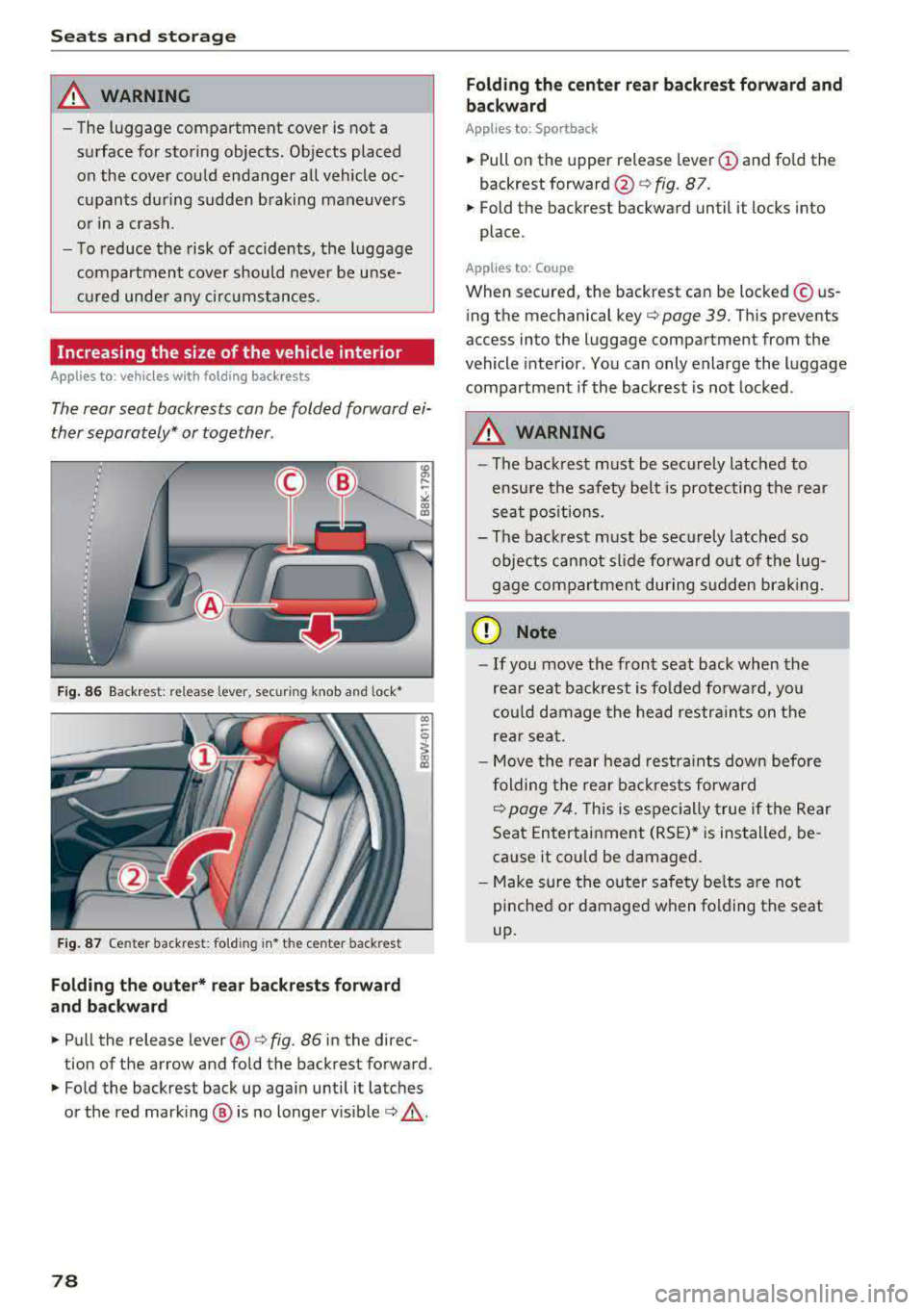
Fig. 86 Backrest : release lever, securing knob and lock*
Fig. 87 Center backrest: fold ing in* the center backrest
Folding the outer* rear backrests forward
and backward
.,. Pull the release lever @¢ fig. 86 in the direc
tion of the arrow and fold the backrest forward .
.,. Fold the backrest back up again until it latches
or the red marking @ is no longer
visible¢ &,.
78
Folding the center rear backrest forward and
backward
Applies to: Sportback
.,. Pull on the upper release lever (D and fold the
backrest
forward @¢ fig. 87.
.,. Fold the backrest backward until it locks into
place .
Applies to : Coupe
When secured, the backrest can be locked© us
ing the mechanical
key¢ page 39. This prevents
access into the luggage compartment from the
vehicle interior. You can only enlarge the luggage
compartment if the backrest is not locked .
_&. WARNING
-The backrest must be securely latched to
ensure the safety belt is protecting the rear
seat positions.
- The backrest must be securely latched so
objects cannot slide forward out of the lug
gage compartment during sudden braking.
(D Note
- If you move the front seat back when the
rear seat backrest is folded forward, you
could damage the head restraints on the
rear seat.
- Move the rear head restraints down before
folding the rear backrests forward
~ page 74. This is especially true if the Rear
Seat Entertainment (RSE)* is installed, be
cause it could be damaged.
- Make sure the outer safety belts are not
pinched or damaged when folding the seat
up.
-
Page 83 of 409
<( a, .... N ,....
N .... 0 \0
3 a,
Warm and cold Climate control system
Description
The climate control system warms , cools and re
moves humidity from the air in the vehicle interi
or. It is the most effective when the w indows and
sliding sun roof* or power top* are closed . If
there is a build-up of heat inside the vehicle, ven
tilation can help to speed up the cooling process.
I n all heating mode functions except for
defrost ,
the blower on ly switches to a higher speed once
the engine coolant has re ached a sufficient tem
perature .
Pollutant filter
The pollutant filter removes pollutants such as
dust and pollen from the air.
Key recognition
The climate control settings are automatically
stored and assigned to the remote control key
that is in use .
T hese settings are different when the power top*
is open or closed .
Warm and cold
{® For the sake of the environment
-If you would like to reduce fuel consump
tion, switch the air conditioning off . This
will also reduce emissions.
- In vehicles with a diesel engine, you can
switch the auxiliary heater off in the Info
tainment system.
(D Tips
- To prevent interference with the heating
and cooling output and to prevent the win
dows from fogging over, the air intake in
front of the windshield must be free of ice,
snow or leaves .
- Condensation from the cooling system can
drip and form a puddle of water under the
vehicle . This is normal and does not mean
there is a leak .
- The energy management system may tem
porarily switch off certain functions, such as
the seat heating* or rear window defogger.
These systems are available again as soon
as the energy supply has been restored.
81
Page 87 of 409
<( a, .... N ,....
N .... 0 \0
3 a,
-The heat output from the neck heating* is l ower when the power top* is closed than
when it is open.
Setup
The climate control system basic settings ore ac
cessed in the Infotainment system .
.,. Select in the Info tainment sys tem: !MENUI b ut
ton
> V ehi cle > left contro l button > A ir condi
tioni ng
Auto reci rculation
When switched on, automatic recircu lation con
trols the rec irculation mode a utomat ically . If the
windows fog up , press
the@ M AX button.
Automatic au xiliary heater*
The auxiliary heater helps to warm the vehicle in
ter ior more quickly .
Steering wheel heating
Applies to: veh icles with steering whee l heating
The steering wheel rim con be heated .
.. Press the @I Q page 15 , fig . 1 1 button on the
mult ifunction steering wheel to switch the
stee ring wheel heating on and off. The mes
sage
Steerin g wh eel heating : on/St eerin g
wh eel h eat ing : off
appears in the instrument
cluster disp lay.
The temperat ure is maintained at a constant lev
e l when steering wheel heating is switched on .
The steering wheel heat ing settings are stored
automatically and ass igned to the remote control
key that is in use.
Warm and c old
85
Page 92 of 409
Driving
St ee ring lock1
)
The stee ring locks when you t urn the engine off
using the
! S T A RT ENGINE ST OP I button and
open the driver 's door. The locked steering helps
prevent v ehicle theft .
Emergency off function*
If it is abso lutely necessary, the engine can also
be turned off while dr iv ing at speeds star ting at
4 mph (7 km/h). To switch the eng ine off, press
the
! S TAR T ENGINE ST OP I button tw ice in a row
briefly or press and hold for longer than two sec
onds.
A WARNING
- Never turn off the engine before the veh icle
has come to a comp lete stop . The full func
t ion of the brake booster and the power
stee ring is not guaranteed. Yo u must use
more force to turn or b rake . Because you
cannot s teer an d brake as you usu ally
would, t his co uld lead to accidents and ser i
ous in juries.
- Alw ays t ake the key wi th you w henever you
leave you r vehicle . Othe rw ise, the engi ne
cou ld be started o r electrical equipment
s uch as the power windows cou ld be operat
ed . This can lead to se rious injury.
- For safety reasons, always park the vehicle
with the se lector lever in the P position
(a u
tomat ic transmission) or with 1st gear en
gaged (manual transmission). Otherwise
the vehicle could roll away u nintent ionally .
(D Note
If the eng ine has been under heavy load for
an extended per iod of t ime, heat builds up in
the engine compartment after the engine is
sw itched off and there is a risk of damaging
the engi ne . For this reason, let the engi ne run
for at idle for approximately two minutes
be
fore shutting it off.
l) Th is fun ction is not avai la bl e in al l co un tries.
90
(D Tips
Fo r u p to 10 minutes after stopping the en
g ine, the radiator fan may turn on again auto
matically or it may continue to r un (even if
the ig nition is switched off) for the following
r easons:
- The coolant temperature is increas ing due
to trapped heat.
- If the eng ine is wa rm and the eng ine com
partment a lso heats up from strong sun
light .
- Applies to: vehicles with diesel particulate
filter: The emissions control system is heat
ed through the regeneration process, even if
the engine has not reached its operat ing
tempe rature yet.
Messages
Engin e running . Warning! Turn off ignition be
fore leavin g vehicle
This message appears and a warning tone sounds
i f you open the drive r's door w hen the eng ine is
r un ning .
Applies to: vehicles with manual transmission
Please pres s clutch pedal
This message appears if you do not press the
clutch pedal to start the eng ine. The engine can
o nly be started w hen the clutch pedal is pressed.
Applies to: vehicles with automatic transmissions
Plea se pres s brake pedal
This message appears if you do not press the
bra ke peda l when sta rting t he eng ine .
Ill Remote control key : key not recognized. Is
the key still in the vehicle ?
This indicator light turns on and this message ap
pears if the ignition key was removed from the
vehicle when the engine was running . If the igni
tion key is no longer in the vehicle, you cannot
switch on the ignition or start the engine once
Page 93 of 409
you stop it. You also cannot lock the vehicle from
the outside .
Applies to: vehicles with au tomatic transm issions
Shift to P , otherwise vehicle can roll away.
Doors do not lock if gearshift is not in P
This message appears for safety reasons if the
selector lever is in the N position when you
sw itch the ignition off. Move the selector leve r to
the P position. Otherwise the vehicle is not pro
tected from ro lling and it cannot be locked .
DJ Remote control key: hold back of key
against the designated area . See owner 's man
ual
If the indicator light turns on and th is message
appears, there is a malfunction
c> page 91 .
Applies to: vehicles with automatic transmissions
Shift to P before leaving car, otherwise vehicle
can roll away
This message appears if the driver's door is
opened while the ignition is switched on and the
transmission has not been shifted to the P posi
tion . Sh ift the transmiss ion into the P position
and turn off the ignition if you are leaving the ve
hicle . Otherwise the vehicle could roll. Also see
c::> page93 .
Starting the engine when there is a
malfunction
It may not be possible to start the engine under
certain circumstances, for example if the battery
in the vehicle key is drained, if interference is af
fected the key or if there is a system malfunc
tion .
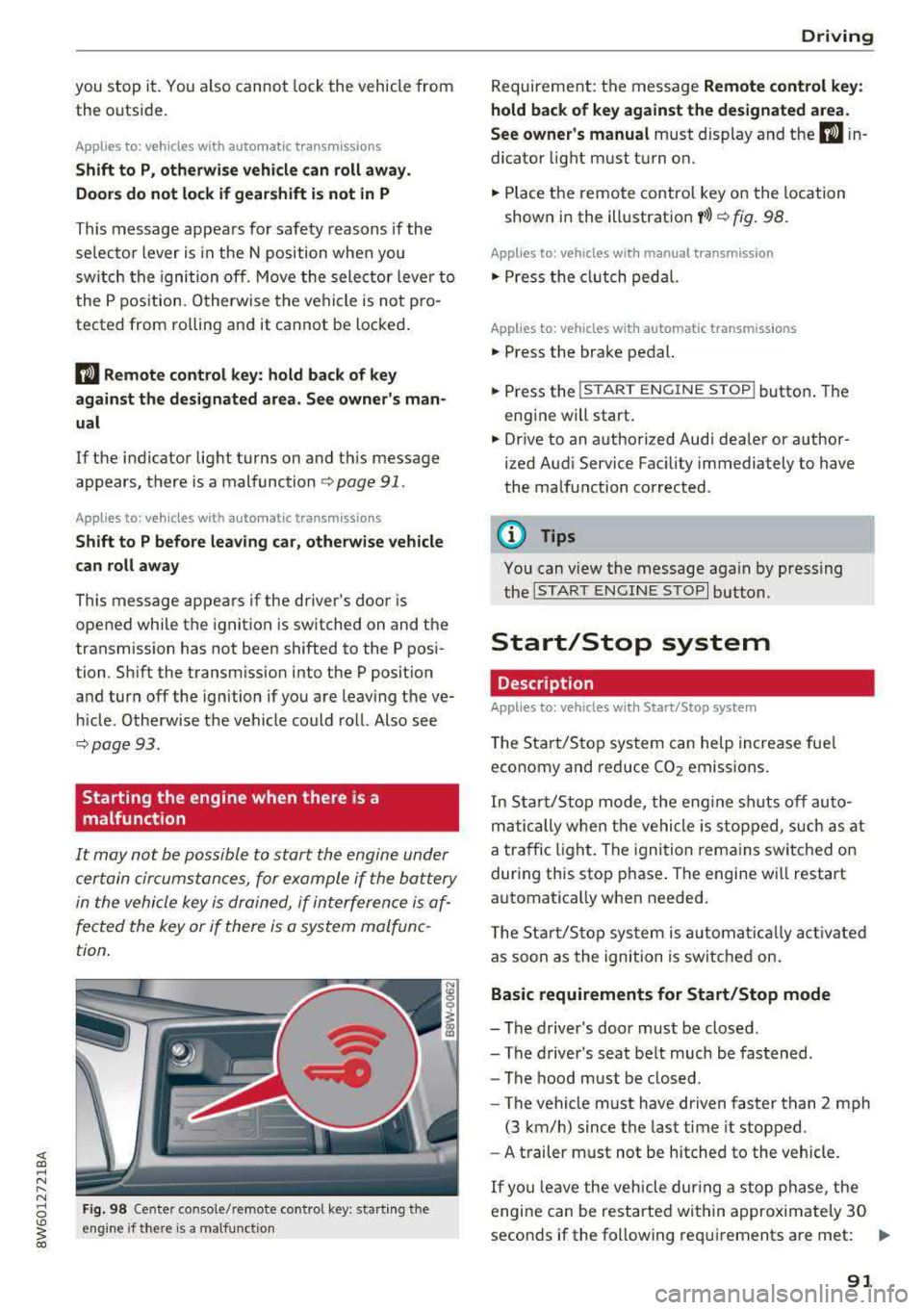
Fig. 98 Cente r console/ remote contro l key: starting t he
eng ine if there is a malfunc tion
Driving
Requirement: the message Remote control key:
hold back of key against the designated area .
See owner's manual
must display and the DJ i n
dicator light must turn on.
.,. Place the remote control key on the location
shown in the illustration
y >l) c::> fig . 98.
Applies to: vehicles with manual transmission
.,. Press the clutch pedal.
Applies to: vehicles with automatic transmissions
• Press the brake pedal.
.. Press the !START ENGINE STOP ! button. The
engine will start.
.,. Drive to an authorized Audi dea ler or author
ized Aud i Service Facility immediately to have
the malfunction corrected.
@ Tips
You can view the message again by pressing
the
I S TART ENGINE STOP I button.
Start/Stop system
Description
Applies to: vehicles with Start/Stop system
The Start/Stop system can help increase fue l
economy and reduce CO2 emissions.
In Sta rt/Stop mode, the engine shuts off auto
matically when the vehicle is stopped, such as at
a traffic light. The ignition remains switched on
during this stop phase . The engine wi ll restart
automatica lly when needed .
Th e Start/Stop system is a utomaticall y activated
as soon as the ignition is switched on.
Basic requirements for Start/Stop mode
-The driver's door must be closed .
-The driver's seat belt much be fastened.
- The hood must be closed.
- The vehicle must have driven faster than
2 mph
(3 km/h) since the last time it stopped .
- A trailer must not be hitched to the vehicle.
If you leave the vehicle during a stop phase, the
engine can be restarted within approximately 30
seconds if the following requi rements are met:
IJ>
91
Page 97 of 409
<( a, .... N ,....
N .... 0 \0
3 a,
sounds when the C®> switch is pulled . Emergency
braking stops as soon as
the(®) switch is released
or the accelerator peda l is pressed.
Parking
.,. Press t he b rake peda l to stop the vehicle .
.,. Pull the(®) switc h to set the parking brake .
.,. Applies to: automatic transmission: Select the
P selector lever position .
.,. Turn the eng ine off c> & .
.,. Applies to: manual transmission: Engage 1st
gear .
.,. Turn the steer ing wheel when parking on in
clines so that the wheels will roll into the curb
i f the veh icle starts moving.
_& WARNING
- Never ac celer ate o r release the clutch pedal
carelessly when a gear or a selector lever
posit ion (automatic transm ission) is engag
ed wh ile the vehicle is stationary and the
en
gine is runn ing. Otherwise, the vehicle will
start to move immediately and this cou ld
re
sult in an accident.
- Emergency braking should only be used in an emergency, when the normal brake peda l
has failed or the brake pedal is obstructed.
During emergency braking, your veh icle will
bra ke sim ila r to heavy brak ing . ESC and the
associated components (ABS, ASR, EDL)
c annot overcome the laws of physics.
Around curves and when road or weather conditions are bad, a fu ll brake application
can cause the vehicle to skid or the rear end
to swerve, which increases the risk of an
ac
c ident.
- If the power supply fails, you cannot set the
park ing brake if it is released. If th is is the
case, stop the veh icle on leve l ground and
secure it by engaging 1st gear (manual
transmiss ion) or select ing the P selector lev
er position (automatic t ransm iss ion). See an
authorized Aud i dealer o r autho rized Aud i
Service Facility for assistance.
- Always take the vehicle key with you when
leaving your vehicle, even if for a short pe ri
od of time. Th is app lies p articu larly when
children rema in in the vehicle. Otherwise,
D riv ing
children could start the engine, release the
parking brake or operate e lectrical equip
ment such as power w indows, which
in
creases the risk of an accident.
- No one, especially children, should remain
in the vehicle when it is locked. Locked
doors make it more difficu lt for emergency
wo rkers to get into the vehicle, which puts
lives at risk .
(D Tips
Applies to: vehicles with automatic transmissions
When stopp ing at a t raff ic signa l or stopp ing
i n city traffic, yo u can set the park ing bra ke
manually. The vehicle does not have to be
held with the brake pedal. The park ing brake
eliminates the tendency to creep when a
se
l ector lever position is engaged. As soon as
you press the accelerator peda l, the parking
brake re leases automatically and your vehicle
starts to move
c>page 95.
(D Tips
- Occasional noises when the parking brake is
set and released are normal and are not a
cause for concern.
- The parking brake goes through a self-test cycle at regu lar intervals when the vehicle is
stopped. Any no ises assoc iated with th is are
normal.
- If there is a power failure, the parking brake
w ill not set if it is released, and it will not
release if it is set
c> A . See an a uthorized
Audi dealer or author ized Audi Service
Fa
cility for assis tance.
Starting to drive
Various convenience and safety funct ions may be
available when the vehicle begins driving,
de
pend ing on vehicle equipment.
Starting on hills w ith the pa rking brake set
Requirement: the driver's door must be closed .
.,. To start driving comfortably when on a hi ll, set
the parking brake and begin driving as usual.
The braking force of the parking brake does not
..,.
95