lock AUDI A5 COUPE 2018 Owner's Manual
[x] Cancel search | Manufacturer: AUDI, Model Year: 2018, Model line: A5 COUPE, Model: AUDI A5 COUPE 2018Pages: 409, PDF Size: 67.63 MB
Page 50 of 409
Opening and closing
Child safety lock
Applies to: ve hicles w ith c hild safety locks
The child safety lock prevents the rear doors
from being opened from the inside and the rear
power windows from be operated.
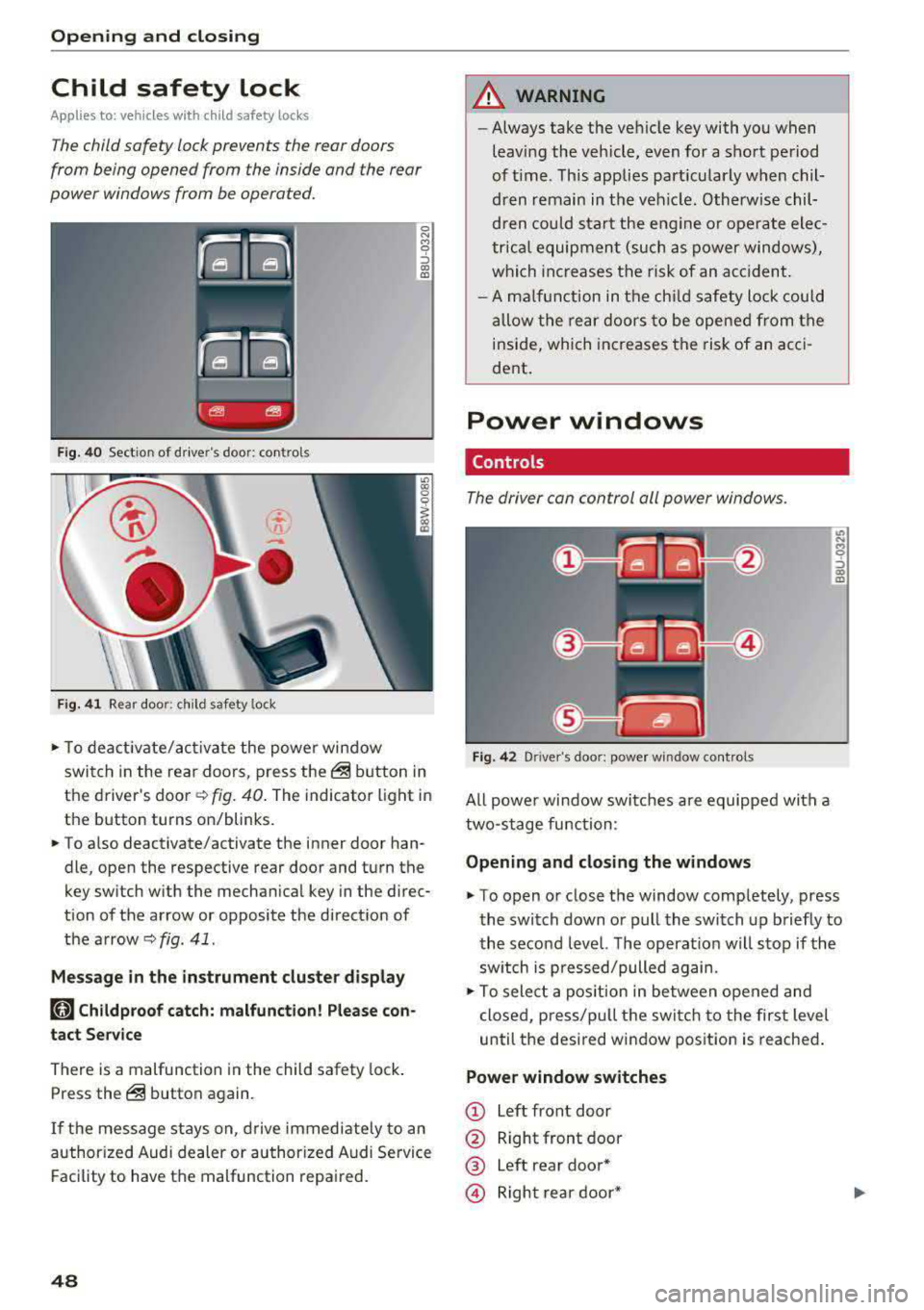
Fig. 40 Section of driver's door: controls
Ci
-
-
Fig. 41 Rear door: chil d safety lock
0 N M 0 ::,
"' "'
• To deactivate/activate the power window
switch in the rear doors, press
the@ button in
the driver's
door ~ fig. 40. The indicator light in
the button turns on/blinks.
• To also deactivate/activate the inner door han
dle, open the respective rear door and turn the
key switch w ith the mechanical key in the direc
tion of the arrow or opposite the direction of
the
arrow~ fig . 41.
Message in the instrument cluster display
(tll Childproof catch: malfunction! Please con
tact Service
There is a malfunction in the child safety lock .
Press
the@ button again.
If the message stays on , drive immediately to an
authorized Audi dealer or authorized Audi Service
Facility to have the malfunction repaired.
48
A WARNING
-Always take the vehicle key with you when
leav ing the vehicle, even for a short period
of time . This applies particularly when chil
dren remain in the vehicle . Otherwise chil
dren could start the engine or operate elec
trical equipment (such as power windows),
which increases the risk of an accident.
- A malfunction in the child safety lock could
allow the rear doors to be opened from the
inside, which increases the risk of an acci
dent.
Power windows
Controls '
The driver can control all power windows .
Fig. 42 Driver's door: power win dow controls
All powe r window switches are equipped with a
two-stage function:
Opening and closing the windows
M 0 ::,
"' "'
• To open or close the window completely, press
the switch down or pull the switch up briefly to
the second level. The operat ion will stop if the
sw itch is p ressed/pulled again.
• To select a position in between opened and
closed, press/pu ll the switch to the first level
until the desired window position is reached.
Power window switches
CD Left front door
@ Right front door
® Left rear door*
© Right rear door*
Page 51 of 409
® Central switch* for opening or closing all side
windows at the same time
A WARNING
- Always take the vehicle key with you when
leaving the vehicle, even for a short period
of time. This applies particularly when chi l
dren rema in in the vehicle. Otherwise ch il
dren could start the engine or operate elec
trical equipment (such as power windows),
wh ich increases the r isk of an accident. The
powe r windows con tinue to function unt il
the driver 's door or front passenger 's door
has been opened .
- Pay ca reful attent ion when closing the win
dows. P inching co uld cause serious injuries .
- When loc king the veh icle from outside, the
vehicle must be unoccupied since the win
dows can no longer be opened in an emer
gency.
(D Tips
You ca n still open and close the w indows fo r
approxima tely 10 minutes after turning the
ign it ion off. T he power windows do no t switch
off until the driver's door or front passe nger's
door has been opened.
Convenience opening/closing
App lies to: vehicles with convenience key
All of the windows and the roof* con be opened/
closed ot the same time.
F or power top* convenience opening/clos ing, re
fer to the in formation
in ~ page 55.
Convenience opening feature
.,. Press and hold the IT! button on the remote con
t rol key until all of the windows reach the de
s ir ed position and the roof* is tilted open.
Con venience closing feature
.,. Press the ('.D button on the remote control key
until the roof* is closed
~ .&. , or
;;§ .,. Touch the sensor* on the doo r hand le until a ll
;::; of the windows and the roof* are closed. Do not ,....
8 place your hand in the door handle when doing
3 th is .
Sett ing conven ienc e op ening in the
Infota inm ent sy stem
.,. Select in the Infotainment system: I MENU ! but
ton
> Vehicle > left control b utton > V ehicle
setti ng s> C entral lock ing > Long p ress to
o pen windo ws.
A WARNING
= -- To reduce the r isk of injury, never close the
windows or the roof* carelessly or in a n un
con trolled man ner .
- For secur ity reaso ns, the windows and the
roof* can on ly be opened and closed with
the remote con trol key a t a maximum dis
tance of approx imately 6.S fee t (2 m) aw ay
from the vehicle . Always pay atten tion when
using the
tfJ button to close the windows
and the roof* so that no one is pinched . The
clos ing process will stop immediately when
the
tfl button is released.
(D Tips
Applies to: vehicles with panorama glass roof:
the power sunshade also opens/closes when
opening/closing the roof.
Correcting power window malfunctions
You can reactivate the one -touch up/down func
tion if it malfunctions.
.,. Pull the powe r window switch up until the win
dow is completely raised.
.,. Release the switch and pu ll it up again fo r at
least one second .
49
Page 53 of 409
Valet parking function
Applies to: vehicles wit h valet parking funct ion
The valet parking function protects the luggage
comportment from unauthorized access.
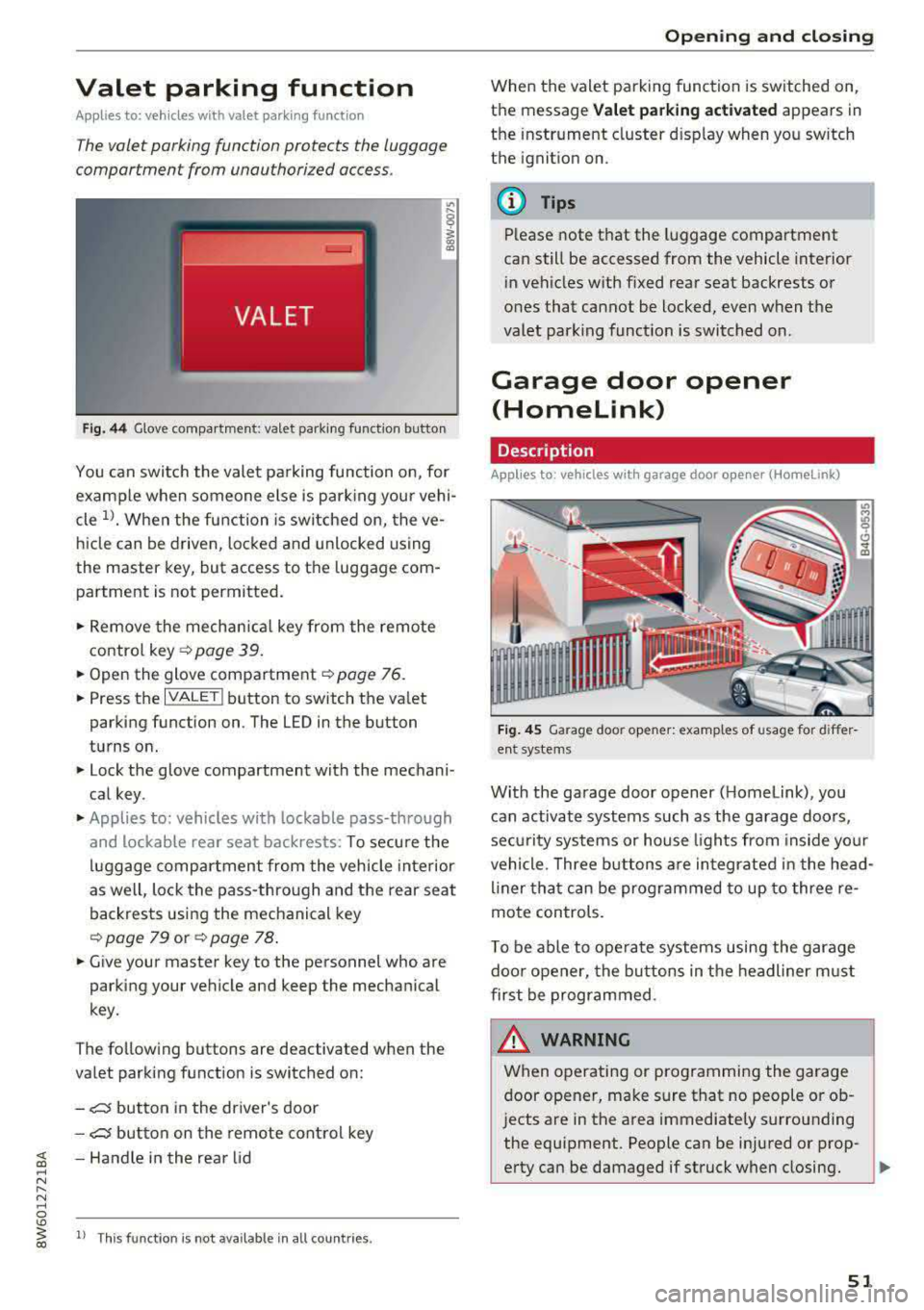
Fig. 44 Glove compartment: valet parking function butto n
You can switch the valet parking function on, for
example when someone else is parking your vehi
cle
l)_ When the function is switched on, the ve
hicle can be driven, locked and unlocked using
the master key, but access to the luggage com
partment is not permitted .
.,. Remove the mechan ical key from the remote
contro l
key~ page 39 .
.,. Open the glove compartment ~ page 76 .
.,. Press the IVALET I button to switch the valet
parking function on . The LED in the button
turns on.
.,. Lock the glove compartment with the mechani
cal key .
.,. Applies to: vehicles with lockable pass-through
and lockable rear seat backrests: To secure the
luggage compartment from the vehicle interior
as well, lock the pass-through and the rear seat
backrests using the mechanical key
~ page 79 or ~ page 78 .
.,. Give your master key to the personnel who are
parking your vehicle and keep the mechanical
key.
The following buttons are deactivated when the
va let parking function is switched on:
-,c:;5 button in the driver's door
-,c:;5 button on the remote control key
~ -Handle in the rear lid ..... N
" N ..... 0
'° ~ ll Th is function is not available in all countr ies . co
Open ing and closing
When the valet parking function is switched on,
the message
Valet parking activated appears in
the instrument cluster disp lay when you sw itch
the ignition on.
@ Tips
Please note that the luggage compartment
can still be accessed from the vehicle interior
in vehicles with fixed rear seat backrests or
ones that cannot be locked, even when the
valet park ing funct ion is switched on.
Garage door opener
(Homelink)
Description
Applies to: vehicles with garage door opener (Home Link)
Fig. 45 Garage door opener: examples of usage for differ
ent system s
With the garage door opener ( Homelink), you
can activate systems such as the garage doors,
sec urity systems or house lights from inside your
vehicle. Three buttons are integrated in the head
liner that can be programmed to up to three re
mote controls.
T o be able to operate systems using the garage
door opener, the buttons in the headliner must
first be programmed .
_& WARNING ~
When operating or programming the garage
door opener, make sure that no people or ob
jects are in the area immediately s urrounding
the equipment. People can be injured or prop-
erty can be damaged if struck when closing.
Ill>
51
Page 57 of 409
_& WARNING
-When operating the power top, make sure
the funct ion is not affected by wind or other
factors and that it does not interfere with other dr ivers .
- Visibility to the rear is limited when operat ing the power top . Avoid operating the top
wh ile driving in reverse .
- Never drive with the power top unlocked .
The wind from driving could cause the pow
er top to open. This can result in injur ies and
damage to the vehicle.
- Make sure no one will be injured by the pow
er top suppo rts or other moving compo
nents when open ing and closing the top.
- T he headroom in the rear is reduced when
opening a nd clos ing the power top. Make
sure the rear passengers keep enough d is
tance from the power top to reduce the risk
of injury.
(D Note
To prevent damage to the power top:
- do not store any objects in the power top storage compartment.
- make sure there is enough space above the
vehicle when opening or clos ing the power
top.
@ Tips
- To prevent the vehicle battery from draining unnecessari ly, do not open or close the pow
er top repea tedly whe n the engine is switch
ed off.
- The power top can also be operated manual
l y temporari ly if there is a malfunc tion
c::, page 58, Power top emergency opera·
tion . An author ized A udi dealer or author
ized Audi Service Facility should diagnose
and correct the cause of the ma lfunction as
soon as possib le.
- If the vehicle is parked with the power top
open, the vehicle inter ior is not protected
from damaging weather or unauthorized ac
cess. Lock any items you leave behind in the
luggage compartment . C lose the power top
before leaving the vehicle .
Powe r top
-The side windows automatically lower
slightly when opening or closing the power
top .
Power top convenience opening/closing
App lies to : vehicles wit h powe r top
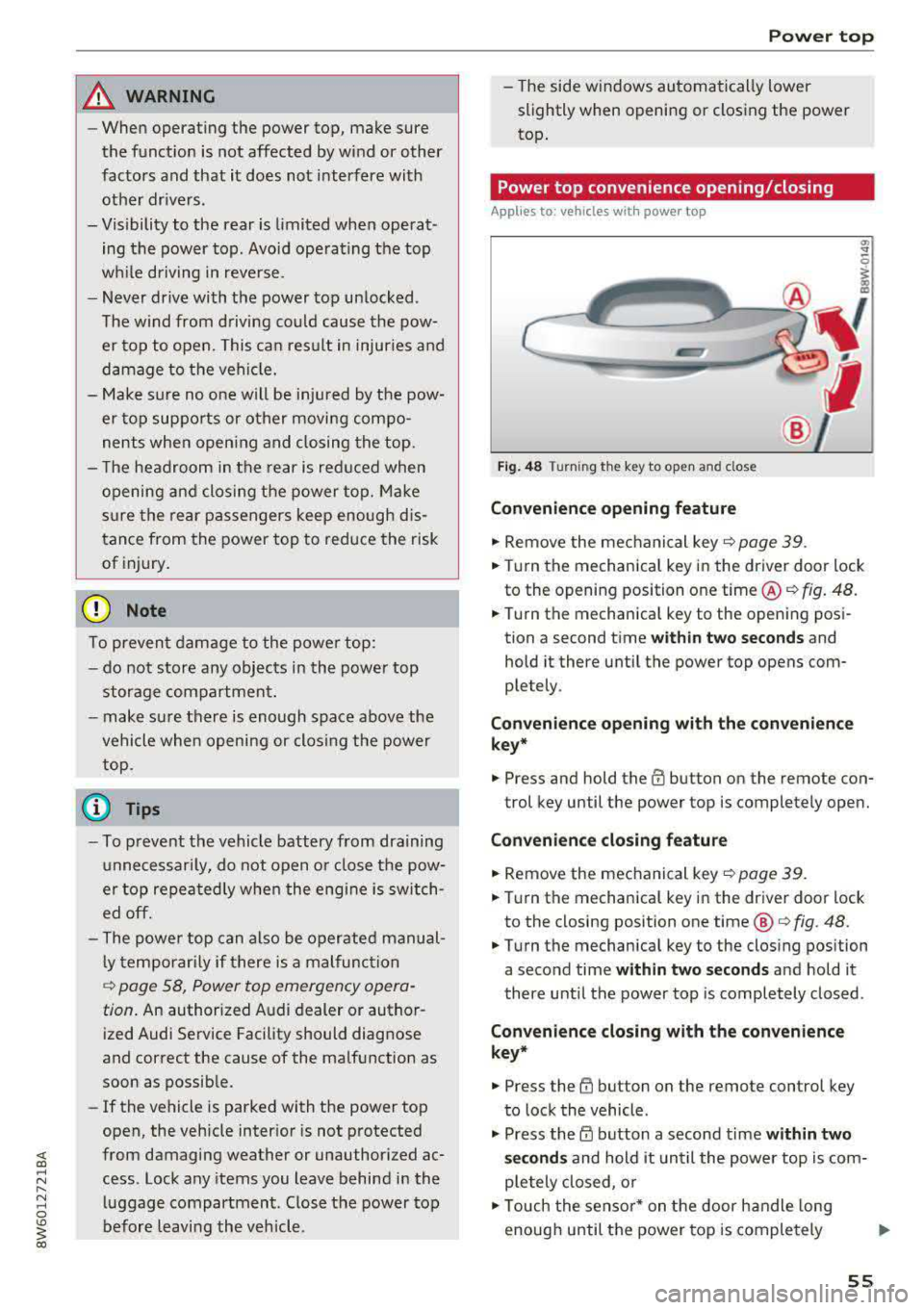
Fi g. 48 Turni ng th e key to open a nd close
Convenien ce opening feature
.,. Remove the mec hanical key c::> page 39 .
.,. Turn the mechanica l key in the driver door lock
to the opening position one time @
c::, fig. 48.
.,. Turn the mechanica l key to the opening posi
tion a second time
wi th in tw o se cond s and
hold it there until the power top opens com
ple tely .
Co nven ien ce opening with th e co nv eni enc e
key*
.,. Press and hold the m button on the remote con-
trol key until the power top is completely open.
Conv enience clo sing featur e
.,. Remove the mechanical key c::, page 39.
.,. Turn the mechanical key in the dr iver door lock
to the closing posit ion one time @
c:> fig. 48.
.,. Turn the mechanical key to the clos ing position
a second time
within two seconds and hold it
there until the power top is completely closed .
Convenienc e closing with th e con ven ience
key*
.,. Press the tfJ button on the remote control key
to lock the vehicle .
.,. Press the CD button a second time within two
s e cond s
and hold it until the powe r top is com
ple tely closed, o r
.,. Touch the sensor * on the door handle long
enough until the power top is completely
Ill>
55
Page 59 of 409
This message appears when there is a malfunc
tion. The power top can be operated manually
r::!) page 58.
.&_ WARNING
Never drive with the power top unlocked. The
wind from driving could cause the power top
to open. This can result in injuries and dam
age to the vehicle.
Wind deflector
Applies to: ve hicles with wind deflecto r
The wind deflector reduces air movement in the
passenger compartment in order to make driving more comfortable.
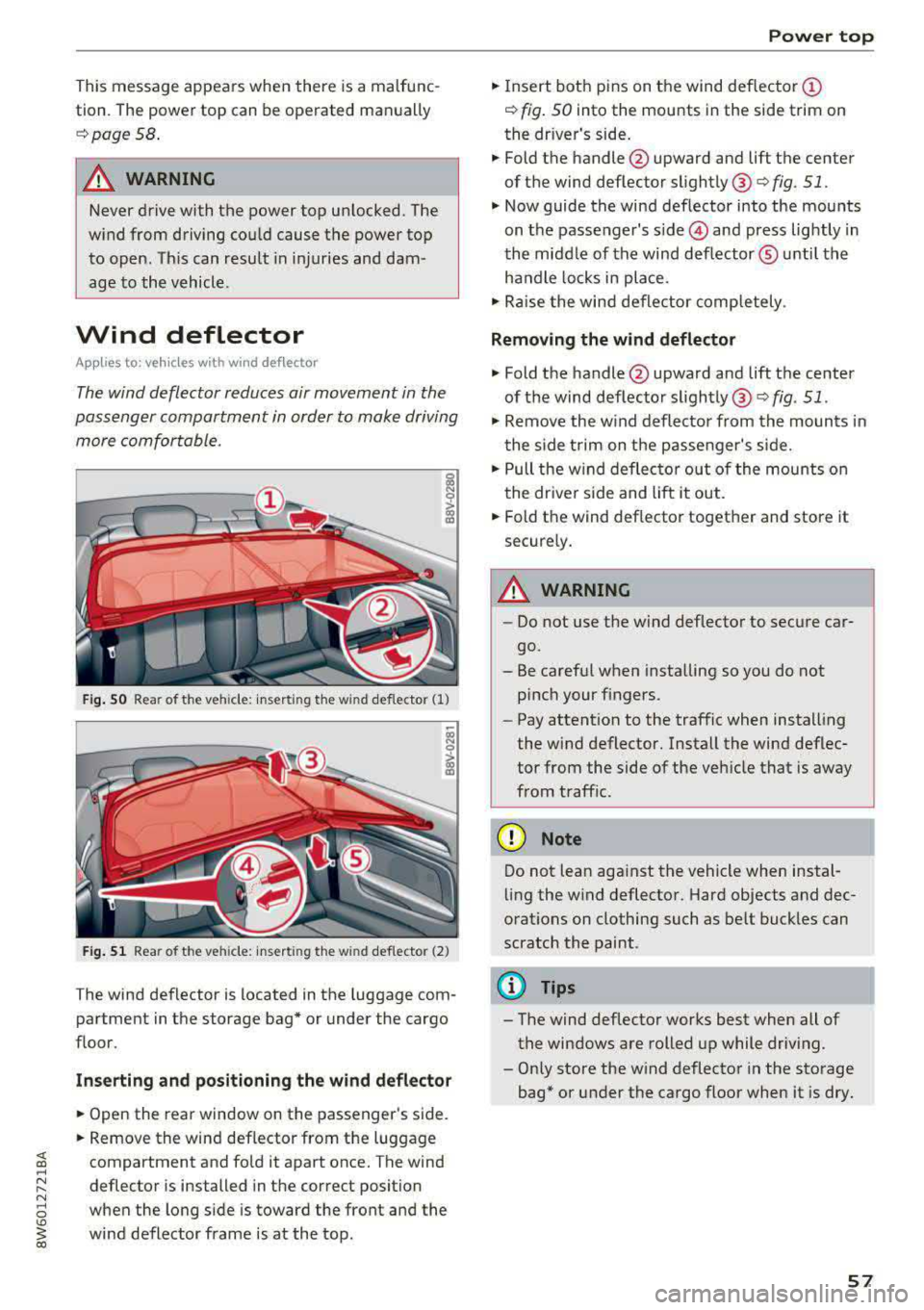
Fig. SO Rea r of t he ve hicle: insert ing the w ind deflecto r (1)
Fig . 51 Rea r of the ve hicle: insert ing the w ind deflecto r (2)
The wind deflector is located in the luggage com
partment in the storage bag* or under the cargo
floor.
Inserting and positioning the wind deflector
.,. Open the rear window on the passenger's side .
.,. Remove the wind deflector from the luggage
compartment and fold it apart once. The wind
deflector is installed in the correct position
when the long side is toward the front and the
wind deflector frame is at the top .
Power top
.,. Insert both pins on the wind deflector @
r::!) fig. 50 into the mounts in the side trim on
the dr iver's side .
.,. Fold the handle @upward and lift the center
of the wind deflector slightly @
c> fig. 51 .
.,. Now guide the wind deflector into the mounts
on the passenger's
s ide © and press lightly in
the middle of the wind deflector ® unti l the
handle locks in place.
.,. Raise the wind deflector completely .
Removing the wind deflector
.,. Fold the handle@upward and lift the center
of the wind deflector slightly ®
c> fig. 51.
.,. Remove the wind deflector from the mounts in
the side trim on the passenger's side .
.,. Pull the w ind deflector out of the mounts on
the driver side and lift it out .
.,. Fold the wind def lector together and store it
securely .
.&_ WARNING ~
-Do not use the wind deflector to secure car-
go.
- Be careful when installing so you do not
pinch your fingers.
- Pay attention to the traffic when installing
the wind deflector. Install the wind deflec
tor from the side of the veh icle that is away
from traff ic.
(D Note
Do not lean aga inst the vehicle when instal
ling the w ind deflector. Hard objects and dec
orat ions on clothing such as be lt buckles can
scratch the paint.
@ Tips
- The wind deflector works best when all of
the windows are rolled up while driving.
- Only store the wind deflector in the storage
bag* or under the cargo floor when it is dry .
57
Page 60 of 409
Power top
Power top emergency
operation
Preparation
Applies to: vehicles with power top
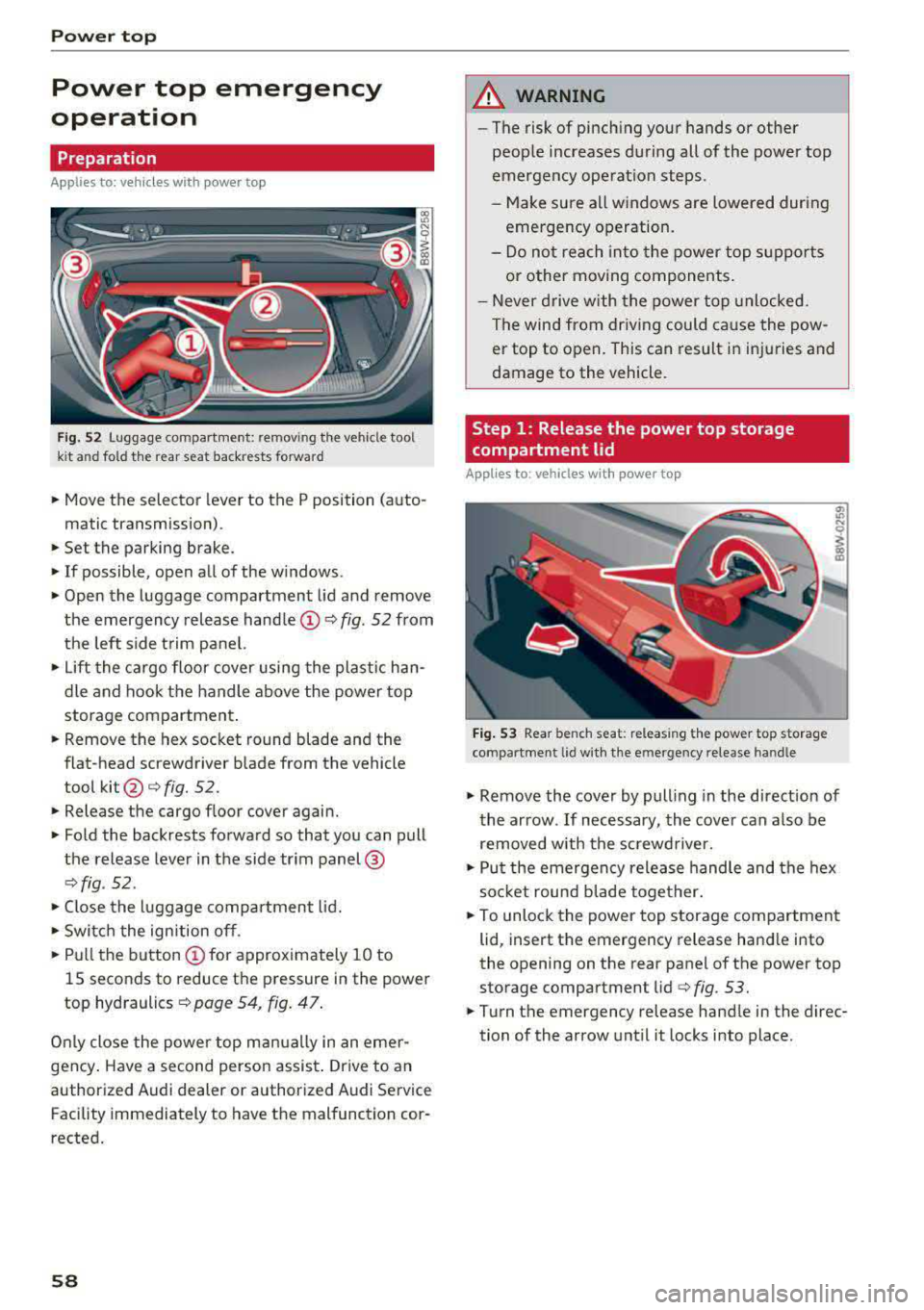
f ig. 52 Luggage compartme nt: remov ing the vehicle tool
k it a nd fo ld the rear seat back rests forward
• Move the selector lever to the P position (auto-
matic transmission) .
• Set the parking brake.
• If possible, open all of the w indows .
• Open the luggage compartment lid and remove
the emergency release
handle@Q fig. 52 from
the left side trim panel.
• Lift the cargo floor cover using the plastic han
dle and hook the handle above the power top
storage compartment .
• Remove the hex socket round blade and the
flat-head screwdriver blade from the vehicle
tool
kit @ c:> fig. 52.
• Release the cargo f loor cover again.
• Fold the backrests forward so that you can pull
the release lever in the side trim panel@
Qfig . 52 .
• Close the luggage compartment lid.
• Switch the ignition off.
• Pull the button @for approximately 10 to
15 seconds to reduce the pressure in the power
top hydraulics
c:> page 54, fig. 47 .
Only close the power top manually in an eme r
gency . Have a second person assist . Drive to an
authorized Audi dealer or authorized Audi Service Facility immediately to have the malfunction cor
rected.
58
A WARNING
- The risk of pinch ing your hands or other
people increases during all of the power top
emergency operation steps .
-Make sure all windows are lowered during
emergency operation.
-Do not reach into the power top supports
or other moving components.
- Never drive with the power top unlocked.
The wind from driving could cause the pow
er top to open. This can result in injuries and
damage to the vehicle.
Step 1 : Release the power top storage
compartment lid
Applies to : vehicles with power top
Fig. 53 Rear bench seat: releas ing the power top storage
compartment lid w ith the e mergency release han dle
"' Ill
I
"' Remove the cover by pulling in the direct ion of
the arrow . If necessary, the cover can a lso be
removed with the screwdriver.
• Put the emergency release handle and the hex
soc ket round b lade together.
• To unlock the power top storage compartment
lid, insert the emergency release handle into
the opening on the rear panel of the power top
storage compartment lid
c:> fig. 53.
• Turn the emergency release handle in the direc
tion of the arrow until it locks in to place.
Page 61 of 409
Step 2: Lift the power top storage
compartment lid out
Applies to: vehicles with power top
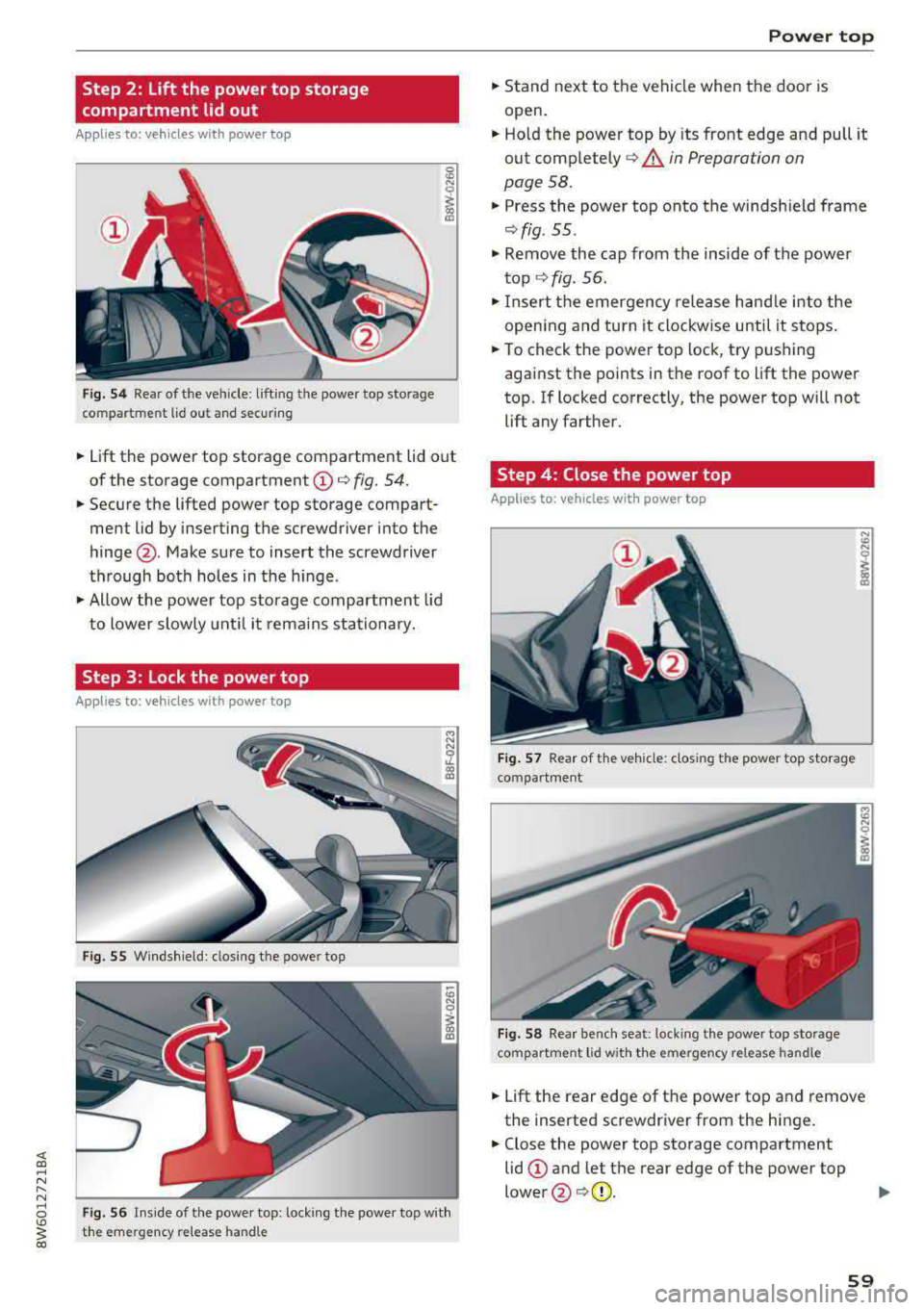
Fig. 54 Rear of the vehicle: lifting the power top storage
compartment lid out and secur ing
0
"' N 0
~ 00 CD
.. Lift the power top storage compartment lid out
of the storage compartment
(D q fig. 54.
.. Secure the lifted power top storage compart
ment lid by inserting the screwdriver into the
hinge @. Make sure to insert the screwdriver
through both holes in the hinge.
.. Allow the power top storage compartment lid
to lower slowly until it remains stationary.
Step 3: Lock the power top
Applies to: vehicles with power top
Fig. 55 Windsh ield: closi ng the power top
N N
5'. CX) Ill
Fig. 56 Inside of the powe r top: lock ing the powe r top wit h
the emergency relea se handle
Power top
.. Stand next to the vehicle when the door is
open .
.. Hold the power top by its front edge and pull it
out completely
q A in Preparation on
page 58.
.. Press the power top onto the windshield frame
qfig. 55 .
.. Remove the cap from the inside of the power
top
¢ fig. 56 .
.. Insert the emergency release handle into the
open ing and turn it clockw ise until it stops .
.. To check the power top lock, try pushing
against the points in the roof to lift the power
top. If locked correctly, the power top w ill not
lift any farther .
Step 4: Close the power top
Applies to: vehicles with power top
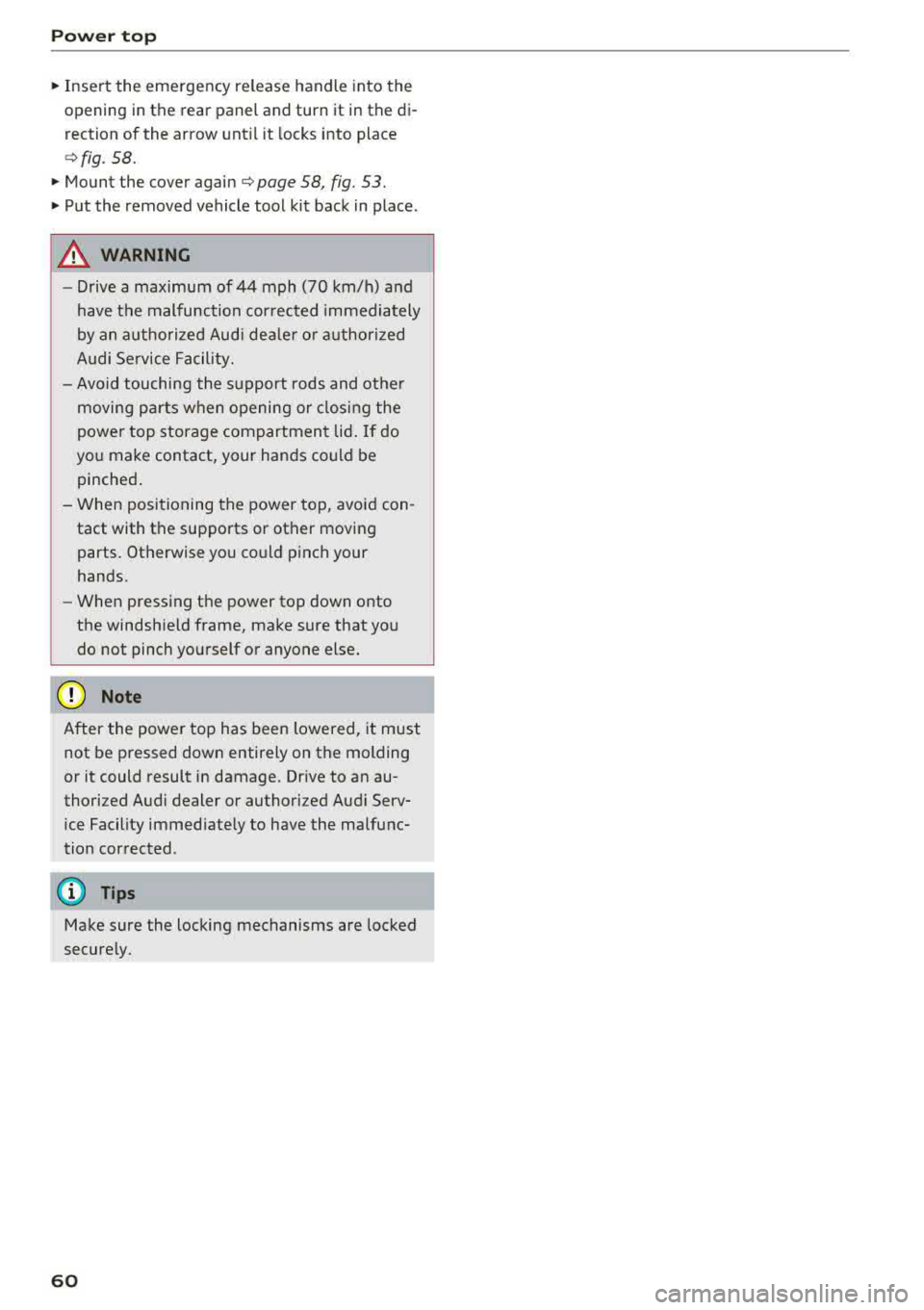
Fig. 57 Rear of t he vehicle: closing the power top storage
compartment
Fig . 58 Rear bench seat: locking the power top storage
compartment lid with the emergency release handle
N
"' N
~ 00 CD
.. Lift the rear edge of the power top and remove
the inserted screwdriver from the hinge .
.. Close the power top storage compartment
lid
(D and let the rear edge of the power top
lower @¢(D . ll>
59
Page 62 of 409
Power top
"'Insert the emergency release handle into the
opening in the rear panel and turn it in the
di
rection of the arrow until it locks into place
c>fig . 58.
"' Mount the cover again c> page 58, fig. 53.
"'Put the removed vehicle tool kit back in place .
A WARNING
-Drive a maximum of 44 mph (70 km/h) and
have the malfunction corrected immediately
by an authorized Audi dea ler or authorized
Audi Service Facility.
- Avoid touching the support rods and other
moving parts when opening or closing the
power top storage compartment lid. If do
you make contact, your hands could be
pinched .
- When positioning the power top, avoid con
tact with the supports or other moving
parts. Otherwise you could pinch your
hands.
- When pressing the power top down onto
the windshield frame, make sure that you
do not pinch yourself or anyone else ,
0 Note
After the power top has been lowered, it must
not be pressed down entirely on the molding
or it could result in damage. Drive to an
au
thorized Audi dealer or authorized Audi Serv
ice Facility immediately to have the malfunc
tion corrected .
(D Tips
Make sure the locking mechanisms are locked
securely.
60
Page 65 of 409
• Headlight assista nt: m alfun cti on! See own
e r's manual
Drive to an autho rized Aud i deale r or a uthorized
Aud i Service Facility immedia tely to have the
malfunct ion corrected. You can still switch the
high beams on or off manually.
• Headlight a ssi stant : currently unavailabl e.
C amera view re stricted due to surrounding s.
See owne r's manual
The camera view is b locked, fo r example by a
sticker o r debris.
The sensor is located between the interior rear
view mirror and the windshield . Do not place any
stickers in th is area on the wi ndsh ield .
& WARNING
High beam assistan t is only i ntended to assist
the drive r. The dr iver is still responsible for
controlling the headlights and may need to
switch them on and off manually depend ing
on light and visibility conditions. It may be
necessary to ope rate them manually in s itua
tions such as:
- In adverse weather conditions such as fog, heavy ra in, b low ing snow or spraying water .
- On roads where oncoming traffic may be
partially obsc ured, such as expressways.
- When there are road users that do not have
su fficient lighting, s uch as bicyclers or
vehicles with dirty ta il lamps.
- In tight cu rves and on steep hills .
- In poorly lit areas.
- Wi th strong ref lec to rs , such as s igns.
- If the area of the windsh ield near the senso r
is f ogged ove r, dirty, icy or covere d wi th a
st icker.
Adjusting the exterior lighting
The functions ore adjust ed in the Infotainment
system.
• Select in the Info tainment system : IM ENUI but-
~ ton >Vehicle > left contro l button > Vehicle ~
~ setting s> Exterior lighting . N ~ 0
'° ~ co
Lights and Vision
Automatic headlights
You can adjust the following se ttings in the Au
t o matic headlights
menu :
Activation tim e -you can adjust if the headlights
switch on
Early , Medium or Late accord ing to the
sensit ivi ty of the light sensor .
Headlight assistant * -you can switch the high
beam assistant* on and off.
Entry /exit lighting
When it is dark, the Ent ry /e xit lighting ill umi
nates the area around the vehicle when unlocking
the vehicle and after switching off the ignit ion
and opening the dr iver's door .
The
Entry /exit lighting only works when it is
dark and the light sw itch is in the
AUTO position.
Daytime running l ight s
USA model s:
the daytime running lights can be
switched on/off . Sel ect
On or Off.
Canad a model s:
this f unction canno t be switched
off. They activate automatically eac h time the ig
nition is switched on .
Emergency flashers
-- ---
] -~ ~-
--------
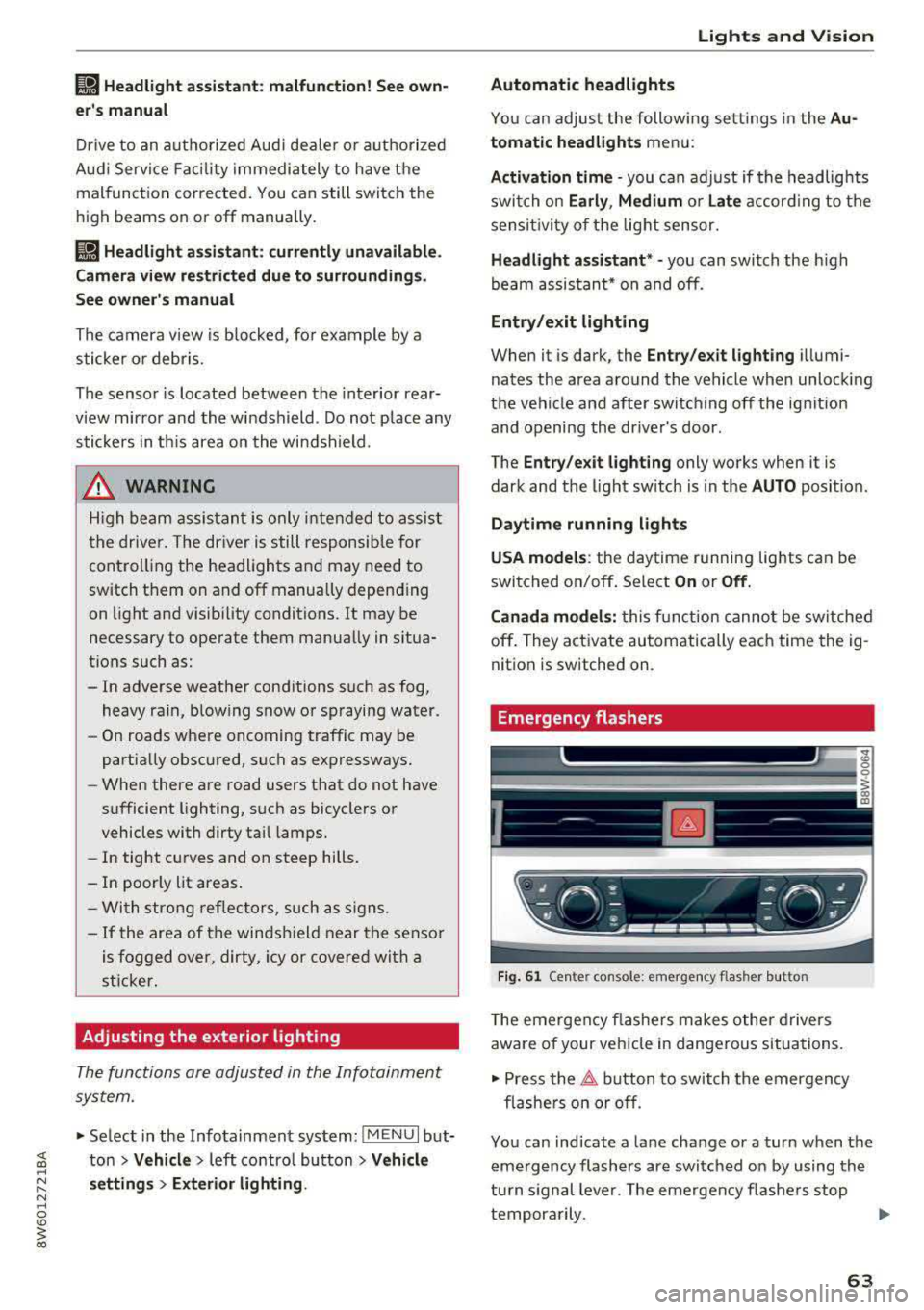
Fig . 61 Ce nte r con so le: emergency flas her butto n
T he emergen cy flashe rs makes othe r d rivers
aware of your vehicle in dangerous situat ions.
• Press the 11 b utton to switch the emergency
flashe rs on or off .
You can ind icate a lane change or a turn when the
eme rgency flashers are switched on by using the
tu rn s ignal lever. The emergency flashe rs stop
tempora rily.
.,.
63
Page 67 of 409
@ Tips
The setting is automatica lly stored and as
signed to the remote control key that is be ing
used.
Instrument illumination
The brightness of the illumination for the instru
ments, display and head-up display* con be ad
justed.
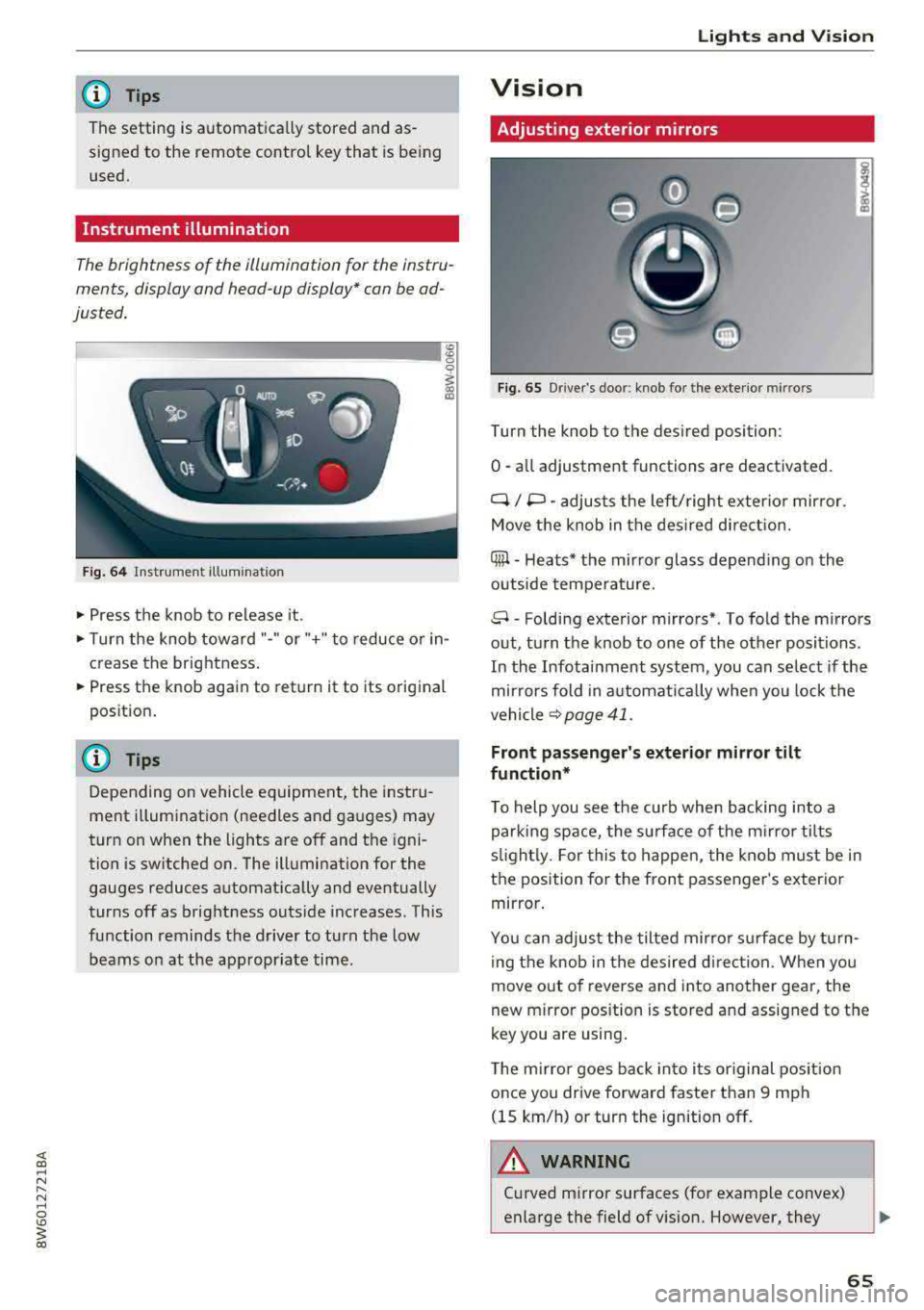
Fig. 64 Instrument illum inatio n
~ Press the knob to release it.
~ Turn the knob toward "-" or"+" to reduce o r in
crease the brightness.
~ Press the knob again to return it to its original
position .
(D Tips
Depending on vehicle equ ipment, the instru
ment illumination (needles and gauges) may
turn on when the lights are off and the igni
tion is sw itched on. The illumination for the
gauges reduces automat ica lly and eventually
turns off as brightness outside increases. This
function reminds the driver to turn the low
beams on at the appropr iate time .
Lights and V ision
Vision
Adjusting exterior mirrors
Fig. 65 Driver's door: knob for the exterior mirrors
Turn the knob to the des ired position:
0
-a ll adjustment functions are deactivated.
q / P -adjusts the left/ right exter io r mirror.
Move the knob in the des ired direct ion.
Qiµ -Heats* the mirror glass depend ing on the
outside tempe rature.
8 -Folding exterior mirrors*. To fold the mirrors
out, turn the knob to one of the other positions.
In the Infotainment system, you can se lect if the
mir rors fold in a utomat ically when you lock the
vehicle
~ page 41.
Front passenger's exterior mirror tilt
function*
T o help you see the curb when backing into a
parking space, the surface of the mi rro r tilts
s lightl y. For this to happen, the knob must be in
the position for the front passenger 's exterio r
mirror .
You can adjust the tilted mirror s urfa ce by turn
i ng the knob in the desired direct ion. When you
move out of reverse and into another gear, the
new m irror pos ition is stored and assigned to the
key you are using .
The mirror goes back into i ts or iginal pos ition
once you drive forward faster than 9 mph
(15 km/h) or turn the ignition off .
.&_ WARNING
-C urved mirror surfaces (for example convex)
enlarge the field of vision. However, they
65