lock AUDI A5 COUPE 2018 Workshop Manual
[x] Cancel search | Manufacturer: AUDI, Model Year: 2018, Model line: A5 COUPE, Model: AUDI A5 COUPE 2018Pages: 409, PDF Size: 67.63 MB
Page 101 of 409
too much stress from being placed on the locking
mechanism .
A WARNING
-The vehicle can roll even when the engine is
switched off.
-U nintended vehicle movement can lead to
serious injuries.
-To reduce the risk of an accident, do not press the acce lerator pedal when changing
the selector lever position while the vehicle
is stationary and the engine is running.
-To reduce the risk of an accident, never se
lect the R or P posit ions while driving.
-Do not inadvertent ly press the acce le rator
peda l when the veh icle is stationary. Other
wise the risk of an accident increases be
cause the vehicle will start to move immed i
ately, eve n if the par king brake is set.
@ Tips
For safety reasons , the parking b rake on ly re
leases automatically when the driver's door is
closed.
Hill descent control
A ppl ies to: ve hicles with a utomat ic t ra nsmi ssio ns
The hill descent control system assists the driver
when driving down hills.
Hill descent control act ivates when the transmis
sion is in the Dor S posit ion and you press the
brake pedal. The t ransmission automat ically se
lects a gear that is suitab le for the hill . H ill de
scent contro l tries to ma inta in the speed ach
i eved at the time of braking, withi n phys ica l and
techn ica l limita tions. If may st ill be necessary to
a dj ust the speed wi th t he b rake pedal.
H ill descent control switches off once the hill lev
e ls out o r yo u press the accelerator pedal.
W hen operating the c ruise contro l system*
¢ page 10 7, hill descent contro l is also act ivated
when the speed is set .
Drivi ng
A WARNING
-Hill descent control cannot overcome physical
limitat io ns, so it may not be able to ma intain
a constant speed under all conditions. Always
b e ready to app ly the brakes.
Shifting manually (tiptronic mode)
A pp lies to : vehicles wi th automatic transmiss ions
The tiptronic mode allows the driver to shift the
gears manually .
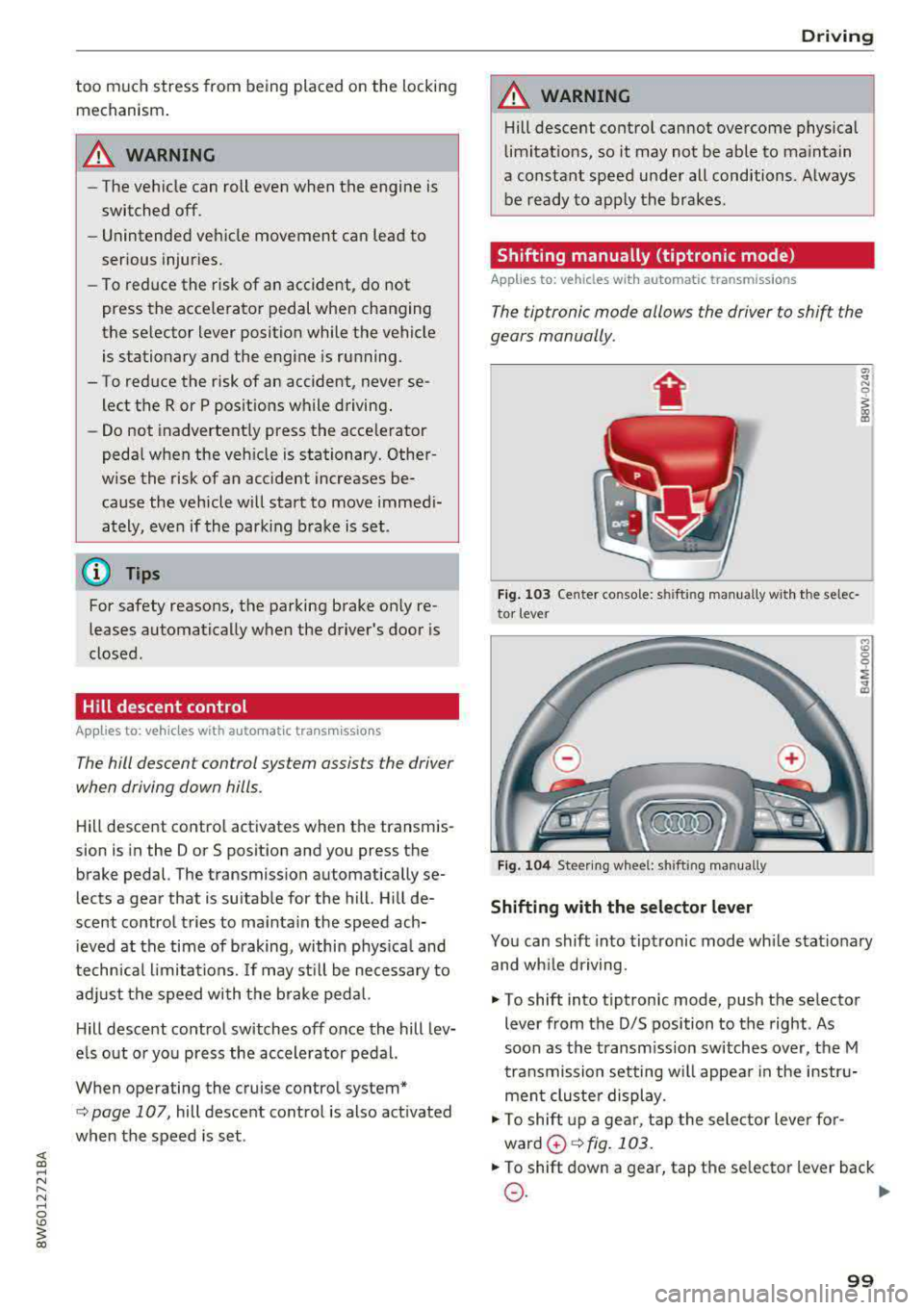
Fig. 103 Center console: s hiftin g man ually w it h th e se lec
to r lever
Fig. 1 04 Stee ring w hee l: sh ift ing man ually
Shifting with the selector lever
9 ~ ... CD
You can shift into tip tronic mode wh ile stat iona ry
and wh ile driving.
.,. To shift into tiptronic mode, push the selector
lever from the D/S position to the right . As
soon as the transm ission switches over, the M
tra nsmission setting w ill appear in the instr u
men t cluste r display .
.,. To shift up a gea r, t ap the sele ctor leve r fo r
ward
0 ¢ fig . 103 .
.,. To shift down a gear, tap the se lector lever back
0 -~
99
Page 104 of 409
Driving
There is a system malfun ction in the t ransmis
s ion. The transm ission is switching to emergency
mode. This mode on ly shifts into certain gears or
will no longer shift at all. The engine may stall.
Drive to an authorized Audi dea ler or authori zed
Audi Serv ice Facility immediately to have the
malfunct io n corrected.
~ Transmissio n: malfunct ion! You may contin
ue driv ing . No reverse gear
There is a system malfunction in the transmis
sion. The transmission is switching to emergency
mode. This mode only shifts into certain gears or
will no longer shift at all. The engine may stall.
You cannot engage the reverse gear . Drive to an
author ized Audi dealer or author ized Audi Service
Facility immediately to have the malfunction cor
rected.
~ Danger of rolling away! P not possible .
Please apply parking brake
-The park ing lock was released using the emer
gency release
¢ page 102. Or
-The parking lock can no longer be engaged.
Drive to an authori zed A udi dealer or author
i z ed Audi Service Facility immed iately to have
the malfunc tion corrected .
~ Move selector leve r to automati c position
There is a mal func tion in the tip tronic mode. End
tiptronic mode by pushi ng the selector lever to
the left i nto t he 0/5 position.
102
Parking lock emergency release
Applies to: vehicles with automatic transmissions
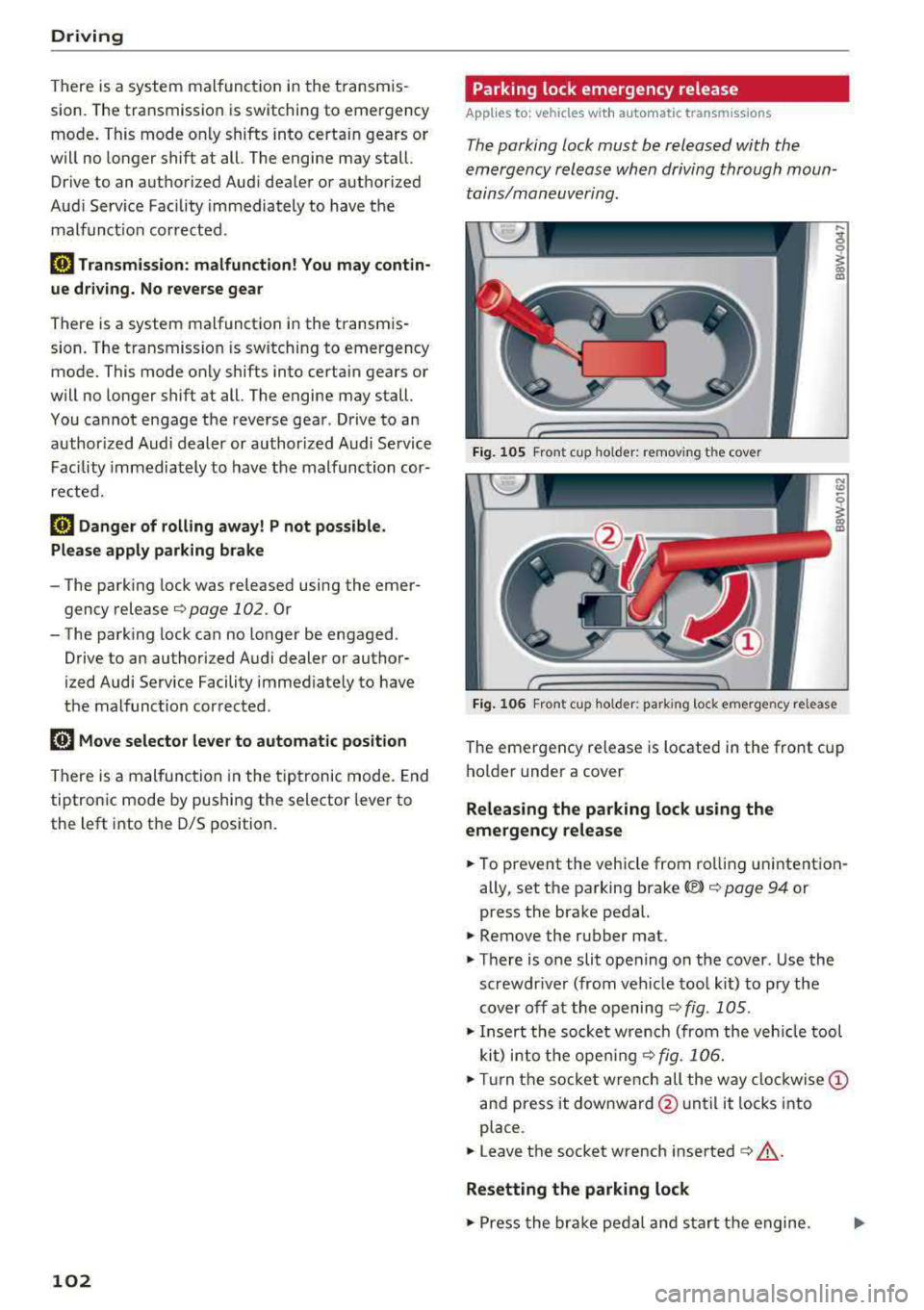
The parking lock must be released with the
emergency releas e when driving through moun
tains/maneuvering.
Fig. 105 Front c up ho lder: remov ing the cove r
Fig. 10 6 Front cu p ho lder: park ing lock emerge ncy re lease
The emergency release is located in the front cup
ho lder under a
cover
Releasing the parking lock using the
emergency relea se
.,. To prevent the veh icle from ro lling un intent ion
ally, set t he parking
brake© ¢ page 94 or
press the brake pedal.
.,. Remove the rubber mat .
.,. T here is one slit opening on the cover . Use the
screwdr iver (from vehicle too l ki t) to p ry the
cover off at the opening ¢ fig. 10 5 .
.,. Insert the socket w re n ch (from the veh icle tool
ki t) i nto the ope ning
¢ fig. 106 .
.,. Tur n the socke t wre nch all the way clo ckwise @
and press it downward @until it locks into
place .
.,. Leave the socket wrench inserted c:> .&_ .
Resetting the parking lock
.,. Press the bra ke peda l and s tart the engine.
Page 105 of 409
<( a, .... N ,....
N .... 0 \0
3 a,
~ Keep the brake pedal pressed and engage the
fo llowing se lector lever positions one after the
othe r:
N, D and back to N.
~ Turn the eng ine off again .
~ Grasp the socket wrench w it h both hands and
pull it up and out carefu lly to remove
<=> (D .
~ Reinsert the cove r and rubbe r mat .
When t he parking lock emergency re lease is
used , the
mJ ind icator light and t he N selector
l eve r pos ition tu rn on in the instrument cluster .
The message
Danger of rolling away! P not pos
s ible . Please apply parking brake
a lso appea rs .
.&, WARNING
- O nly a ctiva te the e mergency re le as e w hile
o n a level s urfa ce o r a s lig ht slo pe.
- T he pa rking lock may only be released using
the e mergency rele ase i f th e parking br ake
is set. If i t i s no t fu nctioning, secure the ve
hicle from rolling using the brake peda l or
ot he r su ita ble means, such as blocking a
front and a rear wheel. An unsec ured veh icle
may roll away, w hich increases the r isk of an
acc ident.
- To red uce the risk of an accident, you must
not drive when the eme rgency release is ac
t ivated.
- Read and follow the impo rtant instructions
abo ut towing
<=> page 3 83.
- The risk of dama ge i ncreases if you do not
r emove the socket wrench carefully when
r esett ing t he pa rking loc k.
D riving
-
103
Page 110 of 409
Ass is tan ce sys tems
operation. You are always responsible for
your speed and the distance between your
vehicle and other vehicles.
- For safety reasons, cruise control should not
be used in the city, in stop-and-go traffic, on
winding roads and when road condit ions are
poor (such as ice, fog, gravel, heavy rain and
hydroplaning), because th is increases the
risk of an accide nt.
- Switch the cru ise control off temporar ily
when driving in turn ing lanes, h ighway exits
o r in construction zones.
- Please note that u nconsciously "resting"
your foot on the accelerator pedal prevents
the cruise control from braking. This is be
ca use p ressing the acce le rato r pedal
over
rides the cruise contro l system.
- If a brake system ma lf u nction such as over
heating occu rs when the c ruise control sys
tem is switched on, the braking function in
the system may be switched off . The rest of
the cruise control system functions remain
act ive as long as the
tij;jl)~i# (USA models) /
ii (Canada models) indicator light is on.
(D Note
Before driving downhill a long distance on a
steep hill, decrease your speed and select a
lower gear. Th is makes use of the eng ine
braking effect and relieves the brakes.
(D Tips
- Applies to: vehicles with manual transmis
sion: The set speed can on ly be reached if
the engaged gear permits it so that the en
gine is not over-rewed and will run smooth ly. Therefore, sh ift into the higher or lower
gear in a timely manner .
- The brake lights turn on when the brakes are applied automatically.
Changing the speed
Applies to: vehicle s with cruise control system
.. To inc rease/decrease the speed in 1 mph (1
km/ h) increments, br iefly
t ap the leve r toward
0 10 q page 107, fig. 107 t o the first level.
108
.. To increase/decrease the speed in 5 mph (10
km/h) increments, briefly
tap the lever toward
0 10 to the second level.
.. To increase or decrease the speed qu ickly, hold
the lever toward 0 10 to the first or second
level unt il the desired speed is reached .
· Overriding the speed
Applies to: vehicles with cruise control system
You can press the acce lerator pedal to increase
you r speed, fo r example if you want to pass
someone . The speed you set earl ie r will resume
as soon as you release the acce lerato r pedal.
However, if you are exceeding the stored speed
by a considerable amount fo r a long time, the
cruise contro l system will tempo rar ily switch off.
The
(ij;ji)~i# (USA mode ls) !ill (Canada mode ls) in
dicator light in the inst rument cluste r turns
off
and the stored speed is maintained.
Preselecting a speed
Applies to: vehicles with cruise control system
You can pre-select your desired speed when the
vehicle is stationary.
.. Switch the ignit io n on.
.. Pull the lever i nto pos ition @ q page 10 7,
fig. 107 .
.. To increase or decrease the speed, tap the lever
toward
0 10 .
This function makes it possible, fo r example, to
save the speed you want before driving on the
highway. Once you are on the expressway, acti
vate the cruise contro l system by pulling the lev
er into
position @.
Switching off
Applies to: vehicles with cruise control system
Deactiva ting temporarily
.. Press the brake pedal, or
.. Press the lever toward @ (not locked into
place)
q page 107, fig . 107 .
Page 146 of 409
Parking system s
General information
Applies to: ve hicles w ith rearview camera
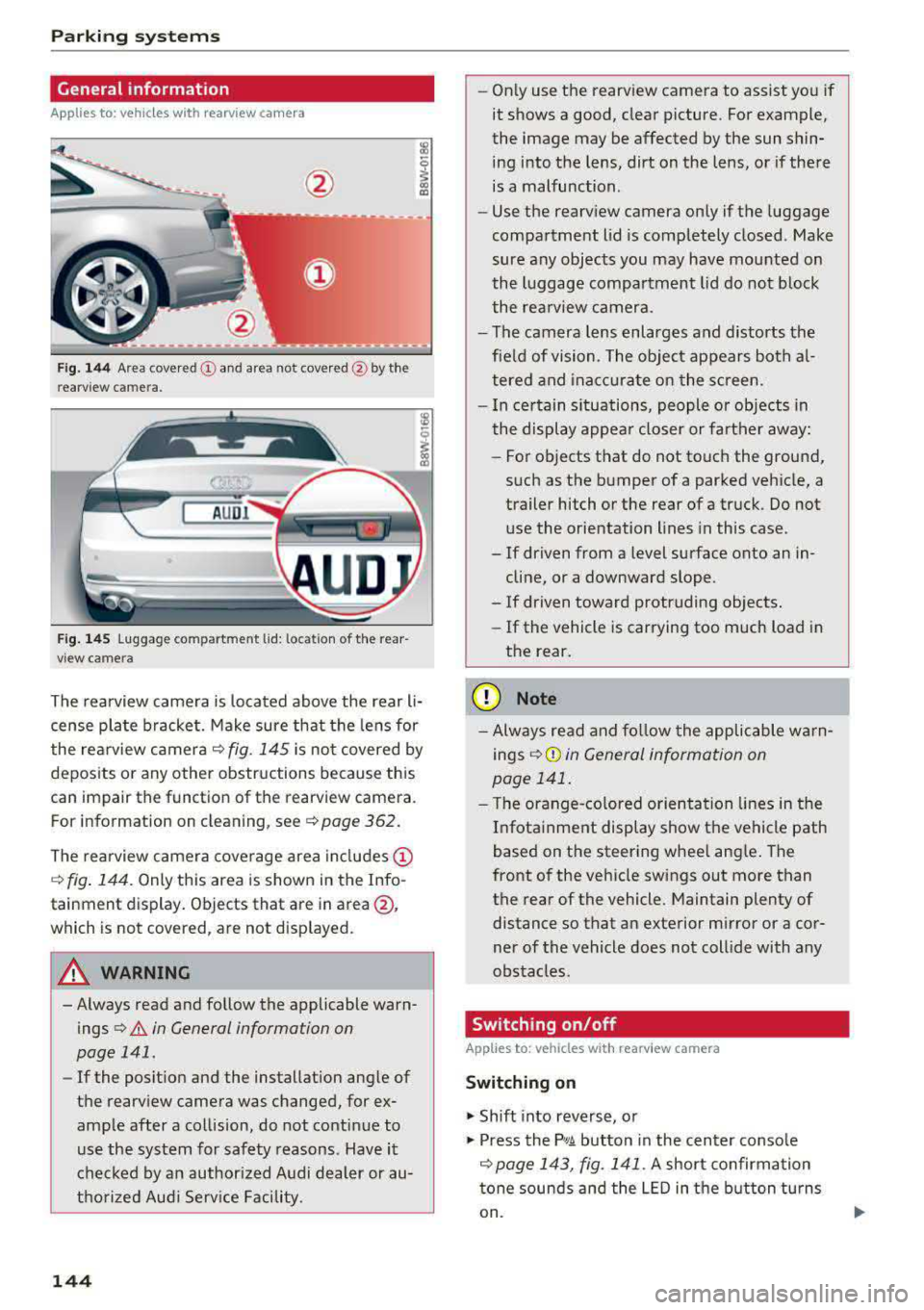
Fig. 144 Area cove red © and area not cove red @ by the
r earv iew c amera.
Fig . 145 Luggage co mpartment lid : loca tion of the rear
v iew came ra
l8
i
The rearview camera is located above the rear li
cense plate bracket. Make sure that the lens for
the rea rview camera
c:::> fig. 145 is no t covered by
deposits or any other obstructions because this
can impair the function of the rearview camera .
F or information on clean ing , se e
c:::> page 362.
The rea rview camera coverage area in cl udes @
c:::> fig. 144 . Only this area is shown in the Info
tainment display . Objects that are in
area @,
which is not cover ed , are not disp layed.
A WARNING
-Always read and follow the applicable warn
ings
c:::> .&. in General information on
page 141 .
-If the posit ion and the installation angle of
the rearv iew camera was changed, for e x
amp le after a collision, do not continue to
use the system for safety reasons . Have it
checked by an author ized Audi dealer or au
thorized Aud i Serv ice Facility .
144
-On ly use the rearview camera to assist you if
it shows a good, clear picture . Fo r example,
the image may be affected by the sun shin
ing into the lens, dirt on the lens, or if there
is a malfunction .
- Use the rearv iew camera only if the luggage
compartment lid is completely closed . Make
sure any objects you may have mounted on
the luggage compa rtment lid do not b lock
the rea rview camera.
- The camera lens enlarges and distorts the
fie ld of vision . The object appears both a l
tered and inac cu ra te on the s creen.
- I n ce rtain s ituations, people or objects in
the display appea r closer or farther away:
- For objects that do not touch the ground,
s uch as the bumper of a parked vehicle, a
trailer hitch or the rear of a truck. Do not use the orientation lines in this case .
- If driven from a level surface onto an in cline, or a downward slope .
- If driven toward protruding objects.
- If the vehicle is carrying too much load in
the rear.
(D Note
- Always read and fo llow the applicable wa rn
ings
c:::> (!j) in General information on
page 141 .
- The orange-co lored orientation lines in the
I n fotainment display show the vehicle path
based on the steering whee l ang le . The
front of the vehicle swings out more than
the rear of the vehicle. Maintain plenty of distance so that an exterior m irror or a cor
ner of the vehicle does not coll ide with any
obstacles.
Switching on/off
Applies to: vehicles wit h rearv iew camera
Switching on
.,. Shift into reverse, o r
.,. Press the p,qA button in the center console
c:::> page 143, fig. 141 . A short confirmation
tone sounds and the
LE D in the b utton turns
on .
Page 153 of 409
Intelligent Technology Electronic stabilization
control (ESC)
Description
Ele ctronic stabilization control (ESC) supports
driver safety . It reduces the risk of slipping and
improves d riving stability. ESC detects critica l sit
uations such as when the vehicle is oversteering
and understeering or the wheels are spinn ing.
T he vehicle is stabilized by applying the brakes or
reducing eng ine torq ue. When the ESC engages,
the
J;,j ind icator light blinks in the instrument
cluste r.
T he follow ing systems are integrated in the ESC:
Ant i-loc k bra king s ystem (ABS)
ABS prevents the whee ls from locking when brak
ing. The vehicle can still be steered even during
hard brak ing. Apply steady pressure to the brake
pedal. Do not pump the pedal. A pulsing in the
b rake pedal indicates that the system is act ing to
stabilize the vehicle .
Br ake a ssist s ystem
The brake assist system can decrease braking dis
tance. It increases brak ing power when the driver
presses the brake pedal quickly in emergency sit
uations . You must press and hold the brake pedal
unti l the dangerous sit uat io n is ove r. In veh icles
with adaptive cr uise contro l*, the bra ke assist
system is more sensitive if t he d istance detec ted
to the veh icle dr iv ing ahead is too small.
Anti-Slip Regulation (ASR )
ASR red uces eng ine power when the drive wheels
begin spinning and adapts the force to the road
conditions . This makes it easie r to sta rt, acceler
ate and dr ive up hill s.
Electronic differenti al lock (EDL )
EDL applies the brakes to a wheel that starts
spi nning and t ransfers t he drive powe r to the
;;§ other driving wheels. This f unct ion is not availa-....
~ b lea t higher speeds.
N .... 0 \0
3
In extreme cases , ED L automat ica lly switches off
to keep the brake o n the braked wheel from over
heating. The veh icle is still working correct ly. ED L
will switch on again automatically when condi
tions have returned to normal.
Ste ering recommendation
The ESC he lps to stabilize the vehicle by changing
the steering torque.
In veh icles wi th dynamic steer ing*, ESC also
helps to stab ilize the steer ing in crit ica l sit ua
tions.
Selective wheel torque control
Se lective w heel to rque con trol is used w hen d riv
i ng on curves. Bra king is targeted towa rd t he
whee ls on the inside of the cu rve as needed. This
allows mo re precise driving in curves .
Automatic post -collision braking system
The "automat ic post-collision braking system "
can help to reduce the risk of sliding and of addi
tiona l co llisions after an acciden t. If the a irbag
contro l
module detects a co llision, the veh icle is
braked by the ESC.
T he veh icle does not bra ke automatically if:
- the dr iver presses the acce lerator pedal, or
- the ESC, the brake system or the veh icle elect ri-
cal system are not functioning.
A WARNING
=
- The ESC and its integrated systems cannot
overcome the lim its imposed by natural
phys ica l laws. This is especially important
on slippery or wet roads. If the systems be
gin acting to s tabilize yo ur vehicle, you
should immediately alter your speed to
match the road and traffic conditions. Do
not let the inc reased safety provided tempt
you into taking risks. This could increase
your r isk of a coll is ion.
- Please note the ris k of a collis ion increases
when dr iv ing fast, especially through curves
and on slippery or wet roads, and when dr iv-
ing too close to objects ahead . The ESC and
~
151
Page 172 of 409
Voice recognition system
• Telephone
• Audi connect •
Favorites
• Call (XV)
• Navigation
• Directory
• Radio
• Media
• Sound •
Enter number
• Redial
• Read new text message
• Navigate to
(XY)
• Enter address/destination
• Help • Online destinations
• Help Speech dialog system
• Help Telephone •
Cancel route guidance
• Map
• Help Audi connect •
Line
(XV)
• Help Navigation
• Help
Map
• Help Radio •
Next page/ previous page
• Cancel
• No. I meant (XV)
• He lp Media • Correction
TE ,EPflON ~
• Enter number • Call list
• Delete number/ correction • Redial
•
Directory
• Call (XV)
• Call mailbox
• Telephone favorites
· business/ private/ land tine
I mobile
• Nav igate to
(XV)
• Start I cancel route guidance
• Directory
• Last destinations •
Block route for (XV) miles
I Block
the next section
• Route list
• Calculate alternative routes
• Nav igation favorites
• Drive home
• Enter address •
Online destinations
• Special destination
• Enter country
I town I street/ state
• Exclude route/ Exclude route for
(XV) km/ m
• Map
• Day map/ Night map
• 2D
driving position map/ 20 north position map/ 3D map/ Destination map/ Overview map
~UJDI CONNECT
• Audi connect
• Travel Information/ Parking Information
• Fuel prices
• Weather
RADIO
• Radio presets
• FM
• FM /AM/ SIRIUS XM
• Station (XY) / Frequency (XV)
• Traffic announcement on
I off
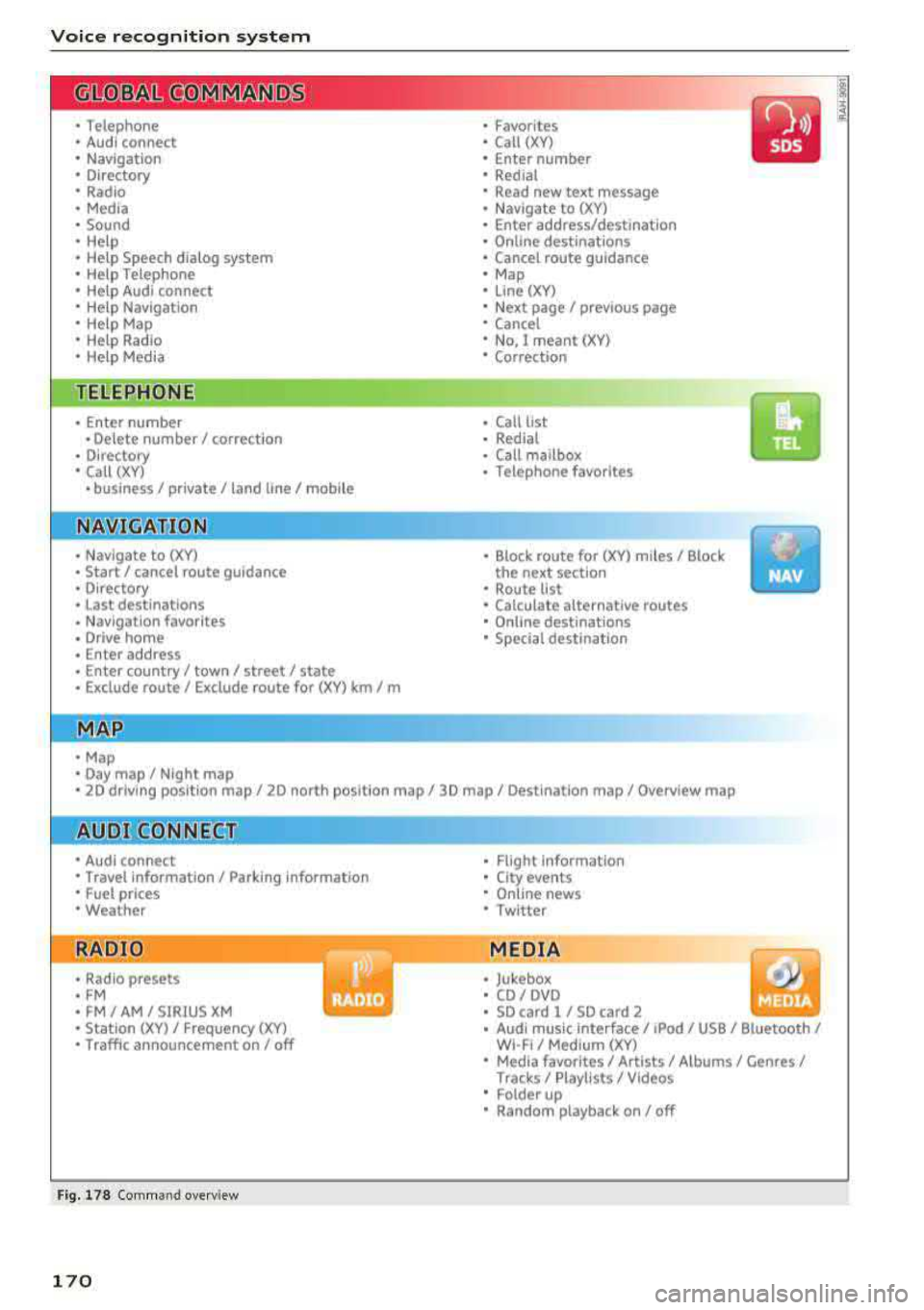
Fig. 178 Comm and overv iew
170
•
• Flight Information
•
City events
• Online news
• Twitter
MEDIA
• Jukebox
• CD
I DVD
• SD card l / SD card 2
• Audi music Interface/ I Pod/ USB / Bluetooth /
WI -Fl/ Med ium (XV)
• Media favorites / Artists / Albums / Genres /
Tracks/ Playllsts / Videos
• Folder up
• Random playback on/ off
Page 177 of 409
<( a, .... N ,....
N .... 0 \0
3 a,
Voice recognition system
Function Say:
Starting route g uidance with an ad-Navigate / Navigate to p riv ate addre ss / Na vig ate to bu siness
dress card open address
Ente ring a new desti nat ion/stop-Enter addre ss > enter the desired address when prompted>
over when ro ute gu idance is ac tive confirm the new des tination/stopover if prompted
Start ing route guidance after enter-Start rout e guidance
ing a dest ination
Canceling current route guidance
Cancel route guidance
Calculat ing alternative routes Calculate alternative route s
Entering a point of interest by se-Point of interest > Change search area > category or subcote-
lecting a search area with guidance gory when prompted, for example "restaurant"
from the system
Dest ina tion i nput ca tegor ies
Audi Service / Train station /Airport / Hot el / Ho spita l / Park-
ing / Re st area / Restaurant / G as station
etc.
Search areas for entering points of Nearby/ Along the route I Near destination / Ne ar stopover /
interest In a new city/ In a new stat e/country
Entering an online destination* Online de stinat ion (XV), for examp le " Online de stination
" Lake view Hotel" "
Correcting data input No I meant (XV)
Clos ing the full-screen command C lo se
list
Requirement: you must be in the
Navigation or
Map menu. Depending on the vehicle equipment
and the selected menu item, you can say the fol-l
owing commands for additional settings in navi
gation:
Function Say:
General map options Map/ Da y map / N ight map / Automat icall y chang e map color
Map type 2D heading up map / 2D north up map / 3D map / De stination
map / Ov ervi ew map / Standard map* / Googl e Earth map *
Showing the route list Route list
Showing the remaining distance/ Destination information
time when route guidance is active
Speed limit prompt
How fa st can I dri ve her e?
Setting voice guidance for active Voice guidance on I Vo ice guidance off I V oice guidance short-
route guidance ened I Voi ce guidance complete I V oice guidance traffic
Blocking a ce rtain section on the Block route for (XV ) m ete rs/ kilometers /yards /mil es/ Block
route next rou te I Avoid n ext se ction of r oute
(D Tips
- Destinations may have to be spe lled when
entered, depending on which region you are
i n and which men u lang uage you have se
l ected. -
Always read the chapter
¢ pag e 198, Audi
conne ct (Infotainment) general informa
tion.
175
Page 203 of 409
<( a, .... N ,....
N .... 0 \0
3 a,
Audi connect vehicle control
Introduction
Applies to vehicles with Aud i connect vehicle control
With the Audi connect vehicle control services l) ,
you can access various information or use individ
ual functions in the
Audi MMI connect app or in
myAudi .
Audi connect vehicle control includes the follow
ing services:
- Remote locking and unlocking ¢
page 202.
-Vehicle status report ¢ page 202.
-Parking location ¢ page 202.
-Geofencing Alert ¢ page 203.
-Speed Alert ¢ page 203.
-Valet Alert¢ page 203 .
- Stolen Vehicle Locator ¢ page 203.
-Online Audi service request ¢ page 203.
(D Tips
-Accessing specific data or controlling func
tions remote ly depends on the charge level
of the vehicle battery. Therefore, these
functions only have limited availability after
switching off the ignition.
- The services are provided through a SIM
card installed in the vehicle . The cost of the
call and data connections is included in the
price for the services. Services are provided
assuming that the cell phone network re
quired for the installed S IM card is funct ion
i ng and ready to operate. The available serv
ic es set by Audi AG are only available within
the cell phone network coverage area for
the cell phone service provider selected by
Audi AG .
- You can also find more information on Audi
connect on line at www.audiusa.com.
l) In pre parat io n at the time of pri nting. T he ava ilab ilit y of
the services offe red depends on th e co untry an d ma y
c hang e over tim e.
Audi connect vehicle control
Setup
Applies to vehicles with Audi connect vehicle control
To use Audi connect vehicle control services 1l,
please note the following:
Creating and verifying a user account
"'Create an account at www.audiusa.com/myaudi
and verify it.
Setting a key user in the vehicle
Requirements: the ignition must be switched on .
Another key user must not be set in the vehicle .
If necessary, reset the key user¢
page 202.
"'Select in the Infotainment system: I MENU ! but-
ton >
Audi connect > if necessary, Display
available functions >
right control button>
Audi connect user management > Key user >
Set key u ser.
"' Enter the user name for your ve rified account
and enter the 10-digit vehicle code. You can rub
the key tag for your remote control key to re
veal the vehicle code ¢
page 38.
"'Select and confirm Log in.
You can now use the vehicle control services
through the
Audi MMI connect app or thro ugh
www.audiusa.com/myaudi.
Using vehicle control services in the Audi
MMI connect app
Requirement: your mobile devices must be com
patible.
"' Install and start the Audi MMI connect app on
your mobi le device .
"'Log in to the Audi MMI connect app using your
user name and Audi online password and select
your vehicle.
(D Tips
- Store the vehicle code in a secure place. It
may be necessary to re-enter the vehicle
code.
201
Page 204 of 409
Audi connect vehicle control
-Pay attention to upper- and lower-case let
ters when entering the vehicle code.
-If you do not have the 10-digit vehicle code,
contact an authorized Audi dealer or author
ized Audi Service Facility.
Additional options
Applies to vehicles with Audi connect vehicle control
License subscription
The validity and expirat ion date of you r subscrip
tions are displayed. When
Warning before sub
scription expires
is activated, a message wi ll be
d isp layed warning you that your license is about
to expire.
Select:
! MENU ! button> Audi connect > Display
available functions >
right control button> Li
cense subscription.
Resetting the primary user
F or examp le, you ca n reset the key user when
selling your vehicle in order to deactivate these
services .
Requirement: the ignition must be switched on.
Select :
!MENU ! button> Audi connect > right
control button
> Audi connect user management
> Key user> Reset key user .
Warning levels
Requirement: the primary user must have set one
or more warning levels. Secondary users can only
see if a warning level is act ive or not .
Select:
! MENU ! button> Audi connect > right
control button
> Alerts.
Remote locking and
unlocking
Applies to vehicles with Audi connect vehicle control
You can lock and unlock your veh icle using this
service.
Requirement
-This requires the 4-dig it PIN that you specified
during the verification on www.audiusa.com/
myaudi.
-The vehicle must be stationary.
202
-T he ignition must be switched off.
Vehicle status report
Applies to vehicles w ith Audi connect vehicle control
The Driver Information System collects data un
der certain conditions and sends it to a server.
When data is stored, yo u can access va lues such
as these using the service:
-Remaining range
-Fue l tank level
-Oil level
-Vehicle doors are open/closed or locked/un-
locked
-Mi leage
-Next oil change
-Next inspection
-Warning messages
-Side marker lights/parking lights on/off
For additional information on the Driver Informa
tion System, refer to
c:> page 17, Driver informa
tion system.
A WARNING
Do not ignore messages and warning or ind i
cator lights that turn on in the vehicle be
cause of the information in the status report .
This could lead to break downs in on the road,
accidents and serious injuries.
Parking location
Applies to vehicles with Audi connect vehicle control
The vehicle collects data under certain cond it ions
and sends it to a serve r.
When data is stored, you can access values such
as these using the service :
-Vehicle location display,
-Display of one's own location,
-Route to you r vehicle .
If your mobile device also has a navigation func
tion, you ca n navigate to your last kno wn parking
lo ca tion .