wheel AUDI A5 COUPE 2018 Owner's Manual
[x] Cancel search | Manufacturer: AUDI, Model Year: 2018, Model line: A5 COUPE, Model: AUDI A5 COUPE 2018Pages: 409, PDF Size: 67.63 MB
Page 95 of 409
@j indicator light appears in the instrument clus
ter disp lay, the engine will not be stopped, for
examp le in the following situations:
- T he eng ine has not reached the minimum re
quired temperature for Start/Stop mode.
- T he interior temperature selected by the cli-
mate contro l system has not been reached .
- T he outs ide temperature is ext remely h igh/low.
- The windshield is being defrosted.
- The neck heating* is turned on .
- The vehicle battery charge level is too low.
- The steering wheel is turned at a sharp angle or is moving .
- After engaging the reverse gear.
- On sharp inclines.
- At high altitudes .
Engine automatically restarts
The standard Start/Stop mode will be canceled
during a stop phase in the follow ing s ituations .
The engine resta rts without any action by the
driver.
- The vehicle rolls , for example while on a slope.
- The interior temperature differs from the tem-
perature selected in the A/C system .
- The windshield is being defrosted.
- The brake pedal is pressed several times in a
row.
- The vehicle battery charge level is too low .
- Power consumption is high.
The engine can turn off again when the condi
tions for Start/Stop mode are met.
Ignition is switched off automatically
To prevent the vehicle battery from draining, the
ignition will switch off automat ically under the
following conditions :
- The Start/Stop system has stopped the engine .
- The vehicle is stationary.
- You left the ve hicle and the engine was not re-
started within approximate ly 30 seconds .
If th is happens, you w ill see the message
Igni
<( ~ tion turns off automatically in the instrument
~ cluster and the activated low beams are replaced N
8 by the parking light. The parking lights will \0
3
switch off after approximately 30 minutes or
when you lock the vehicle .
T he ign ition also switches off when you lock the
vehicle from the outside during a stop phase.
If the Start/Stop system has not turned off the
engine or if you have switched the Start/Stop sys
tem off manually, the ignition w ill no t be auto
matically sw itched off and the eng ine will contin
ue to
run ¢& .
A WARNING
To reduce the risk of poisoning, never allow
the engine to run in confined spaces.
(D Tips
Applies to: vehicles with automatic transmissions
- If you leave the vehicle with the 0/5 or R se
lector lever position engaged, the parking
brake is automatically set.
- If you select the D or N selector lever posi
tion after shifting into reverse, the vehicle
must be driven faster than 6 mph (10 km/h)
in order for the engine to switch off again .
Manually switching the Start/Stop system
off/on
Applies to: veh icles w ith Start/Stop system
If you do not wish to use the system, you can
switch it off manually.
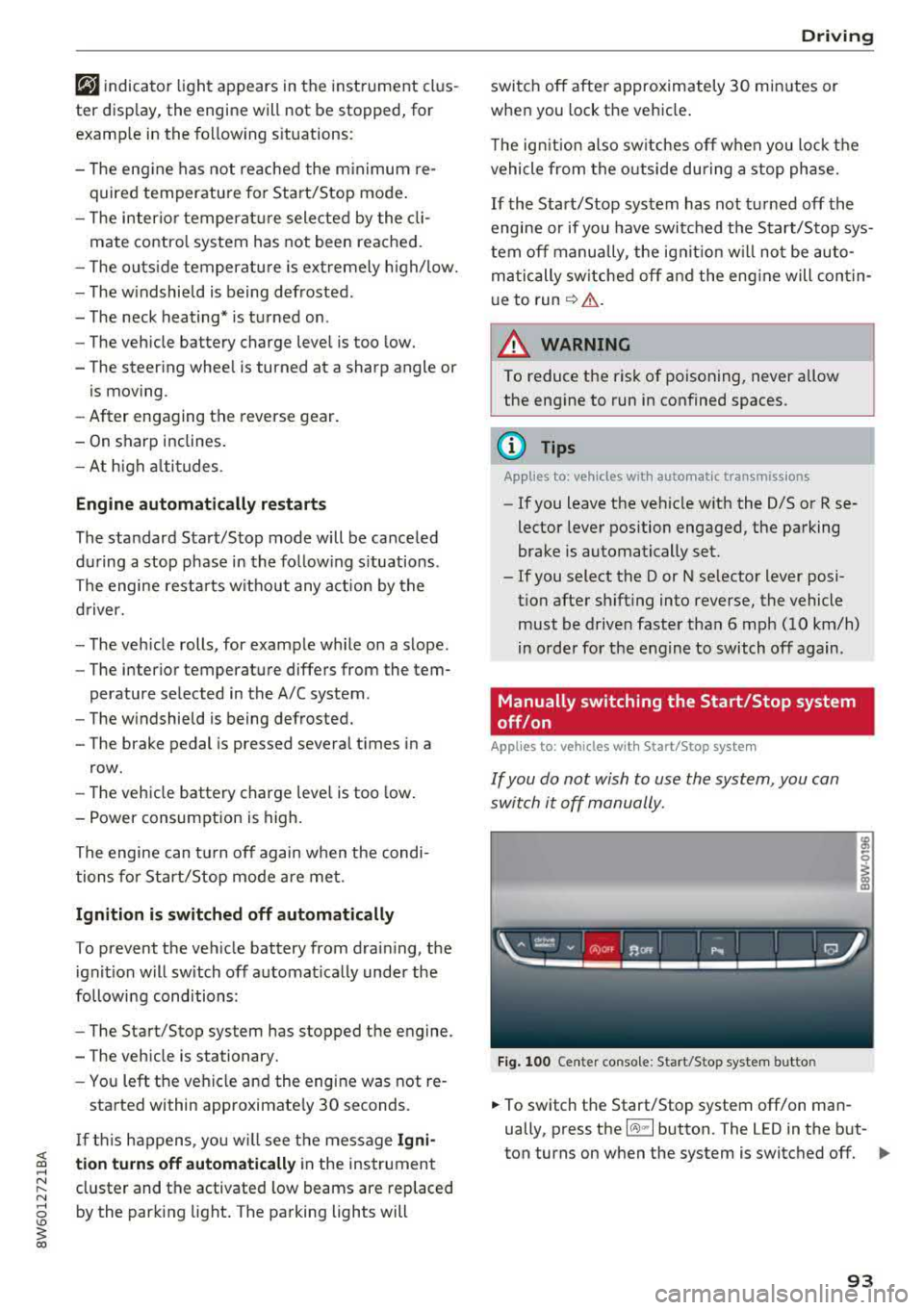
Fig. 100 Center co nsole: Start/Stop system butto n
-
.,. To switch the Start/Stop system off/on man
ually, press the
l (A) ml button. The LED in the but
ton turns on when the system is switched off.
Ill-
93
Page 96 of 409

Driving
(D Tips
If you switch the system off during a stop
phase, the engine will start again automati
cally .
Messages in the instrument cluster display
App lies to: ve hicles w ith S tart/Stop system
Automatic start /stop deact ivated: Please
restart engine manually
This message appea rs whe n specific conditions
are not met dur ing a s top phase . The Sta rt/Stop
system w ill not be ab le to restart the eng ine. The
e n gine mus t b e starte d wit h the
I START ENGI NE STOP I butt on .
Automatic start/stop system: malfunction!
Function unavailable. Please contact Service
T here is a malfunc tion in the Sta rt/S top system.
D rive t he ve hicle to an author ized A udi dealer or
author ized Se rvice Facility as soon as poss ible to
have the ma lf u nction co rrected .
Electromechanical
parking brake
Fig. 10 1 Center conso le : pa rk in g b rake
r- r--
0
~ a, a,
Your veh icle is equippe d with an e lec tromechani
cal parking
b rake @ q fig. 101. The par king
b rake is designed to prevent the vehicle from
ro lling un intent iona lly and replaces the hand
brake.
Setting /manually releasing the parking
brake
.. P ull the(®) switch to set the pa rking brake. The
LED in the sw itch turns on. The
-(USA mod-
94
els)/ . (Canada mo dels) indicator light also
turns on in the instrument cluster disp lay.
.. To re lease the park ing bra ke man ually, press
the bra ke or accelerator peda l w hile the igni
tion is sw itched on and press
the(®) switch at
the same t ime . The LED in the button and the
i n d icator light in t he d isp lay tur n
off.
Releasing the parking brake automatically
Requirement: the d river 's door must be closed .
.. To start driving and r elease the parking brake
automatically, p ress the accelerator peda l as
usual.
I n add ition to releas ing t he pa rking brake auto
ma tic ally, o ther convenien ce an d safety func tion s
are avai lab le when you s tart
d riving ¢ page 95,
Starting to drive.
Preventing the automatic parking brake
release
The vehicle cou ld begin ro ll ing uninten tionally,
depending on the hill or if towi ng a tra ile r .
.. T o preven t the p arking br ake fr om rele asing au
t oma tic ally, pull and ho ld the (®) swi tch and
press the a cce lerator peda l. The pa rking brake
remains set and p revents the ve hicle from roll
ing backward.
.. You can release the<® > switch again once you
are sure that yo u are giving enoug h driving
force to the wheels by press ing the accelerator
pedal.
Emergency braking function
Yo u can use the emergency braking function in an
emergency situat ion, o r if the standa rd brake op
eration ma lfu nctions or is disab led.
.. Pull and hold the(®) switc h.
.. As soon as you re lease the (®) switch or acceler-
ate, the braking stops.
P ulli ng and ho ld ing
the(® ) switch wh ile driving
t h e ve hicle activates the eme rgency brak ing func
tion. The ve hicle is bra ked at a ll four wheels by
activating the hydraulic brake system. The brak
i ng effect is sim ilar to heavy
brak ing ¢ A-
To reduce the risk of act ivat ing the emergency
bra king by m ista ke, a warning tone (b uzzer)
Page 97 of 409
<( a, .... N ,....
N .... 0 \0
3 a,
sounds when the C®> switch is pulled . Emergency
braking stops as soon as
the(®) switch is released
or the accelerator peda l is pressed.
Parking
.,. Press t he b rake peda l to stop the vehicle .
.,. Pull the(®) switc h to set the parking brake .
.,. Applies to: automatic transmission: Select the
P selector lever position .
.,. Turn the eng ine off c> & .
.,. Applies to: manual transmission: Engage 1st
gear .
.,. Turn the steer ing wheel when parking on in
clines so that the wheels will roll into the curb
i f the veh icle starts moving.
_& WARNING
- Never ac celer ate o r release the clutch pedal
carelessly when a gear or a selector lever
posit ion (automatic transm ission) is engag
ed wh ile the vehicle is stationary and the
en
gine is runn ing. Otherwise, the vehicle will
start to move immediately and this cou ld
re
sult in an accident.
- Emergency braking should only be used in an emergency, when the normal brake peda l
has failed or the brake pedal is obstructed.
During emergency braking, your veh icle will
bra ke sim ila r to heavy brak ing . ESC and the
associated components (ABS, ASR, EDL)
c annot overcome the laws of physics.
Around curves and when road or weather conditions are bad, a fu ll brake application
can cause the vehicle to skid or the rear end
to swerve, which increases the risk of an
ac
c ident.
- If the power supply fails, you cannot set the
park ing brake if it is released. If th is is the
case, stop the veh icle on leve l ground and
secure it by engaging 1st gear (manual
transmiss ion) or select ing the P selector lev
er position (automatic t ransm iss ion). See an
authorized Aud i dealer o r autho rized Aud i
Service Facility for assistance.
- Always take the vehicle key with you when
leaving your vehicle, even if for a short pe ri
od of time. Th is app lies p articu larly when
children rema in in the vehicle. Otherwise,
D riv ing
children could start the engine, release the
parking brake or operate e lectrical equip
ment such as power w indows, which
in
creases the risk of an accident.
- No one, especially children, should remain
in the vehicle when it is locked. Locked
doors make it more difficu lt for emergency
wo rkers to get into the vehicle, which puts
lives at risk .
(D Tips
Applies to: vehicles with automatic transmissions
When stopp ing at a t raff ic signa l or stopp ing
i n city traffic, yo u can set the park ing bra ke
manually. The vehicle does not have to be
held with the brake pedal. The park ing brake
eliminates the tendency to creep when a
se
l ector lever position is engaged. As soon as
you press the accelerator peda l, the parking
brake re leases automatically and your vehicle
starts to move
c>page 95.
(D Tips
- Occasional noises when the parking brake is
set and released are normal and are not a
cause for concern.
- The parking brake goes through a self-test cycle at regu lar intervals when the vehicle is
stopped. Any no ises assoc iated with th is are
normal.
- If there is a power failure, the parking brake
w ill not set if it is released, and it will not
release if it is set
c> A . See an a uthorized
Audi dealer or author ized Audi Service
Fa
cility for assis tance.
Starting to drive
Various convenience and safety funct ions may be
available when the vehicle begins driving,
de
pend ing on vehicle equipment.
Starting on hills w ith the pa rking brake set
Requirement: the driver's door must be closed .
.,. To start driving comfortably when on a hi ll, set
the parking brake and begin driving as usual.
The braking force of the parking brake does not
..,.
95
Page 98 of 409
Driving
release automatically until the wheels build up
enough driving force .
Starting on hills with hill hold assist
Hill hold ass ist makes it eas ier to start on hills.
Requirement: the driver 's door must be closed
and the eng ine must be running .
.,. To activate hill hold assist, press and hold the
brake pedal for several seconds. The vehicle
must be in an uph ill direction of travel.
After releasing the brake pedal, the braking pow
er is maintained for a brief moment
c;, .&. to pre
vent the vehicle from rolling back when starting. During this time, you can eas ily begin to move
your veh icle .
.&_ WARNING
-If you do not begin driving immediately or
the engine stalls after releas ing the b rake
pedal, your vehicle may begin to roll back
ward. Press the brake pedal or set the park
ing brake immediate ly.
- The intelligent technology of hill hold assist
cannot overcome the limitations imposed by
natural physical laws. The increased comfort
offered by hill hold assist should not cause
you to take safety risks.
-Hill hold assist cannot hold the vehicle in
place on all h ills (for example, if the ground
is slippery or icy).
-To reduce the risk of an accident, always make sure the vehicle is situated safely
wh ile stat ionary.
Automatic transmission
Introduction
Applies to: vehicles with automatic transmissions
.
The aut omat ic transmission is controlled elec
tronica lly. The transmission shifts up or down au
tomatically depending on which drive prog ram is
selected.
When a
moderate driving style is used, the
transmission se lects the most economical driving
mode. The transmission upshifts at a lower RPM
96
and downshifts at a higher RPM to improve fue l
effic iency.
The transmission switches to a sporty mode after
a kick-down or when the driver uses a
sporty
driving style
characterized by quick accelerator
pedal movements, heavy acceleration, frequent
changes in speed and traveling at the maximum
speed .
If desired, the driver can also select the gears
manually (tiptronic mode) c:;, page 99.
S tronic transmission
The S tron ic is a dual-clutch transmission. Power
i s transferred using two clutches that work inde
pendently from one another. They replace the
torque converter used in conventional automatic
transmissions and allow the vehicle to accelerate
without a noticeable interruption in traction .
tiptronic transmission
In the tiptronic transmission, power is transfer
red by a torque converter.
Selecting a selector lever position
Applies to: vehicles with auto matic transmissions
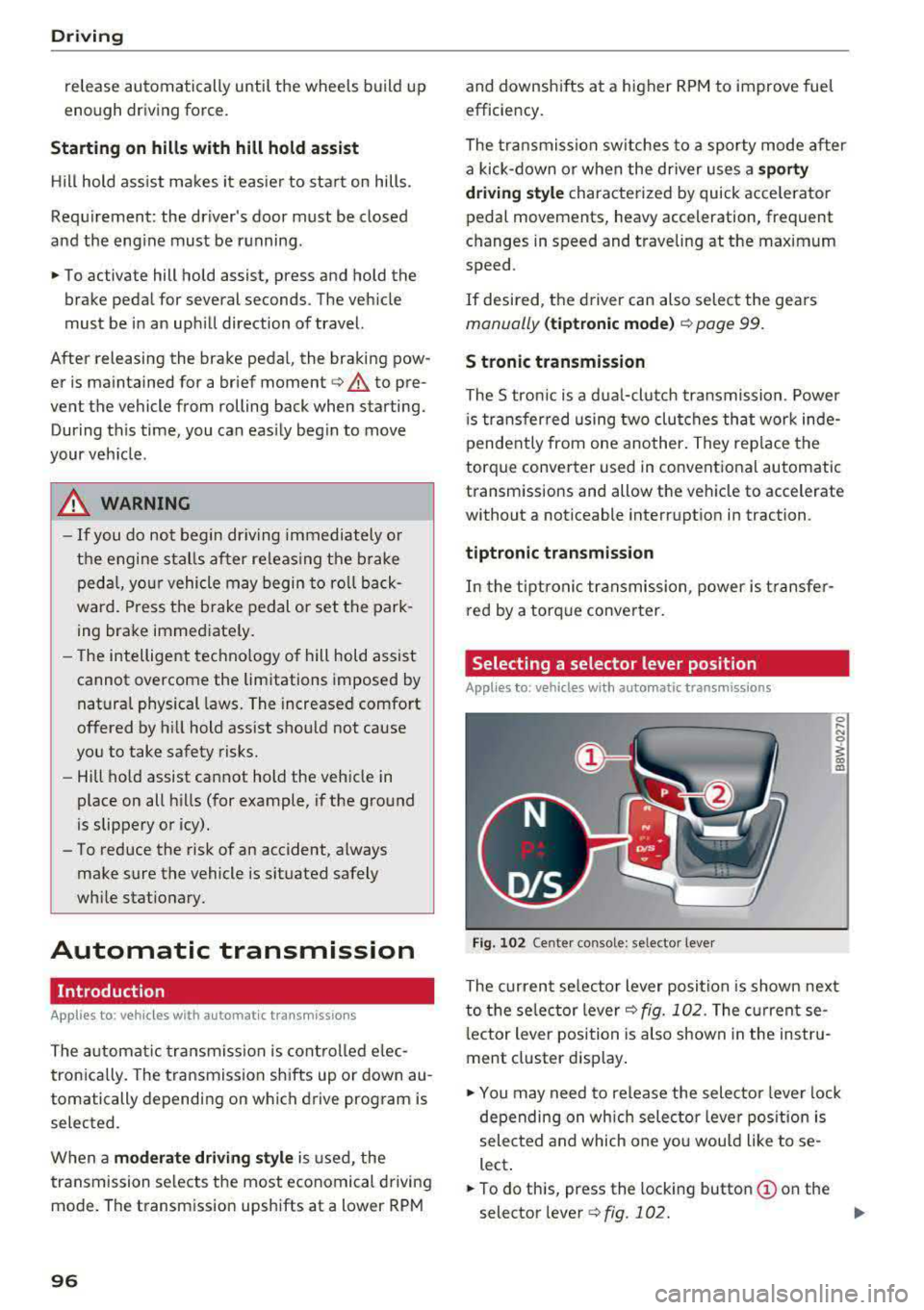
Fig. 102 Cente r console: se lector lever
The current se lecto r lever position is shown next
to the selector lever
c:;, fig. 102 . The current se
l ector lever position is also shown in the instru
ment cluster display .
.,. You may need to release the selector lever lock
depending on wh ich selector lever position is
selected and which one you would like to se
lect .
.,. To do this, press the locking button (!) on the
selector
l ever ¢fig .102. ..,_
Page 100 of 409
Driving
to engage the S sport mode. You can only select
the S selector lever position when the D or E posi
tion is selected. To select the Dor
E position
again when S is engaged, move the selector lever
back ¢,& . To shift from N to D when traveling at
speeds below
1 mph (2 km/h), press the brake
pedal and shift into the D
position ¢,& .
In the normal mode D, the transmission auto
matically selects the suitable gear ratio. It de
pends on engine load, vehicle speed and driving
style .
Select the
sport mode S for sporty driving. The
vehicle makes full use of the engine's power.
Shifting may become noticeable when accelerat
ing.
The S selector lever position engages automati cally when you select the
dynamic mode in drive
select* .
A WARNING
Read and follow all WARNINGS.
- The vehicle can roll even if the ignition is
switched off .
- Power is still transmitted to the wheels
when the engine is running at idle. To pre
vent the vehicle from "creeping", you must keep your foot on the brake in all selector
lever positions (except P and N) when the
engine is running.
- Before opening the hood, select the P selec
tor lever position and set the parking brake.
This reduces the risk of an accident. Always
read and follow the applicable warnings
¢ page 330, Working in the engine com
partment.
(D Tips
If
you accidentally select N while driving, take
your foot off the accelerator pedal and wait
for the engine to slow down to idle before se
lecting Dor S.
98
· Driving tips
App lies to: vehicles with automatic transmissions
Starting the engine
.,. The P or N position must be selected .
Starting from a stop
.,. Press and hold the brake pedal.
.,. Start the engine¢ page 89.
.,. Press the locking button (Don the selector lev
er and select the
D, E, Sor R position
¢ page 96 .
.,. Wait a moment until the transmission shifts.
You will notice a slight movement when the
gear engages .
.,. Release the brake pedal and press the accelera-
tor
pedal ¢ _A.
Various convenience functions are available for
starting on hills
¢ page 95.
Stopping temporarily
.,. Press the brake pedal to stop the vehicle, for
example at a traffic light . Do not press the ac
celerator pedal when doing this.
.,. To prevent the vehicle from rolling when you
start driving, set the parking brake when stop
ping on steep
hills ¢ _A.
.,. The parking brake will release automatically
and the vehicle will start moving once you press
the accelerator pedal.
Stopping/parking
If the selector lever is not in the P position when
you open the driver's door, the vehicle could roll.
.,. Press and hold the brake pedal ¢_& .
.,. Set the parking brake .
.,. To select the P selector lever position, press the
P button
@ on the selector lever ¢ page 96,
fig. 102.
Under certain conditions, such as driving in the
mountains or when towing a trailer, it may be
helpful to switch to manual mode temporarily
and shift
manually to adapt to the driving condi
tions
¢ page 99.
On hills, activate the parking brake first and then
shift into the P
position ¢ page 94. This prevents ..,.
Page 102 of 409
Driving
"'T o switch tiptronic mode off, push the se lector
lever back into the D/S position.
Shifting with th e shift paddle s
You can operate the shift padd les in the D/S or M
selector lever posit ions.
"' To sh ift up a gear, tap the sh ift paddle 0
~ fig . 104.
"'T o shift down a gea r, tap the 0 sh ift paddle.
"'T o engage the lowest gear, ho ld the 0 shift
padd le.
"' If you do not press a shift button within a short
time whi le in the D/S position, the transmission
will return to automatic mode. To keep shifting
us ing the shift paddles, move the selector lever
to the right out of the D/S position.
"' When you want to shift out of tiptronic mode,
press and hold the
0 shift paddle for a longer
per iod of t i me or move the se lector lever back
and release it.
The transm ission automatically shifts up or down
before critical engine speed is reached .
The transm ission only allows manual shifting
when the engine speed is within the permitted
range.
@ Tips
- If you shift to the next lowest gear, the
transmission will only shift if the engine w ill
not be over-rewed .
- With kick-down, the transmission shifts to a
lower gear, depending on vehicle speed and
engine speed.
- tiptronic does not work if the transmiss ion
i s running in emergency mode.
Kick-down
A pp lies to: ve hicles w ith a utomat ic tra nsmi ssio ns
Kick-down enables maximum acceleration.
When you press the accele rator peda l down be
yond the resistance point, the automatic trans
miss ion downshifts into a lower gear and the en
g ine utilizes its full power, depending on vehicle
speed and engine RPM. It shifts up into the next
100
higher gear once the maximum specified engine
RPM is reached.
A WARNING
P lease note that the whee ls cou ld spin on
slick or slippery roads when kick-down is ac
tive.
Launch control program
App lies to : vehicles wi th S tron ic transmiss ion
-
The launch control program provides the best
possible acceleration when starting from a stop .
Requirement: the engine must be at operating
temperature and the steering wheel must not be
turned.
"' Deactivate the Star t/Stop system* ~ page 93.
T he LED in the l(A) "'I button turns on .
"'With the engine running, press the ,...
I .I' -
, O ..,...,,. F=F I but
ton
brief ly ~ page 152. The . indicator light
turns on and the message
Stabil ization cont rol
( E SC) : sport. Warning ! Re st ri ct ed stab ility
ap
pears in the instrument cluster display .
"' Pull the selector lever back out of the D/S pos i
tion briefly to select the S position or se lect the
D ynamic driving mode i n drive se lect*
~ page 139 .
"'Press the brake pedal firm ly with yo ur left foot
and hold it all the way down for at least one
second.
"' At the same time, press the gas peda l all the
way down with your right foot until the eng ine
reaches and stays at a high RPM level.
"' Remove your foot from the brake pedal w ith in
five
seconds ~,& .
A WARNING
-Always adapt your driving to the t raff ic flow.
- Only use the Launch cont rol program when
road and traffic condit ions allow it and oth
er d rivers will not be endange red or both
ered by your driving and the veh icle's accel
erat ion .
- Please note that the d rive wheels can spin
and the vehicle can b reak away when spo rt
mode is switched on, especially when the
road is slippery .
Page 105 of 409
<( a, .... N ,....
N .... 0 \0
3 a,
~ Keep the brake pedal pressed and engage the
fo llowing se lector lever positions one after the
othe r:
N, D and back to N.
~ Turn the eng ine off again .
~ Grasp the socket wrench w it h both hands and
pull it up and out carefu lly to remove
<=> (D .
~ Reinsert the cove r and rubbe r mat .
When t he parking lock emergency re lease is
used , the
mJ ind icator light and t he N selector
l eve r pos ition tu rn on in the instrument cluster .
The message
Danger of rolling away! P not pos
s ible . Please apply parking brake
a lso appea rs .
.&, WARNING
- O nly a ctiva te the e mergency re le as e w hile
o n a level s urfa ce o r a s lig ht slo pe.
- T he pa rking lock may only be released using
the e mergency rele ase i f th e parking br ake
is set. If i t i s no t fu nctioning, secure the ve
hicle from rolling using the brake peda l or
ot he r su ita ble means, such as blocking a
front and a rear wheel. An unsec ured veh icle
may roll away, w hich increases the r isk of an
acc ident.
- To red uce the risk of an accident, you must
not drive when the eme rgency release is ac
t ivated.
- Read and follow the impo rtant instructions
abo ut towing
<=> page 3 83.
- The risk of dama ge i ncreases if you do not
r emove the socket wrench carefully when
r esett ing t he pa rking loc k.
D riving
-
103
Page 108 of 409
Trailer towing
Backing up is difficult and requires practice .
Backing up with a trailer generally requires steer
ing action oppos ite to that when backing up your
veh icle w ithout a trailer.
Maintain a greater distance between your vehicle
and the one in front of you. You w ill need more
room to stop. To compensate for the tra iler, you
will need a larger than normal turn ing radius.
When passing, remember that you cannot accel
erate as fast as you norma lly would because of
the added load. Make sure you have enough room
to pass. After passing, allow plenty of room for
your tra iler before chang ing lanes again.
Avoid jerky starts, sharp turns or rapid lane
changes .
@ Tips
- Do not tow a trailer during the break -in per i
od of your vehicle.
- If you tow a trailer, your Audi may require
more frequent maintenance d ue to the ex
tra load
~ page 389.
Parking on a slope
Do not pork on a slope with a trailer. If it cannot
be avoided, do so only
o~er doing the following:
When parking:
.,. Apply t he foo t brake .
.,. Have someone place chocks under both t he ve
hicle and the tra ile r whee ls .
.. With chocks in p lace, slowly release t he brakes
u ntil the whee l chocks absorb the load .
.. Turn the wheels towards the curb .
.. Apply the parking brake .
.. Move the selector lever to P (automat ic trans
mission) respectively select first gear (manual
transm iss ion).
When restarting after parking:
.. Apply the foot brake .
.. Start the engine .
.. Applies to: vehicles with automatic transmis
sion: Move the selector lever to D/S .
.,. Release the parking brake a nd slowly pull out
and away from the wheel chocks.
106
.. Stop and have someone retrieve the whee l
chocks.
Page 113 of 409
<( a, .... N ,....
N .... 0 \0
3 a,
The vehicle is in a country where the function is
n ot available.
Lap timer
Introduction
Appl ies to: vehicles with lap timer
You can measure and analyze lap times with the
lap timer in the display.
Opening the lap timer
• Open the first Vehicle tab (trip computer) using
the
l <1 t> I button on the mult ifunct ion steer ing
wheel.
• Se lect o n the multifunction steering wheel: left
contro l button
> Lap times .
Operating the lap t imer
• On t he multifunction steer ing whee l, tu rn the
left thumbwheel
(J) c> page 13 unt il the desired
menu item is displayed in the instrument cl us
te r.
• Press the left thumbwhee l to confirm t he selec
t io n.
_& WARNING
Your focus s hould always be on driving your
vehicle sa fely. A s the dr iver, y ou have com
ple te responsib ility for safety in tra ffic. Only
use the f unctions s uch as t he la p timer in s uch
a way that you always mainta in comp lete co n
trol over your vehicle in all traffic s ituations.
(D Tips
You c an ret rieve information from the trip
computer while the lap time r stopwatch is
r u nning .
Lap times and timing
Applies to: vehicles with lap timer
Req uirement: the lap t imer must be open
c>page 111.
Timing laps
• T o start timing manually, se lect Start lap 1 in
the menu.
Assistance systems
• To star t timing automatica lly as soon as you
beg in to drive, select
Start lap 1 by driving off
or Start b y driving off in the menu.
• To meas ure the lap time, select New lap in the
menu. This starts timing the next lap at the
same time.
A fter completing a lap, the difference between
the last lap and the previo us best lap time will be
indicated with a" -" or" +".
Pausing timing and displaying a split time
• To insert a pause m , select Pause in the menu .
• To resume timing, select Resume in the menu.
• To display a sp lit t ime, select Split time in the
menu. The split
time [~] appears for app rox i
mate ly 10 seconds in the instr ument cluster.
The tim ing of the cur rent lap con tinues .
Resetting timing
• Using the mult ifunct io n steer ing whee l, select
Reset times i n the menu.
(!) Tips
- A maximum of 99 lap t imes can be meas
ured.
- If tim ing is pa used, you can continue it later
even if you switch the ignition off.
- Saved lap times cannot be indivi dually de
leted from the total results .
- The s ave d la p time r va lues w ill rem ain after
switchin g the ignition off.
Lap statistics
Applies to: vehicles with lap timer
Displaying lap statistics
You can display t he n umbe r of laps driven, the
f astest lap" +", the slowest lap" -", an d the aver
age t ime
"0" in the instrument cluster.
• On t he mul tif unc tion stee ring w heel, selec t th e
left contro l button
> Lap statistics or Statis
tics .
• Turn the thumbwheel down o r up to display the
ind ividual lap times .
• To return to t he lap timing that was begun,
press the left thumbwheel.
111
Page 116 of 409
Assistance systems
General information
Applies to: ve hicles w ith Aud i adapt ive cruise co ntro l
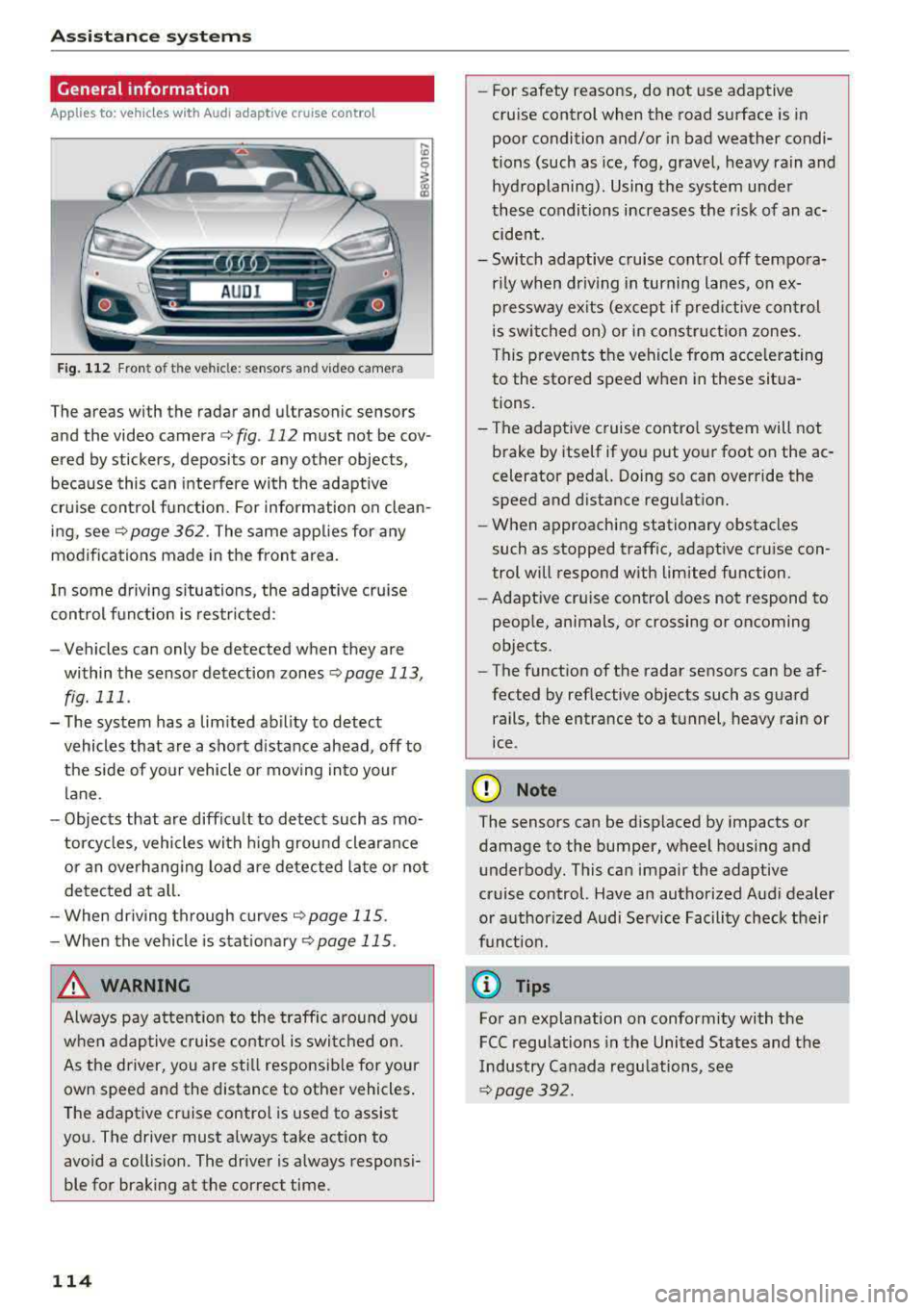
Fig. 112 Fro nt of th e ve hicle: senso rs an d video camera
The areas with the radar and ultrasonic sensors
and the video camera ¢
fig. 112 must not be cov
ered by stickers, deposits or any other objects ,
because this can interfere with the adaptive
cruise control function. For information on clean
ing, see
c::> page 362 . The same applies for any
modifications made in the front area .
In some driving situations , the adaptive cruise
control function is restricted :
-Vehicles can only be detected when they are
within the sensor detection zones
<:;> page 113,
fig. 111 .
-The system has a limited ability to detect
vehicles that are a short distance ahead, off to
the side of your vehicle or moving into your
lane.
-Objects that are difficu lt to detect such as mo
torcycles, vehicles with high ground clearance
or an overhanging load are detected late or not
detected at all.
-When driving through curves
c::>page 115 .
-When the vehicle is stationary <:;> page 115.
_& WARNING
Always pay attention to the traffic around you
when adaptive cruise control is switched on.
As the driver, you are still responsible for your
own speed and the distance to other vehicles.
The adaptive cruise control is used to assist
you. The driver must always take action to
avoid a collision. The driver is always responsi
ble for braking at the correct time.
114
-For safety reasons, do not use adaptive
cruise control when the road surface is in
poor condition and/or in bad weather condi
tions (such as ice, fog, gravel, heavy rain and
hydroplaning) . Using the system under
these conditions increases the risk of an ac
cident.
- Switch adaptive cruise control off tempora
rily when driving in turning lanes, on ex
pressway exits (except if predictive control
is switched on) or in construction zones.
This prevents the vehicle from accelerating
to the stored speed when in these situa
tions.
-The adaptive cruise control system will not
brake by itself if you put your foot on the ac
celerator pedal. Doing so can override the
speed and distance regulation.
-When approaching stationary obstacles
such as stopped traffic, adaptive cruise con
trol will respond with limited function .
- Adaptive cruise control does not respond to
people, animals, or crossing or oncoming
objects.
-The function of the radar sensors can be af
fected by reflective objects such as guard rails, the entrance to a tunnel, heavy rain or
ice .
(D Note
The sensors can be displaced by impacts or damage to the bumper, wheel housing and underbody. This can impair the adaptive
cruise control. Have an authorized Audi dealer
or authorized Audi Service Facility check their
funct ion.
@ Tips
For an explanation on conformity with the
FCC regulations in the United States and the
Industry Canada regulations, see
c::> page 392.