wheel AUDI A5 COUPE 2018 Workshop Manual
[x] Cancel search | Manufacturer: AUDI, Model Year: 2018, Model line: A5 COUPE, Model: AUDI A5 COUPE 2018Pages: 409, PDF Size: 67.63 MB
Page 160 of 409
Multi Media Interface
Multi Media Interface
Traffic safety information
Audi recommends performing certain Infotain
ment system functions, such as entering a desti
nation, only when the vehicle is stationary . Al
ways be prepared to stop operat ing the Infotain
ment system in the interest of your safety and
the safety of other road users.
_& WARNING
Only use the Infotainment system when traf
fic cond itions permit and always in a way that
allows you to maintain complete control over
your vehicle.
@ Tips
Certain funct ions are not available wh ile driv
ing .
Introduction
The Multi Media Interface, or MMI for short,
combines various
systems for communication,
navigation* and entertainment in your Audi . You
can operate the MMI using the MMI control pan
el, the multifunction steering wheel or the voice
recognition system* .
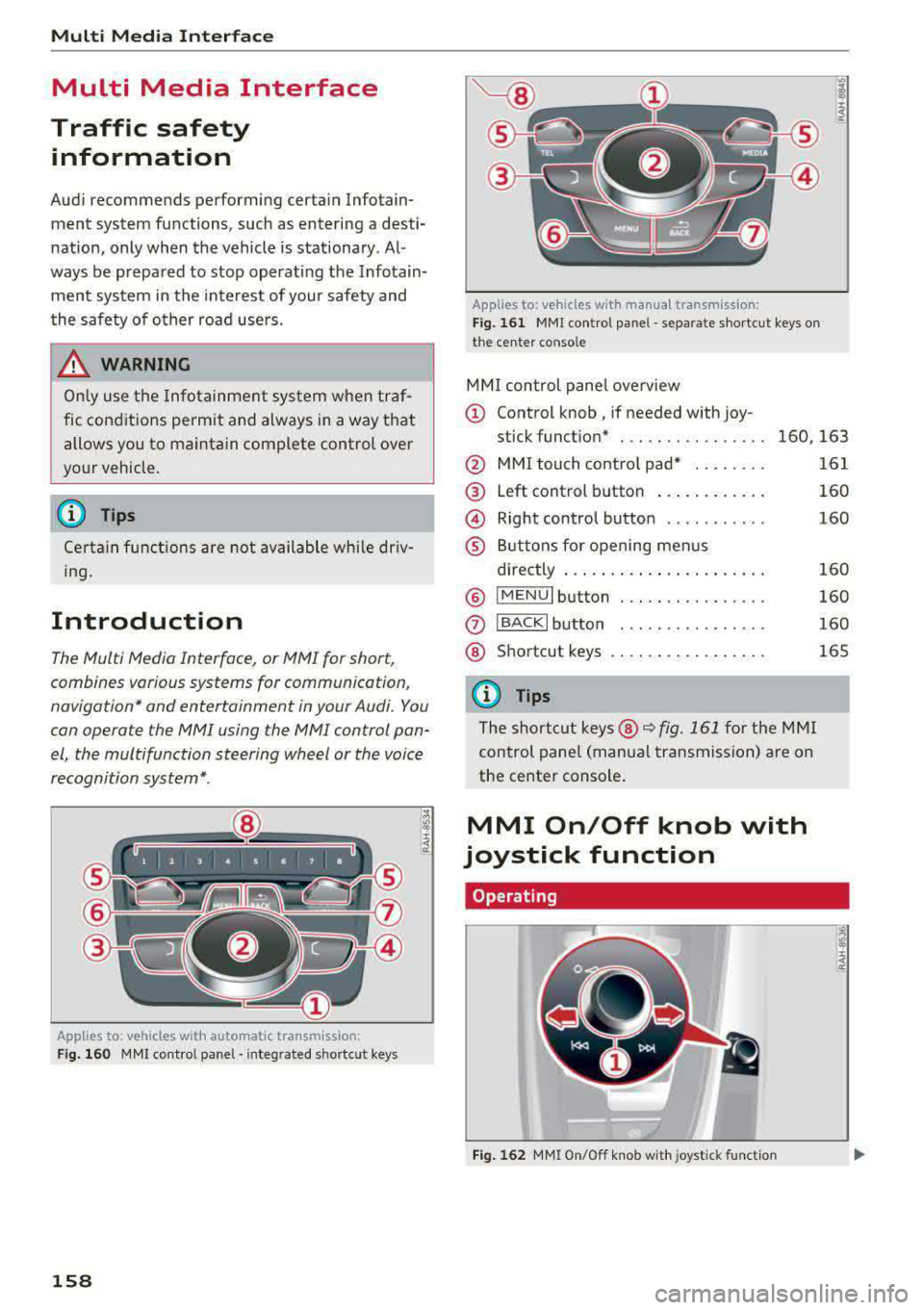
Applies to: vehicles with automatic transmission:
F ig. 160 MMI contro l panel· integ rated shortc ut keys
158
Applies to: ve hicles with manual transmission:
Fig. 161 MMI control pane l
-separate shortcut keys on
the ce nter conso le
MM I control panel overview
(D Control knob , if needed with joy-
stick function* . . . . . . . . . . . . . . . . 160, 163
@ MMI touch contro l pad* ....... .
@ Left control button ........... .
@ Right control button .......... .
® Buttons for opening menus
directly ..................... .
® IMENUI button ..... .... ...... .
0
®
IBACK I button
Shortcut keys
(0 Tips
The shortcut keys @¢ fig. 161 for the MMI
control panel (manua l transmission) are on
the center conso le .
MMI On/Off knob with
joystick function
Operating
•
Fig. 162 MMI On/Off knob w ith joystick function
161
160
160
160
160
160
165
Page 173 of 409
Voice recognition system Operating
Appl ies to: veh icles wit h vo ice recog nitio n system
You con operate many Infotainment functions
conveniently by speaking .
Requirements: the ignition and the MM I must be
switched on
~page 158, the re must not be any
phone call in progress and the park ing system
must not be active.
~ Switching on : press the 51 button@
~ page 15, fig. 11 or~ page 16, fig. 13 briefly
on the mu ltifunction steering wheel and say
the des ired command after the
Beep .
~ Switching off : press and hold the 51 button.
Or: press the [2] butto n.
~ Pau sing : say the command Pau se . To resume,
press the
l2;J button .
~ Correcting : say the command Corre ction . Or :
simply say a new command during an an
nouncement
<=> page 251.
Input assistance
The system gu ides you throug h the input with
v isua l and audio feedbac k.
- Vi sua l input as sistan ce: after switching on
vo ice recogn it io n, a display w ith a selection of
poss ible commands appears. This command
display can be sw itched on o r off. Se lect:
IMENU I button> Setting s> left cont rol button
> MMI setting s > Speech dialog system .
- Audio input a ssis tance :
to have the poss ible
commands read, tu rn the voice recognition sys
tem on and say
Help.
For the s yst em to understand you:
Speak clearly and dist inctly at a normal vo lume .
Speak louder when d riving faste r.
Emphasize the words in the commands evenly
and do not leave long pauses .
C lose the doors, the windows and the sunroof* to
reduce background noise . Make sure that passen-
;;!; gers are not speaking when you are giving a voice
;::; command. ,....
N .... 0 \0
3
Do not direct the air vents toward the hands-free
microphone, which is on the roof headliner near
t h e front inte rior lights .
Only use the system from the dr iver's seat be
ca use the hands -free microphone is directed to
ward that seat.
Additional settings
Seer=;, page 251, Spee ch dialog system .
A WARNING
-Direct your full attention to dr iv ing. As the
driver, you have complete responsibility for
safety in traffic . Only use the functions in
such a way that you a lways maintain com
p lete contro l over your vehicle in all traffic
situations.
-Do not use the voice recognition system in
emergencies beca use your voice may change
in stressful situations. It may take longer to
d ial the number or the system may not be
able to dial it at all. Dial the emergency
number manually.
@ Tips
- The d ialog pauses when there is an incom
ing phone call and will continue if you ig
nore the call. The d ialog ends if you answer
the ca ll.
- You can select an item in the list using ei
ther the vo ice recognit ion system or the
cont rol knob .
Command overview
information
Appl ies to: ve hicles w ith vo ice recognit ion system
T he following overv iews describe the comma nds
t h at can be used to operate the MMI using the
voice recognition system.
Alte rnative commands a re separate d using
a"/",
for example say: Telephone / (or) Navigation /
(or) Radio.
Sequences of commands used to perfo rm an ac
t ion are iden tified w it h
a"> ", fo r ex ample say:
Ente r addre ss > (t hen) Enter country /state . ..,.
171
Page 179 of 409
<( a, .... N ,....
N .... 0 \0
3 a,
The parking aid as well as the Audi voice recogni
tion system must not be active.
A cell phone must be connected to the MMI w ith
the
Handsfree profile ~ page 178.
The cell phone being connected must have voice
control that can be controlled externally .
.. Switching on: press and hold the 5l button on
the multifunction steering wheel* and say the
desired command after the external speech di
alog begins .
.. Continuing/resuming the dialog: the system
remains ready to use for a short time after end
ing the dialog . You can start a new external dia
log during this time. Press the
5l button if
needed, and say a new command.
Or : select
and confirm
Resume on the MMI control panel.
.. Switching off: press and hold the 5] button .
Or: select and confirm Cancel on the MMI con
trol panel.
(1) Tips
- There are no voice guidance* prompts when
a dialog is active.
- This function depends on the cell phone
used. You can obtain more information
from your cell phone service provider or
from your cell phone user guide .
-AUDI AG simply provides access to control
your cell phone with voice operation and does not take any responsibility for the con
tents and commands within the external
voice control.
Voice recognition system
177
Page 219 of 409
Voice guidance volume : you can adjust the vo l
ume d uring voice guidance using the On/Off knob
c::> page 158 Yo u can also f ind additional in fo rma
tion under
c::> page 256.
Map
Operating the map
Appl ies to: ve hicles with naviga tion system
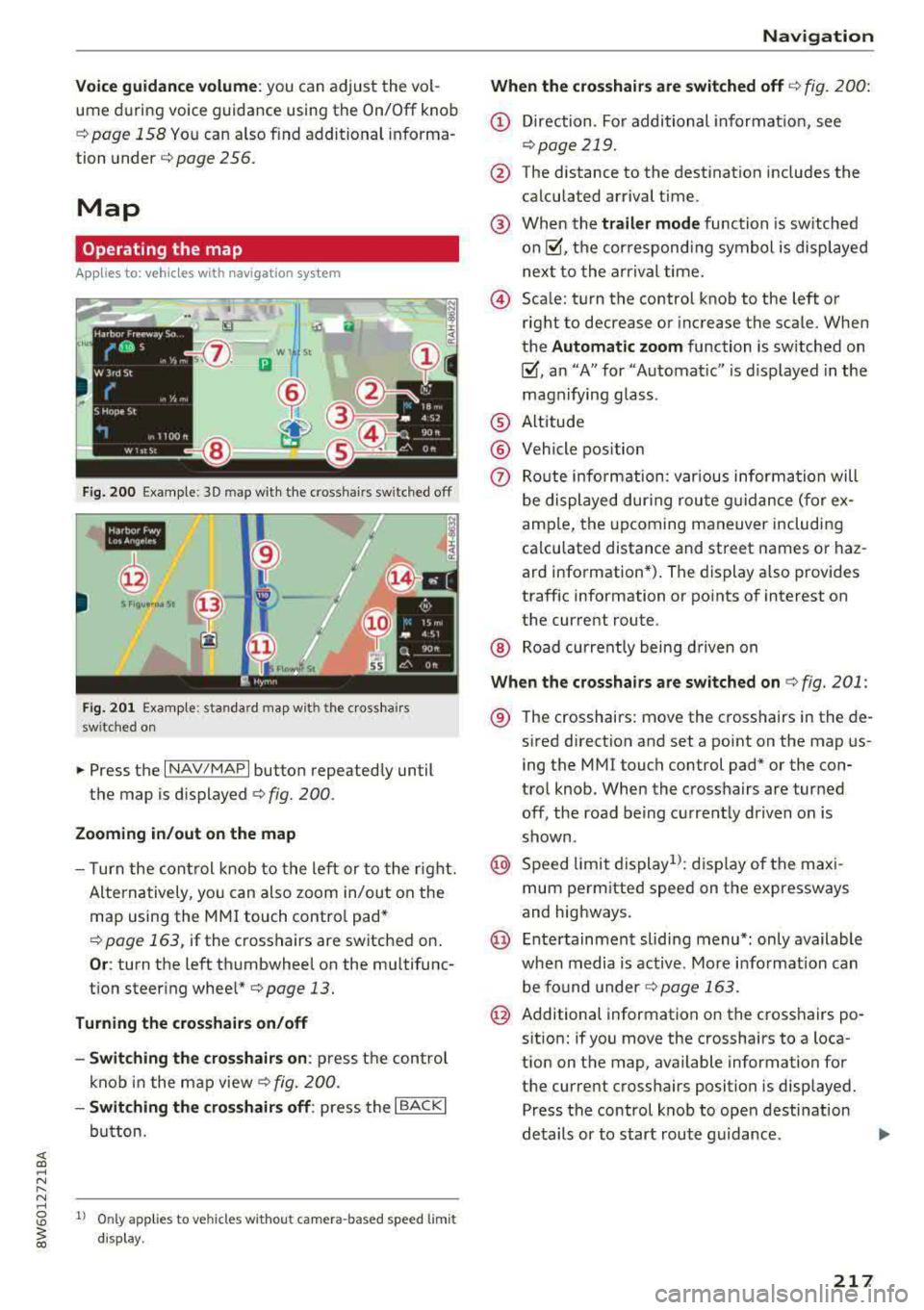
F ig. 200 Exam ple: 30 map with th e cross hairs sw itched off
H4M
~
S FIQUt ra• St
F ig . 201 Exa mpl e: sta n dard m ap with t he cros sha ir s
sw itc hed o n
.. Press the I NAV/MAPI button repeated ly until
the map is d isplayed
<=> fig. 200.
Zoom ing in /out on the map
- T urn the cont rol k nob to the le ft or to the r ight.
Alte rn atively , you can also zoom in/out on the
map using the MM I touch contro l pad*
<=> page 163, if the c ross hairs are switched on .
Or: turn the left thumbwheel on the mu ltifunc
t ion steer ing
whee l*<=> page 13.
Turning the crosshairs on/off
- Switching th e crosshairs on :
press t he control
k no b in t he ma p view
c::> fig. 200.
- Switching the crosshairs off : press the I BACKI
button.
1l O nly app lies to ve hicles w it h ou t camer a-based speed limit
disp lay .
Navigation
When the crosshairs are switched off
c::> fig. 20 0:
(D Direction . Fo r additional informa tion, see
c::> page 219.
@ The distance to the destinat ion includes the
calculated arrival time .
@ When the trailer mode func tion is sw itched
on~, the cor respond ing sy mbol is displayed
n ext to the arrival time.
@ Sca le: t urn the control knob to the left o r
right to decrease or increase the sca le . When
the
Automatic zoom function is sw itched on
~, a n "A" for "A utomat ic" is d isplayed in the
magn ifying g lass .
® Altitude
@ Vehicle position
0 Route info rmation: var ious informa tion will
be displayed dur ing rou te g uidance ( fo r ex
amp le, the upcoming maneuver including
ca lculated distance and street names o r haz
ard info rmation*) . The display a lso provi des
traff ic information or po ints of interest on
the current route .
@ Road currently being d rive n on
When the crosshairs are switched on <=> fig. 201:
® The crosshairs: move the c rosshairs in the de-
s ired direct ion and set a point on the map us
i ng the MMI touc h control pad* or the con
trol knob . When the crosshairs are tur ned
off, the road be ing curren tly driven on is
shown .
@ Speed limit display1>: dis play of the max i
mum pe rm itted speed on t he expressways
and highways.
@ Ente rtain men t slidi ng menu*: only available
when media is active. More i nfo rmat ion can
b e fo und under
c::> page 163.
@ Additional information on the c ross hairs po
s it ion: if you move the crosshairs to a loca
t ion on the map, available information fo r
the current crosshairs position is displayed. Press the control knob to open desti nat ion
de tails or to start rou te g uidance.
217
Page 260 of 409
.,. Observe all traffic laws, rules of the road and
speed limits and plain common sense .
.. ALWAYS adjust your speed to road, traffic and
weather conditions.
.. Take frequent breaks on long trips. Do not drive
for more than two hours at a stretch.
.. Do NOT drive when you are tired, under pres
sure or when you are st ressed.
& WARNING
Impai red dr iv ing safe ty inc reases the risk of
ser ious personal inju ry and death whenever a
vehicle is being used.
Correct passenger
seating positions
Proper seating position for the driver
The proper driver seating position is important
for safe, relaxed driving.
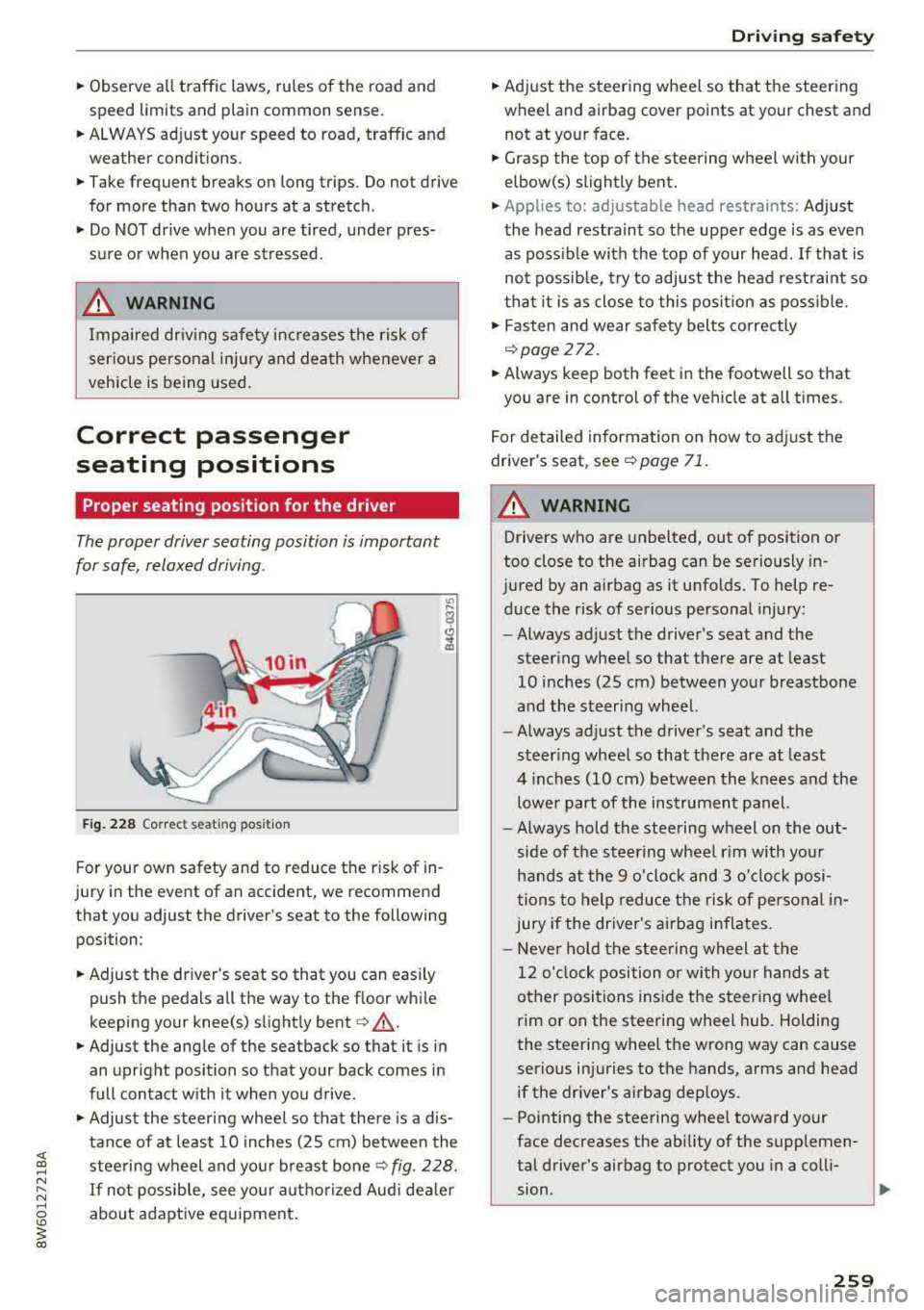
F ig . 2 28 Correct seating posit ion
F or your own safety and to reduce the risk of in
jury in the event of an accident, we recommend
that you adjust the driver's seat to the following position:
.. Adjust the dr iver's seat so that you can easily
push the pedals all the way to the floor while
keeping your knee(s) slight ly
bent ¢&_ .
.. Adjust the angle of the seatback so that it is in
an upright position so that your back comes in
full contact w ith it when you drive .
.,. Adjust the steering wheel so that there is a dis
tance of at least 10 in ches (25 cm) between the
steering wheel and you r breast
bone ¢ fig. 228.
If not possib le, see your aut horized Aud i dea le r
about adaptive eq uipment .
Driving safety
.. Adjust the steering wheel so that the steering
wheel and airbag cover points at your chest and
not at yo ur face .
.. Grasp the top of the steering wheel with your
elbow(s) slightly bent .
.,. Applies to: adjustable head restraints: Adjust
the head restraint so the upper edge is as even as poss ible with the top of your head. If that is
not possib le, try to adjust the head rest raint so
t ha t it is as close to this pos ition as poss ible .
.. Fasten and wear safety belts correctly
¢page 272.
.. Always keep both feet in the footwell so that
you are in contro l of the veh icle at a ll times.
F or detailed information on how to adj ust the
drive r's seat, see
¢page 71 .
A WARNING
-
Drivers who are unbelted, out of position or
too close to the airbag can be seriously in
jured by an airbag as it unfolds. To help re d uce the risk of serious personal injury:
- Always ad just the driver's seat and the
steer ing whee l so that there are at least
10 inc hes (25 cm) between you r breastbone
and the steering wheel.
- Always ad just the driver's seat and the
steer ing wheel so that there are at least
4 inches (10 cm) between the knees a nd the
lowe r part of the instrument panel.
- Always hold the steering w heel on the out
s ide of the steering wheel r im with yo ur
hands at the 9 o 'clock and 3 o'clo ck posi
tions to help reduce the risk of personal in
jury if the driver's airbag inflates.
- Never hold the stee ring wheel at the
12 o' clock position o r wi th yo ur hands at
other positions i nside the steer ing whee l
rim or on the steering wheel hub. Holding
the steering wheel the wrong way can cause
serio us injuries to the hands, arms and head
if the dr iver's airbag dep loys.
- Pointing the steering wheel toward your
face decreases the ability of the supplemen
tal driver's airbag to protect you in a coll i·
.,
sion. ..,
259
Page 278 of 409
<( a, .... N ,....
N .... 0 \0
3 a,
Airbag system
Important information
Importance of wearing safety belts and
sitting properly
Airbags are only supplemental restraints. For
airbags to do their job, occupants must always
properly wear their safety belts and be in a prop
er seating position.
For your safety and the safety of your passen
gers, before driving off, always :
.,. Adjust the driver's seat and steering wheel
properly
9 page 259,
.,. Adjust the front passenger's seat properly
¢page 260,
.,. Wear safety belts properly ¢page 271,
.,. Always properly use the proper child restraint
to protect children
¢ page 302.
In a collision, airbags must inflate within the
blink of an eye and with considerable force. The
supplemental airbags can cause injuries if the
driver or the front seat passenger is not seated
properly. Therefore in order to help the airbag to
do its job, it is important, both as a driver and as
a passenger to sit properly at all times.
By keeping room between your body and the
steering wheel and the front of the passenger
compartment, the airbag can inflate fully and
completely and provide supplemental protection in certain frontal collisions
¢ page 259, Correct
passenger seating positions .
For details on the
operation of the seat adjustment controls
¢page 71.
It 's especially important that children are proper
ly
restrained ¢ page 302.
There is a lot that the driver and the passengers
can and must do to help the individual safety fea
tures installed in your Audi work together as a
system.
Proper seating position is important so that the
front airbag on the driver side can do its job. If
you have a physical impairment or condition that prevents you from sitting properly on the driver
seat with the safety belt properly fastened and
Airbag system
reaching the pedals, or if you have concerns with
regard to the function or operation of the Ad
vanced Airbag System, please contact your au
thori zed Audi dealer or qualified workshop, or
call Audi Customer Relations at 1-800-822-2834
for possible modifications to your vehicle.
When the airbag system deploys, a gas generator
will fill the airbags, break open the padded cov ers, and inflate between the steering wheel and
the driver and between the instrument panel and
the front passenger. The airbags will deflate im
mediately after deployment so that the front oc
cupants can see through the windshield again
without interruption.
All of this takes place in the blink of an eye, so
fast that many people don't even realize that the airbags have deployed. The airbags also inflate
with a great deal of force and nothing should be
in their way when they deploy. Front airbags in
combination with properly worn safety belts slow
down and limit the occupant's forward move
ment . Together they help to prevent the driver
and front seat passenger from hitting parts of
the inside of the vehicle while reducing the forces
acting on the occupant during the crash . In this
way they help to reduce the risk of injury to the
head and upper body in the crash. Airbags do not
protect the arms or the lower parts of the body.
Both front airbags will not inflate in all frontal
collisions . The triggering of the airbag system de
pends on the vehicle deceleration rate caused by
the collision and registered by the electronic con
trol unit . If this rate is below the reference value
programmed into the control unit, the airbags
will not be triggered, even though the car may be badly damaged as a result of the collision. Vehi
cle damage, repair costs or even the lack of vehi
cle damage is not necessarily an indication of
whether an airbag should inflate or not.
Since the circumstances will vary considerably between one collision and another, it is not possi
ble to define a range of vehicle speeds that will
cover every possible kind and angle of impact
that will always trigger the airbags . Important
factors include, for example, the nature (hard or
soft) of the object which the car hits, the angle of
impact, vehicle speed , etc. The front airbags will
II>
277
Page 279 of 409
Airbag syste m
also not inflate in s ide or rear collisions, or in
ro llovers.
Al wa ys rememb er: Airbags will deploy only once,
and on ly in ce rtain k inds of coll is ions. Yo ur safety
be lts are always there to offer protection in those
situations in which airbags are not supposed to
dep loy, or when they have already deployed; for
examp le, when your vehicle str ikes or is struck by
another vehicle after the first coll is ion.
This is just one of the reasons why an airbag is a
supp lementary restraint and is not a substitute
for a safety belt. The a irbag system works most
effect ively when used with the safety belts.
Therefore, always properly wear your safety belts
c::>page 268.
A WARNING
Sitting too close to the steering wheel o r in
st rument panel will decrease the effective
ness of the airbags and will inc rease the risk
of personal injury in a co llision.
- Never sit closer than 10 inches (25 cm) to
the steering wheel or instrument panel.
- If you cannot si t mo re than 10 inches
(25 cm) from the steering wheel, invest i
gate whether adaptive equipment may be
available to help you reach the pedals and
increase your seating distance from the
steering wheel.
- All vehicle occupants and especially children
must be restrained properly whenever riding
in a vehicle. An unrestrained or improperly
restra ined child could be injured by striking
the interior or by being ejected from the ve
hicle during a sudden maneuver or impact.
An unrestrained or imp roperly restrained
child is also at greate r risk of inju ry or death
through contact with an inflating airbag.
- If you are unrestrained, leaning fo rwa rd, s it
t ing s ideways or o ut o f pos ition in any way,
yo ur risk of in ju ry is much h igher.
- Yo u will also receive serious injuries and
could even be killed if you are up aga inst the
airbag or too close to it when it inflates -
even with an Advanced Airbag.
278
-
- To reduce the risk o f injury when an a irbag
inflates, always wear safety belts properly
c::> page 272, Safety belts.
- Always make certa in that children age 12 or
younger always ride in the rear seat. If chil
dren are not properly restrained, they may be severely injured or killed when an airbag
inflates.
- Never let ch ildren ride unrestra ined or im
properly restrained in the vehicle. Ad just the
front seats properly.
- Never ride with the backrest recl ined .
- Always sit as far as possible from the steer-
ing wheel or the instrument panel
c::> page 259.
- Always sit upright w ith your back against
the backrest of your seat .
- Never p lace your feet on the instrument
panel or on the seat. Always keep both feet
on the floor in front of the seat to help pre
vent serious injur ies to the legs and hips if
the airbag inflates.
- Never recl ine the front passenger's seat to
transpo rt objects . Items can also move in to
the area of the s ide a irbag or the front air
bag du ring brak ing o r in a sudden maneu
ver. Obje cts nea r the airbags can become
pro jecti les and cause injury when an airbag
inflates.
A WARNING
A irbags that have deployed in a crash must be
replaced.
- Use on ly original equipment airbags ap
proved by Audi and installed by a trained
technician who has the necessary tools and
diagnostic equipment to properly replace
any airbag in yo ur vehicle and assure system
effectiveness in a crash.
- Never perm it salvaged or recycled airbags to
be installed in your vehicle.
Child restraints on the front seat - some
important things to know
.,. Be s ure to read the impo rtan t in format ion and
heed the WARN INGS for impor tant deta ils
.,..
Page 282 of 409
-Improper installation of child restraints can
reduce their effect iveness or even prevent
them from providing any protection.
- An improper ly installed ch ild restraint can
interfere w ith the airbag as it deploys and
seriously injure or even kill the child
-even
with an Advanced Airbag System .
- Always carefu lly follow the manufacturer's
instructions provided with the child safety
seat or carrier.
- Always make sure that there is nothing on
the front passenger seat that will cause the
capacit ive passenger detection system in
the seat to signa l to the Airbag System that
the seat is occupied by a person when it is
not, or to signa l tha t it is occ upied by some
one who is heavier than the person actua lly
sitting on the seat. The p resence of addi
t ional objects could cause the passenge r
front airbag to be turned on when it shou ld
be off, or could cause the airbag to work in a
way that is different from the way it would have worked without the object on the seat .
Front airbags
Description of front airbags
The airbag system can provide supplemental
protection to properly restrained front seat occu
pants.
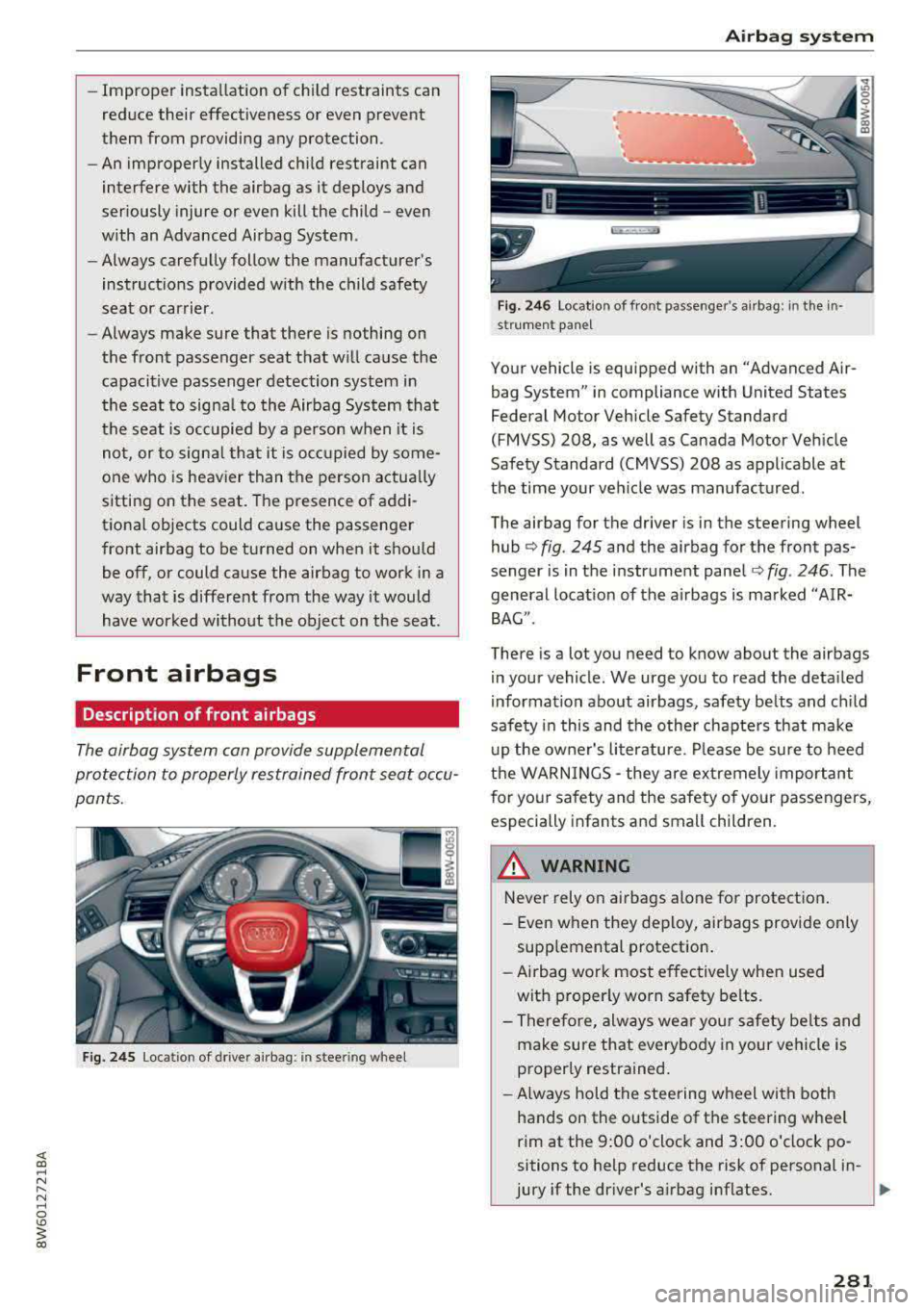
F ig. 2 45 Location of driver airbag: in steering whee l
Airb ag sys tem
Fig. 246 Location of front passenger's airbag: in the in·
st rument pane l
Your vehicle is equipped with an "Advanced Air
bag System" in compliance with United States
Federal Motor Vehicle Safety Standard
(FMVSS) 208, as well as Canada Motor Veh icle
Safety Standard (CMVSS) 208 as applicable at
the time your veh icle was manufactured.
The airbag for the driver is in the steering wheel
hub
¢ fig. 245 and the airbag for the front pas
senger is in the instrument panel
~ fig . 246. The
general locat ion of the airbags is marked ''AIR·
BAG".
There is a lot you need to know about the airbags
i n your vehicle. We urge you to read the deta iled
information abo ut airbags, safety belts and child
safe ty in this and the othe r chapte rs that make
u p the owner's li terature . Please be sure to heed
the WARNINGS
-they are ex tremely important
for your sa fety and the safety of your passengers,
especially infants and small children.
A WARNING
-
Never rely on ai rbags alone for protection .
- Even w hen they deploy, airbags provide only
supp lemental protection .
- Airbag wor k most effec tively when used
with p roper ly worn safety be lts.
- Therefo re, always wea r you r safety be lts and
make sure that everybody in your ve hicl e is
p roper ly restrained.
- Always hold the steering w heel with both
hands on the outside of the steering wheel
rim at the 9:00 o'clock and 3:00 o'clock po
sitions to help reduce the risk of personal in-
jury if the driver's a irbag inflates.
~
281
Page 283 of 409
Airbag system
-Never hold the steering wheel at the 12
o'clock position or with your hands any
where inside the steering wheel or on the
steering wheel hub. Holding the steering
wheel the wrong way increases the risk of
severe injury to the arms, hands, and head if
the driver airbag deploys.
,& WARNING
Objects between you and the airbag will in
crease the risk of injury in a crash by interfer
ing with the way the airbag unfolds and/or by
being pushed into you as the airbag inflates.
- Always make sure nothing is in the front air-
bag deployment zone that could be struck
by the airbag when it inflates.
-
- Objects in the zone of a deploying airbag
can become projectiles when the airbag de
ploys and cause serious personal injury.
- Never hold things in your hands or on your
lap when the vehicle is in use.
- Never place accessories or other objects
(such as cup holders, telephone brackets,
note pads, navigation systems, or things
that are large, heavy, or bulky) on the doors;
never attach then to the doors or the wind
shield; never place them over or near or at
tach them to the area marked ,,AIRBAG" on
the steering wheel, instrument panel or the
seat backrests; never place them between
these areas and you or any other person in
the vehicle.
- Never attach objects to the windshield
above the passenger front airbag, such as
accessory GPS navigation units or music
players. Such objects could cause serious in
jury in a collision, especially when the air bags inflate.
- Never recline the front passenger seat to transport objects. Items can also move into
the deployment area of the side airbags or
the front airbag during breaking or in a sud
den maneuver. Objects near the airbags can
fly dangerously through the passenger com partment and cause injury, particularly
when the seat is reclined and the airbags in
flate.
282
,& WARNING
, -
A person on the front passenger seat, espe
cially infants and small children, will receive
serious injuries and can even be killed by be ing too close to the airbag when it inflates .
- Although the Advanced Airbag System in your vehicle is designed to turn off the front passenger airbag if an infant or a small child
is on the front passenger seat, nobody can
absolutely guarantee that deployment un
der these special conditions is impossible in
all conceivable situations that may happen
during the useful life of your vehicle.
- The Advanced Airbag System can deploy in accordance with the
,.low risk" option for 3-
and 6-year-old children under the U.S. Fed
eral Standard if a child with electrical capac
itance greater than the combined capaci
tance of a typical one-year old infant re
strained in one of the forward facing or rear
ward-facing child seats with which your ve hicle was certified is on the front passenger
seat and the other conditions for airbag de
ployment are met.
- Accident statistics have shown that children
are generally safer in the rear seat area than
in the front seating position.
- For their own safety, all children, especially
12 years and younger, should always ride in
the back properly restrained for their age
and size.
Advanced front airbag system
Your vehicle is equipped with a front Advanced
Airbag System in compliance with United States
Federal Motor Vehicle Safety Standard (FMVSS)
208, as well as Canada Motor Vehicle Safety
Standard (CMVSS) 208 as applicable at the time
your vehicle was manufactured .
-
The front Advanced Airbag System supplements
the safety belts to provide additional protection
for the driver's and front passenger's heads and upper bodies in frontal crashes. The airbags in
flate only in frontal impacts when the vehicle de-
celeration is high enough.
ll>
Page 284 of 409
<( a, .... N ,....
N .... 0 \0
3 a,
The front Advanced Airbag System for the front
seat occupants is not a substitute for your safety be lts. Rather, it is part of the overa ll occupant re
straint system in your vehicle. A lways remember
that the airbag system can on ly help to protect
you, if you are sitting upr ight, wear ing your safe
ty belt and wear ing it properly. This is why you
and your passengers must always be properly re
stra ined, not just because the law requ ires you to
be.
The Advanced Airbag System in your ve hicle has
been certified to meet the
"low r isk" require
ments for 3 and 6 yea r-old children o n the pas
senger side and very sma ll adults on the drive r
side . The low r isk dep loyment cr iteria are intend
ed to help reduce the risk of injury through inter
action with the front airbag that can occur, for
examp le, by being too close to the steering wheel
and instrument pane l when the airbag inflates .
I n addition, the system has been certified to
comp ly with the "supp ression" requirements of
the Safety Standard, to turn off the front a irbag
for infants 12 months old and younger who are
restrained on the front passenger seat in child re
stra ints that are listed in the Standard
c::> page 304, Child restraints and Advanced Air
bags.
"Suppress ion" requ ires the front a irbag on the
passenger side to be turned off if:
- a ch ild up to about one year of age is restrained
on the front passenger seat in one of the rear
facing or forward-fac ing infant restra ints listed
in Federal Motor Vehicle Safety Standard 208
with wh ich the Advanced Airbag System in your
vehicle was ce rt ified. For a listi ng of the ch ild
restra ints tha t were used to certify your veh i
cl e's compl iance with the US Safety St andard
c::, page 304,
- When a person is dete cted on the front passen
ger seat that has an electrical capacitance that
is more than the tota l electrical capac itance of
a ch ild that is about 1 year old restrained in one
of the rear-facing or forward-facing infant re
straints (listed in Federal Motor Vehicle Safety
Standard 208 w ith which the Advanced A irbag
System in your veh icle was certified), the front
Airb ag sys tem
airbag on the passenger side may or may not
dep loy.
T he
PASSENGER AIR BAG OFF ~; ligh t comes on
whe n the elect ronic con trol uni t detects a tota l
electrical capacitance on the front passenger seat
that requires the front airbag to be turned off. If
the
PASSENGER AIR BAG OF F~ ; light does not
come on, the front airbag on the passenger side
has not been turned
off by the contro l unit and
can deploy if the contro l unit senses a n impact
that meets the cond itions stored in its memory.
If the total e lectr ica l capacitance reg istered on
the front passenger seat is more than that of a
typ ical 1 year-old, b ut less than the weight of a
small ad ult, the front a irbag on the passenger
s ide may dep loy (the
PASSENGER AIR BAG OFF
~; light does not come on).
For example, th e airbag may deploy if:
- a small ch ild that is heav ier than a typ ical 1
year-o ld child is on the front passenger seat
(regardless of whether the child is in one of the
child safety seats listed
c:> page 304),
- a child who has outgrown c hild restraints is on
the front passenger seat.
If the front passenger airbag is t urned
off, the
PASSENGER AIR BAG OFF ~; light in the head
liner w ill come on and stay on.
If the front passenge r airbag deploys, the Feder
al Standard requ ires the a irbag to meet the " low
risk" deployment criteria to help reduce the r isk
of inj ury through interaction with the airbag.
"Low risk" deployment occurs in those crashes
that take place at lower decelerations as defined
i n the electronic control unit .
c::>page 289
Always remember: Even though your vehicle is
equipped with Advanced Airbags, the safest place
for childre n is properly restrained on the back
seat. Please be sure to read the impor tant infor
mation in the sec tions that fo llow and be sure to
heed all of the WARNINGS.
_& WARNING
To redu ce the risk of injury when an airbag in-
f lates, always wear safe ty belts properly.
llill-
283