phone AUDI A5 COUPE 2018 Repair Manual
[x] Cancel search | Manufacturer: AUDI, Model Year: 2018, Model line: A5 COUPE, Model: AUDI A5 COUPE 2018Pages: 409, PDF Size: 67.63 MB
Page 253 of 409
System settings
Short dialog : when this function is switched on
~ ' a shorter form of the prompts is used.
Command during voice output*1>: this function
is switched on at the factory. When this function
is switched
on~' you can say new commands
during announcements . You do not need to wait
for the signal tone (beep) during an announce
ment. When the function is switched off
0, you
need to wait for the signal tone (beep) to say a
new command.
Volume: you can adjust the volume of the
prompts by turning the control knob.
Individual speech training (on ly when the vehi
cle is stationary): you can adapt the voice recog
n ition system to yo ur voice or pronunciat ion in
order to improve the system's ability to recognize
your speech. Individual train ing is comprised of
20 speech entries that consist of commands and
sequences of numbers . You can delete the pro
grammed voice tra ining w ith the
Reset individu·
al speech training
function.
Display brightness
You can adjust the brightness of the Infotain
ment system display by turning the control knob .
Factory settings
The following functions can be reset to the facto
ry default settings:
-Sound settings
- Radio
- Media settings
- Jukebox*
- Directory
- Telephone
- Bluetooth and Wi-Fi *
- Navigation settings*
- Navigation and online memory*
- Voice recognition system *
- Shortcut keys
- Message settings*
- Apps*
- Tool tips
1
> Please note that this func tion is not available in Cab rio
lets.
252
- Audi connect*
- Audi smartphone interface*
You can select the desired functions individually
or a ll at once with the option
Select all entries .
Select and confirm Restore factory settings.
(D Tips
Make sure that not only the settings were de
leted but also the stored data, if applicable.
Connection manager
Introduction
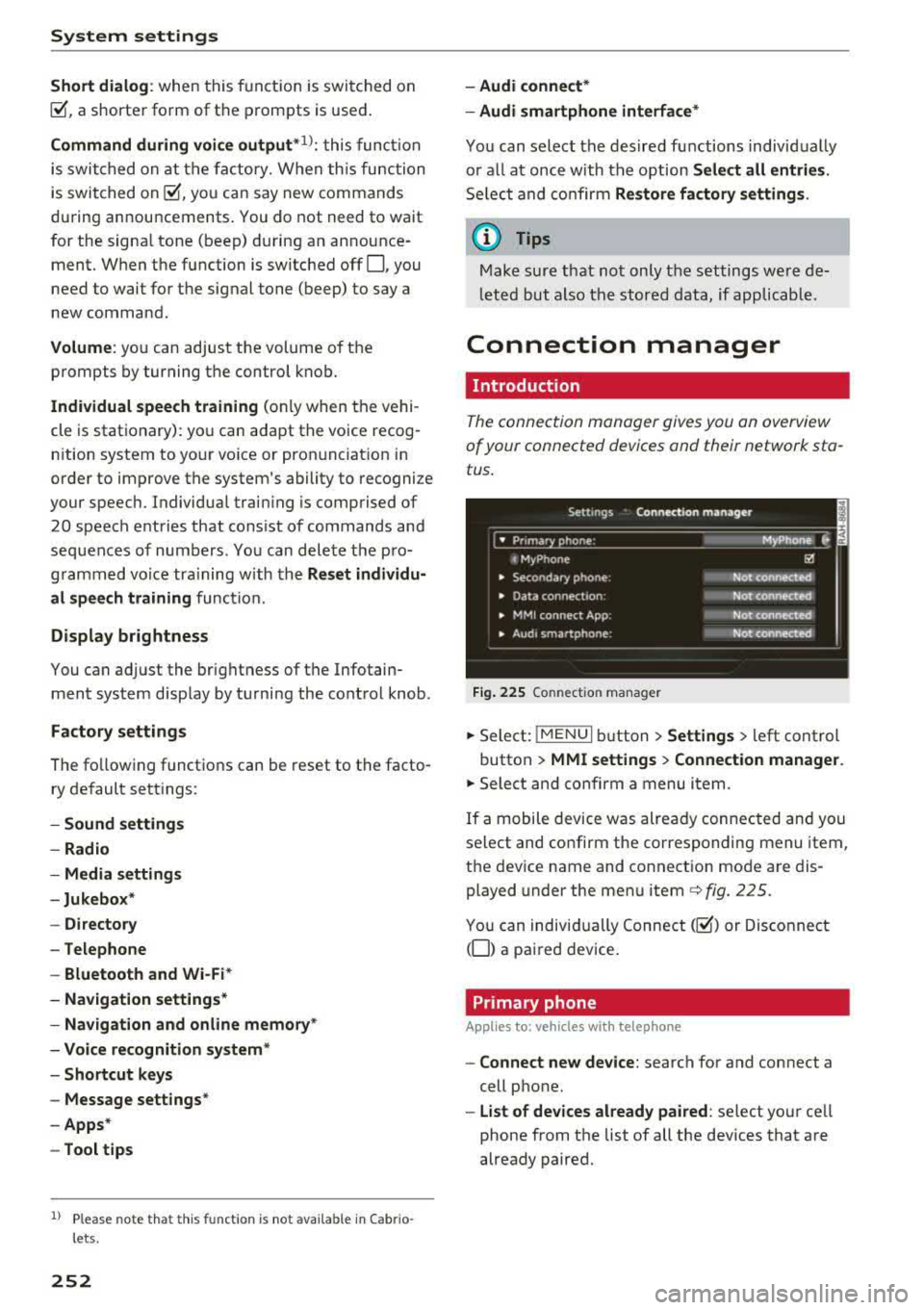
The connection manager gives you an overview
of your connected devices and their network sta
tus .
Fig. 225 Connection manager
.,. Select: !MENUI button> Settings > left control
button >
MMI settings > Connection manager.
.,. Select and confirm a menu item.
If a mobile device was already connected and you
select and confirm the corresponding menu item,
the device name and connection mode are dis
played under the menu
item¢ fig. 225.
You can individually Connect(~) or Disconnect
(0) a paired device.
Primary phone
App lies to: vehicles wi th telepho ne
- Connect new device: search for and connect a
cell phone.
- List of devices already paired : select your cell
phone from the list of all the dev ices that are
already paired.
Page 254 of 409
<( a, ..... N ,....
N ..... 0 \0
3 a,
Secondary phone
Applies to: vehicles with telephone
-Connect new device: search for and connect a
cell phone.
- List of devices already paired: select your cell
phone from the list of all the devices that are
already paired.
Data connection
Applies to vehicles with Audi connect (Infotainment)
- The data connection is made using the embed
ded SIM card
ll ¢ page 191. You do not need to
adjust any additional settings.
Always follow the information found in
¢(D in
Wi-Fi hotspot on page 197.
MMI connect app
Applies to vehicles with Aud i connect (Infotainment)
Requirement: the Audi MMI connect app must
be installed and open on your mobile device.
- Connect new device: search for and connect a
mobile device (such as a smartphone).
- List of devices already paired: select your mo
bile device from the list of all the devices that
are already paired.
Audio player
Applies to vehicles with Bluetoot h or Wi-F i a udio player
Bluetooth player*
Requirement : the Bluetooth function and visibili
ty must be switched on in the MMI
¢ page 254
and on the cell phone.
-Connect new device: press the control knob.
Select
Bluetooth audio player . Search for and
connect a mobile device.
- List of devices already paired: select a Blue
tooth device from the list of all the devices that
are already paired.
l) S IM card inst alle d in the v ehicle at th e fac to ry .
System settings
Wi-Fi audio player*
Requirement: the Wi-Fi hotspot on the MMI
¢
page 197 and on your cell phone must be
switched on.
- Connect new device: press the control knob.
Search for and connect a Wi-Fi capable device.
-Disconnect Wi-Fi audio player: deactivate the
Wi-Fi on your Wi-Fi capable device. The device
will be automatically removed from the list.
(Q) Note
Always follow the information found in ¢Q) in
Wi-Fi hotspot on page 197.
Directory
Applies to: vehicles with telephone
Display contacts from a cell phone (or an addi
tional cell phone).
Requirement: no cell phones can be connected to
the MMI using the
Handsfree profile.
-Connect new device: search for and connect a
new cell phone .
-List of devices already paired : select your cell
phone from the list of all the cell phones that
are already paired .
Audi smartphone
Applies to: vehicles with Aud i smartphone interface
-Connect your cell phone to the Audi music in
terface¢ page 23 7 using a USB adapter
¢page 236, fig. 217 .
-Select your cell phone from the list of cell
phones that have already been connected.
Additional options
Depending on the selected function, you can use
the right control button to access the available
additional options in the connection manager.
.,.
253
Page 255 of 409
System settings
Delete Bluetooth device*
The selected cell phone/mobile device is discon
nected from the MMI and is removed from the
list of all devices that are already paired .
Show Bluetooth profiles*
You can Connect or Disconnect the Handsfree ,
Messages *, Dire ctory/contacts
and Bluetooth
audio player
profiles separately.
Bluetooth settings*
- Bluetooth :
select and confirm a setting for the
B luetooth connection v is ibility. Select
Visible
for the MMI to be visible to other dev ices. Se
lect
Invisible for the MMI to not be vis ible to
other devices. Howeve r, it is still possib le to es
tablish a Bluetooth connection with paired de
vic es when the visibility is switched off. Select
Off to turn visibility off. Then a B luetooth con
nection is not possible .
-Bluetooth audio player: when this function is
switched
on~' the Bluetooth audio player is
available as a source in the
Media menu .
-Bluetooth name : the MMI Bluetooth name (for
example ,,AUDI MM I
2016") is displayed and
can be changed .
Online settings*
- Data usage counter :
the amount of data pack
ets that are sent and received through the MMI
is disp layed. You can reset the data usage infor
mation to zero using the
Reset data counter
option.
-Network status : the mobile network provider
for data service as well as the network status
are displayed .
Wi-Fi settings*
See <=> page 19 7, Wi-Fi hotspot.
Storing as a default telephone
Applies to: veh icles with telephone
Requirement: a cell phone must be connected to
the MMI
<=> page 178.
As soon as the cell phone is in range and the
Bluetooth function on the cell phone and in the
MMI is swit ched on, this cell phone is given pr ior
ity ove r the other Bluetooth devices and is con-
254
nected directly to the MMI. The connected ce ll
phone is displayed first in the device list .
Network settings*
- Login :
you can chose an automatic log in to
your cell phone service provider's network, or
you can choose a
manual login from the list of
avai lab le networks .
-Network selection: available networks in the
present location can be selected under network
selection . This function is on ly availab le for the
Manual l ogin setting.
Apple CarPlay sound settings/ Android Auto
sound settings
Applies to: vehicles with Audi sma rtphone interface
See ~page255.
About Apple CarPlay/ About Android Auto
Applies to: vehicles with Audi smartphone interface
Here you wi ll find legal information regarding
the use of Apple CarPlay or Andro id Auto and in
formation about device-specific data exchange.
Delete CarPlay device/Delete Android Auto
device
Applies to: vehicles with Audi smartphone interface
Requirement: your cell phone must not be con
nected to the Audi music interface with a USB
adapter .
Se lect:
Audi smartphone > a device from the list
> r ight control button.
T o remove your cell phone from the list, select
and confirm
Delete CarPlay device or Delete An
droid Auto device .
System update
"Select: !M ENUI button> Settings > left control
button >
System maintenance .
- System update:
slide the storage device with
the update data into the appropriate drive
<=> page 231 . Select and confirm the dr ive>
Start update . The length of the process de
pends on the size of the update .
-Reset driver installation: the selected media
dr iver package is reset to the settings at the
time of delivery.
Page 257 of 409
System settings
(D Tips
Volumes that are too h igh o r too low are a u
tomatically a djuste d to a set leve l w hen the
MM I is switched on .
Adjusting the system volume
.,. Select : I MENU I button > Sound > left contro l
button .
Telephone
App lies to: ve hicles w ith t elep hone
Mute telephone: messages and ringtones are set
to mute.
Ringtone : see¢ page 188, Ringtone and volume
settings .
Ringtone volume :
you ca n adjust the volume of
the se le cte d r ing to ne by tur ning the con tro l
knob.
Me ssage volume : you ca n ad just t he volume of
the not ifi cat io n for an in comi ng tex t me ssage by
tur ning t he con trol kno b.
Microphone input level : you can adjust the call
volume du ring a phone ca ll by tu rning the co ntro l
knob.
Navigation
A pp lies to: ve hicles w ith navigation system
Voice guidance: see ¢ page 216 .
Voice guidance during phone call: see
¢ page 216.
Voice guidance volume : you can ad just the vo ice
gu idance volume by tur ning the control kno b.
Or :
you can ad just the vo ice gui dance volume during
active route g uidance by turning the On/Off
knob.
Enterta inment fader : the volume of au dio play
bac k can be tempo rarily lowe red w hen the pa rk
ing system or voice g uidance is active .
Voice recognition system
Applies to: ve hicles w ith vo ice recogni tion sys te m
Command display : see ¢page 251.
Short dialog : see¢ page 251 .
256
Volume: see¢ page 251 .
Individual speech training: see ¢ page 2 51.
Parking aid*
You can adjust the vol ume of the sig na l tone by
turning the co ntro l knob.
- Adjusting the Front volume : select and con
firm
High , Medium or Low .
- Adjusting
th e Rear volume : select a nd confirm
High , Medium or Low .
MMI touch volume*
You c an adjus t the vol ume of the prompt s for t he
M MI tou ch * by t urning the control knob .
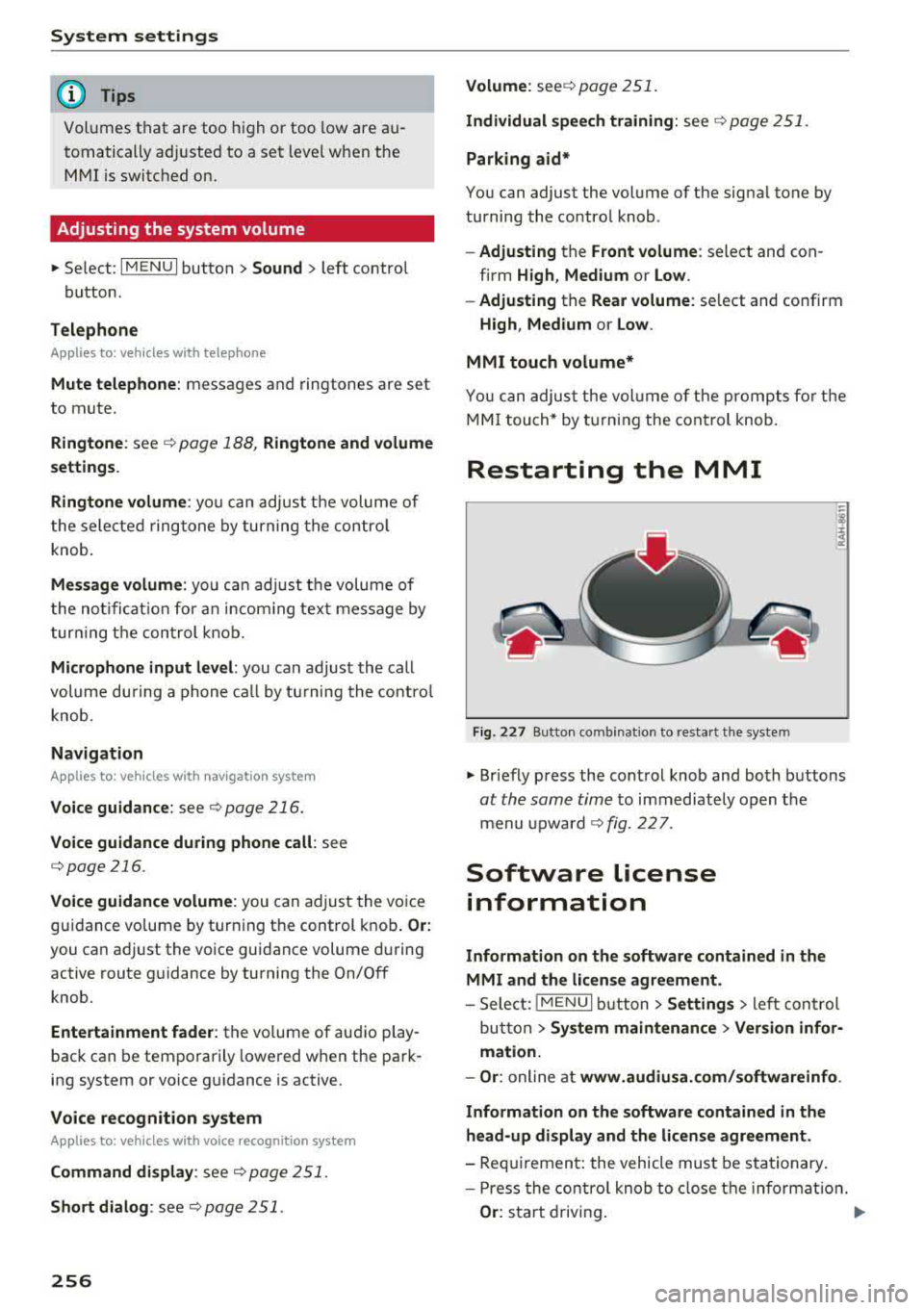
Restarting the MM I
Fig. 22 7 Butto n co mbin at ion to res ta rt t he syste m
.,. Briefly p ress the cont rol knob and bo th bu ttons
at the same time to imm ediately open t he
m enu upward
¢fig. 227 .
Software license
information
Information on the software contained in the
MMI and the license agreement .
-Sele ct: !ME NUI but ton> Settings > left co ntr ol
bu tton >
System maintenance > Version infor
mation.
- Or :
onli ne a t www.audiusa. com/softwareinfo .
Information on the software contained in the head-up display and the license agreement.
- Req uiremen t: the vehicle mus t be s ta tionary .
- P ress the contro l knob to close t he i nformat io n.
Or : sta rt driv ing.
Page 259 of 409
Driving sa fe ty
Driving safety
Basics
Safe driving habits
Please remember -safe ty first!
The individua l safety features of your vehicle can
work together as a system to help protect you
and your passengers in a wide range of accidents.
These features cannot work as a system if they
are not always correctly adjusted and correctly
used .
This chapter contains important informat ion,
tips, instruct ions and warn ings that you need to
read and observe for your own safety, the safety
of your passengers and others . We have summar
ized here what you need to know about safety
be lts , a ir bags, child restra ints as well as child
safety. Yo ur sa fe ty is for us
priority number 1 . Al
ways observe the information and wa rnings in
this section - for your own safety as well as that
of your passengers.
The informa tion in this section applies to all
model ve rsions of your vehicle . Some of the fea
tures described in th is sections may be standard
equipment on some models, or may be optional
equ ipment on others. If you are not sure, ask
your author ized Audi dealer.
A WARNING
- Always make sure that you follow the in
structions and heed the WARNINGS in th is
manual. It is in your inte rest and i n the in
te res t of your passengers .
- Always keep all of the Owner 's L iterature
man uals in yo ur Audi when you lend o r sell
yo ur vehicle so that this importan t info rma
t ion w ill always be availab le to the dr iver
and passenge rs.
- Alw ays keep t he Owner 's L ite ra tu re han dy
so that you can find i t easi ly if yo u have
questions .
258
· Important things to do before driving
Safety is everybody 's job! Vehicle and occupant
safety always depends on the informed and care
ful driver .
For your safety and the safety of your passen
gers,
before driving always:
.. Make sure that a ll lights and signals are operat
ing correctly .
.. Make sure tha t the tire pressure is correct .
.. Make sure that all windows are clean and afford
good vis ibility to the outs ide .
.,. Sec ure all luggage and othe r items ca refully
¢ page 263 .
.,. Mak e sure tha t noth ing ca n interfere with the
pedals .
.. Adjust front seat, head restraint and mirrors
correctly for your height.
.. Applies to: adjustable head restraints: Instruct
passengers to adjust the head restraints ac
cording to the ir height .
.. Make sure to use the rig ht child restraint cor
rectly to protect chi ldren
~ page 302, Child
safety.
.,. Si t properly in yo ur seat a nd make su re t hat
your passengers do the same ¢
page 71, Front
seats.
.. Fasten your safety belt and wear it properly . Al
so instruct your passenge rs to fasten thei r sa fe
ty belts properly ¢
page 268.
What impairs driving safety?
Safe driving is directly related to the condition of
the vehicle , the driver as well as the driver's abili
ty to concentra te on the road withou t being dis
tracted.
The driver is responsib le for the sa fety of the ve
hicle and a ll of its occupants . If your ability to
drive is impa ired, safety risks for everybody in the
vehicle increase and you a lso become a hazard to
everyone else on the road ¢
,&.. There fore:
.. Do not let yourse lf be distracted by passengers
or by using a cellular telephone .
.. NEVER dr ive whe n your driving ab ility is im -
paired (by med ications, alcohol, drugs, e tc.) .
..,.
Page 283 of 409
Airbag system
-Never hold the steering wheel at the 12
o'clock position or with your hands any
where inside the steering wheel or on the
steering wheel hub. Holding the steering
wheel the wrong way increases the risk of
severe injury to the arms, hands, and head if
the driver airbag deploys.
,& WARNING
Objects between you and the airbag will in
crease the risk of injury in a crash by interfer
ing with the way the airbag unfolds and/or by
being pushed into you as the airbag inflates.
- Always make sure nothing is in the front air-
bag deployment zone that could be struck
by the airbag when it inflates.
-
- Objects in the zone of a deploying airbag
can become projectiles when the airbag de
ploys and cause serious personal injury.
- Never hold things in your hands or on your
lap when the vehicle is in use.
- Never place accessories or other objects
(such as cup holders, telephone brackets,
note pads, navigation systems, or things
that are large, heavy, or bulky) on the doors;
never attach then to the doors or the wind
shield; never place them over or near or at
tach them to the area marked ,,AIRBAG" on
the steering wheel, instrument panel or the
seat backrests; never place them between
these areas and you or any other person in
the vehicle.
- Never attach objects to the windshield
above the passenger front airbag, such as
accessory GPS navigation units or music
players. Such objects could cause serious in
jury in a collision, especially when the air bags inflate.
- Never recline the front passenger seat to transport objects. Items can also move into
the deployment area of the side airbags or
the front airbag during breaking or in a sud
den maneuver. Objects near the airbags can
fly dangerously through the passenger com partment and cause injury, particularly
when the seat is reclined and the airbags in
flate.
282
,& WARNING
, -
A person on the front passenger seat, espe
cially infants and small children, will receive
serious injuries and can even be killed by be ing too close to the airbag when it inflates .
- Although the Advanced Airbag System in your vehicle is designed to turn off the front passenger airbag if an infant or a small child
is on the front passenger seat, nobody can
absolutely guarantee that deployment un
der these special conditions is impossible in
all conceivable situations that may happen
during the useful life of your vehicle.
- The Advanced Airbag System can deploy in accordance with the
,.low risk" option for 3-
and 6-year-old children under the U.S. Fed
eral Standard if a child with electrical capac
itance greater than the combined capaci
tance of a typical one-year old infant re
strained in one of the forward facing or rear
ward-facing child seats with which your ve hicle was certified is on the front passenger
seat and the other conditions for airbag de
ployment are met.
- Accident statistics have shown that children
are generally safer in the rear seat area than
in the front seating position.
- For their own safety, all children, especially
12 years and younger, should always ride in
the back properly restrained for their age
and size.
Advanced front airbag system
Your vehicle is equipped with a front Advanced
Airbag System in compliance with United States
Federal Motor Vehicle Safety Standard (FMVSS)
208, as well as Canada Motor Vehicle Safety
Standard (CMVSS) 208 as applicable at the time
your vehicle was manufactured .
-
The front Advanced Airbag System supplements
the safety belts to provide additional protection
for the driver's and front passenger's heads and upper bodies in frontal crashes. The airbags in
flate only in frontal impacts when the vehicle de-
celeration is high enough.
ll>
Page 289 of 409
Airbag system
airbag inflates -even with an Advanced Airbag
System.
- The inflating airbag will hit the child safety
seat or infant carrier with great force and
will smash the child safety seat and child
against the backrest, center armrest, door or roof .
- Always install rear-facing child safety seats
on the rear seat .
- If you must install a rearward-facing child
safety seat on the front passenger seat be
cause of exceptional circumstances and the
PASSENGER AIR BAG OFF~; light does not
come on and stay on, immediately install
the rear-facing child safety seat in a rear
seating position and have the airbag system inspected by your authorized Audi dealer.
A WARNING
Objects between you and the airbag will in
crease the risk of injury in a crash by interfer
ing with the way the airbag unfolds or by be
ing pushed into you as the airbag inflates.
- Never hold things in your hands or on your
lap when the vehicle is in use.
- Never transport items on or in the area of
the front passenger seat. Objects could move into the area of the front airbags dur
ing braking or other sudden maneuvers and
become dangerous projectiles that can
cause serious personal injury if the airbags
inflate .
- Never place or attach accessories or other
objects (such as cupholders, telephone
brackets, large, heavy or bulky objects) on
the doors, over or near the area marked "AIRBAG'' on the steering wheel, instru
ment panel, seat backrests or between
those areas and yourself. These objects could cause injury in a crash, especially
when the airbags inflate.
- Never recline the front passenger's seat to
transport objects. Items can also move into
the area of the side airbag or the front air bag during braking or in a sudden maneu
ver. Objects near the airbags can become
288
-
projectiles and cause injury, particularly
when the seat is reclined .
- Never place or transport objects on the
front passenger seat. Objects on the front passenger seat could cause the capacitive
sensor in the seat to signal to airbag system
that the seat is occupied by a person when it
in fact is not, or that the person on the seat
is heavier than he or she actually is. The
change in electric capacitance because of
such objects can cause the passenger front
airbag to be turned on when it should be
off, or can cause the airbag to work in a way
that is different from the way it would have
worked without objects on the seat.
- Always make sure that there is nothing on
the front passenger seat that will cause the
capacitive passenger detection system in
the seat to signal to the Airbag System that
the seat is occupied by a person when it is not , or to signal that it is occupied by some
one who is heavier than the person actually
sitting on the seat. The presence of an ob
ject could cause the passenger front airbag
to be turned on when it should be off, or
could cause the airbag to work in a way that
is different from the way it would have
worked without the object on the seat.
A WARNING
The fine dust created when airbags deploy can cause breathing problems for people with a history of asthma or other breathing condi
tions .
- To reduce the risk of breathing problems,
those with asthma or other respiratory con ditions should get fresh air right away by
getting out of the vehicle or opening win
dows or doors.
- If you are in a collision in which airbags de
ploy, wash your hands and face with mild
soap and water before eating.
- Be careful not to get the dust into your eyes,
or into any cuts or scratches.
- If the residue should get into your eyes,
flush them with water .
Page 293 of 409
Airbag syste m
Make sure that the PASSENGER AIR BAG
OFF
11;; li ght comes on and stays on all t he
t ime whenever the ignition is switched on.
A WARNING
- If the PA SSEN GER AIR BAG OFF 11;; light
does not go out when an adult is si tting on
the front passe nger seat a fter ta king the
steps described above, make sure the adult is p roperly seated and restrained at one of
the rear seating positions.
- Have the airbag system inspected by your
authorized Aud i dealer before transporting
anyone on the front passenger seat.
@ Tips
If the capacitive passenger detection system
determines that the front passenger seat is
empty, the frontal airbag on the passenge r
side w ill be tu rned off, and the
PASSENGER
AIR BAG OFF
11;; light will stay on.
-
Repair , care and disposal of the airbags
Parts of the a irbag system are installed at many
different places on your Audi. Installing, remov ing, servic ing or repa iring a part in an area of the
ve hicle can damage a part of an airbag system
and prevent that system from working properly
i n a collision .
There are some important things you have to
know to make sure that the effectiveness of the
system w ill not be impaired and that discarded
components do not cause injury or pollute the
env ironment.
A WARNING
Improper care, serv icing and repai r proce
dures can increase the r is k of personal injury
and death by preventing an airbag from de
ploying when needed or dep loying an airbag
unexpectedly:
-
- Never cover, obstruct, or change the stee r
ing wheel horn pad or airbag cover or the in
strument pane l or modify them in any way.
292
- Never attach any objects s uch as c upholders
or telephone mountings to the surfaces cov
ering the a irbag un its.
- For cleaning the horn pad or instrument
panel, use only a soft, dry cloth or one mois
tened w ith plain water. Solvents or cleaners
could damage the airbag cover or change
the st iffness or strength of the material so
that the airbag canno t deploy and p rotect
properly.
- Never repair, adjust , or change any parts of
the airbag system.
- All work on the steering wheel, inst rument
panel, front seats or e lectr ica l system ( in
cluding the installation of a udio eq uipment,
cellular telephones and C B radios, etc.)
m ust be perfo rmed by a qualified techn ician
who has the training and specia l equipment
necessary.
- For any work on the airbag system, we strong ly recommend that you see your au
thorized A udi dealer or qualified workshop.
- Never modify the front b umper or parts of
the vehicle body.
- Always make sure that the side a irbag can
inflate w ithout interference:
- Never install seat covers or replacement
u pholstery over the front seatbacks that
have not been specifically approved by
A udi.
- Never use additional seat c ushions that
cover the areas where the side airbags in
flate.
- Damage to the orig inal seat cove rs or to
the seam in the area of the s ide airbag
module mus t always be repaired immedi
ate ly by an autho riz ed Au di dealer.
- The a irbag system can deploy on ly once. Af
ter an airbag h as been deployed, i t m ust be
repla ced with new replacement parts de
signed and approved espec ia lly for your
Audi model version . Replacement of com
plete airbag systems or airbag components
must be perfo rmed by qua lified workshops
only. Make su re that any airbag service ac
tion is entered in your A udi Warranty
&
Ma intenance boo klet under AIRBAG RE-
PLAC EM EN T RECORD.
~
Page 299 of 409
Airbag syste m
-Never use additiona l seat cushions that
cover the areas where the s ide airbags
deploy.
- Damage to the original seat covers or to
the seam in the area of the side airbag module must always be repaired immedi
ately by an authorized Audi dealer .
- Objects between you and the airbag can in
crease the risk of injury in an accident by in
terfering w ith the way the airbag unfolds or
by being pushed into you as the a irbag in
flates.
- Never p lace or attach accessories or other
objects (such as cupholders, telephone
brackets, or even large, bulky objects) on
the doors, over or near the area marked
"AIRBAG" on the seat backrests.
- Such objects and accessories can become
dangerous projectiles and cause injury
when the supplemental s ide airbag de
p loys.
- Never carry any objects or pets in the de
ployment space between them and the
airbags or allow ch ildren or other passen
ge rs to travel in this posit ion.
- Always use the built-in coat hooks* only for
lightweight cloth ing . Neve r leave any heavy
o r sharp-edged objects in the pockets that
may interfere w ith side airbag dep loyment
and can cause personal injury in an accident .
- Always preven t the side airbags from be ing
damaged by heavy objects knock ing against
or hitting the sides of the seatbacks .
- T he airbag system can only be trigge red
once . If the airbag has been triggered, the
system must be replaced by an authorized
Audi dealership.
- Damage (cracks, deep scratches etc.) to the
original seat covers or to the seam in the
area of the side airbag modu le must always
be repa ired immed iate ly by an authorized
Audi dealer.
- If children are seated improper ly, their r isk
of injury increases in the case of an acc ident
Q page 302, Child safety.
- Never attempt to modify any components of
the a irbag system in any way.
298
-In a side collision, side airbags will not func
tion properly if sensors cannot correctly measure increasing air pressure inside the
doors when a ir escapes through larger, un
closed open ings in the door panel.
- Never dr ive with interior doo r trim panels
removed.
- Neve r dr ive when parts have been re
moved from the inside door panel and the
openings they leave have not been proper
l y closed .
- Never drive when lo udspeakers in the
doors have been removed unless the
speaker holes have been properly closed.
- Always make certain that open ings are
covered o r filled if additional speakers or
other equipment is installed in the inside
door panels.
- Always have work on the doors done by an
authorized Aud i dea ler or qualified work
shop.
Side curtain airbags
Description of side curtain airbags
App lies to: vehicles with side curtain airbags
The side curtain airbags can provide supplemen
tal protection to properly restrained occupants.
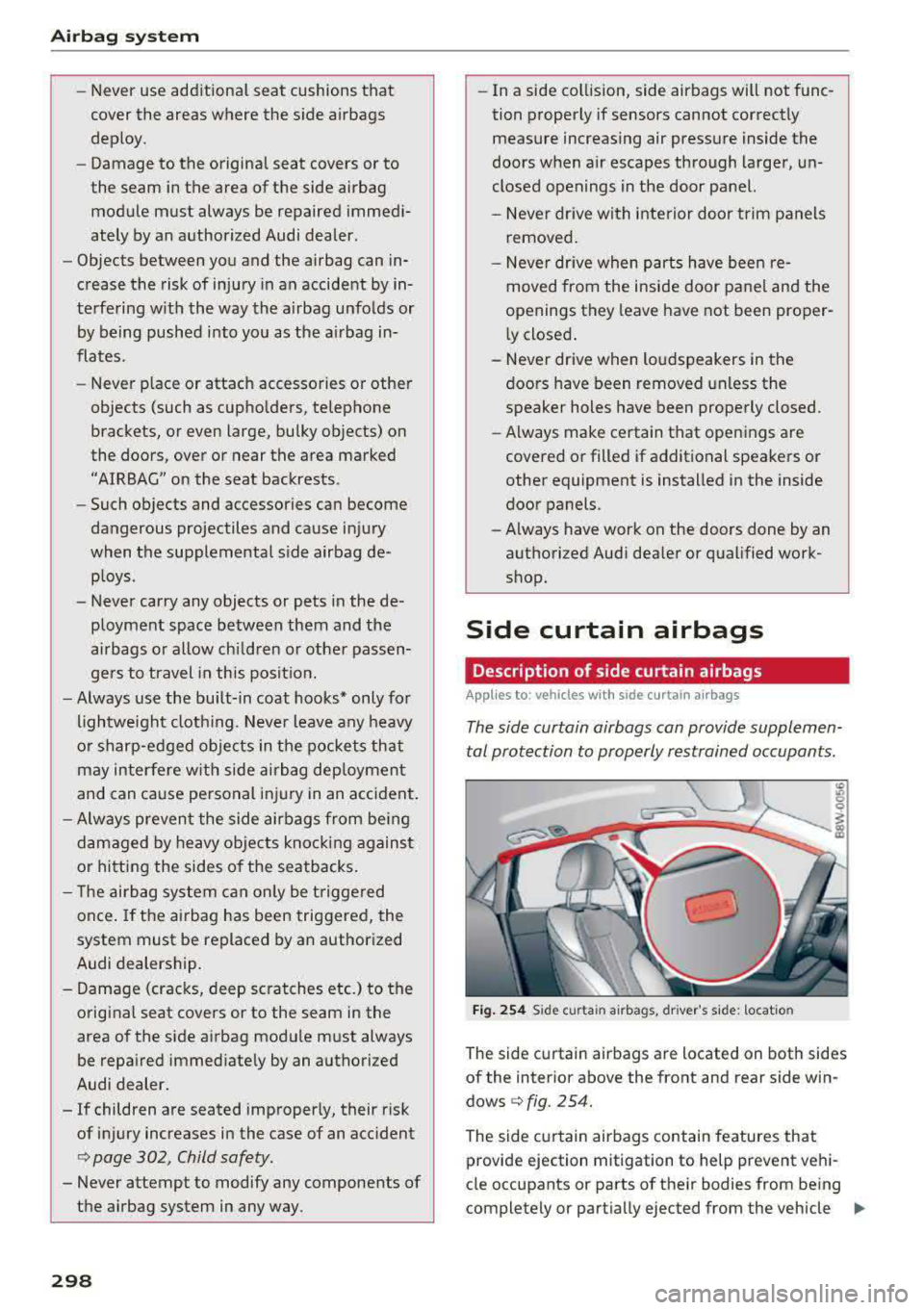
Fig . 254 S ide curta in airbags, driver 's side: location
"' "' 0
i
The side curtain airbags are located on both sides
of the interior above the front and rear side win
dows
Q fig. 254.
The side curtain airbags contain features that provide ejection mitigation to help prevent ve hi-
cle occupants or parts of their bodies from being
completely or part ially ejected from the vehicle
1111-
Page 326 of 409
<( a, .... N ,....
N .... 0 \0
3 a,
filler door. For additional information on fuel,
see
~page 322.
The fuel tank capacity of your vehicle is listed in the
T ec hnical Dat a section ~ page 388.
To avoid fuel spill ing or evaporating from the fuel
tank always close fuel cap p roperly and com
p letely . An improperly closed fue l filler cap may
a lso cause the MIL
lamp~ page 24 t o come on.
A WARNING -
Not paying attention when fueling or han
dling fue l incorrectly can lead to fires, exp lo
sions or serious in juries.
-Fuel ignites easily and can cause serious
burns and other injuries.
-If you do not switch the engine off when fu
eling and/or do not insert the fuel nozz le
completely into the tank opening, fue l can
leak out or run over. Leaked fuel can ignite
and start a fire.
-Do not use the telephone whi le fueling. The
electromagnetic rays can cause sparks,
wh ich can ignite fuel vapors and start a fire.
-Do not sit in your vehicle while fueling. If
you must make an except ion and enter your
vehicle again wh ile fue ling, close the door
and touch meta l to discharge static electric
ity befo re touch ing the fue l nozzle. Static
elect ricity can create spar ks, wh ich can ig
ni te vapo rs when fue ling.
-Do not smoke or have an open flame in the
area when fueling your veh icle o r filling a
f uel contai ner because th is increases the
risk of an explos ion .
-For yo ur safety, carrying f uel containers in
yo ur vehicle is no t recommended. Whethe r
f ull or empty, the conta iner can leak a nd
cause a fire in the event of an accident .
-If you must make an exception and trans
port a fuel container, note the following :
-Never fill the fuel container with fuel
while it is in or on the vehicle. Stat ic elec
tr icity is d ischa rged when filling wh ich can
cause the f uel vapors to ignite and in
creases the r isk of an explos ion.
-Always p lace a fuel containe r on the
g ro u nd before fi llin g.
Ch eck ing and Filling
-Always hold the fue l nozzle completely in
the fuel container when filling.
-If the fuel container is made of metal, the
fuel nozzle must always be in contact with
the container when filling it with fuel. This
prevents stat ic electricity from discharg
ing .
-Never spill fuel in the vehicle or the lug
gage compartment. Evaporated fuel is ex
plosive and increases the risk of serious in
jury or death .
-Follow legal requirements when using,
stor ing and transporti ng fuel conta iners .
-Make sure the fuel container conforms to
industry standards (ANSI/AS TM F8S2-86).
@ Note
-Remove spilled fuel from vehicle pa int im
mediately, because it can damage paint.
-Never drive unti l the fuel tank is complete ly
empty. The irregular supply of fue l that re
sults from that can cause eng ine misfires.
Uncombusted fuel will enter the exhaust
system and increase the risk of damage to
t he catalytic converte r.
-If the fue l tank runs complete ly empty in a
vehicle with a
diesel eng ine , the ignition
must remain swit ched on fo r at least 30
se conds afte r ref ueli ng before starti ng the
eng ine. It may take longer than usual fo r
t he engine to s tart, even up to a minu te.
T his is because the air must first b leed out
of the fue l system when starting the eng ine.
@ For the sake of the environment
Do not overfill the fuel tank, otherwise fuel
can leak out when the veh icle is warming up.
(D Tips
D iesel ve hicles are eq uipped w ith a diesel mis
fueling guard .
It allows the vehi cle to be fu
eled on ly with a diesel fuel pump nozzle. A
worn or damaged nozzle or a nozzle that is
too small may not be able to open the diese l
misfueling guard. If this is the case, try turn
i ng the nozzle before inserting it in the fue l
filler neck, use a different fuel pump, o r see
325