battery AUDI A6 2011 User Guide
[x] Cancel search | Manufacturer: AUDI, Model Year: 2011, Model line: A6, Model: AUDI A6 2011Pages: 370, PDF Size: 87.15 MB
Page 41 of 370
Check Light in the master key
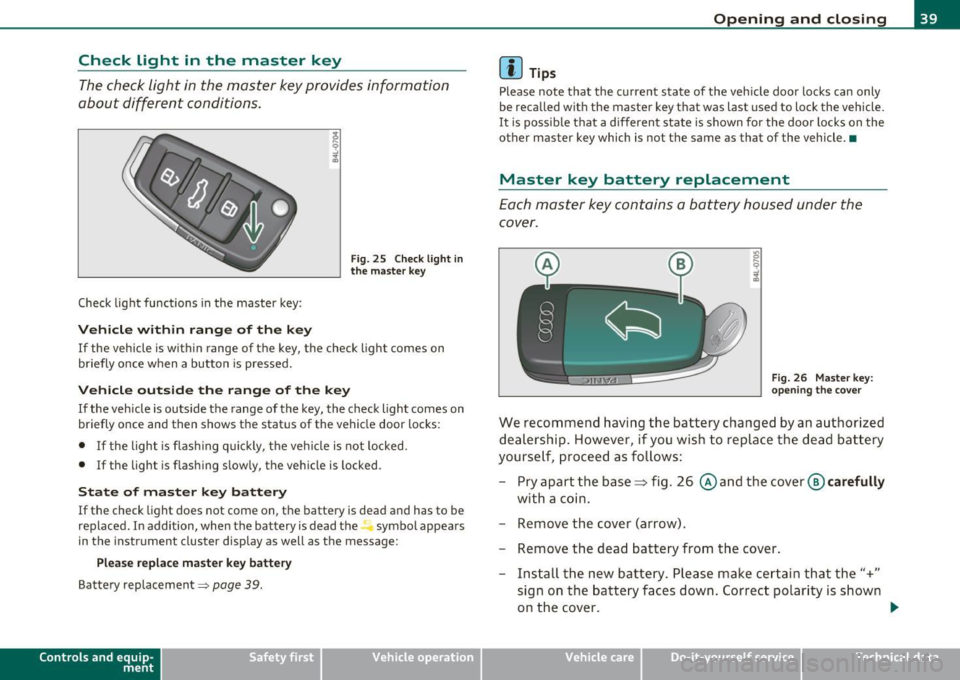
The check light in the master key provides information
about different conditions.
Check light functions in the master key :
Vehicle within range of the key
Fig . 25 C heck lig ht in
the m aster k ey
If the vehicle is w ith in range of the key, the check light comes on
briefly once w hen a button is pressed.
Vehicle outside the range of the key
If the veh icle is outside t he range of the key, the c hec k light comes on
briefly once and then shows the status of the vehicle door locks:
• If the light is fl as hi ng q uickly, the veh icle is not locked.
• If the light is f lashing slow ly, the vehicle is locked .
State of master key battery
If the check light does not come on, the battery is dea d and has to be
replaced . I n addition, when the battery is dead the symbol appea rs
i n the instrument cluste r display as well as the message :
Please replace ma ster ke y battery
Battery replacement~ page 39.
Con tro ls a nd e quip
m en t Vehicle
OP-eration
Opening and closing
(I) Tips
Please note that the c urrent state of the vehicle doo r locks can only
be recalled wit h the master key t hat was last used to lock the vehicle.
It is poss ib le tha t a d ifferen t state is shown fo r the door lo cks on the
other master key which is not the same as that of the vehicle .•
Master key battery replacement
Each mas ter key contains a battery hous ed under th e
cover.
Fi g. 26 Master key:
o pe ning the c ove r
We reco mmend having the ba ttery chang ed by an au thori zed
dealer ship . However , if you wi sh to replace th e dead b atte ry
yourse lf, proc eed as follows :
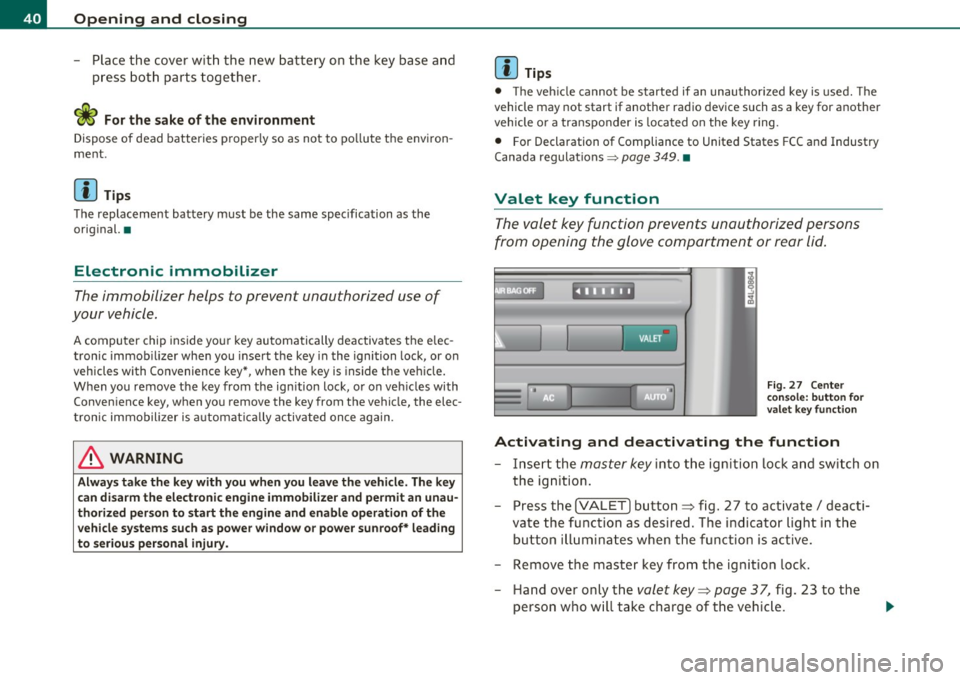
- Pry apart the base~ fig. 26 @and the
cover @carefully
with a c oin.
- Remove the cover (arrow).
- Remove the dead battery from the cover .
- Install th e new ba ttery . Please make c ertain that the"+"
sign on t he ba ttery faces down . Correct po lar ity is shown
o n the cover. .,,.
Vehicle care Do-it-yourselt service iTechnical data
Page 42 of 370
Open ing and closing
- Place the cover w ith th e new battery on the key base and
press both parts together.
c£> For the s ake of the environment
Dispose of dead batteries proper ly so as not to po llute the envi ron
me nt.
00 Tips
The replacement battery must be the same specification as the
orig inal. •
Electronic immobilizer
The immobilizer helps to prevent unauthorized use of
your vehicle.
A compu ter chip inside you r key au tomatically deactivates the e lec
tron ic immob ilizer when you insert the key in the ignition lock, or on
vehicles with Convenience key*, when the key is inside the vehicle.
When you remove the key from the ign ition lock, or on veh icles with
Conven ience key, when you remove the key from the vehicle, the elec
tron ic immobil izer is a utomat ica lly activated once again.
& WARNING
A lway s ta ke the ke y w ith you when you l eav e the vehicle . Th e key
can di sa rm the e lect roni c engine immobilizer and pe rmit an un au
thori zed p erso n t o start the eng ine a nd enable operation of the
v ehi cle sy stems su ch a s pow er w indo w or p ow er sunroof* l eading
to seriou s per sonal injur y.
00 Tips
• The veh icle cannot be started if an unauthori zed key is used. The
vehicle may not start if another radio device su ch as a key for another
vehicle o r a transponder is located on the key ring .
• For Declaration of Compliance to United S tat es FCC and Industry
Canada regulations =>
page 349. •
Valet key function
The valet key function prevents unauthorized persons
from opening the glove compartment or rear lid.
,~ • F ig. 27 Ce nter
co nsole: button for
valet key functio n
Activating and deactivating th e function
- Insert the master key into the igni tion lock and switch on
the ignition.
- Press the
!VALET] button ~ fig. 27 to activate/ deacti
vate the function as desired. The in dicator light in the
button il luminates whe n the funct ion is ac tive.
- Remove the master key from the ignition lock. - Hand over only the
valet key~ page 37, fig. 23 to the
person who will take charge of the vehicle .
Page 51 of 370

• The proximity sensors are deactivated after a few days to save
power . You then have to pull on the door handle once to unlock the
vehicle and a second time to open the vehicle.
• To prevent the battery from being discharged and to preserve your
vehicle's ability to start for as long as possible, the energy manage
ment system gradually switches off unnecessary convenience func
tions . It is possible that you will not be able to unlock your vehicle
using these convenience functions. •
Appli es to ve hicle s: wit h Co nven ience key
Locking the vehicle
The vehicle can be locked without operating the mastery
key.
(
i
Fig . 37 Convenience
key: Locking the
vehicle
- Move the selector lever to the P position.
- Press the locking button in the door handle to lock the
vehicle ~& .
The vehicle can be locked at any door . The authorized master key only
has to be within a range of about 1.5 meters from the particular door.
Th e se lecto r lever must be in the P position , otherwise the vehicle
cannot be locked .
Controls and equip
ment Safety first
Opening and closing
& WARNING
•
When you lock your vehicle from outside, nobody -especially
children -should remain inside the vehicle. Remember, when you
lock the vehicle from the outside the windows cannot be opened
from the inside.
• When you leave the vehicle, always remove the ignition key
and take it with you. This will prevent passengers (children, for
example ) from accidentally being locked in the vehicle should
they accidentally press the power locking switch in the front
doors .
• Do not leave children inside the vehicle unsupervised. In an
emergency it would be impossible to open the doors from the
outside without the key.
[ i ] Tips
It is not possible to re-open the door for a brief period directly after
closing it. This allows you to ensure that the doors are properly
locked. •
Anti-theft alarm system
Description
The anti-theft alarm triggers an alarm if anyone
attempts to break into the vehicle.
The anti-theft alarm system triggers an audible alarm and turns on
the emergency flasher if an unauthorized interf erence with the
vehicle is sensed by the system.
How is the anti-theft alarm system switched on?
The anti-theft alarm system is switched on when you lock the veh icle.
Th e system is activated approximate ly 30 seconds after the vehicle is .,,_
Vehicle care Technical data
Page 55 of 370

-Turn and hold the k ey in the lock posit ion®~ page 52,
fig. 40 until t he windows and th e power roof * are
comple tely closed .
Opening windows
-Inse rt the key into the lock o f th e driver's door.
Turn and hold the key in t he open posit ion @.
The a utomat ic close/open fu nction will cease if the key is returned to
i t s or iginal pos it io n.
& WARNING
• Be careful when closing the windows . Check to see that no one
is in the way, or serious injury could re sult!
• Always read and heed WARNING=>
& in "General des cription "
on
page 41 . •
Reactivating the system after battery
disconnection
If the vehicle battery is disco nnected and t hen reconnected ,
the automatic closing and opening function will not work
u nti l it is reactivated. To reactivate th is featu re, perform the
fo llowing steps:
Reactivating close /open feature
- Pull and hol d th e power w indow sw itc h until t he window is
comp letely closed .
- Release the switch.
- Pull the swi tch again for one second. The automat ic
closi ng/opening is now reactivated. •
Contro ls a nd e quip
m en t Vehicle
OP-eration
Opening and closing
Sliding/tilting power sunroof
Applies to veh icles: with slid ing/t ilting powe r sunroof
How the power sunroof works
Fig . 41 Section of th e
h eadliner : su nroo f
s wit ch pos itio ns
The roof will slide open or ti lt up at the rear as required. When the
ignition is on, yo u can slide the roof open or close it to the des ired
position by turning the rotary control sw itch located overhead next to
the inte rior light. The roof is tilted open o r closed by p ressing or
pulling the control switch at posit ion ®=>fig. 41.
You can s till close or open the sunroof for up to ten minutes after you
have switched off the ignition with the key remaining in the ignition
lock. If either door is opened, powe red operation of the sun roo f will
be deact ivated.
Solar protection with sliding glass sun roof*
The sliding glass sun roof is equipped with an ad justable sunshade to
reduce the effects of strong sunlight. The so lar protection can be
moved at the recessed hand le to open and close it. To p revent the
vehicle interior f rom heat ing up, you should close the solar protection
when you park yo ur vehicle in the s un .
When the roof is
slid open , the sunshade is opened automat ica lly.
Whe n the roof is closed, the sunshade can be closed man ua lly. .,
Vehicle care Do-it-yourselt service iTechnical data
Page 66 of 370
Clear vision
When a door is open, the interior lights are turned off after about 10
minutes to prevent draining the battery.
The brightness of the lights is controlled automatically by a dimmer
when they a re switched on and off .•
Rear interior Lights
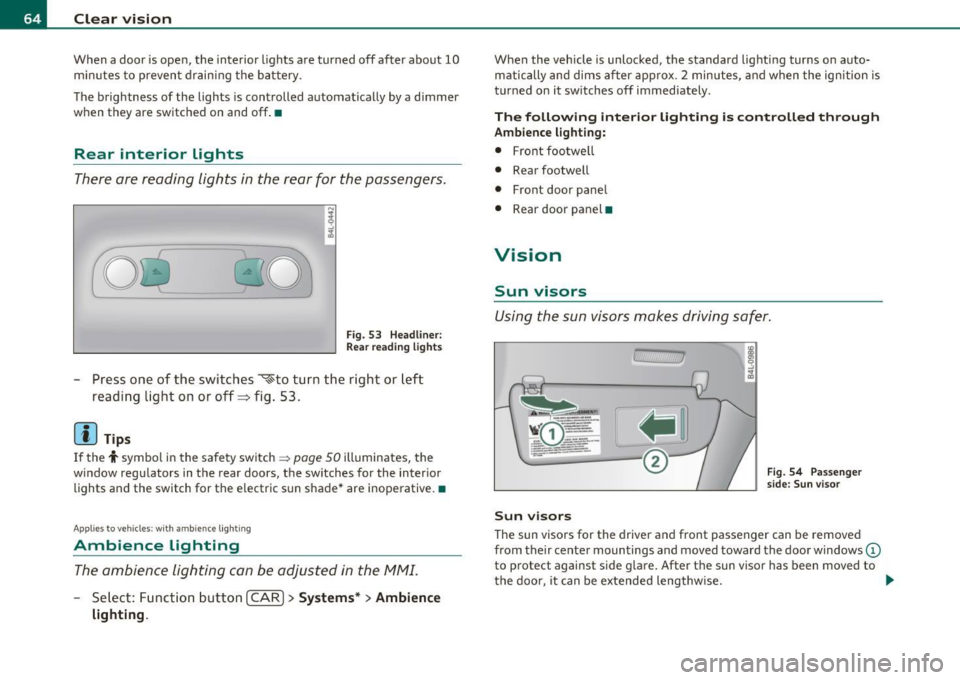
There ore reading lights in the rear for the passengers.
0 '-80
Fig . 53 Headline r:
Rea r read ing lights
Press one of the switches ~to turn the right or left
reading light on or off=> fig . 53 .
[I) Tips
If the t symbol in the safety switch ~ page 50 illuminates, the
w indow regulators in the rear doors, the switches for the interior
lights and the switch for the electric s un shade* are inoperative. •
Applies to ve hic le s: wit h am bien ce ligh tin g
Ambience Lighting
The ambience lighting con be adjusted in the MMI.
-Select: Function button I CAR ]> Systems* > Ambience
lighting.
When the vehicle is unlocked, the standard lighting turns on auto matically and dims after approx . 2 minutes, and when the ignition is
turned on it sw itches off immediately.
The following interior lighting is controlled through
Ambience lighting:
• Front footwe ll
• Rear footwell
• Front door panel
• Rear door panel •
Vision
Sun visors
Using the sun visors makes driving safer.
Sun visors
Fig. 54 Passenger
side: Sun visor
The sun visors for the driver and front passenger can be removed
from the ir center mountings and moved toward the door w indows
(D
to protect against side glare. After the sun visor has been moved to
the door, it can be extended lengthw ise. ..
Page 94 of 370
Seats and storage
Cigarette lighter/socket
Cigarette lighter
. .
. .
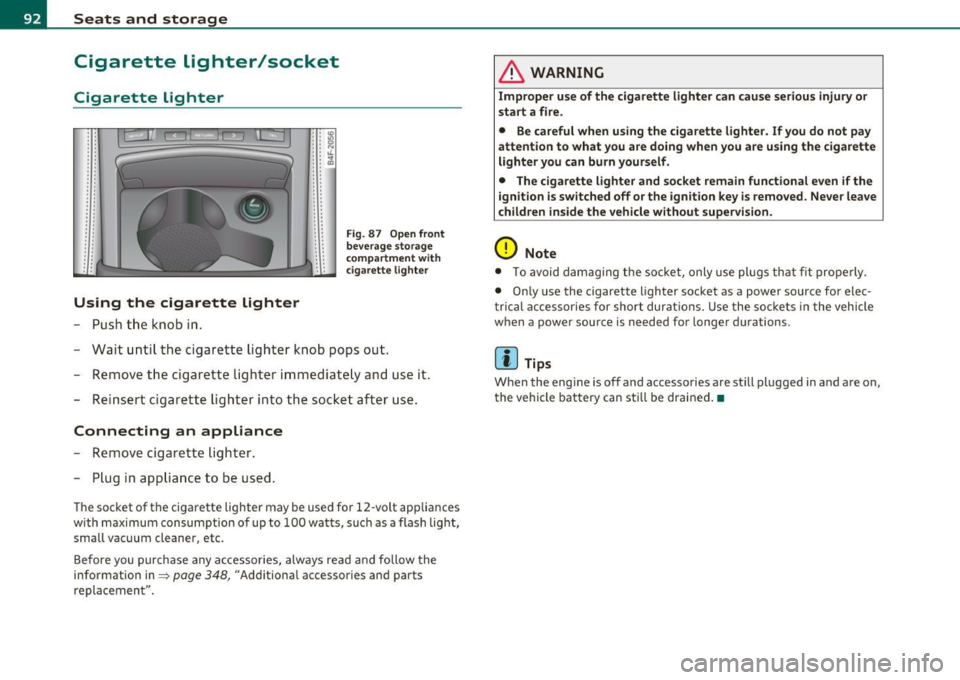
Using the cigarette lighter
- Push the knob in.
• • IO .. :g • • N : : "-.. ~ . .
.. . .
Fig . 87 Open front
beverage storage
c ompartment wit h
ciga rette lighter
-Wait until the cigarette lighter knob pops out.
- Remove the cigarette lighter immediately and use it.
- Reinsert cigarette lighter into the socket after use.
Connecting an appliance
-Remove cigarette lighter.
- Plug in appliance to be used.
The socket of the cigarette lighter may be used for 12 -volt app liances
w ith maximum consumption of up to 100 watts, such as a flash light,
small vacuum cleaner, etc.
Before you purchase any accessories, always read and follow the
information in=>
page 348, "Additional accessor ies and parts
replacemen t".
& WARNING
Improper use of the cigarette lighter can cause serious injury or
start a fire.
• Be careful when using the cigarette lighter. If you do not pay
attention to what you are doing when you are using the cigarette
lighter you can burn yourself .
• The cigarette lighter and socket remain functional even if the
i gnition is switched off or the ignition key is removed. Never leave
children inside the vehicle without supervision.
0 Note
• To avoid damag ing the socket, only use plugs that fit properly.
• Only use the cigarette lighter socket as a power source for elec
t rical accessories for short durat ions. Use the sockets in the vehicle
when a power source is needed for longer durations .
[ i ] Tips
When the engine is off and accessories are st ill plugged in and are on,
the vehicle battery can sti ll be drained. •
Page 95 of 370
Outlet
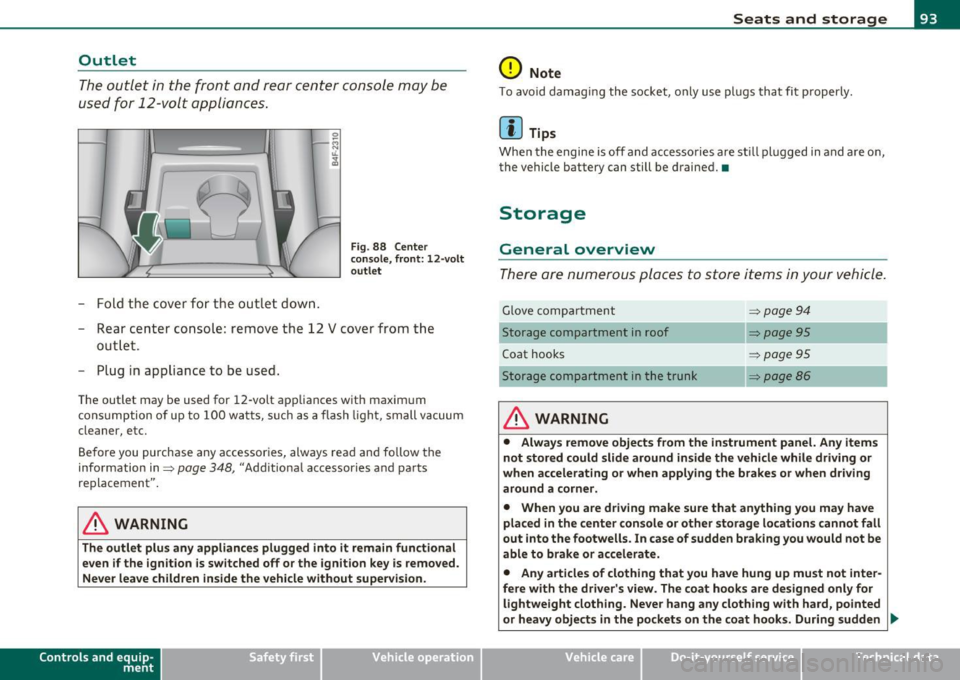
The outlet in the front and rear center console may be
used for 12-volt appli ances .
- Fold the cover fo r the outlet down .
Fig. 88 Center
c on sole , fr ont: 12 -vol t
ou tlet
- Rear center console: remove the 12 V cover from the
out le t.
- Plug in appliance to be used.
The outlet may be used for 12-volt appliances with maxim um
consumption of up to 100 wat ts, su ch as a flash light, small vacuum
cleaner, etc.
Be fore you purchase any accessories, always read and fo llow the
information in:::::,
page 348, "Additional accessories and parts
replacement".
& WARNING
The outlet plus any applianc es plugged into it r emain functional
even if the ign ition is switched off or th e ign itio n key is remo ved.
Ne ver leave children in side the vehicle without supervi sion.
Cont rols a nd e quip
m en t Vehicle
OP-eration
Seats and storage
0 Note
To avo id damaging the socket, only use p lugs that fit p roperly.
[ i ] Tips
Whe n the engine is off and accesso ries a re st ill plugged in and a re on,
the vehicle battery can still be drained. •
Storage
General overview
There are numerous places to store items in your vehicle .
Glove compa rtment :::::, page 94
Storage compartment in roof :::::, page 95
Coat hooks :::::, page 95
Storage compartment in the trunk :::::, page 86
& WARNING
• Alwa ys rem ove objects from the in strument panel. Any items
not stor ed could slid e around in side the v ehicle while driv ing or
when a ccelerating o r whe n applying t he br ake s or whe n driv ing
around a corn er.
• When you are dri ving make sure that an ything you ma y have
placed in the center con so le or other sto rage locat ion s cannot fall
out into the footwells . In case of sudden br aking you would not be
able to b rake or acc ele rate.
• An y article s of clothing that you ha ve hung up mu st not inter
f e re with th e driver's view . The co at hooks are d esigne d only for
lightweight clothing. Ne ver ha ng any clothing with ha rd, pointed
or heavy obj ects in the pockets on th e co at hooks . During sudden
~
Vehicle care Do-it-yourselt service iTechnical data
Page 146 of 370

1111....__A_ u_ d_i_ s_id _e_ a_s _s_ i_ s _t _________________________________________________ _
Notes
Applies to v ehicl es : w it h sid e ass ist
Messages in instrument cluster display
I f si de ass ist tur ns off automatica lly, t he in dicator light on the butto n
w ill go out a nd you w ill s ee a m essag e in t he i nstrumen t cluste r
display:
Audi side assist not available: sensors blocked
Th e side ass is t se nsors ar e built i nto th e rear bump er on th e le ft and
r igh t (no t vis ib le o n the out sid e)=>
pag e 137, fig. 128 . To ensur e
that yo u do not a dve rsely affect t he way si de assist funct ions, foreign
obj ects (such as st ick ers or bicycle rac ks) should not b e atta ch ed t o
the area on t he rear bum per whe re t he sensors are located. If side
assi st funct ions a re adve rse ly aff ected, y ou wi ll see th is m essage in
the inst rument cl uster disp lay. R emove anyth ing that may b e
b locking t he sens ors .
If no ve hicl e is detect ed for a lo nger p eriod of t im e w hile driving , side
assist w ill also sw itc h
off automati ca lly .
Audi side ass ist currently not available
I f the re i s a t empora ry problem (s u ch as the vehicle 's battery char ge
b ein g low), s ide ass ist ca nnot b e act ivated t em porar ily .
Audi side assist: system fault
Have the system checked by an a utho riz ed Aud i dealer or qualified
wo rk shop. •
Applies to ve hicl es : w ith sid e ass is t
Safety tips
T he s ide assist detection may be limited w hen driving aro und narrow
str eet co rn ers, on hill y stree ts, and under p oor we ath er co nditions . It is possib
le that the radar senso rs may also detect other objects,
such a s high or st agg ere d gu ardr ails.
Side assis t does not measure ac tual lane wid th . T he sys tem assumes
a fixe d lane w idth . Detection in the le ft and rig ht lanes is based on
th is ass um ed lan e width . Wh en drivi ng on narrow ro ads or w hen
driv ing to t he left or r ight of t he cente r of a t ravel lane, it is possib le
that vehicles will be de te ct ed th at are
no t in th e lan e nex t to th e lane
you a re us ing.
& WARNING
• Improper reliance on the side assist system can cause collisions
and serious personal injury:
-Never rely only on side assist when changing lanes.
- Always check rear view mirrors to make sure that it is safe to
change lanes.
• Side assist cannot detect all vehicles under all conditions
danger of accident!
• Side assist cannot detect vehicles in time to alert you when
they approach from behind at very high speed , or fall drop back
very quickly.
• The radar sensor's
vision can be reduced or entirely blocked by
rain, snow, and heavy spray. This can result in side assist not
adequately detecting vehicles or, in some cases, not detecting
them at all . Always keep an eye on the direction you are traveling
and the relevant area around the vehicle .
• Please note that side assist indicates there are approaching
vehicles, or vehicles in your blind spot , only after your vehicle has
reached a driving speed of at least 19 mph (30 km/h).
• Side assist signal does not work around tight corners (turning
radius less than 328 feet, or 100 m) .
• Side assist is no replacement for the driver's full attention . The
driver alone is responsible for lane changes and similar driving
maneuvers. Always keep an eye on the direction you are traveling
and the relevant area around the vehicle.
~
Page 154 of 370
-Automatic transmission .n,..__ ______________ _
Appli es to veh icles : wi th 6-spe ed a utomatic t ransm iss ion
Emergency release for selector Lever
If the vehicle's power supply fails, the selector lever can
be released in an emergency.
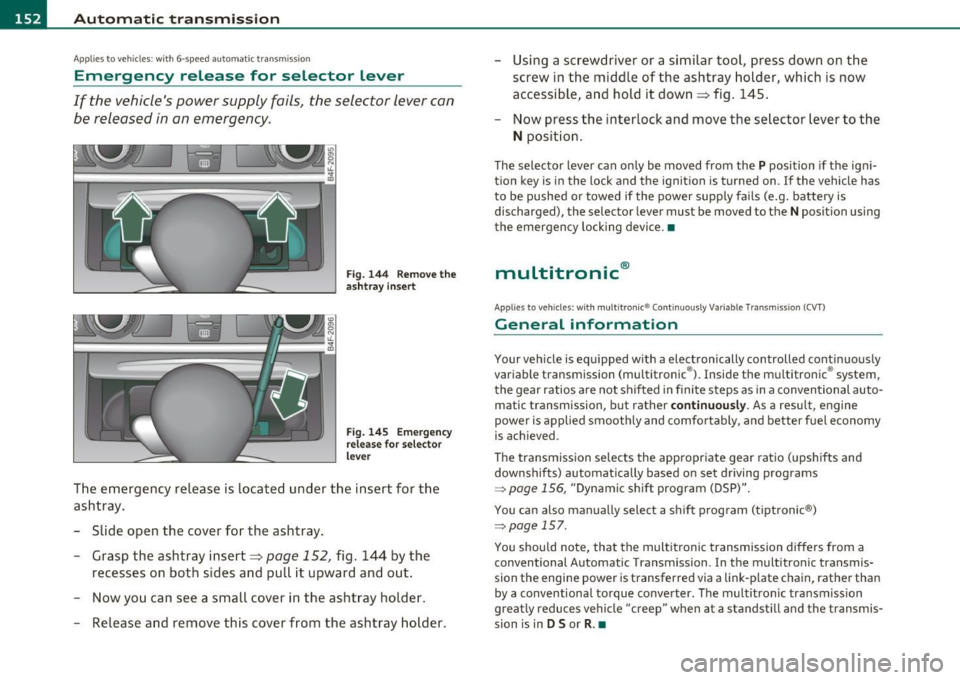
Fig. 144 Remove the
ashtray insert
Fig. 145 Emergency
release for selector
lever
The emergency release is located under the insert for the
ashtray.
- Slide open the cover for the ashtray.
- Grasp the ashtray insert=>
page 152, fig. 144 by the
recesses on both sides and pull it upward and out.
- Now you can see a small cover in the ashtray holder.
- Release and remove this cover from the ashtray holder. -
Using a screwdriver or a similar tool, press down on the
screw in the middle of the ashtray holder, which is now
accessible, and hold it down=> fig. 145.
- Now press the interlock and move the selector lever to the
N position.
The selector lever can only be moved from the P position if the igni
tion key is in the lock and the ignition is turned on . If the vehicle has
to be pushed or towed if the power supply fails (e.g. battery is
discharged), the selector lever must be
moved to the N position using
the emergency locking device.•
multitronic ®
Appli es to vehi cles: w ith mul tit ron ic® Co ntin uous ly Var ia ble Tra nsm iss ion ( CVT)
General information
Your vehicle is equipped with a electronically controlled continuously
variable transmiss ion (multitronic ®). Inside the multitronic ® system,
the gear ratios are not shifted in finite steps as in a conventional auto
matic transmission, but rath er
continuously. As a result, engine
power is applied smoothly and comfortably, and better fuel economy
is achieved .
The transm ission selects the appropriate gear ratio (upshifts and
downshifts) automatically based on set driving programs
~ page 156, "Dynamic shift program (DSP)".
You can also manually select a shift program (tiptronic ®)
~ page 157.
You should note, that the multitronic transmission differs from a
conventional Autom ati c Transmission . In the multitronic transmis
sion the engine power is transferred via a link-plate chain, rather than
by a conventional torque converter. The multitronic transmission
greatly reduces vehicle "creep" when at a standstill and the transmis
sion is in
D Sor R . •
Page 161 of 370

____________________________________________ A_ u_ t_ o_ m_ a_ t_ i_ c _ t_ra _ n_s_ m __ is_s_ i_ o _ n _ __._
App lies to vehicles : wi th mul titro nic® Continu ous ly Va riable Trans missi on (CV T)
Emergency release for selector lever
If the vehicle's power supply fails, the selector lever can
be released in an emergency.
Fig. 152 Remove the
asht ray insert
F ig . 153 E mergen cy
release for se lector
l ever
The emergency release is located under the insert for the
ashtray.
- Slide open the cover for the ashtray .
- Grasp the ashtray insert~ fig. 152 by the recesses on
both sides and pull it upward and out.
- Now you can see a small cover in the ashtray holder.
- Release and remove this cover from the ashtray holder.
Con tro ls a nd e quip
m en t Vehicle
OP-eration
-Using a screwdriver or a similar tool, press down on the
screw in the middle of the ashtray holder , which is now
accessible, and hold it down~ fig. 153 .
- Now press the interlock and move the selector lever to the
N position.
The selector lever can only be moved from the P position if the igni
tion key is in the lock and the ignition is turned on. If the vehicle has
to be pushed or towed if the power supply fails (e.g. battery is
discharged), the selector lever must be moved to the
N position using
the emergency locking device. •
Vehicle care Do-it-yourselt service iTechnical data