fuel AUDI A6 2011 User Guide
[x] Cancel search | Manufacturer: AUDI, Model Year: 2011, Model line: A6, Model: AUDI A6 2011Pages: 370, PDF Size: 87.15 MB
Page 37 of 370
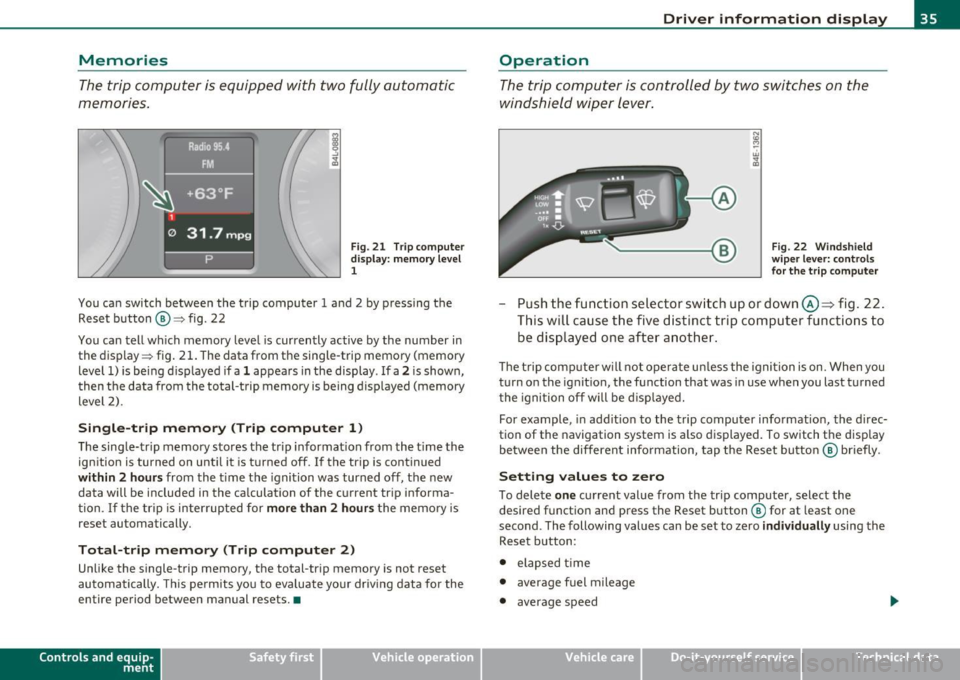
Memories
The trip computer is equipped with two fully automatic
memories .
Fig. 21 T rip c omput er
di spl ay : m emory l evel
1
You ca n switch be twee n the t rip computer 1 a nd 2 by p ressing the
Rese t button @=> fig. 22
You can tell wh ich memory level is currently active by the number in
the display => fig . 21 . The data from t he single-trip memory (memory
level 1) is be ing d isp layed if a
1 appea rs in the display . If a 2 is shown,
then t he data from the total-trip memory is being displayed (memory
level 2) .
Single-trip memory (Trip computer 1 )
The sing le-tr ip memory sto res the trip informat ion from the t ime the
ign ition is turned on unt il it is t urned off .
If the trip is cont inued
within 2 hour s from the time the ignition was turned off, the new
data will be included in the ca lculation of the current tr ip informa
tion .
If the tri p is interrup ted for more than 2 hours t he memory is
reset automatically.
Total-trip memory (Trip computer 2)
Unlike the single-trip memory, the total-tr ip memory is not reset
au tomatically. This pe rmit s you to eva luate yo ur driv ing data fo r the
entire period between manual resets. •
Contro ls a nd e quip
m en t Vehicle
OP-eration
Driver information display
Operation
The trip comp uter is controlle d by two swit che s on the
w ind shield wi per lev er.
Fig . 22 W indsh ield
w ipe r lev er: co nt rol s
fo r the trip compute r
-Push the fu nctio n se le ctor sw itch up or down @~ fig . 22 .
Thi s will cause th e five d ist inc t trip c om puter func tion s to
be dis played o ne aft er anoth er.
The trip com puter w ill not oper ate u nless the igni tion is on. When you
turn o n the ignit ion, the function that was in use when you last turned
t he igni tion off w ill be dis played.
For example , in add it ion to the trip compu ter informat io n, the direc
tion of the navigation system is a lso d is p layed . To switch t he display
be tween the different info rmation, tap the Reset butt on @ briefly .
Setting values to zero
To dele te one c ur rent value from the tr ip computer, select the
desired f unct io n an d press the Reset b utton ® for at least one
second . The following values can be set to zero
individually using the
Reset b utton :
• elapsed time
• average fuel mileage
• average speed
Vehicle care Do-it-yourselt service iTechnical data
Page 44 of 370

Opening and closing
Unlocking and locking with Convenien ce key *
On vehicles wh ich a re equipped with the Con venience key* a uthoriza
t ion system, the doo rs a re unlocked
without a key by means of a prox
im ity sensor in the door handle . The doors are s imilarly locked
without a key us ing the locking button . Eac h door has a prox imity
sensor and a locking button.
Automat ic locking
T he a utomatic locking feature locks all t he vehicle doo rs and the rea r
lid when you d rive faste r than 9 mph (15 km/h). This funct ion can be
t u rned on and off in the MMI
Central locking Men u:::) page 44 .
You ca n unlo ck the vehi cle from the ins ide by:
• removing the key from the ignit ion sw itch (the ve hicle w ill auto
matically un lock itself) or
• pressing the unlock part of the power lock switch
!i::il or
pulling the door handle (twice to open the rear doo rs) .
& WARNING
• When you lock your vehi cle from outside, nobody · especially
children -should remain inside the vehicle . Remember, when you
lock the vehicle from the out side the windows cannot be opened
from the inside .
• When you leave the vehicle, always remove the ignition key
and take it with you. This w ill prevent passengers (children, for
example ) from accidentally being locked in the vehicle should
they accidentally press the power locking switch in the front doors.
• Do not leave children ins ide the vehicle unsuperv ised . In an
emergency it would be impossible to open the doo rs from the
outside without the key .
[I] Tips
• In the event of a cras h w it h ai rbag deploy ment all locked doo rs
w ill be automatically u nlocked to give access to t he vehicle occupants
from t he outside .
• If the power lock ing system should malfunction, you ca n lock each
door ind iv id u ally using the ve hicl e key :::)
page 45.
• If the power locking system sho uld fail, yo u can still open t he fuel
t ank flap in a n emergency:::)
page 277 .
• You a re we ll a dvised not to keep v aluables ins ide an unatten ded
veh icle, v isib le or not. Even a properly locked veh icle cannot provide
the security of a safe. •
Unlocking and locking the vehicle with the
remote control
How the remote control works.
Fig. 28 R emote
control : fu nctio n
bu ttons
Whether on ly the d river's door or the entire vehicle is
u nlocked w hen t he open ing but ton @ is pressed once,
depe nds o n the s ettings in the MM I
Central locking menu
~ page
44.
Page 89 of 370
- Pull out and unfold the ski sack.
- Load skis or similar objects through the luggage compart-
ment into the interior of the vehicle~&.
Securing ski sack
- Insert the ski sack strap@~ page 86, fig. 80 in the
center buckle
® ·
- Pull the safety belt taut on the free end of the belt @.
Stowing ski sack
- Pull the ski sack through the rear backrest to the rear.
- In the passenger compartment, close the ski sack flap.
- Fold the ski sack carefully.
& WARNING
• The ski sack is intended only for the transportation of skis and
other light objects. To reduce the risk of serious personal injury
never transport heavy or pointed objects in the ski sack.
• When braking rapidly or during an accident the load could be
displaced and cause injury to occupants.
• Sharp edges on the load must be covered for protection.
Always fasten the belt tightly around the sack and its contents
=> page 86, fig. 80.
[ i] Tips
Never stow the ski sack away if it's wet or damp (for example, snow
melting from skis). Let it dry completely before you stow it away. •
Controls and equip
ment Safety first
Seats and storage
Roof rack
First things first
A roof
rack can be fitted to carry additional luggage on
the roof
-Always read and follow the instructions provided by the
roof rack manufacturer when the roof rack system must
be installed.
If you are transporting luggage or other objects on the roof, please
note the following:
• Your vehicle has specially designed aerodynamic roof rails. Only
install a roof rack specifically designed for your model. Contact the
nearest Audi dealer for information on approved modular roof racks
for your vehicle .
• These approved roof racks are the basis for a complete roof rack
system. Additional attachments for the basic roof rack are necessary
to safely transport luggage, bicycles, surf boards, skis or small boats.
All necessary hardware for these systems is available at your autho
ri zed Audi dealer .
• We recommend that you keep the installation instructions for
your roof rack system together with your Owner's literature in the
vehicle.
When should the roof rack be removed?
• Before going through an automatic car wash (it is best to ask the
car wash operator for advice).
• When not in use, to reduce fuel consumption, wind noise and to
guard against theft. _,,,
Vehicle care Technical data
Page 101 of 370
![AUDI A6 2011 User Guide Automatic mod e [AUTO j
The automatic mode is the standard setting for all
seasons .
- Select temperature between 60 °F (+16 °C) and 84 °F
(+28 °().
- Press the [AUTO] button.
A](/img/6/57593/w960_57593-100.png "AUDI A6 2011 User Guide Automatic mod e [AUTO j
The automatic mode is the standard setting for all
seasons .
- Select temperature between 60 °F (+16 °C) and 84 °F
(+28 °().
- Press the [AUTO] button.
A")
Automatic mod e [AUTO j
The automatic mode is the standard setting for all
seasons .
- Select temperature between 60 °F (+16 °C) and 84 °F
(+28 °().
- Press the [AUTO] button.
Automatic operation ensures constant temperatures in the interior
and dehumidifies the air inside the vehicle. Air temperature, vol ume
and distribution are controlled automatically to reach or maintain the
desired interior temperature as quickly as possib le . Fl uctuations in
exterior temperature and the effects of temperature from the pos i
tion of the sun are compensated for automatically.
T his operating mode works only in the adjustable temperature range,
from 60
°F ( + 16 °() to 84 °F (+28 °(). If a temperature below 60 °F
(+ 16 °() is selected , LO appea rs in the display. At tempe rat ures above
84
°F (+28 °(), H I is displayed. A t both extreme set tings, climate
control runs continuously at max imum cool ing or heat ing power.
There is no temperature regulation .•
Turning on and off [ ON/OFF]
Turning the air conditioning on
Press the [ON/OFF] button, or
- Press the
[AUTO] button.
Turning the air conditioning off
- Press the [ ON/OFF] button to switch the air conditioning
off and to block the air supply from the outside.
The air conditioner turns back on when you press the t e m pe rat ure
re gulat or
or one of the buttons.
Controls and equip
ment Safety first
W
arm and cold
(I] Tip s
With the ignition turned off, you can activate the residua l heat func
tion by pressing the [ ON/OFF) button. The residual heat from the
coo lant can be used to heat the vehicle interio r. •
Swi tching air cooling on /off [AC]
Switching off the compressor which operates the air
cooling system saves fuel.
- To switch the air cooling system on/off, press the [AC]
button.
When the air cooling system is switched on, the diode in the button
is lit and the heating and ventilation are regulated automat ically .
Please note that the interior temperature cannot be lower than the
outs ide temperature when the air cooling system is switched off. The
blower does not cool or dehumidify the air in the interior. It is there
fore possible that the windows mist up. •
Setting the temperature
Separate temperatures can be selected for the driver's
and front passenger's side.
Rotate the regulator to the left to reduce the tempera
ture, or to the right to increase the temperature .
The selected temperature appears on the climate control disp lay. The
temperature setting will also appear for a few seconds in the MMI
display. •
Vehicle care Technical data
Page 103 of 370

_________________________________________________ W_ a _r_m _ a _n.:..d~ c:.. o::...:. ld.:.;___,J-
• in a traff ic jam.
& WARNING
Do not use this setting for extended periods of time. The windows
could fog up since no fresh air can enter the vehicle. If the
windows fog up, press the air recirculation button again immedi
ately to switch off the air recirculation function or select defrost.•
Rear window defogger [Qiil ]
The rear window defogger clears the rear window of
condensation.
- Press the QW button to turn the rear window defogger on
and
off.
Th e rear window defogger works only when the engine is running. The
light in the switch will illuminate when the defogge r is on .
The rear window defogger will switch off automatically after a short time. The time the rea r window defogger remains on will vary
depending on the outside temperature.
A rear window defogger that was switched on also remains stored for
15 minu tes after the ign ition is switched off . If the engine is
restarted w ith in these 15 minutes, the rear window defogger is a lso
act ivated, depending on outside temperature. With a vehicle that is
parked for a short time, the rear window defogger does not need to
be manua lly activated again.
c£> For the sake of the environment
Turn the defogger off when the rear window is clear. When you save
electricity, you save fuel. •
Contro ls a nd e quip
m en t Vehicle
OP-eration
Air outlets
Air distribution determines the air flow to the individual
vents.
Fig. 95 Instrument panel: air outlet locations and airfl ow directions
Air outlets ® and ©
- Rotate the vertical thumb wheel beside the outlet to
increase, reduce or shut down the airflow from that
outlet .
- To adjust the direction of the a irflow from the outlet,
move the tab in the center of the outlet in the desired
direction. The direction of the air delivered from the vents
can be adjusted horizontally and vertically.
@ Air flows to windshield and to driver and front passenger side
windows
@ Air flows to w indshield
Vehicle care Do-it-yourselt service iTechnical data
Page 104 of 370
1111....__w __ a _r_ m __ a_n_ d_ c_ o _ l_d _______________________________________________ _
@ Air flows to driver/front passenger
© Air flows to driver/front passenger
© Air flows to footwell
T he ai r outlets are actuated either automatically or manually
depending on the operating mode selected.
[I] Tips
• When climate control is working, cooled air will flow primarily
from out lets @ and @. To assure adequate cooling, outlets @ and
© should never be completely closed.
• T he air flow coming from the vents © can be adjusted to be colder
or warmer than the selected set temperature. •
Air outlets in the rear
Outlets in the center console
- Rotate the thumb wheel located next to the outlet to open
or close it.
- To adjust the direction of the airflow from the outlet, move the tab in the center of the outlet in the desired
direction . T he direction of the air delivered from the vents
can be adjusted horizontally and vertically.
Outlets in the door pillars
- Rotate the thumb wheel located next to the outlet to open
or close it .
- To adjust the direction of the airflow from the outlet,
mov e the tab in the center of the o utlet in the desired
direction. The direction of the air delivered from the vents
can be adjusted horizontally and vertically.
The air outlets are actuated either automatically or manually
depending on the operating mode selected. Heated or unheated
fresh air, or cooled air flows from the vents.
T he air outlets to heat the rear footwell are located under the front
seats.
[I] Tips
If the climate control sys tem is operating in cooling mode, air flows
primarily from the outlets in the center console and in the door
pillars. To ach ieve adequate cooling, you sho uld never close the
outlets completely. •
Using climate control economically
Using the climate controls prudently can help save fuel.
When you use the air conditioner, engine power is reduced
and fuel consumption increases . To save fuel, you should use
the air conditioner only when necessary . Also please note the
following points:
To save fuel, turn off cooling mode by pressing the
[AC)
butto n (indicator ligh t goes out).
- In addit ion, if you open the window or the sunroof* while
driving, turn
off cooling mode by pressing the [AC] button
(indicator light goes out).
If the vehicle is extremely hot due to the heat of the sun,
briefly ope n doors and windows.
ffi For the sake of the environment
By reducing the amount of fue l you use, you also reduce the amount
of pollutants emitted into the air.•
Page 116 of 370
![AUDI A6 2011 User Guide 1111....__0_ n_ t_h_ e_ r_ o_ a _ d _________________________________________________ _
(I] Tips
• You can apply the parking brake at any time -even with the igni
tion turned off. T](/img/6/57593/w960_57593-115.png "AUDI A6 2011 User Guide 1111....__0_ n_ t_h_ e_ r_ o_ a _ d _________________________________________________ _
(I] Tips
• You can apply the parking brake at any time -even with the igni
tion turned off. T")
1111....__0_ n_ t_h_ e_ r_ o_ a _ d _________________________________________________ _
(I] Tips
• You can apply the parking brake at any time -even with the igni
tion turned off. The ignition must be turned on in order to release the
parking brake.
• Occasional noises when the parking brake is applied and released
are normal and are not a cause for concern.
• Th e parking brake goes through a se lf-test cycle at regular inter
vals -when the vehicle is parked. Any associated noises are normal. •
Parking
To prevent a parked vehicle from rolling away, there are
a few things you should do.
When you park your vehicle, do the following
- Stop the vehicle using the brake pedal.
- Pull the switch to apply the electromechanical parking
brake.
- Move the selector lever into the
P position==> &.
- Switch off the engine and remove the ignition key from
the ignition lock .
When you park your vehicle on hills, do the
following
- Stop the vehicle using the brake pedal.
- Pull the switch to apply the electromechanical parking
brake.
- If you are parking headed
downhill, turn the front wheels
toward the curb. -
If you are parking headed
uphill, turn the front wheels
away from the curb.
- Move the selector lever into the
P position.
- Switch off the engine and remove the ignition key from
the ignition lock.
& WARNING
This is how you can reduce the risk of injury when leaving your
vehicle.
• Never park the vehicle where it can come in contact with dry
grass, spilled fuel or any other flammable materials.
• When parking on hills, always turn the wheels so that the front
wheels will first roll into the curb, if the vehicle should start to
roll.
• Never allow anyone -especially small children -to remain in
the vehicle when it is locked. Locked doors make it more difficult
for rescuers to access the passenger compartment in the event of
an emergency. Danger to life!
• Never leave children unsupervised in the vehicle. Children
could release the parking brake or move the gearshift lever out of
gear. The vehicle could start to roll away and cause an accident.
• No matter what the season is, the temperature in a parked
vehicle can reach dangerous levels.
0 Note
• Please exercise care when you park your vehicle in parking areas
with parking barriers or curbs. Parking barriers and curbs vary in
height and could damage your bumper and related components as
the front of your vehicle moves over a barrier or curb that is too high,
as you park or as you back out of a parking spot. In order to be sure
that no such damage can occur, you may wish to stop short of having
the front tires of your car touch the parking barrier or curb. .._
Page 151 of 370

______________________________________________ A_ u_ t_ o _ m_ a_ t_ ic_ t_r_a _ n_ s_m_ i_ s _s_ i_ o _ n __ _
-Step on the brake pedal. At the same time press and hold
the interlock button on the side of the gear selector knob
=:> fig. 140 with your thumb until you have moved the
selector lever to the desired position.
Automatic selector lever lock
The selector lever is locked in the P and N positions when the ignition
is turned on. To move the lever from these positions the driver must
depress the brake pedal. As a reminder to the driver, the following
warning appears in the instrument cluster display when the se lector
is in
P and N:
When stationary apply footbrake while selecting gear
A time delay element prevents the selector lever from locking when
it is moved through the
N position (going from R to D). The locking
element will lock the selector lever if the lever is left in N (Neutra l) for
more than approximately 1 second, without the brake pedal being
pressed.
A t speeds above about 3 mph (5 km/h) the Automatic Shift Lock is
automatically deactivated in the
N position .
Interlock button
The lock button on the selector lever prevents the lever from being
accidentally shifted into certain posi tions . Pressing this button deac
tivates the selector lever lock. Depending on the direction of the
shift, the selector lever locks at different positions. The positions are
highlighted in the illustration=>
page 148, fig. 140.
Ignition key safety interlock
The key cannot be removed from the ignition unless the selector lever
is in the
P pa rk position. When the ignition key is removed, the
selector lever will be locked in the
P position. •
Controls and equip
ment Safety first
A
pp lies to vehicles : w ith 6-s p eed a utomati c transm ission
Kick-down
The kick-down feature allows the vehicle to generate
maximum acceleration .
When you press the accelerator pedal beyond the resistance point
that is reached at full throttle, the transmission will select a lower
gear ratio based on vehicle speed and engine RPM. The engine RPM
will be controlled to produce maximum vehicle acceleration as long
as you continue to press the accelerator pedal beyond this resistance
point .
& WARNING
Be careful when using the kick-down feature on slippery roads.
Rapid acceleration may cause the vehicle to skid. •
Applies to v ehicles: with 6 -speed auto mat ic trans miss ion
Dynamic shift program (DSP)
The automatic transmission is electronically controlled.
The transmission is self adapting and will automatically select the
best sh ift p rogram suited to the driv in g conditions and driving style.
The transmission will select one of the
economy programs when you
drive at a steady speed or a gradually changing speed without heavy
acceleration . This ach ieves optimum fuel efficiency, with early
upshifting and de layed downshifting.
Th e transmission will automatically select the
sporty shift programs
when you dr ive at higher speeds, or w ith heavy acceleration and
frequently changing speeds . Upshifts are delayed to make full use of
engine power . Downsh ifting takes place at higher engine speeds than
in the economy programs . _.,
Vehicle care Technical data
Page 152 of 370
ffl..__A_ u_ t_ o_ m_ a_ t _ ic_ t_r_a _ n_ s_m _ i_ s _s_ i_ o _ n _____________________________________________ _
The selection of the most suitable shift program is a continuous,
automatic process. The driver can also make the transmission switch
to a sporty program by
quickly pressing down the gas pedal.
This causes the transmission to shift down to a lower gear to achieve
rap id acceleration, e.g . for quic kly passing another vehicle. You do
not need to press the gas peda l into the kick-down range. After the
transmission has upshifted, the original program is selected
according to your driving style.
An additional shift program allows the automatic transmission to
select the proper gear for uph ill and downh ill gradients .
This keeps the transmission from shifting up and down unnecessarily
on hills . T he transmission will shift down to a lower gea r when the
driver presses the brake pedal on a downhill gradient. This makes use
of the braking effect of the engine without the need to shift down
manually. •
App lies to ve hicles : with 6-s p eed automatic t ransm iss ion
Manual shift program
Using the manual shift program you con manually select
gears.
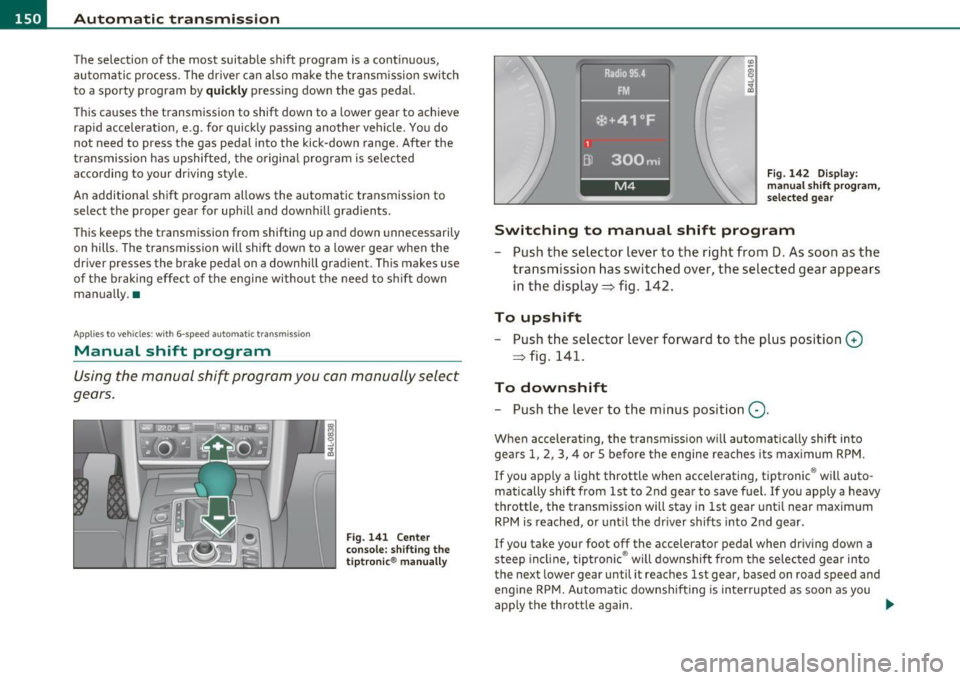
Fig . 141 Center
console: shifting the
tiptronic ® manually Fig
. 142 Display :
manual shift program,
selected gear
Switching to manual shift program
- Push the selector lever to the right from D. As soon as the
transmission has switched over, the selected gear appears
in the display => fig. 142.
To upshift
-Push the selector lever forward to the plus position 0
=> fig. 141.
To downshift
- Push the lever to the minus position Q.
When accelerating, the transmission will automatically shift into
gears 1, 2, 3, 4 or 5 before the engine reaches its maximum RPM.
If you apply a light throttle when acce lerating, tiptronic ® wi ll auto
matically shift from 1st to 2nd gear to save fuel. If you apply a heavy
throttle , the transmission will stay in 1st gear until near maximum
RPM is reached, or until the driver shifts into 2nd gear.
If you take your foot off the accelerator pedal when driving down a
steep incline , tiptronic ® will downshift from the selected gear into
the next lower gear until it reaches 1st gear, based on road speed and
engine RPM. Automatic downshift ing is interrupted as soon as you
apply the throttle again . _.
Page 154 of 370
-Automatic transmission .n,..__ ______________ _
Appli es to veh icles : wi th 6-spe ed a utomatic t ransm iss ion
Emergency release for selector Lever
If the vehicle's power supply fails, the selector lever can
be released in an emergency.
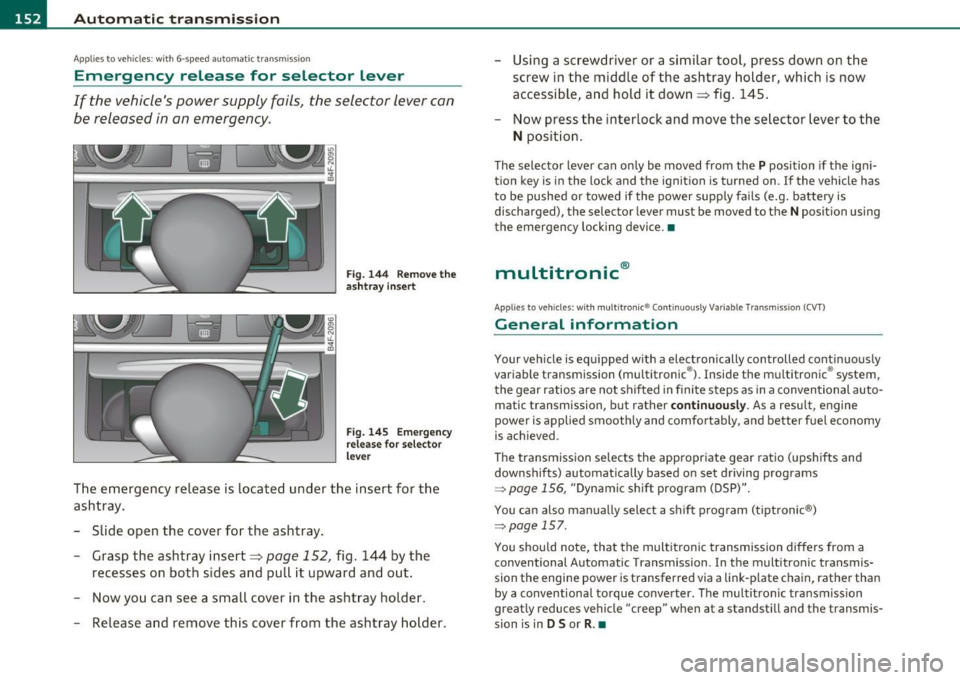
Fig. 144 Remove the
ashtray insert
Fig. 145 Emergency
release for selector
lever
The emergency release is located under the insert for the
ashtray.
- Slide open the cover for the ashtray.
- Grasp the ashtray insert=>
page 152, fig. 144 by the
recesses on both sides and pull it upward and out.
- Now you can see a small cover in the ashtray holder.
- Release and remove this cover from the ashtray holder. -
Using a screwdriver or a similar tool, press down on the
screw in the middle of the ashtray holder, which is now
accessible, and hold it down=> fig. 145.
- Now press the interlock and move the selector lever to the
N position.
The selector lever can only be moved from the P position if the igni
tion key is in the lock and the ignition is turned on . If the vehicle has
to be pushed or towed if the power supply fails (e.g. battery is
discharged), the selector lever must be
moved to the N position using
the emergency locking device.•
multitronic ®
Appli es to vehi cles: w ith mul tit ron ic® Co ntin uous ly Var ia ble Tra nsm iss ion ( CVT)
General information
Your vehicle is equipped with a electronically controlled continuously
variable transmiss ion (multitronic ®). Inside the multitronic ® system,
the gear ratios are not shifted in finite steps as in a conventional auto
matic transmission, but rath er
continuously. As a result, engine
power is applied smoothly and comfortably, and better fuel economy
is achieved .
The transm ission selects the appropriate gear ratio (upshifts and
downshifts) automatically based on set driving programs
~ page 156, "Dynamic shift program (DSP)".
You can also manually select a shift program (tiptronic ®)
~ page 157.
You should note, that the multitronic transmission differs from a
conventional Autom ati c Transmission . In the multitronic transmis
sion the engine power is transferred via a link-plate chain, rather than
by a conventional torque converter. The multitronic transmission
greatly reduces vehicle "creep" when at a standstill and the transmis
sion is in
D Sor R . •