tow AUDI A6 2011 User Guide
[x] Cancel search | Manufacturer: AUDI, Model Year: 2011, Model line: A6, Model: AUDI A6 2011Pages: 370, PDF Size: 87.15 MB
Page 116 of 370
![AUDI A6 2011 User Guide 1111....__0_ n_ t_h_ e_ r_ o_ a _ d _________________________________________________ _
(I] Tips
• You can apply the parking brake at any time -even with the igni
tion turned off. T](/img/6/57593/w960_57593-115.png "AUDI A6 2011 User Guide 1111....__0_ n_ t_h_ e_ r_ o_ a _ d _________________________________________________ _
(I] Tips
• You can apply the parking brake at any time -even with the igni
tion turned off. T")
1111....__0_ n_ t_h_ e_ r_ o_ a _ d _________________________________________________ _
(I] Tips
• You can apply the parking brake at any time -even with the igni
tion turned off. The ignition must be turned on in order to release the
parking brake.
• Occasional noises when the parking brake is applied and released
are normal and are not a cause for concern.
• Th e parking brake goes through a se lf-test cycle at regular inter
vals -when the vehicle is parked. Any associated noises are normal. •
Parking
To prevent a parked vehicle from rolling away, there are
a few things you should do.
When you park your vehicle, do the following
- Stop the vehicle using the brake pedal.
- Pull the switch to apply the electromechanical parking
brake.
- Move the selector lever into the
P position==> &.
- Switch off the engine and remove the ignition key from
the ignition lock .
When you park your vehicle on hills, do the
following
- Stop the vehicle using the brake pedal.
- Pull the switch to apply the electromechanical parking
brake.
- If you are parking headed
downhill, turn the front wheels
toward the curb. -
If you are parking headed
uphill, turn the front wheels
away from the curb.
- Move the selector lever into the
P position.
- Switch off the engine and remove the ignition key from
the ignition lock.
& WARNING
This is how you can reduce the risk of injury when leaving your
vehicle.
• Never park the vehicle where it can come in contact with dry
grass, spilled fuel or any other flammable materials.
• When parking on hills, always turn the wheels so that the front
wheels will first roll into the curb, if the vehicle should start to
roll.
• Never allow anyone -especially small children -to remain in
the vehicle when it is locked. Locked doors make it more difficult
for rescuers to access the passenger compartment in the event of
an emergency. Danger to life!
• Never leave children unsupervised in the vehicle. Children
could release the parking brake or move the gearshift lever out of
gear. The vehicle could start to roll away and cause an accident.
• No matter what the season is, the temperature in a parked
vehicle can reach dangerous levels.
0 Note
• Please exercise care when you park your vehicle in parking areas
with parking barriers or curbs. Parking barriers and curbs vary in
height and could damage your bumper and related components as
the front of your vehicle moves over a barrier or curb that is too high,
as you park or as you back out of a parking spot. In order to be sure
that no such damage can occur, you may wish to stop short of having
the front tires of your car touch the parking barrier or curb. .._
Page 119 of 370

_________________________________________________ O_ n_t_ h _ e_ ro_ a_d __ ffl'II
The display=> page 116, fig. 106 will show the set speed. The display
may vary depending on the type of display in your vehicle. T he indi
cator light
CRUISE (US model) I c-f (Canadian model) w ill also light up
in the instrument cluster.
The speed is kept constant via an engine output adjustment or active
brake intervention.
_& WARNING
• Always pay attention to traffic even when the cruise control is
switched on. You are always responsible for your speed and the
distance between your vehicle and other vehicles.
• For safety reasons, the cruise control should not be used in the
city, in stop-and-go traffic, on twisting roads and when road
conditions are poor (such as ice, fog, gravel, heavy rain and hydro
planing ) - risk of accident.
• Turn off the cruise control temporarily when entering turn
lanes, highway exit lanes or in construction zones.
• Please note that inadvertently "resting" your foot on the accel
erator pedal causes the cruise control not to brake . This is because
the cruise control is overridden by the driver's acceleration .
(I] Tips
The brake lights illuminate as soon as the brakes decelerate
automatically . •
A ppli es to ve hicles : w it h cr uise contro l
Changing speed
- Press lever in the G)orQ direction ==> page 116, fig. 105
to increase or decrease your speed.
- Release the lever to save that speed.
Controls and equip
ment Safety first
Change speed
in increments of 1 mph (1 km/h) by lightly pressing the
lever. If you keep the lever pressed down, yo u will alter your speed in
5 mph (10 km/h) increments.
You can also press the accelerator pedal down to increase your speed, e .g . if you want to pass someone. The speed you saved earlier wi ll
resume as soon as you release the accelerator pedal.
If, however, you exceed yo ur saved speed by 5 mph (10 km/h) for
longer than S m inutes, the cruise control will turn off temporarily.
The symbol will go out but the saved speed will be retained .•
App lies to ve hicle s: w it h cr uise c ontro l
Presetting your speed
You can preset your desired speed while the vehicle is not
moving.
- Turn on the ignition.
- Pull lever into position
(i) ==> page 116, fig. 105 .
- Press the lever in the
0 or 0 direction to increase or
decrease your speed.
- Release the lever to save that speed.
This function makes it possible, for example, to save the speed yo u
want before driving on the highway. Once on the highway, act ivate
the cruise contro l by pulling the lever toward
(D. •
A pp lies to ve hicles : wit h cr uise c ontro l
Switching the system off
Temporary deactivation
- Press the brake pedal, or
Vehicle care Technical data
Page 121 of 370
__________________________________________ A_ d_a""" p:....- t_iv _ e_ C_ r_ u _is _ e_C_ o_n_ t_ r_ o_ L_....J_
Adaptive Cruise Control
Speed and distance control system
App lies to veh icles: wi th Ad aptive Cruise Cont ro l
Descr iption
Th e Adaptive Cruis e Control driv er assistance pro gram is
a c omb in ed spe ed an d dista nce contr ol syst em .
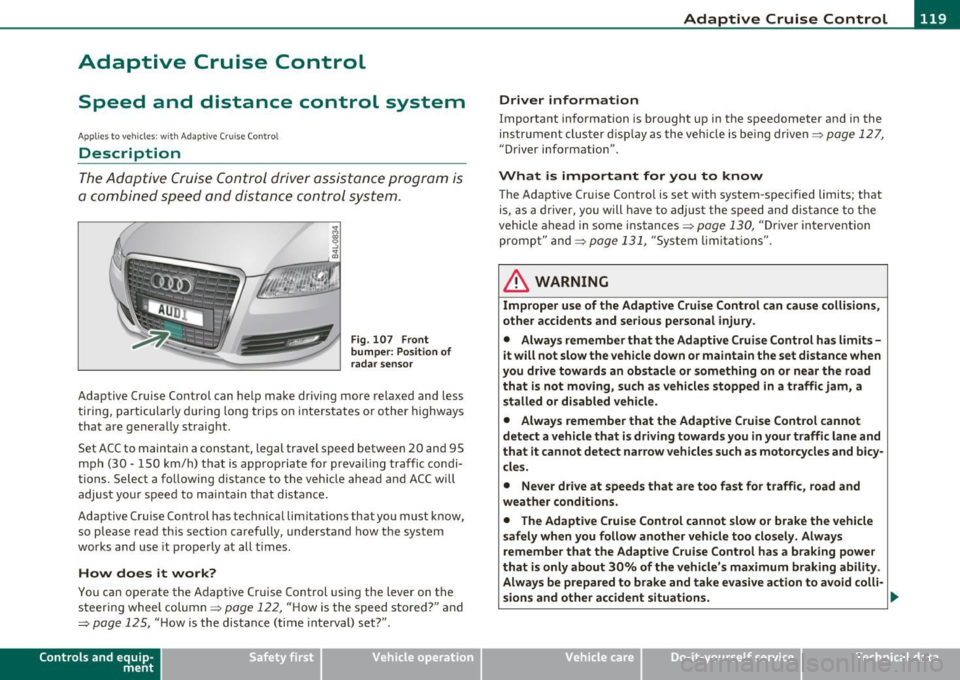
Fig . 107 Front
bumper: Po sition of
radar sensor
Adaptive Cruise Control can help make driving more relaxed and less
t irin g, particular ly d uring long trips on inters tates or o ther highways
that are genera lly straight.
S et ACC to maintain a constant, legal travel speed between 20 and 95
mp h (3 0 -150 km/h) t hat is a pprop riate for prev ailing traffic co ndi
tions. Select a following distance to the vehicle ahead and ACC w ill
adjus t you r speed t o mai ntain that dist an ce.
Adaptive Cruise Control has technical limitations that you must k now,
so p lease read this sectio n carefully, un de rstand how t he sys tem
wor ks and use it pro perly at all times.
How does it work?
You ca n operate the Adaptive Cruise Control using the lever on the
st eerin g wheel column=>
page 122, "H ow is the s peed stored ?" and
=>
page 125, " H ow is the distance (time inte rval) set?" .
Contro ls a nd e quip
m en t Vehicle
OP-eration
Driver information
Important information is bro ught up in the speedometer and in the
ins trumen t clus ter d is pla y as the ve hicle is be ing dr ive n=>
page 127,
"D river information" .
What is important for you to know
The Adaptive Cru ise Contro l is set with system-spec ified limits; that
is, as a driver, you will have to a djus t the s pee d and dis tan ce to t he
vehicle ahead in some in stances =>
page 130, "Driver intervention
promp t" and =>
page 131, "System lim itat ions".
ln. WARNING
Improper use of the Adaptive Cruise Control can cau se collisions,
other accidents and serious personal injury .
• Always remember that the Adaptive Cruise Contro l has limits -
it will not slow the vehicle down or maintain the set distance when
you drive towards an obstacle or something on or near the road
that is not mo ving, such as vehicles stopped in a traffic jam, a
stalled or disabled vehicle .
• Always remember that the Adaptive C rui se Control cannot
detect a vehicle that is driving towards you in your traffic lane and
that it cannot detect narrow vehicles such as motorcycles and bicy
cles .
• Never drive at speeds that are too fast for traffic , road and
weather conditions .
• The Adaptive Cruise Control cannot slow or brake the vehicle
safely when you follow another vehicle too closely . Always
remember that the Adaptive Cruise Control has a braking powe r
that is only about 30% of the vehicle 's maximum braking ability .
Always be prepared to b rake and ta ke e vasive action to a void colli-
sions and other accident situations . .,
Vehicle care Do-it-yourselt service iTechnical data
Page 124 of 370

-Adaptive C ruise Cont rol .J':fl..__..,____ _____________ _
toward you~ page 124, "Turning Adaptive Cruise Control off
temporari ly". •
Applies to ve hicles : w ith Adap tive Cru ise Contro l
Switching the system on and off
Switching the system on
-Pull the lever to position (D => fig. 109.
Sw itching the system off
F ig. 109 Contro l
lever: Sw itching on
and off
- Press the lever to position@ (latched) .•
A pplies to veh icles : wit h Ada ptive Cruise Control
How is the speed stored?
Fig. 110 Cont ro l
l ever: S tori ng speed
With th e syst em switched on the speed is stored as follows:
- Drive at the speed you want. The speed must be between
20 and 95 mph (30 and 150 km/h) .
- Press the
!SETI button => fig . 110 to store the desired
speed .
After the I SET I button is released, the current speed is stored and
maintained .
The saved speed is now shown in the LED disp lay in the speedometer
by one or two illuminated red light diodes~
page 127. At the same
time, the saved speed is also shown for a short time in the Informa
tion line~
page 129.
[I) Tips
For safety reasons, the s tored speed is erased when the ignit ion or
the ACC is turned off .•
Page 131 of 370

__________________________________________ A_ d_ a_,_ p_t _iv _ e_C_ r_u _i _ s _e _C_ o_n_ t_ r_ o_ l __ _
• Driving in traffic: If a vehicle is detected ahead, the arrow moves
on the scale. The green area represents the distance set. When
approaching slowly, the arrow moves from the
gray zone to the green
zone on the scale.
• Driver intervention prompt: When approach ing rapidly, the
arrow serves as an early warning signal. If the distance se lected is
exceeded or possibly not reached, the arrow moves into the
red zone
on the scale. In certain driving situations, you as the driver will have
to take action=>
page 130, "Driver intervent ion prompt".
© Status
• Th e text ACC OFF appears in white letters when Adaptive Cruise
Control is turned off.
• The text
ACC AVAILABLE appears in wh ite letters when the
system is turned on but no desired speed has been set.
• The text
OVERRIDE appears in white letters when you exceed the
desired speed by accelerating .
• The text
DISTANCE! appears in red letters when the interval to a
vehicle traveling ahead is too short and you have to slow your vehicle
add itionally with the foot brake.
• Th e text messages
DISTANCE 1 to DISTANCE 4 appea r in green
letters to indicate the time interval you have set and Adaptive Cruise
Control is in management mode .
• If the driving program "standard" is replaced by "comfort" or
" dynamic" using the MMI, the above text message is supplemented
by an appropriate prompt, e.g.
DISTANCE 1 -dyn . . •
Controls and equip
ment Safety first
App
lies to vehicles : with Adaptive Cr uise Control
System status indicator
The text messages and symbols shown in this area of the
display are not displayed permanently.
Time intervals (such as c::::, ____ c::::,)
Fig. 117 System
status indicato r
The different symbols for the time intervals (distance) appear if you
change the settings=> fig . 117.
Thr ee wh ite dots ... appear if a setting cannot be made with the oper
ating lever . The following are possible reasons
• If you pull the control lever towards you to resume speed but no
requested speed was set.
• If you push the lever up to increase (or down to reduce) speed
when no speed has been set previously.
• If yo u push the lever up to increase (or down to reduce) speed and
this speed is outside the 20 to 95 mph (30 to 150 km/h) speed range.
ACC functionality Limited
The message ACC functional ity limited appears when the ACC
System does not detect any moving vehicles up ahead in your lane of
travel for a longer period of time. During this time, the distance to
moving veh icles in your lane of travel up ahead is not being main
tained . The ACC system is not sw itched off, and increased attent ion .,,
Vehicle care Technical data
Page 154 of 370
-Automatic transmission .n,..__ ______________ _
Appli es to veh icles : wi th 6-spe ed a utomatic t ransm iss ion
Emergency release for selector Lever
If the vehicle's power supply fails, the selector lever can
be released in an emergency.
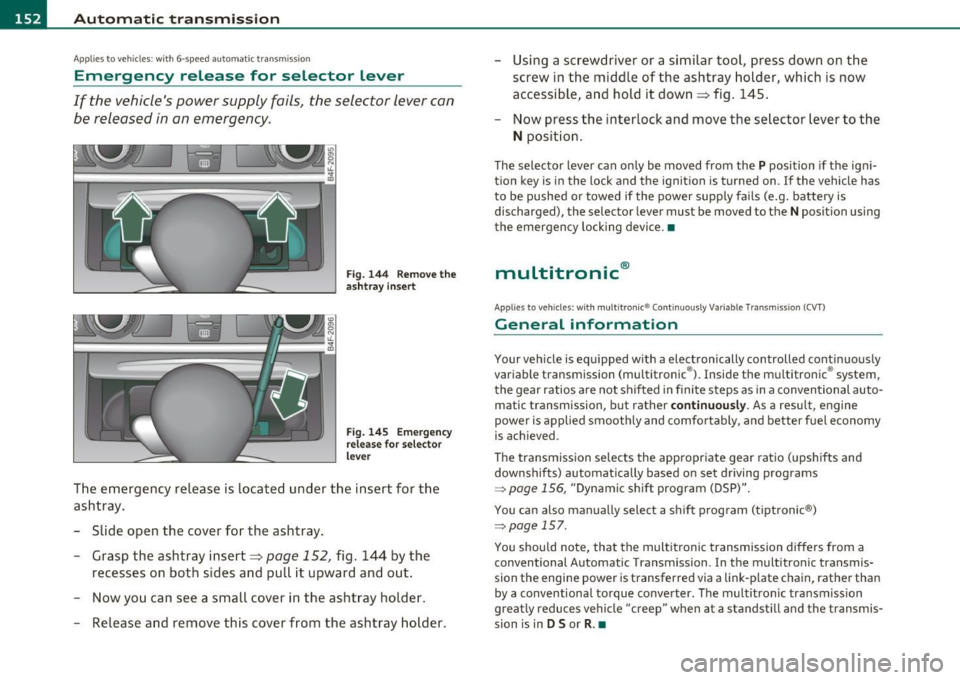
Fig. 144 Remove the
ashtray insert
Fig. 145 Emergency
release for selector
lever
The emergency release is located under the insert for the
ashtray.
- Slide open the cover for the ashtray.
- Grasp the ashtray insert=>
page 152, fig. 144 by the
recesses on both sides and pull it upward and out.
- Now you can see a small cover in the ashtray holder.
- Release and remove this cover from the ashtray holder. -
Using a screwdriver or a similar tool, press down on the
screw in the middle of the ashtray holder, which is now
accessible, and hold it down=> fig. 145.
- Now press the interlock and move the selector lever to the
N position.
The selector lever can only be moved from the P position if the igni
tion key is in the lock and the ignition is turned on . If the vehicle has
to be pushed or towed if the power supply fails (e.g. battery is
discharged), the selector lever must be
moved to the N position using
the emergency locking device.•
multitronic ®
Appli es to vehi cles: w ith mul tit ron ic® Co ntin uous ly Var ia ble Tra nsm iss ion ( CVT)
General information
Your vehicle is equipped with a electronically controlled continuously
variable transmiss ion (multitronic ®). Inside the multitronic ® system,
the gear ratios are not shifted in finite steps as in a conventional auto
matic transmission, but rath er
continuously. As a result, engine
power is applied smoothly and comfortably, and better fuel economy
is achieved .
The transm ission selects the appropriate gear ratio (upshifts and
downshifts) automatically based on set driving programs
~ page 156, "Dynamic shift program (DSP)".
You can also manually select a shift program (tiptronic ®)
~ page 157.
You should note, that the multitronic transmission differs from a
conventional Autom ati c Transmission . In the multitronic transmis
sion the engine power is transferred via a link-plate chain, rather than
by a conventional torque converter. The multitronic transmission
greatly reduces vehicle "creep" when at a standstill and the transmis
sion is in
D Sor R . •
Page 161 of 370

____________________________________________ A_ u_ t_ o_ m_ a_ t_ i_ c _ t_ra _ n_s_ m __ is_s_ i_ o _ n _ __._
App lies to vehicles : wi th mul titro nic® Continu ous ly Va riable Trans missi on (CV T)
Emergency release for selector lever
If the vehicle's power supply fails, the selector lever can
be released in an emergency.
Fig. 152 Remove the
asht ray insert
F ig . 153 E mergen cy
release for se lector
l ever
The emergency release is located under the insert for the
ashtray.
- Slide open the cover for the ashtray .
- Grasp the ashtray insert~ fig. 152 by the recesses on
both sides and pull it upward and out.
- Now you can see a small cover in the ashtray holder.
- Release and remove this cover from the ashtray holder.
Con tro ls a nd e quip
m en t Vehicle
OP-eration
-Using a screwdriver or a similar tool, press down on the
screw in the middle of the ashtray holder , which is now
accessible, and hold it down~ fig. 153 .
- Now press the interlock and move the selector lever to the
N position.
The selector lever can only be moved from the P position if the igni
tion key is in the lock and the ignition is turned on. If the vehicle has
to be pushed or towed if the power supply fails (e.g. battery is
discharged), the selector lever must be moved to the
N position using
the emergency locking device. •
Vehicle care Do-it-yourselt service iTechnical data
Page 165 of 370

______________________________________________________ P_a _ r_ k_ a_ s_s _i _ s _t __ _
Sensors in the bumper
Sensors are located in the rear bumpers . If these detect a n obsta cle,
audib le and visual sig nals wa rn you. The range at w hich the sensors
beg in to measure is approximately:
T o the sid e
2 ft (0. 60 m)
Center rear 5 .2 ft (1.60 m)
Distan ce warning when reversing s tarts w hen an obsta cle is detec ted
in the range of the parking ass ist system. As the d ista nce decreases,
t he time in te rval between the audib le tones becomes shorter .
When the dis tance is less tha n 1ft
(0.30 m), the tone becomes
cont inuo us. At th is point yo u should stop back ing up.
If the dis tance to an obs tacle stays the s am e, t he volume o f the
distance signal chime is grad ually reduced after about
4 seconds
(does not affe ct the conti nuous signal tone) . App roac hing an oth er
obs tacle w ill cause the distance sig nal to sound aga in at t he normal
vol ume.
Rear view camera coverage area
Th e MM I display s hows the area covere d by the rea r view c amera
=>
page 16 2, fig. 156 G) . Objects that a re not in the area covered @
are not s hown on the MMI dis play .
W e recommend that you prac tice parking w ith th e rear v iew camera
in a traff ic-free location o r parking lot to become fam iliar with the
system, the or ientat ion lines, a nd their functi on . W hen doing this,
there should be good light and weathe r cond itions.
I n the MMI di spla y, obje cts o r ve hicl es appea r closer or fu rt h er aw ay
if:
• you are dr iv ing in reverse gea r from a level sur face onto an incline,
or a dow nwar d slop e,
• you are drivin g in reverse gear toward protrud ing ob jects,
• t he vehicle is ca rry ing too much load in the rear.
T he accuracy of the orientat ion lines and blue s urfaces d imin ishes if :
Controls and equip
ment Safety first
• t
he rear view camera does not provide a re liable image , fo r
ex am ple, in po or visib ility co ndi tion s or if the lens is dir ty,
• the image on the screen is not visible due to sun g la re and reflec
t io n.
Caring for the rear view camera lens
The re ar view came ra is locat ed above the r ear license pla te br acket .
For the pa rking ass ist to operate, the lens =>
page 162, fig. 157 m ust
be ke pt clean:
• Dampen the lens wi th a household alcoho l-based glass cleaner,
and clean the lens wi th a d ry cloth => 0.
• Remove snow with a hand br us h and ice preferab ly w it h a de- icing
sp ray =>0.
& WARNING
• The parking aid cannot replace the driver's attention. The
driver alone is responsible for parking and similar driving maneu •
vers.
• Always keep your eyes on the vehicle 's surroundings, using the
rear view mirror as well.
• Do not allow yourself to be distracted from traffic by the rear
view camera pictures.
• If the position and the installation angle of the camera has
changed, for example, after a rear end collision, do not continue
to use the system for safety reasons. Have it checked by a qualified dealership .
0 Note
• Low obstacles a lready s ignaled by a wa rning can disapp ea r from
the system's detection range as they are approached and will not
co ntinu e to be signaled. O bje cts such a s barrier c hains , trailer draw
bars, thin painted vertical po les or fences may not be detected by the
sys te m , pos ing r isk of d amage. _..
Vehicle care Technical data
Page 170 of 370

lffll.___A_ d_ a_,_ p_t _i_ v _e _ A_i_ r_ S_ u_ s ... p,_ e_n_ s_ io_ n __________________________________________ _
Adaptive Air Suspension
Adaptive Air Suspension and
Damping
Ap plies to veh icles: w ith Ad aptive Ai r Suspens ion
Description
Adaptive Air Suspension and damping can be regula ted
and they adapt automatically to a request from the
driver and the driving situation at the time .
Adaptive Air Suspension is an e lectron ically controlled springing and
damping system . This chass is system makes it eas ie r on the driver by
adapting to the particular situation th rough impe rceptible contro l
processes .
The
Adaptive Air Suspension component regu lates ground clearance
depending on ve hicl e speed, load cond ition and driver input.
W hen the system is in a utomatic mode, accelerat ing to a speed above
a predete rm ined limit will make the vehicle lower itsel f. On t he othe r
hand, driv ing more slowly res ults in the vehicle ra is ing again at
specific speeds.
Th e
damping component provides individua l control of the damping
forces. For example, with damp ing characterist ics set to provide
greater com fort, damp ing is se t somewhat harder for a br ief period
only as required, for example, whe n going around a curve or over
rough road sur faces as we ll as when braking .
Settings
Adaptive Air Suspension prov ides the drive r wi th t he opportu nity to
set the chass is characterist ics also to their individual preference.
W ith the driving modes
Comfort, Automatic an d Dynamic the dr ive r
has three chassis sett ings available, ranging from comfort to sporty.
In addit ion,
Lift p rovides a fourth mode which can be selecting fo r
dr iving over poor stretches of road =>
page 169, "Chass is controls" . The modes are set
in MM I =>
page 169.
& WARNING
The height of the parked vehicle can change due to temperature
fluctuation s or changes in load .
0 Note
• Whenever you park yo ur vehicle, always make sure there is
adeq uate clearance above and below the ve hicle . T he heig ht of the
parked vehicle can change as the res ult of temperature fluctuations,
chang es in load condition and changes in the dr iv ing mode (ground
clearance).
• If the veh icle is be ing transported (e .g. by tow truck, train, ship,
etc.) , mount the tie-down cha ins/cables over the r unning s urface
(c ircumfere nce) of the tir es. Never sec ure the ve hicle by the ax le, the
suspension struts or the front or rea r tow line eye. For technical
reaso ns, the p ressure in t he suspension st ru ts m ay change dur ing the
transport, w hic h could result in the vehicle no longer being secured
pro perly.
• To prevent damage to the vehicle underbody, remember that your
veh icle is no t an off-roa d veh icle, even in the "lift" mo de. Th e ground
clearance is insufficient for this type of operation.
• If you are go ing to tow a trai ler, you mus t activate the trai ler ope r
ation mode =>
page 170.
[ i ] Tips
Before you raising your vehicle us ing the veh icle jack (for example,
w hen c hanging a flat tire) you must acti va te the j ack ing mode
::::>page170 .•
Page 172 of 370

lffl!I.___A_ d_ a_,_ p_t _i_ v _e _ A_i_ r_ S_ u_ s ... p,_ e_n_ s_ io_ n __________________________________________ _
mode at speeds above SO mph (80 km/h). This mode is then shown
greyed out in the MMI display .
For additional information on the driving modes=>
page 169,
"Chassis controls". •
Appli es to ve hicles: w it h Adap tive Air S uspensi on
Jacking mode when changing a flat tire
This mode must be activated in the MMI before raising
the vehicle with a jack or on a vehicle lift.
-Select: Function button [CAR)> function button [SETUP]
> Jacking mode.
The vehicle jack mode must be activated before changing a wheel so
that the au toma tic control processes for the air suspension do not
make lifting with the vehicle jack more difficult.
[ i ] Tips
The vehicle jack mode is switched off automatica lly at speeds above 9
mph (15 km/h) .•
Ap plies to veh icle s: with Ad ap tive Ai r Suspe nsion
Towing a trailer
Automatic lowering is not desirable when towing a
trailer .
-Select: Function button [CAR)> function button [SETUP]
> Towing mode .
Level Adjustment when towing a trailer
• Before hitching up the trailer and before adjust ing the tongue
we ight at the trailer, the automatic or comfort mode
must be selected, so that the vehicle is at normal
level=>
page 169, "Setting
the driving modes".
• If driving in dynamic mode is desired, this mode
must be selected
before hitch ing up the trailer and before adjusting the tongue
weight . However, note that your vehicle is lowered and ground clear
ance is reduced .
• If you have to drive under difficu lt road conditions, you can select
lift mode after hitching up the trailer or after adjusting the tongue
weight.
Restrictions when operating with a trailer
When operating with a trailer, the lift mode can only be selected up
to about 25 mph (40 km/h). The system automatically goes out of lift
mode when speed exceeds about 31 mph (SO km/h).
If the vehicle is in automatic, comfort or lift mode before the trailer
towing mode is act ivated, the dynam ic mode cannot be activated .
I f the vehicle is in dynamic mode before towing operation is acti
vated, it can be driven in this mode .
If the suspens ion is switched
from this mode to automatic mode, dynamic mode cannot be re
selected.
[ i ] Tips
If the trailer towing mode has been act ivated, the vehicle will not sink
to the dynamic level if selected .•