warning lights AUDI A6 2011 Owner's Manual
[x] Cancel search | Manufacturer: AUDI, Model Year: 2011, Model line: A6, Model: AUDI A6 2011Pages: 370, PDF Size: 87.15 MB
Page 115 of 370

On the road -_______________ __.
the driver's door is opened. In t his instance, the steer ing is not
locked. The s teer ing is locked:
• If you press the
(STOP) button again for more than 1 second .
• If you close the driver 's door and lock yo ur vehicle from the
outs ide .•
Electromechanical parking brake
Operation
The electromechanical parking brake replaces the hand
brake.
Fi g. 104 Cente r
co nsol e: Pa rki ng brak e
- Pull the switch to apply the parking brake ~fig . 104. The
indicator light in the switch will come on.
- Step on the brake pedal or the accelerator pedal and press the switch at the same time to re lease the parking bra ke.
The indicator light in the switch wil l go out .
Your vehicle is equipped with an electromec hanical park ing brake
w hich replaces the handb rake. The parking brake is d esigned to
prevent the vehicle from ro lling unintent iona lly .
Con tro ls a nd e quip
m en t Vehicle
OP-eration
In addit io n to the normal functions of a traditional hand brake, the
ele ct romechan ica l parki ng br ake p rovides various convenience and
safety functions .
Emergency brake
An emergency brake ensures that the vehicle can be slowed even if
t he
normal bra kes fail => page 115, "E merge ncy bra king" .
Indicator lights
• If the pa rking brake is applie d with the ig nition turned on , the
indicator light in the instrument cluster (U.S models:
:'.Ii , Canadian
mode ls: © ) and i n the swi tch
(e)) w ill come o n.
• If the parking brake is applied with the ign ition
turned off , the
indicator light in the in strument cluste r (U.S. models:
::'.l, , Ca nadian
models: ©) and in the switch© will come on for about 30 seconds
and then go out .
& WARNING
If the vehicle is stati onary and the transmi ssion is engaged with
the eng ine running, the e ngine should not be speeded up (e.g.
m anuall y from under th e hood ). Otherwi se the vehicle will st art to
mo ve -you run the risk of an ac cident.
0 Note
If the warning/ind icator light (U.S. models: BRAKE , Canadian mode ls:
(Ci)) ) flashes in the ins trumen t clus ter, t here is a brake sys tem
malfunction. By press ing the [
CHECK) b utton, yo u can bri ng up a
dr iver message which explains the malfu nction in mo re deta il.
If the
message
Parking brake! Please contact workshop appea rs, the re is a
parking brake malfunction which yo u should have repaired immedi-
ately by an au thorized dealership=>
page 26 . ..
Vehicle care Do-it-yourselt service iTechnical data
Page 119 of 370

_________________________________________________ O_ n_t_ h _ e_ ro_ a_d __ ffl'II
The display=> page 116, fig. 106 will show the set speed. The display
may vary depending on the type of display in your vehicle. T he indi
cator light
CRUISE (US model) I c-f (Canadian model) w ill also light up
in the instrument cluster.
The speed is kept constant via an engine output adjustment or active
brake intervention.
_& WARNING
• Always pay attention to traffic even when the cruise control is
switched on. You are always responsible for your speed and the
distance between your vehicle and other vehicles.
• For safety reasons, the cruise control should not be used in the
city, in stop-and-go traffic, on twisting roads and when road
conditions are poor (such as ice, fog, gravel, heavy rain and hydro
planing ) - risk of accident.
• Turn off the cruise control temporarily when entering turn
lanes, highway exit lanes or in construction zones.
• Please note that inadvertently "resting" your foot on the accel
erator pedal causes the cruise control not to brake . This is because
the cruise control is overridden by the driver's acceleration .
(I] Tips
The brake lights illuminate as soon as the brakes decelerate
automatically . •
A ppli es to ve hicles : w it h cr uise contro l
Changing speed
- Press lever in the G)orQ direction ==> page 116, fig. 105
to increase or decrease your speed.
- Release the lever to save that speed.
Controls and equip
ment Safety first
Change speed
in increments of 1 mph (1 km/h) by lightly pressing the
lever. If you keep the lever pressed down, yo u will alter your speed in
5 mph (10 km/h) increments.
You can also press the accelerator pedal down to increase your speed, e .g . if you want to pass someone. The speed you saved earlier wi ll
resume as soon as you release the accelerator pedal.
If, however, you exceed yo ur saved speed by 5 mph (10 km/h) for
longer than S m inutes, the cruise control will turn off temporarily.
The symbol will go out but the saved speed will be retained .•
App lies to ve hicle s: w it h cr uise c ontro l
Presetting your speed
You can preset your desired speed while the vehicle is not
moving.
- Turn on the ignition.
- Pull lever into position
(i) ==> page 116, fig. 105 .
- Press the lever in the
0 or 0 direction to increase or
decrease your speed.
- Release the lever to save that speed.
This function makes it possible, for example, to save the speed yo u
want before driving on the highway. Once on the highway, act ivate
the cruise contro l by pulling the lever toward
(D. •
A pp lies to ve hicles : wit h cr uise c ontro l
Switching the system off
Temporary deactivation
- Press the brake pedal, or
Vehicle care Technical data
Page 150 of 370
ffl..__A_ u_ t_ o_ m_ a_ t _ ic_ t_r_a _ n_ s_m _ i_ s _s_ i_ o _ n _____________________________________________ _
R -Rev e rse
T he transmission will automatically select the lowe st gea r ratio when
you sh ift into reverse .
Select
R only when the vehicle is at a full stop and the engine is
running at id le speed=>
& in "Driving the a utomatic tra nsmiss ion"
on
page 146 .
Before yo u move the selector lever to R, press both the button in the
handle of the selector lever
and the brake pedal at the same time.
When the ignition is on, the backup lights illum inate when the
selector lever is moved into
R .
N -Neutral
The tra nsmission is in neutra l in t his position . Shift to this posit ion
for standing wit h the brakes applied~
page 148.
When the vehicle is s tationary or a t speeds be low 3 mph (5 km/h),
you must always apply the footbrake before and while mov ing the
lever ou t of
N .
D -Normal position for dri ving forward
Posit ion Dis fo r normal city and highway driv ing. I t ranges from ze ro
to top speed and all gears shift automatically, depending on eng ine
load, d riving speed and au tomatically selected s hift p rograms.
When the vehicle is stat ionary or at speeds below 3 mph (5 km/h),
you must always apply the foot brake before and while moving the
lever to
D out of N .
In certa in circumstances it may be advantageous to temporarily
switch to the m anu al sh ift prog ram to man ua lly se lect gea r ratios to
match specific driving conditions~
page 150.
S -Sport position
Select this position for sportier performance. In this position, the
t ransm iss ion will not upshif t as soon, allowing the vehicle to use the
increased power available at higher engine speeds to achieve livelier
a cceler ation. When the vehicle
is stationary or at speeds below 3 mph (5 km/h),
you must always app ly the foot bra ke before and w hile movi ng the
lever to
S out of N.
& WARNING
Read and follow all WARNINGS=> & in "Driving the automatic
transmi ssion " on
page 146 .
0 Note
Coast ing downh ill with the transmission in N and t he e ng ine not
running will result in damage to the automatic t ransmiss ion and
possibly the catalytic converter .•
Ap plies to veh icles: w it h 6-speed automatic t ransmissio n
Automatic Shift Lock (ASL)
The Automati c Shift Lo ck s afegu ards you ag ainst acci
dentally shifting i nto a for ward or the reverse gear and
causing the vehicle to m ove unintentionally .
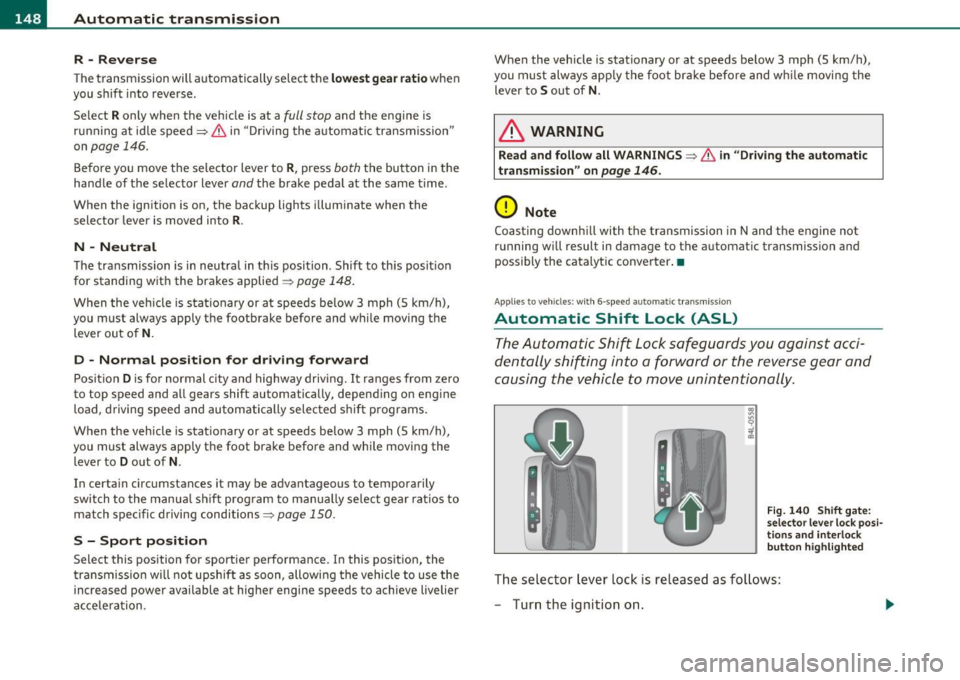
Fig. 140 Shift gat e:
s e lect or le ve r lo ck posi
t io ns a nd interl ock
butt on h ighlighted
The sele ct or lever lock is released as fo llows:
- Turn the ignition on.
Page 157 of 370

Automatic transmission Ill
----------------
Before you move the selector lever to R, press both, the button in the
hand le of the se lector lever
and the brake pedal at the same time.
When the ignition is on, the backup lights illuminate when the
selector lever is moved into
R.
N -Neutral
Shift to this position for standing with brakes applied=> page 155.
When the vehicle is stat ionary o r at speeds below 3 mph (5 km/h),
you must always apply the footbrake before and wh ile moving the
lever out of
N.
Do not use N for coasting downhill.
D -Normal driving position for forward
Depending on the load on the engine, vehicle speed and the dynamic
control program, the transmission will se lect the
optimal gear ratio.
In certa in circumstances it may be advantageous to temporarily
switch to the manual shift program to manually select gear ratios to
match specific driving conditions=>
page 157.
When the vehicle is stationary or at speeds below 3 mph (5 km/h),
you must always apply the footbrake before and while moving the
lever to
D out of N .
S -Sport position
Select this position for sportier performance. In this position, the
transmission will not upshift as soon, allowing the veh icle to use the
increased power available at higher engine speeds to achieve livelier
acceleration.
When the vehicle is stat ionary or at speeds below 3 mph (5 km/h),
you must always app ly the foot brake before and whi le moving the
lever to
S out of N.
& WARNING
Read and follow all WARNINGS=> & in "Driving the multi
tronic ®" on
page 153.
Controls and equip
ment Safety first
0 Note
Coasting downhill
with the transmission in N and the engine not
operating will result in damage to the automatic transmission and
poss ibly the catalytic converter.•
Applies to veh icles: w ith mult itronic ® Continuously Va riable T ransmiss ion (C VT)
Automatic Shift Lock (ASL)
The Automatic Shift Lock safeguards you against acci
dentally shifting into a forward or the reverse gear and
causing the vehicle to move unintentionally.
Fig. 148 Shift gate:
selector lever lock posi
tions and inter lock
button highlighted
The selector lever lock is released as follows:
- Turn the ignition on.
- Step on the brake pedal.
At the some time press and hold
the interlock button on the side of the gear se lector knob
=> fig. 148 with your thumb until you have moved the
selector lever to the desired position .
Automatic selector lever lock
The selecto r lever is locked in th e P and N positions when the ignition
is turned on. To move the lever from these pos itions the driver must
depress the brake pedal. As a reminder to the driver, the following .,_
Vehicle care Technical data
Page 179 of 370

Driving Safely ---------------------"~'----
Important things to do before driving
Safety is everybody's job! Vehicle and occupant safety
always depends on the informed and careful driver.
For your safety and the safety of your passengers, before
driving always:
- Make sure that all lights and signals are operating
correctly.
- Make sure that the tire pressure is correct.
- Make sure that all windows are clean and afford good visi-
bility to the outside.
- Secure all luggage and other items carefully::::>
page 93.
-Make sure that nothing can interfere with the pedals.
- Adjust front seat, head restraint and mirrors correctly for your height .
- Instruct passengers to adjust the head restraints according to their height.
- Make sure to use the right child restraint correctly to
protect children ::::,
page 219, "Child Safety".
- Sit properly in your seat and make sure that your passen gers do the same::::,
page 75, "General recommenda
tions".
- Fasten your safety belt and wear it properly. Also instruct
your passengers to fasten their safety belts properly
=:> page 187. •
Controls and equip
ment Safety first Vehicle operation
What impairs driving safety?
Safe driving is directly related to the condition of the
vehicle, the driver as well as the driver's ability to concen
trate on the road without being distracted .
The driver is responsible for the safety of the vehicle and all
of its occupants. If your ability to drive is impaired, safety
risks for everybody in the vehicle increase and you also
become a hazard to everyone else on the road::::,,& . There
fore:
Do not let yourself be distracted by passengers or by using
a cellular telephone.
NEVER drive when your driving ability is impaired (by
medications, alcohol, drugs, etc.).
- Observe all traffic laws, rules of the road and speed limits
and plain common sense .
- ALWAYS adjust your speed to road, traffic and weather
conditions.
- Take frequent breaks on long trips. Do not drive for more than two hours at a stretch.
- Do NOT drive when you are tired, under pressure or when
you are stressed .
& WARNING
Impaired driving safety increases the risk of serious personal
injury and death whenever a vehicle is being used.•
Vehicle care Do-it-yourself service Technical data
Page 190 of 370
___ S_a _f_e _t-=y '-- b_e_ l_ t _s _____________________________________________ _
-Make sure that your passengers also buckle up a nd prop
erly wear their safety belts .
- Protect c hildren with a child rest raint system appropria te
fo r the size and ag e.
The warn ing light ~ in the instrument cluster lights up when the igni
tion is sw itched on as a reminder to fasten the safety belts. In addi
tion, you w ill hear a wa rning tone for a certa in period of t im e.
Fasten your safety belt and ma ke sure that your passenge rs also
properly put on their safety belt s.
& WARNING
• Safety belts are the singl e most effective means available to
reduce the risk of serious injury and death in automobile a cci
dents . For your protection and that of your pas senger s, always
co rrectly wear safety belts when the vehicle is mo ving .
• Failure to pay attention to the warning light that come on,
could lead to personal injur y.
u
Why safety belts?
Frontal collisions and the law of physics
Frontal crashes create very stron g forc es for people
riding i n vehi cles.
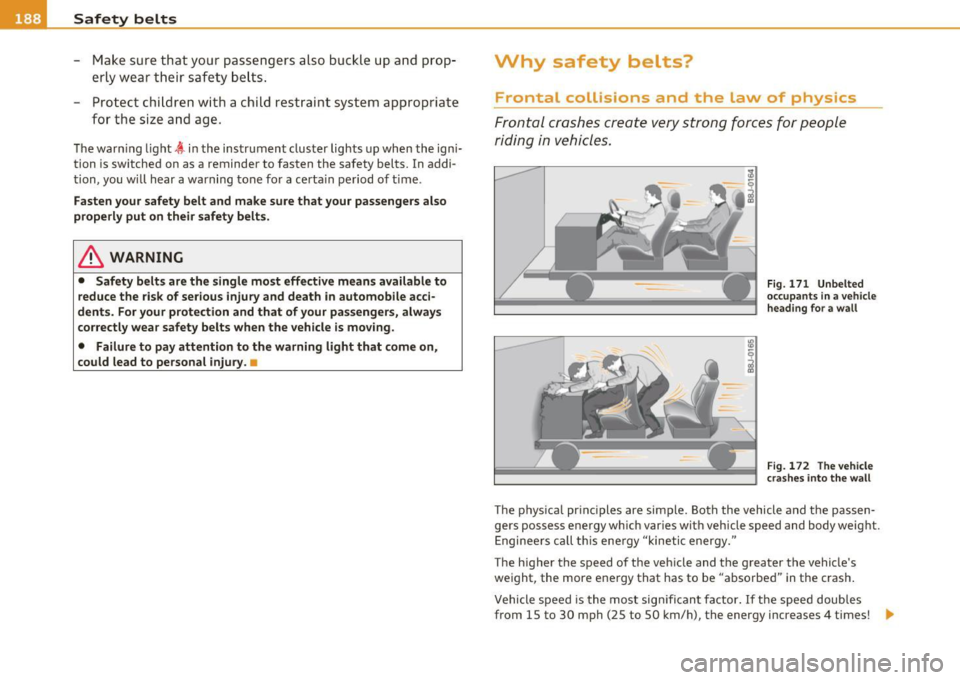
Fig . 171 Unbe lted
o ccupa nts in a vehicle
h eadin g for a w all
Fig . 1 72 The ve hicle
cr as hes int o t he w all
T he p hys ica l pr inc iples are simple. Both the vehicle and the passen
gers possess energy which var ies wit h veh icle speed and body weight.
Enginee rs ca ll t his ene rgy "kinetic energy."
The higher the speed of the veh icle and the greater the vehicle's
we ight, the more energy that has to be "absorbed" in the crash .
Vehicle speed is the most sig nifican t fa ctor. If t he speed doubles
from 15 to 30 mph (25 to 50 km/h), the energy increases 4 times! .,
Page 256 of 370
![AUDI A6 2011 Owners Manual Driving and environment
(I] Tip s
The consumption estimates as pub lished by ENV IRONMENTAL
PROTECTION AGENCY (EPA) and Transport Canada may not corre
spond to your actual consump](/img/6/57593/w960_57593-255.png "AUDI A6 2011 Owners Manual Driving and environment
(I] Tip s
The consumption estimates as pub lished by ENV IRONMENTAL
PROTECTION AGENCY (EPA) and Transport Canada may not corre
spond to your actual consump")
Driving and environment
(I] Tip s
The consumption estimates as pub lished by ENV IRONMENTAL
PROTECTION AGENCY (EPA) and Transport Canada may not corre
spond to your actual consumption on the road, which will vary
depending upon vehicle load and speed, road and weather conditions,
trip length, etc. •
Drive smoothly and keep a lookout ahead
Vehicles use the most fuel when they are accelerating .
-Avo id unnecessary accelerating and braking.
Vehicles use the most fue l when they a re accele rating. If you antici
pate what is going to happen next, you will need to brake less and,
thus, accelerate less. Let the vehicle coast whenever possible -for
example when you see that the next traffic l ight is red. •
Avoid full throttle
Driving at moderate speeds saves fuel and improves your
mileage.
- Try and keep well below your car's maximum speed .
Accelerating gently reduces fuel consumption, engine wear, and does
not disturb the environment.
Fuel consumption, exhaust emissions and engine noise increase
disproportionately at high speeds . If you drive at approx imately three
qua rters of top speed, fuel consumption will be reduced by one half.
Never drive faster than the posted speed limit and weather condi
tions permit.
a Reducing unnecessary idling
Even when your car is just idling it burns up fuel.
-
Shut the engine off when yo u are not driving the vehicle.
- Do not warm up the vehic le by letting the eng ine run at
idle.
It makes sense to shut off the engine in traffic jams, when waiting for
trains to pass at rai lroad crossings, o r at traffic lights that have long
wa its on red . Turn ing the eng ine off for just 30-40 seconds saves
more fuel than is burned starting the engine again.
It takes a long t ime for the engine to warm up fully when it is running
at idle. Howeve r, wear and noxious emissions are espec ially high
when the eng ine is wa rm ing up. So you sho uld d rive away as soon as
you start the engine and avoid running at hig h rpms while the eng ine
is still warming up.
0 Note
Do not leave engine idling unattended after starting . If warning
lights should come on to indicate improper operation, they would go
unheeded. Extended idling also produces heat, which cou ld result in
overheat ing o r othe r damage to the vehicle or other p roperty. •
Regular maintenanc_e ____________ _
A badly tuned engine unnecessarily wastes a lot of fuel .
- Have your vehicle serviced at regular intervals .
By having yo ur vehicle regularly se rviced by an Audi dealer helps to
ensure that it runs properly and economically . T he condition of your
vehicle not only a ffects its safety and ability to ho ld its va lue, it a lso
affects
fu el con sumption .
Check your o il e ach tim e you fill you r tank.
~
Page 258 of 370
Trailer towing
"---------------------------------------------------
Trailer towing
Driving with a trailer
General information
Your Audi was designed primarily for passenger transpor
tation .
If you p lan to tow a t railer, p lease remember that the additional load
w ill affect durability, economy and performance.
Tr ailer towing not on ly p laces mo re s tress on the vehicle, it also calls
for more concentration from the driver.
For this reason, a lways follow the operating and dr iv ing inst ructions
prov ided and use common sense .
0 Note
If you are going to tow a trailer, you must activate the tra iler ope ra
tion mode =>
page 170, "Towing a tra iler". •
Technical requirements
Trailer hitch
Use a we igh t-car rying h itch co nform ing to the gross tra iler we ig ht.
The h itch must be suitab le for your vehicle and trailer and must be
mou nted securely o n th e vehi cle's ch assi s at a
techni cally sound loc a
tion . Use only a trailer hitch with a removab le ball mount. Always
check wit h the t railer h itch manufactu rer to make sure that yo u are
using the correct h itch .
Do not use a bumper hitch.
The h itch mus t be installed in such a way t hat it does not in terfe re
w ith t he impact-absorb ing bumper system. No modifications shou ld be made to t
he veh icle exha ust and bra ke systems. From t ime to
time, check that a ll hitch mounting bo lts rema in securely fastened.
W hen you are no t tow in g a tra ile r, remove the t railer hit ch ball
mount. This prevents the hitc h from caus ing damage should your
vehicle be str uck from behind=>& .
Trailer brakes
If your trail er is e quipped w ith a b raking system, che ck to be s ure t hat
it conforms to all regulations.
T he tra ile r hydrau lic brake system m ust not be directly connected to
t he vehicle's hyd raulic b rake sys tem .
Safety chains
Always use safety chains between your veh icle and t he tra ile r.
Trailer lights
Trailer lights must meet all regulations. Be sure to check w ith your
Audi de aler fo r corr ec t wir ing , sw itches and re lays.
Mirrors
If you are unab le to see t he t raff ic be hind you using t he regular
outs ide mirrors, then you
must install extended mi rrors. It is impor
t an t th at yo u
always ha ve clear vi sion to the re ar.
& WARNING
After removing the trailer hitch, do not store it in your vehicle. In
case of sudden braking , the hitch could fly forward and inju re you
or your passengers. •
Page 284 of 370
lffl) __ C_ h_e _c_ k_ i_ n _ g_ a_ n _ d_ f_il _l _in ____ g ___________________________________________ _
Changing the engine oil
The engine oil and oil fi lter must be changed according to the mileage
(kilometers) and t ime intervals specified in your vehicle 's Warranty
&
Maintenance booklet . Do not exceed these interva ls -harmful
deposits from o ld engine oil can reduce engine performance and can
lead to expensive engine repairs .
Changing the oil at the recommended intervals is so very impo rtant
because the lubricating properties of o il decrease gradually during
normal vehicle use. If you are not sure when you have your oil
changed, ask your author ized Audi Service Adv isor .
Under some circumstances the engine oil should even be changed
mo re frequently. Change oil more often if you drive mostly short
distances, operate the vehicle in dusty areas or mostly under stop
and-go traffic conditions, or when you use your vehicle where temper
atures stay be low freezing point for long periods.
Detergent addit ives in the oi l wi ll make fresh oil look dark after the
engine has been running for a short t ime. This is normal and is not a
reason to change the oil more often than recommended .
Damage or malfunctions due to lack of maintenance
It is essential that you change your oil at the recommended intervals
using only engine oi l that complies with Audi oil standard
VW 502 00. Your Limited New Vehicle War ranty does not cover
damage or malfunctions due to fai lure to follow recommended main
tenance and use requirements as set forth in the Audi Owner 's
Manual and Warranty
& Maintenance booklet. Your dealer will have
to deny warranty coverage unless you present to the dealer proof in
the form of Serv ice or Repair Orders that all scheduled maintenance
was performed in a time ly manner. •
Engine oil consumption
The engine in your vehicle depends on an adequate
amount of oil to lubricate and cool all of its moving parts.
In order to provide effective lubrication and cooling of internal
eng ine components, all inte rnal combustion engines consume a
certain amount of oil. Oil consumption varies from engine to engine
and may change sign ifican tly over the lif e of the engine. Typically,
engines with a specified break- in period (see~
page 251) consume
more oil during the break-in period than they consume after oil
consumption has stab ilized .
Under normal conditions, the rate of oil consumption depends on the
quality and viscosity of the oil, the RPM (revolutions per minute) at
which the engine is operated, the ambient temperature and road
conditions. Further factors are the amount of oil dilution from water
condensation or fuel residue and the ox idation level of the oil. As any
eng ine is subject to wear as mileage builds up, the oil consumption
may increase over time until replacement of worn components may
become necessary.
With all these variab les coming into play, no standard rate of oil
consumption can be established or specified . There is no alternative
to regular and frequent checking of the oil level , see
Note .
If the yellow engine oil leve l warning symbol in the instrument
cl uster lights up, you should chec k the oil level as soon as possible
with the oil dipstick~ page 283. Top off the oil at your earliest
convenience ~
page 284.
& WARNING
Before you check anything in the engine compartment, always
read and heed all WARNINGS~
& in "Working in the engine
compartment" on
page 279.
Page 332 of 370
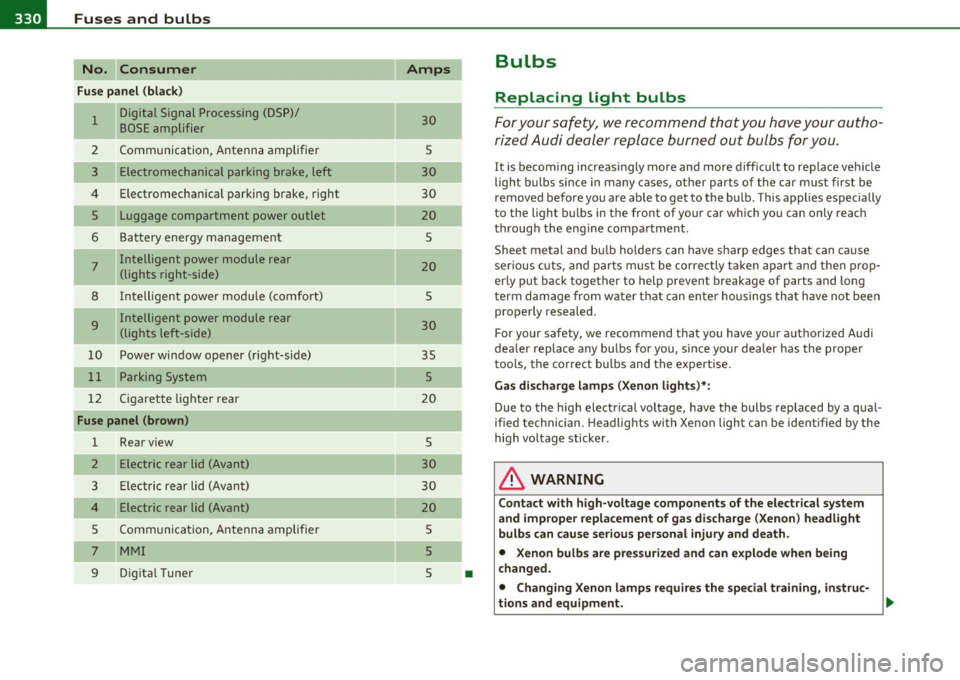
lffl!I.___F_ u_ s_e _s_ a_n_ d_ b_u _ l_ b_ s _______________________________________________ _
No. Consumer
Fuse panel (black)
-
1 Digital Signal Processing (DSP)/
BOSE amplifier
2 Communication , Antenna amplifier
3 Electromechanical parking brake, left
4 Electromechanical parking brake, right
5 Luggage compartment power outlet
6 Battery energy management
7 Intelligent power module rear
(lights right-side)
8 Intelligent power module (comfort)
9 Intelligent power module rear
(lights left-side)
10 Power window opener (right-side)
11 Parking System
12 Cigarette lighter rear
Fuse panel (brown)
1 Rear view
2 Electric rear lid (Avant)
3 Electric rear lid (Avant)
Electric rear lid (Avant)
5 Communication , Antenna amplifier
7 MMI
9 Digital Tuner
Amps
-
30
5
30
30
20 5
20
-
5
30
-
35
5
20
5
30
30
20
5
5
5
•
Bulbs
Replacing light bulbs
For your safety, we recommend that you have your autho
rized Audi dealer replace burned out bulbs for you.
It is becoming increasingly more and more difficult to replace vehicle
light bulbs since in many cases, other parts of the car must first be
removed before you are able to get to the bulb . This applies especially
to the light bulbs in the front of your car which you can only reach
through the engine compartment .
Sheet metal and bulb holde rs can have sharp edges that can cause
serious cuts, and parts must be correctly taken apart and then prop
erly put back together to help p revent breakage of parts and long
term damage from water that can enter housings that have not been
properly resealed .
For your safety, we recommend that you have your authorized Audi
dealer replace any bulbs for you , since your dealer has the proper
tools, the correct bulbs and the expertise.
Gas discharge lamps (Xenon lights)*:
Due to the high electrical voltage, have the bulbs replaced by a qual
ified technician. Headlights with Xenon light can be identified by the
high voltage sticker .
& WARNING
Contact with high-voltage components of the electrical system
and improper replacement of gas discharge (Xenon) headlight
bulbs can cause serious personal injury and death.
• Xenon bulbs are pressurized and can explode when being
changed.
• Changing Xenon lamps requires the special training, instruc-
tions and equipment. .,_