ignition AUDI A6 2011 Workshop Manual
[x] Cancel search | Manufacturer: AUDI, Model Year: 2011, Model line: A6, Model: AUDI A6 2011Pages: 370, PDF Size: 87.15 MB
Page 114 of 370
-On the road .,,, ___________________ _
in. WARNING
• Never turn off th e engine until the vehicle has come to a
c omplete stop .
• The b rake booste r and servotronic only work when the eng ine
is running . With the ignition turned off, you have to apply more
force when stee ring or braking . Since you cannot steer and stop
normally , thi s can lead to accident s and serious in juries.
• For s afety reasons , you should always park your vehicle with
the selector lever in P. Otherwi se, the vehicle could inadvertently
roll away.
• After the engine has been switched off , the radiator fan can
continue to run for up to 10 minutes - even with the ignition
s witched off. It can also switch on again after some time if the
c oolant temper ature rises as the r esult of a heat buildup or if the
engine is hot and the engine compartment is additionally heated
by the sun's rays .
0 Note
If the eng ine has been under heavy load for a n extended per iod, heat
builds up in the engine compartment after the engine is switched
off
- there is a r is k of damaging t he eng ine. Allow the e ngine to run at id le
for about 2 min utes before switc hing it
off. •
Appli es to ve hicles : w it h Conve nience key
Driver messages in the instrument cluster
display
If a function is not present, a driver mess age appea rs .
No key identified
Th is message appears when the ! START ] button is p ressed if there is
no mast er key ins ide the veh icle o r if t he sys tem does not recogn ize
it. For examp le, the master key cannot be recognized if it is covered
by an o bject (e.g . al uminum br ie f c ase) w hich
screens the r adio signal. .Electronic dev
ices such as cell phones can also interfere with
t he radio signal.
Press brake pedal to start engine
Thi s message appea rs if yo u press the !STAR T] butto n to start the
eng ine and do not depress the brake pedal. The engine can on ly be
s t ar ted i f the brake ped al is dep ressed .
Engage N or P to start engine
This message appea rs w he n th e engi ne is started if the sele cto r lever
for the automa tic transmission is not in the P o r N position. The
eng ine can only be s tarted w ith the se lec tor in these pos itions.
? Key not in vehicle
Thi s message appea rs alo ng with the symbol if the master key is
removed from the vehicle with t he engine runn ing. It is intended to
remind you (e.g. w hen c hanging dr ive rs) not to con tinue t he journey
w ithout the master key.
If t he master key is no longe r in the ve hicle, yo u cannot switch of f the
ig nitio n after stopping the engine and you a lso cannot start the
engine again. Moreover, you cannot lock the vehicle from the outside
w ith the key.
Shift to P otherwise vehicle can roll away. Doors do not lock if you
are not in P .
This message appea rs for safety reasons along with a warning buzzer
if the se lector lever for the automatic transmission is not in the P
position when t he ig nition is sw itched
off with t he !STOP] button and
t he d river's door is opened. Move t he selector lever to the P posit io n ,
otherwise the vehicle is not secured against rolling away. You also
c anno t lock the vehicle usi ng the lo cking but ton o n the door hand le
or using the remote key.
To engage steer ing lock, press and hold STOP button
Thi s message appears for safety reasons if the engine and the ignit ion
h ave bee n sw itche d off by p ress ing the
!S T O P) bu tton once, and t hen .,,_
Page 116 of 370
![AUDI A6 2011 Workshop Manual 1111....__0_ n_ t_h_ e_ r_ o_ a _ d _________________________________________________ _
(I] Tips
• You can apply the parking brake at any time -even with the igni
tion turned off. T](/img/6/57593/w960_57593-115.png "AUDI A6 2011 Workshop Manual 1111....__0_ n_ t_h_ e_ r_ o_ a _ d _________________________________________________ _
(I] Tips
• You can apply the parking brake at any time -even with the igni
tion turned off. T")
1111....__0_ n_ t_h_ e_ r_ o_ a _ d _________________________________________________ _
(I] Tips
• You can apply the parking brake at any time -even with the igni
tion turned off. The ignition must be turned on in order to release the
parking brake.
• Occasional noises when the parking brake is applied and released
are normal and are not a cause for concern.
• Th e parking brake goes through a se lf-test cycle at regular inter
vals -when the vehicle is parked. Any associated noises are normal. •
Parking
To prevent a parked vehicle from rolling away, there are
a few things you should do.
When you park your vehicle, do the following
- Stop the vehicle using the brake pedal.
- Pull the switch to apply the electromechanical parking
brake.
- Move the selector lever into the
P position==> &.
- Switch off the engine and remove the ignition key from
the ignition lock .
When you park your vehicle on hills, do the
following
- Stop the vehicle using the brake pedal.
- Pull the switch to apply the electromechanical parking
brake.
- If you are parking headed
downhill, turn the front wheels
toward the curb. -
If you are parking headed
uphill, turn the front wheels
away from the curb.
- Move the selector lever into the
P position.
- Switch off the engine and remove the ignition key from
the ignition lock.
& WARNING
This is how you can reduce the risk of injury when leaving your
vehicle.
• Never park the vehicle where it can come in contact with dry
grass, spilled fuel or any other flammable materials.
• When parking on hills, always turn the wheels so that the front
wheels will first roll into the curb, if the vehicle should start to
roll.
• Never allow anyone -especially small children -to remain in
the vehicle when it is locked. Locked doors make it more difficult
for rescuers to access the passenger compartment in the event of
an emergency. Danger to life!
• Never leave children unsupervised in the vehicle. Children
could release the parking brake or move the gearshift lever out of
gear. The vehicle could start to roll away and cause an accident.
• No matter what the season is, the temperature in a parked
vehicle can reach dangerous levels.
0 Note
• Please exercise care when you park your vehicle in parking areas
with parking barriers or curbs. Parking barriers and curbs vary in
height and could damage your bumper and related components as
the front of your vehicle moves over a barrier or curb that is too high,
as you park or as you back out of a parking spot. In order to be sure
that no such damage can occur, you may wish to stop short of having
the front tires of your car touch the parking barrier or curb. .._
Page 119 of 370

_________________________________________________ O_ n_t_ h _ e_ ro_ a_d __ ffl'II
The display=> page 116, fig. 106 will show the set speed. The display
may vary depending on the type of display in your vehicle. T he indi
cator light
CRUISE (US model) I c-f (Canadian model) w ill also light up
in the instrument cluster.
The speed is kept constant via an engine output adjustment or active
brake intervention.
_& WARNING
• Always pay attention to traffic even when the cruise control is
switched on. You are always responsible for your speed and the
distance between your vehicle and other vehicles.
• For safety reasons, the cruise control should not be used in the
city, in stop-and-go traffic, on twisting roads and when road
conditions are poor (such as ice, fog, gravel, heavy rain and hydro
planing ) - risk of accident.
• Turn off the cruise control temporarily when entering turn
lanes, highway exit lanes or in construction zones.
• Please note that inadvertently "resting" your foot on the accel
erator pedal causes the cruise control not to brake . This is because
the cruise control is overridden by the driver's acceleration .
(I] Tips
The brake lights illuminate as soon as the brakes decelerate
automatically . •
A ppli es to ve hicles : w it h cr uise contro l
Changing speed
- Press lever in the G)orQ direction ==> page 116, fig. 105
to increase or decrease your speed.
- Release the lever to save that speed.
Controls and equip
ment Safety first
Change speed
in increments of 1 mph (1 km/h) by lightly pressing the
lever. If you keep the lever pressed down, yo u will alter your speed in
5 mph (10 km/h) increments.
You can also press the accelerator pedal down to increase your speed, e .g . if you want to pass someone. The speed you saved earlier wi ll
resume as soon as you release the accelerator pedal.
If, however, you exceed yo ur saved speed by 5 mph (10 km/h) for
longer than S m inutes, the cruise control will turn off temporarily.
The symbol will go out but the saved speed will be retained .•
App lies to ve hicle s: w it h cr uise c ontro l
Presetting your speed
You can preset your desired speed while the vehicle is not
moving.
- Turn on the ignition.
- Pull lever into position
(i) ==> page 116, fig. 105 .
- Press the lever in the
0 or 0 direction to increase or
decrease your speed.
- Release the lever to save that speed.
This function makes it possible, for example, to save the speed yo u
want before driving on the highway. Once on the highway, act ivate
the cruise contro l by pulling the lever toward
(D. •
A pp lies to ve hicles : wit h cr uise c ontro l
Switching the system off
Temporary deactivation
- Press the brake pedal, or
Vehicle care Technical data
Page 122 of 370

lffl!I.___A_ d_ a_,_ p_t _i_ v _e _ C_r_ u_ i_ s_ e_ C_ o_ n_ t_ r_ o_ l __________________________________________ _
& WARNING (conti nu ed )
• Never allow the closing speed between you and other vehicles
to be so high that the Adaptive Cruise Control may not b e able to
slow your vehicle safely.
If closing speed is too high , you must
appl y the brake s yourself to r educe the risk of a rear-end crash.
• Never re st your foot on the accelerator pedal , especially when
the Adaptive Crui se Control is being used . Pre ssure on the acceler
ator will o verride the ACC braking fun ction and prevent the brakes
from being applied when ACC detects a situation when the brakes
must be applied .
• Never use Adaptive Cruise Control when you cannot drive safely
at a steady speed, including on city streets , on winding roads or
when road conditions are poor (for example, on ice, gravel, in fog,
heavy rain or on wet roads that incre ase the risk of hydroplaning ).
• The radar sensor's
vision can be reduced by rain, snow and
heavy road spray. These and simila r conditions can p revent vehi
cles up ahead from b eing accurately detect ed and in some cases
they may not be detected at all. Do not use ACC when the rad ar
sen sors cannot ac curately detect vehicle s moving ah ead of you in
traff ic.
• Alway s turn off Adaptive Cruise Control when ente ring turn
lanes, exit lanes and construction zones or in similar situations
becaus e the vehicle will automatic ally a ccelerate to the stored
speed when the road ahead is clear .
• To prevent unintended operation, always switch ACC off when
it is not being used.
[ i ) Tips
• For safety reasons, the stored speed is deleted when the ignition
is tu rned off.
• The Electronic Stabilization Program (ESP) and the Anti-Slip Regu
la tion (ASR) cannot be dea ct iv a te d w he n t he A dapt ive Cruise Co ntr ol
is switched on. If the ESP and the Anti -S li p Reg ulation (ASR) has been deactivated and yo
u then sw itch on the Adapt ive Cr uise Contro l, th e
ES P fu nction w ill als o be a ct iv a te d a utom atically.
• Damage caused by accidents and some minor collisions can affect
t he rad ar sensor settings and c ause the system to malfunction o r
switch off completely .
• Th e radar s ensor cover is heate d. In w in ter cond itions, you sho uld
st ill check befo re dr iv ing to make sur e it is free of ice and snow. If
neces sary, cle an the area ne ar the r ad ar sensor carefull y::::>
page 119,
fig. 107 .
• T o ensure th at th e radar sensor i s not bl ocke d , fo reign obje cts
(e .g. stickers, larger license plate mounts, add-on parts) must not
cover the area near the r ada r senso r::::>
page 119, fig. 1 07. Th e area
near the radar sensor must not be painted, either.
• F or Decla ration o f Compli ance to Uni te d Stat es FCC and I ndustry
Canada regulations::::>
page 349. •
Applies to vehicles : w ith Adaptive Cruise Control
How does Adaptive Cruise Control work?
Vehicles trav eling ahead are det ect ed with the aid of a
radar sensor.
Fig . 108 Basic prin
cipl e dia gram : Radar
s en sor me asurement
rang e
Adaptive Cr uise Cont rol uses a radar sensor in the fron t of t he vehicle
::::> fig. 108 . The system has limitations::::>
page 131. Things that are
no t moving in yo ur lane and in your dire ct io n of trave l will not be
~
Page 128 of 370
lffll.___A_ d_ a_,_ p_t _i_ v _e _ C_r_ u_ i_ s_ e_ C_ o_ n_ t_ r_ o_ l __________________________________________ _
How your vehicle responds when accelerating and follow ing other
veh icles wi th AC C opera ting c an be ad apte d to you r person al wishes
through diffe rent driving programs. Depend ing o n which driving
pro gram an d which distance you choose, you r veh icle w ill respon d
Settings DISTANCE
1
Symbol for time interval c;:::::::::,_c;:::::::::, __ _
Support for: Bu mp er-t o-b um per
tra ff ic, br isk driving
Response in " dynamic " driving program 1
Response in "standard " driving program 2
Response in "comfort " driving program 3
(dy namic) 1 ----- 2 ----- 3 ----- 4 ----- 5 (comfortable)
& WARNING
Following other vehicles too closely increases the risk of a crash
and serious personal injury .
• Following other vehicles too closely , particularly at higher
s peeds increase s the risk of collisions and serious personal injury.
• Setting short distances to the traffic ahead reduces the time
and distance available to bring your vehicle to a safe stop and
makes it even more necessary to pay close attention to traffic.
• Always select a speed and distance to traffic ahead that is safe
and appropriate under the prevailing traffic, road , weathe r and
lighting conditions.
• Never rely on the distance control feature of ACC alone to
prevent rear-end collisions . Always be prepared to brake and take
ev asive action to avoid collisions and other accident situations .
• Never allow the closing spe ed between you and other vehicles
to be so high that the Adaptive Cruise Control may not be able to more dynamically or more com
fortab ly when accelerating a nd
bra king. The set ting is se lec ted t hrough the MMI m enu Adaptive
Cruise Control =>
page 131, "MM I sett ings" .
DISTANCE
2 DISTANCE 3 DISTANCE4
~- _ c;:::::::::,_ - c;:::::::::,_ - _ c;:::::::::,_
c;:::::::::,_ - - _c;:::::::::,
Bum p er-to- bum per Bum per -to- bum per Se co nd ary r oads, tr ail er
tra ff ic, "keep ing pace" traff ic, "k eep ing pace" o perat ion
c omf ortabl y comfort ab ly
2 2 3
3 3 4
4 4
5
&, WARNING (co ntinued )
slow your vehicle safely . If closing speed is too high, you must
apply the brakes yourself to reduce the risk of a rear-end cra sh .
• Always select a greater following distance to the vehicle ahead
on wet roads than on dry roads.
• Always read and heed the information and WARNINGS=>
& in
" Description " on
page 119.
[I) Tips
Th e d istance sett ing is reset to the facto ry defau lt DISTANCE 3 the
next time the ignition is turned on .•
Page 150 of 370
ffl..__A_ u_ t_ o_ m_ a_ t _ ic_ t_r_a _ n_ s_m _ i_ s _s_ i_ o _ n _____________________________________________ _
R -Rev e rse
T he transmission will automatically select the lowe st gea r ratio when
you sh ift into reverse .
Select
R only when the vehicle is at a full stop and the engine is
running at id le speed=>
& in "Driving the a utomatic tra nsmiss ion"
on
page 146 .
Before yo u move the selector lever to R, press both the button in the
handle of the selector lever
and the brake pedal at the same time.
When the ignition is on, the backup lights illum inate when the
selector lever is moved into
R .
N -Neutral
The tra nsmission is in neutra l in t his position . Shift to this posit ion
for standing wit h the brakes applied~
page 148.
When the vehicle is s tationary or a t speeds be low 3 mph (5 km/h),
you must always apply the footbrake before and while mov ing the
lever ou t of
N .
D -Normal position for dri ving forward
Posit ion Dis fo r normal city and highway driv ing. I t ranges from ze ro
to top speed and all gears shift automatically, depending on eng ine
load, d riving speed and au tomatically selected s hift p rograms.
When the vehicle is stat ionary or at speeds below 3 mph (5 km/h),
you must always apply the foot brake before and while moving the
lever to
D out of N .
In certa in circumstances it may be advantageous to temporarily
switch to the m anu al sh ift prog ram to man ua lly se lect gea r ratios to
match specific driving conditions~
page 150.
S -Sport position
Select this position for sportier performance. In this position, the
t ransm iss ion will not upshif t as soon, allowing the vehicle to use the
increased power available at higher engine speeds to achieve livelier
a cceler ation. When the vehicle
is stationary or at speeds below 3 mph (5 km/h),
you must always app ly the foot bra ke before and w hile movi ng the
lever to
S out of N.
& WARNING
Read and follow all WARNINGS=> & in "Driving the automatic
transmi ssion " on
page 146 .
0 Note
Coast ing downh ill with the transmission in N and t he e ng ine not
running will result in damage to the automatic t ransmiss ion and
possibly the catalytic converter .•
Ap plies to veh icles: w it h 6-speed automatic t ransmissio n
Automatic Shift Lock (ASL)
The Automati c Shift Lo ck s afegu ards you ag ainst acci
dentally shifting i nto a for ward or the reverse gear and
causing the vehicle to m ove unintentionally .
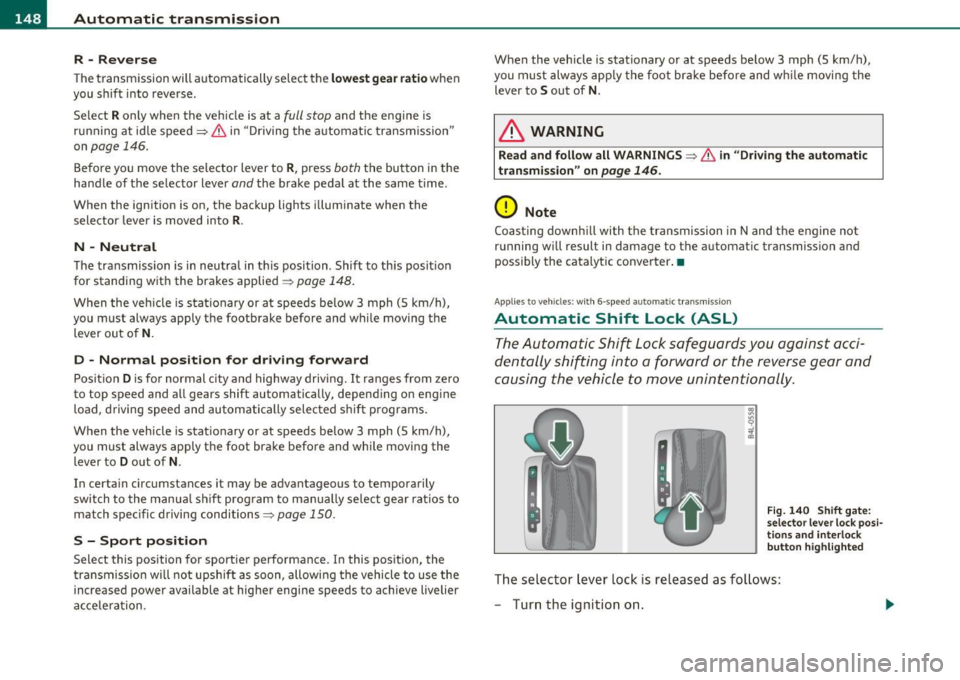
Fig. 140 Shift gat e:
s e lect or le ve r lo ck posi
t io ns a nd interl ock
butt on h ighlighted
The sele ct or lever lock is released as fo llows:
- Turn the ignition on.
Page 151 of 370

______________________________________________ A_ u_ t_ o _ m_ a_ t_ ic_ t_r_a _ n_ s_m_ i_ s _s_ i_ o _ n __ _
-Step on the brake pedal. At the same time press and hold
the interlock button on the side of the gear selector knob
=:> fig. 140 with your thumb until you have moved the
selector lever to the desired position.
Automatic selector lever lock
The selector lever is locked in the P and N positions when the ignition
is turned on. To move the lever from these positions the driver must
depress the brake pedal. As a reminder to the driver, the following
warning appears in the instrument cluster display when the se lector
is in
P and N:
When stationary apply footbrake while selecting gear
A time delay element prevents the selector lever from locking when
it is moved through the
N position (going from R to D). The locking
element will lock the selector lever if the lever is left in N (Neutra l) for
more than approximately 1 second, without the brake pedal being
pressed.
A t speeds above about 3 mph (5 km/h) the Automatic Shift Lock is
automatically deactivated in the
N position .
Interlock button
The lock button on the selector lever prevents the lever from being
accidentally shifted into certain posi tions . Pressing this button deac
tivates the selector lever lock. Depending on the direction of the
shift, the selector lever locks at different positions. The positions are
highlighted in the illustration=>
page 148, fig. 140.
Ignition key safety interlock
The key cannot be removed from the ignition unless the selector lever
is in the
P pa rk position. When the ignition key is removed, the
selector lever will be locked in the
P position. •
Controls and equip
ment Safety first
A
pp lies to vehicles : w ith 6-s p eed a utomati c transm ission
Kick-down
The kick-down feature allows the vehicle to generate
maximum acceleration .
When you press the accelerator pedal beyond the resistance point
that is reached at full throttle, the transmission will select a lower
gear ratio based on vehicle speed and engine RPM. The engine RPM
will be controlled to produce maximum vehicle acceleration as long
as you continue to press the accelerator pedal beyond this resistance
point .
& WARNING
Be careful when using the kick-down feature on slippery roads.
Rapid acceleration may cause the vehicle to skid. •
Applies to v ehicles: with 6 -speed auto mat ic trans miss ion
Dynamic shift program (DSP)
The automatic transmission is electronically controlled.
The transmission is self adapting and will automatically select the
best sh ift p rogram suited to the driv in g conditions and driving style.
The transmission will select one of the
economy programs when you
drive at a steady speed or a gradually changing speed without heavy
acceleration . This ach ieves optimum fuel efficiency, with early
upshifting and de layed downshifting.
Th e transmission will automatically select the
sporty shift programs
when you dr ive at higher speeds, or w ith heavy acceleration and
frequently changing speeds . Upshifts are delayed to make full use of
engine power . Downsh ifting takes place at higher engine speeds than
in the economy programs . _.,
Vehicle care Technical data
Page 154 of 370
-Automatic transmission .n,..__ ______________ _
Appli es to veh icles : wi th 6-spe ed a utomatic t ransm iss ion
Emergency release for selector Lever
If the vehicle's power supply fails, the selector lever can
be released in an emergency.
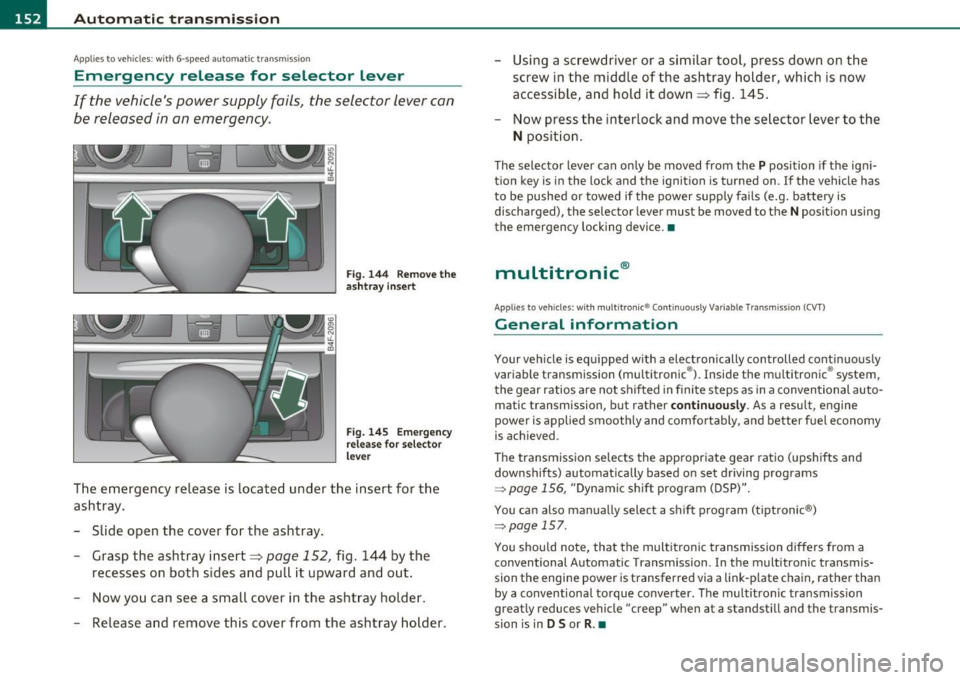
Fig. 144 Remove the
ashtray insert
Fig. 145 Emergency
release for selector
lever
The emergency release is located under the insert for the
ashtray.
- Slide open the cover for the ashtray.
- Grasp the ashtray insert=>
page 152, fig. 144 by the
recesses on both sides and pull it upward and out.
- Now you can see a small cover in the ashtray holder.
- Release and remove this cover from the ashtray holder. -
Using a screwdriver or a similar tool, press down on the
screw in the middle of the ashtray holder, which is now
accessible, and hold it down=> fig. 145.
- Now press the interlock and move the selector lever to the
N position.
The selector lever can only be moved from the P position if the igni
tion key is in the lock and the ignition is turned on . If the vehicle has
to be pushed or towed if the power supply fails (e.g. battery is
discharged), the selector lever must be
moved to the N position using
the emergency locking device.•
multitronic ®
Appli es to vehi cles: w ith mul tit ron ic® Co ntin uous ly Var ia ble Tra nsm iss ion ( CVT)
General information
Your vehicle is equipped with a electronically controlled continuously
variable transmiss ion (multitronic ®). Inside the multitronic ® system,
the gear ratios are not shifted in finite steps as in a conventional auto
matic transmission, but rath er
continuously. As a result, engine
power is applied smoothly and comfortably, and better fuel economy
is achieved .
The transm ission selects the appropriate gear ratio (upshifts and
downshifts) automatically based on set driving programs
~ page 156, "Dynamic shift program (DSP)".
You can also manually select a shift program (tiptronic ®)
~ page 157.
You should note, that the multitronic transmission differs from a
conventional Autom ati c Transmission . In the multitronic transmis
sion the engine power is transferred via a link-plate chain, rather than
by a conventional torque converter. The multitronic transmission
greatly reduces vehicle "creep" when at a standstill and the transmis
sion is in
D Sor R . •
Page 157 of 370

Automatic transmission Ill
----------------
Before you move the selector lever to R, press both, the button in the
hand le of the se lector lever
and the brake pedal at the same time.
When the ignition is on, the backup lights illuminate when the
selector lever is moved into
R.
N -Neutral
Shift to this position for standing with brakes applied=> page 155.
When the vehicle is stat ionary o r at speeds below 3 mph (5 km/h),
you must always apply the footbrake before and wh ile moving the
lever out of
N.
Do not use N for coasting downhill.
D -Normal driving position for forward
Depending on the load on the engine, vehicle speed and the dynamic
control program, the transmission will se lect the
optimal gear ratio.
In certa in circumstances it may be advantageous to temporarily
switch to the manual shift program to manually select gear ratios to
match specific driving conditions=>
page 157.
When the vehicle is stationary or at speeds below 3 mph (5 km/h),
you must always apply the footbrake before and while moving the
lever to
D out of N .
S -Sport position
Select this position for sportier performance. In this position, the
transmission will not upshift as soon, allowing the veh icle to use the
increased power available at higher engine speeds to achieve livelier
acceleration.
When the vehicle is stat ionary or at speeds below 3 mph (5 km/h),
you must always app ly the foot brake before and whi le moving the
lever to
S out of N.
& WARNING
Read and follow all WARNINGS=> & in "Driving the multi
tronic ®" on
page 153.
Controls and equip
ment Safety first
0 Note
Coasting downhill
with the transmission in N and the engine not
operating will result in damage to the automatic transmission and
poss ibly the catalytic converter.•
Applies to veh icles: w ith mult itronic ® Continuously Va riable T ransmiss ion (C VT)
Automatic Shift Lock (ASL)
The Automatic Shift Lock safeguards you against acci
dentally shifting into a forward or the reverse gear and
causing the vehicle to move unintentionally.
Fig. 148 Shift gate:
selector lever lock posi
tions and inter lock
button highlighted
The selector lever lock is released as follows:
- Turn the ignition on.
- Step on the brake pedal.
At the some time press and hold
the interlock button on the side of the gear se lector knob
=> fig. 148 with your thumb until you have moved the
selector lever to the desired position .
Automatic selector lever lock
The selecto r lever is locked in th e P and N positions when the ignition
is turned on. To move the lever from these pos itions the driver must
depress the brake pedal. As a reminder to the driver, the following .,_
Vehicle care Technical data
Page 158 of 370
1111....__A_ u_ t_o _m_ a_ t_ic _ t_ r_ a_ n_s _m_ i _s_ s_ i_ o_ n ____________________________________________ _
warning appears in the instrument cluster display when the selector
is in
P and N:
When stationary apply footbrake while selecting gear
A time delay element prevents the selector lever from locking when
it is moved through the
N position (going from R to D). The locking
element will lock the selector lever if the lever is left in N (Neutral) for
more than approximately 1 second, without the brake pedal be ing
pressed .
At speeds above about 3 mph (5 km/h) the Automatic Shift Lock is
automatically deactivated in the
N position.
Interlock button
The lock button on the selector lever prevents the lever from being
accidentally shifted into certain positions. Pressing this button deac
tivates the selector lever lock. Depending on the direction of the
shift, the selector lever locks at different positions. The positions are
high light ed in the illustrat ion~
page 155 , fig. 148.
Ignition key safety interlock
The key cannot be removed from the ignition unless the selector lever
is in the
P park position. When the ignition key is removed, the
selector lever w ill be locked in the
P pos it ion .•
Ap plies to v ehicles : w ith mult itronic ® Contin uously Var iable Transm issio n (C VT)
Kick-down
The kick-down feature allows the vehicle to generate
maximum acceleration.
When you press the accelerator pedal beyond the resistance point
that is reached at full throttle, the transmission will select a lower
gear ratio based on vehicle speed and engine RPM . The engine RPM
w ill be contro lled to produce maximum vehicle acceleration as long
as you continue to press the accelerato r pedal beyond th is resistance
point .
& WARNING
Be careful when using the kick-down feature on slippery roads.
Rapid acceleration may cause the vehicle to skid. •
Applies to veh icl es: w it h mul tit ro nic® Con tin uous ly Va ria bl e Tran smis s io n ( CVT)
Dynamic shift program (DSP)
The multitronic ® transmission is electronically
controlled .
The transmission selects the appropriate gear ratio (upshifts and
downshifts) automatically based on preset d riving programs.
The transmission will select one of the
economy programs when you
drive at a steady speed or a gradua lly changing speeds without heavy
acceleration . Th is gives best fuel eff iciency, with early upshifting and
delayed downshifting.
Th e transmission will automatically select the
sporty shift programs
when you dr ive at higher speeds, or w ith heavy acceleration and
frequently changing speeds. Upshifts are delayed to make full use of
engine power . Downshifting takes place at higher engine speeds than
in the economy programs.
Th e selection of the most suitab le shift program is a continuous,
automatic process. The driver can a lso make the transmission switch
to a sporty program by
quickly pressing down the gas pedal.
This causes the transmiss ion to shift down into a lower gear ratio and
makes quick acceleration possible (to pass another vehicle) You do
not need to press the gas pedal into the kickdown range. After the
transmission has upshifted, the original program is selected
according to your driving style.
An additional shift prog ram allows the automatic t ransmission to
select the proper gear for uph ill and downh ill grad ients.
This prevents the transmiss ion from shifting up and down unneces
sari ly on hills. The transmission will shift down to a lower gear ratio _,,,