light AUDI A6 2011 Workshop Manual
[x] Cancel search | Manufacturer: AUDI, Model Year: 2011, Model line: A6, Model: AUDI A6 2011Pages: 370, PDF Size: 87.15 MB
Page 73 of 370
• Do not attach any st ickers to the w indshield in front of the light
sensor, as this would inte rfe re with the a utomat ic operat ion of the
headlights and the automat ic dimming of the ins ide mir ror.
• Be aware that a utomatic dimming o f the in si de mir ror can on ly
operate proper ly if the rear w indow s un b lin d* is retracted . •
Outside mirrors
The outside mirrors are elec trically ad jus ted.
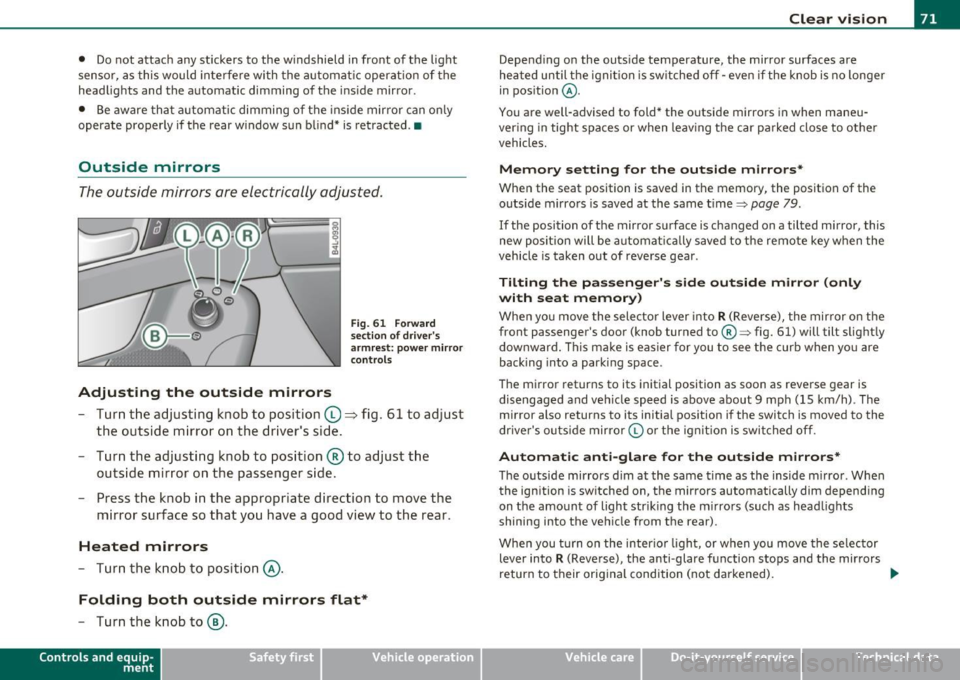
Adjusting the outside mirrors
F ig . 6 1 Forward
sec tion of dri ve r's
a rmr est: p ow er mirr or
con tro ls
- Tur n th e adjus ting k no b to position (0 ~ fig. 61 to ad just
the outsi de mi rror on the drive r's sid e.
- Turn the adjusting knob to position ® to adjust the
outside mir ror on the passenger side .
- Press the knob in the appropriate direction to move the
mirror surface so that you have a good view to the rear .
Heated mirrors
- Turn the knob to position @.
Folding both outside mirrors flat*
-Turn the knob to@ .
Con tro ls a nd e quip
m en t Vehicle
OP-eration
Clear vision
Depend ing on the outs ide temperature, the mirror surfaces are
heated un til t he ignit ion is sw itched off -eve n if the knob is no longe r
in pos ition
@ .
You are well-advised to fold* the o utside mirrors in when maneu
ver ing in tight spa ces or when leav ing t he car parked close to ot her
vehicles.
Memory setting for the outside mirrors *
When the seat position is saved in the memory, the position of the
outs ide mirro rs is saved at the same time~ page 79.
If the position of the mirro r su rface is changed on a tilted mirror, this
new posit io n wi ll be automat ically saved to the rem ote key w hen the
vehicle is taken out of reverse gear .
Tilting the passenger's side outside mirror (only
with seat memory )
When yo u move the selector lever into R (Reverse), the mir ror on t he
front passenger 's door (knob turned to@ ~ fig. 61) will tilt slight ly
downward . Th is ma ke is eas ier for you to see t he curb when you are
back ing into a parki ng space .
T he mirror returns to its initial position as soon as reverse gear is
disengaged and ve hicle speed is above about 9 mph (15 km/h) . The
mirro r also returns to its initia l position if the switch is moved to the
dr ive r's o uts ide mirro r© or th e ig ni tion is swit ched off .
Automatic anti-glare for the outside mirrors*
The o utside mirrors dim at the same t ime as the inside m irro r. When
the ign it ion is sw itched on, the mirrors automatically dim depend ing
on the amo unt of light str iking the m irro rs (su ch as head lights
shining into the vehicle from the rear).
When you turn on the inter io r li ght, or w hen you move the se lec tor
lever into
R (Reverse), the anti-glare f unction stops and the mirrors
return to their orig inal condition (not darkened).
~
Vehicle care Do-it-yourselt service iTechnical data
Page 74 of 370
Clear vision
0 Note
• Curved ( i.e. co nvex) mir ror s urfaces increase your field of view.
Remember that vehicles or other objects will ap pear smaller and
f art her away th an whe n seen in a fla t mi rror. If you use th is mi rro r to
estimate distances of follow ing ve hicles when chang ing lanes, you
could estimate i nco rre ct ly and ca u se an a cci dent .
• If the mir ror ho using is moved un inte ntionally (for examp le, whi le
par king yo ur veh icle), then you m ust fir st f old the mir ror ele ctrically.
Do not read just the mirro r hous ing manually. You could damage the
mot or w hic h con trols the mi rror .
[ i ] Tips
If the re should be a m alfu nction in the ele ct ric al sys tem, you can st ill
adjust the outs ide mirrors by pressing the edge of the m irror. •
App lies to ve hicles : w ith auto mat ic dimm ing fo r outs ide m ir ro rs
Automatic dimming for outside mirrors
T he ou tside mir rors are dimmed toge ther w it h t he a utoma tic
dimming of the ins ide mirror . When the ignition is sw itched on, t he
m irrors da rken a utomat ica lly depend ing on the light stri king them
(e .g . headlights from the r ea r) .
When the interio r light ing is sw itched on and when reverse gear is
engaged , the mi rrors are switche d back to their or ig inal b rightness
(not d immed).
& WARNING
Broken glass of automatic dimming mirror can cause electrolyte
fluid leakage. Electrolyte fluid can irritate skin, eyes, and respira tory system.
• Repeated or prolonged exposure to electrolyte can cause irrita
tion to the respiratory system, especially among people w ith
& WARNING (co ntinued )
asthma o r other respiratory conditions . Get fresh air immediately
by leaving the vehicle or, if that is not po ssible, open window s and
doors all the way.
• If electrolyte gets into the eyes, flush them thoroughly with
large amounts of clean water fo r at least 15 minutes; medical
attention i s recommended.
• If electrolyte contacts skin , flush affected area with clean
water for at least 15 minutes and then wash affected area w ith
soap and water; medical attention is recommended. Thoroughly
wash affected clothing and shoes before reuse.
• If swallowed and person is conscious, rinse mouth with water
for at least 15 minutes. Do not induce vomiting unle ss instructed
to do so by medical professional. Get medical attention immedi·
ately.
0 Note
El ectro ly te lea king from a br oke n m irro r g lass a ttack s th e veh icle
pa int and plast ic surfaces. Clean up sp illed electrolyte immed iate ly
w ith clear w ater and a s ponge.
[ i ] Tips
• If automatic dimming for the inside mirror is switched off , the
outside mirrors are also not dimmed automatically.
• Automat ic di mmin g for t he mir ro r only oper ates p roperly if the
sunshade * fo r th e rear w indow is retracted, o r the light strik ing t he
inside mi rror is not hindere d by other objects .•
Page 77 of 370
Seats and storage
General recommendations
Why is your seat adjustment so important?
The safety belts and the airbag system can only provide
maximum protection if the front seats are correctly
adju sted.
Th ere a re various ways of adjusting t he front seats to provide safe and
comfortable support for the driver and the front passenger . Ad just
your seat properly so that :
• you can easily and quickly reach a ll the switc hes and contro ls in the
ins trumen t pa nel
• your body is properly supported thus reducing phys ica l stress and
fatigue
• the safety be lts and airbag system can offer maximum protection
=>
page 197 .
In the following sections, you w ill see exact ly how you can best ad just
your sea ts .
Th ere are special regulations a nd instr uctions for install ing a child
safety seat on the front passenger's sea t. Always follow the informa
tion regarding child safety p rovided in=>
page 219, "Child Safety ".
& WARNING
Incorrect seating posit ion of the dri ver and all other passengers
can result in seriou s personal injury.
• Always keep your feet on the floor when the vehicle is in
motion -never put your feet on top of the instrument panel, out
of the window o r on top of the seat cush ion. This applies especially
to the passengers.
If your seating po sition is incorrect, you
increase the ri sk of injury in the case of sudden braking or an acci-
Controls and equip
ment Safety first
Seats and storage
& WARNING
(con tinu ed)
dent . If the airbag inflates and the seating position is incorrect ,
this could result in per sonal injury or even death .
• It is important for both the dri ver and front passenger to keep
a distan ce of at least 10 inche s (25 cm) between themselves and
the steering wheel and /or instrument panel. If you 're sitting any
closer than this , the airbag system cannot protect you properly. In
addition, the front seats and head restraints must be adjusted to
your body height so that they can give you maximum protection .
• Always try to keep as much distance as possible between your
self and the steering wheel or instrument panel.
• Do not adjust the driver's or front passenger 's seat while the
vehicle is moving. You r seat may move unexpectedly , causing
sudden loss of vehicle control and personal injury . If you adjust
your seat while the vehicle is moving , you are out of position. •
Driver's seat
The correct seat position is important for saf e and
re lax ed driving.
W e recomme nd that you a djust the drive r's sea t in the
f ollowing man ner :
- Ad just the seat in fore and aft direction so that you can
easily pus h the pedals to the floor w hile keeping your
knees slightly bent=>
& in "Why is yo ur seat a djus tme nt
so importa nt?" .
- Adjust the seatback so that when yo u sit with yo ur back
agai nst t he seatback , you can st ill grasp t he top of the
steering w heel. ..,
Vehicle care Technical data
Page 81 of 370

Seat memory
Applies to veh icles: with seat memory
Driver's seat memory
The seat adjustment settings for two drivers can be
stored using the memory buttons in the driver's door.
-...... SET 1 2 ,,..,
Fig. 68 Driver's door:
Seat memory
In addition to the setting for the driver's seat, the settings for the
steering column* and both exterior mirrors can be stored.
Storing and r ecalling setting s
Using the memory buttons 1 and 2, you can store and recall the
settings for two different drivers~ fig . 68 .
T he current settings are also automatically stored on the remote
control key being used when the vehicle is locked. When the vehicle is
unlocked, the settings stored on the remo te contro l key being used
are automatically recalled. This function has to be activated in the
MMI
~ page 80, " Activating remote cont rol key memo ry" .
Tur ning seat m em ory o n and off
If the [ ON/OFF I switch is depressed , the seat memo ry is inoperative .
The word
OFF next to the [ ON/OFF ) switch illuminates.
All the stored settings are retained. We recommend using the
I ON/OFF ) switch and deact ivat ing the seat memory if the vehicle is
Controls and equip
ment Safety first
S
eats and storage
only going to be used temporarily by a driver whose settings are not
going to be stored .•
App lies to veh icles : w it h seat memo ry
Storing and recalling a seat position
Before you can store or recall your seat position, the
[ON/OFF) button must be engaged (down) .
Storing settings
-Adjust the driver 's seat => page 76.
- Adjust the steering column*=>
page 107.
-Adjust both outside mirrors=> page 71. In the ti lt-down
position, the passenger mirror can be adjusted to the
preferred position and saved in the seat memory.
- Press the
[SETI button and hold it down. At the same
time, press one of the memory buttons for at least one
second .
- Release the buttons. The settings are now stored under the corresponding memo ry bu tton.
Recalling settings
- Driver's door open -press the des ired memory button.
- Driver's door closed - press the corresponding memory
button unt il the stored position is reached .
Su ccessfu l storage is confirmed audib ly and by the light in the [SET )
button illuminat ing .
When the vehicle is
locked , the current settings are stored and
assigned to the remote control key. But the settings sto red on
memory buttons 1 and 2 are not deleted. They can be recalled at any ..,
Vehicle care Technical data
Page 82 of 370
Seats and storage
time. When the vehicle is unlocked , the settings stored on the
remote con trol key are res to red .
If your ve hicle is driven by othe r persons using yo ur remo te con trol
key, you sho uld save yo ur individ ua l seat position on one of the
memo ry bu tton s. Yo u can recall you r se tting s ag ain sim ply and
conveniently by p ressing the cor responding memory button. When
t he vehi cle i s lo ck ed , the se se tt ings are a uto mati ca lly re-assig ned to
the remote cont rol key and stored .
& WARNING
• For safety reasons , the seat setting can only be recalled when
the vehicle is stationary -otherwise you risk having an accident .
• In an emergency , the recall operation can be stopped by
pressing the [
ON/OFF ] button or by briefly pressing any given
memory button. •
Applies to ve hicl es : w it h seat m em ory
Activating remote control key memory
To be ab le to re ca ll the st ore d set tings with the rem ote
co ntr ol key, the func tion h as to be activa ted in the MMI.
- Sele ct: Funct ion butt on I CAR] > Systems* > Seat
adjustment > Driver's seat > Key mem. profile> On. •
Rear seats
General information
Safe transpo rtat ion of pa sseng ers on t he re ar seat s
r eq uires prope r safety prec aut ion s.
All passengers on the rear seats must be seated in compliance with
t he s afe ty gu idelin es expl ain ed in~
page 18 7 and ~ pa ge 19 7. T he correct seating position is critica
l for the safety of front
and rear seat
p assenge rs alik e~
page 180.
& WARNING
• Occupants in the front and rear seats must always be properly
restrained .
• Do not let anyone ride in the vehicle without the head
restraints provided. Head restraints help to reduce injuries.
• Loose items inside the passenger compartment, can fly
forward in a crash or sudden maneuver and injure occupants .
Always store articles in the luggage compartment and use the
fastening eyes, especially when the rear seat backs have been
folded down.
• Read and heed all WARNINGS~
page 180, "Proper seating
positions for passengers in rear seats ".•
Rear window shelf
You can place light articles of c lothing on the rea r win dow
sh elf behi nd th e s eatbac k.
& WARNING
Whenever you are driving, do not leave any hard objects on the
rear window shelf or allow your pet to sit on the shelf . These could
become a hazard for vehicle occupants in the event of sudden
braking or a crash!
[ i ] Tips
• A vent slot is located between the shel f and the rear window . Do
no t bl ock the ven t wi th any item s you m ay pla ce o n the re ar window
shelf.
• Do not place b ulky items o n the rea r window she lf as t hey wo uld
restrict or bloc k the driver 's vis ion thro ug h the rear view m irror. •
Page 87 of 370

App lies to veh icles : with ca rgo net
Elastic cargo net
The cargo net prevents light objects from sliding around
in the luggage compartment.
Fig. 75 Luggage
compartme nt cargo
ne t
Fig. 76 Luggage
compar tment car go
net attach ed to
mounting hooks*
Securing objects to the luggage
compartment floor with the net
-Lay out the cargo net in the luggage compartment .
- Engage all four hooks into the fasten ing eyelets => fig. 75.
- Place objects to be secured under the net.
Con tro ls a nd e quip
m en t Vehicle
OP-eration
Seats and storage
Configuring the net to restrain small objects
- Lay out the cargo net in the luggage compartment .
- Engage the hooks on the cargo net in the fastening eyelets
in the floor at the rear of the luggage compartment
=> fig . 76.
- Pull down the mounting hooks -arrows- located below the
base of the rear window.
- Connect each loop on the net to the corresponding hook as illustrated .
- Place items inside the net.
Mounting hooks*
There are two mounting hooks under the base of the rear window
inside the luggage compartme nt. You can attach the cargo net as well
as
light objects to these hooks.
The mounting hooks are spring-loaded and will return to their normal
position when not in use .
& WARNING
For strength-related reasons, the mounting hooks can only be
used to secure objects weighing
up to 10 lb. (5 kg). Heavier
objects will not be adequately secured -there is a risk of injury. •
Vehicle care Do-it-yourselt service iTechnical data
Page 88 of 370
Seats and storage
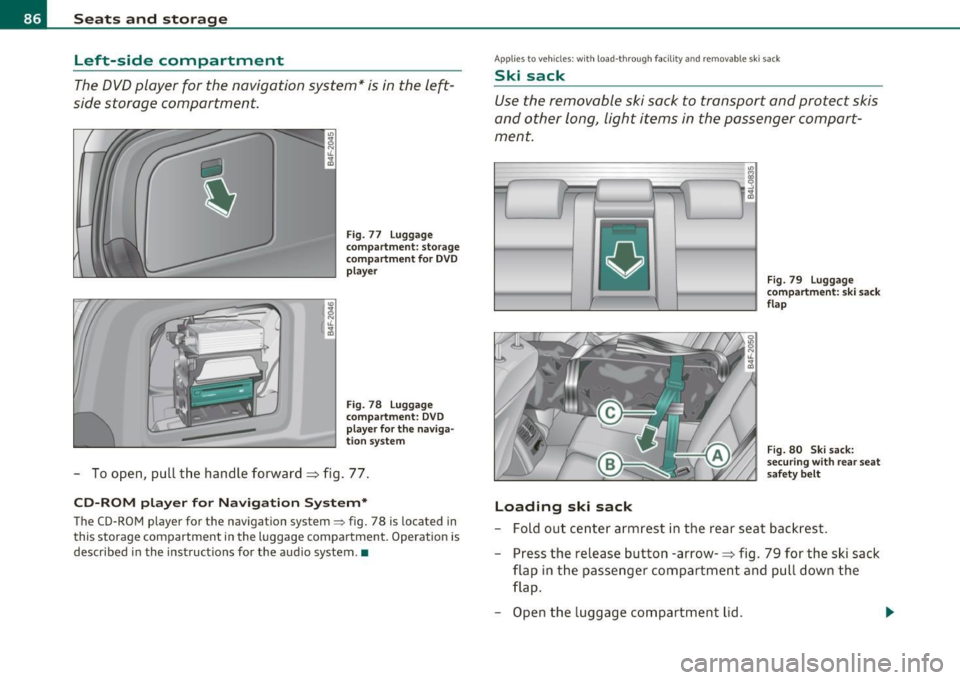
Left-side compartment
The DVD player for the navigation system* is in the left
side storage compartment.
• •
Fig. 77 Luggage
compartment: storage
compartment for DVD
player
Fig. 78 Luggage
compartment: DVD
player for the naviga·
tion system
-To open, pull the handle forward=> fig. 77.
CD-ROM player for Navigation System*
The CD-ROM player for the navigation system=> fig. 78 is located in
this storage compartment in the luggage compartment. Operation is
described in the instructions for the audio system .•
Applies to veh icles : with load -through faci lity and removab le s ki sack
Ski sack
Use the removable ski sack to transport and protect skis
and other long, light items in the passenger compart
ment .
Loading ski sack
Fig. 79 Luggage
compartment: ski sack
flap
Fig. 80 Ski sack:
securing with rear seat
safety belt
-Fold out center armrest in the rear seat backrest.
- Press the release button -arrow-=> fig. 79 for the ski sack
flap in the passenger compartment and pull down the
flap.
- Open the luggage compartment lid .
Page 89 of 370
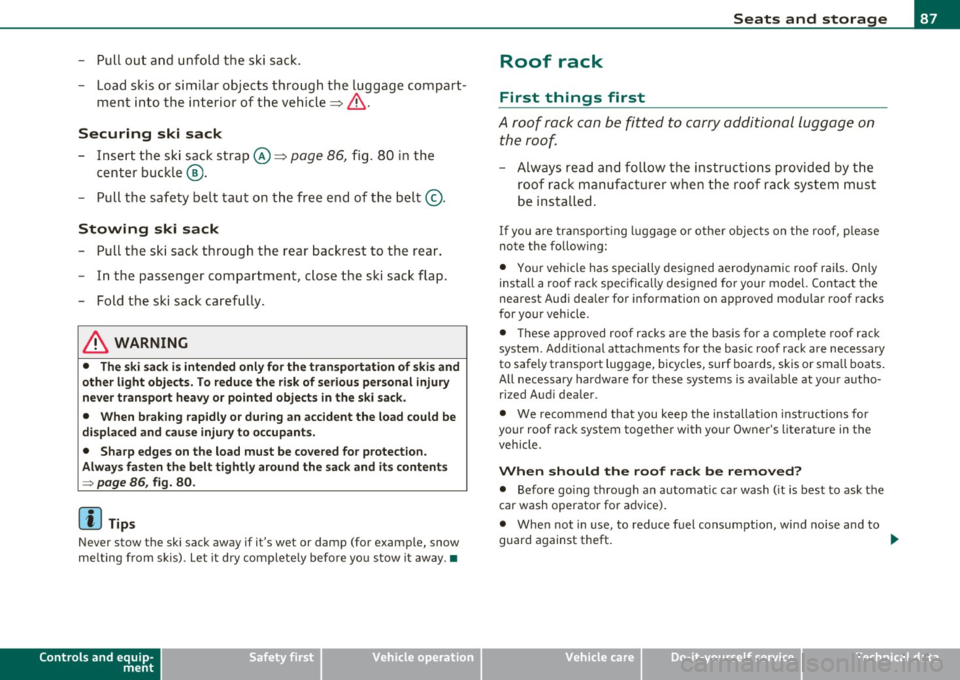
- Pull out and unfold the ski sack.
- Load skis or similar objects through the luggage compart-
ment into the interior of the vehicle~&.
Securing ski sack
- Insert the ski sack strap@~ page 86, fig. 80 in the
center buckle
® ·
- Pull the safety belt taut on the free end of the belt @.
Stowing ski sack
- Pull the ski sack through the rear backrest to the rear.
- In the passenger compartment, close the ski sack flap.
- Fold the ski sack carefully.
& WARNING
• The ski sack is intended only for the transportation of skis and
other light objects. To reduce the risk of serious personal injury
never transport heavy or pointed objects in the ski sack.
• When braking rapidly or during an accident the load could be
displaced and cause injury to occupants.
• Sharp edges on the load must be covered for protection.
Always fasten the belt tightly around the sack and its contents
=> page 86, fig. 80.
[ i] Tips
Never stow the ski sack away if it's wet or damp (for example, snow
melting from skis). Let it dry completely before you stow it away. •
Controls and equip
ment Safety first
Seats and storage
Roof rack
First things first
A roof
rack can be fitted to carry additional luggage on
the roof
-Always read and follow the instructions provided by the
roof rack manufacturer when the roof rack system must
be installed.
If you are transporting luggage or other objects on the roof, please
note the following:
• Your vehicle has specially designed aerodynamic roof rails. Only
install a roof rack specifically designed for your model. Contact the
nearest Audi dealer for information on approved modular roof racks
for your vehicle .
• These approved roof racks are the basis for a complete roof rack
system. Additional attachments for the basic roof rack are necessary
to safely transport luggage, bicycles, surf boards, skis or small boats.
All necessary hardware for these systems is available at your autho
ri zed Audi dealer .
• We recommend that you keep the installation instructions for
your roof rack system together with your Owner's literature in the
vehicle.
When should the roof rack be removed?
• Before going through an automatic car wash (it is best to ask the
car wash operator for advice).
• When not in use, to reduce fuel consumption, wind noise and to
guard against theft. _,,,
Vehicle care Technical data
Page 93 of 370

Ashtray
Front ashtray
To open ashtray
- Tap the edge of the ashtray =>& .
To close ashtray
Fig. 85 Center
conso le: front asht ray
- Tap the lid to close the ashtray automatically .
Removing ashtray ins ert
- Grasp the ashtray insert => fig . 85 by th e recesses on both
sides and pull it upward and out -Arrow -.
To reinstall ashtray
-Press the ashtray insert back into its holder.
& WARNING
Never put waste pap er in the a sht ray. Hot ashe s or o ther hot
obj ects in th e ashtra y could set w ast e pape r on fire. •
Cont rols a nd e quip
m en t Vehicle
OP-eration
Seats and storage
Rear ashtray
-
F ig. 86 Rea r asht ray
To open asht ray
- Touch the lid to open the ashtray .
Removing ashtray insert
-Press the front of the open lid downward in the direction
of the arrow => fig . 86 -the ashtray insert pops out
slightly .
- Lift the ashtray insert up and out.
Reinstalling ashtray insert
-Open the lid on the ashtray insert and press the insert into
the housing as far it can go.
& WARNING
N ev er pu t waste paper in th e ashtray . Hot ashes or othe r ho t
obj ects in the a shtr ay c ould set w aste pap er on fire .•
Vehicle care Do-it-yourselt service iTechnical data
Page 94 of 370
Seats and storage
Cigarette lighter/socket
Cigarette lighter
. .
. .
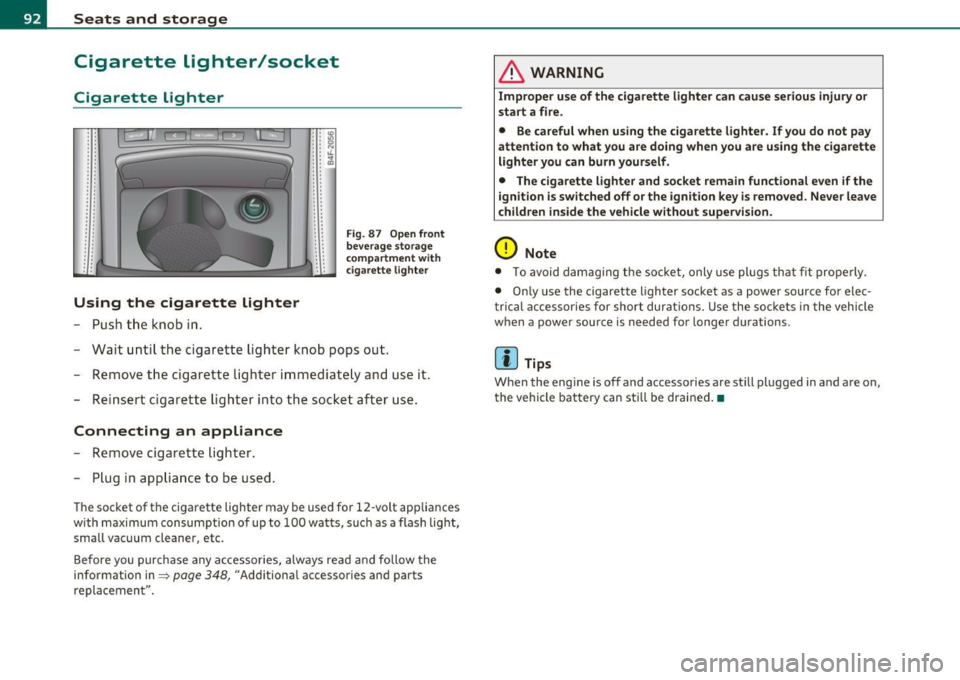
Using the cigarette lighter
- Push the knob in.
• • IO .. :g • • N : : "-.. ~ . .
.. . .
Fig . 87 Open front
beverage storage
c ompartment wit h
ciga rette lighter
-Wait until the cigarette lighter knob pops out.
- Remove the cigarette lighter immediately and use it.
- Reinsert cigarette lighter into the socket after use.
Connecting an appliance
-Remove cigarette lighter.
- Plug in appliance to be used.
The socket of the cigarette lighter may be used for 12 -volt app liances
w ith maximum consumption of up to 100 watts, such as a flash light,
small vacuum cleaner, etc.
Before you purchase any accessories, always read and follow the
information in=>
page 348, "Additional accessor ies and parts
replacemen t".
& WARNING
Improper use of the cigarette lighter can cause serious injury or
start a fire.
• Be careful when using the cigarette lighter. If you do not pay
attention to what you are doing when you are using the cigarette
lighter you can burn yourself .
• The cigarette lighter and socket remain functional even if the
i gnition is switched off or the ignition key is removed. Never leave
children inside the vehicle without supervision.
0 Note
• To avoid damag ing the socket, only use plugs that fit properly.
• Only use the cigarette lighter socket as a power source for elec
t rical accessories for short durat ions. Use the sockets in the vehicle
when a power source is needed for longer durations .
[ i ] Tips
When the engine is off and accessories are st ill plugged in and are on,
the vehicle battery can sti ll be drained. •