light AUDI A6 2011 Repair Manual
[x] Cancel search | Manufacturer: AUDI, Model Year: 2011, Model line: A6, Model: AUDI A6 2011Pages: 370, PDF Size: 87.15 MB
Page 95 of 370
Outlet
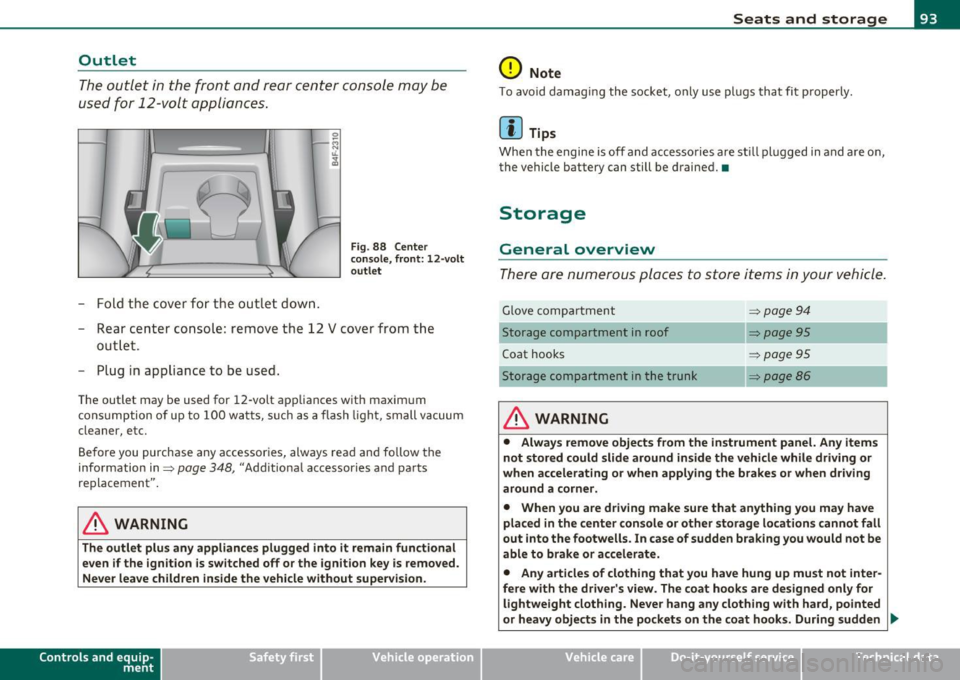
The outlet in the front and rear center console may be
used for 12-volt appli ances .
- Fold the cover fo r the outlet down .
Fig. 88 Center
c on sole , fr ont: 12 -vol t
ou tlet
- Rear center console: remove the 12 V cover from the
out le t.
- Plug in appliance to be used.
The outlet may be used for 12-volt appliances with maxim um
consumption of up to 100 wat ts, su ch as a flash light, small vacuum
cleaner, etc.
Be fore you purchase any accessories, always read and fo llow the
information in:::::,
page 348, "Additional accessories and parts
replacement".
& WARNING
The outlet plus any applianc es plugged into it r emain functional
even if the ign ition is switched off or th e ign itio n key is remo ved.
Ne ver leave children in side the vehicle without supervi sion.
Cont rols a nd e quip
m en t Vehicle
OP-eration
Seats and storage
0 Note
To avo id damaging the socket, only use p lugs that fit p roperly.
[ i ] Tips
Whe n the engine is off and accesso ries a re st ill plugged in and a re on,
the vehicle battery can still be drained. •
Storage
General overview
There are numerous places to store items in your vehicle .
Glove compa rtment :::::, page 94
Storage compartment in roof :::::, page 95
Coat hooks :::::, page 95
Storage compartment in the trunk :::::, page 86
& WARNING
• Alwa ys rem ove objects from the in strument panel. Any items
not stor ed could slid e around in side the v ehicle while driv ing or
when a ccelerating o r whe n applying t he br ake s or whe n driv ing
around a corn er.
• When you are dri ving make sure that an ything you ma y have
placed in the center con so le or other sto rage locat ion s cannot fall
out into the footwells . In case of sudden br aking you would not be
able to b rake or acc ele rate.
• An y article s of clothing that you ha ve hung up mu st not inter
f e re with th e driver's view . The co at hooks are d esigne d only for
lightweight clothing. Ne ver ha ng any clothing with ha rd, pointed
or heavy obj ects in the pockets on th e co at hooks . During sudden
~
Vehicle care Do-it-yourselt service iTechnical data
Page 97 of 370

Fig. 91 Lock ing pin
for glove compartment
-Remove with the cover with the aid of a screwdriver
==>
page 94, fig . 90.
- Now press the locking pin inward with the screwdriver
==> fig . 91. •
Storage compartment in roof
111111 \\\H
. '
Fig. 92 Storage
compartment in roof
-To open the lid you have to touch the bar==> fig . 92
(arrow) . The lid opens automatically.
- To close the lid, push it up until it engages.
Con tro ls a nd e quip
m en t Vehicle
OP-eration
Seats and storage
& WARNING
Always keep the lid closed while driving to reduce the risk of injury
during a sudden braking maneuver or in the event of an accident. •
Coat hooks
& WARNING
Fig. 93 Coat hooks at
rear doors
• Hang clothes in such a way that they do not impair the driver's
vision .
• The coat hooks must only be used for lightweight clothing. Do
not leave any heavy or sharp edged objects in the pockets which
may interfere with the side curtain airbag deployment and can
cause personal injury in a crash.
• Do not use coat hangers for hanging clothing on the coat hooks
as this can interfere with proper deployment of the side curtain
airbags in an accident.
• Do not hang heavy objects on the coat hooks, as they could
cause personal injury in a sudden stop. •
Vehicle care Do-it-yourselt service iTechnical data
Page 98 of 370
Warm and cold
Warm and cold
Climate control
Description
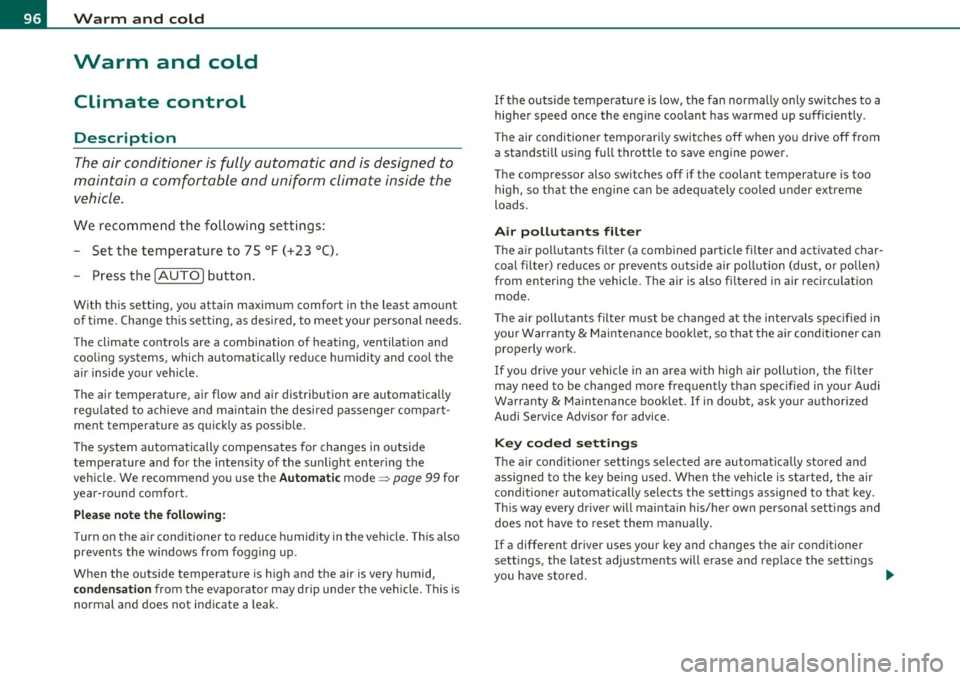
The air conditioner is fully automatic and is designed to
maintain a comfortable and uniform climate inside the
vehicle.
We recommend the following settings:
- Set the temperature to 75 °F (+23 °C).
- Press the [AUTO] button.
With this setting, you attain maximum comfort in the least amount
of time. Change this setting , as desired, to meet your personal needs.
The climate controls are a combination of heating, ventilation and cooling systems, which automatically reduce humidity and cool the
air inside your vehicle.
The air temperature, air flow and air distribution are automatically regulated to achieve and maintain the desired passenger compart
ment temperature as quickly as possible .
The system automatically compensates for changes in outside
temperature and for the intensity of the sunlight entering the
vehicle. We recommend you use the
Automatic mode=> page 99 for
year-round comfort .
Please note the following:
Turn on the air conditioner to reduce humidity in the vehicle. This also
prevents the windows from fogging up .
When the outside temperature is high and the air is very humid,
condensation from the evaporator may drip under the vehicle. This is
normal and does not indicate a leak. If the outside temperature
is low, the fan normally only switches to a
higher speed once the engine coolant has warmed up sufficiently .
The air conditioner temporarily switches off when you drive off from
a standstill using full throttle to save engine power.
The compressor also switches off if the coolant temperature is too
high, so that the engine can be adequately cooled under extreme
loads.
Air pollutants filter
The air pollutants filter (a combined particle filter and activated char
coal filter) reduces or prevents outside air pollution (dust, or pollen)
from entering the vehicle. The air is also filtered in air recirculation
mode.
The air pollutants filter must be changed at the intervals specified in
your Warranty
& Maintenance booklet, so that the air conditioner can
properly work .
If you drive your vehicle in an area with high air pollution, the filter
may need to be changed more frequently than specified in your Audi
Warranty
& Maintenance booklet. If in doubt, ask your authorized
Audi Service Advisor for advice .
Key coded settings
The air conditioner settings selected are automatically stored and
assigned to the key being used. When the vehicle is started, the air
conditioner automatically selects the settings assigned to that key.
This way every driver will maintain his/her own personal settings and
does not have to reset them manually.
If a different driver uses your key and changes the air conditioner
settings, the latest adjustments will erase and replace the settings
you have stored . _.,
Page 103 of 370

_________________________________________________ W_ a _r_m _ a _n.:..d~ c:.. o::...:. ld.:.;___,J-
• in a traff ic jam.
& WARNING
Do not use this setting for extended periods of time. The windows
could fog up since no fresh air can enter the vehicle. If the
windows fog up, press the air recirculation button again immedi
ately to switch off the air recirculation function or select defrost.•
Rear window defogger [Qiil ]
The rear window defogger clears the rear window of
condensation.
- Press the QW button to turn the rear window defogger on
and
off.
Th e rear window defogger works only when the engine is running. The
light in the switch will illuminate when the defogge r is on .
The rear window defogger will switch off automatically after a short time. The time the rea r window defogger remains on will vary
depending on the outside temperature.
A rear window defogger that was switched on also remains stored for
15 minu tes after the ign ition is switched off . If the engine is
restarted w ith in these 15 minutes, the rear window defogger is a lso
act ivated, depending on outside temperature. With a vehicle that is
parked for a short time, the rear window defogger does not need to
be manua lly activated again.
c£> For the sake of the environment
Turn the defogger off when the rear window is clear. When you save
electricity, you save fuel. •
Contro ls a nd e quip
m en t Vehicle
OP-eration
Air outlets
Air distribution determines the air flow to the individual
vents.
Fig. 95 Instrument panel: air outlet locations and airfl ow directions
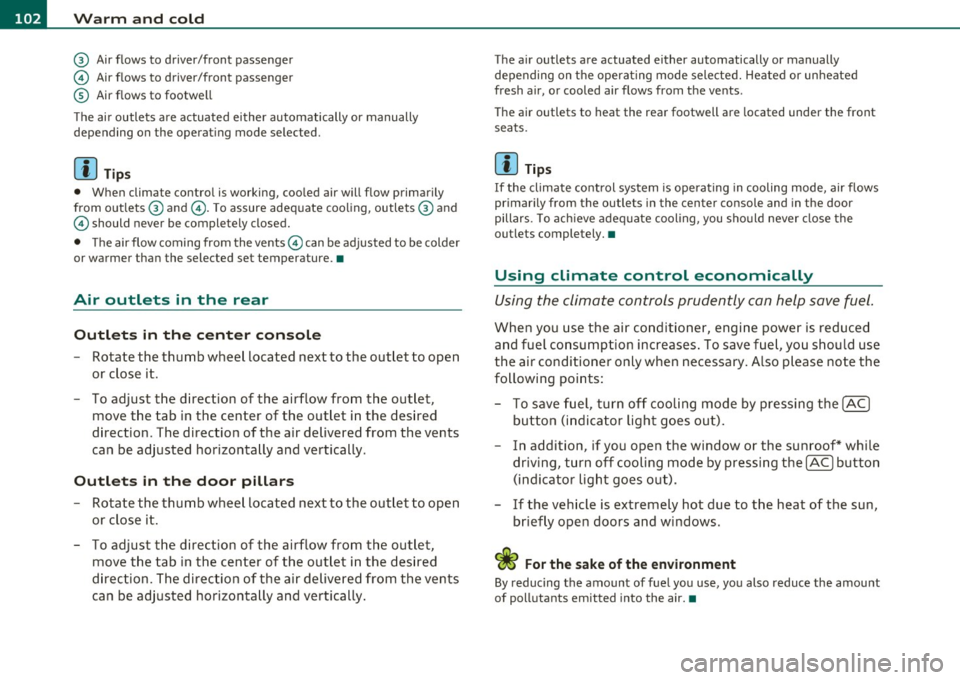
Air outlets ® and ©
- Rotate the vertical thumb wheel beside the outlet to
increase, reduce or shut down the airflow from that
outlet .
- To adjust the direction of the a irflow from the outlet,
move the tab in the center of the outlet in the desired
direction. The direction of the air delivered from the vents
can be adjusted horizontally and vertically.
@ Air flows to windshield and to driver and front passenger side
windows
@ Air flows to w indshield
Vehicle care Do-it-yourselt service iTechnical data
Page 104 of 370
1111....__w __ a _r_ m __ a_n_ d_ c_ o _ l_d _______________________________________________ _
@ Air flows to driver/front passenger
© Air flows to driver/front passenger
© Air flows to footwell
T he ai r outlets are actuated either automatically or manually
depending on the operating mode selected.
[I] Tips
• When climate control is working, cooled air will flow primarily
from out lets @ and @. To assure adequate cooling, outlets @ and
© should never be completely closed.
• T he air flow coming from the vents © can be adjusted to be colder
or warmer than the selected set temperature. •
Air outlets in the rear
Outlets in the center console
- Rotate the thumb wheel located next to the outlet to open
or close it.
- To adjust the direction of the airflow from the outlet, move the tab in the center of the outlet in the desired
direction . T he direction of the air delivered from the vents
can be adjusted horizontally and vertically.
Outlets in the door pillars
- Rotate the thumb wheel located next to the outlet to open
or close it .
- To adjust the direction of the airflow from the outlet,
mov e the tab in the center of the o utlet in the desired
direction. The direction of the air delivered from the vents
can be adjusted horizontally and vertically.
The air outlets are actuated either automatically or manually
depending on the operating mode selected. Heated or unheated
fresh air, or cooled air flows from the vents.
T he air outlets to heat the rear footwell are located under the front
seats.
[I] Tips
If the climate control sys tem is operating in cooling mode, air flows
primarily from the outlets in the center console and in the door
pillars. To ach ieve adequate cooling, you sho uld never close the
outlets completely. •
Using climate control economically
Using the climate controls prudently can help save fuel.
When you use the air conditioner, engine power is reduced
and fuel consumption increases . To save fuel, you should use
the air conditioner only when necessary . Also please note the
following points:
To save fuel, turn off cooling mode by pressing the
[AC)
butto n (indicator ligh t goes out).
- In addit ion, if you open the window or the sunroof* while
driving, turn
off cooling mode by pressing the [AC] button
(indicator light goes out).
If the vehicle is extremely hot due to the heat of the sun,
briefly ope n doors and windows.
ffi For the sake of the environment
By reducing the amount of fue l you use, you also reduce the amount
of pollutants emitted into the air.•
Page 112 of 370

ffl..__O_ n_ t_h _ e_ r_ o_ a_ d _________________________________________________ _
& WARNING
Never start or let the engine run in a confined or enclosed area.
Exhau st fume s from the engine contain carbon monoxide, a color
less and odorless gas. Carbon monoxid e can be fatal if inhal ed.
• Never leave the engine idling unattended . An unattended
vehicle with a runn ing engine poses a danger of personal injury or
theft .
0 Note
Avoid high eng ine speeds, fast acce lerat ion or heavy eng ine loads
w hile the engine is still cold. This cou ld damage the eng ine .
~ For the sake of the environment
To avoid unn ecessary engine wear and to reduce exhaust emiss io ns,
do not let your vehicle stand and warm up. Be ready to dr ive off imme
diately after starting your vehicle . Maintain mo dera te speed unt il the
engine is comp letely warm . Remember, the engine performs best at
operat ing temperature. •
Stopping the engine
- Turn the ignition key to position @ => page 109 , fig. 101 .
& WARNING
• Never turn off the engine until the vehicle has come to a
compl ete stop .
• The brake boos ter and servotronic only work when the engine
is running. With the ignition turned off , you have to apply more
for ce when steering or braking. Since you cannot steer and stop
normally, this can lead to accidents and serious injuries .
& WARNING (contin u ed )
• The radiator fan can continue to run for up to 10 minute s even
a fter you have turned off the engine and removed the ignition key.
The radi ator fan can also tur n on agai n if the engine coolant heats
up be cause of intense sunlight or heat build-up in the engine
compartment.
0 Note
Do not stop the engine immed iate ly after hard or extended driving.
Keep t he engine run ning for approximate ly two minutes to prevent
excessive hea t build-up .•
Starting and stopping the engine
with Convenience key
A pplies to vehicl es: w it h Con ven ience key
Starting the engine with the !START ] button
This button s witch es on the ignition and sta rts the
engine .
Fig. 10 2 Convenien ce
ke y: ENGINE START
bu tton
The [S TA RT] button is provided wit h two-stage operation
=> fig. 102. ..,_
Page 115 of 370

On the road -_______________ __.
the driver's door is opened. In t his instance, the steer ing is not
locked. The s teer ing is locked:
• If you press the
(STOP) button again for more than 1 second .
• If you close the driver 's door and lock yo ur vehicle from the
outs ide .•
Electromechanical parking brake
Operation
The electromechanical parking brake replaces the hand
brake.
Fi g. 104 Cente r
co nsol e: Pa rki ng brak e
- Pull the switch to apply the parking brake ~fig . 104. The
indicator light in the switch will come on.
- Step on the brake pedal or the accelerator pedal and press the switch at the same time to re lease the parking bra ke.
The indicator light in the switch wil l go out .
Your vehicle is equipped with an electromec hanical park ing brake
w hich replaces the handb rake. The parking brake is d esigned to
prevent the vehicle from ro lling unintent iona lly .
Con tro ls a nd e quip
m en t Vehicle
OP-eration
In addit io n to the normal functions of a traditional hand brake, the
ele ct romechan ica l parki ng br ake p rovides various convenience and
safety functions .
Emergency brake
An emergency brake ensures that the vehicle can be slowed even if
t he
normal bra kes fail => page 115, "E merge ncy bra king" .
Indicator lights
• If the pa rking brake is applie d with the ig nition turned on , the
indicator light in the instrument cluster (U.S models:
:'.Ii , Canadian
mode ls: © ) and i n the swi tch
(e)) w ill come o n.
• If the parking brake is applied with the ign ition
turned off , the
indicator light in the in strument cluste r (U.S. models:
::'.l, , Ca nadian
models: ©) and in the switch© will come on for about 30 seconds
and then go out .
& WARNING
If the vehicle is stati onary and the transmi ssion is engaged with
the eng ine running, the e ngine should not be speeded up (e.g.
m anuall y from under th e hood ). Otherwi se the vehicle will st art to
mo ve -you run the risk of an ac cident.
0 Note
If the warning/ind icator light (U.S. models: BRAKE , Canadian mode ls:
(Ci)) ) flashes in the ins trumen t clus ter, t here is a brake sys tem
malfunction. By press ing the [
CHECK) b utton, yo u can bri ng up a
dr iver message which explains the malfu nction in mo re deta il.
If the
message
Parking brake! Please contact workshop appea rs, the re is a
parking brake malfunction which yo u should have repaired immedi-
ately by an au thorized dealership=>
page 26 . ..
Vehicle care Do-it-yourselt service iTechnical data
Page 118 of 370

lffllL--_O=-:.. n.:.....: t;,:.h .:...:e~ r...::o =-- a=-.:. d;__ ________________________________________________ _
Press brake pedal to release parking brake
This driver message appears when the switch to release the parking
brake was pressed . The parking brake can only be released if you press
the brake or accelerator pedal and press the switch at the same time.
Parking brake malfunction !
This driver message appears together with the yellow symbol
when there is a parking brake malfunction .
0 Note
If the warning/indicator light (U.S . models: BRAKE , Canadian models:
«D>) flashes in the instrument cluster, there is a brake system
malfunction . By pressing the [
CHECK I button, you can bring up a
d river message which explains the malfunction in more detail. If the
message
Parking brake! Please contact workshop appears, there is a
parking brake malfunction which you should have repaired immedi
ately by an authorized dealership~
page 26. •
Cruise control
Applies to veh icles: wit h cruise co ntro l
Switching the system on
The cruise control system makes it possible to drive at a
constant speed starting at 20 mph (30 km/h) .
-"' M
-w ., a,
Fig. 105 Control lever
with set button
Fig. 106 Display:
Selected speed
-Pull the lever to position (D => fig. 105 to switch the
system on .
- Drive at the speed you wish to set.
- Press button
© to set that speed .
Page 119 of 370

_________________________________________________ O_ n_t_ h _ e_ ro_ a_d __ ffl'II
The display=> page 116, fig. 106 will show the set speed. The display
may vary depending on the type of display in your vehicle. T he indi
cator light
CRUISE (US model) I c-f (Canadian model) w ill also light up
in the instrument cluster.
The speed is kept constant via an engine output adjustment or active
brake intervention.
_& WARNING
• Always pay attention to traffic even when the cruise control is
switched on. You are always responsible for your speed and the
distance between your vehicle and other vehicles.
• For safety reasons, the cruise control should not be used in the
city, in stop-and-go traffic, on twisting roads and when road
conditions are poor (such as ice, fog, gravel, heavy rain and hydro
planing ) - risk of accident.
• Turn off the cruise control temporarily when entering turn
lanes, highway exit lanes or in construction zones.
• Please note that inadvertently "resting" your foot on the accel
erator pedal causes the cruise control not to brake . This is because
the cruise control is overridden by the driver's acceleration .
(I] Tips
The brake lights illuminate as soon as the brakes decelerate
automatically . •
A ppli es to ve hicles : w it h cr uise contro l
Changing speed
- Press lever in the G)orQ direction ==> page 116, fig. 105
to increase or decrease your speed.
- Release the lever to save that speed.
Controls and equip
ment Safety first
Change speed
in increments of 1 mph (1 km/h) by lightly pressing the
lever. If you keep the lever pressed down, yo u will alter your speed in
5 mph (10 km/h) increments.
You can also press the accelerator pedal down to increase your speed, e .g . if you want to pass someone. The speed you saved earlier wi ll
resume as soon as you release the accelerator pedal.
If, however, you exceed yo ur saved speed by 5 mph (10 km/h) for
longer than S m inutes, the cruise control will turn off temporarily.
The symbol will go out but the saved speed will be retained .•
App lies to ve hicle s: w it h cr uise c ontro l
Presetting your speed
You can preset your desired speed while the vehicle is not
moving.
- Turn on the ignition.
- Pull lever into position
(i) ==> page 116, fig. 105 .
- Press the lever in the
0 or 0 direction to increase or
decrease your speed.
- Release the lever to save that speed.
This function makes it possible, for example, to save the speed yo u
want before driving on the highway. Once on the highway, act ivate
the cruise contro l by pulling the lever toward
(D. •
A pp lies to ve hicles : wit h cr uise c ontro l
Switching the system off
Temporary deactivation
- Press the brake pedal, or
Vehicle care Technical data
Page 124 of 370

-Adaptive C ruise Cont rol .J':fl..__..,____ _____________ _
toward you~ page 124, "Turning Adaptive Cruise Control off
temporari ly". •
Applies to ve hicles : w ith Adap tive Cru ise Contro l
Switching the system on and off
Switching the system on
-Pull the lever to position (D => fig. 109.
Sw itching the system off
F ig. 109 Contro l
lever: Sw itching on
and off
- Press the lever to position@ (latched) .•
A pplies to veh icles : wit h Ada ptive Cruise Control
How is the speed stored?
Fig. 110 Cont ro l
l ever: S tori ng speed
With th e syst em switched on the speed is stored as follows:
- Drive at the speed you want. The speed must be between
20 and 95 mph (30 and 150 km/h) .
- Press the
!SETI button => fig . 110 to store the desired
speed .
After the I SET I button is released, the current speed is stored and
maintained .
The saved speed is now shown in the LED disp lay in the speedometer
by one or two illuminated red light diodes~
page 127. At the same
time, the saved speed is also shown for a short time in the Informa
tion line~
page 129.
[I) Tips
For safety reasons, the s tored speed is erased when the ignit ion or
the ACC is turned off .•