display AUDI A6 2013 Owner's Guide
[x] Cancel search | Manufacturer: AUDI, Model Year: 2013, Model line: A6, Model: AUDI A6 2013Pages: 306, PDF Size: 76.92 MB
Page 95 of 306
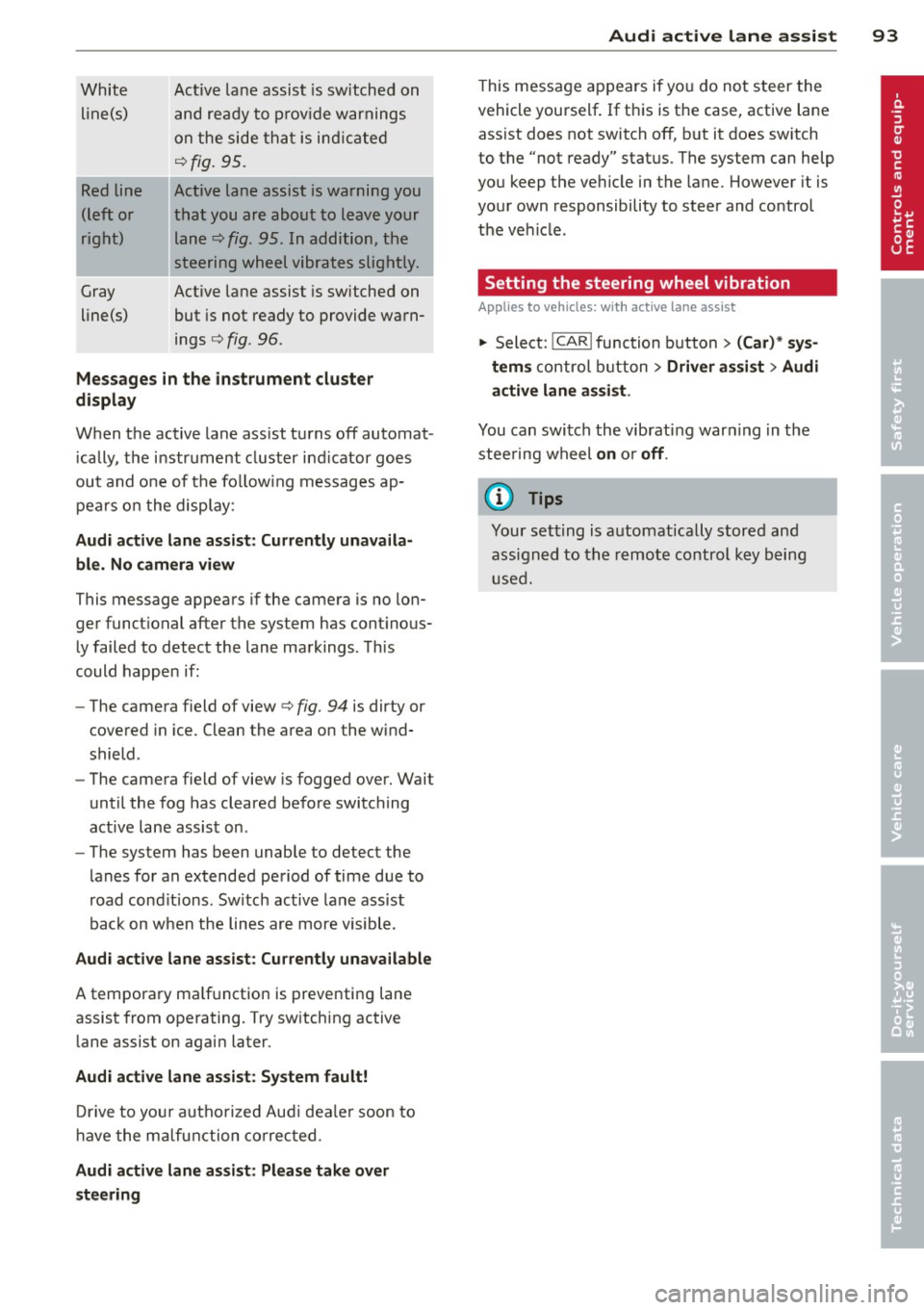
White line(s)
Red line
(left or
right)
Gray
line(s) Act
ive lane assist is switched on
and ready to p rov ide warnings
on the side that is ind icated
Q fig. 95.
Act ive lane assist is warning you
that you are about to leave your lane
Q fig. 95. In addition, the
steering wheel vibrates slightly.
Act ive l ane assist is switched on
but is not ready to provide warn
ings
Q fig . 96 .
Mes sages in the instrument clu ster
display
When the active lane ass ist turns off automat
i cally, the i nstrument cluster ind icator goes
out and o ne of the fo llow ing messages ap
pears on the display :
Audi active lane a ssist : Currently un availa
ble . No camera view
This message appears if the camera is no lon
ger funct ional after the system has cont inous
ly failed to detec t the lane markings . This
could happe n if:
- The camera field of view
Q fig. 94 is dirty or
covered in ice. Clean the area o n the wind
shield .
- The camera field of view is fogged over. Wait
until the fog has cleared before switching
active lane assis t on .
- The system has been unable to detect the
lanes for an extended period of time due to
road cond it ions . Switch active lane ass ist
back on when the lines are more visible .
Audi active lane assist: Currently un available
A temporary ma lf u nction is preventing lane
assist from operating. Try sw itching active
lane assist on again later.
Audi active lane a ssist : Sy stem fault!
D rive to you r autho rized Aud i dea le r soon to
h ave the ma lfunction co rrec ted .
Audi active lane a ssist : Pl ea se take over
s te ering
Audi acti ve lane a ssis t 93
This message appears if yo u do not s teer the
vehicle yourself . If this is the case, active lane
ass ist does not switch off, b ut it does sw itch
to the "not ready" stat us. The system can help
you keep the ve hicle in the lane. However it is
your own responsibility to steer and control
t h e ve hicle .
Setting the steering wheel vibration
Applies to vehicles: with active lane assist
11> Select: !CAR !function button> (Car) * sys
tem s
control button > Driver assi st > Audi
active lan e assi st.
You can switch the vibrat ing war ning in t he
stee ring wheel
on o r off .
(D Tips
Your setting is a utomat ically stored and
assigned to the remo te control key being
used.
Page 96 of 306
94 Audi side assist
Audi side assist
Lane Change Assistant
Description
App lies to vehicles: wit h side ass ist
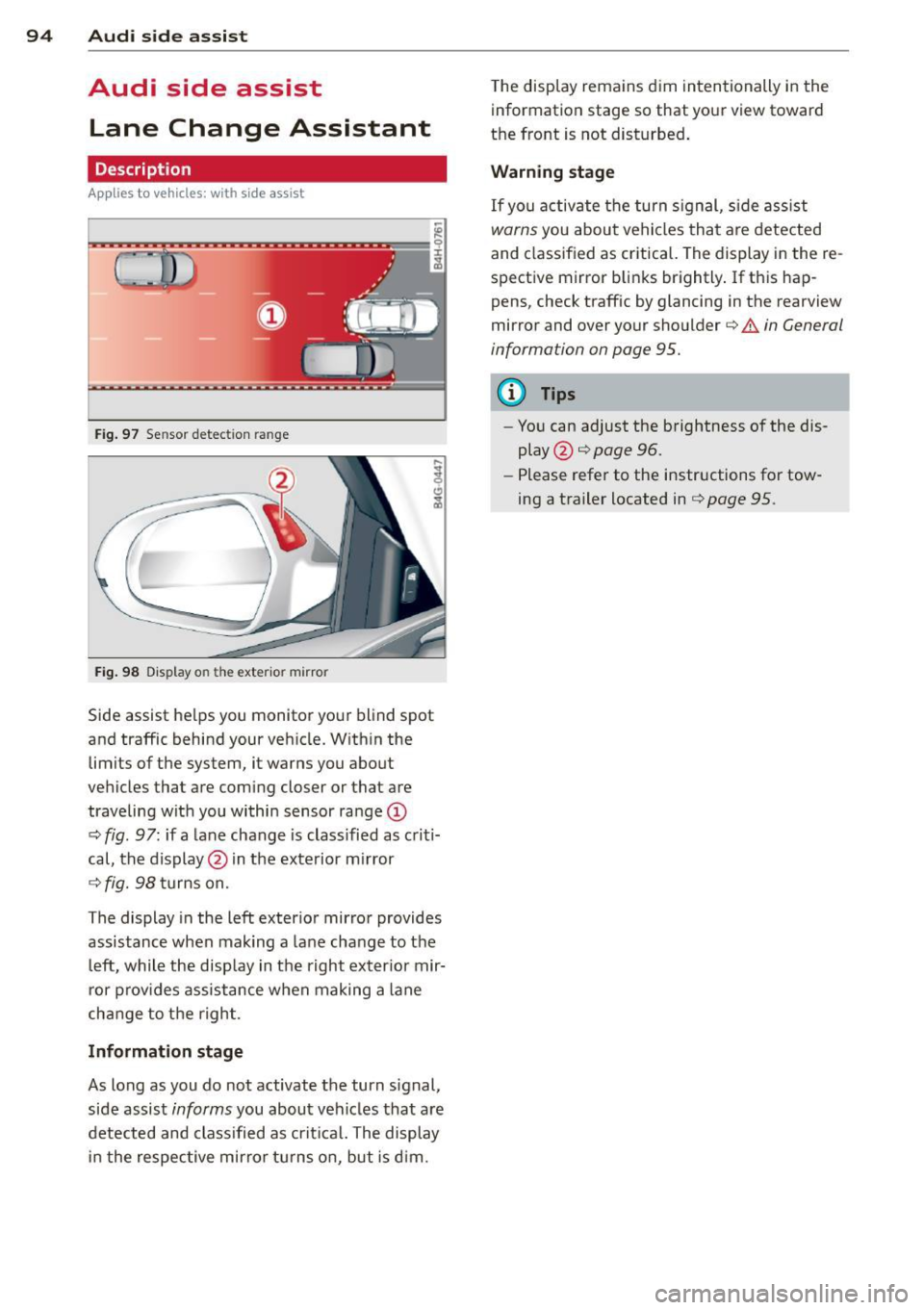
Fig . 97 Se nsor detect ion ra nge
Fig. 98 Display o n the exte rior mirror
Side assist he lps you monitor your blind spot
and traffic behind your veh icle. Within the
limits of the system, it warns you about
vehicles that are com ing closer or that are
traveling wit h you within sensor range
(D
c:> fig . 97 : if a lane change is class ified as c riti·
cal, the display@in the exterior mirror
¢ fig. 98 turns on.
The display in the left exterior mirror provides
assistance when mak ing a lane change to the
le ft, while the disp lay in the right exter ior mir·
ror p rov ides assistance when making a lane
cha nge to the righ t.
Information stage
As long as you do not activate the turn signal,
side assist
informs you about veh icles that are
detected and class ified as cr it ical. The display
in the respective mirror turns on, but is d im. T
he display remains d im intentionally in the
information stage so that your view toward
the front is not disturbed .
Warning stage
If you activate the turn signal, s ide ass ist
warns you about vehicles that are detected
and class ified as critical. The display in the re
spective mirror blinks brightly . If this hap
pens, check traffic by glancing in the rearview
mirror and over your shoulder c:>
.&. in General
information on page 95.
(D Tips
- Yo u can adjust the brightness of the dis
play @c:>
page 96.
-Please refer to the instructions for tow·
ing a trailer located in
¢ page 95 .
Page 97 of 306
General information
Applies to vehicles: with side assist
®
©
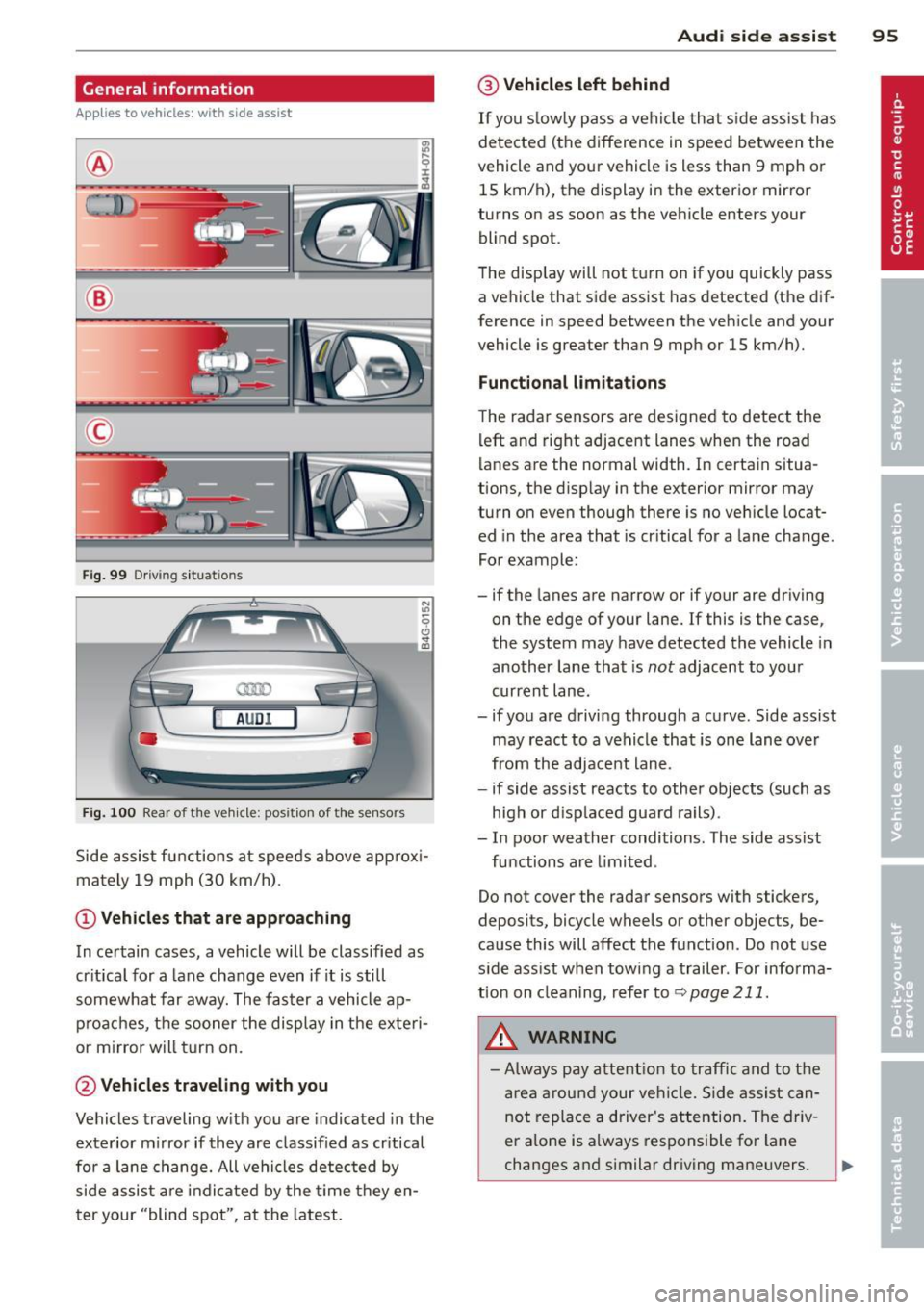
Fig . 99 Driving situations
A UD I
Fi g. 100 Rear of t he ve hicle: positio n of t he se nsors
Side assist functions at speeds above approx i
mately 19 mph (30 km/h).
@ Vehicl es th at ar e approaching
In certain cases, a vehicle will be classified as
cr itical for a lane change even if it is still
somewhat far away. The fas ter a vehicle ap
p roaches, the sooner the display in the exteri
or m irror will t urn on.
@ Vehicles traveling with you
Vehicles traveling w ith you are indicated in the
exterior m irror if they are classified as cr itical
for a lane change. All vehicles detec ted by
side assist are indicated by the time they en
t er your "blind spot", at the latest.
Aud i side assist 95
@ Veh icles left behind
If you s low ly pass a vehi cle that s ide assist has
detected (the difference in speed between the
vehicle and you r vehicle is less than 9 mph or
15 km/h), the display in the exterio r mir ror
turns on as soon as the vehicle enters your blind spot.
T he disp lay will not t urn on if you quickly pass
a vehicle that side assist has detected (the dif
ference in speed between the veh icle and your
vehicle is greater than 9 mph or 15 km/h).
Functi onal limitations
The radar sensors are designed to detect the
left and right adjacent lanes when the road
lanes are the normal width. In certain situa
tions, the d isp lay in the exterior mirror may
turn on even though there is no veh icle locat
ed in the area that is cr itical for a lane change.
For example:
- if the lanes are narrow or if your are dr iving
on the edge of your lane.
If this is the case,
the system may have detected the vehicle in
another lane that is
not adjacent to you r
current lane .
- if you a re driving through a curve. Side assist
may react to a vehicle that is one lan e ove r
from the adjacent lane.
- if side assist reacts to other objects (such as
high or d isp laced guard rails) .
- In poor weather conditions. The side assist
functions are l imited .
Do not cover the radar sensors with stickers,
deposits, bicycle wheels or other objects, be
cause this will affect the function . Do not use
s ide ass ist when towing a trailer . For informa
tion on clean ing, refer to
q page 211.
_&. WARNING
-Always pay a ttent ion to traffic and to t he
ar ea a round your ve hicl e. S ide assist can
not repla ce a driver's attention. The driv
er a lone is always responsible fo r lane
changes and similar driving mane uvers.
Page 98 of 306
96 Audi side assist
-Improper reliance on the side assist sys
tem can cause collisions and serious
personal injury:
- Never rely only on side assist when
changing lanes.
- Always check rear view mirrors to make
sure that it is safe to change lanes.
- Side assist cannot detect all vehicles un
der all conditions- danger of accident!
- Please note that side assist indicates
there are approaching vehicles, or
vehicles in your blind spot, only after
your vehicle has reached a driving speed
of at least 19 mph (30 km/h).
- In certain situations, the system may not
function or its function may be limited.
For example:
- if vehicles are approaching or being left
behind very quickly . The display may
not turn on in time.
- in poor weather conditions such as
heavy rain, snow or heavy mist .
- on very wide lanes, in tight curves or if
there is a rise in the road surface.
Vehicles in the adjacent lane may not be detected because they are outside
of the sensor range.
(D Note
The sensors can be displaced by impacts or damage to the bumper, wheel housing and
underbody. This can affect the system.
Have your authorized Audi dealer or au
thorized Audi Service Facility check their
function.
@ Tips
- If the window glass in the driver's door
or front passenger's door has been tint ed, the display in the exterior mirror may
be misinterpreted.
- For Declaration of Compliance to United
States FCC and Industry Canada regula
tions¢
page 288.
Activating and deactivating
Applies to vehicles: rnit s ide ass ist
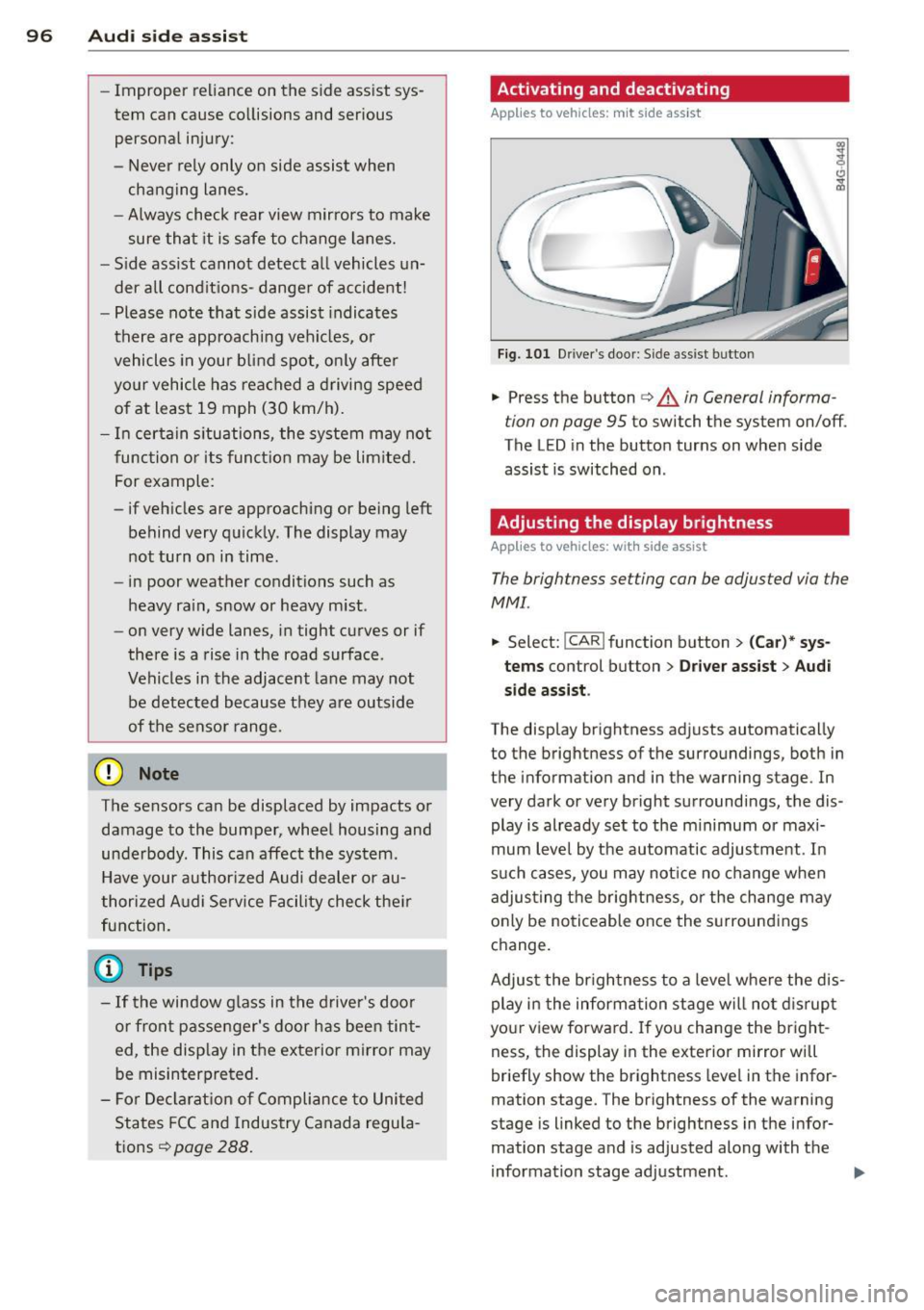
Fig. 101 Driver's doo r: Side ass ist butto n
.. Press the button c> & in General informa
tion on page 95
to switch the system on/off .
The LED in the button turns on when side
assist is switched on .
Adjusting the display brightness
Applies to vehicles: wit h side assist
The brightness setting con be adjusted via the
MMI.
.. Select: !CAR ! function button> (Car)* sys
tems control button > Driver assist
> Audi
side assist .
The display brightness adjusts automatically
to the brightness of the surroundings, both in
the information and in the warning stage. In
very dark or very bright surroundings, the dis
play is already set to the minimum or maxi
mum level by the automatic adjustment. In
such cases, you may notice no change when
adjusting the brightness, or the change may
only be noticeable once the surroundings
change.
Adjust the brightness to a level where the dis
play in the information stage will not disrupt
your view forward. If you change the bright
ness, the display in the exterior mirror will
briefly show the brightness level in the infor
mation stage. The brightness of the warning
stage is linked to the brightness in the infor mation stage and is adjusted along with the
information stage adjustment .
Page 99 of 306
@ Tips
-Side assist is not active while you are
making the adjustment.
- Your settings are automatically stored
and assigned to the remote control key
being used.
Driver messages
Applies to vehicles: with side assist
If side assist switches off by itself, the LED in
the button turns off and a message will ap
pear in the instrument cluster display:
Audi side assist: Currently unavailable. No
sensor vision
The radar sensors' vision is affected. Do not
cover the area in front of the sensors with bike
wheels, stickers, dirt or other objects. Clean
the area in front of the sensors, if necessary
c>fig. 100.
Audi side assist: Currently unavailable
Side assist cannot be switched on temporarily
because there is a malfunction (for example,
the battery charge level may be too low).
Audi side assist: System fault!
The system cannot guarantee that it will de
tect vehicles correctly and it is switched off .
The sensors have been displaced or are faulty.
Have the system checked by an authorized
Audi dealer or authorized Audi Service Facility
soon.
Audi side assist: Unavailable when towing.
Side assist switches off automatically when a
factory-installed trailer hitch is connected to
the electrical connector on the trailer. There is
no guarantee the system will switch off when
using a retrofitted trailer hitch. Do not use
side assist when towing a trailer.
Audi side assist 97
Page 102 of 306
100 Audi drive select
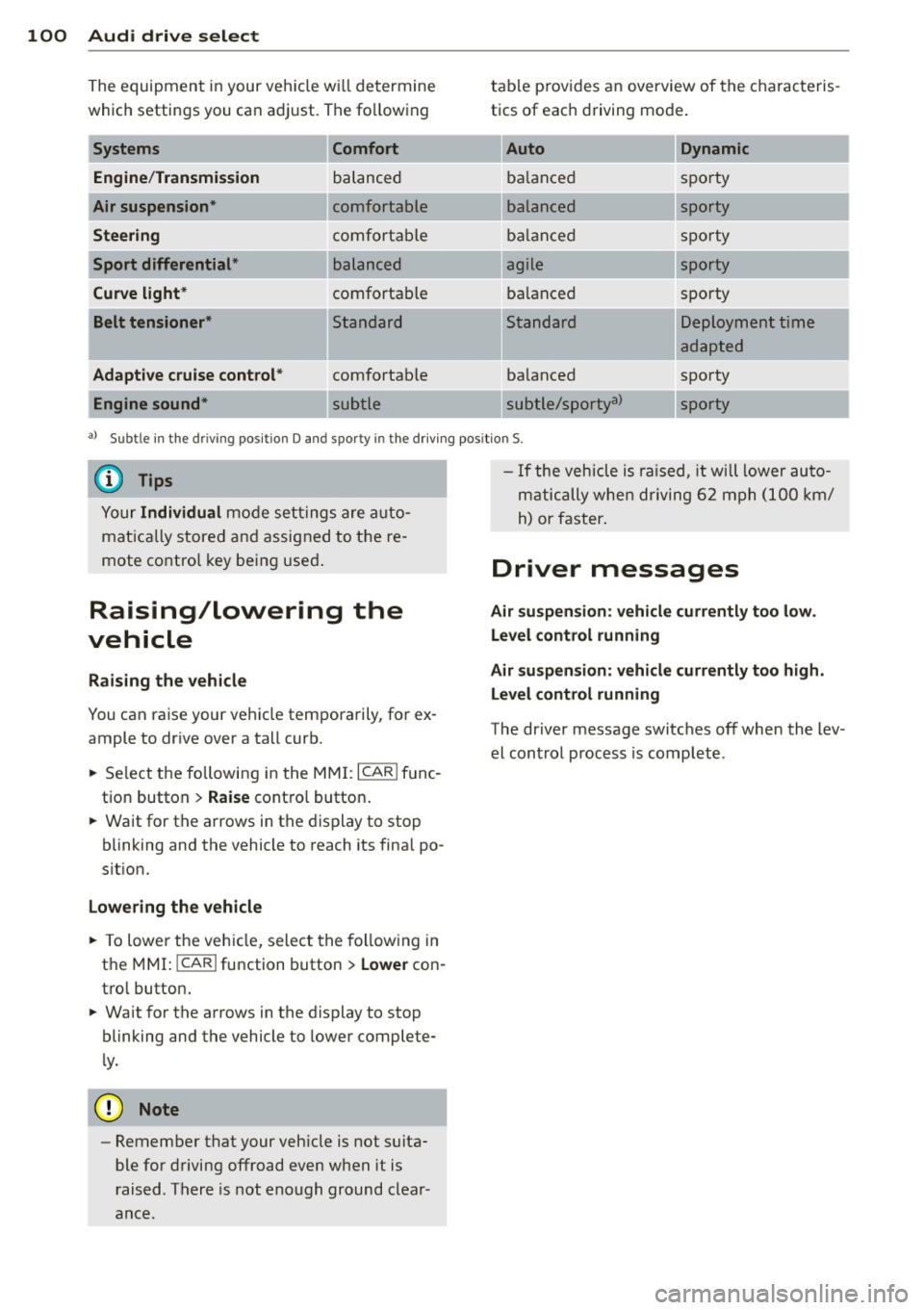
The equipment in your veh icle w ill determine
which settings you ca n adj ust. The fo llowing
Engine /Trans mission
Air su spension *
Steering
Sport differential *
Curve light*
Belt tensioner *
Adapti ve cruise control *
Engine sound* Comfort balanced
comfortable
comfortable
balanced
comfortable
Standard
comfortable
table p
rov ides a n overview of the characteris
tics of eac h driving mode .
Auto Dynamic
balanced sporty
balanced sporty
ba lanced spo
rty
agile sporty
ba lanced spo
rty
---.. ,
Standard
ba lanced
subtle/sportya> Deployment time
adapted
sporty
-...
sporty
-
a l Subt le i n th e drivi ng pos it io n D an d sp o rty in t he d riving pos itio n S.
{DJ Tips
Your Individual mode se ttings are a uto
mat ica lly stored and assigned to t he re
mote co ntro l key being use d.
Raising/lowering the
vehicle
Raising the vehicle
You can ra ise your veh icle temporarily, for ex
ample to dr ive over a tall curb .
., Se lect the following i n the
MM I: ICAR I f u nc
tion button >
Raise cont ro l button .
., Wait for the a rrows in the display to stop
blinking and the vehicle to reach its fina l po
s it ion.
Lowering the vehicle
., To lowe r the veh icle, select the fo llow ing in
the
M MI: ICARlfunction button> Lowe r con
tro l button .
., Wait for the a rrows in the display to stop
blinking and the vehicle to lower complete
l y .
{(D Note
- Remember that your veh icle is not suita
ble for driving offroad even when it is
r aised . There is not enough ground clear
ance.
- If the vehicle is ra ised, it will lower auto
m atic ally when d riving 6 2 mph (1 00 km/
h) or faster .
Driver messages
Air suspen sio n: vehicl e currently too low .
Level control running
Air su spension : vehicle curr ently too high .
L e vel control running
The driver message switc hes off when the lev
el cont rol process is complete .
Page 103 of 306
Night vision assistant
Night vision assistant
with detected pedestrian marking
Description
App lies to vehicles: with night v isio n assistant
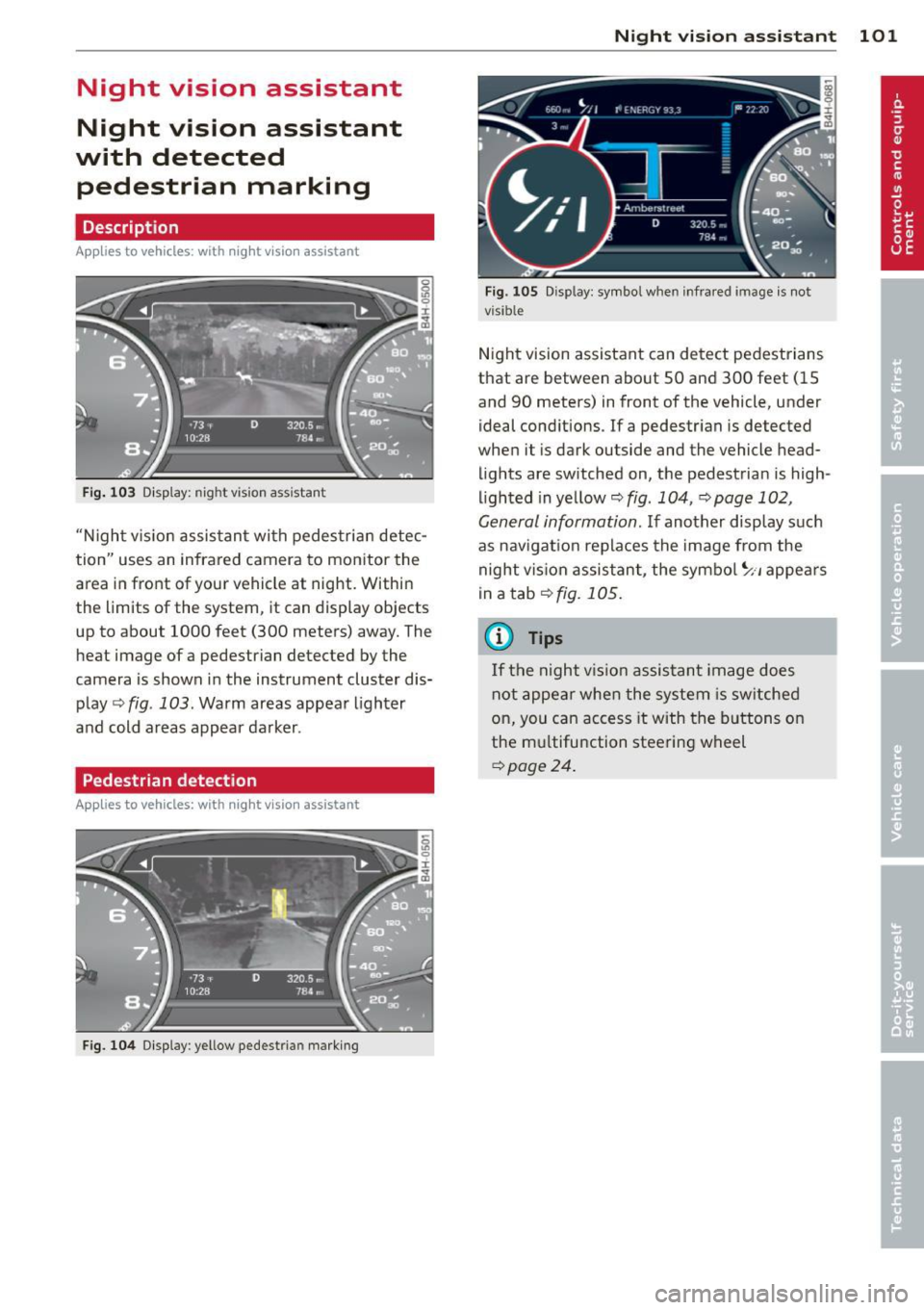
Fig . 103 Disp lay: nig ht v is ion assistant
"N ight v is ion assistant with pedestrian detec
tion" uses an infrared camera to monitor the
area in front of your vehicle at night. Within
the limits of the system , it can display objects
up to about 1000 feet (300 meters) away. The
heat image of a pedestrian detected by the
camera is shown in the instrument cluster dis
play
Q fig . 103 . Warm areas appear lighter
and cold areas appear darker .
Pedestrian detection
Applies to vehicles: with n ig ht v ision ass istant
Fig. 104 Display : yellow pedestrian marking
Night vision assistant 101
Fig. 105 D isp lay: symbo l w hen infrare d image is not
visi ble
Night vision assistant can detect pedestrians
that are between about 50 and 300 feet (15
and 90 meters) in front of the vehicle, under
ideal conditions .
If a pedestrian is detected
when it is dark outside and the vehicle head
lights are switched on, the pedestrian is high
lighted in yellow
Qf/g . 104, Qpage 102,
General information.
If another display such
as navigation replaces the image from the
night vision assistant, the symbo l~,, appears
in a tab
Q fig. 105.
(D Tips
If the night vision assistant image does
not appear when the system is sw itched
on, you can access it with the buttons on
the multifunction steering wheel
Q page24 .
Page 104 of 306
102 Night visi on assis tant
Pedestrian warning
Applies to vehicles: with night vision assistant
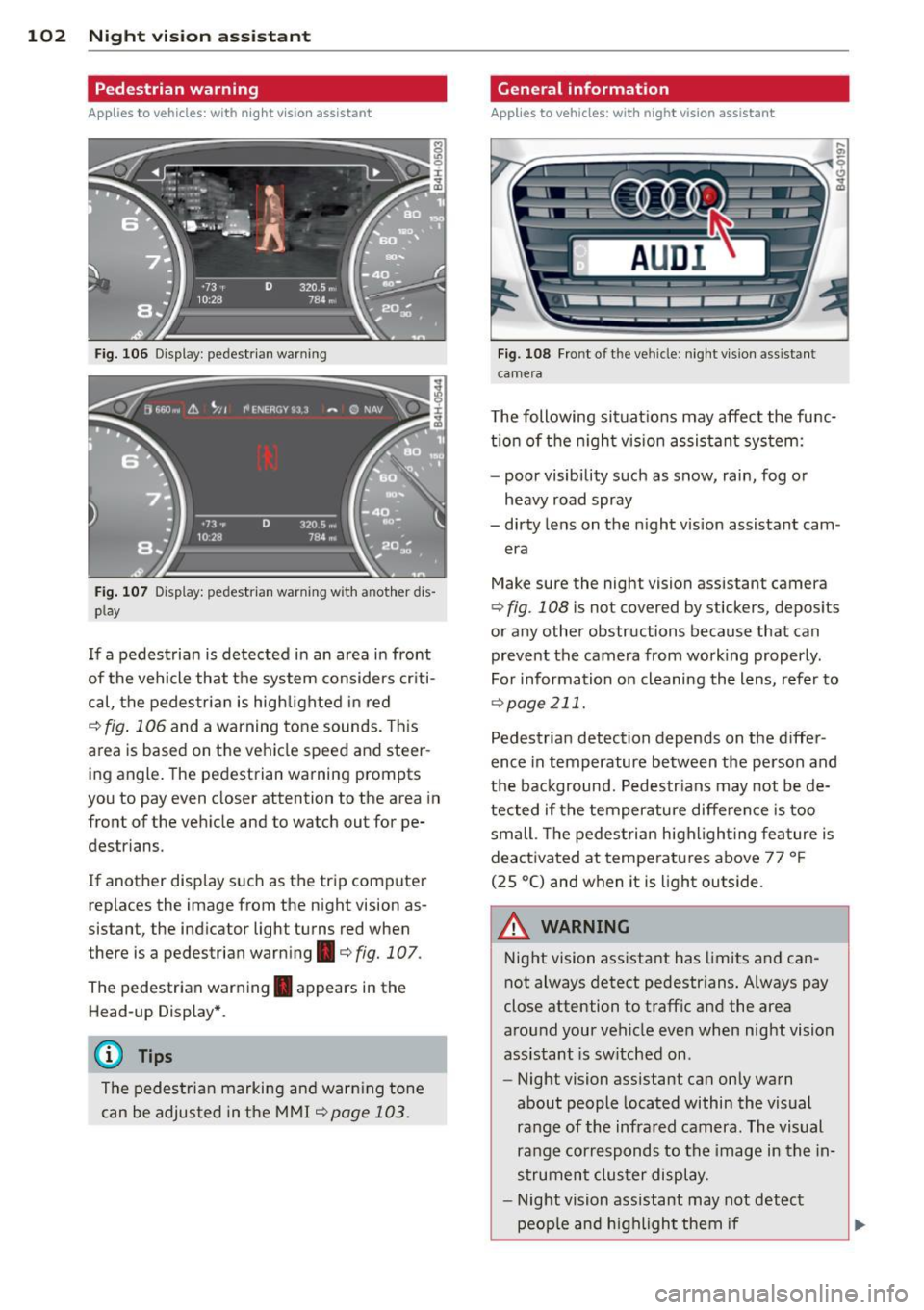
Fig. 106 Display : pedestrian warning
Fig . 107 D is p lay: pedestrian warning w ith a nother dis
p lay
I f a pedestrian is detected in an area in front
of the vehicle that the system considers criti
cal, the pedestrian is high lighted in red
¢ fig . 106 and a warning tone sounds. This
area is based on the vehicle speed and steer
ing angle. The pedestrian warning prompts
you to pay even closer attention to the area in
front of the vehicle and to watch out for pe
destrians.
If another display s uch as the tr ip computer
replaces the image from the night vision as
sistant, the indicator light turns red when
there is a pedestrian warning.¢
fig. 107 .
The pedestrian warning . appears in the
Head-up Display *.
(D Tips
The pedestrian marking and warn ing tone
can be adjusted in the MMI
!:!) page 103.
General information
Applies to vehicles: with night vision assistant
Fig. 108 Fro nt of th e ve hicle: night v ision assistant
camera
T he following situat ions may affect the func
t ion of the n ight vision assistant system:
- poor visibility such as snow, rain, fog or
heavy road spray
- dirty lens on the n ight vis ion assistant cam -
era
Make sure the night vision assistant camera
¢
fig . 108 is not covered by stickers, deposits
or any other obstructions because that can
prevent the camera from working properly.
For information on cleaning the lens, refer to
¢ page 211.
Pedestrian detection depends on the d iffer
ence in temperature between the person and
the background. Pedestr ians may not be de
tected if the temperature diffe rence is too
small . Th e pedestrian highl ighting feature is
deactivated at tempe ratures above 77 ° F
(25 °C) and when it is light outside.
A WARNING
Night vision assistant has limits and can
not always detect pedestr ians. Always pay
close attention to traffic and the area
around your vehicle even when night vision
assistant is sw itched on .
- Night vision assistant can only warn
about people located within the visual
range of the infrared camera. The visual
range corresponds to the image in the in
strument cluster display .
- Night vision assistant may not detect
-
peop le and highlight them if .,.
Page 105 of 306
-they are not in an upright position, for
example if they are sitting, crouching
or lying down and/or
- if the outline in the display is incom
plete or interrupted, for example be
cause the person is partially hidden by
a parked vehicle .
(D Tips
-Pedestrian detection and the pedestrian
warming are limited to objects that are
detected as pedestrians. The system
does not detect animals . Even though
the shape and warmth radiated by each
object detected is evaluated, the system
does have limitations and it can give in
correct warnings.
- For technical reasons , the image pauses
in split second intervals.
Switching on and off
Appl ies to vehicles: with night vision assistant
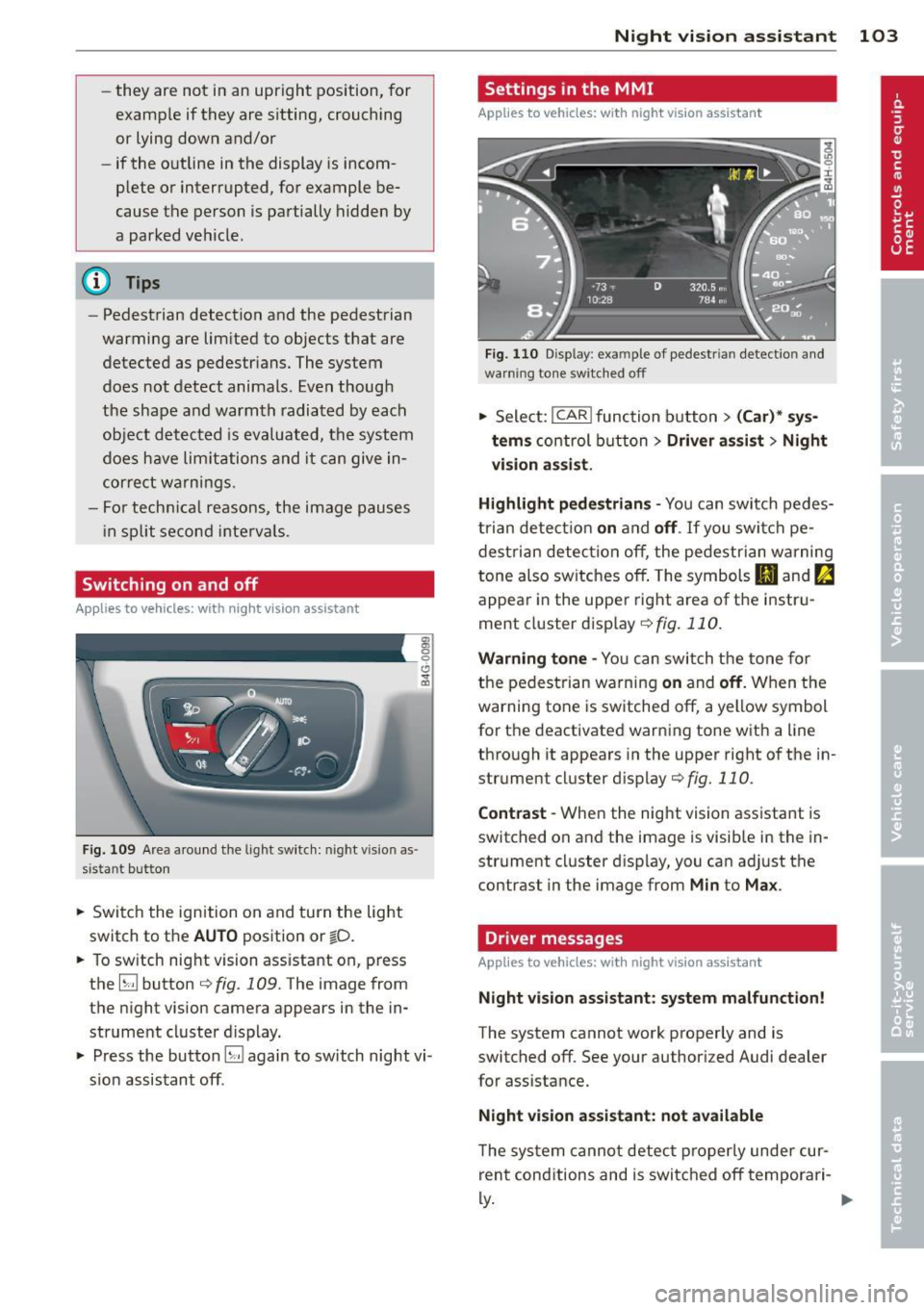
Fig. 109 Area around the lig ht switch: night vis io n as
si st ant button
.. Switch the ignition on and turn the light
switch to the
AUTO position or io.
.. To switch night vision assistant on, press
the
EJ button <::> fig. 109. The image from
the night vision camera appears in the in
strument cluster display.
.. Press the button
EJ again to switch night vi
sion assistant off .
Night vision assistant 103
Settings in the MMI
Applies to vehicles: with night vision assistant
Fig. 110 Disp lay : exa mple of pedest rian detect io n and
warn ing tone sw itched off
.. Select: I CAR I function button > (Car)* sys
tems
control button > Driver assist> Night
vision assist.
Highlight pedestrians -
You can switch pedes
trian detection
on and off . If you switch pe
destrian detection off, the pedestrian warning
tone also switches off. The symbols
(II and ria
appear in the upper right area of the instru
ment cluster display ¢
fig. 110.
Warning tone -You can switch the tone for
the pedestrian warning
on and off. When the
warning tone is switched off, a yellow symbol
for the deactivated warning tone with a line
through it appears in the upper right of the in
strument cluster display¢
fig. 110.
Contrast -When the night vision assistant is
switched on and the image is visible in the in
strument cluster display, you can adjust the
contrast in the image from
Min to Max .
Driver messages
Applies to vehicles: with night vision assistant
Night vision assistant: system malfunction!
The system cannot work properly and is
switched off. See your authorized Audi dealer
for assistance.
Night vision assistant: not available
The system cannot detect properly under cur
rent conditions and is switched off temporari-
~ ~
Page 107 of 306
Automatic Transmission
multitronic ®, S tronic ®,
tiptronic
Introduction
App lies to vehicles: with multitro ni c/S tronic/t iptronic
The automatic transmission is controlled elec
tronically . The transmission upshifts or down
shifts automatically depend ing on which drive
program is se lected.
When a
moderate driving style is used, the
transmission selects the most economical
driving mode .
It will then change up early and
de lay the downshifts to g ive better fuel econ
omy.
The transmission switches to a sporty mode after a k ick-down or when the driver uses a
sporty driving style characterized by quick ac
celerator pedal movements, heavy accelera
tion, frequent changes in speed and traveling
at the maximum speed.
If desired, the driver can a lso se lect the gears
manually (t iptronic mode ) ¢ page 109.
Various automatic transm issions may be in
stalled, depend ing on the model :
multitronic® transmission
The multitronic ® transmission is a continuous
ly variable transmission. Power is transferred
using a multidisk clutch. In contrast to con
ventional automatic transmissions using shift
ing operat ions, the transmission ratio in the
continuously variable transmission is changed
continuously. This opt imizes the comfort level
and conserves fuel.
S tronic ® transmission
The S tronic ® is a dual-clutch transmission .
Power is transferred using two clutches that
work independently from one another. They
r eplace the torque converter used in conven
tional automat ic transmissions and allow the
vehicle to accelerate without a noticeable in
terruption in traction.
Automatic Transmission 105
tiptronic transmission
In the tiptronic transmission, power is trans
ferred by a torque converter .
Selector lever positions
Applies to vehicles: wit h mult itronic/5 tro nic/tiptro nic
Fig. 111 Disp lay in the instrument cluster: selector
l ever pos itio n
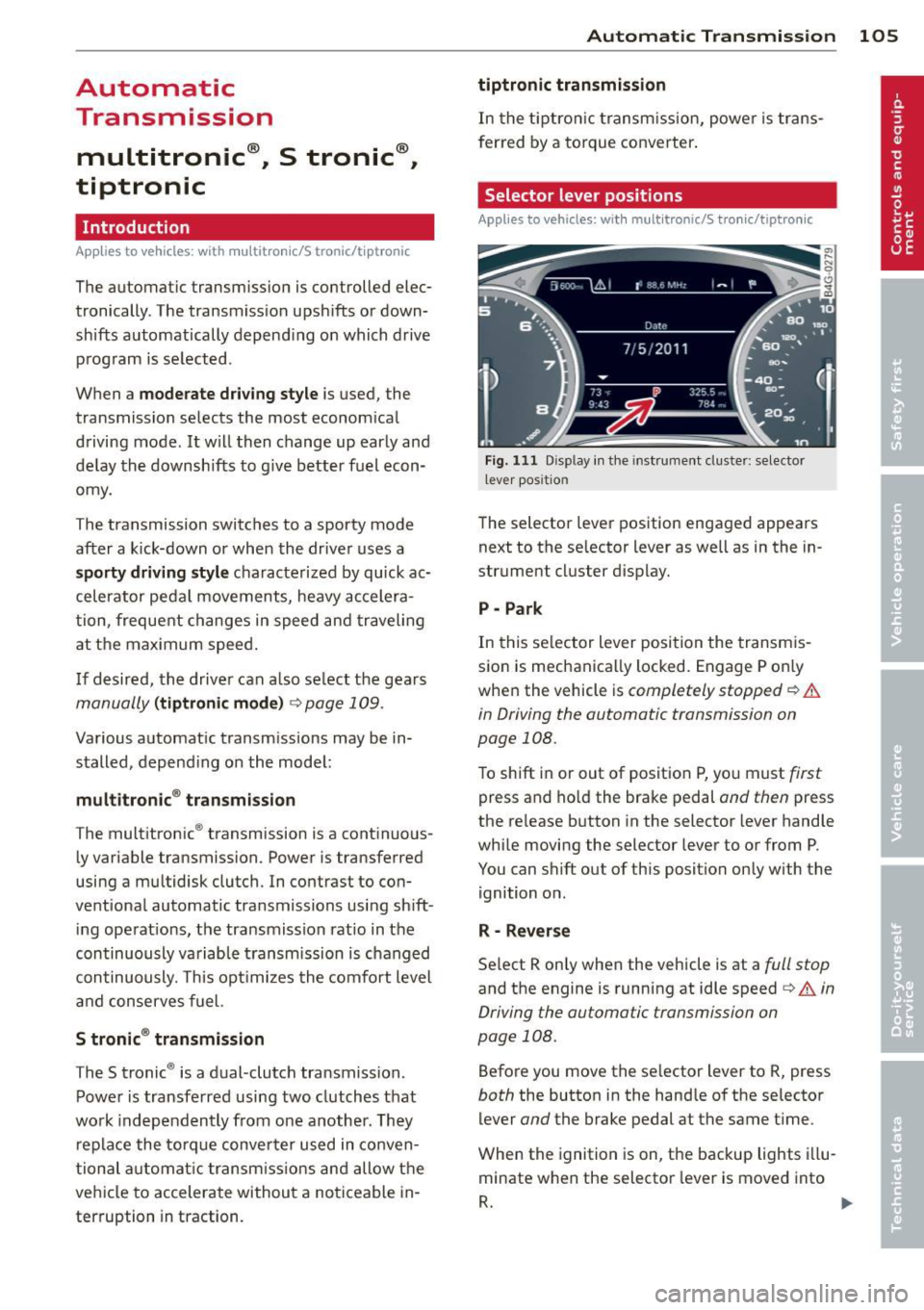
The selector lever position engaged appears
next to the selector lever as well as in the in
strument cluster display.
P -Park
In this selector lever position the transmis
sion is mechanically locked. Engage P only
when the vehicle is
completely stopped¢&.
in Driving the automatic transmission on
page 108.
To shift in or out of position P, yo u must first
press and ho ld the brake pedal and then press
the release button in the selector lever handle
while moving the selector lever to or from P .
You can shift out of this position only with the ignition on .
R -Reverse
Select R only when the vehicle is at a full stop
and the engine is running at idle speed¢ A in
Driving the automatic transmission on
page 108.
Before you move the se lector lever to R, press
both the button in the handle of the selector
lever
and the brake pedal at the same time .
When the ignition is on, the backup lights illu
minate when the selector lever is moved into
R. .,.