display AUDI A6 2013 Workshop Manual
[x] Cancel search | Manufacturer: AUDI, Model Year: 2013, Model line: A6, Model: AUDI A6 2013Pages: 306, PDF Size: 76.92 MB
Page 122 of 306
120 Park in g s ystems
the vehicle at the latest when the red orien
tation line* borders an object
c::> A in Gener
al information on page 117.
Rear
Applies to vehicles: with park ing system plus and rear
mode
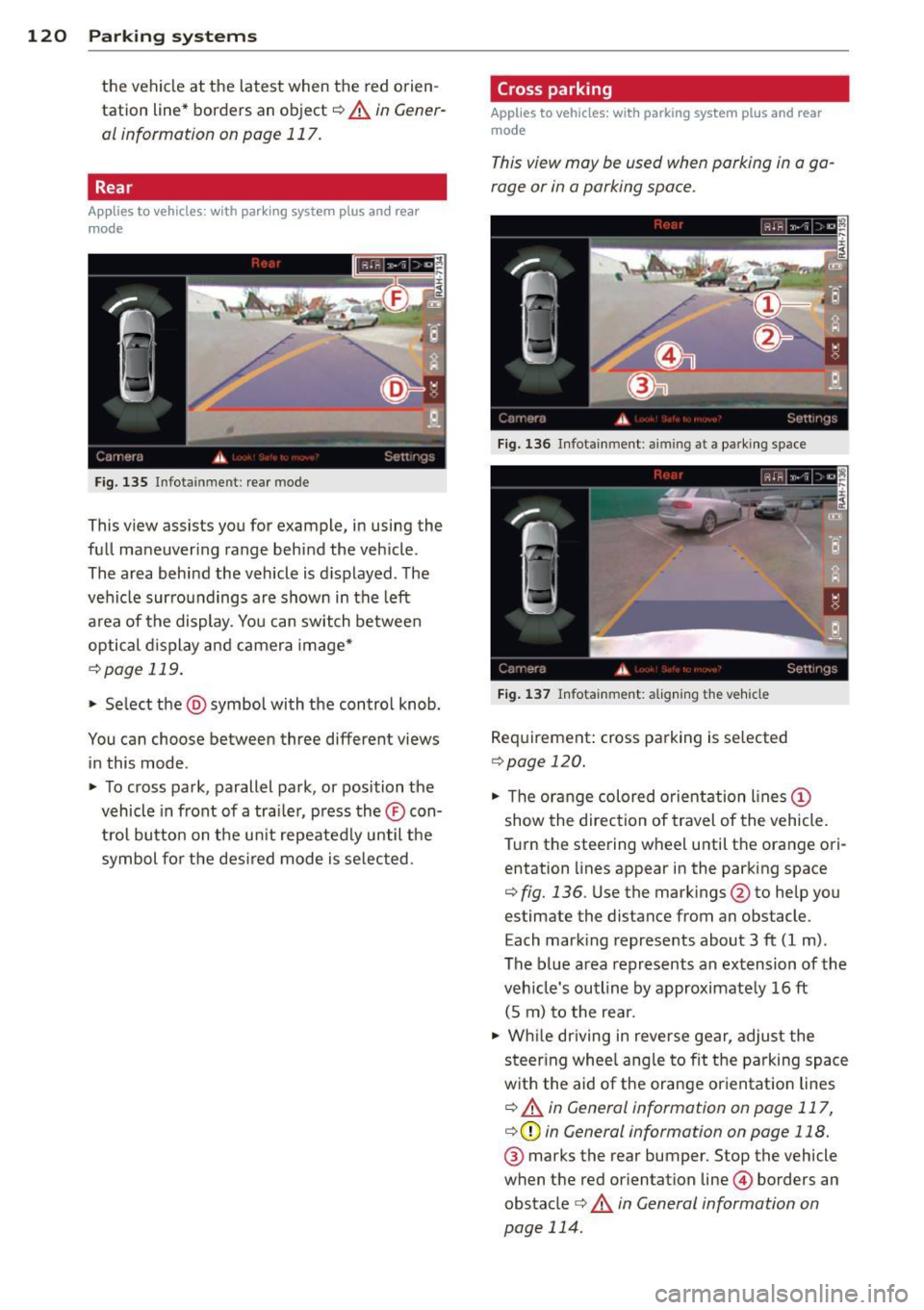
Fig. 135 Infot ainmen t: rea r m ode
This view assists you for example, in using the
full maneuvering range behind the veh icle .
The area behind the vehicle is d isplayed . The
vehicle surroundings are shown in the left
a rea of the display. You can switch betwee n
optical d isplay and camera image*
c::> page 119.
• Se lect the @symbol with the control knob .
You can choose between three different views in this mode .
• To cross park, parallel park, or position the
vehicle in front of a tra iler, press the ® con
t ro l bu tton on the un it repeatedly until the
symbol fo r the des ired mode is se lected .
Cross parking
Applies to vehicles: wit h parking system pl us and rear
mo de
This vi ew may be used when parking in a ga
rage or in a parking space.
Fig . 1 36 Infota inment : aimin g at a pa rk in g space
F ig . 1 37 Infota inment : aligning the ve hicle
Req uirement: cross parking is se lected
c::> page 120.
• The orange colored orientation lines (D
show the direction of travel of the vehicle.
T urn the steering wheel until the orange ori
entation lines appear in the parking space
c::> fig. 136 . Use the mark ings @to he lp you
estimate the distance from an obstacle.
E ach mark ing represents about 3 ft (1 m) .
The b lue area represents an extension of the
veh icle's outline by approximate ly 16 ft
(5 m) to the rear.
• Wh ile dr iving in reverse gear, adjust the
steer ing whee l ang le to fit t he parking space
w ith the aid of the orange or ientat ion lines
c::> A in General information on page 117,
c::> (D in General information on page 118.
® marks the rear bumper. Stop the vehicle
when the red orientation line© borders an
obstacle
c::> &. in General information on
page 114 .
Page 123 of 306
Parallel parking
Applies to vehicles: with parking system plus and rear
mode
This view may be used when parallel parking
along the side of a street.
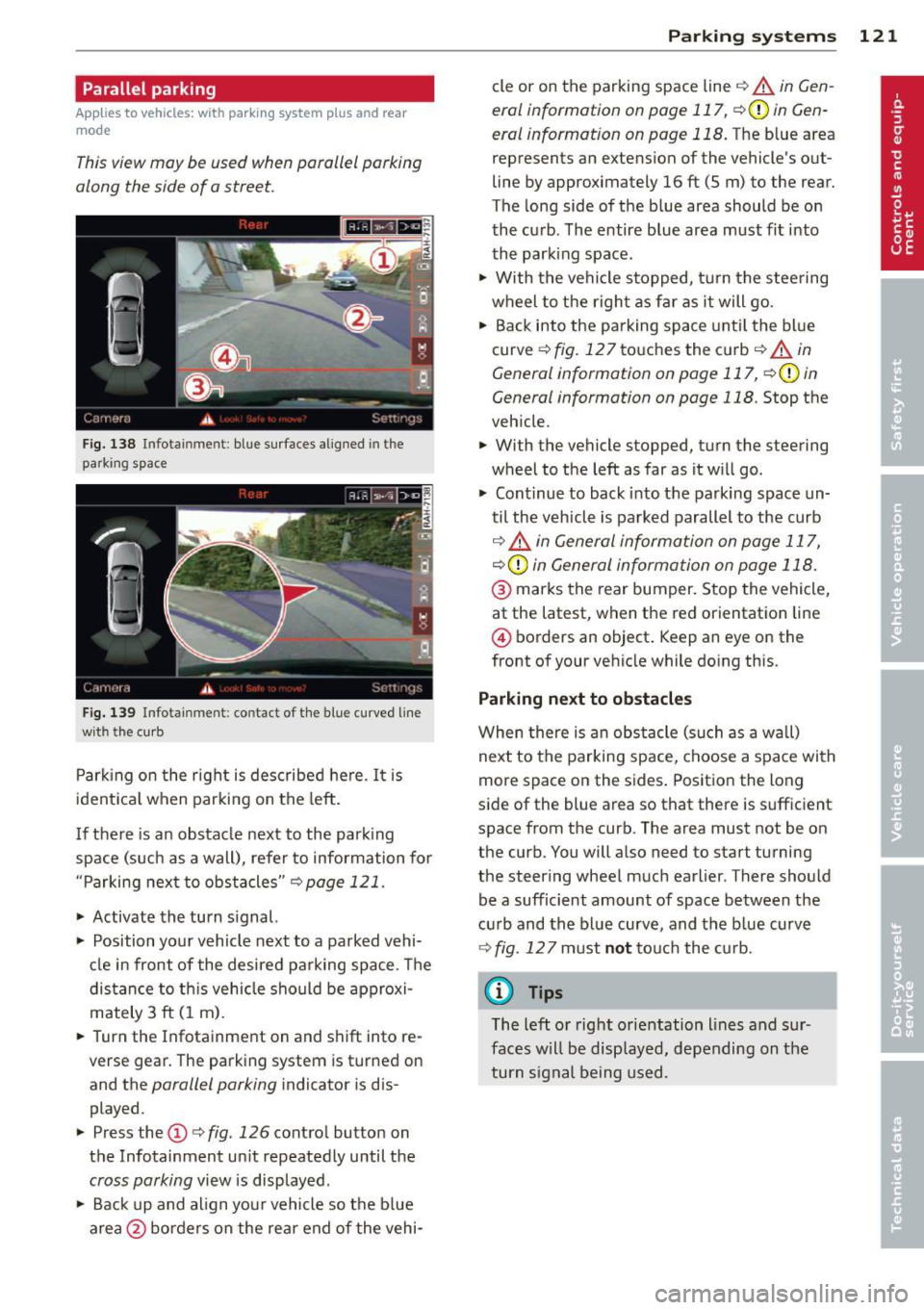
F ig. 138 Infot ainme nt: bl ue su rfaces aligned in th e
park ing space
Fig . 139 Infota inmen t: co ntact of the blue curved line
with t he curb
Parking on the right is described he re. It is
ident ical when parki ng on the left .
I f there is an obstacle next to the park ing
space (such as a wall), refer to information for
"Parking nex t to obstacles" ¢
page 121.
~ Activate the turn s ignal.
~ Position your vehicle next to a parked vehi
cle in front of the desired parking space . T he
distance to th is vehicle sho uld be approxi
mately 3 ft (1 m).
~ Turn the Infotainment on and shift into re
verse gear. The parking system is turned on
and the
parallel parking i ndicator is dis
played .
~ Press the@¢ fig. 126 contro l button on
the Infotainment un it repeatedly until the
cross parking view is displayed .
~ Back up and align your vehicle so the b lue
area @ borders on the rear end of the vehi-
Parking systems 121
cle or on the parking space line¢ A in Gen
eral information on page 117 , ¢ (Din Gen
eral information on page 118.
The b lue area
represent s an extens ion of the vehicle 's out
line by approximately 16 ft (5 m) to the rear.
The long side of the blue area should be on
the curb . The entire blue area must fit into
th e parking space .
~ With the vehicle s topped, tu rn the steering
wheel to t he righ t as fa r as it will go.
~ Back into the parking space until t he bl ue
curve ¢
fig. 12 7 touches the curb ¢ A in
General information on page 117, ¢(Din
General information on page 118 .
Stop the
veh icle .
~ With the vehicle stopped, turn the steering
wheel to the left as far as it w ill go.
~ Cont inue to back into the parking space un
til the vehicle is parked parallel to the curb
¢ ..&. in General information on page 117,
¢ (Din General information on page 118.
@ marks the rear bumper. Stop the vehicle,
at the latest, when the red or ientation line
@ borders an object . Keep an eye on the
front of your vehicle while do ing this .
Parking next to obstacles
When there is an obstacle (such as a w all)
next to the parking space, choose a space with
more space on the sides . Positio n the long
side of the blue area so that there is suff icient
space from the curb. The area must not be on
the curb. You will a lso need to start turning
the steering wheel much earlier . T here should
be a sufficient amount of space between the
c ur b and the bl ue curve, and t he b lue curve
¢
fig . 127 must n ot touc h the curb.
@ Tips
The left o r right orientation lines and su r
faces w ill be disp layed, depending on the
turn s ignal being used .
Page 124 of 306
122 Park in g s ystems
Trailer view
Ap plies to vehicles: with par king system p lus and tra iler
hitch
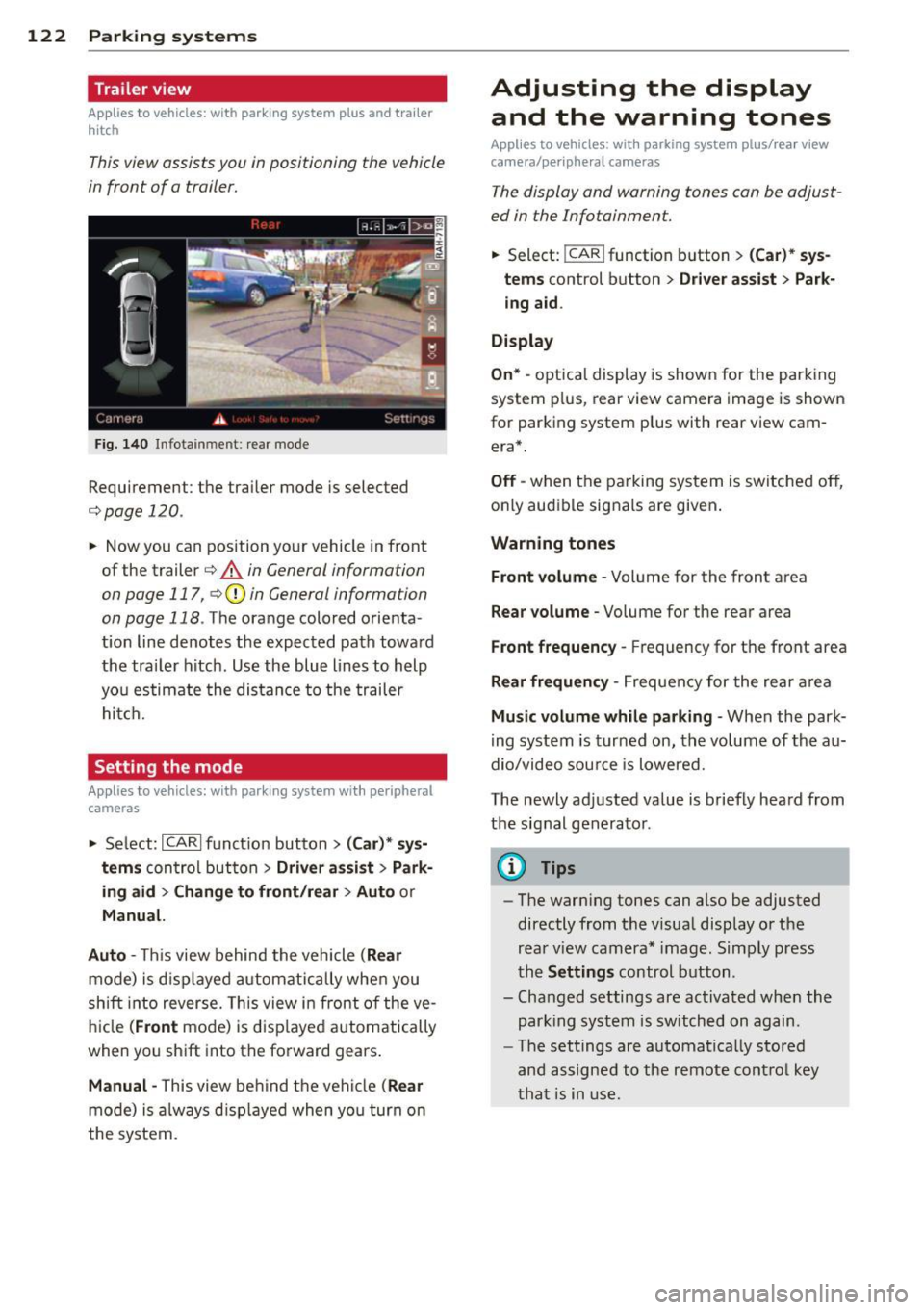
This view assists you in positioning the vehicle
in front of a trailer.
F ig. 1 40 Infotainment: rear mode
Requirement: the trailer mode is selected
c:;,page 120.
.. Now you can position your vehicle in front
of the trailer
c:;, .&. in General information
on page 117, c:;,Q) in General information
on page 118 .
The orange colo red orienta
t ion line denotes the expected path toward
the trai ler hitch . Use the blue lines to help
yo u estimate the distan ce to the trailer
hitch.
Setting the mode
Ap plies to veh icles: with par king system wi th peripheral
cameras
.. Select: ICARI funct ion button > ( Car )* sys
tem s
control button > Driv er a ssis t > Park
ing aid > Ch ange to front /rea r> A uto
or
Manu al.
Aut o -
This view behind the vehicle ( Rear
mode) is d isplayed a utomatically when you
shift into reverse. This view in front of the ve
hicle
( Front mode) is d isp layed automatically
when you sh ift into the forward gears .
Manual -This view behind the vehicle (Rear
mode) is a lways d isp layed when you turn on
the system.
Adjusting the display and the warning tones
Applies to vehicles: wit h parking syste m plus/ rea r view
came ra/ peri pheral cameras
The display and warning tones can be adjust
ed in the Infotainment.
.. Select: !CAR ! function b utton > (C ar)* sys
tem s
control button > Drive r a ssist > Par k
in g a id .
Di splay
On * -
optical display is shown for the parking
system p lus, rear view camera image is shown
for parking system plus with rear view cam era*.
Off -when the parking system is switched off,
only audible signals are given .
Warning tones
Fr ont volume -
Volume for the front area
Rear volume -Volume for the rear area
Front frequency -Frequency for the front area
Rear frequen cy -Frequency for the rear area
Mu sic v olum e wh ile parkin g -When the park
ing system is turned on, the volume of the au
dio/video sou rce is lowered.
The newly adjusted value is briefly heard from
the signal generator .
@ Tips
-The warn ing tones can also be adjusted
directly from the visual display o r the
rear v iew camera* image. Simply press
the
Setting s control button .
- Changed settings are act ivated when the
park ing system is switched on again.
- The settings are automatica lly stored
and assigned to the remote control key
that is in use .
Page 125 of 306
Error messages
Applies to vehicles: with parking system plus/rear view
camera/per ipheral cameras
There is an e rror in the system if the LED in
the
p, qA button is blinking and you hear a con
tinuous alarm for a few seconds afte r switch
ing on the parking system or when the park
ing system is already activated. If the error is
not corrected before you switch off the igni
tion, the LED in the
Pw.6. button will blink the
next time you switch on the parking system by
shifting into reverse.
Parking system plus
If a sensor is faulty, the~ symbol will appear
in front of/behind the vehicle in the Infotain
ment display. If a rear sensor is fau lty, only
obstacles that are in areas @ and @ are
shown
c:> fig. 117 . If a front sensor is fau lty,
only obstacles that are in areas © and @are
shown .
Peripheral cameras*
There is also a system error if:
- the
'(:8:)• • symbol appears in the display and
the corresponding display area is shown in
blue. The camera is not working in this area.
- all segments around the vehicles are red or
if no segments are displayed.
Drive to your authorized Aud i dea ler o r au
thorized repair fac ility immediately to have
the ma lfunction corrected.
Trailer hitch
Appl ies to vehicles: with parking system plus/rear view
camera/per ipheral cameras and trailer hitch
For vehicles using the tra iler socket, the park
ing system rear senso rs do not turn on when
you shift into reverse gear or when yo u press
the P
01A button. This resu lts in the following re
strictions:
Parking system plus*
There is no distance wa rning for the rear. The
front sensors rema in activated. The visual dis
play switches to the trailer towing mode.
Parking systems 123
Parking system plus and rear view
camera* /Peripheral cameras*
There is no distance warning for the rear. The
front sensors remain activated. The visual dis
play sw itches to the trailer towing mode. The
rear view camera image will not show the ori
entation lines and the blue surfaces .
{D Tips
Trailer hitches that are not installed at the
factory may cause the park ing system to
malfunction or they may restr ict its func
tion.
Page 127 of 306
@ Tips
To open the garage door, press the button,
but do not press it for longer ten seconds
or the Homelink modu le w ill switch to
programming mode .
Programming the transmitter
Applies to vehicles : with Home Link
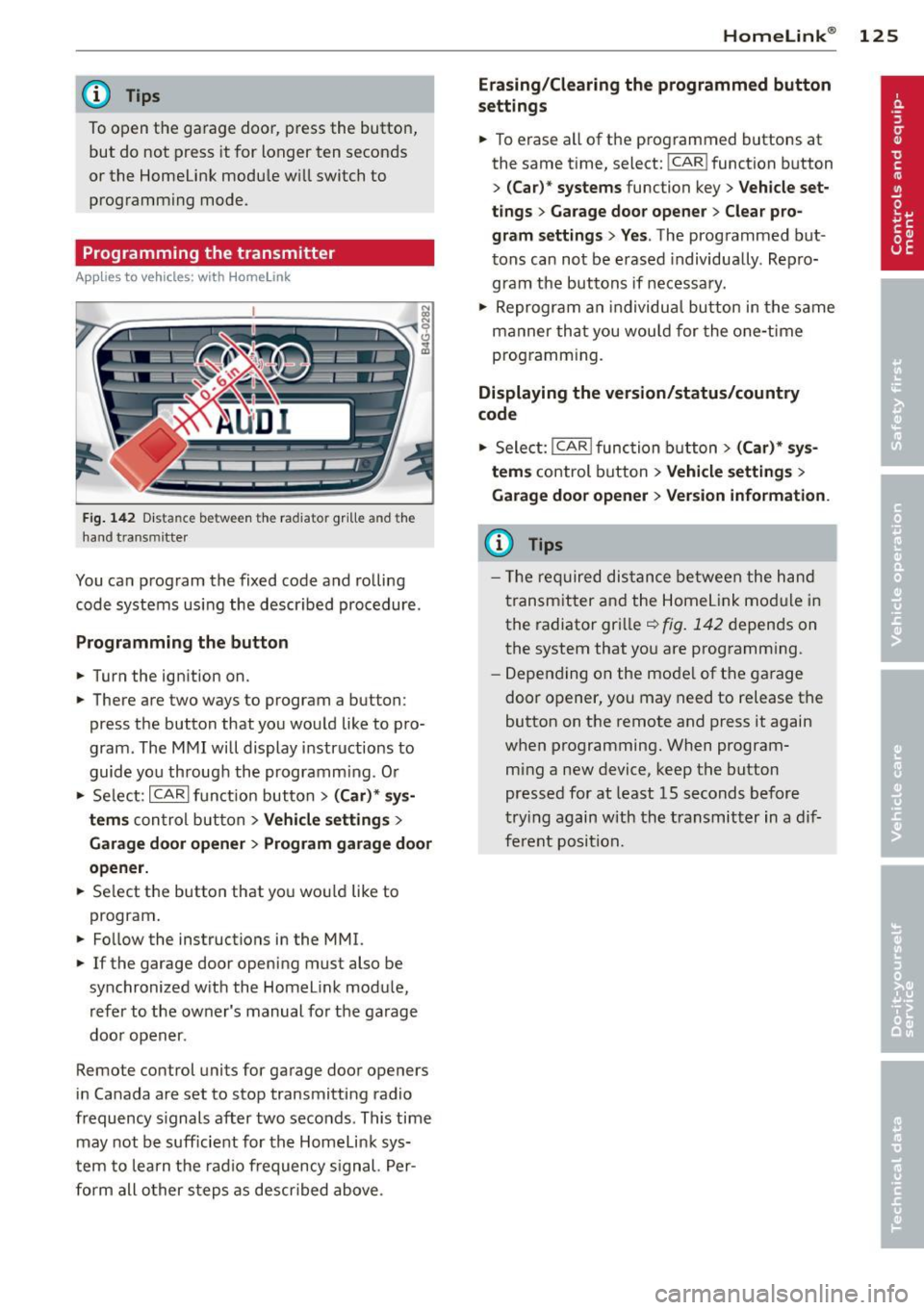
Fig. 142 Dist an ce be tween the ra diato r gr ille a nd the
hand t ransm itter
You can program the fixed code and rolling
code systems using the described procedure.
Programming the button
.. Turn the ignition on.
.. There are two ways to program a button:
press the button that you would like to pro
gram . The MMI will display instructions to
guide you through the programm ing . O r
.. Se lect: ICARlfunction button>
( Car) * sys
tems
con trol button > Vehicle settings >
Garage door opener > Program garage door
opener .
.. Se lect the button that you wou ld like to
program .
.. Fo llow the instructions in the MMI.
.. If the garage door opening must also be
synchronized with the Homelink module,
refer to the owner's manual for the garage
door opener .
Remote control units for garage door openers
in Canada are set to stop transmitting radio
frequency s ignals after two seconds . This time
may not be sufficient for the Homelink sys
tem to learn the radio frequency signal. Per
form all other steps as descr ibed above .
Homelink ® 125
Erasing/Clearing the programmed button
settings
.. To erase all of the programmed buttons at
the same time, select: !CAR ! function button
>
(Car)* systems function key> Vehicle set
tings
> Garage door opener > Clear pro
gram settings> Yes .
The programmed but
tons can not be erased individua lly . Repro
gram the buttons if necessary .
.. Reprogram an individual button in the same
manner that you wou ld for the one-time
programming.
Displaying the version/status/country
code
.. Select: I CAR I function button > (Car)* sys
tems
control button > Vehicle settings >
Garage door opener > Version information .
(D Tips
- The required distance between the hand
transmitter and the Homelink mod ule in
the radiator grille~
fig. 142 depends on
the system that you are programm ing .
- Depending on the mode l of the garage
door opener, you may need to release the
button on the remote and press it again
when programming. When program
ming a new device, keep the button
pressed for at least 15 seconds before
trying again with the transmitter in a dif
ferent position.
Page 150 of 306
148 Airbag sys tem
If the front passenger airbag is turned off , the
PASSENGER AIR BAG OFF light comes on in
the instrument cluster and stays on .
I f the front passenger airbag deploys, the
F ederal Standard requires the airbag to meet
the " low risk" deployment criteria to reduce
the r isk of in jury through interaction with the
a irbag. "Low ris k" deployment oc curs in tho se
c rashe s that take pl ace a t lower decele ra tions
as defined in the electronic control un it
c::> page 158, PASSENGER AIR BAG OFF light.
A lw ays r emember, a chi ld seat or infant carri
er installed on the front seat may be s truck
and knocked out of position by the rap idly in
flati ng passenger's a irbag i n a frontal colli
sion . The airbag could greatly reduce the ef
fectiveness of t he ch ild restrai nt and even se
r io usly in ju re the child during infla tion.
For this reason, and because the back seat is
the safest place for chi ldren - when p roperly
r estra ined a ccord ing to the ir age and size - we
strongly recommend t hat childre n always si t
in the back seat
c::> page 171, Child Safety .
& WARNING
-
A child in a rearward -facing child seat in
stalled on the front passenger seat will be
ser iously injured and can be killed if the
front airbag inflates - even with an Ad
vanced Airbag System.
- The inflating a irbag will hit the child seat
or infant carrier w ith great force and w ill
smash the ch ild seat and child against
the bac krest , cen ter armres t, door or
roof.
- Always install rear-facing child seats on
the rear seat.
- If you must i nstall a rearward facing
child seat on the front passenge r seat
because of except iona l circumstances
and the
PASSENGER AIR BAG OFF ligh t
does not come on an d stay on, immedi
a tely install the re ar-facin g chi ld seat in a
rear seating position and have the ai rbag
system inspected by your Aud i dealer. -
Forwa rd- facing child seats installed on
the front passenger 's seat may interfere
wit h the dep loyment of the a irbag and
cause serious persona l injury to the
child .
& WARNING
-If, in except ional circumstances, you m ust
i nstall a forward-facing child restraint on
the front passenge r's seat:
- Always make sur e the forward-facing
seat has been designe d and certified by
its m anufacture r for u se on a fron t se at
wit h a passenger fron t and s ide airba g.
- Never p ut t he fo rward -facing child re
s tra int up agains t or ve ry near the instru
men t pa nel.
- Always move the passenge r seat into it s
rearmost pos ition in the seat' s fore and
aft a djustmen t range, as fa r away from
the air bag as possible before installing
the forwar d-facing ch ild restra int . The
backrest must be ad justed to an upright
position.
- Make sure that the
PASSENGER AIR BAG
OFF
li ght comes on and stays on all the
time whenever the ignit ion is switched
on .
& WARNING
-To reduce the risk of serious injury, make
sure that the
PASSENGER AIR BAG OFF
light w ill be display ed whe nev er a child re
straint is insta lled on the front pa ssenger
se at and the ignition is sw itche d on .
- If the
PASSENGER AIR BAG OFF light
does no t stay on, per form the che cks de
scribed
c::> page 15 7, Monitoring the Ad
vanced Airbag System.
- Ta ke t he chi ld restraint off the fron t pas
senger sea t and inst all it prope rly at one
of the rear seat positions i f the
PASSEN
GER AIR BAG OFF
li ght does not stay on.
- Have the airbag system inspected by
your Aud i dea le r i mmediately.
Page 196 of 306
194 Intelligent technology
@ Tips
-ABS and ASR on ly work correctly when
all four wheels are equipped w ith identi
cal tires. Different tire sizes can lead to a
reduction in engine power.
- You may hear noises when the systems
described are working.
- If the indicator light
DJ or 11:11 (USA
models) 1i] (Canada models) appears,
there may be a malfunction¢
page 20,
c> page 19.
Switching on and off
ESC
turns on automatically when you start
the engine.
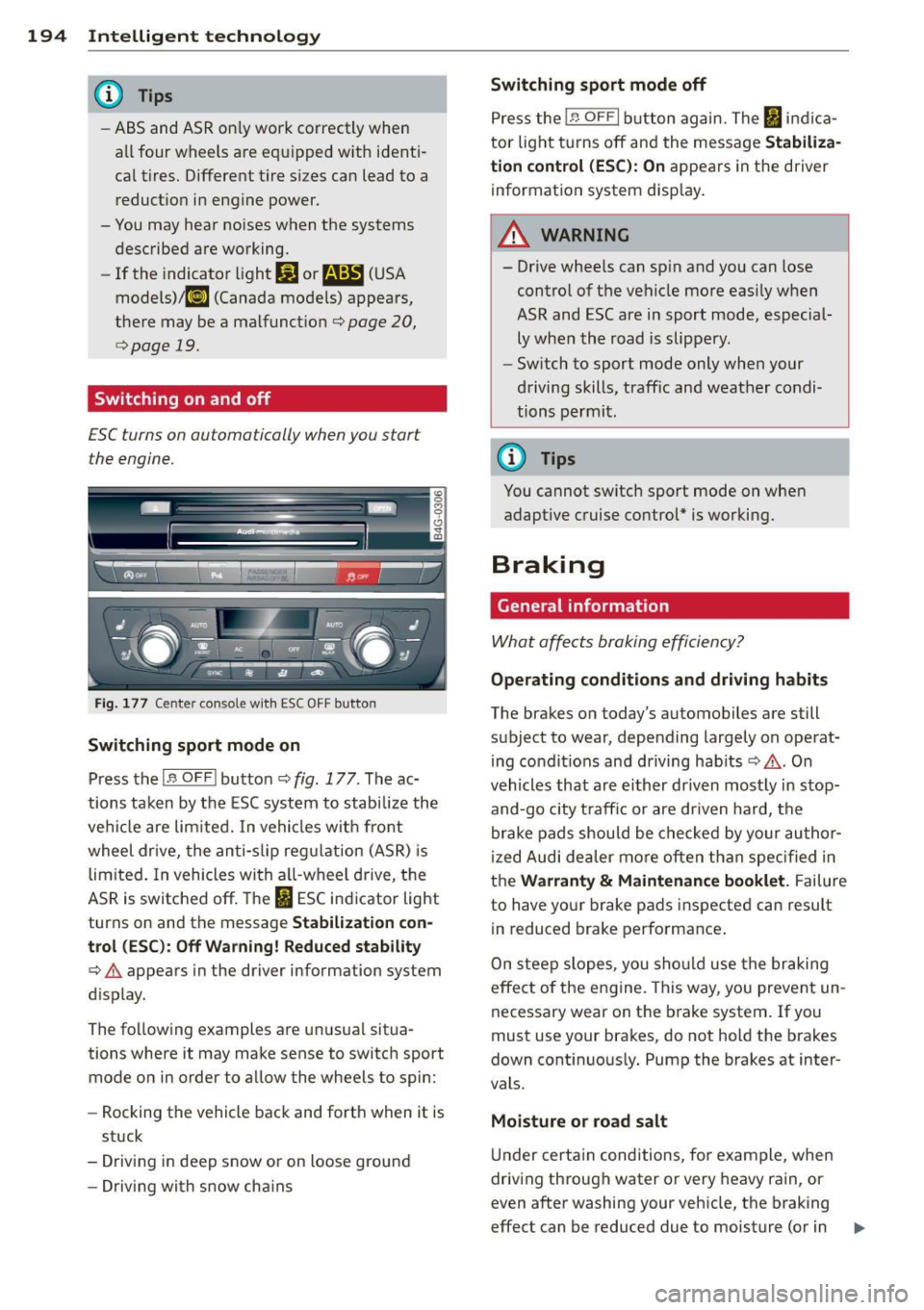
Fig. 177 Center console w it h ESC OFF button
Switching sport mode on
Press the I~ OF FI button c::> fig . 177. The ac
tions taken by the ESC system to stabilize the
vehicle are limited. In vehicles with front
wheel drive, the anti-slip regulation (ASR) is
limited. In vehicles with a ll-wheel drive, the
ASR is switched off. The
It) ESC indicator light
turns on and the message
Stabilization con
trol (ESC): Off Warning! Reduced stability
¢.&. appears in the driver information system
d isplay.
The following examples are unusual situa
tions where it may make sense to switch sport
mode on in order to allow the wheels to spin:
- Rocking the vehicle back and forth when it is
stuck
- Driving in deep snow or on loose ground
- Driving with snow cha ins
Switching sport mode off
Press the 1.$ OF FI button again. The I indica
tor light turns off and the message
Stabiliza
tion control (ESC): On
appears in the driver
information system display .
A WARNING
-
-Drive wheels can spin and you can lose
control of the vehicle more easily when
ASR and ESC are in sport mode, especial
ly when the road is slippery.
- Sw itch to sport mode only when your
driving skills, traffic and weather condi
tions permit.
@ Tips
You cannot sw itch sport mode on when
adaptive cruise control* is working.
Braking
General information
What affects braking efficiency?
-
Operating conditions and driving habits
The brakes on today's automobiles are still
subject to wear, depending largely on operat
ing condit ions and driving hab its
c::> .&. . On
vehicles that are either driven most ly in stop
and-go city t raff ic or are driven hard, the
brake pads should be checked by your author
ized Audi dea ler more often than specified in
the
Warranty & Maintenance booklet. Failure
to have your brake pads inspected can result
in reduced brake performance .
On steep slopes, you should use the braking
effect of the engine . This way, you prevent un
necessary wear on the brake system. If you
must use your brakes, do not hold the brakes
down continuously. Pump the brakes at inter
vals .
Moisture o r road salt
Under certain conditions, for example, when
driving through water or very heavy rain, or
even after washing your vehicle, the braking
effect can be reduced due to moisture (or in .,,_
Page 208 of 306
206 Trailer towing
Always apply brakes early. When driving
downhill, shift into a lower gear to use the en
g ine braking effect to slow the vehicle . Use of
the brakes alone can cause them to overheat
and fail.
Coolant temperature
The coolant temperature gauge¢ page 11
must be observed carefully. The coolant tem
perature can increase if you drive on long in
clines in a low gear at high engine speeds. Re
duce your speed immediately if the LEDs in
the top part of the display turn on .
For more information about indicator lights,
refer to. ¢
page 16 .
A WARNING
Anyone not properly restrained in a mov
ing vehicle is at a much greater risk in an
accident . Never let anyone r ide in your car
who is not properly wear ing the restraints
provided by Aud i.
Trailer towing tips
Important to know
Your vehicle handles differently when towing
a trailer because of the additional weight and
different weight distribution . Safety, perform
ance and economy w ill greatly depend on how
carefully you load your trailer and operate
your rig .
Before you actually tow your trailer, practice
turn ing, stopp ing and back ing up in an area
away from traffic. Keep practicing until you
have become comp lete ly familiar with the way
your ve hicle-trai ler comb ination behaves and
responds.
Backing up is difficult and requires practice .
Backing up with a tra iler generally requi res
steering act ion opposite to that when backing
up your vehicle without a trailer.
Maintain a greater distance between your ve
hicle and the one in front of you. You will need
more room to stop. To compensate for the trailer, you wi
ll need a larger than normal
turning radius.
When passing, remember that you cannot ac
celerate as fast as you norma lly would be
cause of the added load. Make sure you have
enough room to pass . After passing, a llow
plenty of room for your trailer before chang
ing lanes again.
Avoid jerky starts , sharp turns or rapid lane
changes.
(D Tips
- Do not tow a trailer during the break-in
period of your vehicle.
- If you tow a trailer, your Audi may re
quire more frequent maintenance due to
the extra load¢
page 285.
Parking on a slope
Do not park on o slope with a trailer. If it can
not be avoided, do so only after doing the fol
lowing:
When parking:
.,. App ly the foot brake .
.. Have someone pla ce chocks under both the
vehicle and the trailer wheels.
.. With chocks in place, slowly release the
brakes until the whee l chocks absorb the
load .
.. Turn the wheels towards the curb .
.. Apply the parking brake.
.. Select the P selector lever posit ion .
When restarting after parking:
.. Apply the foot brake.
.. Start the engine.
.. Select the D/S selector lever position .
.. Release the parking brake and slowly pull
out and away from the wheel chocks .
.,. Stop and have someone retr ieve the wheel
chocks .
Ill-
Page 216 of 306
214 Cleaning and protec tio n
To preserve the deco rative appearance of the
cast a lloy whee ls , some specia l care is neces
sary. In addit ion to road dirt and sa lt, brake
dust is also corros ive. If left on for too long,
brake dust can cause pitt ing.
Use only specia l
acid-free cleaners formulated
for a lloy rims. Safe products are available at
your Aud i dealer. Never leave the cleaner on
the r ims longer than spec ified on the label. If
not rinsed off promptly, the acid conta ined in
some cleaners can attack the threads on the
wheel bolts.
Never use abras ive or metal polishing clean
ing agents . If the protective coating has been
ch ipped, e .g . by k icked up road dirt, touch it
up as soon as poss ible.
A WARNING
- Moisture and ice on brakes may affect
braking efficiency
Q page 194, General
information .
Test the brakes caref ully
each time you wash the vehicle.
- Always read and heed all WARNINGS and
other information ¢
page 208.
-
Body cavity sealing
The body cavity sealing does not need to be
checked.
A ll body cavities wh ich could be affected by
corrosion have been thoroughly protected at
the facto ry.
This sealing does not require any inspection or
addit ional treatment . If any wax should seep
out of the cav ity when the ambient tempera
ture is high, it can be removed w it h a plastic
scrape r and a suitab le solven t.
A WARNING
So lvents can be dange rous.
- Benzine is flammable and toxic.
If you
use benzine for removing the wax, keep
sparks, flame and lighted cigarettes
away. Never dump benzine on t he
ground, into open streams or down sew
age drains. -
Be s ure to observe all safety and environ
mental regulat ions. Follow all instruc
tions on the container .
- Always read and heed all WARNINGS and
other information
Q page 208.
Chassis
Hove the undercoating checked for damage
from time to time .
The lower body shell of your Aud i is also thor
oughly protected against corrosion .
Any damage to the undercoat ing ca used by
road hazards should be repaired prom ptly.
A WARNING
r----
Too much undercoating in the wrong p la-
ces can cause a fire.
- Do not app ly additional under coating or
r u stp roof ing on or nea r the exhaust
manifold, exhaust pipes, catalytic con
verter or heat shields . While driving, the
substance used fo r undercoating could
overheat and cause a fire.
-
- Always read and heed a ll WARNINGS and
other information
Q page 208.
Exhaust tail pipes
Road salt and other corrosive materials will
damage the material in the exhaust tail pipes
if they are not cleaned regular ly. Do not clean
the tail pipes with wheel cleaner, pa int polish,
chr ome polish or other ab rasive clea ners.
Clean the tail pipes with ca r c are products
t h at are suitable fo r stainless steel.
Your authorized Aud i dea ler can provide clean
ing produc ts tha t have been tested and ap
proved for yo ur vehicle .
Care of interior
Infotainment components
The MMI/RSE* display may be cleaned wit h a
soft clot h and commercia lly-available "LCD
cleaner ". The clot h should be coated lightly ..,
Page 217 of 306
when the cleaning solution when cleaning the
display .
The MMI/RS E* contro ls must be cleaned firs t
with a brush so that dirt does no t ente r the
unit or enter between the buttons and the
housing . Then wiping the controls with a cloth
dampened with dish detergent and water is
recommended.
(D Note
- To avoid scratching the disp lay, you
shou ld never clean it dry.
- To prevent damage, make sure fl uids do
not enter the controls .
Head-up Display
Applies to vehicles: with Head-up Display
The Head-up Display may be cleaned with a
damp cloth. The cloth should be free from
dust and lint, like a m icrofiber cloth for exam
ple.
(D Note
- To prevent scratches, do not clean the
display when it is dry.
- To prevent damage, make sure that flu
i ds do not enter the disp lay.
Aluminum trim
Use only n eutral -pH products to remove spots
and depos its from alum inum surfaces .
Chrome ca re produ cts and alkaline cleaners
will a ttac k alum in um s urfaces and can dam
age them over time.
A WARNING
Always read and heed a ll WARNINGS and
other information
~ page 208 .
Fabrics and fabric coverings
Fabrics and fabric coverings (e .g. seats, door
tr im panels, etc.) should be cleaned at reg ular
intervals with a vacuum cleaner. T his removes
surface dirt particles which could become em bedded in the fabr ic through use. Steam
Cleaning and protec tion 215
cleaners sho uld not be used, beca use the
steam tends to p ush the dirt deeper into the
fabric and lock it there .
Normal cleaning
Generally, we recommend using a soft sponge
o r a lint-free microfibe r cloth to the clean fab
ric. Brushes shou ld only be used for carpets
and floor mats, since other fabr ic surfaces
could be harmed by brushes.
Norma l surface stains can be cleaned using a
commercially availab le foam cleaner . Spread
the foam on the s urface of t he fabric with a
soft sponge and work it in gently. Do not satu
rate the fabric. T hen pat the foam dry us ing
absorbent, dry cloths (e.g. m icrofiber cloth)
and vacuum it after it has dried completely.
Cle aning sta in s
Stains caused by beverages (e .g. coffee, fr uit
juice, etc.) can be treated with a mild deter
gent solution. Apply the detergent solution
with a sponge. In the case of stubborn stains,
a detergent paste can be applied directly to
the stain and worked into the fabric. After
wards, use copious amounts of clean water to remove the rema ining de terge nt. App ly the
water wit h a damp cloth or sponge and pat
the fabric dry with an absorbent, dry cloth .
Stai ns from choco late or ma keup should have
de tergent paste (e.g. ox-gall soap) rubbed in
to them. Afterwa rds, remove the soap wi th
wa ter (damp sponge) .
Alcohol can be used to treat stai ns from
grease, o il, lipstick or a ballpoin t pen. Melted
grease o r dye mus t be patted
off using ab
sorbent mater ia l. It may be necessary to re
treat the areas with detergent paste and wa
ter .
In the case of genera l soiling of the upho ls
tery and cover material, we recommend hir ing
a specia list t hat has the eq uipment to clean
the seat covers and other fabric surfaces by
shampooing and spray extraction. •
•