wheel AUDI A6 2013 Owner's Guide
[x] Cancel search | Manufacturer: AUDI, Model Year: 2013, Model line: A6, Model: AUDI A6 2013Pages: 306, PDF Size: 76.92 MB
Page 111 of 306
a gear that is suitable for the incline. Hill de
scent control tries to maintain the speed ach
ieved at the time of brak ing, within physical
and technica l limitations. If may still be nec
essary to adjust the speed with the brakes.
Hill descent control switches off once the de
cline levels out or you press the accelerator pedal.
On vehicles with the cruise control system*
¢ page 79, hill descent control is also activat
ed when the speed is set.
.&_ WARNING
-
H ill descent control cannot overcome
physical limitations, so it may not be able
to maintain a constant speed under all
conditions. Always be ready to app ly the
brakes .
Manual shift program
Applies to vehicles: with mult itronic/S tronic/tiptron ic
Using the manual shift program you can
manually select gears.
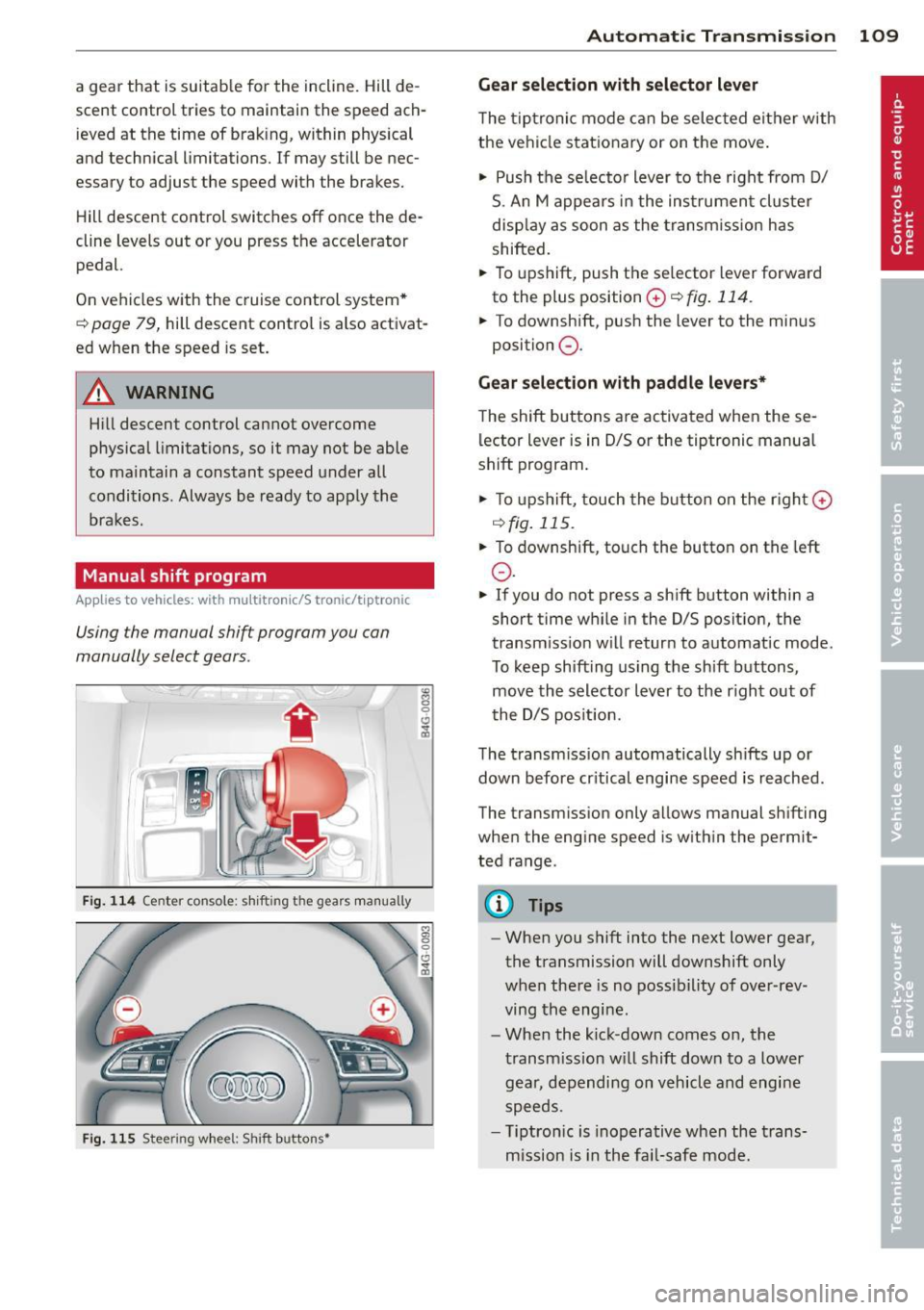
Fig. 114 Center co nsole: shi fting the gears manually
Fig. 115 Steering wheel: Shift buttons•
"' 8 0 CJ
cb
Automatic Transmission 109
Gear selection with selector lever
The tiptronic mode can be selected either with
the vehicle stationary or on the move.
"' Push the se lecto r lever to the right from D/
S. An M appears in the instrument cluster
display as soon as the transm ission has
shifted.
"' To upshift, push the se lector lever forward
to the plus position
0 ¢ fig . 114.
"' To downshift, push the lever to the minus
position
0 .
Gear selection with paddle levers*
The shift buttons are activated when these
lector lever is in D/S or the tiptronic manual
shift program .
"'To upshift, touch the button on the rig ht G)
C) fig. 115 .
.,. To downshift, touch the button on the left
0 .
"' If you do not press a sh ift button within a
short time while in the D/S position, the
transm iss ion w ill retur n to automat ic mode.
To keep shifting using the sh ift buttons,
move the selector lever to the r ight out of
t he D/S posit ion.
The transmission automatically shifts up or
down before cr itical engine speed is reached .
The transm ission only a llows manual sh ifting
when the engine speed is w ithin the permit
ted range.
(D Tips
- When you shift into the next lower gear,
the transmission will downshift only
when there is no possibility of over-rev
ving the engine.
- When the kick-down comes on, the
transmission will shift down to a lower
gear, depending on vehicle and engine
speeds.
- T iptron ic is inoperat ive when the trans
mission is in the fail-safe mode.
Page 112 of 306
110 Automatic Tran sm iss ion
Kick-down
Applies to vehicles: with multitron ic/S tronic/t iptronic
Kick-down enables maximum acceleration .
Applies to ve hicle s w ith a multit ro nic ®
t ra nsmission
When you depress the accelerator pedal be
yond the resistance po int, the transmission
downshifts into a lower gear ratio depend ing
on the vehicle speed and engine speed. As l ong as the accelerator peda l is depressed, the
engine speed is a utomat ica lly regulated for
maximum accelera tion.
Appli es to veh icl es with a S tronic ®-/ ,
tiptronic tran smi ssion
When you dep ress the accele rator pedal be
yond the resistance po int, the a utomat ic
transmission downshifts into a lower gear, de
pending on vehicle speed and engine speed.
The upshift into the next higher gear takes p lace once the maximum specified engine
speed is reached.
A WARNING
,-
Please note that the drive wheels can spin
if kick-down is used on a smooth slippery
road - there is a risk of skidding .
Launch Control Program
Applies to vehicles: with S tronic
The Launch Control Program provides the
best acceleration possible when starting from
a stop .
Requirement : The engine must be at operat
ing temperature and the steering wheel must
not be turned .
.. Press the
I~ O FF I button ¢ page 194 while
the engine is running. The
IJ indica tor light
illuminates in the instrument cluster and
Sta bilization contr ol (ESC ): Off Warn ing!
R educed stabi lit y
appears in the dr iver in
fo rmat io n system disp lay .
.. Move the selecto r lever to posit ion D/S to
select sport mode (5) or select
D yna mic
mode in Audi dr ive select c:> page 99 .
.. Press the b rake pedal strongly with you r left
foot and hold it down for at least 1 second .
.. At the same time, press the accelerator
pedal down complete ly with your r ight foot
until the engine reaches and mainta ins a
high RPM .
.. Remove your foot from the brake pedal
w ith in
5 seconds c:> ,&. .
_&. WARNING
-Always adapt your dr iving to the tr aff ic
f low.
- Onl y use the Launch Cont ro l Program
when road and t raff ic condi tions a llow i t
and other d rivers w ill not be endangered
or annoyed by your driving and the vehi
cle 's acceleration.
- Please note that the driving wheels can spin and the vehicle can b reak away
when ESC is switched off, especially
when the road is slippery .
- Once the vehicle has started moving,
press the
1 1' OFFI button brief ly to turn
the ESC on .
(D Tips
- The transmission temperature may in
crease signif icantly after using the
launch control program. If that happens,
the program may not be ava ilable for a
few minutes. It w ill be available again af
ter a cool-down per iod.
- When accelerating using the launch con
tro l program, all vehicle parts are subject
to heavy loads . This can resu lt in in
creased wear .
Transmission malfunction
Applies to vehicles: with multitronic/S tronic/tiptronic
[O] Tran smi ssi on: Pr ess brake pedal and se
lect gear again
Press the brake peda l and select the desired
selector lever position again. You can the n
continue d riving .
[O] Transmi ssion overheating: Plea se drive
con servatively
Page 114 of 306
112 Parking system s
Parking systems
General information
A ppl ies to vehicles: with pa rk in g system plus/ rear view
camera/peripheral cameras/par king ass istant
Depending on your vehicle's equ ipment, vari
ous parking aids will help yo u when pa rk ing
and maneuvering.
The
pa rking sy stem plu s assists you when
pa rking by audib ly and visually indicat ing ob
jects detected
in front of and behind t he vehi
cle
~ page 113.
The rear vie w c am era shows the area behind
the vehicle in the Infotainment d isp lay. This
d isplay assists you when you are c ross o r par
allel parking
q page 114. In addit ion, you are
assisted by the functions from the parking
system plus
~ page 113 .
The periph eral camera s ass ist you with park
ing and maneuvering. You are aided by var ious
cameras depending on the vehicle equipment leve l¢
page 117. In addition, you are assist
ed by the function s from the parking sy stem
p lus ¢ page 113.
A WARNING
- Always look for traff ic and check the area
around your vehicle by looking at it di
rectly as well . The parking system cannot
replace the d rive r's attent ion. The dr iver
is always respons ible for safety during
par king and for all other maneuvers.
- Please note that some surfaces, such as
clothing, are not detected by the system.
- Sensors and cameras have blind spots in
w hich peop le and objects cannot be de
tected. Be especially cautious of children
and animals.
- T he sensors can be displaced by impacts
or damage to the radiato r grille, bumper,
wheel housing and the unde rbody. The
parking systems may become impaired
as a result . Have your authorized Audi
dealer or qualified workshop check their
function. -
Make sure the sensors are not covered by
stickers, deposits or any other obstruc
tions as it may impair the sensor func
tion . For information on cleaning, refer
to
~ page 211 .
(D Note
- Some objects are not detected by the
system under certain c ircumstances :
- Objects su ch as ba rrie r chains, trailer
draw bars, vertical po les or fences
- Objects above the senso rs such as wall
extensions
- Objects w ith specific surfaces or struc
tures su ch as chain link fences or pow
der snow.
- If you contin ue driving closer to a low- ly
ing object, it may disappear from the
sensor range. Note that you w ill no lon
ger be warned abo ut this obstacle.
(j) Tips
- The system may provide a wa rning even
tho ugh there are no obs tacles in the cov
erage area in some situations, such as:
- certain road surfaces or for long grass.
- externa l ultrasonic sources e.g. from
clean ing vehicles.
- heavy rain, snow or thick vehicle ex
haust.
- We recommend that you practice park
ing in a traff ic-free location or park ing
lot to become familiar with the system.
When doing this, there should be good light and weather cond itions .
- You can change the volume and pitch of
the s ignals as we ll as the display
¢page 122.
- Please refer to the instructions for tow
ing a trailer
¢ page 123 .
-What appears in the infotainment dis
play is somewhat time-delayed .
Page 118 of 306
116 Parking systems
Cross parking
Applies to vehicles: with park ing system p lus w it h rear
view ca mera
This view may be used when parking in a ga
rage or in a parking space.
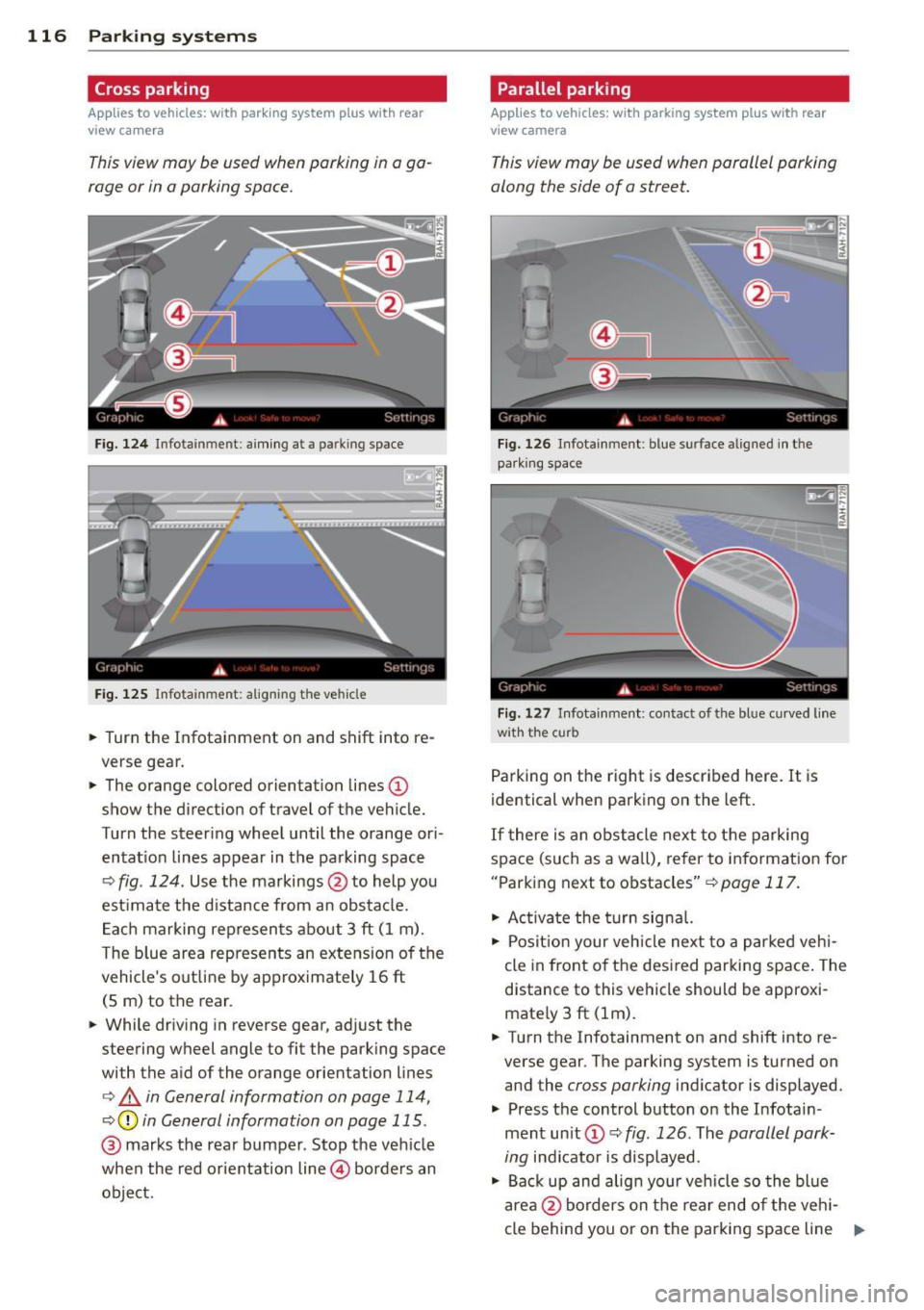
F ig. 124 Infotainment: aim ing at a parking space
Fig. 125 Infotainment : aligning the ve hicle
... Turn the Infotainment on and shift into re
verse gear.
... The orange colored orientation lines@
show the direction of travel of the vehicle.
Turn the steering wheel until the orange ori
entat ion lines appear in the parking space
c:::> fig. 124 . Use the markings @to help you
est imate the distance from an obstacle.
Each marking represents about 3 ft (1 m).
The blue area represents an extens ion of the
vehicle's out line by approximately 16 ft
(5 m) to the rear.
... While driving in reverse gear, adj ust the
steering wheel angle to fit the parking space
with the aid of the orange orientation lines
c:> & in General information on page 114,
c:::> @ in General information on page 115 .
@ marks the rear bumper . Stop the vehicle
when the red orientation line@ borders an
object.
Parallel parking
Applies to vehicles : wit h parking system pl us with rear
v iew camera
This view may be used when parallel parking
along the side of a street.
Fig . 126 Infotainment : blue surface align ed in the
par king space
Fig. 127 Infotainme nt: contact of the blue curved lin e
w ith the curb
Parking on the right is described here. It is
identical when parking on the left.
If there is an obstacle next to the parking
space (such as a wall), refer to information for
"Parking next to obstacles"
c:::> page 117.
"' Ac tivate the turn signal.
"' Position your vehicle next to a parked vehi
cle in front of the desired parking space. The
distance to this vehicle should be approxi
mate ly 3 ft (lm) .
... Turn the Infotainment on and shift into re
verse gear. The parking system is turned on
and the
cross parking indicator is displayed.
"' Press the control button on the Infotain
ment un it
(D c:::> fig. 126 . The parallel park
ing
indicator is displayed.
"' Back up and align your vehicle so the blue
area @borders on the rear end of the vehi-
cle behind you or on the parking space line ..,.
Page 119 of 306
r::> & in General information on page 114,
r::> (Din General information on page 115 .
The blue area represents an extension of the
vehicle's outline by approximately 16 ft
(5 m) to the rear . The long side of the blue
area should be on the curb . The entire blue
area must fit into the parking space.
• With the vehicle stopped, turn the steering
wheel to the right as far as it will go.
• Back into the parking space until the blue
curve
r::> fig. 12 7 touches the curb r::> & in
General information on page 114,
r::> (D in
General information on page 115.
Stop the
vehicle.
• With the vehicle stopped, turn the steering
wheel to the left as far as it will go .
• Continue to back into the parking space un
t il the vehicle is parked parallel to the curb
r::> & in General information on page 114,
r::> (D in General information on page 115.
@ marks the rear bumper. Stop the vehicle,
at the latest, when the red orientation line
@ borders an object. Keep an eye on the
front of your vehicle while doing this .
Parking next to obstacles
If there is an obstacle (such as a wall) next to
the parking space, position the vehicle so
there is more space on that side. Position the
long side of the blue surface so that there is
sufficient space from the obstacle. The sur
face must not be touching . You will also need
to start turning the steering wheel much ear
lier . The blue curve
r::> fig . 12 7 must not touch
the obstacle and should have sufficient room.
(D Tips
The left or right orientation lines and sur
faces will be displayed, depending on the
turn signal being used.
Peripheral cameras
Introduction
Applies to vehicles: with parki ng system plus w ith periph
eral cameras
In addition to parking system plus
r::>page 113, this parking system contains pe-
Parking systems 117
ripheral cameras. Depending on the vehicle
equipment, you are assisted by various views
such as peripheral view, corner views at the
front and rear of the vehicle, and views direct
ly in front of or behind the vehicle.
General information
Applies to vehicles: with parking system plus with periph
eral cameras
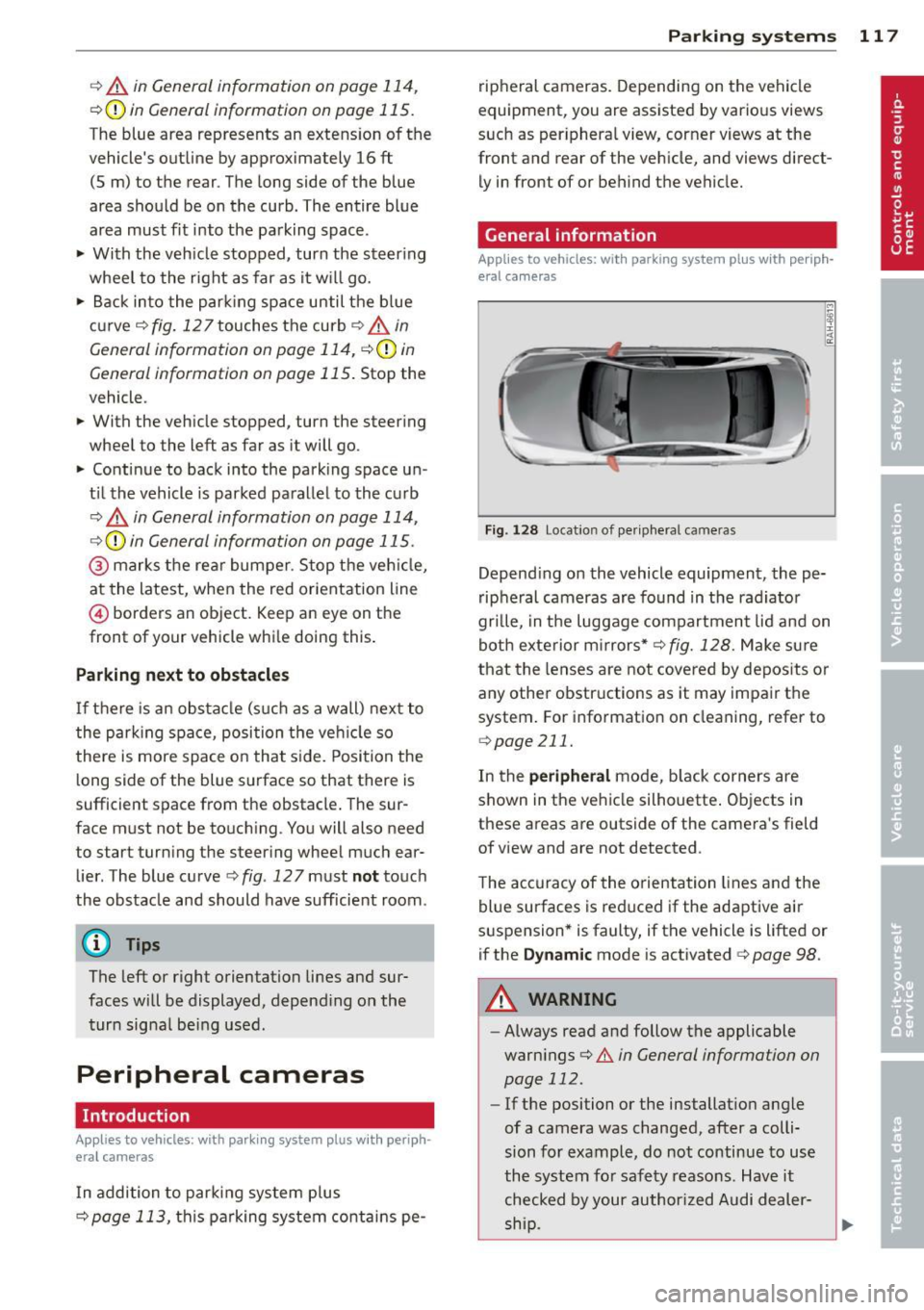
Fig. 128 Locat ion of per ipheral cameras
Depending on the vehicle equipment , the pe
ripheral cameras are found in the radiator
grille, in the luggage compartment lid and on
both exterior mirrors*
r::> fig. 128. Make sure
that the lenses are not covered by deposits or
any other obstructions as it may impair the
system. For information on cleaning, refer to
qpage 211.
In the peripheral mode, black corners are
shown in the vehicle silhouette. Objects in
these areas are outside of the camera's field
of view and are not detected .
The accuracy of the orientation lines and the
blue surfaces is reduced if the adaptive air
suspension* is faulty, if the vehicle is lifted or
if the
Dynamic mode is activated 9 page 98.
A WARNING
-Always read and follow the applicable
warnings
r::> .&. in General information on
page 112.
- If the position or the installation angle
of a camera was changed, after a colli
sion for example, do not continue to use
the system for safety reasons. Have it checked by your author ized Audi dealer-
-
ship. ~
Page 120 of 306
118 Parking systems
- Keep in mind that the image in the dis
play is distorted if the exter ior mirror
housing has been manually adjusted.
- Use the
re ar mode and the corne r view
( rear )
mode on ly when the luggage com
partment lid is fully closed . Otherwise
the image in the display will be distort
ed .
- The veh icle surroundings are shown us
ing the camera images. The vehicle im
age is shown by the system . Objects and
obstacles above the camera are not dis
played .
- Camera lenses en la rge and distort the
field of v is io n . The objects appear bo th
alte red and in accu rate on the screen.
(D Note
- Always read and follow the applicable
warnings
r:!>0 in Gen eral information on
page 112 .
-The Infota inment display shows the di
r ection in wh ic h the rear of the vehicle is
t ra veli ng based on the steering wheel
angle . T he front o f the ve hicle front
swings o ut more than the rear of the ve
hicle . Ma inta in plenty of distance so that
you r outside m irror or a corner of your
vehicle does not col lide with any obsta
cles.
(D Tips
If the 8/~/,c:;s symbol appears in the
disp lay and the respective d isplay area is
grayed out, then the power exterior mir
rors were fo lded in or the dr iver 's door/
front passenger's door/luggage compart
ment Lid was opened.
Switching on or off
Applies to vehicles: with parking system plus with periph
eral cameras
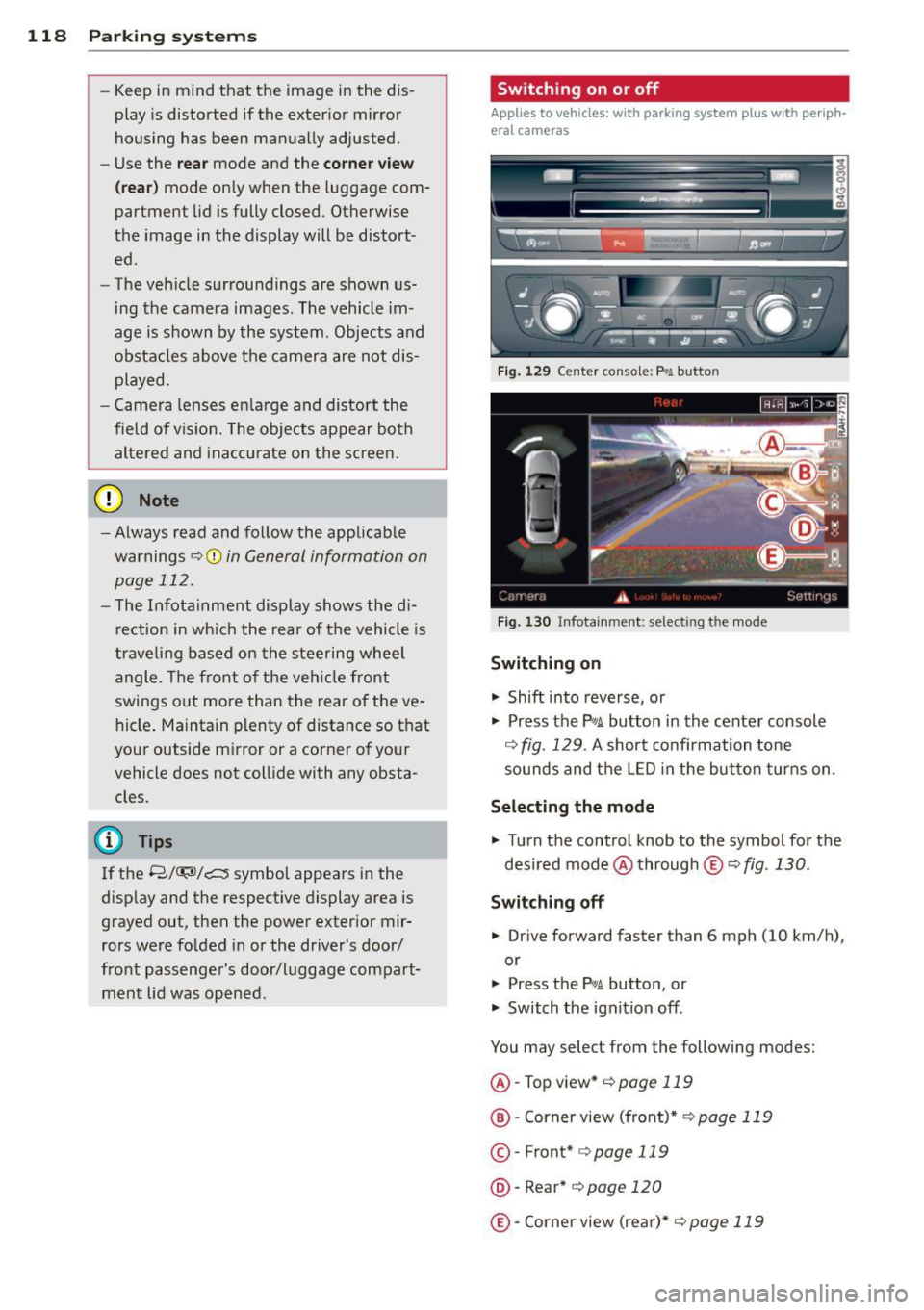
F ig. 1 29 Ce nt er co n so le: f» A butt on
Fig . 1 30 In fota inme nt: se lect in g th e mo de
Switching on
.,. Shift into reverse, or
.,. Press the
p,,;A button in the cente r consol e
r:!> fig. 129 . A short confirmation tone
sounds and the LED in the but to n tur ns on .
Selecting the mode
.,. Turn the control knob to the symbol fo r the
desi red mode @through
® r:!> fig. 130 .
Switching off
.,. Drive forward faster than 6 mph (10 km/h),
or
.,. Press the
P,,1A button, or
.,. Switch the ignit ion off .
You may select from the following modes:
@ -Top view*
c>page 119
@ -Corner view (front)* r:!> page 119
©-Front* r:!>page 119
@ -Rear* r:!> pag e 120
@ -Corner view (re ar)* r:!> page 119
Page 122 of 306
120 Park in g s ystems
the vehicle at the latest when the red orien
tation line* borders an object
c::> A in Gener
al information on page 117.
Rear
Applies to vehicles: with park ing system plus and rear
mode
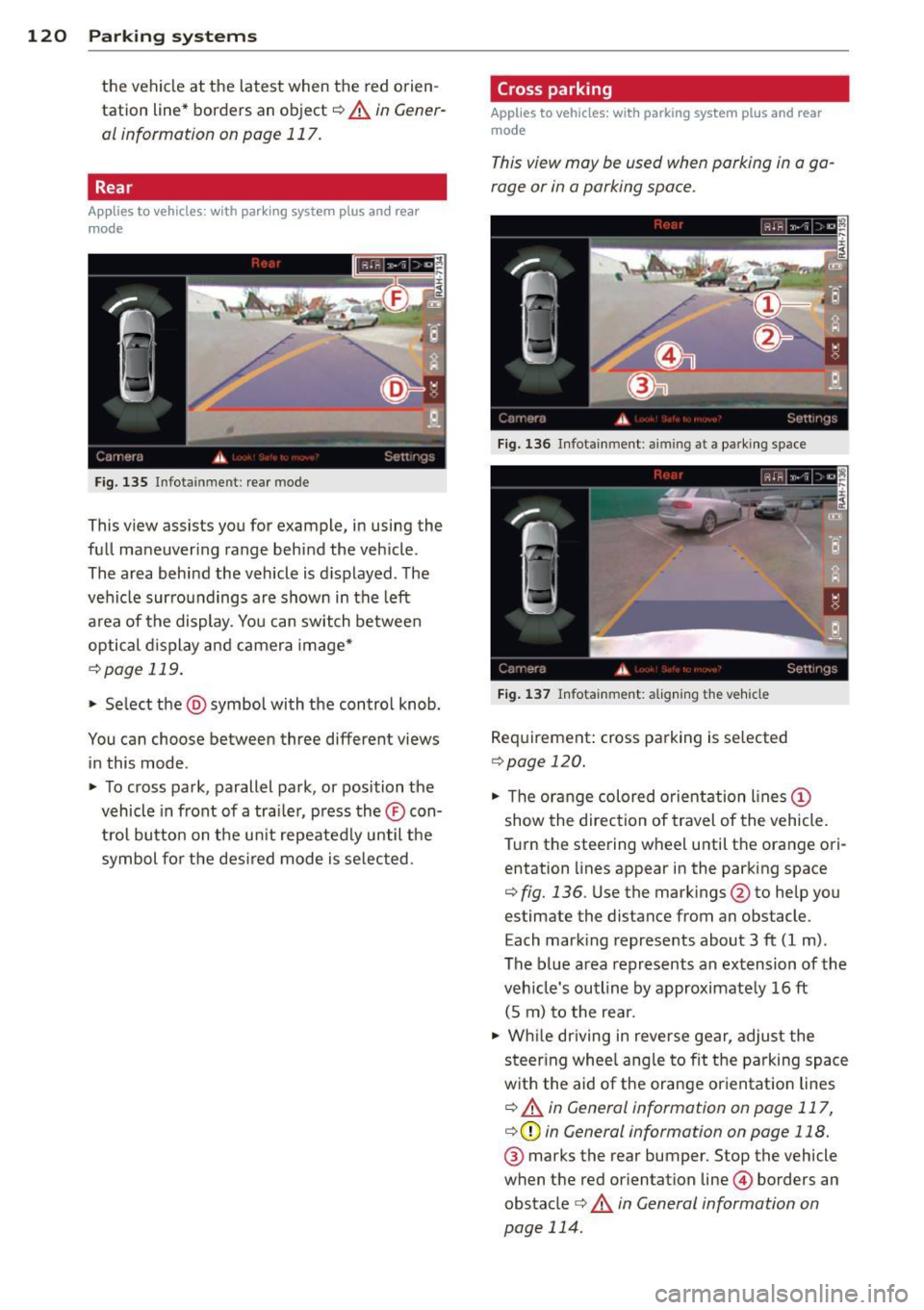
Fig. 135 Infot ainmen t: rea r m ode
This view assists you for example, in using the
full maneuvering range behind the veh icle .
The area behind the vehicle is d isplayed . The
vehicle surroundings are shown in the left
a rea of the display. You can switch betwee n
optical d isplay and camera image*
c::> page 119.
• Se lect the @symbol with the control knob .
You can choose between three different views in this mode .
• To cross park, parallel park, or position the
vehicle in front of a tra iler, press the ® con
t ro l bu tton on the un it repeatedly until the
symbol fo r the des ired mode is se lected .
Cross parking
Applies to vehicles: wit h parking system pl us and rear
mo de
This vi ew may be used when parking in a ga
rage or in a parking space.
Fig . 1 36 Infota inment : aimin g at a pa rk in g space
F ig . 1 37 Infota inment : aligning the ve hicle
Req uirement: cross parking is se lected
c::> page 120.
• The orange colored orientation lines (D
show the direction of travel of the vehicle.
T urn the steering wheel until the orange ori
entation lines appear in the parking space
c::> fig. 136 . Use the mark ings @to he lp you
estimate the distance from an obstacle.
E ach mark ing represents about 3 ft (1 m) .
The b lue area represents an extension of the
veh icle's outline by approximate ly 16 ft
(5 m) to the rear.
• Wh ile dr iving in reverse gear, adjust the
steer ing whee l ang le to fit t he parking space
w ith the aid of the orange or ientat ion lines
c::> A in General information on page 117,
c::> (D in General information on page 118.
® marks the rear bumper. Stop the vehicle
when the red orientation line© borders an
obstacle
c::> &. in General information on
page 114 .
Page 123 of 306
Parallel parking
Applies to vehicles: with parking system plus and rear
mode
This view may be used when parallel parking
along the side of a street.
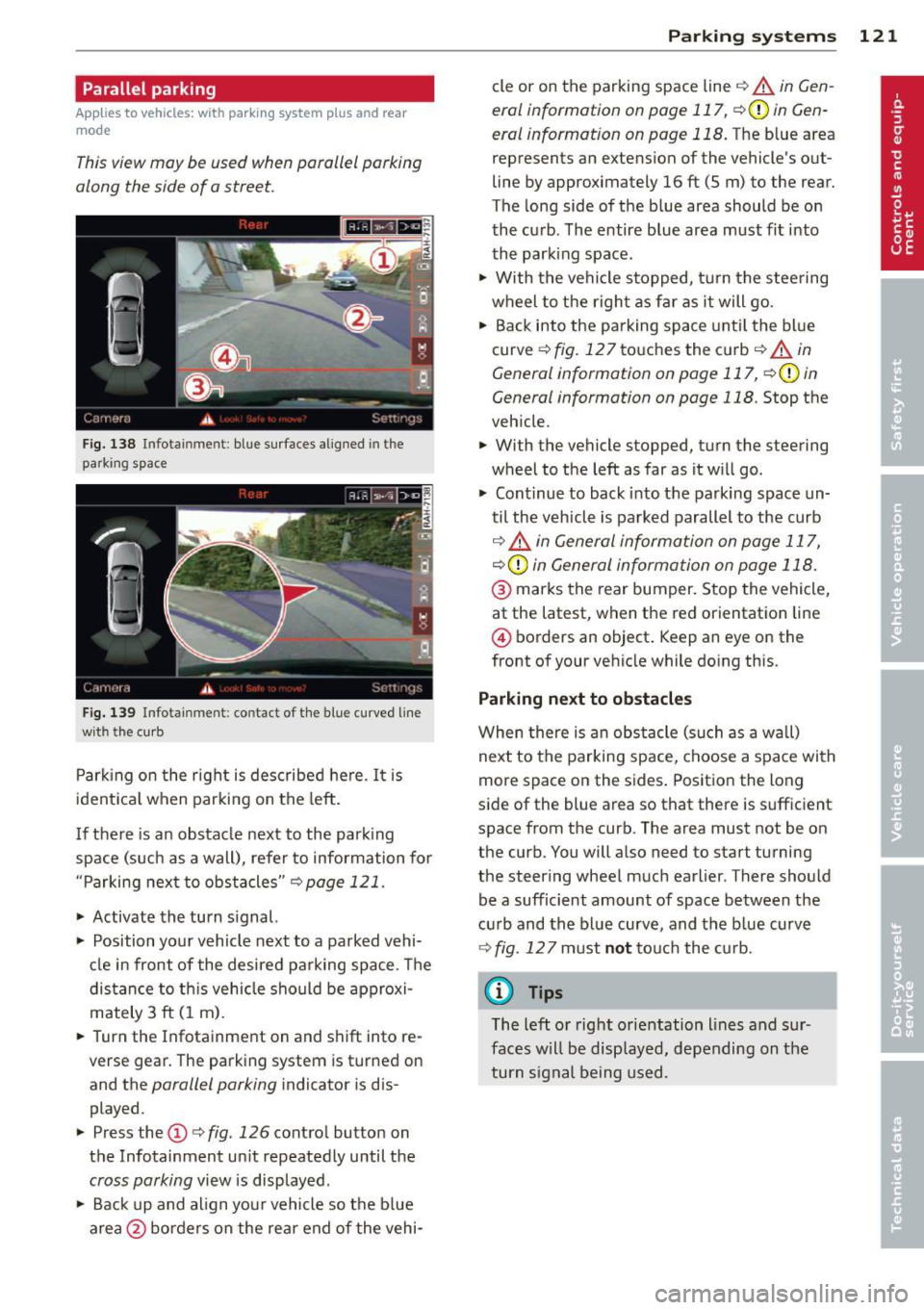
F ig. 138 Infot ainme nt: bl ue su rfaces aligned in th e
park ing space
Fig . 139 Infota inmen t: co ntact of the blue curved line
with t he curb
Parking on the right is described he re. It is
ident ical when parki ng on the left .
I f there is an obstacle next to the park ing
space (such as a wall), refer to information for
"Parking nex t to obstacles" ¢
page 121.
~ Activate the turn s ignal.
~ Position your vehicle next to a parked vehi
cle in front of the desired parking space . T he
distance to th is vehicle sho uld be approxi
mately 3 ft (1 m).
~ Turn the Infotainment on and shift into re
verse gear. The parking system is turned on
and the
parallel parking i ndicator is dis
played .
~ Press the@¢ fig. 126 contro l button on
the Infotainment un it repeatedly until the
cross parking view is displayed .
~ Back up and align your vehicle so the b lue
area @ borders on the rear end of the vehi-
Parking systems 121
cle or on the parking space line¢ A in Gen
eral information on page 117 , ¢ (Din Gen
eral information on page 118.
The b lue area
represent s an extens ion of the vehicle 's out
line by approximately 16 ft (5 m) to the rear.
The long side of the blue area should be on
the curb . The entire blue area must fit into
th e parking space .
~ With the vehicle s topped, tu rn the steering
wheel to t he righ t as fa r as it will go.
~ Back into the parking space until t he bl ue
curve ¢
fig. 12 7 touches the curb ¢ A in
General information on page 117, ¢(Din
General information on page 118 .
Stop the
veh icle .
~ With the vehicle stopped, turn the steering
wheel to the left as far as it w ill go.
~ Cont inue to back into the parking space un
til the vehicle is parked parallel to the curb
¢ ..&. in General information on page 117,
¢ (Din General information on page 118.
@ marks the rear bumper. Stop the vehicle,
at the latest, when the red or ientation line
@ borders an object . Keep an eye on the
front of your vehicle while do ing this .
Parking next to obstacles
When there is an obstacle (such as a w all)
next to the parking space, choose a space with
more space on the sides . Positio n the long
side of the blue area so that there is suff icient
space from the curb. The area must not be on
the curb. You will a lso need to start turning
the steering wheel much earlier . T here should
be a sufficient amount of space between the
c ur b and the bl ue curve, and t he b lue curve
¢
fig . 127 must n ot touc h the curb.
@ Tips
The left o r right orientation lines and su r
faces w ill be disp layed, depending on the
turn s ignal being used .
Page 129 of 306
.. Make sure to use the right child restraint
correct ly to protect children
Q page 171,
Child Safety.
.. Sit properly in your seat and make sure that
your passengers do the same¢
page SO,
General recommendations .
.. Faste n your safety belt and wear it properly.
Also instruct your passengers to fasten their
safety belts properly ¢
page 136.
What impairs driving safety?
Safe driving is directly related to the condi
tion of the vehicle, the driver as well as the
driver 's ability to concentrate on the road
without being distracted.
The driver is respons ible for the safety of the
veh icle and all of its occupants.
If your ability
to drive is impai red, safety r isks for everybody
in the vehicle increase and you also become a
hazard to everyone else on the road ¢ _&. .
Therefore:
.. Do not let yourself be dist racted by passen
gers or by using a cellular telephone.
.. NEVER drive when your driving ability is im
paired (by medications, alcohol, drugs, etc.).
.. Observe all traffic laws, rules of the road
and speed limits and plain common sense .
.. ALWAYS adjust your speed to road, traffic
and weather conditions .
.,. Take frequent breaks on long trips . Do not
drive for more than two hours at a stretch.
.. Do NOT drive when you are tired, under
pressure or when you are stressed.
A WARNING
Impaired driving safety increases the risk
of serious personal injury and death when
ever a vehicle is being used.
Driving Safely 12 7
Proper occupant
seating positions
Proper seating position for the driver
The proper driver seating position is impor
tant for safe, relaxed driving .
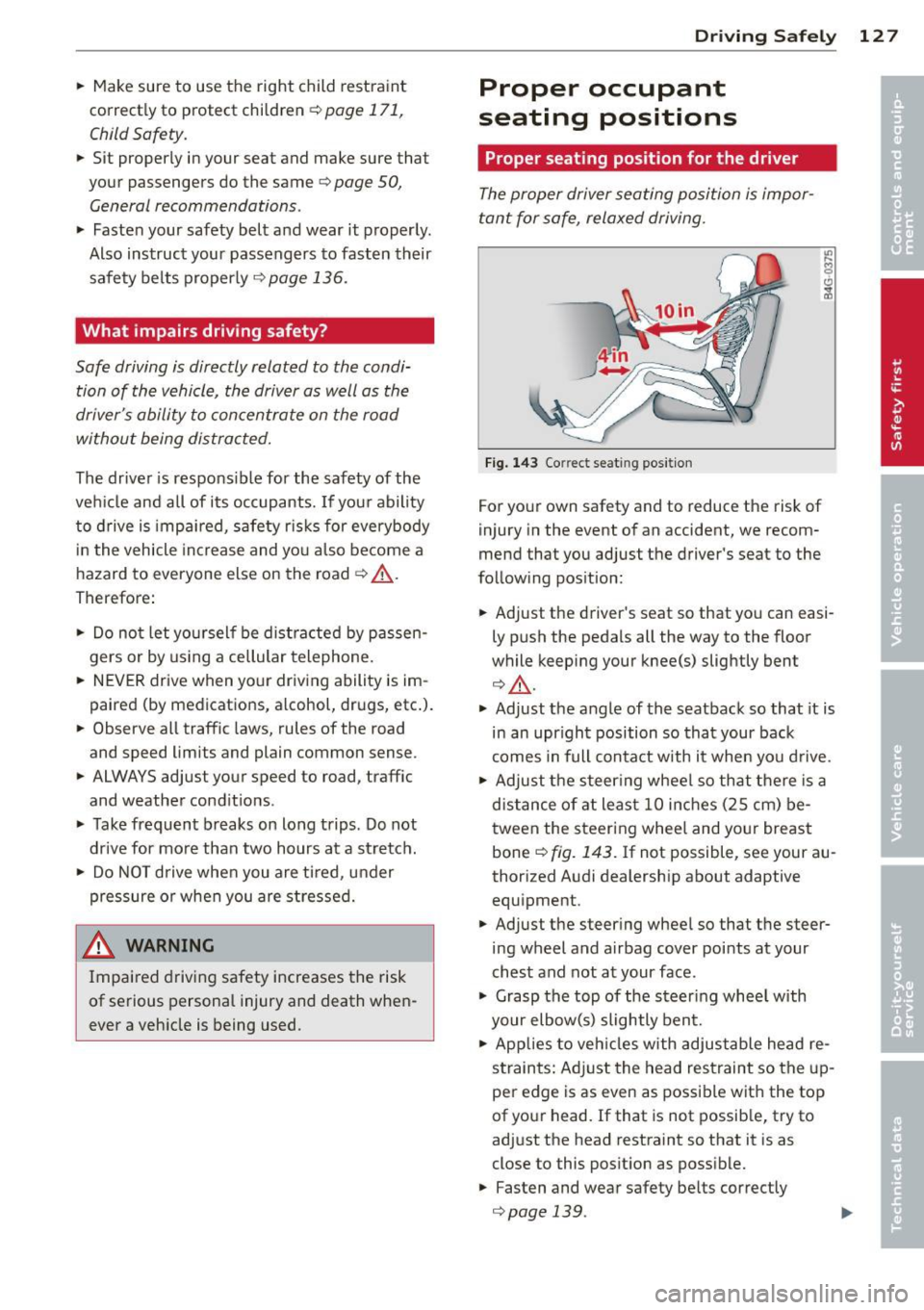
Fig. 143 Correct seat ing pos it ion
For your own safety and to reduce the risk of
injury in the event of an accident, we recom
mend that you adjust the driver's seat to the
follow ing pos ition:
.. Adjust the driver's seat so that you can easi
ly push the pedals all the way to the floor
wh ile keeping your knee(s) slightly bent
¢ _&. .
.. Adjust the angle of the seatback so that it is
in an upr ight position so that your back
comes in full contact w ith it when you drive.
.. Adjust the steering wheel so that there is a
distance of at least 10 inches (25 cm) be
tween the steering wheel and yo ur breast
bone
Q fig. 143. If not possible, see your au
thorized Audi dealership about adaptive
equipment .
.. Adjust the steer ing wheel so that the steer
ing wheel and airbag cover points at your
chest and not at your face.
.,. Grasp the top of the steering whee l with
your elbow(s) slightly bent.
.. Applies to vehicles with adjustable head re
straints: Ad just the head restraint so the up
per edge is as even as possible with the top
of your head. If that is not possible, try to
adjust the head restraint so that it is as
close to this posit ion as possible .
.. Fasten and wear safety be lts correctly
¢ page 139. .,.
Page 130 of 306
128 Driving Safely
• Always keep both feet in the footwell so
that you are in control of the vehicle at all
times.
For detailed information on how to adjust the
driver's seat, see
r:::> page 51.
A WARNING
Drivers who are unbelted, out of position
or too close to the airbag can be seriously
injured by an airbag as it unfolds. To help
reduce the risk of serious personal injury:
- Always adjust the driver's seat and the
steering wheel so that there are at least
10 inches (25 cm) between your breast
bone and the steering wheel.
- Always adjust the driver's seat and the
steering wheel so that there are at least
4 inches (10 cm) between the knees and
the lower part of the instrument panel.
- Always hold the steering wheel on the
outside of the steering wheel rim with
your hands at the 9 o'clock and 3 o'clock positions to help reduce the risk of per
sonal injury if the driver's airbag inflates.
- Never hold the steering wheel at the
12 o'clock position or with your hands at
other positions inside the steering wheel
rim or on the steering wheel hub. Hold
ing the steering wheel the wrong way
can cause serious injuries to the hands,
arms and head if the driver's airbag in
flates.
- Pointing the steering wheel toward your
face decreases the ability of the supple
mental driver's airbag to protect you in a
collision.
- Always sit in an upright position and nev
er lean against or place any part of your
body too close to the area where the air
bags are located.
- Before driving, always adjust the front
seats and head restraints properly and
make sure that all passengers are prop
erly restrained.
- Never adjust the seats while the vehicle
is moving. Your seat may move unexpect- edly and you could lose control of the ve
hicle .
- Never drive with the backrest reclined or
tilted far back! The farther the backrests
are tilted back, the greater the risk of in
jury due to incorrect positioning of the safety belt and improper seating posi
tion .
- Children must always ride in child seats
r:::> page 171. Special precautions apply
when installing a child seat on the front
passenger seat¢
page 145.
Proper seating position for the front
passenger
The proper front passenger seating position
is important for safe, relaxed driving .
For your own safety and to reduce the risk of
injury in the event of an accident, we recom
mend that you adjust the seat for the front
passenger to the following position :
• Adjust the angle of the seatback so that it is
in an upright position and your back comes in full contact with it whenever the vehicle is
moving.
• Adjust the head restraint so the upper edge
is as even as possible with the top of your
head. If that is not possibl e, try to adjust
the head restraint so that it is as close to
this position as possible¢
page 130.
• Keep both feet flat on the floor in front of
the front passenger seat .
• Fasten and wear safety belts correctly
r:::> page 13 9.
For detailed information on how to adjust the
front passenger's seat, see
r:::> page 50 .
A WARNING
-
Front seat passengers who are unbelted,
out of position or too close to the airbag
can be seriously injured or killed by the air
bag as it unfolds. To help reduce the risk of
serious personal injury: