wheel AUDI A6 2013 Owner's Manual
[x] Cancel search | Manufacturer: AUDI, Model Year: 2013, Model line: A6, Model: AUDI A6 2013Pages: 306, PDF Size: 76.92 MB
Page 85 of 306
Audi adapt ive crui se c ontrol an d bra kin g guard 8 3
vehicles or obstacles that are not moving
can trigger a collision warning and if con
firmed by the video camera, an acute col lis ion warn ing.
- For safety reasons, do not use adaptive
cruise control when driving on roads with
many curves, when the road surface is in
poor condit ion and/or in bad weather
(such as ice, fog, gravel, heavy rain and
hydroplan ing). Using the system under
these cond itions cou ld result in a co lli
sion .
- Switch adaptive c ruise control off tempo
rar ily when driv ing in turning lanes, on
expressway exits or in construction
zones . This prevents the vehicle from ac
celerating to the set speed when in these
situations .
- The adapt ive cru ise control system w ill
not brake by itse lf if you put your foot on
the accelerator pedal. Doing so can over ride the speed and distance regulation .
- When approaching stationary objects such as stopped traffic, adaptive cruise
control will not respond and braking
guard w ill have limited function.
- The adapt ive cruise control system and
braking guard do not react to people , an
ima ls, objects crossing the road o r on
coming objects .
- The function of the radar sensors can be
affected by reflective objects such as
guard ra ils, the entra nce to a tunnel,
heavy rain or i ce.
- Never follow a veh icle so closely that you
cannot stop your vehicle safe ly. The
adaptive cruise cont ro l c anno t slow or
brake the veh icle safely when you follow
another vehicle too closely. Always re
member that the automatic braking
funct ion cannot bring the veh icle to a
sudden or emergency stop under these
conditions .
- To prevent unintended operation, always
switch ACC off when it is not being used. (D Note
The sensors can be displaced by impacts or
damage to the bumper, wheel housing and underbody. That cou ld affect the adaptive
cruise control system and brak ing guard .
Have your authorized Aud i dea ler or a u
thorized Audi Serv ice Facility check their
funct ion.
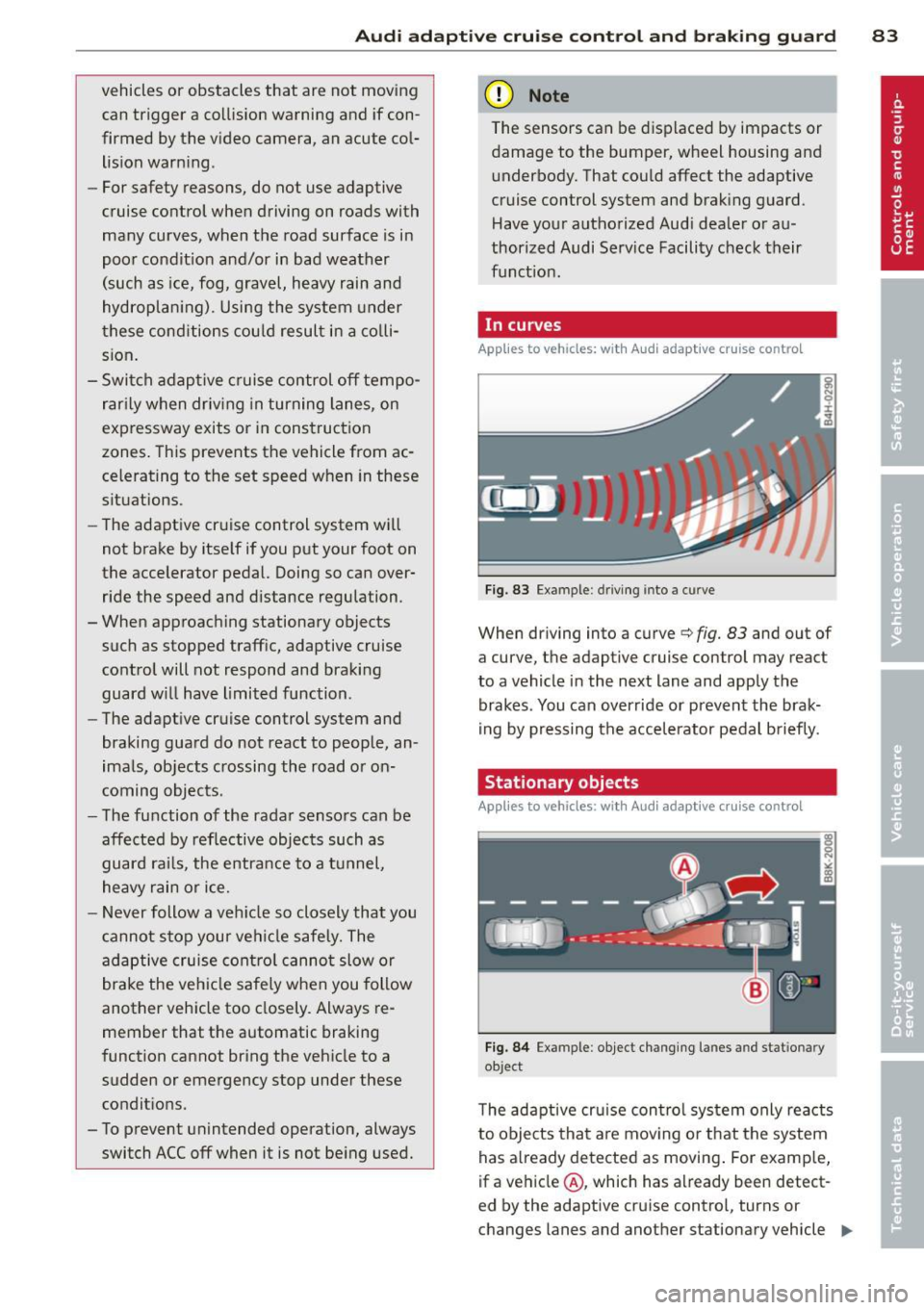
In curves
Applies to vehicles: with Audi adaptive cruise control
I
F ig. 83 Ex ampl e: dri vin g in to a curve
When dr iving into a curve c:> fig. 83 and out of
a cu rve, the ad aptive cruise con trol m ay react
to a vehicle in the next lane and apply the
brakes . You can override or prevent the brak
i ng by pressing the accelerator pedal b riefly.
Stationary objects
Applies to vehicles: with Audi adaptive cruise control
Fig. 8 4 Exampl e: object chang ing l anes and s ta tio nar y
objec t
The adaptive cru ise con tro l system only reacts
to objects that a re mov ing o r th at the system
has a lready detected as moving . For examp le,
if a vehicle @, which has a lready been detect-
ed by the adaptive c ruise contro l, tu rns o r
changes lane s and another stationary vehicle .,._
Page 87 of 306
Audi adaptive cruise control and braking guard 85
the tachometer @and is also shown briefly
in the display @¢
fig. 87 .
.. You must also press the brake peda l when
the vehicle is stopped.
Switching adaptive cruise control off
.. Push the lever away from you into position
@ until it clicks into place. The message
ACC off appears.
@ Indicator lights
r• 1 -Adaptive cruise control is switched on. No
vehicles are detected up ahead . The stored
speed is ma intained.
I -A moving vehicle is detected up ahead .
The adaptive cruise control system regulates
the speed and distance to the moving vehicle
ahead and acce lerates/brakes automatical ly.
fa) -Adaptive cruise control is switched on. A
moving vehicle up ahead was detected. Your
ve hicl e remains stopped.
I -When automat ic braking is not able to
keep enough distance to a previously detected
moving vehicle up ahead, you must take con
trol and brake¢
page 87, Prompt for driver
intervention.
© Display
If adaptive cruise control is not shown in the
d isp lay, you can call it up with the multifunc
tion steering wheel buttons ¢
page 23.
Based on the symbols in the d isplay, you can
determine if the system is maintaining a dis
tance to the vehicle ahead and what that d is
tance is.
No vehicle -No veh icle ahead was detected .
White vehicle -A vehicle ahead was detected.
Red vehicle -Prompt for the driver to take ac
tion
¢ page 87.
Both arrow s on the scale© indicate the dis
tance to the vehicle ahead. No arrow appears
when the vehicle is on an open road and there
is no object ahead . If an object is detected
ahead , the arrow moves on the scale . The
green zone on the scale shows the stored
distance. For information on changing the
stored distance, refer to ¢
page 86. If the
distance selected is too close or may soon be
come too close, the arrows move into the red
zone on the sca le .
A WARNING
Improper use of the adaptive cruise con
trol can cause collisions, other accidents
and serious personal injur ies .
- Pressing the
!SET ! button when driv ing at
speeds below
20 mph (30 km/h), will au
tomatically accelerate the vehicle to
20
mph (30 km/h), which is the minimum
speed that can be set.
(D Tips
-If you switch the ignit ion or the adaptive
cruise control off, the set speed is erased
from the system memory.
- You cannot switch the Electronic Stabili
zation Control (ESC) to the SPORT mode
when adaptive cruise control is switched
on.
Changing the speed
Applies to vehicles: with Aud i adapt ive crui se control
0
f
• 0
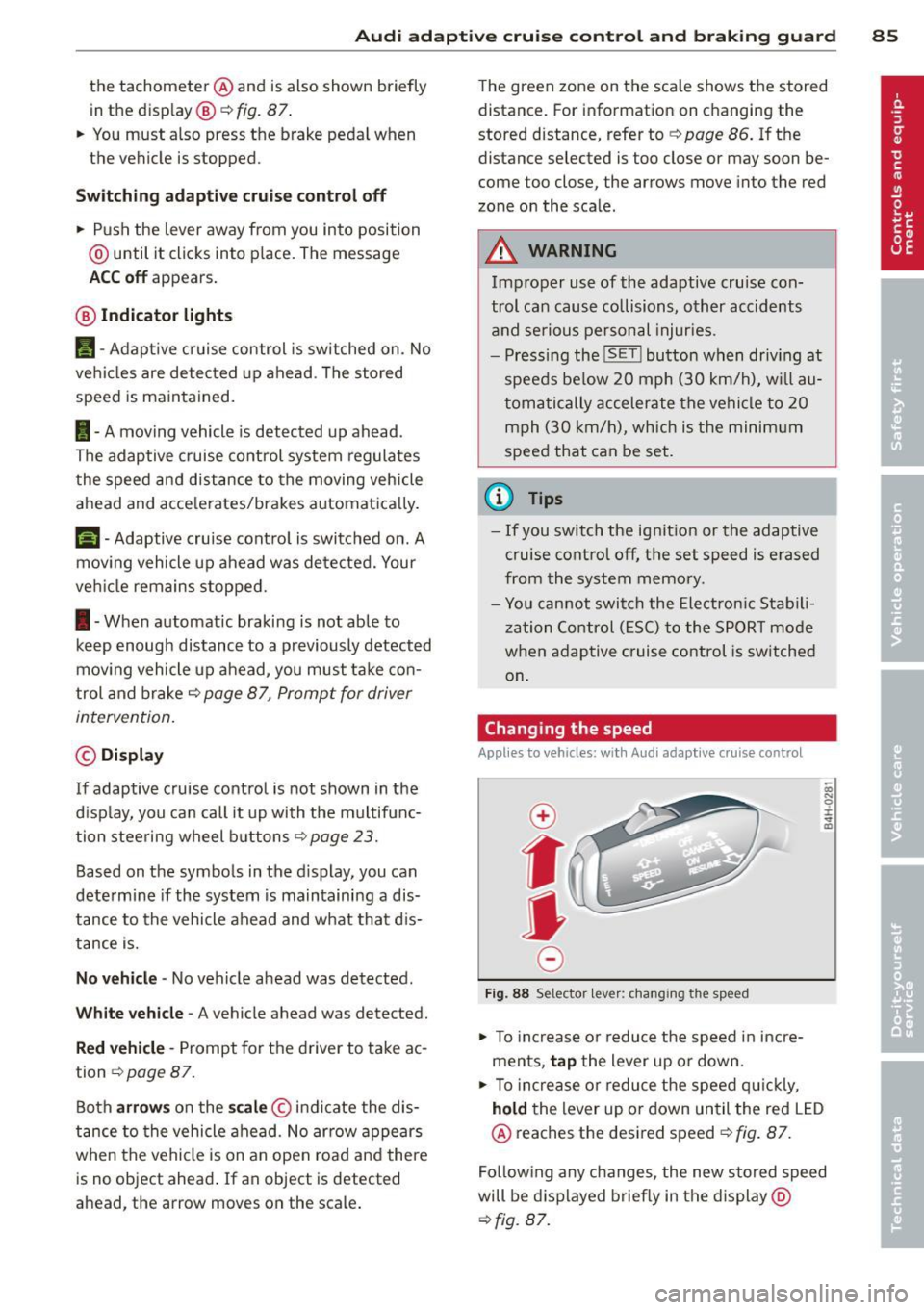
Fig. 88 Selector lever: changing the speed
.. To increase o r reduce the speed in incre
ments,
tap the lever up or down.
-0:, N 0 ± ... a)
.. To incr ease o r reduce the speed quickly,
hold the lever up or down until the red LED
@ reaches the desired speed¢
fig. 87.
Following any changes, the new stored speed
will be displayed briefly in the display @
¢fig. 87.
Page 93 of 306
Audi active Lane assist
Active Lane assist
Description
Applies to vehicles: with active lane assist
Active lane assist helps you keep your vehicle
in your lane.
Active lane assist detects lane marker lines
within the limits of the system using a camera in the windshield . If you are approaching a de
tected lane marker line and it appears likely
that you w ill leave the lane, the system will
warn you by means of corrective steer ing . T he
driver can over ride the cor re ct ive steer ing at
any time. If the veh icle crosses a line, the d riv
er is also warned by a light
vibration in the
steering whee l. The vibration warning must
be switched on in the MMI for this to happen.
Active lane ass ist is operable when the line
marking the lane is detected on at least one
side of the vehicle .
If the system is in active standby mode and
the turn signa l is activated before driving over
the lane marker line, the warning does not oc
cur since the system allows for intentional lane changes .
The system is designed for driv ing on free
ways and expanded highways and thus works
only at speeds of 40 mph (65 km/h) or more .
If the vehicle is also equipped with Audi adap
tive cruise control*, the corrective steering
will be more specif ic in regard to the driving
situation . In addition to the lane marker lines,
the system can a lso take into acco unt other
objects such as guard rails. If they are detect
ed in close proximity to the veh icle, Audi a c
tive lane ass ist helps prevent the vehicle from
driving too close to them . There is also pass
ing assistance. The system does not provide
any corrective steering if it detects that you
are passing another vehicle.
A WARNING
- The system warns the driver that the ve
hicle is leaving the lane us ing corrective
Audi acti ve lane a ssis t 9 1
steering. The driver is always responsible
for keeping the vehicle within the lane.
- The system can assist the driver in keep
ing the vehicle in the lane, but it does
not steer by itself. A lways keep your
hands on the steering wheel.
- Corrective steering may not occur in cer tain situat ions, such as dur ing heavy
brak ing.
- The camera does not recognize all lane
marker lines. Corrective steer ing can only
take p lace on the side of the vehicle
where lane marker lines are detected .
- Other road structures or objects cou ld
possibly be identified un intent ionally as
lane ma rker lines. As a result, cor rect ive
steer ing may be unexpected or may not
oc cur .
- The camera view can be restricted, for
examp le by vehicles driving ahead o r by
ra in, snow, heavy spray or light s hining
into the camera. This can result in a ctive
lane assist not detecting the lane marke r
lines or detect ing them inco rrectly .
- Unde r ce rtain condi tions such as ruts in
the road, a banked roadway or cross
winds, the corrective stee ring alone may
not be enough to keep the vehicle in the
lane.
- For safety reasons, active lane ass ist
must not be used when there are poor
road and/or weather condit ions such as
slippery roads, fog, gravel, heavy rain,
snow and the potent ial for hydroplaning .
Using act ive lane assist under thes e con
ditions may increase the risk of a crash.
Page 94 of 306
92 Audi active lane assist
Activating and deactivating
Appl ies to vehicles: with active lan e assis t
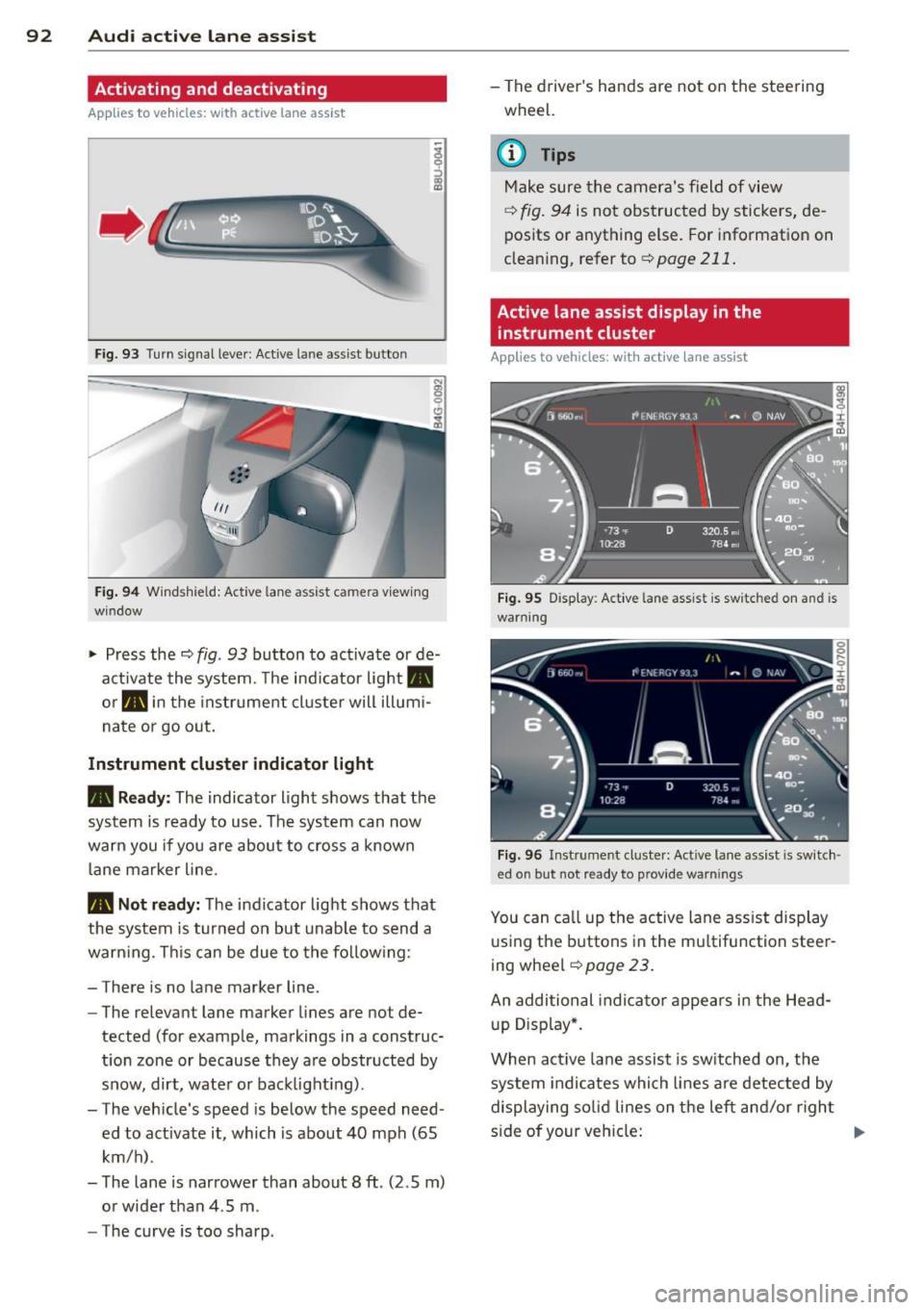
Fig. 93 Turn signal leve r: Active lane ass ist butto n
Fig. 94 Windshie ld: Active lane assist ca mera viewing
win dow
-
I
~ Press the c::> fig. 93 button to activate or de
activate the system. The indicator light.
or . in the instrument cluster will illumi
nate or go out.
Instrument cluster indicator light
• Ready: The indicator light shows that the
system is ready to use . The system can now
warn you if you are about to cross a known
lane marker line .
• Not ready: The indicator light shows that
the system is turned on but unable to send a
warning . This can be due to the following:
- There is no lane marker line .
- The relevant lane marker lines are not de·
tected (for example, markings in a construc
tion zone or because they are obstructed by
snow, dirt, water or backlight ing).
- The vehicle 's speed is below the speed need
ed to activate it, which is about 40 mph (65
km/h) .
- The lane is narrower than about 8 ft . (2 .5 m)
or wider than 4 .5 m .
- The curve is too sharp. - The driver's hands are not on the steering
wheel.
(D Tips
Make sure the camera's field of view
c::> fig. 94 is not obstructed by stickers, de
posits or anything else. For information on
cleaning, refer to
c::> page 211.
Active lane assist display in the
instrument cluster
Applies to vehicles: wit h active lane assist
Fig. 95 D isplay : Active lane assist is switc hed on a nd is
warning
Fig. 96 Instrument cl uster: Active lane assist is switch ·
ed o n but not r eady to p rov id e warn ings
You can call up the active lane assist display
using the buttons in the multifunction steer
ing wheel
c::> page 23.
An additional indicator appears in the Head
up Display*.
When active lane assist is switched on, the
system indicates which lines are detected by
displaying solid lines on the left and/or right
side of your vehicle: .,..
Page 95 of 306
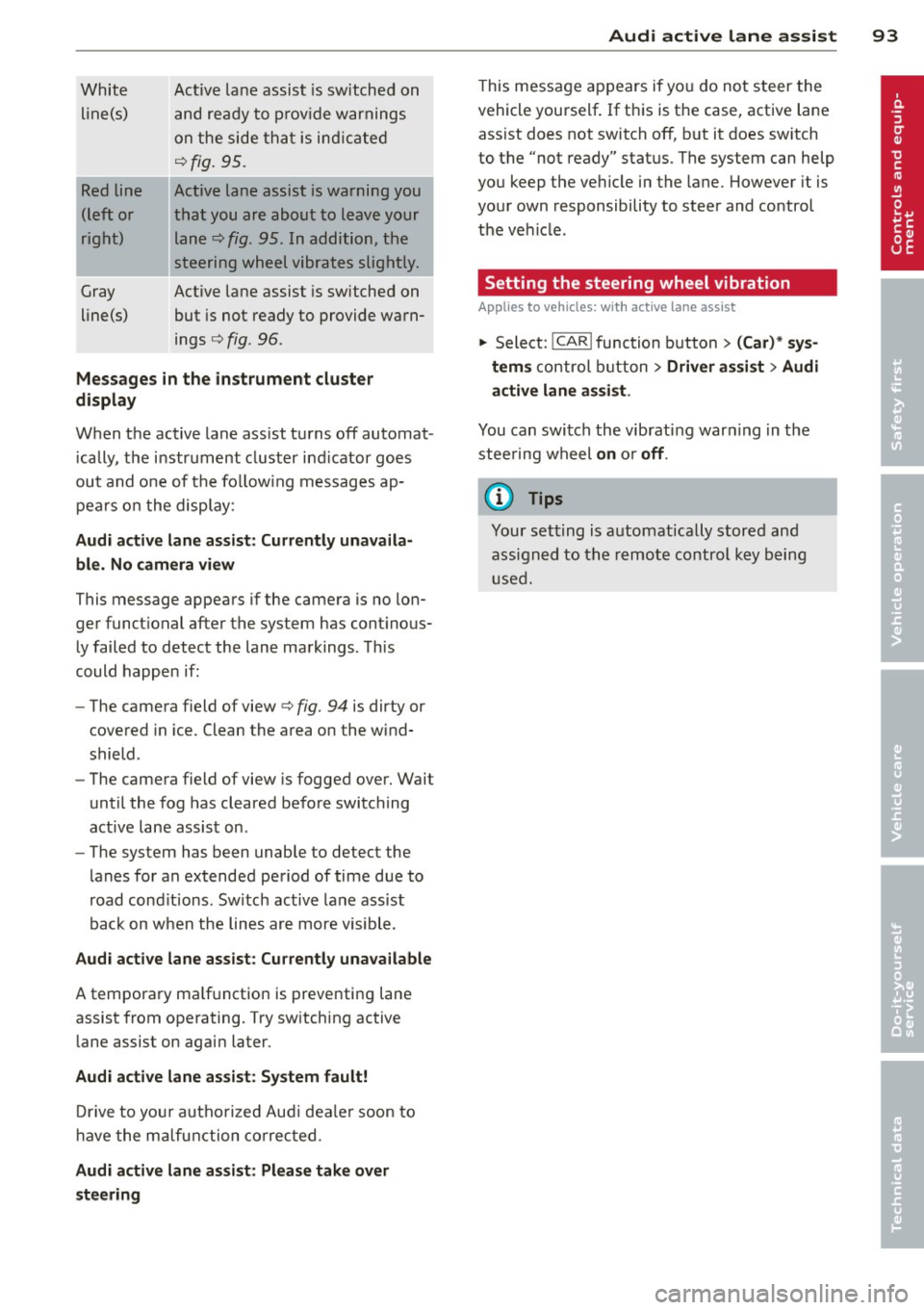
White line(s)
Red line
(left or
right)
Gray
line(s) Act
ive lane assist is switched on
and ready to p rov ide warnings
on the side that is ind icated
Q fig. 95.
Act ive lane assist is warning you
that you are about to leave your lane
Q fig. 95. In addition, the
steering wheel vibrates slightly.
Act ive l ane assist is switched on
but is not ready to provide warn
ings
Q fig . 96 .
Mes sages in the instrument clu ster
display
When the active lane ass ist turns off automat
i cally, the i nstrument cluster ind icator goes
out and o ne of the fo llow ing messages ap
pears on the display :
Audi active lane a ssist : Currently un availa
ble . No camera view
This message appears if the camera is no lon
ger funct ional after the system has cont inous
ly failed to detec t the lane markings . This
could happe n if:
- The camera field of view
Q fig. 94 is dirty or
covered in ice. Clean the area o n the wind
shield .
- The camera field of view is fogged over. Wait
until the fog has cleared before switching
active lane assis t on .
- The system has been unable to detect the
lanes for an extended period of time due to
road cond it ions . Switch active lane ass ist
back on when the lines are more visible .
Audi active lane assist: Currently un available
A temporary ma lf u nction is preventing lane
assist from operating. Try sw itching active
lane assist on again later.
Audi active lane a ssist : Sy stem fault!
D rive to you r autho rized Aud i dea le r soon to
h ave the ma lfunction co rrec ted .
Audi active lane a ssist : Pl ea se take over
s te ering
Audi acti ve lane a ssis t 93
This message appears if yo u do not s teer the
vehicle yourself . If this is the case, active lane
ass ist does not switch off, b ut it does sw itch
to the "not ready" stat us. The system can help
you keep the ve hicle in the lane. However it is
your own responsibility to steer and control
t h e ve hicle .
Setting the steering wheel vibration
Applies to vehicles: with active lane assist
11> Select: !CAR !function button> (Car) * sys
tem s
control button > Driver assi st > Audi
active lan e assi st.
You can switch the vibrat ing war ning in t he
stee ring wheel
on o r off .
(D Tips
Your setting is a utomat ically stored and
assigned to the remo te control key being
used.
Page 97 of 306
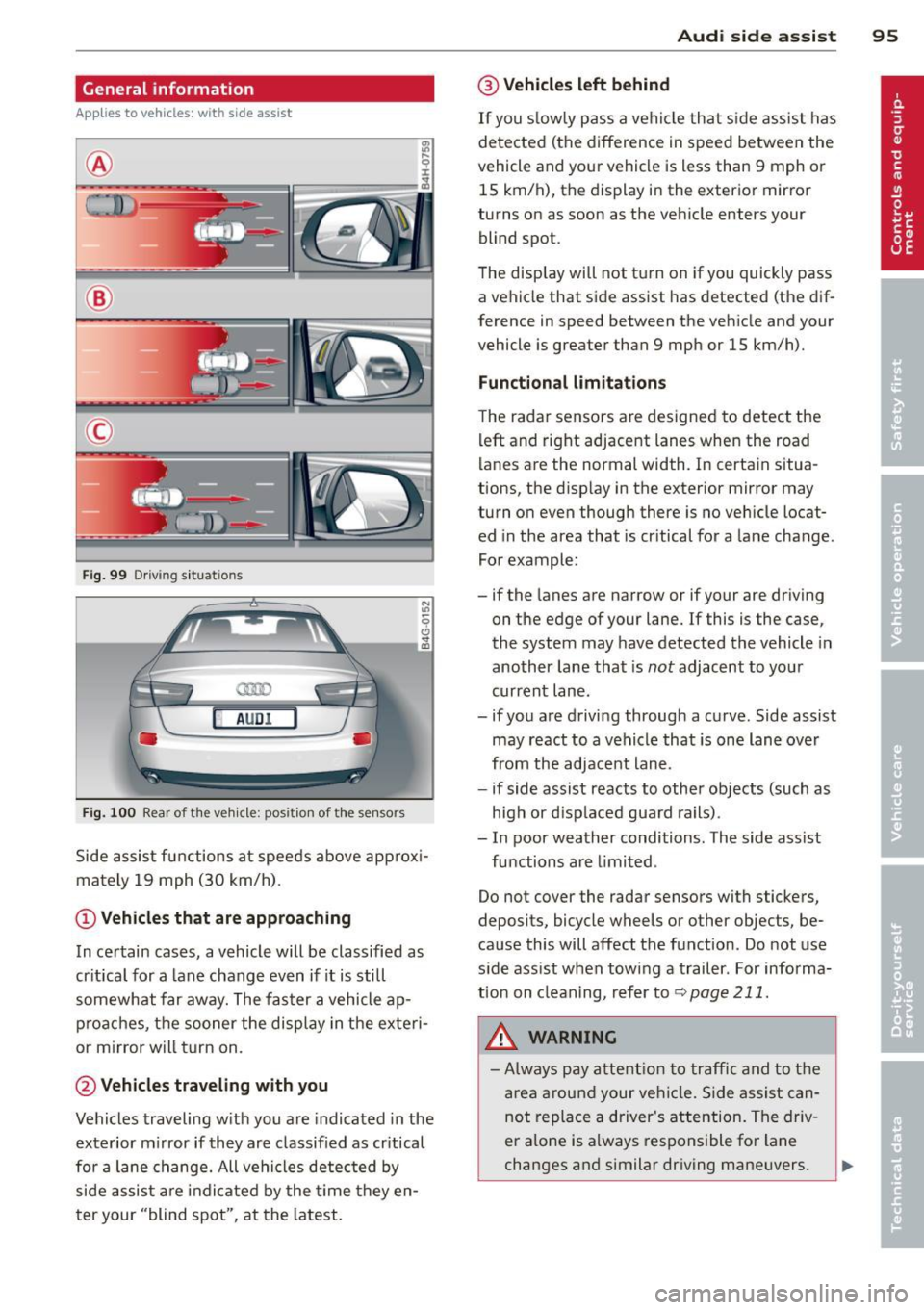
General information
Applies to vehicles: with side assist
®
©
Fig . 99 Driving situations
A UD I
Fi g. 100 Rear of t he ve hicle: positio n of t he se nsors
Side assist functions at speeds above approx i
mately 19 mph (30 km/h).
@ Vehicl es th at ar e approaching
In certain cases, a vehicle will be classified as
cr itical for a lane change even if it is still
somewhat far away. The fas ter a vehicle ap
p roaches, the sooner the display in the exteri
or m irror will t urn on.
@ Vehicles traveling with you
Vehicles traveling w ith you are indicated in the
exterior m irror if they are classified as cr itical
for a lane change. All vehicles detec ted by
side assist are indicated by the time they en
t er your "blind spot", at the latest.
Aud i side assist 95
@ Veh icles left behind
If you s low ly pass a vehi cle that s ide assist has
detected (the difference in speed between the
vehicle and you r vehicle is less than 9 mph or
15 km/h), the display in the exterio r mir ror
turns on as soon as the vehicle enters your blind spot.
T he disp lay will not t urn on if you quickly pass
a vehicle that side assist has detected (the dif
ference in speed between the veh icle and your
vehicle is greater than 9 mph or 15 km/h).
Functi onal limitations
The radar sensors are designed to detect the
left and right adjacent lanes when the road
lanes are the normal width. In certain situa
tions, the d isp lay in the exterior mirror may
turn on even though there is no veh icle locat
ed in the area that is cr itical for a lane change.
For example:
- if the lanes are narrow or if your are dr iving
on the edge of your lane.
If this is the case,
the system may have detected the vehicle in
another lane that is
not adjacent to you r
current lane .
- if you a re driving through a curve. Side assist
may react to a vehicle that is one lan e ove r
from the adjacent lane.
- if side assist reacts to other objects (such as
high or d isp laced guard rails) .
- In poor weather conditions. The side assist
functions are l imited .
Do not cover the radar sensors with stickers,
deposits, bicycle wheels or other objects, be
cause this will affect the function . Do not use
s ide ass ist when towing a trailer . For informa
tion on clean ing, refer to
q page 211.
_&. WARNING
-Always pay a ttent ion to traffic and to t he
ar ea a round your ve hicl e. S ide assist can
not repla ce a driver's attention. The driv
er a lone is always responsible fo r lane
changes and similar driving mane uvers.
Page 98 of 306
96 Audi side assist
-Improper reliance on the side assist sys
tem can cause collisions and serious
personal injury:
- Never rely only on side assist when
changing lanes.
- Always check rear view mirrors to make
sure that it is safe to change lanes.
- Side assist cannot detect all vehicles un
der all conditions- danger of accident!
- Please note that side assist indicates
there are approaching vehicles, or
vehicles in your blind spot, only after
your vehicle has reached a driving speed
of at least 19 mph (30 km/h).
- In certain situations, the system may not
function or its function may be limited.
For example:
- if vehicles are approaching or being left
behind very quickly . The display may
not turn on in time.
- in poor weather conditions such as
heavy rain, snow or heavy mist .
- on very wide lanes, in tight curves or if
there is a rise in the road surface.
Vehicles in the adjacent lane may not be detected because they are outside
of the sensor range.
(D Note
The sensors can be displaced by impacts or damage to the bumper, wheel housing and
underbody. This can affect the system.
Have your authorized Audi dealer or au
thorized Audi Service Facility check their
function.
@ Tips
- If the window glass in the driver's door
or front passenger's door has been tint ed, the display in the exterior mirror may
be misinterpreted.
- For Declaration of Compliance to United
States FCC and Industry Canada regula
tions¢
page 288.
Activating and deactivating
Applies to vehicles: rnit s ide ass ist
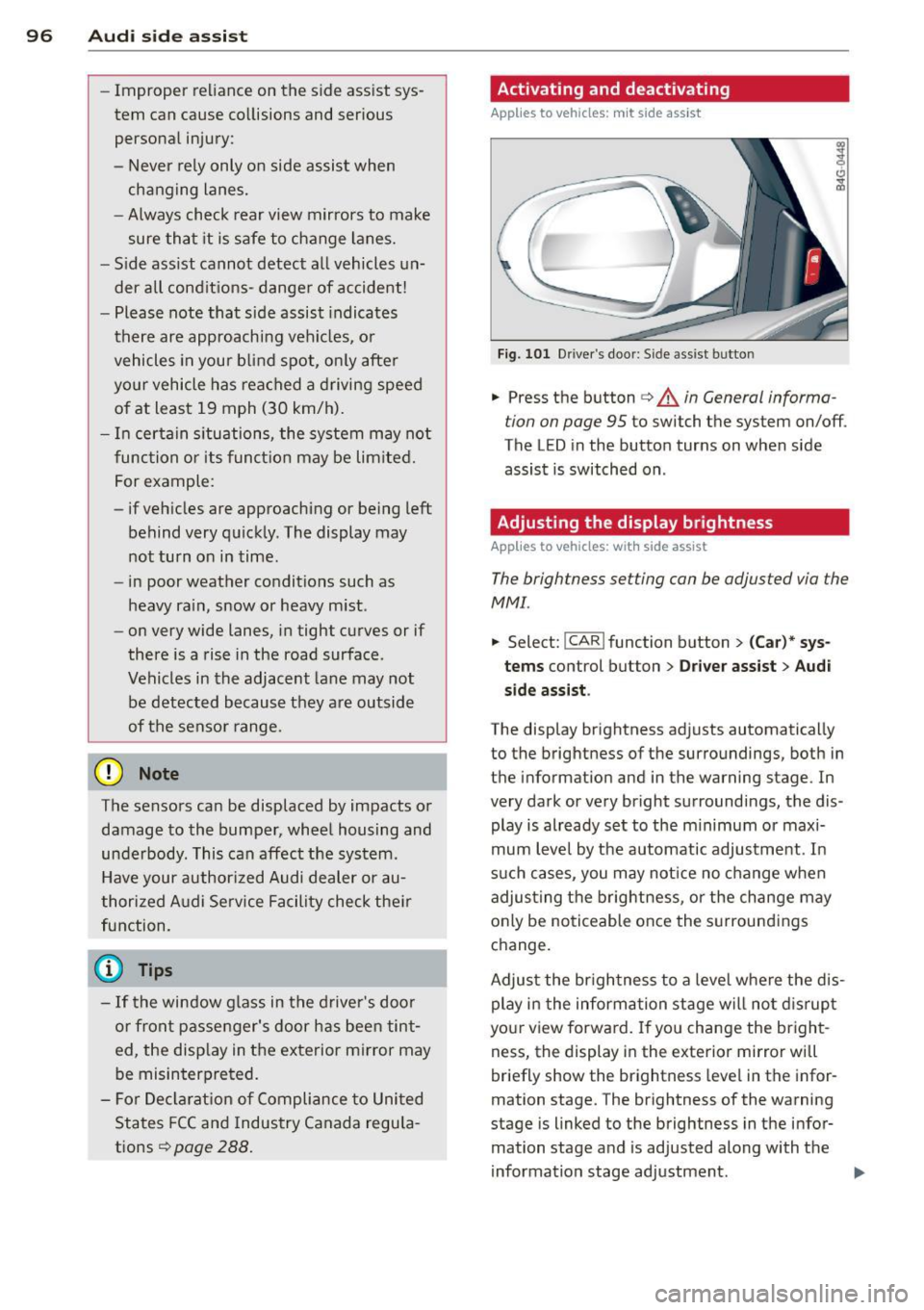
Fig. 101 Driver's doo r: Side ass ist butto n
.. Press the button c> & in General informa
tion on page 95
to switch the system on/off .
The LED in the button turns on when side
assist is switched on .
Adjusting the display brightness
Applies to vehicles: wit h side assist
The brightness setting con be adjusted via the
MMI.
.. Select: !CAR ! function button> (Car)* sys
tems control button > Driver assist
> Audi
side assist .
The display brightness adjusts automatically
to the brightness of the surroundings, both in
the information and in the warning stage. In
very dark or very bright surroundings, the dis
play is already set to the minimum or maxi
mum level by the automatic adjustment. In
such cases, you may notice no change when
adjusting the brightness, or the change may
only be noticeable once the surroundings
change.
Adjust the brightness to a level where the dis
play in the information stage will not disrupt
your view forward. If you change the bright
ness, the display in the exterior mirror will
briefly show the brightness level in the infor
mation stage. The brightness of the warning
stage is linked to the brightness in the infor mation stage and is adjusted along with the
information stage adjustment .
Page 99 of 306
@ Tips
-Side assist is not active while you are
making the adjustment.
- Your settings are automatically stored
and assigned to the remote control key
being used.
Driver messages
Applies to vehicles: with side assist
If side assist switches off by itself, the LED in
the button turns off and a message will ap
pear in the instrument cluster display:
Audi side assist: Currently unavailable. No
sensor vision
The radar sensors' vision is affected. Do not
cover the area in front of the sensors with bike
wheels, stickers, dirt or other objects. Clean
the area in front of the sensors, if necessary
c>fig. 100.
Audi side assist: Currently unavailable
Side assist cannot be switched on temporarily
because there is a malfunction (for example,
the battery charge level may be too low).
Audi side assist: System fault!
The system cannot guarantee that it will de
tect vehicles correctly and it is switched off .
The sensors have been displaced or are faulty.
Have the system checked by an authorized
Audi dealer or authorized Audi Service Facility
soon.
Audi side assist: Unavailable when towing.
Side assist switches off automatically when a
factory-installed trailer hitch is connected to
the electrical connector on the trailer. There is
no guarantee the system will switch off when
using a retrofitted trailer hitch. Do not use
side assist when towing a trailer.
Audi side assist 97
Page 103 of 306
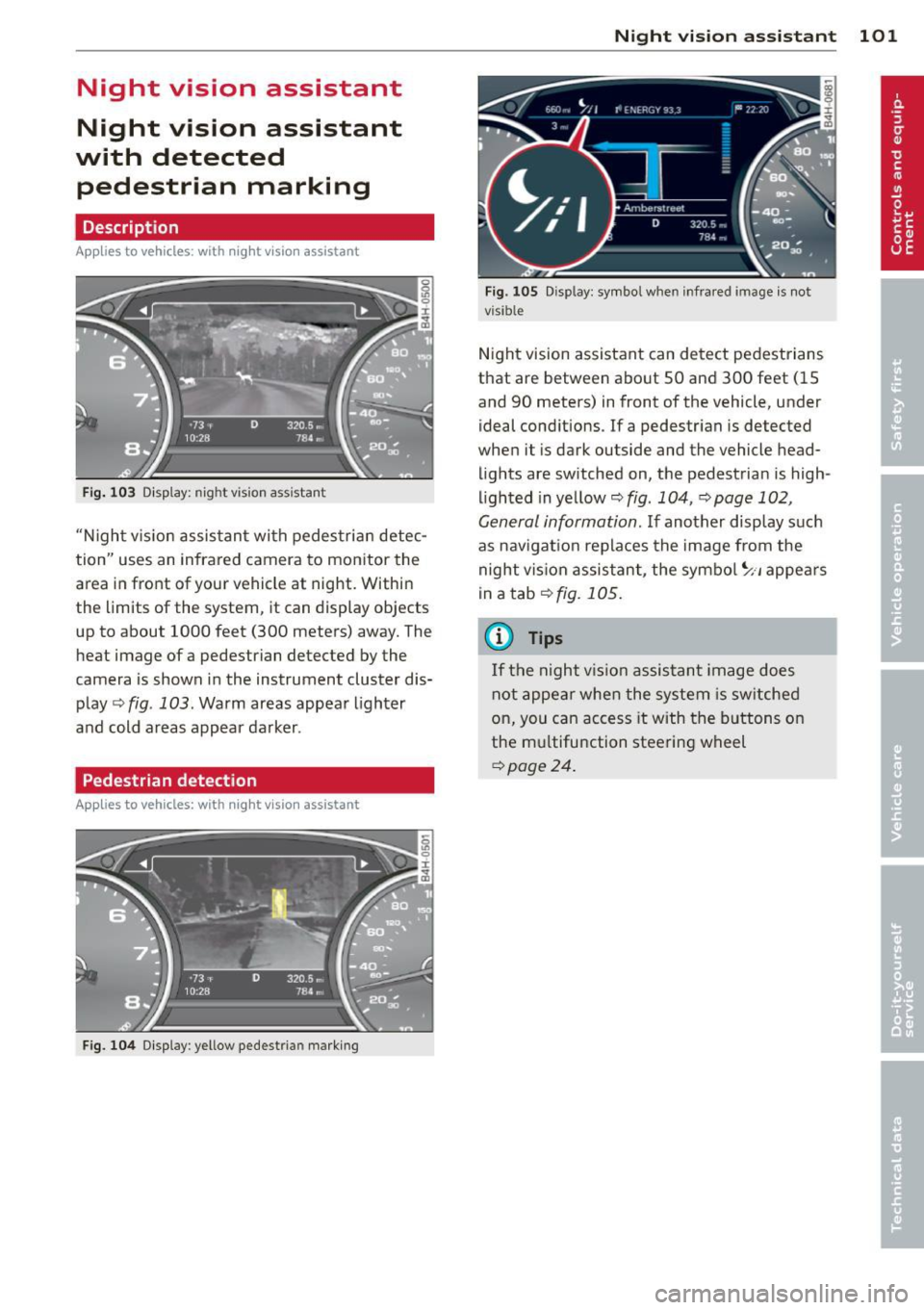
Night vision assistant
Night vision assistant
with detected pedestrian marking
Description
App lies to vehicles: with night v isio n assistant
Fig . 103 Disp lay: nig ht v is ion assistant
"N ight v is ion assistant with pedestrian detec
tion" uses an infrared camera to monitor the
area in front of your vehicle at night. Within
the limits of the system , it can display objects
up to about 1000 feet (300 meters) away. The
heat image of a pedestrian detected by the
camera is shown in the instrument cluster dis
play
Q fig . 103 . Warm areas appear lighter
and cold areas appear darker .
Pedestrian detection
Applies to vehicles: with n ig ht v ision ass istant
Fig. 104 Display : yellow pedestrian marking
Night vision assistant 101
Fig. 105 D isp lay: symbo l w hen infrare d image is not
visi ble
Night vision assistant can detect pedestrians
that are between about 50 and 300 feet (15
and 90 meters) in front of the vehicle, under
ideal conditions .
If a pedestrian is detected
when it is dark outside and the vehicle head
lights are switched on, the pedestrian is high
lighted in yellow
Qf/g . 104, Qpage 102,
General information.
If another display such
as navigation replaces the image from the
night vision assistant, the symbo l~,, appears
in a tab
Q fig. 105.
(D Tips
If the night vision assistant image does
not appear when the system is sw itched
on, you can access it with the buttons on
the multifunction steering wheel
Q page24 .
Page 110 of 306
108 Automatic Transmission
This prevents too much stress from being placed on the locking mechanism.
multitronic transmission : Your vehicle is
equipped with
hill hold assist allowing you to
start while on an incline. The system is acti
vated when the brake pedal is pressed down
and held
for a few seconds. T he brake pres
sure will hold for
o moment after the brake
pedal loosens to prevent the vehicle from roll
ing backwards while starting up .
A WARNING
-The vehicle can also roll when the engine
is stopped .
- Unintended vehicle movement can cause serious injury.
- Never leave your vehicle with the engine
running while in gear. If you must leave
your vehicle when the engine is running, activate the parking brake and move the
selector lever to P.
- Power is still transmitted to the wheels
when the engine is running at idle. To
prevent the vehicle from "creeping ", you
must keep your foot on the brake when
the engine is running and the selector lever is in D/S or R or "tiptronic" mode is
selected.
- Do not press the accelerator pedal when
changing the selector lever position
while the vehicle is stationary and the
engine is running.
- Never shift into R or P while driving.
- Before driving down a steep slope, re-
duce your speed and shift into a lower
gear with "tiptronic".
- Do not ride the brakes or press the brake
pedal too often or too long when driving
down a hill. Constant braking causes the
brakes to overheat and substantially re
duces braking performance, increases
braking distance or causes complete fail
ure of the brake system.
- To prevent the vehicle from rolling back
when stopping on inclines, always hold it
in place with the brake pedal or parking
brake. -
Never hold the vehicle on an incline with
a slipping clutch. The clutch opens auto
matically when it becomes too hot from
the overload . An indicator lamp
[O] illu
minates and a driver message appears
~ page 110 when the clutch is overload
ed.
- If the engine must remain running, never
have any driving position engaged when
checking under the hood. Make sure the
selector lever has securely engaged and
is locked in P with the parking brake set
~ page 219, Engine comportment. Oth
erwise, any increase in engine speed may
set the vehicle in motion, even with the
parking brake applied.
(D Note
- 5 tronic ®- and tiptronic transmission :
When stopping on an incline, do not try
to hold the vehicle in place by pressing
the accelerator pedal while a driving gear
is selected . This can cause the transmis
sion to overheat and can damage it. Acti
vate the parking brake or press the brake
pedal to prevent the vehicle from rolling .
- 5 tronic ®- and tiptronic transmission : Al
lowing the vehicle to roll when the en
gine is stopped and the selector lever is
in N will damage the transmission be
cause it is not lubricated under those cir
cumstances.
(D Tips
For safety reasons, the parking brake is re
leased automatically only when the driv
er's safety belt is engaged in the buckle.
Hill descent control
Applies to vehicles: with mult itronic/5 tronic/tiptronic
The hill descent control system assists the
driver when driving down declines.
Hill descent control is activated when these
lector lever is in D/S and you press the brake
pedal. The transmission automatically selects .,.