cruise control AUDI A6 2013 Owners Manual
[x] Cancel search | Manufacturer: AUDI, Model Year: 2013, Model line: A6, Model: AUDI A6 2013Pages: 306, PDF Size: 76.92 MB
Page 4 of 306
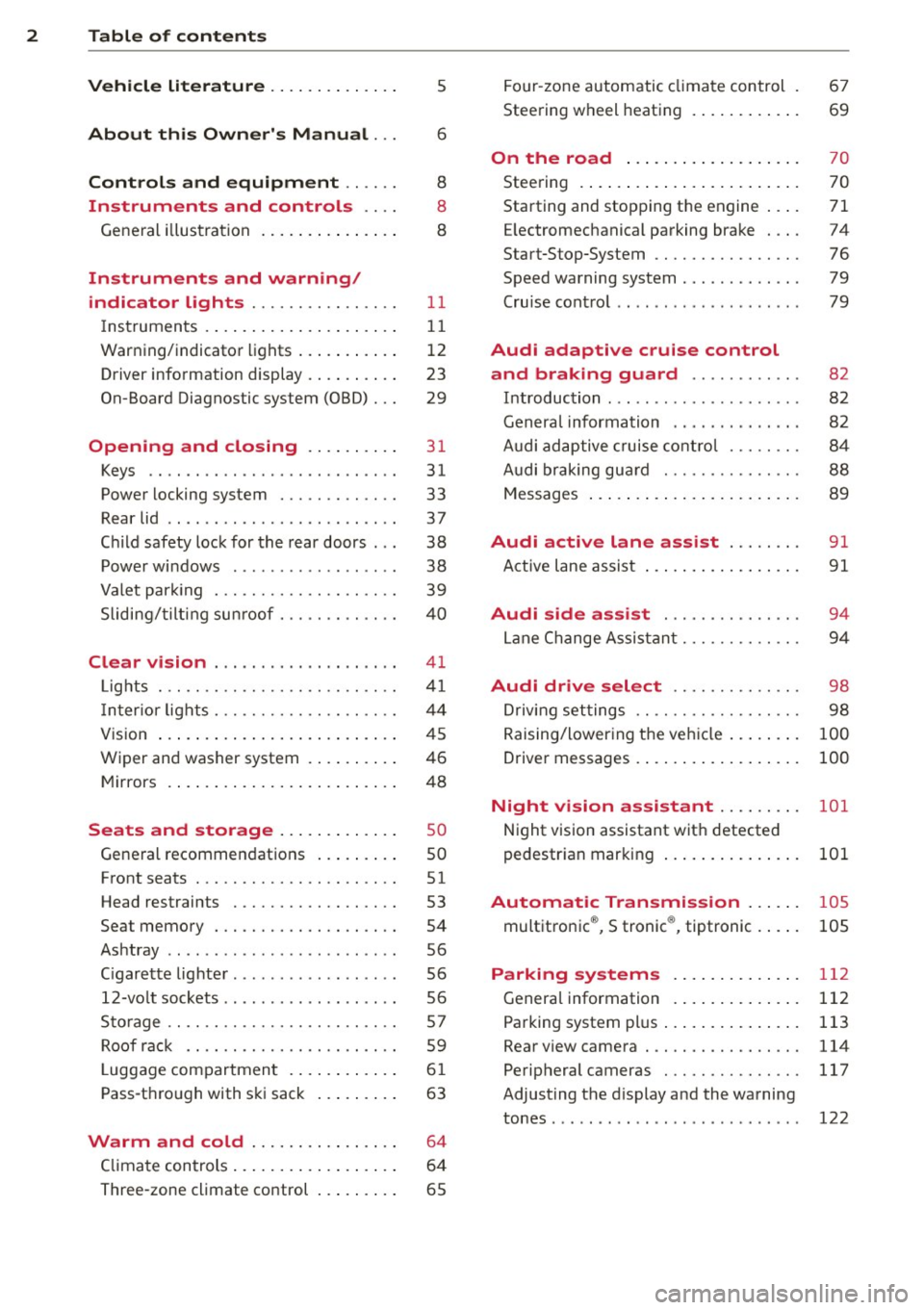
2 Table of contents Vehicle literature .. .. .. .. .. ... .
5
About this Owner's Manual . . . 6
Controls and equipment .. ... .
Instruments and controls .. . .
General illustration ......... .. ... .
Instruments and warning/
indicator lights ........ .. .. .. . .
Instruments ............ ... .. ... .
Warning/indicator lights .......... .
Driver information display .. .. .. ... .
On-Board Diagnostic system (OBD) . . .
Opening and closing .. .. .... . .
Keys .. ...... ........... .. .. ... .
Power locking system ..... .. .. .. . .
Rear lid .. .. ........ ..... .. ..... .
Child safety lock for the rear doors .. .
Power windows . .......... ... .. . .
Valet park ing . ........... .. .. ... .
Sliding/tilting sun roof ... .. .. .. .. . .
Clear vision .. ....... ... .. .. ... .
Lights . .. .. .. . .......... .. .. .. . .
I nter ior lights ............ .. .. .. . .
V1s 1on .......... ......... ... ... .
Wiper and washer system ... .... .. . 8
8
8
11
11
12
23
29
31
31
33
37
38
38
39
40
41
41
44
45
46
Mirrors . . . . . . . . . . . . . . . . . . . . . . . . . 48
Seats and storage ......... ... .
General recommendations ... .... . .
Front seats .............. .. .. ... .
Head restraints .............. ... .
Seat memory . ........... .... ... .
Ashtray .. .. ... .... ...... .. .. .. . .
C igarette lighter .............. .. . .
12-vo lt sockets ... ..... ... .. .. .. . .
Storage ................. .. .. ... .
Roof rack ............... .. .. .. . .
L uggage compartment ........... .
Pass-through with ski sack ... .. ... .
so
so
51
53
54
56
56
56
57
59
6 1
63
Warm and cold . . . . . . . . . . . . . . . . 64
Climate controls . . . . . . . . . . . . . . . . . . 64
Three-zone climate control . . . . . . . . . 65 Four-zone
automatic climate control .
Steering wheel heating ........... . 67
69
On the road
. . . . . . . . . . . . . . . . . . . 70
Steering . . . . . . . . . . . . . . . . . . . . . . . . 70
Starting and stopping the engine . . . . 71
E lectromechanical parking brake . . . . 74
Start-Stop-System . . . . . . . . . . . . . . . . 76
Speed warning system . . . . . . . . . . . . . 79
Cruise control . . . . . . . . . . . . . . . . . . . . 79
Audi adaptive cruise control
and braking guard . . . . . . . . . . . .
8 2
Introduction . . . . . . . . . . . . . . . . . . . . . 82
Genera l information . . . . . . . . . . . . . . 82
Audi adaptive cruise control . . . . . . . . 84
Audi braking gua rd . . . . . . . . . . . . . . . 88
Messages . . . . . . . . . . . . . . . . . . . . . . . 89
Audi active lane assist . . . . . . . . 91
Active lane assist . . . . . . . . . . . . . . . . . 91
Audi side assist . . . . . . . . . . . . . . . 94
Lane Change Assistant. . . . . . . . . . . . . 94
Audi drive select . . . . . . . . . . . . . . 98
Driving settings . . . . . . . . . . . . . . . . . . 98
Raising/lowering the vehicle . . . . . . . . 100
Driver messages . . . . . . . . . . . . . . . . . . 100
Night vision assistant . . . . . . . . . 101
Night vision assistant with detected
pedestrian marking . . . . . . . . . . . . . . . 101
Automatic Transmission . . . . . . 105
multitronic ®, S tronic ®, tiptronic . . . . . 105
Parking systems . . . . . . . . . . . . . . 112
General information . . . . . . . . . . . . . . 112
Parking system plus . . . . . . . . . . . . . . . 113
Rear view camera . . . . . . . . . . . . . . . . . 114
Peripheral cameras . . . . . . . . . . . . . . . 117
Adjusting the d isplay and the warning
tones. . . . . . . . . . . . . . . . . . . . . . . . . . . 122
Page 11 of 306
CD
@
®
©
®
®
(j)
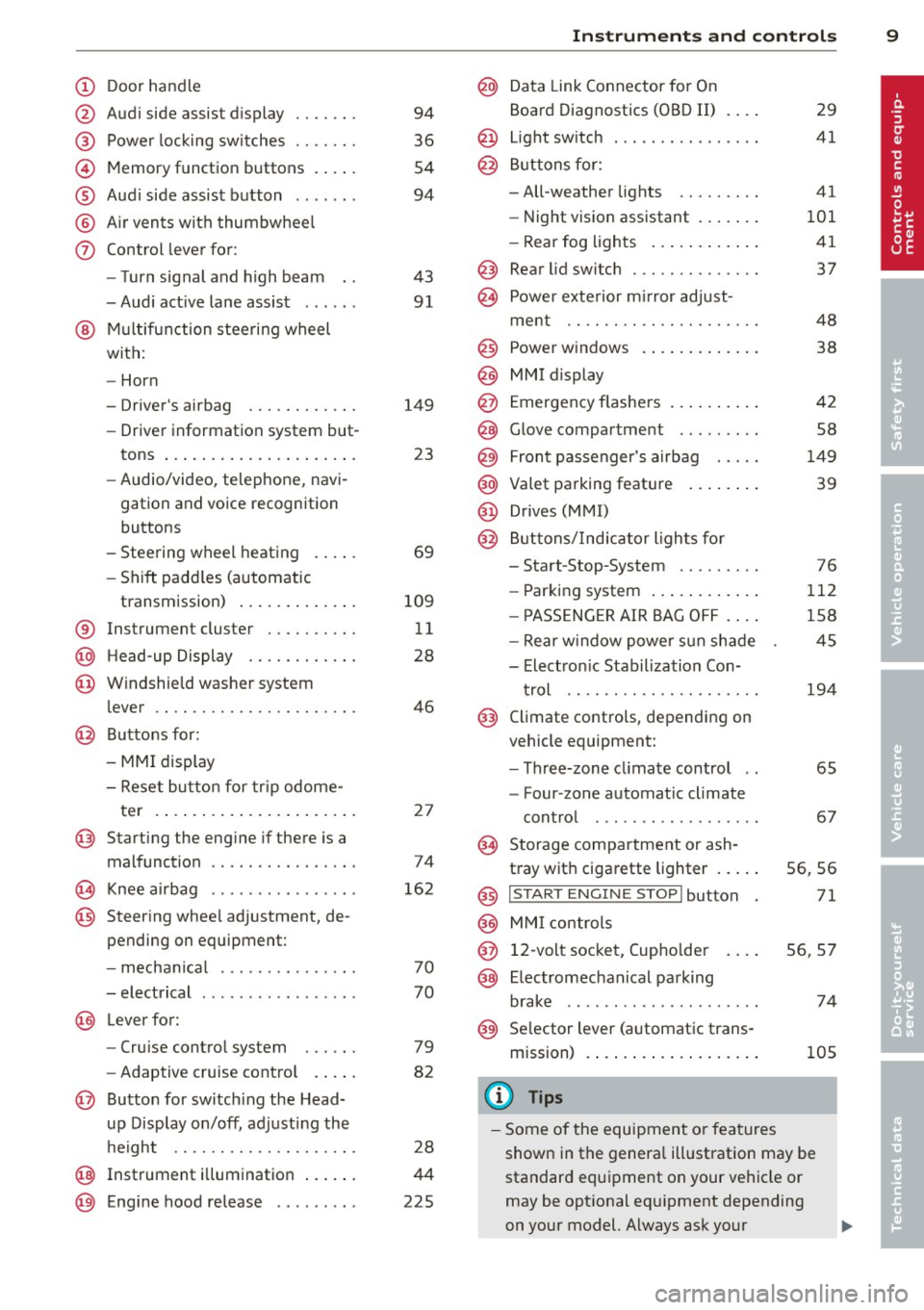
Door handle
Audi side assist display
Power locking sw itches
Memory function buttons .. .. .
Aud i side assist button ...... .
A ir vents with thumbwheel
Control lever for:
- T urn signal and high beam
- Audi act ive lane assist . .. .. .
@ Mu ltifunction steering wheel
with:
- Horn
- Driver's airbag
- Driver information system but-
tons ... ..... ....... ... .. .
- Audio/video , telephone, navi
gation and voice recognition
buttons
- Steering wheel heating . ... .
- Shift padd les (automatic
transmission) ..... ... ... . .
® Instrument cluster ......... .
@ Head-up Display ........... .
@ Windshield washer system
lever ..................... .
@ Buttons for:
- MMI display
- Reset bu tton for tr ip odome-
te r .. .. ... .. ..... ... .. .. .
@ Starting the engine if there is a
malfunction ............... .
~ Knee airbag ........... .. .. .
@ Steer ing whee l adjustment, de
pending on equipment:
- mechan ical .......... .. .. .
- electrical .... .. ..... ... .. .
@ Leve r for:
- Cru ise control system ... .. .
- Adaptive cruise contro l .. .. .
@ Button for sw itch ing the Head
up Disp lay on/off, adjusting the
h eight .. ............. .. .. .
@ Instrument illumination ... .. .
@ Eng ine hood release ........ . 94
36
54
94
43 91
149 23
69
109 11
28
46
2 7
74
16 2
70
70
79
82
28
44
225
In strument s and control s 9
@ Data Link Connector for On
Board Diagnostics (OBD II)
@ Light switch ... .. . .. .... ... .
@ Buttons for :
- All-weather lights
- Night vision assistant .... .. .
- Rear fog lights .. .. .. ..... .
@ Rear lid switch ............. .
~ Power exterior m irror adjust- 29
41
41
101 41
37
ment . . . . . . . . . . . . . . . . . . . . . 48
@ Power w indows . . . . . . . . . . . . . 38
@ MMI display
@ Emergency flashe rs . . . . . . . . . . 42
@ Glove compartment . . . . . . . . . 58
@) Front passenger's airbag . . . . . 149
@ Valet parking feature . . . . . . . . 39
@ Drives (MMI)
@ Buttons/Indicator lights fo r
- Start-Stop-System . . . . . . . . . 76
- Parking system . . . . . . . . . . . . 112
- PASSENG ER AIR BAG OF F . . . . 1S8
- Rear w indow powe r sun shade 4S
- Electron ic Stabilization Con-
t rol . . . . . . . . . . . . . . . . . . . . . 19 4
@ Climate controls, depending on
vehicle equipment:
- Three-zone cl imate control . . 6S
- F our-zone automatic climate
cont rol . . . . . . . . . . . . . . . . . . 67
@ Storage compartment or ash-
t ray wit h cigarette lighter . . . . . S6, 56
@ I ST ART ENGINE STOPI button 71
@ MM I controls
@ 12-volt socket, (upho lder 56, 57
@ E lectromechanical parking
brake . . . . . . . . . . . . . . . . . . . . . 74
@ Selector lever (a utomatic trans-
mission) 105
(D Tips
-Some of the equipment or fea tures
show n in the genera l ill ustration may be
standard equipment on your vehicle or
may be opt ional eq uipment depending
on your model. Always ask your
ll>
Page 15 of 306
Instrument s and warnin g/indic ator ligh ts 13
compartment, stop the engine and let it
cool down. Always exercise extreme cau
t ion when working under the hood
<=> page 219, Engine compartment
@ Tips
Ma lf u nctions or faults wi ll be identified ei
ther with a red symbo l (pr iority 1 -Dan
ger!) or with a yellow symbol (pr iority 2 -
Warn ing).
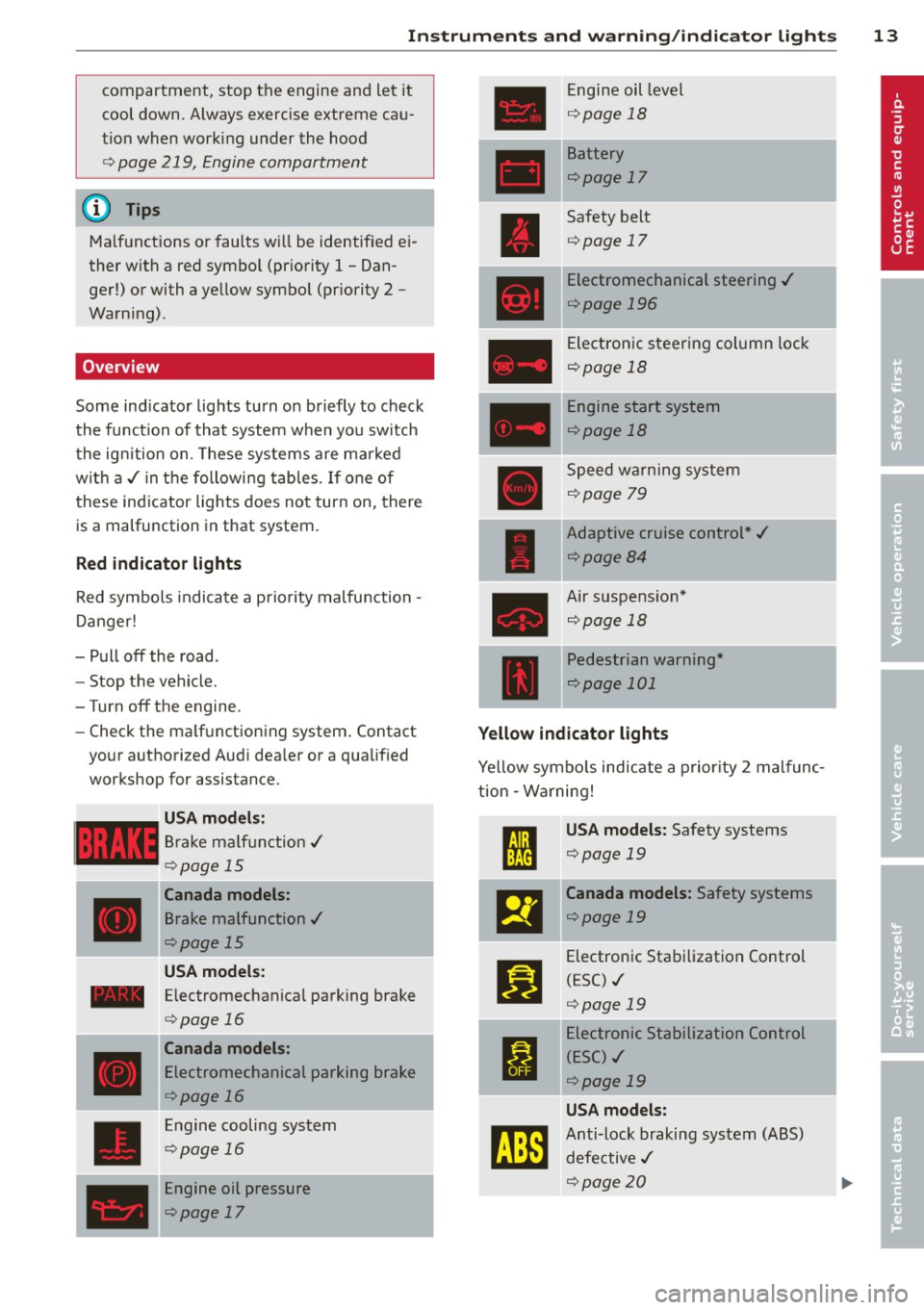
Overview
Some ind icator lights turn on briefly to check
the function of that system when you switch
the ignition on. These systems are ma rked
with a ,/ in the following tables. If one of
these indicator lights does not turn on, there is a malfunction in that system.
Red indicator lights
Red symbols indicate a prio rity malfunction -
D anger!
- Pull off the road.
- Stop the vehicle.
-Turn off the engine.
- Check the ma lf u nctioning system . Contact
your authorized Audi dea ler or a qualified
workshop for assistance.
USA mode ls:
Brake ma lf u nction,/
Qpage 15
Canada models:
Brake malfunction,/
Qpage 15
USA models:
- Electromechanical parking brake
____ ,
D
<=> page 16
Canada models:
Electromechanical parking brake
<=>page 16
Engine cooling system
<=>page 16
Engine oil pressure
<=>page 17
Engine oil level
Q page 18
Battery
<=>page 17
Safety belt
<=>page 17
Electromechanical steering ,/
<=>page 196
Electronic steering column lock
<=>page 18
Engine start system
<=>page 18
Speed warning system
<=>page 79
Adaptive cruise control*,/
<=>page84
Air suspension*
Qpage 18
Pedestrian warning*
Qpage 101
Yellow indicator lights
Yellow symbo ls indicate a p rior ity 2 malfunc
t ion -W arning!
I
USA models: Safety systems
<=>page 19 .
El
Canada models: Safety systems
<=>page 19
II
Electronic Stab ilization Control
(ESC) ./
<=>page 19
I
Electronic Stabil ization Control
( E SC) ,/
<=>page 19
USA models:
tm
Anti-lock braking system (ABS)
defective ,/
Qpage20
I
Page 16 of 306
![AUDI A6 2013 Owners Manual 14 Instrum ent s and w arn ing /indic ato r light s
Canada models:
[I]
Anti-lock braking system (ABS)
defective ./
¢ page20
•
Worn brake pads
¢ page20
:rm
Electromechanical par](/img/6/57588/w960_57588-15.png "AUDI A6 2013 Owners Manual 14 Instrum ent s and w arn ing /indic ato r light s
Canada models:
[I]
Anti-lock braking system (ABS)
defective ./
¢ page20
•
Worn brake pads
¢ page20
:rm
Electromechanical par")
14 Instrum ent s and w arn ing /indic ato r light s
Canada models:
[I]
Anti-lock braking system (ABS)
defective ./
¢ page20
•
Worn brake pads
¢ page20
:rm
Electromechanical parking brake
¢ page 74
g
Tire pressure monitoring system
./
¢page258
Tire pressure monitoring system
••w;~, ¢ page258
Im
Electronic power control ./
¢ page 21
I Malfunction indicator Lamp (MIL)
111!
./
¢ page21
.,
Engine speed limitation
¢ page 21
I.
Engine oil level
¢ page 18
•
Engine oil sensor
¢ page 21
&1
Battery
¢ pagel7
Ill
Tank system
¢page 21
•
Windshield washer fluid level
¢page22
m
Windshie ld wipers
¢ page22
!I
Remote control key
¢page 71
m
Remote control key
¢ page 74
I!
Battery in remote control key
¢ page32
-.
l:J
Defective ligh t bulb warn ing
¢ page22
II
Rear fog light(s)
¢page22
II
Headlight range control
¢page22
- -
Ill
adaptive light *
¢page22
m
Light -/rain sensor faulty
¢ page 22
- -
•
Audi active lane assist *
¢page92
Im
T ransmission
¢ page 110
Im
Transmission
¢page 110
R1
Transmission
- S t ron ic ® ¢ page 110
•
Electronic steering column lock
¢page 18
- -
.,
Engine start system
¢page 18
£1.p
Electromechanical steering
¢page 196
•
Air suspens ion*
¢ page 18
Ill
Sport differential *
¢page22
Other indicator lights
II
II
I : I -._ I• 11
Turn signals ¢ page 23
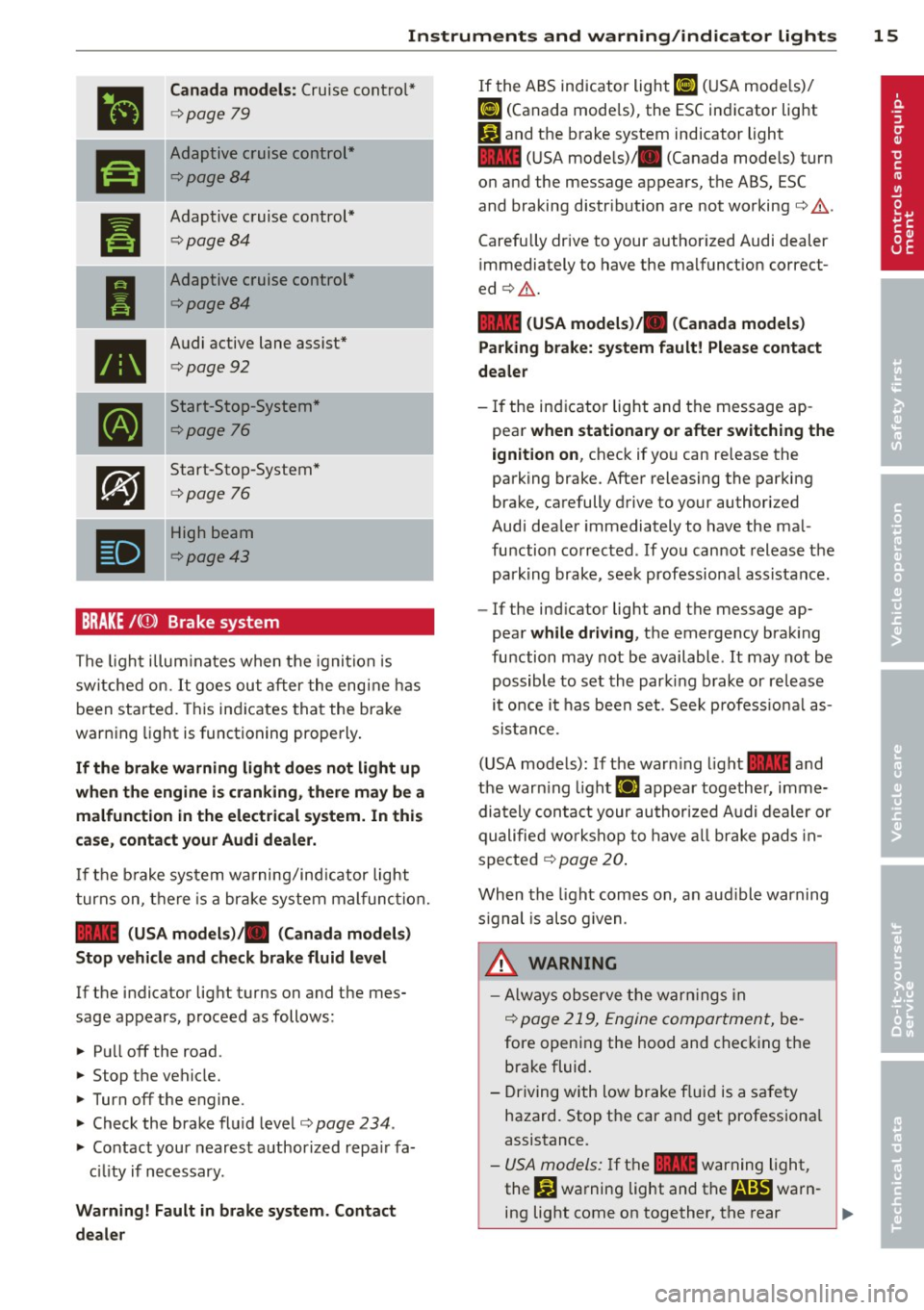
USA model s: Cruise control *
¢page
79
,,_
...
Page 17 of 306
Instruments and warning/indicator lights 15
•
Canada models: Cruise contro l*
¢ page 79
ra
Adaptive cruise cont rol*
¢page8 4
--
Pl
Adaptive c ruise control*
¢ page84
I
Adaptive cruise control*
¢page8 4
•
Audi active lane assist*
¢ page 92
•
Start-Stop-System *
¢page 76
•
Start-Sto p-System *
¢page 76
•
High beam
¢page 43
BRAKE/( ©) Brake system
The ligh t illum inates when t he igni tion is
sw itche d on.
It goe s ou t aft er the eng ine has
been st art ed. This in dicates tha t th e brake
warn ing light is functioning properly .
If the brake warning light does not light up
when the engine is cranking, there may be a
malfunction in the electrical system. In this
case , contact your Audi dealer.
If t he b rake sys tem warning/ind icator light
tur ns on, t here is a br ake system mal func tion.
1111 (USA models) ;II (Canada models)
Stop vehicle and check brake fluid level
If the indicator light t urns on and the mes
sage appears, p roceed as follows:
... Pu ll off the road .
... St op t he vehicle.
.,. Turn off t he e ngine.
.,. Check the brake flu id leve l<=>
page 234 .
... Contact your neares t authorized repa ir fa
c ili ty if n ecessary .
Warning! Fault in brake system . Contact
dealer
If the A BS indicator light ri] (U SA mode ls)/
ri] (Canada mode ls), the ESC in dicator light
Pl and the b rake system indicator light
1111 (U SA mode ls)/ . (Canada models) turn
o n and the message appears, the ABS , ESC
and braking distr ibut ion are not working<=> &..
Carefully drive to your author ized Audi dealer
immediately to have the malfunct ion correct
ed <=>&. .
1111 (USA models )/. (Canada models)
Parking brake: system fault! Please contact
dealer
- If the in dicator light and the message ap
pea r
when stationary or after switching the
ignition on ,
check if yo u can re lease the
parking brake. Afte r releasing the par king
brake, carefully d rive to your authorized
Aud i dea le r i mmediately to have the ma l
fu nction corrected . If yo u can not releas e th e
park ing brake , see k professiona l assistan ce.
- If the ind icator light and the message ap
pear
while dr iving , the emergency bra king
fu nction may not be available.
It may not be
po ssibl e to set th e par king b rake or re lease
i t once i t has been set . See k profess io na l as
s is tan ce.
( U SA mode ls) : If the war ning light
1111 a nd
the war ning light
£1 appear together, imme
dia tely con ta ct y our au thor ized A udi dealer or
qualifie d wor kshop to have all brake pad s in
spe cte d
¢ page 20.
When the light comes on , an aud ible warn ing
s ignal is also g iven .
A WARNING
-Always o bserve the warn ing s in
<=>
page 219, Engi ne compar tmen t, be
fore openi ng the hood and c hec kin g the
brake fluid .
- Driving with low brake f lui d is a safety
hazard. Stop t he car and get professiona l
assis tance .
- USA mode ls: I f t he 1111 war ning light,
the
G1 warning light and t he m!ID warn-
ing light come on together, the rear .,.
Page 25 of 306
Instrument s and warning /indicator lights 23
There is a malfunct ion with the sport differen
tial.
D rive to yo ur aut ho riz ed Aud i dea le r i mmedi
ately to have the mal func tion cor re cted.
II] Sport differential : overheating
The transmission temperature has increased
sign ificantly due to the sporty dr iving manner .
Dr ive in a less spo rty manne r unt il the tem
perat ure returns to the no rma l range and the
in di cator lig ht switches of.
& WARNING
Con ta ct yo ur a uthori ze d Au di d ealer o r a
qu alifi ed workshop if the spor t diffe ren tial
is faulty or ma lfunctioni ng . The repa ir
must be perfo rmed by trai ned person ne l
using the cor rect oil in orde r to ensure
safety.
¢i 9 Turn signals
-
The indicator light blinks when you use either
turn signal.
W henever you use the left II or the rig ht II
turn sig na l, the ind icator light blinks . When
you use the emergency flashers, both indica
tor lights f las h.
I f o ne of the tu rn s ignal light bu lbs burn out,
t he t urn signa l will blink tw ice as fas t as nor
mal. Carefully drive to your author ized A udi
dea ler immediately to have the malfunction
corrected. The indicator light does not indi
cate a malfunction ifa turn signa l on the trail
er or on the vehicle fails in trailer towing mode .
@ Tips
For mo re i nfo rmation on the turn signals,
refer to
c::> page 43 .
CRUISE , .. \"i Cruise control
The warning/ind icator light [1jim~i~ (USA mod
e ls)/ lil (Canada mode ls) illum inates when
t he c ruise c ont ro l is activa ted
c::> page 7 9 .
Driver information
display
Overview
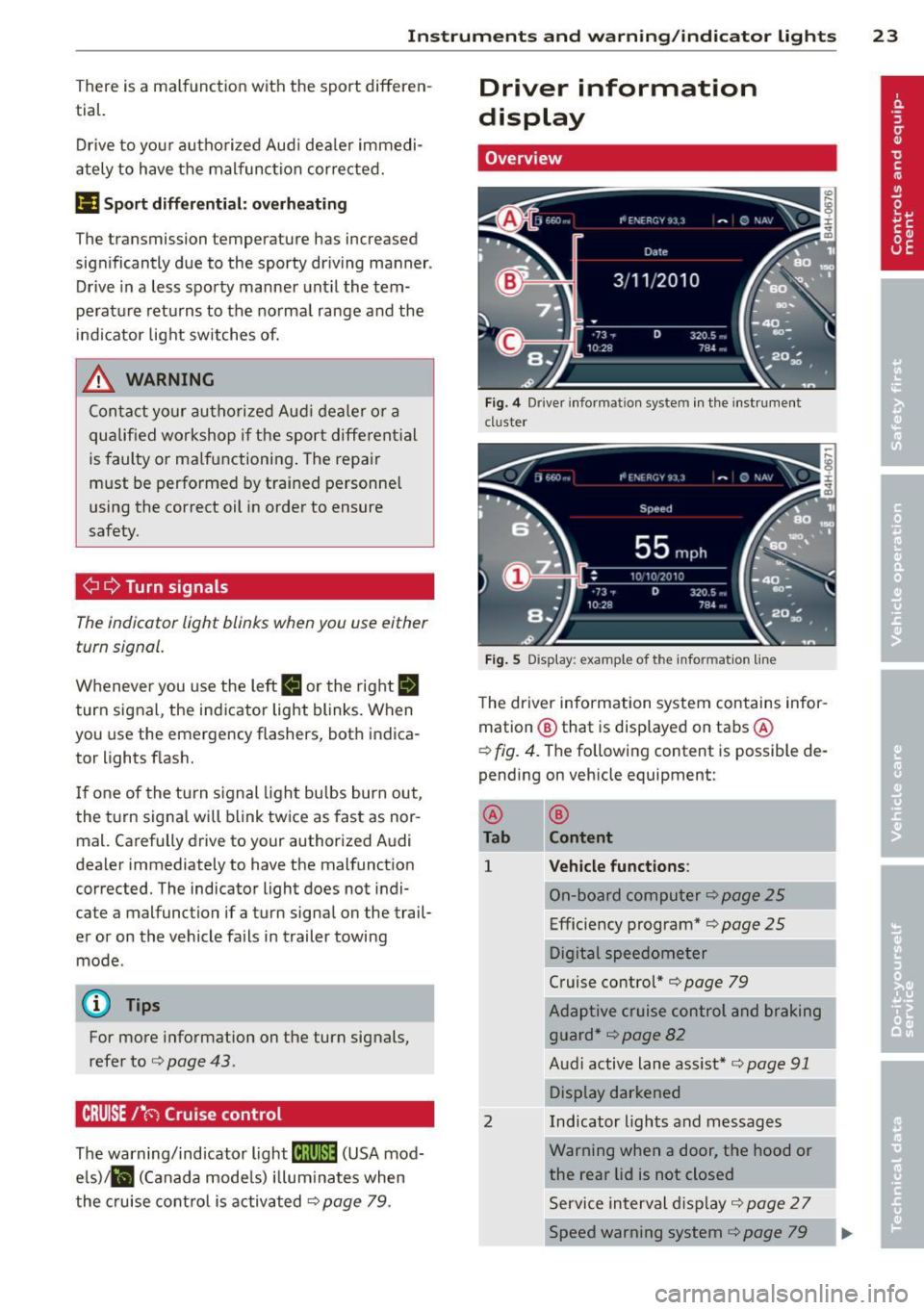
Fi g. 4 Drive r in fo rm atio n syste m in th e i nst ru m ent
cl ust er
Fig. 5 Disp lay : examp le of t he info rmatio n lin e
The dr iver information system con tains infor
mation @ that is displayed on tabs @
c::> fig. 4. The following content is possible de
pending on veh icle equipment:
@
Tab
1
2
®
Content
Vehicle functions :
On-board computer c::> page 25
Efficiency program* c::> page 25
Digital speedometer
C ruise control*
c::> page 79
Adaptive cruise con trol and bra king
g uard *
c::> page 82
Aud i active lane ass ist * c::> page 91
Display dar kened
Ind icator lights and m essages
Warning when a door, the hood or
the rear lid is not closed
S ervice interval displ ay
c::> page 2 7
Speed warning system
c::> page 79
Page 31 of 306
Instrument s and warning /indicator lights 29
Display content
In the MMI, you can specify which information
should be displayed :
- Cruise contro l system*
- Nav igat ion information*
- Audi adap tive cruise control*
- Audi active lane assist*
- Night vision assistant* (pedestrian warning)
The speed display and some of the red indica
tor lights cannot be hidden in the MMI.
Display brightness
You can adjust the display brightness in the MMI. The display brightness decreases auto
mat ica lly as the amount of light decreases .
The basic leve l o f brightness is adjusted with
the instrument illumination~
page 44.
(D Note
To prevent scratches on the glass covering
the Head-up Display, do not place any ob
jec ts in the projection opening .
(D Tips
- Sunglasses with polar izat ion filters and
unfavorable lighting conditions can af
fect the display.
- Vehicles with seat memory* : your Head
up Display settings are stored automati
cally and assigned to the remote control
key that you are using.
- A specia l windshield is needed for the
Head-up Display function .
- For information on cleaning, refe r to
~ page 215.
On-Board Diagnostic
system (OBD)
Malfunction Indicator Lamp (MIL)
The Malfunction Ind icator Lamp (MIL) ¢'4 i n
the instrument cluster is part of the On-Board
Diagnostic (OBD II) system.
The warning/indicator light illuminates when
the ignition is switched on and goes out after the engine starts and the id
le has stabilized.
This indicates that the MIL is working proper
ly .
If the light does not go out after the engine
is started, or illuminates while you are driv
ing, a malfunction may ex ist in the engine sys
tem.
If the light illuminates, the catalytic con
verter could be damaged .
Continue driving
with reduced power (avoid
ing sustained high speeds and/or rapid accel
erations) and have the cond ition corrected.
Contact your authori zed Audi dealer.
If the light illuminates, the electronic speed
limiter may also be malfunctioning . For more
information
¢ pag e 30, Electronic spe ed
limiter.
An improperly closed fuel filler cap may also
cause the MIL light to illuminate
~page 222.
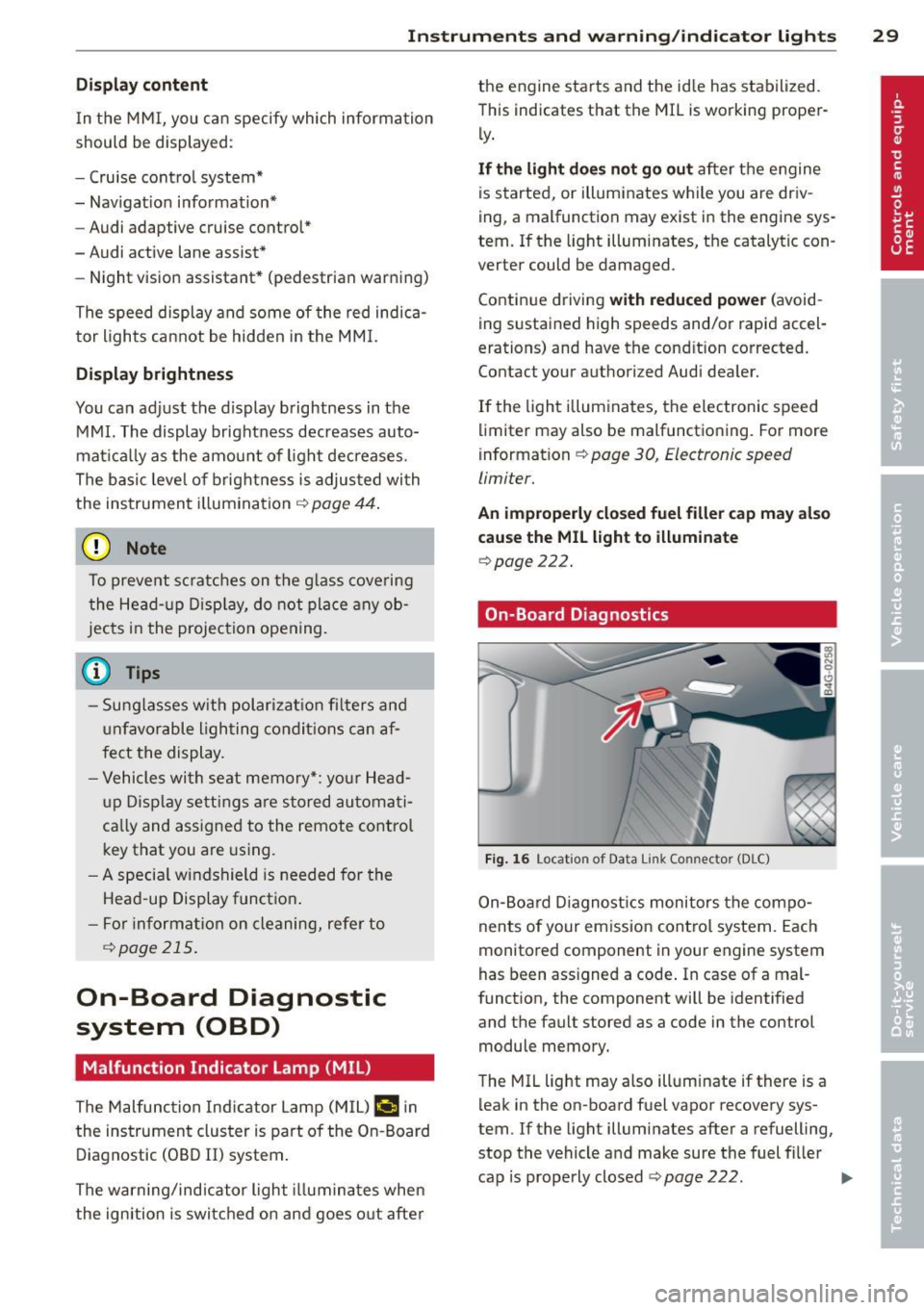
On-Board Diagnostics
Fig. 16 Locat ion o f Data Li nk Co nnector (DLC)
On-Board Diagnostics monitors the compo
nents of your emission control system. Each
monitored component in your eng ine system
has been ass igned a code . In case of a mal
function, the component will be identified
and the fault stored as a code in the control module memory.
The MIL light may also illuminate if there is a
leak in the on -board fuel vapor recovery sys
tem. If the light illuminates after a refuelling,
stop the vehicle and make sure the fuel filler
cap is properly closed
~ page 222. IIJ,,
Page 33 of 306
Opening and closing Keys
Key set
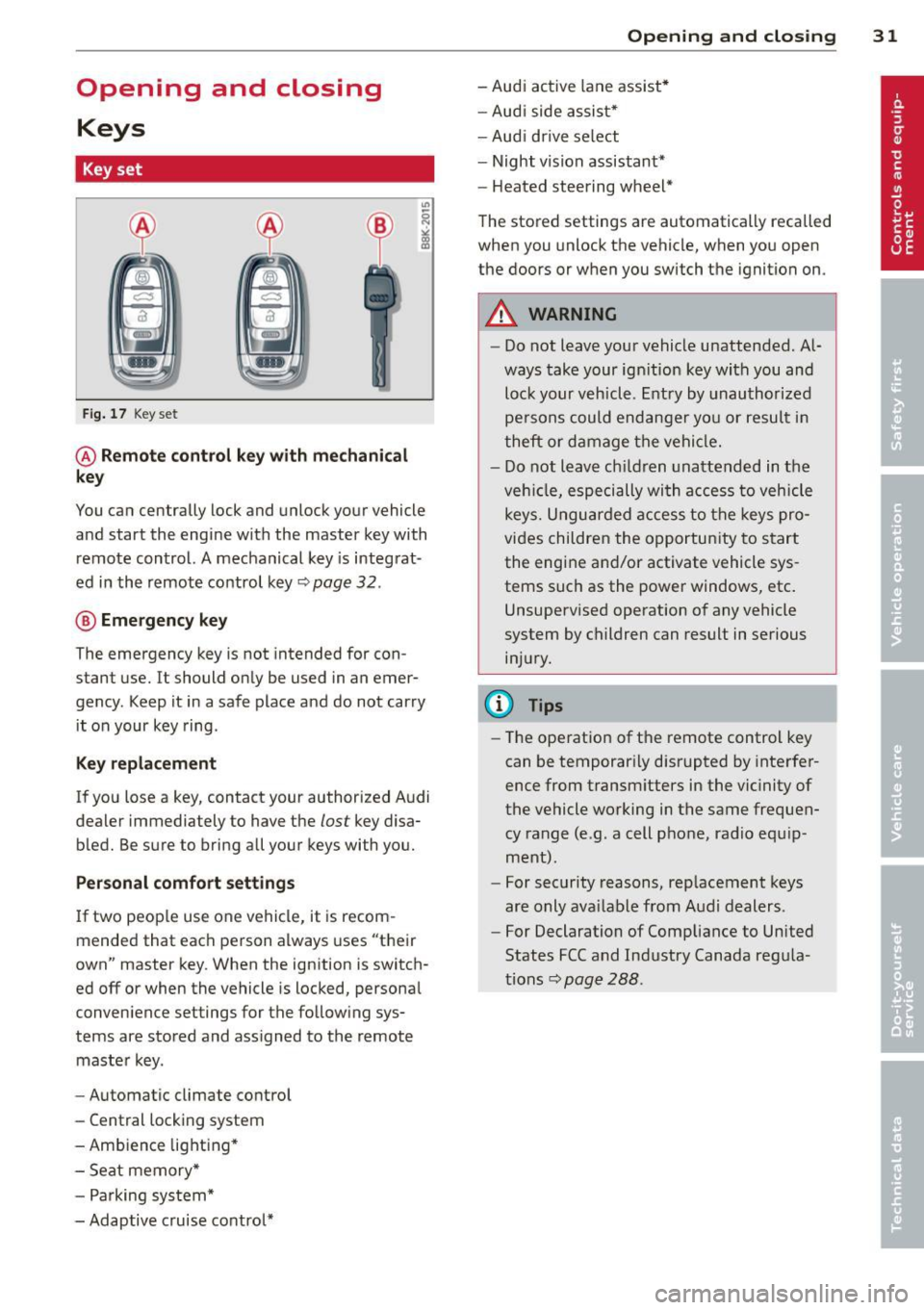
Fig. 17 Key set
@ Remote control key with mechanical
key
You can centrally lock and unlock your vehicle
and start the engine with the master key with
remote control. A mechanical key is integrat
ed in the remote control key~ page
32 .
® Emergency key
The emergency key is not intended for con
stant use.
It should only be used in an emer
gency . Keep it in a safe place and do not carry
it on your key ring .
Key replacement
If you lose a key, contact your authorized Audi
dealer immediately to have the
lost key disa
bled. Be sure to bring all your keys with you.
Personal comfort settings
If two people use one vehicle, it is recom
mended that each person always uses "their
own" master key. When the ignition is switch
ed off or when the vehicle is locked, personal
convenience settings for the following sys
tems are stored and assigned to the remote
master key.
- Automatic climate control
- Central locking system
- Ambience lighting*
- Seat memory*
- Parking system*
- Adaptive cruise control*
Opening and closing 31
- Audi active lane assist*
- Audi side assist*
-Audi drive select
- Night vision assistant*
- Heated steering wheel*
The stored settings are automatically recalled
when you unlock the vehicle, when you open
the doors or when you switch the ignition on.
A WARNING
- Do not leave your vehicle unattended. Al
ways take your ignition key with you and
lock your vehicle. Entry by unauthorized
persons could endanger you or result in
theft or damage the vehicle.
- Do not leave children unattended in the
vehicle, especially with access to vehicle
keys. Unguarded access to the keys pro
vides children the opportunity to start
the engine and/or activate vehicle sys
tems such as the power windows, etc.
Unsupervised operation of any vehicle
system by children can result in serious
injury.
(D Tips
- The operation of the remote control key
can be temporarily disrupted by interfer
ence from transmitters in the vicinity of
the vehicle working in the same frequen
cy range (e.g . a cell phone, radio equip
ment).
- For security reasons, replacement keys
are only available from Audi dealers.
- For Declaration of Compliance to United
States FCC and Industry Canada regula
tions~ page
288.
Page 81 of 306
Messages in the instrument cluster
display
Applies to vehicles: with Start-Stop-System
Start-Stop system deactivated: Please re
start engine manually
This message appears when specific condi
tions are not met dur ing a s top phase and the
Start -Stop-System w ill
not be able to restart
the eng ine.
If the Dor R selector lever posi
tions were engaged, P will be selected auto mat ica lly. The engine must be started with
the
! START ENGINE STOP I button .
Start-Stop system: System fault! Function
unavailable
There is a malf unctio n in t he Star t-Stop-Sys
tem . Dr ive the veh icle to an authorized repair
fac ility for servicing as soon as possible to cor
rect the malfunction .
Speed warning system
Introduction
The speed warning system helps you to stay
under a specified maximum speed.
The speed warning system warns you if you
a re exceeding the max imum speed that you
have set. You w ill hear a warn ing tone when
your speed exceeds the stored va lue by ap
p rox ima tely 3 mph (3 km/h) . An indicato r
l ight . (USA models)/ . (Canada mode ls) in
t he ins trumen t cluster display also turns on at
the same time. The indicator light
a;m
turns off when the speed decreases below the
stored maximum speed.
Setting a threshold is recommended if you
wou ld like to be reminded when you reach a
certain maximum speed . Situations where you
may want to do so include driving in a country
with a general speed limit or if there is a
specif ied max imum speed for winter tires.
(D Tips
Even tho ugh your vehicle is equipped with
a speed warning system, you should st ill
On the road 79
watch the speedometer to make sure you
are not driving faster than the speed limit.
Setting the threshold
You can set, chang e and delete the threshold
in the MMI.
.,. Select: I CAR I function button > (Car)* sys
tems
control button > Driver assist > Speed
warning.
You can set any threshold between 20 mph
(30 km/h) and lS0 mph (240 km/h). Sett ings
can eac h be adjusted in increments of 6 mph
(10 km/h).
Cruise control
Switching on
Applies to vehicles: with cruise control
The cruise control system makes it possible to
drive at a constant speed starting at
20 mph
(30kmlh).
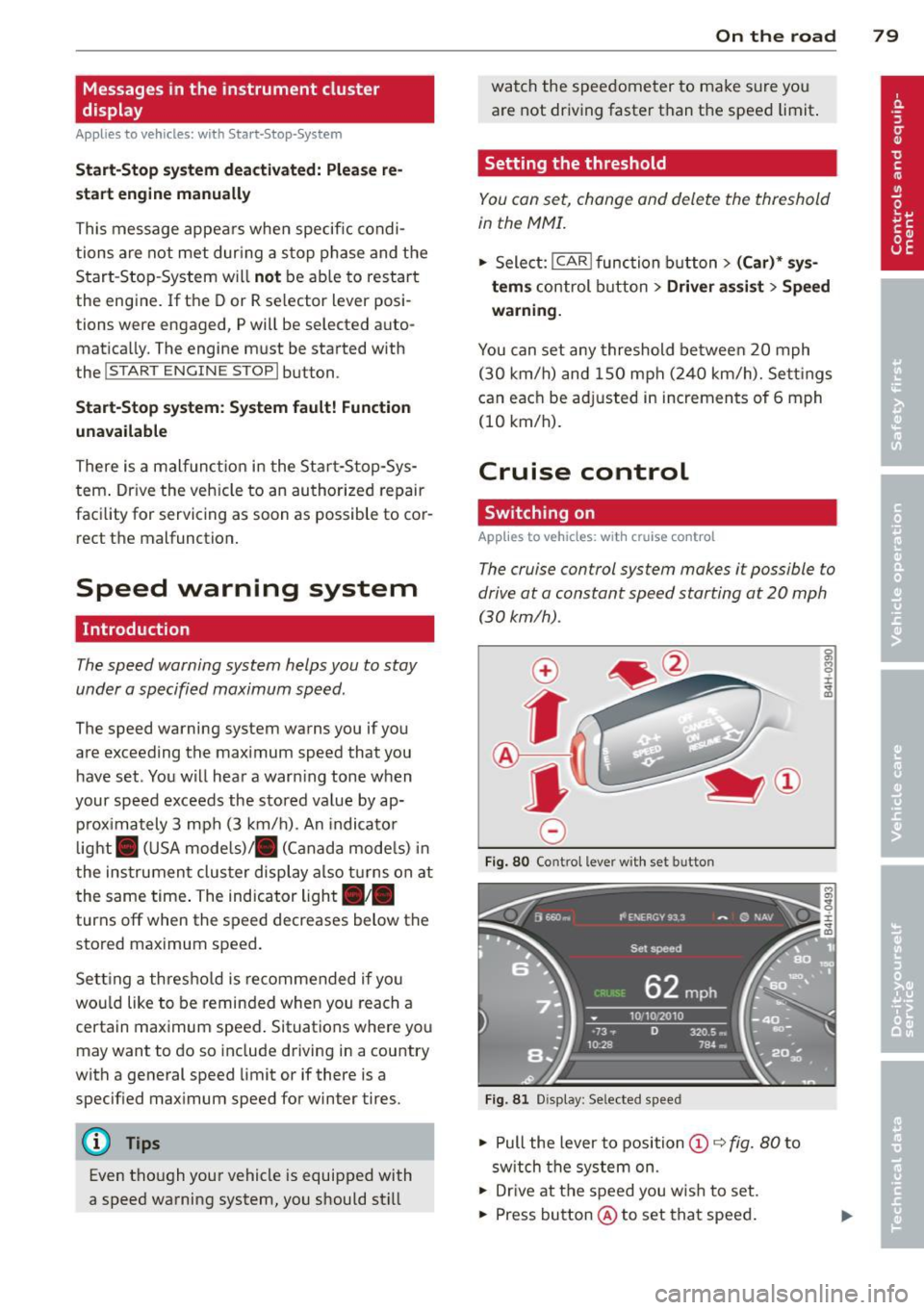
0
f
®t
0
Fig. 80 Contro l lever with set button
Fig . 81 Display: Selected speed
.,. Pull the lever to position © c::> fig. 80 to
sw itch the system on.
.,. Drive at the speed you w is h to set.
.,. Press button @ to set that speed.
Page 82 of 306
80 On the road
The stored speed and the ind icator light
A;(l)~i~ (US mo dels) 1,'I (Canadian mode ls) a p
pea r in the instrument cluster d isp lay
c::> fig. 81. The display may vary, depending on
the type of d isplay in your vehicle .
This informat ion is also shown briefly in the
Head -up Display*.
The speed is kept constant v ia an engine o ut
put adjustment or active b rake intervention.
A WARNING
- Always pay attention to traffic even when
the cruise control is switched on. You are
always responsible for your speed and
the distance between your vehicle and
other vehicles .
- For safety reasons, the cruise control
should not be used in the city, in stop
and-go traff ic, on twist ing roads and
when road conditions are poor (such as ice , fog, grave l, heavy ra in and hydro
planing) -risk of accident.
- Turn
off the cruise control temporar ily
when entering turn lanes, highway exit lanes o r in construc tion zones.
- Please note that inadvertently "rest ing"
yo ur foot on the accelerator peda l causes
the cruise control not to brake . T his is
because the cr uise control is overridden
by the d river's acce leration .
- If a brake system malfunc tion such as
overheating occurs when the cruise con
tro l system is switched on, the braking
function in the system may be switched
off. The other cruise control functions re
ma in active as long as the indicator light
[~;rn~i~ (US models) !Ill (Canad ian mod
els) is on .
(j) Tips
The brake lights illuminate as soon as the
brakes decelerate automat ica lly.
Changing speed
Applies to veh icles: w ith cru ise control
., To increase/decrease the speed in inc re
ments, tap the lever in the
0 10 direc tion
c::> fig . 80
., To increase/decrease the speed quic kly,
hold t he lever in the
0 10 direction until
the desired speed is displayed.
You can also press the accelerator pedal down
to increase your speed, e.g . if you want to
pass someone . The speed you saved earlier
will res ume as soon as you release the acceler
ator pedal.
If, however, you exceed your saved speed by
6 mph (10 km/h) for longer than 5 m inutes,
the cr uise control wi ll turn
off temporari ly.
The green symbol
A;(l)~i~ (US mode ls) 1,'I
(Canadian mode ls) in the display will go out
but the saved speed rema ins the same .
Presetting your speed
Applies to veh icles : w ith cru ise control
You can preset your desired speed while the
vehicle is not moving.
., Switch on the ignition.
., Pull lever into position
(D c::> fig . 80.
., Press t he lever in the 0 or 0 direction to
increase or decrease your speed .
., Release the lever to save that speed .
This function makes it possible, for examp le,
to save the speed you want before dr iving on
the h ighway. Once on t he h ighway, act ivate
the cru ise control by pulling the lever toward
(D .
Switching the system off
Applies to veh icles: w ith cruise control
Temporary deactivation
., Press the b rake pedal, or
., Press the leve r into posi tion @(n ot clicked
into place)
c::> fig. 80, or
... Drive for longer t han 5 min utes at more
than 5 mph (10 km/h) above the stored
speed.