steering AUDI A6 2015 User Guide
[x] Cancel search | Manufacturer: AUDI, Model Year: 2015, Model line: A6, Model: AUDI A6 2015Pages: 314, PDF Size: 77.57 MB
Page 47 of 314
M N
0 I.J "". rl I.O
"' rl
"' rl
Automatic headlights
You can adjust the following settings in the
Automatic headlights menu:
Headlights activation time -You can adjust if
the headlights switch on
Early, Med . or Late
according to the sensitivity of the ligh t sensor.
Audi adaptive light* -You can switch adaptive
light
On and Off.
Daytime running lights
USA models:
You can switch the dayt ime run
n ing lights
on and off .
Canada models :
The function cannot be
turned off . It is activated automatically each
time the ignition is switched on. This menu
item is shown "greyed out" .
Coming home, Leaving home
The coming home function illuminates the
area outside the vehicle when you switch the
ignition off and open the driver's door. To turn
the function on, select
Lights when leaving
car > On .
The leaving home function illuminates the
area outside the vehicle when you un lock the
vehicle. To turn the funct ion on, select
Lights
when unlocking car > On .
The coming home and leaving home functions
only operate when it is dark and the light
switch is in the
AUTO position. Clear
vision 45
Turn signals and high beam lever
The lever on the left side of the steering col
umn is used to operate the turn signals and
the high beam as well as
the headlight flash
er.
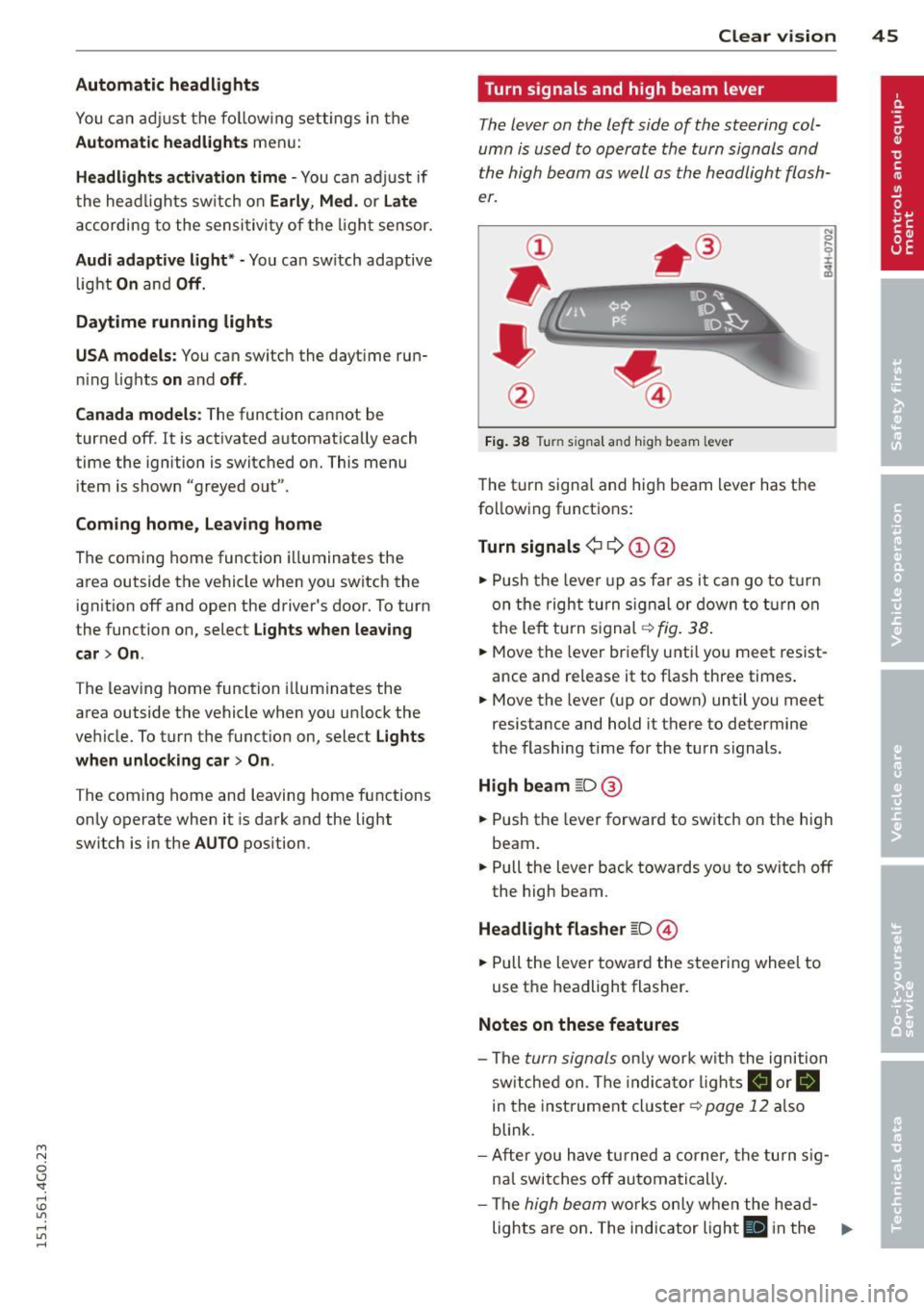
Fig. 38 Tu rn signal and high beam lever
The turn signal and high beam lever has the
following functions:
Turn signals ¢ 9 ©@
.,. Push the lever up as fa r as it can go to turn
on the right turn signa l or down to turn on
the left tu rn s ignal ¢
fig. 38.
.. 0 ....
~
... Move the lever briefly unti l you meet resist
ance and re lease it to flash three times.
.,. Move the lever (up or down) until you meet
resistance and hold it there to determine
the flashing time for the turn signals.
High beam ~D @
... Push the lever forward to switch on the high
beam .
.,. Pull the lever back towards you to switch off
the high beam.
Headlight flasher ~D ©
... Pull the lever toward the steering wheel to
use the headlight flasher.
Notes on these features
-The turn signals on ly work w ith the ignition
sw itched on. The indica tor l ights
a or.
in the instrument cluster¢
page 12 also
blink.
- After you have turned a corner, the turn sig
nal switches off automatically .
- The
high beam works only when the he ad-
lights are on . The indicator light
El in the ..,.
Page 54 of 314
52 Seat s a nd s tor ag e
Seats and storage
General recommen
dations
Why is your seat adjustment so
important?
The safety belts and the airbag system can
only provide maximum protection if the front
seats are correctly adjusted.
There are various ways of adjust ing the front
seats to provide safe and comfortable support
for the driver and the front passenger . Adjust
you r seat prope rly so that :
- you can easily and quick ly reach all the
switches and controls in the instrument
panel
-your body is prope rly supported thus reduc
ing physical stress and fatigue
- the safety be lts and a irbag system can offer
maximum protection
¢ page 145 .
In the following sec tions, you will see exactly
how you can best adjust you r seats .
There are special regulations and instructions
for insta lling a child seat on the front pas
senger's seat. Always fo llow the information
regarding ch ild safety provided in
q page 171, Child Safety .
A WARNING
Incorrect seating position of the dr iver and
all other passengers can result in serious
personal in jury.
- Always keep your feet on the floor when
the vehicle is in motion -never p ut your
feet on top of the instrument panel, out
of the w indow or on top of the seat cush
ion . Th is applies especially to the passen
gers .
If your seating position is incorrect,
yo u increase the r isk of injury in the case
of sudden braking or an a ccident.
If t h e
a ir bag infla tes and the se ating position
is inco rre ct, this could resul t in personal
injury o r even death.
- It is import ant for both the driver an d
front passenger to keep a distance of at least 10 inches (25 cm) between them
selves and the steering wheel and/or in
strument panel. If you're s itting any
closer than th is, the a irbag system can
not protect you properly . In addition, the
front seats and head restraints must be
adjusted to your body height so that they
can give you max imum protect ion.
- Always try to keep as much distance as
possible between yourself and the steer
ing wheel o r inst rument pane l.
- Do not adjust the driver's o r front pas
senger's seat whi le the vehicle is moving.
Your sea t may move unexpected ly, caus
ing sudden loss of vehicle cont rol and
personal injury . If yo u adjust yo ur seat
while the veh icle is moving, yo u are out
of posit ion.
Driver's seat '
The correct seat position is important for safe
and relaxed driving.
We recommend tha t you adjus t the dr iver's
seat in the fo llowing manner :
.,. Adjust t he seat in fore and aft direction so
t ha t you can eas ily push the peda ls to the
floor w hile keeping your knees sl igh tly bent
q A in Why is your seat adjustment so im
portant? on page 52.
.. Adjust the backrest so that when you sit
w ith your back against t he backrest, you can
still grasp the top of the steering wheel.
.. For adjustab le head restra ints: adjust the
head restra int so the upper edge is as eve n
as poss ible with the top of your head. If that
is not possible, try to adjust the head re
s train t so that it is as cl ose to this position
as poss ible
q page 55 . Move the head re
straint so that it is as close to the back of
the head as possib le .
A WARNING
-
Never place any objects in the dr iver's foot-
well. An object could get into the pedal
area and interfere with pedal function . In
Page 74 of 314
7 2 Warm and cold
(D Note
To avoid damage to the heating e lements
in the seats, do not kneel on the seats or
place heavy loads on a small area of the
seat .
Setup
Applies to vehicles: with four-zone a utomat ic clima te con·
tro l
The climate control system setup is accessed
through the MMI .
.,. Se lect : I CAR I func tion button> (Car )* sys·
terns con trol but ton > A /C.
Rear cabin settings*
When th is fu nction is selected, all sett ings for
the rear can be adjusted through the climate
control sys tem in the cockpit. The cl imate
con trol sy stem se ttings cannot be adjusted in
the rea r seat a t the same time. This func tion
switches o ff after a certain period of time or
when one of the dia ls in the cockp it is press
ed .
Auto recirculation*
The sensit ivity level of the au tomatic rec ircu
lation mode can be set at v ario us leve ls from
off to sensit ive. The recirculation mode is con
trolled a utomat ica lly. You must p ress the
I@ FRONT I button if fog forms on the win
dows.
Footwell temperature
You can ad just the footwe ll temperat ure so
that it is cooler or wa rmer.
Supplementary heater*
The supplementa ry heater warms the interio r
of vehicle s with diesel engines* mo re q uic k ly.
The su pplement ary he ate r is cont rolle d au to
mat ica lly in t he
Auto setting.
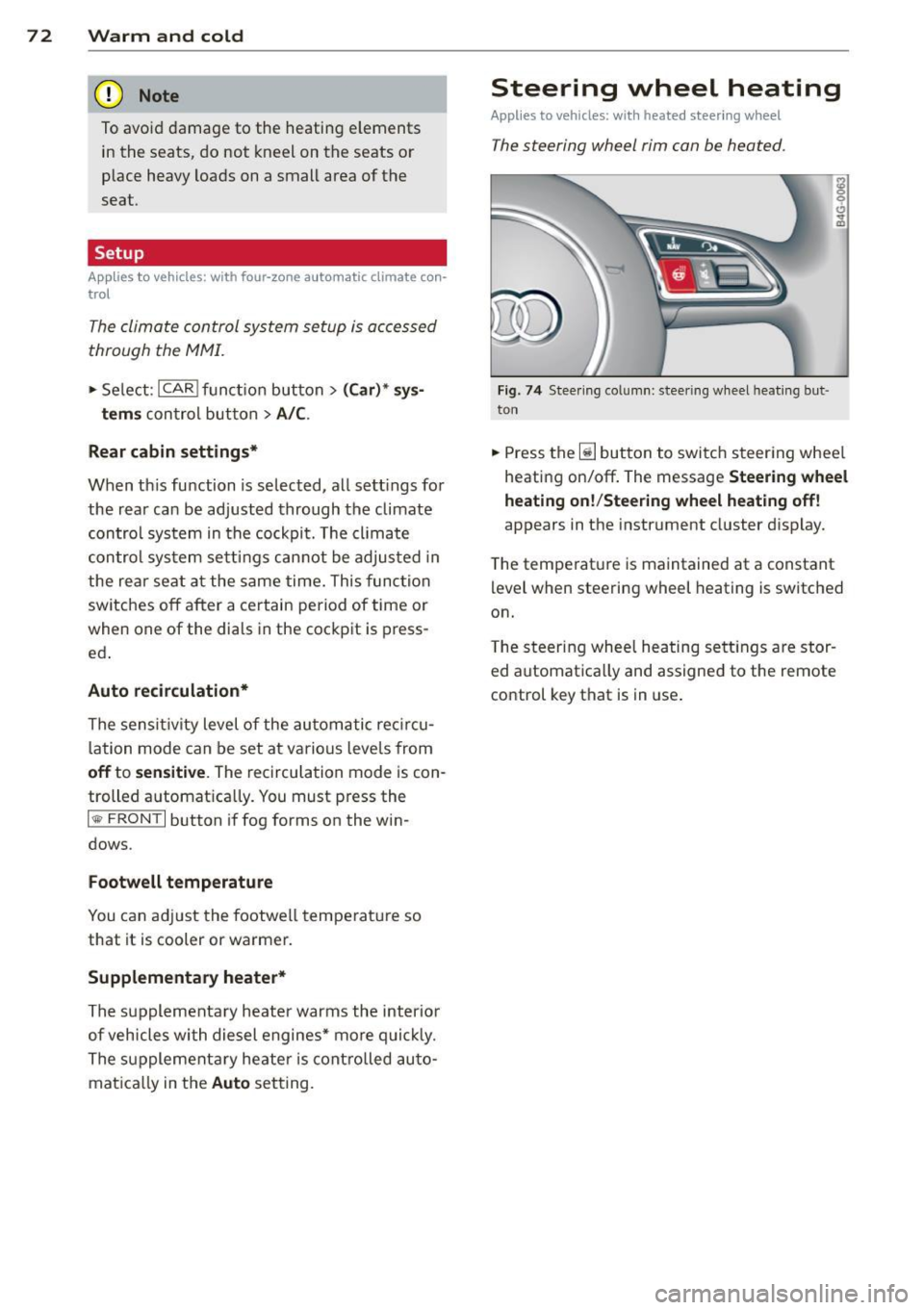
Steering wheel heating
App lies to vehicles: wi th hea ted s tee rin g wheel
The steering wheel rim can be heated .
Fig. 7 4 Stee ring co lu mn : steeri ng w hee l h ea tin g but ·
ton
.,. Press the~ button to swi tch steering whee l
heati ng on/off . The message
Steering wheel
heating on !/Steering wheel heating off !
appears in the instrument cluster d isplay.
T he temperat ure is maintained at a constant
level when steering wheel heating is switched
on.
T he steering whee l hea ting se tt ings are stor
ed automat ica lly and assigned to the remote
control key that is in use .
Page 75 of 314
M N
0 I.J "". rl I.O
"' rl
"' rl
On the road
Steering
Manually adjustable steering wheel
Applies to vehicles: with manu ally adjustable steering
w hee l
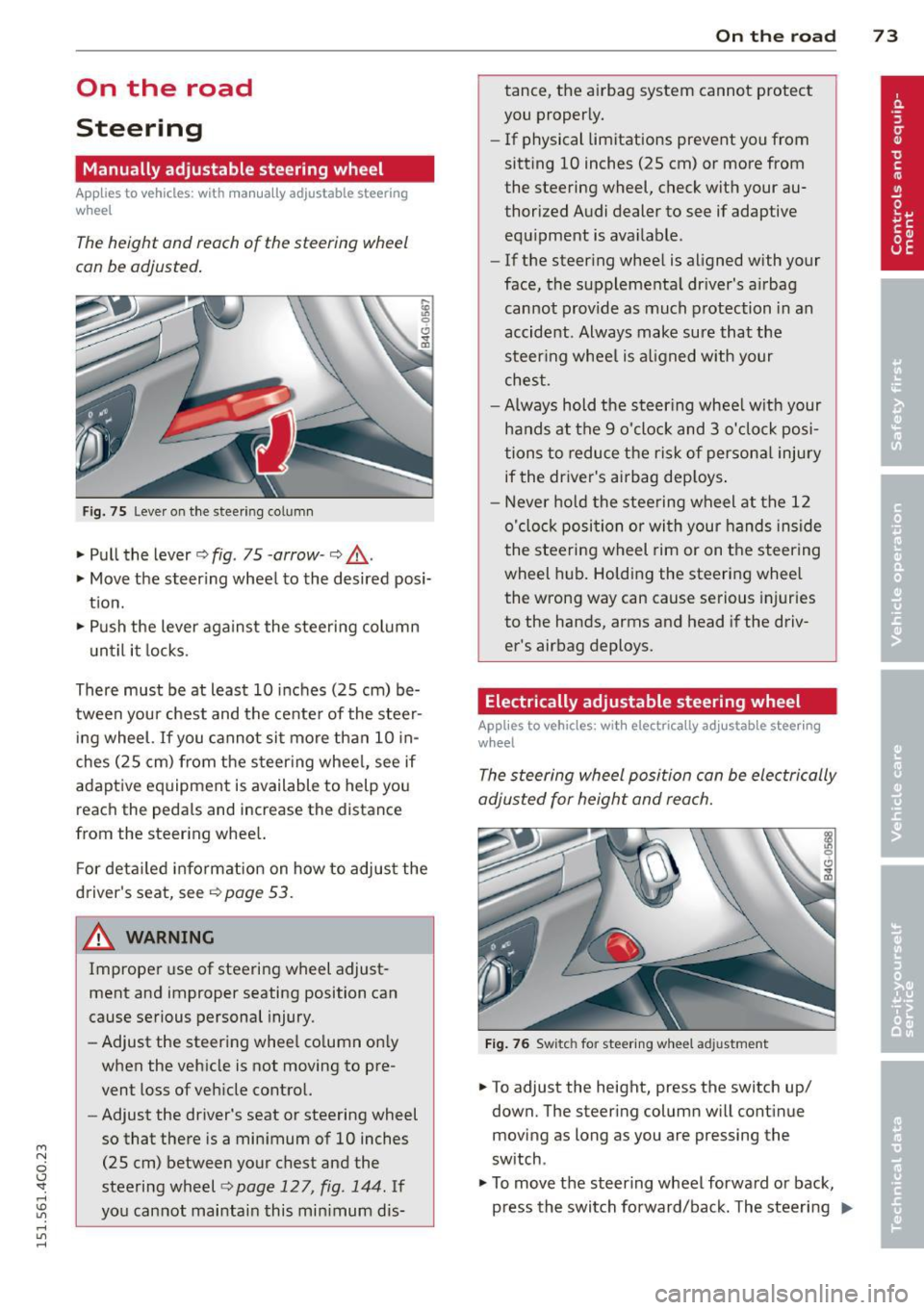
The height and reach of the steering wheel
can be adjusted .
Fig. 7 5 Lever on t he steering col umn
" Pull the lever¢ fig. 75 -arrow-¢ _&..
"Move the steer ing whee l to the desired posi
t ion.
" Push the lever aga inst the steeri ng column
u ntil it locks.
There must be at least 10 inc hes (25 cm) be
tween you r chest and the cente r of the steer
in g wheel.
If you cannot sit more than 10 in
ches (25 cm) from the s teer ing whee l, see if
adaptive eq uipment is available to help you
reach the peda ls and increase the distance
from the steer ing whee l.
F or deta iled informa tion on how to adjus t the
d river's seat, see
r::!.> page 53.
_& WARNING
Improper use of steering wheel adjust
ment and improper seating position can
cause se rious personal injury.
- Adjust the steer ing whee l co lumn on ly
when the veh icle is not moving to pre
vent loss of veh icle cont rol.
-
- Adjust the driver's seat or steering wheel
so that there is a min imum of 10 inches
(25 cm) between your chest and the
steering wheel¢
page 127, fig . 144. If
yo u cannot mai ntai n this min imum dis-
On the road 73
tance, the a irbag system cannot protect
you proper ly.
- If physical limitations prevent you from
sitting 10 inches (25 cm) or more from
the steering wheel, check with your au
thorized A udi dealer to see if adaptive
equ ipment is ava ilable.
- If the steer ing wheel is aligned with your
face , the suppleme nta l dr iver's a irbag
cannot provide as much protection in an
accident . Always make sure that the
steer ing whee l is a ligned with your
ches t.
- Always hold the ste ering whee l w ith your
hands at the 9 o'clock and 3 o'clock posi
tions to reduce the ris k of persona l injury
if the driver's airbag dep loys .
- N ever hold the stee ring wheel at the 12
o' clock posi tion or wi th your hands ins ide
the stee rin g wheel rim or on t he steering
wheel h ub. Holding the steering whee l
the wrong way can cause se rious injuries
to the hands, arms and head if the driv
er's airbag deploys.
Electrically adjustable steering wheel
App lies to vehicles: wi th electrica lly ad justable stee ring
w heel
The steering wheel position can be electrically
adjusted for height and reach.
F ig . 76 Switc h fo r steeri ng w hee l ad justment
" To adjust the height, press the switch up/
down. The steer ing column w ill cont inue
moving as long as you are pressing the
switch .
" To move t he steering wheel forwa rd or back,
press the switch forward/back. The steering
I),-
Page 76 of 314

7 4 On the road
column will continue moving as long as you
are pressing the switch.
There must be at least 10 inc hes (25 cm) be
tween you r chest and the center of the steer
ing whee l.
If you cannot sit more than 10 in
ches (25 cm) from the steering whee l, see if
adaptive equipment is available to help you reach the pedals and increase the distance
from the steer ing wheel.
F or detai led information on how to adjust the
driver's seat, see
<::> page 53 .
In vehicles with the memory f unction* , the
steering column settings are stored together
with the seat position.
A WARNING
Improper use of steering wheel adjust
ment and improper seating position can
cause se rious personal injury.
- Adjust the steer ing whee l column on ly
when the vehicle is not moving to pre
vent loss of veh icle control.
-
- Adjust the driver's seat or steering wheel
so that the re is a min imum of 10 inches
(25 cm) between your chest and the
steering wheel ¢
page 12 7, fig. 144. If
you can not maintain this min imum dis
tan ce, the airbag system cannot protect
yo u properly.
- If phys ica l limi tations prevent you from
sitting 10 in ches (25 cm) o r more from
the steering wheel, check with yo ur au
tho rized Aud i dealer to see if adaptive
equipment is availab le .
- If the steering wheel is aligned with you r
face, the supp lemental drive r's airbag
cannot provide as much protect ion in an
acc ident. A lways make sure that the
steering wheel is aligned with your
chest.
- Always hold the steering wheel with your
hands at the 9 o'clock and 3 o'clock posi
t ions to reduce the risk of pe rsonal injury
if the d river 's airbag deploys.
- Never hold the steering whee l at the 12
o'clock posit ion or w ith your hands i nside the steering wheel rim or on the steering
wheel hub. Hold
ing the steer ing wheel
the wrong way can cause serious injuries
to the hands, arms and head if the driv
er 's airbag deploys.
Easy entry feature
Applies to vehicles: with electrically adjustable steering
wheel
The easy entry feature makes it easier to en
ter and exit the vehicle by automatically ad
justing the steering wheel.
.. Select in the MM I: ICARI function button>
(Car )* sys tem s control b utton > V ehicle set
ting s
> Seats > D rive r's seat > Easy entry >
On .
When the easy ent ry feature is turned on, the
steering wheel moves up to the park position
when you switch
off the ignition. After you en
ter the veh icle, the steering wheel moves to
the stored position as soon as you sw itch on
the ignit ion.
Starting and stopping
the engine
Starting the engine
This button switches on the ignition and
starts the engine.
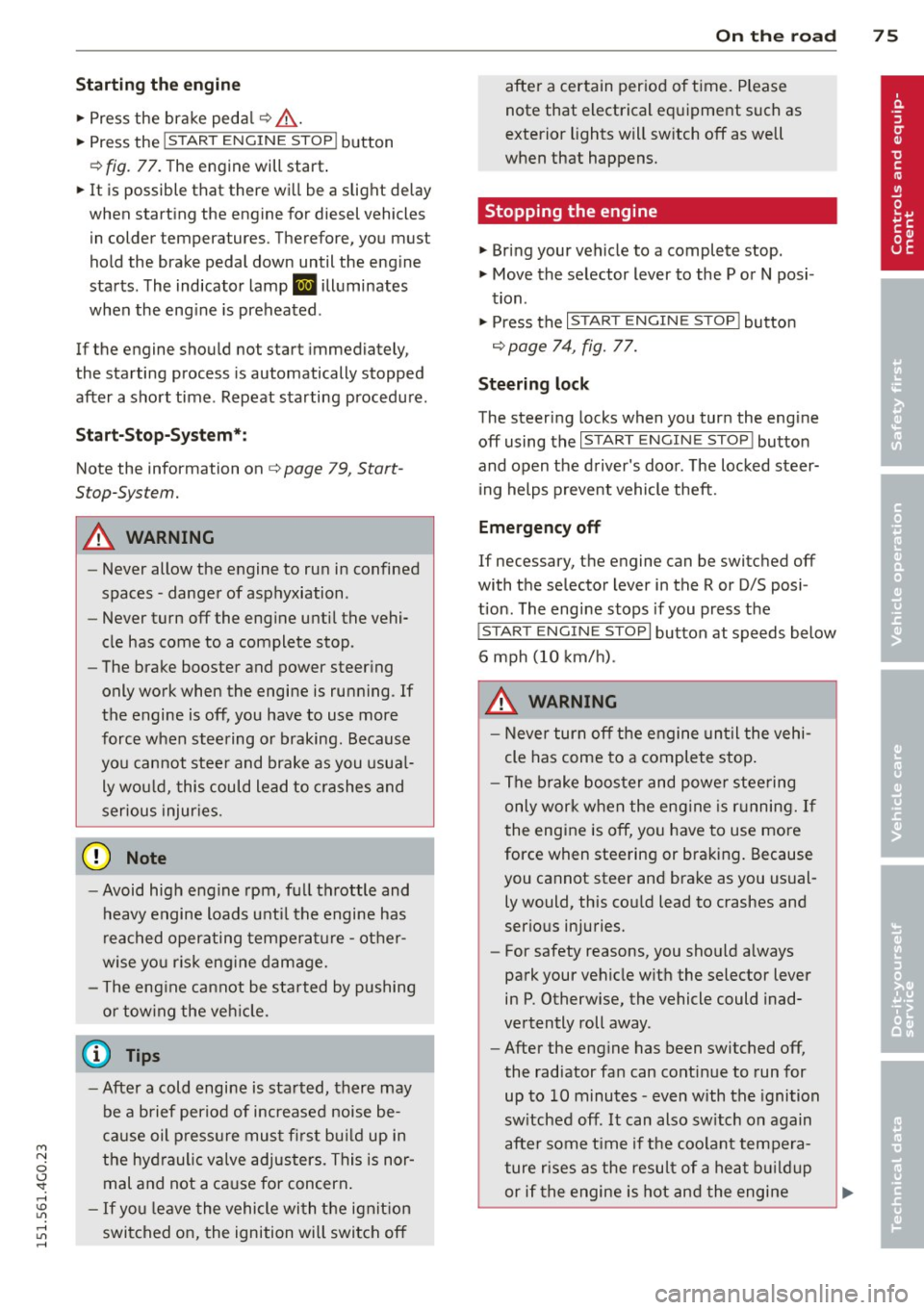
Fig . 77 Center console: S TART ENGINE S TOP butto n
Switching the ign ition on /off
.. To switch the ign ition on/off, press the
I STAR T ENGINE ST OPI button . Do not press
the brake pedal while doing this . Diesel
veh icles are preheated while the ignit ion is
sw itched on .
lilJ,
Page 77 of 314
M N
0 <.J 'SI: ,...., \!) ..,.,
,...., ..,., ,....,
Starting the engine
"'Press the brake pedal c::> _&..
"'Pr ess the !START ENGINE STOPI button
c::> fig. 77. The engi ne will start.
"' It is possible that there will be a slight delay
when starting the engine for diesel vehicles
in colder temperatures. Therefore, you must
hold the brake pedal down until the engine
starts. The indicator lamp
Ii illuminates
when the engine is preheated.
If the engine should not start immedi ately,
the starting process is automatically stopped
after a short time . Repeat starting procedure.
Start-Stop-System*:
Note the information on c::> page 79, Start
Stop-System.
A WARNING
- Never allow the engine to run in confined
spaces -danger of asphyxiation .
- Never turn off the engine until the vehi
cle has come to a complete stop.
- The brake booster and power steering
only work when the engine is running.
If
the engine is off, you have to use more
force when steering or braking. Because
you cannot steer and brake as you usual
ly would, this could lead to crashes and
serious injuries.
-Avoid high engine rpm, full throttle and
heavy engine loads until the engine has
reached operating temperature - other
wise you risk engine damage.
- The engine cannot be started by pushing
or towing the vehicle.
(D Tips
-After a cold engine is started, there may
be a brief period of increased noise be
cause oil pressure must first build up in
the hydraulic valve adjusters. This is nor mal and not a cause for concern.
- If you leave the vehicle with the ignition
switched on, the ignition will switch off
On the road 75
after a certain period of time. Please
note that electrical equipment such as
exterior lights will switch off as well
when that happens.
Stopping the engine
"'Bring your vehicle to a complete stop.
"' Move the selector lever to the P or N posi
tion .
"'Press the
I STAR T ENGINE ST OP I button
c::> page 7 4, fig. 77.
Steering lock
The steer ing locks when you turn the engine
off using the
I STAR T ENGINE STOP I button
and open the driver's door. The locked steer ing helps prevent vehicle theft.
Emergency off
If necessary, the engine can be switched off
with the selector lever in the R or D/S posi
tion. The engine stops if you press the
I START ENGINE STOPI button at speeds below
6 mph (10 km/h).
A WARNING
-Never turn off the engine until the vehi
cle has come to a complete stop.
- The brake booster and power steering
only work when the engine is running. If
the engine is off, you have to use more
force when steering or braking. Because
you cannot steer and brake as you usual
ly would, this could lead to crashes and
serious injuries.
- For safety reasons, you should always
park your vehicle with the selector lever
in P. Otherwise, the vehicle could inad
vertently roll away.
- After the engine has been switched off,
the radiator fan can continue to run for
up to 10 minutes -even with the ignition
switched off.
It can also switch on again
after some time if the coolant tempera
ture rises as the result of a heat buildup
.
or if the engine is hot and the engine .,..
Page 81 of 314
soon as the switch(®) is released, or the accel
erator pedal is depressed, emergency braking
stops.
.&_ WARNING
Emergency braking should only be used in
an emergency, when the normal foot brake
has failed or the brake pedal is obstructed .
Using the parking brake to perform emer
gency braking will slow your vehicle down
as if you had made a full brake applicat ion.
The laws of physics cannot be suspended
even with ESC and its associated compo
nents (ABS, ASR, EDL). In corners and
when road or weather conditions are bad
'
a full brake application can cause the vehi-
cle to skid or the rear end to break away -
r isking an accident.
Start-Stop-System
Description
Appl ies to vehicles : wit h Start-Stop-System
The Start-Stop-System can help increase fuel
economy and reduce CO
2 emissions.
I n the Start-Stop-mode, the engine shuts off
automatically when the vehicle is stopped,
such as at a traffic light. The ignit io n remains
sw itched on dur ing th is stop phase. The en
gine will be automatically restarted when
needed.
The last Start-Stop-System setting (on/off us
ing the button
l
l --1 but
ton turns on when the Start-Stop-System is
switched off manually.
Basic requirements for the Start-Stop
mode
- The driver's door is closed .
- The driver' seat belt is latched.
- The hood is closed.
- T he veh icle must have been driven faster
~ than 2.5 mph (4 km/h) since the last stop.
~ -A tra iler is not hitched to the veh icle.
rl I.O
"' rl
"' rl
On the road 79
.&_ WARNING
-Never let the vehicle roll with the engine
sw itched off . You could lose control over
the vehicle. This can lead to a collision
and serious injuries.
- The brake booster and the steering sup
port do not work while the engine is
sw itched off. More force is required to
stop and to steer the vehicle.
- To reduce the risk of injuries, make sure
that the Start-Stop-System is turned off
when working in the eng ine compart
ment ¢
page 81.
(D Note
Always switch off the Sta rt-Stop-System
when driving through water¢
page 81.
Starting/stopping the engine
Applies to vehicles: w ith Start -Stop-System
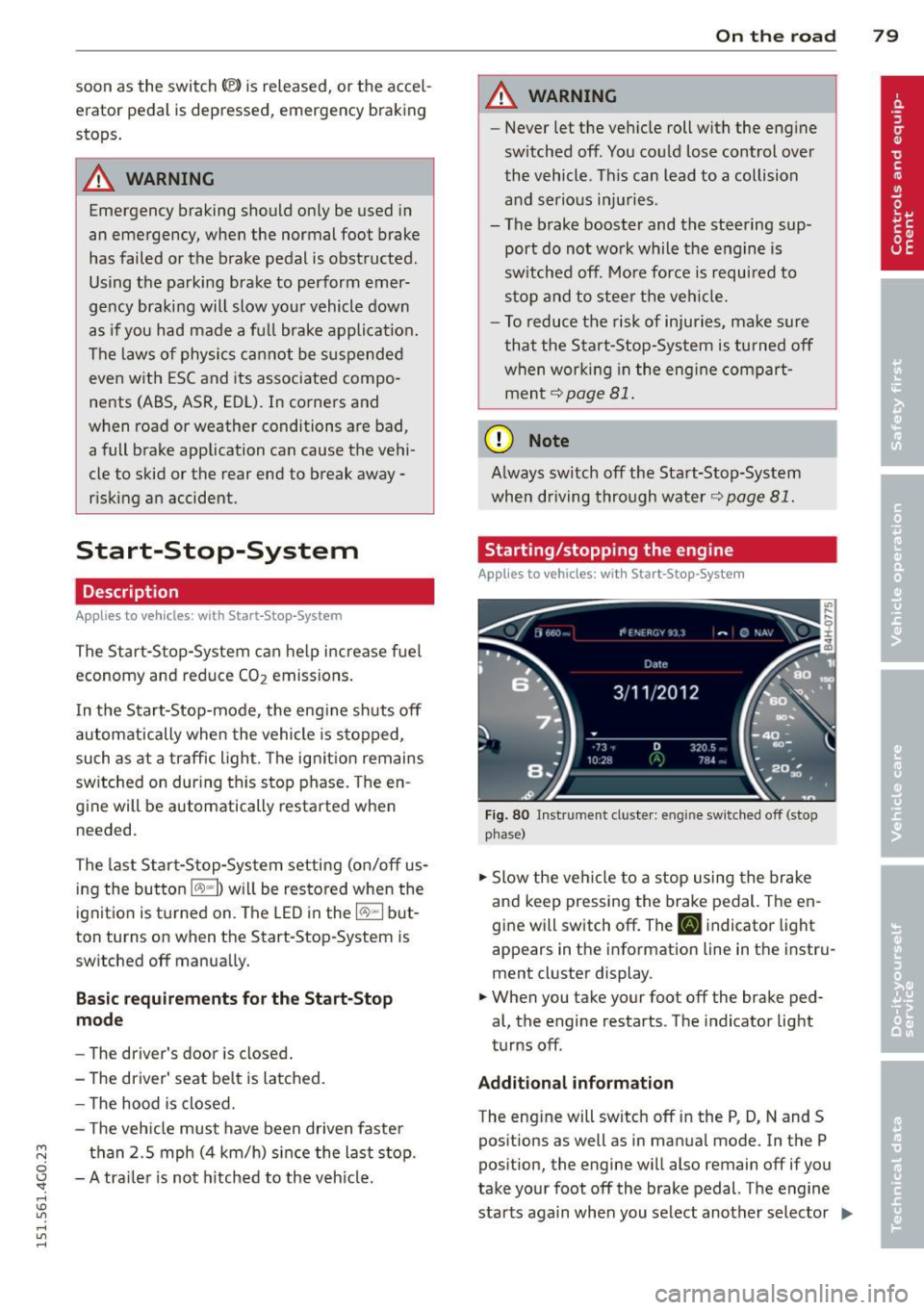
Fig. 80 Instrument cluste r: engine sw itched off (stop
p hase)
.,. Slow the vehicl e to a stop using the brake
and keep pressing the brake pedal. The en
gine will switch off. The
tlJ indicator light
appears in the information line in the instru
ment cluster display.
.. When you take your foot off the brake ped
al, the engine restarts. The indicator light
turns off.
Additional information
The eng ine will switch off in the P, D, N and S
positions as well as in manual mode. In the P
position, the engine will also remain off if you
take your foot off the brake pedal. The engine
starts aga in when you select another selector ..,_
Page 82 of 314
80 On the road
lever position and take your foot off the brake
pedal.
If you select the R position during a Stop
phase, the engine will start again.
Shift from
D to P quickly to prevent the engine
from starting unintentionally when shifting
through
R.
You can determine for yourself if the engine
will stop or not by reducing or increasing the
amount of force you use to press the brake
pedal. For example, if you only lightly press
on the brake pedal in stop-and and-go traffic
or when turning, the engine will not switch off
when the vehicle is stationary. As soon as you
press the brake down harder, the engine will
switch off.
General information
App lies to vehicles: with Start-Stop-System
The standard Start-Stop-mode can be cancel
led for different system-related reasons.
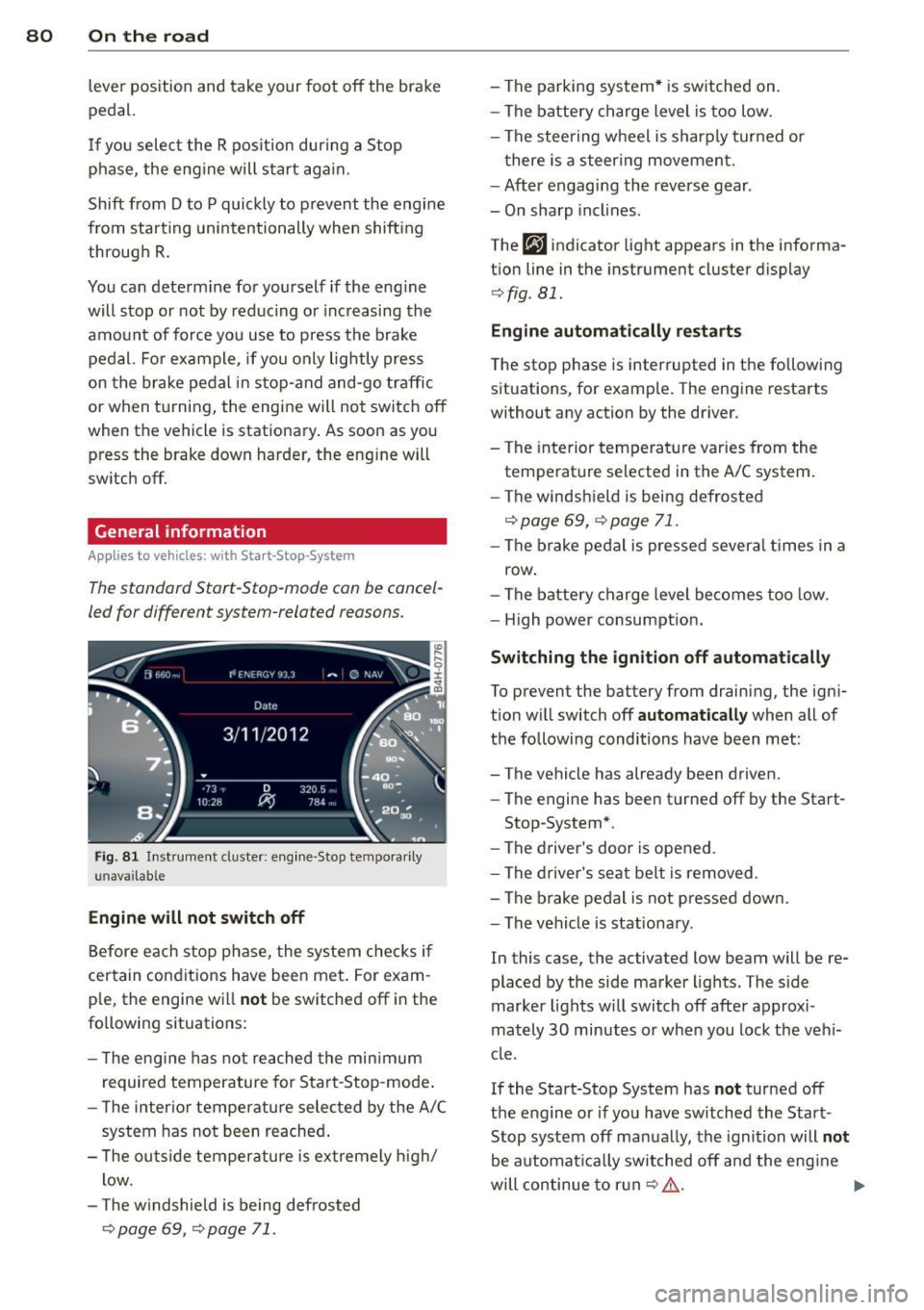
Fig . 81 Instrument cluster: engine -Stop tempo rarily
unava ilable
Engine will not switch off
Before each stop phase, the system checks if
certain conditions have been met. For exam·
ple, the engine will
not be switched off in the
following situations:
- The engine has not reached the minimum
required temperature for Start-Stop-mode.
- The interior temperature selected by the A/C
system has not been reached.
- The outside temperature is extremely high/
low .
- The windshield is being defrosted
¢ page 69, ¢ page 71.
-The parking system* is switched on.
- The battery charge level is too low.
- The steering wheel is sharply turned or
there is a steering movement.
- After engaging the reverse gear .
- On sharp inclines.
The
fjJ indicator light appears in the informa
tion line in the instrument cluster display
¢fig . 81.
Engine automatically restarts
The stop phase is interrupted in the following
situations, for example. The engine restarts
without any action by the driver.
- The interior temperature varies from the
temperature selected in the A/C system.
- The windshield is being defrosted
c:!;> page 69, ¢ page 71.
-The brake pedal is pressed several times in a
row.
- The battery charge level becomes too low.
- High power consumption.
Switching the ignition off automatically
To prevent the battery from draining, the igni
tion will switch off
automatically when all of
the following conditions have been met :
- The vehicle has already been driven.
- The engine has been turned off by the Start-
Stop-System*.
- The driver's door is opened.
- The driver's seat belt is removed .
- The brake pedal is not pressed down.
- The vehicle is stationary.
In this case, the activated low beam will be re
placed by the side marker lights. The side
marker lights will switch off after approxi
mately
30 minutes or when you lock the vehi
cle.
If the Start-Stop System has
not turned off
the engine or if you have switched the Start
Stop system off manually, the ignition will
not
be automatically switched off and the engine
will continue to run
c:!;> ,&. .,..
Page 89 of 314
Audi adaptive cruise control and braking guard 87
tachometer @and is also shown briefly in
the display @
c::> fig. 90.
.. You must also press the brake pedal when
the vehicle is stopped.
Switching adaptive cruise control off
.. Push the lever away from you into position
@ until it clicks into place. The message
ACC off appears.
@ Indicator lights
II-Adaptive cru ise contro l is switched on.
No vehicles are detec ted up ahead. The stored
speed is ma intained.
• -A moving vehicle is detected up ahead.
The adaptive cruise control system regulates
the speed and distance to the moving vehicle
ahead and acce lerates/brakes automatical ly.
fit -Adaptive cruise contro l is switched on. A
mov ing vehicle up ahead was detected. Your
vehicle remains stopped.
• -When automatic brak ing is not able to
keep enough distance to a previously detected
moving vehicle up ahead, you must take con
trol and brake
c::> page 89, Prompt for driver
intervention.
© Display
If adaptive cruise control is not shown in the
d isp lay, you can call it up with the multifunc
tion steering wheel buttons
c::> page 24.
Based on the symbols in the d isplay, you can
determine if the system is maintaining a dis
tance to the vehicle ahead and what that d is
tance is.
No vehicle -No veh icle ahead was detected .
White vehicle -A vehicle ahead was detected.
Red vehicle -Prompt for the driver to take ac
tion
c::> page 89.
Both arrow s on the scale© indicate the dis
tance to the vehicle ahead. No arrow appears
~ when the vehicle is on an open road and there
0
~ is no object ahead . If an object is detected
:;, ahead , the arrow moves on the scale .
"' ,....,
"' ,....,
The green zone on the scale shows the stored
distance. For information on changing the
stored distance, refer to
c::> page 88 . If the
distance selected is too close or may soon be
come too close, the arrows move into the red
zone on the sca le .
A WARNING
Improper use of the adaptive cruise con
trol can cause collisions, other accidents
and serious personal injur ies .
- Pressing the
!SET ! button when driv ing at
speeds below 20 mph (30 km/h), will au
tomatically accelerate the vehicle to 20
mph (30 km/h), which is the minimum
speed that can be set.
(D Tips
-If you switch the ignit ion or the adaptive
cruise control off, the set speed is erased
from the system memory.
- Th e elec tronic stab ilization control (ESC)
and the anti-slip-regulation (ASR) are au
tomatically turned on when the adaptive
cruise control is turned on. Both systems
cannot be turned off if the adaptive
cruise contro l is turned on.
Changing the speed
Applies to veh icles: with Audi adaptive cruise control
0
f
• 0
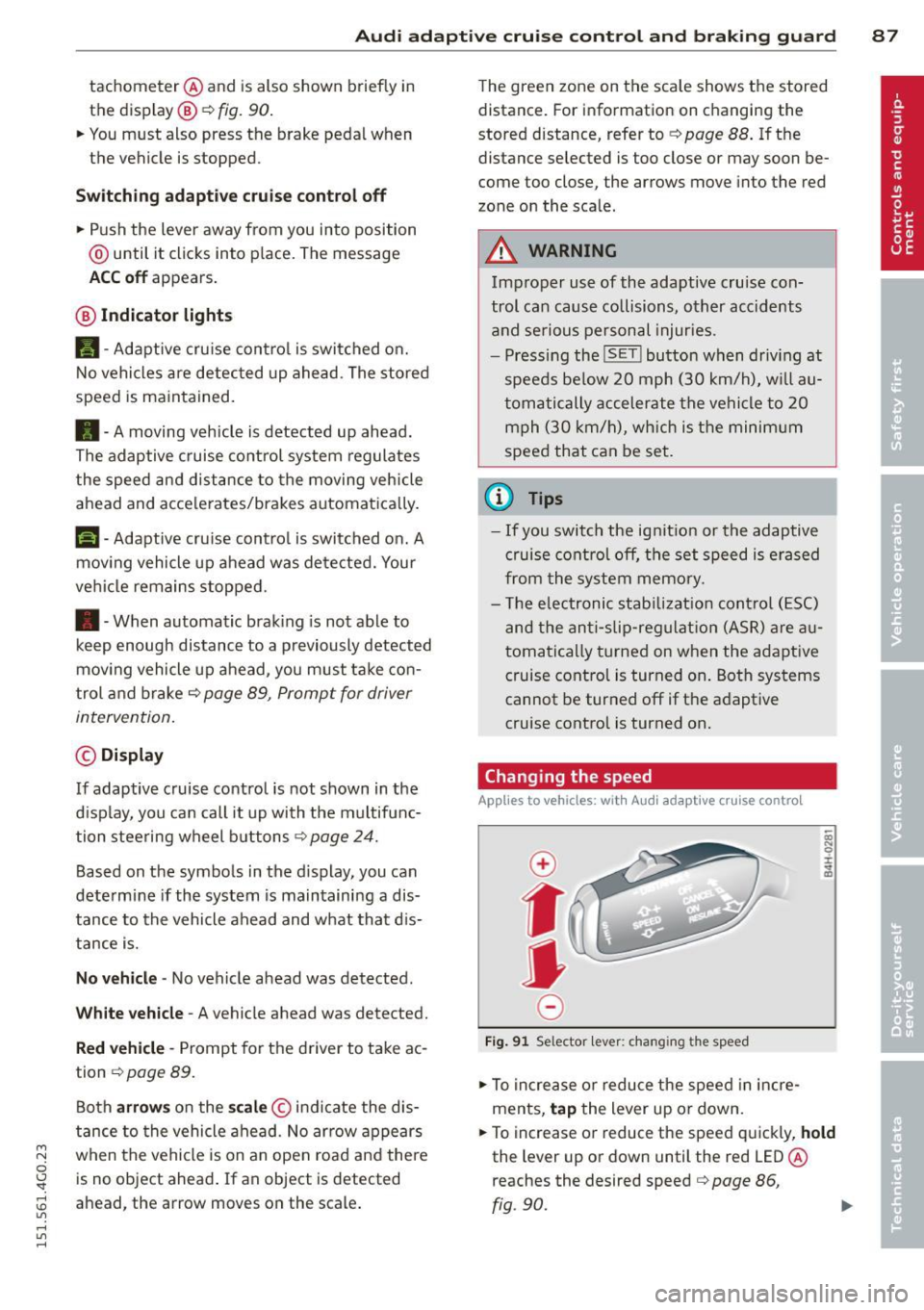
Fig. 91 Selector lever: chang ing the speed
.. To increase or reduce the speed in incre
ments,
tap the lever up or down.
.. To increase or reduce the speed quickly,
hold
the lever up or down until the red LED @
reaches the desired speed
c::> page 86,
fig .90.
~
Page 95 of 314
M N
0 <.J 'SI: ,...., \!) 1.1'1 ,...., 1.1'1 ,....,
Audi active Lane assist
Active Lane assist
Description
Applies to vehicles: with active lane assist
Active lane assist helps you keep your vehicle
in your lane.
Active lane assist detects lane marker lines
within the limits of the system using a camera in the windshield . If you are approaching a de
tected lane marker line and it appears likely
that you w ill leave the lane, the system will
warn you by means of corrective steer ing . T he
driver can over ride the cor re ct ive steer ing at
any time. If the veh icle crosses a line, the d riv
er is also warned by a light
vibration in the
steering whee l. The vibration warning must
be switched on in the MMI for this to happen.
Active lane ass ist is operable when the line
marking the lane is detected on at least one
side of the vehicle .
If the system is in active standby mode and
the turn signa l is activated before driving over
the lane marker line, the warning does not oc
cur since the system allows for intentional lane changes .
The system is designed for driv ing on free
ways and expanded highways and thus works
only at speeds of 40 mph (65 km/h) or more .
If the vehicle is also equipped with Audi adap
tive cruise control*, the corrective steering
will be more specif ic in regard to the driving
situation . In addition to the lane marker lines,
the system can a lso take into acco unt other
objects such as guard rails. If they are detect
ed i n close proximity to the veh icle, Audi a c
tive lane ass ist helps prevent the vehi cle from
driving too close to them . The re is also pass
ing assistance. The system does not provide
any corrective steering if it detects that you
are passing another vehicle.
A WARNING
- The system warns the driver that the ve
hicle is leaving the lane us ing corrective
Audi acti ve lane a ssis t 93
steer ing. The driver is always responsible
for keeping the vehicle within the lane.
- The system can assist the driver in keep
ing the vehicle in the lane, but it does
not steer by itself. A lways keep your
hands on the steering wheel.
- Corrective steering may not occur in cer tain sit uat ions, such as dur ing heavy
brak ing.
- The camera does not recognize all lane
marker lines. Corrective steer ing can only
take p lace on the side of the vehicle
where lane marker lines are detected .
- Other road structures or objects cou ld
possibly be identified un intent ionally as
lane ma rker lines. As a result, cor rect ive
steer ing may be unexpected or may not
oc cur .
- The camera view can be restricted, for
examp le by vehicles driving ahead o r by
r ai n, snow, heavy spray or light s hining
into the camera. This can result in a ctive
lane assist not detecting the lane marke r
lines or detect ing them inco rrectly .
- Unde r ce rtain condi tions such as ruts in
the road, a banked roadway or cross
winds, the corrective stee ring alone may
not be enough to keep the vehicle in the
lane.
- For safety reasons, active lane ass ist
must not be used when there are poor
road and/or weather condit ions such as
slippery roads, fog, gravel, heavy rai n,
snow and the potent ial for hydroplaning .
Using act ive lane assist under thes e con
ditions may increase the risk of a crash.