steering AUDI A6 2015 Owner's Manual
[x] Cancel search | Manufacturer: AUDI, Model Year: 2015, Model line: A6, Model: AUDI A6 2015Pages: 314, PDF Size: 77.57 MB
Page 96 of 314
94 Audi active lane assist
Activating and deactivating
A pp lies to vehicles: with active lan e assis t
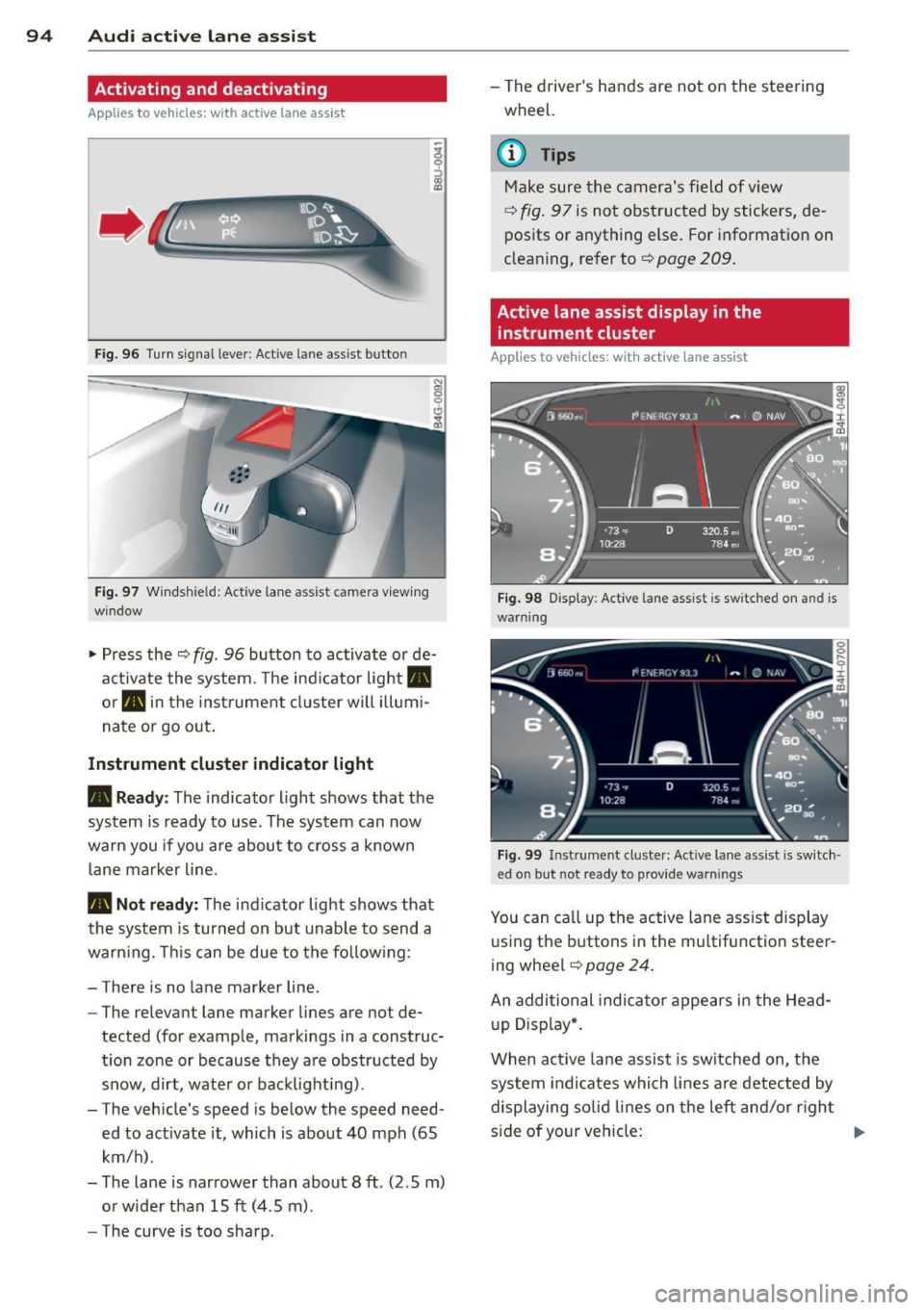
Fig. 96 Turn signal leve r: Active lan e ass ist butto n
Fig. 97 Windshie ld: Active lane assist ca mera viewing
wi ndow
-
I
~ Press the ¢ fig. 96 button to activate or de
activate the system. The indicator light .
or . in the instrument cluster will illumi
nate or go out.
Instrument cluster indicator light
• Ready: The indicator light shows that the
system is ready to use . The system can now
warn you if you are about to cross a known
lane marker line .
• Not ready: The ind icator light shows that
the system is turned on but unable to send a
warning . This can be due to the following :
- There is no lane marker line .
- The relevant lane marker lines are not de-
tected (for example, markings in a construc
tion zone or because they are obstructed by
snow, dirt, water or backlight ing).
- The vehicle' s speed is below the speed need
ed to activate it, which is about 40 mph (65
km/h) .
- The lane is narrower than about 8 ft . (2 .5 m)
or wider than 15 ft (4 .5 m).
- The curve is too sharp . - The driver's hands are not on the steering
wheel.
(D Tips
Make sure the camera's field of view
¢fig. 97 is not obstructed by stickers, de
posits or anything else. For information on
cleaning, refer to¢
page 209.
Active lane assist display in the
instrument cluster
App lies to vehicles: wit h act ive lane assist
Fig. 98 Display : Activ e la ne ass is t i s s witc hed on and is
warning
Fig. 99 Instrume nt cl ust er: Act ive lane a ssist is switch ·
ed o n but no t re ady to pro vid e wa rning s
You can call up the active lane assist display
using the buttons in the multifunction steer
ing wheel ¢
pag e 24.
An additional indicator appears in the Head
up Display*.
When active lane assist is switched on, the
system indicates which lines are detected by
displaying solid lines on the left and/or right
side of your vehicle: .,..
Page 97 of 314
M N
0 <.J 'SI' ,...., \!) 1.1'1 ,...., 1.1'1 ,....,
White Active l ane assist is sw itched on
line(s) and ready to p rov ide warnings
on the side that is ind icated
¢ fig. 98.
Red line Act ive lane assist is warning you
(left or that you are about to leave your
right) lane
¢ fig . 98. In addition, the
steeri ng wheel vibrates s light ly.
Gray Act ive l ane assist is switched on
line(s) but is not ready to provide warn-
ings
¢ fig . 99.
Mes sages in the instrument clu ster
display
When the active lane ass ist turns off automat
i cally, the i nstrument cluster ind icator goes
out and one of the fo llow ing messages ap
pears on the display :
Audi active lane a ssist : Currently un availa
bl e. No camera view
This message appears if the camera is no lon
ger funct ional after the system has cont inous
ly failed to detect the lane markings . This
could happen if :
- The camera field of view¢
page 94, fig. 97
is d irty or covered in ice. Clean the area on
the windshie ld.
- The camera field of view is fogged over. Wait
until the fog has cleared before switching
active lane assist on .
- The system has been unable to detect the
lanes for an extended period of time due to
road cond it ions . Switch active lane ass ist
back on when the lines are more visible .
Audi active lane a ssist : Currently un available
A temporary ma lf u nction is preventing lane
assist from operating. Try sw itching active
lane assist on again later.
Audi acti ve lane a ssist : S ys tem fault!
Drive to you r autho rized Aud i dea le r soon to
h ave the ma lfunction co rrec ted.
Audi active lane a ssis t: Pl ea se take over
s te ering
Audi acti ve lane a ssis t 95
This message appears if yo u do not s teer the
vehicle yourself . If this is the case, active lane
ass ist does not switch off, b ut it does sw itch
to the "not ready" stat us. The system can help
you keep the ve hicle in the lane. However it is
your own responsibility to steer and control
t h e ve hicle .
Setting the steering wheel vibration
Applies to vehicles: with active lane assist
11> Select: !CAR ! function button> (Car )* sys
tem s
control button > Driver a ssis t > Audi
a ctive lan e as sis t.
You can switch the vibrat ing warn ing in t he
stee ring wheel
o n or off .
(D Tips
Your setting is a utomat ically stored and
assigned to the remo te control key being
used.
Page 102 of 314
100 Audi drive select
Audi drive select
Driving settings
Introduction
Aud i d rive select mak es it possible to expe ri
ence diffe ren t types of vehi cle se ttin gs i n o ne
ve hicl e. The dr ive r can se lect th ree
Comfort ,
Auto and Dynamic modes in the M MI to
switch between a sporty and a comforta ble
driving mo de.
You c an a lso a djust the setti ng according to
your p re ferences in the
Individual mode . F o r
examp le, you ca n combine settings such as a
sporty en gine t uning with comfortab le steer
ing.
A WARNING
Improper use of the A udi drive select can
cause collisions, ot her acc idents and se ri
ous personal injury.
Description
The follow ing systems a re affected by dr ive
se lect:
Engine and transmission
Depending on the mode, the engine and the
tra nsmission respond quicker or in a more bal
a nced manner to acce lerator pedal move
men ts. I n the sporty dynamic mode, the
tra nsmission sh ifts at highe r RPMs.
Air suspension*
The adaptive air suspension/adaptive air sus
pe nsion sport*
(A ir suspension in the MMI) is
an e lec tronically con tro lled air suspens ion and
d ampi ng sys tem. Th ey are adjusted depe nd
ing on the se lected driving mode, the dr ive r's
steer ing, br aki ng and acceler ation inpu t and
the road s urface, ve hicle speed an d load . A
sporty se tting is generally use d in vehicl es
with a daptive ai r suspension s port* .
The vehicle clea rance v aries depe nd ing on the
se lec ted mode and the speed . T
he hig hway setting is act ivated automat ically
whe n you drive above 7 5 mph (120 km/ h) for
m ore than
30 seconds in the Auto or Dynamic
mode. The g ro und clearance is increased a uto
matically if the speed drops below
44 mph
(70 km/h) for more than 120 seconds .
Steering
The steering adapts in terms of steering effort
and steering ratios. Indirect steering that
moves easily, like the steer ing in comfort
m ode, is best suited to lo ng drives o n a hig h
way. In contrast, dynamic mode provides spo rty, direct steer ing .
The following applies to veh icles with dynamic
steering* : the steer ing rat io changes based on
vehicle speed in orde r to ma inta in optimum
stee ring effort for the dr ive r at all times . This
sets the stee ring to be less sens itive at h igher
speeds in order to provide improved vehicle
co ntrol. At reduced spee ds, howeve r, s teer ing
is mo re d ire ct in order to keep the stee ring ef
fort as minima l as poss ible when the drive r is
mane uve rin g the vehicle. At low and average
speeds, dynamic steering addit iona lly pro
vides more responsive steeri ng performance.
Sport differential*
As a component o f the all whee l dr ive system
(quatt ro)
¢ page 197, the Sport differential *
dist ributes t he d riving power to the rear ax le
depend ing on the sit uat ion . The distrib ution
of power var ies depending on the selected
mode, from balanced (comfo rt) to agile (dy
nam ic) . The goal is a h igh level of ag ility and
abili ty to acce lera te on curves . Th e veh icle is
very respons ive to stee ring.
Curve light*
The curve light adapts to driving on curves.
The pivoting act io n and the lighting are also
adapt ed to the mode.
Adaptive cruise control*
The behav ior when accelerating can be adjust
ed from comfortab le to sporty, depending on
the drive select mode . Adaptive cru ise contro l
also responds to the driv ing behavior o f the
IJI,,
Page 103 of 314
M N
0 I.J "". rl I.O
"' rl
"' rl
vehicle ahead in a more conservative or sporty manner .
Engine sound*
The sou nd of the engine is adapted to these
lec ted mode and ranges from subtle to sporty.
(D Note
- Make sure there is eno ugh clearance
above and below the veh icle when park
i ng. The height of the vehicle can change
once it is parked due to temperature
fluctuations, changes to the load condi
tions and changes to the driving modes,
which can affect clearance.
- When transporting the vehicle on a car
carrier, train, ship or by other means, on
ly tie the vehicle down at the running
surface of the tires, which is the outer
circumference. Secur ing the vehicle at
the axle components, suspension struts
or tow ing eyes is not permitted because
the pressure in the air suspension struts
can change d uring transpor t. The vehicle
may not be sec ured s uff icient ly if this
happens.
- If you are going to tow a trailer, you
must activate the trailer ope rat ion mode
¢page 205 .
@ Tips
-In some mode ls, the m axim um vehicle
speed can on ly be reached in the Auto
and Dynami c modes.
- Se lecting the Dynami c mode results in
sporty shifting characteristics . The S
gear position engages automatically .
- In vehicles with sport differential*, the
D ynamic mode is deactivated when tow
ing a trai ler .
- In vehicles that have dynamic steering*,
operating noise is heard when starting or
Audi dri ve sele ct 101
stopping the engine. This does not indi
cate a prob lem .
Selecting the driving mode
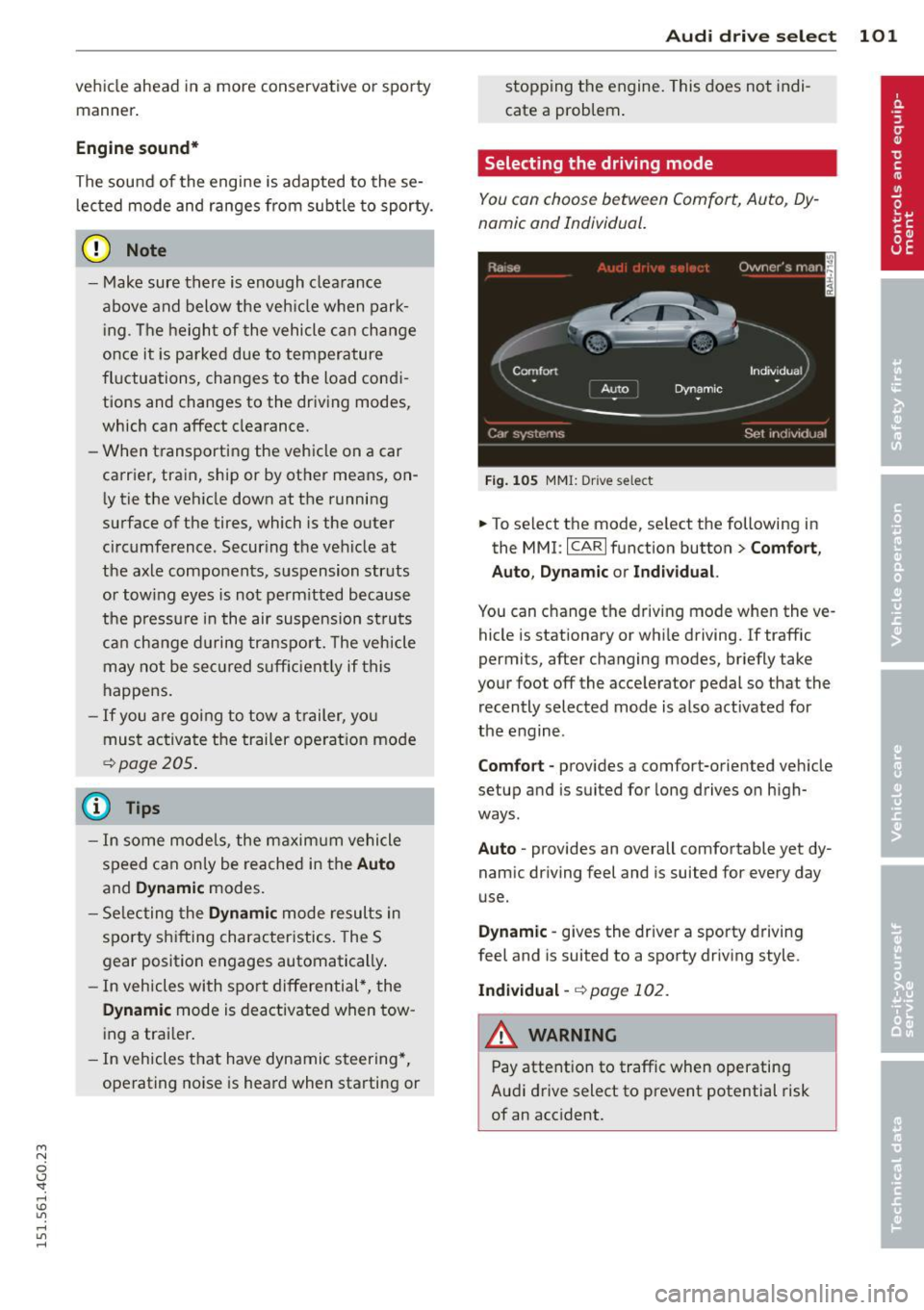
You con choose between Comfort, Auto, Dy
namic and Individual.
F ig . 1 05 MMI: Drive select
.,. To select t he mode, se lect the following in
the MMI : ICARlfunction button> Comfort,
A uto , Dynamic or In d iv idual.
You can c hange the driving mode when the ve
hicle is stationary or whi le driving. If traffic
permits, after changing modes, briefly take
your foot off the acce lerator pedal so that the
recently selected mode is also activated for
the engine .
Comfo rt -provides a comfort-oriented vehicle
setup and is suited fo r long drives on high
ways .
Auto -provides an overall comfortable yet dy
namic dr iving feel and is suited for every day
use.
D ynamic -gives the driver a sporty driving
feel and is suited to a sporty driv ing style .
Indi vidual -
¢ page 102.
WARNING
Pay attention to traffic when operating
Audi drive select to prevent potential risk
of an accident.
Page 104 of 314
102 Audi drive select
Adjusting the Individual mode
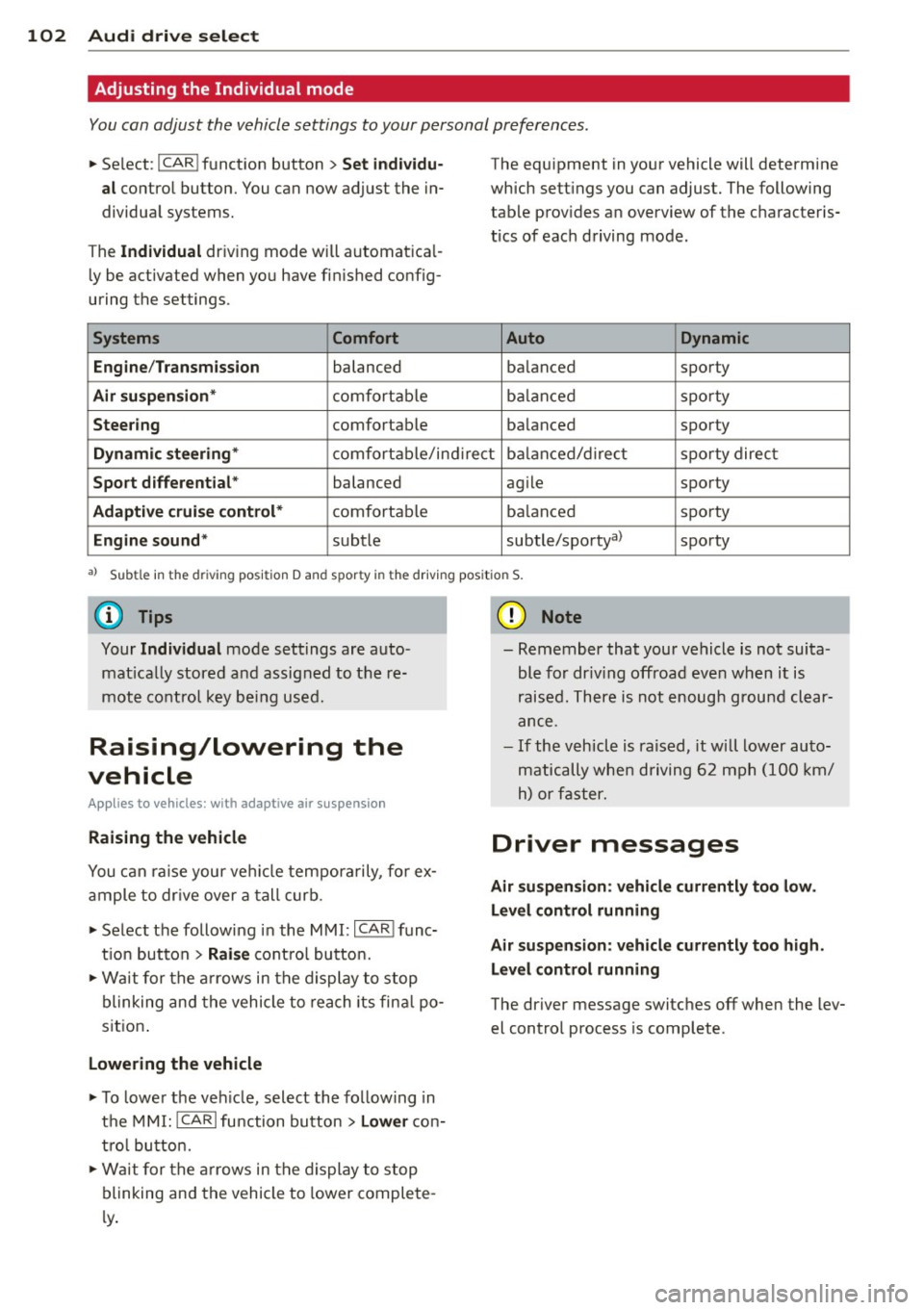
You can adjust the vehicle settings to your personal preferences .
• Se lect : I CAR ! function button > Set individu
al
control button. You can now adjust the in
dividual systems.
The
Individual dr iving mode will automatica l
ly be activated when you have finished config
uring the settings .
Systems Comfort
Engine /Transmission
balanced
Air suspension* comfortable
Steering comfortable The equipment
in your vehicle will determine
which settings you can adjust. The following
table provides an overview of the characteris
tics of each driving mode.
Auto Dynamic
balanced sporty
balanced sporty
balanced sporty
Dynamic steering* comfortable/indirect balanced/direct sporty direct
Sport differential * balanced agile sporty
Adaptive cruise control* comfortable balanced sporty
Engine sound* subtle
subtle/sportya> sporty
al Sub
tle in th e d riv in g po sit ion D an d sp or ty in t he driving pos itio n S.
Your Individual mode settings are auto
matically stored and assigned to the re
mote control key being used.
Raising/lowering the
vehicle
Appl ies to vehicles : wit h adapt ive a ir suspe nsion
Raising the vehicle
You can ra is e your veh icle temporarily, for ex
ample to drive over a tall curb.
• Select the following in the MMI:
ICARI func
t ion button
> Raise control button.
• Wait for the arrows in the display to stop
blinking and the vehicle to reach its fina l po
sit ion .
Lowering the vehicle
• To lower the vehicle, select the following in
the MMI:
!CARI function button > Lower con
tro l button.
• Wait for the arrows in the display to stop
blinking and the vehicle to lower complete
l y .
(D Note
- Remember that your vehicle is not suita
ble for dr iv ing offroad even when it is
raised. There is not enough ground clear
ance.
- If the vehicle is raised, it wi ll lower auto
matically when driving 62 mph (100 km/
h) or faster.
Driver messages
Air suspension: vehicle currently too low .
Level control running
Air suspension: vehicle currently too high.
Level control running
The driver message switches off when the lev
el control process is complete .
Page 105 of 314
M N
0 I.J "". rl I.O
"' rl
"' rl
Night vision assistant
Night vision assistant
with detected pedestrian marking
Description
App lies to vehicles: with night v isio n assistant
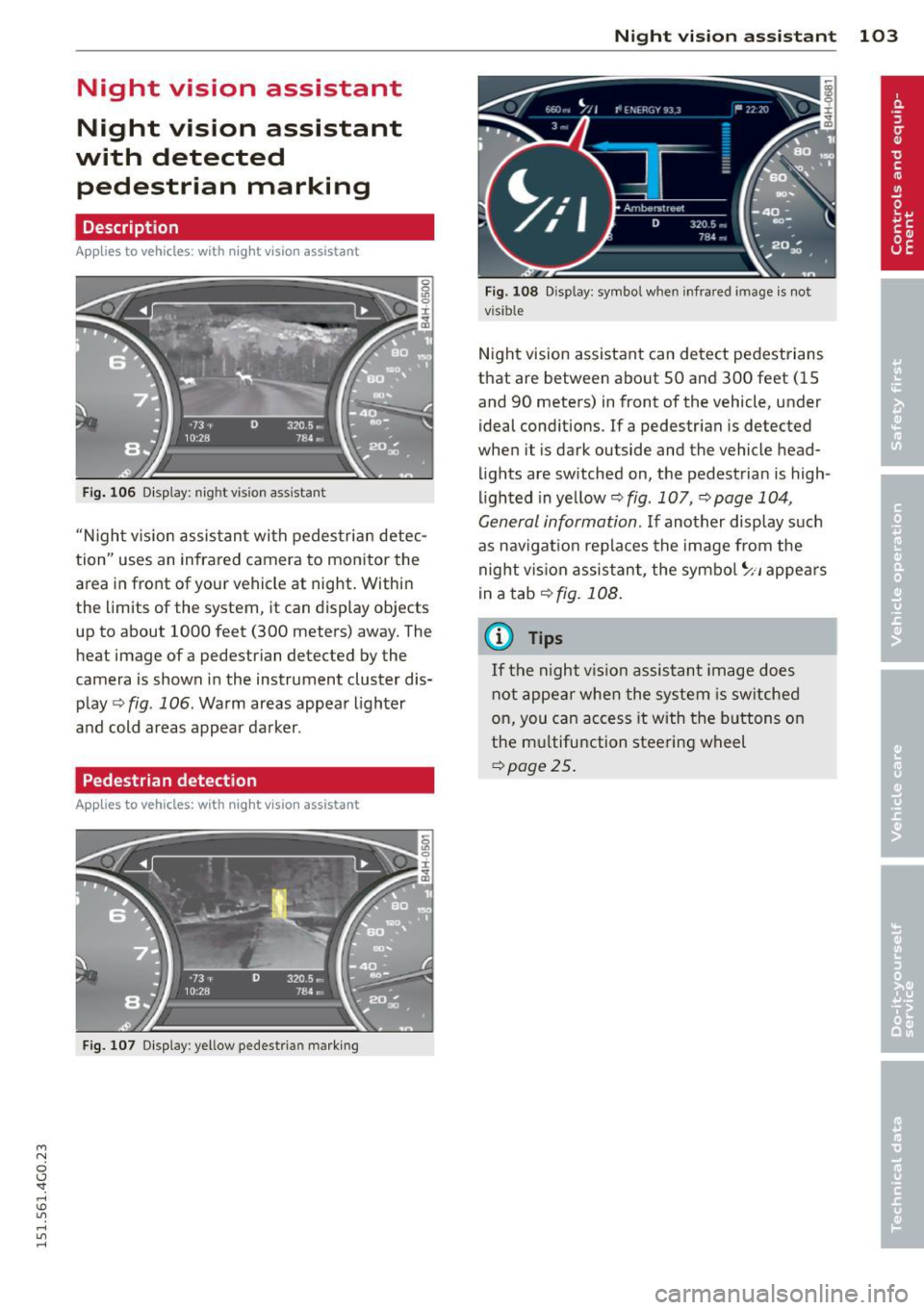
Fig . 106 Display: nig ht v is ion assistant
"N ight v is ion assistant with pedestrian detec
tion" uses an infrared camera to monitor the
area in front of your vehicle at night. Within
the limits of the system , it can display objects
up to about 1000 feet (300 meters) away. The
heat image of a pedestrian detected by the
camera is shown in the instrument cluster dis
play
Q fig . 106 . Warm areas appear lighter
and cold areas appear darker .
Pedestrian detection
Applies to vehicles: with n ig ht v ision ass istant
Fig. 107 Display : yellow pedestrian marking
Night vision assistant 103
Fig. 108 D isp lay: symbo l w hen infrare d image is not
visi ble
Night vision assistant can detect pedestrians
that are between about 50 and 300 feet (15
and 90 meters) in front of the vehicle, under
ideal conditions .
If a pedestrian is detected
when it is dark outside and the vehicle head
lights are switched on, the pedestrian is high
lighted in yellow
Qf/g . 107, Qpage 104,
General information.
If another display such
as navigation replaces the image from the
night vision assistant, the symbo l~,, appears
in a tab
Q fig. 108.
(D Tips
If the night vision assistant image does
not appear when the system is sw itched
on, you can access it with the buttons on
the multifunction steering wheel
Q page25.
Page 113 of 314
M N
0 I.J "". rl I.O
"' rl
"' rl
Hill descent control switches off once the de
cline levels out or you press the accelerator pedal.
On vehicles with the cruise control system*
¢ page 82, hill descent control is also activat
ed when the speed is set.
A WARNING
Hill descent control cannot overcome
physical limitations, so it may not be able
to maintain a constant speed under all
conditions. Always be ready to apply the
brakes .
Manual shift program
Using the manual shift program you can
manually select gears.
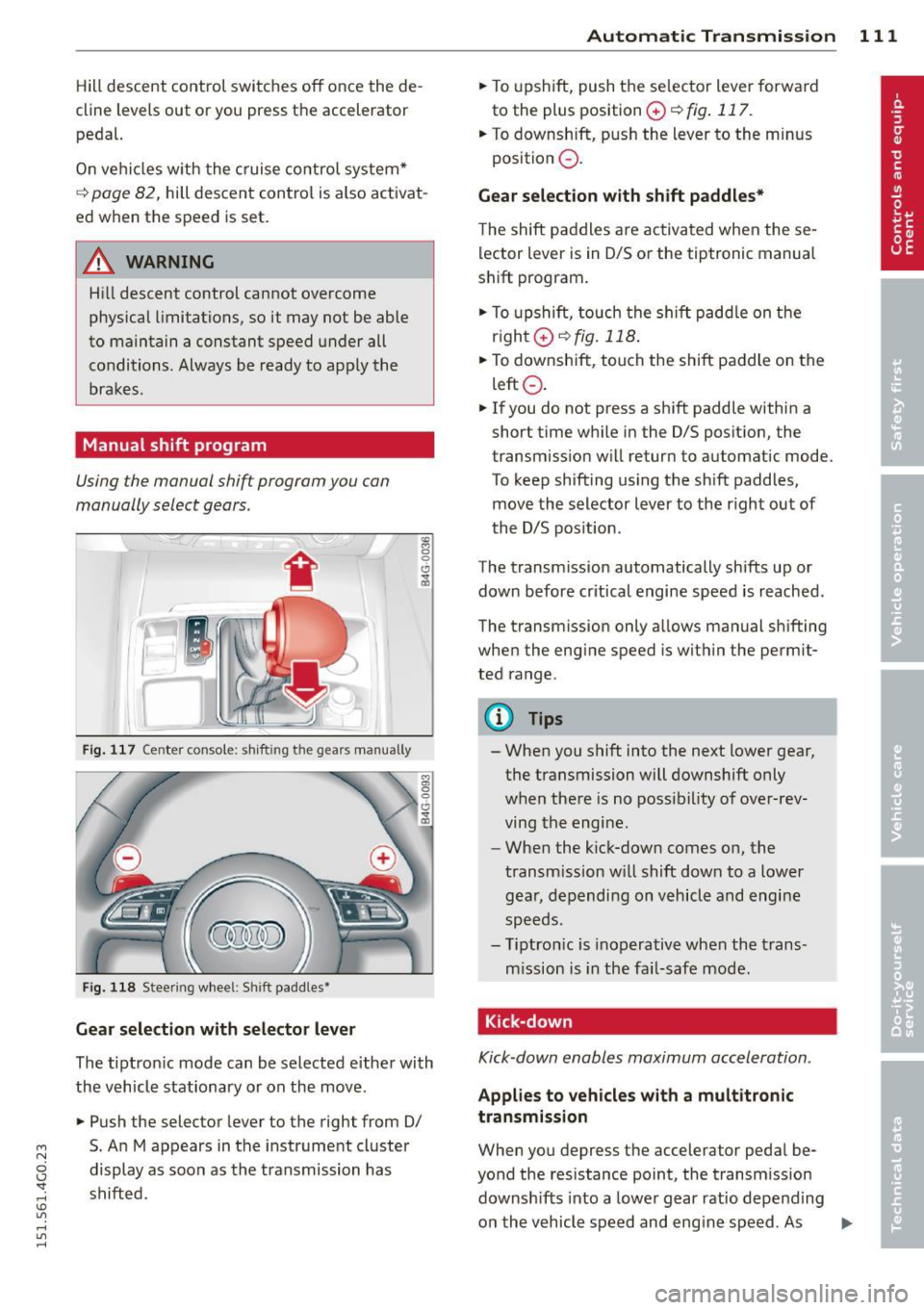
Fig. 117 Center console; shift ing the gears manually
Fig. 118 Steering wheel: Shift paddles•
Gear selection with selector lever
The tipt ron ic mode can be selected either with
the vehicle stationary or on the move.
.,. Push the selector lever to the right from 0/
5. An M appears in the instrument cluster
display as soon as the transmission has
shifted.
Automatic Transmission 111
.,. To upshift, push the se lector lever forwa rd
to the plus position
0 ¢ fig . 117.
.,. To downshift, push the lever to the minus
position
0 .
Gear selection with shift paddles*
The shift paddles are activated when these
lector lever is in 0/S or the tiptronic manual
shift program.
.,. To upshift, touch the shift paddle on the
right 0¢fig.118 .
.,. To downshift, touch the shift paddle on the
left
0 .
.,. If you do not press a shift paddle within a
short time while in the 0/S position, the
transm iss ion will return to automatic mode.
To keep shifting using the shift paddles,
move the selector lever to the r ight out of
the 0/S position.
The transmission automatically shifts up or
down before critical engine speed is reached.
The transm ission only allows manual sh ifting
when the engine speed is with in the permit
ted range.
@ Tips
- When you shift into the next lower gear,
the transmission will downshift only
when there is no possibility of over-rev
ving the engine.
- When the kick-down comes on, the
transmission will shift down to a lower
gear, depending on vehicle and engine
speeds.
- Tiptronic is inoperative when the trans
mission is in the fai l-safe mode.
, Kick-down
Kick-down enables maximum acceleration.
Applies to vehicles with a multitronic
transmission
When you depress the accelerator pedal be
yond the resistance point, the transmission
downshifts into a lower gear ratio depend ing
on the vehicle speed and engine speed. As .,.
Page 114 of 314
112 Automatic Tran sm iss ion
long as the accelerator peda l is depressed, the
engine speed is automatica lly regulated for
maximum acceleration.
Appli es to v ehicl es with a S tronic -/,
tip tronic t ransmis sion
When you depress the acce lerator pedal be
yond the resistance point, the automatic transmission downshifts into a lower gear, de
pending on vehicle speed and engine speed.
The upshift into the next higher gear takes
place once the maximum specified eng ine
speed is reached.
A WARNING
Please note that the d rive wheels can spin
if kick-down is used on a smooth slippery
road - there is a risk of skidding .
Launch Control Program
Applies to vehicles: with 5 tronic
The Launch Control Program provides the
best acceleration possible when starting from
a stop .
Requirement: The engine must be at operat
i ng temperature and the steering wheel must
not be tu rned.
,,. Press the
I" O FFI button ¢ page 195 while
the engine is running. The
II ind icator light
illuminates in the instrument cluster and
Sta bilizati on co ntrol (E SC): Off W arning!
Redu ced st a bilit y
appears in the driver in
f ormation system display.
,,. Move the selector lever to position D/S to
select sport mode (S) or select
Dynam ic
mode in Audi dr ive select ¢ page 101.
,,. Press the brake pedal strongly with your left
foot and hold it down for at least 1 second.
,,. At the same t ime, press the accelerator ped
al down complete ly w ith your r ight foot un
t il the engine reaches and maintains a h igh
RPM.
,,. Remove your foot from the brake pedal
within S seconds¢ .&_.
A WARNING
-Always adapt your driving to the traffic
flow .
- Only use the Launch Control Program
when road and traff ic conditions allow it
and other drivers w ill not be endangered
or annoyed by your driving and the vehi
cle's acceleration.
- Please note that the driving wheels can
spin and the vehicle can break away
when sport mode is switched on, espe
cially when the road is slippe ry.
- Once you have accelerated, you shou ld
sw itch sport mode off by pressing the
I J'J OFF I button.
(D Tips
'
-The tra nsmission temperature may in
crease significantly after using the
Launch Control P rogram. If that hap
pens, the p rogram may not be avai lab le
for a few minutes . It w ill be ava ilable
again after a cool-down period .
- When accelerating using the La unch
Contro l Program, a ll vehicle parts are
subject to heavy loads. This can result in
increased wear.
Transmission malfunction
ID T ransm ission: Pre ss bra ke pedal and se
l e ct ge ar a gai n
Press the brake peda l and select the desired
selector lever position again. You can then continue driving.
[O] Transmi ssion o verh eatin g: Plea se dri ve
con ser va tivel y
-
The transm iss ion temperat ure has inc reased
significantly due to the sporty driving manner .
Drive in a less sporty manner until the tem
perature returns to the normal range and the
indicator light switches of.
ID T ra nsmis sion malfun ction : Y o u can con-
tinue dri ving ..,
Page 117 of 314

M N
0 I.J "". rl I.O
"' rl
"' rl
Parking system plus
Description
Applies to vehicles: with parking system plus
Audi parking system plus provides audio and
visual signals when parking.
Fi g. 120 Dis p lay f ie ld
Sensors are located in the front and rear
bumpers.
If these detect an obs tacle, visual
and in some situations aud ible signals warn
you.
M ake sure t he sensors are not cove red by
s t icke rs, deposits or any o ther obs truc tions as
it may impair the sensor function. For infor
mation on cleaning, refer to
c::> page 209 .
The display field begins approximately at:
® 4 ft (1.20 m)
® 3 ft (0 .90 m)
© 5.2 ft (1.60 m)
@ 3 ft (0 .90 m)
The clos er you get to the obstacle, the sho rter
the interval between the audible signa ls. A
con tinuous tone sounds when the obstacle is
l ess than approximate ly 1 ft (0.30 m) away .
Do not continue driving farther¢
& in Gener
al information on page 114, ¢(Di n General
information on page 114 !
If the d istance to an obstacle remains con
stant, the volume of the d istance warning
gradually drops after about four seconds (this
does not apply in the continuous tone range).
P arking systems 115
Switching on/off
Applies to vehicles: with parking system plus
F ig. 121 Ce nter co nso le :
Pv! button
F ig . 1 22 Infota in m ent : v is u al d is ta n ce d isplay
Switching on
.,. Shift into reverse or
.,. Press the
p,;A button in the center console
c::> fig. 121 . A short confirmation tone
sounds and the LED in the button turns on .
Switching off
.,. Dr ive fo rward fas ter than 6 mph (10 km/ h),
or
.,. press the
P"IA button, or
.,. sw itch the ignit ion off.
Visual d isplay
U sing the segments, yo u can estimate the dis
tance to a n object in front of o r behind the ve
hicle ¢
fig. 12 2. The red lines mark the ex
pected d irect ion of travel according to the
steering ang le . A wh ite segment indicates an
identified obstacle that is outside of the vehi
cle's pat h. Red segments show identified ob
stacles that are in your vehicle's path . As your
vehicle comes close r to the obstacle, the seg
ments move closer to the vehicle . At the lat-
est th e collision area has been reached when ..,.
Page 119 of 314
M N
0 <.J 'SI: ,...., \!) 1.1'1 ,...., 1.1'1 ,....,
example, after a collision, do not contin
ue to use the system for safety reasons.
Have it checked by your authorized Audi
dealership or authorized repa ir facility .
- Only use the rear v iew camera to assist
you if it shows a good, clear picture. For
example, the image may be affected by
the sun shin ing into the lens, dirt on the
lens or if there is a system fau lt.
- Use the rear view camera only if the lug
gage compartment lid is comp letely
closed. Ma ke su re any objects you may
h ave mounted on the luggage compart
ment lid do not block the rear view cam
era.
- The camera lens en la rges and dis torts
the field of vision. The ob ject appears
both a ltered and inaccurate on the
screen .
- In certain s ituations, peop le or objects in
the display appear closer or f urther
away:
- objects that do not touch the ground,
such as the bumper of a parked vehicle ,
a trailer hitch o r the rear of a truck. Do
not use the help lines in this case.
- If driven from a leve l surface onto a n
incline, or a downward slope.
- If driven towa rd protruding objects .
- If the ve hicle is carrying too much load
in the rear.
({D Note
- Always read and follow the applicable
warnings
¢ (Din General information on
page 114 .
-The orange colored orientat ion lines in
the Infotainment disp lay show the vehi
cle path depending on the steering
whee l ang le. The front of the vehicle
front sw ings out more than t he rear of
the veh icle. Maint ain p lenty of distan ce
so that your ou ts ide mirror or a corner of
you r vehicle does not collide with any ob
stacles .
Parking sys tem s 117
Switching on/off
App lies to vehicles: wit h parking system plus w ith rear
v iew camera
Switching on
.. Shift in to reverse or
.. press the
PwA bu tton in the center console
¢ page 115, fig . 121 . A short confirmation
tone sounds and the LED in the button turns
on .
Swi tching between the re ar view camera
and optical displa y
.,. Press the Graphi c control button®
¢ page 118, fig. 12 7 to see the optical d is
play .
.. Press the
Rearview control b utton to see the
rear view camera image.
Switching off
.,. Dr ive forward faster than 6 mph (10 km/h),
or
.. Press the
P111A button, or
.,. Switch the ignit ion off.
(D Tips
The visual d isplay in the left part of the
display should help you detec t the critical
vehicle areas .