brake AUDI A6 2016 Owner's Manual
[x] Cancel search | Manufacturer: AUDI, Model Year: 2016, Model line: A6, Model: AUDI A6 2016Pages: 294, PDF Size: 73.88 MB
Page 85 of 294

(Canadian models) in t he d isp lay will go out but
the saved speed remains the same.
Preselecting the speed
A pp lies to vehicles: with c ruise control system
You con preselect your desired speed when the
vehicle is stationary .
~ Switch the ign ition on.
~ Pu ll the lever in to posi tion (D q page 82,
fig . 86 .
~ To inc rease or decrease the speed, tap the leve r
toward
G) !Q .
~ To store the speed displayed, re lease the lever .
This f unct ion makes it possib le, for examp le, to
save the speed yo u want before dr iving on the
hi ghway . Once on the h ighway, activate the
cru ise control by pu lling the lever toward
(D .
Switching the system off
Appl ies to vehicles: with c ruise control
Temporary deactivation
~ Press t he b rake pedal, o r
~ Press the leve r into posi tion @(not cl icked into
place)
q page 82 , fig . 86, or
~ D rive for longer tha n 5 minutes at mo re than
5 m ph (1 0 km /h) above the stored speed.
Switching off completely
~ Press lever into position @(clicked into place),
or
~ Swi tch the ign ition o ff .
The system retains the saved speed if you deact i
vate the cruise contro l temporarily . To resume
the saved speed , re lease the brake pedal a nd p ull
the lever to position
(D .
Sw itching the ign ition off erases the saved speed .
A WARNING
You should only return to the saved speed if it
is not too fas t for the cur rent traffic co ndi
t io ns -risk of an a ccident!
D riving
83
Page 86 of 294
Audi adaptive cruise control and braking guard
Audi adaptive cruise
control and braking
guard
Introduction
Applies to vehicles: with Audi adaptive cruise control
The adaptive cruise contro l system assists the
driver by regulating vehicle speed and helping to
maintain a set distance to the veh icle ahead ,
within the limits of the system. If the system de
tects a moving vehicle up ahead, adaptive cruise
control can brake and then accelerate your vehi
cle. This helps to make driving more comfortable
both on long highway stretches and in stop-and
go traffic.
The braking guard system can warn you about an
impending collision and initiate braking maneu
vers
c::> page 90.
Adaptive cruise control and braking guard have
technical limitations that you must know, so
please read this section carefully, understand
how the system works and use them properly at
all times.
General information
General information
Applies to vehicles: with Audi adaptive cruise control
Fig. 88 Front of the ve hicle: sensors and video camera
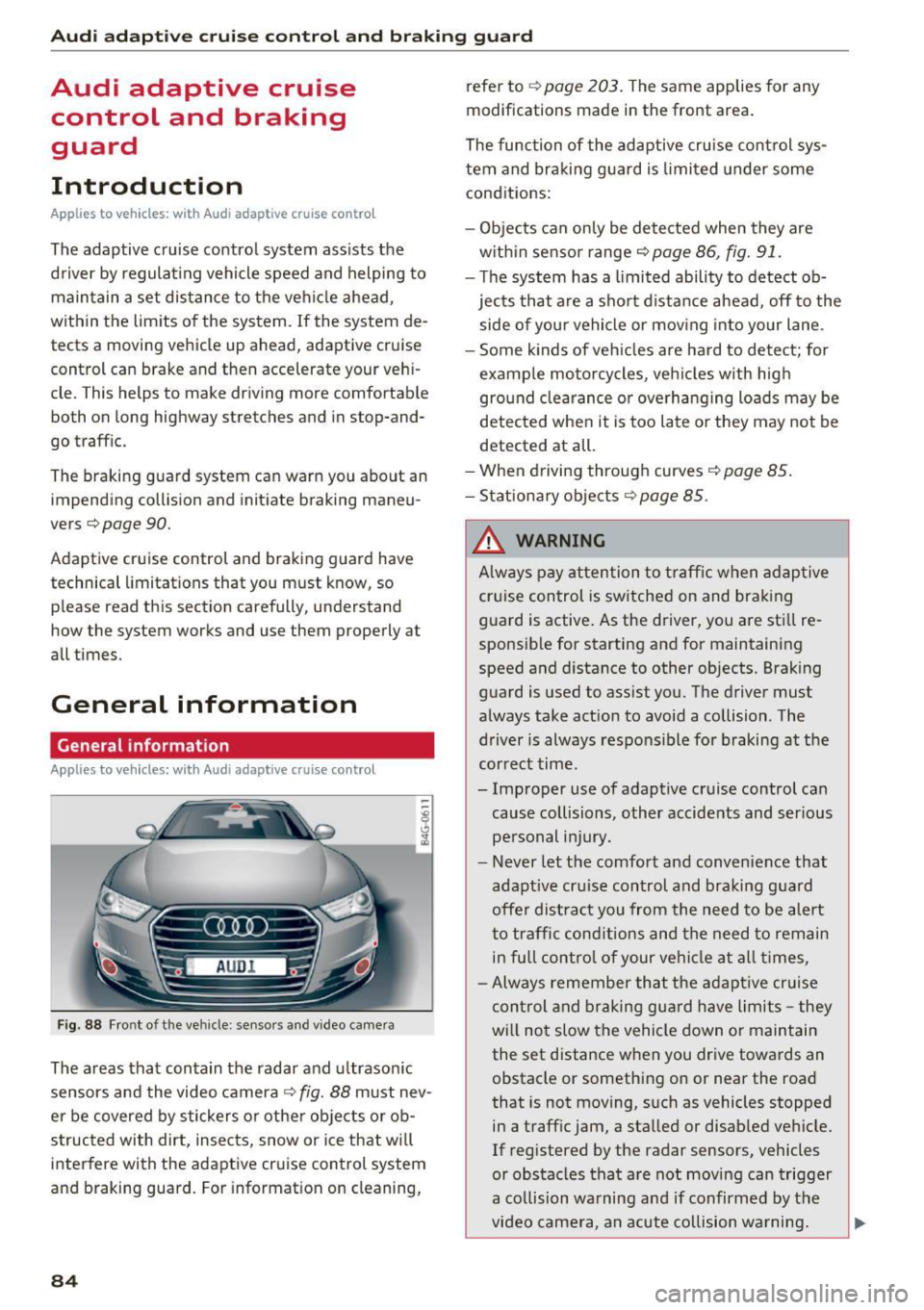
The areas that contain the radar and ultrasonic
sensors and the video camera
c::> fig. 88 must nev
er be covered by stickers or othe r objects or ob
structed with dirt, insects, snow or ice that will
interfere with the adaptive cruise control system
and braking guard. For information on cleaning,
84
refer to c::> page 203. The same applies for any
modifications made in the front area .
The function of the adaptive cruise control sys
tem and braking guard is limited under some
conditions:
- Objects can only be detected when they are
w ithin sensor range
c::>page 86, fig. 91.
- Th e system has a limited ability to detect ob
jects that are a short distance ahead, off to the
side of you r vehicle or moving into your lane .
- Some kinds of vehicles are hard to detect; for
example motorcycles, veh icles with high
ground clearance or overhanging loads may be
detected when it is too late or they may not be
detected at all.
- When driving through curves
c::> page 85.
-Stationary objects c::> page 85.
A WARNING
Always pay attention to traffic when adaptive
cruise control is switched on and braking
guard is active. As the driver, you are still re
sponsible for starting and for maintaining
speed and distance to other objects. Braking
guard is used to assist you. The driver must
always take act ion to avoid a collision . The
driver is always respons ible for braking at the
correct time.
- Improper use of adaptive cruise control can cause collisions , other accidents and serious
personal injury.
- Never let the comfort and convenience that
adapt ive cru ise control and braking guard
offe r dist ract you from the need to be alert
to traffic conditions and the need to remain
in fu ll contro l of your ve hicle at all times,
- Always remember that the adaptive cruise
control and braking guard have limits -they
will no t slow the vehicle down or maintain
the set distance when you drive towards an
obstacle or something on or near the road
that is not moving, s uch as vehicles stopped
in a traff ic jam, a stalled or disab led vehicle.
If registered by the radar sensors, vehicles
or obstacles that are not moving can trigger
a co llision warning and if confirmed by the
video camera, an acute co llision warning.
Page 87 of 294
.... N
0 CJ '
Audi ada pti ve c ruise contr ol and br akin g gu ard
-For safety reasons, do not use adapt ive
cruise contro l when driv ing on roads with
many curves, when the road surface is in
poor condit ion and/or in bad weather (such
as ice, fog, gravel, heavy rain and hydroplan
ing) . Us ing the system under these condi
t ions could result in a collision .
- Switch adaptive cruise contro l off tempora
rily when driving in turn ing lanes, on ex
pressway exits or in const ruc tion zones. This
preven ts the vehicle from accelerating to
the set speed when in these situat ions .
- T he adapt ive cr uise con trol system will no t
br ake by i tself if you pu t your foot on the ac
celerator peda l. Doing so can override the
speed and distance regulation.
- Whe n approaching stat ionary obje cts such
as stopped traffic, adapt ive cruise control
will not respo nd and braking guard will have
limited function .
- The adaptive cruise control system and
brak ing guard do not react to peop le, ani
ma ls, objects crossing the road or oncom ing
objects.
- The function of the radar sensors can be af
fected by reflective objects such as guard
rai ls, t he entrance to a tunnel, heavy rain or
ice.
- Never follow a veh icle so closely that you
cannot stop your vehicle safely . The adap
t ive cr uise control cannot slow or brake the
vehicle safely when you follow another veh i
cle too close ly. Always remember th at the
au tom atic b raking function ca nnot br ing the
vehicle to a sudden or emergency stop un
der these conditions .
- T o preven t unintended operation, alw ays
switch AC C off when i t is not be ing used.
(D Note
The sensors can be displaced by impacts o r
damage to the bumper, whee l housing and
underbody. That co uld affect the adaptive
cru ise con trol sys tem and braking guard .
Have your a uthorized Audi dea ler or author·
ized Aud i Service Facility check their function.
In curves
Applies to vehicles: w ith Audi adapt ive cruise control
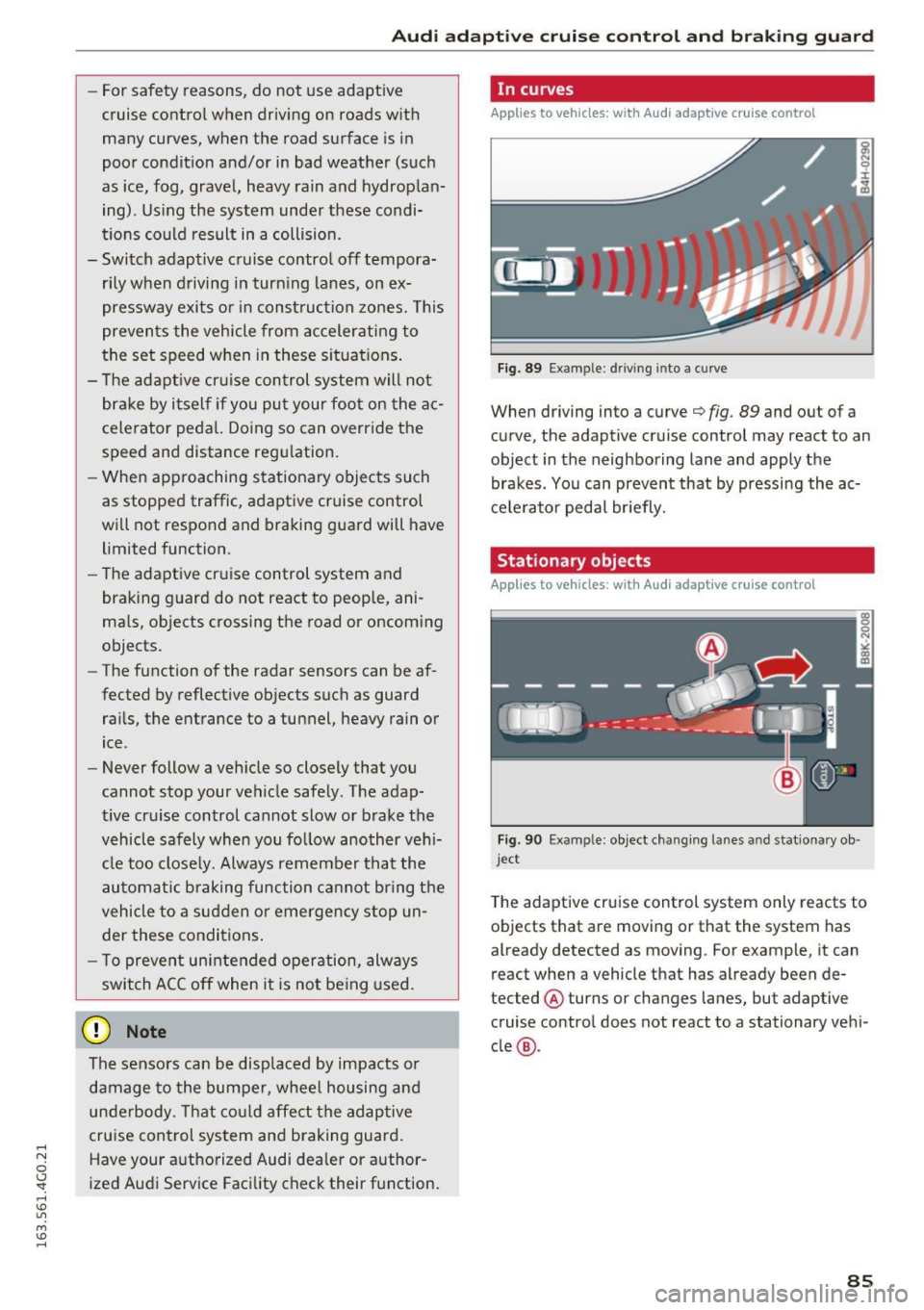
F ig. 89 Exampl e: d ri ving into a curve
When driving into a curve¢ fig. 89 and out of a
curve, the adaptive cruise control may react to an
object in the neighboring lane and app ly the
brakes . Yo u can prevent that by pressing the ac
ce le rator peda l br iefly.
Stationary objects
Applies to vehicles : w ith Audi adaptive cruise control
Fig. 90 Exa mple : object changing la nes a nd s tatio nary ob ·
j e ct
T he adaptive cruise control system only reacts to
objects that are moving or that the system has
already detected as moving. For example, it can
react when a vehicle that has already been de
tected @ turns or changes lanes, but adaptive
cruise control does not react to a stationary veh i
cle @.
85
Page 88 of 294
Audi adaptive cruise control and braking guard
Audi adaptive cruise
control
Description
Applies to vehicles: with Audi adaptive cruise control
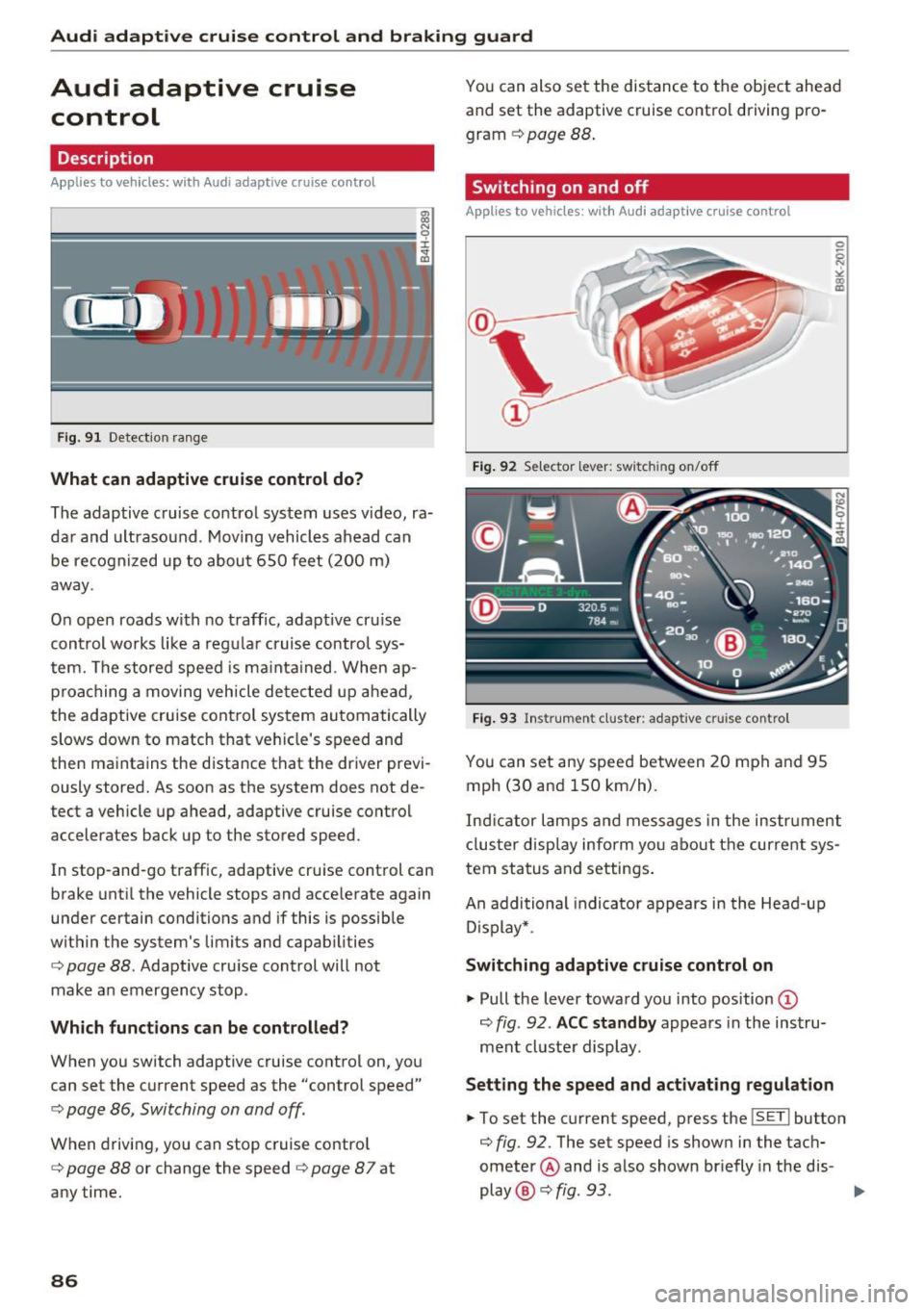
F ig. 91 Detection range
What can adaptive cruise control do?
The adaptive cruise control system uses video, ra
dar and ultrasound . Moving vehicles ahead can
be recognized up to about 650 feet (200 m)
away .
On open roads with no traffic, adaptive cru ise
control works like a regular cruise control sys
tem. The stored speed is ma inta ined. When ap
proaching a moving vehicle detected up ahead,
the adaptive cruise cont rol system automatically
slows down to match that vehicle's speed and
then maintains the distance that the driver previ ously stored. As soon as the system does not de
tect a vehicle up ahead, adaptive cruise control
accelerates back up to the stored speed.
In stop-and-go traffic, adaptive cruise control can
brake until the vehicle stops and accelerate again
under certain conditions and if this is possible
within the system's limits and capabilities
¢ page 88. Adaptive cruise control will not
make an emergency stop .
Which functions can be controlled?
When you switch adaptive cruise control on, you
can set the current speed as the "control speed"
¢ page 86, Switching on and off.
When driving, you can stop cruise control
¢ page 88 or change the speed ¢ page 8 7 at
any time.
86
You can also set the distance to the object ahead and set the adaptive cruise control driving pro
gram
¢ page 88.
Switching on and off
Applies to vehicles: with Audi adaptive cruise control
Fig. 92 Selector leve r: switch ing on/off
Fig. 93 Instrument cluster : adaptive cruise contro l
You can set any speed between 20 mph and 95
mph (30 and 150 km/h) .
Indicator lamps and messages in the instrument
cluster display inform you about the current sys
tem status and settings.
An addi tional indicator appears in the Head-up
D isplay* .
Switching adaptive cruise control on
.,. Pull the lever toward you into position ©
¢
fig . 92 . ACC standby appears in the instru
ment cluster display.
Setting the speed and activating regulation
.,. To set the current speed, press the ISETI button
¢ fig. 92. The set speed is shown in the tach
ometer @ and is also shown br iefly in the dis-
play @¢
fig. 93 . II>
Page 89 of 294
.... N
0 CJ '
Audi ada pti ve c ruise contr ol and br akin g gu ard
.. You must also press the brake pedal when the
vehicle is stopped .
Switching adaptive cruis e co ntrol off
.. Push the lever away from you into position @
un til it clicks into place. The message
AC C o ff
appea rs.
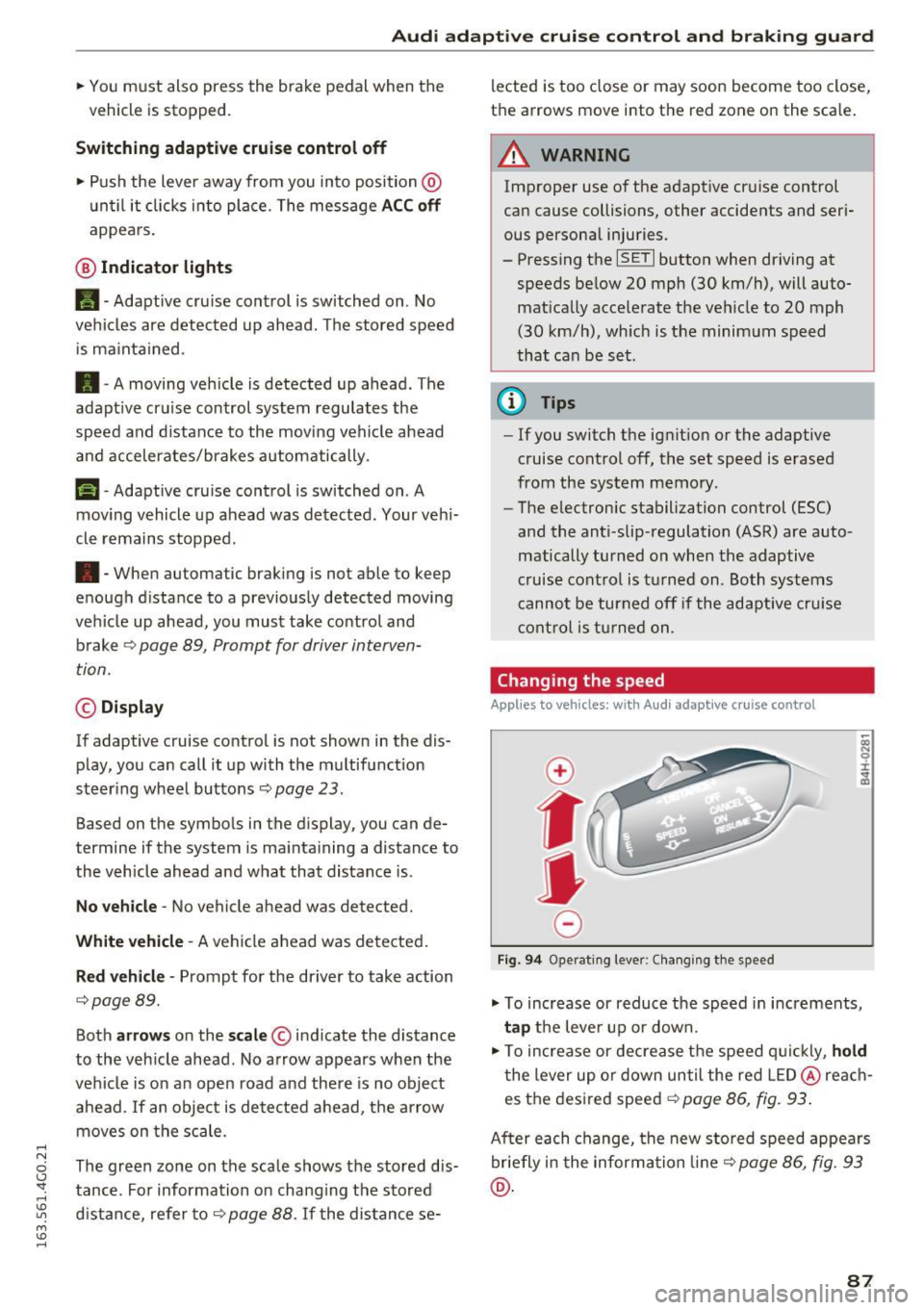
@ Indic ator lights
II -Adapt ive cru ise control is switched on . No
vehicles are detected up ahead. The stored speed
is ma inta ined .
• -A moving vehicle is detected up ahead . The
adapt ive cruise control system regulates the
speed and distance to the moving vehicle ahead
and accelerates/brakes automatically.
(-) -Adaptive cru ise control is switched on . A
mov ing vehicle up ahead was detected . Your veh i
cle remains stopped .
• -When automatic braking is not able to keep
enough d istance to a previously detected moving
veh icle up ahead, you must take control and
brake
c::> page 89, Prompt for driver interven
tion.
© Di spla y
If adaptive cruise control is not shown in the dis
play, you can call it up with the multifunction
steer ing wheel buttons
c::> page 23.
Based on the symbols in the display, you can de
termine if the system is ma inta ining a distance to
the vehicle ahead and what that distance is.
N o v ehicle -No vehicle ahead was detected.
White vehicl e -A vehicle ahead was detected.
Red ve hicl e -Prompt for the driver to take action
c::> page 89.
Both arr ow s on the scal e© indicate the distance
to the vehicle ahead. No arrow appears when the
vehicle is on an open road and there is no object
ahead .
If an object is detected ahead, the arrow
moves on the scale .
The green zone on the scale shows the stored dis
tance . For information on chang ing the stored
distance, refer to
c::> page 88 . If the distance se- lected is too close or may soon become too close,
the arrows move into the red zone on the scale .
A WARNING
Improper use of the adaptive cruise control
can cause collisions, other accidents and seri
ous personal injuries.
- Pressing the
ISETI button when driving at
speeds below 20 mph (30 km/h), will auto matically accelerate the ve hicle to 20 mph
(30 km/h), which is the minimum speed
that can be set.
(D Tips
- If you switch the ignit ion or the adaptive
cruise control off, the set speed is erased
from the system memory .
- The e lectronic stabilization control (ESC)
and the anti-slip-regulation (ASR) are auto
matically turned on when the adaptive
cruise cont rol is tu rned on . Both systems
cannot be turned off if the adaptive cru ise
control is t urned on.
Changing the speed
Appl ies to vehicl es: wi th Audi ada ptive c ruise con trol
0
f
jJ
0
Fig. 9 4 Operat ing lever : Chang ing the speed
.,. To increase or reduce the speed in increments,
ta p the lever up or down.
.. To increase or decrease t he speed q uickl y,
ho ld
the lever up or down un til the red LED @ reac h
es the desired speed
c::> page 86, fig. 93 .
After each change, the new stored speed appears
br iefly i n the informa tion line
c::> page 86, fig . 93
@ .
87
Page 90 of 294

Audi adaptive cruise control and braking guard
Driving in stop-and-go traffic
Applies to vehicles: with Audi adaptive cruise control
The adaptive cruise control system also assists
you in stop-and-go traffic.
If a previous detected
vehicle ahead stops, your vehicle will brake to a
stop, within the limits of the system.
• To resume driving with adaptive cruise control,
tap the accelerator pedal or
• Pull the lever toward you into position @
¢ page 88, fig. 95.
(Di Tips
-If adaptive cruise control is active and your
vehicle does not start driving as expected
after pulling the lever once, you can start
out again by tapping the accelerator pedal.
- If an obstacle is detected when your vehicle
starts driving, the system will prompt you
to take over¢
page 89. Your vehicle will
drive more slowly when starting. This may
also happen in some situations when no ob
stacle is apparent.
Interrupting cruise control
Applies to vehicles: with Audi adaptive cruise contro l
Fig. 95 Selector lever
Requirement: The adaptive cruise control is
switched on.
Overriding cruise control
• To accelerate manually, pull the lever toward
you into position@and hold it there. The mes
sage
ACC: Override appears. Or
• press the accelerator pedal.
• To resume cruise control, release the lever or
take your foot off the accelerator pedal.
88
Canceling cruise control while driving
• Move the lever into position @. The message
ACC: Standby appears. Or
• press the brake pedal.
• To resume the stored speed, move the lever in
to position @.
Canceling cruise control when stopped
• Push the lever away from you into position@.
The message
ACC: Standby appears.
• To resume cruise control, press the brake pedal
and pull the lever toward you into position @.
A WARNING
It is dangerous to activate cruise control and
resume the stored speed when the current
road, traffic or weather conditions do not per
mit this . This could result in a crash.
Setting the distance
Applies to vehicles: with Audi adapt ive cruise control
Fig. 96 Selector lever: setting the dista nce
• Tap the switch to display the current set dis
tance ¢
fig. 96.
• To increase or reduce the distance by incre
ments, tap the switch again to the left or right.
The distance between the two vehicles will
change in the instrument cluster display.
When approaching a moving vehicle up ahead,
the adaptive cruise control system automatically brakes to match that object's speed and then
maintains the stored distance.
If the vehicle
ahead accelerates, adaptive cruise control will al-
so accelerate up to the stored speed.
II--
Page 91 of 294
.... N
0 CJ '
M
"' ......
Audi ada pti ve c ruise contr ol and br akin g gu ard
The highe r the speed, the greater the distance in
yards (meters) ¢&. .The
Distance 3 setting is
recommended .
The distan ces p rovided are specified values. De
pending on the driving situation and the how the
vehicle ahead is driving, the actual distance may
be more or less than these target d istances.
The various symbols fo r the time increments ap
pear br ie fly in the information line @ ¢
page 86,
fig. 93 when you change the settings.
c:::, _c:::, ___ Dis tan ce 1: This setting corresponds
to a distance of 92 fee t/28 meters when travel
ing at 62 mph (100 km/h), o r a time interval of 1
second.
c:::, __ c:::, __ Distan ce 2 : This setting corresponds
to a distance of 118 feet/36 meters whe n travel
ing at 62 mph (100 km/h), or a time interval of
1.3 seconds.
c:::, ___ c:::,_ Distanc e 3: This setti ng corresponds
to a distance of 164 feet/SO meters when travel ing at 62 mph (100 km/h), o r a time interval of
1.8 seconds.
c:::, __ __ c:::, Di stance 4 : This setti ng corresponds
to a distance of 210 feet/64 meters when travel ing at 62 mph (100 km/h), or a time interval of
2 .3 seconds.
A WARNING
Following other vehicles too closely increases
the risk of collisions and ser ious personal in
jury.
- Setting short distances to the traffic ahead reduces the t ime and distance available to
br ing your vehicle to a safe stop a nd makes
it even more necessary to pay close atten
t ion to traffic .
- Always obey applicable traff ic laws, use
good judgment, and select a safe following distance for the traffic, road and weathe r
condit io ns.
(D Tips
- Di stance 3 is set automatically each time
you switch the ignition on . -
Your standard settings are automatically
stored and assigned to the remote control
key being used.
Selecting the driving mode
Applies to vehicles: with Aud i adapt ive cru ise control
.,. Select the desired driving mode in drive select
¢page 100.
{!) Tips
Your settings are automatically stored and as
s igned to the remote control key being used.
Prompt for driver intervention
Applies to vehicles: with Aud i adapt ive cru ise control
F ig . 97 Inst rume nt cluster: request for d river in tervention
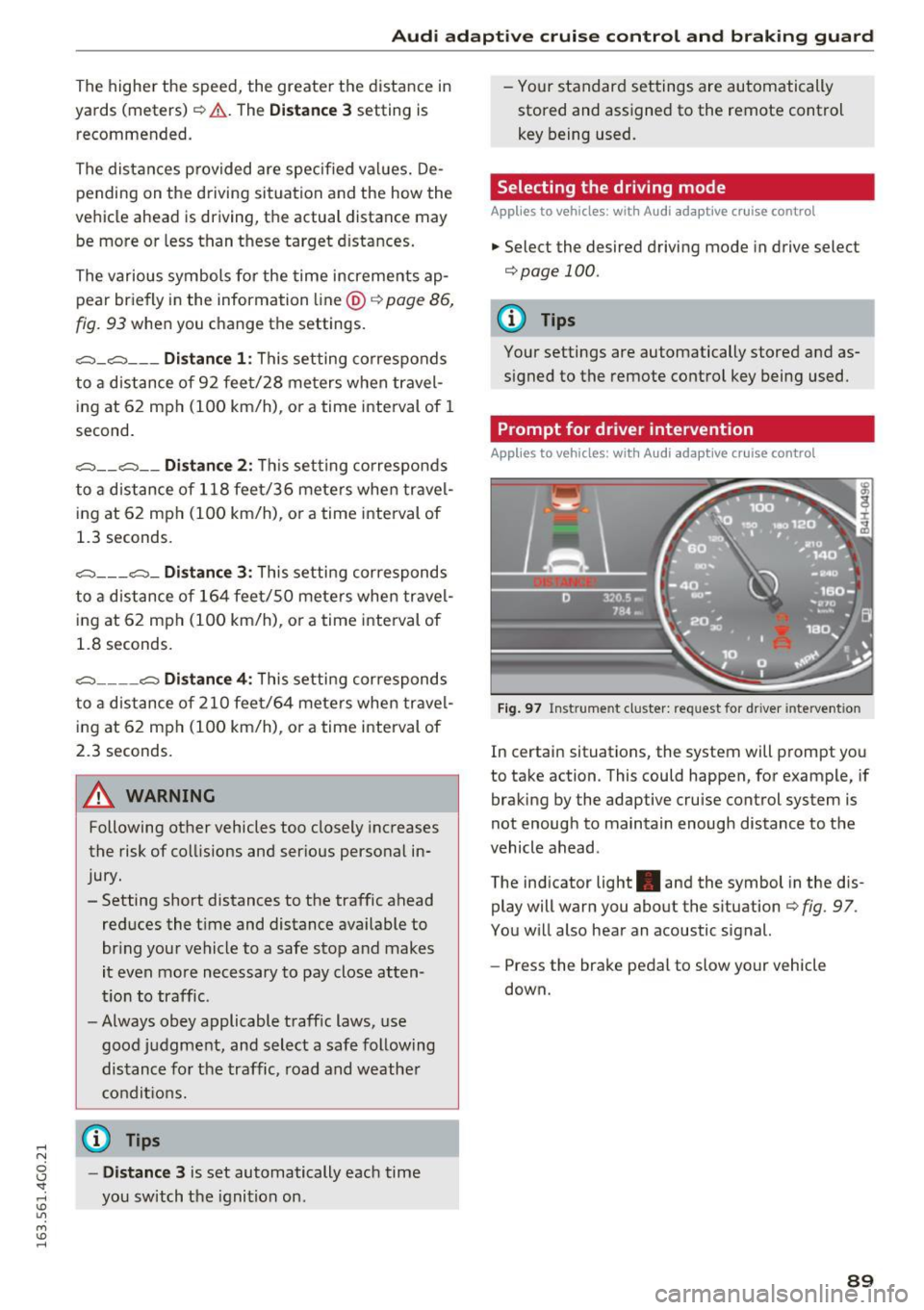
In certain situations, the system will prompt you
to take action . This could happen, for example, if
braking by the adaptive cru ise control system is
not enough to maintain enough distance to the
vehicle ahead .
The ind icator light . and the symbol in the dis
play will warn you about the situation ¢
fig. 97 .
You w ill also hear an acoustic signal.
- Press the brake pedal to slow yo ur vehicle
down.
89
Page 92 of 294
Audi adaptive cruise control and braking guard
Audi braking guard
Description
Applies to vehicles: w ith Audi adaptive cruise co ntro l
Fig. 98 Instrument cluster: approach warning
Braking guard uses radar sensors and a video
camera . It also functions within the limits of the
system when adaptive cruise control is switched
off .
What can braking guard do?
When detected in time, the system can assess
situations when a vehicle ahead brakes suddenly
or if your own vehicle is traveling at a high speed
and approaching a vehicle up ahead that is mov
ing more slowly . Braking guard does not react if
it cannot detect the situat ion.
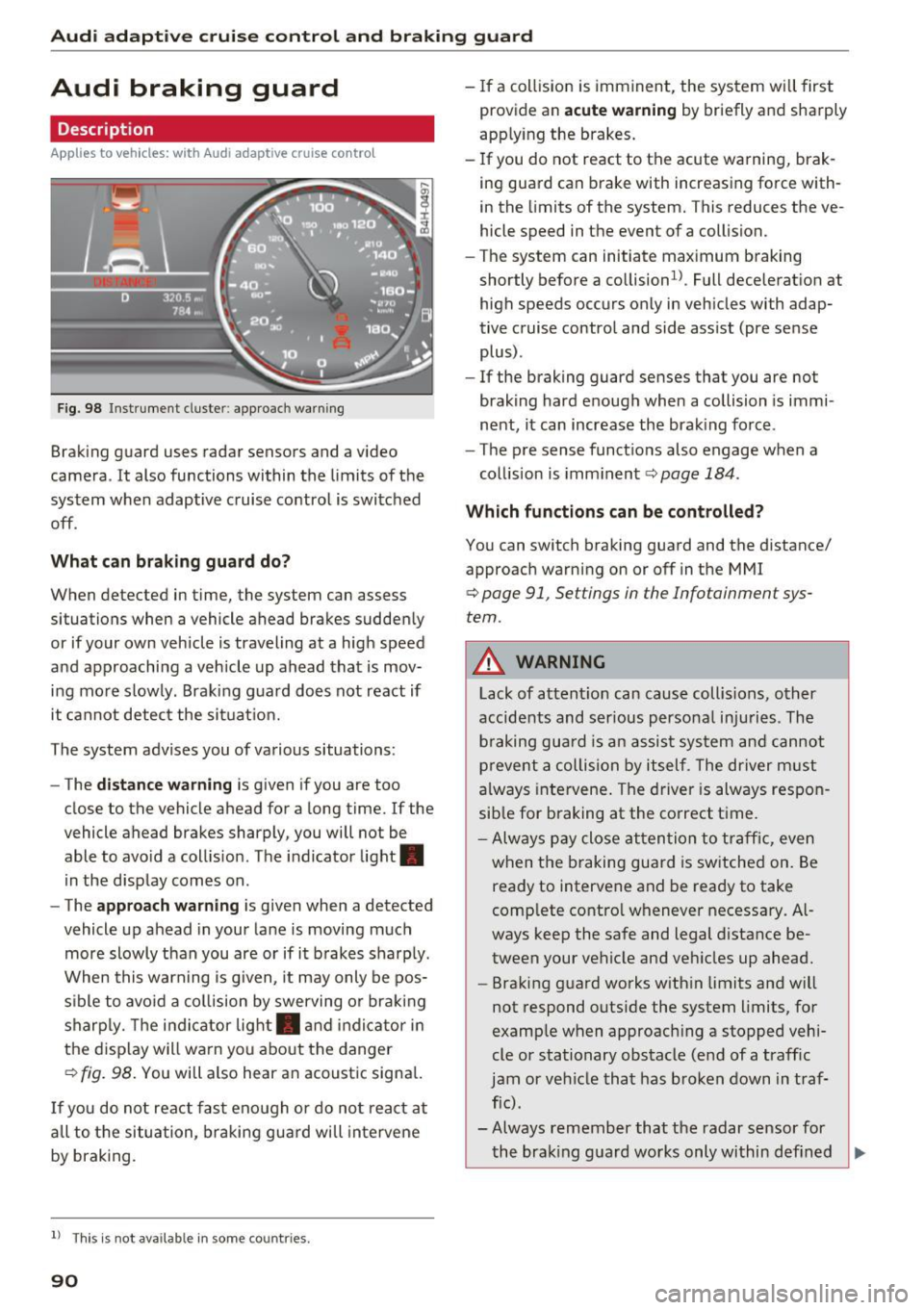
The system advises you of various situations:
- The
distance warning is given if you are too
close to the vehicle ahead for a long time.
If the
vehicle ahead brakes sharply, you will not be
able to avo id a coll is ion. The indicator light.
in the display comes on .
- The
approach warning is given when a detected
vehicle up ahead in your lane is moving much
more slowly than you are or if it brakes sharply .
When this warning is g iven, it may only be pos
sible to avo id a collision by swerving or braking
sharp ly. Th e indicator light. and indicator in
the display will warn you about the danger
qfig. 98. You will also hear an acoustic signal.
If you do not react fast enough or do not react at
all to t he situation, braking guard will intervene
by braking.
l ) Thi s is not ava ilab le in some co un tri es .
90
-If a collision is imminent, the system will first
provide an
acute warning by briefly and sharply
app lying the brakes.
- If you do not react to the acute warning, brak
ing guard can brake with increasing force with
in the limits of the system. This reduces the ve
hicle speed in the event of a collision.
- The system can initiate maximum braking
shortly before a co llision
1
) . Full deceleration at
high speeds occurs only in vehicles with adap
tive cruise control and side assist (pre sense
plus) .
- If the braking guard senses that you are not
braking hard enough when a collision is immi
nent, it can increase the braking force .
- The pre sense functions also engage when a
collision is imminent
qpage 184.
Which functions can be controlled?
You can switch braking guard and the distance/
approach warning on or off in the MMI
q page 91, Settings in the Infotainment sys
tem .
A WARNING
Lack of attent ion can cause collisions, other
accidents and serious personal injuries . The
b ra king guard is an assist system and cannot
prevent a collision by itself. The driver must
always intervene . The driver is always respon
sib le for braking at the correct time .
- Always pay close atten tion to traffic, even
when the braking guard is switched on. Be
ready to intervene and be ready to take
comp lete contro l whenever necessary. Al
ways keep the safe and legal distance be
tween your vehicle and vehicles up ahead.
- Braking guard works with in limits and will
not respond outside the system limits, for
example when approaching a stopped vehi
cle or stationary obstacle (end of a traffic
jam or vehicle that has broken down in traf
fic) .
- Always remember that the radar sensor for
-
the brak ing guard works only within def ined Ill>
Page 93 of 294
Audi adapt ive cruis e control and braking gua rd
de tect ion and range limits t hat may prevent
the proper detection of other veh icles.
- The radar sensor's function and range can
be reduced by rain, snow and heavy spray.
Moving veh icles up ahead may not be
promptly detected or may not be detected
at all .
- Reflective surfaces including crash barriers
or tunnel entrances may impair the funct ion
of the radar sensor.
(D Tips
- You can cancel the brak ing with increasing
force that is init iated by the system by b rak
i ng yourself, by accelerat ing noticeab ly or
by swerving .
- Braking guard error messages ¢
page 91.
-Keep in mind that braking guard can brake
unexpected ly. Always secure any cargo or
objects that you are transport ing to reduce
the risk of damage or injury .
Settings in the Infotainment system
Appl ies to vehicles: w ith Audi a daptive cruise co ntro l
~ Select: t he ICARI function button > (Car )* Sys
tems
con trol b utton > Driver assi stan ce > Audi
braking guard .
S ys tem -
Switch the braking guard On/ Off. When
you swit ch the ig nitio n on, the message
Brak ing
guard: Off
appears if the system is swi tched off .
Prewarning -The d istance and app roach warn
in gs i n the display can be switched
On/ Off.
(!) Tips
-Your settings are automatically stored and
ass igned to the remote cont rol key being
used.
- If you rest rict or sw itch off the ESC, the
braking gua rd also sw itches i tself off
¢ page 188 .
- Switch braking guard off when yo u are load
i ng t he ve hicle on to a vehicle ca rr ier, t rain,
s hi p or other type of transportation . This
c a n prevent undesired warnings from the
br aking gua rd system.
Messages
App lies to vehicles: wi th Audi ada ptive c ruise con trol
Braking guard : off
T his dr iver message appears if the system is
tu rned off via t he i nfot ainment. O therwise, if the
system is t urne d off, the information appears ev
ery time shortly after t he start o f the trip .
T he driver message a lso appea rs if the system is
not avai lab le due to a m alfu nction o r if the ES C i s
not switched on¢
page 188 . If th is is the case,
the sys tem wi ll not provide warnings abou t a
poss ib le collision .
Braking guard : a ctivated
This dr iver message appears if sharp brake pres
su re was applied due to an acu te warning .
ACC: Unava ilable!
ACC and Audi braking guard: not available
T he system cannot detec t moving vehicles up
ahe ad co rrectly and is swi tc h e d off. The senso rs
have been displaced or are not working proper ly.
T he Audi pre sense funct ions may also be affect
e d. D rive to yo ur authorized A udi deal er or au
thori zed Audi serv ice facility immediately to have
the malfunction corrected .
ACC: currently unavailable. No senso r vi sion
ACC and braking guide : current ly unavailable .
No s ensor vi sion
Th is message appears if the senso r view is ob
structed, for examp le by leaves, snow, heavy
sp ray or dirt. Clean the sensors ¢
page 84 ,
fig. 88.
ACC : Currently unavailable. Grad ient too steep
The road exceeds the maximum poss ible angle
for proper adaptive cruise co ntro l operat ion .
Adaptive cruise contro l is swi tched off .
ACC: Only available in D, Sor M
Select the D/S or M selector leve r position.
ACC : currently unavailable . Parking brake ap
plied
91
Page 94 of 294
Audi adaptive cruise control and braking guard
The adaptive c ruise contro l sys tem swi tches off
automatically if the park ing brake is set .
ACC: Currently unavailable. Stability control
(ESC) input .
This message appea rs if the Electronic S tabiliza
tion Contro l (ESC) is wor king to help st ab iliz e the
ve hicl e. In thi s case, ada pti ve cr uise co nt rol
sw itches
off au tom atic ally.
ACC off: Manual control!
This message appea rs when adapt ive cr uise con
trol cannot set the pa rking brake . Press the brake
pedal to p revent the vehicle from rolling .
•••
Three whi te dots a ppea r if a se tt ing cannot be se
lected with the se lector lever. For example, t his
ha ppens if adaptive c ruise contro l cannot resume
driving in stop -and-go traffic beca use one o f the
conditi ons requ ired for ACC to work is not
p resent .
Door open
The ada ptive cruise cont ro l sy stem cannot sw itch
on whe n a door is open .
Stationary object ahead
This message appea rs if you would like to switc h
adapt ive cr uise control o n and there is a stat io n
ary vehicle or obs tacle d irectly ahead of your ve
h icle .
92