light AUDI A6 2016 Service Manual
[x] Cancel search | Manufacturer: AUDI, Model Year: 2016, Model line: A6, Model: AUDI A6 2016Pages: 294, PDF Size: 73.88 MB
Page 57 of 294
.... N
0 CJ '
Multifunction button
Applies to vehicles: with memory function
You con adjust the massage function, lumbar
support, side bolsters and seating surface using the multifunction button .
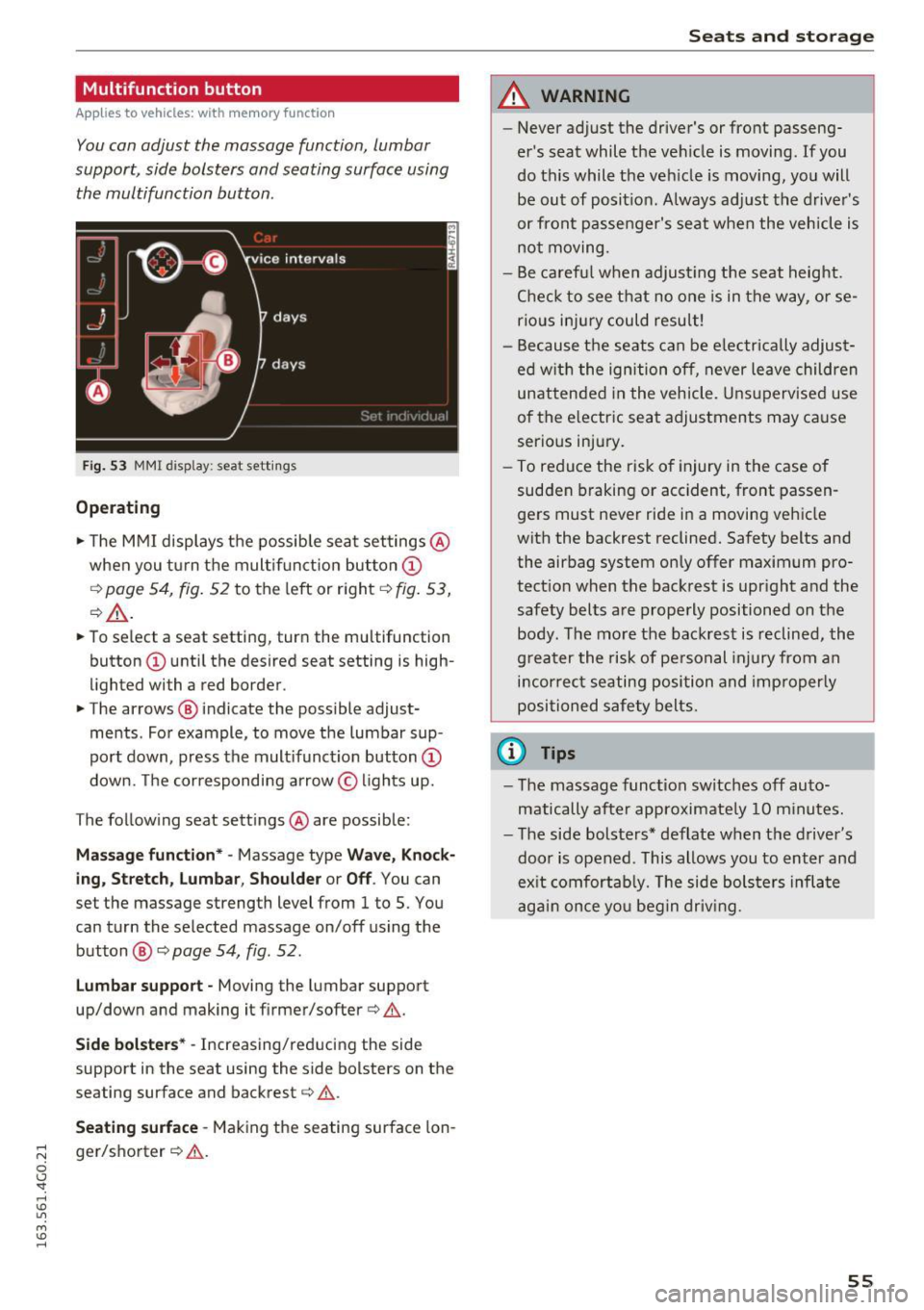
Fig. 53 MMI display: seat settings
Operating
.,. The MMI displays the possible seat settings @
when you turn the multifunction button(!)
qpoge 54, fig. 52 to the left or right qfig. 53,
¢_&. .
.,. To select a seat setting , turn the multifunction
button (!) until the desired seat setting is high
lighted with a red border .
.,. The arrows @ indicate the possible adjust
ments . For example, to move the lumbar sup
port down, press the multifunction button(!)
down. The corresponding arrow © lights up.
T he following seat settings @are possible :
Massage function* -Massage type Wave, Knock
ing, Stretch, Lumbar, Shoulder or Off.
You can
set the massage strength level from 1 to 5 . You
can turn the selected massage on/off using the
button @¢
page 54, fig . 52.
Lumbar support -Moving the lumbar support
up/down and making it firmer/softer ¢& .
Side bolsters* -Increasing/reducing the side
support in the seat using the side bolsters on the
seating surface and backrest¢& .
Seating surface -Making the seating surface lon
ger/shorter ¢&. .
Seats and storage
A WARNING
--
-Never adjust the driver's or front passeng
er's seat while the vehicle is moving. If you
do this while the vehicle is moving, you will be out of position. Always adjust the driver's
or front passenger's seat when the vehicle is
not moving.
- Be careful when adjusting the seat height.
Check to see that no one is in the way, or se
rious injury could result!
- Because the seats can be electrically adjust
ed with the ignition off, never leave children
unattended in the vehicle . Unsupervised use
of the electric seat adjustments may cause
serious injury.
- To reduce the risk of injury in the case of
sudden braking or accident, front passen
gers must never ride in a moving vehicle
with the backrest reclined. Safety belts and the airbag system only offer maximum pro
tection when the backrest is upright and the safety belts are properly positioned on the
body. The more the backrest is reclined, the
greater the risk of personal injury from an
incorrect seating position and improperly
positioned safety belts .
(0 Tips
- The massage function switches off auto
matically after approximately 10 minutes.
- The side bolsters* deflate when the driver's
door is opened . This allows you to enter and
exit comfortably. The side bolsters inflate
again once you begin driving.
55
Page 60 of 294
Seats and storage
Remote Memory button
control key
Driver Driver
Front
passen-
ger
Seat X X X
Steering wheel* X
X
Both exterior X X
mirrors*
Remote control key
Applies to vehicles: w ith memory function
The driver 's seat profile con be assigned to the
remo te control key when the vehicle is locked.
• Se lect : the ICARI function button > (Car)* Sys
tems
control button > Vehicle settings > Driv
er's seat
> Remote control key > On.
(D Tips
If you do not wish to have the seat profile for
another driver assigned to the remote contro l
key, switch the memory function off in the In
fotainment system or using the IOFFI button
r::::;,poge 58.
Memory buttons
Applies to vehicles: with memory function
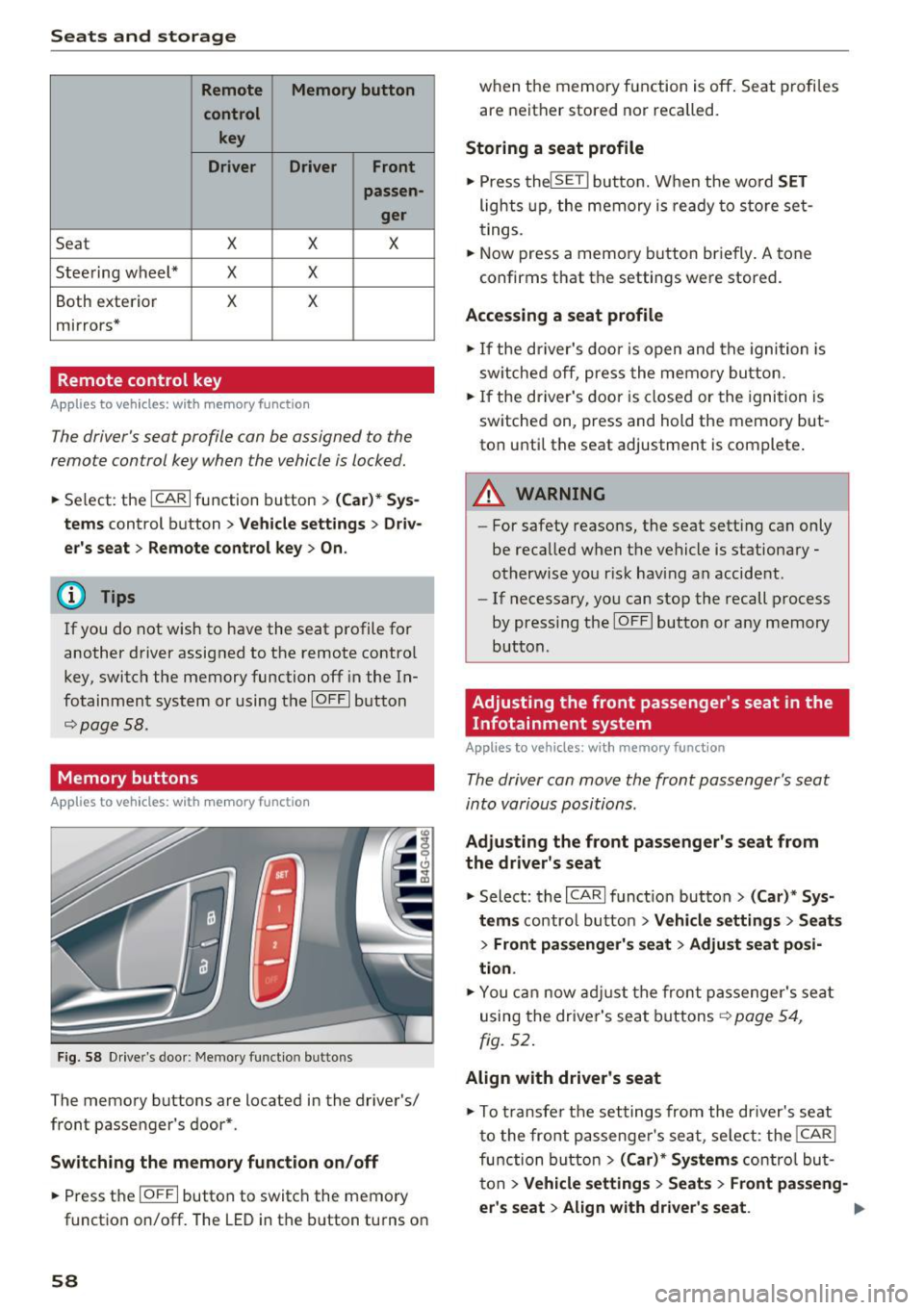
F ig. 58 Drive r's door : Me mory funct io n button s
The memory buttons are located in the driver's/
front passenger 's door*.
Switching the memory function on/off
• Press the IO FFI button to switch the memory
functio n on/off. The
LED in the button turns on
58 when the memory function is off
. Seat profiles
are neither stored nor recalled.
Storing a seat profile
• Press thelSE TI button. When the word SET
lights up, the memory is ready to store set
tings .
• Now press a memo ry button briefly.
A tone
confirms that th e settings were stor ed.
Accessing a seat profile
• If the driver's door is open and the ignition is
sw itched off, press the memory button.
• If the driver's door is closed or the ignition is
switched on, press and hold the memory but
ton until the seat adjustment is complete .
A WARNING
-For safety reasons, the seat sett ing can only
be recalled when the vehicle is stationary -
otherwise you r isk having an accident .
- If necessary, you can stop the recall process
by press ing the IOF FI butto n or any memory
button .
Adjusting the front passenger's seat in the
Infotainment system
Applies to vehicles: with memory function
The driver con move the front passenger's seat
into various positions .
Adjusting the front passenger's seat from
the driver's seat
• Select: the I CARI function button > (Car)* Sys
tems
control button > Vehicle settings > Seats
> Front passenger's seat > Adjust seat posi
tion .
• You can now adjust the front passenger's seat
using the driver's seat buttons
r:::;, page 54,
fig. 52.
Align with driver's seat
""To transfer the settings from the dr iver's seat
to the front passenge r's seat, se lect : the
I CAR I
function button
> (Car)* Systems contro l but
ton
> Vehicle settings > Seats > Front passeng-
er 's seat
> Align with driver 's seat . .,.
Page 61 of 294
.... N
0 CJ '
.. Press and hold the control knob until the ad
justing process is complete.
(D Tips
The lumbar support and upper thigh support
settings are not transferred when aligning
the front passenger's seat with the driver's
seat .
Ashtray
Applies to vehicles: with ashtray
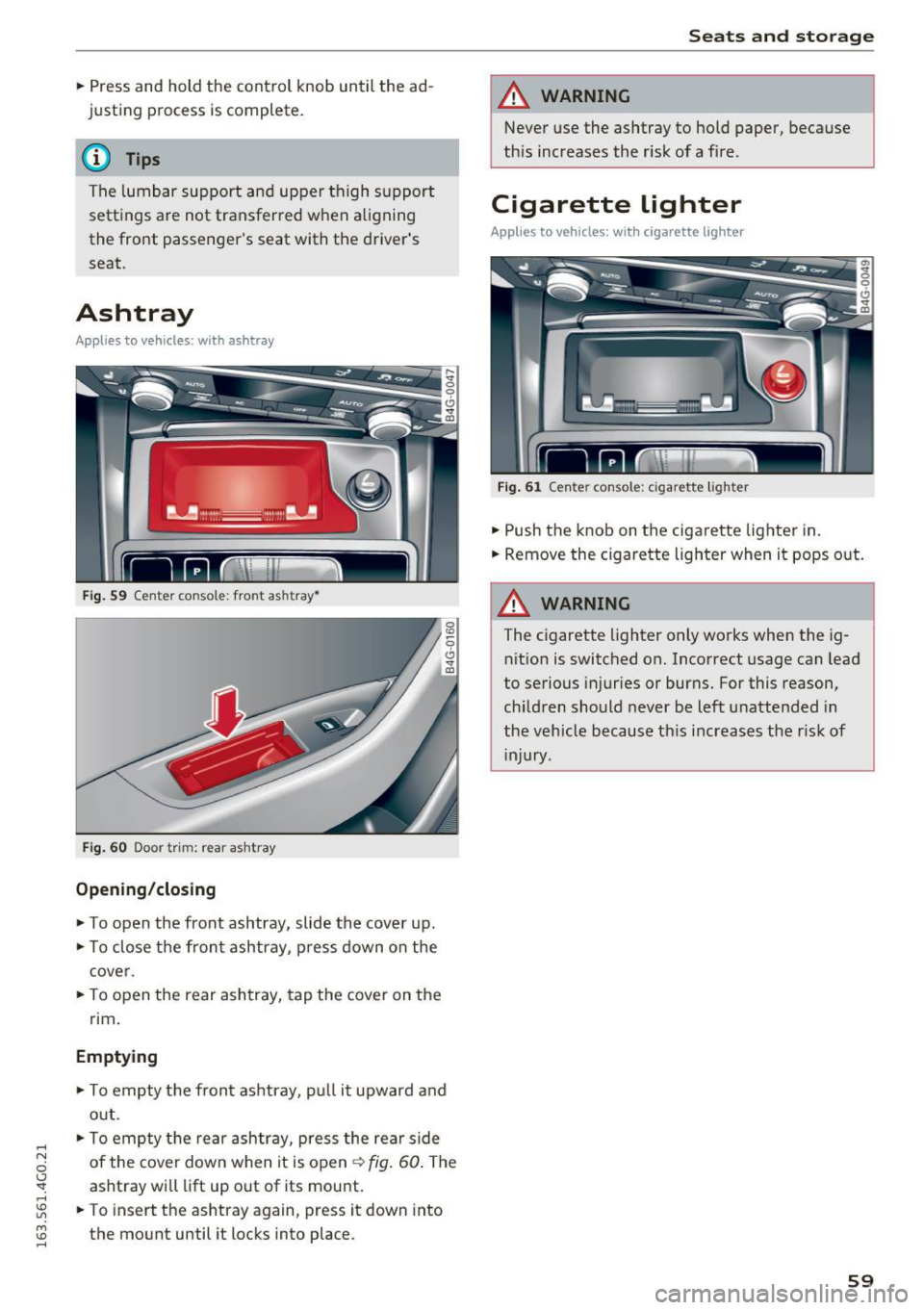
Fig. 59 Center console: front ashtray•
Fig. 60 Door trim: rear ashtray
Opening /closing
.. To open the front ashtray, slide the cover up .
.. To close the front ashtray, press down on the
cover .
.. To open the rear ashtray, tap the cover on the
rim.
Emptying
.. To empty the front ashtray, pull it upward and
out .
.. To empty the rear ashtray, press the rear side
of the cover down when it is open~
fig. 60. The
ashtray will lift up out of its mount.
.. To insert the ashtray again, press it down into
the mount until it locks into place .
Seats and storage
A WARNING
-Never use the ashtray to hold paper, because
this increases the risk of a fire.
Cigarette lighter
Applies to vehicles: with cigare tte ligh ter
Fig. 61 Center console : cigarette lighter
.. Push the knob on the cigarette lighter in .
.. Remove the cigarette lighter when it pops out.
A WARNING ~
The cigarette lighter only works when the ig-
nition is switched on. Incorrect usage can Lead
to serious injuries or burns. For this reason,
children should never be left unattended in
the vehicle because this increases the r isk of
injury .
59
Page 62 of 294
Sea ts and stor age
12 Volt sockets
Applies to veh icles: w ith 12-vo lt socke ts
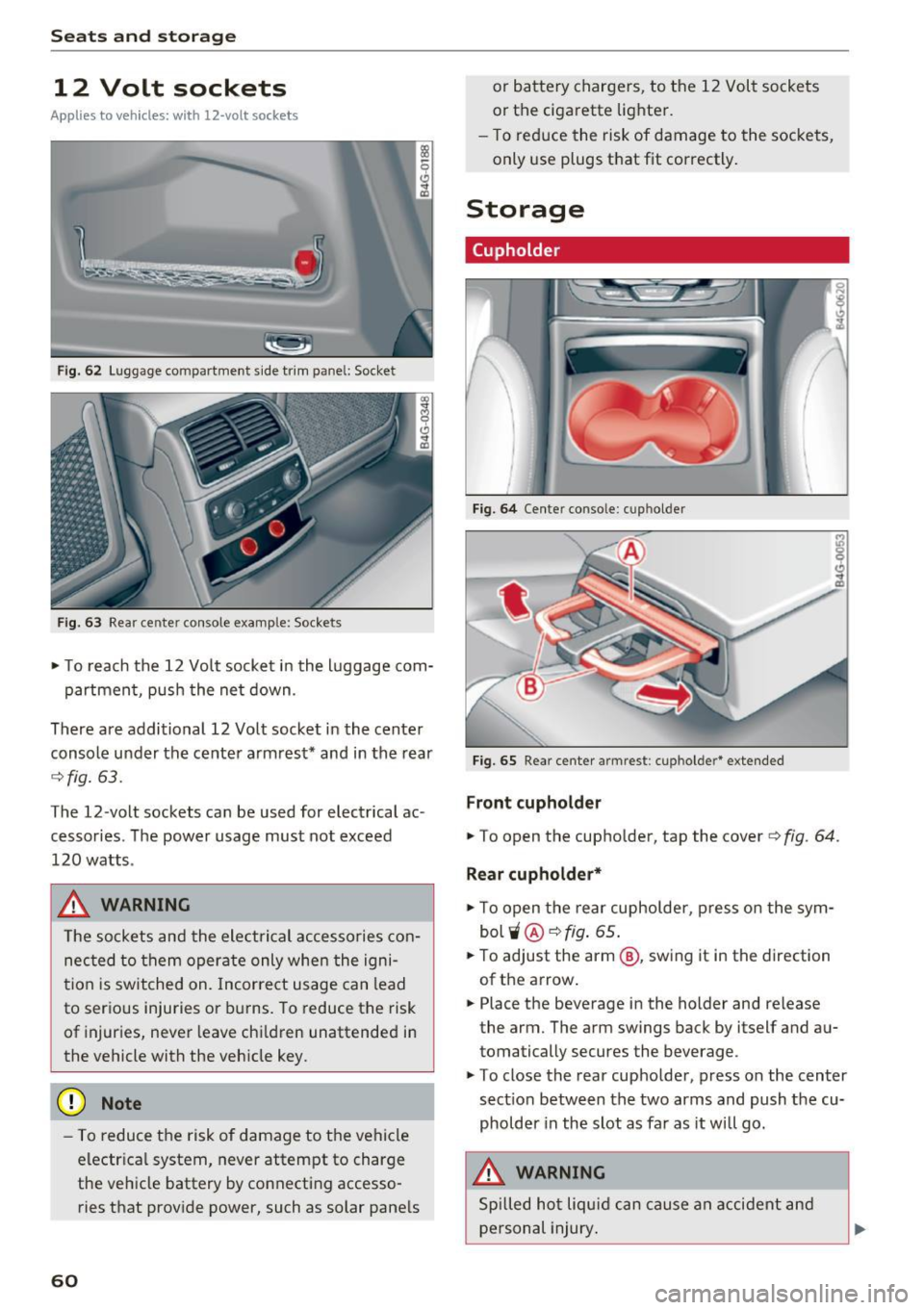
F ig . 62 Luggage compartment s ide tr im pane l: Socket
F ig . 6 3 Rear center co nsole example: Sockets
• To reach the 12 Vo lt socket in the l uggage com-
partment, push the ne t down .
There are additional 12 Volt socket in the center
console under the center armrest* and in the rear
c:> fig. 63.
The 12-volt sockets can be used for electrical ac
cessories. T he power usage must not exceed
120 watts .
_& WARNING
The sockets and the electrical accesso ries con
nected to them operate only when the igni
t ion is switched on. Incorrect usage can lead
to serious injuries or burns. To reduce the risk
of injuries, never leave chi ldren unattended in
the vehicle with the veh icle key.
(D Note
- To reduce the risk of damage to the vehicle
electr ica l system, never attempt to charge
the ve hicle battery by connecting accesso
ries that provide power, such as solar pane ls
60
or battery chargers, to the 12 Volt sockets
or the cigarette lighter.
- T o reduce the risk of damage to the sockets,
only use plugs that fit correctly .
Storage
(upholder
Fig. 64 Cente r conso le : cu p holder
Fig. 65 Rear center armrest : cupholde r* exte nded
Front cupholder
• To open the cup ho lder, tap the cover ¢ fig. 64.
Rear cupholde r*
• To open the rear cupholder , press on the sym
bol
'i @ c:> fig . 65 .
• To adjust the arm @, sw ing it in the direction
of the arrow .
• Place the beverage in the holder and release
the arm. The arm swings back by itself and au
tomatically secures the beverage.
• To close the rear cupholder, press on the center
sect ion between the two arms and push the cu
pholder in the slot as far as it will go.
_& WARNING
Spilled ho t liquid can cause an accident and
personal injury .
Page 63 of 294
-Never carry any beverage containers with
hot liquids, such as hot coffee or hot tea, in
the vehicle while it is moving. In case of an
accident, sudden braking or other vehicle
movement , hot liquid could spill, causing
scalding burns. Spilled hot liquid can also
cause an accident and personal injury .
- Use only soft cups in the cupholder . Hard
cups and glasses can cause injury in an acci
dent.
- Never use the cupholder or adapter as an
ashtray -risk of fire.
(D Note
Only drink containers with lids should be car
ried in the cupholder . Liquid could spill out
and damage your vehicle's electronic equip
ment or stain the upholstery, etc.
Cooled glove compartment
Applies to vehicles : wit h cooled glove compartment
The cooled glove compartment only functions
when the AIC system is switched on .
Fig. 66 Glove compartmen t: sw itching cooli ng mode on/
off
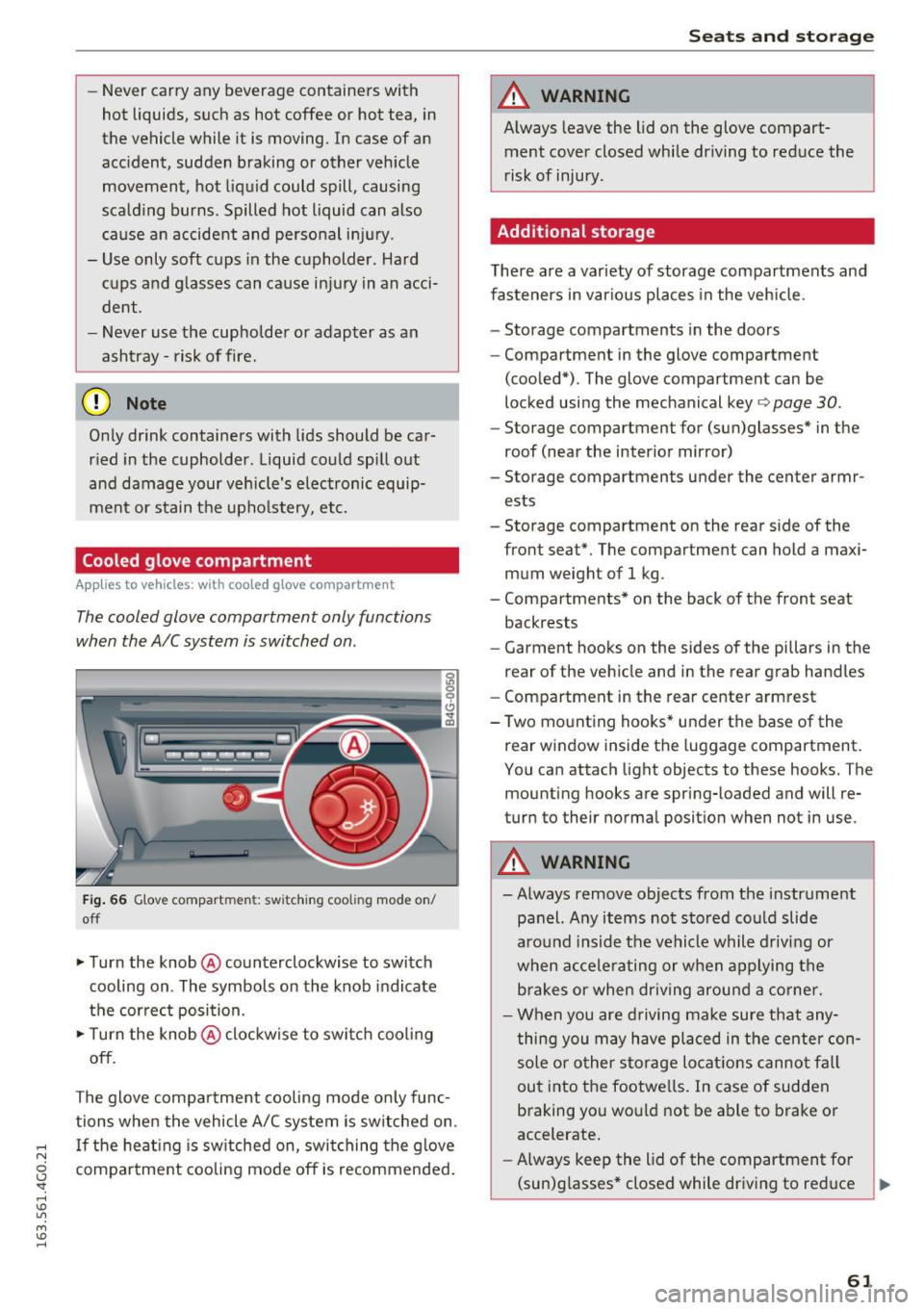
.. Turn the knob @counterclockwise to switch
cooling on . The symbols on the knob indicate
the correct position.
.,. Turn the knob @clockwise to switch cool ing
off.
The glove compartment cooling mode only func
tions when the vehicle A/C system is switched on .
..... If the heating is switched on, switching the glove
N
g compartment cooling mode off is recommended.
'
Seats and storage
A WARNING
-Always leave the lid on the glove compart-
ment cover closed while driving to reduce the
risk of injury.
Additional storage
There are a variety of storage compartments and
fasteners in various places in the vehicle.
- Storage compartments in the doors
- Compartment in the glove compartment
(cooled*) . The glove compartment can be
locked using the mechanical key ¢
page 30.
-Storage compartment for (sun)glasses* in the
roof (near the interior mirror)
- Storage compartments under the center armr ests
- Storage compartment on the rear side of the
front seat*. The compartment can hold a maxi
mum weight of 1 kg .
- Compartments* on the back of the front seat
backrests
- Garment hooks on the sides of the pillars in the
rear of the vehicle and in the rear grab handles
- Compartment in the rear center armrest
- Two mounting hooks* under the base of the rear window inside the luggage compartment.
You can attach light objects to these hooks. The
mounting hooks are spring-loaded and will re
turn to their normal position when not in use .
A WARNING
--Always remove objects from the instrument
panel. Any items not stored could slide
around inside the vehicle while driving or
when accelerating or when applying the
brakes or when driving around a corner.
- When you are driving make sure that any
thing you may have placed in the center con
sole or other storage locations cannot fall
out into the footwells. In case of sudden
braking you would not be able to brake or
accelerate.
- Always keep the lid of the compartment for
(sun)glasses* closed while dr iving to reduce ..,.
61
Page 64 of 294
Sea ts and stor age
the risk of injury during a sudde n braking
maneuver o r in the event of an accident.
- Any articles of clothing that you have hung
up must not interfere with the driver's view.
The coat hooks are designed only for light
weight cloth ing. Never hang any clothing
with hard, pointed or heavy objects in the
poc kets on the coat hooks. Dur ing sudden
bra king or in an accident -especia lly if the
airbag is dep loyed -these objects could in
jure any passengers inside the vehicle.
- To reduce the risk of pe rsonal inj ury in an
a cci den t or su dden stop, a lways keep the
glove compartment closed while driv ing.
- Read and follow a ll WARN ING S
<=> page 162, Important safety instru ctions
on the side airbag system.
- Hang clothes i n such a way that they do not
impa ir the driver's vis ion.
- The coat hooks must only be used for lig ht
we ight clot hing. Do not leave any heavy or
sharp edged objects in the pockets which
may interfere wit h the side curtain airbag
deployment and can cause personal injury in
a crash.
- Do not use coat ha ngers for hanging cloth
ing on the coat hooks as this can interfere
with prope r deployment of the side curtain
airbags in an accident.
- Do not hang heavy objects on the coat
hooks, as they co uld cause personal injury in
a sudden stop.
- For strength-related reasons, the mounting
hooks can on ly be used to secure objects
weighing up to 10 lb. (5 kg). Heavier objects
will not be adequate ly secured -there is a
risk of in jury.
(D Note
Objects located on the rear shelf that rub
aga inst the rear window could damage the
heati ng wires for the rea r window defogger .
62
Roof rack
Description and mounting locations
Additional cargo can be carried with a roof lug
gage rack.
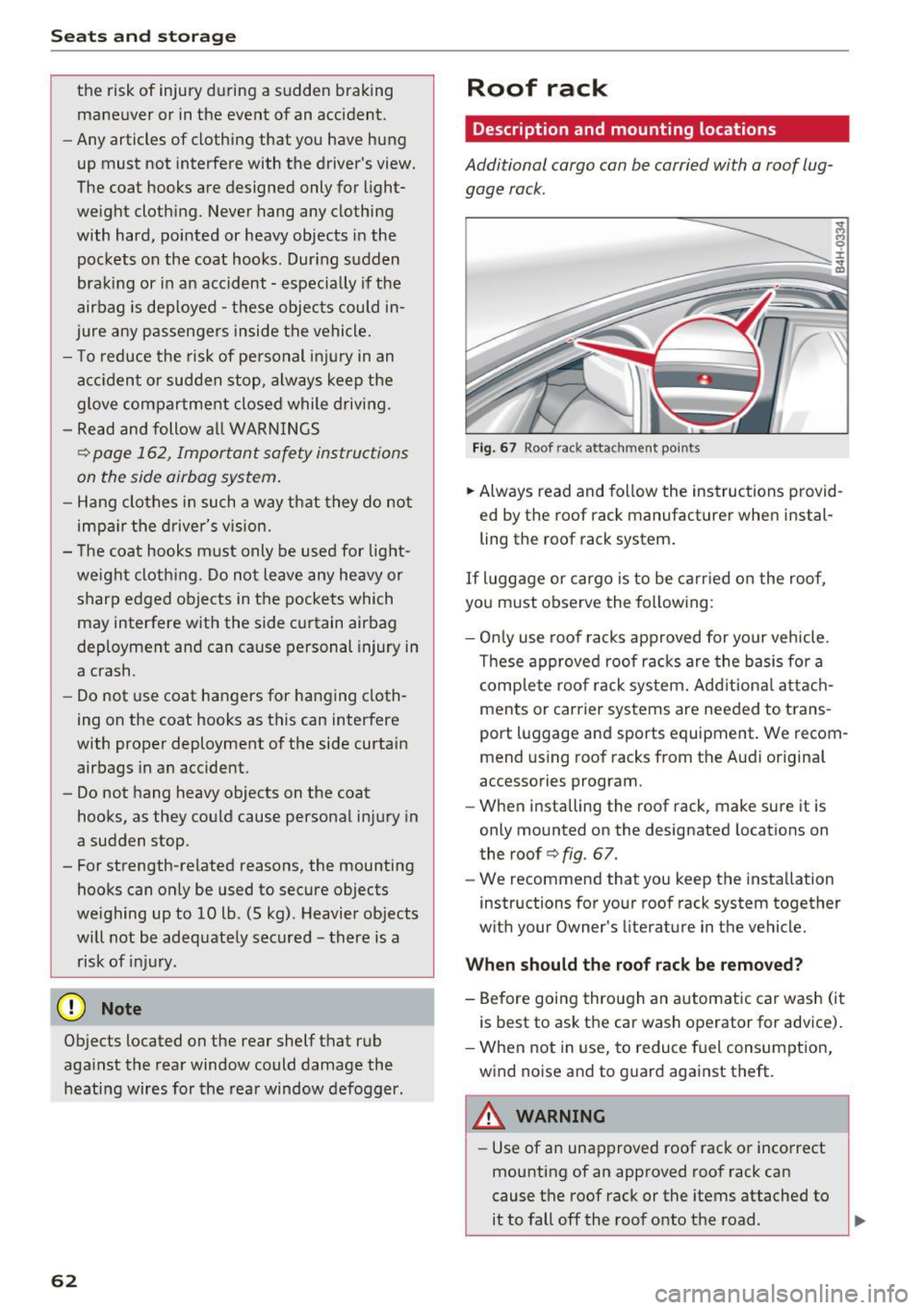
Fig. 6 7 Roof rack attachment po ints
.. Always read and fo llow the ins truc tions provid
ed by the roof rack manufact urer when instal
ling the roof rack system .
If luggage or cargo is to be ca rried o n the roof,
you must observe the fo llowing :
- Onl y use roof racks approved for your veh icle .
Th ese approved roof rack s are the basis fo r a
c omp le te roo f rack system. Add it ion al attac h
ments or carrier systems are needed to trans
port luggage and sports equipment. We recom
mend us ing roof racks from the A udi original
accessories program .
- When installing the roof rack, make sure it is
only mounted on the designated locations on
the roof <=>
fig. 67.
-We recommend that you keep the installation
instructions for your roof rack system together
w ith your Owner 's literature in the vehicle.
When should th e roof rac k be removed?
- Before goi ng through an automatic ca r wash (i t
is best to ask the car wash operator for advice).
- When not in use, to reduce f uel consumptio n,
wind noise and to g uard against theft .
A WARNING
- Use of an unapproved roof rack o r incorrect
mounting of an approved roof rack can
cause t he roof rack or the items attached to
it to fall off the roof onto the road .
~
Page 68 of 294
Sea ts and stor age
Pass-through with ski
bag
Pass -through with ski sack
A pplies to veh icles: with sk i sack
Long objects such as skis con be transported in
the ski sock*.
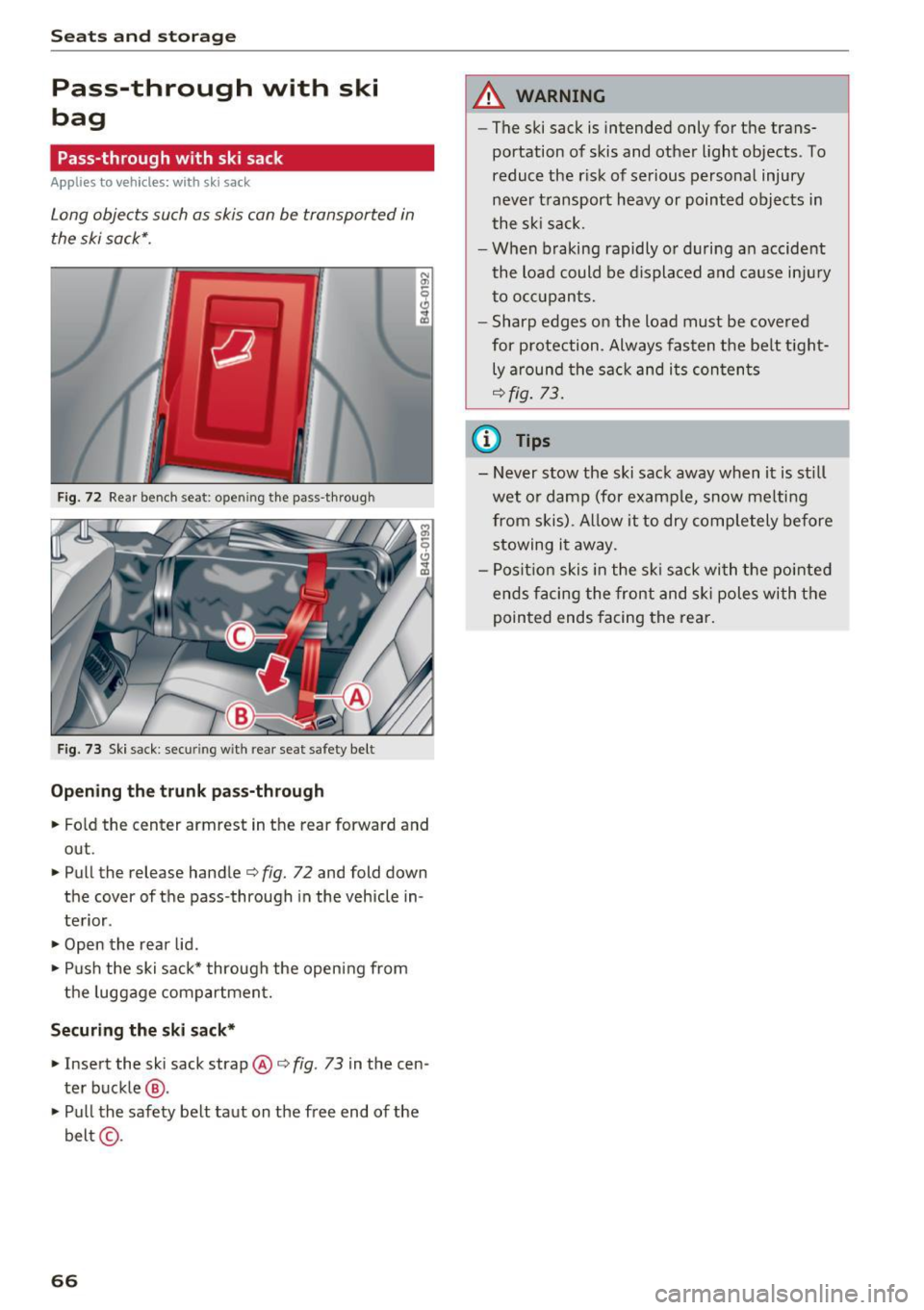
Fig. 72 Rear bench seat : ope ning the pass-through
F ig . 73 Sk i sack: securing with rear sea t safety belt
Opening the t runk p ass-through
.. Fo ld the center armrest in the rear forward and
out .
.. Pull the release handle c:>
fig. 72 and fold down
the cover of the pass -through in the vehicle in
te rior.
.,. Open the rear lid .
.. Push the ski sack* through the opening from
t he luggage compartmen t.
Secur ing the ski sack*
.. Insert the ski sack strap @c:> fig. 73 in the cen
ter buckle
@ .
• Pu ll the safety belt taut on the free end of the
belt @-
66
A WARNING
-The ski sack is intended only for the trans
portation of skis and other light objects . To
reduce the risk of serious personal injury
never t ransport heavy or pointed objects in
the s ki sack.
- When braking rapidly o r d uring a n accident
the load could be displaced and cause in ju ry
to o cc u pants.
- Sharp edges on the load must be covered
for p rotection_ Always fas ten the be lt t ight
ly around the sac k and i ts con ten ts
¢fig . 73.
(D Tips
- Never stow the ski sack away when it is st ill
wet o r damp (for examp le, snow melting
from skis). Allow it to dry comp letely before
stowing i t away.
- Posit ion skis in the ski sack wi th the pointed
ends f acing the front and sk i pole s with t he
pointed ends facing the rear.
Page 70 of 294

Warm and cold
Three-zone climate control
Operating
Applies to vehicles: w ith three zo ne cl imate contro l
Fig. 74 T hree-zone climate co ntrol: contro ls
P ress the buttons to tur n the func tions on or off.
The dial adj usts t he temperatu re and the blower.
The LED in a button will light up when the func
tion is sw itche d on.
IAUTO I Switching automatic mode on
Automatic mode ma inta ins a constant tempera
ture inside the vehicle . Air tempe rature, airflow
and a ir distribution are controlled automatically.
Adjusting the temperature
The temperatu re can be adjusted individually fo r
the dr iver and front passenger us ing t he dials
(D
and @.
Adjust ing the blower 8f?
Using the dial@, you can manually adjust the
amount of air generated by the blower to suit
your preferences. To have the blowe r regu lated
automatically, p ress the
IAUTO ! button.
~. ~ .~ Adjusting air distribution
You can manually select the vents where the air
will flow. To have the air distribution regulated
automatically, press the
IAUTO! button.
l""" I Switch ing recirculation m ode on/off
In recirculation mode, the air inside the vehicle is
circulated and filtered. This prevents the unfil-
68
tered air outs ide the ve hicle from entering the
vehicle interior. We recommend sw itching recir
cu lation mode on when driving through a tu nnel
or when sitting in traffic ~.&. .
The
! AUTO I button or I@ FRONT ! button switches
recircu lation mode off .
IOFFI Switching the climat e control system
on /off
The !OFF ! button switches the climate con trol
system on or off.
It a lso switches on when you
press the b lower control. Airflow from outside is
blocked when the climate control system is
switched off.
IA/Cl Switching cooling mode on/off
The air is not coo led and humidity is not removed
whe n coo ling mode is switched off . This can
cause fog on the windows. The cooling mode
switches off automatically when there are cold
outside temperatures.
l«w FRONT I Switching the defr oster on /off
The w indshield and side w indows a re defrosted
or cleared of condensation as quick ly as poss ible .
The maximum amount of air flows mainly from
the vents below the windshield. Recircu lation .,.
Page 72 of 294
Warm and cold
Four-zone automatic climate control
Operating
Applies to vehicles: with four-zone automatic climate control
F ig . 75 Four -zone automa tic cl imate contro l: co ntro ls
N :g 0 t'.)
" a,
Fig. 76 F our -zone automa tic cl imate co ntro l: rea r co ntrols
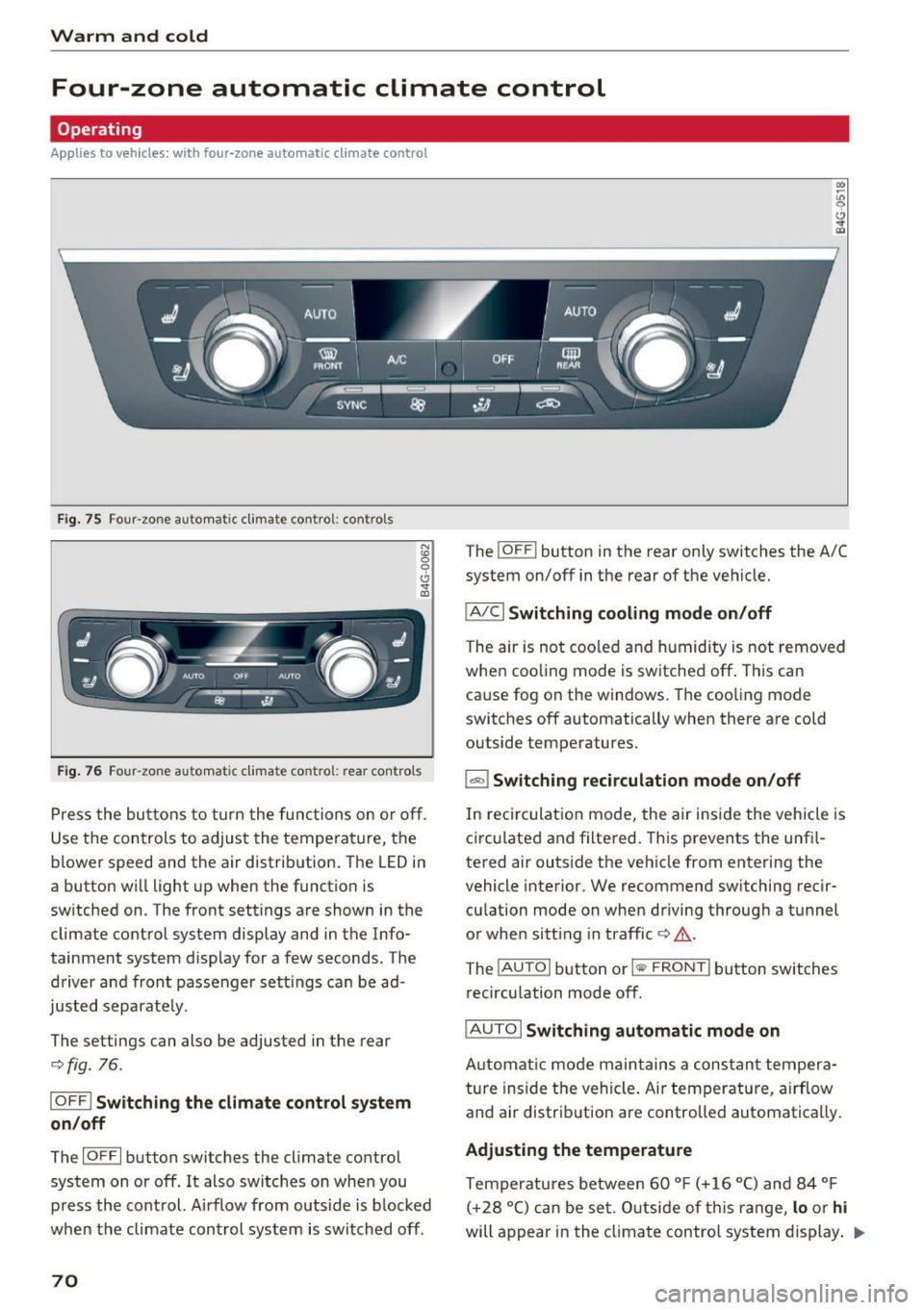
Press the butto ns to turn the functions on or off _
Use the controls to adjust the tempe ra ture, the
b lower speed and the air distribution. The LED in
a button will light up when the function is
sw itched on. The front sett ings are shown in the
climate control system display and in the Info
tainment system display for a few seconds. The
driver and front passenger sett ings can be ad
justed separate ly.
The settings can also be adjusted in the rear
¢ fig. 76 .
IOFF ! Switching the climate control system
on/off
The IO FF I button switches the cl imate control
system on or off. It also switches on when you press the control. A irflow from outside is b locked
when the climate control system is switched off .
70
The !OFF ! button in the rear only switches the A/C
system on/off in the rear of the vehicle.
IAJCI Switching cooling mode on/off
The air is not cooled and humidity is not removed
whe n coo ling mode is switched off . This can
cause fog on the windows. The coo ling mode
switches off automatically when there are cold
outside temperatures.
1 -=I Switching recirculation mode on/off
In reci rculation mode, the air inside the vehicle is
circulated and filtered. This prevents the unfi l
tered air outside the veh icle from entering the
vehicle interior. We recommend sw itching recir
culation mode on when driving through a tunnel
or when sitt ing in traffic ¢,&. .
The
! AU TO I button or I <111> FRONT I button switches
recirculation mode off.
I AUTO I Switching automatic mode on
Automat ic mode main tains a constan t tempera
ture inside the vehicle . Air temperature , a irflow
and air distribution are controlled automatically.
Adjusting the temperature
Temperatures between 60 °F (+ 16 °C) and 84 °F
( +2 8 ° C) can be set. O utside of this range,
lo or hi
will appear in the climat e control system display . .,.
Page 76 of 294
Driving
There must be at least 10 inches (25 cm) be
tween your chest and the center of the steering
wheel. If you cannot sit more than 10 inches (25
cm) from the steer ing wheel, see if adaptive
equipment is available to help you reach the ped
als and increase the distance from the steering
wheel.
For detai led information on how to adjust the
driver's seat, see
¢ page 54 .
In vehicles with the memory function*, the steer
ing column sett ings are stored together with the
seat position.
A WARNING
Improper use of steer ing whee l adjustment
and improper seating position can cause ser i
ous pe rsonal injury.
- Adjust the steering wheel column only when
the vehicle is not moving to prevent loss of
vehicle control.
- Adjust the driver's seat or steering wheel so
that there is a minimum of 10 inches (25
cm) between your chest and the steer ing
wheel
r::.> page 126, fig. 143. If you cannot
mainta in this min imum distance, the airbag
system cannot protect you properly.
- If phys ica l limitations prevent you from sit
t ing 10 inches (25 cm) or more from the
steering wheel , check with your authorized
Audi dealer to see if adaptive equ ipment is
available.
- If the steering wheel is aligned with your
face, the supp lemental driver's airbag can
not provide as m uch protection in an acci
dent. Always make sure that the steering
wheel is aligned w ith your chest.
- Always hold the steer ing whee l with your
hands at the 9 o'clock and 3 o'clock posi
tions to reduce the risk of personal injury if
the driver's airbag deploys .
- Never hold the steer ing wheel at the 12
o'clock posit ion or w ith your hands inside
the steering wheel rim or on the steering
wheel hub . Holding the steer ing whee l the
wrong way can cause ser ious injuries to the
hands, arms and head if the driver's airbag
deploys.
74
-
Easy seat entry
Applies to vehicles: with power steering wheel adjustment
Easy seat entry makes it easier to enter and exit
the vehicle by adjusting the steering column au
tomatically .
.,. In the Infotainment system, selec t: the ICARI
function button > (Car )* Systems control but
ton
> Vehicle settings > Seats > Driver's seat>
Easy seat entry> On.
When easy seat entry is switched on, the steer ing
column goes back up into the park position when
the ignit ion is switched off . After enter ing the ve
hicle, the steering col umn returns to t he sto red
pos ition once the ign it ion is swi tched on.
Starting and stopping
the engine
Starting the engine
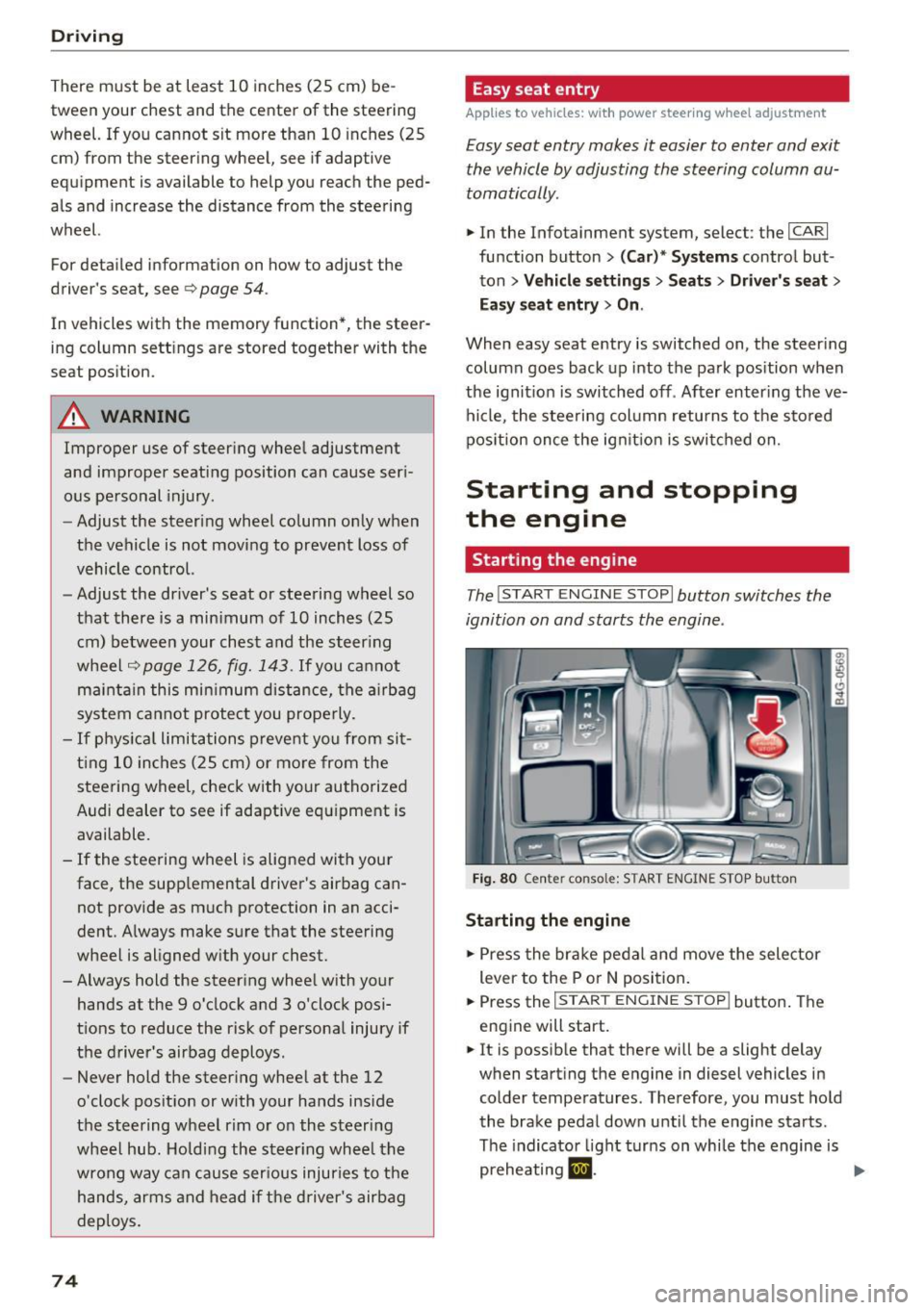
The I START ENGINE STOP I button switches the
ignition on and starts the engine .
Fig. 80 Cente r conso le: S TART ENGINE STOP b utt on
Starting the engine
.,. Press the brake pedal and move the selector
lever to the P or
N position.
... Press the
!STAR T ENGINE ST OP ! button. The
engine will start.
.,. It is possible that there will be a slight delay
when starting the engine in diesel vehicles in colder temperatures . Therefore, you must hold
the brake pedal down until the engine starts.
The indicator light turns on while the engine is
preheating
1,1 . ..,.