lock AUDI A6 2017 User Guide
[x] Cancel search | Manufacturer: AUDI, Model Year: 2017, Model line: A6, Model: AUDI A6 2017Pages: 280, PDF Size: 70.24 MB
Page 33 of 280
co
co
.... N
" N .... 0 0 <.,;) 'SI"
key is in your jacket pocket or in your briefcase,
for example .
The door ca nnot be opened for a br ief period di
rect ly after loc king it. This way you have the op
portunity to check if the doors locked correctly.
The settings in the Infotainment system deter mine if the entire vehicle or only one of the doors
is unlocked when unlocking the vehicle
¢page 32.
WARNING .1!!!!!!!!!. !!..-
Read and heed a ll WARNINGS ~.& in Descrip
tion on page
2 7.
@ Tips
If your vehicle is left stand ing for a long peri
od of time, note the following:
- The proximity senso r switches off after a
few days to save energy. You then have to
pull once on the door handle to unlock the
vehicle and a second time to open it .
- The energy management system gradually
turns off unnecessary convenience functions
to prevent the vehicle battery from draining
and to maintain the vehicle 's abi lity to start
for as long as possible. You may not be able to unlock your vehicle using the convenience
key.
- For an explanation on conformity with the
FCC regulations in the United States and the
Industry Canada regulations, see
¢page 262.
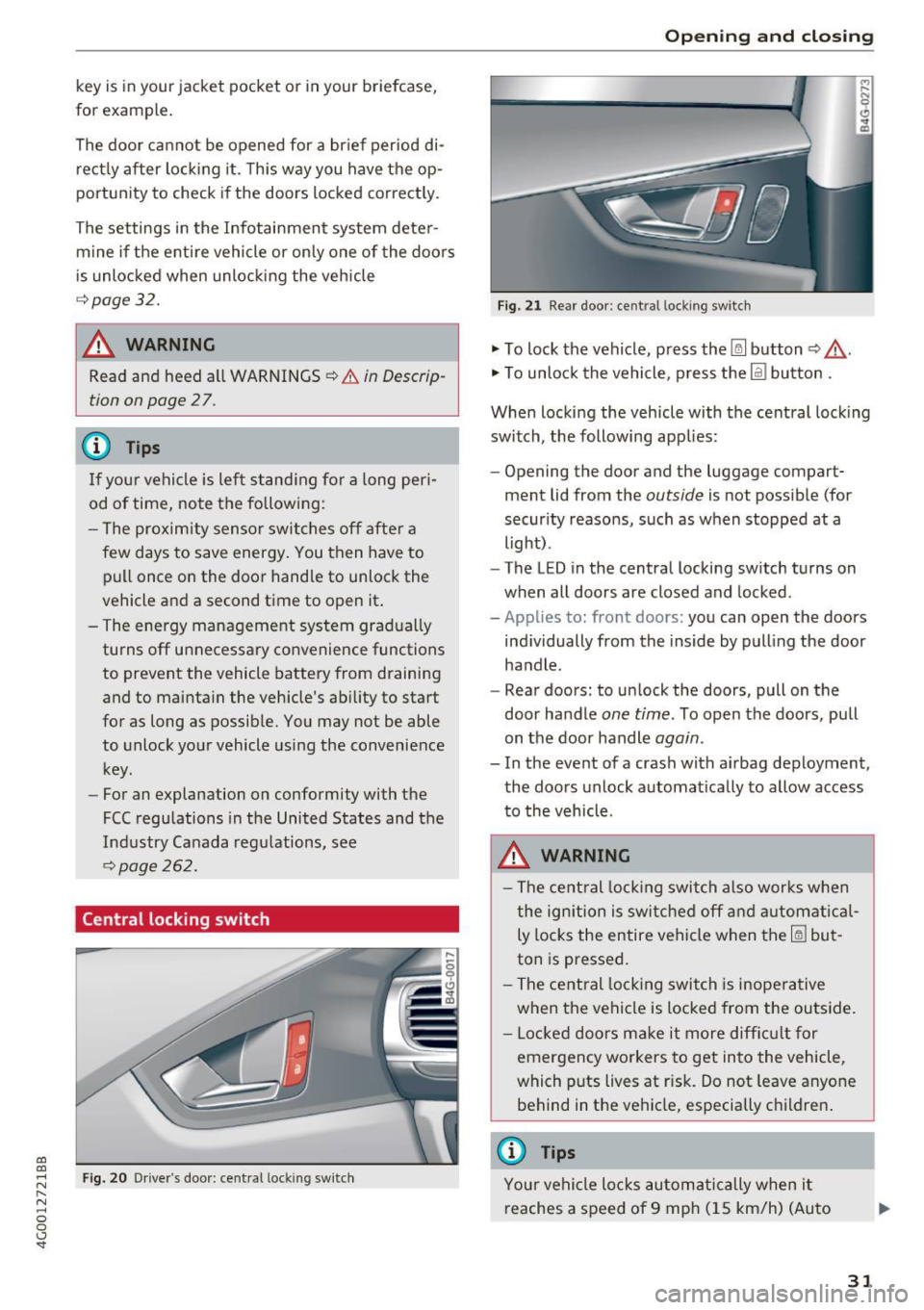
Central locking switch
Fig. 20 Drive r's door: central loc king switch
Open ing and closing
Fig. 21 Rear doo r: ce ntra l locking sw it c h
"' To lock the vehicle, press the~ button ~,&. .
"' To unlock the vehicle, p ress the @l button .
When locking the vehicle with the central locking
switch, the following app lies:
- Opening the door and the luggage compart
ment lid from the
outside is not possible (for
security reasons, such as when stopped at a
light) .
- The L ED in the central locking switch turns on
when all doors are closed and locked.
-Applies to: front doors: you can open the doors
ind ividually from the inside by pulling the door
handle .
- Rear doors: to unlock the doors, pull on the
door ha ndle
one time . To open the doors, pull
on the door handle
again .
- In the event of a crash with a irbag deployment,
the doors unlock automat ically to allow access
to the vehicle.
A WARNING
-The central locking switch also works when
the ignition is switched off and automatical
ly locks the entire vehicle when the~ but
ton is pressed.
- The central locking switch is inoperative
when the vehicle is locked from the outside.
- Locked doors make it more difficult for
emergency workers to get into the vehicle,
which puts lives at r isk. Do not leave anyone
behind in the vehicle, especially c hildren .
@ Tips
Your vehicle locks automatically when it
reaches a speed of 9 mph (15 km/h) (Auto
31
Page 34 of 280
Opening and clo sin g
Lock) c::> page27. You can unlock the vehicle
again using the
crl button in the central lock
ing switch.
Setting the central locking system
In the Infotainment system, you can set which
doors the central locking system will unlock .
.,. Se lect : the ICARI function button > (C ar) * Sy s
tems
control button > V ehi cle sett ing s > (C en
t ral lock ing )* .
Door unlo cking -
you can decide if All doors or
only the
Dri ver door should unlock. The l uggage
compartment lid also unlocks when
All is select
ed . If you select
Dri ver in a vehicle with a conven
ience key*, only the door whose handle you pull
will unlock.
If you select D river , all the doo rs and luggage
compartment lid will un lock if you press the
@l
button on the remote control key twice .
Disable tailg ate handle -If you selec t On , the
luggage compartment lid hand le is locked. I n
this case the luggage compartment lid can be opened with the~ button on the remote control
key or with the
l a l button* in the driver 's door. In
veh icles with a convenience key*, you can st ill
open the luggage compartment lid using the handle if an author ized remote control key is
nea r th e p rox imity se nsor* .
Fold mirrors when locking * -if you select On ,
the exterior rea rview mirro rs fold in automatical
ly when you press the
l@J butto n on the remote
control key or to uch t he senso r* in the handle.
T on e wh en locking ll -if you se lect On , a tone
will sound when you lock the veh icle.
l) Th is fun ctio n is not a vailab le in all coun tries.
32
Emergency unlocking and locking the doors
Each door must be locked separately if the pow
er locking system fails .
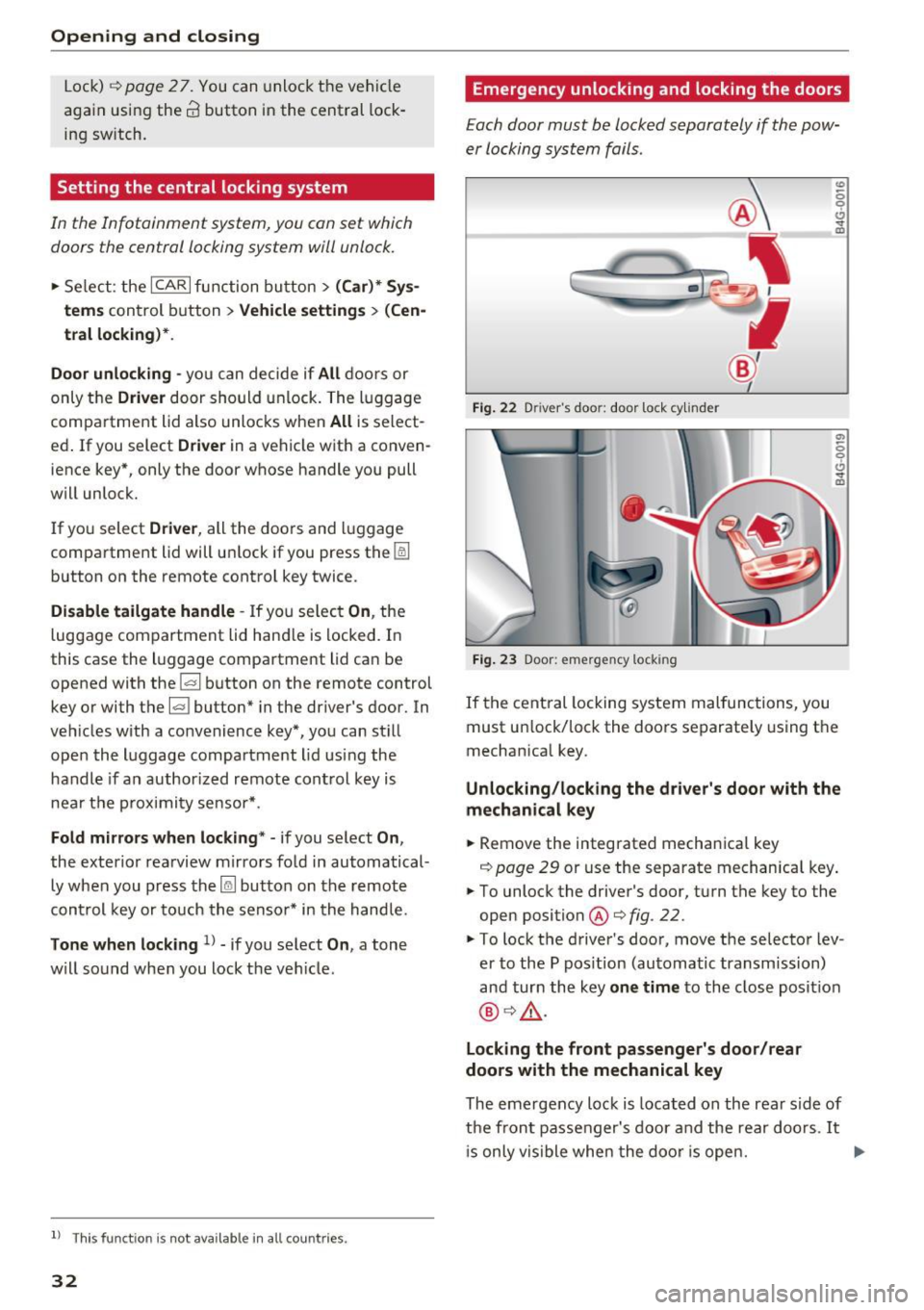
Fig. 22 D river's doo r: door loc k cy linder
F ig . 23 Door : eme rge ncy loc king
t!, .., m
a,
l5 0 t!, .., m
If the central locking system malfunctions, you
must un lock/lock the doors separately using the
mechan ica l key.
Unlocking /locking the d river 's door with the
mechanical key
.,. Remove the integrated mechanical key
c::> page 29 or use the separate mechanica l key .
.,. To unlock the driver's door, turn the key to the
open position
@ c::> fig . 22 .
.,. To lock the driver's doo r, move t he selector lev
er to the P pos ition (automatic transm ission)
and turn the key
on e time to the close posit ion
@ c::>,& .
Locking the front pa ssenger's door /rear
doo rs with the mechanical key
The eme rgency lock is loca ted on the rear side of
the front passenger's door and the rear doo rs .
It
is only vis ible whe n the doo r is ope n. .,.
Page 35 of 280
co
co
.... N
" N .... 0 0 <.,;) 'SI'
.. Remove the integrated mechanical key
Q page 29 or use the separate mechan ical key .
.. Pull the cap out of the opening
¢ fig. 23 .
.. Insert the key in the inside slot and turn it all
the way to the right (right door) or left (left
door).
A WARNING
Read and heed all WARNINGS¢ A in Descrip
tion on page
27.
Anti-theft alarm system
If the anti-theft alarm system detects a vehicle
b reak-in, audio and visual warning signals are
triggered. The anti-theft alarm system is activat
ed when the vehicle is locked as usual.
It
switches off when the vehicle is unlocked.
If the alarm is triggered, it w ill shut
off automat
ically after a ce rtain amount of time. Switch the
ignition on or press the~ button on the remote
control key to turn
off the alarm.
Luggage compartment
Lid
Opening /closing the luggage compartment
lid
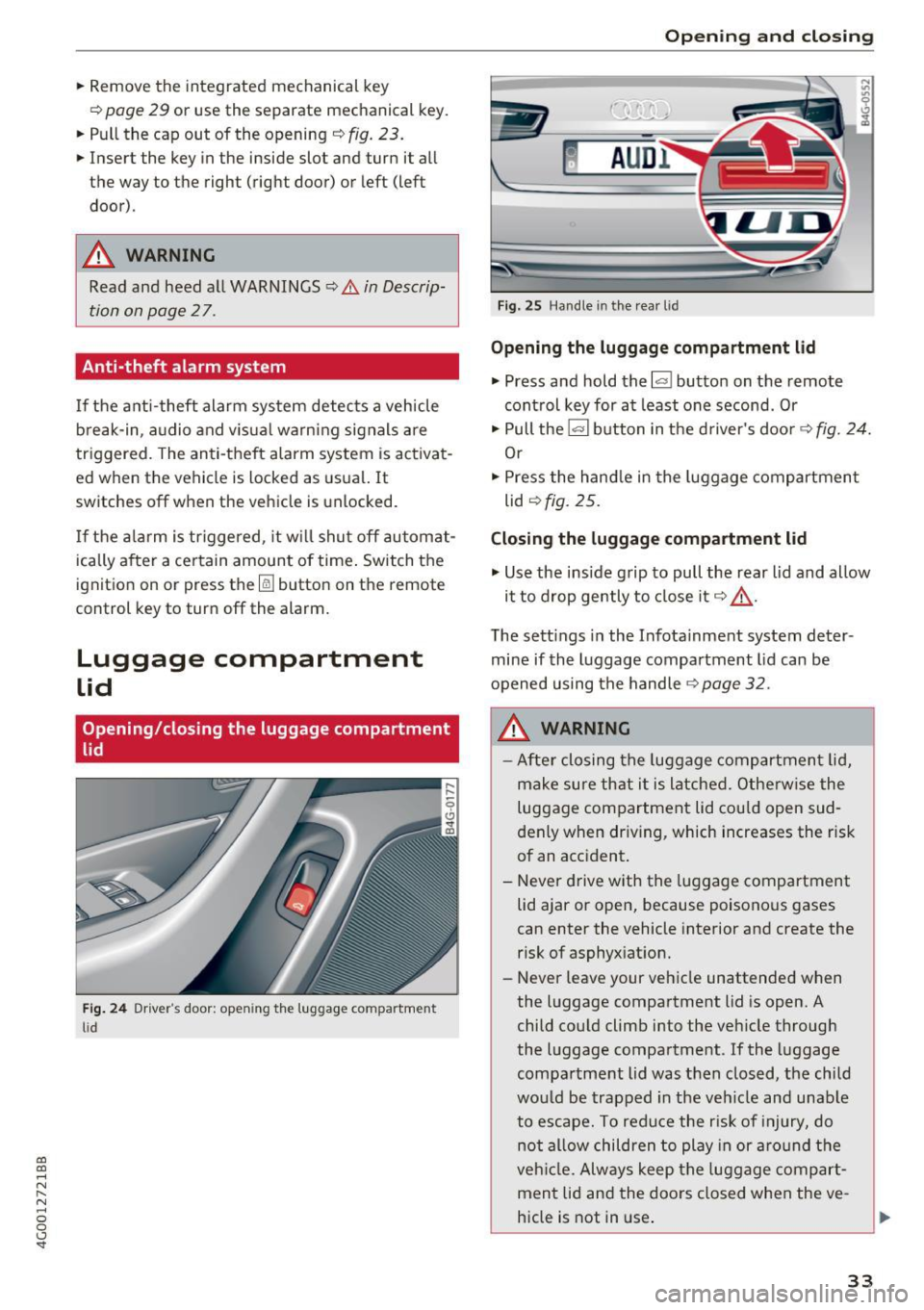
Fig. 24 Dr iver's door : opening the luggage compartment
li d
Open ing and closing
Fig. 25 Handle in the rea r lid
Opening the luggage compartment lid
.. Press and hold the l""I button on the remote
control key for at least one second . Or
.. Pull the~ button in the driver's door¢
fig. 24.
Or
.. Press the hand le in the luggage compartment
lid
Q fig. 25.
Closing the luggage compartment lid
.,. Use the inside grip to pull the rear lid and allow
it to drop gently to close it¢ _&. .
T he sett ings in the Infota inment system deter
mine if the luggage compartment lid can be
opened using the handle
¢ page 32.
A WARNING
- After closing the luggage compartment lid,
make sure that it is latched. Otherwise the
luggage compartment lid could open sud
denly when driv ing, which increases the risk
of an accident.
- Never drive with the luggage compartment
lid ajar or open, because poisonous gases
can enter the vehicle interior and create the
risk of asphyxiation.
- Never leave your vehicle unattended when
the luggage compartment lid is open. A
child could climb into the vehicle through
the luggage compartment . If the luggage
compartment lid was then closed, the child
would be trapped in the vehicle and unable
to escape. To reduce the r isk of injury, do
not allow children to play in or around the
veh icle. Always keep the luggage compart
ment lid and the doors closed when the ve
hicle is not in use.
33
Page 36 of 280
Opening and closing
-Always make sure no one is in the luggage
compartment lid's range of motion when it
is clos ing, especially near the hinges. Fin
gers or hands could be p inched .
(D Tips
When the vehicle is locked, the luggage com
partment lid can be unlocked separately by
pressing the
l a ! button on the remote control
key. The luggage compartment lid locks auto
matically when it is closed again.
Automatic luggage compartment lid
Applies to: ve hicles w ith a utomat ic luggage compartment lid
The luggage compartment lid can be opened and
closed electrically .
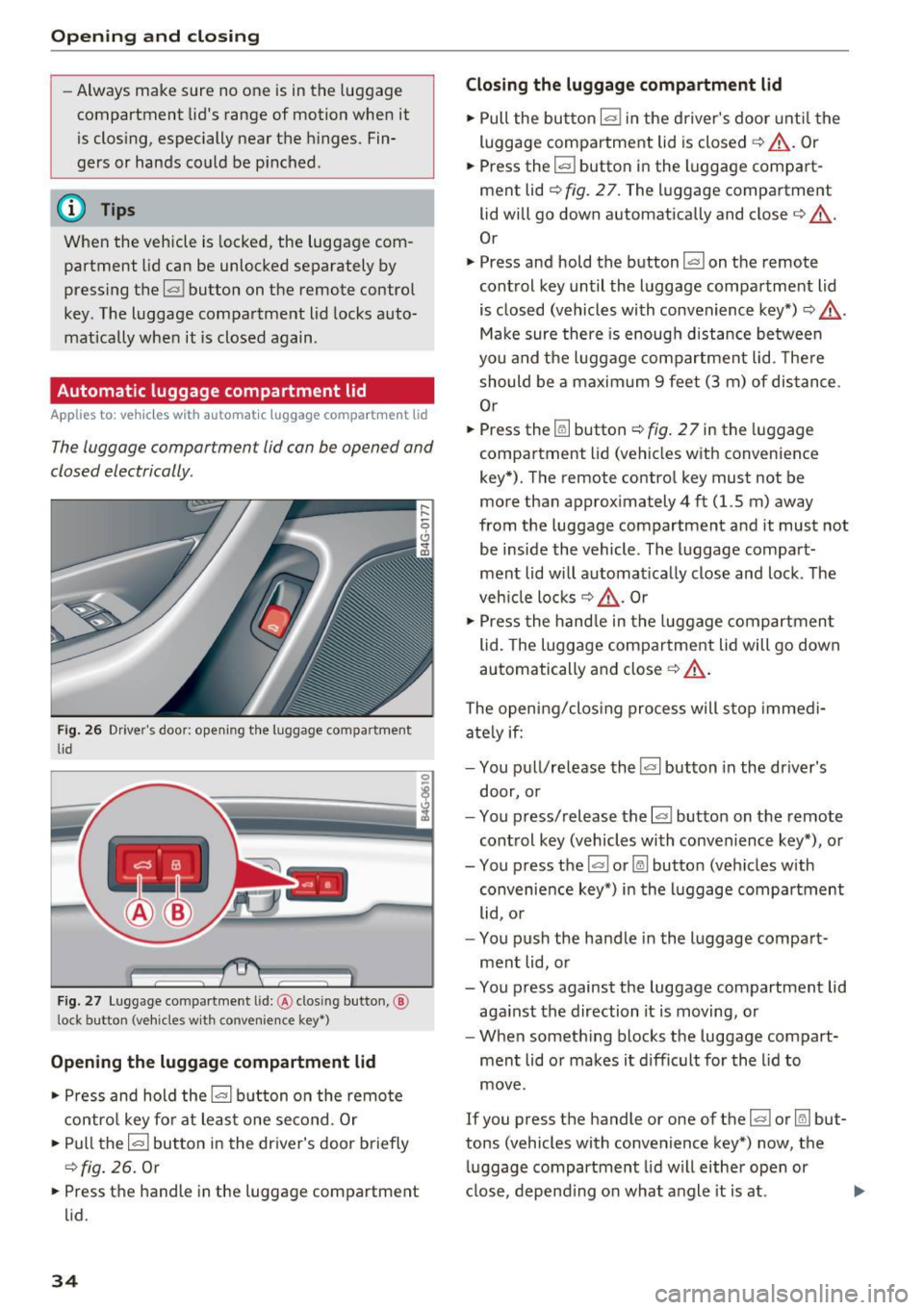
Fig. 26 Driver's door: opening t he luggage compartment
li d
' c::::;s Iii
--- -
Fig . 27 Luggage compar tment lid:@ clos ing butto n,@
l ock button (vehicles w ith convenie nce key•")
Opening the luggage compartment lid
• Press and hold the !<=> I button on the remote
control key for at leas t one second . Or
• Pull the
l=I button in the driver's door briefly
c::>fig. 26. Or
• Press the handle in the luggage compartment
lid.
34
Closing the luggage compartment lid
• Pull the button l= I in the driver's door until the
luggage compartment lid is closed
c::> _&. . Or
• Press the
l= I button in the l uggage compart
ment lid
r::;> fig. 27. The luggage compartment
lid will go down automatically and close ¢ _&. .
Or
• Press and hold the button
la l on the remote
control key until the luggage compartment lid
is closed (vehicles with convenience key*) ¢ _&. .
Make sure there is enough d istance between
you and the luggage compartment lid. The re
should be a maximum
9 feet (3 m) of distance.
Or
• Press the~ button
r:;, fig. 2 7 in the luggage
compartment lid (vehicles with convenience
key*). The remote control key must not be
more than approximately
4 ft (1.5 m) away
from the luggage compartment and it must not
be inside the vehicle. The luggage compart
ment lid wi ll automat ica lly close and lock . The
veh icle locks ¢_&. . Or
• Press the handle in the luggage compartment
lid. The luggage compar tment lid will go down
automatically and close
c::> _&. .
The opening/closing process will stop immedi
ate ly if:
- You pull/release the
!a l button in the dr iver's
door, or
- You press/release the
l<=> I button on the remote
control key (vehicles with convenience key*), or
- You press the~ or~ button (veh icles with
convenience key*) in the luggage compartment
lid, o r
- You push the handle in the luggage compart
ment lid, or
- You press against the luggage compartment lid
aga inst the direction it is moving, or
- When someth ing blocks the luggage compart
ment lid o r makes it difficult for the lid to
move.
If you press the handle or one of the~ or~ but
tons (vehicles with convenience key*) now, the luggage compartment lid will either open or
close, depend ing on what angle it is at.
Page 37 of 280
co
co
.... N
" N .... 0 0 <.:l 'SI'
A WARNING
-Read and follow all WARNINGS¢&. in De
scription on page
27 .
-After closing the luggage compartment lid,
always pull up on it to make sure that it is
properly closed. Otherwise it could open
suddenly when the veh icle is moving.
- To help prevent poisonous exhaust gas from
being drawn into the veh icle, always keep
the luggage compartment lid closed while driving. Never transport objects larger than
those which fit completely into the luggage area, because then the luggage compart
ment lid cannot be fully closed.
- Never leave your vehicle unattended espe
cially with the l uggage compartment l id left
open. A chi ld co uld crawl into the car
through the luggage compartment and pull
the lid shut, becoming trapped and unable
to get out. To reduce the risk of personal in
jury, never let children p lay in or around
your vehicle. Always keep the luggage com partment lid as well as the vehicle doors
closed when not in use.
- Never close the luggage compartment lid
inattentively or without checking first. Al
though the closing force of the luggage
compartment lid is limited, yo u can st ill se
riously injure yourself or others.
- Always ensure that no one is within ra nge of
the luggage compartment lid when it is
moving, in part icular close to the h inges and
the upper and lower edges -fingers o r
hands can be pinched.
- Never try to interfere w ith the l uggage com
partment lid or help i t when it is being
opened or closed automatically.
([) Note
The luggage compartment lid can bump into
objects such as the garage ceiling when open
ing and become damaged.
(D Tips
- The settings in the Infota inment system de
te rmine if the luggage compa rtment lid can
be opened us ing the handle
¢ page 32.
Op enin g an d clos ing
-There are audio signa ls when closing the
luggage compartment lid with the remote
control key (vehicles with conven ience key*)
or with the
l ""'I button in the driver's door.
- When the vehicle is locked, the luggage
compartment lid can be unlocked separately
by pressing the
1£) button on the remote
control key. The luggage compartment lid
locks automatically when it is closed again.
- You can close the luggage compartment lid
using the remote control key (vehicles with
convenience key*) up to a distance of ap
proximately 9 feet (3 m).
- The luggage compartment lid can be oper
ated manually if the vehicle battery is low .
It is necessary to use more force when doing
this. Move the lid s low ly to redu ce the
amou nt of fo rce needed.
Luggage compartment with movement
activated opening
Applies to: vehicles with convenience key and senso r-co ntro l·
led luggage compartment lid
Fig. 28 Rea r of the veh icle: foot movement
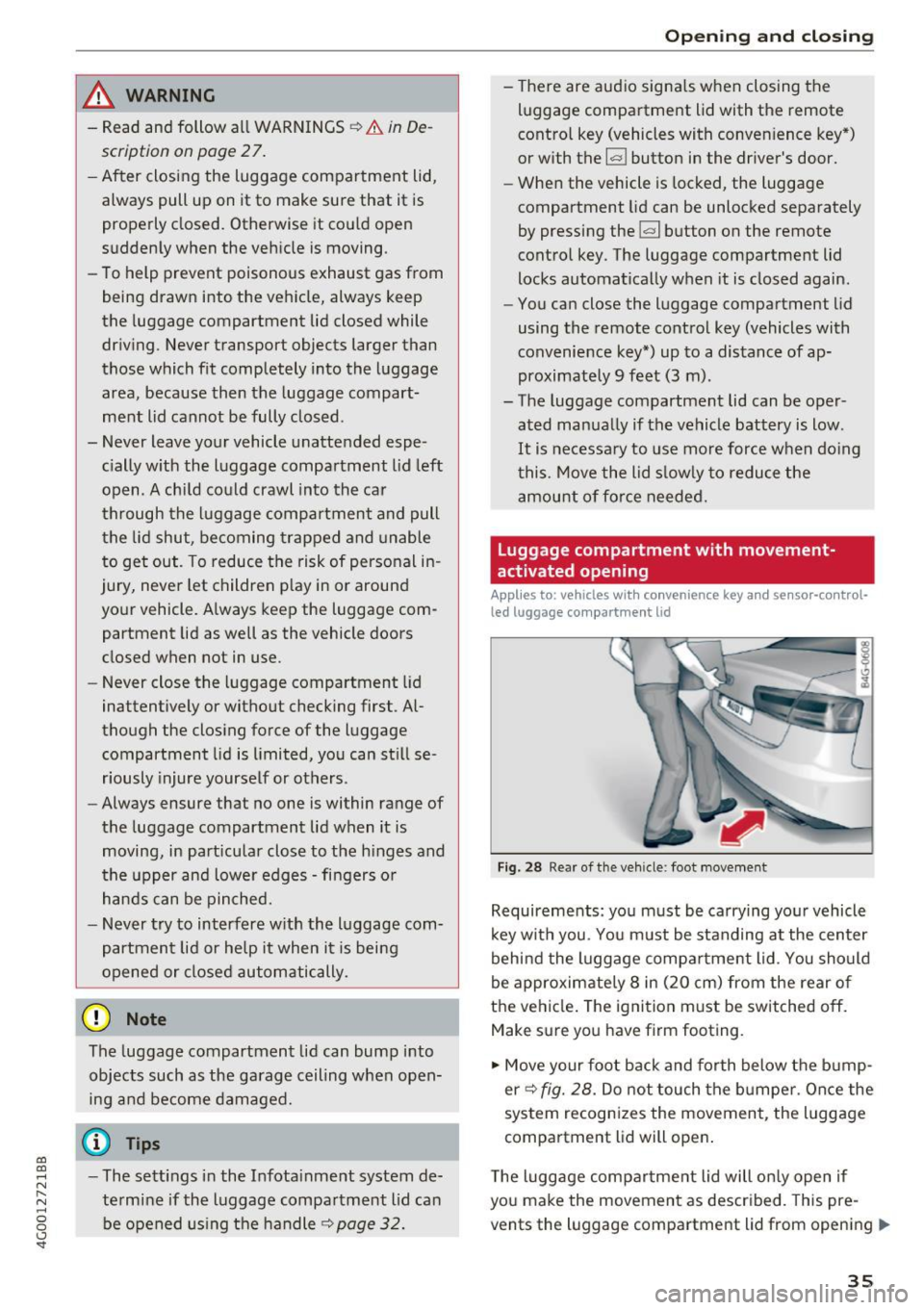
Requirements: you must be carrying you r vehicle
k ey w ith you. You m ust be standing at the center
behind the luggage compa rtment lid. You should
be approximately 8 in (20 cm) from the rear of
the ve hicle. The ignition m ust be switched off.
Make sure you have firm footing.
.,. Move your foot back and forth below the b ump
er ¢
fig. 28. Do not touch the bumpe r. Once the
system recognizes the movement, the luggage
compartment l id will open .
T he luggage compar tme nt lid will on ly open if
you make the movement as described. This pre
vents the luggage compartment lid from opening
llll>
3 5
Page 38 of 280
Opening and clo sin g
due to similar movements, such as when you
walk between the rear of th e vehicle and your ga
rage door.
General inform ation
I n some situations, the function may be lim ited
or tempo rar ily unava ilable . This may happen if :
- the luggage compartment lid was closed imme diately before .
-you park close to a hedge and the branches move back and forth under the vehicle for a
long period of time.
- you clean your vehicle , fo r example with a pres
sure washe r or i n a car wash.
- there is heavy rain.
- the bumper is very dirty , for example after driv-
ing on salt-covered roads .
- there is interference to the radio signal from
the ve hicle key, such as from cell phones or re
mote controls .
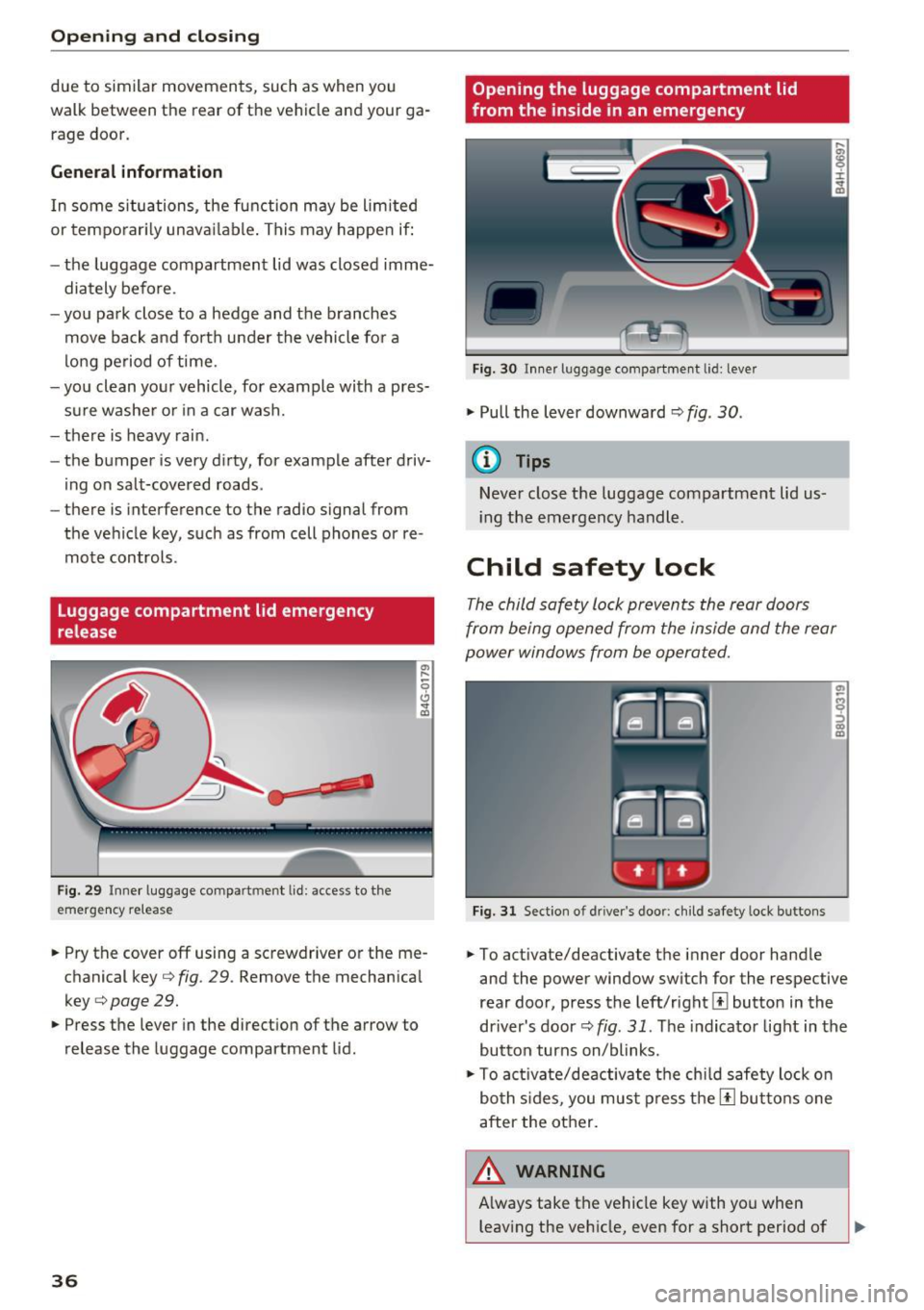
Luggage compartment lid emergency
release
F ig . 29 Inner luggage compart men t lid : access to the
emergen cy re le ase
.,. Pry the cover off using a screwdriver or the me
chan ical key ¢
fig. 29 . Remove the mechan ica l
key ¢
page 29 .
.,. Press the lever in the direct ion of the arrow to
release the luggage compartment lid .
36
Opening the luggage compartment lid
from the ins ide in an emergency
Fig. 30 I nne r luggage compart ment l id : leve r
.,. Pull the lever downward¢ fig. 30 .
(D Tips
Never close t he luggage compartment lid us
i ng the emergency handle .
Child safety lock
The child safety lock prevents the rear doors
from being opened from the inside and the rear
power windows from be operated.
Fig. 31 Sect ion o f dri ver's doo r: ch ild safety loc k bu ttons
.,. To activate/deactivate the inner door hand le
and the power window switch for the respective
rear doo r, press the left/rightl±l button in the
driver's door¢
fig. 31 . The indicator light in the
button turns on/blinks .
.,. To act ivate/deactivate the chi ld safety lock o n
bo th s ides, you mus t press the [!l but tons one
after the other.
A WARNING , ~
A lways take the vehicle key with you when
leaving the veh icle, even for a short period of
Page 39 of 280
co
co
.... N
" N .... 0 0 <.,;) 'SI"
time. T hi s app lies pa rt icu larly when children
remain in the vehicle. Othe rw ise children
co uld start t he engine or operate elect rical
equipment (such as power windows), which
increases the r is k of an accident .
Power windows
Controls
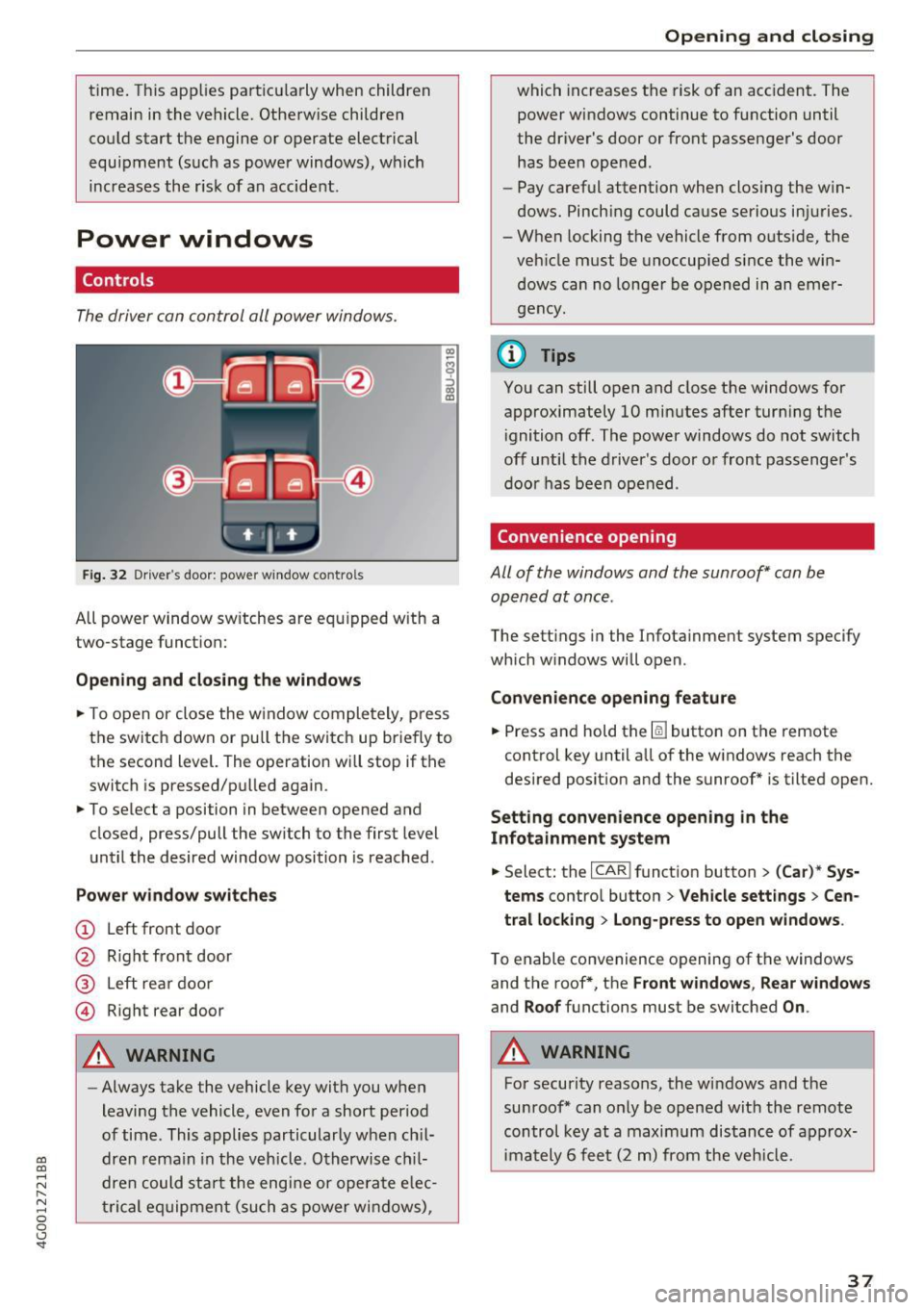
The driver can control all power window s.
F ig. 32 Dr ive r's door : power w indow co ntro ls
All power window sw itches are eq uipped w ith a
two-stage funct ion:
Opening and closing the windows
"' -$ :,
"' CD
~ T o open or close the w indow completely, p ress
the switch down or pu ll the switch up briefly to
the second level. The operation will stop if the
switch is pressed/pu lled again.
~ To se lect a position in between opened and
closed, press/pull the sw itch to the first level
u nt il the desired window position is reached.
Power window switches
(!) L eft front door
@ R ight front door
® L eft rea r d oor
© Right rear door
A WARNING
- Always take the vehicle key wit h you when
leaving the vehicle, even fo r a short period
of time . This applies particularly w hen ch il
dr en re ma in in the vehicl e. O th erwis e chi l
dre n cou ld st art t he engi ne or ope ra te e lec
t ric al eq uip m ent (such as power wi ndows),
Open ing and closing
which increases the risk of an acc ident. The
power windows continue to function until
the dr iver's door or front passenge r's door
has been opened .
- Pay careful attention when closing the w in
dows . Pinch ing could ca use serio us in juries.
- When locking the vehicle from o utside, the
veh icle must be unoccup ied since the win
d ows can no longe r be o pened in an emer
g e ncy .
@ Tips
You can still o pen and close the windows for
approximately 10 mi nutes after tur ning t he
i gnition off . The power windows do not switch
off until the driver 's door o r front passenger 's
door has been open ed .
Convenience opening
All of the windows and the sunroof* can be
opened at once .
The settings in the Infota inment system specify
which w indows will open .
Convenience opening feature
~ Press and hold the~ button on the remote
control key until a ll of the w indows reach the
desired position and the sunroof* is tilted open.
Setting convenience opening in the
Infotainment system
~ Select: the I CAR I funct io n button > (Car) * Sys
tems
contro l button > Vehicle sett ings > Cen
tral locking
> Long-press to open windows .
To enable convenience openin g of the w indows
and the roof *, th e
Front windows , Rear windows
and Roof functions must be switched On .
A WARNING
For security reasons, the w indows and the
su nroof* can o nly be opened wit h the remote
control key at a maximum distance of a pprox
im ately 6 fee t (2 m ) from the veh icle .
37
Page 41 of 280
Valet Parking function
Applies to: veh icles wit h Valet Parking function
The valet parking function protects the luggage
comportment from unauthorized access .
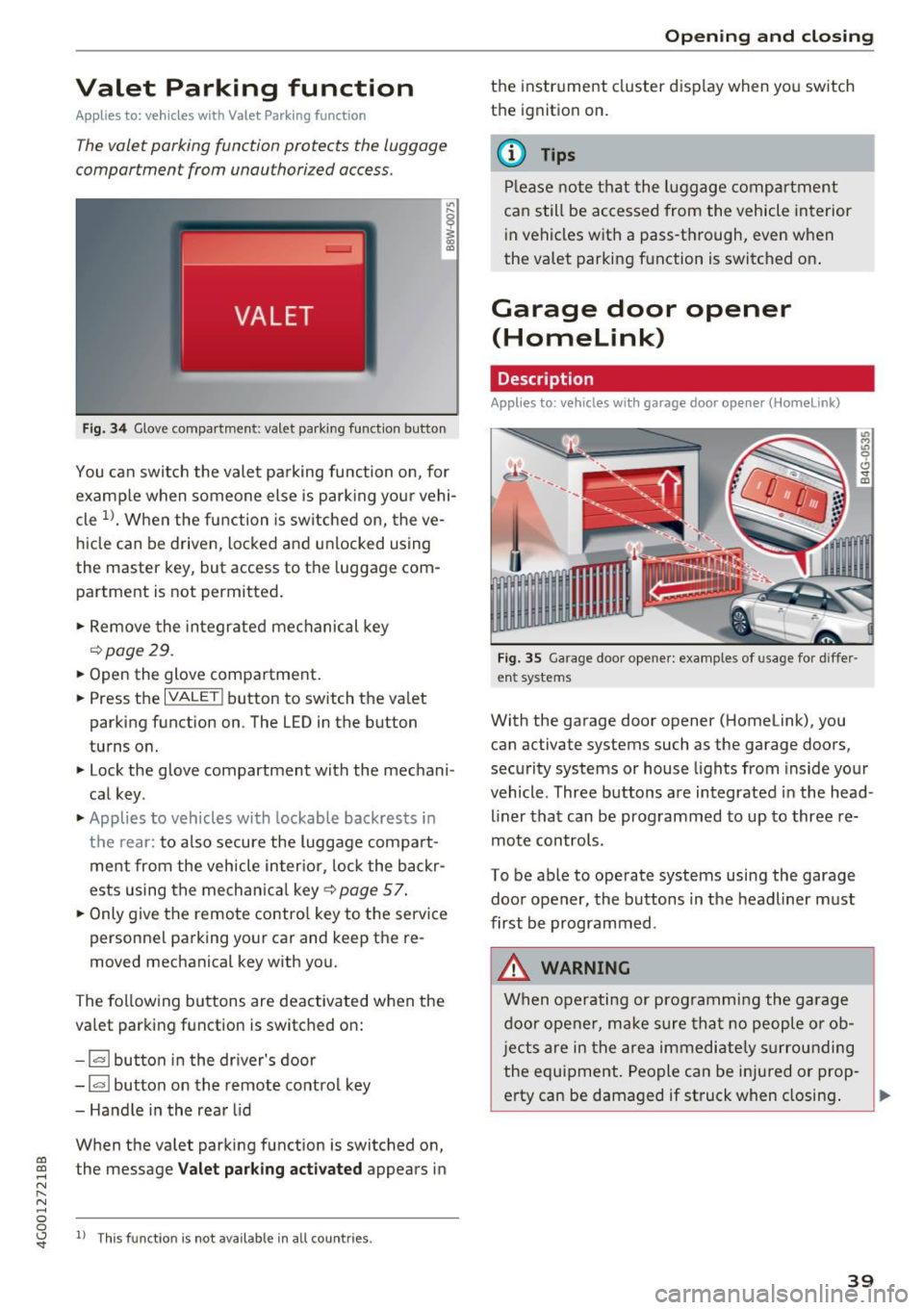
Fig. 34 Glove compartment: valet park ing function button
You can switch the valet parking function on, for
example when someone else is parking your vehi
cle
l)_ When the function is switched on, the ve
hicle can be driven, locked and unlocked using
the master key, but access to the luggage com
partment is not permitted .
.,. Remove the integrated mechanical key
r::!:>poge 29.
.,. Open the glove compartment.
.,. Press the
IVALET I button to switch the valet
parking function on. The LED in the button
turns on.
.,. Lock the glove compartment with the mechani
cal key .
.,. Applies to vehicles with lockable backrests in
t h e rear: to also secure the luggage compart
ment from the vehicle inter ior, lock the backr
ests using the mechanica l key ¢
page 57.
.,. Only giv e the remote control key to the service
personnel parking your car and keep the re
moved mechanical key with you.
The following buttons are deactivated when the
va let parking function is switched on:
- 1""' 1 button in the driver's door
-la l button on the remote control key
- Handle in the rear lid
When the valet parking function is switched on,
co ~ the message Valet parking activated appears in
N
" N .... 0 0
~ ll This func tion is not available in all co untries .
Open ing and closing
the instrument cluster display when you switch
the ignition on.
(D Tips
Please note that the luggage compartment
can still be accessed from the vehicle interior
in vehicles with a pass-through, even when
the valet parking function is switched on .
Garage door opener
(Homelink)
Description
Applies to: veh icles with garage door opener (Home link)
Fig . 35 Garage door opene r: examples of usage for diffe r
ent systems
With the garage door opener (Homelink), you
can activate systems such as the garage doors ,
security systems or house lights from inside your
vehicle. Three buttons a re integrated in the head
liner that can be programmed to up to three re
mote controls.
To be able to operate systems using the garage
door opener, the buttons in the headliner must
first be programmed .
_&. WARNING
When operating or programming the garage
door opener, make sure that no people or ob
j ects are in the area immediate ly surrounding
the equipment. People can be injured or prop-
erty can be damaged if struck when closing. .,.
39
Page 45 of 280
Messages in the instrument cluster display
Headlight a ssist: System fault !
Drive to an authorized Aud i dealer or a uthorized
Aud i Service Facility immediately to have the
malfunct ion cor rected. You can still switc h the
hi gh beams on or off manually.
Headlight as sis t: Unavailable No camera view
The camera view is blocked, for example by a
sticker or debris.
The sensor is located between the interior rear
v iew mirror and the windshield . Do not p lace any
stickers in this area on the windshield.
A WARNING
H igh beam assistant is only intended to assist
the drive r. The dr iver is still responsible for
con troll ing the headlights a nd sw itch ing
them manually depend ing on light and v is ibil
i t y cond itions .
It may be neces sary to operate
t hem manually in situ at ions such as:
- In adverse weathe r co nd itions s uch as fog,
heavy r ain, b low ing snow o r sp raying wate r.
- On roads whe re oncoming traffic may be
partia lly obs cured, su ch as exp ressways .
- Whe n there are road users that do not have
s ufficient lighting, s uch as bi cycler s or
vehicles wi th dirty ta il lamps .
- In tight cu rv es and on steep hills.
- In poor ly l it areas.
- With strong reflectors, such as s igns.
- If the area of the windsh ield near the sensor
is fogged over, dirty, icy or covered w ith a
st icker.
Adjusting the exterior lighting
The functions ore adjusted in the Infotainment
system.
.,. Se lect : I CARI fu nction button> (Car )* Systems
contro l button > Vehicle setting s> Exterior
lighting .
co Automatic headlights co ....
~ You can adjust the fo llowing settings in the Au-N
8 tomatic headlight s menu: 0 <.,;) 'SI"
Lights and Vision
A cti vation sensitivity -you can adjust if the
headlights switch on
Early , Medium or Late ac
cording to the sensitivity of the light sensor .
Auto-dimming high beams* -yo u can sw itch the
high beam assistant*
On and Off .
Daytime running lights*
USA mode ls:
the daytime running lights can be
swit ched on/off. Select
On or Off .
Canada models:
this function cannot be switched
off . They act ivate automatically each time the ig
ni tion is switched on.
Coming home , Leaving home
The coming home function illuminates the area
outside the vehicle when you turn the ignit ion off
and open the driver 's doo r. To turn the function
o n, select
Light s when leaving car > On .
The leaving home illum inates the area outside
the vehicle when you unlock the vehicle . To turn
the function on, se lect
Li ghts when unlocking
car > On .
The coming home and leav ing home functions
only operate when it is dark and the light switc h
is in the
AUTO pos ition .
Emergency flashers
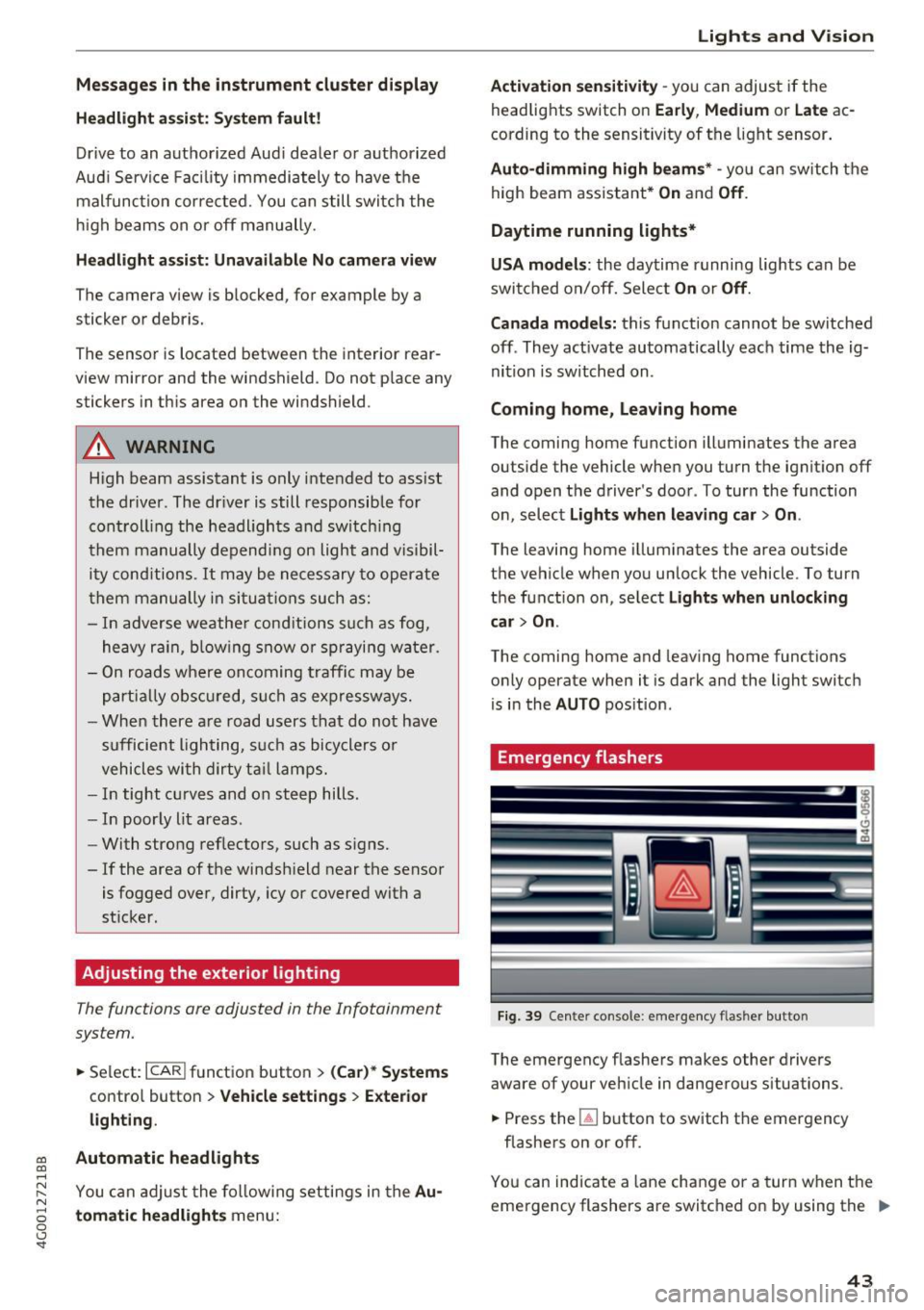
Fi9. 39 Cente r console : emergency f las her button
The emergency flashe rs makes other drivers
aware of your vehicle in dangerous situations .
.,. Press the~ button to switch the emergency
flashe rs on or off.
You can indicate a lane change or a turn w hen the
eme rgency flashers are switched on by using the .,.
43
Page 47 of 280
co
co
.... N
" N .... 0 0 <.,;) 'SI"
Vision
Adjusting the exterior mirrors
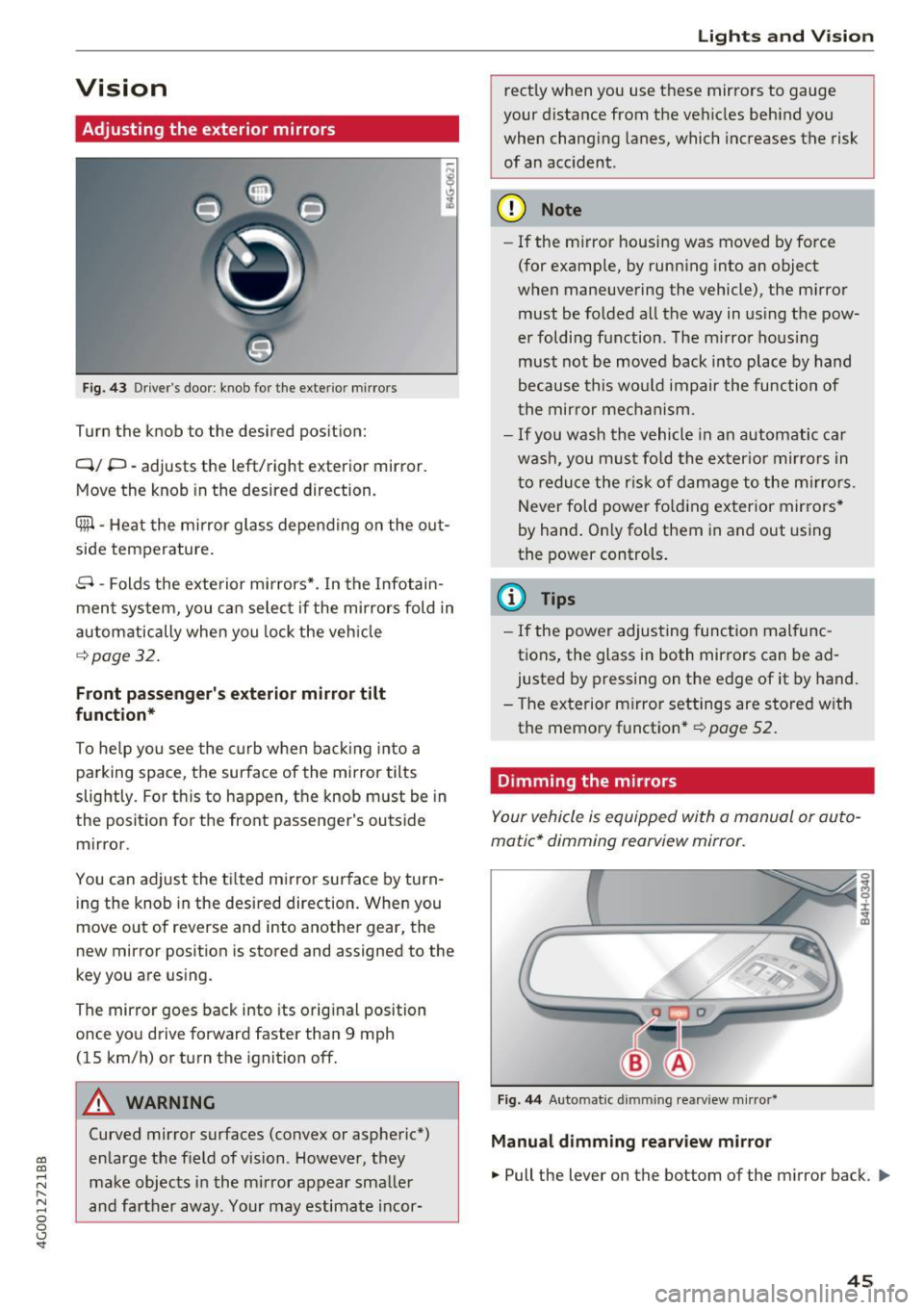
Fig. 43 Driver's door: knob for the exterior mir rors
Turn the knob to the desired pos ition:
Q/ P -adjusts the left/right exterior mirror.
Move the knob in the desired direction.
Cfill -Heat the mirror g lass depen ding on the o ut
side temperature .
8 -Folds the exte rior mi rrors*. In the Infotain
men t system, you ca n selec t if the mirrors fold in
automatically when you lock the veh icle
¢page 32.
Front passenger's exterior mirror tilt
function*
To he lp you see the curb w hen back ing in to a
parking space, the surface of the mirror tilts
slightly . For th is to happen, t he knob must be in
the posit ion for the front passenger's outside
mirror.
You can adjust the t ilted mi rror sur face by turn
i ng the knob in the desired direction. Whe n you
move out of reverse and into anot her gear, the
new mirror position is stored and assigned to the
key you a re using.
The mirror goes back into its orig inal position
once yo u drive forward faster than 9 mph
(15 km/h) or turn the ignition off.
A WARNING
Curved mirror surfaces (convex or aspheric*)
en large the f ield of vision. However, they
make obj ects in the mi rror appear smalle r
and fa rther away. Your may estimate i ncor-
Lights and V ision
rect ly when you use t hese mirrors to gauge
your d istance from the ve hicles beh ind you
when chang ing lanes, which increases the risk
of an acc ident.
(D Note
- If the m irror housing was moved by fo rce
(for example, by runn ing into an object
w hen maneuvering the vehicle) , the m irro r
must be fo lded all the way in us ing t he pow
er foldi ng f unction. The m irro r ho us ing
must not be moved back into plac e by hand
because this wo uld impair the func tion of
t he mir ror mec hanism.
- If you wash the vehicle in an automa tic ca r
w ash , you mus t fo ld the ex ter ior mir ror s in
t o reduce the r isk of d am age to the m irro rs.
N ever fold p ower fo ld ing ex ter ior mir rors *
by hand . On ly fold them in and out using
the power controls .
(D Tips
-If the power adjus ting func tion mal func
tions, the glass in both mirrors can be ad
justed by p ressing on the e dge of it by hand.
- T he exterior m irror settings are store d with
the memo ry functio n*
r=;, page 52.
Dimming the mirrors
Your vehicle is equipped with a manual or au to
matic* dimming rearview mirror.
Fi g. 44 Automatic dimming rearview mirror*
Manual dimming rearview mirror
.,. Pull the lever on the bottom of the mirror back. ll>
45