ignition AUDI A6 2017 Owner's Manual
[x] Cancel search | Manufacturer: AUDI, Model Year: 2017, Model line: A6, Model: AUDI A6 2017Pages: 280, PDF Size: 70.24 MB
Page 55 of 280
co
co
.... N
" N .... 0 0 <.,;) 'SI"
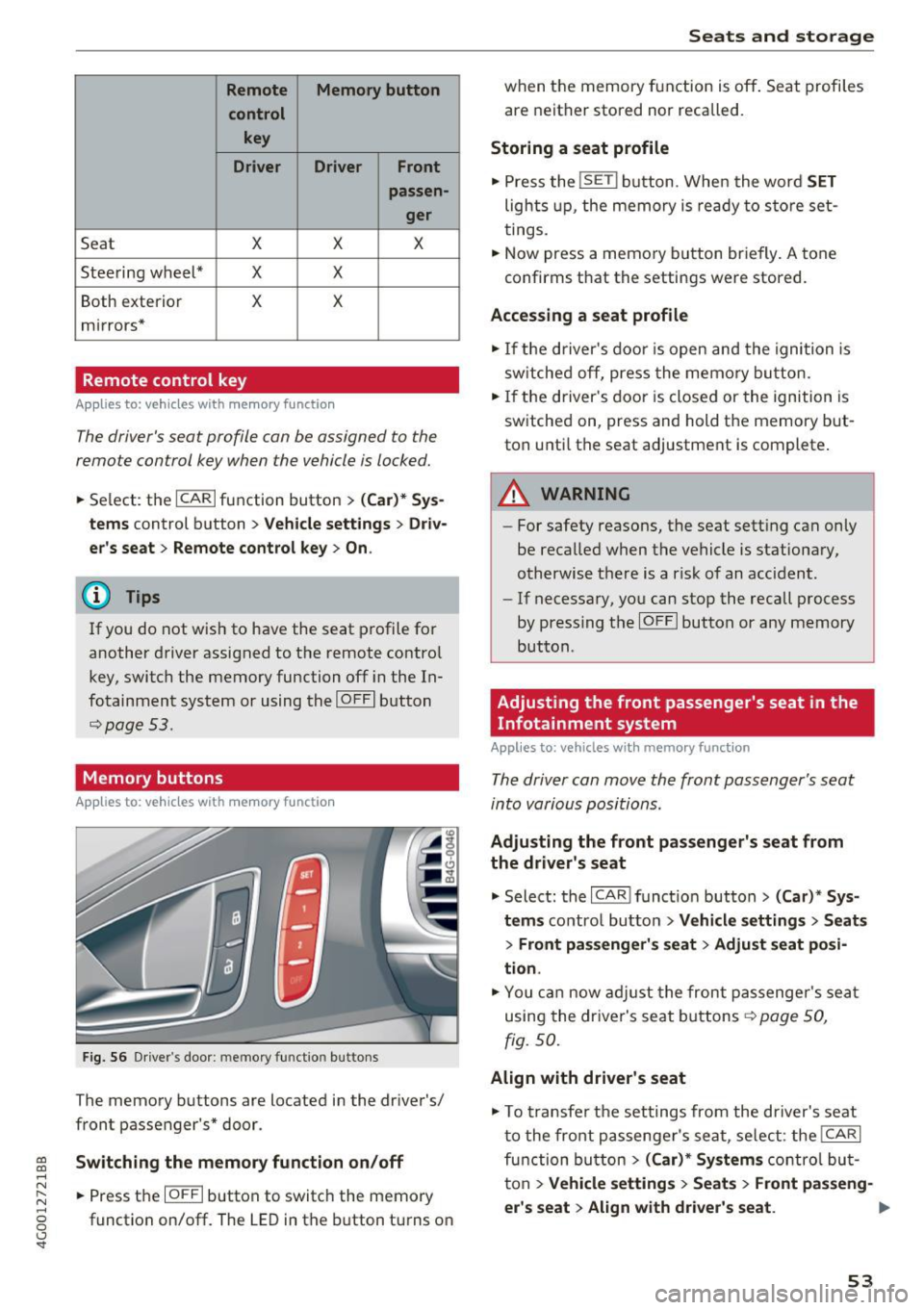
Remote Memory button control key
Driver D river Front
passen-ger
Seat X X X
Steering wheel* X X
Both
exterior X X
mirrors*
Remote control key
Applies to: vehicles with memory function
The driver's seat profile can be assigned to the
remote control key when the vehicle is locked.
• Select: the ICARI function button > (Car)* Sys
tems
control button > Vehicle settings > Driv
er's seat
> Remote control key > On .
(D Tips
If you do not wish to have the seat profile for
another driver assigned to the remote control
key, switch the memory function off in the In
fotainment system or using the
IOFFI button
¢page 53.
Memory buttons
Applies to: vehicles with memory function
Fig. S6 Driver 's door: memory function buttons
The memory buttons are located in the driver's/
front passenger's* door.
Switching the memory function on/off
• Press the IOFFI button to switch the memory
function on/off. The LED in the button turns on
Seats and storage
when the memory function is off . Seat profiles
are neither stored nor recalled.
Storing a seat profile
• Press the ISET I button. When the word SET
lights up, the memory is ready to store set
tings .
• Now press a memory button briefly. A tone
confirms that the settings were stored.
Accessing a seat profile
• If the driver's door is open and the ignition is
sw itched off, press the memo ry button.
.. If the driver's door is closed or the ignition is
switched on, press and hold the memory but
ton until the seat adjustment is complete .
A WARNING
-For safety reasons, the seat setting can only
be recalled when the vehicle is stationary,
otherwise the re is a risk of an accident.
- If necessary, you can stop the recall process
by press ing the
IOFFI button or any memory
button.
Adjusting the front passenger's seat in the
Infotainment system
Applies to: vehicles with memory function
The driver can move the front passenger's seat
into various positions.
Adjusting the front passenger's seat from
the driver's seat
• Select: the I CAR I funct ion button > (Car) * Sys
tems
contro l button > Vehicle settings > Seats
> Front passenger's seat > Adjust seat posi
tion .
• You can now adjust the front passenger's seat
using the driver's seat buttons
¢ page SO,
fig.
so.
Align with driver's seat
• To transfer the settings from the driver's seat
to the front passenger's seat, select: the
I CAR I
function button > (Car)* Systems control but
ton
> Vehicle settings> Seats > Front passeng-
er 's seat > Align with driver 's seat. ..,.
53
Page 66 of 280
Warm and cold
mode switches off. The temperature shou ld be
set to approximate ly 72 °F (22 °C).
The
IAUTOI button switches the defroster off.
IQiiJ REARI S witching the re ar window defo gger
o n/off
The rear window heater on ly operates when the
engine is running.
It sw itches off a utomat ica lly
afte r a few minutes, depending on the outs ide
temperature.
To prevent the rear w indow heater from switch
ing off automatically, p ress and ho ld the
l iiiP REAR I
button for more than 2 seconds . This is stored
until the ignition is switched off.
ISYNC I Sy nchronization
When synchronization is switched on, the set
tings for the drive r's side are applied to the front
passenger's side (ex cept for seat heating/ventila
tion*). The settings in the rear are a lso synchron
ized. Synchronization switches off if the settings
are adjusted on the front passenger's side or in
the rear.
You can synch ronize the settings in a row by
pressing and holding a contro l. For example, to
apply the settings for the front passenger's side
to the driver's side, press and ho ld the contro l on
the front passenger's side. The same applies to
the rear .
Res idua l h eat *
With the ignition turned off, you can activate the
residual heat function by pressing the~ button
¢ fig. 73. The residual heat from the coolant is
used to heat the vehicle interior. The residual
heat function switches off automatically after
about 30 m inutes .
Air vents
You can open or close the center and rear vents in
the cockpit and the vents in the rear center con
sole and door pillars using the ridged thumb
wheels . The levers adjust the direction of the air
flow from the vents .
64
A WARNING ,_
- You shou ld not use the recircu lation mode
for an extended period of time since no
fresh air is drawn in. W ith the air-condition
ing sw itched off, the windows can fog up,
which inc reases the risk of an acc ident.
- Individuals w ith reduced sensit iv ity to pa in
or temperature could develop bu rns when
using the sea t heati ng f unct ion. To red uce
the risk of i nju ry, these individuals sho uld
not use seat heating.
(D Note
To avoid damage to the heating elements in
the seats, do no t knee l on the se ats or place
heavy loads on a small area of the seat.
Basic settings
The climate control system basic settings are ac
cessed in the Infotainment system.
"' Select: the I CARI funct ion button > (Car )* Sys-
tems
contro l button > AC .
Rea r seat setting s*
When this function is se lected, all settings for
the rear can be adjusted through the climate con
trol system in the cockpit. The climate control
system settings cannot be adjusted in the rear
seat at the same time. This funct ion sw itches off
after a ce rtain per iod of t ime o r whe n one of the
contro ls in the coc kp it is pressed.
Automatic recirculation*
The sensitivity level of the automatic recircula
t ion mode can be set at various levels from
Off to
Sen siti ve . Reci rculat ion mode is contro lled auto
matically. If the windows fog up, p ress the
I@ FRO NT ! button.
Footwell temperature *
You can adjust the footwell temperature so that
i t is cooler or warme r.
Automat ic au xilia ry heater*
In vehicles with diesel engines*, the auxiliary
heater helps to warm the vehicle interior more
Page 70 of 280
Driving
lead to greater tire wear and will affect driving
behavior.
Do not drive on
winter tires year-round, as this
will consume up to 10% more fuel.
Eliminate unnecessary weight
Since every kilogram of extra
weight increases
fuel consumption, a quick inspection of the lug
gage compartment may be worth it to avoid un
necessary weight.
When not being used, a roof rack should be re moved to decrease the wind resistance of the ve
hicle. You will save approximately 12% of your
fuel when at speeds from 62- 7 5 mph (100-120 km/h) .
Save energy
The engine drives the generator, which generates
electricity; the fuel consumption also increases
with the demand for electricity. Therefore, switch electrical equipment off when you no longer
need it. Examples of equipment that uses a lot of
energy are air blowers at a high setting, the rear
window defogger and seat heating*.
CD Note
Do not leave engine idling unattended after
starting.
If warning lights should come on to
indicate improper operation, they would go
unheeded. Extended idling also produces
heat, which could result in overheating or
other damage to the vehicle or other proper
ty .
CD Note
- Have your vehicle maintained properly and
in accordance with the service recommenda
tions in your Warranty
& Maintenance book
let . Lack of proper maintenance as well as
improper use of the vehicle will impair the
function of the emission control system and
could lead to damage.
- Do not alter or
remove any component of
the Emission Control System unless ap
proved by the manufacturer.
- Do not alter or remove any device, such as
heat shields, switches, ignition wires,
68
valves, which are designed to protect your
vehicle's Emission Control System and other
important vehicle components.
(D Tips
The consumption estimates as published by
ENVIRONMENTAL PROTECTION AGENCY
(EPA) and Transport Canada may not corre
spond to your actual consumption on the
road, which will vary depending upon vehicle
load and speed, road and weather conditions,
trip length, etc.
Steering
Manual steering wheel position adjustment
Applies to: vehicles with manual steering wheel adjustment
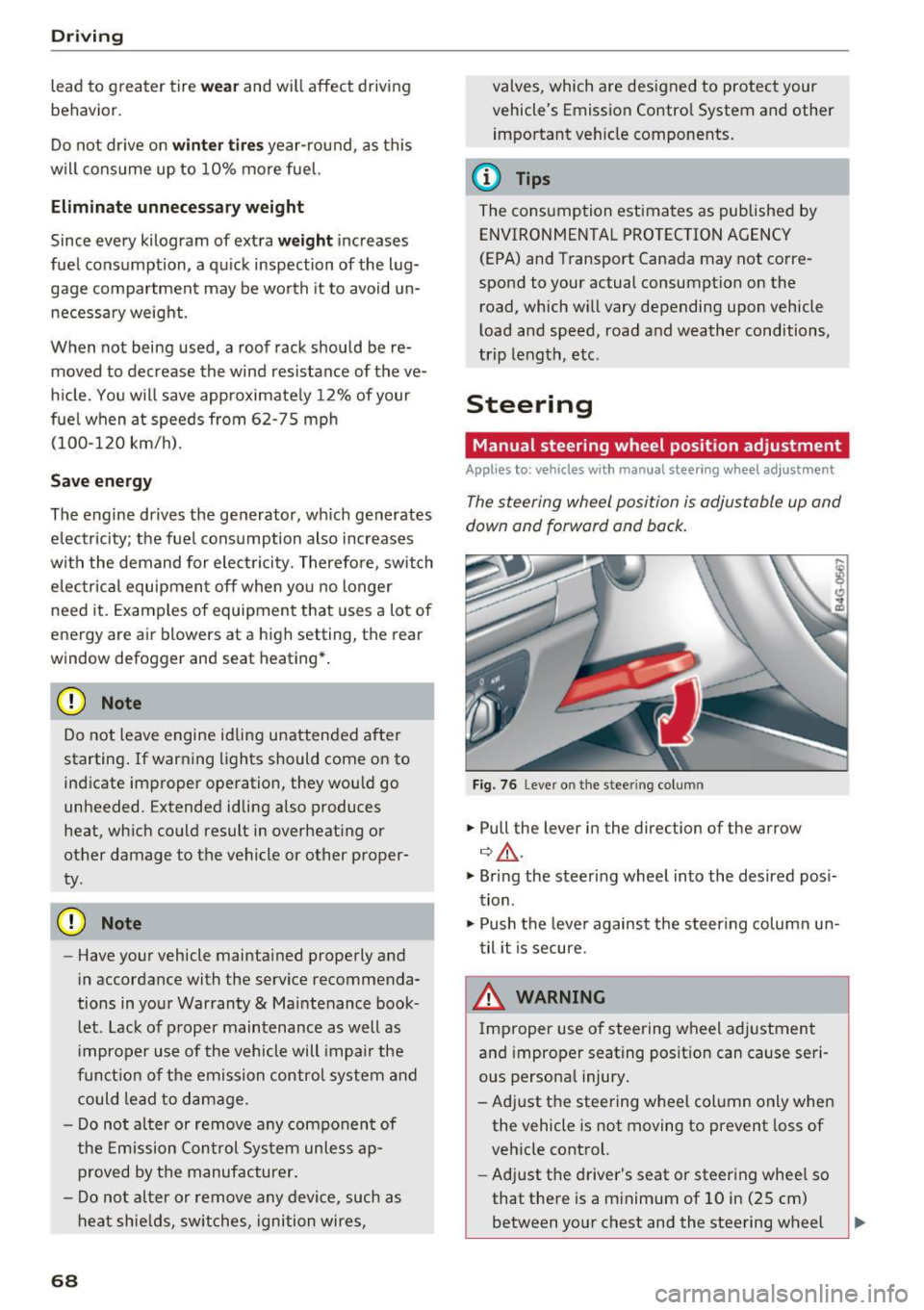
The steering wheel position is adjustable up and
down and forward and back.
Fig. 76 Lever o n the stee ring col umn
.,. Pull the lever in the direction of the arrow
¢ ,&. .
.,. Bring the steering wheel into the desired posi
tion .
.,. Push the lever against the steering column un
til it is secure.
& WARNING
Improper use of steering wheel adjustment
and improper seating position can cause seri
ous personal injury.
- Adjust the steering wheel column only when the vehicle is not moving to prevent loss of
vehicle control.
- Adjust the driver's seat or steering wheel so
that there is a minimum of 10 in (25 cm)
between your chest and the steering wheel -
Page 71 of 280
co
co
...,
N
" N ...,
0 0 <.,;) 'SI'
~ page 129, fig. 140. If you cannot main
tain this minimum distance, the airbag sys
tem cannot protect you properly.
- If physical limitations prevent you from sit
ting 10 in (25 cm) or more from the steer ing wheel, check with your authorized Audi
dealer to see if adaptive equipment is avail
able.
- If the steering wheel is aligned with your
face, the supplemental driver's airbag can
not provide as much protection in an acci
dent. Always make sure that the steering
wheel is aligned with your chest.
-Always hold the steering wheel with your
hands at the 9 o'clock and 3 o'clock posi
tions to reduce the risk of personal injury if
the driver's airbag deploys.
- Never hold the steer ing wheel at the 12
o'clock position or with your hands inside
the steering wheel rim or on the steering
wheel hub . Holding the steering wheel the
wrong way can cause serious injuries to the
hands, arms and head if the driver's airbag
deploys.
Power steering wheel position adjustment
App lies to: ve hicles with power steering whee l adjustment
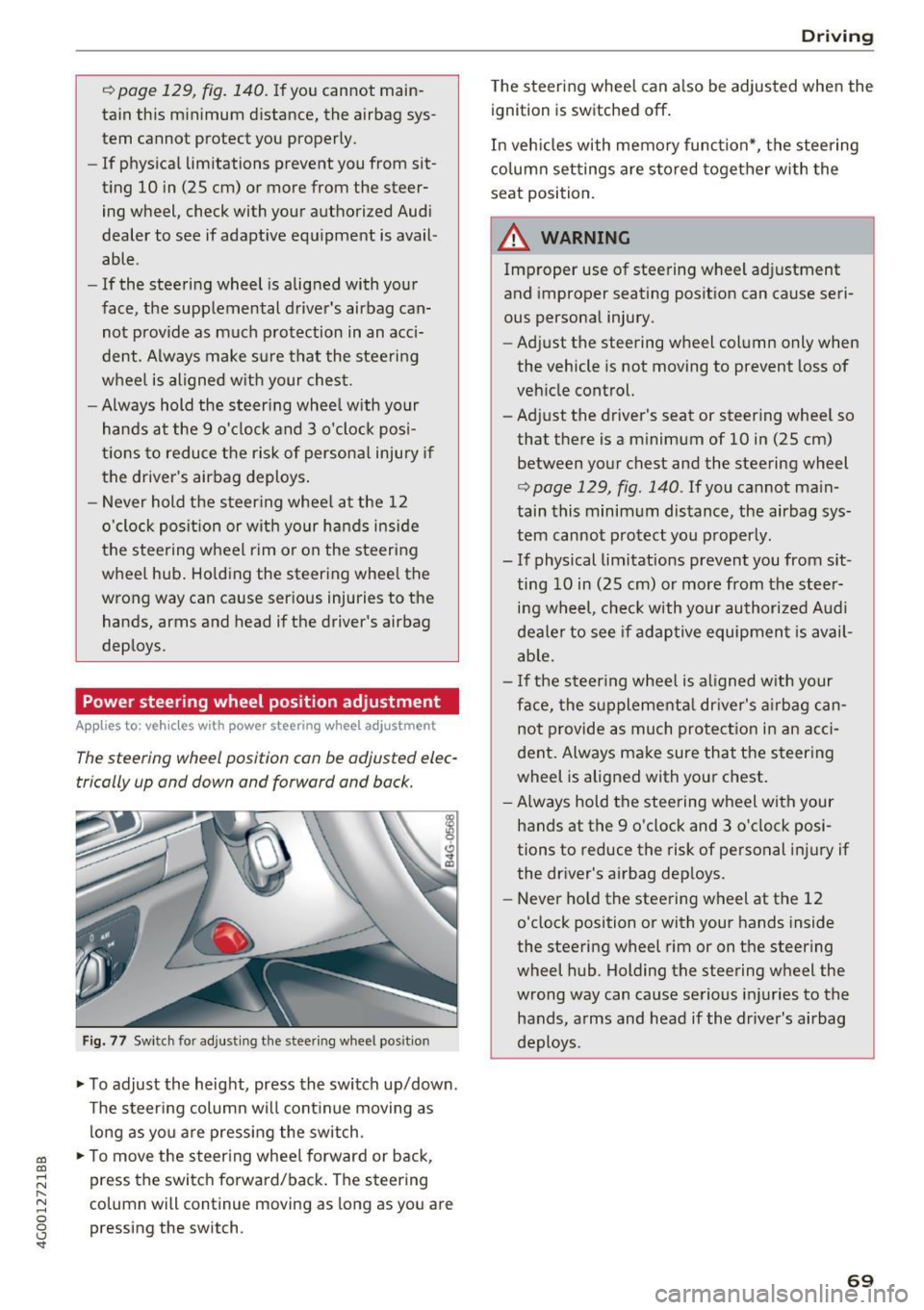
The steering wheel position can be adjusted elec
trically up and down and forward and back.
Fig. 77 Switch for adjust ing the steer ing whee l pos ition
~ To adjust the height, press the switch up/down.
The steering column will cont inue moving as
long as you are pressing the switch .
~ To move the steering wheel forward or back,
press the switch forward/back. The steering
column will continue moving as long as you are
pressing the switch.
Driving
The steering wheel can a lso be adjusted when the
ignition is switched off .
In vehicles with memory function*, the steering
column settings are sto red together with the
seat position.
A WARNING
Improper use of steering wheel adjustment
and improper seating position can cause seri
ous personal injury.
- Adjust the steering wheel column only when
the vehicle is not moving to prevent loss of
vehicle control.
- Adjust the driver's seat or steering whee l so
that there is a minimum of 10 in (25 cm)
between your chest and the steering wheel
r:=;, page 129, fig . 140 . If you cannot main
tain this minimum distance, the airbag sys
tem cannot protect you properly.
- If physical limitations prevent you from sit ting 10 in (25 cm) or more from the steer
ing wheel, check with your authorized Audi
dealer to see if adaptive equipment is avail
able.
- If the steering wheel is aligned with your
face, the supplemental dr iver's airbag can
not provide as much protection in an acci
dent. Always make sure that the steering
wheel is aligned with your chest.
- Always hold the steering wheel with your
hands at the 9 o'clock and 3 o'clock posi
tions to reduce the risk of personal injury if
the driver's airbag deploys.
- Never hold the steering wheel at the 12
o'clock position or with your hands inside
the steering wheel rim or on the steering
wheel hub . Holding the steering wheel the
wrong way can cause serious injuries to the
hands, arms and head if the driver's airbag
deploys.
-
69
Page 72 of 280
Driving
Easy seat entry
Applies to: ve hicles w ith power steering whee l adj ustment
Easy seat entry makes it easier to enter and exit
the vehicle by adjusting the steering column au
tomatically .
.-In the Infotainment system, select the ICARI
funct ion button > (C ar) * Systems control but
ton
> Vehi cle settings > Seat s > Dr iver' s seat >
Easy seat ent ry > On .
When easy seat entry is switched on, the steering
column goes back up into the park position when
the ignition is switched off . After entering the ve
h icle, the steering co lumn re turns to the stored
position once the ignition is sw itched on.
Starting and stopping
the engine
Starting the engine
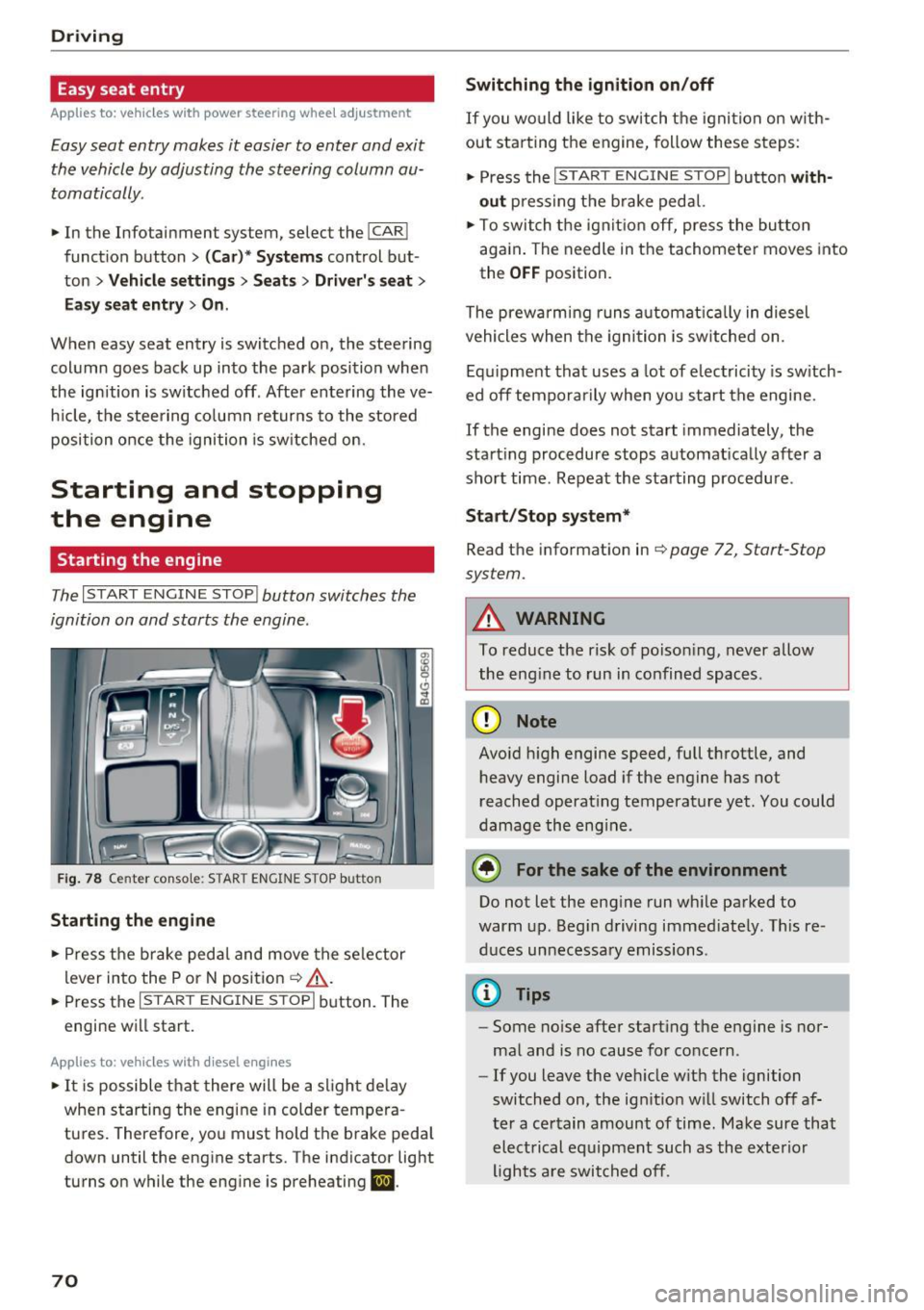
The I START ENGINE STOP I button switches the
ignition on and starts the engine.
Fig. 78 Center console: STAR T ENGINE STOP button
Starting the engine
.- Press the brake pedal and move the se lector
lever into the P or N posit ion ¢
&_.
.-Press the I START ENGINE STOPI button. The
engine will start.
App lies to: ve hicles w ith diesel e ngi nes
.- It is possible t hat there will be a slight de lay
when starting the engine in colder tempera
tures. Therefore, you must hold the brake peda l
down until the engine starts. The indicator light
turns on while the engine is preheating
II .
70
Switching the ignition on /off
If you wo uld like to switch t he igni tion on w ith
out star ting the engine, follow these s teps:
.- Press the
I START ENGINE STOP I button with
out press ing the b rake pedal.
.- To switch the igni tion off, press the bu tton
aga in . The needle in the tachomete r moves into
the
O FF position.
The prewarming runs a utomat ica lly in diesel
vehicles when the igni tion is sw itched on .
Equ ipment that uses a lot of electricity is sw itch
ed off tempo rarily when you start the engine.
If the engine does not start immediately, the
start ing procedure stops automat ically after a
short time. Repeat the starting procedure .
Start /Stop system*
Read the information in¢ page 72, Start-Stop
system.
A WARNING
To reduce the risk of poison ing, never allow
the eng ine to run in confined spaces.
(D Note
Avo id h igh engine speed, full throttle, and
heavy engine load if the engine has not
reached operat ing temperature yet. You could
damage the eng ine.
® For the sake of the environment
Do not let the eng ine run wh ile parked to
warm up. Beg in driving immed iately. Th is re
d uces unnecessary emissions .
(D Tips
-Some noise after start ing the engine is nor
ma l and is no cause for concern .
- If you leave the veh icle w it h the ignition
switched on, the ign ition w ill switch off af
ter a certain amount of time. Make sure that electrical equipment such as the exterior
lights a re switched off.
-
Page 73 of 280
co
co
.... N ,..._
N .... 0 0 <..:l '
~ Bring the vehicle to a full stop.
~ Move the selector lever to the P or N position.
~ Press the I START ENGINE STOPI ~page 70,
fig. 78 button.
Steering lock1
)
The steering locks when you turn the engine off
using the
I START ENGINE STOPI button and
open the driver's door. The locked steering helps
prevent vehicle theft.
Emergency off function*
If it is absolutely necessary, the engine can also
be turned off while driving in the R or D/S selec
tor lever position at speeds below 6 mph (10 km/
h). To stop the engine, press and hold the
I START ENGINE STOPI button and also press the
brake pedal.
~ WARNING
- Never turn off the engine before the vehicle
has come to a complete stop. The full func
tion of the brake booster and the power
steering is not guaranteed. You may need to
use more force when braking or steering.
Because you cannot brake and steer as you
usually would, this could lead to accidents
and serious injuries.
- Always take the key with you whenever you
leave your vehicle. Otherwise, the engine
could be started or electrical equipment
such as the power windows could be operat
ed. This can lead to serious injury.
- For safety reasons, always park the vehicle
with the selector lever in the P position.
Otherwise, there is the risk that the vehicle
could roll unintentionally.
(D Note
If the engine has been under heavy load for
an extended period of time, heat builds up in
the engine compartment after the engine is
switched off and there is a risk of damaging
the engine. For this reason, let the engine run
l ) This function is not available in all countr ies.
Driving
at idle for approximately two minutes before
shutting it off.
(D Tips
After the engine has been switched off, the
radiator fan can continue to run for up to 10
minutes -even with the ignition switched off.
It can also switch on again after some time if
the coolant temperature rises as the result of
heat buildup or if the engine is already warm
and the engine compartment is also heated
by the sun's rays.
Messages
Turn off ignition before leaving car
This message appears and a warning tone sounds
if you open the driver's door when the ignition is
switched on.
Press brake pedal to start engine
This message appears if you do not press the brake pedal when starting the engine.
II Key not in vehicle?
This indicator light turns on and this message ap·
pears if the ignition key was removed from the
vehicle when the engine was running.
If the igni
tion key is no longer in the vehicle, you cannot
switch on the ignition or start the engine once
you stop it. You also cannot lock the vehicle from
the outside.
Shift to P, otherwise vehicle can roll away.
Doors do not lock if lever is not in P.
This message appears for safety reasons if the
transmission is not in the P position when you
switch the ignition off. Move the selector lever to
the P position. Otherwise the vehicle is not pro
tected from rolling and it cannot be locked.
II Key is not recognized. Hold back of key
against marked area. See owner's manual
If the indicator light turns on and this message
appears, there is a malfunction
~page 72. .,..
71
Page 74 of 280
Driving
Tur n off igniti on b efore lea ving v ehicle. B atte ry
i s di sch arg ing
This message appea rs if the driver's door is
opened while the ignition is switched on . A lways
switch off the ignition if you are leaving the vehi
cle. A lso see
¢ page 74.
Shift to P and turn off ignition bef ore leaving
ca r, othe rwi se vehicle can ro ll aw ay
This message appea rs if the driver's door is
opened while the ignition is switched on and the
selec to r l ever is not in the P posit io n. Move the
selector lever in to the P position and switch the
ignition off when you exit the vehicle. Otherwise
the vehicle could roll. A lso see
¢ page 74 .
Starting the engine when there is a
malfunction
It may not be possible to start the engine under
certain circums tances, for example if the bat tery
in the vehicle key is drained , if in terference is af
fected the key or if there is a system malfunc
tion.
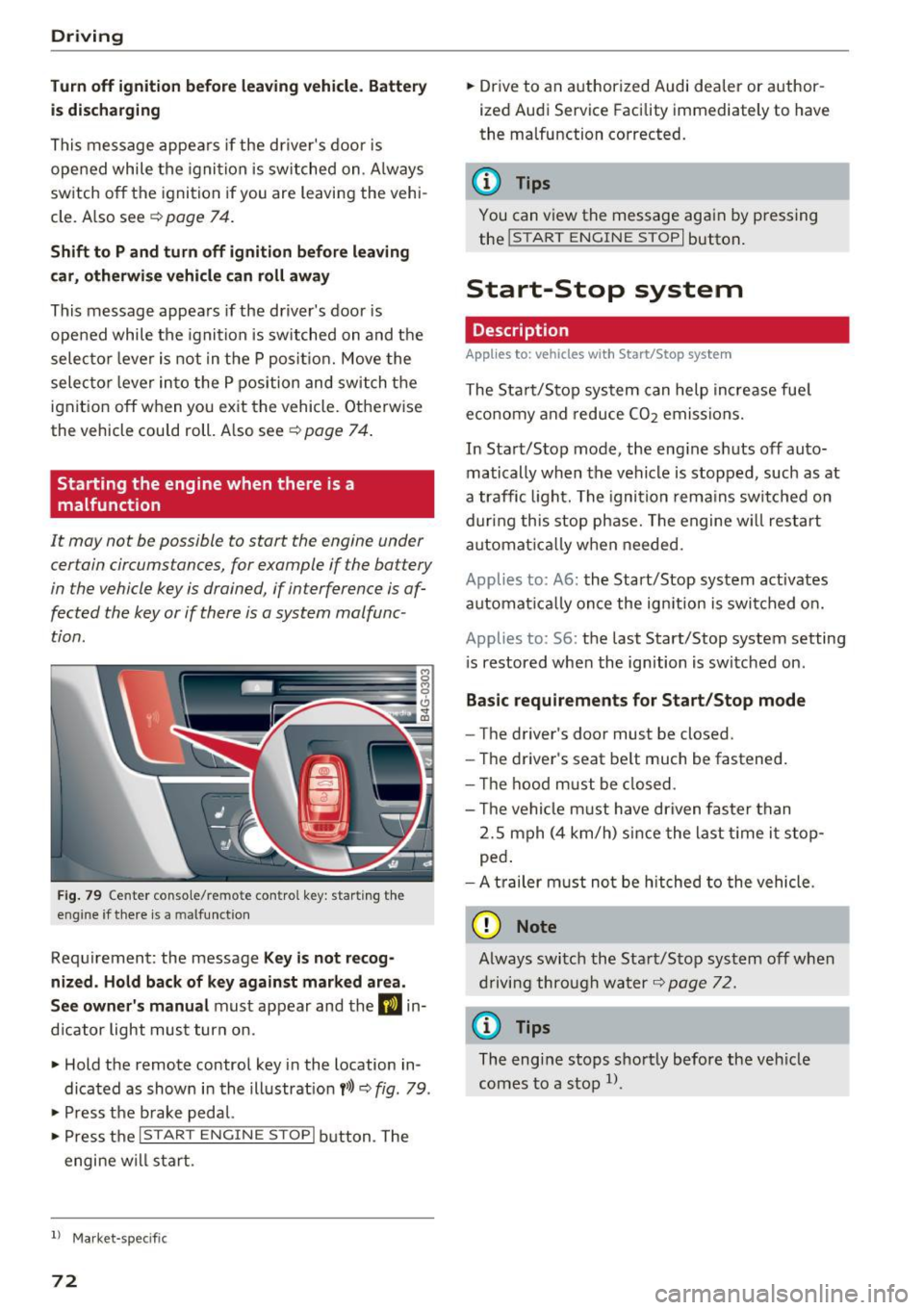
F ig . 79 Ce nter co n so le/ re m ote con tro l key : star ting th e
eng ine if there is a malfunction
Requirement: the message Ke y is not recog
ni zed . Ho ld ba ck of ke y again st mark ed area.
See ow ner's m anual
must appear and the DJ in
d icator light must turn on .
" Hold the remote control key in the location in
dicated as shown in the illustrat ion
f >l) ~ fig. 79 .
" Press t he b rake pedal.
" Press the
I START ENGIN E STOPI button . The
engine w ill start .
l) Market -specifi c
72
"Drive to an authorized Audi dealer or author
ized Audi Service Facility immediately to have
the malfunction corrected.
@ Tips
You can view the message again by p ressing
the
! START ENGINE STOP I button.
Start-Stop system
Description
Applies to: vehicles with Start/Stop system
The Start/Stop system can help increase fue l
eco nomy and reduce
CO2 emissions.
In Start/Stop mode, the eng ine shuts off auto
matically when the vehicle is stopped, such as at
a traffic light. The ignition rema ins swi tched on
during this stop phase. The engine w ill restart
automat ica lly w hen needed.
Applies to: A6: the Start/Stop system act ivates
automa tica lly once the ign ition is swi tched o n.
Applies to: S6: the last Start/Stop system setting
i s restored when the ignition is switched on .
Basic r equir ement s for Start /Stop mod e
-The driver's door must be closed.
- The driver's seat be lt much be fastened.
- T he hood must be closed .
- T he vehicle must have driven faste r than
2.S mph (4 km/h) since the last t ime it stop
ped .
- A t railer m ust not be hitched to the vehicle .
(D Note
Always switch the Sta rt/Stop system off when
driving through water
¢ page 72.
{t) Tips
The eng ine stops shortly before the veh icle
comes to a stop
l) .
Page 75 of 280
co
co
.... N
" N .... 0 0 <.,;) 'SI"
Stopping/starting the engine
Applies to: vehicles with Start/Stop system
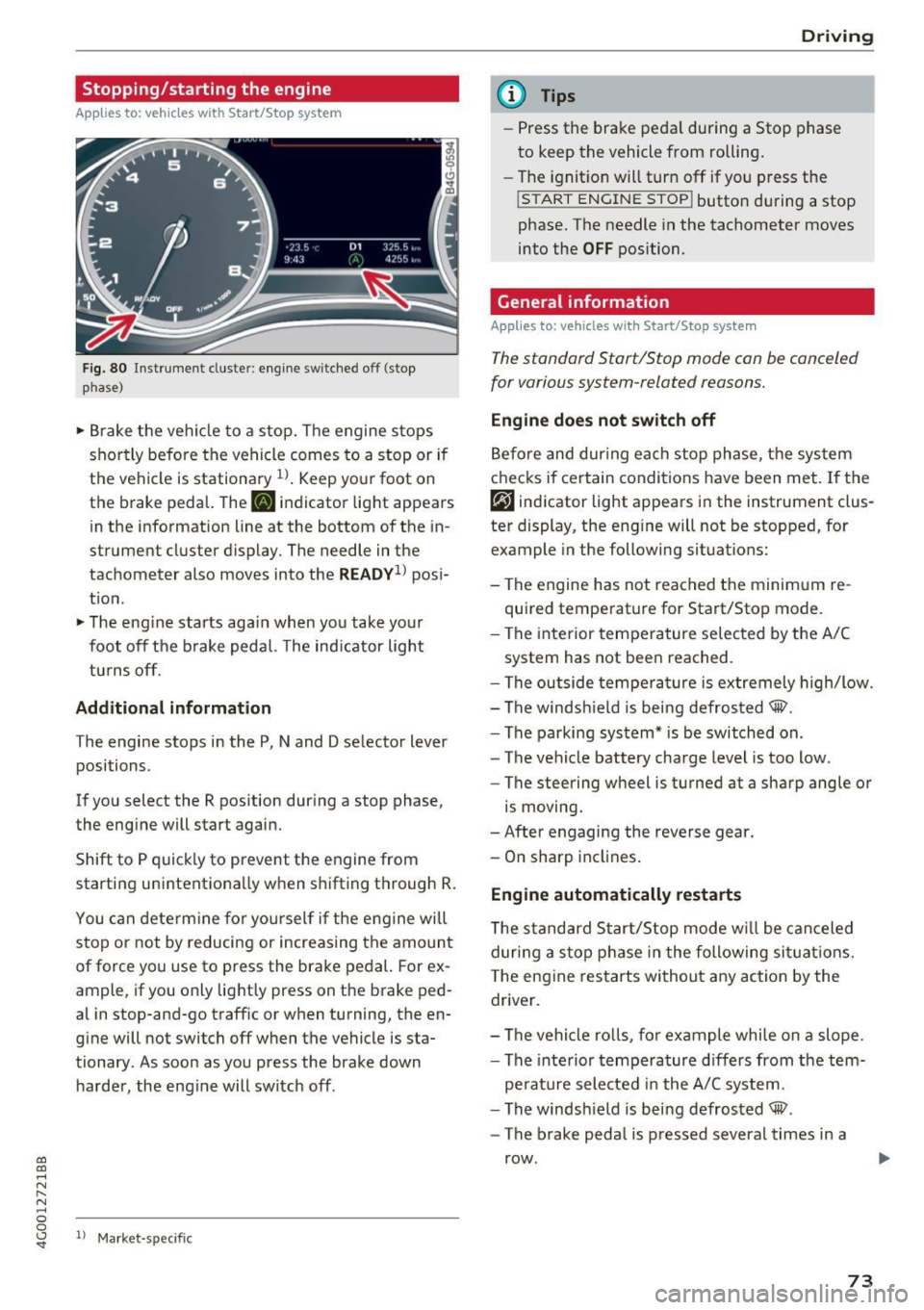
Fig. 80 ll)strument cluster: eng ine sw itched off (stop
p hase)
~ B rake the ve hicle to a stop. The engine stops
shortly befo re the vehicle comes to a stop or if
the vehicle is stationa ry
1l . Keep yo ur foot on
the brake pedal. The
II indicator light appears
in the information line at the bottom of the in
strument cluster d isplay. The needle in the
tachometer also moves into the
READY1 ) pos i
t ion .
~ The eng ine starts aga in when you take you r
foot off the b rake pedal. The ind ic a tor light
tu rns off.
Additional information
T he engine stops in the P, N and D se lector lever
positions .
If you select the R position dur ing a stop phase,
the eng ine will start again.
Shift to P quick ly to prevent the engine from
starting unintentionally w hen s hifting t hrough R.
You can dete rm ine for yo ursel f if the eng ine will
stop or not by reducing or increas ing the amount
of force you use to press the brake pedal. For ex
ample, if you only lightly press on the brake ped
al in stop-and -go traff ic or when turning, the en
g ine will not switch off when the vehicle is sta
tionary . As soon as you press the brake down
ha rder, the eng ine will switch off .
ll Market -s p ecific
D rivi ng
(D Tips
-Press the bra ke peda l during a Stop phase
to keep the vehicle from rolling.
- The ignition will turn off if yo u press the
!START ENGINE STOPI butto n dur ing a stop
phase. The needle in the tachometer moves
into the
OFF position.
General information
Applies to: vehicles with Start/Stop system
T he standard Start/Stop mode con be canceled
for various system-related reasons.
Eng ine does not swit ch off
Be fo re and dur ing each stop phase, the system
checks if certain conditions have been met. If the
rjj indicator light appears in the instrument clus
ter display, the eng ine will not be stopped, for
example in the following situations:
- The engine has not reached the minim um re
quired temperature for Start/Stop mode .
- The interior temperature selec ted by the A/C
system has not been reached.
- The outside tempera ture is ex tremely high/low.
- The windsh ield is being defrosted® .
- The parking system * is be switched on .
- The vehicle battery charge level is too low.
- The steering wheel is turned at a sharp angle or
is moving.
- After engaging the reverse gear.
- On sharp incl ines .
Engine automatically restarts
The s tandard Start/Stop mode w ill be can celed
dur ing a stop phase in the following si tuations.
T he eng ine res tarts wi thout a ny action by the
driver .
- The vehi cle ro lls, fo r example whi le on a slope .
- The inte rior tempe rature d iffers from the tem-
pe rature selected in the A/C sys tem.
- The windsh ield is being defrosted® .
- The brake peda l is pressed several times in a
row .
73
Page 76 of 280
Driving
-The vehicle battery charge leve l is too low.
- Power consumption is high .
The engine can turn off again when the condi
tions fo r Start-Stop mode are met .
Ignition is switched off automati call y
To prevent the veh icle battery from drain ing, the
ignit ion will switch off
automat ic a lly under the
following conditions:
- The vehicle must have already been driven.
- The Start/Stop system has stopped the engine.
- The driver's door must be open.
- The driver's safety be lt must be unb uckled.
- The brake pedal must not be p ressed .
- The vehicle must be stationary .
In th is case, the activated low beam is replaced
by the parking light. The parking lights will
sw itch off after approximately 30 minutes or
when you lock the vehicle .
If the Start/Stop system has not turned off the
engine or if you have sw itched the Start/Stop sys
tem off manually , the ignition will not be auto
mat ically switched off and the engine w ill contin
ue to run
~ ,& .
A WARNING
To red uce the risk of poisoning, never allow
t he engine to r un in confined spa ces .
@ Tips
If you select the Dor N se lector lever position
after sh ift ing into reverse, t he vehicle m ust
be driven faster than 6 mph (10 km/h) in or
de r fo r th e e ng ine to swit ch off again.
74
-
Manually switching the Start /Stop system
off /on
Appl ies to: vehicles with Start/Stop system
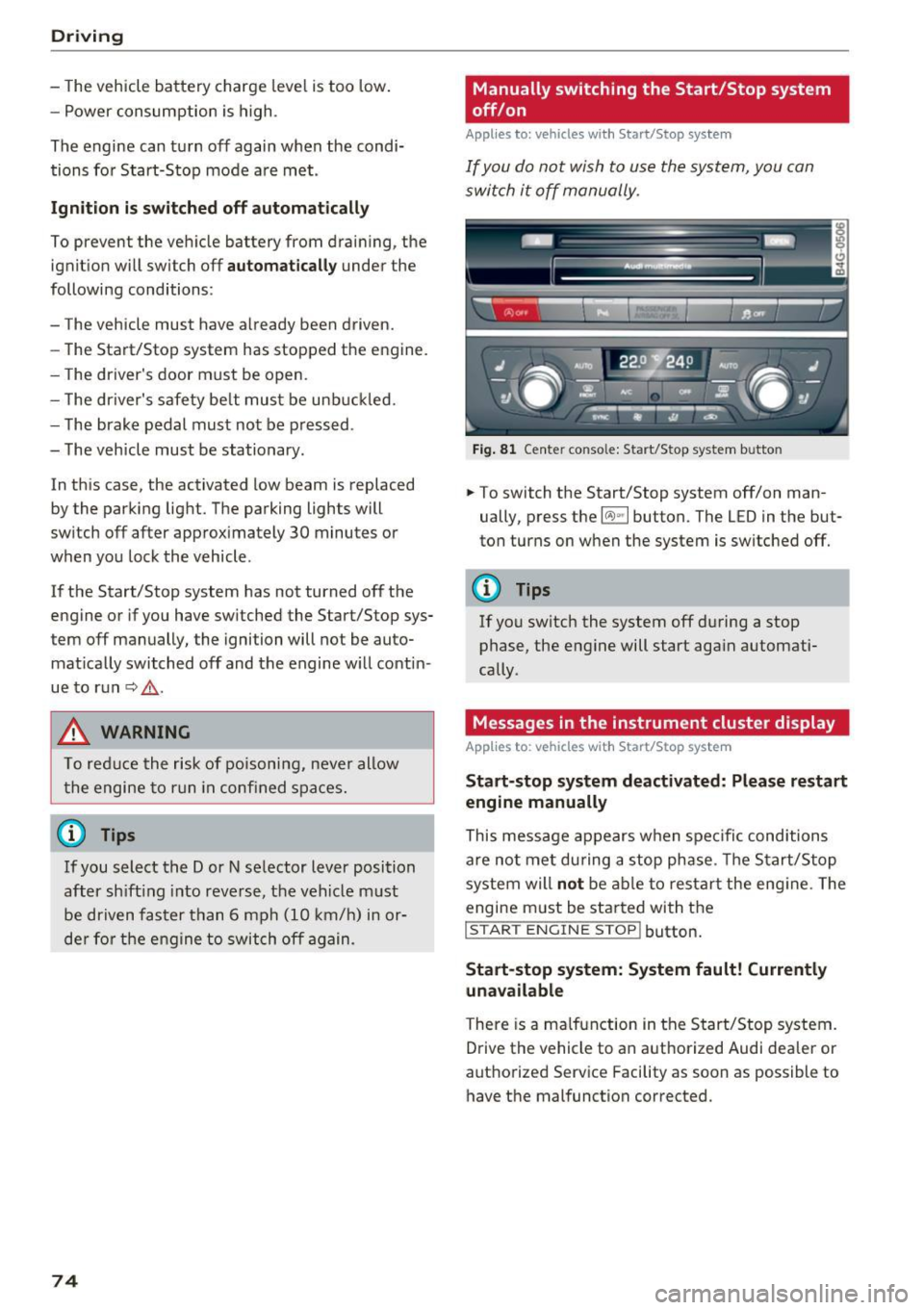
If you do not wish to us e th e system, you can
switch i t off manually.
Fig . 8 1 Ce nte r conso le: Start/Stop system b utto n
.,. To switch the Start/Stop system off/on man
ually, press the
l (A) ~I button. The LED in the but
ton turns on when the system is switched off.
0) Tips
If yo u switch the system off d uring a stop
phase, the engine will start aga in automati
cally .
Messages in the instrument cluster display
Applies to : vehicles with Start/Stop system
Start-stop system deactivated: Please restart
engine manually
This message appears w hen spec ific cond itions
are not me t during a stop phase. The S tart/S top
system will
not b e a ble to re sta rt the eng ine. The
engine m ust be started with the
I S TAR T ENGINE ST OP ! button.
Start -stop system: System fault! Currently
una vailable
There is a ma lfunction in the Start/Stop system.
Drive the vehicle to an author ized Audi dea ler or
autho rized Service Facility as soon as possible to
have the malfunction corrected.
Page 79 of 280
co
co
.... N
" N .... 0 0 <.,;) 'SI"
-Hill hold assist cannot hold the veh icle in
place on all h ills (for example, if the ground
is slippery or icy).
- To reduce the risk of an accident, always
make sure the vehicle is situated safely
wh ile stat io nary.
Automatic transmission
Introduction
The automat ic transmission is cont rolled e lec
tron ica lly. The tra nsmission shifts up or down au
tomatically depending on which drive program is
selected.
When a
moderat e driving style is used, the
transmission selects the most economical driving mode. The t ransmission upshifts at a lower RPM
and downshifts at a higher RPM to improve fuel
efficiency .
The transmission sw itches to a sporty mode a fter
a kick-down or when the driver uses a
s po rt y
driving st yle
characterized by quick accelerator
pedal movements, heavy acce leration, frequent
changes in speed and traveling at the maximum
speed .
If desired, the driver can also select the gears
manually ( tiptronic mode) q page 80 .
Appl ies to : ve hicles w ith S tro nic t ran smi ssio n
The 5 tronic is a dual-clutch transmiss ion . Powe r
is transferred using two cl utches that work inde
pendently from one another. They replace the
torque converter used in conventional automat ic
transmissions and allow the vehicle to accelerate
without a noticeab le interruption in tract ion.
A ppl ies to: ve hicles with a t iptro nic tr ansmi ssio n
Power is transfer red using a torque conver ter.
D rivi ng
Selector lever positions
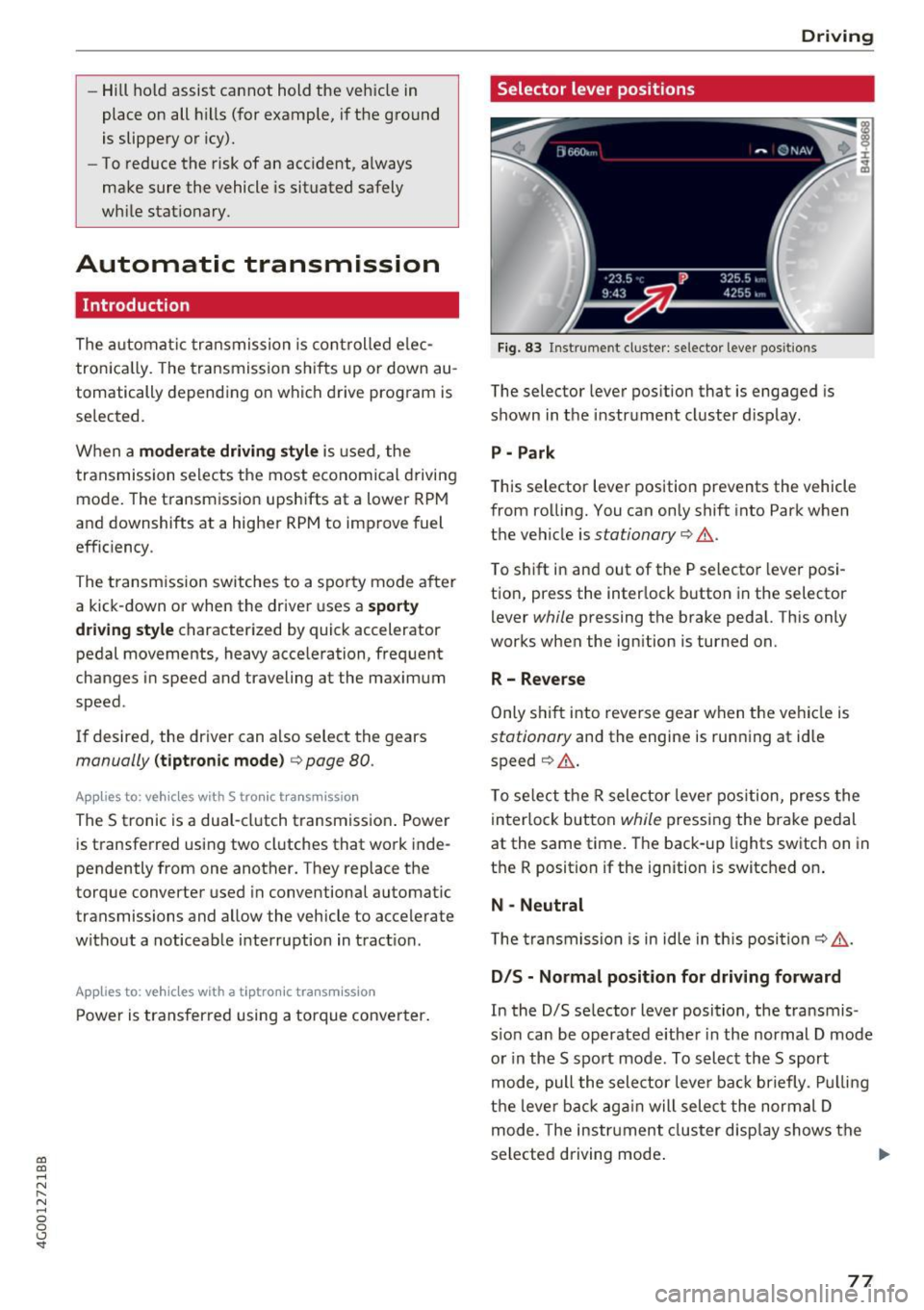
Fig. 83 Instrument cl uster: selector leve r pos itions
The selector lever position that is engaged is
shown in the instrume nt cluster display .
P - Park
This selector lever position prevents the vehicle
from rolling. You can only shift into Park when
the vehicle is
stationary q &. .
To shift in and out of the P selector lever posi
tio n, press the inter lock b utton in the selector
lever
while pressing the brake peda l. Th is only
works when the ign ition is turned on.
R- Reverse
Only s hift into reve rse gear when t he vehicle is
stationary and the engine is running at idle
speed
q &. .
To se lect the R selector leve r pos ition, press the
in terlo ck button
while pressing the brake pedal
at the same time. The back-up lights switch on in
the R position if the ignition is switched on .
N -Neutral
T he tra ns m ission is in idle in th is posi tion
q &_ .
DIS -Normal position for driving forward
In the D/S se lector lever position, the t ransmis
s io n can be operated e ither in the normal D mode
or in the 5 spo rt mode . To select the 5 sport
mode, pull the selector leve r ba ck briefly . Pu llin g
t h e lever ba ck aga in will selec t the normal D
mode. The instr ument cluster disp lay shows the
selected driving mode .
77