ignition AUDI A6 2017 User Guide
[x] Cancel search | Manufacturer: AUDI, Model Year: 2017, Model line: A6, Model: AUDI A6 2017Pages: 280, PDF Size: 70.24 MB
Page 37 of 280
co
co
.... N
" N .... 0 0 <.:l 'SI'
A WARNING
-Read and follow all WARNINGS¢&. in De
scription on page
27 .
-After closing the luggage compartment lid,
always pull up on it to make sure that it is
properly closed. Otherwise it could open
suddenly when the veh icle is moving.
- To help prevent poisonous exhaust gas from
being drawn into the veh icle, always keep
the luggage compartment lid closed while driving. Never transport objects larger than
those which fit completely into the luggage area, because then the luggage compart
ment lid cannot be fully closed.
- Never leave your vehicle unattended espe
cially with the l uggage compartment l id left
open. A chi ld co uld crawl into the car
through the luggage compartment and pull
the lid shut, becoming trapped and unable
to get out. To reduce the risk of personal in
jury, never let children p lay in or around
your vehicle. Always keep the luggage com partment lid as well as the vehicle doors
closed when not in use.
- Never close the luggage compartment lid
inattentively or without checking first. Al
though the closing force of the luggage
compartment lid is limited, yo u can st ill se
riously injure yourself or others.
- Always ensure that no one is within ra nge of
the luggage compartment lid when it is
moving, in part icular close to the h inges and
the upper and lower edges -fingers o r
hands can be pinched.
- Never try to interfere w ith the l uggage com
partment lid or help i t when it is being
opened or closed automatically.
([) Note
The luggage compartment lid can bump into
objects such as the garage ceiling when open
ing and become damaged.
(D Tips
- The settings in the Infota inment system de
te rmine if the luggage compa rtment lid can
be opened us ing the handle
¢ page 32.
Op enin g an d clos ing
-There are audio signa ls when closing the
luggage compartment lid with the remote
control key (vehicles with conven ience key*)
or with the
l ""'I button in the driver's door.
- When the vehicle is locked, the luggage
compartment lid can be unlocked separately
by pressing the
1£) button on the remote
control key. The luggage compartment lid
locks automatically when it is closed again.
- You can close the luggage compartment lid
using the remote control key (vehicles with
convenience key*) up to a distance of ap
proximately 9 feet (3 m).
- The luggage compartment lid can be oper
ated manually if the vehicle battery is low .
It is necessary to use more force when doing
this. Move the lid s low ly to redu ce the
amou nt of fo rce needed.
Luggage compartment with movement
activated opening
Applies to: vehicles with convenience key and senso r-co ntro l·
led luggage compartment lid
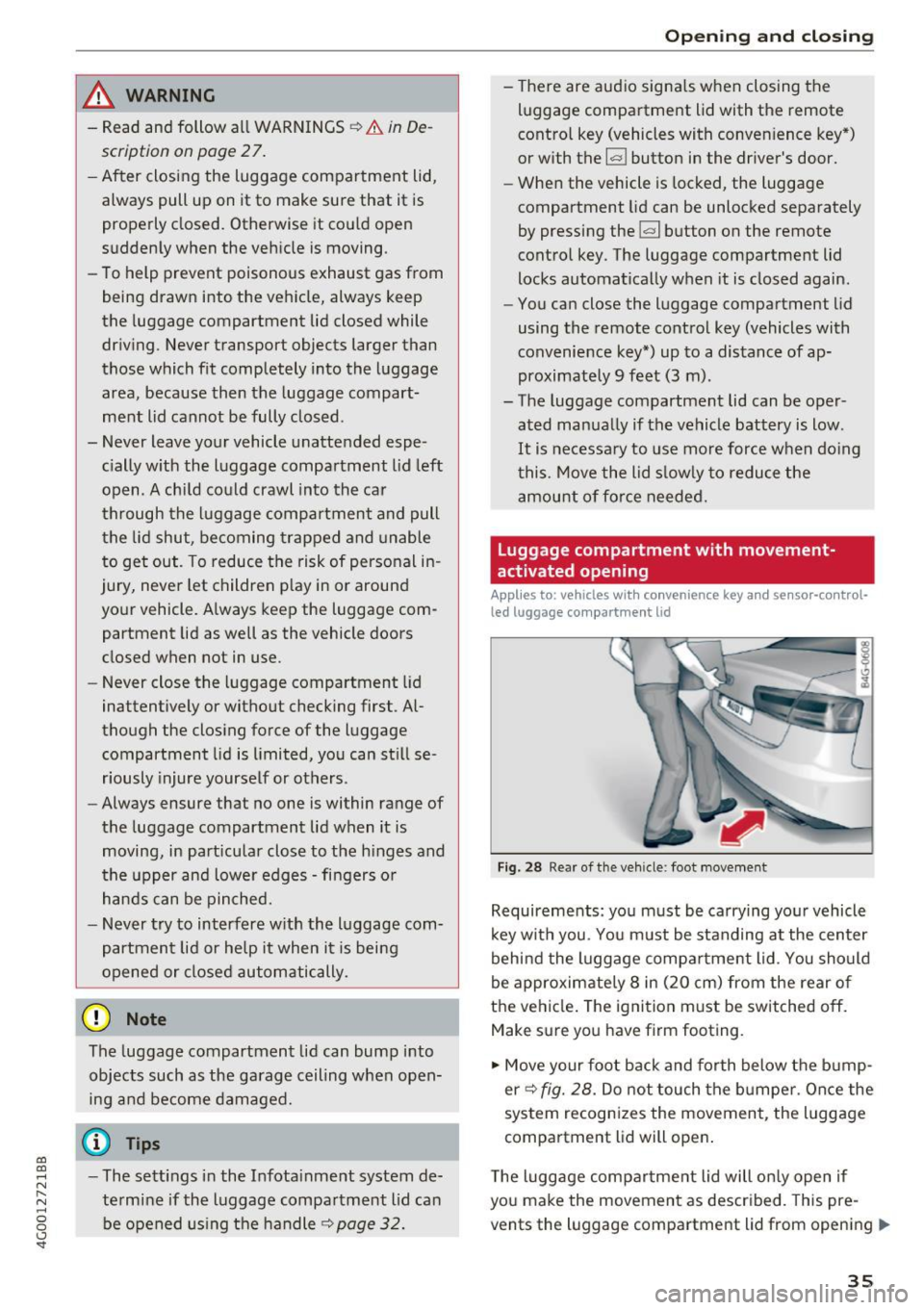
Fig. 28 Rea r of the veh icle: foot movement
Requirements: you must be carrying you r vehicle
k ey w ith you. You m ust be standing at the center
behind the luggage compa rtment lid. You should
be approximately 8 in (20 cm) from the rear of
the ve hicle. The ignition m ust be switched off.
Make sure you have firm footing.
.,. Move your foot back and forth below the b ump
er ¢
fig. 28. Do not touch the bumpe r. Once the
system recognizes the movement, the luggage
compartment l id will open .
T he luggage compar tme nt lid will on ly open if
you make the movement as described. This pre
vents the luggage compartment lid from opening
llll>
3 5
Page 40 of 280
Opening and clo sin g
Correcting power window malfunctions
You con reactivate the one-touch up/down func
tion if it malfunctions .
• Pull the power window switch up unt il the win
dow is completely raised.
• Release the sw itch and pull it up again for at
least one second.
Sunroof
Description
Applies to: veh icles with slid ing/tilting sunroof
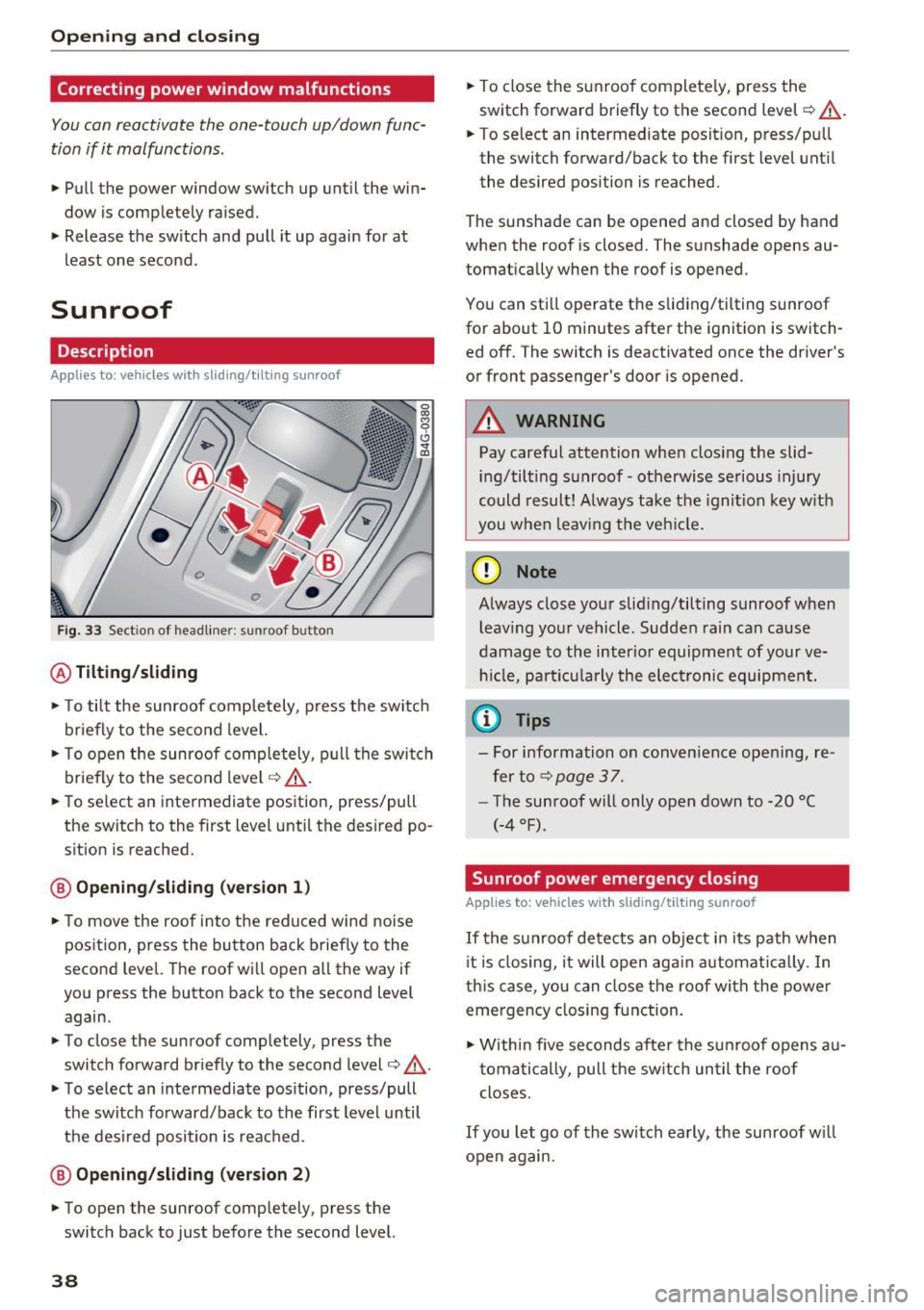
Fig. 33 Sect ion of head liner: sunroof button
@ Tilting /sliding
• To tilt the sunroof comp letely, press t he switch
briefly to the second level.
• To open the sunroof completely, p ull the switch
briefly to the second level
c:::> &_ .
• To select an intermediate position, press/pull
the switch to the first level until the desired po
sition is reached.
@ Openin g/sliding (ver sion 1 )
• To move the roof into the reduced wind noise
position, press the button back brief ly to the
second level. The roof will open all the way if
you press the button back to the second level
again.
• To close the sunroof completely, press the
switch forward br iefly to the second level
c:::> & .
• To select an intermediate pos ition, press/pull
the switch forward/back to the first level until
the des ired position is reached .
@ Opening/sliding (ver sion 2)
• To open the sunroof completely, press the
switch back to just before the second level.
38
• To close the sunroof complete ly, press the
switch forward briefly to the second level
c:::> &_.
• To select an intermediate posit ion, press/pu ll
the switch forward/back to the first level until
the desired position is reached.
The sunshade can be opened and closed by hand
when the roof is closed. The sunshade opens au
tomatically when the roof is opened.
You can sti ll operate the sliding/tilting sunroof
for about 10 minutes after the ignition is switch
ed off. The switch is deactivated once the driver 's
or front passenger's door is opened.
A WARNING
Pay careful attention whe n clos ing the slid
ing/tilting s unroof- otherwise serious injury
could result! A lways take the ignition key w ith
you w hen leav ing the veh icle.
-
(D Note
Always close your slid ing/tilting sunroof when
l eav ing your vehicle. Sudden rain can cause
damage to the inter io r equipment of your ve
h icl e, par ticu larly the elect ronic equipment.
(j) Tips
- For information on conven ience ope ning, re
fer to
c:::> page 3 7 .
- The sunroof will only open down to -20 °C
(-4 °F).
Sunroof power emergency closing
Applies to: vehicles with sliding/tilting sunroof
If the s unroof de tects an object in its path when
i t is closing, i t will open again automatically . In
th is case, you can close the roof with the power
emergency closing function .
• Within five seconds af ter the sunroof opens au
tomatically, pull the sw itch un til the roof
closes.
If you let go of the switch ea rly, the sunroof w ill
open again .
Page 41 of 280
Valet Parking function
Applies to: veh icles wit h Valet Parking function
The valet parking function protects the luggage
comportment from unauthorized access .
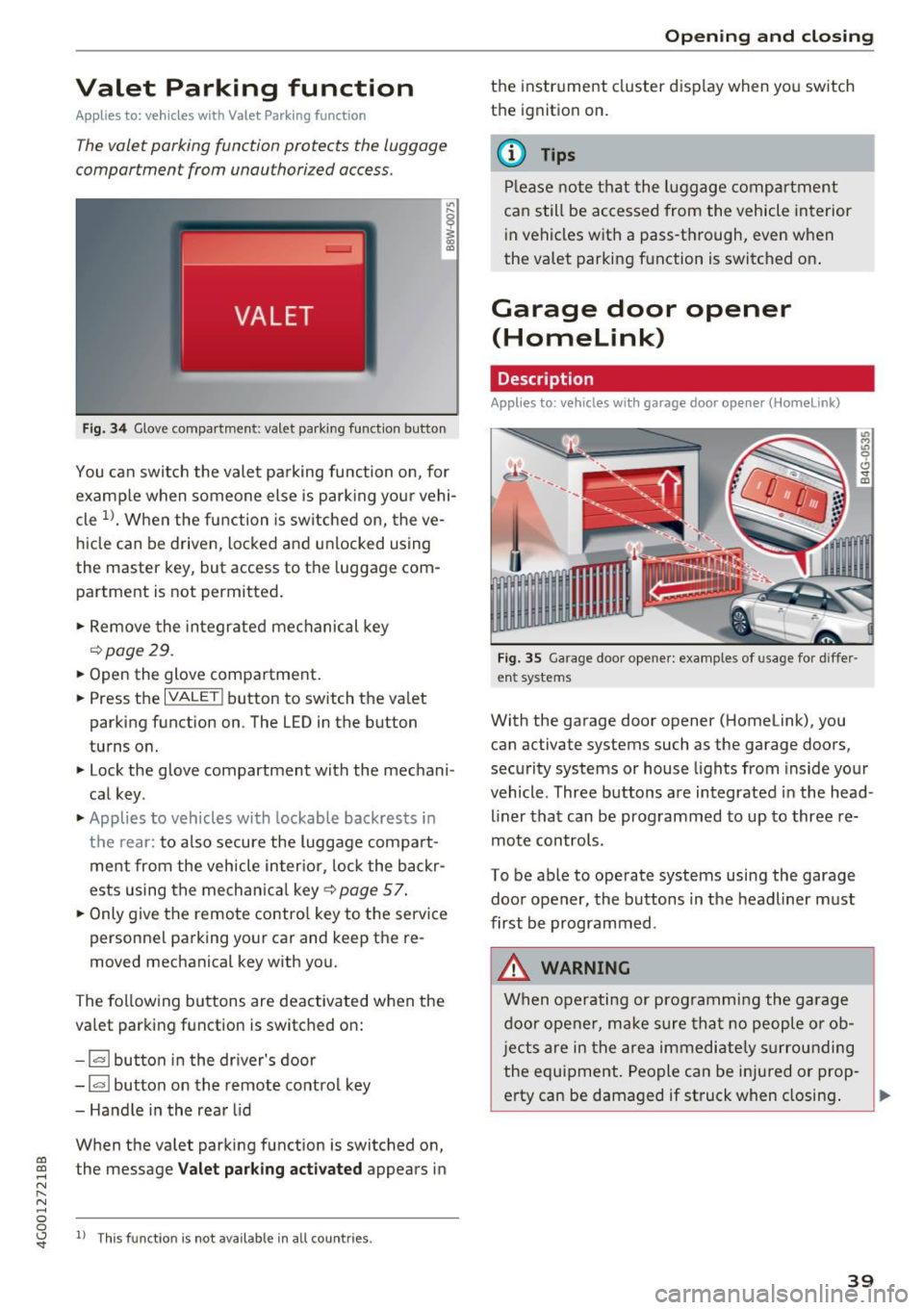
Fig. 34 Glove compartment: valet park ing function button
You can switch the valet parking function on, for
example when someone else is parking your vehi
cle
l)_ When the function is switched on, the ve
hicle can be driven, locked and unlocked using
the master key, but access to the luggage com
partment is not permitted .
.,. Remove the integrated mechanical key
r::!:>poge 29.
.,. Open the glove compartment.
.,. Press the
IVALET I button to switch the valet
parking function on. The LED in the button
turns on.
.,. Lock the glove compartment with the mechani
cal key .
.,. Applies to vehicles with lockable backrests in
t h e rear: to also secure the luggage compart
ment from the vehicle inter ior, lock the backr
ests using the mechanica l key ¢
page 57.
.,. Only giv e the remote control key to the service
personnel parking your car and keep the re
moved mechanical key with you.
The following buttons are deactivated when the
va let parking function is switched on:
- 1""' 1 button in the driver's door
-la l button on the remote control key
- Handle in the rear lid
When the valet parking function is switched on,
co ~ the message Valet parking activated appears in
N
" N .... 0 0
~ ll This func tion is not available in all co untries .
Open ing and closing
the instrument cluster display when you switch
the ignition on.
(D Tips
Please note that the luggage compartment
can still be accessed from the vehicle interior
in vehicles with a pass-through, even when
the valet parking function is switched on .
Garage door opener
(Homelink)
Description
Applies to: veh icles with garage door opener (Home link)
Fig . 35 Garage door opene r: examples of usage for diffe r
ent systems
With the garage door opener (Homelink), you
can activate systems such as the garage doors ,
security systems or house lights from inside your
vehicle. Three buttons a re integrated in the head
liner that can be programmed to up to three re
mote controls.
To be able to operate systems using the garage
door opener, the buttons in the headliner must
first be programmed .
_&. WARNING
When operating or programming the garage
door opener, make sure that no people or ob
j ects are in the area immediate ly surrounding
the equipment. People can be injured or prop-
erty can be damaged if struck when closing. .,.
39
Page 42 of 280
Opening and closing
@ Tips
-For security reasons, we recommend that
you clear the programmed buttons before
selling the vehicle.
- For additional information about Homelin k,
vis it www.homelink.com.
- For an explanation on conformity with the
FCC regulations in the United States and the
Industry Canada regulations, see
¢page 262.
Programming buttons
App lies to : vehicles with garage door opener (Homelin k)
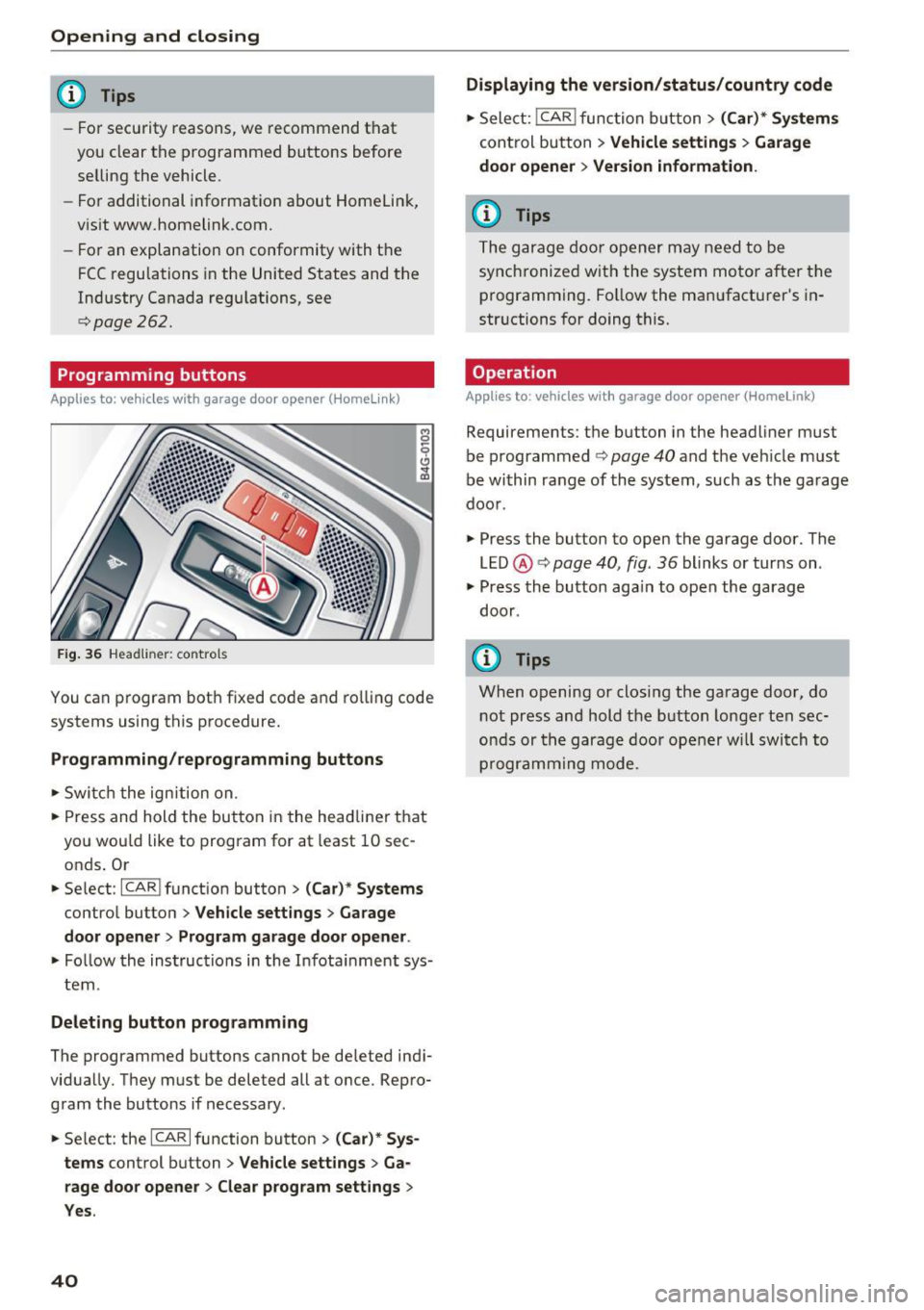
Fig. 36 Headli ner: co ntrols
You can program both fixed code and rolling code
systems using this procedure.
Programming/reprogramming buttons
,.. Switch the ignition on.
,.. Press and hold the button in the headliner that
you wou ld like to program for at least 10 sec
onds . Or
,.. Select:
-I C_A _R_I function button > (Car)* Systems
control button > Vehicle settings > Garage
door opener > Program garage door opener .
,.. Fo llow the instructions in the Infota inment sys
tem .
Deleting button programming
The programmed buttons cannot be de leted indi
vidually. They must be deleted all at once. Repro
gram the buttons if necessary.
,.. Se lect : the
ICARI function button > (Car)* Sys
tems
control button > Vehicle settings > Ga
rage door opener
> Clear program settings >
Yes.
40
Displaying the version/status/country code
,.. Select: !CAR I func tion button > (Car)* Systems
control button > Vehicle settings > Garage
door opener > Version information.
(D Tips
The garage door opener may need to be
synchronized with the system motor after the
programming. Follow the manufacturer's in
str uctions for doing this.
Operation
Applies to : vehicles with garage door opener (Homelink)
Requirements: the button in the headliner must
be programmed
¢ page 40 and the veh icle must
be within range of the system, such as the ga rage
door .
.,. Press the button to open the garage door. The
LED @¢
page 40, fig. 36 blinks or turns on .
.,. Press the button aga in to open the garage
door .
(D Tips
When opening or closing the garage door, do
not press and hold the button longer ten sec
onds or the garage door opener will switch to
programming mode.
Page 43 of 280
co
co
.... N
" N .... 0 0 <.,;) 'SI"
Lights and Vision
Exterior Lighting
Switching lights on and off
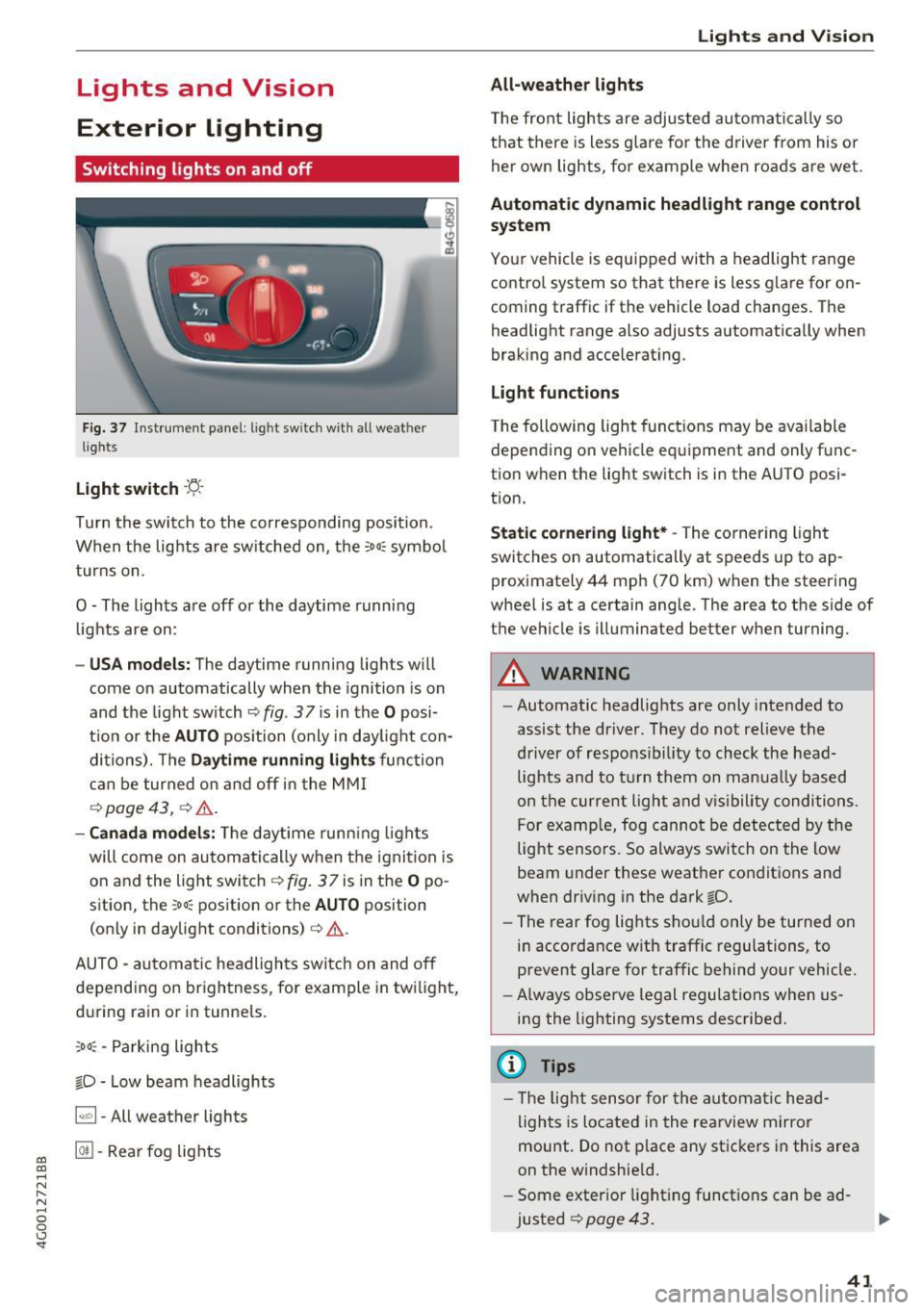
Fig. 37 In strument pane l: l ig ht sw itc h w ith all weather
lights
Light switch -r;..-
T u r n the switch to the co rresponding posi tion.
When the lights are sw itched on, the
:oo: symbo l
turns on.
0 · The lights are off or the daytime running
l ights are on:
- USA models: The daytime running lig hts will
come on automatically when the ignition is on
and the light sw itch
c::> fig . 37 is in the O posi
t io n or the
AUTO pos ition (only i n day light con
di tions). The
Daytime running lights func tion
c an be turned o n and off in the MM I
c::> page 43, ¢ ,&. .
-Canada models : The daytime runn ing ligh ts
will come on au toma tically when t he ig nit ion is
on a nd the light swi tch <=?
fig . 37 is in the O po
sition, the
: oo: position or the AUTO position
(only in daylig ht conditions)
c:> ,&. .
AUTO -au toma tic headligh ts sw itc h on and off
depending on br igh tness, for example in tw ilight,
d ur ing ra in or in tunne ls.
,oo : -Parking lights
io · Low beam headlights
~ -All weather lights
@II -Rea r fo g lig hts
Lights and V ision
All-weather lights
T he front lights a re adju sted au toma tic a lly so
t h at there is less glare for the driver from his o r
her own lights, fo r example whe n roads a re wet.
Automatic dynamic headlight range control
system
Yo ur vehicle is equip ped with a headlight r ange
contro l system so that there is less g lare for on
coming traff ic if the vehicle load changes . The
headlight range also adjusts automatically when
braking and accelerat ing.
Light functions
T he following light funct ions may be ava ilable
depending on vehicle eq uipme nt and only f unc
tion when the lig ht switch is in the AUTO posi
t ion.
Static cornering light* -The corner ing ligh t
switches on automatically at speeds up to ap
prox imately 44 mph (70 km) when the steering
whee l is at a certain ang le. The area to t he side of
the vehicle is illuminated better when turning.
A WARNING
-
- Automatic headlights are only intended to
assist the driver. They do no t relieve t he
d river of respons ibi lity to check the head
light s and to t urn them on manua lly based
o n t he curre nt light and v is ib ility conditi ons .
Fo r examp le, fog canno t be de tec ted by the
light sensors. So always switch o n the low
beam under these weat her co nditions a nd
when driving in the dark
io.
- The rear fog lights s ho ul d only be turned on
i n acco rdance w ith traffic regulations, to
prevent glare for traffic behind your vehicle.
- Always observe le g al regulations when us
i n g the lighting systems desc ribed.
(D Tips
- T he lig ht sensor for the automa tic head
lights is located in the rea rview mirror
mount. Do not p lace a ny st icke rs i n this are a
on the windshie ld .
- Some exter io r l ight ing funct io ns can be ad
justed
c::> page 43 .
41
Page 44 of 280
Lights and Vi sion
- If you turn off the ignition whi le the exterior
lights are on and open the door, a warning
tone sounds.
- In cool or damp weather, the inside of the
headlights, turn signals and tail lights can
fog over due to the temperature d ifference
between the inside and outside. They will
clear shortly after sw itch ing them on. This
does not affect the serv ice life of the light
ing .
Turn signal and h igh beam lever
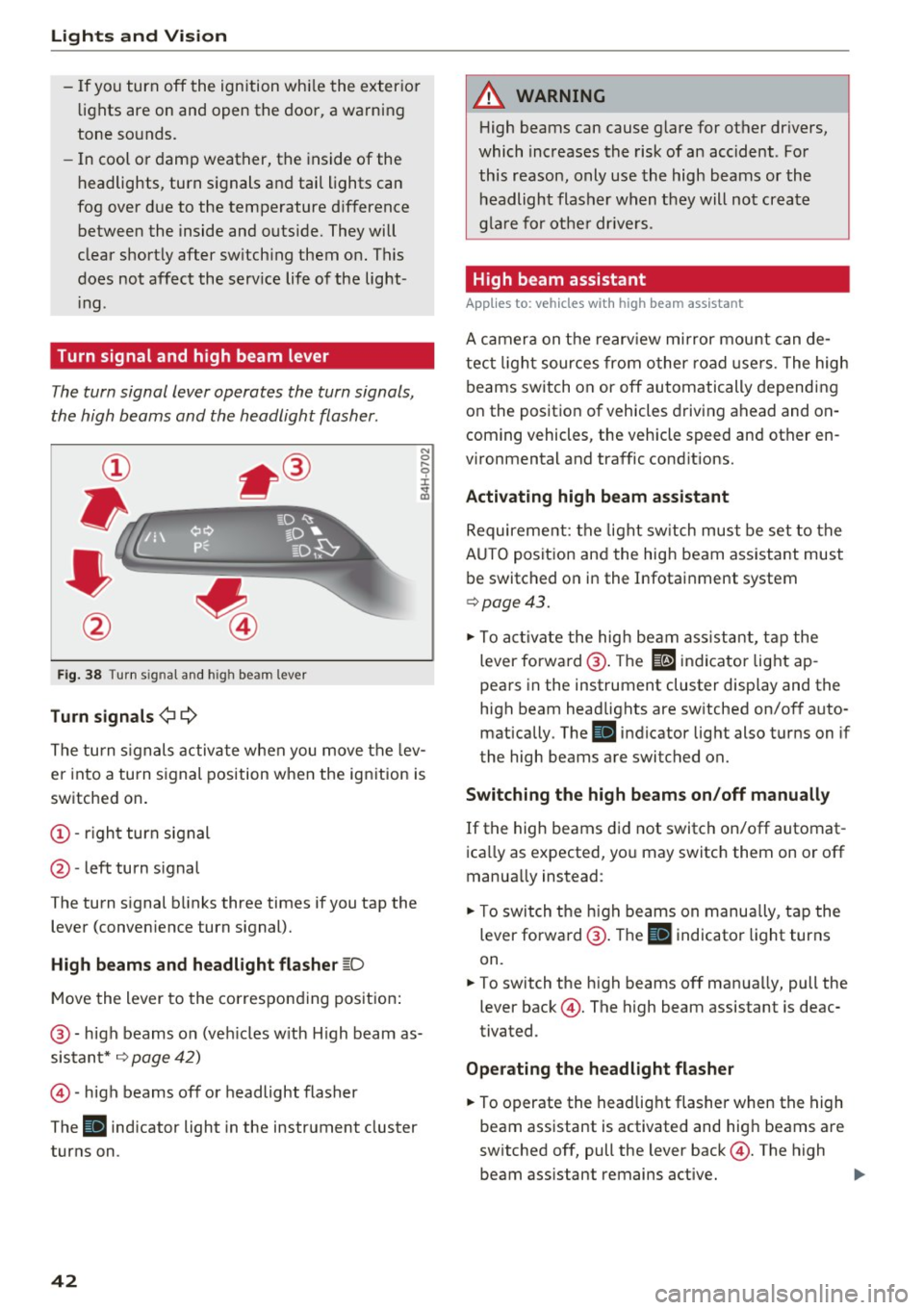
The turn signal lever operates the turn signals,
the high beams and the headlight flasher.
F ig . 38 Turn sig nal and high beam lever
Tu rn signals ¢ Q
N
0 ,.._
9 J:
;;!;
The turn s ignals activate when you move the lev
er into a turn signal position when the ignition is
switched on.
@ -right turn signal
@ -left turn s ignal
The turn signal blinks three times if you tap the lever (conven ience turn signal).
High b eams and h eadlight flasher ~D
Move the lever to the corresponding position :
@ -high beams on (veh icles w ith H igh beam as
sistant*
¢ page 42)
© -high beams off or headlight flasher
The
II indicator light in the instrument cluster
turns on.
42
A WARNING , _
H igh beams can cause glare for other drivers,
which increases the risk of an accident . For
this reason, only use the high beams or the headlight flasher when they will not create
g la re fo r othe r drive rs .
High beam assistant
App lies to: vehicles wi th high beam ass istan t
A camera on the rearv iew mirror mou nt can de
tect light sources from other road use rs. The high
beams switch on or off automatically depending
on the position of vehicles driving ahead and on
coming vehicles, the vehicle speed and other en
vironmental and traffic cond itions.
Activating high beam ass istant
Requirement: the light sw itch must be set to the
A UTO posit ion and the hig h beam ass istant must
be switched on in the Infotai nment system
¢ page 43 .
.,. To act ivate the high beam ass istant, tap the
lever forward @. The
El indicator light ap
pears in the instrument cluster display and the
high beam headlights are sw itched on/off auto
matically . The
II indicator light also turns on if
the high beams are switched on.
Switching the high b eam s on /off manually
If the high beams did not switch on/off automat
ica lly as expected, yo u may switch them on or off
manually instead:
.,. To switch t he h igh beams on manually, tap the
lever forward @. The
II indicator light turns
on.
.,. To switch the h igh beams off manua lly, pull the
lever back@. The high beam assistant is deac
tivated .
Operating the headlight flasher
.,. To operate the headlig ht flasher when the high
beam assistant is activated and hig h beams are
sw itched off, pull the lever back@. The high
beam ass istant remains active.
Page 46 of 280
Lights and Vision
turn signal lever . The emergency flashers stop
temporarily .
The emergency flashers also wo rk when the igni
tion is turned off.
Interior lighting
Front and rear interior lighting
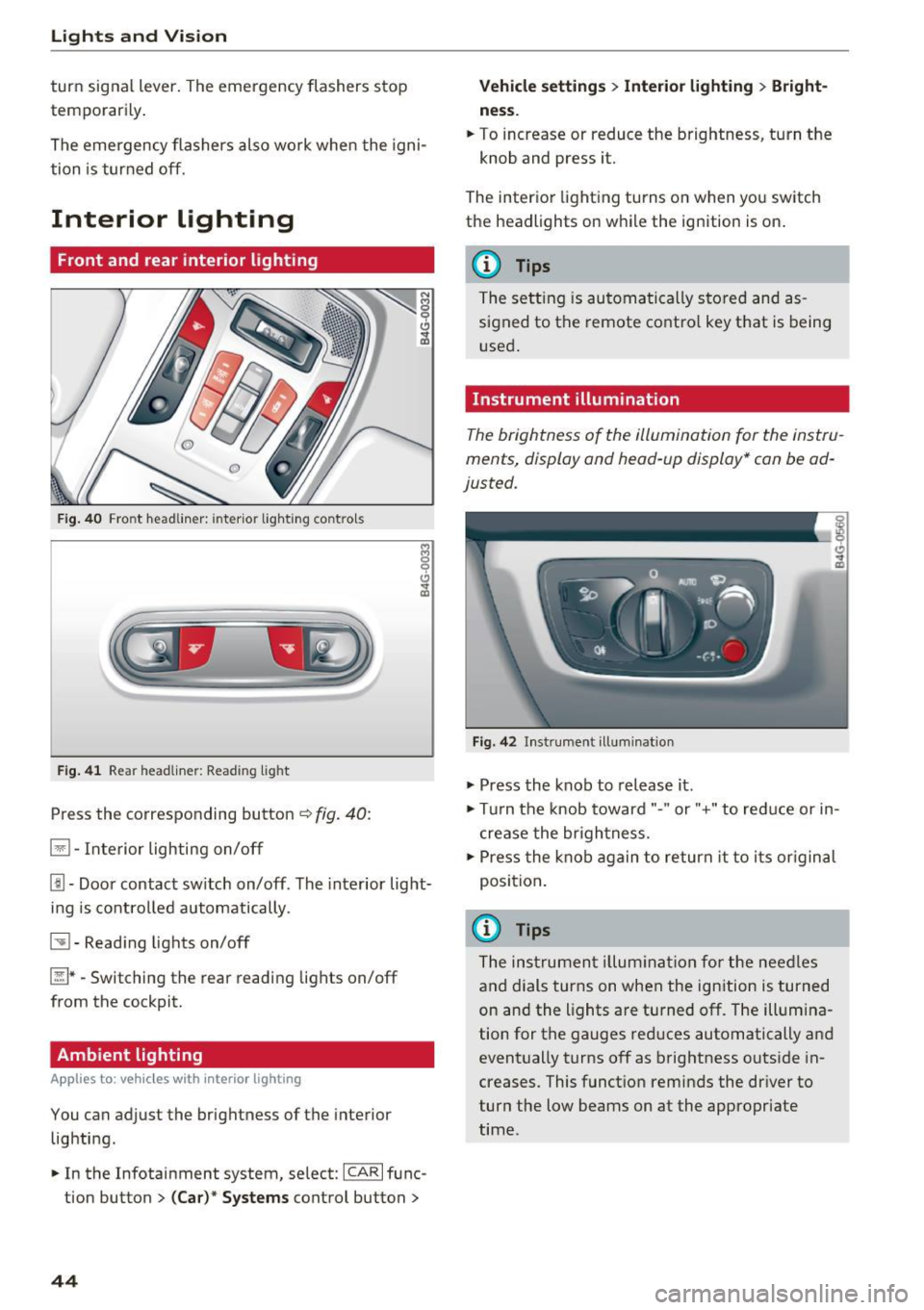
Fig . 4 0 Fro nt headli ner: inter io r lig hting co ntro ls
F ig . 4 1 Rea r headliner: Read ing light
Press the corresponding button ~ fig. 40:
El -Interior lighting on/off
Jjj -Door contact sw itch on/off. The interior light
ing is contro lled automatically.
~ - Read ing lights on/off
~ *·Switching the rear reading lights on/off
from the cockpit.
Ambient lighting
Ap plies to: vehicl es w ith i nterio r lighting
You can adjust the brightness of the interior
lighting .
.. In the Infotainment system , select:
ICAR I func
tion button
> ( Ca r)* Sy stems control button >
44
Vehicle setting s> Interior lighting > Bright
ne ss .
.. To increase or reduce the brightness, turn the
knob and press it.
The inter ior lighting turns on when yo u switch
the headlights on w hile the ignition is on .
(D Tips
The setting is automa tically stored and as
s igned to the remote contro l key that is being
u sed .
Instrument illumination
The brightness of the illumination for the instru
ments, display and head -up display* can be ad
justed.
F ig. 42 In strument illuminat ion
.,. Press the knob to release it .
.,. Tur n the knob toward"." or"+" to reduce or in
c rease the br ightness.
.,. Press the knob again to return it to i ts or iginal
position .
(i} Tips
The ins trumen t illum ina tion for the nee dles
and dials turns on when the ign ition is turned
on and the lights are turned off. The illum ina
tion for the gauges red uces automatically and
event ually turns off as brightness outside in
creases. This funct ion reminds the dr iver to
turn the low beams on at the appropriate
time.
Page 47 of 280
co
co
.... N
" N .... 0 0 <.,;) 'SI"
Vision
Adjusting the exterior mirrors
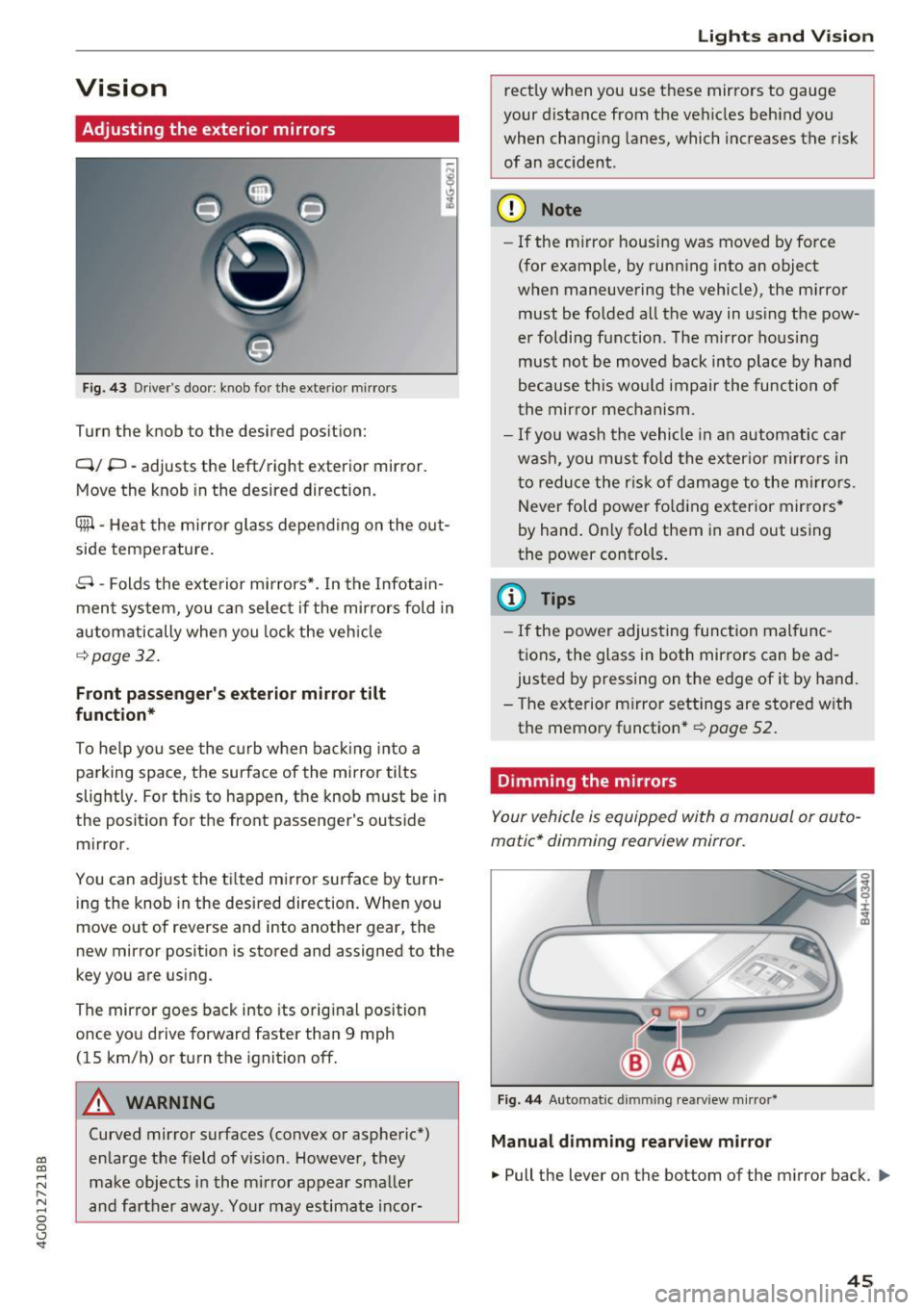
Fig. 43 Driver's door: knob for the exterior mir rors
Turn the knob to the desired pos ition:
Q/ P -adjusts the left/right exterior mirror.
Move the knob in the desired direction.
Cfill -Heat the mirror g lass depen ding on the o ut
side temperature .
8 -Folds the exte rior mi rrors*. In the Infotain
men t system, you ca n selec t if the mirrors fold in
automatically when you lock the veh icle
¢page 32.
Front passenger's exterior mirror tilt
function*
To he lp you see the curb w hen back ing in to a
parking space, the surface of the mirror tilts
slightly . For th is to happen, t he knob must be in
the posit ion for the front passenger's outside
mirror.
You can adjust the t ilted mi rror sur face by turn
i ng the knob in the desired direction. Whe n you
move out of reverse and into anot her gear, the
new mirror position is stored and assigned to the
key you a re using.
The mirror goes back into its orig inal position
once yo u drive forward faster than 9 mph
(15 km/h) or turn the ignition off.
A WARNING
Curved mirror surfaces (convex or aspheric*)
en large the f ield of vision. However, they
make obj ects in the mi rror appear smalle r
and fa rther away. Your may estimate i ncor-
Lights and V ision
rect ly when you use t hese mirrors to gauge
your d istance from the ve hicles beh ind you
when chang ing lanes, which increases the risk
of an acc ident.
(D Note
- If the m irror housing was moved by fo rce
(for example, by runn ing into an object
w hen maneuvering the vehicle) , the m irro r
must be fo lded all the way in us ing t he pow
er foldi ng f unction. The m irro r ho us ing
must not be moved back into plac e by hand
because this wo uld impair the func tion of
t he mir ror mec hanism.
- If you wash the vehicle in an automa tic ca r
w ash , you mus t fo ld the ex ter ior mir ror s in
t o reduce the r isk of d am age to the m irro rs.
N ever fold p ower fo ld ing ex ter ior mir rors *
by hand . On ly fold them in and out using
the power controls .
(D Tips
-If the power adjus ting func tion mal func
tions, the glass in both mirrors can be ad
justed by p ressing on the e dge of it by hand.
- T he exterior m irror settings are store d with
the memo ry functio n*
r=;, page 52.
Dimming the mirrors
Your vehicle is equipped with a manual or au to
matic* dimming rearview mirror.
Fi g. 44 Automatic dimming rearview mirror*
Manual dimming rearview mirror
.,. Pull the lever on the bottom of the mirror back. ll>
45
Page 49 of 280
co
co
.... N
" N .... 0 0 <..:l 'SI'
Sunshade on the rear window
Applies to: vehicles with a sunshade on the rear window
Applies to: sedan
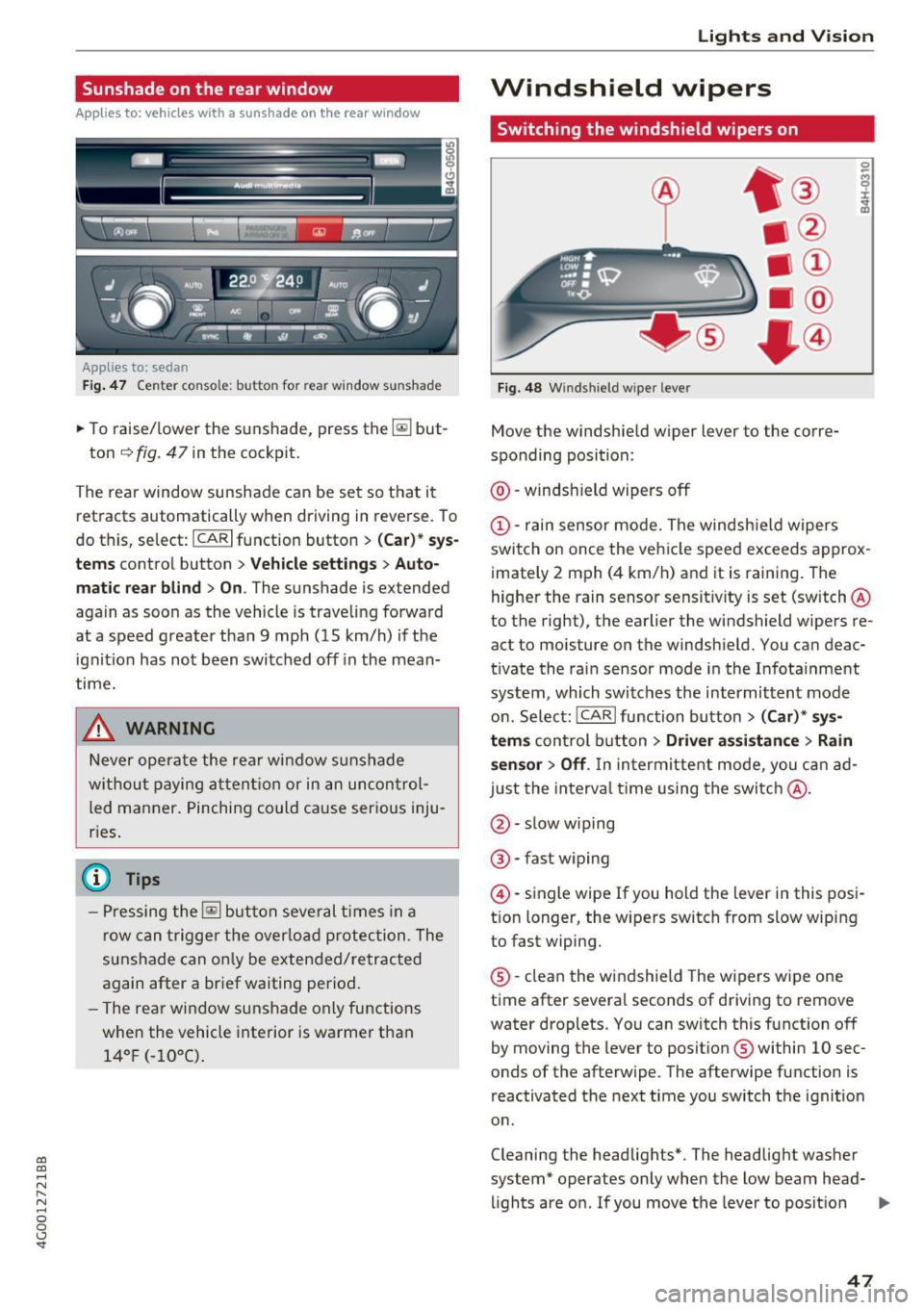
F ig. 4 7 Center console: button for rear window su nshade
~ To raise/lower the sunshade, press the~ but-
ton
¢ fig. 47 in the cockpit .
The rear window sunshade can be set so that it
retracts automatically when driving in reve rse. To
do this, select: ICARlfunction button>
(Ca r)* sys
tems
control button > Vehicle settings > Auto
matic rear blind > On .
The sunshade is extended
again as soon as the vehicle is trave ling forward
at a speed greater than
9 mph (15 km/h) if the
ignition has not been switched off in the mean
time.
& WARNING
-
N ever operate the rear window sunshade
w ith out paying attention or in an uncon trol
led manner. Pinching could cause serious inju
r ies .
(0 Tips
-Pressing the~ button several times in a
row can trigger the overload protection . The
sunshade can on ly be extended/retracted
again after a brief waiting period.
- The rear window sunshade only functions
when the vehicle interior is warmer than
14° F (-1 0°C) .
Lights and V ision
Windshield wipers
Switching the windshield wipers on
Fig. 48 W inds hield w iper leve r
Move the windshie ld wiper lever to the corre
sponding position:
@ -windsh ield wipers off
@ -rain sensor mode. The windsh ield wipers
switch on once the vehicle speed exceeds approx imately 2 mph (4 km/h) and it is raining . The
higher the rain sensor sensit ivity is set (switch @
to the right), the earlier the windshield wipers re
act to moisture on the windshie ld. You can deac
tivate the rain sensor mode in the Infota inment
system, which switches the intermittent mode
on. Select: ICARI function button>
(Car)* sys
tems
con trol button > Driver assistance > Rain
sensor> Off.
In intermittent mode, you can ad
just the interval time using the switc h@ .
@-slow wiping
®-fast w iping
@ -single wipe If you hold the lever in this posi
t ion longer, the wipers switch from slow wip ing
to fast wiping.
® -clean the windshield The wipers wipe one
time after several seconds of driving to remove
water droplets. You can sw itch this function off
by moving the lever to posit ion ® within
10 sec
onds of the afterwipe . The afterwipe function is
reactivated the next time you switch the ignit ion
o n .
Cleaning the headlights*. The headlight washer
system* operates only when the low beam head- lights are on. If you move the lever to posit ion
II>-
47
Page 50 of 280
Lights and Vi sion
® , the headlights and the night vision assist
camera* are cleaned at intervals.
A WARNING
-The rain sensor is only intended to assist the
driver. The driver may still be responsible
for manually switching the wipers on based on visibility conditions.
- The windshield may not be treated with wa
te r-repell ing windsh ield coating agents. Un
favorable conditions, such as wetness, dark
ness or low sun, can result in increased
glare, which increases the risk of an acc i
dent. Wiper blade chatter is also poss ible.
- Properly functioning windsh ield wiper
blades are required for a clear view and safe
dr iv ing¢
page 48, Replacing windshield
wiper blades.
(D Note
- If there is frost, make sure the w indshie ld
wiper blades a re not frozen to the wind
s hi eld. Sw itching on the winds hield wipers
when the blades are frozen to the wind
shield can damage the wiper blades.
- Prior to using a car wash, the windshield
wiper system must be switched off (lever in
position 0) . This prevents the wipers from
switching on unintentiona lly and causing
damage to the w indshield wiper system.
(D Tips
- The windshield wipers switch off when the
ignition is switched off. You can activate the
windsh ield wipers after the ign ition is
switched back on by moving the windsh ield
wiper lever to any pos it ion.
- Worn or dirty windshield wiper blades result
i n streak ing. This can affect the rain sensor
funct ion . Check your winds hield wiper
blades regularly.
- The washer fluid nozzles for the windshie ld
washer system are heated at low tempera
tures when the ignition is on .
- When stopp ing temporarily, such as at a
traffic l ight, the speed of the windshield
wipers automat ically reduces by one level.
48
· Cleaning windshield wiper blades
Clean the wiper b lades when yo u see w iper
streaks. Use a soft cloth and a g lass cleaner.
.. Place the w indshield w iper arms in the service
position ¢
page 48.
" Fold the windsh ie ld w iper arms away from the
w indshie ld.
A WARNING
D irty windshie ld w iper blades can impa ir vi
sion, which increases the r isk of an accident .
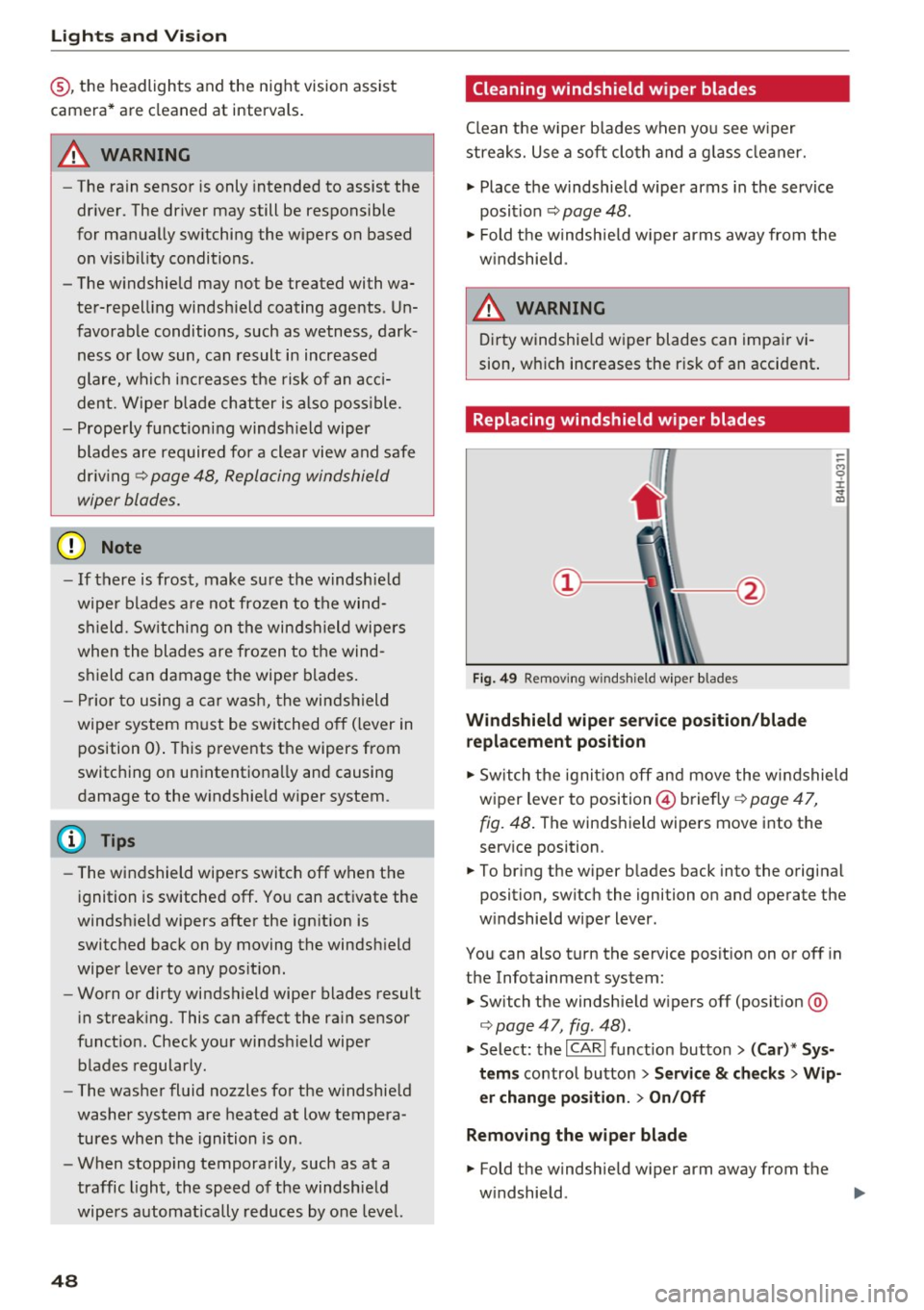
Replacing windshield wiper blades
Fig. 49 Removi ng w inds hield w ipe r blades
Windshield wiper service position /blade
replacement po sition
-
-
-M 0 :i: V m
" Sw itch the ignit ion off and move the windshield
wiper lever to position © briefly ¢
page 47,
fig. 48 .
The winds hield wipers move into the
serv ice position .
.. To br ing the wiper b lades back into the original
position, switch the ignition on and operate the
w indshield wiper lever.
You can also turn the service posit ion on or off in
the Infotainment system:
.. Switch the windshie ld w ipers off (posit ion @
¢page 47, fig. 48).
" Select: the I CARI funct ion button > (Car )* Sys
tems
control button > S ervice & ch ecks > Wip
er chang e po sition .
> On/Off
Remo ving the wiper blade
.. Fold the windshield w iper arm away from the
w indshield .
1111>