lights AUDI A6 2017 Owner's Guide
[x] Cancel search | Manufacturer: AUDI, Model Year: 2017, Model line: A6, Model: AUDI A6 2017Pages: 280, PDF Size: 70.24 MB
Page 72 of 280
Driving
Easy seat entry
Applies to: ve hicles w ith power steering whee l adj ustment
Easy seat entry makes it easier to enter and exit
the vehicle by adjusting the steering column au
tomatically .
.-In the Infotainment system, select the ICARI
funct ion button > (C ar) * Systems control but
ton
> Vehi cle settings > Seat s > Dr iver' s seat >
Easy seat ent ry > On .
When easy seat entry is switched on, the steering
column goes back up into the park position when
the ignition is switched off . After entering the ve
h icle, the steering co lumn re turns to the stored
position once the ignition is sw itched on.
Starting and stopping
the engine
Starting the engine
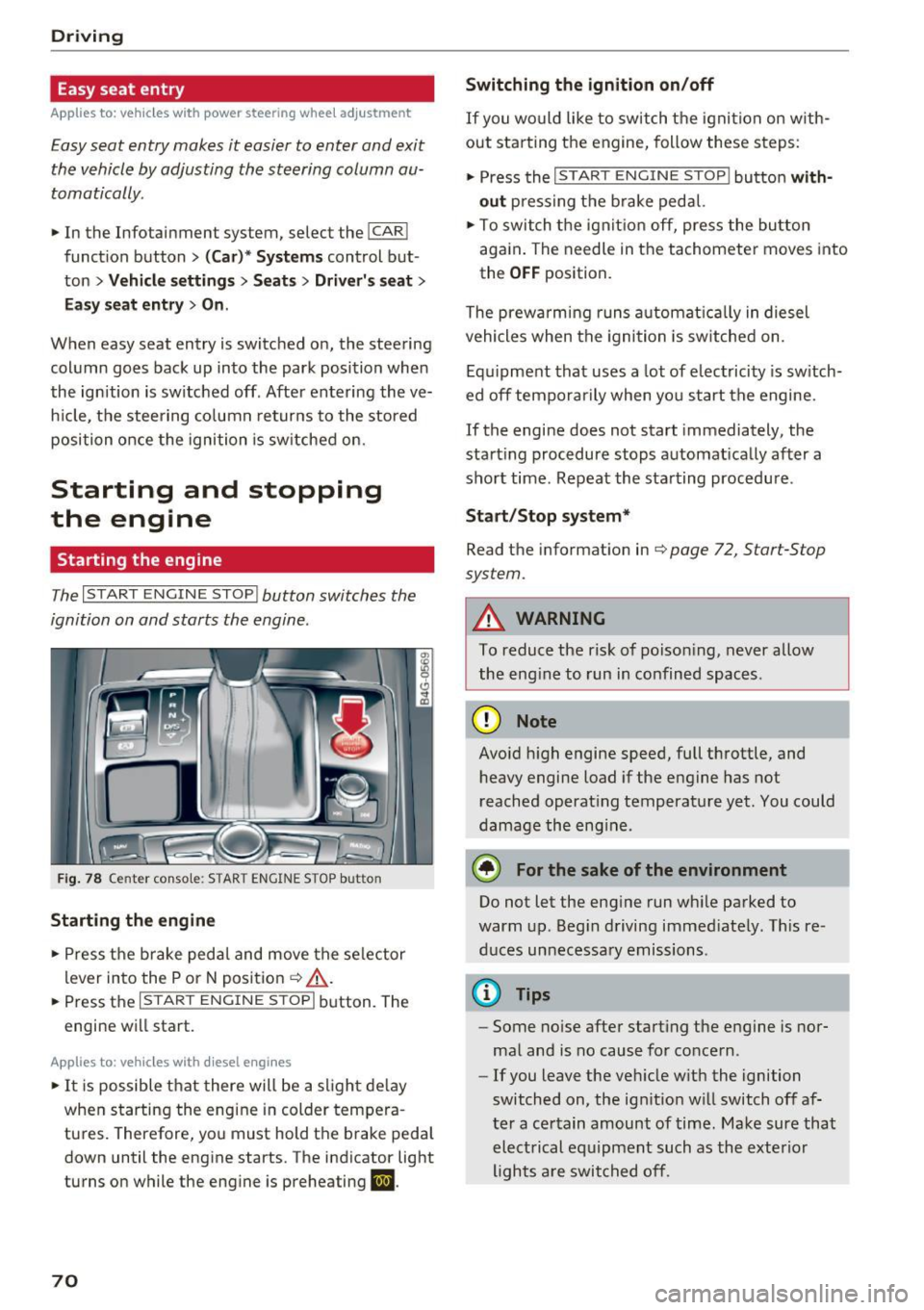
The I START ENGINE STOP I button switches the
ignition on and starts the engine.
Fig. 78 Center console: STAR T ENGINE STOP button
Starting the engine
.- Press the brake pedal and move the se lector
lever into the P or N posit ion ¢
&_.
.-Press the I START ENGINE STOPI button. The
engine will start.
App lies to: ve hicles w ith diesel e ngi nes
.- It is possible t hat there will be a slight de lay
when starting the engine in colder tempera
tures. Therefore, you must hold the brake peda l
down until the engine starts. The indicator light
turns on while the engine is preheating
II .
70
Switching the ignition on /off
If you wo uld like to switch t he igni tion on w ith
out star ting the engine, follow these s teps:
.- Press the
I START ENGINE STOP I button with
out press ing the b rake pedal.
.- To switch the igni tion off, press the bu tton
aga in . The needle in the tachomete r moves into
the
O FF position.
The prewarming runs a utomat ica lly in diesel
vehicles when the igni tion is sw itched on .
Equ ipment that uses a lot of electricity is sw itch
ed off tempo rarily when you start the engine.
If the engine does not start immediately, the
start ing procedure stops automat ically after a
short time. Repeat the starting procedure .
Start /Stop system*
Read the information in¢ page 72, Start-Stop
system.
A WARNING
To reduce the risk of poison ing, never allow
the eng ine to run in confined spaces.
(D Note
Avo id h igh engine speed, full throttle, and
heavy engine load if the engine has not
reached operat ing temperature yet. You could
damage the eng ine.
® For the sake of the environment
Do not let the eng ine run wh ile parked to
warm up. Beg in driving immed iately. Th is re
d uces unnecessary emissions .
(D Tips
-Some noise after start ing the engine is nor
ma l and is no cause for concern .
- If you leave the veh icle w it h the ignition
switched on, the ign ition w ill switch off af
ter a certain amount of time. Make sure that electrical equipment such as the exterior
lights a re switched off.
-
Page 76 of 280
Driving
-The vehicle battery charge leve l is too low.
- Power consumption is high .
The engine can turn off again when the condi
tions fo r Start-Stop mode are met .
Ignition is switched off automati call y
To prevent the veh icle battery from drain ing, the
ignit ion will switch off
automat ic a lly under the
following conditions:
- The vehicle must have already been driven.
- The Start/Stop system has stopped the engine.
- The driver's door must be open.
- The driver's safety be lt must be unb uckled.
- The brake pedal must not be p ressed .
- The vehicle must be stationary .
In th is case, the activated low beam is replaced
by the parking light. The parking lights will
sw itch off after approximately 30 minutes or
when you lock the vehicle .
If the Start/Stop system has not turned off the
engine or if you have sw itched the Start/Stop sys
tem off manually , the ignition will not be auto
mat ically switched off and the engine w ill contin
ue to run
~ ,& .
A WARNING
To red uce the risk of poisoning, never allow
t he engine to r un in confined spa ces .
@ Tips
If you select the Dor N se lector lever position
after sh ift ing into reverse, t he vehicle m ust
be driven faster than 6 mph (10 km/h) in or
de r fo r th e e ng ine to swit ch off again.
74
-
Manually switching the Start /Stop system
off /on
Appl ies to: vehicles with Start/Stop system
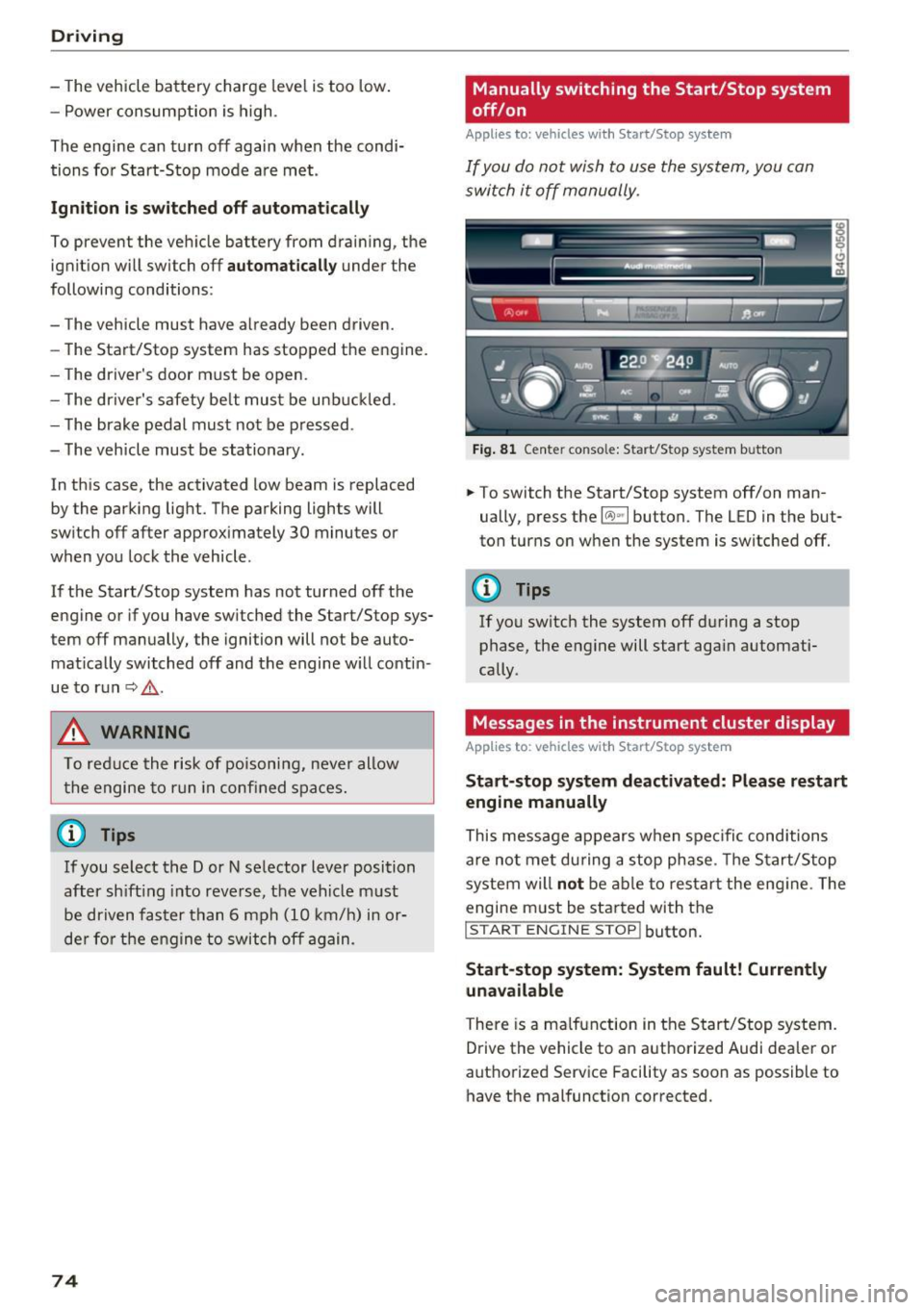
If you do not wish to us e th e system, you can
switch i t off manually.
Fig . 8 1 Ce nte r conso le: Start/Stop system b utto n
.,. To switch the Start/Stop system off/on man
ually, press the
l (A) ~I button. The LED in the but
ton turns on when the system is switched off.
0) Tips
If yo u switch the system off d uring a stop
phase, the engine will start aga in automati
cally .
Messages in the instrument cluster display
Applies to : vehicles with Start/Stop system
Start-stop system deactivated: Please restart
engine manually
This message appears w hen spec ific cond itions
are not me t during a stop phase. The S tart/S top
system will
not b e a ble to re sta rt the eng ine. The
engine m ust be started with the
I S TAR T ENGINE ST OP ! button.
Start -stop system: System fault! Currently
una vailable
There is a ma lfunction in the Start/Stop system.
Drive the vehicle to an author ized Audi dea ler or
autho rized Service Facility as soon as possible to
have the malfunction corrected.
Page 79 of 280
co
co
.... N
" N .... 0 0 <.,;) 'SI"
-Hill hold assist cannot hold the veh icle in
place on all h ills (for example, if the ground
is slippery or icy).
- To reduce the risk of an accident, always
make sure the vehicle is situated safely
wh ile stat io nary.
Automatic transmission
Introduction
The automat ic transmission is cont rolled e lec
tron ica lly. The tra nsmission shifts up or down au
tomatically depending on which drive program is
selected.
When a
moderat e driving style is used, the
transmission selects the most economical driving mode. The t ransmission upshifts at a lower RPM
and downshifts at a higher RPM to improve fuel
efficiency .
The transmission sw itches to a sporty mode a fter
a kick-down or when the driver uses a
s po rt y
driving st yle
characterized by quick accelerator
pedal movements, heavy acce leration, frequent
changes in speed and traveling at the maximum
speed .
If desired, the driver can also select the gears
manually ( tiptronic mode) q page 80 .
Appl ies to : ve hicles w ith S tro nic t ran smi ssio n
The 5 tronic is a dual-clutch transmiss ion . Powe r
is transferred using two cl utches that work inde
pendently from one another. They replace the
torque converter used in conventional automat ic
transmissions and allow the vehicle to accelerate
without a noticeab le interruption in tract ion.
A ppl ies to: ve hicles with a t iptro nic tr ansmi ssio n
Power is transfer red using a torque conver ter.
D rivi ng
Selector lever positions
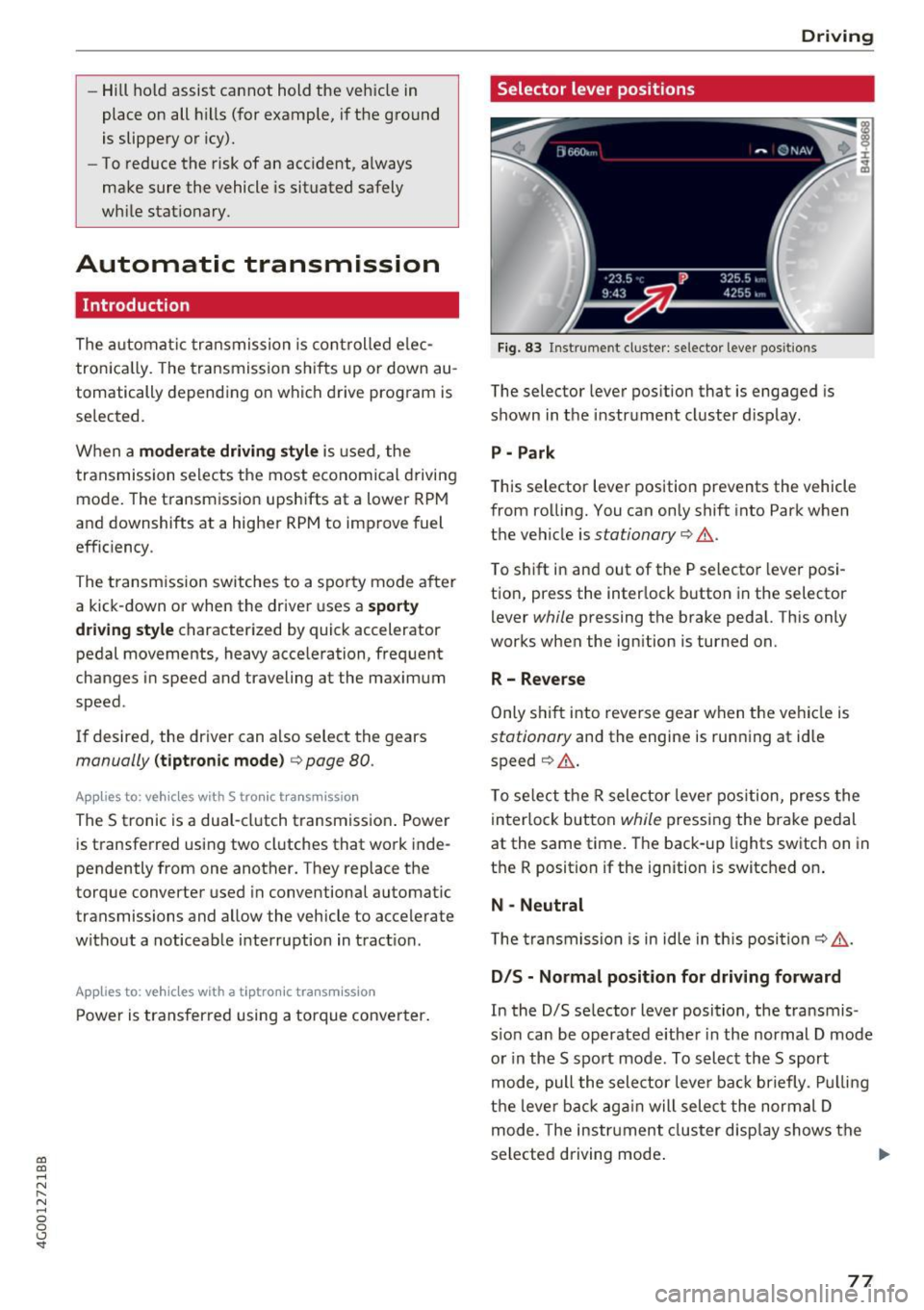
Fig. 83 Instrument cl uster: selector leve r pos itions
The selector lever position that is engaged is
shown in the instrume nt cluster display .
P - Park
This selector lever position prevents the vehicle
from rolling. You can only shift into Park when
the vehicle is
stationary q &. .
To shift in and out of the P selector lever posi
tio n, press the inter lock b utton in the selector
lever
while pressing the brake peda l. Th is only
works when the ign ition is turned on.
R- Reverse
Only s hift into reve rse gear when t he vehicle is
stationary and the engine is running at idle
speed
q &. .
To se lect the R selector leve r pos ition, press the
in terlo ck button
while pressing the brake pedal
at the same time. The back-up lights switch on in
the R position if the ignition is switched on .
N -Neutral
T he tra ns m ission is in idle in th is posi tion
q &_ .
DIS -Normal position for driving forward
In the D/S se lector lever position, the t ransmis
s io n can be operated e ither in the normal D mode
or in the 5 spo rt mode . To select the 5 sport
mode, pull the selector leve r ba ck briefly . Pu llin g
t h e lever ba ck aga in will selec t the normal D
mode. The instr ument cluster disp lay shows the
selected driving mode .
77
Page 81 of 280
co
co
.... N
" N .... 0 0 <..:l -
pressed.
Interlock button
The in terlo ck button i n the selector lever handle
p revents yo u from moving the selector lever i n
advertently while in some se lector lever posi
tions. The positions that require the interlock button to be pressed are marked in co lor i n the il
lustration
c:> fig . 84.
Driving tips
Starting the engine
.. The selector lever must be in the P or the N po
s it ion.
Starting from a stop
.. Press and hold the brake pedal.
.. Press and hold the lock button in the selector
lever hand le, select the desired se lector lever
pos ition such as 0/5 and release the lock but
ton .
.. Wait a moment unt il the transm ission shifts .
You w ill no tice a slight movement when t he
gear e ngages .
.. Release t he b rake pedal and press the acce le ra
tor pedal
c:> &_ .
Stopping temporarily
.. Keep the veh icle stat ionary using the braking
peda l, for example at traffic lights .
.. Do no t press t he accelerator pedal when doing
t hi s.
.. To p revent the vehicle from rolling when yo u
sta rt driving, se t the park ing brake when stop
ping on steep i nclines
c:> _&. .
.. The parking bra ke wi ll re lease automatically
and the vehicle will start moving once you press
the accelerator pedal.
Stopping /parking
If the se lec to r l ever is not in the P posi tion when
you open the driver's door, the vehicle could rol l.
The message
Transmission: selector lever in
drive position!
appears . A warn ing tone wi ll also
sound.
.. Press and hold the brake pedal
c:> _&. .
Driving
.. Se t the par king brake.
.. Select the P selector lever posit ion .
U nder certain circumst ances, su ch as driving in
t h e mo unta ins, i t may be useful to swi tch tempo
ra rily to the manual s hift program in order to
man ua lly adjust the gea rs to the driving condi
tions
c:> poge 80.
On inclines, activate the parking brake fi rs t a nd
t h en move the selector lever to t he P position
c:> page 75. This prevents the locking mechanism
from be ing loaded too heavily and will make it
easier to move the selector lever out of the P po
s ition .
A WARNING
- The vehicle ca n roll even if the ignit ion is
sw itched off .
- Never leave your ve hicle w ith the engine
r u nning while in gear .
- Do not press the acce le rator peda l when
changing the se lector lever posi tion while
the vehicle is s ta tionary and the engi ne is
r u nning .
-
-Please no te that a small amo unt of power is
transmi tted if the veh icle is stopped tern po
r a rily w hile in t he D/S or R select or leve r po
si tion. To reduce t he risk of an a cc iden t, y ou
m ust cont in ue pressing firmly on the brake
pedal whi le t he veh icle is stoppe d so that i t
does not ro ll.
- Never engage the R or P sele ctor leve l pos i
tions while dr iv ing. It could ca use a crash .
- Before driving down a steep slope, reduce
your speed and sh ift into a lowe r gear w ith
"t i pt ronic" .
- Do not r ide the brakes or p ress the brake
pedal too often or too lon g when dr iving
downhill . Constant bra king causes the
brakes to overheat and s ubstant ially re
duces brak ing performance, increases b rak
ing d istance or causes comp lete fai lure of
the bra ke system.
- If you must stop on an incline, a lways hold
the vehicle in place wit h the foot brake or
pa rking bra ke to p reve nt i t from rolling
back.
79
Page 85 of 280
co
co
.... N
" N .... 0 0 <..:l '
General information
Your Audi was designed primarily for passenger
transportation .
If you plan to tow a trailer, please remember that
the additional load will affect durability, econo
my and performance.
Trailer towing not only places more stress on the
vehicle, it also calls for more concentration from
the driver.
For this reason, always follow the operating and
driving instructions provided and use common
sense.
(D Note
If you are going to tow a trailer, you must ac
tivate the trai ler operation mode
c::> page 83, Operating instructions.
Technical requirements
Trailer hitch
Use a weight-carrying hitch conforming to the
gross trailer weight. The hitch must be suitable
for your vehicle and trailer and must be mounted
securely on the vehicle's chassis at a
technically
sound
location . Use only a trailer hitch with a re
movable ball mount. Always check with the trail
er hitch manufacturer to make sure that you are
using the correct hitch.
Do not use a bumper hitch.
The hitch must be installed in such a way that it
does not interfere with the impact -absorbing
bumper system . No modifications should be
made to the vehicle exhaust and brake systems .
From time to time, check that all hitch mounting
bolts remain securely fastened.
When you are not towing a trailer,
remove the
trailer hitch ball mount . This prevents the hitch
from causing damage shou ld your vehicle be
struck from behind
c::> .&, .
Tra iler towing
Trailer brakes
If your trailer is equipped with a braking system,
check to be sure that it conforms to all regu la
tions.
T he trailer hydraulic brake system must not be
directly connected to the vehicle's hydraulic
brake system.
Safety chains
Always use safety chains between your vehicle
and the tra iler .
Trailer lights
Trailer lights must meet all regulations. Be sure
to check with your Audi dealer for correct wiring,
switches and relays.
Mirrors
If you are unable to see the traffic behind you us
ing the regular outside mirrors, then you
must in
stall extended mirrors . It is important that you
always have clear vision to the rear .
A WARNING
--
After removing the trailer hitch, do not store
it in your vehicle. In case of sudden braking,
the hitch could fly forward and injure you or
your passengers.
Operating instructions
Maximum trailer weight
A trailer for your vehicle is lim ited to a typical
class 1 or class 2 trailer.
Trailer load distribution
Be sure the load in the trailer is held securely in
place to prevent it from shifting forward, back
ward or s ideways.
Never allow a passenger to ride in a trailer c::> .&.
in Driving instructions on page 85 .
Engine cooling system
Towing a trailer makes the engine work harder. It
is important that the cooling system's perform
ance is up to the additional load. Make sure that
the cooling system has enough fluid . ..,.
83
Page 86 of 280
Trailer towing
Tire pr essure
When tow ing a tra iler, inflate the tires of yo ur
veh icle to the tire pressure listed under " Fu ll
load" on the label¢
page 220. Inflate trai ler
tires to trai ler and tire manufacturers' specifica
tions.
Lights
Check to ma ke sure both vehicle and t railer lights
are working proper ly.
Safety chains
Be sure trailer safety chains are proper ly connect
ed from the traile r to the hitch on the vehicle.
L eave enough slac k in the c ha ins to permi t turn
ing corners. When you install safety chains, make
sure they wi ll not drag on the road when you are
driving.
The chains shou ld cross under the trailer tongue
to prevent it from dropping in case of separation
from the hitch .
Adjusting the Audi drive select
Make sure the veh icle is on a level surface before
h itchi ng up the t railer a nd before adjus ting the
tongue we igh t. The vehicle must be in
auto or
c omfort driving mode and not ra ised
¢page 104, ¢(!) .
Make sure that the vehicle is lowered. In Info
tainmen t, se lect:
ICARI f u nct ion butto n> Lower
con trol b utton.
I f you must dr ive under poo r road conditions, you
can ra ise the vehicle
aft er coup ling the t rai ler or
after adj usting the tongue weight¢ page 106.
@ Note
-Changes in tempe rature or load ca n affect
the he ight of the vehicle.
- Always se lect
auto or comfort mode . Other
wise, the tongue load spec ified for your ve
hi cle w ill no longe r be applicable.
84
· Driving instructions
Driving with a trailer always requires extra care
and consideration.
Weight distribution
Towing a loaded trailer with an empty car results
i n a h ighly unstab le distribut ion of weight. If this
cannot be avoided, drive at very low speeds only
to avoid the risk of losing steering control.
A "balanced" rig is easier to operate and control.
This means that the tow vehicle shou ld be loaded
to the extent possible and permissible, wh ile
keeping the trailer as light as possible under the
c ir cumstances . Wheneve r possible, transfer
some cargo to the luggage compartment of the
tow ve hicle while observing tongue load require
ments and vehicle load ing conside ra tions.
Speed
The higher the speed, the more difficult it be
comes for the dr iver to control the r ig. Do not
drive at the maximum permissible speed. Reduce
yo ur speed even more if load, weather or wind
cond it ions are unfavo rab le -pa rtic ularly whe n
going downh ill.
Reduce vehicle speed
immed iately if the t railer
shows the slightest sign of sway ing.
Do not try
t o stop th e s waying by accelerating.
Observe speed limits. In some areas, speeds fo r
vehicles tow ing traile rs are lower than for regular
vehicles.
Always apply brakes early. When driving down
hill, shift into a lower gear to use the eng ine
braki ng effect to slow the vehicle. Use of the
bra kes alone ca n cause them to overheat a nd fail.
Air suspension*
When dr iving with a trailer, act ivate the trailer
mode of the air suspens io n. Switch the a ir sus
pension trailer mode on w hen you are towing a
trailer. This wi ll limit the regulation by the air
s u spension while dr iv ing. Se lect in the M MI:
I CAR ! funct ion but ton > (Car )* s ystem s contro l
button >
Vehicle setting s > Air su sp .: towing >
On . .,_
Page 87 of 280
co
co
.... N
" N .... 0 0 <..:l '
The coolant temperature gauge c::> page 9 must
be observed carefu lly . The coolant temperature
can increase if you drive on long inclines in a low
gear at high engine speeds. Reduce your speed immediately if the LEDs in the top part of the dis
play turn on.
F or more information about ind icator lights, re
fer to.
c::> page 14.
A WARNING
Anyone not proper ly restrained in a moving
vehicle is at a much greater risk in an acci
dent. Never let anyone ride in your car who is
not properly wearing the restraints provided
by Audi.
Trailer towing information
Important to know
Your vehicle handles differently when towing a
tra iler because of the additional weight and dif
ferent weight distribut ion . Safety, performance
and economy will greatly depend on how careful
ly you load your trailer and operate your rig.
Before you actually tow your trailer, practice
turning, stopp ing and back ing up in an area away
from traff ic. Keep practicing until you have be
come completely fam iliar with the way your vehi
cle-trailer combination behaves and responds.
Backing up is difficult and requires pract ice.
Backing up with a trailer generally requires steer
ing action opposite to that when backing up your
vehicle without a trailer.
Maintain a greater d istance between your vehicle
and the one in front of you. You w ill need more
r oom to stop. To compensate for the trailer, you
will need a larger than normal turning radius.
When passing, remember that you cannot accel
erate as fast as you normally wou ld because of
the added load. Make s ure you have enough room
to pass. After passing, a llow plenty of room for
your tra iler before changing lanes again.
Trailer towing
Avoid jerky starts, sharp turns or rapid lane
changes.
(D Tips
- Do not tow a trailer during the break-in peri
od of your vehicle.
- If you tow a trailer, your Audi may require
more frequent maintenance due to the ex
tra load
c::> page 259 .
Parking on a slope
Do not pork on a slope with a trailer. If it cannot
be avoided, do so only after doing the following:
When parking:
• Apply the foot brake.
• Have someone place chocks under both the ve
hicle and the trailer wheels.
• With chocks in place, slowly release the brakes
until the wheel chocks absorb the load.
• Turn the whee ls towards the curb.
• App ly the parking brake.
• Select the P selector lever position.
When restarting after parking:
• App ly the foot brake.
• Start the engine.
• Select the D/S se lector lever position.
• Release the parking brake and slowly pull out
and away from the wheel chocks.
• Stop and have someone retrieve the wheel
chocks.
(D Tips
If you move the selector lever of the automat
i c transmission to P before applying the park
i ng brake and before blocking the wheels, you
may have to use more force later to move the
l ever out of the P position.
85
Page 89 of 280
co
co
.... N
" N .... 0 0 <..:l '
your foot on the accelerator pedal prevents
the cruise control from braking. This is be
cause pressing the accelerator pedal over
rides the cruise control system .
- If a brake system malfunction such as over
heating occurs when the cruise control sys
tem is switched on, the braking function in
the system may be switched off. The rest of
the cruise control system functions remain
active as long as the
(tj;(IM@ (USA models) /
ii (Canada models) indicator light is on.
@ Tips
The brake lights turn on when the brakes are
applied automat ically .
Changing speed
Applies to: vehicles with cruise control system
.. To increase or decrease the speed in incre
ments, tap the lever toward
010 ¢ page 86,
fig. 88 .
.. To increase or decrease the speed quickly, hold
the lever in the
G)/0 direction until the de
sired speed is displayed.
You can also press the accelerator pedal down to
increase your speed, for example if you want to
pass someone. The speed you set earlier will re
sume as soon as you release the accelerator ped
al.
However, if you exceed your saved speed by 5
mph (10 km/h) for longer than 6 minutes, the
cruise control system turns off temporarily .
The green
ltj;(i )~i@ (USA models) 1 '11 (Canada mod
els) indicator light in the speedometer turns off
and the stored speed is maintained.
Preselecting the speed
App lies to: ve hicles with cru ise control system
You can pre-select your desired speed when the
vehicle is stationary.
.. Switch the ignition on.
.. Pull the lever into position
(D ¢ page 86,
fig. 88 .
Assist
.. To increase or decrease the speed, tap the lever
toward
0 10 .
.. To store the speed displayed, release the lever.
T his function makes it possible, for example, to
save the speed you want before driving on the
highway. Once on the highway, activate the
cruise control by pulling the lever toward @.
Switching off
Appl ies to : vehicles with cruise co ntrol system
Temporary deactivation
.. Press the brake pedal, or
.. Press the lever into position @ (not clicked into
place)
¢ page 86, fig. 88, or
.. Drive for longer than 5 minutes faster than 5
mph (10 km/h) above the stored speed .
Switching off completely
.. Press the lever into position @(clicked into
place), or
.. Switch the ignition off.
The speed you stored will be maintained if the cruise control has been switched off temporarily .
To resume the stored speed, release the brake pedal and pull the lever to position@.
Switching the ignition off will erase the stored
speed .
A WARNING
--You should only resume the stored speed if it
i s not too high for existing traff ic conditions.
Otherw ise you can inc rease the risk of an acci
dent.
87
Page 92 of 280
Ass is t
When driving into a curve ~ fig. 91 and out of a
curve, the adaptive cruise control may react to an
object in the neighbor ing lane and apply the
brakes. You can prevent that by pressing the ac
celerator pedal brief ly .
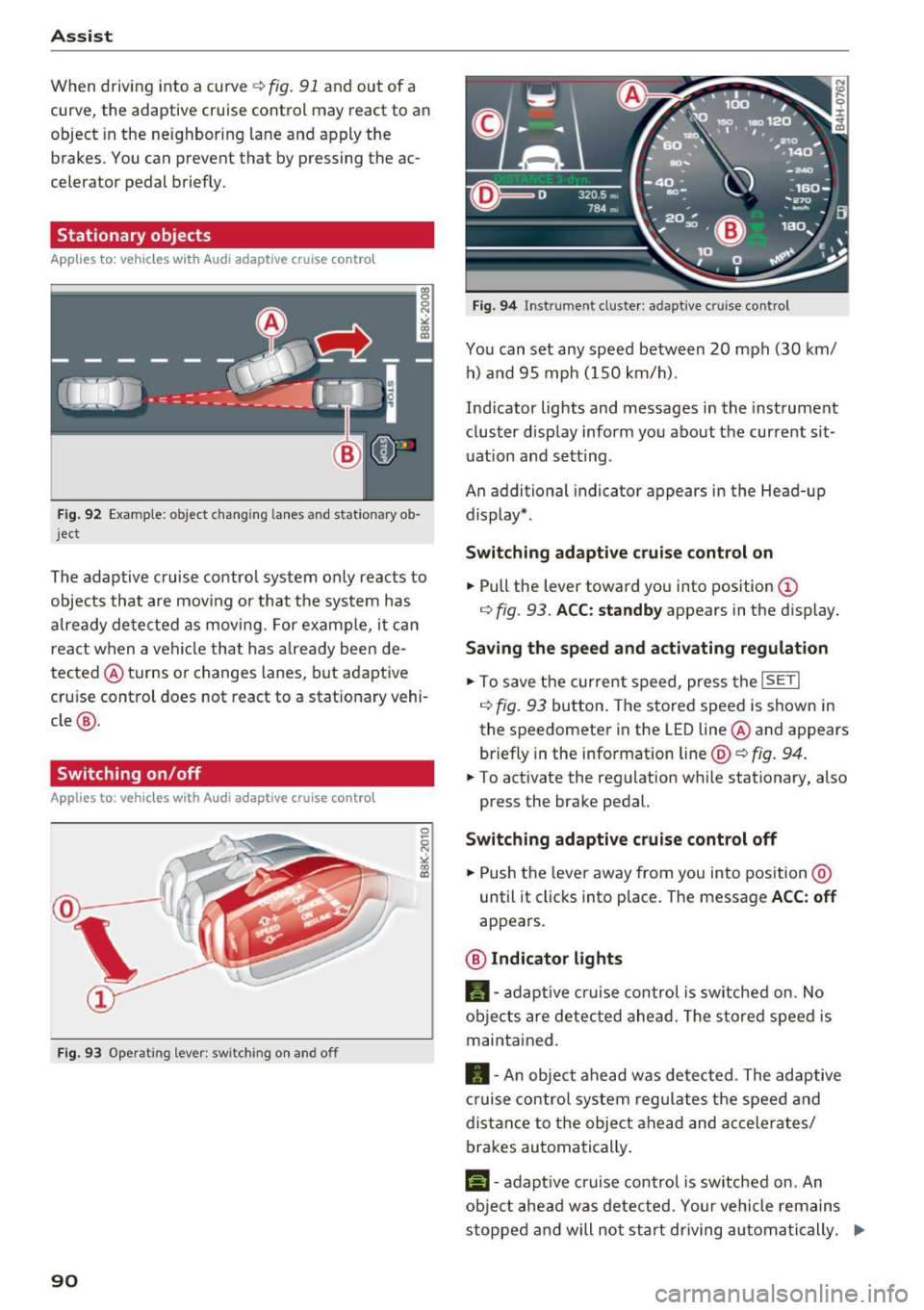
Stationary objects
App lies to: vehicles with Audi adaptive cruise contro l
Fig . 92 Examp le: ob ject changin g lanes and stationary o b
j ect
The adaptive cruise contro l system only reacts to
objects that are mov ing or that the system has
a lready detected as moving. For examp le, it can
react when a vehicle that has a lready been de
tected @turns or changes lanes, but adaptive
cru ise control does not react to a stat ionary vehi
cle @.
Switching on /off
Applies to: vehicles with Audi adaptive cruise control
Fig. 9 3 Operat ing leve r: sw itching on a nd o ff
90
F ig. 94 In str umen t cl uste r: ad ap tive cr uise cont rol
You can set any speed between 20 mph (30 km/
h) a nd 95 mph ( 150 km/h).
Ind icator lights and messages in the instrument
cluster display inform you about the current sit
uat ion and setting .
An additional indicator appears in the Head-up display* .
Switching ad apti ve c ruise control on
.,. Pull the lever toward you into position (D
r=> fig. 93 . ACC: standb y appears in the disp lay.
Saving the speed and activating regulat ion
.,. To save the current speed, press the ISETI
r=> fig . 93 button . The stored speed is shown in
the speedomete r in the LED line @and appears
briefly in the info rmation line @'=>
fig. 94.
.,. To activate the regu lation while stationary, also
press the brake pedal.
Switching adaptive crui se control off
.,. Push the lever away from you into position @
until it clicks into place. The message
ACC : off
appears .
@ Indicator lights
fll-adap tive cr uise contro l is sw itched on. No
objects are detec ted ahead. The s tored speed is
maintained.
• -A n object ahead was detected . The adaptive
cruise contro l sys tem regu lates the speed and
d istance to the objec t ahead and ac ce lera tes/
brakes automatically .
f:i-adaptive cruise control is switched on. An
object ahead was detected . Yo ur vehicle remains
stopped and will not start driving au toma tically. ..,.
Page 99 of 280
Switching on/off
A ppl ies to: ve hicles with Audi active lane assist
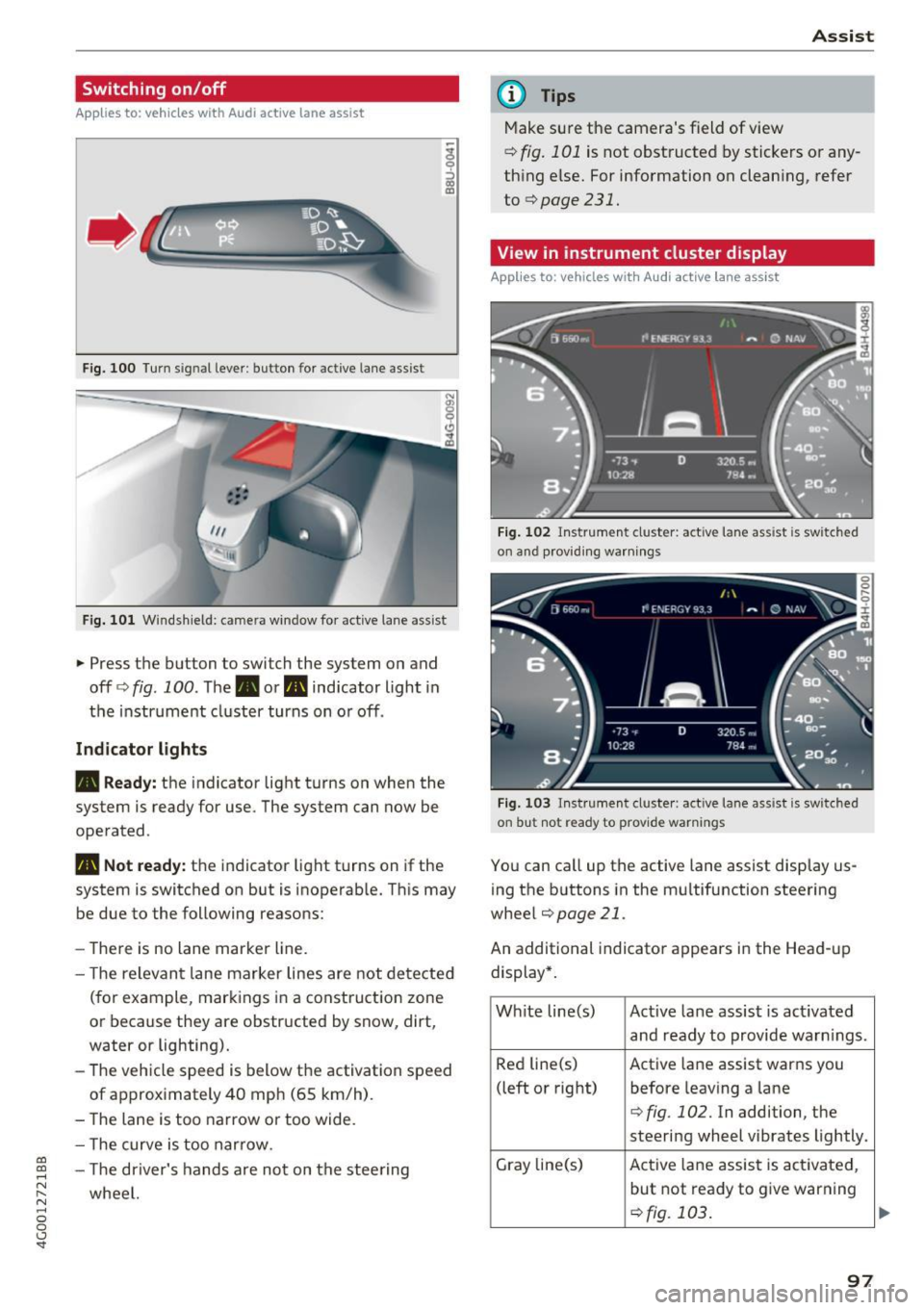
Fig. 100 Turn s ig n al lever: button for active lane ass ist
F ig. 101 Windsh ield: camera window fo r ac tive lane assist
... Press the button to switch the system on and
off ¢fig . 100 . The. or. indicator light in
the instrument cluster turns on o r off .
Indicator lights
• Ready: the indicator light turns on when the
system is ready for use. The system can now be
operated .
., Not ready: the indicator light turns on if the
system is switched on but is inoperab le. Th is may
be due to the following reasons:
- The re is no lane marker line.
- T he relevan t lane marker lines are not detected
(for example, mark ings in a construction zone
or because they are obstructed by snow, dirt,
water or lighting).
- The vehicle speed is below the activation speed
of approx imately 40 mph (65 km/h) .
- The lane is too narrow or too wide.
- The curve is too narrow.
co ~ - The driver's hands are not on the stee ring
~ wheel. N .... 0 0 <.,;) 'SI"
Assist
(D Tips
Make sure the camera's field of view
¢ fig. 101 is not obstructed by stickers or any
thing else. For information on clean ing, refer
to
¢page 231.
View in instrument cluster display
App lies to: vehicles with Audi a ctive la ne ass ist
Fig. 102 Instrument cluster: active lane ass ist is sw itc hed
on and providing warnings
Fig. 103 Instrument cluste r: act ive lane ass ist is sw itc hed
on b ut not ready to provide warnings
You can call up the active lane assist display us
ing the b uttons in the mu ltifunction steering
wheel
¢ page 21 .
An additional indicato r appears i n the Head-up
display*.
White line(s) Active lane assist is act ivated
and ready to provide warn ings .
Red line(s) Active lane assist warns you
(left or right) before leav ing a lane
¢fig . 102. In addition, the
steering wheel vibrates lightly.
Gray line(s) Active lane assist is activated,
but not ready to give warning
¢fig. 103 .
97