lights AUDI A6 2017 Service Manual
[x] Cancel search | Manufacturer: AUDI, Model Year: 2017, Model line: A6, Model: AUDI A6 2017Pages: 280, PDF Size: 70.24 MB
Page 105 of 280
co
co
.... N
" N .... 0 0 <.,;) 'SI"
If the head-up display* is switched on and the
night vision assist content is activated,. or.
will appear in the head-up display*.
Marking light*
To direct the driver's attention to a pedestrian,
the headlights can flash on the pedestrian three
times in a row when there is a pedestrian warn
ing.
This occurs at speeds above approximately 35 mph (60 km/h) if you are outside of illuminat
ed areas and no detected vehicles are shown. The
high beam assistant* controls the marking light*
c::> page 42, High beam assistant .
The marking light is not used for wild animals.
General information
Applies to: vehicles with night vision assist
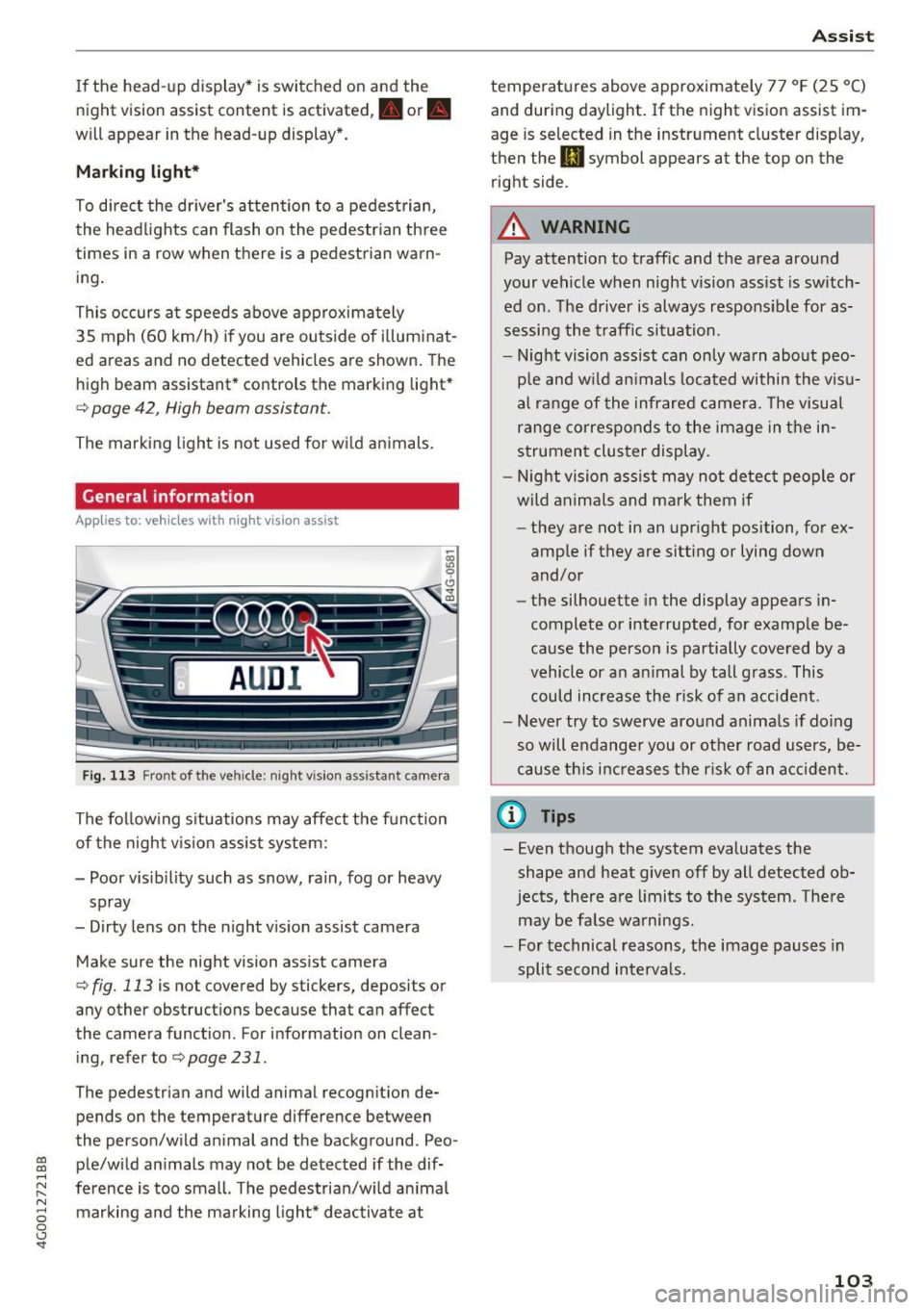
Fig. 113 Front of the vehicle: night vision ass istant came ra
The following situations may affect the function
of the night vision assist system:
- Poor visibility such as snow, rain, fog or heavy spray
- Dirty lens on the night vision assist camera
Make sure the night vision assist camera
c::> fig. 113 is not covered by stickers, deposits or
any other obstructions because that can affect
the camera function . For information on clean
ing, refer to
c::> page 231 .
The pedestrian and wild animal recogn it ion de
pends on the temperature difference between
the person/wild animal and the background . Peo
ple/wild animals may not be detected if the dif
ference is too small. The pedestrian/wild animal marking and the marking light* deactivate at
Assist
temperatures above approximately 77 °F (25 °C)
and during daylight.
If the night vision assist im
age is selected in the instrument cluster display,
then the
II symbol appears at the top on the
right side.
A WARNING
-Pay attention to traffic and the area around
your vehicle when night vision assist is switch
ed on. The driver is always responsible for as
sessing the traffic situation.
- Night vision assist can only warn about peo
ple and wild animals located within the visu
al range of the infrared camera. The visual
range corresponds to the image in the in
strument cluster display.
- Night vision assist may not detect people or
wild animals and mark them if
- they are not in an upright position, for ex
amp le if they are sitting or lying down
and/or
- the silhouette in the display appears in
complete or interrupted, for example be
cause the person is partially covered by a
vehicle or an animal by tall grass. This
could increase the risk of an accident.
- Never try to swerve around animals if doing
so will endanger you or other road users, be
cause this increases the risk of an accident.
(l'} Tips
-Even though the system evaluates the
shape and heat given
off by all detected ob
jects, there are limits to the system . There
may be false warnings.
- For technical reasons, the image pauses in
split second intervals.
-
103
Page 106 of 280
Ass is t
Switching on /off
Applies to: vehicles with night vision assist
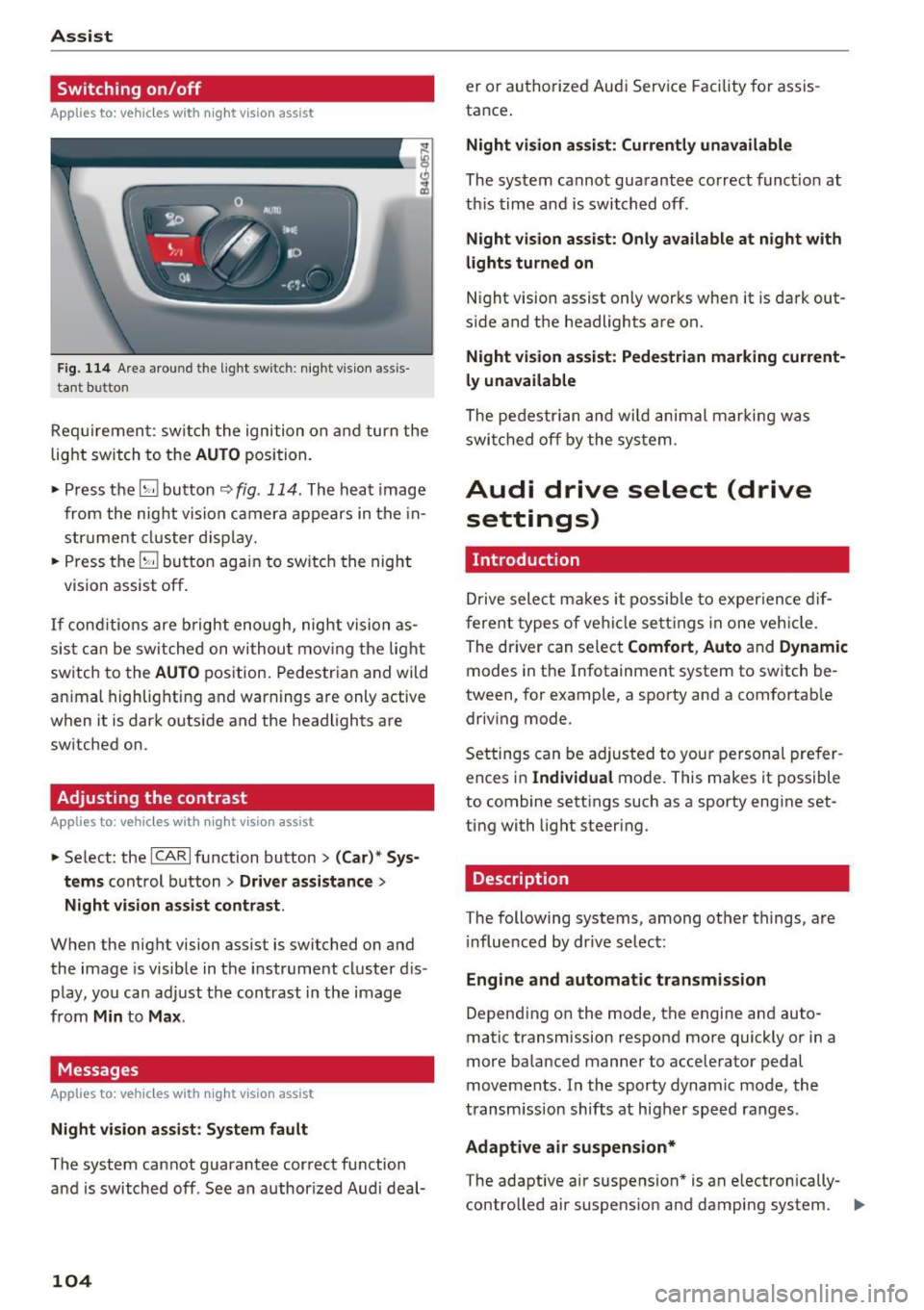
Fig. 114 Are a aro und th e light sw itc h: n ight v is ion assis
ta nt b utto n
Req uiremen t: sw itch the ignition on and turn the
light switch to the
AUTO position.
• Press the
[g button ~ fig. 114 . The heat image
from the nig ht vision camera appears in the in
strume nt cluster d isplay.
• Press the
(g button again to switch the night
vision assist off .
If conditions are b right enough, night vision as
sis t can be switched on withou t mov ing the light
switch to the
AUTO position. Pedestrian and wild
an imal highlighting and warnings are only active
when it is da rk outs ide and the headlights are
sw itched on .
Adjusting the contrast
Applies to: vehicles with night vision assist
• Select : the ICARlfunction button > (C ar)* S ys
t e ms
control button > Dri ver assistance >
Night vi sion a ssis t contrast .
When the night vision assist is switched on and
the image is visible in the instrument cluster d is
p lay, you can adjust the contrast in the image
from
Min to Ma x.
Messages
Applies to: vehicles with night vision assist
Ni ght vision assist : S ystem fau lt
The system cannot guarantee correct function
and is switched off . See an author ized Audi deal-
104
er or authori zed Aud i Service Facility for assis
tance .
Night vi sion a ssis t: Curren tly unavailable
The system cannot guarantee correct funct io n at
th is time and is switched off .
Night vis ion ass ist: O nly ava ilabl e a t n ight with
lights turned on
N ight vision assist only works when it is dark out
s ide and the headlights are on.
Night vis ion a ssist: Pede st ria n marking current
l y unavailab le
The pedestrian and wi ld animal marki ng was
swi tched off by the system .
Audi drive select (drive
settings)
Introduction
D rive select makes it possib le to exper ience dif
ferent types of ve hicle settings in one veh icle .
The dr iver can select
Comfort , Auto and Dynamic
modes in the Infotainment system to switch be
tween, for example, a sporty and a comfortab le
driv ing mode .
Settings can be adjusted to your persona l prefer
ences in
Individua l mode. This makes it possible
to combine settings such as a sporty engine set
ting with light steering.
Description
T he following systems, among other things, are
i nfluenced by dr ive select:
Eng ine and aut om atic transmi ssion
Depend ing on the mode, th e engine and auto
matic transmission respond more quickly or in a
more balanced manner to acceler ator pedal
movements. In the sporty dynamic mode, the
transm ission shifts at higher speed ranges .
Adaptive air su spen sion*
The adaptive a ir suspension * is an e lectronically
controlled air suspens ion and damping system. ..,_
Page 123 of 280
co
co
.... N
" N .... 0 0 <..:l 'SI"
you into taking risks. This could increase
your risk of a collision.
- Please note the risk of a co llision increases
when driving fast, especially through curves
and on slippery or wet roads, and when driv
ing too close to objects ahead. The ESC and
its integrated systems cannot always pre
vent collisions -there is still a r isk of acci
dents!
- Press the accelerator pedal carefully when
accelerating on even, slippery surfaces such
as ice and snow. The drive wheels can spin
Switching on /off
Intelligent Technology
even when these control systems are instal
led and this can affect driving stability and
increase the risk of a collision.
(D Tips
- ABS and ASR only function correctly when
all four wheels are equipped with identical
tires. Different tire s izes can lead to a reduc
tion in engine power.
- You may hear noises when the systems de
scribed are working.
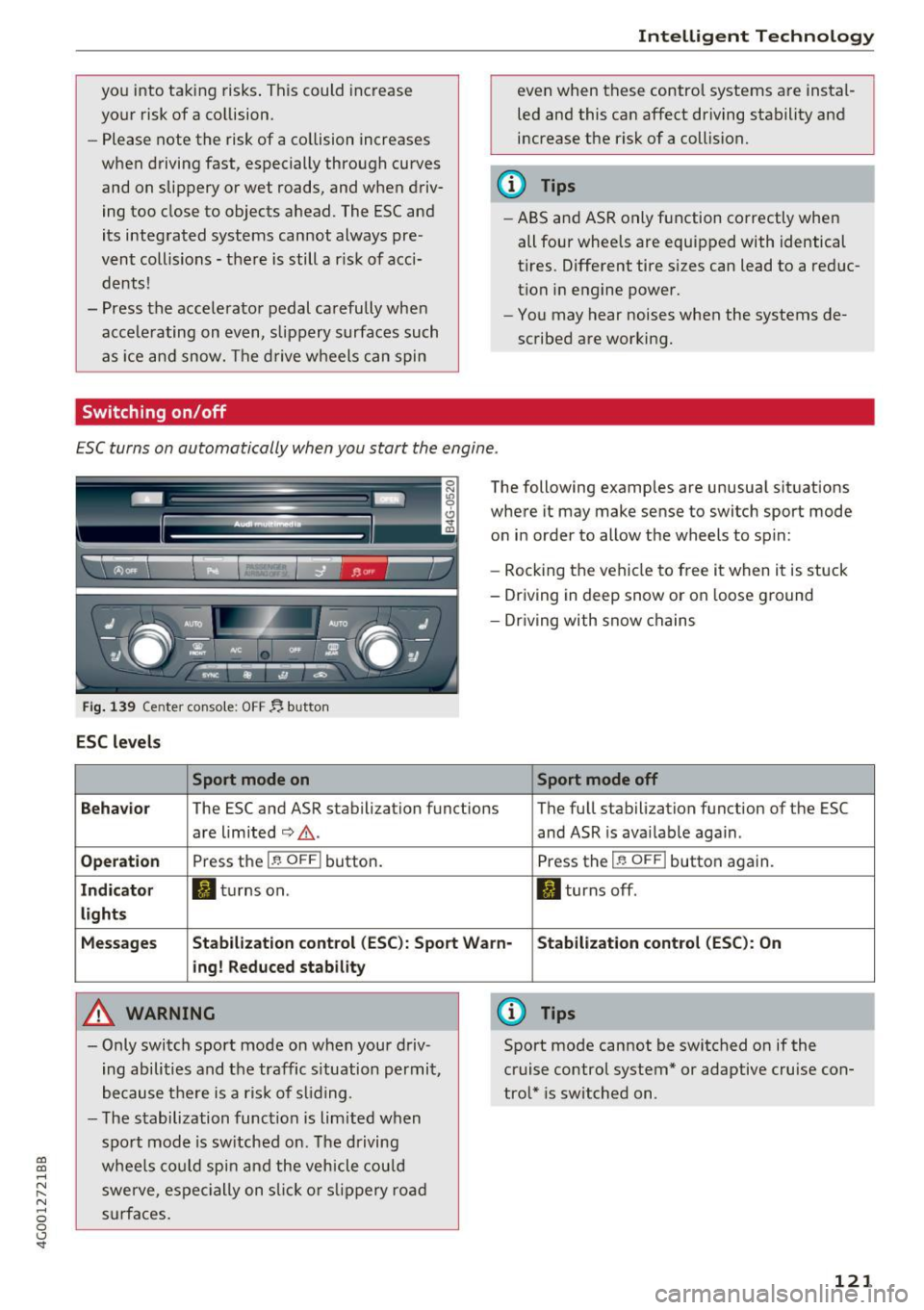
ESC turns on automatically when you start the engine .
Fig. 139 Center console: OFF ~ button
ESC levels
Sport mode on
The following examples are unusual situations
where it may make sense to switch sport mode
on in order to allow the wheels to spin:
- Rocking the vehicle to free it when it is stuck
- Driving in deep snow or on loose ground
- Dr iving with snow chains
Sport mode off
Behavior
The ESC and ASR stabilization functions The full stabilization function of the ESC
are limited
c:> .&. . and ASR is available again .
Operation Press the I~ OFF I button. Press the I~ OFFI button again.
Indicator ltltur nson. II turns off .
lights
Messages Stabilization control (ESC): Sport Warn· Stabilization control (ESC): On
i ng! Reduced stability
A WARNING
- Only switch sport mode on when your driv
ing abilities and the traffic s ituation permit,
because there is a risk of sliding .
- The stabilization function is limited when
sport mode is switched on. The driving
wheels could spin and the vehicle could
swerve, espec ially on slick or slipp ery road
surfaces .
(D Tips
Sport mode cannot be switched on if the
cruise control system* or adaptive cruise con
trol* is switched on .
121
Page 125 of 280
co
co
.... N
" N .... 0 0 <..:l '
plying the brakes carefully several times
dries the brakes and removes ice bui ld-up.
- The effic iency of the brakes can also be im
paired by driving for long stretches on roads
covered w ith salt without using the brakes.
You can remove salt deposits from the brake rotors and pads by ca ref ull y applyi ng
the brakes severa l t imes.
- If the front spo iler is damaged or you install
another spoiler, ma ke sure the front w heel
bra kes are vent ilated p roperly. O therwise,
t h e brake syste m could ove rheat, wh ic h re
duces the ir effec tiveness.
- Failure of a bra ke circuit impai rs b raking
performan ce, which incre ases bra king dis
tance . Avoid driving the vehicle and have it
towed it to the nearest authorized A udi
dealer or author ized Audi Service Facility .
- If the brake booste r is not working, you wi ll
have to press m uch ha rder on the bra ke
peda l to compensate for the lac k of the
booster.
(D Note
- Never let the brakes "rub" by pressing the
p edal light ly when bra king is not actually
necessa ry. This causes the brakes to over
heat and increases bra king d istance and
causes wear.
- Befo re driving downh ill a long distance on a
steep h ill, decrease your speed and select a
l ower gear. This makes use of the engine
braking effect and relieves the brakes. If
you need to b rake additionally, brake in in
te rvals and not cont inuous ly .
(0 Tips
- If the brake booster is not working, you
must p ress the brake pedal with much mor e
fo rc e th an norma l.
-If you re trofit your vehicle wi th a front spoil
er, whee l covers o r similar items, ma ke sure
t h at t he ai r flow to the front whee ls is not
i nte rru pted. Ot he rw ise the brake sys tem
c a n become too hot.
Intellig ent Technology
Electromechanical
steering, dynamic
steering
The ele ctromechanical s teering supports the
driver's steering movements.
P ower s teer ing adapts electroni cally based on
the ve hicle spee d.
Indicator lights and messages
• Do not dr iv e vehicle: steering defective
If this indicator light turns on and stays on and
t hi s message appears, the power steering may
have failed.
Stop the vehicle in a safe location as soon as pos
s ible. Do
not cont inue driving. See an authorized
Audi dealer or authorized A udi Service Fac ility for
ass istance.
,~n Stee ring: System fault You can continue
driving
If the indicator light turns on and the message
appea rs, the steering whee l may be more diffi
cul t to move o r more sensitive than us ual. The
steering wheel may also be at an ang le when
driv ing straight.
Drive slowly to an a uth orized Audi dea ler or a u
t h orized Audi Service Facility to have the mal
f unct ion corrected.
,Ion Dynamic steering: Initiali zing
If the indicator light is blinking and this message
appea rs, dynam ic steering* is be ing ini tialized.
T he s teer ing whee l will be easy to move a fter
sta rt ing the engine. Re -ini tialization mig ht be
necessary if the steering w heel was moved hard
to the left and right while the ve hicle was not
moving. The d isp lay turns off if the init ialization
was s uccessful.
(D Tips
- If the . or
,Ion indicato r light only stays on
for a short time, you may continue driving.
- The dynamic steering stability systems
¢ page 120 are not ava ilable in the event of
a system mal function.
IJJ,
123
Page 130 of 280
Driving sa fe ty
Driving safety
Basics
Safe driving habits
Please remember -safety first!
This chapter contains important information,
tips, instruct ions and warn ings that you need to
read and observe for your own safety, the safety
of your passengers and others. We have summar ized here what you need to know about safety
be lts, a irbags, child restra ints as well as child
safety. Your safety is for us
priority number 1 . Al
ways observe the i nfo rmation and wa rn ings in
this section - for your own safety as well as that
of your passengers.
The information i n this section applies to all
model versions of yo ur vehicle . Some of the fea
tures descr ibed in t his sections may be s tanda rd
equipment on some models, or may be optional
equipment on others . If you are not sure, ask
your authorized Audi dealer.
A WARNING
- Always make sure that you follow the in
structions and heed the WARNINGS in th is
Manual.
It is in your interest and in the in
te rest of your passengers.
- Always keep the comp lete Owner's Litera
ture in your A udi when you lend or sell your
vehicle so that this important information
will always be available to the d river and
passenge rs.
- Always keep the Owner 's literature handy so
that you can find it easily if you have ques
t ions.
Safety equipment
The safety features are part of the occupant re
straint system and work together to help reduce
the risk of injury in a wide variety of occident si t
uations.
Your safety and the safety of your passenge rs
should not be left to chance. Advan ces i n tech
nology have made a var iety of features avai lab le
to help reduce t he risk of injury in an accident .
128
The following is a list of just a few of the sa fety
features in your Audi :
- sophis tica ted safety be lts fo r dr ive r and all pas-
senge r seat ing pos itions,
- safety belt p retensioners,
- safety belt force lim ite rs fo r th e front seats,
- safety belt he ight adjustment systems for the
front seats,
- front airbags,
- knee airbags for the front seats*
- side airbags in the front seats and outer rear
seats*,
- side curtain airbags with ejection mitigation
features,
- special LATCH anchorages for child restraints,
- head rest raints fo r ea ch seating position,
- adj ustab le steering col umn.
These ind iv idual safety features, can work to
ge ther as a system to help protect you and your
passengers in a wide range of acc idents. These
features canno t wo rk as a sys tem if they are not
alw ays cor rec tly adj usted and cor rect ly used.
Safety is everybody' s re sponsibility!
Important things to do before driving
Safety is everybody's job! Vehicle and occupant
safety always depends on the informed and care
ful driver .
For your safety and the safety of your passen
gers,
before driving alway s:
.. Make sure that a ll lights and signals are operat
ing correctly.
.. Make sure that the tire pressure is correct.
.,. Make sure that all windows are clean and afford
good visibility to the outs ide .
.. Sec ure all luggage and othe r items carefully
~page 57, ~page 56 .
.. Ma ke sure that noth ing ca n interfere wi th the
peda ls .
.. Adjust front seat, head restraint and mirrors
correctly for yo ur height .
.. Instruct passengers to adjust the head re
straints according to their he ight.
Page 141 of 280
co
co
.... N
" N .... 0 0 <..:l '
General information
Always wear safety belts!
Wearing safety belts correctly saves lives!
This chapter explains why safety belts are neces
sary, how they work and how to adjust and wear
them correctly.
~ Read all the information that follows and heed
all of the instructions and WARNINGS.
A WARNING
Not wearing safety belts or wearing them im
properly increases the risk of serious personal
injury and death.
- Safety belts are the single most effective
means available to reduce the risk of serious
injury and death in automobile accidents.
For your protection and that of your passen
gers, always correctly wear safety belts
when the vehicle is moving.
- Pregnant women, injured, o r physically im
paired persons must also use safety belts.
Like all vehicle occupants, they are more
likely to be seriously injured if they do not
wear safety belts. The best way to protect a
fetus is to protect the mother -throughout
the entire pregnancy.
Number of seats
Your Audi has a total of five seating positions:
two in the front and three in the rear. Each seat ing position has a safety belt.
A WARNING
Not wearing safety belts or wearing them im
properly increases the risk of serious personal
injury and death.
- Never strap more than one person, includ
ing small children, into any belt.
It is espe
cially dangerous to place a safety belt over a
child sitting on your lap.
- Never let more people ride in the vehicle
than there are safety belts available.
Safety belts
-Be sure everyone riding in the vehicle is
properly restrained with a separate safety
belt or child restraint.
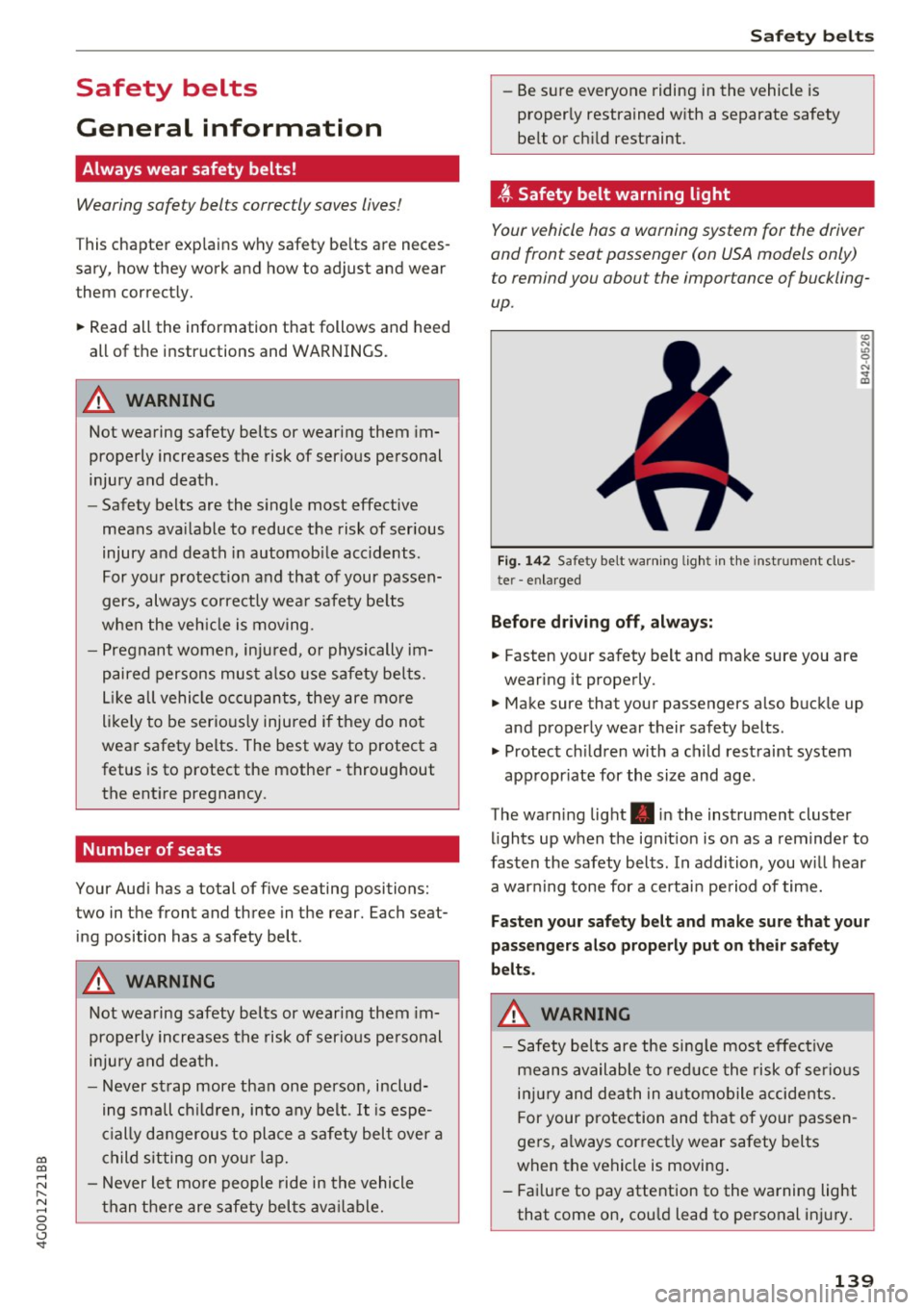
~ Safety belt warning light
Your vehicle has a warning system for the driver
and front seat passenger (on USA models only)
to remind you about the importance of buckling
up .
Fig. 142 Safety belt warn ing light in the instrument clus
te r -enlarged
Before driving off, always:
.. Fasten your safety belt and make sure you are
wearing it properly.
.,, N
"' 0 ..:, ., m
~ Make sure that your passengers also buckle up
and properly wear their safety belts .
~ Protect children w ith a ch ild restraint system
appropr iate for the size and age .
The warning light . in the instrument cluster
lights up when the ignit ion is on as a reminder to
fasten the safety belts. In addition, you wil l hear
a warning tone for a certain period of time.
Fasten your safety belt and make sure that your
passengers also properly put on their safety
belts.
A WARNING
-
- Safety belts are the sing le most effective
means available to reduce the risk of serious
injury and death in automobile accidents.
For your protection and that of your passen
gers, a lways correctly wear safety belts
when the vehicle is moving .
- Failure to pay attention to the warning light
that come on, could lead to personal injury.
139
Page 204 of 280
Check ing and F illing
Using the proper engine oil is impo rtant for the
functionality and service life of the engine. Your
engine was facto ry-filled with a h igh-quality oi l
which can usually be used throughout the entire
year.
@) Note
Your Limited New Vehicle War ranty does not
cover damage or malfunctions due to failure
to follow recommended maintenance and use
requirements as set forth in the Audi Owner's
Manual and Warran ty
& Maintenance booklet.
- Use only a high quality eng ine oil t hat ex-
p ressly complies with the Audi oil qua lity
standard specified for your vehicle's engine.
Using a ny o ther oil can cause serious engine
d am age.
- D o not mix any lubricants o r other addit ives
i nto the engine oil. Doing so ca n cause en
g ine damage.
(D Tips
I f you need to add oil and there is none availa
ble t hat meets the Audi o il quality standard
your eng ine requi res, you m ay ad d a tot al of
no more than 0.5 q t (0.5
l) of a h igh-quali ty
"synthe tic"oil that meets t he following speci
fications.
- Applies to: gasoline engine: ACEA A3 or
API SM with a viscosity g rade of SAE 0W-30,
SAE SW -30 or SAE SW-40.
- Applies to: diesel engine: ACEA C3 or API C F
with a viscosity grade of SAE 0W-30 or
SAE SW-30.
- Fo r more information about engine o il that
has been approve d for your ve hicle, please
contact either you r authorized Audi dea ler
or Audi C ustome r Relat ions at
1 (800) 822-2834 or visit our web site at
www.audiusa.com or www .aud icanada .ca.
Engine oil consumption
The engine in your vehicle depends on an ade
quate amount of oil to lubricate and cool all of
its moving parts .
In order to provide effective lubr ication and cool
ing of internal engine components, a ll inter nal
202
combust ion engines consume a certa in amo unt
of oil. Oil consumption varies from engine to en
gine and may change signi ficantly over the life of
the engine. Typically, engines w ith a specified
break-in period (see
c:::;, page 66) consume more
o il dur ing the break-in per iod than they consume
af ter o il consumption has stab ilized .
Under normal cond itions, the rate of oil con
sumption depends on the quality and viscos ity of
the oil, the RPM (revo lutions per m inute) at
wh ich the engine is operated, the amb ient tem
perature and road condit ions. Furt her facto rs a re
the amo unt of o il di lution from wate r condensa
t ion or fue l resid ue an d the oxidation level of the
o il. As any engine is sub je ct to wear as mileage
builds up, the oi l cons umption may increase ove r
time unt il replacement of worn components may
become necessary.
With a ll these va riab les coming into p lay, no
standard rate of oil consumption can be estab
li shed or spec ified. The re is no alte rnative to reg
ul ar and freq uent checking of the oi l level, see
Note .
If the yellow engine oi l level warning symbo l in
the instr ument cluster
El lights up, yo u should
check the o il level as soon as possible
c:::;, page 203. Top off the o il at your ea rliest con
venience
c:::;, page 203.
A WARNING
Before you check a nyth ing in the e ng ine com
par tment, always read and heed all WARN
IN GS
c:::;, .&. in Working in the engin e compart
ment on page 198.
(D Note
Drivi ng w it h an insuff ic ient oil level is likely to
cause severe damage to the eng ine.
(D Tips
- The oil pressure warn ing d isplay. is not
an indicator of the oil level. Do not rely on
it. Instead, check the oil level in your en
gine at regular intervals, preferably each
time you refuel, and alway s before going
on a long trip .
Page 231 of 280
Tire pressure monitoring system
Applies to: vehicles with Tire Pressure Monitoring System in
dicator
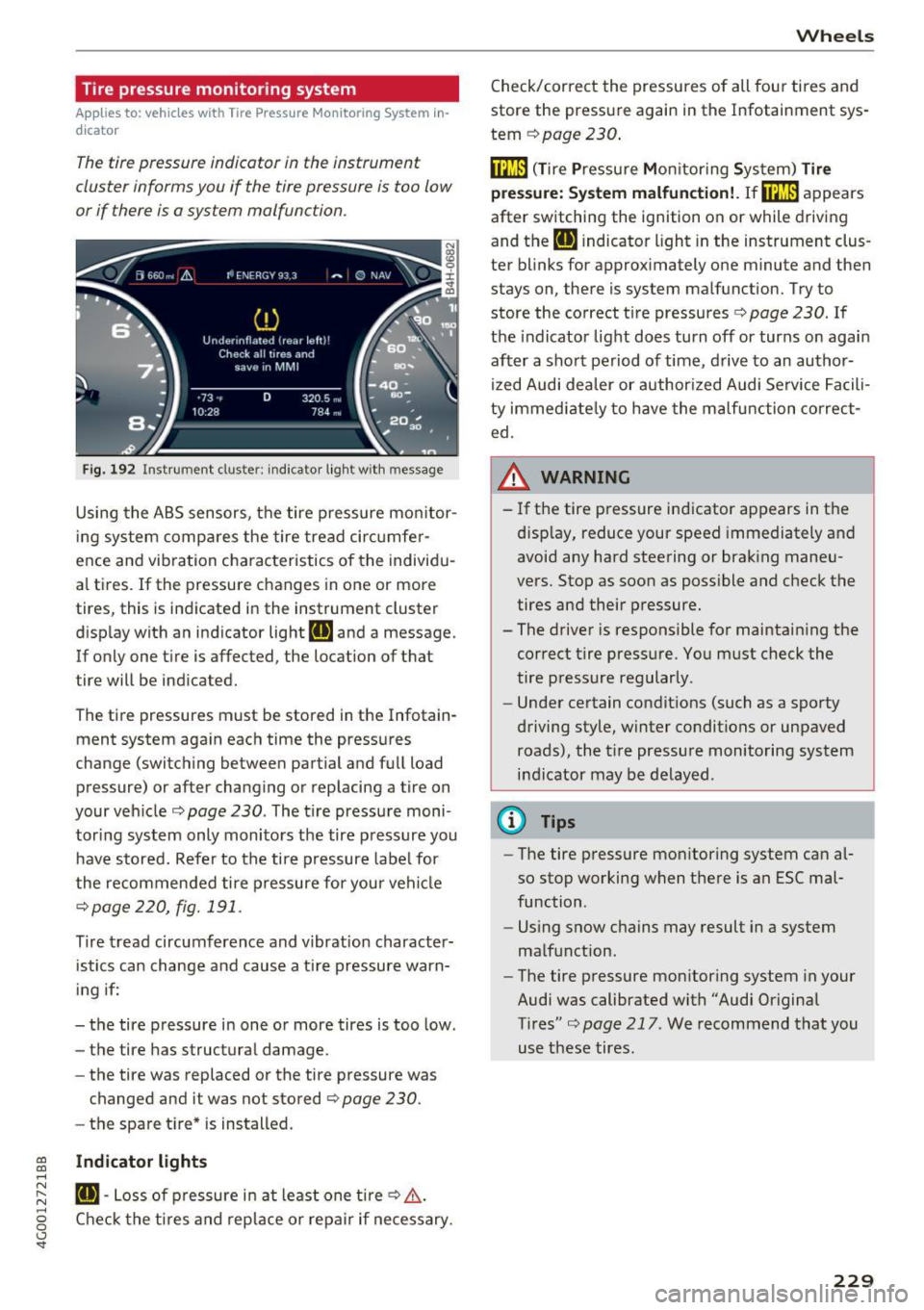
The tire pressure indicator in the instrument
cluster informs you if the tire pressure is too low
or if there is a system malfunction .
Fig. 192 Instrument clus ter : indicator ligh t w ith message
Using the ABS sensors, the tire pressure monitor
ing system compares the tire tread circumfer
ence and vib ration characteristics of the individu
al tires.
If the pressure changes in one or more
tires, this is indicated in the instrument cluster
display with an indicator light
RE and a message.
If only one tire is affected, the location of that
tire will be indicated.
The tire pressures must be stored in the Infotain
ment system again each time the pressures
change (switching between partial and full load pressure) or after changing or replacing a tire on
your vehicle ¢
page 230 . The tire pressure moni
toring system only monitors the tire pressure you have stored. Refer to the tire pressure label for
the recommended tire pressure for your vehicle
¢page 220, fig.191 .
Tire tread circumference and v ibration character
istics can change and cause a tire pressure warn
ing if:
- the tire pressure in one or more tires is too low.
- the tire has structural damage.
- the tire was replaced or the tire pressure was
changed and it was not stored
¢ page 230.
- the spare tire* is installed.
~ Indicator lights ....
~ RE-Loss of pressure in at least one tire¢,&,. . ....
g Check the tires and replace or repair if necessary.
<.,;) 'SI"
Wheels
Check/correct the pressures of all four tires and
store the pressure again in the Infotainment sys
tem
¢ page 230 .
fflm (T ire Pressure Monitoring System) Tire
press ure: System malfunction!.
Ifffi:m appears
after switching the ignition on or while driving
and the
RE indicator light in the instrument clus
ter blinks for approximately one minute and then
stays on, there is system malfunction. Try to
store the correct tire pressures¢
page 230. If
the indicator light does turn off or turns on again
after a short period of time , drive to an author
ized Audi dealer or author ized Audi Service Facili
ty immediately to have the malfunction correct
ed.
_& WARNING ,..___
- If the tire pressure indicator appears in the
d isplay, reduce your speed immediately and
avoid any hard steering or braking maneu
vers. Stop as soon as possible and check the
tires and their pressure.
- The driver is responsible for maintaining the
correct tire pressure. You must check the
tire pressure regularly.
- Under certain conditions (such as a sporty
driving style, winter conditions or unpaved roads), the tire pressure monitoring system
indicator may be delayed .
@ Tips
-The tire pressure monitoring system can al
so stop working when there is an ESC mal
function .
- Using snow chains may result in a system
malfunction.
- The tire pressure monitoring system in your
Audi was calibrated with "Audi Original
Tires"¢
page 217 . We recommend that you
use these tires.
229
Page 234 of 280
Care and cleaning
-To reduce the risk of cuts, protect yourself
from sharp metal components when was h
ing the underbody or the inside of the wheel
housings .
- After washing the vehicle, the braking effect
may be delayed due to mo isture on the
brake rotors or ice in the winter . This in
creases the risk of an acc ident. The bra kes
must be d ried first w ith a few careful brake
applica tions.
0 Note
- If you wash the ve hicle in an automatic car
wash, you must fold the exterior m irrors in
to reduce the risk of damage. Power fo ld ing
ex ter ior mirro rs* m ust only be folded in and
out using the power folding function.
- To reduce the risk of paint damage, do not
wash the vehicle i n dire ct sunlig ht.
- T o reduce t he risk of damage to the surface,
do not use i nsec t remov ing sponges, ki tchen
s ponges or similar items. - Matte finish painted vehicle components:
-To reduce the r isk of damage to the sur-
face, do not use polis hing agents or hard
wax.
- Never use protective wax. It can destroy
the matte finish effect .
- Do not place any stickers or magnetic
signs on vehicle parts painted with matte
finish paint. The paint could be damaged
when the stickers or magnets are re
moved. @ For the sake of the environment
Only wash t he ve hicle in facilities spec ially de
signed for that pu rpose. This will reduce the
r isk of dirty wate r contaminated with o il from
ente ring the sewe r system.
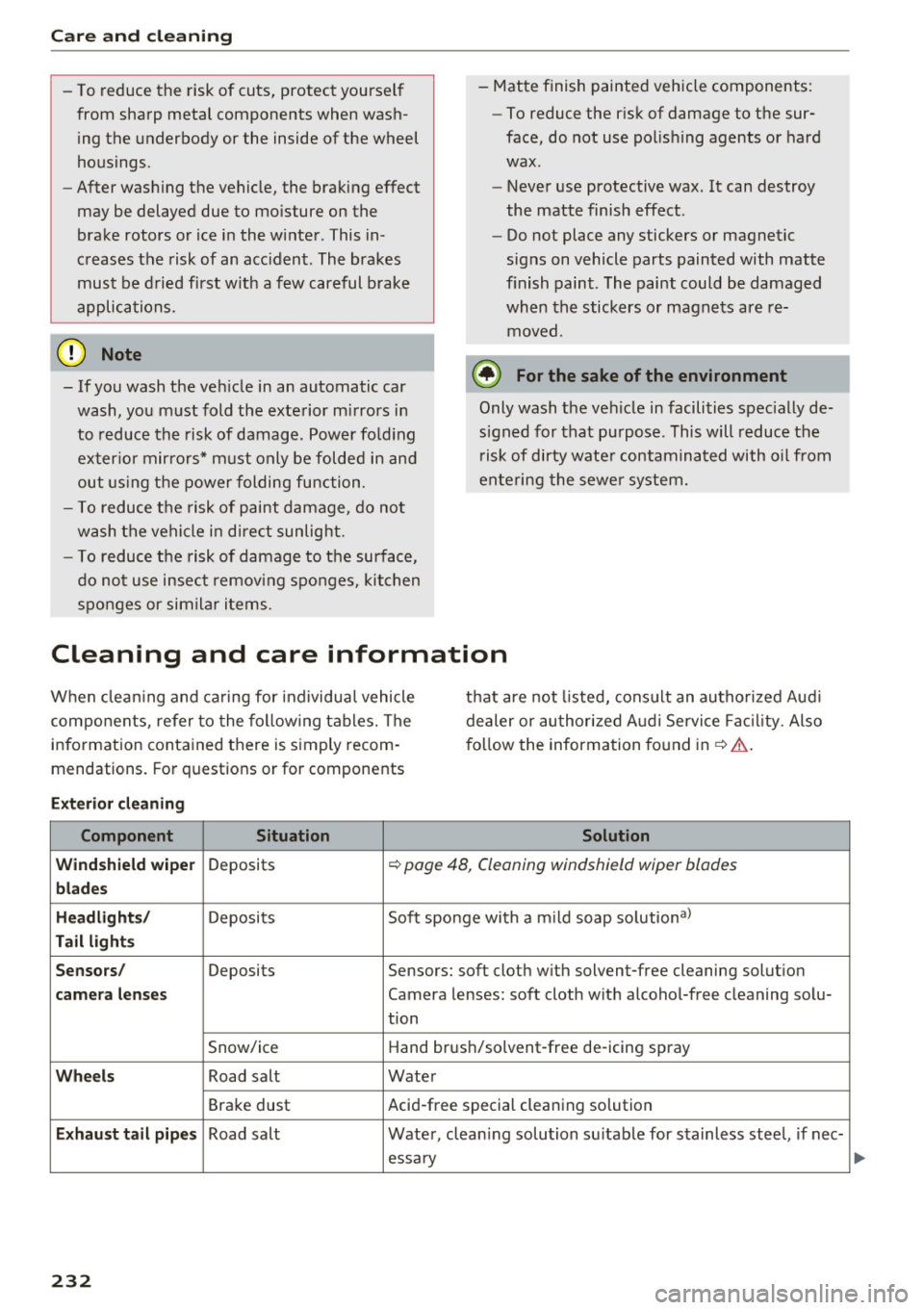
Cleaning and care information
W hen clean ing and c aring for ind ividua l vehicle
com ponents, refer to the fo llow ing tables. The
info rmation conta ined there is simply recom
mendations. Fo r quest ions or for components that are
not listed, cons ult an autho rized Audi
dealer or au thor ized A udi Service Fac il ity. Also
fo llow the information found in ¢ &. .
Ext erior cleaning
Component Situation Solution
Windshield wiper
Deposits ¢ page 48, Cleaning windshield wiper blades
blades
Headlights/
Deposits S
oft sponge with a m ild soap solutiona)
Tail light s
Sensors /
Deposits Sensors: soft cloth w ith solvent-free cleaning solut ion
camera lenses Camera lenses: soft cloth with alcohol-free cleaning solu-
tion
Snow/ice Hand br
ush/solvent-free de-icing spray
Wheels Road salt Water
Bra ke dust Acid-free special cleaning solution
E
xhau st tail pipes Road salt Water, clean ing solution su itab le for s tainless stee l, if nee-
essary
232
Page 236 of 280
Care and cleaning
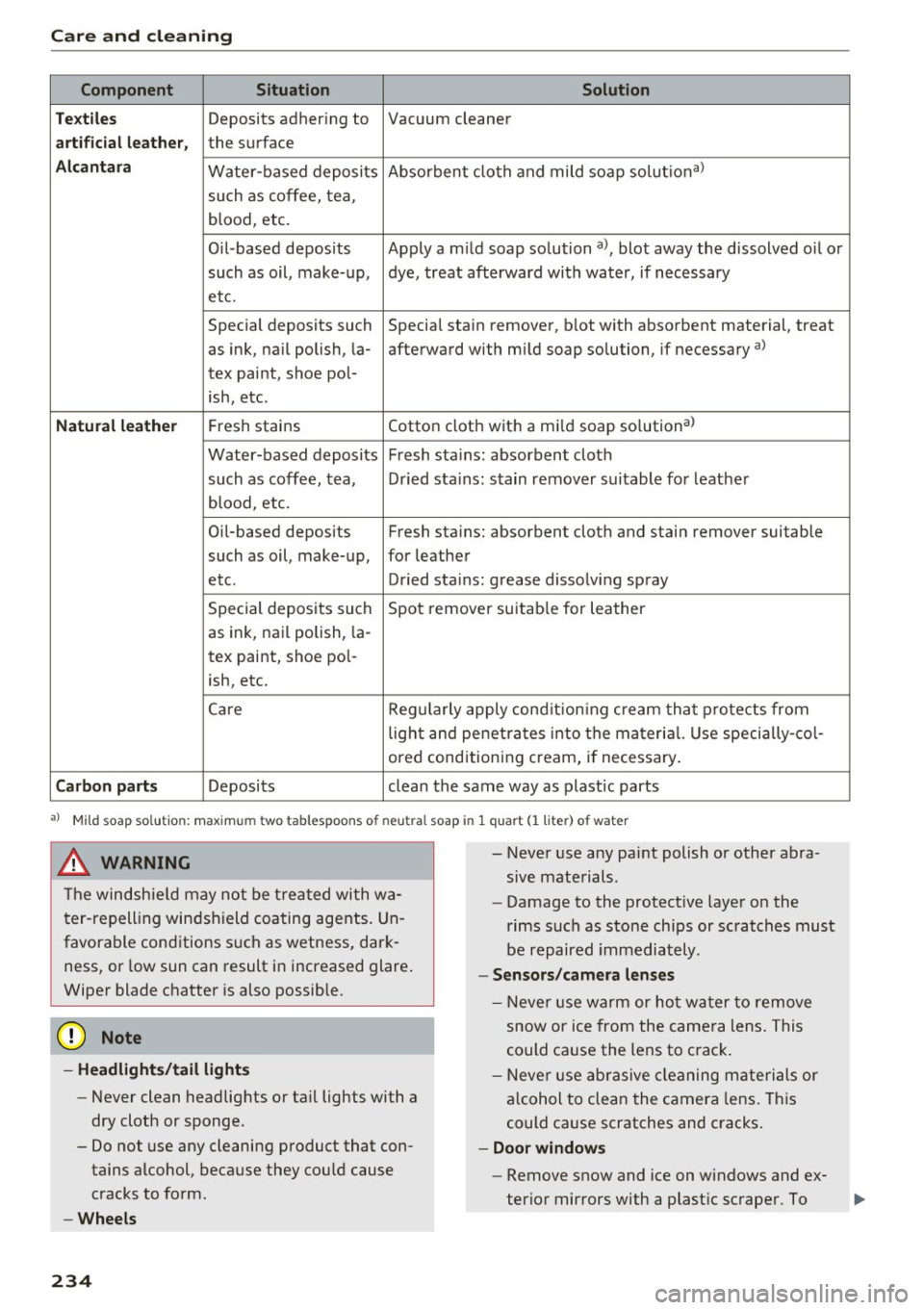
Component Situation Solution
Te xtil es
Deposits adhering to Vacuum cleaner
a rt ifici al le ather , the surface
Alcant ara Water-based deposits Absorben
t cloth and mild soap solutiona>
such as coffee, tea,
blood, etc.
O il-based deposits Apply a m ild soap solution a), blot away the dissolved oil or
such as oil, make-up, dye, treat afterward with water, if necessary
etc.
Special deposits such Special stain remover, b lot with absorbent material, treat
as ink, na il polish, la- afterward with mild soap solution, if necessary a)
tex paint, shoe pol-
ish, etc.
Natural leather Fresh stains Cotton cloth with a mi
ld soap solutiona>
Water-based deposits Fresh sta ins : absorbent cloth
such as coffee, tea, Dried sta ins: stain remover suitable fo r leather
blood, etc.
Oil-based deposits Fresh stains: absorbent cloth and stain remover suitable
such as oil, make-up, for leather
etc. Dried sta ins : grease dissolv ing spray
Special deposits such Spot remover suitab le for leather
as ink, nai l polish, la -
tex paint, shoe pol-
ish, etc.
Ca re Regularly apply cond ition ing cream that protects from
light and penet rates into the materia l. Use specia lly-co l-
ored conditioning cream, if necessary.
Carbon parts Deposits clean the same way as plastic parts
a) Mild soap solution: maximum two tablesp oons of neutral soap in 1 quart (l liter) of water
_& WARNING
The windshie ld may not be trea ted with wa
ter-repelling windshield coating agents. Un
favorable conditions s uch as wetness, dark
ness, or low sun can result in increased glare .
Wiper blade chatter is also possible.
(D Note
- Headlights /tail light s
-Never clean headlights or tail lights with a
dry cloth or sponge.
- Do not use any cleaning product that con
tains alcohol, because they could cause
cracks to form.
- Wheels
234
-
- Never use any paint polish or other abra
sive materials.
- Damage to the protect ive layer on the
rims such as stone chips or scratches must
be repaired immediately.
- Sensors /camera l enses
- Neve r use wa rm or ho t water to remove
snow or ice from the camera lens . This
could cause the lens to crack .
- Neve r use ab rasive cleaning materials or
a lcohol to clea n the camera lens . This
could cause scratches and cracks .
-Doo r window s
-Remove snow and ice on windows and ex-
terior mirrors with a plast ic scraper. To