brakes AUDI A6 2018 User Guide
[x] Cancel search | Manufacturer: AUDI, Model Year: 2018, Model line: A6, Model: AUDI A6 2018Pages: 266, PDF Size: 41.38 MB
Page 88 of 266

Ass is tance sy stem s
Audi adaptive cruise
control
Description
A pp lies to: ve hicles w ith Audi adaptive cruise co ntro l
F ig. 88 Detection range
The adaptive cruise control system is a combina
tion of speed and distance regulation.
It assists
the dr iver by bot h regula ting the speed and
maintaining a distance to the vehicle driving
ahead, within the limits of the system .
If the sys
tem detects and object ahead, adaptive cruise
control can brake and accelerate your vehicle.
This makes driving more comfortable both on
long stretches of hig hway and in stop-and-go
traffic .
What c an adapti ve crui se control do ?
The adaptive cruise contro l system uses video, ra
dar and ultrasound. Objects driving ahead can be
recognized up to 650 feet (200 m) away.
On open roads with no traffic, it functions like a
cruise control system . The stored speed is main
tained. When approaching an object ahead, the
adaptive cruise control system automatically brakes to match that object's speed and then
maintains t he stored d istance . As soon as the
system does not detect an object ahead, adaptive
cru ise control acce lerates up to the stored speed .
In stop-and-go traffic, adaptive cru ise control can
brake unt il the vehicle is stat ionary and then be
g in driving aga in under certain conditions
c::> page89.
Audi braking guard can war n you about an im
pending collision and initiate brak ing maneuve rs
<=:> page 91 .
86
Which functions can be controlled?
When you switch ad apt ive cr uise control on, you
can set the current speed as the "control speed"
c::> page 88, Switching on/off.
When dr iving, you can stop cruise cont rol
¢ page 90 or ch ange the speed c::> page 89 at
any time.
You can also set the distance to the object mov i ng ahead and se t the driving mode of t he adap
tive cr uise
control¢ page 90.
General information
App lies to : vehicles wi th Audi adap tive c ruise con trol
Fig. 89 Fro nt of th e vehicle: senso rs a nd video camera
The areas that contain the rada r and ultrasonic
senso rs and the video camera
c::> fig . 89 must not
be covered by stickers, deposits or o ther objects
because this can interfere with the function of
the adapt ive cruise control system and braking
guard . For info rmation on clea ning, see
¢ page 221. The same applies for any modif ica
tions made in the front area.
The function of the adaptive cru ise control sys
tem and braking guard is limited under some
cond itions.
- Objects can only be detected when they are
w ith in the sensor range
<=:>page 86, fig. 88.
- The system has a l imi ted abili ty to detect ob
jec ts that are a sho rt d istance ahead, off to the
side of your vehicle or moving into your lane.
- Obje cts that are d ifficult to detect such as mo
torcycles, veh icles with high ground clea rance
or an overhanging load are detected late or not
detected at all.
- When driving through curves
c::> page 88. IJ>
Page 90 of 266
Assistance systems
In curves
Applies to: vehicles with Audi adaptive cruise contro l
Fig. 90 Example: dr ivi ng into a curve
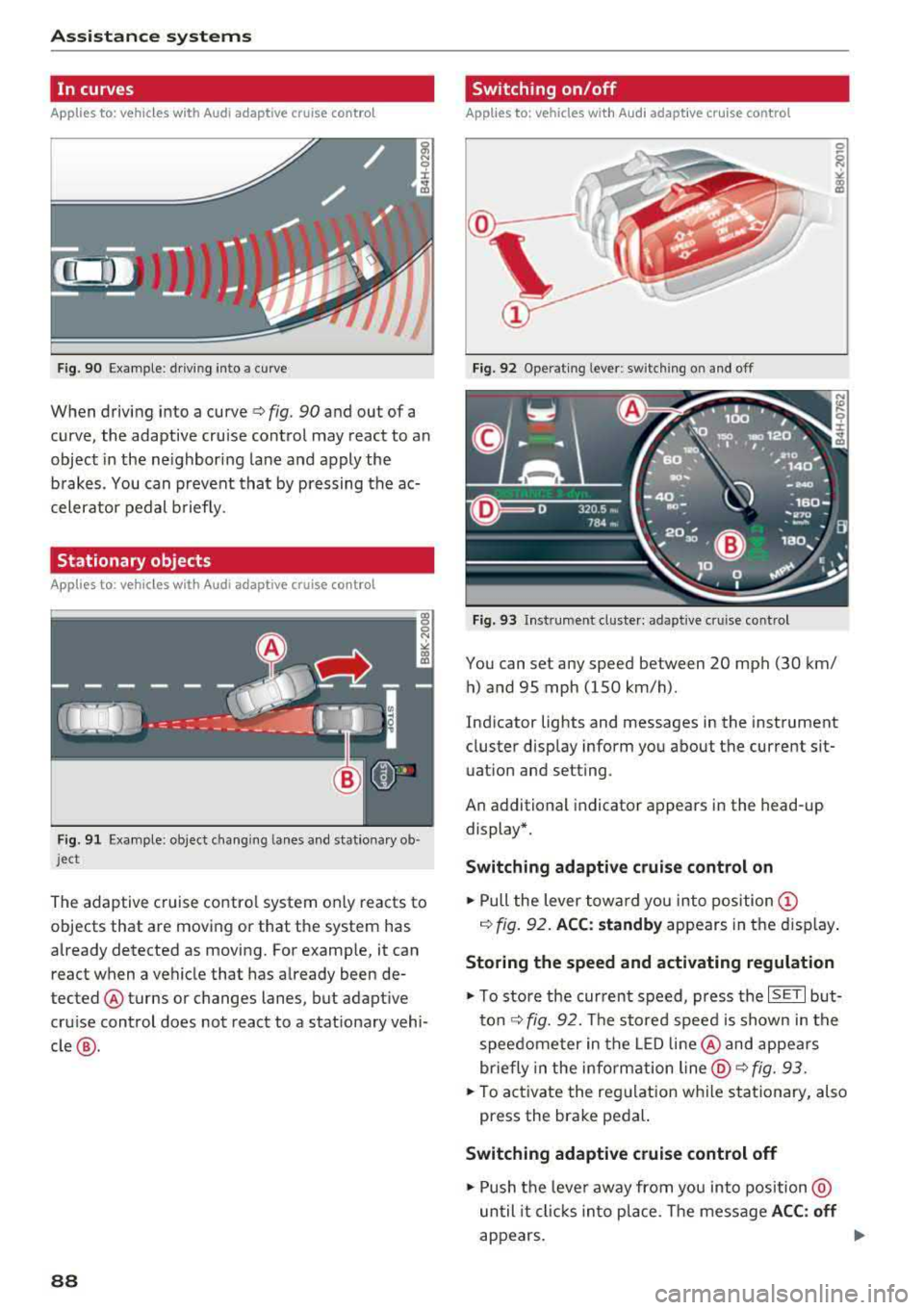
When driving into a curve ¢ fig. 90 and out of a
curve, the adaptive cruise control may react to an
object in the ne ighbor ing la ne and apply the
brakes. You can p revent that by pressing the ac
celerator pedal b riefly.
Stationary objects
Applies to: vehicles with Audi adaptive cruise control
F ig . 91 Example: object changi ng lanes and stationa ry o b·
j e ct
The adaptive cruise contro l system only reacts to
objects that are moving or that the system has
already detected as moving. For examp le, it can
react when a vehicle that has already been de
tected @turns or changes lanes, but adaptive
cru ise control does not react to a stat ionary vehi
cle @.
88
Switching on/off
Applies to: vehicles with Audi adaptive cruise control
Fig. 92 Operat ing lever: switc hing on and off
Fig. 93 Instrument cl ust er: a daptive c ruise control
You can set any speed between 20 mph (30 km/
h) and 95 mph (150 km/h) .
Indicator lights and messages in the instrument
cluster disp lay inform you about the current sit
uation and setting .
An additional indicator appears in the head-up
display*.
Switching adaptive cruise control on
.,.. Pull the lever toward you into position @
¢ fig. 92. ACC: standby appears in the display.
Storing the speed and activating regulation
.,.. To store the cur rent speed, press the ISET I but
ton
¢ fig. 92. The stored speed is shown in the
speedometer in the LE D line @and appears
briefly in the info rmation
line @¢ fig. 93 .
.,.. To activate the regulation while stationary, also
press the brake pedal.
Switching adaptive cruise control off
.,.. Push the leve r away from you into position@
until it clicks into place. The message
ACC : off
appears.
Page 91 of 266

a co ,...,
N
" N ,...,
0 0 <..:l '
•-Adaptive cru ise control is switched on . No
objects are detected ahead. The stored speed is
maintained .
•-An object a head was de tected. The adap tive
cr uise control system regula tes the speed and
d istance to the ob ject ahead and acce lerates/
brakes a utomatically.
r-j -Adaptive cru ise con trol is switched on . An
object ahead was detec ted . Your vehicle rema ins
stopped and w ill not s tart dr iv ing automat ica lly.
• -The automatic brak ing is no t enough to
main tain a sufficient distance to a n object ahead.
You must inte rvene
¢ page 91, Reques t for
driver intervention.
© Instrument cluster display
I f adaptive cruise control is not shown in the in
strument cluster disp lay, yo u can call it up using
the mu ltifu nction stee ring wheel b uttons
¢ page 19.
Based on the graphics in the d isp lay, you can de
termine if the system is ma inta ining a distance to
the object ahead and what that distance is.
No vehicle -no object was detected ahead .
White vehicle -an object was detected ahead.
Red vehicle -request for driver intervention
¢ page 91 .
Both arrow s on the scale © indicate the dis tance
to the object a head . No ar row appea rs when the
ve hicle is on an open road and there is no object
ahead. If an object is detected ahead, the arrow
moves on the scale.
T he green zone on the sca le ind icates the s tore
d ista nce . For information on changing the dis
tance, refer to
~ page 90. If the distance se
lect ed is exce eded or not reached, th e arrow
moves into the red zone on the scale.
A WARNING
If you press the ISE TI button when d riving at
speeds below 20 mph (30 km/h), the vehicle
accelerates automat ically up to 20 mph (30
A ssi st a nce systems
km/h), wh ic h is the minim um speed that can
be set .
(D Tips
-If you switch the ignit ion or the adaptive
cruise control system off, the set speed is
erased fo r safety reasons .
-The e lectronic stabilization control (ESC)
and the anti -slip -regulation (ASR) are auto
matically switched on when the adaptive
cruise cont rol is switched on.
Changing the speed
Applies to: vehicles with Audi adaptive cruise control
0
f
•
0
Fi g. 9 4 Operating lever : chang ing t he sp eed
.,. To increase or reduce the speed in increments,
tap the lever up o r down.
.,. To increase or decrease the speed quick ly, hold
the lever up or down until the red LED @reach
es the des ired
speed ¢ page 88, fig . 93.
After each change, the new sto red speed appears
briefly in the information
line ¢ page 88 , fig . 93
@ .
Driving in stop-and-go traffic
Applies to: vehicles with Audi adapt ive cru ise control
The adaptive cru ise control system also assists
you in stop-and-go traffic .
Stopping automatically
If an object ahead stops, your vehicle will brake
and stay at a stop, within the limits of t he sys
tem . The Sta rt/Stop system* can be used as usu -
al.
..,_
89
Page 92 of 266

Ass is tance sy stem s
Driving manually
.,. Tap the acce lerato r pedal, o r
.,. pull the lever toward you into position @.
(D Tips
If an obstacle is detected whe n your veh icle
starts moving, the driver intervention request
appears
¢ page 91. Your vehicle will drive
more s low ly when starting. This may also
happen in some situations when there is no
apparent obstacle.
Interrupting cruise control
App lies to: veh icles with Audi adaptive cruise control
Fig . 95 S ele ctor leve r
Req uirement: adaptiv e cruis e control must be
sw itched on.
Overriding cruise control
.,. T o accelerate manually , p ull the lever toward
you into position @and ho ld it the re . T he mes
sage
ACC : over ride appears. Or
.,. Press the accelerator pedal.
.,. T o resume cru ise control, release the lever or
take your foot off the accelerator pedal.
Canceling c ruise contr ol while driving
.,. Move the lever into posit ion @. The message
AC C: standby appears . Or
.,. Press the brake pedal.
.,. T o resume the stored speed, move the lever in
to position
@ .
Canceling crui se contr ol when stopped
.,. Push the lever away from you into position @.
The message
ACC: standby appea rs.
90
.,. To resume c ruise contro l, press the brake peda l
and pull the lever toward you into position @ .
A WARNING
It is dangerous to activate cruise control and
resume the stored speed when the current
road , traffic or weather conditions do not per
mit this . This increases the risk of an accident .
· Setting the distance
Applies to: vehicles with Audi adapt ive c ruise control
Fig. 96 Operat ing lever: settin g th e d ista nce
.,. T ap the switch to display the current set dis
tance
c> fig . 96.
N a, N 9 ::c
~
.,. To increase or reduce the dis tance in incre
ments, tap the sw itch again to the r ight or left .
The d istance between the two vehicles will
change in the instrumen t cluster display .
When app roaching an object ahead, the adaptive
c ruise contro l system brakes to match that speed
and then adjusts to the set distance . If the object
ahead ac celerates, adaptive c ruise co ntro l w ill al
so ac ce lerate up to the stored speed .
The higher the speed, the greater the distance in meters
c> ,&. . The Distance 3 setting is recom
mended. That is equa l to the general recommen
da tion of
" hal f the speed shown on the speedom
ete r" .
The distances provided a re spec ified values . De
pending on the driv ing s ituation and the way the
ob je ct ahe ad is dr iv ing, the actual dist ance may
be more or less than these ta rget distan ces .
The var ious symbols for the time inc rements ap
pears briefly in the info rmation line @
¢ page 88, fig . 93 when you change the settings. II>
Page 94 of 266

Ass is tanc e system s
What can the braking guard do?
When detected in t ime, the system can assess
dangerous situations where an object ahead
brakes suddenly or if your own vehicle is traveling
at a high speed and approaching an object that is moving more slowly. The braking guard does not
react if it cannot detect the s ituation.
The system advises you of various dangerous sit uations :
- T he
dista nce warning occurs if you d rive too
closely to the object ahead for a long period of
time. If the object ahead brakes strongly, you
would not be able to avoid a collision .
The.
indicator light appears as an indication for this.
- The
app ro ach warning occurs when an object
ahead is traveling more slow ly or brakes
strongly. When th is warning occurs, it may only
be possible to avoid a co llision by swerv ing or
braking strongly . The danger is indicated by the
• ind icator light ¢ fig . 98 . An aud io signal w ill
also sound .
If you do not react early enough or at all to a dan
ge rous situation, the braking guard suppo rts you
with a brak ing intervention .
- If a collision is imminent, the system will f irst
provide an
a cut e warn ing by braking sharply.
- If you do not react to the acute warning, the braking guard can increase the braking force
within the limits of the system
ll . Th is reduces
the vehicle speed in the event of a collision .
- The system can init iate comp lete deceleration
shortly before a collision
ll _ Full deceleration at
high speeds occurs only in vehicles with adap
tive cru ise control and s ide ass ist (pre sense
pl us).
- If the braking gua rd determines that you are
not brak ing strongly enough whe n there is an
im pending co llision, it can increase the bra king
force .
- T he pre sense functions also engage whe n
t h ere is an impend ing collision ¢
page 94.
l) Th is is not ava ilab le in some co untri es .
92
Which fun ction s can be controlled?
Yo u can swi tch the braking guard and the d is
tance/approach warning on or
off in the Infotain
ment system ¢
page 93, Settings in the Info
tainment system .
A WARNING
Lack of attention can cause collisions, other
accidents and ser ious personal injuries . The
braking guard is an assist system and cannot
prevent a collis ion by itself . The dr iver must
a lways intervene. The d river is always respon
sib le for braking at the co rrect t ime.
- Always pay close attention to traffic, even
when the b raking guard is sw itched on. Be
ready to intervene and be ready to take
co mplete co ntro l whenever necessa ry . Al
ways keep the sa fe and legal distance be
tween your vehicle and ve hicles up ahead .
- Br aki ng g uard wo rks w ithin limits and w ill
no t respond outside the system limits, for
examp le when approaching a stopped vehi
cle or stationary obstacle (end of a traffic
jam or ve hicle that has broken down in traf
fic).
- Always remember that the radar sensor for
the brak ing guard works only within defined
detection and range limits that may prevent
the proper detection of other vehicles .
- The radar sensor's function and range can
be reduced by rain, snow and heavy spray.
Mov ing veh icles up ahead may not be
promptly detected or may not be detected
at al l.
- Reflective surfaces including crash ba rr iers
or tunne l entra nces may impair the function
of the rada r senso r.
(D Tips
- You can cancel the braking with increas ing
force that is initiated by the system by brak ing yourse lf, by acce le rating not iceably or
by swerv ing.
- Keep in mind that b raking gua rd can b rake
unexpectedly. A lways secure a ny cargo or
Page 121 of 266

a co .... N
" N .... 0 0 \,;J '
control (ESC)
Description
Electronic stabilization control (ESC) supports
driver safety. It reduces the risk of slipping and
improves driving stability. ESC detects critica l sit
uations such as the vehicle oversteering and un
dersteering or the wheels are spinning. The vehi
cle is stabilized by applying the brakes or reduc ing engine torque. As soon as the ESC is actively
regulating, the
If] indicator light b links in the in
strument cluster.
The following systems are integrated in the ESC:
Anti-lock braking system (ABS)
ABS prevents the wheels from locking when brak
ing. The vehicle can still be steered even during
hard braking. Apply steady pressure to the brake
pedal. Do not pump the pedal. A pulsing in the
brake pedal indicates that the system is act ing to
stabilize the vehicle .
Brake assist system
The brake assist system can decrease braking dis
tance. It increases braking power when the driver
presses the brake pedal quickly in emergency sit
uations . You must press and hold the brake pedal
until the dangerous situat ion is over . In veh icles
with adaptive cruise contro l*, the brake assist
system is more sensitive if the distance detected
to the vehicle dr iv ing ahead is too small. On
vehicles with activated and functioning night vi
sion assist*, the brake assist system can respond more sensitively if there is a warning .
Anti-Slip Regulation (ASR)
ASR reduces eng ine power when the drive wheels
begin spinning and adapts the force to the road
conditions. This makes it easier to start, acceler
ate and drive up hills.
Electronic differential lock (EDL)
The EDL applies the brakes to a whee l that starts
spinning and transfers the drive power to the
other driving wheel or wheels (if the vehicle is
Intelligent Technology
equipped with a ll wheel drive*). This function is
not avai lab le at higher speeds.
In extreme cases , EDL automatically switches off
to keep t he brake on the braked whee l from over
heating. The vehicle is still working correctly. EDL
will switch on again automatically when condi
tions have returned to normal.
Power steering
The ESC can also support veh icle stability
through steering .
Selective wheel torque control
Selective wheel torque control is used when driv
i ng on curves. The front whee l on the ins ide of
the curve or both wheels on the ins ide of the
curve are braked selectively as needed. This al
lows more precise driving in curves.
Automatic post-collision braking system
The "automat ic post-collis ion braking system"
can help to reduce the risk of sliding and of addi
tional collisions after an accident. If the airbag
contro l module
detects a co llision above a certa in
vehicle speed, the vehicle is braked by the ESC.
T he vehicle does not brake automatically if:
- the driver presses the accelerator pedal, or
- the braking force generated by the pressed brake pedal is greater than the braking force
that would be initiated by the system, or
- the ESC, the brake system or the vehicle electri
cal system are not functioning.
A WARNING
-
- The ESC and its integrated systems cannot
overcome the lim its imposed by natura l
p hys ica l laws. This is especially impo rtant
on slippery or wet roads. If the systems be
g in acting to stabilize yo ur vehicle, you
should immediately alter your speed to
match the road and traffic conditions. Do
not let the increased safety provided tempt
you into taking risks. This could increase
your r isk of a coll is ion.
- Please note the risk of a coll ision increases
when dr iv ing fast, especially through curves
and on slippery or wet roads, and when
IIJ,,
119
Page 122 of 266
Intelligent Technology
driving too close to objects ahead . The ESC
and its integrated systems cannot always prevent coll isions
-there is still a risk of ac
cidents!
- Press the accelerator pedal carefully when
accelerating on even, slippery surfaces such as ice and snow . The drive wheels can spin
even when these control systems are instal-
Switching on /off
led and this can affect driving stability and
increase the risk of a collision.
(D Tips
-ABS and ASR only function correctly when
all four wheels are equipped with identical
tires. Different tire sizes can lead to a reduc
tion in engine power.
- You may hear noises when the systems de
scribed are working.
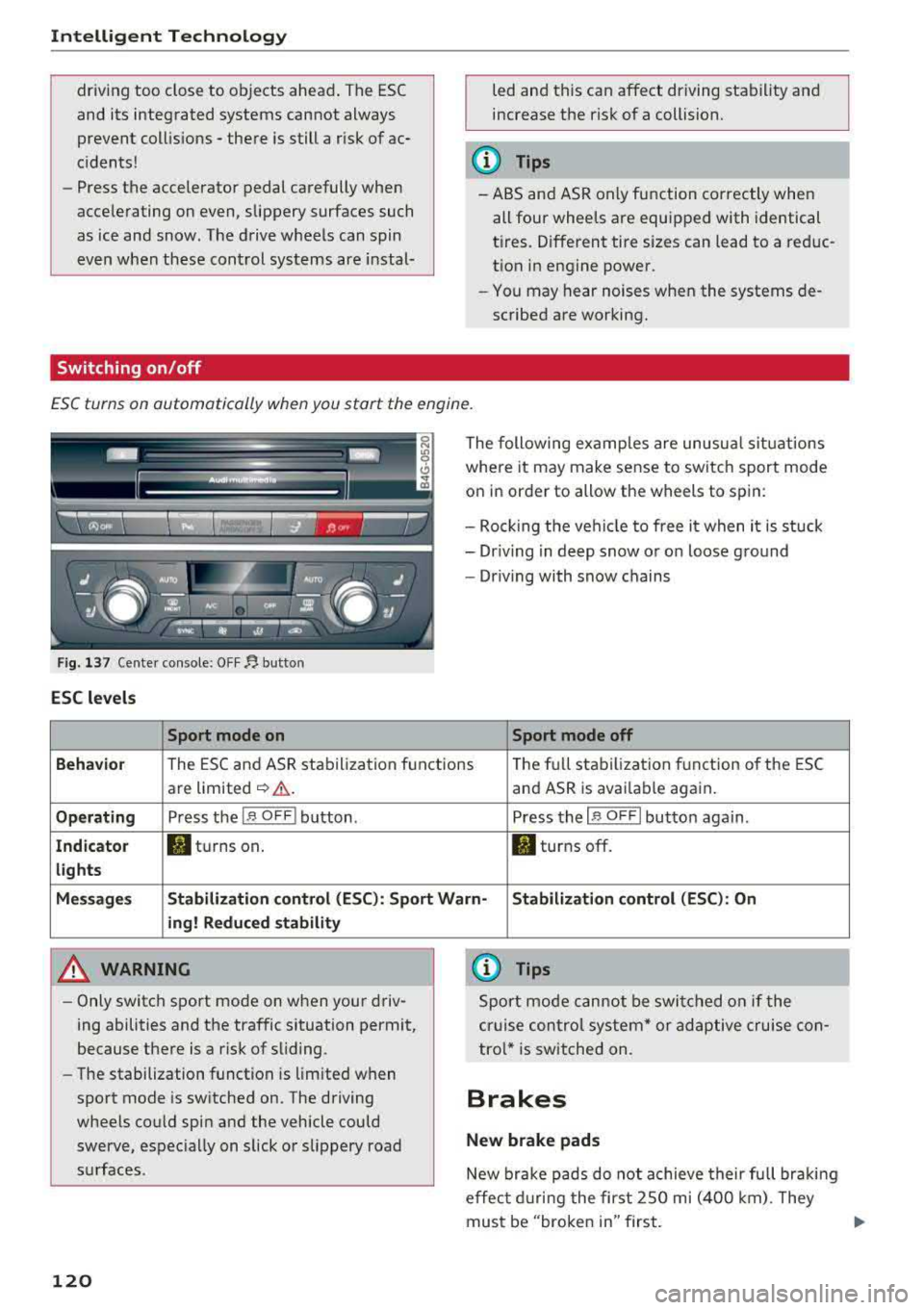
ESC turns on automatically when you start the engine .
Fig. 137 Ce nter con sole: OF F~ button
ESC levels
Sport mode on
The following examples are unusual situations
where it may make sense to switch sport mode
on in order to allow the wheels to spin:
- Rock ing the vehicle to free it when it is stuck
- Dr iving in deep snow or on loose ground
- Driving with snow chains
Sport mode off
Behavior
The ESC and ASR stabilization f unctions Th
e fu ll stabilization f unction of the ESC
are limited
~ &. . and ASR is avai lab le again.
Operating Press the I~ O FF I button . Press the I~ OF F! button again .
Indicator filturns on. . turns off.
lights
Messages Stabilization control (ESC): Sport Warn-Stabilization control (ESC): On
ing! Reduced stability
A WARNING
-Only switch sport mode on when your driv
ing abilities and the traffic situation permit,
because there is a risk of sliding .
- The stabilization function is limited when
sport mode is switched on. The driving
wheels could spin and the vehicle could
swerve, espec ially on slick or slippery road
surfaces .
120
-
{l) Tips
Sport mode cannot be switched on if the
cruise control system* or adaptive cruise con
tro l* is switched on .
Brakes
New brake pads
New brake pads do not achieve their full braki ng
effec t during the first 2SO mi (400 km). They
must be "broken in" first.
Page 123 of 266
a co .... N
" N .... 0 0 \,;J '
wear depends largely on the way the
vehicle is driven and on operating conditions.
This is especially true if you are driving frequently
in the city and on curves or with a sporty driving
style.
Operating noise
Noises may occur when braking depending on the
speed, braking force and outside conditions such
as temperature and humidity.
Effect of water and road salt
In certain situations, for example after driving
through water, in heavy ra in, after overnight con
densat ion or after washing your car, the braking
effect can be reduced by moisture or ice on the
brake rotors and brake pads. The brakes must be
"dried" first with a few careful brake applica
tions.
At higher speeds and with the windshie ld wipers
turned on, the brake pads press against the brake rotors for a short amount of time. This action,
which is not felt by the driver, happens at regular
intervals and ensures a better reaction time for
the brakes in wet weather .
The braking effect can also be reduced if you are
driving on salted roads and you do not apply the brakes for long periods of time. The layer of salt
on the brake rotors and pads must be worn off
f ir st when the brakes are applied.
Corrosion
Leaving the vehicle parked for long periods of
time, low mileage and avo iding heavy brak ing
can contribute to corrosion on the brake rotors
and to d irty brake pads .
If you usually avoid heavy braking or if there is
corros ion present, occasional heavy braking at
high speeds is recommended to clean the brake
rotors and
pads¢ &..
Brake system malfunction
If you notice that the brake pedal travel has sud
denly
increased, then a brake circuit in the dual
circu it brake system may have malfunct ioned.
Drive to an authorized Aud i dealer or authorized
Intelligent Technology
Audi Service Facility immediately to have the
problem corrected. On the way there, drive with
reduced speed and keep in mind that you will
need a longer distance to stop and you will need
to press the brake peda l harder.
Low brake fluid level
When the brake fluid level is low, malfunctions in
the brake system may occur . The brake fluid level
is e lectronically monitored.
Brake booster
T he brake booster amplifies the press ure you ap
ply to the brake pedal. It on ly works w hen the en
gine is running.
A WARNING
-
-Only apply the brakes for the purpose of
cleaning the brake system when road and
traffic cond itions permit. You must not en
danger other road users. This increases the
risk of an accident .
- Never let the vehicle roll while the engine is
stopped because this increases the risk of an
accident .
- New brake pads do not ach ieve the ir full
braking effect dur ing the first 250 m i
(400 km). They must be "broken in" first .
However, you can compensate fo r the
slightly reduced braking force by pressing
firmly on the brake pedal. Avoid heavy b rak
ing during the break -in period.
- Ce rtain weather and operating conditions
such as driving through water, dr iv ing in
heavy rain or driving after washing your ve
hicle can impair the effectiveness of the
brakes. In the winter, ice may build up on
the brake pads, rotors and drums. Check
these components by braking carefully. Ap
plying the brakes carefully several times
dries the brakes and removes ice build-up .
- The efficiency of the brakes can also be im
pa ired by dr iv ing for long stretches on roads
covered with salt without using the brakes.
You can remove salt deposits from the
brake rotors and pads by carefully applying
the brakes several times.
121
Page 124 of 266

Intellig ent T echn olo gy
- If the front spoiler is damaged or you insta ll
another spoiler, make sure the front wheel
brakes are venti lated properly. Otherwise,
the brake system could overheat, wh ich re
duces the ir effectiveness .
- Failure of a brake circuit impairs braking
performance, which increases brak ing dis
tance. Avoid driving the vehicle and have it
towed it to the nearest author ized Audi
dealer or author ized A udi Se rvice Fac il ity.
- If the brake booster is not working, you will
have to press muc h ha rde r on the bra ke
peda l to compe nsate for the lack of the
booste r.
0 Note
- Neve r let the brakes "rub" by press ing the
pedal light ly when bra kin g is not actually
ne cessa ry. Th is ca u ses the brakes to over
hea t an d increases bra king d istance and
causes wear.
- B efo re dr iv ing downh ill a long distance on a
steep hi ll, de crease your speed and se lec t a
l ower gear . This makes use of the engine
braking effect and relieves the brakes . If
you need to brake additionally, brake in in
tervals and not continuously.
(D Tips
- If the brake booster is not working, you
must press the brake pedal with much more
force than normal.
- If you retrofit your vehicle with a front spoil
er, whee l covers or s imilar items, make sure
that the a ir flow to the front whee ls is not
i nterrupted. Otherw ise the brake system
can become too hot .
Electromechanical
steering, dynamic
steering
The electromechanical steering supports the
driver's steering movements.
Power steering adapts electronically based on
the vehicle speed.
122
Indicator lights and me ssag es
• Do n ot driv e vehi cle: Ste ering d efe ctiv e
If this indicator light turns on and stays on and
t hi s message appears, the power steering may
have failed.
Stop the veh icle in a safe location as soon as pos
s ible. Do
n o t continue driving . See an authorized
Audi dealer or author ized Audi Service Fac ility for
ass ista nce.
kr-D S te ering: System fault You can cont inu e
dri ving
If the indicator light turns on and the message
appears, the steering wheel may be more d iffi
cult to move or more sensitive than usual. The
steering wheel may also be at an angle when
driv ing stra ight.
Drive slowly to an authorized Audi dealer or au
thorized Aud i Serv ice Facility to have the mal
funct ion corrected.
l;rfl D ynamic steer ing: Init ializing
If the indicator light is blinking and this message
appears, dynamic steering* is being initialized.
The steering wheel will be easy to move after
start ing the engine. Re-initialization might be
necessary if the steering wheel was moved hard
to the left and r ight while the veh icle was not
moving. T he d isplay turns off if the in it ial izat ion
was successful.
(D Tips
- If the . or ':r,y indicator l ight only stays on
for a sho rt time, you may cont inue d riv ing.
- The dynamic steering stability systems
~page 119 are not ava ilable in the event of
a system malfunct ion.
- For add itional information o n dynamic
steering,
see~ page 104 .
Page 206 of 266
Wheel s
Glossary of tire and loading
terminology
Accessory weight
means the combined weight (in
excess of those standard items
which may be replaced) of auto matic transmission, power steer
ing , power brakes , power win
dows , power seats, radio, and
heater, to the extent that these
items are available as factory-in
stalled equipment (whether in
stalled or not).
Aspect ratio
means the ratio of the height to
the width of the tire in percent. Numbers of 55 or lower indicate a
low sidewall for improved steer
ing response and better overall
handling on dry pavement .
Bead
means the part of the tire that is
made of steel wires, wrapped or
reinforced by ply cords and that is
shaped to fit the rim.
Bead separation
means a breakdown of the bond
between components in the bead.
20 4
Cord
means the strands forming the
plies in the tire.
Cold tire inflation pressure
means the t ire pressure recom
mended by the vehicle manufac
turer for a tire of a designated
size that has not been driven for
more than a couple of miles (kilo
meters) at low speeds in the
three hour period before the tire pressure is measured or adjusted.
Curb weight
means the weight of a motor ve
hicle w ith standard equipment in
cluding the maximum capacity of
fuel, oil, and coolant, ai r condi
tioning and additional weight of
optional equipment.
E x tra load ti re
means a tire designed to operate
at higher loads and at higher in
flation pressures than the corre
sponding standard tire. Extra load
tires may be identified as "X L",
"
l" "EXTRA LOAD" or "RF" on X I I
the sidewall. .,.