start stop button AUDI A6 2018 User Guide
[x] Cancel search | Manufacturer: AUDI, Model Year: 2018, Model line: A6, Model: AUDI A6 2018Pages: 266, PDF Size: 41.38 MB
Page 80 of 266
Driving
On vehicles with a cruise control system*
¢ page 84, hill descent control is also activated
when the speed is set.
A WARNING
Hill descent control cannot overcome physical
limitations, so it may not be able to maintain
a constant speed under all condit ions. Always
be ready to apply the brakes.
Shifting manually (tiptronic mode)
The tiptronic mode allows the driver to shift the
gears manually.
)
r
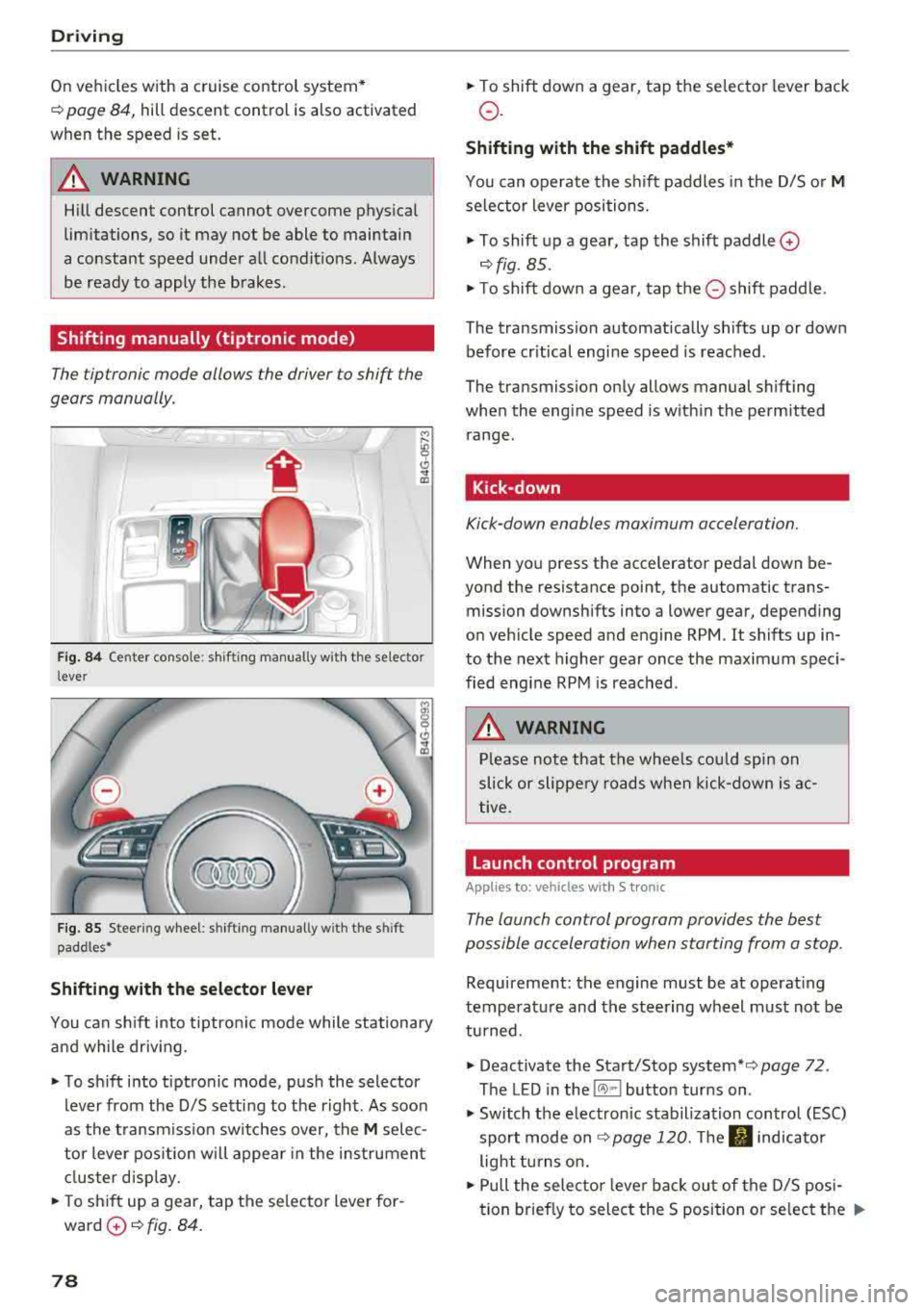
Fig. 84 Center console : sh ifting manual ly w ith the se lector
l ever
F ig. 85 Stee ring wheel: shifting manually w ith t he s hift
paddles*
Shifting with the selector lever
You can shift into tiptronic mode while stationary
and while driv ing .
"To shift into tiptronic mode, push the selector
lever from the 0/5 sett ing to the right. As soon
as the transmission switches over, the
M selec
tor lever position will appear in the instrument
cluster disp lay.
.. To sh ift up a gear, tap the se lector lever for
ward
0 ¢ fig. 84.
78
" To shift down a gear, tap the selector lever back
o.
Shifting with the shift paddles*
You can operate the shift paddles in the 0/5 or M
selector lever positions.
" To shift up a gear, tap the shift paddle 0
¢ fig . 85 .
"T o shift down a gear, tap the 0 shift paddle.
The transmission automatically shifts up or down before cr itical engine speed is reached .
The transmission only allows manual shifting
when the engine speed is w ithin the permitted
range.
Kick-down
Kick-down enables maximum acceleration.
When you press the accelerator pedal down be
yond the resistance point, the automatic trans
mission downshifts into a lower gear, depending
on vehicle speed and engine RPM . It shifts up in
to the next higher gear once the maximum speci
fied engine RPM is reached.
A WARNING
Please note that the whee ls could spin on
slick or slippery roads when kick-down is ac
tive .
Launch control program
Applies to: vehicles with S tronic
-
The launch control program provides the best
possible acceleration when starting from a stop .
Requirement: the engine must be at operating
temperature and the steering wheel must not be
turned.
.. Deactivate the Start/Stop system* ¢ page 72.
The LED in the
l(A) ~l button turns on .
" Switch the electronic stabilization control (ESC)
sport mode
on ¢ page 120. The fl indicator
light turns on.
" Pull the selecto r lever bac k out of the 0/5 posi
tion brief ly to select the S position or select the
..,.
Page 86 of 266
Ass is tance sy stem s
Assistance systems
Speed warning system
Description
Applies to: veh icles with speed warning system
The speed warning system helps you to stay un
der a specified maximum speed.
The speed warning system warns you if you are
exceeding the maximum speed that you have set.
A warning tone will sound as soon as your speed
exceeds the sto red value slightly.
The . (USA models) I. (Canada models) indi
cator light and a message appear in the instru
ment cluster display at the same time.
The.
• indicator light and the message turn off if the
speed falls back below the stored maximum
speed.
Sett ing a threshold is recommended if you would
like to be reminded when you reach a certa in
maximum speed. S ituations where you may want
to do so i nclude driving in a country wit h a ge ne r
a l speed limit o r if the re is a specified maximum
speed for winter tires.
Setting the warning threshold
The warning threshold is set in the Infotainment
system.
• Se lect: the ICARI function button> (Car )* Sys
tems
control button > Driver assistan ce >
Spe ed warning .
(D Tips
Regardless of the speed warning system, you
should always monitor your speed using the
speedometer and make sure you are following
the legal speed limit.
84
Cruise control system
Switching on
Applies to: vehicles with cruise control system
The cruise control system makes it possible to
drive at a constant speed starting at 20 mph (30
km/h).
0
f
~
0
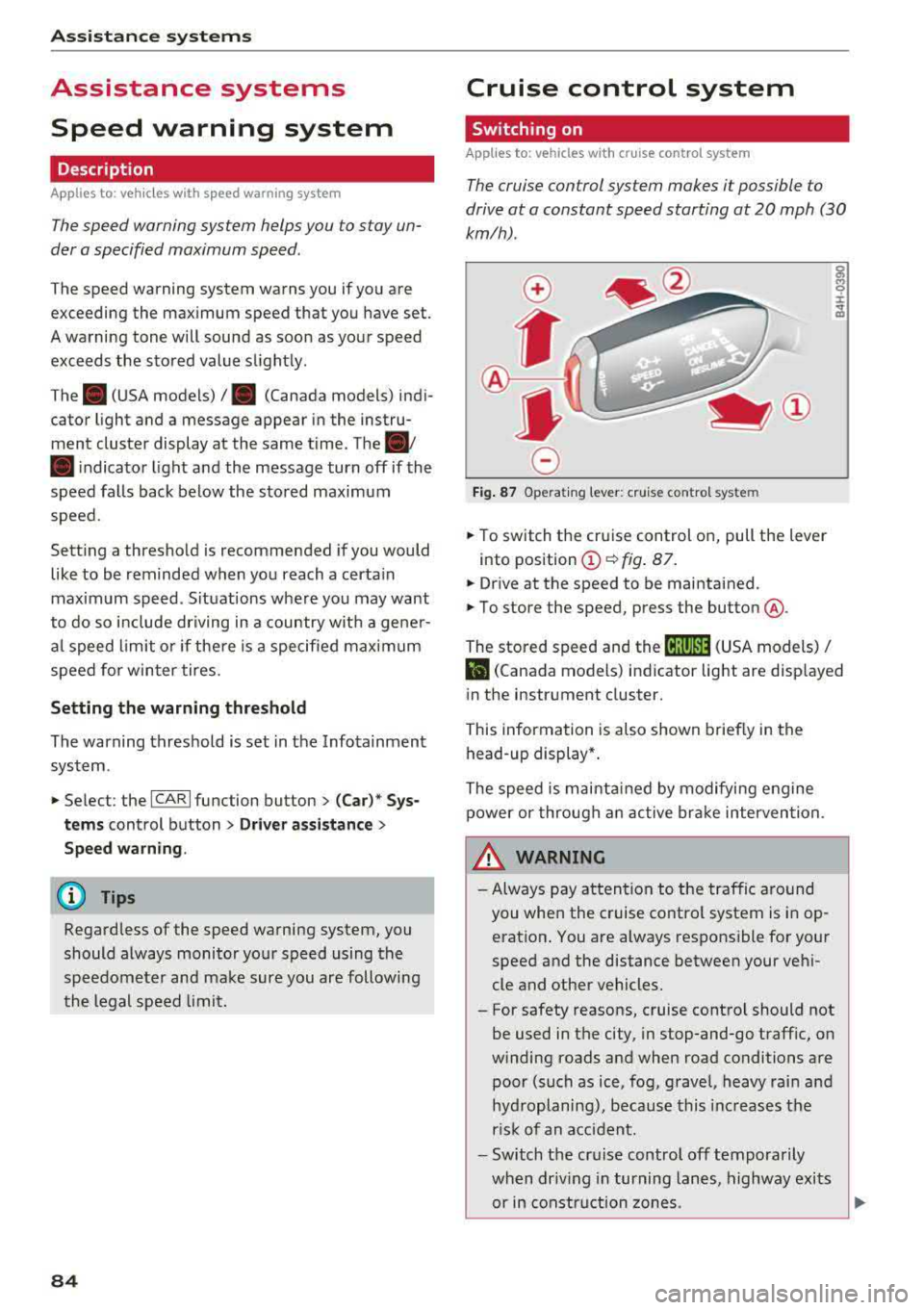
F ig . 8 7 Operat ing lever: c ruise control system
• To switch t he cru ise control o n, pull the lever
into position
(D ~ fig. 87 .
• Drive at the speed to be maintained.
• To store the speed, press the button @.
The stored speed and the
( ij;\1)~14 (USA models) /
l'I (Canada models) ind icator lig ht are disp layed
in the instrument cluster.
This information is also shown briefly in the
head -up display* .
The speed is mainta ined by modifying engine
power or through a n active br ake interven tion.
~ WARNING
-Always pay at tentio n to the traffic around
you when the cruise contro l system is in op
eration . You are always respons ible for your
speed and the distance between your ve hi
cle and other vehicles.
-For safety reasons, cruise control should not
be used in the city, in stop-and-go traff ic, on
winding roads and when road conditions are poor (such as ice, fog, gravel, heavy rai n and
hyd roplaning), because this inc reases the
r is k of an accident.
-Switch the cr uise control off temporarily
when dr iv ing in turning lanes, highway exits
or in constr uction zones.
-
Page 95 of 266

a co .... N
" N .... 0 0 \.J '
the ris k of damage or i njury.
Settings in the Infotainment system
Applies to: vehicles with Audi adaptive cruise control
~ Select : the ICARI function button > ( Car )* Sys
tems
control button > Driver assistance > Audi
braking guard .
System -
switch the brak ing guard On /Off. When
you switch the ign it ion on, the message
B raking
guard: Off
appears if the sys tem is switched off .
Early warning -the distance and approach warn
ings in the display can be switched
On /Off .
(D Tips
-You r settings are automatically stored and
assigned to the remote contro l key being
u sed .
-If yo u rest rict or sw itch off the ESC, t he
bra king gua rd also sw itches itself off
c> page 120.
-Switc h braking guard off w hen yo u are load
i ng t he ve hicle onto a vehicle ca rr ier, t rain,
s hi p or other type o f transportation . This
ca n prevent undesired warnings from the
braking guard system .
Messages
Applies to: vehicles with Audi adaptive cruise control
Braking guard: Off
This message appears if the system is switched
off through the Infota inme nt system . Otherwise,
if the system is turned off, the information ap
pea rs every time shortly after the start of the
tr ip.
The message also appears if the system is not
ava ilable d ue to a malfunct io n or if the ESC is
sw itched off
c> page 120 . If this is the case, the
sys tem w ill not prov ide warnings about a possi
b le co llision.
Braking guard: engaged
This message appea rs if a sharp brake press ure
was applied due to an acute wa rning.
A ss istance systems
ACC: Unavailable!
ACC and Audi braking guard: Unavailable
The system cannot guarantee that it will detect objects correctly and is sw itched off . The sensors
have been moved or are faulty . Th e p re sense
funct ions may a lso be affec ted . D rive to an au
tho riz ed Au di dealer or author ized Audi Serv ice
F aci lity immed iate ly to have the ma lfunction co r
r ected .
ACC: Currently unavailable. No sensor vision
A CC and Audi braking guard: Currently unavail
able. No sensor vision
This message appears if the sensor v iew is ob
structed, for examp le by leaves, snow, heavy
spray or dirt . Clean the sensors
c> page 86 ,
fig . 89 .
AC C: Currently unavailable . Gradient too steep
T he road exceeds the maxim um poss ible angle
fo r safe adaptive c ruise contro l operation . Adap
tive cruise control is switched off.
ACC : Only available in D , Sor M
Select t he "D/S" or "M" se lecto r lever position .
ACC: Currently unavailable . Parking brake ap
plied
T he adaptive cr uise cont rol system switches off
automat ica lly if the parking brake is set.
ACC: Currently unavailable . Stability control
( ESC ) input.
This message appears if the e lectro nic s tabiliza
t io n c ontrol ( ES C) is tak ing a ct ion to s tabili ze the
vehicle. In t his case, adaptive cruise contro l
switches off automatically.
ACC off : Manual control!
Th is message appears when adaptive c ruise co n
t rol cannot set the parking brake . P ress the brake
peda l to prevent the veh icle from ro lling.
• ••
T hree white dots appear if a setting cannot be se
l ected w ith the operating lever. For example, this
happens if adapt ive cru ise control cannot sta rt
driv ing automat ica lly in stop-and-go traff ic
93
Page 118 of 266

Parking systems
,.. Turn the Infotainment system on and shift into
reverse gear. The parking system must be
turned on and the
Cross parking view must be
displayed .
,.. Press the control button on the Infotainment
unit(D ¢page 111, fig . 122 . The Parallel park
ing
view is displayed.
,.. Back up and align your vehicle so the b lue area
@ borders on the rear end of the vehicle be
hind you or on the parking space line
¢_& in
General information on page 112, ¢(D in Gen
eral information on page 112.
The blue area
represents an extension of the vehicle's outline
by approximately 16 ft (5 meters) to the rear .
The long side of the blue area should be on the
curb . The entire blue area must fit into the
parking space.
,.. With the veh icle stopped, turn the steer ing
wheel to the right as far as it w ill go .
,.. Back into the parking space until the blue curve
¢ page 111, fig . 123 to uch es the curb¢ _& in
General information on page 112,
¢ (D in Gen
eral information on page 112 .
Stop the vehicle.
,.. With the vehicle stopped, turn the steering
whee l to the left as far as it will go.
,.. Continue to back into the parking space until
the vehicle is parked parallel to the
curb¢ .&.
in General information on page 112, ¢(D in
General information on page 112. @ repre
sents the rear bumper. At the very latest, stop
the vehicle when the red orientation line ©
borders an object . Keep an eye on the front of
your vehicle while doing this .
Parking next to obstacles
If there is an obstacle (such as a wall) next to the
parking space, position the vehicle so there is
mo re space on that side. Position the long side of
the blue area so that there is sufficient space
from the object. The area must not be on the
curb . You will a lso need to start turning the
steer ing whee l earlier. The blue curve
¢ page 111, fig. 123 must not touch the obsta
cle, but rather there should be enough distance.
116
@ Tips
The left or right orientation lines and surfaces
will be disp layed, depending on the turn s ig
nal being used.
Trailer mode
Applies to: vehicles wit h peripheral ca meras a nd tra iler hitch
This view assists you in positioning the vehicle in
front of a trailer .
Fig. 136 Infotainment system: rea r m ode
Requirement: the trailer mode must be selected
¢page 114.
,.. Now you can posit ion your veh icle in front of
the trailer
¢ .&. in General information on
page 112,
¢ @ in General information on
page 112.
The orange orientation line indicates
the expected path toward the trailer h itch. Use
the blue lines to help you estimate the d istance
to the trailer h itch .
Setting the mode
App lies to: vehicles with peripheral ca meras
,.. Select: !CAR ! function button > (Car)* Systems
control button > Driver assistance > Parking
aid
> Change to front/rear > Auto or Manual.
Auto
-this view behind the vehicle (Rear mode) is
displayed automatically when you shift into re
verse. This view in front of the vehicle
( Front
mode) is displayed automatically when you shift
into the forward gears.
Manual -When you switch the system on, the
view behind the vehicle
( Rear mode) is always
displayed and it does not switch to the
Front
mode when a forward gear is selected.
Page 255 of 266
a co .... N
" N .... 0 0 \,;J '
Important safety instructions for using chi ld
safety seats . . . . . . . . . . . . . . . . . . . . . . . . 170
Important things to know when driving with
children . . . . . . . . . . . . . . . . . . . . . . . . . . . 166
Tether anchors . . . . . . . . . . . . . . . . . . . . . . 183
Tether straps . . . . . . . . . . . . . . . . . . . . . . . 183
Child safety lock Power windows . . . . . . . . . . . . . . . . . . . . . . 33
Rear doors . . . . . . . . . . . . . . . . . . . . . . . . . . 33
Child safety seats . . . . . . . . . . . . . . . . . . . . . 172
Booster seats . . . . . . . . . . . . . . . . . . . . . . . 176
Convertible child seats . . . . . . . . . . . . . . . 174
Convertible locking retractor . . . . . . . . . . 179
How do I properly install a child safety seat
. h' l 7 170 in myve 1c e . ................. ... .. .
Infant seats .. ................ ... .. . 172
Installing a child restraint using the LATCH
system . . . . . . . . . . . . . . . . . . . . . . . . . . . . 182
L ATCH system . . . . . . . . . . . . . . . . . . . . . . 182
L owe r anchorages . . . . . . . . . . . . . . . . . . . 181
Mounting and releasing the anchorage
hook . . . . . . . . . . . . . . . . . . . . . . . . . . . . . . 182
Safety instructions . . . . . . . . . . . . . . . . . . . 170
Securing . . . . . . . . . . . . . . . . . . . . . . . . . . . 177
Unused safety belts on the rear seat . . . . 172
Cigarette lighter . . . . . . . . . . . . . . . . . . . . . . . 51
Cleaning . . . . . . . . . . . . . . . . . . . . . . . . . . . . 221
Cleaning/removing ice from windows . . . . . 223
C leaning Alcantara . . . . . . . . . . . . . . . . . . . . 224
Cleaning artificial leather . . . . . . . . . . . . . . . 224
Cleaning carbon parts . . . . . . . . . . . . . 223, 224
C leaning contro ls . . . . . . . . . . . . . . . . . . . . . 223
Cleaning decorative parts/trim . . . . . . 222, 223
C leaning displays . . . . . . . . . . . . . . . . . . . . . 223
Cleaning exhaust tail pipes . . . . . . . . . . . . . 222
Cleaning plastic parts . . . . . . . . . . . . . . . . . . 223
C leaning rims . . . . . . . . . . . . . . . . . . . . . . . . 222
Cleaning textiles . . . . . . . . . . . . . . . . . . . . . . 224
Climate control system . . . . . . . . . . . . . . . . . 58
Automatic recirculation . . . . . . . . . . . . . . . . 62
Basic settings . . . . . . . . . . . . . . . . . . . . . . . . 62
Drive select . . . . . . . . . . . . . . . . . . . . . . . . . 104
C losing
Hood . . . . . . . . . . . . . . . . . . . . . . . . . . . . . . 191
Sunroof. . . . . . . . . . . . . . . . . . . . . . . . . . . . . 35
Windows . . . . . . . . . . . . . . . . . . . . . . . . . . . 34
Index
Closing/opening
By remote control . . . . . . . . . . . . . . . . . . . . 27
Using the door lock cylinder . . . . . . . . . . . . 29
With the convenience key . . . . . . . . . . . . . . 27
Closing aid (doors) . . . . . . . . . . . . . . . . . . . . . 24
Cockpit (overview) . . . . . . . . . . . . . . . . . . . . . . 6
Coming home . . . . . . . . . . . . . . . . . . . . . . . . . 40
Compartments . . . . . . . . . . . . . . . . . . . . . . . . 52
Compliance . . . . . . . . . . . . . . . . . . . . . . . . . . 250
Consumer Information ............. 132, 247
Consumption (fuel) . . . . . . . . . . . . . . . . . . . . 20
Contacting NHTSA . . . . . . . . . . . . . . . . . . . . 132
Convenience key
Starting the engine (STAR T ENGINE STOP
button) . . . . . . . . . . . . . . . . . . . . . . . . . . . . . 68
Stopping the engine (STAR T ENGINE ST OP
button) . . . . . . . . . . . . . . . . . . . . . . . . . . . . . 68
Switching the ignition on . . . . . . . . . . . . . . 68
Unlocking/locking . . . . . . . . . . . . . . . . . . . . 27
Convenience opening . . . . . . . . . . . . . . . . . . . 34
Convertib le child safety seats . . . . . . . . . . . 17 4
Convertib le locking retractor
Activating . . . . . . . . . . . . . . . . . . . . . . . . . . 179
Deactivating . . . . . . . . . . . . . . . . . . . . . . . . 180
Using to secure a child safety seat . . . . . . 179
Cooling down . . . . . . . . . . . . . . . . . . . . . . . . . 64
Cooling mode (4-zo ne deluxe automatic cli-
mate control) . . . . . . . . . . . . . . . . . . . . . . . . . 61
Cooling mode (deluxe automatic climate con -
trol) . . . . . . . . . . . . . . . . . . . . . . . . . . . . . . . . . 59
Cooling system Adding coolant . . . . . . . . . . . . . . . . . . . . . . 196
Coolant . . . . . . . . . . . . . . . . . . . . . . . . . . . . 195
Coolant level checking . . . . . . . . . . . . . . . . 196
Coolant temperature indicator . . . . . . . . . . . 9
Indicator light . . . . . . . . . . . . . . . . . . . . . . . 13
Cornering light . . . . . . . . . . . . . . . . . . . . . . . 104
Crossing water . . . . . . . . . . . . . . . . . . . . . . . . 64
Cruise control system Changing speed . . . . . . . . . . . . . . . . . . . . . . 85
Preselecting speed . . . . . . . . . . . . . . . . . . . . 85
Switching off . . . . . . . . . . . . . . . . . . . . . . . . 85
Switching on . . . . . . . . . . . . . . . . . . . . . . . . . 84
Cup holders . . . . . . . . . . . . . . . . . . . . . . . . . . . 52
Current consumption . . . . . . . . . . . . . . . . . . . 20
253
Page 262 of 266

Index
Seating position
Driver . . . . . . . . . . . . . . . . . . . . . . . . . . . . . 126
Front passenger . . . . . . . . . . . . . . . . . . . . . 127
How to adjust the front seats . . . . . . . . . . 127
Incorrect seat posi tion . . . . . . . . . . . . . . . 129
Occupa nts . . . . . . . . . . . . . . . . . . . . . . . . . . 126
Rear passengers . . . . . . . . . . . . . . . . . . . . . 128
Seats Ad justing . . . . . . . . . . . . . . . . . . . . . . . . . . . 47
Clean ing . . . . . . . . . . . . . . . . . . . . . . . . . . . 224
Convenience s ide v iew . . . . . . . . . . . . . . . . . 50
Correct seating position . . . . . . . . . . . . . . 126
Folding . . . . . . . . . . . . . . . . . . . . . . . . . . . . . 55
M assage f unct ion . . . . . . . . . . . . . . . . . . . . . 47
Seat symmetry . . . . . . . . . . . . . . . . . . . . . . . 50
Seats (number) . . . . . . . . . . . . . . . . . . . . . . . 134
Seat venti lation (4-zone de luxe automatic cli
mate control) . . . . . . . . . . . . . . . . . . . . . . . . . 61
Select ive whee l torque contro l . . . . . . . . . . 119
Selector lever (automat ic transmission)
Emergency release . . . . . . . . . . . . . . . . . . . . 80
Positions . . . . . . . . . . . . . . . . . . . . . . . . . . . . 75
Serv ice and d isposa l
Safety belt pretensioner . . . . . . . . . . . . . . 141
Serv ice inte rval d isplay . . . . . . . . . . . . . . . . . 199
Shade . . . . . . . . . . . . . . . . . . . . . . . . . . . . 43, 44
Shift padd les (automatic transmission) . . . . 78
Ship carrier . . . . . . . . . . . . . . . . . . . . . . . . . . 244
Side airbags Descr ipt io n . . . . . . . . . . . . . . . . . . . . . . . . . 160
H ow t hey work . . . . . . . . . . . . . . . . . . . . . . 162
Side assist . . . . . . . . . . . . . . . . . . . . . . . . . . . . 98
Adj usting the br ightness . . . . . . . . . . . . . . 100
Clean ing the sensors . . . . . . . . . . . . . . . . . 222
Sensor range . . . . . . . . . . . . . . . . . . . . . . . . 99
Sw itchi ng on and off . . . . . . . . . . . . . . . . . 100
also refer to Side assist . . . . . . . . . . . . . . . . 98
Side curtain airbags . . . . . . . . . . . . . . . . . . . 163
Descr ipt ion . . . . . . . . . . . . . . . . . . . . . . . . . 163
H ow they work . . . . . . . . . . . . . . . . . . . . . . 164
Safety instruct ions . . . . . . . . . . . . . . . . . . . 165
Ski bag . . . . . . . . . . . . . . . . . . . . . . . . . . . . . . . 56
Secur ing . . . . . . . . . . . . . . . . . . . . . . . . . . . . 56
Snow chains
Socket ...... .. .. ................ ... . .
So urces of information about c hild restraints 2
17
52
and their use . . . . . . . . . . . . . . . . . . . . . . . . . 184
260
Space -saving spare t ire . . . . . . . . . . . . . . . . 232
Spare t ire . . . . . . . . . . . . . . . . . . . . . . . . . . . 232
Speedometer . . . . . . . . . . . . . . . . . . . . . . . . . . 9
Speed warning system . . . . . . . . . . . . . . . . . . 8 4
Sport different ial . . . . . . . . . . . . . . . . . . . . . 104
Ind icator light . . . . . . . . . . . . . . . . . . . . . . . 18
Star button
. .. .. .. ' . .. ... .. ..... ... .. . 20
Start/Stop system . . . . . . . . . . . . . . . . . . . . . 70
E ngine does not swi tch off . . . . . . . . . . . . . 71
Engine starts automatically . . . . . . . . . . . . 71
Indicator lig hts . . . . . . . . . . . . . . . . . . . . . . 70
Messages . . . . . . . . . . . . . . . . . . . . . . . . . . . 72
Start ing/stopping the eng ine . . . . . . . . . . . 70
Switc hing off/on . . . . . . . . . . . . . . . . . . . . . 72
STAR T ENG IN E ST OP button . . . . . . . . . . . . . 68
Start ing to drive . . . . . . . . . . . . . . . . . . . . . . . 74
Start ing (engine) . . . . . . . . . . . . . . . . . . . 68, 70
Stee ring
E lectromechanical steering . . . . . . . . . . . . 122
Indicator lig ht . . . . . . . . . . . . . . . . . . . 15, 122
Locking . . . . . . . . . . . . . . . . . . . . . . . . . . . . . 68
also refer to Electromechanical steering . 122
Stee ring w heel
Buttons ... .. .. .... .. ... .. ..... ... .. . 20
Easy seat entry ..... .. ... .. ..... ... .. . 67
Manua l adjustment . . . . . . . . . . . . . . . . . . . 66
Power ad justment . . . . . . . . . . . . . . . . . . . . 67
S hi ft paddles (automatic transm iss ion) . . . 78
Steering wheel heat ing . . . . . . . . . . . . . . . . 63
Steps for determining cor rect load limit ... 215
Stopping (engine) . . . . . . . . . . . . . . . . . . . 68, 70
Storage compartments . . . . . . . . . . . . . . . . . 52
Stor age hooks . . . . . . . . . . . . . . . . . . . . . . . . . 56
S tronic (automat ic transmiss ion) . . . . . . . . . 74
La unch control p rogram . . . . . . . . . . . . . . . 78
Sunroof . . . . . . . . . . . . . . . . . . . . . . . . . . . . . . 35
Convenience opening . . . . . . . . . . . . . . . . . . 34
Emergency closing . . . . . . . . . . . . . . . . . . . . 35
Suns hade . . . . . . . . . . . . . . . . . . . . . . . . . 43, 44
Su n visors . . . . . . . . . . . . . . . . . . . . . . . . . . . . 43
Symbols
refer to Indicator lights . . . . . . . . . . . . . . . . 10
T
Tachometer . . . . . . . . . . . . . . . . . . . . . . 9, 10, 19