stop start AUDI A6 2018 User Guide
[x] Cancel search | Manufacturer: AUDI, Model Year: 2018, Model line: A6, Model: AUDI A6 2018Pages: 266, PDF Size: 41.38 MB
Page 72 of 266
Driving
Starting the engine when there is a
malfunction
It may not be possible to start the engine under
certain circumstan ces, for example if the battery
in the vehicle key is drained, if interference is af
fected the key or if there is a system malfunc
tion .
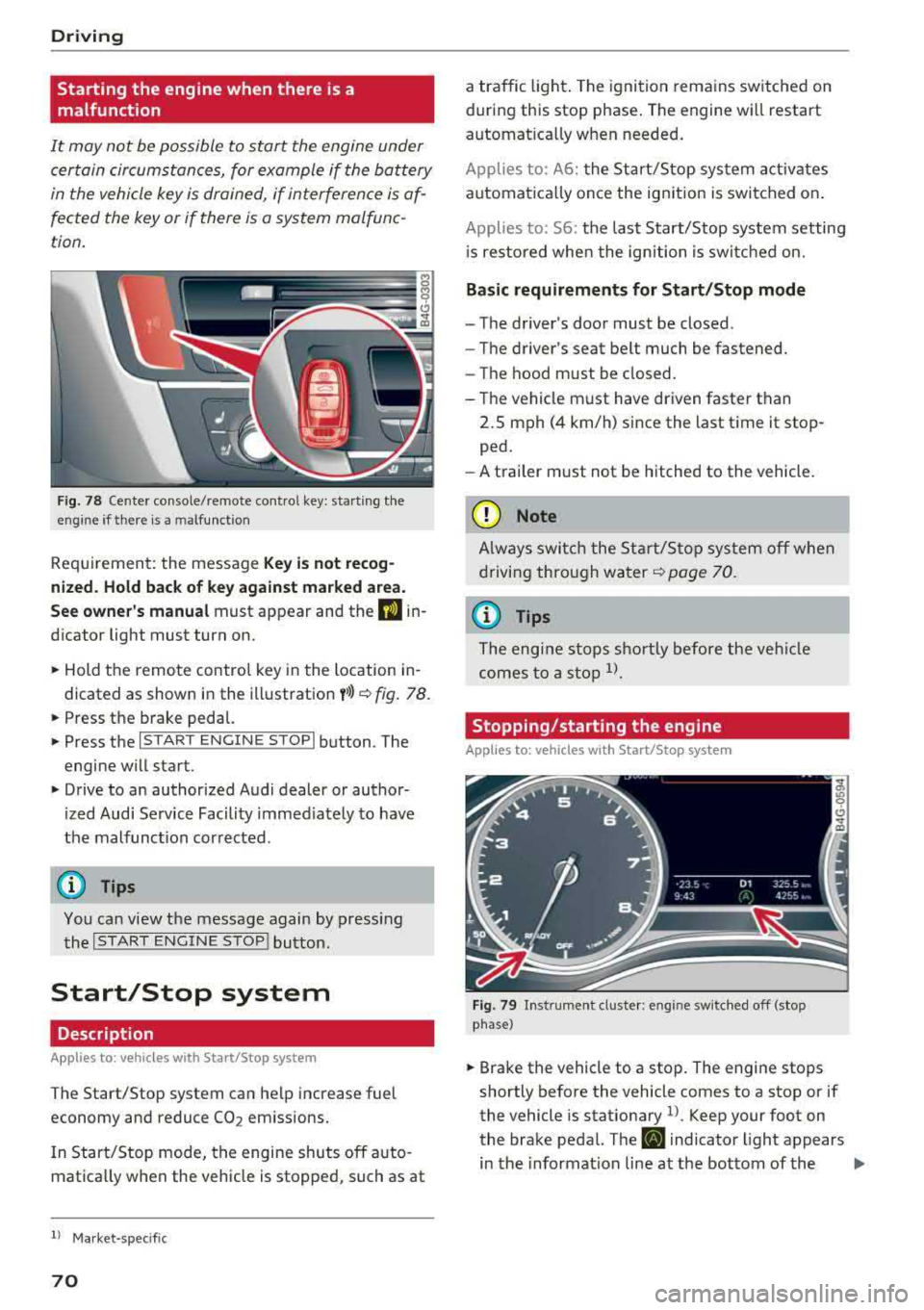
Fig . 78 Cen te r co nsole /rem ote co ntro l key : sta rt ing t he
en gine if th ere is a m alfu nction
Req uiremen t: the messa ge Key i s no t recog
nized . Hold back of key against marked a rea.
See owner's manual
must app ear and the DJ in
dicator light must tu rn on .
,.. Hold the remo te contro l key in the loc ation in
dicated as shown in the illustration
y >l) c::> fig . 78.
,.. Press the b rake pedal.
,.. Press the I S TAR T ENGINE STOPI button . The
engine will start.
,.. Drive to an authorized Audi dealer or author
ized Audi Service Facility immed iately to have
the malfunc tion cor rected .
(D Tips
You can view the message again by pressing
the
I START ENGINE STOP ! button.
Start/Stop system
Description
Applies to: veh icles with Sta rt/Stop system
The Start/Stop system can help increase fuel
economy and reduce
CO 2 em issions.
I n Start/Stop mode, the engine shuts off a uto
mat ica lly w hen the veh icle is stopped, such as at
ll Ma rket -spe cifi c
70
a traffic light . The ignition remains sw itched on
during this stop phase . The engine wi ll restart
automat ica lly w hen needed .
Applies to: A 6: the Sta rt/Stop system activates
automat ica lly once the ig nition is switched on .
Applies to: 56: the last S tart/Stop system setting
i s re stored whe n the ignition is switc hed on.
Basic requirements for Start/Stop mode
- The driver's doo r must be closed .
- The driver 's seat be lt much be fastened.
- The hood must be closed.
- T he vehicle m ust have driven faster than
2.5 mph (4 km/h) since the last t ime it stop
ped.
- A t railer m ust not be hitched to the vehicle.
(D Note
A lways swi tch the Start/Sto p system o ff whe n
drivi ng thro ugh wa ter
<::> page 70.
(D Tips
The engi ne s tops s hortly before the ve hicle
comes to a sto p
ll.
Stopping/starting the engine
Applies to: vehicles with Start/Stop sys tem
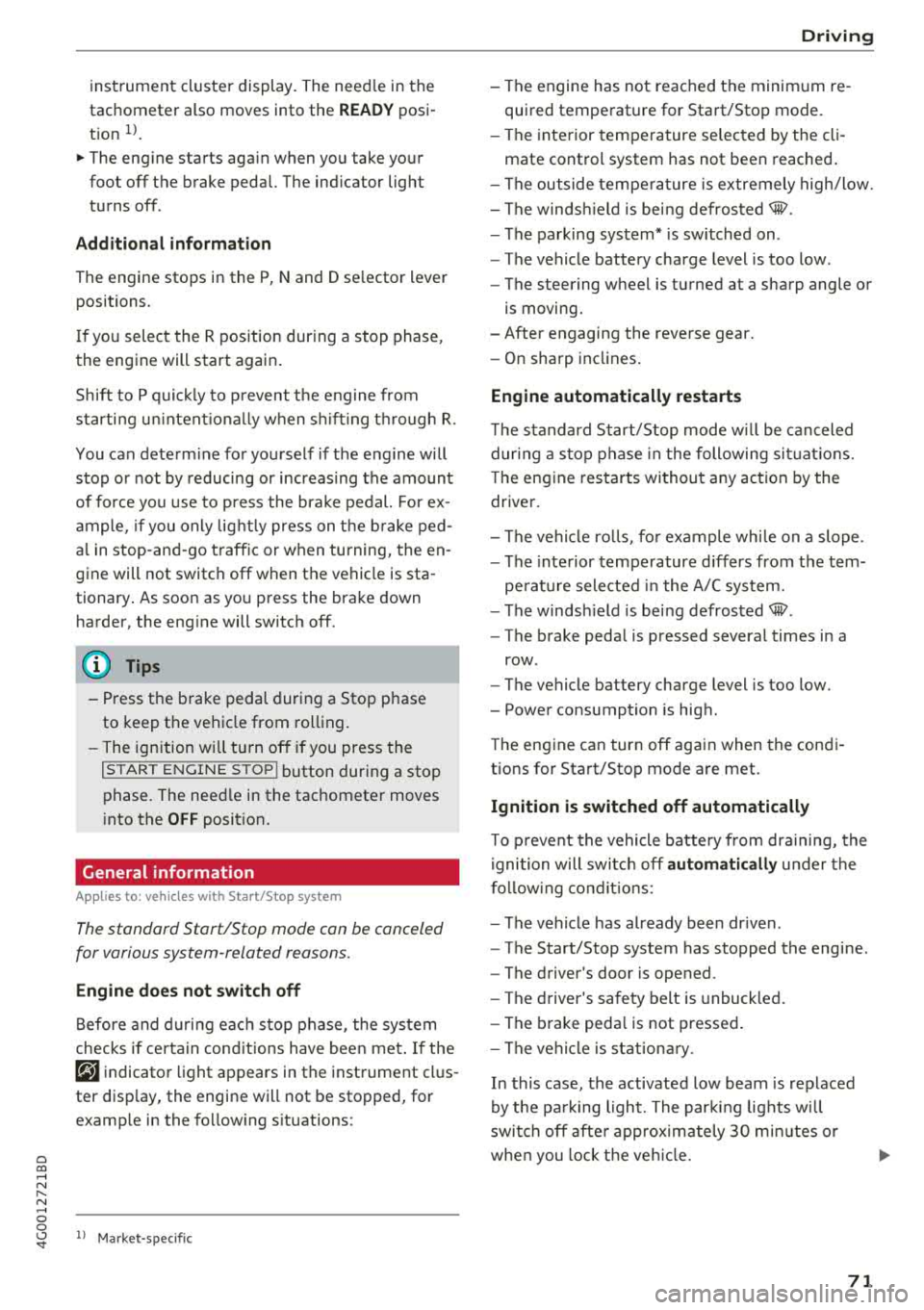
F ig. 79 In str umen t cl uste r: en gin e sw it ch ed off (stop
p hase )
,.. Brake the vehicl e to a stop. The engine stops
shortly before the vehicle comes to a stop or if
the vehicle is stationary
1> . Keep your foot on
the brake pedal. The
D] i ndicator light appears
in the informat ion line at the bottom of the
.,..
Page 73 of 266
a co .... N
" N .... 0 0 \.J '
tachometer also moves into the
READ Y posi
t ion
ll .
~ The eng ine starts aga in when you take your
foot off the brake pedal. The ind icator light
turns off.
Additional inf ormation
The engine stops in the P, N and D se lector lever
positions.
I f you select the R pos ition dur ing a stop phase,
the engine will start again .
Shift to P q uickl y to p revent t he engine from
starti ng u ninten tiona lly w hen s hift ing t hrough R .
You can determ ine for yourself if the eng ine will
stop or not by reducing or increas ing the amount
of force you use to press the bra ke pedal. For ex
ample, if you only lig htly press on t he b rake ped
a l in stop-and -go traff ic or w hen tu rning, the en
gine will not switch
off when the vehicle is sta
tionary . As soon as yo u press the brake down
harder, the eng ine will switch off.
(D Tips
-Press the b rake pedal during a Stop p hase
to keep the ve hicle from rolling.
-The ignition wi ll tu rn off if you press the
I START E NGINE STOP ! button during a stop
phase . The need le in the tachomete r moves
i nto the
OFF position.
General information
App lies to: ve hicles with Start/Stop system
The standard Start/Stop mode can be canceled
for various system-related reasons.
Engine does not switch off
B efore and d urin g e ach stop phase , the system
checks if certa in con ditions have been me t. If the
@j indicator light appears in the instrument cl us
ter disp lay, the engine will not be stopped, for
examp le in the fo llow ing s ituations:
ll Ma rket -specific
Driving
-The engine has not reached the minim um re
quired temperature for Sta rt/Stop mode.
-The interior temperature selec ted by the cli -
mate control system has not been reached .
-The outside tempe ra ture is ex tremely high/low.
-The winds hield is bei ng defros ted® .
-The parking system * is sw itched on .
-The vehicle battery charge level is too low .
-The steering wheel is tu rned at a sharp angle o r
is moving.
-After engaging the reverse gear.
-On sharp inclines .
Engine automatically restarts
The standard Start/S top mode w ill be can celed
dur ing a stop phase in the followi ng si tuatio ns.
T he eng ine restarts wi thout any action by the
driver .
-The vehi cle ro lls, fo r example whi le on a slope .
-The inte rior tempe rature d iffers from t he tem-
pe ra ture selected in the A/C system.
-The winds hield is bei ng defrosted® .
-The brake peda l is pressed severa l times in a
row .
-The vehicle battery charge level is too low.
-Power consumption is high.
T he eng ine can turn off aga in when the cond i
tions for Start/Stop mode are met.
Ignition is switched off automatically
T o p reve nt the vehicle battery from dra ining, the
i gni tion will switc h off
automaticall y under the
f o llow ing co nditions:
-The vehicle has already been dr iven .
-The Start/Stop system has stopped the engine .
-The driver's door is opened .
-The driver's safety belt is unbuckled.
-The brake peda l is not pressed .
-The vehicle is stat ion ary.
In this case, the activated low beam is replaced
by the pa rk ing light. The par kin g lights wi ll
swi tch off afte r approx imately 30 m inutes o r
whe n you lock t he ve hicle.
71
Page 74 of 266
Driving
If the Start/Stop system has not turned of f the
engine or if you have switched the Start/Stop sys
tem off manually, the ignition will not be auto
matically switched off and the engine w ill contin
ue to run
c:> .&. .
A WARNING
To reduce the risk of poisoning, never allow
the engine to run in confined spaces.
(D Tips
If you select the D or N se lector lever position
after shift ing into reverse, the vehicle must
be driven faster than 6 mph (10 km/h) in or
de r for the engine to switch off again .
Manually switching the Start/Stop system
off/on
Applies to: vehicles with Start/Stop system
If you do not wish to use the system, you can
switch it off manually.
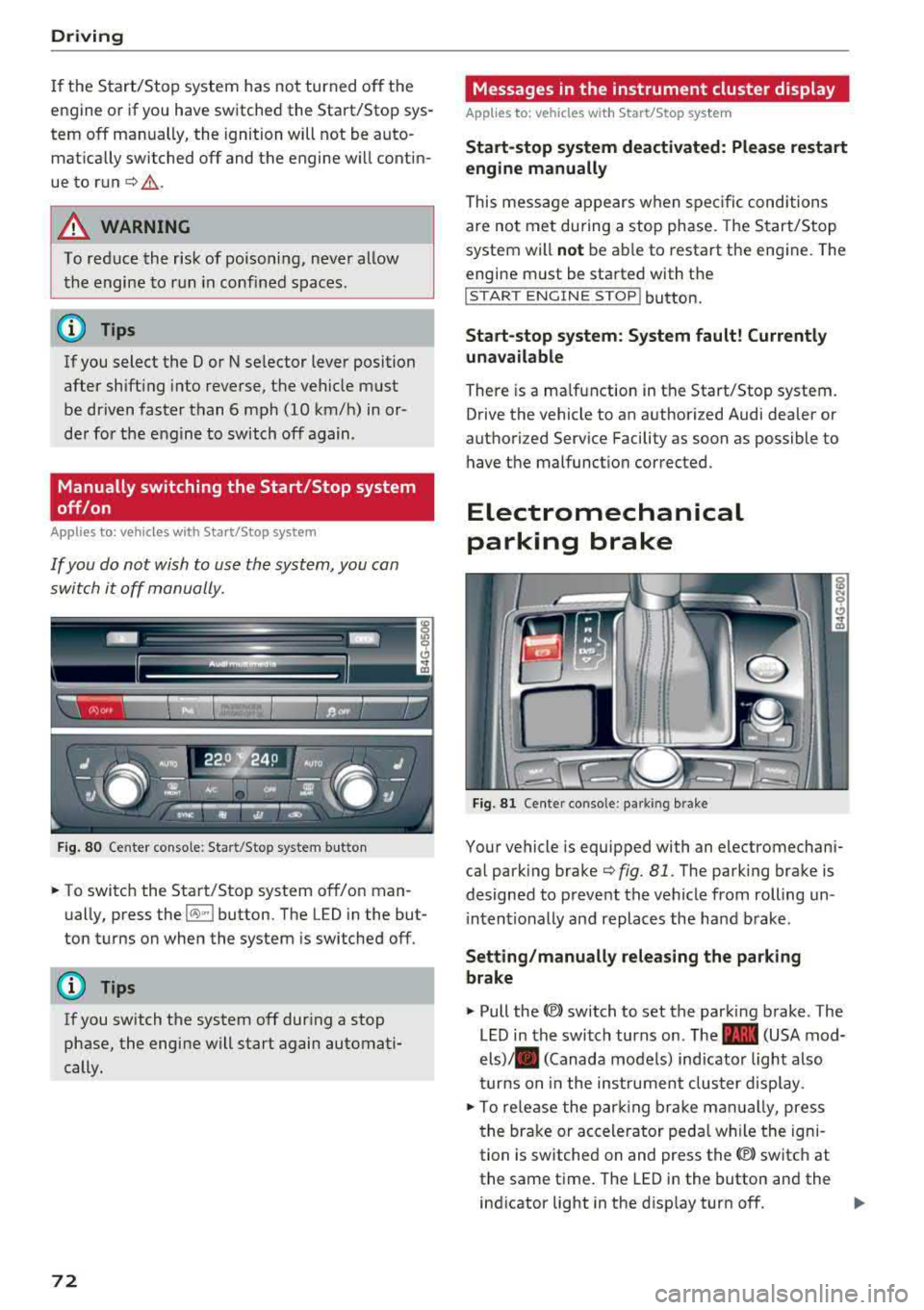
F ig . 80 Center conso le: Start/Stop system button
-
.. To switch the Start/Stop system off/on man
ually, press the
l(>:)ml button. The LED in the but
ton turns on when the system is switched off.
(D Tips
If you switch the system off during a stop
phase, the engine will start again automati
cally.
72
Messages in the instrument cluster display
Applies to: vehicles with Start/Stop system
Start -stop system deact ivated: Please restart
engine manually
This mess age appears when spec ific conditions
are not met during a stop phase. The Start/Stop
system will
not be ab le to restart the engine. The
engine m ust be started with the
!START ENGINE S T OP ! button.
Start -stop system: System fault! Currently
una vailable
There is a malfunction in the Start/Stop system.
Drive the vehicle to an authorized Audi dealer or
authorized Service Facility as soon as possible to have t he malfunction corrected.
Electromechanical
parking brake
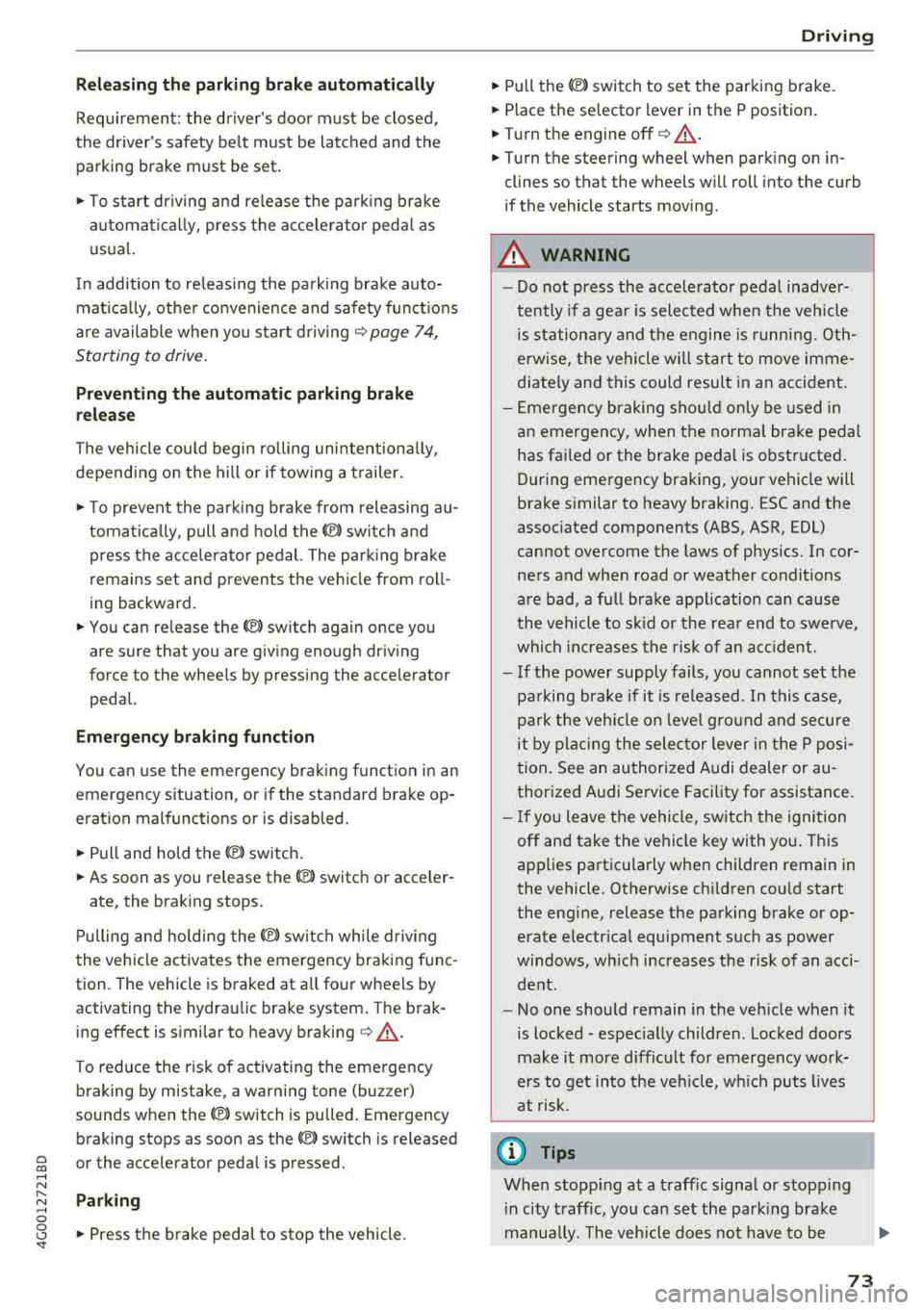
Fi g. 81 Cente r conso le : pa rk in g brake
Your vehicle is equipped with an electromechani
cal park ing brake
c:>fig. 81 . The park ing brake is
designed to prevent the vehicle from rolling un i ntentionally and replaces the hand brake .
Setting/manually releasing the parking
brake
.. Pull the<®> switch to set the parking brake . The
LED in the switch turns on. The
-(USA mod
els)/ . (Canada models) ind icator light also
turns on in the instrumen t cluster display .
.. To re lease the par king br ake man ually, press
the brake or accelerator peda l w hil e the igni
tion is switched on and press the
(®) switch at
the same time. The LED in the button and the
ind icator light in the disp lay turn off.
Page 75 of 266
a co .... N
" N .... 0 0 \,;J '
Requirement: the driver's door must be closed,
the driver's safety belt must be latched and the
parking brake must be set.
.,. To start driving and release the parking brake
automatically, press the accelerator pedal as
usual.
In addition to releasing the parking brake auto
matically, other convenience and safety functions
are available when you start driving
¢page 74,
Starting to drive.
Preventing the automatic parking brake
release
The vehicle could begin rolling unintentionally,
depending on the hill or if towing a trailer.
.,. To prevent the parking brake from releasing au
tomatically, pull and hold
the(®) switch and
press the accelerator pedal. The parking brake
remains set and prevents the vehicle from roll
ing backward.
.,. You can release the C®l switch again once you
are sure that you are giving enough driving
force to the wheels by pressing the accelerator pedal.
Emergency braking function
You can use the emergency braking function in an
emergency situation, or if the standard brake op
eration malfunctions or is disabled.
.,. Pull and hold the®) switch.
.,. As soon as you release the (®) switch or acceler-
ate, the braking stops.
Pulling and holding the
C®) switch while driving
the vehicle activates the emergency braking func
tion. The vehicle is braked at all four wheels by
activating the hydraulic brake system. The brak ing effect is similar to heavy
braking¢&_ .
To reduce the risk of activating the emergency
braking by mistake, a warning tone (buzzer)
sounds when
the®> switch is pulled. Emergency
braking stops as soon as
the®) switch is released
or the accelerator pedal is pressed.
Parking
.,. Press the brake pedal to stop the vehicle.
Driving
.,. Pull the®> switch to set the parking brake .
.,. Place the selector lever in the P position.
.,. Turn the engine off¢&_ .
.,. Turn the steering wheel when parking on in
clines so that the wheels will roll into the curb
if the vehicle starts moving.
A WARNING
-
- Do not press the accelerator pedal inadver
tently if a gear is selected when the vehicle
is stationary and the engine is running. Oth
erwise, the vehicle will start to move imme
diately and this could result in an accident.
- Emergency braking should only be used in
an emergency, when the normal brake pedal
has failed or the brake pedal is obstructed.
During emergency braking, your vehicle will
brake similar to heavy braking. ESC and the
associated components (ABS, ASR, EDL)
cannot overcome the laws of physics . In cor
ners and when road or weather conditions
are bad, a full brake application can cause
the vehicle to skid or the rear end to swerve,
which
increases the risk of an accident.
- If the power supply fails , you cannot set the
parking brake if it is released . In this case,
park the vehicle on level ground and secure
it by placing the selector lever in the P posi
tion. See an authorized Audi dealer or au
thorized Audi Service Facility for assistance.
- If you leave the vehicle, switch the ignition
off and take the vehicle key with you. This
applies particularly when children remain in
the vehicle. Otherwise children could start
the engine, release the parking brake or op
erate electrical equipment such as power
windows, which increases the risk of an acci
dent.
- No one should remain in the vehicle when it
is locked - especially children . Locked doors
make it more difficult for emergency work
ers to get into the vehicle, which puts lives
at risk.
(D Tips
When stopping at a traffic signal or stopping
in city traffic, you can set the parking brake
manually . The vehicle does not have to be
73
Page 76 of 266
Drivin g
held with the br ake pedal. T he parking brake
eliminates the tendency to creep when a se
lector lever pos ition is engaged . As soon as
you press the accelerator pedal, the park ing
brake releases automat ically and your vehicle
starts to move
¢ page 74 .
(D Tips
- Occasiona l noises when the parking brake is
set and re leased are normal and are not a
cause for concern .
- The park ing brake goes through a se lf-test
cycle at regular intervals when the veh icle is
stopped . Any noises associated w ith this are
no rmal.
- If there is a power fa ilure, the parking brake
will not set if it is released, and it will not r elease if it is
set¢ &. See an authorized
A udi dealer or authori zed Audi Servi ce Fa
cility for ass istance.
Starting to drive
Va rio us conven ience and safety fu nctions may be
av aila ble when the vehicle begins d riv in g, de
pending on vehicle eq uipment.
Starting on hills with the parking brak e set
Requ irement: the dr iver's door must be closed
and the dr iver's safety be lt must be fastened .
.. To start driving comfortab ly when on a hill , se t
the parking brake and begin dr iv ing as usual.
T he brak ing force of the park ing brake does not
re lease automatically until t he wheels b uild up
eno ugh dr iv ing fo rce .
Starting on hills with hill hold assist
Hill hold ass ist makes it eas ier to start on hills.
Req uirement: the driver 's door must be closed
and the eng ine must be r unning.
.. T o activate hill hold assist, press an d hold the
brake peda l for seve ral seconds. The ve hicle
must be in an up hill direction of travel.
Afte r releasing the br ake pe dal, the br aking pow
er is ma intained for a brie f
moment¢ A to p re
vent the vehicle from rolling back when starting .
74
During this time, you can easily begin to move
yo ur vehicle .
A WARNING
Applies to: ve hicles with hill hold assist
- If you do not beg in driving immed iate ly or
the engine stalls after releasing the brake
pedal, your veh icle may beg in to roll back
ward. Press the bra ke peda l or se t the park
ing b rake immedi ately.
- The inte lligent technology of hill ho ld assist
cannot ove rcome the limitat ions imposed by
natural phys ica l laws. The increased com fort
offered by hill hold assist should not cause
you to take safety risks.
- Hill hold ass ist cannot hold the vehicle in
place on all hills (for examp le, if the ground
is s lippery or icy).
- To reduce the risk o f an accident, always
make sure the vehicle is situated safely
while stationary.
Automatic transmission
Introduction
The au tomatic transmissio n is controlled elec
t ronically. The transmission shifts up or down au
tomat ic al ly depen ding on which dr ive p rogr am is
selected .
When a
moderate driving sty le is used, the
t ransm iss ion selects the mos t econom ica l dr iv ing
mode. The tra nsmission upshi fts at a lowe r RPM
and downs hifts a t a higher RPM to improve fue l
efficiency.
The transmission sw itc hes to a sporty mode after
a kick- down o r when the dr iver uses a
s porty
dri ving style
characterized by quick acce lerato r
pedal movements, heavy acceleration, frequent
c h anges in sp eed and t raveling at the maximum
speed .
I f desired, t he driver can also selec t the gears
manually (tipt ronic mode ) ¢ page 78.
Applies to: vehicles wit h S t ronic transmiss ion
The S tron ic is a d ua l- cl utc h t ran smission. Power
i s transfer red using two clutches that work inde -
pendent ly from one another . They rep lace the
..,_
Page 77 of 266
a co ,...,
N
" N ,...,
0 0 \,;J '
transmissions and allow the vehicle to accelerate without a noticeab le interruption in tract ion .
Appl ies to: veh icles wit h a t iptro nic tra nsm iss io n
Power is transferred using a torque converter .
Selector lever positions
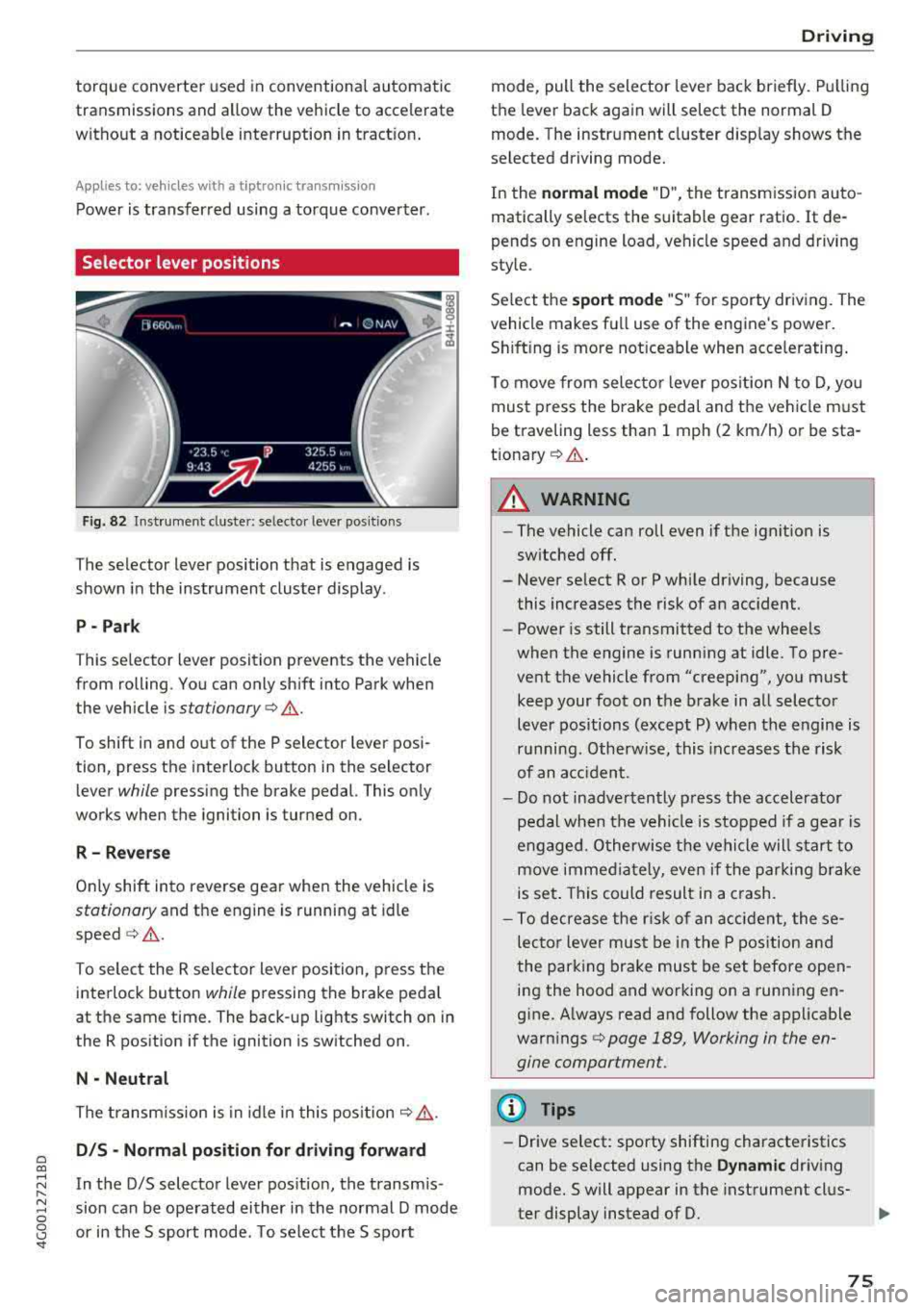
Fig. 82 Instrument cluste r: se lecto r leve r po sition s
The selector lever position that is engaged is
shown in the instrument cluster display .
P- Park
T his selector l ev er position prevents the vehicle
from rolling. You can only sh ift into Park when
the vehicle is
stationary ¢.&. .
To shift in and out of the P selector lever posi
tion, press the interlock button in the selector
lever
while pressing the brake pedal. This only
works when the ignition is turned on.
R - R everse
Only shift into reverse gea r when the vehicle is
stationary and the engine is running at idle
speed ¢.&. .
To select the R se lector lever position, press t he
interlock button
while pressing the brake peda l
at the same time. The back-up lights switch on in
the R position if the ignition is switched on .
N -Neutral
The transm iss ion is in idle in this pos it ion ¢,&. .
DIS -Normal pos iti on for d riv ing forward
In the D/S selector lever pos ition, the transm is
sion can be ope rated either in the normal D mode
or in the S sport mode . T o select the S sport
D rivi ng
mode, pull the selector lever back briefly. Pulling
the lever back again will select the normal D
mode. The instrument cluster d isp lay shows the
selected driving mode.
In the
n o rmal mode "D", the transmission auto
matically selects the suitable gear ratio .
It de
pends on engine load, vehicle speed and driving
style.
Se lect the
sport mode "S " for sporty driving. The
vehicle makes fu ll use of the engine's power.
Sh ift ing is more not iceable when accelerating .
To move from selecto r lever pos ition N to D, you
must press the brake pedal and the vehicle must
be traveling less than 1 mph (2 km/h) or be sta
t ionary ¢.&. .
A WARNING
----
-The vehicle can roll even if the ignition is
sw itched off.
- Never se lect R or P while driving, because
this increases the risk of an accident.
- Power is still transmitted to the wheels
when the engine is running at idle . To pre
vent the vehicle from "creeping", you must keep your foot on the b rake in all selector
lever positions (except P) when the engine is
r u nning. Otherwise, this inc reases the risk
of an acc ident.
- Do not inadvertently p ress the accelerator
pedal when the vehicle is stopped if a gea r is
engaged. O therwise the ve hicle will start to
move immed iate ly, even if the parking brake
is set . This could result in a crash.
- To decrease the r is k of an accident, these
lecto r lever mus t be in the P pos ition and
the parking brake must be set before open
ing the hood and working on a running en
g ine. A lways read and follow the applicable
warn ings
¢ page 189, Working in the en
gine compartment.
(D Tips
- Drive select : sporty shifting characteristics
can be se lected using the
Dynamic driv ing
mode.Swill appear in the instrument clus
ter display instead of D.
75
Page 78 of 266
Driving
-If you accidenta lly select N while driving,
take your foot off the accelerator pedal and
wait for the engine to s low down to idle be
fore selecting D/5.
- If there is a power fa ilure, the selecto r lever
will not
move out of the P pos it ion. T he
emergency release can be used if this hap
pens
¢ page 80.
Selector lever lock
The selector lever lock prevents you from select
ing a gear accidentally, causing the vehicle to
roll.
( )
_-I
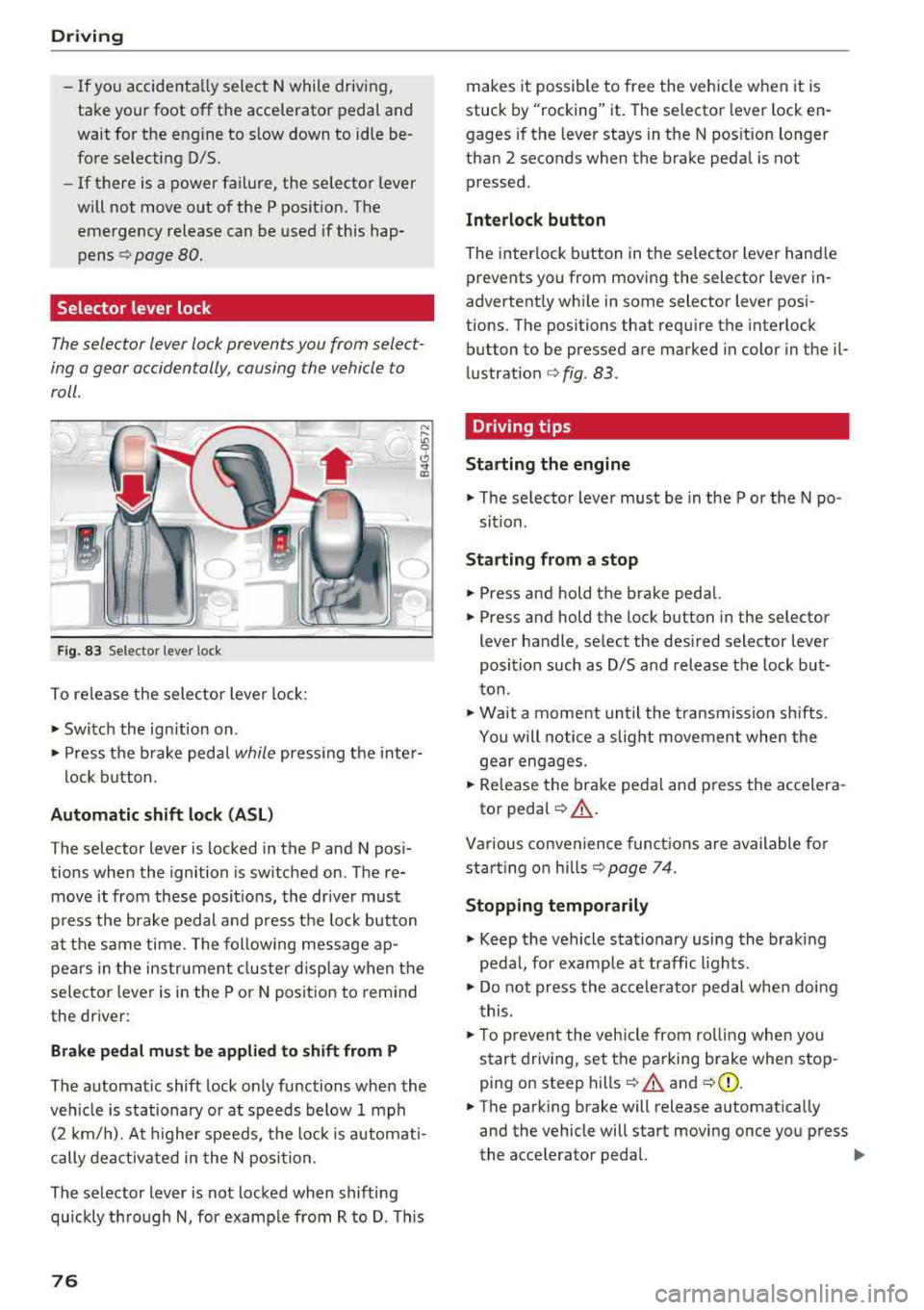
F ig. 8 3 Selector lever loc k
To release the selector leve r lock:
• Switc h the ign ition on.
• P ress t he b rake peda l while pressing t he in te r-
l ock button.
Automatic shift lock (ASL)
The se lector lever is locked in the P and N pos i
tions whe n the ignition is sw itched on . T he re
move it from these posit ions, the drive r mus t
p ress the bra ke pedal and press the lock button
a t the s ame ti me. The following me ssage ap
pears in the instr ument clus ter d isp lay when the
selec to r l eve r is i n the P or N posit io n to remind
the dr iver:
Brake pedal must be applied to shift from P
The automat ic shift lock only functions when the
ve hicl e is stationary or at speeds below 1 mph
(2 km/ h). A t higher speeds, the lock is automat i
cally dea ctivate d in t he N posi tion.
The se lector lever is not locked when shifting
qu ickly th ro u gh
N, for examp le from R to D. This
76
makes it possible to free the vehicle when it is
stuck by "rocking" it. The selecto r lever lock en
gages if the leve r stays in the N pos ition longer
than 2 seconds when the brake peda l is not
pressed.
Interlock button
The inter lock button in the selec to r l ever hand le
prevents you from mov ing the selector leve r in
advertent ly wh ile in some selector lever posi
t ions. The positions that req uire the interlock
button to be pressed a re marked in color in the il
l ustratio n
¢ fig. 83.
Driving tips
Starting the engine
• T he se lector lever must be in the P o r the N po
si tion.
Starting from a stop
• Press and hold the brake peda l.
• Press and hold the lock b utton in the selector
lever handle, se lect the desi red selector lever
position such as D/S a nd release t he lock but
ton.
• Wa it a mo ment un til the transmission sh ifts.
You will notice a slig ht movemen t whe n the
ge ar engages.
• Rele ase the bra ke peda l an d press the ac cele ra-
to r
peda l¢ ,&. .
Various convenience funct ions a re available f or
st arti ng o n hill s
¢ page 74.
Stopping temporarily
• Keep the vehicle sta tionary using the braki ng
pe dal, for examp le a t traffic ligh ts.
• Do not press the a cce lera to r ped al whe n doi ng
t his.
• T o preven t the veh icle from ro lli ng when yo u
s tar t drivi ng, set t he parking brake when
stop
ping on steep hills ¢ A and ¢(D.
• The parking brake will release a utomat ica lly
and the vehicle will start moving once yo u press
the acce lerator pedal.
..,.
Page 80 of 266
Driving
On vehicles with a cruise control system*
¢ page 84, hill descent control is also activated
when the speed is set.
A WARNING
Hill descent control cannot overcome physical
limitations, so it may not be able to maintain
a constant speed under all condit ions. Always
be ready to apply the brakes.
Shifting manually (tiptronic mode)
The tiptronic mode allows the driver to shift the
gears manually.
)
r
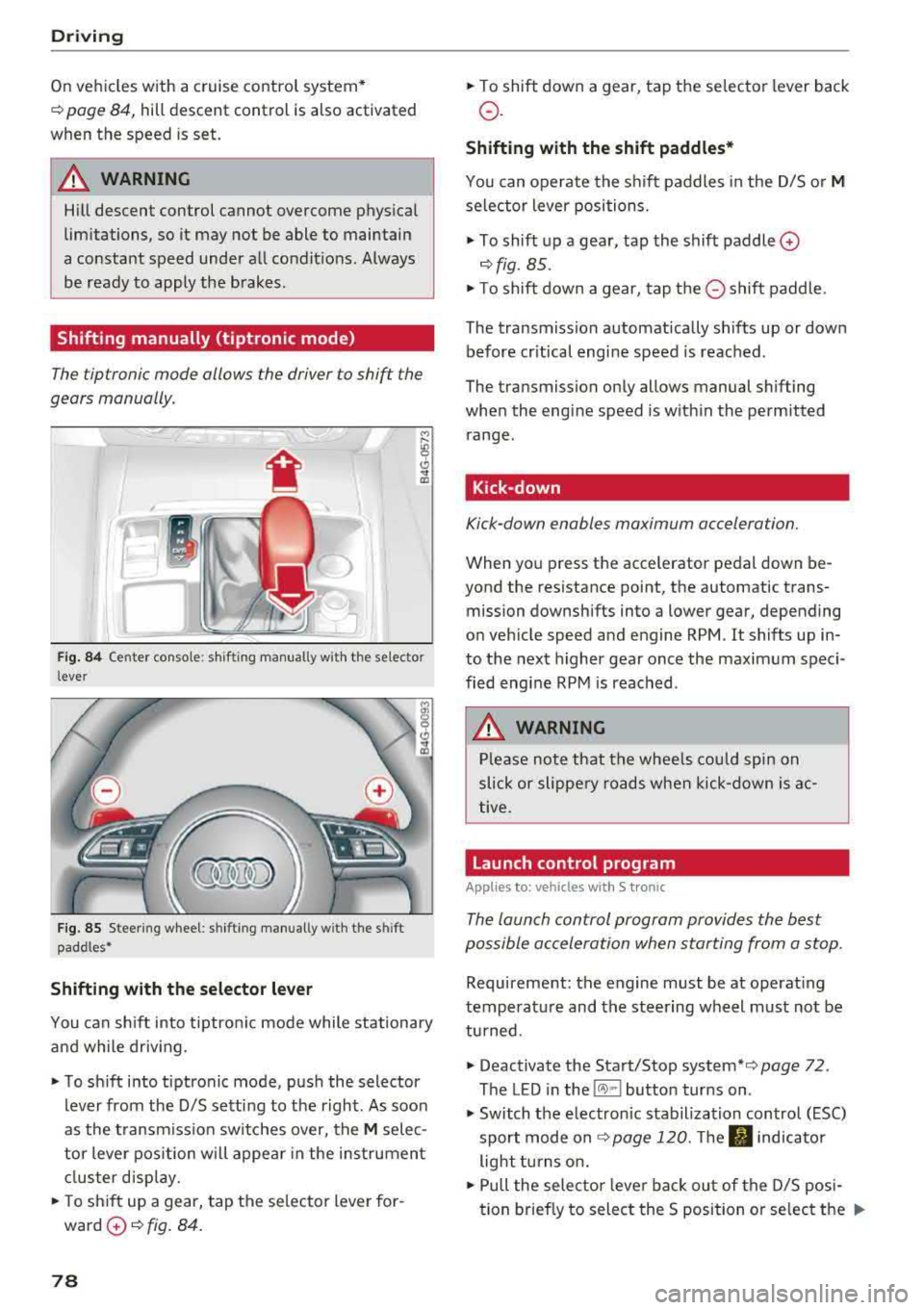
Fig. 84 Center console : sh ifting manual ly w ith the se lector
l ever
F ig. 85 Stee ring wheel: shifting manually w ith t he s hift
paddles*
Shifting with the selector lever
You can shift into tiptronic mode while stationary
and while driv ing .
"To shift into tiptronic mode, push the selector
lever from the 0/5 sett ing to the right. As soon
as the transmission switches over, the
M selec
tor lever position will appear in the instrument
cluster disp lay.
.. To sh ift up a gear, tap the se lector lever for
ward
0 ¢ fig. 84.
78
" To shift down a gear, tap the selector lever back
o.
Shifting with the shift paddles*
You can operate the shift paddles in the 0/5 or M
selector lever positions.
" To shift up a gear, tap the shift paddle 0
¢ fig . 85 .
"T o shift down a gear, tap the 0 shift paddle.
The transmission automatically shifts up or down before cr itical engine speed is reached .
The transmission only allows manual shifting
when the engine speed is w ithin the permitted
range.
Kick-down
Kick-down enables maximum acceleration.
When you press the accelerator pedal down be
yond the resistance point, the automatic trans
mission downshifts into a lower gear, depending
on vehicle speed and engine RPM . It shifts up in
to the next higher gear once the maximum speci
fied engine RPM is reached.
A WARNING
Please note that the whee ls could spin on
slick or slippery roads when kick-down is ac
tive .
Launch control program
Applies to: vehicles with S tronic
-
The launch control program provides the best
possible acceleration when starting from a stop .
Requirement: the engine must be at operating
temperature and the steering wheel must not be
turned.
.. Deactivate the Start/Stop system* ¢ page 72.
The LED in the
l(A) ~l button turns on .
" Switch the electronic stabilization control (ESC)
sport mode
on ¢ page 120. The fl indicator
light turns on.
" Pull the selecto r lever bac k out of the 0/5 posi
tion brief ly to select the S position or select the
..,.
Page 86 of 266
Ass is tance sy stem s
Assistance systems
Speed warning system
Description
Applies to: veh icles with speed warning system
The speed warning system helps you to stay un
der a specified maximum speed.
The speed warning system warns you if you are
exceeding the maximum speed that you have set.
A warning tone will sound as soon as your speed
exceeds the sto red value slightly.
The . (USA models) I. (Canada models) indi
cator light and a message appear in the instru
ment cluster display at the same time.
The.
• indicator light and the message turn off if the
speed falls back below the stored maximum
speed.
Sett ing a threshold is recommended if you would
like to be reminded when you reach a certa in
maximum speed. S ituations where you may want
to do so i nclude driving in a country wit h a ge ne r
a l speed limit o r if the re is a specified maximum
speed for winter tires.
Setting the warning threshold
The warning threshold is set in the Infotainment
system.
• Se lect: the ICARI function button> (Car )* Sys
tems
control button > Driver assistan ce >
Spe ed warning .
(D Tips
Regardless of the speed warning system, you
should always monitor your speed using the
speedometer and make sure you are following
the legal speed limit.
84
Cruise control system
Switching on
Applies to: vehicles with cruise control system
The cruise control system makes it possible to
drive at a constant speed starting at 20 mph (30
km/h).
0
f
~
0
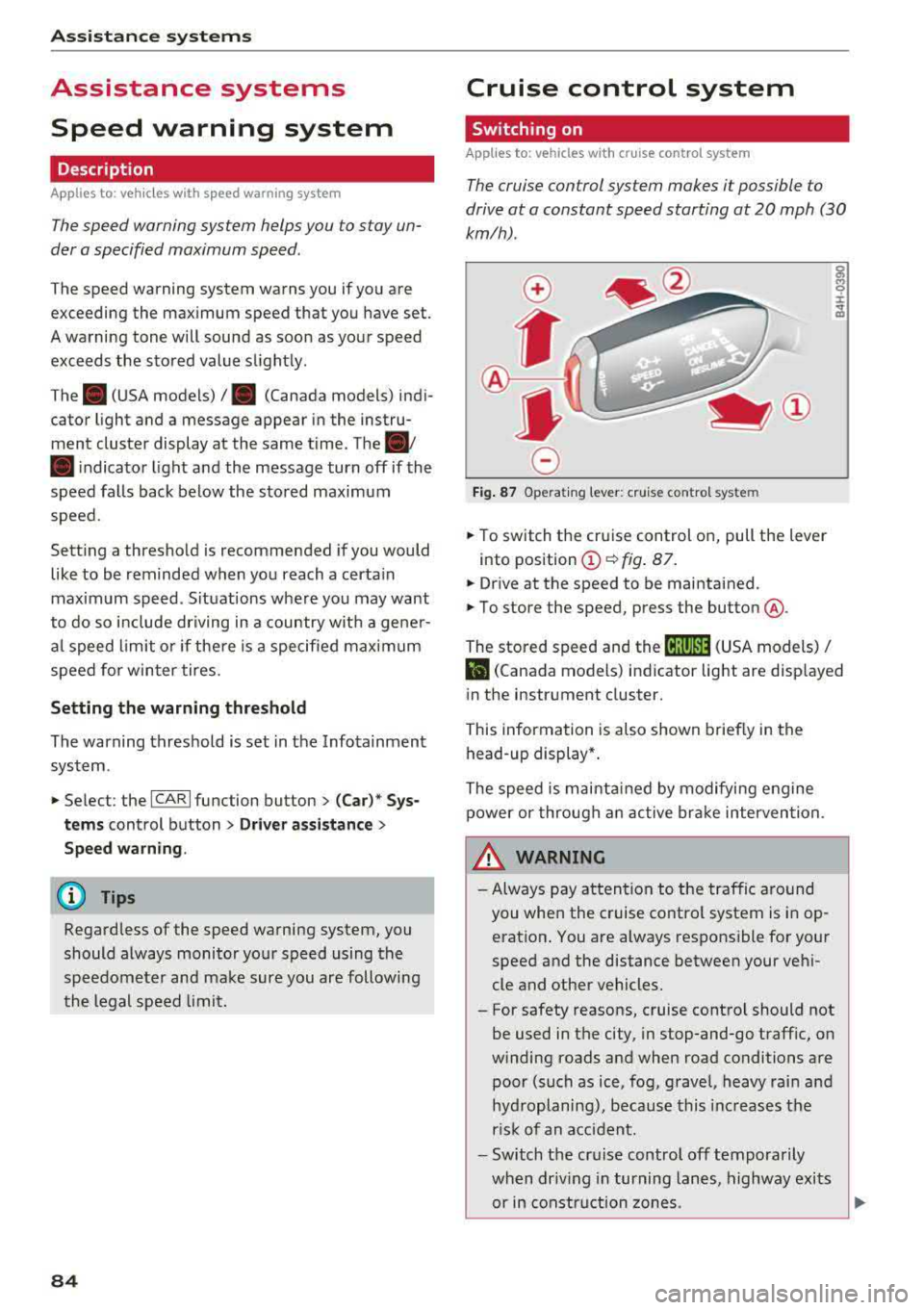
F ig . 8 7 Operat ing lever: c ruise control system
• To switch t he cru ise control o n, pull the lever
into position
(D ~ fig. 87 .
• Drive at the speed to be maintained.
• To store the speed, press the button @.
The stored speed and the
( ij;\1)~14 (USA models) /
l'I (Canada models) ind icator lig ht are disp layed
in the instrument cluster.
This information is also shown briefly in the
head -up display* .
The speed is mainta ined by modifying engine
power or through a n active br ake interven tion.
~ WARNING
-Always pay at tentio n to the traffic around
you when the cruise contro l system is in op
eration . You are always respons ible for your
speed and the distance between your ve hi
cle and other vehicles.
-For safety reasons, cruise control should not
be used in the city, in stop-and-go traff ic, on
winding roads and when road conditions are poor (such as ice, fog, gravel, heavy rai n and
hyd roplaning), because this inc reases the
r is k of an accident.
-Switch the cr uise control off temporarily
when dr iv ing in turning lanes, highway exits
or in constr uction zones.
-
Page 89 of 266

a co .... N
" N .... 0 0 \,;J '
A WARNING
Always pay attention to traffic when adaptive
cruise control is switched on and braking
guard is active . As the driver, you are still re
sponsible for starting and for maintaining
speed and distance to other objects. Braking
guard is used to assist you . The driver must
always take action to avoid a collision. The
driver is always responsible for braking at the
correct time.
- For safety reasons, do not use adaptive
cruise control when driving on roads with
many curves, when the road surface is in
poor condition and/or in bad weather (such
as ice, fog, gravel, heavy rain and hydroplan
ing). Using the system under these condi
tions increases the risk of an accident.
- Switch adaptive cruise control off tempora
rily when driving in turning lanes, on ex
pressway exits or in construction zones. This
prevents the vehicle from accelerating to
the stored speed when in these situations .
- The adaptive cruise control system will not
brake by itself if you put your foot on the ac
celerator pedal. Doing so can override the
speed and distance regulation.
- When approaching stationary objects such
as stopped traffic, adaptive cruise control
will not respond and braking guard will have limited function.
- The adaptive cruise control system and
braking guard do not react to people, ani
mals, objects crossing the road or oncoming
objects.
- The function of the radar sensors can be af
fected by reflective objects such as guard
rails, the entrance to a tunnel, heavy rain or
ice.
A WARNING
- Improper use of adaptive cruise control can
cause collisions, other accidents and serious
personal injury.
- Never let the comfort and convenience that
adaptive cruise control and braking guard
Assistance systems
offer distract you from the need to be alert
to traffic conditions and the need to remain
in full control of your vehicle at all times,
- Always remember that the adaptive cruise
control and braking guard have limits -they
will not slow the vehicle down or maintain
the set distance when you drive towards an
obstacle or something on or near the road
that is not moving, such as vehicles stopped
in a traffic jam, a stalled or disabled vehicle.
If registered by the radar sensors, vehicles
or obstacles that are not moving can trigger
a collision warning and if confirmed by the
video camera, an acute collision warning.
- Never follow a vehicle so closely that you
cannot stop your vehicle safely. The adap
tive cruise control cannot slow or brake the
vehicle safely when you follow another vehi cle too closely. Always remember that the
automatic braking function cannot bring the
vehicle to a sudden or emergency stop un
der these conditions .
- To prevent unintended operation, always
switch ACC off when it is not being used .
@ Note
The sensors can be displaced by impacts or
damage to the bumper, wheel housing and underbody . That could affect the adaptive
cruise control system and braking guard .
Have an authorized Audi dealer or authorized
Audi Service Facility check their function.
(D Tips
For an explanation on conformity with the
FCC regulations in the United States and the
Industry Canada regulations, see
¢page 250.
87