stop start AUDI A6 2018 Owner's Manual
[x] Cancel search | Manufacturer: AUDI, Model Year: 2018, Model line: A6, Model: AUDI A6 2018Pages: 266, PDF Size: 41.38 MB
Page 92 of 266

Ass is tance sy stem s
Driving manually
.,. Tap the acce lerato r pedal, o r
.,. pull the lever toward you into position @.
(D Tips
If an obstacle is detected whe n your veh icle
starts moving, the driver intervention request
appears
¢ page 91. Your vehicle will drive
more s low ly when starting. This may also
happen in some situations when there is no
apparent obstacle.
Interrupting cruise control
App lies to: veh icles with Audi adaptive cruise control
Fig . 95 S ele ctor leve r
Req uirement: adaptiv e cruis e control must be
sw itched on.
Overriding cruise control
.,. T o accelerate manually , p ull the lever toward
you into position @and ho ld it the re . T he mes
sage
ACC : over ride appears. Or
.,. Press the accelerator pedal.
.,. T o resume cru ise control, release the lever or
take your foot off the accelerator pedal.
Canceling c ruise contr ol while driving
.,. Move the lever into posit ion @. The message
AC C: standby appears . Or
.,. Press the brake pedal.
.,. T o resume the stored speed, move the lever in
to position
@ .
Canceling crui se contr ol when stopped
.,. Push the lever away from you into position @.
The message
ACC: standby appea rs.
90
.,. To resume c ruise contro l, press the brake peda l
and pull the lever toward you into position @ .
A WARNING
It is dangerous to activate cruise control and
resume the stored speed when the current
road , traffic or weather conditions do not per
mit this . This increases the risk of an accident .
· Setting the distance
Applies to: vehicles with Audi adapt ive c ruise control
Fig. 96 Operat ing lever: settin g th e d ista nce
.,. T ap the switch to display the current set dis
tance
c> fig . 96.
N a, N 9 ::c
~
.,. To increase or reduce the dis tance in incre
ments, tap the sw itch again to the r ight or left .
The d istance between the two vehicles will
change in the instrumen t cluster display .
When app roaching an object ahead, the adaptive
c ruise contro l system brakes to match that speed
and then adjusts to the set distance . If the object
ahead ac celerates, adaptive c ruise co ntro l w ill al
so ac ce lerate up to the stored speed .
The higher the speed, the greater the distance in meters
c> ,&. . The Distance 3 setting is recom
mended. That is equa l to the general recommen
da tion of
" hal f the speed shown on the speedom
ete r" .
The distances provided a re spec ified values . De
pending on the driv ing s ituation and the way the
ob je ct ahe ad is dr iv ing, the actual dist ance may
be more or less than these ta rget distan ces .
The var ious symbols for the time inc rements ap
pears briefly in the info rmation line @
¢ page 88, fig . 93 when you change the settings. II>
Page 95 of 266

a co .... N
" N .... 0 0 \.J '
the ris k of damage or i njury.
Settings in the Infotainment system
Applies to: vehicles with Audi adaptive cruise control
~ Select : the ICARI function button > ( Car )* Sys
tems
control button > Driver assistance > Audi
braking guard .
System -
switch the brak ing guard On /Off. When
you switch the ign it ion on, the message
B raking
guard: Off
appears if the sys tem is switched off .
Early warning -the distance and approach warn
ings in the display can be switched
On /Off .
(D Tips
-You r settings are automatically stored and
assigned to the remote contro l key being
u sed .
-If yo u rest rict or sw itch off the ESC, t he
bra king gua rd also sw itches itself off
c> page 120.
-Switc h braking guard off w hen yo u are load
i ng t he ve hicle onto a vehicle ca rr ier, t rain,
s hi p or other type o f transportation . This
ca n prevent undesired warnings from the
braking guard system .
Messages
Applies to: vehicles with Audi adaptive cruise control
Braking guard: Off
This message appears if the system is switched
off through the Infota inme nt system . Otherwise,
if the system is turned off, the information ap
pea rs every time shortly after the start of the
tr ip.
The message also appears if the system is not
ava ilable d ue to a malfunct io n or if the ESC is
sw itched off
c> page 120 . If this is the case, the
sys tem w ill not prov ide warnings about a possi
b le co llision.
Braking guard: engaged
This message appea rs if a sharp brake press ure
was applied due to an acute wa rning.
A ss istance systems
ACC: Unavailable!
ACC and Audi braking guard: Unavailable
The system cannot guarantee that it will detect objects correctly and is sw itched off . The sensors
have been moved or are faulty . Th e p re sense
funct ions may a lso be affec ted . D rive to an au
tho riz ed Au di dealer or author ized Audi Serv ice
F aci lity immed iate ly to have the ma lfunction co r
r ected .
ACC: Currently unavailable. No sensor vision
A CC and Audi braking guard: Currently unavail
able. No sensor vision
This message appears if the sensor v iew is ob
structed, for examp le by leaves, snow, heavy
spray or dirt . Clean the sensors
c> page 86 ,
fig . 89 .
AC C: Currently unavailable . Gradient too steep
T he road exceeds the maxim um poss ible angle
fo r safe adaptive c ruise contro l operation . Adap
tive cruise control is switched off.
ACC : Only available in D , Sor M
Select t he "D/S" or "M" se lecto r lever position .
ACC: Currently unavailable . Parking brake ap
plied
T he adaptive cr uise cont rol system switches off
automat ica lly if the parking brake is set.
ACC: Currently unavailable . Stability control
( ESC ) input.
This message appears if the e lectro nic s tabiliza
t io n c ontrol ( ES C) is tak ing a ct ion to s tabili ze the
vehicle. In t his case, adaptive cruise contro l
switches off automatically.
ACC off : Manual control!
Th is message appears when adaptive c ruise co n
t rol cannot set the parking brake . P ress the brake
peda l to prevent the veh icle from ro lling.
• ••
T hree white dots appear if a setting cannot be se
l ected w ith the operating lever. For example, this
happens if adapt ive cru ise control cannot sta rt
driv ing automat ica lly in stop-and-go traff ic
93
Page 118 of 266

Parking systems
,.. Turn the Infotainment system on and shift into
reverse gear. The parking system must be
turned on and the
Cross parking view must be
displayed .
,.. Press the control button on the Infotainment
unit(D ¢page 111, fig . 122 . The Parallel park
ing
view is displayed.
,.. Back up and align your vehicle so the b lue area
@ borders on the rear end of the vehicle be
hind you or on the parking space line
¢_& in
General information on page 112, ¢(D in Gen
eral information on page 112.
The blue area
represents an extension of the vehicle's outline
by approximately 16 ft (5 meters) to the rear .
The long side of the blue area should be on the
curb . The entire blue area must fit into the
parking space.
,.. With the veh icle stopped, turn the steer ing
wheel to the right as far as it w ill go .
,.. Back into the parking space until the blue curve
¢ page 111, fig . 123 to uch es the curb¢ _& in
General information on page 112,
¢ (D in Gen
eral information on page 112 .
Stop the vehicle.
,.. With the vehicle stopped, turn the steering
whee l to the left as far as it will go.
,.. Continue to back into the parking space until
the vehicle is parked parallel to the
curb¢ .&.
in General information on page 112, ¢(D in
General information on page 112. @ repre
sents the rear bumper. At the very latest, stop
the vehicle when the red orientation line ©
borders an object . Keep an eye on the front of
your vehicle while doing this .
Parking next to obstacles
If there is an obstacle (such as a wall) next to the
parking space, position the vehicle so there is
mo re space on that side. Position the long side of
the blue area so that there is sufficient space
from the object. The area must not be on the
curb . You will a lso need to start turning the
steer ing whee l earlier. The blue curve
¢ page 111, fig. 123 must not touch the obsta
cle, but rather there should be enough distance.
116
@ Tips
The left or right orientation lines and surfaces
will be disp layed, depending on the turn s ig
nal being used.
Trailer mode
Applies to: vehicles wit h peripheral ca meras a nd tra iler hitch
This view assists you in positioning the vehicle in
front of a trailer .
Fig. 136 Infotainment system: rea r m ode
Requirement: the trailer mode must be selected
¢page 114.
,.. Now you can posit ion your veh icle in front of
the trailer
¢ .&. in General information on
page 112,
¢ @ in General information on
page 112.
The orange orientation line indicates
the expected path toward the trailer h itch. Use
the blue lines to help you estimate the d istance
to the trailer h itch .
Setting the mode
App lies to: vehicles with peripheral ca meras
,.. Select: !CAR ! function button > (Car)* Systems
control button > Driver assistance > Parking
aid
> Change to front/rear > Auto or Manual.
Auto
-this view behind the vehicle (Rear mode) is
displayed automatically when you shift into re
verse. This view in front of the vehicle
( Front
mode) is displayed automatically when you shift
into the forward gears.
Manual -When you switch the system on, the
view behind the vehicle
( Rear mode) is always
displayed and it does not switch to the
Front
mode when a forward gear is selected.
Page 124 of 266

Intellig ent T echn olo gy
- If the front spoiler is damaged or you insta ll
another spoiler, make sure the front wheel
brakes are venti lated properly. Otherwise,
the brake system could overheat, wh ich re
duces the ir effectiveness .
- Failure of a brake circuit impairs braking
performance, which increases brak ing dis
tance. Avoid driving the vehicle and have it
towed it to the nearest author ized Audi
dealer or author ized A udi Se rvice Fac il ity.
- If the brake booster is not working, you will
have to press muc h ha rde r on the bra ke
peda l to compe nsate for the lack of the
booste r.
0 Note
- Neve r let the brakes "rub" by press ing the
pedal light ly when bra kin g is not actually
ne cessa ry. Th is ca u ses the brakes to over
hea t an d increases bra king d istance and
causes wear.
- B efo re dr iv ing downh ill a long distance on a
steep hi ll, de crease your speed and se lec t a
l ower gear . This makes use of the engine
braking effect and relieves the brakes . If
you need to brake additionally, brake in in
tervals and not continuously.
(D Tips
- If the brake booster is not working, you
must press the brake pedal with much more
force than normal.
- If you retrofit your vehicle with a front spoil
er, whee l covers or s imilar items, make sure
that the a ir flow to the front whee ls is not
i nterrupted. Otherw ise the brake system
can become too hot .
Electromechanical
steering, dynamic
steering
The electromechanical steering supports the
driver's steering movements.
Power steering adapts electronically based on
the vehicle speed.
122
Indicator lights and me ssag es
• Do n ot driv e vehi cle: Ste ering d efe ctiv e
If this indicator light turns on and stays on and
t hi s message appears, the power steering may
have failed.
Stop the veh icle in a safe location as soon as pos
s ible. Do
n o t continue driving . See an authorized
Audi dealer or author ized Audi Service Fac ility for
ass ista nce.
kr-D S te ering: System fault You can cont inu e
dri ving
If the indicator light turns on and the message
appears, the steering wheel may be more d iffi
cult to move or more sensitive than usual. The
steering wheel may also be at an angle when
driv ing stra ight.
Drive slowly to an authorized Audi dealer or au
thorized Aud i Serv ice Facility to have the mal
funct ion corrected.
l;rfl D ynamic steer ing: Init ializing
If the indicator light is blinking and this message
appears, dynamic steering* is being initialized.
The steering wheel will be easy to move after
start ing the engine. Re-initialization might be
necessary if the steering wheel was moved hard
to the left and r ight while the veh icle was not
moving. T he d isplay turns off if the in it ial izat ion
was successful.
(D Tips
- If the . or ':r,y indicator l ight only stays on
for a sho rt time, you may cont inue d riv ing.
- The dynamic steering stability systems
~page 119 are not ava ilable in the event of
a system malfunct ion.
- For add itional information o n dynamic
steering,
see~ page 104 .
Page 190 of 266
Checking and Filling
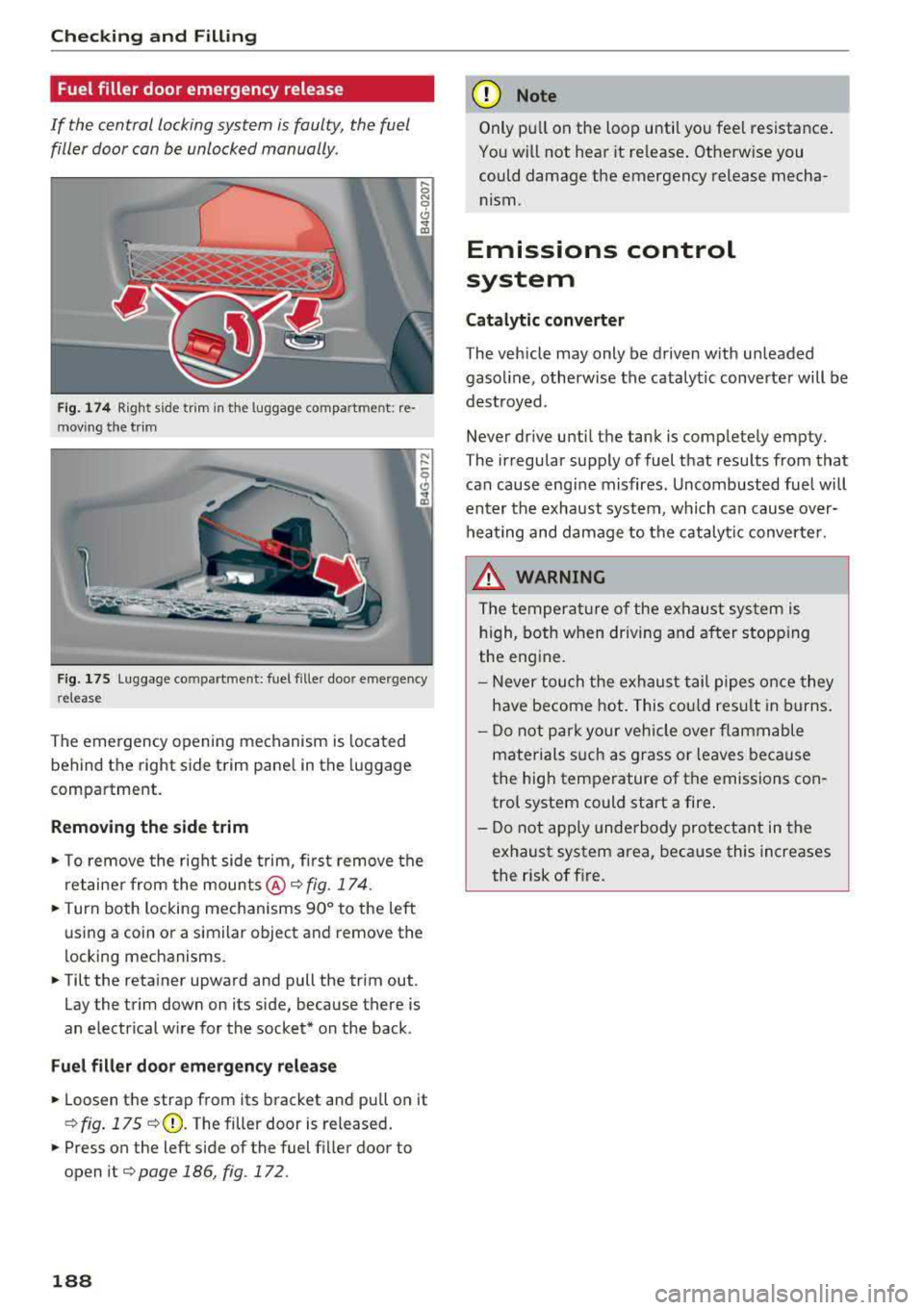
Fuel filler door emergency release
If the central locking system is faulty, the fuel
filler door can be unlocked manually.
Fig . 17 4 Right side trim in the luggage co mpartme nt: re
mov ing the tr im
F ig. 175 Luggage compa rtment: fuel fille r doo r eme rgency
r elease
The emergency opening mechanism is located
behind the right side trim pane l in the luggage
compartment.
Removing th e side trim
• To remove the right side trim, first remove the
retaine r from the mounts @¢
fig. 174.
• Turn both locking mechanisms 90° to the left
us ing a coin or a similar object and remove the
locking mechanisms.
• Tilt the reta iner upward and pull the trim out .
Lay the trim down on its side, because there is
an electrical w ire for the socket* on the back .
Fuel filler d oor em ergenc y relea se
• Loosen the strap from its bracket and pu ll on it
¢ fig. 175 ¢(D. The filler door is released.
• Presson the left side of the fuel f iller door to
open it
¢page 186, fig. 172.
188
(D Note
Only pu ll on the loop until you feel resistance .
You will not hear it re lease . Otherwise you
could damage the emergency release mecha nism.
Emissions control
system
Cat alytic converter
The vehicle may only be driven w ith unleaded
gaso line , otherwise the catalytic converte r will be
dest royed .
Never dr ive until the tank is completely empty.
The irregular supply of fuel that results from that can cause engine misfires. Uncombusted fuel will
enter the exhaust system, which can cause over
heating and damage to the catalytic converter .
&_ WARNING
The temperature of the exhaust system is
h igh, both when driving and a fter stopp ing
the engine.
-
- Never tou ch the exhaust tail pipes once they
have become hot. This cou ld resu lt in burns.
- Do not park your vehicle over flammable
materials s uch as grass or leaves because
the high temperature of the emissions con
trol system could start a fire .
- Do not apply unde rbody protectant in the
exhaust system area, beca use this increases
the risk of fire.
Page 223 of 266
a co .... N
" N .... 0 0 \,;J '
General information
Regu lar, proper ca re helps to maintain your ve hi
cle's value. It can a lso be a requirement when
submitting warranty claims fo r cor rosion damage
and pa int defects on the body.
The necessary care prod ucts can be obtained
from an authorized Audi dea le r or authorized
Aud i Service Facility . R ead and follow the instruc
tions fo r use on the packaging.
A WARNING
-Us ing clea ning and ca re products inco rrectly
can be dangero us to your hea lth .
- Always store clean ing and ca re prod ucts out
of reach of chi ldren to reduce the r isk of po i
son ing .
@ For the sake of the environment
- P refe rab ly purchase env ironmenta lly-friend
l y cleaning prod ucts.
- Do not d ispose o f leftove r clea ning and ca re
p roducts with house hold t rash.
Car washes
T he longer that deposits remain on the vehicle,
the more the surface may be damaged. High
temperatures such as those caused by sun light
increase t he damag ing effect .
Before washing, rinse
off heavy deposits with
p lenty o f water.
S tu bbor n depos its s uch as bird droppi ngs or tree
sap are best removed with plenty of wate r and a
mic rofibe r cloth.
A lso , wash t he u nderside of yo ur vehicle once
road sa lt stops being used for the season .
Pressure washers
When washi ng your ve hicle w it h a pressu re wash
e r, a lways fo llow the operating instr uctions pro
v id ed wi th t he p ress ure washer. This is espe cially
i mportant in rega rd to the pressure and sp raying
d ista nce . Do not a im the spray directly at the
sea ls on the side w indows , doors, lids o r the sun -
Care and cleaning
roo f* or at tires, r ubber hoses, insulat ing mater i
al, sensors* or camera lenses* . Keep a distance of
at least 16 in (40 cm) .
D o no t remove snow and ice wi th a pressure
washe r.
Never use cone noz zles o r high press ure no zzles .
The water temperature must not be above 140 °F
(60 °() .
Automatic car washes
Spray of f th e vehicle befo re wash ing .
Make s ure that the w in d ows and roo f* are closed
and the windsh ie ld wipers are
off . Follow instruc
t ions from the car wash ope rato r, es pecially if
t h ere are accesso ries attac hed to you r vehicle .
If possible, use car washes th at do not have
brushes .
Washing by hand
Clean the ve hicle starting from t he top and wor k
i ng down using a soft sponge o r clea ning br ush .
U se solven t-free cleani ng p rod ucts.
Washing vehicles with matte finish paint by
hand
To avo id d amag ing the pa int w hen washi ng, fi rst
r emove dust and large p articl es from you r vehi
cl e. Insects, gre ase spo ts and fingerpr ints are
best removed w it h a s pecial cleaner for mat te
finish paint.
Apply t he p rodu ct using a microfiber cloth. To
avo id dam ag ing t he pa int surfa ce, do no t use too
much pressure.
Rinse t he ve hicle thoroug hly w ith wate r. T hen
cl ea n usi ng a neutra l shampoo an d a soft m icro
f iber clo th .
Rinse the ve hicle thoroug hly aga in and let it air
dry. Remove a ny wate r residue using a chamois .
A WARNING
- Only wash the veh icle w hen the ig nition is
off an d follow t he in str uctions from the car
wash ope rato r to re duce the ris k of acci
dents .
-
221
Page 239 of 266
a co .... N
" N .... 0 0 \,;J '
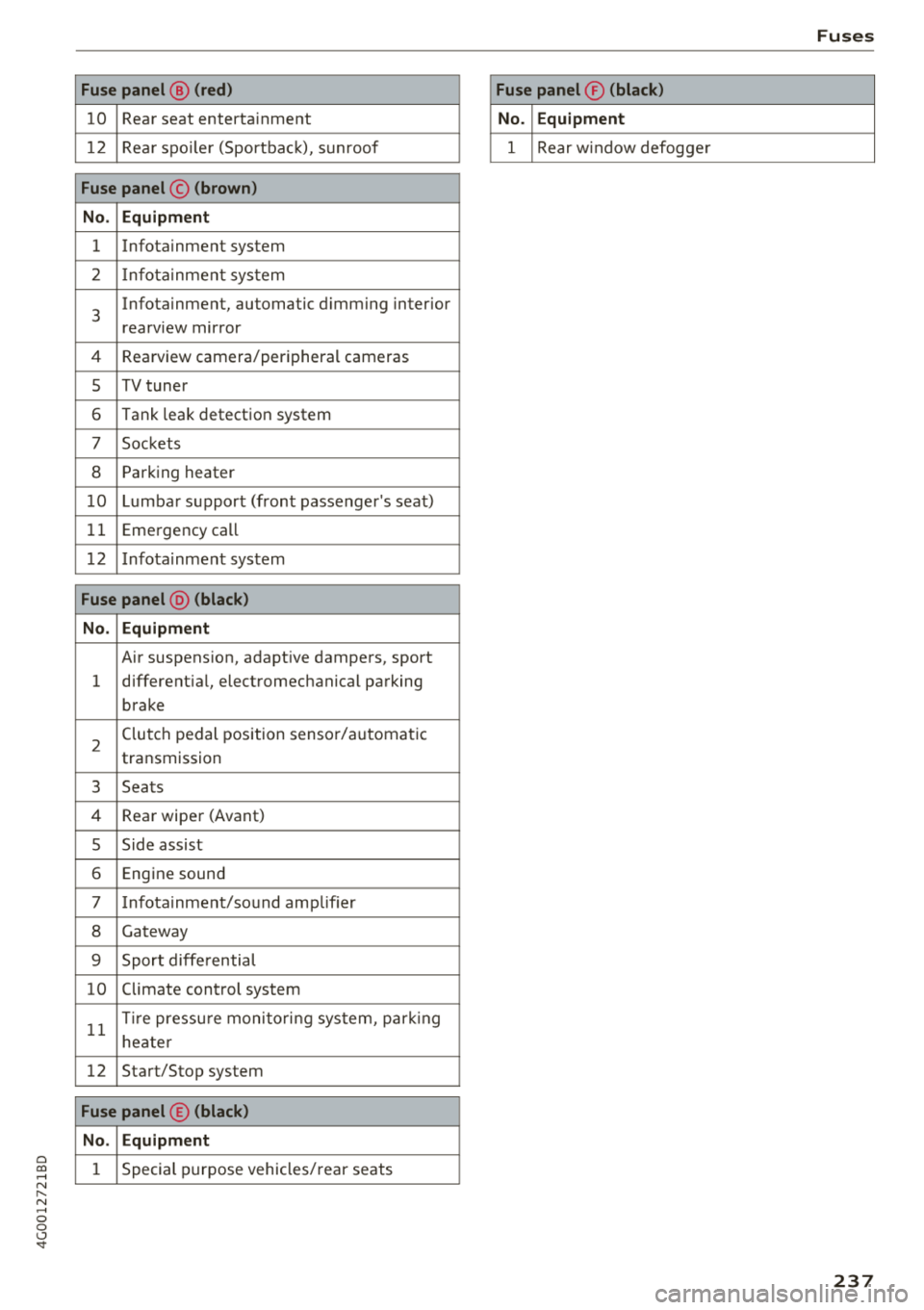
10 Rear seat entertainment
1 2 Rea r spo ile r (Sportbac k), sunroof
Fuse panel © (brown )
N o. Equipm ent
1 Infotainment system
2 Infota inment system
3
Infotainment, automatic dimming interior
rearview mirror
4 Rearview camera/peripheral cameras
5 TV tuner
6 Tank leak detection system
7 Sockets
8 Parking heater
1 0 Lumbar support (front passenger's seat)
11 Emergency
call
1 2 Infotainment system
Fuse panel @ (black )
N o. Equipm ent
Air suspension, adaptive dampers, sport
1 different
ial, electromechanical parking
brake
2 Clutch pedal position sensor/automatic
transmission
3 Seats
4 Rear wiper (Avant)
5 Side assist
6 Engine sound
7 Infotainment/sound amplifier
8 Gateway
9 Sport diffe rential
10 Climate control
system
11 T
ir e pressu re monito ring system, park ing
heate r
12 Start/Stop
system
Fuse panel © (black )
N o. E quipm ent
1 Special purpose vehicles/ rear seats
Fuses
Fuse panel ® (blac k)
N o. Equipm en t
1 Rear w indow defogge r
237
Page 255 of 266
a co .... N
" N .... 0 0 \,;J '
Important safety instructions for using chi ld
safety seats . . . . . . . . . . . . . . . . . . . . . . . . 170
Important things to know when driving with
children . . . . . . . . . . . . . . . . . . . . . . . . . . . 166
Tether anchors . . . . . . . . . . . . . . . . . . . . . . 183
Tether straps . . . . . . . . . . . . . . . . . . . . . . . 183
Child safety lock Power windows . . . . . . . . . . . . . . . . . . . . . . 33
Rear doors . . . . . . . . . . . . . . . . . . . . . . . . . . 33
Child safety seats . . . . . . . . . . . . . . . . . . . . . 172
Booster seats . . . . . . . . . . . . . . . . . . . . . . . 176
Convertible child seats . . . . . . . . . . . . . . . 174
Convertible locking retractor . . . . . . . . . . 179
How do I properly install a child safety seat
. h' l 7 170 in myve 1c e . ................. ... .. .
Infant seats .. ................ ... .. . 172
Installing a child restraint using the LATCH
system . . . . . . . . . . . . . . . . . . . . . . . . . . . . 182
L ATCH system . . . . . . . . . . . . . . . . . . . . . . 182
L owe r anchorages . . . . . . . . . . . . . . . . . . . 181
Mounting and releasing the anchorage
hook . . . . . . . . . . . . . . . . . . . . . . . . . . . . . . 182
Safety instructions . . . . . . . . . . . . . . . . . . . 170
Securing . . . . . . . . . . . . . . . . . . . . . . . . . . . 177
Unused safety belts on the rear seat . . . . 172
Cigarette lighter . . . . . . . . . . . . . . . . . . . . . . . 51
Cleaning . . . . . . . . . . . . . . . . . . . . . . . . . . . . 221
Cleaning/removing ice from windows . . . . . 223
C leaning Alcantara . . . . . . . . . . . . . . . . . . . . 224
Cleaning artificial leather . . . . . . . . . . . . . . . 224
Cleaning carbon parts . . . . . . . . . . . . . 223, 224
C leaning contro ls . . . . . . . . . . . . . . . . . . . . . 223
Cleaning decorative parts/trim . . . . . . 222, 223
C leaning displays . . . . . . . . . . . . . . . . . . . . . 223
Cleaning exhaust tail pipes . . . . . . . . . . . . . 222
Cleaning plastic parts . . . . . . . . . . . . . . . . . . 223
C leaning rims . . . . . . . . . . . . . . . . . . . . . . . . 222
Cleaning textiles . . . . . . . . . . . . . . . . . . . . . . 224
Climate control system . . . . . . . . . . . . . . . . . 58
Automatic recirculation . . . . . . . . . . . . . . . . 62
Basic settings . . . . . . . . . . . . . . . . . . . . . . . . 62
Drive select . . . . . . . . . . . . . . . . . . . . . . . . . 104
C losing
Hood . . . . . . . . . . . . . . . . . . . . . . . . . . . . . . 191
Sunroof. . . . . . . . . . . . . . . . . . . . . . . . . . . . . 35
Windows . . . . . . . . . . . . . . . . . . . . . . . . . . . 34
Index
Closing/opening
By remote control . . . . . . . . . . . . . . . . . . . . 27
Using the door lock cylinder . . . . . . . . . . . . 29
With the convenience key . . . . . . . . . . . . . . 27
Closing aid (doors) . . . . . . . . . . . . . . . . . . . . . 24
Cockpit (overview) . . . . . . . . . . . . . . . . . . . . . . 6
Coming home . . . . . . . . . . . . . . . . . . . . . . . . . 40
Compartments . . . . . . . . . . . . . . . . . . . . . . . . 52
Compliance . . . . . . . . . . . . . . . . . . . . . . . . . . 250
Consumer Information ............. 132, 247
Consumption (fuel) . . . . . . . . . . . . . . . . . . . . 20
Contacting NHTSA . . . . . . . . . . . . . . . . . . . . 132
Convenience key
Starting the engine (STAR T ENGINE STOP
button) . . . . . . . . . . . . . . . . . . . . . . . . . . . . . 68
Stopping the engine (STAR T ENGINE ST OP
button) . . . . . . . . . . . . . . . . . . . . . . . . . . . . . 68
Switching the ignition on . . . . . . . . . . . . . . 68
Unlocking/locking . . . . . . . . . . . . . . . . . . . . 27
Convenience opening . . . . . . . . . . . . . . . . . . . 34
Convertib le child safety seats . . . . . . . . . . . 17 4
Convertib le locking retractor
Activating . . . . . . . . . . . . . . . . . . . . . . . . . . 179
Deactivating . . . . . . . . . . . . . . . . . . . . . . . . 180
Using to secure a child safety seat . . . . . . 179
Cooling down . . . . . . . . . . . . . . . . . . . . . . . . . 64
Cooling mode (4-zo ne deluxe automatic cli-
mate control) . . . . . . . . . . . . . . . . . . . . . . . . . 61
Cooling mode (deluxe automatic climate con -
trol) . . . . . . . . . . . . . . . . . . . . . . . . . . . . . . . . . 59
Cooling system Adding coolant . . . . . . . . . . . . . . . . . . . . . . 196
Coolant . . . . . . . . . . . . . . . . . . . . . . . . . . . . 195
Coolant level checking . . . . . . . . . . . . . . . . 196
Coolant temperature indicator . . . . . . . . . . . 9
Indicator light . . . . . . . . . . . . . . . . . . . . . . . 13
Cornering light . . . . . . . . . . . . . . . . . . . . . . . 104
Crossing water . . . . . . . . . . . . . . . . . . . . . . . . 64
Cruise control system Changing speed . . . . . . . . . . . . . . . . . . . . . . 85
Preselecting speed . . . . . . . . . . . . . . . . . . . . 85
Switching off . . . . . . . . . . . . . . . . . . . . . . . . 85
Switching on . . . . . . . . . . . . . . . . . . . . . . . . . 84
Cup holders . . . . . . . . . . . . . . . . . . . . . . . . . . . 52
Current consumption . . . . . . . . . . . . . . . . . . . 20
253
Page 256 of 266
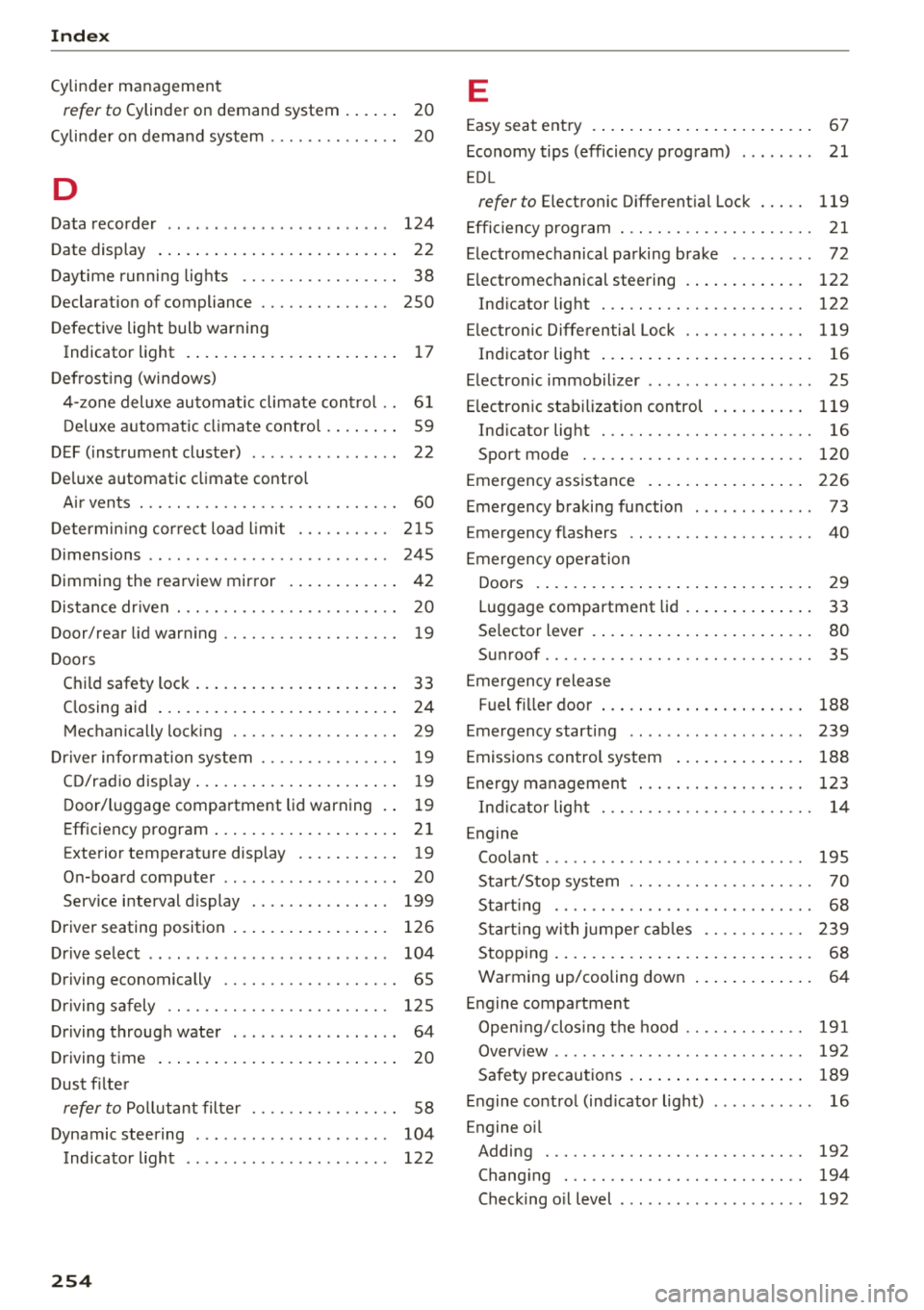
Index
Cylinder management
refer to Cylinder on demand system . . . . . . 20
Cyli nder on dema nd syste m . . . . . . . . . . . . . . 20
D
Data recorder . . . . . . . . . . . . . . . . . . . . . . . . 124
Date display . . . . . . . . . . . . . . . . . . . . . . . . . . 22
Daytime runni ng lights . . . . . . . . . . . . . . . . . 38
Declaration of compliance . . . . . . . . . . . . . . 250
D efective light bulb warning
Indicato r light . . . . . . . . . . . . . . . . . . . . . . . 1 7
Defrost ing (windows)
4- zone deluxe au toma tic climate con trol . . 6 1
D eluxe a utomat ic cli mate contro l . . . . . . . . 59
D EF (instrument cluste r) . . . . . . . . . . . . . . . . 22
De luxe a utomatic climate contro l
Air vents . . . . . . . . . . . . . . . . . . . . . . . . . . . . 60
Determin ing cor rec t load l imi t . . . . . . . . . . 215
Dimensions . . . . . . . . . . . . . . . . . . . . . . . . . . 245
Dimming the rea rview mirror . . . . . . . . . . . . 42
Distance dr iven . . . . . . . . . . . . . . . . . . . . . . . . 20
Door/rear lid warn ing . . . . . . . . . . . . . . . . . . . 19
Doors Chi ld safety lock . . . . . . . . . . . . . . . . . . . . . . 33
C losing aid . . . . . . . . . . . . . . . . . . . . . . . . . . 24
Mechanically lock ing . . . . . . . . . . . . . . . . . . 29
Dr iver inform ation system . . . . . . . . . . . . . . . 19
C D/rad io disp lay . . . . . . . . . . . . . . . . . . . . . . 1 9
D oor/l uggage compartment lid warning . . 19
Efficiency program . . . . . . . . . . . . . . . . . . . . 21
E xterior temperature disp lay . . . . . . . . . . . 19
On-board computer . . . . . . . . . . . . . . . . . . . 20
Serv ice i nterval d isplay . . . . . . . . . . . . . . . 199
D river seating position . . . . . . . . . . . . . . . . . 126
D rive se lect . . . . . . . . . . . . . . . . . . . . . . . . . . 104
Driving economically . . . . . . . . . . . . . . . . . . . 65
Dr iving safely . . . . . . . . . . . . . . . . . . . . . . . . 125
Driving throug h water . . . . . . . . . . . . . . . . . . 64
Driving time . . . . . . . . . . . . . . . . . . . . . . . . . . 20
Dus t fi lte r
refer to Po llutant filter . . . . . . . . . . . . . . . . 58
Dynamic steering . . . . . . . . . . . . . . . . . . . . . 104
Indicator l ight . . . . . . . . . . . . . . . . . . . . . . 122
254
E
Easy seat entry . . . . . . . . . . . . . . . . . . . . . . . . 67
Economy tips (efficiency program) . . . . . . . . 21
E DL
refer to E lectronic D ifferent ial Lock . . . . . 119
Effic iency program . . . . . . . . . . . . . . . . . . . . . 21
E lectromechanical parking brake . . . . . . . . . 72
E lectromechanical steering . . . . . . . . . . . . . 122
Ind icator light . . . . . . . . . . . . . . . . . . . . . . 122
El ectron ic Diffe renti al Lock . . . . . . . . . . . . . 119
Ind icator lig ht . . . . . . . . . . . . . . . . . . . . . . . 16
E lectron ic immobilizer . . . . . . . . . . . . . . . . . . 25
E lectron ic stab ilization control . . . . . . . . . . 119
Ind icator light . . . . . . . . . . . . . . . . . . . . . . . 16
Sport mode . . . . . . . . . . . . . . . . . . . . . . . . 120
E mergency assistance . . . . . . . . . . . . . . . . . 226
Emergency b raking fu nction . . . . . . . . . . . . . 73
E mergency flashers . . . . . . . . . . . . . . . . . . . . 40
E mergency ope ra tion
Doors . . . . . . . . . . . . . . . . . . . . . . . . . . . . . . 29
Luggage compartment lid . . . . . . . . . . . . . . 33
Se lector lever . . . . . . . . . . . . . . . . . . . . . . . . 80
Su nroof. . . . . . . . . . . . . . . . . . . . . . . . . . . . . 35
E mergency release
Fuel f iller door . . . . . . . . . . . . . . . . . . . . . . 188
Emergency starting . . . . . . . . . . . . . . . . . . . 239
Emissions control system . . . . . . . . . . . . . . 188
En ergy managemen t . . . . . . . . . . . . . . . . . . 1 23
Ind icator lig ht . . . . . . . . . . . . . . . . . . . . . . . 14
Engine Coo la nt . . . . . . . . . . . . . . . . . . . . . . . . . . . . 195
Start/Stop system . . . . . . . . . . . . . . . . . . . . 70
Start ing . . . . . . . . . . . . . . . . . . . . . . . . . . . . 68
Start ing wi th ju mpe r ca bles . . . . . . . . . . . 239
Stopping . . . . . . . . . . . . . . . . . . . . . . . . . . . . 68
Warming up/cooling down . . . . . . . . . . . . . 64
E ngine compartment
Open ing/clos ing the hood . . . . . . . . . . . . . 191
Overv iew . . . . . . . . . . . . . . . . . . . . . . . . . . . 192
Safety precau tions . . . . . . . . . . . . . . . . . . . 189
E n gine contro l (ind icator light) . . . . . . . . . . . 16
E ngine o il
Adding . . . . . . . . . . . . . . . . . . . . . . . . . . . . 192
Chang ing . . . . . . . . . . . . . . . . . . . . . . . . . . 194
Checking o il level . . . . . . . . . . . . . . . . . . . . 192
Page 257 of 266
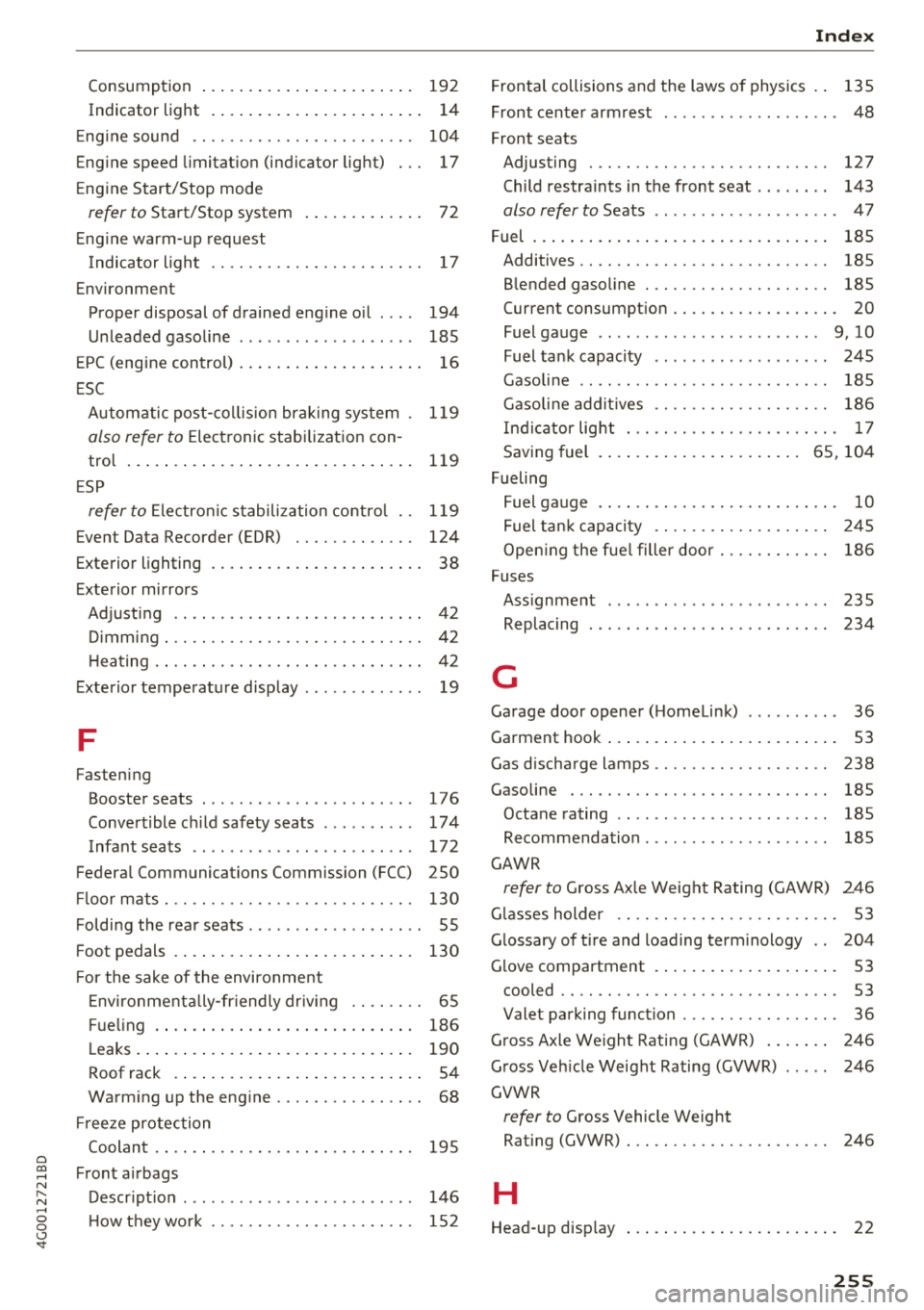
a co .... N
" N .... 0 0 \.J '
14
Eng ine sound . . . . . . . . . . . . . . . . . . . . . . . . 104
Engine speed limitation (indicator light) 17
Engine Start/Stop mode
refer to Start/Stop system . . . . . . . . . . . . . 72
Engine warm-up request
I ndicator light . . . . . . . . . . . . . . . . . . . . . . .
1 7
Environment
Proper disposal of drained engine oil . . . .
194
Unleaded gasoline . . . . . . . . . . . . . . . . . . . 185
EPC (engine control) . . . . . . . . . . . . . . . . . . . . 16
ESC
Automatic post-collision brak ing system .
119
also refer to Electronic stabilization con-
tro l . . . . . . . . . . . . . . . . . . . . . . . . . . . . . . .
119
ESP
refertoElectron icstabilizationcontrol . .
119
Event Data Recorder (EDR) . . . . . . . . . . . . . 124
Exterior lighting . . . . . . . . . . . . . . . . . . . . . . . 38
Exterior mirrors
Adjusting . . . . . . . . . . . . . . . . . . . . . . . . . . .
42
o· . 1mmmg . .. .. ............. .. .. .. .. . . 42
Heating............................. 42
Exterior temperature display . . . . . . . . . . . . . 19
F
Fastening
Booster seats . . . . . . . . . . . . . . . . . . . . . . .
176
Convertible child safety seats . . . . . . . . . . 174
Infant seats . . . . . . . . . . . . . . . . . . . . . . . . 172
Federal Communications Commission (FCC) 250
Fl oor mats . . . . . . . . . . . . . . . . . . . . . . . . . . . 130
Folding the rear seats . . . . . . . . . . . . . . . . . . . 55
Foot pedals . . . . . . . . . . . . . . . . . . . . . . . . . . 130
For the sake of the environment
Environmentally-friendly driving . . . . . . . .
65
Fu eling . . . . . . . . . . . . . . . . . . . . . . . . . . . . 186
Leaks . . . . . . . . . . . . . . . . . . . . . . . . . . . . . . 190
Roof rack . . . . . . . . . . . . . . . . . . . . . . . . . . . 54
Warming up the engine . . . . . . . . . . . . . . . . 68
Fr eeze protection
Coolant
. ... .. ................ ......
Front airbags
D . t' escnp 10n ... ................ ... .. .
How they work ............... .. .. .. .
195
146
152
Index
Frontal collisions and the laws of physics . . 135
Front center armrest . . . . . . . . . . . . . . . . . . . 48
Front seats
Adjusting . . . . . . . . . . . . . . . . . . . . . . . . . .
127
Child restraints in the front seat . . . . . . . . 143
also refer to Seats . . . . . . . . . . . . . . . . . . . . 4 7
Fuel . . . . . . . . . . . . . . . . . . . . . . . . . . . . . . . .
185
Additives. . . . . . . . . . . . . . . . . . . . . . . . . . . 185
Blended gasoline . . . . . . . . . . . . . . . . . . . . 185
Current consumption . . . . . . . . . . . . . . . . . . 20
Fuel gauge . . . . . . . . . . . . . . . . . . . . . . . . 9, 10
Fuel tank capacity . . . . . . . . . . . . . . . . . . . 245
Gasoline . . . . . . . . . . . . . . . . . . . . . . . . . . . 185
Gasoline addit ives . . . . . . . . . . . . . . . . . . . 186
Indicator light . . . . . . . . . . . . . . . . . . . . . . . 17
Saving fuel . . . . . . . . . . . . . . . . . . . . . . 65, 104
Fueling
Fuel gauge . . . . . . . . . . . . . . . . . . . . . . . . . .
10
Fuel tank capacity . . . . . . . . . . . . . . . . . . . 245
Open ing the fuel filler door . . . . . . . . . . . . 186
Fuses
Assignment . . . . . . . . . . . . . . . . . . . . . . . .
235
Replacing . . . . . . . . . . . . . . . . . . . . . . . . . . 234
G
Garage door opener (Homelink) . . . . . . . . . . 36
Garment hook . . . . . . . . . . . . . . . . . . . . . . . . . 53
Gas discharge lamps . . . . . . . . . . . . . . . . . . . 238
G asoline . . . . . . . . . . . . . . . . . . . . . . . . . . . . 185
Octane rating . . . . . . . . . . . . . . . . . . . . . . . 185
Recommendation . . . . . . . . . . . . . . . . . . . . 185
GAWR
refer to Gross Axle Weight Rating (GAWR) 246
Glasses holder . . . . . . . . . . . . . . . . . . . . . . . .
53
Glossary of tire and loading terminology . . 204
Glove compartment . . . . . . . . . . . . . . . . . . . . 53
cooled . . . . . . . . . . . . . . . . . . . . . . . . . . . . . . 53
Valet parking function . . . . . . . . . . . . . . . . . 36
Gross Axle Weight Rating (GAWR) . . . . . . . 246
Gross Vehicle Weight Rating (GVWR) . . . . . 246
GVWR
refer to Gross Vehicle Weight
Rating (GVWR) . . . . . . . . . . . . . . . . . . . . . .
246
H
Head-up disp lay . . . . . . . . . . . . . . . . . . . . . . . 22
255