camera AUDI A7 2012 User Guide
[x] Cancel search | Manufacturer: AUDI, Model Year: 2012, Model line: A7, Model: AUDI A7 2012Pages: 294, PDF Size: 73.33 MB
Page 113 of 294

-Never use warm or hot water to remove
snow or ice from the rear view camera l ens - th is could cause the lens to crack!
- When cleaning the lens, never use prod
ucts that are abrasive .
Switching on and off
Applies to vehicles: with pa rk in g system p lus wit h rear
view ca mera
The rear view camera switches on automati
cally together with the acoustic and visual
park assist when you put the vehicle in re
verse .
Switching on
.,. Switch the MMI on
.,. Activate
co mfort or auto mode in Audi drive
select ¢
page 96.
.,. Sh ift into reve rse or
.,. Press the switch
lp.,,, I in the cente r console
¢
page 108, fig. 116 . A short confirmation
tone sounds and th e indicator light in the
switch lights up.
Sw itching betwe en th e rear view camer a
a nd vis u al di splay
.,. Press the Gr aphi c control button
¢page 112, fig . 122 @to see the visua l
display .
.,. Press the
Rear vie w control button to see
the rear view camera image
Q page 108,
fig . 117 .
Switchin g off
.,. Drive faster than 6 mph (10 km/h), or
.,. press the switch ~ or
.,. switch off the ignit ion.
A WARNING
- The MMI display cannot show, or cannot
adequate ly show, certa in objects (such as
small posts o r grating), recesses in the
ground and protrud ing parts on another
car.
- Only use the rear v iew camera to assist
you if it shows a good, clear pictu re . For
example, the image may be affected by
Par king system 11 1
the sun shining into the lens, dirt on the
lens or if there is a defect .
- Use the rear view camera on ly with the
rear lid comp lete ly closed. Make sure any
objects you may have mounted on the
rear lid do not b lock the rear v iew cam
era.
(D Tips
- The sensors must be kept clean and free
of snow and ice for the park assist to op
erate .
- If your veh icle is near an obstacle, an ad
ditional v isual ind icator appears in the
rearview camera image . Th is superim
posed image is there to help you to de
termined wh ich area of the vehicle is af
fected .
- Yo u can change the volume and pitch of
the s ignals as we ll as the disp lay
Q page 113.
-What appears in the display is time-de
layed .
Page 114 of 294
112 Park in g s ystem
Reverse Park ing
App lies to vehicles: with park ing system p lus w it h rear
view ca mera
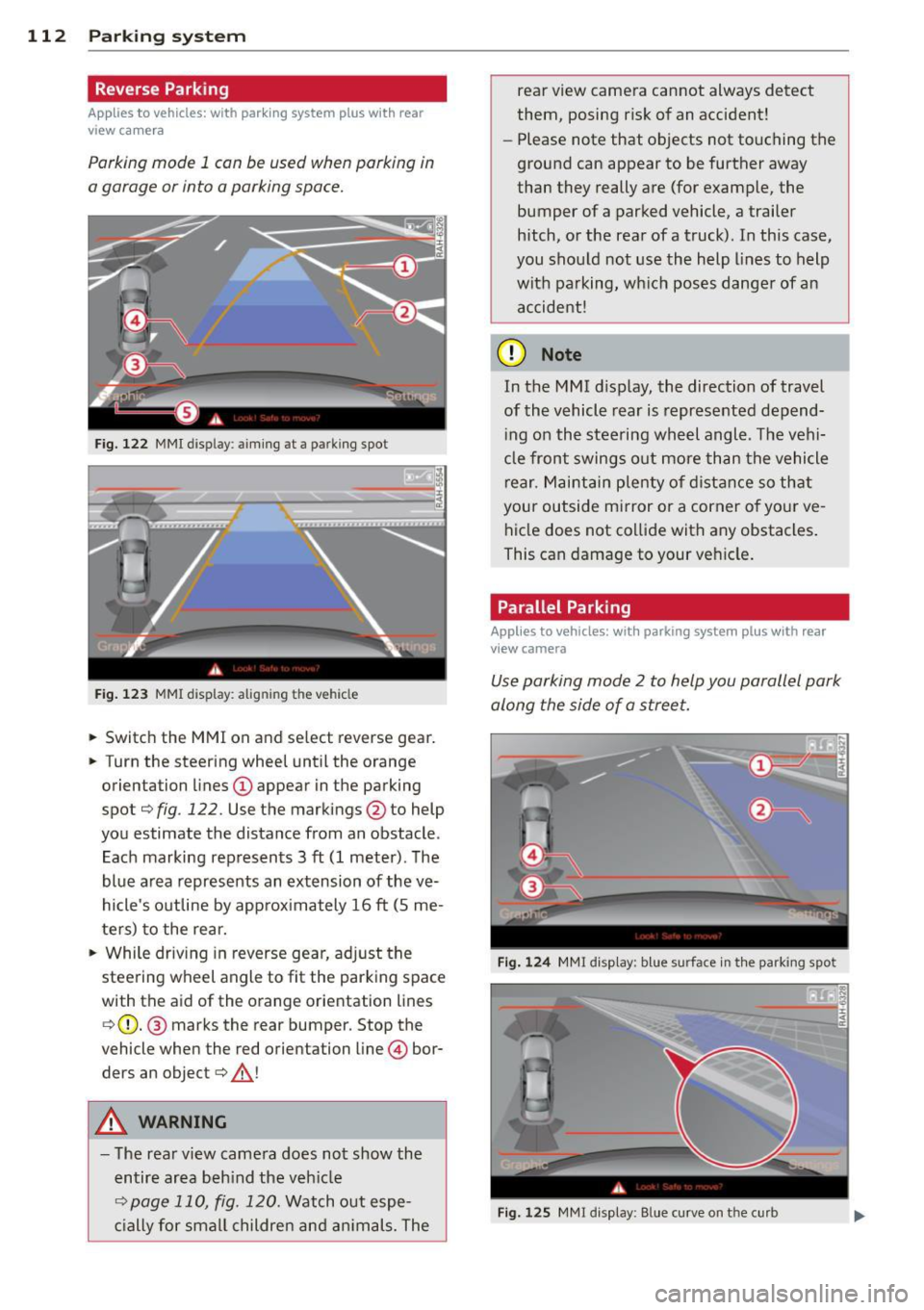
Parking mode 1 con be used when parking in
a garage or into a parking space.
Fig. 122 MMI display : aiming at a parking spot
Fig . 123 MMI display: alig nin g th e veh icle
... Switch the MMI on and select reverse gear .
... Turn the steering wheel until the orange
orientation lines
(D appear in the parking
spot¢
fig . 122. Use the markings @to help
you estimate the distance from an obstacle .
Each marking represents 3
ft (1 meter). The
blue area represents an extension of the
ve
hicle's outline by approx imately 16 ft (5 me
ters) to the rear.
"' While driv ing in reverse gear, ad just the
steering wheel angle to fit the parking space
with the aid of the orange orientation lines ¢ (D. @ marks the rear bumper. Stop the
vehicle when the red orientation line © bor
ders an object¢ .&_!
A WARNING
-The rear view camera does not show the
entire area beh ind the veh icle
¢ page 110, fig. 120. Watch out espe
c ially for small childre n and an imals. The rear view camera cannot always detect
them, posing risk of an accident!
- Please note that objects not touching the
ground can appear to be further away
than they really are (for example, the
bumper of a parked vehicle, a trailer
hitch, or the rear of a truck). In this case,
you shou ld not use the help lines to help
with pa rking, wh ich poses danger of an
accident!
(D Note
In the M Ml d is play , the direction of travel
of the vehicle rear is represented depend
i ng on the steering wheel angle . T he vehi
cle front swings o ut more than the vehicle
rear. M aint ain plenty of dista nce so th at
your outside mirror or a corner o f you r
ve
hicle does not co llide with any obstacles .
This can damage to your ve hicle .
Parallel Parking
Applies to vehicles: wit h parking system plus with rea r
v iew camera
Use parking mode 2 to help you parallel park
along the side of a stree t .
F ig . 124 MMI disp lay: b lue surface in th e parking spot
Fig . 125 MM! display : B lue curve on th e curb
Page 115 of 294

The following steps apply only when there is
no obstacle such as a wall near the parking
spot. Otherwise, please read the information
prov ided in the "Parking Next to Obstacles"
section
c::> page 113.
~ Activate the turn signal.
~ Position your vehicle parallel to the edge of
the street, approximately 3 ft (1 meter)
from a parked vehicle.
~ Switc h the MMI on and se lect reverse gear.
The parking aid tu rns o n and parking mode
1 appears on the display .
~ Press the contro l bu tton (D c::> fig. 124 on
the MMI contro l conso le. Parking mode 2
appea rs .
~ Back up and align your vehicle so t he blue
area @ borders on the rear end of the vehi
cle or on the parking spot line. The blue area
represents an extension of the vehicle's out
line by approximate ly 16 ft (5 meters) to the
rear. The long side of the blue area should
be o n the curb . The entire blue area must fit
i nto the parking spot .
~ With the vehicle stopped, turn the steer ing
whee l to the right as far as it w ill go.
~ Back into the park ing spot until the blue
cu rve to uches the curb
c::> fig. 125. Stop the
vehicle.
~ With the veh icle stopped, turn the steering
wheel to the left as far as it will go.
~ Continue to back into the parking spot until
the vehicle is parked para llel to the curb. @
marks the rear bumper. Stop the vehicle
when the red orientation line@ borde rs an
object
c::> .&, . Keep an eye o n the fron t of
yo ur vehicle while do ing this
c::> (j) .
Parking next to obstacles
When t here is an obstacle (such as a wall)
next to the pa rking spot, choose a spot wit h
mo re space on t he sides. Pos ition the long
side of the b lue a rea so that there is sufficient
space from the curb. The a rea m ust no t be on
the c urb. You w ill also need to start turn ing
the steering wheel much earlier. T he re should
be a suffic ient amo unt of space between the
curb and the blue c urve, and the blue cu rve
c::> fig. 125 must not touch the curb.
Parking system 113
A WARNING
-The rear view camera does not show the
entire area behind the vehicle
c::> page 110, fig. 120. Watch out espe
cially fo r small children and anima ls. The
rea r view ca m era ca nnot alway s de te ct
them, posing r is k of an a ccident!
- P lease note that objects not touching the
g rou nd can appear to be further away
than they really are (for example, the
bumper of a parked vehicle, a trai ler
hitch, or the rea r of a truck) . In this case,
you shou ld not use the help lines to help
with parking, wh ich poses danger of an
accident!
(D Note
In the MMI display, the direction of travel
of the vehicle rear is represented depend
i ng on the steering wheel angle. The vehi
cle front swings o ut more than the vehicle
rear. Maintain ple nty of d istance so that
your outside mirror or a corner of your ve
hicle does not col lide with any obstacles.
T his can damage to your ve hicle.
(0 Tips
The left o r right orientation lines and su r
faces will be disp layed, depending on the
turn s ignal being used.
Adjusting the display
and warning tones
App lies to v ehicl es: wi th parkin g sys tem pl us or parkin g
system plus wit h rear view ca mera
The display and warning tones can be adjust
ed in the MMI .
~ Select:!CAR !function button> Car sy stem s
cont ro l butto n > Driv er a ssist > Parking aid
> Setting s control b utton .
Display
On* -turns o n the visual d isplay for parking
system p lus and shows the rearview came ra
image for the par king system p lus w ith rea r
view came ra*. ..,
Page 116 of 294
114 Parking system
Off -when the park ing system is switched off,
only audible signals are given.
Warning tones
Front v olume -front senso r volume
Front fr equ enc y -front sensor frequency
Rear v olume -rear sensor volume
Rea r frequ enc y -rear sensor freq uency
Mu sic vo lume whil e parking -when the park
ing system is switched on, the volume of the
active audio sou rce is lowered.
The newly adjusted value is briefly heard from
the signa l generator.
(Di Tips
- The warning tones can a lso be adjusted
directly by the v isual display or the p ic
ture from the rear v iew camera. Simp ly
press the
S etting s contro l button.
- Changed settings are activated when
parking system is switched on again.
-The sett ings are automatically stored
and ass igned to the remote control key.
Error messages
App lies to vehicles: with pa rking system p lus or parking
syste m plus with rear v iew camera
There is an error in the system if the LED on
the ~ switch is blinking and you hear a con
tinuous alarm for a few seconds after switch ing on the parking system or when the park
i ng system is already act ivated. Have your au
thor ized Audi dealer correct the e rror .
{D) Tips
If the error is not corrected before you
sw itch off the ignition, when you switch on
the par king system aga in, the LED in the
~ switch w ill blink.
Page 204 of 294

202 Cleaning and protec tio n
directly at locks, or at door or hatch
openings -they can freeze shut.
- Never use sponges designed to remove insects, or any kitchen scouring sponges
or similar products . They can damage
your paint finish.
- Never use a dry cloth or sponge to clean
the headlights . Only use wet cloths or
sponges to prevent scratches. It is best
to use soapy water.
- You should remove debris (such as in
sects) from the headl ight lenses on a
regular basis, for example when refuel
i ng your vehicle. Never clean the head
li ghts w ith a dry cloth or sponge. Use a
wet cloth or sponge.
It is best to use
soapy wa ter.
@ For the sake of the environment
In the interest of the envi ronment, the ve
hicle sho uld only be washed i n special
was h bays.
Washing your vehicle with a power
washer
Cleaning the exterior of your car with a high
pressure power washer is safe as long as you
observe a few simple rules.
.. Befo re using the power washer , make sure
yo u have read and understood the WARN
INGS¢
A in General information on
page 200.
.. Always fo llow the operating instructions for
the power washer .
.. Make sure that the jet o n the spray hose
produces a "fan shaped spray" .
.. Do
not hold the spray nozzle too close to
soft materia ls .
When cleaning the veh icle with a power wash
er
always follow the operating instructions .
This applies particularly to the
op erating
pr essure
a nd the s pray ing di stance . Keep a
d ista nce from soft materials such as rubber
hoses o r insulat ing ma ter ial as well as sensors
and camera lenses . Do not use a jet which sprays water in a
d
ir ect
stream
or one t hat has a rotating jet .
Water temper ature sho uld not ex ceed 140 °F
(60 °().
A WARNING ~ -
Neve r wash tires with a jet that sprays wa
ter i n a direct stream. This could cause in
vis ib le damage to the t ires and weaken
them, even if the spray is from a re lative ly
l ong distance and for a short time. Dam
aged and weakened tires can fail and cause
accidents and personal inj ury.
'
([) Note
To avoid damaging your vehicle, a lways
make sure that there is suffic ient d istance
between the spray head and soft materia ls
like rubber hoses, plast ic pa rts and sound
deaden ing mater ials as w ell as sensors
and camera lenses. Neve r aim t he sp ray
head at the same point for a long time.
This also applies to cleaning headligh ts
and painted bumpers. Remembe r: the
closer the nozzle is to the surface of the
materia l, the greater the stress on the ma
terial.
Sensors and camera lenses
- Remove snow with a hand br ush and remove
ice with a de- ic ing spray that does not con
tain so lvents .
- Clea n the sensors (adaptive cruise control*,
pa rk ing system*) w ith a cleaning so lution
that does not contain so lvents and a soft
cloth .
- The camera lens or the area in front of the
came ra le ns is no rmally cleaned by the
w indshie ld w ipers o r he adlig ht wipers (night
vision system *).
If the lens or the area is ex
ceptionally di rty, clean the area wit h glass
cleaner and a soft, dry cloth .
(D Note
-If you was h your veh icle with a pres sure
washer,
Page 205 of 294

-make s ure there is enough distance to
sensors in the front and rear bumper,
- do not clean the camera lenses and the
area around them with the pressure
washer.
- Never use warm or hot water to remove
snow or ice from the camera lens. This
could cause the lens to crack .
- Never clean the camera lens with abra
s ive prod ucts .
Waxing and Polishing
Wa xing
A good wax coating protects the vehicle paint
to a large extent against the environmental
factors listed under¢
page 200, Washing and
even against slig ht scratches.
You can use a liq uid ca r wax to protect your
paint as soon as one week after your vehicle
has been delivered.
Even if you regularly use a
wax ing process in
automatic ca r washes, we recommend that
you manua lly app ly a coat of wax to give the
pa int extra protection, particularly if water no
longer beads o n the clean paint.
Protect p lastic body pa rts with car wax in the
same way as the vehicle body.
D uring wa rm weather dead insec ts tend to
collect on the front bumper and on the for
ward area of the hood . They are much easier
to remove from paint that is waxed
often.
P olish ing
P olish you r vehicle on ly if the pa int has lost its
shine and the g loss cannot be brought back
with wax.
If the po lish used does not conta in prese rva
tive compounds , the paint must be waxed af
terwa rds .
A WARNING
Always read and heed a ll WARNINGS and
other information ¢
page 200.
Cleaning and protec tion 203
@ Note
Do not use car wax on
- matte o r anodized meta l trim
- rubber or rubber- lik e t rim.
Trim strips
Metal trim needs special care .
For environmental reasons, Audi fabricates
the b right t rim strips and trim p ieces from
pure chromium-free al uminum .
Dirt and marks on the trim strips shou ld be
removed w it h a
pH-balanced cleaning agent
(do not use a chrome cleane r). Audi dealers
ca rry clea ning products which have been test
ed fo r use on your vehicle and are not ha rmfu l
to the environment.
T o avoid co rrosion on the exter io r trim st rips ,
o nly a pH-balanced solution should be used
for t he windsh ie ld washer.
A WARNING
A lways read and heed all WARN INGS and
other informat ion ¢
page 200 .
Plastic and vinyl
Plastic needs special care.
Use a clean, damp cloth or sponge to remove
dust and light su rface d irt. For other soil, use
a lukewa rm all-p urpose cleaning solution or a
mild saddle soap for v inyl tr im . Remove water
spots and t races of soap wi th a clean, damp
cl oth or sponge. Use a clean, soft cloth to rub
dry .
G rease , ta r or oil stains can be removed w it h a
cl ea n clot h or sponge soaked with a ll- purpose
cl eaner or with a so lvent designe d espec ia lly
to clean v inyl.
Oc cas iona lly app ly a color less v inyl or leathe r
preserva tive to re tain the ma ter ia l's lus ter
and pliabili ty .
•
•
Page 280 of 294

278 Index
A
Accessories ... .. .. ..... ... .. .. .... . 275
AC (automatic cl imate control) ... .. .. . . 67
AC (climate contro l) . . . . . . . . . . . . . . . . . . 65
Adapt ive cr uise control . . . . . . . . . . . . . . . . 79
C le a ning sensors/cameras .. .. .. .. .. . 202
M essages . . . . . . . . . . . . . . . . . . . . . . . . . 86
Request for driver intervention . . . . . . . . 83
Stop-and-go traffic . . . . . . . . . . . . . . . . . 82
Adapt ive Lig ht (defe ctive) . .. .. .. .. .. . . 21
Adding Eng ine coolant .............. ... ... 224
Eng ine o il .. .......... ...... ... .. . 22 1
W indshie ld washer fluid . .. .. .. .. .. . 230
Addit ives
Eng ine oil .... ........... .... .... . 221
Ad justing
Ai r dist ribution (automatic climate con-
trol) . .. .. .. ............. .. .. .. ... . 68
a ir distribution (climate control) . .. .. . . 65
Front seats . . . . . . . . . . . . . . . . . . . . . . . . 50
Instrumen t illum inat ion .... ... .. .. .. 44
Steer ing column e lectrically .. .. .. .. . . 70
Steer ing column manually . .. .. .. ... . 70
T empe ratu re (a utoma tic climate co ntrol) 68
T empe ratu re (climate con trol) .. .... .. 65
A irbag system . . . . . . . . . . . . . . . . . 137, 158
Advanced Airbag System . ...... .. .. . 141
Advanced Airbag System components . 1 45
Ca re . .. .. ... ............ .. .. .. .. . 153
C hi ldren . .. ... .......... .. .. .. .. . 16 5
Ch ild restra ints . .. ..... ... .. .. .... . 165
Components (front airbags) . ... .. ... 145
Danger of fitting a child seat on t he front
passenger seat ........... .. .. .... . 139
Disposal . ............... .. .. .. .. . 153
Front airbags . . . . . . . . . . . . . . . . 141, 143
H ow do the front airbags wo rk? . .. .. . 147
H ow ma ny airbags does my vehicle
h ave? . .. .... ........... .. .. .. .. . 145
H ow t he Advan ced Airbag Sys tem com-
po nents work toge ther .... .. .. .. .. . 147
I mportant safety instructions on the
knee airbag system .. ... .. .. .. .... . 156
Important things to know . ... .. .... . 137
Knee airbags .. ........... .. .. .... . 154
Mo nitor ing .............. .. .. .. .. . 149 PASS
ENG ER A IR BAG OF F light .... . .. 15 0
Repairs ... .... .. .. ... .. ..... ... .. 153
Safety instr uctions . .. .. ..... ... .. .. 152
S ide a irbags ... .. ............. .... 157
S ide curtain airbags ............ .... 160
Warning/ind icator lights ........... .. 17
Wa rning/Indicato r lights . .. .. .. .. .. 149
When must the system be inspected? . 149
All-wheel drive .. .. ... .......... .... 189
Winter tires ... ... ................ 246
Alloy w heels .... .. .. ... ..... ... .. .. 2 05
Alterna to r ... ... .. .......... ...... .. 16
Amb ience lighting ................ .. . 44
An ti-free ze
refer to E ng ine coolan t ...... ... .. .. 2 23
An ti-lock b rak ing system . .. ... ..... .. 184
Warning/ind icator lights ........... .. 18
Anti-slip reg ulation .. ........... .. .. 184
An ti- theft systems
El ectronic immob ilizer .. ..... ... .. .. . 30
Asht ray ..... ... .. .. ... ........... .. 54
Audi braking guard
refer to brak ing guard .......... .... . 79
Audi dr ive selec t
refer to drive select .... ..... ... .. .. . 96
Audi Se rv ice Repair Manuals and Litera-
tu re ....... .. .. .. .. ........... .... 273
A UTO
automatic climate control . . . . . . . . . . . . 68
Automa tic head lights ....... ...... .. 41
cli mate control . .. .......... ...... .. 65
Auto Lock . . . . . . . . . . . . . . . . . . . . . . . . . . 31
A uto mat ic be lt retractor ......... .. .. 131
Automat ic car wash .......... ...... . 201
A utomatic climate contro l
Air vents .. .... .. ............. .... . 68
Automat ic recirc ulation ......... .. .. . 69
Operation . . . . . . . . . . . . . . . . . . . . . . . . . 67
Setup ........ .. .. ... ........... .. 69
synchronizi ng . . . . . . . . . . . . . . . . . . . . . . 68
A utomat ic transm iss ion ... .... ... .. .. 102
Automat ic Shift Lock (ASL) ...... .... 104
Driving ... .. .. .. ............. .. .. 102
Dynam ic shift program . .. ... ..... .. 105
Emergency mode . ................ . 106
Emergency re le a se .......... ...... . 107
Kic k-down . .. .. .. ... .......... .... 104
Page 286 of 294

28 4 Index
Lifting vehicle
Light 268
Ambience lighting ........ .... .. .. .. 44
Com ing/ Leaving home ............... 43
Daytime running lights ...... .. .... .. 41
E mergency flashers . . . . . . . . . . . . . . . . . 42
Exterior lighting ....... ... .. .. .... .. 41
Headlight rang e contro l ... .. .. .. .. . . 41
High beam ... ........ ..... .. .. .. .. 43
Low beam .. ...... ......... .. .. .. .. 41
Rear fog lights ................ ..... 41
Side ma rker lights ........ .. .. .. .. .. 41
Turn signa ls .............. ... .. .... 43
Light/ra in sensor
H eadligh ts ..... ..... ...... .. .. .. .. 41
Intermittent (windshield wipers) .. .... 45
Sensor defective . . . . . . . . . . . . . . . . . . . . 21
Loading the roof rack . . . . . . . . . . . . . . . . . 58
L oc king
Power locking sw itch . . . . . . . . . . . . . . . . 34
Remote control .. ..... ... .. .. .... .. 33
Using the key . . . . . . . . . . . . . . . . . . . . . . 34
L ow beams .. .......... ...... ... .. .. 4 1
Lower universa l anchorages (Canada) 177
Lugg age compartmen t
Cargo net .. ..... ..... ... .. .. .... .. 61
carpeting . . . . . . . . . . . . . . . . . . . . . . . . . 62
Cover .. .. .... ........... .. .. .. .. .. 60
Enlarg ing ... ............ .. .. .. .. .. 60
Fastening eyes ..................... 62
Loading ... ................... ... .. 59
Ski sack ... ................... ... .. 62
Stowing luggage ............. .. ... 124
Tie-downs ... ............ .. .. .. .. .. 6 1
Trunk pass-thro ugh ................. 63
M
Maintenance ....................... 273
Malfunction Indicator Lamp (MIL) . . 19, 27
Mechanical key . . . . . . . . . . . . . . . . . . . . . . 30
M irrors
Adjust ing the exte rior m irrors ... .. .. . . 47
d imm ing . .. ... .......... .. .. .. .. .. 48
Vani ty mir rors ..................... 45
Mo nitoring the Advanced Airbag System 149
M ultifunction stee ring wheel ... .. .. ... . 23
N
Natura l lea ther .... ... .. ..... .... . .. 207
New ti res and wheels
NHTSA 242
Contacting .. .. .. ... ... .... ....... 126
N igh t vision assistant .......... .... .. . 98
Cleaning camera lens ... ..... ... .. .. 202
Number of seats . ................... 128
0
Occupant seating positions 119
Octane rating ..... .. .... .... ... .. .. 211
Odometer . . . . . . . . . . . . . . . . . . . . . . . . . . 25
OFF (au tomatic climate control) . . . . . . . . 67
OFF (climate control) . . . . . . . . . . . . . . . . . 65
Oil
refer to E ng ine oil ................. 218
On-board computer . . . . . . . . . . . . . . . . . . 23
On-Board D iagnost ic System (O BD)
Data Link Connector (D LC) .. ... .. .. .. . 27
E lectronic speed limiter .... ... .. .. .. . 28
Malfunction Indicator Lamp (MIL) . ... . 27
Open door/hood/rear lid warning . . . . . . . 22
Open ing
Hood ........ ................... . 216
Power w indows .................. .. 38
Rea r lid . .. .. .. .. .......... ..... ... 35
S lid ing/ti lting s unroof .......... .. .. . 39
Operate your vehicle economically and
min imize pollution ... ... ....... ... .. 194
Other equipment (efficiency program) . .. 24
Outlet . ...... .. .. ............. .. .. . 54
p
Pa int
T ouc h-up .. .. .. .. .. ... ....... ... .. 204
Pa int No .... .. .. .. ............. .. .. 270
Parking ...... .. .. ............... .. . 75
Automat ic transmiss ion ..... ... .. .. 102
Valet parking .... .. ... ..... ... .. .. . 39
Pa rking brake ... ... .......... ...... . 74
also refer to Electromechani cal pa rking
b rake . .. .. .. .. .. ............... .. . 74
Page 287 of 294
Parking system Adjusting the disp lay ... ... ... ... .. . 1 13
Ad justing the warning tones . ... .. .. . 1 13
C leaning camera lens ...... .. .. .. .. . 202
parking system plus ....... .. .. .. .. . 108
parking system plus with rear view cam -
era .. .. .. .. .. ........ ... .. ... ... . 109
Parking system p lus with rear view camera
Rear view camera - parking mode 1 .. . 112
Rear view camera - parking mode 2 .. . 112
Safety precautions ............... .. 110
Sw itching on and off .. .... .. .. .. .. . 111
Parts rep lacement . ..... ... .. .. .. .. . 275
P ass-t hrough with s ki sack . . . . . . . . . . . . . 6 2
PASSENGER AIR BAG OFF light . .. .. .. . 150
Passenger protection . . . . . . . . . . . . . . . . 18 2
P assive safety system ............ .... 118
Peda ls .. .. .. ................. .. .. . 123
Ph ysica l pr inc iples of a fron tal coll is ion . 129
Polishing .................... ... ... 203
Pollen filter
refer to Po llutant filter . . . . . . . . . . . . . . 64
P oll utant fi lter ............ .. .. .. .... 64
Power locking system . . . . . . . . . . . . . . . . . 31
L ock ing/ unlocking the vehicle from in-
side ...... ... ................ .... . 34
Selective unlock feature ... .. .. .. .. .. 3 2
Sett ings . .. .. ........... .. .. .. .... 3 2
Un lo cki ng and locking veh icle . .. .. .. .. 33
Power seat ad justment
F ront seats ........... ...... .... ... 51
Power steering
refer to Electro-mechanical power as-
sist . .. .. .. .... ... .. ... ... .. .. .. . 189
Powe r windows . . . . . . . . . . . . . . . . . . . . . . 38
malfunction . . . . . . . . . . . . . . . . . . . . . . . 38
P regnant wome n
Specia l cons idera tions when weari ng a
safety be lt .... .. ..... ... .. .. .. ... 133
pre se nse . . . . . . . . . . . . . . . . . . . . . . . . . . 182
Preventat ive passenger protection . . . . . 182
P rog ramming t he Home link ® unive rsal re
mote cont ro l . . . . . . . . . . . . . . . . . . . . . . . 115
Proper occupa nt seat ing posit ions .... . 119
Prope r safety belt position ... .. .. .. .. . 132
Inde x 285
Proper seating position
Front passenger .. .. . ... .... ... .. .. 120
Occupants ... .. .. .. . .. ... .... ... .. 119
Rear passengers .. ................. 121
Q
quatt ro®
refer to All-whee l drive
189
Question What happens to unbelted occup ants? 129
Why sa fety belts? . .. ... ...... ... .. 128
R
Radiator fan .. .. .. .... ........... .. 2 25
Radio clock . . . . . . . . . . . . . . . . . . . . . . . . . 25
Rain/ light sensor
Head lights . ... .. .. .. .. .. .... ... .. . 41
Intermittent (w indshield w ipers) ... .. . 45
Sensor defective .. .. ........... .... . 21
Range (fue l level) . . . . . . . . . . . . . . . . . . . . 23
Reading lights ... .. .. . .. .... .... .. .. . 44
Rear fog lights .. .. .. ............... . 41
Re ar lid
Automat ic operation . ....... ... .. .. . 35
Emergency re lease .. . .. ..... ... .. .. . 37
Rea r light
Defect ive . .. .. .. .... ........... .. . 20
Rear shelf .. .. .. .. .... ............. . 60
Rea r spo ile r . .. .... .. . .. .. ..... ... .. 186
Rea r view came ra
Reve rse Pa rking .. .... ... ... ... .. .. 112
Rear view m irror . .. ............. .. .. . 48
Rear window heat ing (automatic climate
control) . . . . . . . . . . . . . . . . . . . . . . . . . . . . 68
Rea r window heat ing (cl imate control) .. . 66
Recirc ulation mode (a utomat ic cl imate
control) . . . . . . . . . . . . . . . . . . . . . . . . . . . . 67
Recirc ulation mode (climate cont ro l) .... 65
Ref uell ing .. .. .. .... .......... ..... 213
Remote contro l
Garage door opener (Homelink ®) ... .. 115
U nlocking and locki ng .......... .... . 33
Repair man uals . ...... .. .. ..... ... .. 273
Repa irs
Airbag system . .. .... ......... .. .. 153
•
•