tow AUDI A7 2013 Owner's Manual
[x] Cancel search | Manufacturer: AUDI, Model Year: 2013, Model line: A7, Model: AUDI A7 2013Pages: 310, PDF Size: 77.45 MB
Page 105 of 310
(D Note
-Make sure there is enough clearance
above and below the veh icle when park
ing. The height of the vehicle can change
once it is parked due to temperature
fluctuations, changes to the load cond i
tions and changes to the dr iving modes,
which can affect clearance .
- When t ransporting the veh icle on a car
carr ier, tra in, ship or by other means, on
l y tie the veh icle down at the runni ng
su rface of the tires, which is the outer
ci rcumference . Secur ing the vehicle at
the axle components, s uspension struts
or tow ing eyes is not pe rm itted because
the pressu re in the air suspension struts
can change during transport. The vehicle may not be secured sufficiently if this
happens.
- If you are going to tow a trailer, you
must activate the trailer operation mode
<=> page 209.
{!) Tips
- In some models, the maximum vehicle
speed can only be reached in the
Auto
and Dynami c modes.
- Selecting the
Dynami c mode results in
spo rty sh ifting character istics. The S
gear posit ion engages automatically.
- In vehicles with sport differential", the
Dynami c mode is deactivated when tow
i ng a trailer.
Adjusting the Individual mode
Audi dri ve sele ct 103
Selecting the driving mode
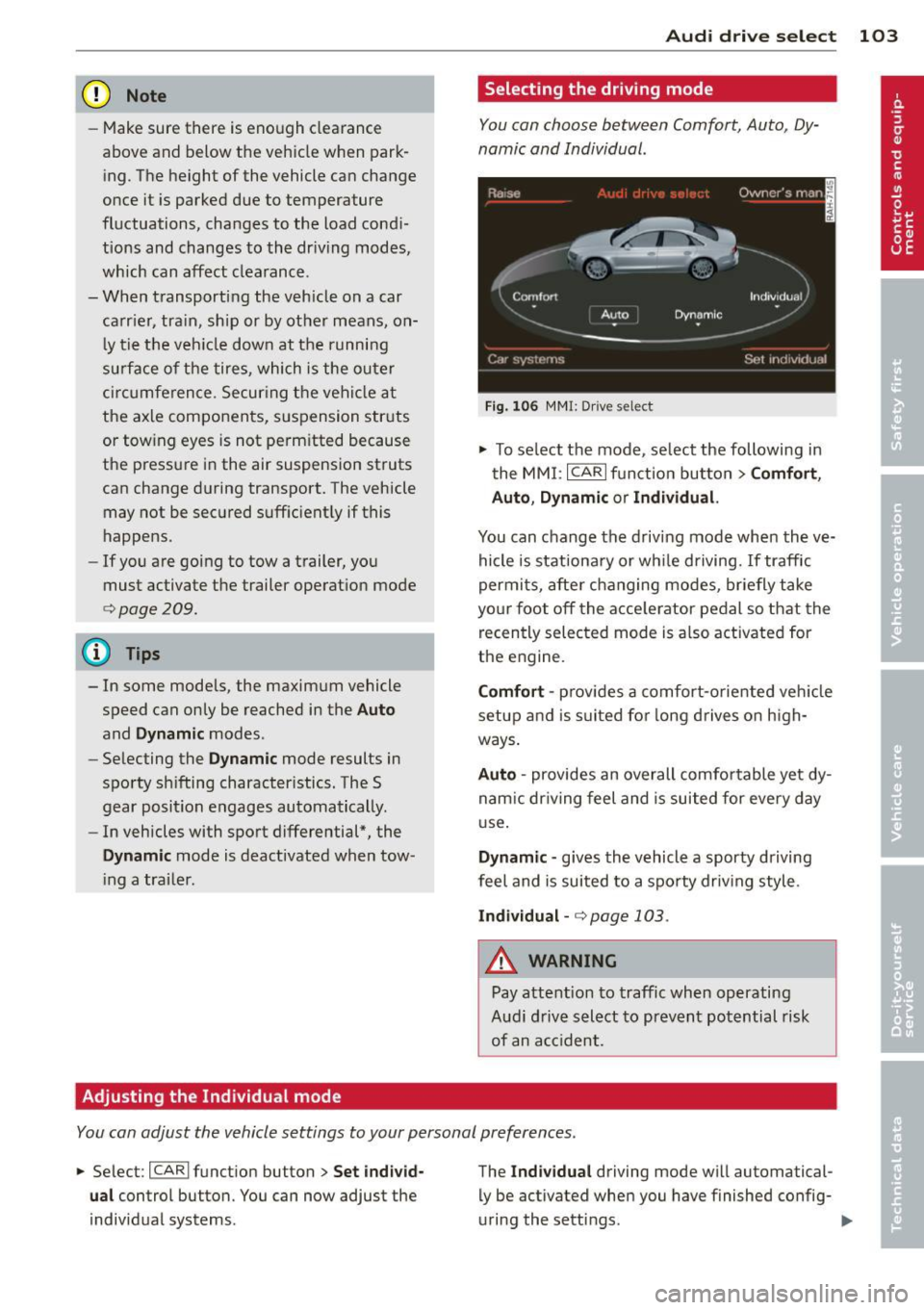
You can choose between Comfort, Auto, Dy
namic and Individual .
Fig. 10 6 MMI: D rive select
.,.. To se lect the mode, se lect the following in
the
MM I: ICARlf unction button> Comf ort ,
Auto , D ynamic or Individual.
You can change the d riv ing mode when the ve
hicle is stationary or wh ile driving.
If traffic
permi ts, after changing modes, briefly take
yo ur f oot off the acce lerator pedal so that the
recently selected mode is a lso activated for
the engine.
Comf ort -prov ides a comfort-oriented veh icle
setup and is s uited for long drives on h igh
ways .
Auto -provides an overall comfo rtable yet dy
nam ic dr iving feel and is suited for every day
u se.
Dynamic -gives the vehicle a sporty driving
feel and is suited to a spo rty driving style .
Individual -<=> page 103 .
_.& WARNING
-Pay attention to traffic when operating
Audi d rive select to prevent potential risk
of an acc ident.
-
You can adjust the vehicle settings to your personal preferences .
.,.. Select : I CARI funct ion button> Set individ
ual
control button. You can now adjust the
individual systems . The
Ind
ividu al driving mode wi ll automatical
ly be activated when you have finished config
uring the sett ings.
Page 117 of 310
![AUDI A7 2013 Owners Manual cannot engage the reverse gear. Drive to your
authorized Audi dealer or qualified repair fa
cility immediately to have the malfunction
corrected.
[O] Transmission malfunction: Sto](/img/6/57603/w960_57603-116.png "AUDI A7 2013 Owners Manual cannot engage the reverse gear. Drive to your
authorized Audi dealer or qualified repair fa
cility immediately to have the malfunction
corrected.
[O] Transmission malfunction: Sto")
cannot engage the reverse gear. Drive to your
authorized Audi dealer or qualified repair fa
cility immediately to have the malfunction
corrected.
[O] Transmission malfunction: Stop vehicle
and shift to P
Do not continue driving. Select the P selector
l eve r position and see your autho rized Aud i
dealer or qualified repair facility for assis
tance.
(D Note
If the transmission switches to emergency
mode, you should take the vehicle to an
authorized Audi dealership as soon as pos
sible to have the cond ition corrected.
Selector lever emergency release
Applies to vehicles: with S tro nic/t iptronic
If the vehicle's power supply fails, the selec
tor lever can be released in an emergency.
Fig. 120 F ront center co nsole: selecto r lever emergen
c y r elease
~ T o reach the emergency release mechanism,
remove the asht ray insert* .
~ Loosen and remove the small cap in the
ashtray mount
c:::> fig. 120.
~ You now have access to a bolt. Using a
screwdriver or simi lar, press the bolt down
and hold it down.
~ Now press the interlock and move the selec-
tor lever to the N pos ition.
The selector lever can only be moved from the P posit ion if the ignition is turned on . If the
veh icle has to be pushed or towed if the power
supply fails (e.g . battery is discharged), the
Automatic Transmission 115
selector lever must first be moved to the N
position using the emergency locking device.
Page 118 of 310
116 Parking system s
Parking systems
General information
A ppl ies to vehicles: with pa rk in g system plus/ rear view
camera/peripheral cameras/par king ass istant
Depending on your vehicle's equ ipment, vari
ous parking aids will help yo u when pa rk ing
and maneuvering.
The
pa rking sy stem plu s assists you when
pa rking by audib ly and visually indicat ing ob
jects detected
in front of and behind t he vehi
cle
~ page 117.
The rear vi ew cam era shows the area behind
the vehicle in the Infotainment d isp lay. This
d isplay assis ts you when you are c ross o r par
allel parking
q page 118. In addit ion, you are
assisted by the functions from the parking
system plus
~ page 117 .
The peripheral cam era s ass ist you with park
ing and maneuvering. You are aided by var ious
cameras depending on the vehicle equipment l eve l¢
page 121. In addition, you are assist
ed by the function s from the parking sy stem
p lus ¢ page 117.
A WARNING
- Always look for traff ic and check the area
around your vehicle by looking at it di
rectly as well . The parking system cannot
replace the d rive r's attent io n. The dr iver
is a lways respo nsible for safety during
p arki ng and fo r all other maneuvers.
- Please note that some surfac es, such as
cl othing, are not detected by the system.
- Senso rs and cameras have blind spots in
w hich peop le and objects can not be de
tected. Be especially cau tious of children
a nd animals.
- T he sensors can be displaced by impacts
or d amage to t he rad ia to r grille, b umpe r,
wheel housing and the unde rbody. The
par king systems may become impaired
as a result . Have your a uthorized Audi
dealer or qua lified wor kshop check their
function. -
Make s ure the sensors are not covered by
stickers, deposits or any other obstruc
tions as it may impai r the sensor func
tion . For information on cleaning, refer
to
~ page 216 .
(D Note
- Some objects are not detected by the
system under certain c ircumstances :
- Obje cts su ch as ba rrie r ch ains, trailer
draw bars, vertic al po les or fences
- Objects above t he senso rs such as wall
ex tensions
- Objects w ith specific surfaces or st ruc
tures su ch as chain link fences or pow
der snow.
- If you conti nue d riving closer to a low- ly
ing object, it may disappea r from the
sensor range. Note th at yo u w ill no lon
ger be warned abo ut this obstacle.
(j) Tips
- T he sys tem may provide a wa rni ng even
t ho ugh the re are no obs ta cl es in the cov
erage a rea in some situa tions, such as:
- certain road surfaces or for long grass.
- externa l ult rasonic sources e.g. from
clean ing vehicles.
- heavy rain, snow or thick vehicle ex
ha ust.
- We recommend that you practice park
ing in a traff ic- free location or park ing
lot to become familiar w it h the system.
When doing this, there should be good light and weather cond itions .
- Yo u can change the volume and pitch of
the s ignals as we ll as the disp lay
¢ page 126 .
-Please refer t o the instructions for tow
ing a t railer
¢ page 127 .
-What appears in the infotainment dis
play is somewhat time-delayed .
Page 121 of 310
example, after a collision, do not contin
ue to use the system for safety reasons.
Have it checked by your authorized Audi
dealership or authorized repair facility.
- Only use the rear view camera to assist
you if it shows a good, clear picture. For
example, the image may be affected by
the sun shining into the lens, dirt on the
lens or if there is a system fault.
- Use the rear view camera only if the lug
gage compartment lid is completely
closed. Make sure any objects you may
have mounted on the luggage compart
ment lid do not block the rear view cam
era.
- The camera lens enlarges and distorts
the field of vision. The object appears
both altered and inaccurate on the
screen.
- In certain situations, people or objects in
the display appear closer or further
away:
- For objects that do not touch the
ground, such as the bumper of a
parked vehicle, a trailer hitch or the
rear of a truck. Do not use the help
lines in this case.
- If driven from a level surface onto an
incline, or a downward slope.
- If driven toward protruding objects.
- If the vehicle is carrying too much load
in the rear.
(D Note
- Always read and follow the applicable
warnings
¢ (D in General information on
page 116.
- The orange colored orientation lines in
the Infotainment display show the vehi
cle path depending on the steering
wheel angle. The front of the vehicle
front swings out more than the rear of
the vehicle. Maintain plenty of distance
so that your outside mirror or a corner of
your vehicle does not collide with any ob stacles.
Parking systems 119
Switching on/off
App lies to vehicles: wit h parking system plus w ith rear
v iew camera
Switching on
.. Shift into reverse or
.. press the
p,,1A button in the center console
¢ fig. 122 . A short confirmation tone
sounds and the LED in the button turns on .
Switching between the rear view camera
and optical display
.. Press the Graphic control button ®
¢ fig. 128 to see the optical display.
.,. Press the
Rearview control button to see
the rear view camera image.
Switching off
.. Drive forward faster than 6 mph (10 km/h),
or
.,. Press the
p,,1A button, or
.,. Switch the ignition off.
(D Tips
The visual display in the left part of the
display should help you detect the critical
vehicle areas.
Page 128 of 310
126 Parking systems
Trailer view
Ap plies to vehicles: with par king system p lus and tra iler
hitch
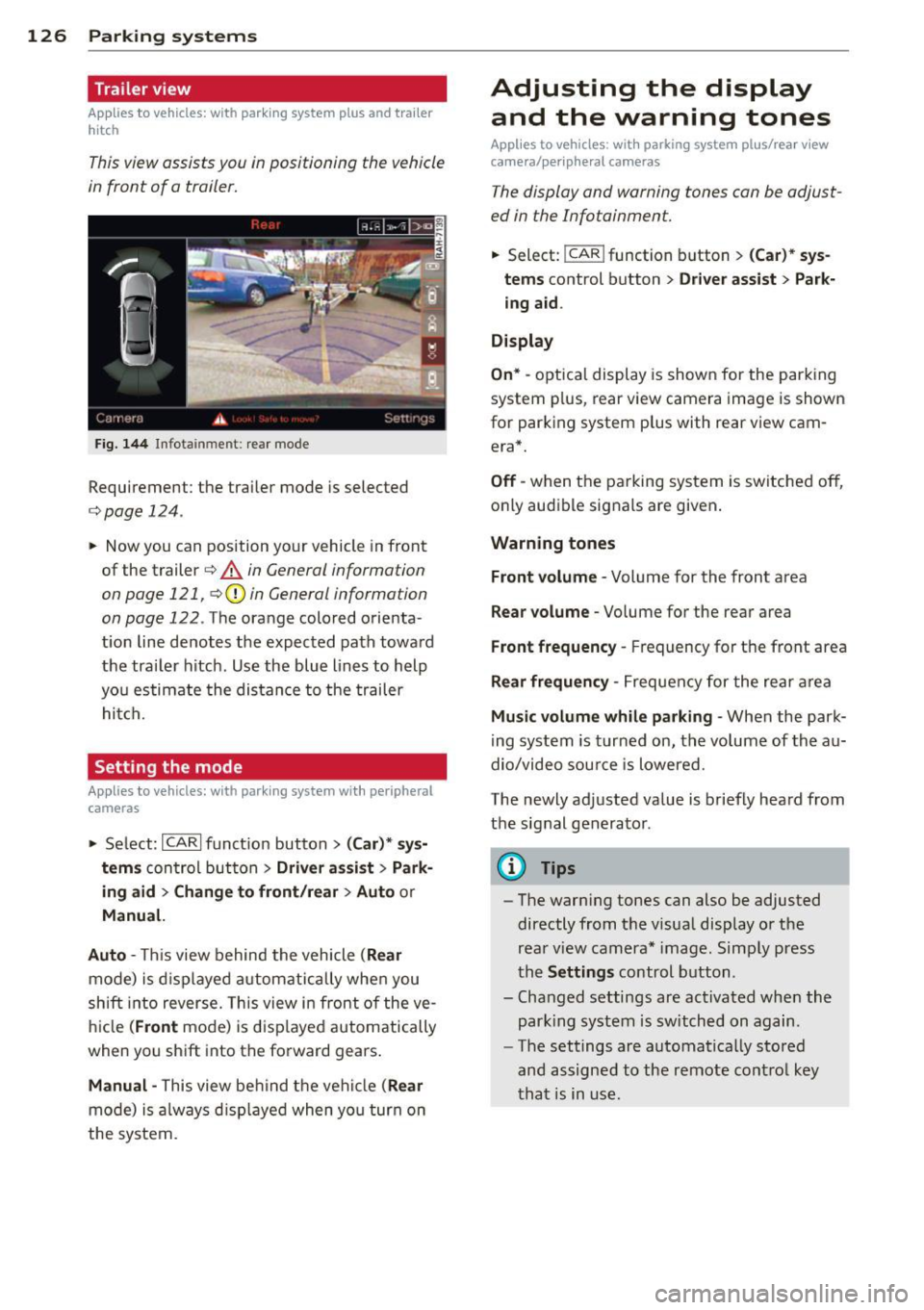
This view assists you in positioning the vehicle
in front of a trailer.
F ig. 1 44 Infotai nment: rea r mode
Requirement: the trai ler mode is selected
c:;, page 124.
.. Now you can position yo ur vehicle in front
of the trailer
c:;, .&. in General information
on page 121, c:;,(j) in General information
on page 122 .
The orange colo red orienta
t ion line denotes the expected path toward
the tra iler hitch . Use the blue lines to help
yo u estimate the distan ce to the trailer
hi tc h.
Setting the mode
Ap plies to veh icles: with par king system wi th peripheral
cameras
.. Select: ICARI funct ion button > ( Car )* sy s
tem s
control button > Driv er a ssis t > Park
ing aid > Ch ange to front /rear > Auto
or
Manual.
Auto -
This view behind the vehicle ( Rear
mode) is d isplayed a utomatically when you
shift into reverse. This view in front of the ve
h icle
(Front mode) is d isp layed automatically
when you sh ift into the forward gears .
Manual -This view be hind the vehicle (Rear
mode) is a lways d isp layed when yo u turn on
the system.
Adjusting the display and the warning tones
Applies to vehicles: wit h parking syste m plus/ rea r view
came ra/ peri pheral cameras
The display and warning tones can be adjust
ed in the Infotainment.
.. Select: !CAR ! function b utton > (Ca r) * s ys
tems
control button > Dri ver ass ist > Par k
i n g a id .
Display
On * -
optica l display is shown for the parking
system p lus, rear view camera image is shown
for parking system plus with rear view cam era*.
Off -when the parking system is switche d off,
o nly aud ible signa ls are given .
Warning tones
Front volume -
Volume for the front area
Rear volume -Volume for the rear area
Front frequency -Frequency for the front area
Rear frequen cy -Frequency for the rear area
Mu sic volum e while parking -When the park
ing system is turned on, the vo lume of the au
dio/video sou rce is lowered.
The newly adjusted value is briefly hea rd from
the signal generator .
@ Tips
-The warn ing tones can also be adjusted
directly from t he visua l display o r the
rea r view camera* image. Simp ly press
the
Setting s control button .
- Changed settings are act ivated when the
par king system is switched on again.
- The settings are automa tica lly stored
and assigned to the remote cont rol key
t ha t is in use .
Page 129 of 310
Error messages
Applies to vehicles: with parking system plus/rear view
camera/per ipheral cameras
There is an e rror in the system if the LED in
the
p, qA button is blinking and you hear a con
tinuous alarm for a few seconds afte r switch
ing on the parking system or when the park
ing system is already activated. If the error is
not corrected before you switch off the igni
tion, the LED in the
Pw.6. button will blink the
next time you switch on the parking system by
shifting into reverse.
Parking system plus
If a sensor is faulty, the~ symbol will appear
in front of/behind the vehicle in the Infotain
ment display. If a rear sensor is fau lty, only
obstacles that are in areas @ and @ are
shown
c:> fig. 121 . If a front sensor is fau lty,
only obstacles that are in areas © and @are
shown .
Peripheral cameras*
There is also a system error if:
- the
'(:8:)• • symbol appears in the display and
the corresponding display area is shown in
blue. The camera is not working in this area.
- all segments around the vehicles are red or
if no segments are displayed.
Drive to your authorized Aud i dea ler o r au
thorized repair fac ility immediately to have
the ma lfunction corrected.
Trailer hitch
Appl ies to vehicles: with parking system plus/rear view
camera/per ipheral cameras and trailer hitch
For vehicles using the tra iler socket, the park
ing system rear senso rs do not turn on when
you shift into reverse gear or when yo u press
the P
01A button. This resu lts in the following re
strictions:
Parking system plus*
There is no distance wa rning for the rear. The
front sensors rema in activated. The visual dis
play switches to the trailer towing mode.
Parking systems 127
Parking system plus and rear view
camera* /Peripheral cameras*
There is no distance warning for the rear. The
front sensors remain activated. The visual dis
play sw itches to the trailer towing mode. The
rear view camera image will not show the ori
entation lines and the blue surfaces .
{D Tips
Trailer hitches that are not installed at the
factory may cause the park ing system to
malfunction or they may restr ict its func
tion.
Page 134 of 310
132 Driving Safely
• Always keep both feet in the footwell so
that you are in control of the vehicle at all
times.
For detailed information on how to adjust the
driver's seat, see
¢ page 53.
A WARNING
Drivers who are unbelted, out of position
or too close to the airbag can be seriously
injured by an airbag as it unfolds. To help
reduce the risk of serious personal injury:
- Always adjust the driver's seat and the
steering wheel so that there are at least
10 inches (25 cm) between your breast
bone and the steering wheel.
- Always adjust the driver's seat and the
steering wheel so that there are at least
4 inches (10 cm) between the knees and
the lower part of the instrument panel.
- Always hold the steering wheel on the
outside of the steering wheel rim with
your hands at the 9 o'clock and 3 o'clock positions to help reduce the risk of per
sonal injury if the driver's airbag inflates.
- Never hold the steering wheel at the
12 o'clock position or with your hands at
other positions inside the steering wheel
rim or on the steering wheel hub. Hold
ing the steering wheel the wrong way
can cause serious injuries to the hands,
arms and head if the driver's airbag in
flates.
- Pointing the steering wheel toward your
face decreases the ability of the supple
mental driver's airbag to protect you in a
collision.
- Always sit in an upright position and nev
er lean against or place any part of your
body too close to the area where the air
bags are located.
- Before driving, always adjust the front
seats and head restraints properly and
make sure that all passengers are prop
erly restrained.
- Never adjust the seats while the vehicle
is moving. Your seat may move unexpect- edly and you could lose control of the ve
hicle .
- Never drive with the backrest reclined or
tilted far back! The farther the backrests
are tilted back, the greater the risk of in
jury due to incorrect positioning of the safety belt and improper seating posi
tion .
- Children must always ride in child seats
¢
page 175. Special precautions apply
when installing a child seat on the front passenger seat¢
page 149.
Proper seating position for the front
passenger
The proper front passenger seating position
is important for safe, relaxed driving .
For your own safety and to reduce the risk of
injury in the event of an accident, we recom
mend that you adjust the seat for the front
passenger to the following position :
• Adjust the angle of the seatback so that it is
in an upright position and your back comes in full contact with it whenever the vehicle is
moving.
• Adjust the head restraint so the upper edge
is as even as possible with the top of your
head. If that is not possibl e, try to adjust
the head restraint so that it is as close to
this position as possible¢
page 134.
• Keep both feet flat on the floor in front of
the front passenger seat .
• Fasten and wear safety belts correctly
¢page 143.
For detailed information on how to adjust the
front passenger's seat, see ¢
page 52.
A WARNING
-
Front seat passengers who are unbelted,
out of position or too close to the airbag
can be seriously injured or killed by the air
bag as it unfolds. To help reduce the risk of
serious personal injury:
Page 138 of 310
136 Driving Saf ely
Fl oor mats used in your vehicle must be at
tached to these fasteners. Proper ly securing
the floor mats will prevent them from s liding
into pos itions that could interfere with the
pedals or impair safe operation of your vehicle
in other ways .
A WARNING
Pedals that cannot move freely can result
in a loss of veh icle contro l and increase the
r isk of serious personal injury .
- Always make sure that floor mats are
properly secured.
- Never place or insta ll floor mats or other
floor coverings in the vehicle that cannot be properly secured in place to prevent
them from slipping and interfering w ith
the pedals or the ability to control the
vehicle.
- Never place o r insta ll floor ma ts or other
floor coverings on top of a lready insta l
led floor mats. Additional floor mats and
other coverings w ill reduce the size of
the pedal area and interfere with the
pedals.
- Always properly reinstall and secure floor
mats that have been taken out for clean
ing.
- Always make sure that objects cannot fall into the driver footwell wh ile the ve
hicle is moving. Objects can become
trapped under the brake pedal and accel
erator peda l causing a loss of veh icle
control.
Stowing luggage
Loading the luggage compartment
All luggage and other objects must be prop
erly stowed and secured in the luggage com
partment.
L oose items in the luggage comp art ment can
shift suddenly, changing veh icle hand ling
characteristics. Loose items can also increase
the risk of serious personal injury in a sudden
vehicle maneuver or in a collision . ..
Distribute the load even ly in the luggage
compartment .
.. Always place and proper ly secure heavy
items in the luggage compartment as far
forward as possible .
.. Secure luggage using the tie -downs prov id
ed
¢ page 63, Luggage compartment.
.. Make s ure that the rear seatback is securely
la tc hed in place.
A WARNING
Imp roperly store d luggage or other items
can fly thro ugh the vehi cle causing ser ious
personal injury in the event of hard brak
i ng or an accident. To help reduce the risk
of ser ious personal in jury:
- Always put objects, fo r example, luggage
or other heavy items in the luggage com pa rtment.
- Always secure objects in the luggage
compartment using the t ie-down hooks
and suitable straps.
A WARNING
=
Heavy loads w ill influence the way your ve-
hi cle handles . To help reduce the risk of a
l oss of contro l leading to serious pe rsonal
i njury :
-Always keep in mind when transporting
heavy objects, that a change i n the cen
ter of gravity can also cause changes in
veh icle ha ndling:
- Always distribute the load as evenly as
poss ible.
- Place heavy objects as far forward in
the luggage compartment as possible .
- Never exceed the Gross Axle Weight Rat
ing or the Gross Vehicle We ight Rating
specified on the safety compliance stick
er on the left door jamb. Exceed ing per
miss ible weight standards can cause the
veh icle to slide and handle differently .
- Please observe information on safe dr iv
ing¢
page 130.
Page 147 of 310
Use the height adjustment to change the posi
tion of the shoulder belt of the front safety
belts .
.&_ WARNING
Improperly positioned safety belts can
cause serious personal injury in an acci
dent.
-
- The shoulder belt should lie as close to
the center of the collar bone as possible
and should fit well on the body. Hold the
belt above the latch tongue and pull it
even ly across the chest so that it sits as
low as possible on the pelvis and there is
no pressure on the abdomen. The be lt
sho uld a lways f it snugly ¢
fig. 156. Pull
on the belt to tighten if necessary.
- A loose-fitt ing safety be lt can cause seri
o us injuries by shifting its position on
yo ur body from the strong bones to more
vulnerab le, soft tissue and cause serious
injury.
- Always read and heed all WARNINGS and
other important information
¢ page 143.
Pregnant women must also be correctly
restrained
The best way to protect the fetus is to make
sure that expectant mothers always wear
safety belts correctly -throughout the preg
nancy.
Fi g. 157 Safety belt pos itio n during pr egnancy
To provide maxim um protection, safety belts
must always be posit ioned correctly on the
wearer's body¢
page 144.
Safety belts 145
.. Adjust the front seat and head restraint cor
rectly ¢
page 52, General recommenda
tions .
.. Hold the belt by the tongue and pull it
evenly across the chest and pelv is
¢ fig. 157, ¢ &. .
.. Insert the tongue into the correct buckle of
your seat until you hear it latch securely
r=:;, fig. 155 .
.. Pull on the belt to make sure that i t is se
curely latched in the buck le .
A WARNING
-
Improperly positioned safety be lts can
cause ser ious persona l injury in an acci
dent.
- Expectant mothers m ust always wear the
lap portion of the safety belt as low as
possible across the pelvis and below the
round ing of the abdomen.
-Always read and heed all WARNINGS and
other important information
i=:;, &. in Fas
tening safety belts on page
144.
Unfastening safety belts
Unbuckle the safety belt with the red release
button only ofter the vehicle has stopped.
,,,,,
Fig . 158 Re leas ing the tong ue from the buck le
.,. Push the red release button on the buckle
r=:;, fig. 158. The be lt tongue will spr ing out
of the buckle
¢ f1. .
0 ...
"' 0 ±
~
.,. Let the belt w ind up on the retractor as you
guide the be lt tongue to its stowed position.
Ill>
Page 160 of 310
158 Airbag system
-Repairs to the front passenger seat must
be performed by qualified and properly
trained workshop personnel.
- Never remove the front passenger or
driver seat from the vehicle.
- Never remove the upholstery from the
front passenger seat.
- Never disassemble or remove parts from
the seat or disconnect wires from it.
- Never carry sharp objects in your pockets
or put them on the seat. The capacitive
passenger detection mat in the front
passenger seat will not function properly
if it is punctured .
- Never carry things on your lap or carry
objects on the front passenger seat.
Such objects can influence the capaci
tance registered by the capacitive pas senger detection system, so that incor
rect information is provided to the airbag
control unit.
- Never store items under the front pas
senger seat. Parts of the Advanced Air
bag System under the passenger seat
could be damaged, preventing them and
the airbag system from working proper
ly.
- Never place seat covers or replacement upholstery that have not been specifical
ly approved by Audi on the front seats.
- Seat covers can prevent the Advanced
Airbag System from recognizing child re
straints or occupants on the front pas
senger seat and prevent the side airbag
in the seat backrest from deploying prop
erly .
- If a seat heater has been retrofitted or
otherwise added to the front passenger
seat, never install any child restraint sys
tem on this seat.
- Never use cushions, pillows, blankets, or
similar items on the front passenger
seat. The additional layers prevent the
capacitive passenger detection system
from accurately measuring the capaci
tance of the child safety seat and/or the
person on the seat and thus keep the Ad- vanced Airbag System from working
properly.
- Never place or use any electrical device
(such as a laptop, CD player, electronic
games device or power inverter) on the
front passenger seat if the device is con nected to the 12-volt socket or the ciga
rette lighter socket. Such devices can in
fluence the capacitance registered by the
capacitive passenger detection system,
so that incorrect information is provided
to the airbag control unit.
- If you must use a child restraint on the
front passenger seat and the child re
straint manufacturer's instructions re
quire the use of a towel, foam cushion or
something else to properly position the
child restraint, make certain that the
PASSENGER AIR BAG OFF light comes
on and stays on whenever the child re
straint is installed on the front passen
ger seat.
- If the
PASSENGER AIR BAG OFF light
does not come on and stay on, immedi
ately install child restraint in a rear seat
ing position and have the airbag system
inspected by your Audi dealer.
_& WARNING
If the front passenger seat gets wet, dry it
immediately.
- If liquid soaks into the front passenger
seat, this can keep the airbag system
from working properly and may, for in stance, deactivate the passenger frontal
airbag. If this happens, the
PASSENGER
AIR BAG OFF
light will come on and stay
on together with the airbag indicator light
fl in the instrument cluster .
- If liquid is pooled on the seat, but has
not soaked in, this may also keep the air
bag system from working properly and
cause the passenger frontal airbag to be
enabled (turned on), even though there
is a properly installed child restraint sys
tem on the seat. Wet towels or other wet
things on the seat cushion can have the