lock AUDI A7 2014 Owner's Guide
[x] Cancel search | Manufacturer: AUDI, Model Year: 2014, Model line: A7, Model: AUDI A7 2014Pages: 306, PDF Size: 76.83 MB
Page 74 of 306

7 2 Warm and cold
Four-zone automatic climate control
Operation
Applies to vehicles: with four -zone automa tic clima te control
We recommend pressing the IAUTO I button and setting the temperature to 72 °F (22 °C).
Fig. 74 Fo ur-zone automat ic climate contro l: controls
Fig . 75 Fou r-zone automatic cl imate cont ro l: rear con
trol s
Press the buttons to turn the functions on or
off. Use the dials to adjust the temperature,
the blower speed and the air distribution. The
LED in a button will light up when the func
tion is switched on. The settings are shown in
the climate control display and are also shown in the MMI display for a few seconds . The driv
er and front passenger sett ings can be adjust
ing separately.
The settings can also be adjusted in the rear
<::;> fig. 75.
IOFF j Switching the climate control
system on/off
The I O FFI button switches the climate control
system on or off .
It also switches on when you
turn the dia l or press any button. Airflow from outside is blocked when the
climate control
system is switched off .
You can activate the residual heat function
whe n the ignition is off by pressing and hold
ing the ~ button. The residua l heat from the
coolant is used to heat the vehicle interior .
The residual heat function switches off auto
matically after about 30 minutes.
!ACI Switching cooling mode on/off
T he air is not coo led and humidity is not re
moved when cooling mode is switched off.
T his can cause fog on the windows. Cooling
mode switches off automatically when the
outside temperature is be low zero .
1- 1 Switching recirculation mode on/off
In recircu lation mode, the air inside the vehi
cle is circu lated and filtered. This prevents the
unfiltered air outside the vehicle from enter
ing the vehicle interior . We recommend
switching recirculation mode on when driving
through a tunnel or when sitting in traffic ¢ .&, .
The
! AUTO I button or~ button switches rec i r-
cu lation mode off. .,.
Page 77 of 306
On the road
Steering
Manually adjustable steering wheel
Applies to vehicles: with manu ally adjustable steering
w hee l
The height and reach of the steering wheel
can be adjusted.
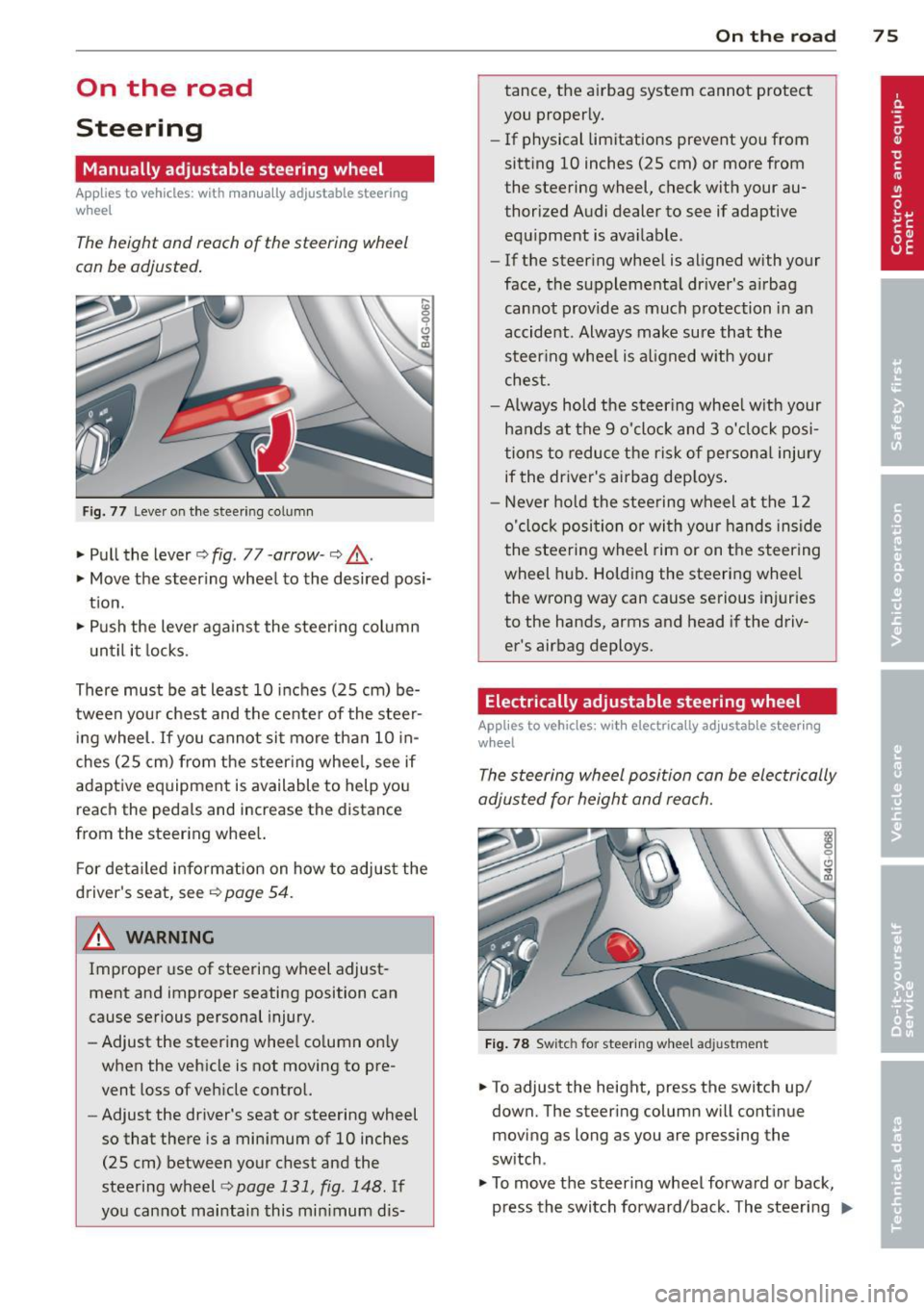
Fig. 77 Lever on the steer ing co lumn
" Pull the lever¢ fig. 77 -arrow -¢_&..
"Move the steering wheel to the desired posi
tion.
" Push the lever against the steering column
u ntil it locks.
There must be at least 10 inches (25 cm) be
tween your chest and the center of the steer ing wheel.
If you cannot sit more than 10 in
ches (25 cm) from the steer ing wheel, see if
adaptive equipment is available to help you
reach the pedals and increase the distance
from the steering whee l.
F or detailed information on how to adjust the
driver's seat, see
Q page 54.
_& WARNING
Improper use of steering wheel adjust
ment and improper seating position can
cause serious personal injury.
- Adjust the steering whee l column on ly
when the vehicle is not moving to pre
vent loss of veh icle control.
-
- Adjust the driver's seat or steering wheel
so that there is a minimum of 10 inches
(25 cm) between your chest and the
steering wheel¢
page 131, fig . 148 . If
you cannot maintain this minimum dis-
On the road 75
tance, the airbag system cannot protect
you properly.
- If physical limitations prevent you from
sitting 10 inches (25 cm) or more from
the steering wheel, check with your au
thorized Audi dealer to see if adaptive
equipment is available.
- If the steering wheel is aligned with your
face, the supplementa l driver's a irbag
cannot provide as much protection in an
accident . Always make sure that the
steering wheel is aligned with your
chest .
- Always hold the steering wheel w ith your
hands at the 9 o'clock and 3 o'clock posi
tions to reduce the risk of personal injury
if the driver's airbag deploys.
-Never hold the steering wheel at the 12
o'clock position or wi th your hands inside
the stee ring wheel rim or on the steering
wheel hub. Holding the steering wheel
the wrong way can cause serious injuries
to the hands, arms and head if the driv
er's airbag deploys.
Electrically adjustable steering wheel
App lies to vehicles: wi th electrica lly ad justable stee ring
w heel
The steering wheel position can be electrically
adjusted for height and reach.
Fig. 78 Switc h fo r steering w heel adju stment
"To adjust the height, p ress the switch up/
down. The steer ing column w ill cont inue
moving as long as you are press ing the
switch .
" To
move the steering wheel forward or back,
press the switch forward/back. The steering
I),-
Page 78 of 306

76 On the road
column will continue moving as long as you
are pressing the switch.
There must be at least 10 inc hes (25 cm) be
tween you r chest and the center of the steer
ing whee l.
If you cannot sit more than 10 in
ches (25 cm) from the steering whee l, see if
adapt ive equipment is available to help you
reach the pedals and increase the distance
from the steer ing wheel.
F or detai led information on how to adjust the
driver's seat, see
<::> page 54 .
In vehicles with the memory f unction* , the
steering column settings are stored together
with the seat position.
A WARNING
Improper use of steering wheel adjust
ment and improper seating position can
cause se rious personal injury.
- Adjust the steer ing whee l column on ly
when the vehicle is not moving to pre
vent loss of veh icle cont rol.
-
- Adjust the driver's seat or steering wheel
so that the re is a min imum of 10 inches
(25 cm) between your chest and the
steering wheel ¢
page 1311 fig. 148. If
you can not maintain this min imum dis
tan ce, the airbag system cannot protect
yo u properly.
- If p hys ica l limi tations prevent y ou from
sitting 10 in ches (25 cm) o r more from
the steering wheel, check with yo ur au
tho rized Aud i dealer to see if adaptive
equipment is availab le .
- If the steerin g wheel is aligned wi th you r
face, the supp lemental drive r's airbag
cannot prov ide as much protect ion in an
acc ident. A lways make sure that the
steering wheel is aligned with your
chest.
- Always hold the steering wheel with your
hands at the 9 o'clock and 3 o'clock posi
t ions to reduce the risk of pe rsonal injury
if the d river 's airbag deploys.
- Never hold the steer ing whee l at the 12
o'clock posit ion or w it h your hands i nside the steering wheel rim or on the steering
wheel hub. Hold
ing the steer ing wheel
the wrong way can cause serious injuries
to the hands, arms and head if the driv
er 's airbag deploys.
Easy entry feature
Applies to vehicles: with electrically adjustable steering
wheel
The easy entry feature makes it easier to en
ter and exit the vehicle by automatically ad
justing the steering wheel.
.. Select in the MM I: ICAR I fu nction button>
(Car )* sys tem s control b utton > V ehicle set
ting s
> Seat s > Driver 's seat > Easy entry >
On .
When the easy ent ry feature is turned on, the
steering wheel moves up to the park position
when you switch
off the ignition. After you en
ter the veh icle, the steering wheel moves to
the stored position as soon as you sw itch on
the ignit ion.
Starting and stopping
the engine
Starting the engine
This button switches on the ignition and
starts the engine.
Fig . 79 Center console: S TART ENGINE S TOP b utto n
Switching the ign ition on /off
• To switch the ign ition on/off, press the
I STAR T ENGINE ST OPI button . Do not p ress
the brake pedal while doing this . Diesel
veh icles are preheated while the ignit ion is
sw itched on . ..,.
Page 79 of 306

Starting th e engin e
"'Press the brake peda l c::> _&..
"'Press the !START ENGINE STOP I button
c::>fig. 79. The engine will start .
"' It is possible that the re wi ll be a slight de lay
when starting the engine for diesel vehicles
in colder temperatures. Therefore, you must
hold the brake pedal down until the eng ine
starts. The indicator lamp
&I illum inates
when the eng ine is preheated .
If the engine should not start immediately,
the starting process is automatically stopped
after a short time . Repeat starting procedure .
Start-Stop-Sy stem *:
Note the information on c::> page 81, Start
S top-Sys tem.
A WARNING
- Never allow the engine to run in confined
spaces -danger of asphyxiation .
- Never turn off the eng ine unti l the vehi
cle has come to a complete stop .
- The brake booster and power steer ing
only work when the engine is running . If
the engine is off, you have to use more
force when steering or braking. Because
you cannot stee r and brake as you usua l
ly wou ld, this could lead to crashes and
serious injur ies.
- Avoid high engine rpm, fu ll throttle and
heavy engine loads unti l the engine has
reached operating temperature - ot her
wise yo u risk eng ine dam age.
- The eng ine cannot be started by pushing
or tow ing the veh icle.
(D Tips
- After a cold engine is started, there may
be a brief period of increased noise be
cause oil press ure must fi rst bu ild up in
the hydraulic valve adjusters. This is nor
mal and not a ca use for concern .
-If yo u leave the vehicle with the ignit ion
switched on, the ignition will switch off
On th e ro ad 77
after a certain period of time. Please
note that electrical equipment such as
exterior lights will sw itch off as well
when that happens.
Stopping the engine
"' Bring your vehicle to a complete stop.
"' Move the selector lever to the P or N posi
tion .
"' Press the
I STA RT E NGINE ST OP I button
c::> page 76, fig. 79.
When you stop and the Start-Stop-System*
turns off the engine, the ignition remains on .
Press the
! S TAR T ENGIN E ST OPI button to
switch the ign ition off du ring a stop phase.
Steerin g lock
The steering locks when you tur n the engine
off using the
I START ENGINE STOP I button
and open the driver's door. The locked steer
i ng helps prevent vehicle theft.
Eme rgency off
If necessary, the engine can be switched off
with the selector lever in the R or D/S posi
tion. The engine stops if you press the
I S TART ENGINE STOP I button at speeds below
6 mph (10 km/h) .
A WARNING
-Never turn off the engine until the vehi
cle has come to a complete stop.
- The brake boos ter and power steering
only work when the engine is r unning . If
the engine is off, yo u have to use more
force when steering or braking. Because
you cannot steer and brake as you usual
ly would, th is cou ld lead to crashes and
serious injuries.
- For safety reasons, you sho uld a lways
park your vehicle w ith the selector lever
in P . Otherwise, the vehicle could inad
vertently roll away.
- After the eng ine has been switched off,
the radiator fan can cont inue to run for
up to 10 minutes - even with the ignition .,..
Page 80 of 306

78 On the road
switched off. It can a lso switch on again
after some time if the coolant tempera
ture rises as the result of a heat buildup
or if the engine is hot and the engine
compartment is addit ionally heated by
the sun's rays.
(D Note
D o not stop the engine immediate ly afte r
hard or extended driving . Keep the engine
running for approximately two minutes to
prevent excessive heat build-up.
Driver message in the instrument
cluster display
Turn off ignition b efo re leaving car
This message appears and a war ning tone
sounds if yo u open the dr ive r's door when the
ignition is switched on.
Pres s brake pedal to start en gine
This message appears if you press the
I STAR T ENGINE ST OP ! button to start the en
g ine and do not depress the brake pedal. The
engine can on ly be started if the brake pedal
i s depressed.
!I ls k ey in the vehicle ?
If the indicator light turns on and the mes
sage appears, the remote control key was re
moved from the vehicle while the engine was
running . If the ignit ion key is not in the vehi
cle you w ill not be ab le to switch on the ig ni
tion o r restart the eng ine after it has been
switched off. Yo u wi ll also not be able to lock
the vehicle from the outside.
Shift to P , otherwise vehicle can roll away .
Doors do not lo ck if le ver i s not in P .
This message appears for safety reasons
along w ith an audib le warn ing tone if the P
selecto r lever posit io n is not engaged when
stopping the eng ine with the
I START ENGINE STOP! button. Select the P se
lector lever posit io n. Otherw ise the veh icle
could roll and it cannot be locked.
mJ Ke y is not re cogni zed . H old back of ke y
a ga in st marked are a. See owner' s manual.
If the indicator ligh t turns on and this mes
sage appears, there is a malf unct ion
r::!;> page 78.
Turn off ignition before l ea v ing car. B attery
i s d isc harging
This message appears if the driver's door is
opened wh ile the ignition is switched on. Al
ways switch off the igni tion if you are leaving
the vehi cle. See also
r::¢,page 83.
Shift to P and turn off ignition before l eav
ing car, oth erwi se v ehicl e can roll away
This message appears if the driver's door is
opened wh ile the ignition is switched on and
t h e selecto r lever is not in the P posi tion. Shift
the selecto r lever into the P pos ition and
switch off the ignit ion when you exit the vehi
cl e. Otherw ise the vehicle cou ld roll. See also
r::¢,page 83.
Starting the engine if there is a
malfunction
It may not be possible to start the engine un
der certain circumstances, for example if the
battery in the vehicle key is drained, if inter
ference has affected the key or if there is a
system malfunction.
F ig . 80 Ce nter console/master key: starting the eng ine
i f there is a malfunct ion
Requirement: The message Key not recog
nized . Hold back of ke y against marked are a.
See o wne r's manual.
must appear and the in-
dicator light
ml must switch on. .,..
Page 83 of 306

Emergency braking
In the event that the conventional brake system fails or locks .
11-In an emergency, pull the switch C®) and
conti nue to pull it to slow your vehicle down
with the parking brake .
11-As soon as you release the sw itch C®) or ac-
celerate, the braki ng p rocess stops.
If you pull the sw itch (®) and hold it above a
speed of about 5 mph (8 km/h), the emergen
cy braking function is in itiated. The v ehicle is
b ra ked at a ll four wheels by activating the hy
d raul ic br ake system. The b ra ke performance
i s sim ilar to making an emergency stop¢.&. .
I n o rder not to activate the emergency brak
i ng by m ista ke, an audible warning tone (bu z
z er) sounds when the switc h(®) is p ulled. As
soon as the switch(®) is released, or the accel
erator pedal is dep ressed, emergency braking
stops .
.&_ WARNING
Emergency braking shou ld only be used in
an eme rgency, when the normal foot brake
has failed or the brake pedal is obstructed.
Using t he parking brake to perform emer
gency braking will slow you r vehicle down
as if you had made a fu ll brake applicat ion.
T he laws of phy sic s ca nnot be s uspended
eve n w ith ES C and its a ssoci ate d compo
nents (ABS, ASR, EDL). In co rners and
when road or weather conditions are bad,
a full brake application can cause the vehi
cle to skid or the rear end to b reak away -
r isking a n accident.
Start-Stop-System
Description
Appl ies to vehicles : wit h Start-Stop-System
The Start -Stop-System can he lp increase fue l
economy and red uce C O2 emissions.
I n the Start-Stop-mode , the eng ine shuts off
automatically whe n the vehicle is stopped,
such as at a traffic light. The ig nit ion remains
On th e ro ad 81
switched on during this stop phase. The en
gine wi ll be a utomatica lly restarted when
needed .
T he las t Start -Stop-Sys tem se tting (on/off us
ing the b utton
10 «<1) will be restored when the
ignition is turned on . The LED in t he
!0 •·1 but
ton t urns on when the Start-Stop-System is
switched off manually.
Basic requir ements for the Start -Stop
mode
- The d river 's door is closed.
- The driver' seat belt is latched.
- The hood is closed.
- The vehi cle must have bee n dr iven faster
t han
2.5 mph (4 km/h) since the las t stop.
- A t railer is not hitched to the ve hicle.
.&_ WARNING
- Never let the ve hicle roll wit h the eng ine
sw itched o ff. You co uld lose con trol over
the vehicle. This can lead to a collision
an d serio us in juries .
-The brake boo ster and the s teering sup
port do not work while the engine is
sw itche d off . M ore force is requi red to
stop and to steer the veh icle.
- To reduce t he risk of injuries, make sure
that the Start-Stop -System is tu rned off
when working in the eng ine compart
ment¢
page 83.
([) Note
Always switch off the Sta rt -Stop-System
when driving through water¢
page 83.
Page 85 of 306

-The windshield is being defrosted
r=>page 71, r::!;> page 73 .
-The brake peda l is pressed several times in a
row.
- Th e battery charge level becomes too low.
- High power consumption .
Switching the ignition automatically
To prevent the battery from draining, the igni
tion will switch off
automatically when all of
the following conditions have been met:
- The vehicle has already been driven .
- The engine has been turned off by the Start-
Stop-System*.
- The driver's door is opened .
- The driver's seat belt is removed.
- The bra ke peda l is not pressed down.
- The vehicle is stationary.
In this case, the activated low beam will be re
placed by the side marker lights. The side
marker lights will switch off after approx i
mately 30 minutes or when you lock the vehi
cle .
If the Start-Stop System has
not turned off
the engine or if you have switched the Start
Stop system off manually, the ignition w ill
not
be automatically switched off and the engine
will continue to run
r::!;> ,&.
& WARNING
Never allow the engine to run in confined
spaces -danger of asphyxiation.
(0 Tips
If you shift into the D, N or S positions af
ter shifting into reverse, the vehicle must
be driven faster than 6 mph (10 km/h) in
order for the engine to switch off again .
On the road 83
Switching the Start-Stop-System on/off
manually
Applies to veh icles: w ith Star t-Stop-Sys te m
If you do not wish to use the system, you can
switch it off manually.
=~-
-~ ---
' I~ -
--
Fig. 84 Center console: Start-Stop-System button
.,. To switch the Start-Stop-System off/on
manually, press the
1 (1() ~·1 button. The LED in
the button turns on when the system is
switched off.
(D Tips
If you switch the system off during a stop phase, the engine will start again auto
matically.
Messages in the instrument cluster
display
A pp lies to veh icles : w ith S tart-Stop -Sys tem
Start-Stop system deactivated: Please re
start engine manually
This message appears when spec ific condi
tions are not met during a stop phase and the
Start-Stop-System will
not be able to restart
the engine . If the Dor R selector lever posi
tions were engaged, P will be selected auto
matically. The engine must be started with
the
I START ENGINE STOP! button.
Start-Stop system: System fault! Function
unavailable
T here is a malfunction in the Start-Stop-Sys
tem . Drive the vehicle to an authorized repair
facility for servicing as soon as possible to cor
rect the malfunction.
Page 111 of 306

Automatic Transmission
S tronic, tiptronic
Introduction
Applies to vehicles: with S tro nic/t iptronic
The automat ic transmission is controlled elec
tronically. The transmission upshifts or down
shifts automatically depending on which drive
program is se lected.
When a
moderate driving style is used, the
transmission selects the most economica l
driving mode. It will then change up early and
de lay the downshifts to give better fuel econ
omy.
The transmission switches to a sporty mode
after a kick-down or when the driver uses a
sporty driving style characterized by quick ac
celerator pedal movements, heavy accelera
tion, frequent changes in speed and traveling
at the maximum speed.
If desired, the driver can also select the gears
manually (tiptronic mode) r:::> page 113.
Various automatic transmissions may be in
stalled, depending on the mode l:
S tronic transmission
The 5 tronic is a dual-clutch transmission .
Power is transferred using two clutches that
work independently from one another . They
replace the torque converter used in conven
tional automatic transmissions and allow the
vehicle to accelerate without a noticeable in
terruption in traction.
tiptronic transmission
In the tiptronic transmission, power is trans
ferred by a torque converter.
Automatic Transmission 109
Selector lever positions
App lies to vehicles: wit h S tronic/tiptro nic
Fig. 116 Display in the instrument cluste r: selector
lever pos ition
T he selector lever position engaged appears
next to the selector lever as well as in the in
strument cluster display.
P -Park
In this selector lever position the transmis
sion is mechanically locked. Engage P only
when the vehicle is
completely stopped Q .&.
in Driving the automatic transmission on
page 112.
To shift in or out of position P, you must first
press and hold the brake pedal and then press
the release b utton in the selector lever handle
whi le moving the selector lever to or from P.
You can shift out of this position only with the
ignition on .
R- Reverse
Select R on ly when the vehicle is at a full stop
and the engine is running at idle speed r:::> .&. in
Driving the automatic transmission on
page 112.
Before you move the selector lever to R, press
both the button in the hand le of the selector
lever
and the brake pedal at the same t ime.
When the ignition is on, the backup lights illu
minate when the selector lever is moved into
R.
N -Neutral
The transmission is in neutral in this position.
Sh ift to th is position for standing with the ..,.
Page 112 of 306
110 Automatic Transmission
brakes applied ¢ & in Driving the automatic
transmission on page 112.
When the veh icle is stationary or at speeds
be low 1 mph (2 km/h), you must always apply
the footbrake before and while moving the
lever out of N.
D/S -Normal position for driving forward
In the D/S position, the transmiss io n can be
operated e ither in the normal mode Dor in
the sport mode S. To select the sport mode S,
pull the se lector lever back briefly . Pulling the
lever back again will select the normal mode
D. The instrument cluster display shows the
selected driving mode.
In the
normal mode D, the transmission auto
matica lly selects the suitab le gear ratio. It de
pends on engine load, vehicle speed and driv
ing style.
Select the
spo rt mode S for sporty driving.
The vehicle makes fu ll use of the engine's
power. Shifting may become noticeable when
accelerating.
When the vehicle is stationary or at speeds
be low 1 mph (2 km/h), you must always apply
the foot brake before and while moving the lever to D/S out of N.
A WARNING
Read and follow all WARNINGS¢ & in
Driving the automatic transmission on
page 112.
d) Note
-
Coasting downhill with the transmission in
N and the engine not running w ill result in
damage to the automatic transmission
and possibly the catalytic converter.
@ Tips
- Audi drive select: you can adjust the
sporty sh ift characteristics in the
Dy
namic driving mode.Swill appear in the
i nst rument cluste r d isplay instead of D.
-If you accidentally select N while driv ing,
take your foot off the acce lerator pedal immediately and wait
for the engine to
slow down to idle before selecting D/S.
-If there is a power failure, the selector
lever will not move out of the P position.
The emergency release can be used if
this happens
¢page 115.
Automatic Shift Lock (ASL)
Applies to vehicles : wit h S t ronic/tipt ro ni c
The Automatic Shift Lock safeguards you
against accidentally shifting into a forward or
the reverse gear and causing the vehicle to
move unintentionally.
( )
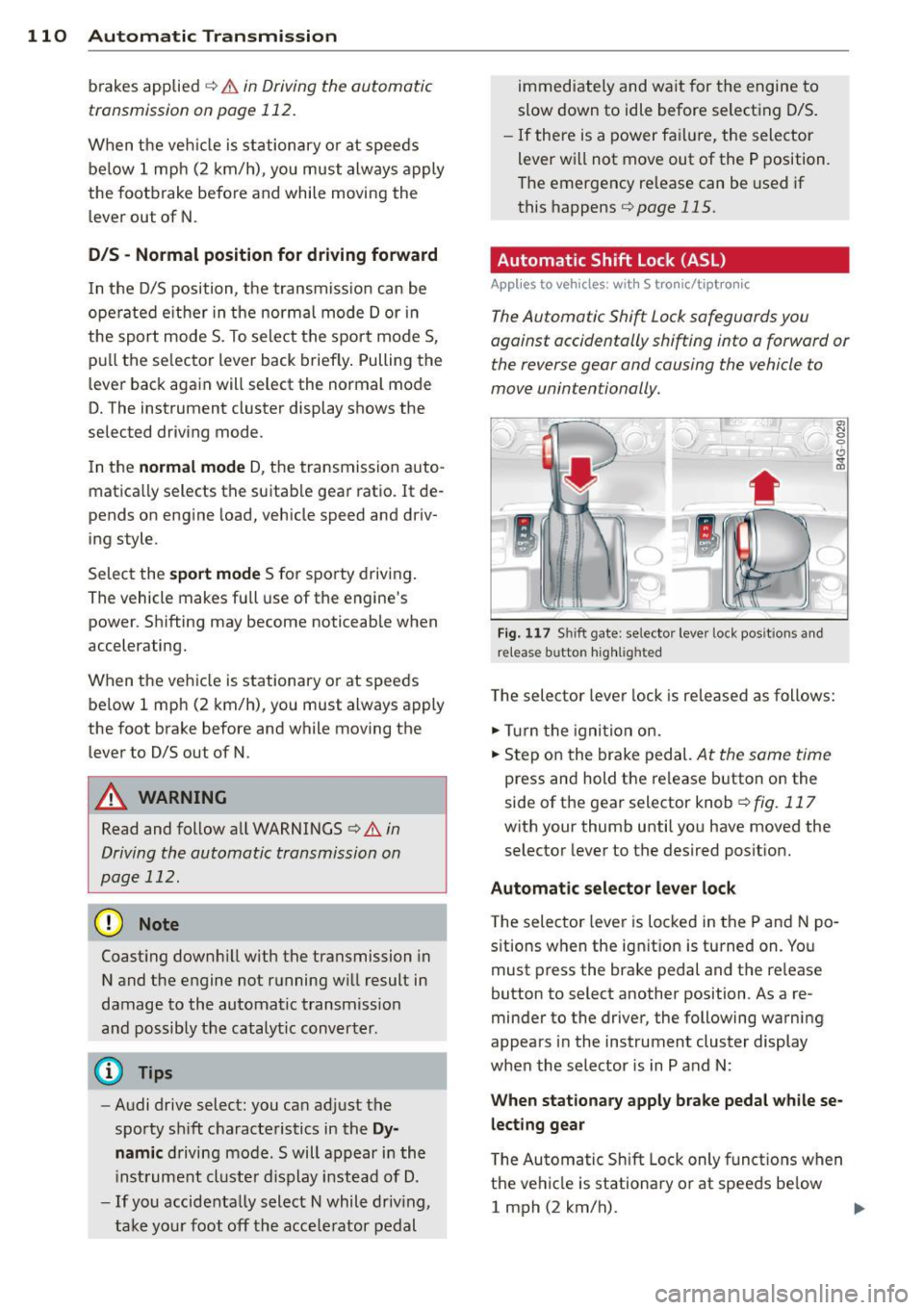
Fig. 117 Shi ft gate: selector leve r loc k pos it ions and
r e lease button highlighted
The selector lever lock is released as follows:
.,. Turn the igni tion on.
.,. Step on the brake pedal.
At the sam e tim e
press and hold the release button on the
side of the gear selector knob
¢ fig. 117
with your thumb until you have moved the
selector lever to the desired position.
Automatic selector lever lock
The selector lever is locked in the P and N po
s itions when the ignit ion is turned on. You
must press the brake pedal and the re lease
button to select another position . As a re
minder to the driver, the following warning
appears in the instrument cluster display
when the selector is in P and N:
When stationary apply brake pedal while se
lecting gear
T he Automatic Shift Lock only functions when
the vehicle is stationary or at speeds be low
1 mph (2 km/h).
Page 113 of 306

At speeds above about 1 mph (2 km/h) the
Automatic Shift Lock is automatically deact i
vated in the N position .
A time de lay element prevents the se lector
l ever from locking when it is moved through
the N position (go ing from R to D/S). The lock
ing e lement will lock the selecto r lever if the
l ever is left in N (Neutral) for more than ap
proximately 2 second, without the brake ped
al being pressed .
Relea se butt on
The release button on the selector lever pre
vents the lever from being accidentally shifted
into certain positions . Depending on the direc
tion of the shift, the se lector lever locks at d if
ferent positions. The positions are h ighlighted
i n the illustration
c:> fig . 117 .
Driving the automatic transmission
Applies to vehicles: with S tronic/tiptronic
Fig . 1 18 Sh ift gate on the center conso le: se lector lev
er w it h relea se button
Startin g the engin e
• The selector leve r must be in P or N .
Starting off
• Press and hold the brake pedal.
• Press and hold the release button in these
lector lever handle, select the desired se lec
tor lever pos ition such as D/S and release
the button .
• Wait br iefly until the transmission has shift
ed (you will feel a slight movement).
• Remove your foot from the b rake pedal and
acce le rate .
Automatic Tra nsmi ssi on 11 1
Stopping t emporaril y
• Keep the veh icle stationary using the brak
ing pedal , for example at traffic lights .
• Do not press the accelerator peda l when do
ing this .
• To prevent the vehicle from ro lling when you
start driv ing, set the parking brake when
stopping on steep inclines
c:> .&_ .
• The parking brake will release automat ically
and the vehicle will start mov ing once you
press the acce lerator pedal.
Stopping /parking
If the selector lever is not in the P position
when you open the driver's door, the veh icle
could roll. The message
Tran smi ssion: Car
ma y roll! Shift to park!
appears .
• Press and hold the brake pedal until the ve-
hicle has come to a comp lete stop .
• Apply the parking brake
c:> page 80, Parking .
• Select the P selector lever posit ion c:> .&_ .
Stopping on an incline
• Always press the brake pedal to ho ld the ve
hicle in place and preven t it from "rolling
back"
c:> .&_ . Do not try to prevent the vehi
cle from "rolling back " when a gear is en
gaged by increasing the engine speed
c:> 0.
Starting on an incline
• Activate the parking brake.
• With the driving gear selected, press the ac
celerator pedal carefully . The parking brake
w ill release automatically if your seat belt is
fastened.
Under certa in circumstances, such as driving
in the mounta ins, it may be usefu l to sw itch
temporar ily to the manual sh ift p rogram in or
der to adj ust the gears to the driving cond i
ti ons by hand
<:? _&. .
On slopes, activate the parki ng b rake first and
then move the selector lever to the P position.
T his prevents too much st ress from being
placed on the locking mechanism.