light AUDI A7 2014 Repair Manual
[x] Cancel search | Manufacturer: AUDI, Model Year: 2014, Model line: A7, Model: AUDI A7 2014Pages: 306, PDF Size: 76.83 MB
Page 106 of 306
104 Audi drive select
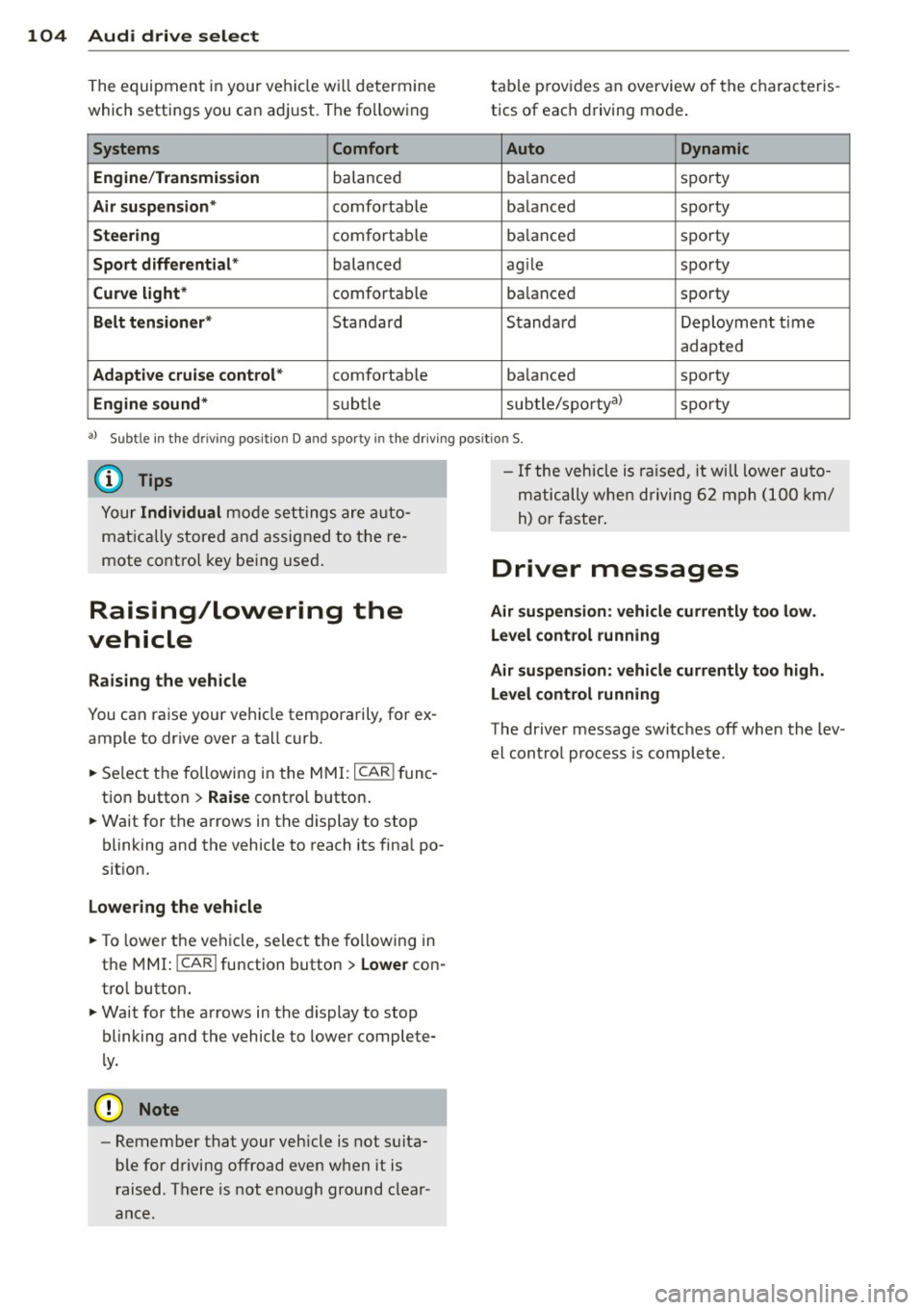
The equipment in your vehicle w ill determine
which settings you ca n adj ust. The fo llowing
Systems Comfort
Engine /Tran smission
balanced
Air suspension * comfortable
Steering comforta ble
Sport d iff erent ial * balanced
Curve light* comfortab le
Belt tensioner * Standard
Adaptive cruise control * comfortable
Engine sound* subtle table p
rov ides a n overview of the characteris
tics of eac h driving mode .
Auto Dynamic
balanced sporty
ba lanced sporty
ba lanced spo
rty
ag ile sporty
ba lanced spo
rty
Standard Deployment time
adapted
ba lanced sporty
subtle/spo rtyal
sporty
al Subtle in the driving pos itio n D and sporty in th e d riving pos itio n S.
{DJ Tips
Your Individual mode se ttings are a uto
mat ica lly store d an d assig ned to t he re
mote co ntro l key being use d.
Raising/lowering the
vehicle
Raising the vehicle
You can ra ise your veh icle tempora rily, for ex
ample to dr ive over a tall curb.
., Se lect the following in the
MMI: ICAR !f u nc
tion button >
Raise contro l button .
., Wait for the arrows in the display to stop
blinking and the vehicle to reach its fina l po
s it ion.
Lowering the vehicle
., To lower t he veh icle, select the fo llowing in
the
M MI: ICARlfunction button> Lowe r con
t ro l button .
., Wait for the a rrows in the display to stop
blinking and the vehicle to lower complete
l y.
{(D Note
- Remember that your veh icle is not s uita
ble for driving offroad even when it is
r aised. There is not enough ground clear
ance. -
If the vehicle is ra ised, it will lower auto
m at ically whe n driving 6 2 mph (1 00 km/
h) or faster .
Driver messages
Air suspen sion : vehicle currently too low .
Level control running
Air su spension : vehicle curr ently too high .
L e vel control running
The driver message switc hes off when the lev
el cont rol process is comp lete .
Page 107 of 306
Night vision assistant
Night vision assistant
with detected pedestrian marking
Description
App lies to vehicles: with night v isio n assistant
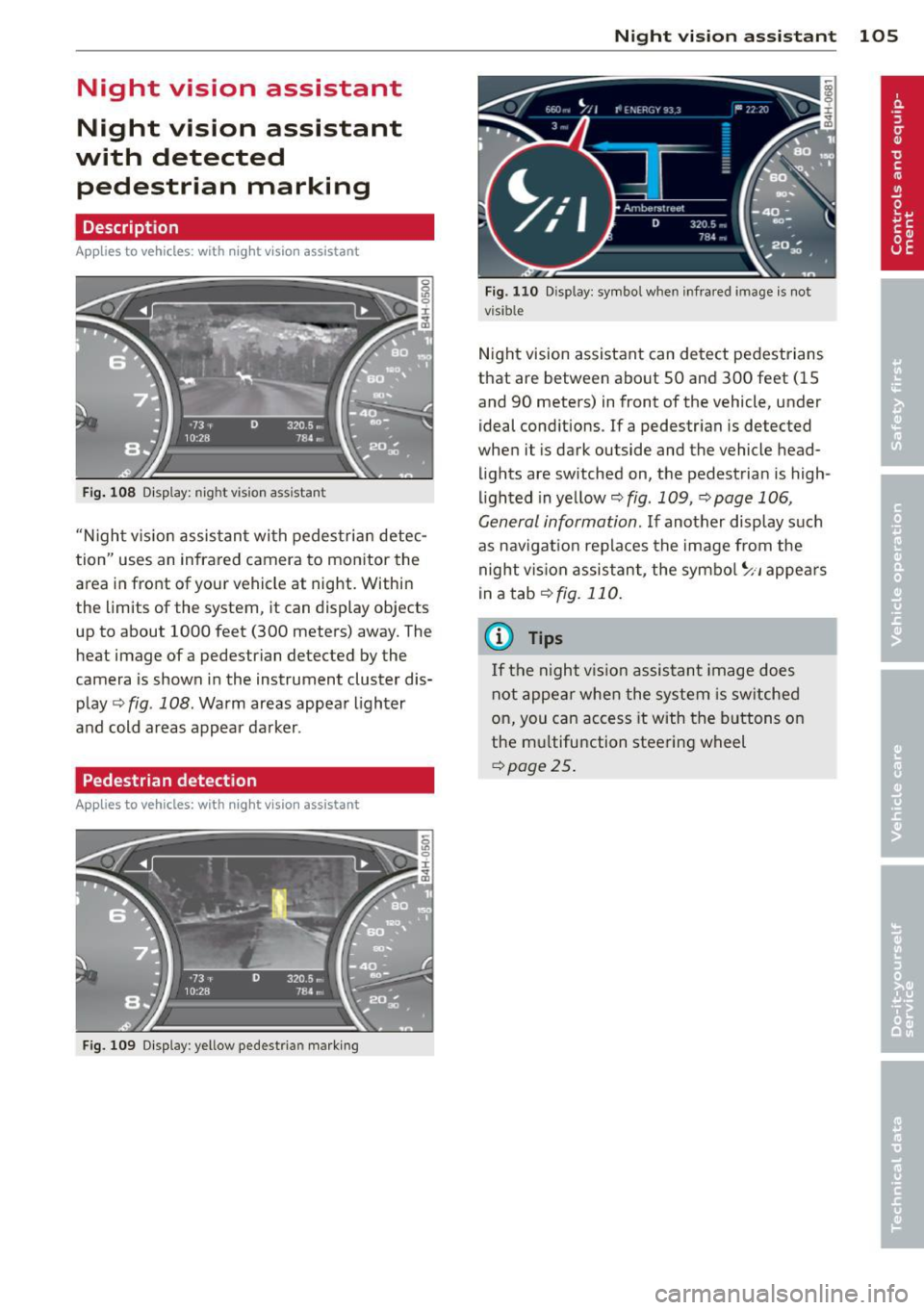
Fig . 108 Display: nig ht v is ion assistant
"N ight v is ion assistant with pedestrian detec
tion" uses an infrared camera to monitor the
area in front of your vehicle at night. Within
the limits of the system , it can display objects
up to about 1000 feet (300 meters) away. The
heat image of a pedestrian detected by the
camera is shown in the instrument cluster dis
play Q fig . 108. Warm areas appear lighter
and cold areas appear darker .
Pedestrian detection
Applies to vehicles: with n ig ht v ision ass istant
Fig. 109 Display : yellow pedestrian marking
Night vision assistant 105
Fig. 1 10 Disp lay: symbo l w hen infrare d image is not
visi ble
Night vision assistant can detect pedestrians
that are between about 50 and 300 feet (15
and 90 meters) in front of the vehicle, under
ideal conditions .
If a pedestrian is detected
when it is dark outside and the vehicle head
lights are switched on, the pedestrian is high
lighted in yellow Qf/g. 109, Qpage 106,
General information. If another display such
as navigation replaces the image from the
night vision assistant, the symbo l~,, appears
in a tab Qfig. 110.
(D Tips
If the night vision assistant image does
not appear when the system is sw itched
on, you can access it with the buttons on
the multifunction steering wheel
Q page25.
Page 108 of 306
106 Night visi on assis tant
Pedestrian warning
Applies to vehicles: with night vision assistant
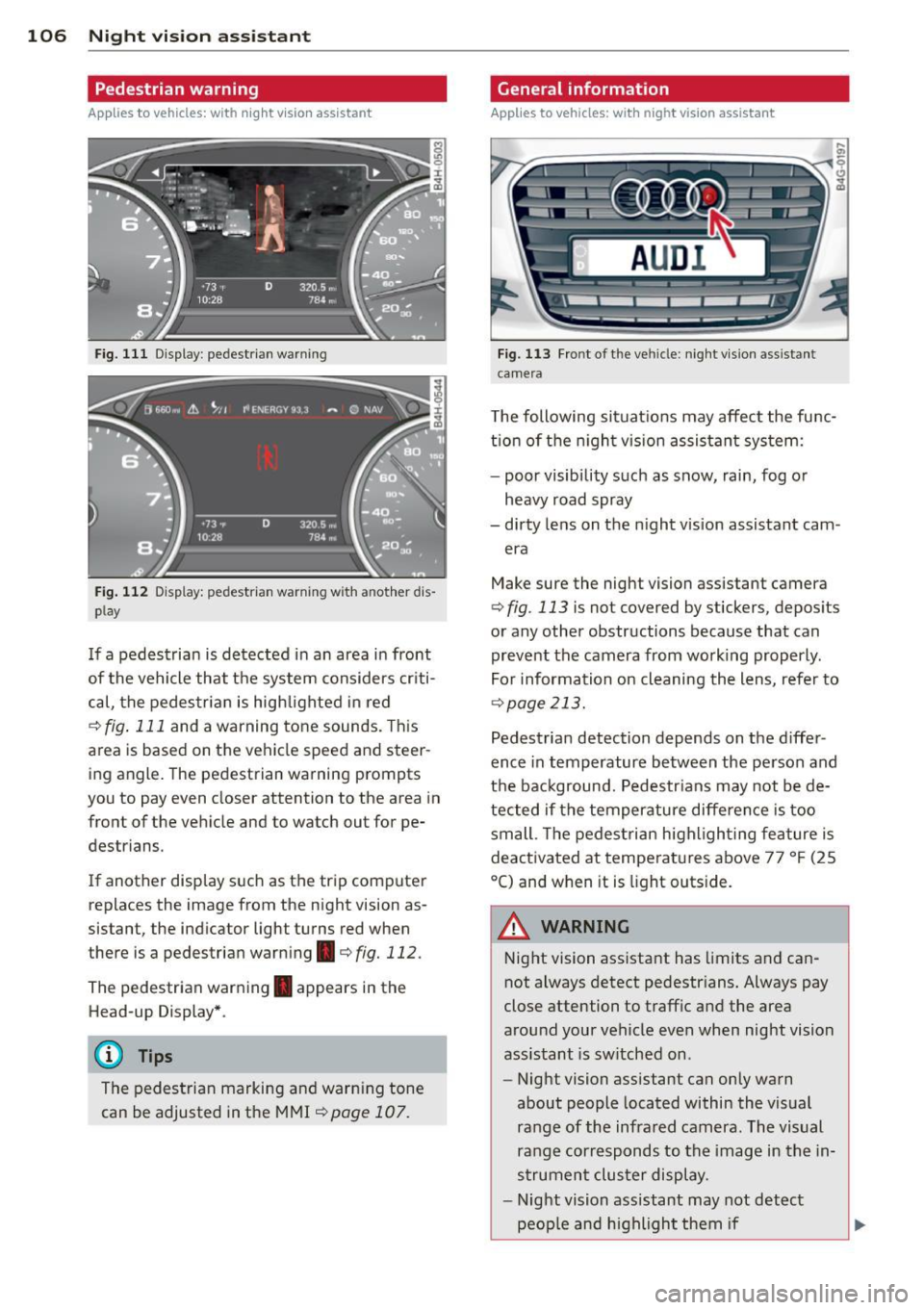
Fig. 111 Display : pedestrian warning
Fig . 112 D is p lay: pedestrian warning w ith a nother dis
p lay
I f a pedestrian is detected in an area in front
of the vehicle that the system considers criti
cal, the pedestrian is high lighted in red
¢ fig . 111 and a warning tone sounds. This
area is based on the vehicle speed and steer
ing angle. The pedestrian warning prompts
you to pay even closer attention to the area in
front of the vehicle and to watch out for pe
destrians.
If another display s uch as the tr ip computer
replaces the image from the night vision as
sistant, the indicator light turns red when
there is a pedestrian warning.¢
fig. 112 .
The pedestrian warning . appears in the
Head-up Display *.
(D Tips
The pedestrian marking and warn ing tone
can be adjusted in the MMI
!:!) page 107.
General information
Applies to vehicles: with night vision assistant
Fig. 113 Fro nt of th e ve hicle: night v ision assistant
camera
T he following situat ions may affect the func
t ion of the n ight vision assistant system:
- poor visibility such as snow, rain, fog or
heavy road spray
- dirty lens on the n ight vis ion assistant cam -
era
Make sure the night vision assistant camera
¢
fig . 113 is not covered by stickers, deposits
or any other obstructions because that can
prevent the camera from working properly.
For information on cleaning the lens, refer to
¢ page 213.
Pedestrian detection depends on the d iffer
ence in temperature between the person and
the background. Pedestr ians may not be de
tected if the temperature diffe rence is too
small . Th e pedestrian highl ighting feature is
deactivated at tempe ratures above 77 ° F (25
°C) and when it is light outs ide.
A WARNING
Night vision assistant has limits and can
not always detect pedestr ians. Always pay
close attention to traffic and the area
around your vehicle even when night vision
assistant is sw itched on .
- Night vision assistant can only warn
about people located within the visual
range of the infrared camera. The visual
range corresponds to the image in the in
strument cluster display .
- Night vision assistant may not detect
-
peop le and highlight them if .,.
Page 109 of 306
-they are not in an upright position, for
example if they are sitting, crouching
or lying down and/or
- if the outline in the display is incom
plete or interrupted, for example be
cause the person is partially hidden by
a parked vehicle .
(D Tips
-Pedestrian detection and the pedestrian
warming are limited to objects that are
detected as pedestrians. The system
does not detect animals . Even though
the shape and warmth radiated by each
object detected is evaluated, the system
does have limitations and it can give in
correct warnings.
- For technical reasons , the image pauses
in split second intervals.
Switching on and off
Appl ies to vehicles: with night vision assistant
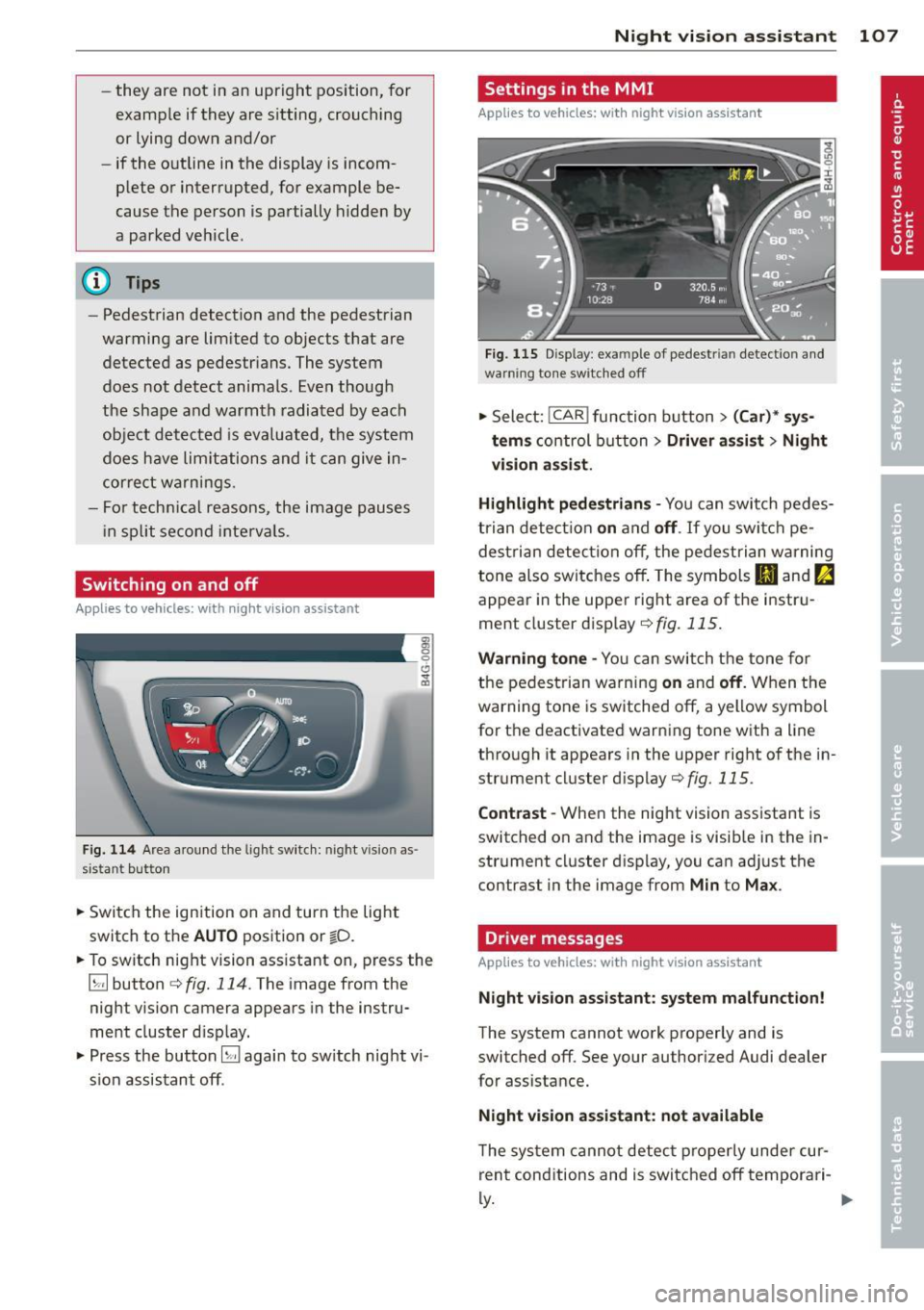
Fig. 114 Area around the light switch : nigh t vision as
s istant button
.. Sw itch the ignition on and turn the light
switch to the
AUTO position or io.
.. To switch night vision assistant on, press the
~ button ¢
fig. 114. The image from the
night vision camera appears in the instru
ment cluster display.
.. Press the button~ again to switch night vi
sion assistant off .
Night vision assistant 107
Settings in the MMI
Applies to vehicles: with night vision assistant
Fig. 115 Display : exa mpl e of pede strian detect ion and
warn ing tone switched off
.. Select: !CAR ! function button> (Car)* sys
tems
control button > Driver assist> Night
vision assist.
Highlight pedestrians -
You can switch pedes
trian detection
on and off. If you switch pe
destrian detection off, the pedestrian warning
tone also switches off. The symbols
Ill and fa
appear in the upper right area of the instru
ment cluster display
¢ fig. 115.
Warning tone -You can switch the tone for
the pedestrian warning
on and off. When the
warning tone is switched off, a yellow symbol
for the deactivated warning tone with a line
through it appears in the upper right of the in
strument cluster display
¢fig. 115 .
Contrast -When the night vision assistant is
switched on and the image is visible in the in
strument cluster display, you can adjust the
contrast in the image from
Min to Max .
Driver messages
Applies to vehicles: with night vision assistant
Night vision assistant: system malfunction!
The system cannot work properly and is
switched off. See your authorized Audi dealer
for assistance.
Night vision assistant: not available
The system cannot detect properly under cur
rent conditions and is switched off temporari-
~ ~
Page 110 of 306
108 Night vision assistant
Night vision assistant: only available in dark
ness and with lights switched on
Night vision assistant only works when it is
dark outside and the headlights are on.
Night vision assistant: pedestrian detection
not available
The system has deactivated the pedestrian de
tection function.
Page 111 of 306

Automatic Transmission
S tronic, tiptronic
Introduction
Applies to vehicles: with S tro nic/t iptronic
The automat ic transmission is controlled elec
tronically. The transmission upshifts or down
shifts automatically depending on which drive
program is se lected.
When a
moderate driving style is used, the
transmission selects the most economica l
driving mode. It will then change up early and
de lay the downshifts to give better fuel econ
omy.
The transmission switches to a sporty mode
after a kick-down or when the driver uses a
sporty driving style characterized by quick ac
celerator pedal movements, heavy accelera
tion, frequent changes in speed and traveling
at the maximum speed.
If desired, the driver can also select the gears
manually (tiptronic mode) r:::> page 113.
Various automatic transmissions may be in
stalled, depending on the mode l:
S tronic transmission
The 5 tronic is a dual-clutch transmission .
Power is transferred using two clutches that
work independently from one another . They
replace the torque converter used in conven
tional automatic transmissions and allow the
vehicle to accelerate without a noticeable in
terruption in traction.
tiptronic transmission
In the tiptronic transmission, power is trans
ferred by a torque converter.
Automatic Transmission 109
Selector lever positions
App lies to vehicles: wit h S tronic/tiptro nic
Fig. 116 Display in the instrument cluste r: selector
lever pos ition
T he selector lever position engaged appears
next to the selector lever as well as in the in
strument cluster display.
P -Park
In this selector lever position the transmis
sion is mechanically locked. Engage P only
when the vehicle is
completely stopped Q .&.
in Driving the automatic transmission on
page 112.
To shift in or out of position P, you must first
press and hold the brake pedal and then press
the release b utton in the selector lever handle
whi le moving the selector lever to or from P.
You can shift out of this position only with the
ignition on .
R- Reverse
Select R on ly when the vehicle is at a full stop
and the engine is running at idle speed r:::> .&. in
Driving the automatic transmission on
page 112.
Before you move the selector lever to R, press
both the button in the hand le of the selector
lever
and the brake pedal at the same t ime.
When the ignition is on, the backup lights illu
minate when the selector lever is moved into
R.
N -Neutral
The transmission is in neutral in this position.
Sh ift to th is position for standing with the ..,.
Page 112 of 306
110 Automatic Transmission
brakes applied ¢ & in Driving the automatic
transmission on page 112.
When the veh icle is stationary or at speeds
be low 1 mph (2 km/h), you must always apply
the footbrake before and while moving the
lever out of N.
D/S -Normal position for driving forward
In the D/S position, the transmiss io n can be
operated e ither in the normal mode Dor in
the sport mode S. To select the sport mode S,
pull the se lector lever back briefly . Pulling the
lever back again will select the normal mode
D. The instrument cluster display shows the
selected driving mode.
In the
normal mode D, the transmission auto
matica lly selects the suitab le gear ratio. It de
pends on engine load, vehicle speed and driv
ing style.
Select the
spo rt mode S for sporty driving.
The vehicle makes fu ll use of the engine's
power. Shifting may become noticeable when
accelerating.
When the vehicle is stationary or at speeds
be low 1 mph (2 km/h), you must always apply
the foot brake before and while moving the lever to D/S out of N.
A WARNING
Read and follow all WARNINGS¢ & in
Driving the automatic transmission on
page 112.
d) Note
-
Coasting downhill with the transmission in
N and the engine not running w ill result in
damage to the automatic transmission
and possibly the catalytic converter.
@ Tips
- Audi drive select: you can adjust the
sporty sh ift characteristics in the
Dy
namic driving mode.Swill appear in the
i nst rument cluste r d isplay instead of D.
-If you accidentally select N while driv ing,
take your foot off the acce lerator pedal immediately and wait
for the engine to
slow down to idle before selecting D/S.
-If there is a power failure, the selector
lever will not move out of the P position.
The emergency release can be used if
this happens
¢page 115.
Automatic Shift Lock (ASL)
Applies to vehicles : wit h S t ronic/tipt ro ni c
The Automatic Shift Lock safeguards you
against accidentally shifting into a forward or
the reverse gear and causing the vehicle to
move unintentionally.
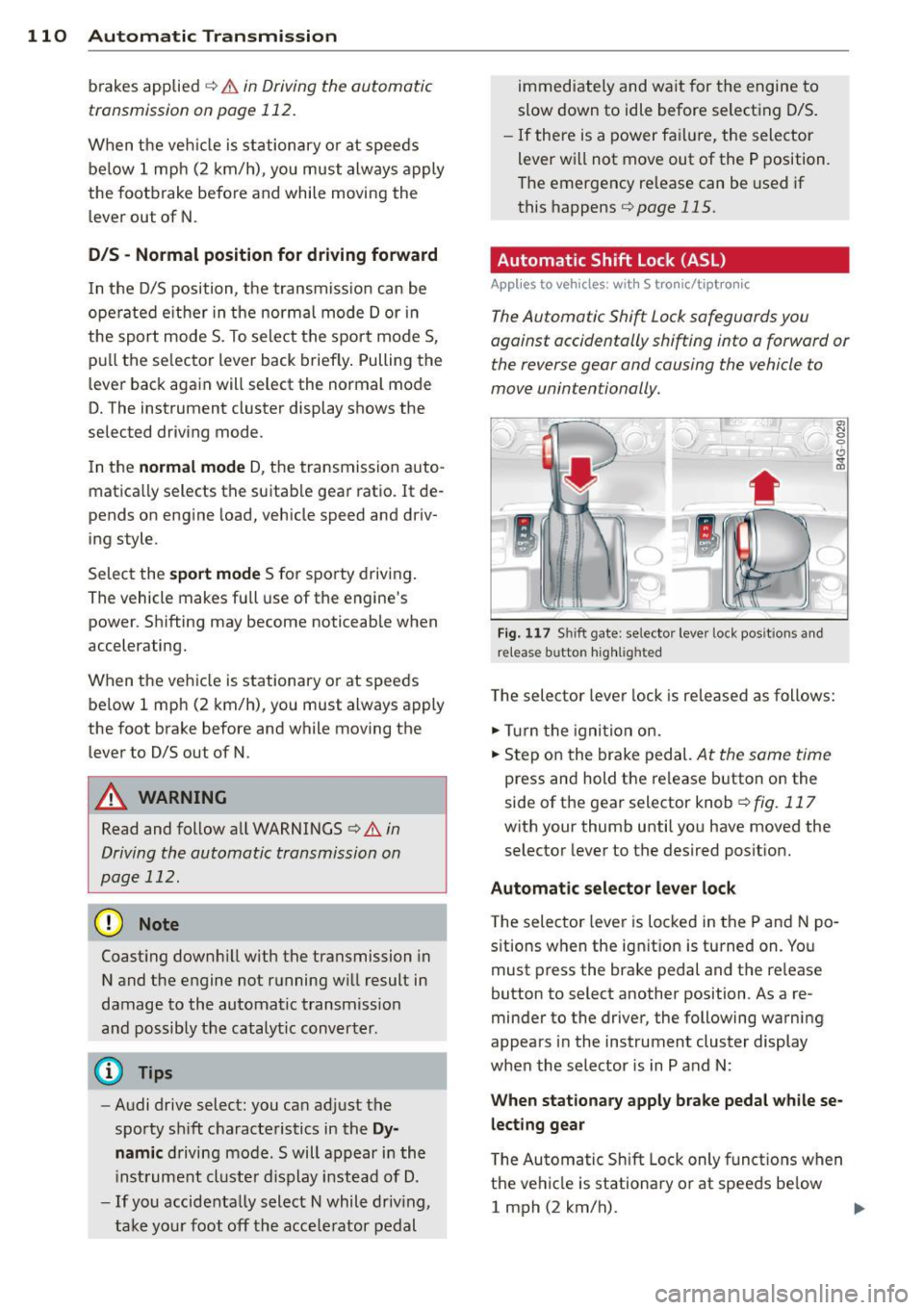
( )
Fig. 117 Shi ft gate: selector leve r loc k pos it ions and
r e lease button highlighted
The selector lever lock is released as follows:
.,. Turn the igni tion on.
.,. Step on the brake pedal.
At the sam e tim e
press and hold the release button on the
side of the gear selector knob
¢ fig. 117
with your thumb until you have moved the
selector lever to the desired position.
Automatic selector lever lock
The selector lever is locked in the P and N po
s itions when the ignit ion is turned on. You
must press the brake pedal and the re lease
button to select another position . As a re
minder to the driver, the following warning
appears in the instrument cluster display
when the selector is in P and N:
When stationary apply brake pedal while se
lecting gear
T he Automatic Shift Lock only functions when
the vehicle is stationary or at speeds be low
1 mph (2 km/h).
Page 113 of 306

At speeds above about 1 mph (2 km/h) the
Automatic Shift Lock is automatically deact i
vated in the N position .
A time de lay element prevents the se lector
l ever from locking when it is moved through
the N position (go ing from R to D/S). The lock
ing e lement will lock the selecto r lever if the
l ever is left in N (Neutral) for more than ap
proximately 2 second, without the brake ped
al being pressed .
Relea se butt on
The release button on the selector lever pre
vents the lever from being accidentally shifted
into certain positions . Depending on the direc
tion of the shift, the se lector lever locks at d if
ferent positions. The positions are h ighlighted
i n the illustration
c:> fig . 117 .
Driving the automatic transmission
Applies to vehicles: with S tronic/tiptronic
Fig . 1 18 Sh ift gate on the center conso le: se lector lev
er w it h relea se button
Startin g the engin e
• The selector leve r must be in P or N .
Starting off
• Press and hold the brake pedal.
• Press and hold the release button in these
lector lever handle, select the desired se lec
tor lever pos ition such as D/S and release
the button .
• Wait br iefly until the transmission has shift
ed (you will feel a slight movement).
• Remove your foot from the b rake pedal and
acce le rate .
Automatic Tra nsmi ssi on 11 1
Stopping t emporaril y
• Keep the veh icle stationary using the brak
ing pedal , for example at traffic lights .
• Do not press the accelerator peda l when do
ing this .
• To prevent the vehicle from ro lling when you
start driv ing, set the parking brake when
stopping on steep inclines
c:> .&_ .
• The parking brake will release automat ically
and the vehicle will start mov ing once you
press the acce lerator pedal.
Stopping /parking
If the selector lever is not in the P position
when you open the driver's door, the veh icle
could roll. The message
Tran smi ssion: Car
ma y roll! Shift to park!
appears .
• Press and hold the brake pedal until the ve-
hicle has come to a comp lete stop .
• Apply the parking brake
c:> page 80, Parking .
• Select the P selector lever posit ion c:> .&_ .
Stopping on an incline
• Always press the brake pedal to ho ld the ve
hicle in place and preven t it from "rolling
back"
c:> .&_ . Do not try to prevent the vehi
cle from "rolling back " when a gear is en
gaged by increasing the engine speed
c:> 0.
Starting on an incline
• Activate the parking brake.
• With the driving gear selected, press the ac
celerator pedal carefully . The parking brake
w ill release automatically if your seat belt is
fastened.
Under certa in circumstances, such as driving
in the mounta ins, it may be usefu l to sw itch
temporar ily to the manual sh ift p rogram in or
der to adj ust the gears to the driving cond i
ti ons by hand
<:? _&. .
On slopes, activate the parki ng b rake first and
then move the selector lever to the P position.
T his prevents too much st ress from being
placed on the locking mechanism.
Page 116 of 306
114 Automatic Transmission
Launch Control Program
Applies to vehicles: with S tro nic
The Launch Control Program provides the
best acceleration possible when starting from
a stop .
Requirement: The engine must be at operat
ing temperature and the steering wheel must
not be turned .
.. Press the
I~ O FFI button 9 page 198 while
the engine is running. The
II indicator light
illuminates in the instrument cluster and
Stabilization control (ESC): Off Warning!
Reduced stability
appears in the driver in
formation system display.
.. Move the selector lever to position D/S to
select sport mode (5) or select
Dynamic
mode in Audi drive select ¢page 103.
.. Press the brake peda l strongly with your left
foot and hold it down for at least
1 second.
.. At the same t ime, press the accelera tor ped
al down completely w ith your r ight foot un
t il the engine reaches and maintains a high
RPM.
.. Remove your foot from the brake pedal
within S seconds ¢
Li)..
.&_ WARNING
-Always adapt your driving to the traffic
flow .
- Only use the Launch Control Program
when road and traffic conditions allow it
and other drivers will not be endangered
or annoyed by yo ur driving and the vehi
cle's acce lerat ion.
- Please note that the driving wheels can
spin and the vehicle can break away
when sport mode is sw itched on, espe
c ially when the road is slippery .
- Once yo u have accelerated, you should
switch sport mode off by pressing the
j .i, OFF I button.
- The transmission temperat ure may in
crease significantly after using the
Launch Control Program . If that hap- pens,
the program may not be available
for a few minutes . It will be available
again after a cool-down period.
- When accelerating using the Launch
Contro l Program, a ll vehicle parts are
subject to heavy loads. This can result in
increased wear.
Transmission malfunction
Applies to vehicles: wit h S tronic/tiptro nic
[O] Transmission: Press brake pedal and se
lect gear again
Press the brake pedal and select the desired
selector lever position again. You can then continue driving .
[O] Transmission overheating: Please drive
conservatively
The transmission temperature has increased
s ignificantly due to the sporty driving manner .
Drive in a less sporty manner until the tem
perature returns to the normal range and the
indicator light switches of.
[O] Transmission malfunction: You can con
tinue driving
T he re is a system mal function in the transmis
sion . You may continue driving. Drive to your
authorized Audi dea ler or qualified repair fa
cility soon to have the malfunction corrected.
[O] [O] Transmission malfunction: You can
continue driving with limited functionality
There is a system malfunction in the transmis
s ion. The transmission is switching to emer
gency mode. This mode on ly shifts into cer
tain gears or will no longer shift at all. The en
gine may sta ll. Drive to your authorized Audi
dealer or qualified repair facility immediately
to have the malfunction corrected.
[O] Iii Transmission malfunction: No reverse
gear. You can continue driving
S tronic transmission: There is a system mal
fu nct ion in the transm ission. The transmis
sion is switching to emergency mode . This
mode only shifts into certain gears or will no
l onger shift at a ll. The engine may stall. You .,..
Page 118 of 306

116 Parking system s
Parking systems
General information
A ppl ies to vehicles: with parkin g system plus/rear view
camera/peripheral cameras
Depending on your vehicle's equ ipment, vari
ous parking a ids wi ll help you when pa rk ing
and maneuvering.
The
p ar king sy st e m plu s assists you when
pa rking by audib ly and visually indicat ing ob
jects detected
in front of and behind the vehi
cle
<=? page 117.
The rear view ca m era shows the area behind
the vehicle in the Infotainment d isp lay. This
d isplay assists you when you are c ross o r par
allel parking
q page 118. In addit ion, you are
assisted by the functions from the parking
system plus <=?
page 117.
The peripher al cam era s ass ist you with park
ing and maneuvering. You are aided by var ious
cameras depending on the vehicle equipment leve l¢
page 121. In addition, you are assist
ed by the functions from the parking system
plus ¢ page 117.
A WARNING
-Always look for traff ic and check the area
around your vehicle by looking at it di
rectly as well . The parking system cannot
rep lace the d river's attent ion. The dr iver
is always respons ible for safety du ring
p arki ng and for all other maneuvers.
- Please note that some surfaces, such as
clothing, a re not detected by the system.
- Senso rs and cameras have blind spots in
wh ich peop le and objects ca nnot be de
te cted. Be especially cau tious of children
and animals.
- T he sensors can be displaced by impacts
or damage to the radia to r grille, bumpe r,
wheel housing and the unde rbody. The
par king systems may become impaired
as a resu lt . Have your a uthorized Audi
dealer or qualified wor kshop check their
function. -
Make s ure the sensors are not covered by
stickers, deposits or any other obstruc
tions as it may impair the sensor func
tion . For information on cleaning, refer
to <=?
page 213 .
(D Note
- Some objects are not detected by the
system under certain c ircumstances:
- Obje cts su ch as ba rrie r chains, trailer
draw bars, vertical po les or fences
- Objects above t he senso rs such as wall
extensions
- Objects w ith specific surfaces or struc
tures su ch as chain link fences or pow
der snow.
- If you conti nue d riving closer to a low- ly
ing object, it may disappea r from the
sensor range. Note th at yo u w ill no lon
ger be warned abo ut this obstacle.
(j) Tips
- T he system may provide a wa rni ng even
t ho ugh the re are no obs ta cl es in the cov
erage a rea in some situa tions, such as:
- certain road surfaces or for long grass.
- externa l ultrasonic sources e.g. from
clean ing vehicles.
- heavy rain, snow or thick vehicle ex
ha ust.
- We recommend that you practice park
ing in a traff ic-free location or park ing
lot to become familiar w ith the system.
When doing this, there should be good light and weather cond itions .
- You can change the volume and pitch of
the s ignals as we ll as the disp lay
¢page 126.
- Please refer to the instructions for tow
ing a t railer
¢ page 127.
-What appears in the infotainment dis
play is somewhat time-delayed.