ECO mode AUDI A7 2016 User Guide
[x] Cancel search | Manufacturer: AUDI, Model Year: 2016, Model line: A7, Model: AUDI A7 2016Pages: 294, PDF Size: 73.82 MB
Page 71 of 294
M N <( I.J -
Three-zone climate control
Operating
Applies to vehicles: with three zone climate co ntrol
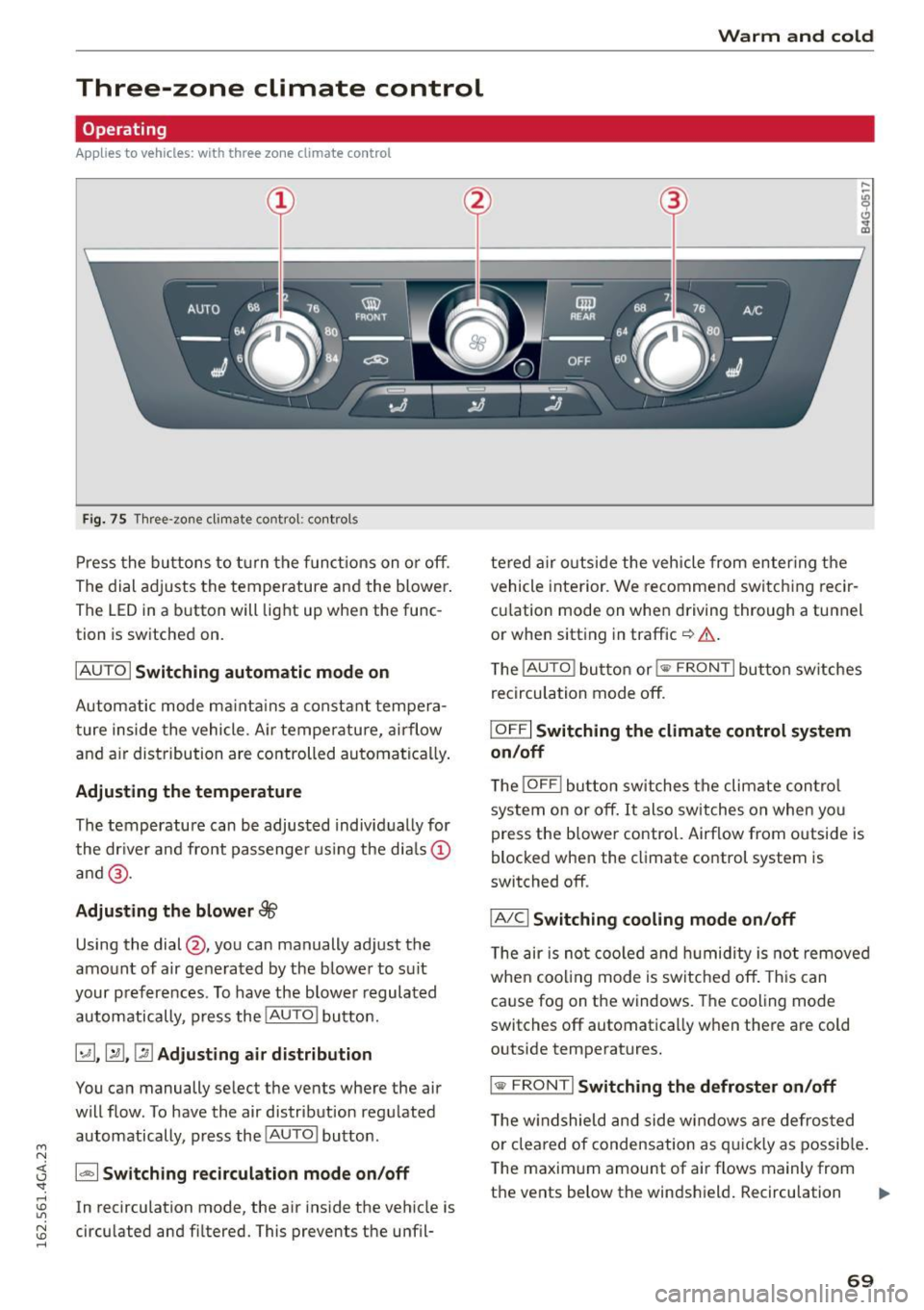
Fi g. 75 Three -zone climate co ntro l: cont rols
P ress the buttons to t urn the funct ions on o r off.
The dial adjusts the temperature and the blower.
The LED in a button will light up when the func
tion is sw itched on.
IAUTO I Switching automatic mode on
Automatic mode ma inta ins a constant tempera
ture inside the vehicle. A ir temperature, airflow
and a ir distribution are controlled automatica lly .
Adjusting the temperature
The temperature can be adjusted individ ually for
the dr iver and front passenge r us ing the dia ls ©
a nd @.
Adjusting the blower 88
Using the dial@, you can manually adjust the
amount of air generated by the blower to suit
your preferences . To have the b lowe r regulated
automatically, press the
! AUTO I button.
~ .~ .~ Adjusting air distribution
You can manually select the vents where the air
will flow . To have the air distribution regu lated
automatically, press the
! AU TO ! button .
1- 1 Sw itching recirculation mode on/off
In recirculation mode, the air ins ide the vehicle is
circu lated and fi ltered. This prevents the unfil-
Warm and cold
te red a ir o utside the vehicle from enter ing the
vehicle inte rior. We recommen d switc hing recir
cu lation mode on whe n driving through a tunnel
or when sitt ing in traffic ¢&. .
T he
!AUTO ! button or i
IOFFI Switching the climat e control system
on /off
T he !OFF ! button switches the climate con tro l
system on or off. It also switches on when yo u
press the b lower control. Airflow from outside is
blocked when the climate control system is
switched off .
IA/Cl Switching cooling mode on/off
The air is not coo led a nd hu midity i s not remove d
whe n coo ling mode is switched off. This can
ca use fog on the windows . The cooling mode
switches off automatica lly w hen there are cold
outside temperatures.
I @ F RONT I Switching th e defroster on /off
T he w indshield and side w indows a re defros ted
o r cleared of condensation as q uickl y as possib le .
The maxim um amount of air flows mainly from
the
vents below the windshield . Recirculation ..,.
69
Page 72 of 294
Warm and cold
mode switches off. The temperat ure shou ld be
set to approximately 72 ° F (22 °C).
The
IAU TOI button switches the defroster off.
I® REAR I Switching the rear window defogger
on /off
The rear w indow heater only operates when the
engine is r unning.
It sw itches off automatically
after a few m in utes, depending on the outs ide
temperature.
To prevent the rear w indow heater from switch
ing
off a utomat ica lly, press and hold the!@ R EAR I
but ton fo r more than 2 seconds. This rema ins
stored until the ignition is switched
off.
Q:I Adjusting seat h eating *
Pressing the button switches the seat heating on
at the highes t setting (level 3) . T he LEDs indicate
the tempe rature leve l. To red uce the tempe ra
ture, press the button again. To switch the seat
heating
off , press the button repeatedly until the
LED turns
off .
Afte r 10 minutes , the seat heat ing a utomat ica lly
sw itches from level 3 to leve l 2 .
Air vent s
You can open or close the center and rear vents in
the cockpit and the vents in the rear center con
sole using the r idged thumbwhee ls. The levers
adj ust the d irect ion of the a irf low from the vents.
70
A WARNING
-
- You should not use the recirculation mode
for an extended period since no fresh air is
drawn in . With the a ir-conditioning sw itched
off, the windows can fog up, which increases
the r isk of a n accident.
- Individuals w ith reduced sensitivity to pain
or temperatu re could develop burns when
using the seat heat ing f unct ion. To reduce
the r isk of inj ury, these indiv iduals should
not use seat heating.
(D Note
To avoid damage to the heat ing e lements in
the seats, do not kneel on the sea ts or place
h eavy loads on a sma ll area o f the seat .
Basic settings
Applies to vehicles: wit h three-zone climate control
The climate control system basic settings are ac
cessed in the Infotainment system.
~ Select: the I CARI funct ion button > ( Car )* S ys-
t e m s
control button > AC.
Au xilia ry heater*
In vehicles with diesel engines, the auxiliary heat
er helps to warm the vehicle interior more quick
ly. The aux iliary heater is controlled automatical
l y in the
A ut o setting .
Page 73 of 294

M N <( I.J "". rl I.O
"' N I.O rl
Warm and cold
Four-zone automatic climate control
Operating
Applies to vehicles: with four-zone a utomat ic climate control
Fi g. 76 Four -zone a utomat ic climate con trol: controls
N :g 0
Cl .,. m
Fig . 77 Four -zone automat ic climate con trol: rear contro ls
Press the buttons to t urn the funct ions on or off.
Use the con trols to ad just the temperature, the
b lower speed and the air distribution . The LED in
a button will light up when the function is
switched on. The front settings are shown in the
climate control system display and in the Info
tainment system d isplay for a few seconds. The
d river and front passenger settings can be adjust
ed sepa rately .
The settings can also be adjusted in the rear
¢ fig. 77.
IOFF ! Switching the climate control system
on /off
The IO FFI button switches the climate control
system on or off.
It a lso switches on when you
p ress the control. Airflow from outside is blocked
when the climate control system is switched off . The
I
OF F! button in the rear only switches the A/C
system on/off in the rear of the vehicle.
IA/Cl Switching cooling mod e on /off
T he air is not coo led an d humidity is not remove d
when coo ling mode is switc hed off. This can
ca use fog on the windows . The cooling mode
switches off automatica lly when there are cold
outside temperatures.
l ""'I Switching recirculation mode on /off
In recirc ulation mode, the air inside the vehicle is
c irculated and filtered. Th is prevents the unfil
tered air outside the vehicle from entering the
vehicle interior. We recommend switch ing recir
cu lation mode on when driving through a tunnel
or when sitt ing in traffic
c:> & .
The IAUTO I button orl ~ FRON T I button switches
recirculation mode off .
I AUTO I Switching automatic mode on
Automatic mode main tains a cons tan t tempera
tu re ins ide the veh icle. Air tem perature, airf low
and air distr ib ution are cont ro ll ed automatically.
Adjusting the temperature
Tempera tures betwee n 60 °F (+ 16 °() and 8 4 °F
(+ 28 °() can be set . Ou tside of this range, lo or hi
will appear in the climate control system disp lay .
lliJJ,
71
Page 74 of 294
Warm and cold
At both of these settings, the climate control sys
tem runs continuously at maximum cooling or heating power. There is no temperat ure regula
tion.
Adju st ing th e bl ow er[!]
You can ad just the volume of air generated by the
b lower to yo ur preference. To have the blower
reg ulated automatically, press the
!AUTO I button .
~ Adjusting air d istribution
You ca n manually se lect the vents whe re the air
w ill flow. To have the air distrib ution regu lated
automatically, press the
! AUTO ! button.
~ Adjusting seat heating * /se at vent ilation*
Pressing the button switches the seat heating/
seat ventilat ion on at the highest setting ( leve l
3). The LEDs indicate the tempe ratu re leve l. To
red uce the tempe ratu re, p ress the butto n aga in.
To switch the seat heating/seat venti lation off,
press the button repeatedly until the LED turns
off .
After 10 minutes, the seat heating automat ica lly
switches from leve l 3 to leve l 2 .
I@ FRONT I Switching the defroster on /off
The windsh ield and s ide windows are defrosted
or cleared of condensation as quickly as possible.
The max imum amo unt of air flows ma inly from
t he ven ts below the w indshie ld. Rec irc ulat ion
mode switches off . The temperature shou ld be
set to approximately 22
°C.
The IAUTOI b utton swi tches the defroster off.
IOiil REAR I Switching the rear window defogger
on /off
The rear w indow heater only operates when the
eng ine is running.
It sw itches off automatically
after a few m in utes, depend ing on the outs ide
temperature.
To prevent the rear w indow heater from switc h
ing off a utomat ica lly, press and hold the
!l:iil REAR I
button fo r more t han 2 seconds. This rema ins
stored until the ignition is switched off.
72
I SYNC I Sy nchron izat ion
When synchroni zation is swi tched on, the set
tings for the driver's side a re applied to the front
passenger's side (except for seat heating/ventila
tion*). The settings in the rear are also synchron ized. Synchronization switches off if the settings
are adjusted on the front passenger's side or in
the rear.
You can synchronize the settings in a row by
pressing and holding a control. For example, to
apply the settings for the front passenger's side
to the driver's side, press and ho ld the control on
the front passenger's side. The same applies to
the rear .
Residual he at*
With the ign ition turned off, you can activate the
residual heat function by pressing the
[!:I button
<=> fig . 76 . The residua l heat from the coolant is
u sed to heat the veh icle interior. The residual
heat funct ion switches off automatically after
about 30 minutes.
Air vents
You can open or close the center and rear vents in
the cockpit and the vents in the rear center con
sole and door pillars using the ridged thumb
whee ls . T he levers adjust the direct ion of the air
flow from the vents.
.8, WARNING
- You should no t use the re ci rculation mode
for an extended period since no fresh air is drawn in. With the a ir-conditioning switched
off, the windows can fog up, which increases
the risk of an accident.
- Individ ua ls with red uced sensitivity to pain
or temperat ure could deve lop burns when
using the seat heating f unction. To reduce
the risk of inj ury, these indiv iduals should
not use seat heating .
(D Note
To avoid damage to the heating e lements in
the seats, do not kneel on the seats or place heavy loads on a small area of the seat.
Page 82 of 294
Driving
made a full brake application . ESC and the as·
soc iated components (ABS, ASR, EDL) cannot
overcome the laws of physics. In corners and
when road or weather conditions a re bad, a
full b rake app lication can cause the vehicle to
skid or the rea r end to break away, wh ich in·
c reases the risk of an acc ident.
Start-Stop-System
Description
Applies to vehicles: with Sta rt-Stop-System
The Start-Stop-System can he lp increase fue l
economy and red uce CO2 emissions.
I n Start -Stop mode, the eng ine shuts
off auto
matica lly w hen the vehicle is stopped, such as at
a traffic light. The ign ition remains sw itched on
during this stop phase . The engine w ill restart
automatically when needed .
The Start-Stop-System is automatically activated
each time you switch on the ignition.
Basic requirements for Start -Stop mode
- T he driver's door is closed.
- T he driver' seat be lt is lat ched .
- The hood is closed .
- The vehicle must have been dr iven faster than
2.5 mph (4 km/h) s ince the last stop.
- A trai ler is not hitched to the vehicle .
(D Note
Always switch the Start-Stop-System off when
driving through water <=>
page 80.
@ Tips
The engine stops shortly before the vehicle
comes to a stop
1>. The fu ll function of the
brake booster and the power steering is sti ll
available.
l l de pend ing on eng in e
80
Stopping/starting the engine
Applies to vehicles: with Start-Stop-System
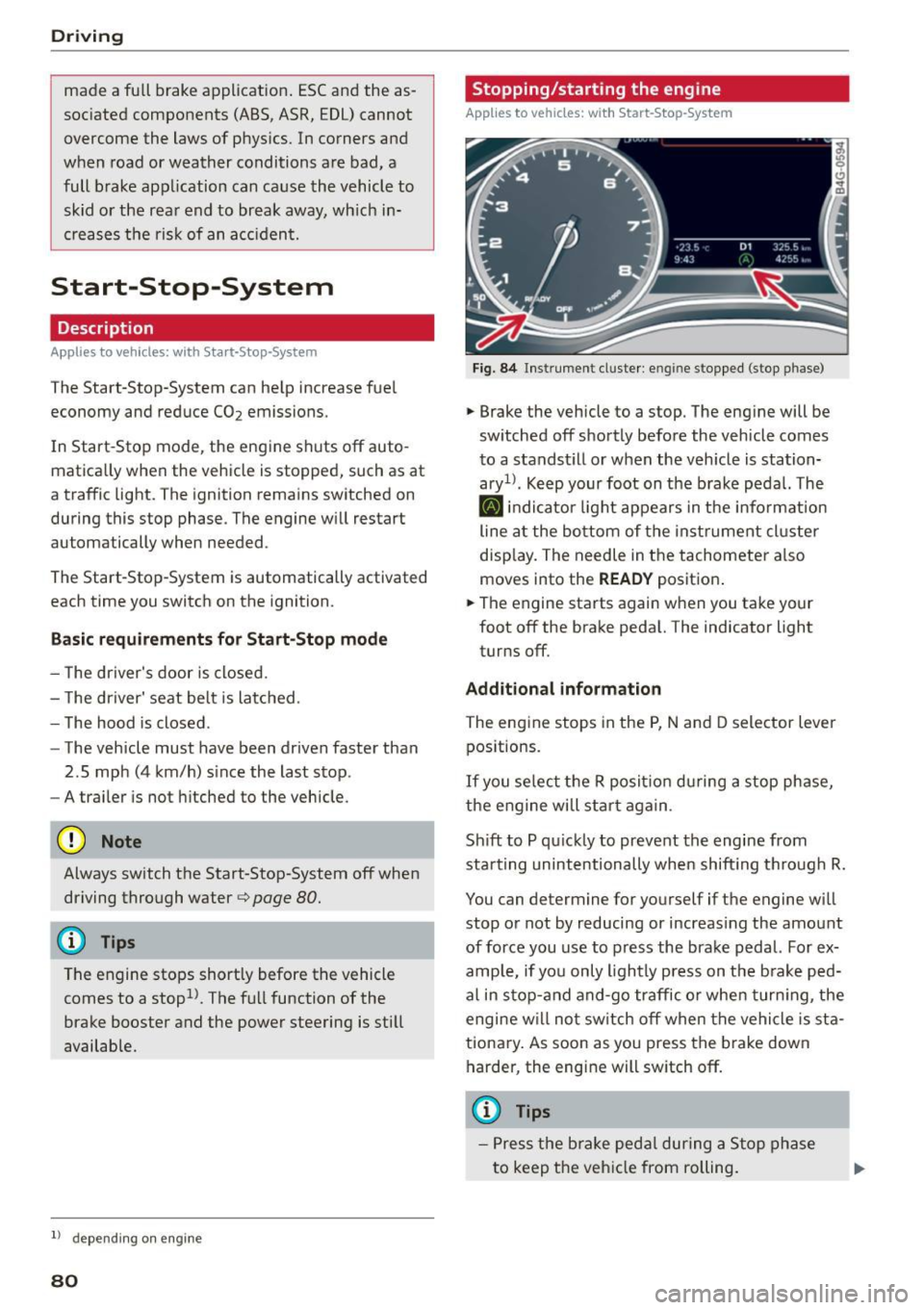
Fi g. 8 4 Instrument cl uste r: en gin e stopped (stop phase)
.,. Brake the vehicle to a stop. The eng ine will be
sw itched
off shortly before the vehicle comes
to a standst ill or when the veh icle is station
ary 1>. Keep your foot on the b rake peda l. The
[I] indi cato r light appears in the info rmat ion
line a t the bottom of the inst rument cl uster
disp lay. The needle in the tachometer a lso
moves into the READY positio n.
.,. The engine starts again when you take your
foot
off the brake peda l. The indicator light
turns
off.
Additional information
The engine stops in the P, N and D selector lever
pos itions.
If you se lect the R posit io n du ring a stop phase,
the e ngine will star t aga in .
Sh ift to P qu ickly to prevent the engine from
starting unintentionally when shift ing th rough R.
You can determine for yourself if the engine will
stop or not by reducing or increas ing the amount
of force you use to p ress the brake pedal. For ex
ample, if yo u only lightly press on t he b rake ped
al in s top-and and-go traffic o r when tur ning, the
engine w ill no t sw itch
off when the vehi cle is sta
tiona ry . As soon as you press the b rake down
harder, the eng ine will sw itch
off.
(D Tips
- Press the bra ke peda l during a S top phase
to keep the vehi cle from rolling.
Page 83 of 294
M N <( I.J "". rl 1.0
"' N 1.0 rl
-The ignition will turn off if you press the
I START ENGINE STOP I button during a stop
phase . The needle in the tachometer
moves
into the OFF position.
General information
Applies to vehi cles: with Start-Stop-System
The standard Start-Stop mode con be canceled
for different system-related reasons.
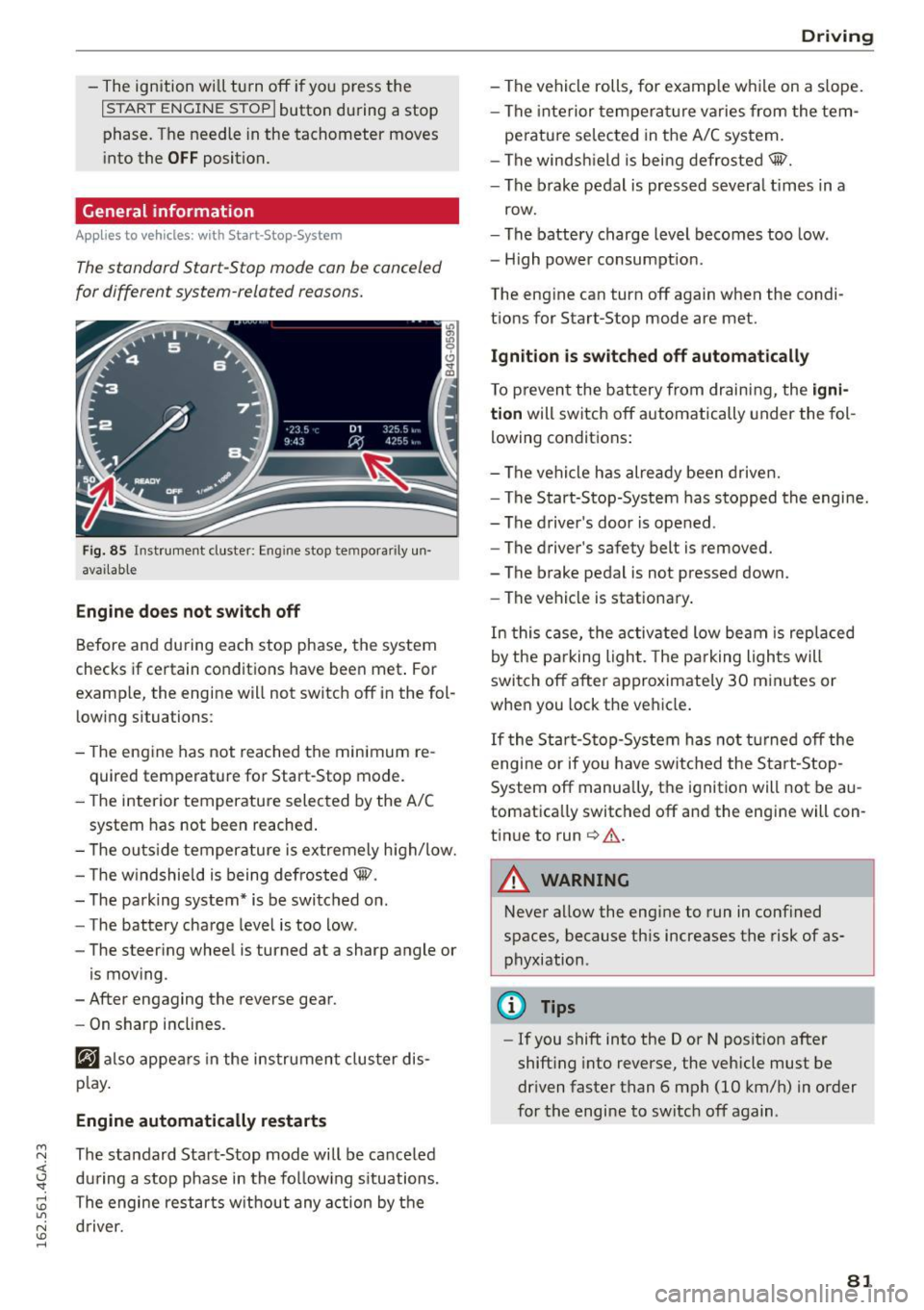
Fig. 85 Instrument cluster: Eng ine stop tempora rily un
avai lable
Engine does not switch off
Before and during each stop phase, the system
checks if certain conditions have been met . For
examp le, the engine will not switch off in the fol
lowing situations:
- The engine has not reached the minimum re
quired temperature for Start-Stop mode.
- The interior temperature selected by the A/C
system has not been reached.
- The outside temperature is extremely high/low.
- The windshield is being defrosted@.
- The parking system* is be switched on .
- The battery charge level is too low .
- The steering wheel is turned at a sharp angle or
is moving .
- After engaging the reverse gear.
- On sharp inclines.
@J also appears in the instrument cluster dis
play.
Engine automatically restarts
The standard Start-Stop mode will be canceled
during a stop phase in the following situations .
The engine restarts without any action by the driver.
Driving
- The vehicle rolls, for examp le while on a s lope.
- The interior temperature varies from the tem-
perature selected in the A/C system.
- The windshield is being defrosted@.
- The brake pedal is pressed severa l times in a
row.
- The battery charge level becomes too low.
- High power consumption.
The engine can turn off again when the condi tions for Start-Stop mode are met.
Ignition is switched off automatically
To prevent the battery from draining, the igni
tion
will switch off automatically under the fol
lowing conditions:
- The vehicle has already been driven.
- The Start-Stop-System has stopped the engine.
- The driver's door is opened .
- The driver's safety belt is removed.
- The brake pedal is not pressed down.
- The vehicle is stationary.
In this case, the activated low beam is replaced
by the parking light. The parking lights will
switch off after approximately 30 minutes or
when you lock the vehicle.
If the Start-Stop-System has not turned off the
engine or if you have switched the Start-Stop
System off manually, the ignition will not be au
tomatically switched off and the engine will con
tinue to run
c> .&. .
A WARNING
--Never allow the engine to run in confined
spaces, because this increases the risk of as
phyxiation .
@ Tips
-If you shift into the D or N position after
shifting into reverse, the vehicle must be
driven faster than 6 mph (10 km/h) in order
for the engine to switch off again .
81
Page 84 of 294

Driving
Switching the Start-Stop-System on/off
manually
Applies to veh icles: with Sta rt-Stop-System
If you do not wish to use the system, you can
switch it off manually.
F ig . 86 Ce nter con so le: Start -Stop-Syste m button
• To switch the Start-Stop-System off/on manual
ly, press the
1 0• •1 button . The L ED in the button
turns on when t he system is switched off .
(D Tips
If you switch the system off d uring a stop
phase, the engine will start again automati
cally.
Messages in the instrument cluster display
Applies to vehicles: with Start -Stop-System
Start-stop system dea ctivated: Please restart
engine manually
This message appea rs when specific conditions
are no t me t d uring a stop phase and the Sta rt
Stop-System will
not be able to resta rt the en
gine. The engine must be started with the
I S TAR T ENGINE STOP I button.
Start-stop system: System fault! Currently
unavailable
There is a ma lf u nct ion in the Star t-Stop -System .
Drive the veh icle to an authorized repair fac ility
for servic ing as soon as possib le to correct the
malfunct ion.
82
Speed warning system
Introduction
The speed warning system helps you to stay un
der a specified maximum speed .
The speed warning system warns you if you are
exceeding the maximum speed that you have set .
You w ill hear a warning tone when your speed ex
ceeds the sto red val ue by app rox imately 3 mph
(3 km/h) . An indicator light . (USA mode ls)/ .
(Ca nada models) in the ins trumen t cluste r dis
play a lso turns o n at the same time. The ind ic a tor
li ght .,. turns off w hen the speed decrea ses
below the stored maximum speed.
Set ting a t hreshol d is recom mended if you would
lik e to be rem inded when you re ach a cert ain
maximum speed . Si tua tions where you may want
to do so include drivin g in a country w ith a gene r
a l speed limit or if there is a specified max imum
speed for winter tires.
(D Tips
Eve n though your vehicle is eq uipped w ith a
speed warning system, you should still watch
the speedometer to make sure yo u are not
drivi ng faster than the speed lim it.
Setting the threshold
You con set , change and delete the warning
threshold in the Infotainment system.
• Select: the ICAR I function button > (Car)* Sy s
tems
control b utton > Driver ass istance >
Speed warning .
You can set any threshold betwee n 20 mph
(30 km/h) and 150 mph (240 km/h) . Settings
can each be adjusted in increments of 6 mph
(10 km/h) .
Page 92 of 294
Audi adapt ive cru ise control and brak ing gu ard
The higher the speed, the greater the distance in
yards (meters)
c::;, .,& . The Dista n ce 3 setting is
recommended.
The distances provided are specified values. De
pending on the d riving situat ion and the how the
vehicle ahead is driving, the actual distance may
be more or less than these target distances.
The various symbols for the time increments ap
pear briefly in the information line@q
page 87,
fig. 94 when you c hange the settings.
c::::,_c::::, ___ Distan ce 1 : This set ting co rresponds
to a distance o f 92 feet/28 meters when trave l
ing at 62 mph (100 km/h), or a time interval of 1
second.
c::::, __ c::::, __ Distan ce 2: T his sett ing corresponds
to a distance o f 118 feet/36 meters when travel
ing at 62 mph (100 km/h), or a time interval of
1.3 seconds.
c::::, ___ c::::,_ Distanc e 3: This setting corresponds
to a distance o f 164 feet/SO me ters when travel
ing at 62 mph (100 km/h), or a time interval of
1.8 seconds.
c::::, ____ c::::, Distanc e 4: This setting corresponds
to a distance o f 210 feet/64 me ters when travel
ing at 62 mph (100 km/h), or a time interval of
2.3 seconds.
A WARNING
Following other vehicles too closely increases
the risk of collisions and ser ious personal in
jury.
- Setting short distances to the traffic ahead
reduces the time and d istance availab le to
br ing your vehicle to a safe stop and makes
i t even more necessary to pay close atten
t ion to traffic.
- Always obey applicable traffic laws, use
good judgme nt, and select a safe following
distance for the traffic, road and weather
condit ions.
(0 Tips
- Distanc e 3 is set automatically each time
you sw itch the ignit ion on.
90
- Your standard settings are automatically
stored and assigned to the remote control
key be ing used .
Selecting the driving mode
Applies to vehicles: wit h Aud i adapt ive c ruise contro l
.,. Select the desired driving mode in drive select
c::;,page 101.
@ Tips
Your settings are automatica lly stored and as
signed to the remote control key being used.
Prompt for driver intervention
Applies to vehicles: with A udi adapt ive c ru ise contro l
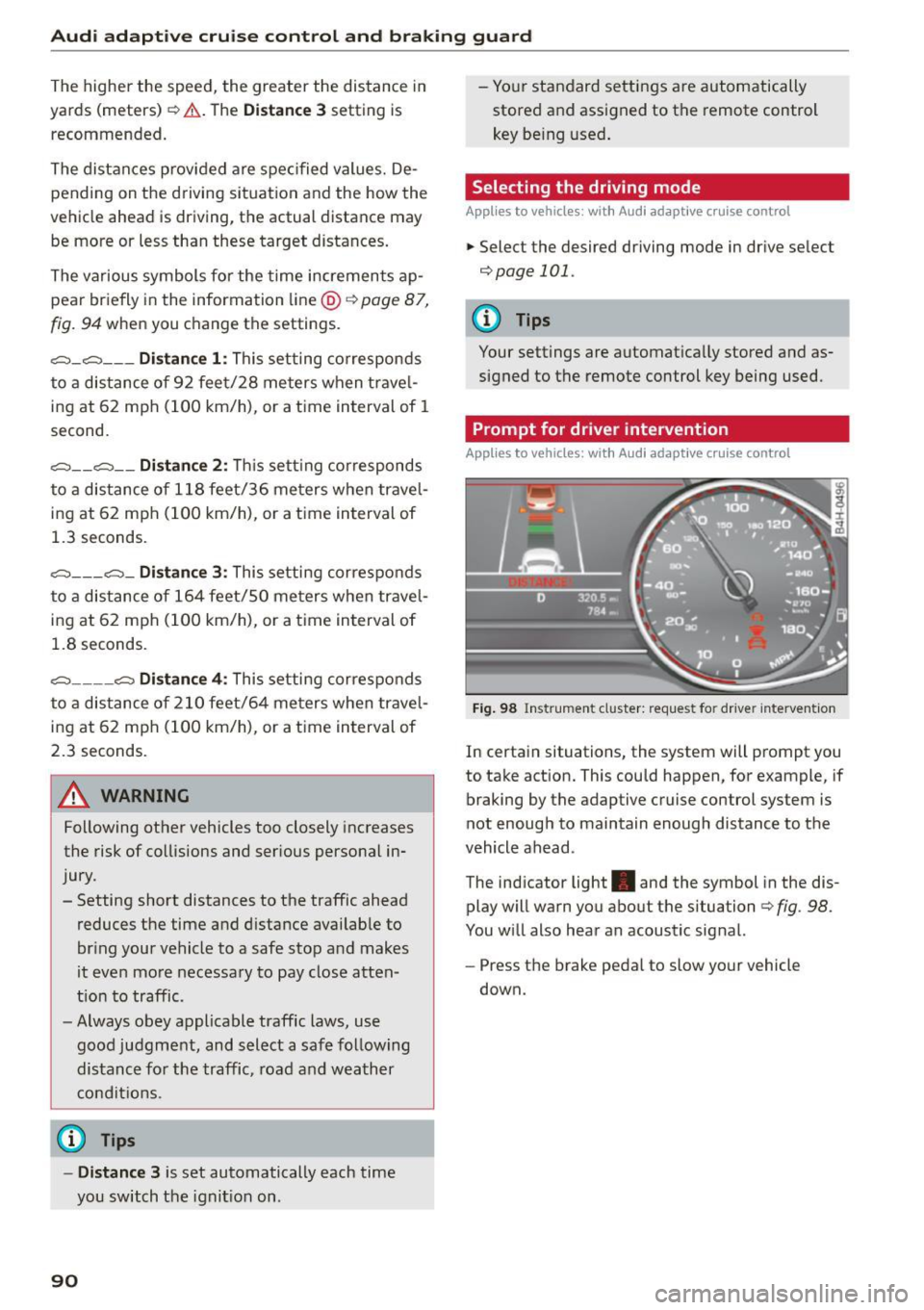
Fig . 98 Instrument cluster: req uest fo r dr ive r interve ntion
In certain situations, the system will prompt you
to take action. This could happen, for example, if
braking by the adaptive cruise control system is
not enough to maintain enough distance to the
vehicle ahead .
The indicator light. and the symbol in the dis
play will warn you about the situation
c::;, fig . 98.
You w ill also hear an acoustic sig nal.
- Press the brake peda l to slow your vehicle
down.
Page 103 of 294
M N <( (.J
'SI: ,...., \!) ..,.,
N \!) ,....,
Audi drive select Driving settings
Introduction
Drive select makes it possible to experience dif
ferent types of vehicle settings in one vehicle.
The driver can select
Comfort, Auto and Dynamic
modes in the Infotainment system to switch be
tween a sporty and a comfortable driving mode.
In the
Individual mode, the settings can be ad
justed to your personal preferences. This makes it possible to combine settings such as a sporty en
g ine tun ing with light steering.
_&. WARNING
Improper use of the Audi drive select can
cause collisions, other acc idents and serious
personal injury.
Description
-
The follow ing systems are affected by drive se
lect:
Engine and transmission
Depending on the mode, the eng ine and the
transmission respond quicker or in a more bal
anced manner to acce lerator pedal movements.
I n the sporty dynamic mode, the transmission
shifts at higher RPMs.
Air suspension*
The adaptive air suspension/adaptive air suspen
sion sport*
(Air suspension in the MMI) is an
e lectronically controlled a ir suspension and
damping system. They are adjusted depending on
the selected driving mode, the driver's steering,
b raking and acce leration input and the road sur
face, vehicle speed and load. A sporty setting is generally used in vehicles with adaptive air sus
pension sport*.
The vehicle clearance varies depending on these lected mode and the speed.
The highway setting is activated automatically
when you drive above 75 mph (120 km/h) for
more than 30 seconds in the
Auto or Dynamic
Audi drive select
mode. The ground clearance is increased auto
matically if the speed drops below 44 mph (70
km/h) for more than 120 seconds.
Steering
T he steering adapts in terms of steer ing effort
and steering ratios . Indirect steering that moves
easily, like the steering in comfort mode, is best
suited to long drives on a highway. In contrast,
dynamic mode provides sporty, direct steering.
T he following applies to vehicles with dynamic
steering*: the steering ratio changes based on ve
hicle speed in order to maintain optimum steer
ing effort for the driver at all times. This sets the
steering to be less sensitive at higher speeds in
order to provide improved vehicle control. At re
duced speeds, however, steering is more direct in
order to keep the steering effort as minimal as
poss ible when the driver is maneuvering the vehi
cle. At low and average speeds, dynamic steer ing
additionally provides more responsive steering
performance.
Sport differential*
As a component of the all wheel dr ive system
(quattro)
¢ page 192, the Sport differential* dis
tributes the driving power to the rear axle de
pending on the sit uation. The distribution of
power varies depending on the selected mode,
from balanced (comfort) to agile (dynamic) . The
goal is a high level of agility and ability to accel
erate on curves. The vehicle is very responsive to
steering.
Curve light*
T he curve light adapts to driving on curves. The
pivoting action and the lighting are also adapted
to the mode.
Adaptive cruise control*
T he behav ior when accelerating can be adjusted
from comfortable to sporty, depending on the
drive select mode. Adaptive cruise control a lso
responds to the driving behavior of the vehicle
ahead in a more conservative or sporty manner. ..,_
101
Page 109 of 294
M N <( I.J "". rl I.O
"' N I.O rl
Automatic transmission S tronic, tiptronic
Introduction
The automat ic transm iss ion is controlled elec
tronically. The transmission upshifts or down
shifts automatically depending on which drive
program is selected.
When a
moderate driving style is used, the
transmission selects the most econom ical driving
mode. The transmiss ion upshifts at a lower RPM
and downshifts at a higher RPM to improve fuel
efficiency.
The transmission switches to a sporty mode after a kick-down or when the driver uses a
sporty driv
ing style
cha racterized by quick accelerator pedal
movements, heavy acceleration, frequent
changes in speed and traveling at the maximum
speed.
If desired, the driver can also select the gears
manually (tiptronic mode) ¢ page 111.
Various automat ic tr ansm issions may be instal
led, depending on the model:
S tronic transmission
The S tronic is a dual -clutch transmission . Power
is transferred using two clutches that work inde
pendently from one another. They replace the
torque converter used in conventional automat ic
transmissions and a llow the vehicle to accelerate
without a noticeable interruption in traction.
tiptronic transmission
In the tiptronic transmission, power is transfer
r ed by a torque converter.
Automatic transmission
Selector lever positions
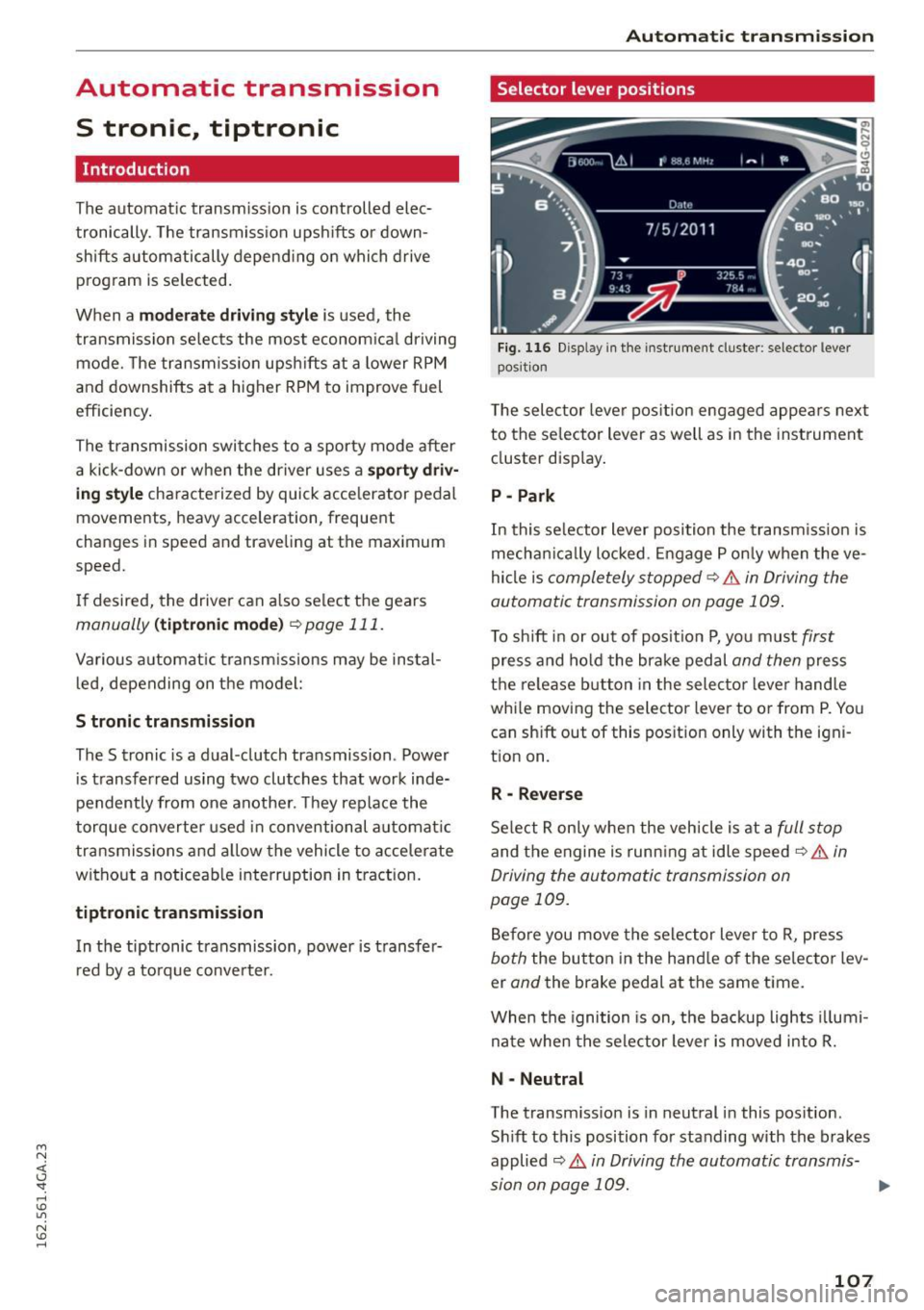
Fig. 116 Disp lay in the instrument cluste r: selector lever
posit ion
T he selec tor lever pos ition engaged appea rs next
to the se lector lever as well as in the instrument
cluster display.
P -Park
In this selector lever position the transmission is
mechanica lly locked . Engage P only when the ve
hicle is
completely stopped¢.& in Driving the
automatic transmission on page 109.
To shift in or out of posit ion P, you must first
press and hold the brake pedal and then press
the release button in the selector lever hand le
whi le moving the selector lever to or from P. You
can sh ift out of this position only with the igni
tion on.
R -Reverse
Select R only when the vehicle is at a full stop
and the engine is running at idle speed¢ .& in
Driving the automatic transmission on
page 109.
Before you move the selector lever to R, press
both the button in the hand le of the selector lev
er
and the brake pedal at the same time.
When the ignition is on, the backup lights illumi
nate when the selector lever is moved into R.
N -Neutral
The transm iss io n is in neutral in this pos ition.
Sh ift to this position for standing with the brakes
applied
¢ .& in Driving the automatic transmis-
sion on page 109. .,.
107