ECO mode AUDI A7 2016 Owner's Manual
[x] Cancel search | Manufacturer: AUDI, Model Year: 2016, Model line: A7, Model: AUDI A7 2016Pages: 294, PDF Size: 73.82 MB
Page 110 of 294
Automatic transmission
When the vehicle is stationary or at speeds below
1 mph (2 km/h), you must always apply the foot
brake before and while moving the lever out of N.
DIS -Normal position for driving forward
In the D/S position, the transmission can be oper
ated either in the normal mode Dor in the sport
mode S . To select the sport mode S, pull these
lector lever back brief ly. Pulling the lever back
again will se lect the normal mode D . The inst ru
ment cluster display shows the selected driving
mode.
In the
normal mode D , the transmission auto
matically selects the suitable gear ratio . It de
pends on engine load, vehicle speed and driving
style.
Select the
sport mode S for sporty driving. The
vehicle makes full use of the engine 's power .
Shifting may become noticeable when accelerat
ing.
When the vehicle is stationary or at speeds below 1 mph (2 km/h), you must a lways apply the foot
brake before and while moving the lever to D/S
out of N.
A WARNING
Read and follow all WARNINGS¢.&. in Driv
ing the automatic transmission on
page 109.
(D Note
Coast ing downh ill with the transmission in N
and the engine not running will result in dam
age to the automatic transmission and possi
bly the catalytic converter.
@ Tips
- Audi drive select: you can adjust the sporty
sh ift characte ristics in the
Dynamic driv ing
mode .Sw ill appear in the instrument clus
ter display instead of D.
-If you accidentally select N while driving,
take you r foot off the accelerator pedal im
mediately and wait for the engine to slow
down to idle before selecting D/S.
108
-If there is a power fai lure, the selector lever
wi ll not move out of the P position. The
emergency release can be used if this hap
pens
¢ page 113.
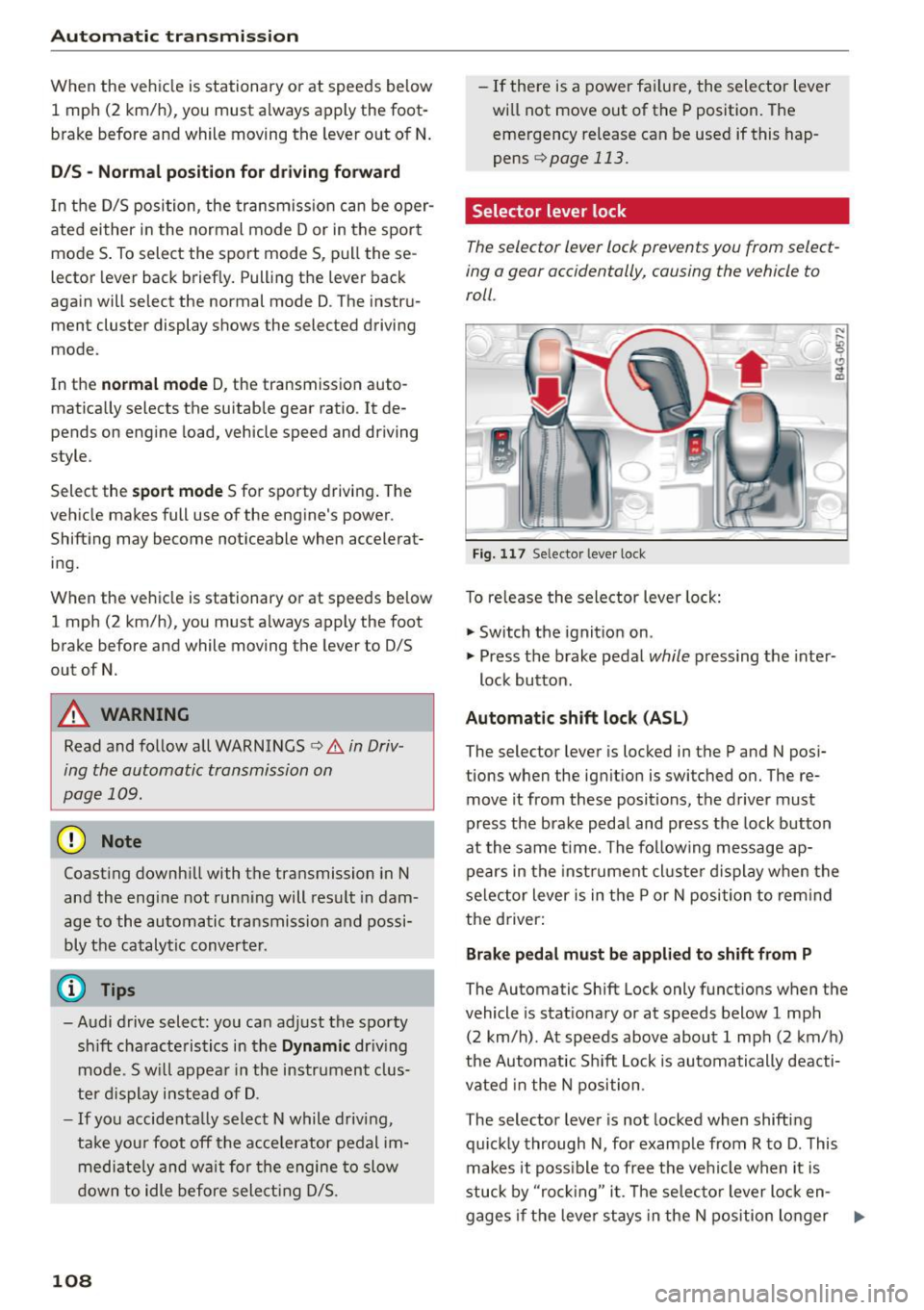
Selector lever lock
The selector lever lock prevents you from select
ing a gear accidentally, causing the vehicle to
roll .
Fig. 117 Selector lever lock
T o re lease the selector lever lock:
"' Switch the ignition on .
)
"' Press the brake pedal while pressing the inter-
lock button.
Automatic shift lock (ASL)
The selector lever is locked in the P and N posi
tions when the ignition is switched on. The re
move it from these positions, the driver must
press the brake pedal and press the lock button
at the same time. The following message ap
pears in the instr ument cluste r display when the
selector lever is in the P or N position to rem ind
the driver:
Brake pedal must be applied to shift from P
The Automatic Shift Lock only functions when the
vehicle is stat ionary or at speeds below 1 mph
(2 km/h) . At speeds above about 1 mph (2 km/h)
the Automatic Sh ift Lock is automatically deacti
vated in the N position .
The selector lever is not locked when shifting
quickly through N, for example from R to D. This
makes it poss ible to free the vehicle when it is
stuck by "ro ckin g" it. The selector lever lock en-
gages if the leve r stays in the N position longer ..,.
Page 111 of 294
M N <( (.J
'SI: ,...., \!) 1.1'1
N \!) ,....,
than 2 seconds when the brake pedal is not
pressed.
Lock button
The lock button in the selector lever handle pre
vents yo u from moving the se lector lever unin
tentionally while in some se lector lever positions .
The positions that require the lock button to be
pressed are marked in color in the illustration
¢fig. 117 .
Driving the automatic transmission
Starting the engine
.. The selector lever must be in P or N.
Starting off
.. Press and hold the brake pedal.
.. Press and ho ld the release button in the selec
tor lever handle, select the desired selector lev
er position such as D/S and release the button .
.. Wait briefly until the transmission has shifted
(you will feel a slight movement).
.. Remove your foot from the brake pedal and ac
celerate .
Stopping temporarily
.. Keep the vehicle stationary using the braking
pedal, for example at traffic lights.
.. Do not press the accelerator pedal when doing
th is.
.. To prevent the veh icle from rolling when you
start driving, set the parking brake when stop
ping on steep inclines¢,& .
.. Th e parking brake will re lease automatically
and the vehicle will start moving once you press
the accelerator peda l.
Stopping/parking
If the selector lever is not in the P position when
you open the driver 's door, the veh icle could roll.
The message
Transmi ssion : Car may roll! Shift
to park!
appears.
.. Press and ho ld the brake pedal unt il the vehicle
has come to a complete stop.
.. Apply the parking brake¢
page 78, Parking.
.. Select the P selector lever position ¢ ,&.
Automatic transmission
Stopping on an incline
.. Always press the brake pedal to hold the vehi
cle in place and prevent it from "ro lling back"
c::> ,& . Do not try to prevent the vehicle from
"rolling back" when a gear is engaged by in
creasing the engine speed ¢(D .
Starting on an incline
.. Activa te the parking brake.
.. With the driving gear selected, press the acce l
erator pedal carefu lly. The parking brake will re
lease automatica lly if your seat belt is fastened.
Under certain circumstances, such as driving in
the mountains, it may be useful to switch tempo
rarily to the manual shift program in order to ad
just the gears to the dr iv ing condit ions by hand
Q ,&. .
On s lopes, activate the parking brake first and
then move the selector lever to the P position.
This prevents too much stress from being placed
on the locking mechanism.
A WARNING
- The vehicle can also roll when the engine is
stopped.
- Unintended vehicle movement can cause se
rious injury .
- Never leave your vehicle with the engine
running while in gear. If you must leave your
vehicle when the engine is running, activate
the park ing brake and move the selector lev
er to P.
- Power is still transmitted to the wheels
when the engine is running at idle. To pre
vent the vehicle from "creep ing", you must
keep yo ur foot on the brake when the engine
is running and the se lector lever is in D/S or
R or "tiptronic" mode is selected.
- Do not press the accelerator pedal when
changing the se lector lever position while
the vehicle is stationary and the engine is
running .
- Never shift into R or P while driving.
- Before driving down a steep slope, reduce
your speed and shift into a lower gear with
"ti ptronic".
109
Page 114 of 294
Automatic transmi ssion
DYNAMIC driving mode in drive select
¢page 102 .
• Press the brake pedal firmly with your left food
and hold it all the way down for at le ast 1 sec
ond.
• At the same time, press the gas peda l all the
way down w ith your r ight foot u ntil the engine
reaches and stays at a high R PM level.
• Remove your foot from t he b rake pedal w it hi n 5
seconds ¢,& .
A WARNING
-Always adapt you r driving to the traffic f low.
- Only use the La unch control program when
road and t raff ic condi tions a llow i t and oth
er drivers wi ll not be endangered or both
ered by yo ur driving and t he ve hicle's acce l
eration.
- Please note that the dr ive whee ls can sp in
and the vehicle can brea k away w hen spo rt
mode is switched on, especially when the
road is slippery.
- Once the vehicle has started moving, press
the
I .$ O FF l button briefly to turn the sport
mode off.
(D Tips
- The t ransmission tempe ratu re may inc rease
significantly after using the launch control
program. If that happens, the program may
not be available for a few minutes. It will be
ava ilable again after a coo l-down period .
- When accelerat ing using the launch contro l
program, all vehicle pa rts a re subject to
heavy loads. This can lead to increased wear .
Transmission malfunction
DD Transmission : Please press brake pedal and
s el ect gear again .
Press the brake pedal and se lect the desired se
lecto r leve r posit io n aga in . Yo u can then continue
d riving.
[O] Transmiss ion overhe ating: Please drive con
servativ ely.
112
The transm ission temperat ure has inc reased s ig
nificantly d ue to the sporty driving manner. Drive
i n a less sporty manne r until the temperature re
turns to the normal range and the indicator light
switches of.
DD Transmission malfunction: you can continue
driving
The re is a system mal func tion in the t ransm is
s ion . You may contin ue driving . Drive to yo ur au
thorized Audi dea ler or a uthorized Audi Se rvice
Fac ility soon to have the ma lfunction corrected.
DD Trans mission malfun ction : You can continue
driving with limited functionality
There is a system malfunct ion in the t ransm is
s io n. The t ransm ission is swi tching to eme rgency
mode. This mode on ly shifts in to cer tain gears or
will no longer shift at al l. The engine may stall.
D rive to an authorized A udi dealer o r authorized
Audi Service Facility immed iate ly to have the
malfunction corrected.
DD m Trans mission malfunction: No reverse
gear. You can continue driving
S tronic tra nsmission: The re is a system malfunc
tion in the tr ansmission . Th e transmission is
swi tching to emergency mode. This mode on ly
shifts into certain gears or will no longer shift at
a ll. The eng ine may stall. Yo u cannot engage the
r everse gea r. Drive to an aut hori zed Aud i dea ler
or a uthori zed Audi Service Facility immedia tely to
have the malfunct ion corrected .
DD Transmission malfunction: Stop veh icle and
shift to park.
Do not con tinue driving . Se lect the P selector lev
e r position and see an authorized A udi dealer or
a utho riz ed Aud i service facility for assistance .
([) Note
If the transmission has switched to eme rgen
cy mode, drive to you r aut ho rize d Aud i dea le r
i mmediately to have the ma lf u nction co rrect
ed.
Page 126 of 294
Parking systems
Adjusting the display and the warning tones
Applies to veh icles: With parking system plus/rea rview ca m
era/peripheral came ras
The display and warning tones can be adjusted in
the Infotainment.
~ Se lect: the ICARI function button > (Car )* Sys
tems
contro l button > Dri ver assi stance > Park
ing aid .
Display
On * -
An optical disp lay is shown for t he parking
system plus, a rearview camera image is shown
for the rearview camera* .
Off -When the p ark ing system is sw itched off,
only audib le signa ls are given.
Warning tones
Front volume -
Volume for the front area
Rear volume -Volume for the rear area
Front frequenc y -Frequency for the front area
Rear frequency -Frequency fo r the rear area
Entertainment volume lowering -When the
pa rking system is turned on, the vo lume of the
aud io/v ideo source is lowered.
The newly adjusted value is briefly heard from
the signal generator.
(D Tips
- The warning tones can also be adjusted d i
rectly by the visual display or the picture
from the camera . S imply press the
Settings
control b utton .
- Changed settings are activated when the
p arking system is switc hed on aga in.
- The settings for volume and frequency are
automat ically saved and ass igned to the re
mote con trol key being used.
Error messages
Applies to veh icles: With parking system plus/rearview cam
era/peripheral came ras
There is an e rror in the system if the LED in t he
Pw , button is b link ing and yo u hear a continuous
124
alarm for a few seconds afte r switching on the
par kin g system or when the parking system is al
r eady act ivated . If the error is not corrected be
fo re you switch off the ignition, the LED in the
Pw ,
button will blink the next time you switch on the
parki ng system by shifting into reverse.
Parking sy stem plus
If a senso r is fa ulty, the .f;l4 symbol will appear in
front of/behind the vehicle in the Infota inment
display. If a rear sensor is faulty, only obstacles
that are in areas @and @ are shown
<=:> page 115, fig . 121 . If a fro nt sensor is faulty,
o n ly obs tacles that a re in areas © and @are
shown. Ther e is a lso a system ma lf u nction if all
segme nts around the vehicle a re red or if no seg
men ts a re dis played.
Peripheral cameras*
There is a system malfunct ion if the i:8l• • symbol
appears and the co rrespo nd ing display a rea is
shown in bl ue. The came ra is not wo rking in this
a rea.
Drive to an authorized A udi dealer or authorized
Audi Se rvice Facility immed iately to have th e
malfunction corrected.
Trailer hitch
App lies to vehicles: with parking system plus/rearview cam
era/periphe ral ca meras and trailer hitch
For vehicles us ing the trailer socket, the parking
system rear sensors do not turn o n when yo u
shift into reverse gear or when you press the
p,,1 A
button . This res ults in the following restrictions.
Parking sy stem plus
There is no d istance warning for the rear. The
front sensors remain act ivated. The visual display
switches to the trailer towing mode.
Rearview camera* /peripheral came ras*
There is no d istance warn ing fo r th e rea r. T he
front sensors remain act ivated . The visual display
switches to the trailer towing mode. The rearv iew
camera image will not show t he or ientat ion lines
and the b lue sur faces. .,._
Page 160 of 294

Airbag syste m
(D Tips
If the capaciti ve passenger detection system
determines that the front passenger seat is
empty, the frontal airbag on the passenger
side w ill be turned off, and the
PA SSEN GER
AIR BA G OFF
light w ill stay on.
Repair, care and disposal of the airbags
Parts of the a irbag system are installed at many
d iffe rent p laces on your Audi. Insta lling, remov
ing, servicing or repa iring a part in an area of the
veh icle can damage a part of an ai rbag system
and prevent that system from working properly
in a co llision.
There are some important thi ngs you have to
know to make sure that the effect iveness of the
system w ill not be impaired and that d isca rded
components do not cause injury or pollute the
environment.
A WARNING
-Improper care, servicing and repair proce
dures can increase the risk of personal injury
and death by preventing an a irbag from de
ploying when needed or deploying an airbag
unexpectedly:
- Never cover, obstruct, or change the steer ing wheel horn pad or airbag cover or the in
strument pane l or modify them in any way.
- Never attach any objects such as cup holders or te lephone mountings to the surfaces cov
ering the airbag units.
- For cleaning the ho rn pad or instrument
panel, use only a soft, dry cloth or one mois
tened with plain water. So lvents or cleaners
c ould damage the a irbag cover or change
the stiffness o r strength of the ma ter ial so
that the airbag cannot dep loy and protect
properly .
- Never repa ir, adjust, or change any parts of
the a irbag system.
- All work on the stee ring wheel, inst rument
panel, front seats or electrical system (in
cluding the installation of audio equipment,
cellular telephones and CB radios, etc.)
must be performed by a qualified technician
158
who has the training and special equipment necessary.
- For any work on the airbag system, we
strongly recommend that yo u see your au
thorized Audi dealer or qualified workshop.
- Never modify the front bumper or parts of
the vehicle body.
- Always make sure that the side airbag can
inflate w ithout interference:
- Never install seat covers or rep lacement
u pholstery over the front seatbacks that
have not been specifically approved by
A udi.
- Never use additional seat c ushions that
cover the areas where the side a irbags in
flate.
- Damage to the orig inal seat cove rs or to
the seam in the are a of the side ai rbag
module mus t always be repaired immedi
ate ly by an autho rized Aud i dealer.
- The a irb ag sys tem can deploy on ly on ce. Af
ter an airbag has been deployed, i t m ust be
rep laced with new replacement parts de
signed and approved especially fo r your A udi
model version. Replacement of complete
airbag systems or a irbag components must
be performed by qualified workshops only.
Ma ke sure that any airbag serv ice action is
e ntered in your Aud i Warranty
& Ma inte
nance booklet unde r
AIRBAG REPLAC EM ENT
R ECORD.
- For safety reasons in severe accidents, the
al ternator and starte r are separated from
the vehicle batte ry w ith a pyrotec hni c circ uit
interrupter .
- Work on the pyrotechnic c ircuit interrupt
er must on ly be performed by a qua lified
techn ic ians who have the experience, in
fo rmation and specia l tools necessa ry to
perfo rm the wor k safely.
- If the vehicle or the circuit interr upter is
scrapped, all app licable safety precautions
must be followed.
~
Page 171 of 294
M N <( (.J
'SI: ,...., \!) 1.1'1
N \!) ,....,
Advanced front airbag system and children
Your vehicle is equipped wit h a front "Advanced
A irbag System" i n compliance w it h United States
F ederal Motor Vehicle Safe ty Standard ( FMVSS)
208 as applicable at the time your vehicle was
manufactured .
The Advanced Airbag system in your ve hicl e has
been certified to mee t the " low -risk" requ ire
ments for 3 -and 6-year o ld children on the pas
senger side and small adults on the driver side.
T he low risk deployment criteria are intended to
reduce the r isk of injury through interaction with
the airbag that can occur, for example, by being
too close to the steering whee l and instrument
panel when the a irbag inflates . In add it io n, the
system has been cert ified to comply with the
"suppression" requiremen ts of the Safety Stand
ar d, to turn off t he front airbag for infa nts up to
12 months who are restra ined on the front pas
senger seat in child restraints that are listed i n
the Standard.
E ven though yo ur vehicle is equ ip ped with an Ad
vanced A irbag sys tem, all children, especia lly
those 12 years and younger, should always ride in
the back seat properly restrained for their age
and size. The airbag on the passenger side makes
the front seat a potent ially dangerous p lace for
a
chi ld to r ide. The fro nt seat is not the safes t place
for a child in a forward-facing child safety seat . It
can be a very dangerous place for a n infant or a
l arger child in a rea rward-facing seat .
T he vehicle's Advanced Airbag System has a ca
pacitive passenger detect ion system in the front
passenger seat cush ion that ca n detec t the p res
e n ce of a baby o r a child in a c hild restra int sys
tem on this seat.
The capacit ive passenger detection system regis
ters the changes that result in an electrical field
when a ch ild, a child rest raint, and a baby b la nk et
a re on the fron t passenger sea t. T he change in
the meas ured c apac it a nce due to the presence of
a child,
a chi ld restraint, and a baby blanket on
the front passenger seat is re lated to the child re
straint system resting on the seat . The measu red
capacitance of a chi ld restraint system va ries de-
Child sa fety
pending on the type of sys tem and specific make
and mode l.
T he elec trical c apacit a nce of the va rious types,
makes, and mo dels o f child restra ints specifie d
by the U.S.National Highway Traff ic Sa fety Ad
ministration (NH TSA) in the relevant safety
standard are stored in the Advanced Airbag Sys
tem control unit together w it h the capacitances
typ ica l of infants and a 1-year old child. When a
c h ild restra int is used on the front passenger seat
with
a typ ica l 1 year-old in fant, the Advanced Air
bag System compa res the capacitance measu red
by the capacitive passenge r dete ction system
wi th t he dat a stored in the elec tronic con trol
u ni t.
Child restraints and Advanced front airbag
system
Regardless of the c hild restra int that you use,
make sure that it has been cert ified to meet Unit
ed States Federa l Moto r Veh icle Safety Standa rds
and has been ce rtified by its manufacture r fo r
u se with an a irbag. Always b e sur e t hat t he c hild
r est rain t is prope rly insta lled a t one of the rear
sea ting pos itions. If in excep tional circ ums tan ces
yo u m ust use it on the front passenge r seat, care
fully read a ll of the information on chi ld safety
and Advanced Airbags and heed all of the appli
cable WARNINGS. Make certain that the child
and child restra int are correctly recogni zed by the
capacit ive passenger detection system i n the
front passenger seat, that the front passe nger
airbag is turned off, and that the a irbag status is
always cor rect ly signa led by the
PASSENGER AIR
BAG OFF
light .
Many types and models of child rest raints have
been available ove r the years, new mode ls a re in
t rod uced regu larly in co rporating new and im
proved de signs and older mode ls are take n ou t of
produ ct io n. Ch ild restra ints are not s tandar dized.
Child rest rain ts of the same type typ ically have
different weights and sizes and different "foot
prints", the size and shape of t he bottom of the
c hi ld restra int that sits on the seat, when they
are installed on
a vehicle seat. These d ifferences
make it virtua lly impossib le to cert ify compliance
with the requirements for advanced airbags with .,.
169
Page 191 of 294
M N <( I.J ""'. rl I.O
"' N I.O rl
will switch on again automatically when
conditions have returned to normal.
Steering recommendation
The ESC helps to stabilize the vehicle by changing
the steering torque.
In vehicles with dynam ic steering*, ESC also
he lps to stabilize the steering in critical situa
tions.
Selective wheel to rque control
Selective wheel torque control is used when driv
ing on curves . The front wheel on the inside of
the curve or both wheels on the i nside of the
curv e are braked selectively as needed . This al
lows more precise dr iving in curves.
Automatic post-collision braking system
The "Automatic post-collision braking system"
can help to reduce the risk of sliding and of other
collis ions after an accident. If the airbag control
module detects a coll is ion above a ce rtain veh icle
speed, the vehicle is braked by the ESC.
The vehicle does not brake automatically if:
- the driver presses the acce lerator pedal, or
- the braking force generated by the pressed
brake pedal is greater than the braking force
that would be initiated by the system, or
- the ESC, the brake system or the vehicle electri
ca l system are not functioning.
Switching on/off
Intelligent Technology
A WARNING ,-
-The ESC and its integrated systems cannot
overcome the limits posed by natural phys i
cal laws. This is especially important on slip
pe ry or wet roads. If the systems begin act
ing to stabilize your vehicle, you should im
mediately alter your speed to match the
road and traffic conditions. Do not let the in
creased safety provided tempt you into tak
ing risks. This could increase your risk of a
collis ion.
- Please note the r isk of a collision increases
when driving fast, especially thro ugh curves
and on slippery or wet roads, and when driv
ing too close to objects ahead. The ESC and its integrated systems cannot always pre
vent collisions· there is still a risk of acc i
dents!
- Press the accelerator pedal carefully when
accelerating on even, slippery surfaces such
as ice and snow. The drive wheels can spin
even when these control systems are instal
led and this can affect driving stability and
i n crease the r isk of a coll ision .
(j) Tips
-ABS and ASR only function correctly when
all four wheels are equipped with identical
tires. Different tire s izes can lead to a reduc
tion in engine power .
- You may hear noises when the systems de
scribed are working.
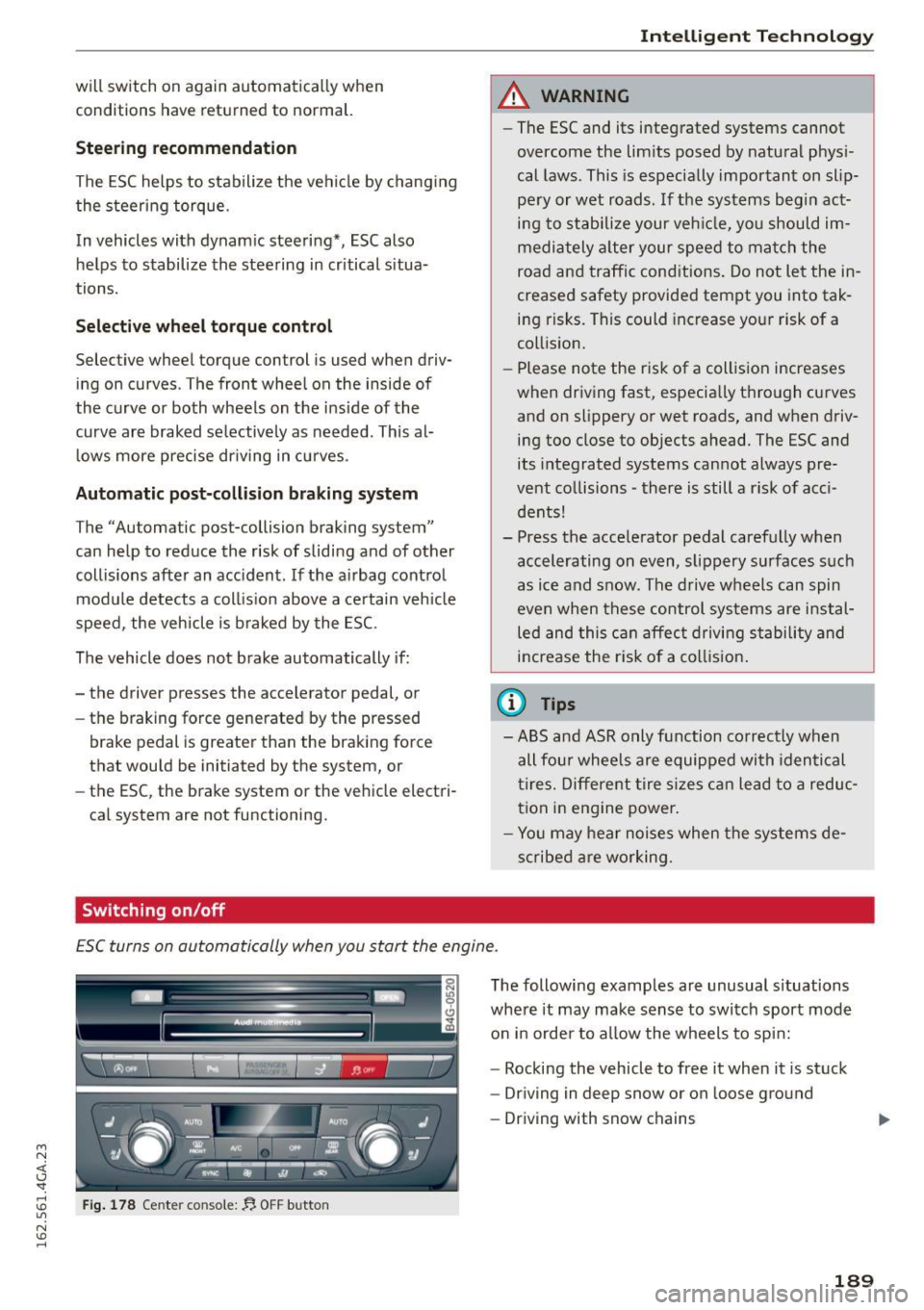
ESC turns on automatically when you start the engine .
Fig. 178 Center console: !J, OFF butto n
The following examples are unusual situations
where it may make sense to switch sport mode
on in orde r to allow the wheels to sp in:
- Rocking the vehicle to free it when it is stuck
- Driving in deep snow or on loose ground
- Driving with snow chains
189
Page 200 of 294
Driving and th e environment
content of the fuel be ing used. Using a differ
ent brand of fuel may help, or filling the tank
w ith lead-free super grade gasoline.
Diesel particulate filter
A pp lies to veh icles: w ith d iesel e ng in e
The diesel particulate filter filters nearly a ll of
the soot particles out of the exhaust . The filter
cleans itse lf automatically under normal driving
conditions. If the f ilter cannot clean itself (for ex
ample, because you are only driving short distan
ces), the filter becomes clogged with soot and
the
II symbo l for the diesel particulate filter il
lum inates ¢
page 20.
_& WARNING
-Do no t park your vehicle ove r flammable
materials such as g rass or leaves because
the high temperature of the diesel particu
late fi lter co uld start a fire.
-
- Do not apply an underbody protectant in the
exha ust system a rea o r a fire could start.
Placing your vehicle out
of service
If you wou ld like to take your veh icle out of serv
ice for a longer t ime, contact your authorized
Aud i dealer or authorized Aud i Service Facility.
They will advise you of important measures, such
as corrosion protection, maintenance and storage p rocedures . Also follow the informat ion about
the battery ¢
page 228.
Economical and environ
mentally-friendly driving
General
Your personal style of driving will determine the
economy of your vehicle, as well as exhaust and
noise levels .
Fuel economy, environmental impact, and wear
on your engine, brakes and t ires largely depend
on three factors:
-your personal dr iv ing style
- operating conditions
198
- technical limitat ions
If you ant ic ipate what you need to do next and
drive econom ic a lly, you can easily cut yo ur fu el
consump tion by 10-15 percent. This section will
give you some tips on how you can he lp the envi
ronment and your pocketbook .
(D Tips
'
The cons ump tion es tima tes as published by
EN VIRON MENTAL PRO TEC TION AGENCY ( EPA)
and T ransport Canada may not correspond to
your actual consumption on the road, which
will vary depending upon vehicle load and
speed, road and weather conditions, tr ip
l ength, etc.
Drive smoothly and keep a lookout ahead
Vehicles use the most fuel when they are acceler
ating.
.. Avo id unnecessary accelerating and brak ing.
Vehicles use the mos t fue l when they a re acceler
ating. I f yo u anticipate what is going to happen
next, you w ill need to b rake less and, thus, accel
erate less. Let the veh icle coast whenever possi
ble -for example when you see that the next traf
fic light is red .
Avoid full throttle
Driving at moderate speeds saves fuel and im
proves your mileage.
.. Try and keep well below your car's maximum
speed.
Acce lerating gently red uces fue l cons umption,
engine wear, and does not disturb the environ
ment .
Fuel consumpt ion, exhaust emiss ions and engine
noise increase d isproportionately at high speeds .
If you drive at approximate ly three quarte rs of
top speed, fue l consumption will be reduced by
one half. Never drive faster than the posted
speed l imit and weather cond itions permit.
Page 203 of 294
M N <( (.J
'SI: ,...., \!) ..,.,
N \!) ,....,
Trailer mode Driving with a trailer
General information
Your Audi was designed primarily for passenger
transportation .
If you plan to tow a trailer, p lease remember that
the additional load will affect durability, econo
my and performance.
Trailer towing not only places more stress on the
vehicle, it also calls for more concentration from
the driver.
For this reason, always follow the operating and
driving instructions provided and use common
sense.
(D Note
If you are going to tow a trai ler, you must ac
tivate the trailer operat ion mode
c::> page 201, Operating instructions.
Technical requirements
Trailer hitch
Use a weight-carrying hitch conforming to the
gross trailer weight. The hitch must be suitable
for your vehicle and trailer and must be mounted
securely on the vehicle's chassis at a
technically
sound
location. Use only a trailer hitch with a re
movable ball mount. Always check with the trail
e r hitch manufacturer to make sure that you are
using the correct hitch.
Do not use a bumper hitch.
The hitch must be installed in such a way that it
does not interfere with the impact-absorbing
bumper system. No modifications should be
made to the vehicle exhaust and brake systems.
From time to time, check that all hitch mounting
bolts remain securely fastened .
When you are not towing a trailer,
remove the
trailer hitch ball mount. This prevents the hitch
from causing damage should your vehicle be
struck from behind
c::> &, .
Trailer mode
Trailer brakes
If your trailer is equipped with a brak ing system,
check to be sure that it conforms to all regula
tions.
T he trailer hydraulic brake system must not be di
rect ly connected to the vehicle's hydraulic b rake
system.
Safety chains
Always use safety chains between your veh icle
and the tra iler.
Trailer lights
Trailer lights must meet all regulations. Be sure
to check with your Aud i dealer for correct wiring,
switches and relays.
Mirrors
If you are unable to see the traffic behind you us
ing the regular outside mirrors, then you
must in
stall extended mirrors. It is important that you
always have clear vision to the rear .
A WARNING
--
After removing the trailer hitch, do not store
i t in your vehicle. In case of sudden braking,
the hitch could fly forward and injure you or
your passengers.
Operating instructions
Maximum trailer weight
A trailer for your vehicle is limited to a typical
class 1 or class 2 trailer.
Trailer load distribution
Be sure the load in the trailer is held securely in
place to prevent it from sh ifting forward, back
ward or sideways.
Never allow a passenger to ride in a trailer c::> &.
in Driving instructions on page 203 .
Engine cooling system
Towing a trailer makes the engine work harder. It
is important that the cooling system's perform
ance is up to the additional load. Make sure that
the cooling system has enough fluid . .,..
201
Page 205 of 294

M N <( (.J
'SI: ,...., \!) 1.1'1
N \!) ,....,
braking effect to slow the vehicle. Use of the
brakes alone can cause them to overheat and fail.
Air suspension*
When driving with a trailer, activate the trailer
mode of the air suspension. Switch the air sus
pension trailer mode on when you are towing a
trailer. This will limit the regulation by the air
suspension while driving. Select in the MMI:
ICARI function button > (Car)* systems control
button>
Vehicle settings> Air susp.: towing>
On.
Coolant temperature
The coolant temperature gauge c::> page 10 must
be observed carefully. The coolant temperature
can increase if you drive on long inclines in a low
gear at high engine speeds . Reduce your speed
immediately if the LEDs in the top part of the dis
play turn on .
For more information about indicator lights, re
fer to.
c::> page 15.
A WARNING
Anyone not properly restrained in a moving
vehicle is at a much greater risk in an acci
dent . Never let anyone ride in your car who is
not properly wearing the restraints provided
by Audi.
Trailer mode notes
Important to know
-
Your vehicle handles differently when towing a trailer because of the additional weight and dif
ferent weight distribution . Safety, performance
and economy will greatly depend on how careful
ly you load your trailer and operate your rig.
Before you actually tow your trailer, practice
turning, stopping and backing up in an area away
from traffic . Keep practicing until you have be
come completely familiar with the way your vehi
cle-trailer combination behaves and responds.
Backing up is difficult and requires practice. Back
ing up with a trailer generally requires steering
Trailer mode
action opposite to that when backing up your ve
hicle without a trailer.
Maintain a greater distance between your vehicle
and the one in front of you . You will need more
room to stop. To compensate for the trailer, you
will need a larger than normal turning radius.
When passing, remember that you cannot accel
erate as fast as you normally would because of
the added load. Make sure you have enough room
to pass. After passing, allow plenty of room for
your trailer before changing lanes again.
Avoid jerky starts, sharp turns or rapid lane
changes.
(D Tips
- Do not tow a trailer during the break-in peri
od of your vehicle.
- If you tow a trailer, your Audi may require
more frequent maintenance due to the ex
tra load
c::> page 2 7 4.
Parking on a slope
Do not park on a slope with a trailer. If it cannot
be avoided, do so only after doing the following:
When parking:
" Apply the foot brake.
" Have someone place chocks under both the ve
hicle and the trailer wheels.
"With chocks in place, slowly release the brakes
until the wheel chocks absorb the load.
"Turn the wheels towards the curb.
... Apply the parking brake.
"Select the P selector lever position.
When restarting after parking:
"Apply the foot brake.
"Start the engine.
"Select the D/S selector lever position.
"Release the parking brake and slowly pull out
and away from the wheel chocks.
"Stop and have someone retrieve the wheel
chocks .
203