ECU AUDI A7 2016 User Guide
[x] Cancel search | Manufacturer: AUDI, Model Year: 2016, Model line: A7, Model: AUDI A7 2016Pages: 294, PDF Size: 73.82 MB
Page 65 of 294
M N <( I.J "". rl I.O
"' N I.O rl
Luggage compartment
Loading luggage compartment
Luggage items must be stowed securely.
"' (X) 0 9 Cl .,.
"'
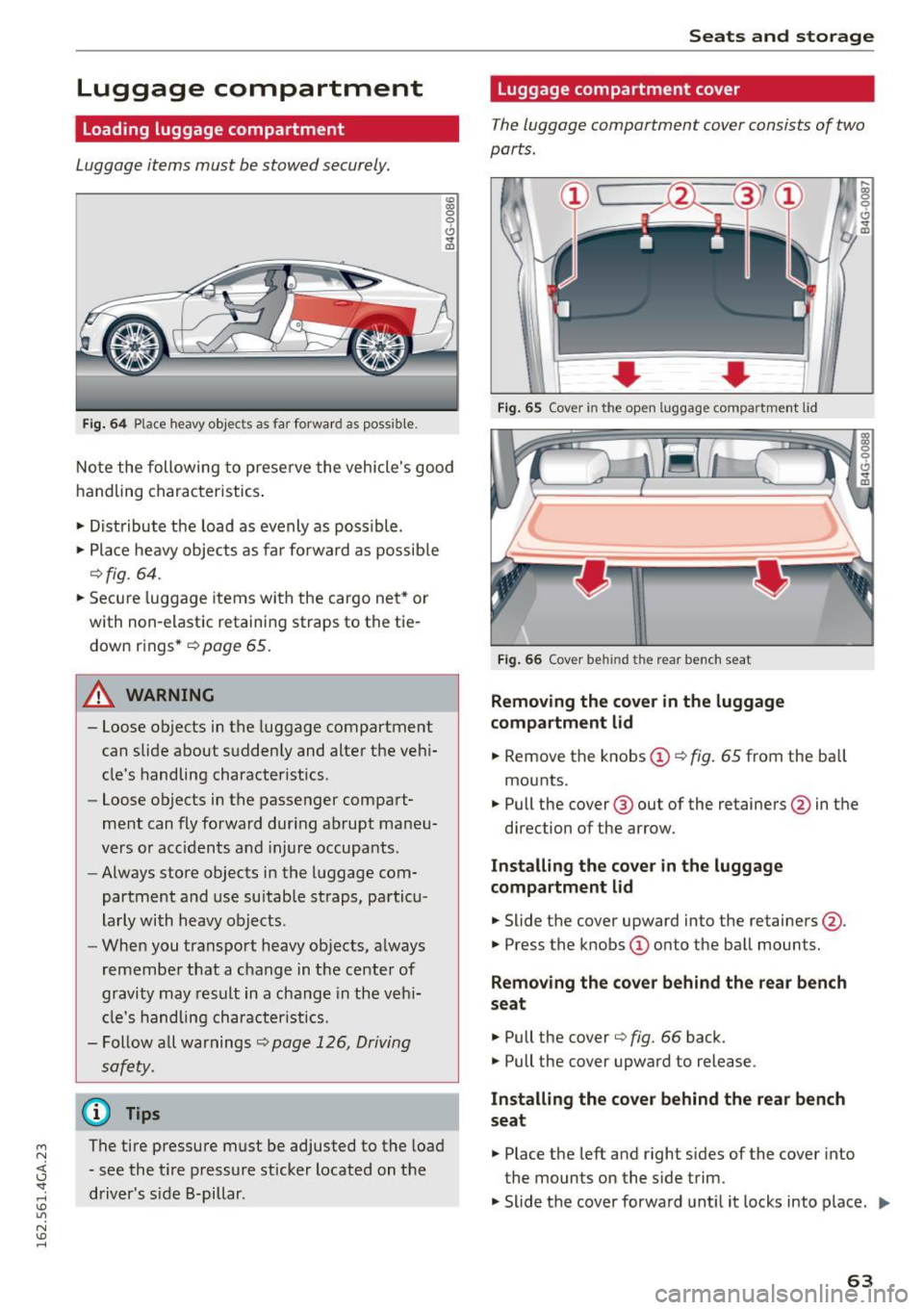
Fig. 64 P lace heavy objec ts as far fo rward as poss ib le .
Note the following to preserve the vehicle's good
handling characteristics .
.. Distribute the load as evenly as possible .
.. Place heavy objects as far fo rward as possib le
¢fig. 64 .
.. Secu re luggage items wi th the cargo ne t* or
with non-elastic retaining straps to the tie down r ings*
r=> page 65.
A WARNING
-Loose objects in the luggage compartment
can slide about suddenly and alter the vehi
cle's handling characteristics .
- Loose objects in the passenger compart
me nt can fly forward during abrupt maneu
vers or acc idents and injure occupants .
- Always store objects in the luggage com
partment and use suitab le straps, pa rticu
larly with heavy objects .
- When you transport heavy objects, always
remembe r that a change in t he center of
gravity may res ult in a change in the veh i
cl e's handling character istics.
- Follow all warnings
r=> page 126, Driving
safety.
@ Tips
The tire pressure must be adjusted to the load
- see the t ire pressure sticker located on the
driver's s ide B-pillar .
Seats and storage
Luggage compartment cover
The luggage compartment cover consists of two
parts.
,... a, 0 , 0
0 .,.
0 0. a)
F ig . 65 Cov er in the open lu ggag e compar tment lid
Fig . 66 Cov er behind the re ar bench seat
Removing the cover in the luggage
compartment lid
.. Remove the knobs @ r=> fig. 65 from the ba ll
mounts .
.. Pull the cover @ out of the retainers@in the
direction of the arrow.
Installing the co ve r in the luggage
compartm ent lid
.,._ Slide the cover upward into the retainers@.
.. Press the knobs
(I) onto the ball mounts.
Removing the cove r behind the rear bench
seat
.,._ Pull the cover r=> fig. 66 back.
.. Pull the cover upward to release.
Installing the cover behind the rea r bench
s eat
.. Place the left and right s ides of the cover into
the mounts on the side trim.
.. Slide t he cover forward unt il it locks into place.
IJI,,,
63
Page 66 of 294
Seats and storag e
_& WARNING
- To prevent accidents, never install the lug
gage compartment
cover unsecured.
- The luggage compartment
cover is not a
surface for storing objects . Objects placed
on the
cover cou ld endanger all vehicle oc
cupants during sudden brak ing maneuvers
or in a crash.
The defogger and antenna wires in the rear
w indow can be damaged by objects on the
luggage compartment
cover rubbing against
them.
Enlarging cargo capacity of the vehicle
interior
The seat backs can be folded forward to enlarge
the cargo capacity.
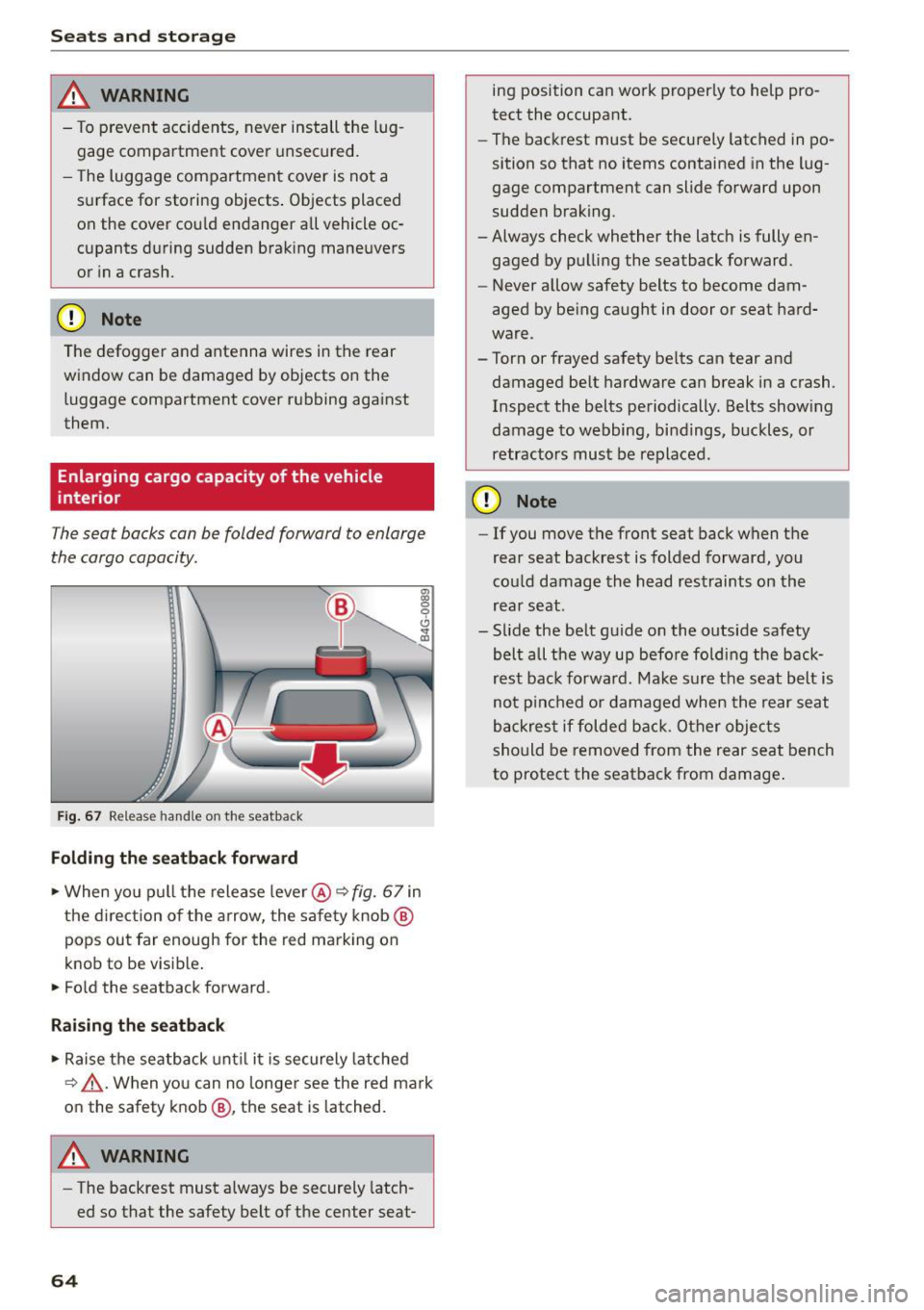
F ig. 67 Release handle on the seatback
Folding the s eatback forward
• When yo u pull the release lever @<=> fig. 67 in
the d irection o f the a rrow, the sa fe ty knob @
pops out far enough for the red marking on
knob to be visib le .
• Fo ld the seatback forward .
Raising the seatback
• Raise the seatback unt il it is securely latched
<=> A .When you can no longer see the red mark
on the safety knob @, the seat is latched.
A WARNING
-The backrest must always be securely latch
ed so that the safety belt of the center seat-
64
ing position can work proper ly to help pro
tect the occupant.
- The backrest must be securely latched in po
sition so that no items contained in the lug
gage compartment can slide forward upon
sudden braking.
- Always check whether the latch is fully en gaged by pu lling the seatback forward.
- Never allow safety belts to become dam
aged by being caught in door or seat hard
ware.
- Torn or frayed safety be lts can tear and
damaged be lt hardware can break in a crash.
Inspect the belts periodically. Belts show ing
damage to webbing, bindings, buckles, or
retractors must be replaced.
(D Note
- If you move the front seat back when t he
rear seat backrest is folded forward, you
cou ld damage the head res traints on the
rear seat .
- S lide the belt guide on the outside safety
belt all t he way up befo re fold ing the back
rest back forward . Make sure the seat belt is
no t pinched or damaged when the rear seat
backres t if folded back. Other objec ts
should be
removed from the rear seat bench
to protect the seatback from damage .
Page 67 of 294
M N <( I.J "". rl I.O
"' N I.O rl
Tie-downs and cargo net
The cargo net* prevents small objects from slid
ing .
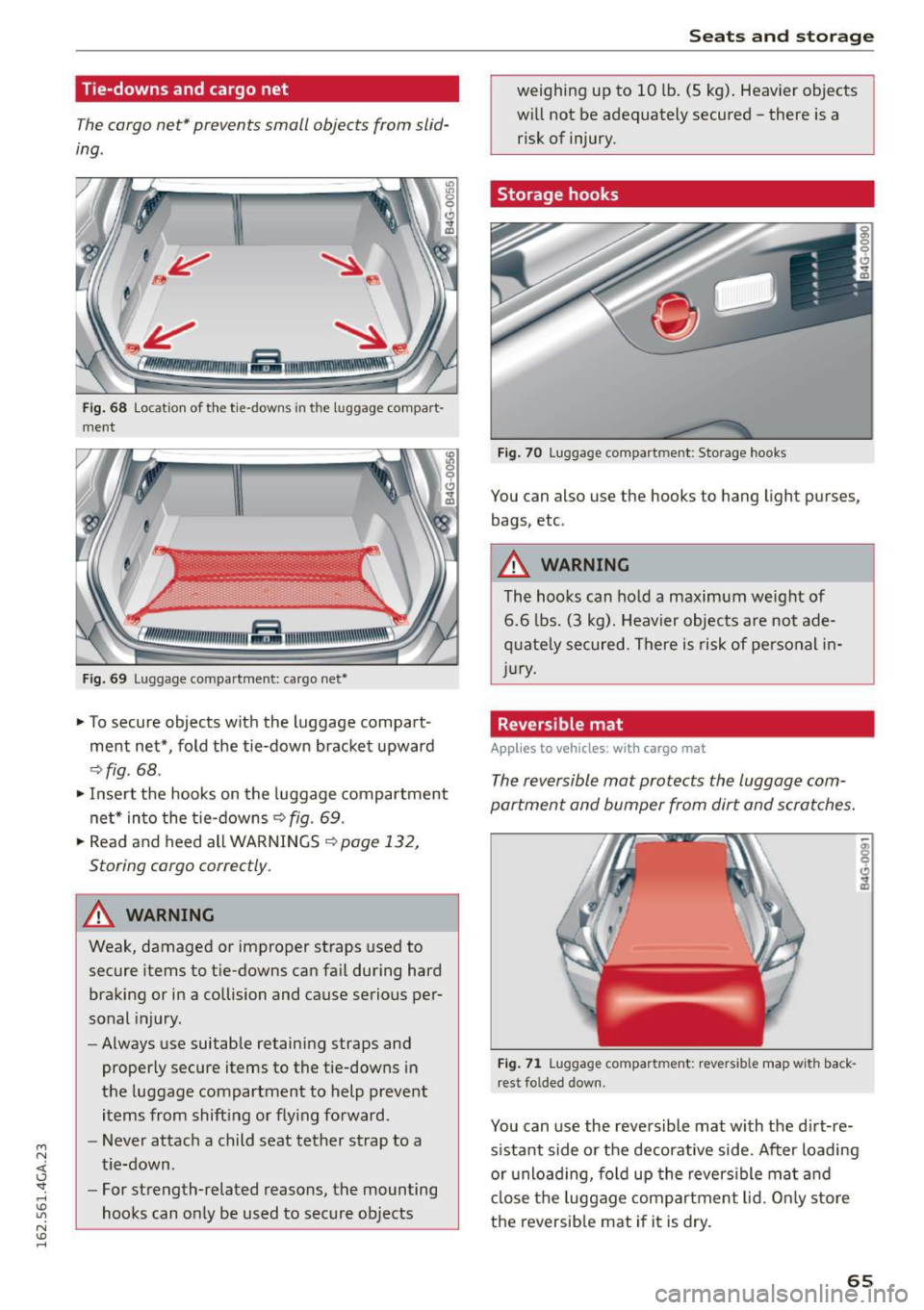
Fig. 6 8 Locat ion of th e tie-downs in the lug gage com part·
ment
F ig. 69 Luggage compartme nt: ca rgo net•
~ To secure objects with the luggage compart
ment net*, fold the tie-down bracket upward
~ fig . 68 .
~ Insert the hooks on the luggage compar tment
ne t* into the t ie-downs
~ fig . 69.
~ Read and heed all WARNINGS~ page 132,
Storing cargo correctly.
A WARNING
Weak , damaged or improper straps used to
secure items to tie-downs can fa il during hard
braking or in a co llision and cause serious per
sonal injury .
- Always use suitable retaining straps and
properly secure items to the tie-downs in
the luggage compartment to help prevent
items from shift ing or fly ing forward.
- Never attach a child seat tether strap to a
t ie-down.
- For strength-related reasons, the mounting
hoo ks can only be used to secure objects
Seats and storage
weighing up to 10 lb. (5 kg) . Heav ier objects
will not be adequately secured -there is a
risk of injury.
Storage hooks
Fig . 70 Luggage compartmen t: S to ra ge hooks
You can also use the hooks to hang light pu rses,
bags, etc .
A WARNING
The hooks can hold a maximum w eig ht of
6 .6 lbs . (3 kg) . Heavier obj ect s are not ade
q uate ly secured. There is risk of personal i n
jur y.
Reversible mat
Appl ies to veh icles : w it h ca rgo mat
-
The reversible mat protects the luggage com
partment and bumper from dirt and scratches.
Fig. 71 Luggage compart men t: revers ible map w ith back ·
r est folded dow n.
You can use the reversible mat with the d irt-re
s istant side o r the decorative side. After loading
o r u nlo ading, fo ld up the revers ible ma t and
cl ose the luggage compartment lid. O nly s to re
the reversib le mat if it is dry.
65
Page 68 of 294
Seats and storage
Pass-through with ski
bag
Preparing the pass-through
Applies to veh icles: with sk i sack
Long objects such as skis con be transported in
the ski sock*.
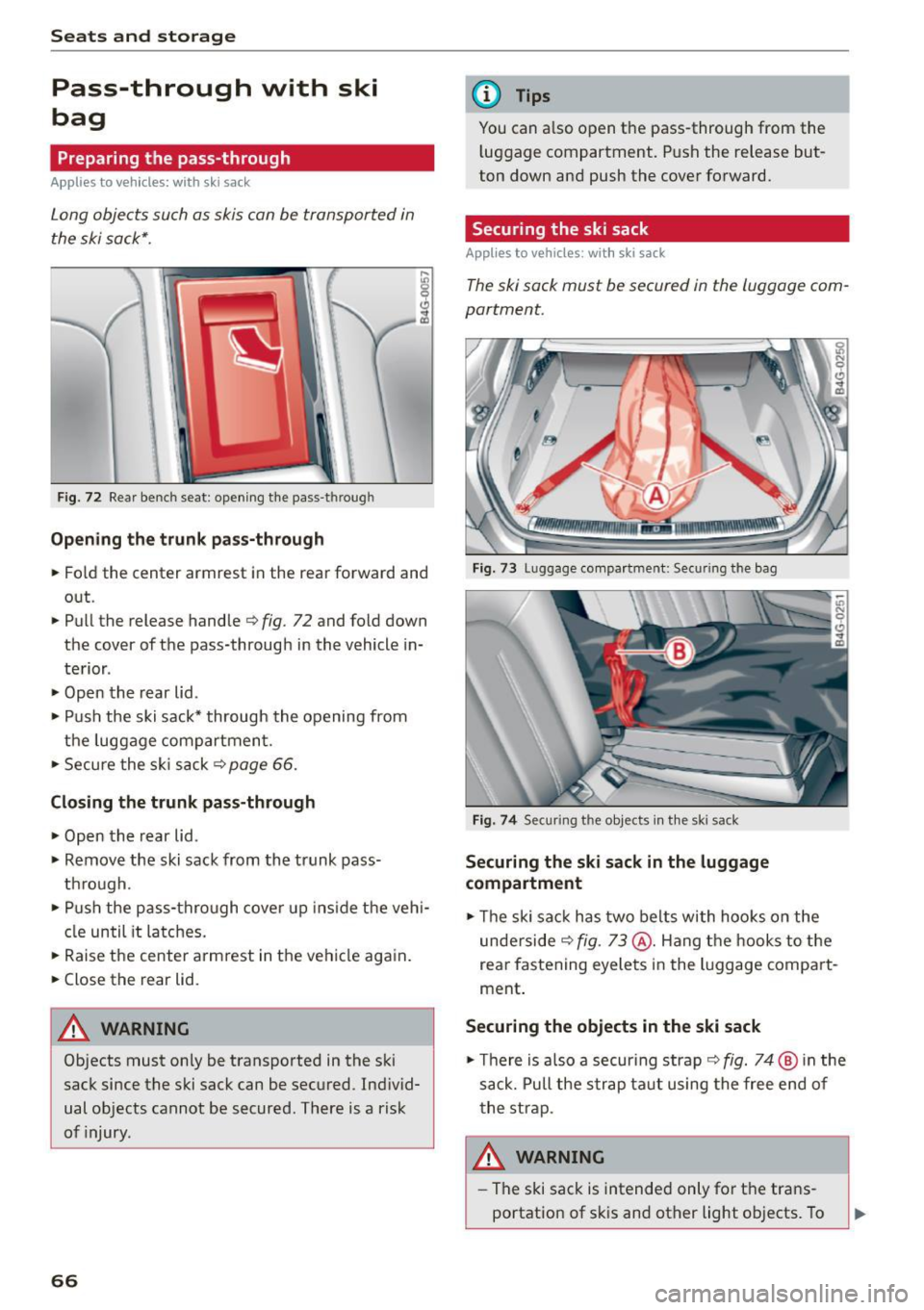
F ig. 72 Rear bench seat: open ing the pass-t hroug h
Opening the trunk pass-through
.. Fold the center armrest in the rear forward and
out .
.. Pull the release handle
c:> fig . 72 and fold down
the cover of the pass-through in the vehicle in
terior .
.. Open the rear lid .
.. Push the ski sack* through the opening from
the luggage compartment.
.. Secure the ski sack¢
page 66.
Closing the trunk pass-through
.. Open the rear lid .
.. Remove the ski sack from the trunk pass
through.
.. Push the pass-thro ugh cover up inside the vehi
cle until it latches.
.. Raise the center armrest in the vehicle again.
.. Close the rear lid.
A WARNING
Objects must only be transported in the ski
sack since the ski sack can be secured . Ind ivid
ual objects cannot be secured. There is a risk
of injury .
66
@ Tips
You can a lso open the pass-through from the
l uggage compartment. Push the release but
ton down and push the cover forward.
Securing the ski sack
Applies to vehicles: with ski sack
The ski sock must be secured in the luggage com
portment.
Fig. 73 Luggage compartme nt: Secu ring the bag
Fig. 74 Securing t he objects in the ski sack
Securing the ski sack in the luggage
compartment
.. Th e ski sack has two belts with hooks on the
underside
¢ fig . 73 @. Hang the hooks to the
rear fastening eyelets in the luggage compart
ment .
Securing the objects in the ski sack
.. Th ere is also a securing strap¢ fig. 74 @ in the
sack. Pull the strap taut using the free end of
the strap.
8_ WARNING ,._
-The ski sack is intended only for the trans
portation of skis and other light objects. To
Page 94 of 294

Audi adaptive cru ise control and b ra king guard
detection and range limits that may prevent
the proper detect ion of other vehicles.
- The radar sensor's function and range can
be reduced by rain, snow and heavy spray .
Moving vehicles up ahead may not be
promptly detected or may not be detected
at all.
- Reflective surfaces includ ing crash barr iers
or tunnel entrances may impair the function
of the radar senso r.
@ Tips
- You can cance l the braking with increasing
force that is initiated by the system by brak
i ng yourself, by accelerating noticeably or by
swervrng .
- Braking guard error messages
c> page 92.
- Keep in mind that braking guard can brake
unexpectedly. Always secure any cargo or
objects that you are transporting to reduce
the r isk of damage or injury.
Settings in the Infotainment system
Applies to vehicles: with Audi adaptive cruise control
~ Se lect : the ICARI function button > (Car )* Sys
t e m s
control button > Dr iver a ssistan ce > Audi
bra king gua rd.
S yste m -
Sw itch the braking guard On/ Off. When
you switch the ign ition on, the message
Br akin g
g uard : Off
appea rs if the system is switched off.
Pr ew arni ng -The distance and approach warn
i n gs in the display can be sw itched
On/ Off.
(D Tips
-Your settings are automat ically stored and
assigned to the remote control key being
used.
- If you restrict or switch off the ESC, the braking guard also switches itself off
c>page 189.
- Switch brak ing guard off when you are load
i ng the veh icle onto a vehicle carr ier, tra in,
sh ip or other type of transportation. This
can prevent undesired wa rnings from the
braking guard system.
92
Messages
Applies to vehicles: with Audi adaptive c ru ise control
B ra king gu ard : off
This dr iver message appears if the system is
tu rned off via the infotainment. Otherw ise, if the
system is t urned off, the information appears ev
ery time short ly after the start of the trip.
The driver message a lso appea rs if the system is
not available due to a malfunction or if the ESC is
not sw itched on
c> page 189 . If th is is the case,
the system wi ll not provide warnings about a
possible collision .
Braking guard : ac tiv ated
This dr ive r message appears if sharp brake pres
sure was applied due to an acute warn ing .
ACC : Un available !
A CC and Audi b raking gua rd: not av ailable
The system cannot detec t mov ing vehicles up
ahead correc tly and is sw itched off. The sensors
have been displaced or are not working proper ly .
T he Audi pre sense functions may a lso be affect
ed. Drive to your authorized Audi dealer or au
thorized Audi service facility immediately to have
the malfunction corrected.
A CC: currentl y unav ailable. No sen so r v ision
A CC and b rakin g g uid e: currentl y un available .
No s ensor vis ion
This message appears if the sensor v iew is ob
structed, for examp le by leaves, snow, heavy
spray or d irt . Clean the sensors
c> page 85,
fig. 89.
AC C: C urrentl y un availabl e. Gradi ent t oo ste ep
The road exceeds the max imum possible angle
for proper adapt ive cruise control operation.
Adaptive c ruise control is sw itched off .
ACC: Onl y ava ilable in D , Sor M
Select t he D/S or M selector leve r position.
ACC: curr entl y unavailable . Parking brake ap
plied
Page 104 of 294

Audi dri ve se lect
Engine soun d*
The sound of the engine is adapted to the select
ed mode and ranges from subtle to sporty.
(D Note
-Make sure there is enough clearance above
and below the veh icle when parking. The
height of the vehicle can change once it is
parked due to temperature fluctuations,
changes to the load conditions and changes
to the driving modes, which can affect clear
ance.
- When transporting the vehicle on a car car
rier, train, ship or by other means, only tie
the vehicle down at the running surface of
the tires, which is the outer c ircumference .
Securing the vehicle at the axle compo
nents, suspension struts or towing eyes is
not permitted because the pressure in the
a ir s uspension struts can change dur ing
transport. The vehicle may not be secured
sufficient ly if this happens .
- If yo u are goi ng to tow a t railer, yo u m ust
activate the trai ler operation mode
¢ page 201.
(D Tips
-In some models, the maximum vehicle
speed can on ly be reached in the
Auto and
D ynami c modes.
- Se lecting the
D ynamic mode results in spor
ty shifting characte ristics . The S gear posi
tion engages automatically.
- In vehicles with spo rt differential*, the
Dy·
na mic
mode is deactivated when towing a
trai ler.
- In vehicles that have dynamic steering*, op
erating noise is heard when starting or stop -
Adjusting the Individual mode
ping the engine. This does not indica te a
problem .
Selecting the driving mode
You can choose between comfort, auto, dynamic
and individual.
Fig . 109 Infota inment : drive select
.. To select the mode, se lect the following in the
Infotainment system:
I CAR I function button >
Comfort , Auto , D yn amic or Indi vidu al.
You can change the driv ing mode when the vehi
cle is stationary or whi le driving . If traffic per
mits, after changing modes, briefly take your
foot off the accelerator pedal so that the recently
selected mode is also activated for the engine.
Comfort -provides a comfort-o riented vehicle
setup and is s uited for long drives o n highways.
Auto -provides an overall comfortable ye t dy
nam ic dr iv ing feel and is suited for eve ry day use.
D ynami c· gives the driver a sporty driving feel
and is suited to a sporty driv ing style .
Individual ·¢ page 102.
A WARNING
Pay attent ion to traffic when operating the
drive select to reduce the risk of an accident .
You con adjust the vehicle settings to your personal preferences .
.. Se lect: the ICARI function button> Set individ
ual
control button. Once you select the menu,
102
you will automatically drive in the In di vid ua l
mode.
Page 112 of 294
Automatic transmission
-Do not ride the brakes or press the brake
pedal too often or too long when driving
down a hill. Constant braking causes the
brakes to overheat and substantially re
duces braking performance, increases brak
ing distance or causes complete failure of
the brake system .
- To prevent the vehicle from rolling back
when stopping on inclines, always hold it in
place with the brake pedal or parking brake.
- Never hold the vehicle on an incline with a
slipping clutch. The clutch opens automati
cally when it becomes too hot from the
overload . An indicator lamp
mJ illuminates
and a driver message appears¢
page 112
when the clutch is overloaded.
-If the engine must remain running, never
have any driving position engaged when
checking under the hood. Make sure these
lector lever has securely engaged and is
locked in P with the parking brake set
¢page 218. Otherwise, any increase in en
gine speed may set the vehicle in motion,
even with the parking brake applied.
@ Note
- When stopping on an incline, do not try to
hold the vehicle in place by pressing the ac
celerator pedal while a driving gear is se lected . This can cause the transmission to
overheat and can damage it . Activate the
parking brake or press the brake pedal to
prevent the vehicle from rolling.
- Allowing the vehicle to roll when the engine
is stopped and the selector lever is in N will
damage the transmission because it is not
lubricated under those circumstances.
@ Tips
For safety reasons, the parking brake is re
leased automatically only when the driver's
safety belt is engaged in the buckle.
110
· Hill descent control
Hill descent control assists the driver when driv
ing down hills .
Hill descent control is activated when the selec
tor lever is in the D or S posi tion and you press
the brake pedal. The transmission automatically selects a gear that is suitable for the incline . Hill
descent control tries to maintain the speed ach
ieved at the time of braking, within physical and
technical limitations. If may still be necessary to
adjust the speed with the brake pedal.
Hill descent control switches off once the hill lev
els out or you press the accelerator pedal.
On vehicles with a cruise control system*
¢
page 83, hill descent control is also activated
when the speed is set.
A WARNING
Hill descent control cannot overcome physical
limitations, so it may not be able to maintain
a constant speed under all conditions. Always be ready to apply the brakes.
Page 128 of 294
Driving safety
Driving safety
Basics
Safe driving habits
Please remember -safety first!
This chapter contains important information,
tips, instructions and warnings that you need to
read and observe for your own safety, the safety
of your passengers and others. We have summar ized here what you need to know about safety
belts, airbags, child restraints as well as child
safety. Your safety is for us
priority number 1. Al
ways observe the information and warnings in
this section - for your own safety as well as that
of your passengers .
The information in this section applies to all
model versions of your vehicle . Some of the fea
tures described in this sections may be standard
equipment on some models, or may be optional
equipment on others. If you are not sure, ask
your authorized Audi dealer.
A WARNING
- Always make sure that you follow the in
structions and heed the WARNINGS in this
Manual.
It is in your interest and in the in
terest of your passengers.
- Always keep the complete Owner's Litera
ture in your Audi when you lend or sell your
vehicle so that this important information
will always be available to the driver and
passengers.
-
- Always keep the Owner's literature handy so
that you can find it easily if you have ques
tions .
Safety equipment
The safety features are part of the occupant re
straint system and work together to help reduce
the risk of injury in a wide variety of occident sit
uations.
Your safety and the safety of your passengers
should not be left to chance. Advances in tech
nology have made a variety of features available
to help reduce the risk of injury in an accident.
126
The following is a list of just a few of the safety
features in your Audi:
-sophisticated safety belts for driver and all pas-
senger seating positions,
- safety belt pretensioners,
- safety belt force limiters for the front seats,
- safety belt height adjustment systems for the
front seats,
- front airbags,
- knee airbags for the front seats*
- side airbags in the front seats and outer rear
seats*,
- side curtain airbags with ejection mitigation
features,
- special LATCH anchorages for child restraints,
- head restraints for each seating position,
- adjustable steering column.
These individual safety features, can work to gether as a system to help protect you and your
passengers in a wide range of accidents . These
features cannot work as a system if they are not
always correctly adjusted and correctly used.
Safety is everybody's responsibility!
Important things to do before driving
Safety is everybody's job! Vehicle and occupant
safety always depends on the informed and care
ful driver.
For your safety and the safety of your passen
gers,
before driving always:
... Make sure that all lights and signals are operat
ing correctly.
... Make sure that the tire pressure is correct.
... Make sure that all windows are clean and afford
good visibility to the outs ide .
... Secure all luggage and other items carefully
~ page 63, ~page 60.
... Make sure that nothing can interfere with the
pedals .
... Adjust front seat, head restraint and mirrors
correctly for your height .
... Instruct passengers to adjust the head re
straints according to their height.
Page 131 of 294
M N <( I.J "". rl I.O
"'
-Passengers who are unbelted, out of posi
tion or too dose to the airbag can be seri
ously injured by an airbag as it unfolds with great force in the blink of an eye.
- Always make sure that there are at least
10 inches (25 cm) between the front pas
senger's breastbone and the instrument panel.
- Always make sure that there are at least
4 inches (10 cm) between the front passen
ger's knees and the lower part of the instru
ment panel.
- Each passenger must always sit on a seat of
their own and properly fasten and wear the safety belt belonging to that seat.
- Before driving, always adjust the front pas
senger seat properly.
- For adjustable head restraints: before driv
ing, always also adjust the head restraints
properly.
- Always keep your feet on the floor in front
of the seat. Never rest them on the seat, in
strument panel, out of the window, etc. The
airbag system and safety belt will not be
able to protect you properly and can even in
crease the risk of injury in a crash.
- Never drive with the backrest reclined or
tilted far back! The farther the backrests are
tilted back, the greater the risk of injury due
to incorrect positioning of the safety belt and improper seating position.
- Children must always ride in child seats
c> page 167. Special precautions apply
when installing a child seat on the front pas senger seat
c> page 143.
Proper seating positions for passengers in
rear seats
Rear seat passengers must sit upright with both
feet on the floor consistent with their physical
size and be properly restrained whenever the ve
hicle is in use.
To reduce the risk of injury caused by an incorrect
seating position in the event of a sudden braking
maneuver or an accident, your passengers on the
rear bench seat must always observe the follow-
~ 1ng: rl
Driving safety
.,. For adjustable head restraints : adjust the head
restraint so the upper edge is as even as possi
ble with the top of your head. If that is not pos
sible, try to adjust the head restraint so that it
is as close to this position as possible
c>page 129 .
.,. Keep both feet flat in the footwell in front of
the rear seat.
.,. Fasten and wear safety belts properly
c> page 138.
.,. Make sure that children are always properly re
strained in a child restraint that is appropriate
for their size and age
c> page 167.
A WARNING
-
Passengers who are improperly seated on the
rear seat can be seriously injured in a crash.
- Each passenger must always sit on a seat of
their own and properly fasten and wear the
safety belt belonging to that seat .
- Safety belts only offer maximum protection when the safety belts are properly posi
tioned on the body and securely latched. By not sitting upright, a rear seat passenger in
creases the risk of personal injury from im
properly positioned safety belts!
- For adjustable head restraints: always ad
just the head restraint properly so that it
can give maximum protection .
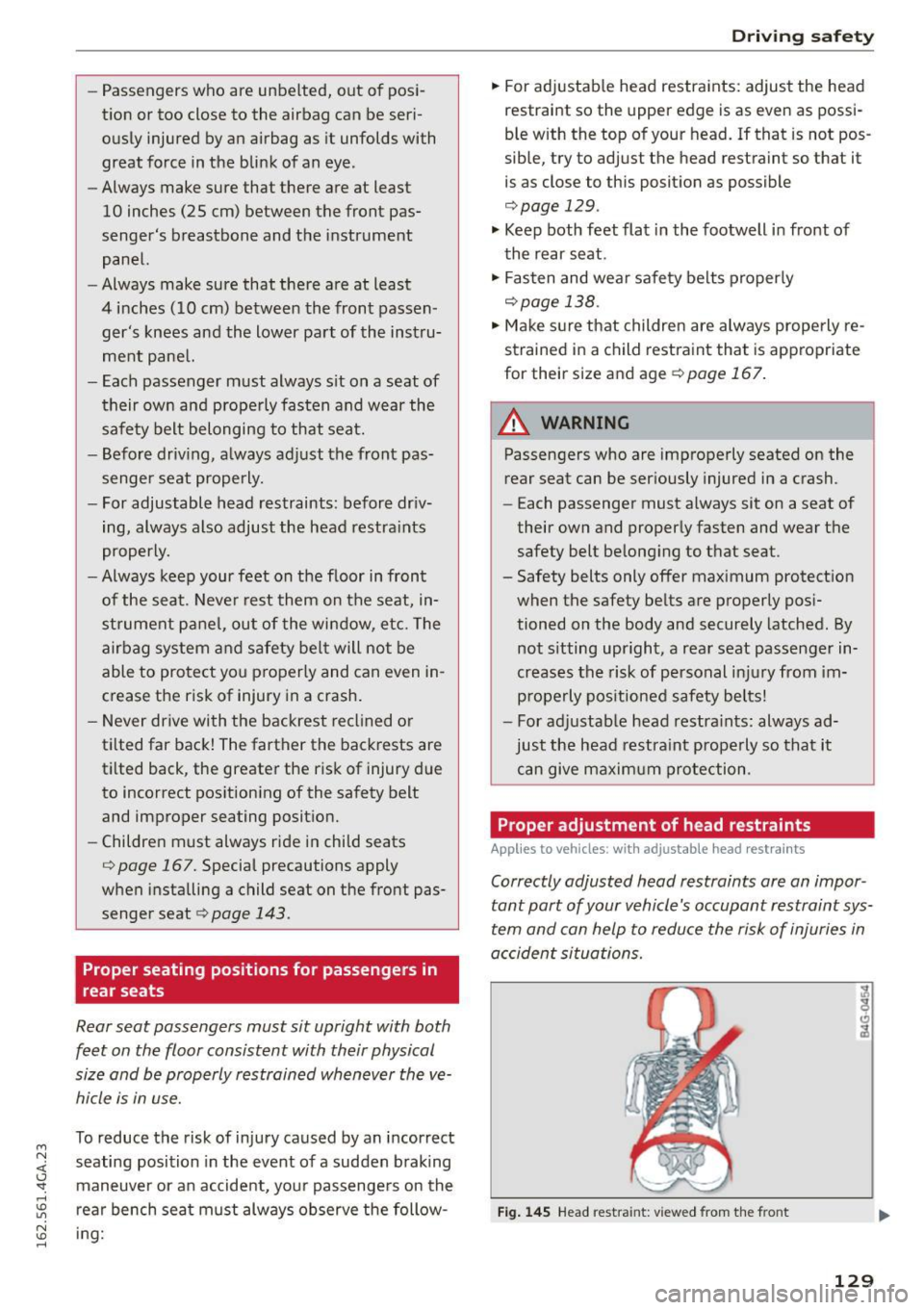
Proper adjustment of head restraints
Applies to vehicles: with adjustable head restraints
Correctly adjusted head restraints are an impor
tant part of your vehicle's occupant restraint sys
tem and can help to reduce the risk of injuries in
accident situations.
Fig. 145 Head restra int: v iewed from the front
129
Page 133 of 294
A WARNING ,~
Improper seating positions increase the risk
of serious personal injury and death whenever
a vehicle is be ing used.
- Always make sure that all vehicle occupants
stay in a proper seating position and are
properly restrained whenever the vehicle is
being used.
Driver's and front
passenger's footwell
Important safety instructions
Applies to vehicles: with knee airbags
A WARNING
Always make sure that the knee a irbag can in
flate without interference . Objects between
yourself and the airbag can increase the risk of injury in an accident by interfering with the
way the airbag deploys or by being pushed in
to you as the airbag deploys.
- No persons (chi ldren) or animals should ride
in the footwell in front of the passenger
seat. If the airbag deploys, this can result in
serious or fatal injuries.
- No objects of any k ind shou ld be carried in
the footwe ll area in front of the dr iver's or
passenger's seat. Bulky objects (shopp ing
bags, for example) can hamper or p revent
proper deployment of the airbag . Small ob
jects can be thrown thro ugh the vehi cle if
the a irbag deploys and injure you or you r
passenge rs .
Pedal area
Pedals
The pedals must always be free to move and
must never be interfered with by a floor mat or
any other object.
Make sure that all pedals move freely witho ut in-
~ terference and that noth ing prevents them from
j returning to their original pos it ions .
'SI:
~ Only use floor mats that leave the peda l area free 1.1'1
~ and can be secured with floor mat fasteners . ......
Drivin g s afet y
If a brake circuit fai ls, increased brake pedal trav
el is required to bring the vehicle to a full stop.
A WARNING
-Pedals that cannot move free ly can cause loss
of vehicle control and increase the risk of ser i
ous injury.
- Never p lace any objects in the driver's foot
well. An object could get into the pedal area
and interfere with pedal function. In case of
sudden braking or an accident, you would
not be able to b rake or accelerate!
- Always make sure that nothing can fall or
move into the d river's footwell.
Floor mats on the driver side
Always use floor mats that can be securely at
tached to the floor mat fasteners and do not in
terfere with the free movement of the pedals .
.. Make sure that the floor mats are properly se-
cured and cannot move and interfere with the
pedals¢ .&,.
Use only floor mats that leave the peda l area un
obstructed and that are firmly secured so that
they cannot slip out of position . You can obtain
su itable floor mats from your authorized Aud i
Dealer .
Floor mat fasteners are insta lled in your Audi.
Floor mats used in yo ur vehicle must be attached
to these fasteners. Properly sec uring the floor
mats will prevent them from s liding into posi
t ions that could interfere with the pedals or im
pair safe operation of your vehicle in other ways .
A WARNING ~
Pedals that cannot move freely can result in a
l oss of vehicle control and increase the risk of
se rious pe rsonal injury.
- Always ma ke sure that floor mats a re prop
erly secured .
- Never p lace or install floor mats or other
f loor cove rings in the vehicle that cannot be
properly secu red in p lace to prevent them
from slipp ing and in terfering wi th the ped-
als o r the ab ility to cont rol the vehicle.
~
1 3 1