mirror AUDI A7 2016 User Guide
[x] Cancel search | Manufacturer: AUDI, Model Year: 2016, Model line: A7, Model: AUDI A7 2016Pages: 294, PDF Size: 73.82 MB
Page 100 of 294
Audi side assist
General information
App lies to vehicles: with sid e assist
®
@
©
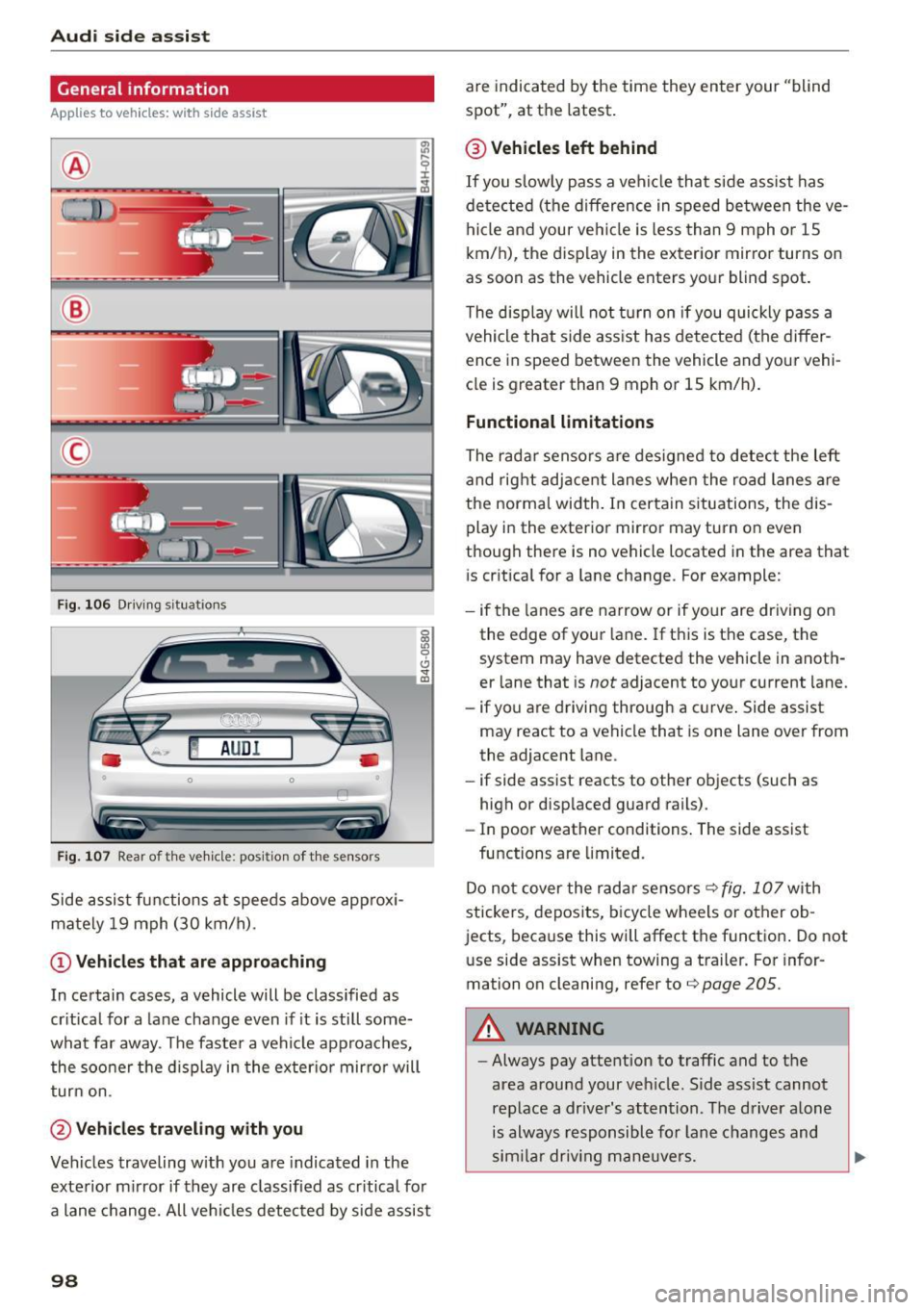
Fig. 106 Driving s itua tions
~ AUD I
• 0 0 •
Fig. 107 Rear of the ve hicle: pos it io n of t he sensors
Side assist functions at speeds above approx i
mately 19 mph (30 km/h).
(D Vehicles that are approaching
In certain cases, a vehicle will be classified as
critical for a lane change even if it is still some
what far away . The faste r a vehicle approaches,
the sooner t he d isplay in the exter io r mirro r will
turn on.
@Vehicles traveling with you
Vehicles traveling w ith you are indicated in the
exterior mirror if they are classified as critical for
a lane change. All vehicles detected by side assist
98
are indicated by the time they enter your "blind
spot", at the latest.
@ Vehicles left behind
If you slowly pass a veh icle that side assist has
detected (the difference in speed between the ve
hicle and your vehicle is less than 9 mph or 1S
km/h), the display in the exterior mirror turns on
as soon as the vehicle enters your blind spot.
T he display will not turn on if you quickly pass a
vehicle that side ass ist has detected (the differ
ence in speed between the vehicle and your vehi
cle is greater than 9 mph or 15 km/h).
Functional limitations
The radar sensors are designed to detect the left
and right adjacent lanes when the road lanes are
the normal width. In certain s ituations, the dis
play in the exterior mirror may turn on even
though there is no vehicle located in the area that
i s cr itical for a lane change. For example:
- if the lanes are narrow or if your are dr iving on
the edge of your lane. If this is the case, the
system may have detected the vehicle in anoth
er lane that is
not adjacent to your current lane.
- if yo u are driving through a c urve . Side assist
may react to a vehicle that is one lane over from
the adjacent lane.
- if side assist reacts to other objects (such as
high or displaced guard rails).
- In poor weather conditions . The side assist
functions are limited.
Do not cover the radar sensors
q fig. 107 with
stickers, deposits, bicycle wheels or other ob
jects, because this will affect the function . Do not
use side assist when towing a trailer . For infor
mation on cleaning, refer to
q page 205 .
A WARNING
-Always pay attention to traffic and to the
area around your veh icle. S ide ass ist cannot
replace a dr iver's attention . The driver alone
is always responsible for lane changes and
sim ila r driv ing maneuvers.
Page 101 of 294

M N <( I.J "". rl I.O
"' N I.O rl
-Improper reliance on the side assist system
can cause collisions and serious personal in
jury:
- Never rely only on side assist when chang
ing lanes .
- Always check rear view mirrors to make
sure that it is safe to change lanes.
- Sid e assist cannot detect a ll vehicles under
all conditions- danger of accident!
- Please note that side assist indicates there
are approaching vehicles, or vehicles in your
blind spot, only after your vehicle has
reached a driving speed of at least 19 mph
(30 km/h).
- In certain situations, the system may not
function or its function may be limited. For
example:
- if vehicles are approaching or being left
behind very quickly. The display may not
turn on in time.
- in poor weather conditions such as heavy
rain, snow or heavy m ist .
- on very wide lanes, in tight curves or if
there is a rise in the road surface . Vehicles
in the adjacent lane may not be detected
because they are outside of the sensor
range.
(D Note
The sensors can be displaced by impacts or damage to the bumper, wheel housing and
underbody. This can affect the system . Have
your authorized Audi dealer or authorized
Audi Service Facility check their function.
(D Tips
-If the window g lass in the driver's door or
front passenger's door has been tinted, the
display in the exterior mirror may be misin
terpreted.
- For Declarat ion of Compliance to United
States FCC and Industry Canada regulations
c:>page277 .
Audi side assist
Switching on and off
Applies to vehicles: wit h Audi side ass ist
Fig. 108 Driver 's door : side assist button
" Press the c:> A in General information on
page 98
button to switch the system on and
off. The LED in the button turns on when side
assist is switched on .
Adjusting the display brightness
Applies to vehicles: wit h Audi side ass ist
The display brightness can be adjusted in the In
fotainment system .
.,. Select: the I CAR I function button > (Car)* Sys
tems
control button > Driver assistance > Audi
side assist .
The display brightness adjusts automatically to
the brightness of the surroundings, both in the
information and in the warning stage. In very
dark or very bright surroundings, the display is al
ready set to the m inimum or maximum level by
the automatic adjustment. In such cases, you
may not ice no change when adjusting the bright
ness, or the change may only be noticeable once
the surroundings change.
Adjust the br ightness to a level where the display
in the info rmation stage will not disrupt your
view forward. If you change the brightness, the
display in the exterior mirror will briefly show the
brightness level in the information stage . The
brightness of the warning stage is linked to the
brightness in the information stage and is adjust
ed along with the information stage adjustment.
Ill>
99
Page 121 of 294

M N <( I.J "". rl I.O
"' N I.O rl
CD Note
Keep enough distance from the curb to avoid
damage to the rims.
@ Tips
The left or right orientation lines and sur faces
will be displayed, depending on the turn sig na l being used .
Peripheral cameras
Introduction
Applies to vehicles: with periphera l cameras
W ith this equipment, die parking system plus* is
supp lemented w ith various peripheral cameras
¢ page 115. Depending on veh icle equ ipment,
you are provided with the following views:
Around the vehicle, front corner and rear corner, in front of the veh icle and beh ind the veh icle.
General information
Ap plies to vehicles: with perip hera l cameras
Fig . 131 Loca tion of periphe ral cameras
Depending on the vehicle equ ipment, the periph
eral cameras are found in the rad iator grille, in
the l uggage compa rtment lid and on both exteri
or mirrors*
¢ fig. 131 . Make sure that the lenses
are not covered by depos its or any other obstruc
tions as it may impair the system. For informa·
t ion on cleaning, refer to¢
page 205.
In the Surround ing mode, black corners are
shown in the vehicle si lhouette . Objects in these
areas are outside of the camera 's field of view
and are not detected.
P arking systems
The accuracy of the o rientation lines and the blue
s u rfaces is reduced if the adaptiv e air suspen
s ion* is faulty, if the vehicle is lifted or if the
D y·
nam ic mode is activated ¢ page 101.
A WARNING
-Always read and follow the applicable warn·
i n gs ¢
A in General information on
page 114 .
-If the position or the installat ion angle of a
camera was changed, after a coll is ion for ex
ample, do not continue to use the system
for safety reasons. Have it checked by your
Aud i dea le r o r autho rized Audi Servi ce Faci li
ty .
- Keep in mind that the image in the disp lay is
d istorted if the exterio r mirro r hous ing has
been manually adjusted.
- Use the
Rear mode and the co rn er vi ew
( re ar )
mode only when the luggage com
partment lid is fu lly closed . Otherwise the
image in the d isplay w ill be disto rted .
- The vehicle surro undings are shown using
the camera images . The vehicle image is
shown by the system. Objects and obstacles
above the camera are not d isplayed.
- Camera lenses enlarge and distort the field
of vision. The objects appear both altered
and inaccurate on the screen.
CD Note
-Always read and follow the applicable warn
ings
¢ CJ.) in General information on
page 114 .
-The Infotainment display shows the direc
tion in which the rear of the vehicle is travel
ing based on the steering whee l ang le . The
front of the vehicle front swings out more
than the rear of the vehicle. Maintain p lenty
of distance so that your outside mirror or a
co rne r of your vehicle does not collide w ith
any obstacles .
© Tips
If the 8/rr;!)/c::; symbol appears in the d is
play and the respective display a rea is grayed
out, then the power exter ior mir ro rs were
fo lded in or the dr iver's door/front
119
Page 128 of 294
Driving safety
Driving safety
Basics
Safe driving habits
Please remember -safety first!
This chapter contains important information,
tips, instructions and warnings that you need to
read and observe for your own safety, the safety
of your passengers and others. We have summar ized here what you need to know about safety
belts, airbags, child restraints as well as child
safety. Your safety is for us
priority number 1. Al
ways observe the information and warnings in
this section - for your own safety as well as that
of your passengers .
The information in this section applies to all
model versions of your vehicle . Some of the fea
tures described in this sections may be standard
equipment on some models, or may be optional
equipment on others. If you are not sure, ask
your authorized Audi dealer.
A WARNING
- Always make sure that you follow the in
structions and heed the WARNINGS in this
Manual.
It is in your interest and in the in
terest of your passengers.
- Always keep the complete Owner's Litera
ture in your Audi when you lend or sell your
vehicle so that this important information
will always be available to the driver and
passengers.
-
- Always keep the Owner's literature handy so
that you can find it easily if you have ques
tions .
Safety equipment
The safety features are part of the occupant re
straint system and work together to help reduce
the risk of injury in a wide variety of occident sit
uations.
Your safety and the safety of your passengers
should not be left to chance. Advances in tech
nology have made a variety of features available
to help reduce the risk of injury in an accident.
126
The following is a list of just a few of the safety
features in your Audi:
-sophisticated safety belts for driver and all pas-
senger seating positions,
- safety belt pretensioners,
- safety belt force limiters for the front seats,
- safety belt height adjustment systems for the
front seats,
- front airbags,
- knee airbags for the front seats*
- side airbags in the front seats and outer rear
seats*,
- side curtain airbags with ejection mitigation
features,
- special LATCH anchorages for child restraints,
- head restraints for each seating position,
- adjustable steering column.
These individual safety features, can work to gether as a system to help protect you and your
passengers in a wide range of accidents . These
features cannot work as a system if they are not
always correctly adjusted and correctly used.
Safety is everybody's responsibility!
Important things to do before driving
Safety is everybody's job! Vehicle and occupant
safety always depends on the informed and care
ful driver.
For your safety and the safety of your passen
gers,
before driving always:
... Make sure that all lights and signals are operat
ing correctly.
... Make sure that the tire pressure is correct.
... Make sure that all windows are clean and afford
good visibility to the outs ide .
... Secure all luggage and other items carefully
~ page 63, ~page 60.
... Make sure that nothing can interfere with the
pedals .
... Adjust front seat, head restraint and mirrors
correctly for your height .
... Instruct passengers to adjust the head re
straints according to their height.
Page 203 of 294
M N <( (.J
'SI: ,...., \!) ..,.,
N \!) ,....,
Trailer mode Driving with a trailer
General information
Your Audi was designed primarily for passenger
transportation .
If you plan to tow a trailer, p lease remember that
the additional load will affect durability, econo
my and performance.
Trailer towing not only places more stress on the
vehicle, it also calls for more concentration from
the driver.
For this reason, always follow the operating and
driving instructions provided and use common
sense.
(D Note
If you are going to tow a trai ler, you must ac
tivate the trailer operat ion mode
c::> page 201, Operating instructions.
Technical requirements
Trailer hitch
Use a weight-carrying hitch conforming to the
gross trailer weight. The hitch must be suitable
for your vehicle and trailer and must be mounted
securely on the vehicle's chassis at a
technically
sound
location. Use only a trailer hitch with a re
movable ball mount. Always check with the trail
e r hitch manufacturer to make sure that you are
using the correct hitch.
Do not use a bumper hitch.
The hitch must be installed in such a way that it
does not interfere with the impact-absorbing
bumper system. No modifications should be
made to the vehicle exhaust and brake systems.
From time to time, check that all hitch mounting
bolts remain securely fastened .
When you are not towing a trailer,
remove the
trailer hitch ball mount. This prevents the hitch
from causing damage should your vehicle be
struck from behind
c::> &, .
Trailer mode
Trailer brakes
If your trailer is equipped with a brak ing system,
check to be sure that it conforms to all regula
tions.
T he trailer hydraulic brake system must not be di
rect ly connected to the vehicle's hydraulic b rake
system.
Safety chains
Always use safety chains between your veh icle
and the tra iler.
Trailer lights
Trailer lights must meet all regulations. Be sure
to check with your Aud i dealer for correct wiring,
switches and relays.
Mirrors
If you are unable to see the traffic behind you us
ing the regular outside mirrors, then you
must in
stall extended mirrors. It is important that you
always have clear vision to the rear .
A WARNING
--
After removing the trailer hitch, do not store
i t in your vehicle. In case of sudden braking,
the hitch could fly forward and injure you or
your passengers.
Operating instructions
Maximum trailer weight
A trailer for your vehicle is limited to a typical
class 1 or class 2 trailer.
Trailer load distribution
Be sure the load in the trailer is held securely in
place to prevent it from sh ifting forward, back
ward or sideways.
Never allow a passenger to ride in a trailer c::> &.
in Driving instructions on page 203 .
Engine cooling system
Towing a trailer makes the engine work harder. It
is important that the cooling system's perform
ance is up to the additional load. Make sure that
the cooling system has enough fluid . .,..
201
Page 208 of 294
Care and cleaning
- To reduce the risk of cuts, protect yourse lf
from sharp metal components when wash
ing the underbody or the inside of the wheel
housings.
- After washing the vehicle, the braking effect
may be delayed due to moisture on the
brake rotors or ice i n the winter. The brakes
must be d ried first w ith a few careful bra ke
applications.
(D Note
- If you wash the vehicle in an automatic car
wash, you must retract the rear spoiler if
necessary, and fold the exter ior mirrors in to
r educe the ris k of damage. Power folding
ex ter ior mirrors* must on ly be folded in and
out using the power folding function.
- To prevent pa int damage, do not wash the
vehicle in di re ct s unlight.
- To reduce the risk of damage to the s urface,
do not use i nsec t removing sponges, kitche n
sponges or similar ite ms. - Matte finish painted vehicle components:
-To reduce the risk of damage to the sur-
face, do not use polish ing agents or hard
wax.
- Never use protective wax.
It can destroy
the matte finish effect.
- Do not place any stickers or magnet ic
signs on vehicle parts painted w ith matte
finish paint. The pa int co uld be damaged
when the stickers o r mag nets are re
moved.
@ For the sake of the environment
Only wash t he ve hicle i n facilities spec ially de
signed for that purpose. Th is w ill re duce the
r isk of dirty water co ntaminated w ith oil from
ente ring the sewe r system.
Cleaning and care information
W hen clean ing and caring for ind ividua l vehicle
com ponents, re fer to the following tables. The
info rmation conta ined there is simply recommen- dations. For questions or for compo
nents tha t
are not li sted, refer to an au thor ized Audi dealer.
A lso follow the information found in
¢ .& .
Exterior cleaning
Component Situation Solution
Wind shield wiper
Deposits ¢ page 50, Cleaning windshield wiper blades
blades
Headlights /
Deposits Soft sponge with a mild soap solutional
tail lights
Sensors /
Deposits Sensors: soft cloth with solvent-free cleaning so lution
camera lenses Camera lenses: soft cloth with alcoho l-free clean ing solu-
tion
Snow/ ice H
and br ush/solvent -free de- icing sp ray
Wheels Road sa lt Water
Brake d ust Acid
-free spec ia l cleaning solut ion
E x haust t ail pipes Road sa lt Water, clea ning solution sui tab le for stain less stee l, if nee -
essary
Decorative parts / Deposits Mild soap solutiona>, a cleaning so lution suitable for stain -
trim less stee l,. if necessary
206
Page 211 of 294
M N <( (.J
'SI: ,...., \!) 1.1'1
N \!) ,....,
avoid scratches, move the scraper only in
one direction and not back and forth.
- Never remove snow or ice from door win
dows and mirrors using warm or hot water
because this could cause cracks to form.
- To avoid damage to the rear window de
fogger, do not apply any stickers on the
heating wires on the inside of the window.
- Decorative parts/trim
- Never use chrome care or cleaning prod-
ucts .
- Paint
- To reduce the risk of scratches, the vehicle
must be free of dirt and dust before pol
ishing or waxing.
- To prevent paint damage, do not polish or
wax the vehicle in direct sunlight.
- To reduce the risk of paint damage, do not
polish away rust spots.
- Remove cosmetics and sunscreen immedi
ately -these could damage the paint.
- Displays
- To avoid scratches, do not use dry cleaning
methods on displays.
- Controls
- Make sure that no fluids enter the con-
trols, because this could cause damage.
- Safety belts
- Do not remove the safety belts to clean
them.
- Never clean safety belts or their compo
nents chemically or with corrosive fluids
or solvents and never allow sharp objects
to come into contact with the safety belts.
This could cause damage to the belt web
bing.
- If there is damage to the webbing, the
connections, the retractors or the buckles,
have them replaced by an authorized deal
er.
- Textiles/artificial leather/Alcantara
- Never treat artificial leather/Alcantara
with leather care products, solvents, floor polish, shoe polish, spot remove or similar
products.
- Have a specialist remove stubborn stains
to prevent damage.
Care and cleaning
- Never use steam cleaners, brushes, hard
sponges, etc. when cleaning.
- Do not turn on the seat heating* to dry
the seat.
- Objects with sharp edges such as zippers,
rivets on clothing or belts can cause dam
age to the surface.
- Open hook and loop fasteners, for exam
ple on clothing, can damage seat covers.
Make sure hook and loop fasteners are
closed.
- Natural leather
- Never treat leather with solvents, floor
polish, shoe polish, spot remover or simi
lar products.
- Objects with sharp edges such as zippers, rivets on clothing or belts can cause dam
age to the surface .
- Never use steam cleaners, brushes, hard
sponges, etc. when cleaning .
- Do not turn on the seat heating* to dry the seat.
- To help prevent the leather from fading,
do not leave the vehicle in direct sunlight
for long periods of time. If leaving the ve
hicle parked for long periods of time, you
should cover the leather to protect it from
direct sunlight.
(D Tips
- Insects are easier to remove from paint that
has been freshly waxed .
- Regular waxing can prevent rust spots from
forming.
209
Page 274 of 294

Technical data
Gross Axle Weight Rating
The Gross Axle Weight Rating is the maximum
load that can be applied at each axle of the vehi
cle ¢& .
Vehicle capacity weight
The vehicle capacity we ight (max. load) is listed
eithe r on the driver's side B-pillar or inside the
fue l filler f lap.
A WARNING
- The actual Gross Axle Weight Rating at the
front and rear axles should not exceed the
permissible weights, and their combination
must not exceed the Gross Vehicle Weight
Rating .
Dimensions
Length i
n (mm)
Width in
(mm)
Width (across mirrors) in (mm)
Height (unloaded)al in
(mm) -
Exceeding permissible weight ratings can
result in veh icle damage, acc idents and per
sonal injury.
(D Note
-The vehicle capacity weight figures apply
when the load is distributed evenly in the
vehicle (passengers and luggage). When
transporting a heavy load in the luggage
compartment, carry the load as near to the
rear axle as possible so that the vehicle's
hand ling is not impaired.
- Do not exceed the maximum permissible
axle loads or the maximum gross veh icle
we ight. Always remember that the vehicle's
hand ling will be affected by the extra load.
T herefore, adjust your speed accordingly.
- Always observe local regulations.
A7 S7
196.2 (4984) 196 .3 (4985)
75.2 (1911) 75 .2 (1911)
84.2 (2139) 84.2 (2139)
55.9 (1420) 55 .0 (1398)
al Th e he igh t of th e vehicl e de pe nd s on th e tires a nd the su sp ension .
When driving up steep ramps, on rough roads,
over curbs, etc. it is important to remember that
some parts of your vehicle, such as spo ilers or ex-
Capacities
Fuel tank: tota l capacity
- gasoline engine
- diesel engine
Windsh ield f lu id container
Windshield and headlight washer fluid container*
272
haust system components, may be close to the
ground. Be careful not to damage them.
gal (liters) approx. 19.8 (75.0)
gal (liters) approx. 19.3 (73.0)
quarts (liters) approx. 3.7 (3.5)
quarts (liters) approx. 5.2 (4.9)
Page 283 of 294

Date display . . . . . . . . . . . . . . . . . . . . . . . . . . 26
Daytime running lights . . . . . . . . . . . . . . . . . . 43
Declaration of compliance Adaptive cruise control .... .. .. .. .. .. .
277
A d' .d . u I s1 e assist . .. .... .... . .... .. .. . 277
Cell phone package ........ ... ... ... . 277
Convenience key ............. .. .... . . 277
Electronic immobilize r ..... .. .. .. .. .. . 277
Garage door opener (HomeLink) . .. .. .. . 277
Remote control key . . . . . . . . . . . . . . . . . . 277
Defective light bulb warning
Indicator light . . . . . . . . . . . . . . . . . . . . . . .
21
Defrosting (windows)
Four- zone automatic climate control . . . . .
72
Three-zone climate control . . . . . . . . . . . . . 69
DEF (instrument cluster) . . . . . . . . . . . . . . . . 26
Determining correct load limit . . . . . . . . . .
247
Diesel
Indicator light . . . . . . . . . . . . . . . . . . . . . . .
20
Prewarming . . . . . . . . . . . . . . . . . . . . . . . . . 75
Diesel fuel... .. .............. ... .... .
211
Diesel particulate filter . . . . . . . . . . . . . . . . 198
Dimensions . . . . . . . . . . . . . . . . . . . . . . . . . . 272
Dimming the rearview mirror . . . . . . . . . . . . 48
Distance . . . . . . . . . . . . . . . . . . . . . . . . . . . . . 24
Door/rear lid warning
23
Doors Ch ild safety lock . . . . . . . . . . . . . . . . . . . . . . 39
Driver information system . . . . . . . . . . . . . . . 23
CD/radio display . . . . . . . . . . . . . . . . . . . . . . 23
Door/rear lid warning . . . . . . . . . . . . . . . . . 23
Efficiency program . . . . . . . . . . . . . . . . . . . . 25
Exterior temperature display . . . . . . . . . . . 23
On-board computer . . . . . . . . . . . . . . . . . . .
24
Service interval disp lay . . . . . . . . . . . . . . . . 26
Driver seating position . . . . . . . . . . . . . . . . .
127
drive select
adaptive air suspension/spor t . . . . . . . . . .
101
Adaptive dampers . . . . . . . . . . . . . . . . . . . 101
Curve light . . . . . . . . . . . . . . . . . . . . . . . . . 101
Engine sound . . . . . . . . . . . . . . . . . . . . . . . 101
Safety belt tensioner . . . . . . . . . . . . . . . . . 101
Sport different ial . . . . . . . . . . . . . . . . . . . . 101
M N Drive select . . . . . . . . . . . . . . . . . . . . . . . . . . 101 <(
~ Driving economically . . . . . . . . . . . . . . . . . . 198 ,....,
~ Driving safely . . . . . . . . . . . . . . . . . . . . . . . . 126
~ Driving through water . . . . . . . . . . . . . . . . . 196
Index
Driving time
Duplicate key . . . . . . . . . . . . . . . . . . . . . . . . . . 24
30
Dust filter
refer to Pollutant filter . . . . . . . . . . . . . . . . 68
Dynamic steering
Indicator light
E
192
Easy seat entry . . . . . . . . . . . . . . . . . . . . . . . . 75
Economy tips (efficiency program) . . . . . . . . 25
Efficiency program . . . . . . . . . . . . . . . . . . . . . 25
Electromechanical parking brake
Operation . . . . . . . . . . . . . . . . . . . . . . . . . . .
78
Releasing and closing . . . . . . . . . . . . . . . . . 78
Warning/indicator lights . . . . . . . . . . . . . . . 15
Electromechanical steering . . . . . . . . . . . . . 192
Indicator light . . . . . . . . . . . . . . . . . . . . . . 192
Electronic differential lock
Indicator light . . . . . . . . . . . . . . . . . . . . . . .
18
Electronic Differential Lock . . . . . . . . . . . . . 188
Electronic differential lock (EDL)
Warning/ind icator lights . . . . . . . . . . . . . . .
19
Electronic immobilizer . . . . . . . . . . . . . . . . . . 31
Electronic power control (EPC)
warning/indicator light . . . . . . . . . . . . . . . .
20
Electronic speed limiter . . . . . . . . . . . . . . . . . 29
Electronic stabilization control
Indicator light . . . . . . . . . . . . . . . . . . . . . . .
18
Electronic Stabilization Control . . . . . . . . . . 188
Sport mode . . . . . . . . . . . . . . . . . . . . . . . . 189
Emergency actuation
Doors . . . . . . . . . . . . . . . . . . . . . . . . . . . . . . 36
Emergency flasher . . . . . . . . . . . . . . . . . . . . . 46
Warning/indicator lights . . . . . . . . . . . . . . . 22
Emergency operation Emergency braking function (parking brake) .7.9
Fuel filler door . . . . . . . . . . . . . . . . . . . . . .
214
Luggage compartment lid . . . . . . . . . . . . . . 38
Selector lever . . . . . . . . . . . . . . . . . . . . . . .
113
Sunroof . . . . . . . . . . . . . . . . . . . . . . . . . . . . . 41
Emergency starting . . . . . . . . . . . . . . . . . . . 265
Energy management . . . . . . . . . . . . . . . . . .
194
Engine
Compartment . . . . . . . . . . . . . . . . . . . . . . .
220
Coolant . . . . . . . . . . . . . . . . . . . . . . . . . . . . 224
Prewarming . . . . . . . . . . . . . . . . . . . . . . . . . 75
281
Page 284 of 294
Index
Starting . . . . . . . . . . . . . . . . . . . . . . . . . . . . 75
Starting with jumper cab les . . . . . . . . . . . 265
Stopping . . . . . . . . . . . . . . . . . . . . . . . . . . . . 76
Engine compartment . . . . . . . . . . . . . . . . . . 220
Closing the hood . . . . . . . . . . . . . . . . . . . . 219
Opening the hood . . . . . . . . . . . . . . . . . . . 218
Safety instructions . . . . . . . . . . . . . . . . . . . 218
Working in the engine compartment . . . . 218 Event Data Recorder (EDR)
. . . . . . . . . . . . . . 187
Expansion tank . . . . . . . . . . . . . . . . . . . . . . . 224
Exterior lighting . . . . . . . . . . . . . . . . . . . . . . . 43
Exterior mirrors
Adjusting . . . . . . . . . . . . . . . . . . . . . . . . . . . 47
Dimming ..... ..... .. ................ 48
Heating...... ..... .. ................ 47
Exterior temperature display . . . . . . . . . . . . . 23
Engine coolant . . . . . . . . . . . . . . . . . . . . . . . 224
Adding coolant . . . . . . . . . . . . . . . . . . . . . . 225
F
Checking the engine coolant leve l. . . . . . . 224
Expansion tank . . . . . . . . . . . . . . . . . . . . . . 224
Malfunction symbol . . . . . . . . . . . . . . . . . . . 15
Radiator fan . . . . . . . . . . . . . . . . . . . . . . . . 226
Temperature gauge . . . . . . . . . . . . . . . . . . . 10
Engine oil . . . . . . . . . . . . . . . . . . . . . . . . . . . 220
Adding . ..... .. ................ .... 222
Additives . . . . . . . . . . . . . . . . . . . . . . . . . . . 222
Changing . . . . . . . . . . . . . . . . . . . . . . . . . . 223
Checking oil level . . . . . . . . . . . . . . . . . . . . 222
Consumpt ion . . . . . . . . . . . . . . . . . . . . . . . 222
Indicator light . . . . . . . . . . . . . . . . . . . . . . . 17
O il consumption. .............. ... .. . 221
Pressure malfunct ion . . . . . . . . . . . . . . . . . . 16
Sensor defective . . . . . . . . . . . . . . . . . . . . . . 21
Specification and viscos ity . . . . . . . . . . . . . 220
Engine sound . . . . . . . . . . . . . . . . . . . . . . . . 101
Engine speed limitation (indicator light) 21
E ngine Start-Stop mode
refer to Start-Stop-System . . . . . . . . . . . . . 82
Engine warm -up request
Indicator light . . . . . . . . . . . . . . . . . . . . . . . 2 1
Environment Catalytic converter . . . . . . . . . . . . . . . . . . . 197
Diesel particulate filter . . . . . . . . . . . . . . . 198
Disposing of your vehicle battery . . . . . . . 231
Driving at high speeds . . . . . . . . . . . . . . . . 198
Fuel ...... ... .. ... ............. ... . 212
L eaks under your veh icle . . . . . . . . . . . . . . 218
L ett ing the veh icle stand and warm up . . . 199
Proper disposal of drained brake fluid . . . 227
Proper disposal of drained engine coo lant 225
Proper disposal of drained engine oil 222, 223
Recycling used engine oil. . . . . . . . . . . . . . 222
Unleaded fuel .................. .. ... 210
What should I do with an old battery? . . . 231
ESC Automatic post-collision braking system 189
282
Fastening
Booster seats . . . . . . . . . . . . . . . . . . . . . . . 176
Convertib le child safety seats . . . . . . . . . . 17 4
Infant seats . . . . . . . . . . . . . . . . . . . . . . . . 173
Floor mats ...... ... ... ........ ...... . 131
Foot pedals .......................... 131
For the sake of the environment Environmentally-friendly driving . . . . . . . 198
Gasoline fumes and the env ironment . . . . 212
Reducing engine noise by early upshifting . 10
Refueling . . . . . . . . . . . . . . . . . . . . . . . . . . 212
Saving fuel by early upshifting . . . . . . . . . . 10
Warming up the engine . . . . . . . . . . . . . . . . 75
Four-zone automatic climate control Air vents . . . . . . . . . . . . . . . . . . . . . . . . . . . . 72
Auxiliary heater . . . . . . . . . . . . . . . . . . . . . . 73
Basic settings . . . . . . . . . . . . . . . . . . . . . . . . 73
Operating . . . . . . . . . . . . . . . . . . . . . . . . . . . 71
Recirculation mode . . . . . . . . . . . . . . . . . . . 73
Residual heat . . . . . . . . . . . . . . . . . . . . . . . . 72
Synchronizing . . . . . . . . . . . . . . . . . . . . . . . . 72
Front airbags Description . . . . . . . . . . . . . . . . . . . . . . . . . 147
How they work . . . . . . . . . . . . . . . . . . . . . . 152
Frontal collisions and the laws of physics . . 136
Front seats . . . . . . . . . . . . . . . . . . . . . . . . . . . 53
Adjusting . . . . . . . . . . . . . . . . . . . . . . . . . . 128
Child restraints in the front seat . . . . . . . . 144
Fuel Additives .. .. .. . . . . . . . . . . . . . . . . . . . . . 210
Blended gasoline . . . . . . . . . . . . . . . . . . . . 210
Current consumption . . . . . . . . . . . . . . . . . . 24
Fuel filler neck . . . . . . . . . . . . . . . . . . . . . . 212
Fuel gauge . . . . . . . . . . . . . . . . . . . . . . . 10 , 11
Gasoline . . . . . . . . . . . . . . . . . . . . . . . . . . . 210
Gasoline additives . . . . . . . . . . . . . . . . . . . 211
Indicator light . . . . . . . . . . . . . . . . . . . . . . . 21