brake AUDI A7 2016 Owner's Guide
[x] Cancel search | Manufacturer: AUDI, Model Year: 2016, Model line: A7, Model: AUDI A7 2016Pages: 294, PDF Size: 73.82 MB
Page 95 of 294
M N <( (.J
'SI: ,...., \!) 1.1'1
N \!) ,....,
Audi adaptive cruise control and braking guard
The adaptive cruise co ntrol system switches o ff
automatically if t he parking brake is set .
ACC: Currently unavailable . Stability control
(ESC) input .
This messag e appea rs if the Electro nic Sta biliza
tion Co ntrol ( ESC) is wor king to help s tab iliz e the
ve hicl e. In this case , ad apti ve c ruis e con tro l
sw itches off aut omatically .
ACC off : Manual control!
This message appea rs when adapt ive cr uise c on
trol ca nnot set the park ing brake . Press the b rake
pedal to prev ent t he ve hicle fro m rolling .
•••
Three w hite do ts a ppear if a setti ng cannot be se
l ected with the se lector lever. For example, th is
h appens if adaptive cruise contro l cannot resume
d riving in stop-and-go traffic because one of the
conditi ons required for ACC to work is not
present .
Door open
Th e ad ap tive cruise co ntrol system c annot swit ch
on when a door is o pen .
Stationary object ahead
This message appea rs if you would like to sw itch
adapt ive cruise control on and th ere is a sta tion
a ry v ehicl e or obstacl e dir ectl y a head of your ve
hicl e.
93
Page 109 of 294
M N <( I.J "". rl I.O
"' N I.O rl
Automatic transmission S tronic, tiptronic
Introduction
The automat ic transm iss ion is controlled elec
tronically. The transmission upshifts or down
shifts automatically depending on which drive
program is selected.
When a
moderate driving style is used, the
transmission selects the most econom ical driving
mode. The transmiss ion upshifts at a lower RPM
and downshifts at a higher RPM to improve fuel
efficiency.
The transmission switches to a sporty mode after a kick-down or when the driver uses a
sporty driv
ing style
cha racterized by quick accelerator pedal
movements, heavy acceleration, frequent
changes in speed and traveling at the maximum
speed.
If desired, the driver can also select the gears
manually (tiptronic mode) ¢ page 111.
Various automat ic tr ansm issions may be instal
led, depending on the model:
S tronic transmission
The S tronic is a dual -clutch transmission . Power
is transferred using two clutches that work inde
pendently from one another. They replace the
torque converter used in conventional automat ic
transmissions and a llow the vehicle to accelerate
without a noticeable interruption in traction.
tiptronic transmission
In the tiptronic transmission, power is transfer
r ed by a torque converter.
Automatic transmission
Selector lever positions
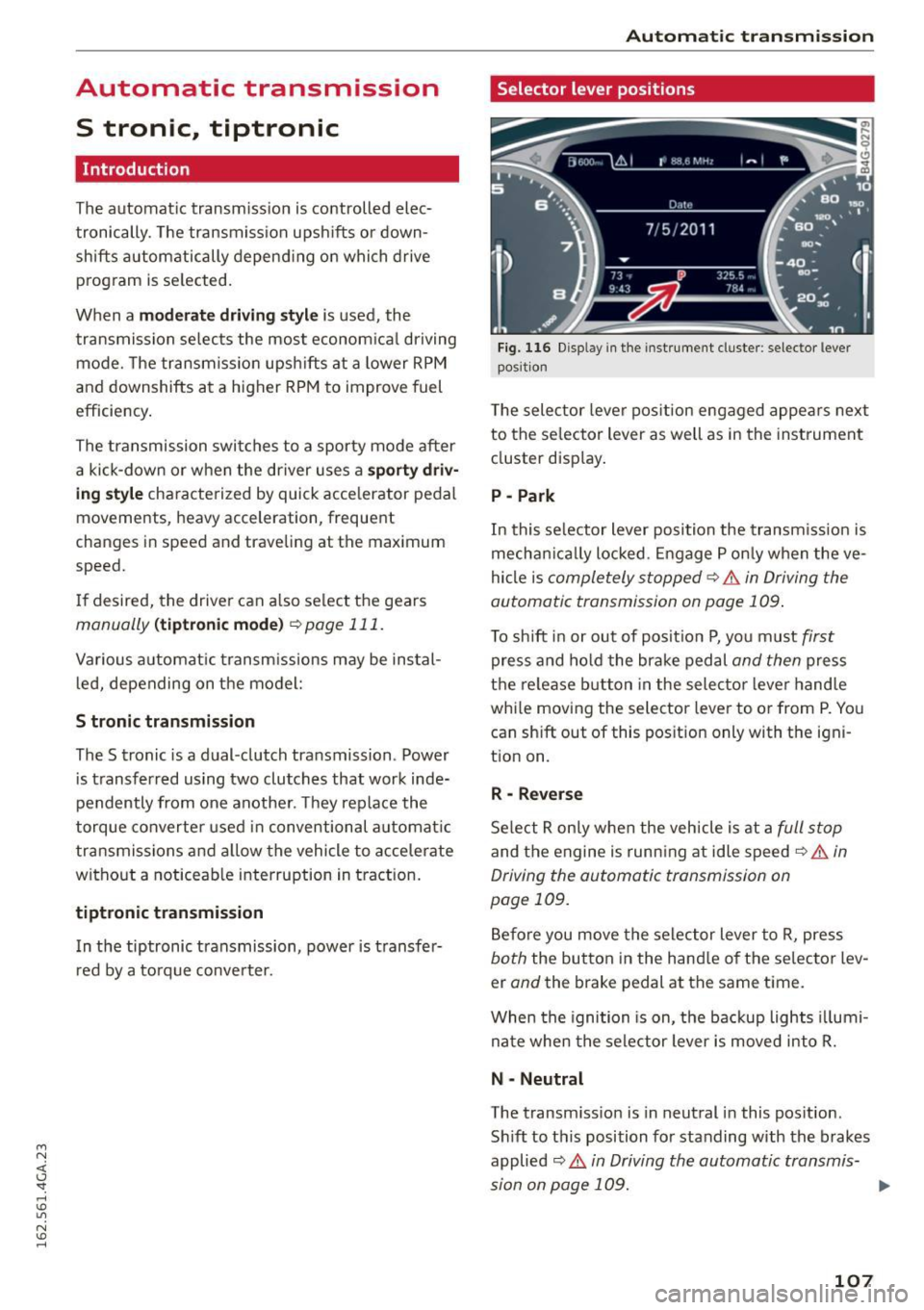
Fig. 116 Disp lay in the instrument cluste r: selector lever
posit ion
T he selec tor lever pos ition engaged appea rs next
to the se lector lever as well as in the instrument
cluster display.
P -Park
In this selector lever position the transmission is
mechanica lly locked . Engage P only when the ve
hicle is
completely stopped¢.& in Driving the
automatic transmission on page 109.
To shift in or out of posit ion P, you must first
press and hold the brake pedal and then press
the release button in the selector lever hand le
whi le moving the selector lever to or from P. You
can sh ift out of this position only with the igni
tion on.
R -Reverse
Select R only when the vehicle is at a full stop
and the engine is running at idle speed¢ .& in
Driving the automatic transmission on
page 109.
Before you move the selector lever to R, press
both the button in the hand le of the selector lev
er
and the brake pedal at the same time.
When the ignition is on, the backup lights illumi
nate when the selector lever is moved into R.
N -Neutral
The transm iss io n is in neutral in this pos ition.
Sh ift to this position for standing with the brakes
applied
¢ .& in Driving the automatic transmis-
sion on page 109. .,.
107
Page 110 of 294
Automatic transmission
When the vehicle is stationary or at speeds below
1 mph (2 km/h), you must always apply the foot
brake before and while moving the lever out of N.
DIS -Normal position for driving forward
In the D/S position, the transmission can be oper
ated either in the normal mode Dor in the sport
mode S . To select the sport mode S, pull these
lector lever back brief ly. Pulling the lever back
again will se lect the normal mode D . The inst ru
ment cluster display shows the selected driving
mode.
In the
normal mode D , the transmission auto
matically selects the suitable gear ratio . It de
pends on engine load, vehicle speed and driving
style.
Select the
sport mode S for sporty driving. The
vehicle makes full use of the engine 's power .
Shifting may become noticeable when accelerat
ing.
When the vehicle is stationary or at speeds below 1 mph (2 km/h), you must a lways apply the foot
brake before and while moving the lever to D/S
out of N.
A WARNING
Read and follow all WARNINGS¢.&. in Driv
ing the automatic transmission on
page 109.
(D Note
Coast ing downh ill with the transmission in N
and the engine not running will result in dam
age to the automatic transmission and possi
bly the catalytic converter.
@ Tips
- Audi drive select: you can adjust the sporty
sh ift characte ristics in the
Dynamic driv ing
mode .Sw ill appear in the instrument clus
ter display instead of D.
-If you accidentally select N while driving,
take you r foot off the accelerator pedal im
mediately and wait for the engine to slow
down to idle before selecting D/S.
108
-If there is a power fai lure, the selector lever
wi ll not move out of the P position. The
emergency release can be used if this hap
pens
¢ page 113.
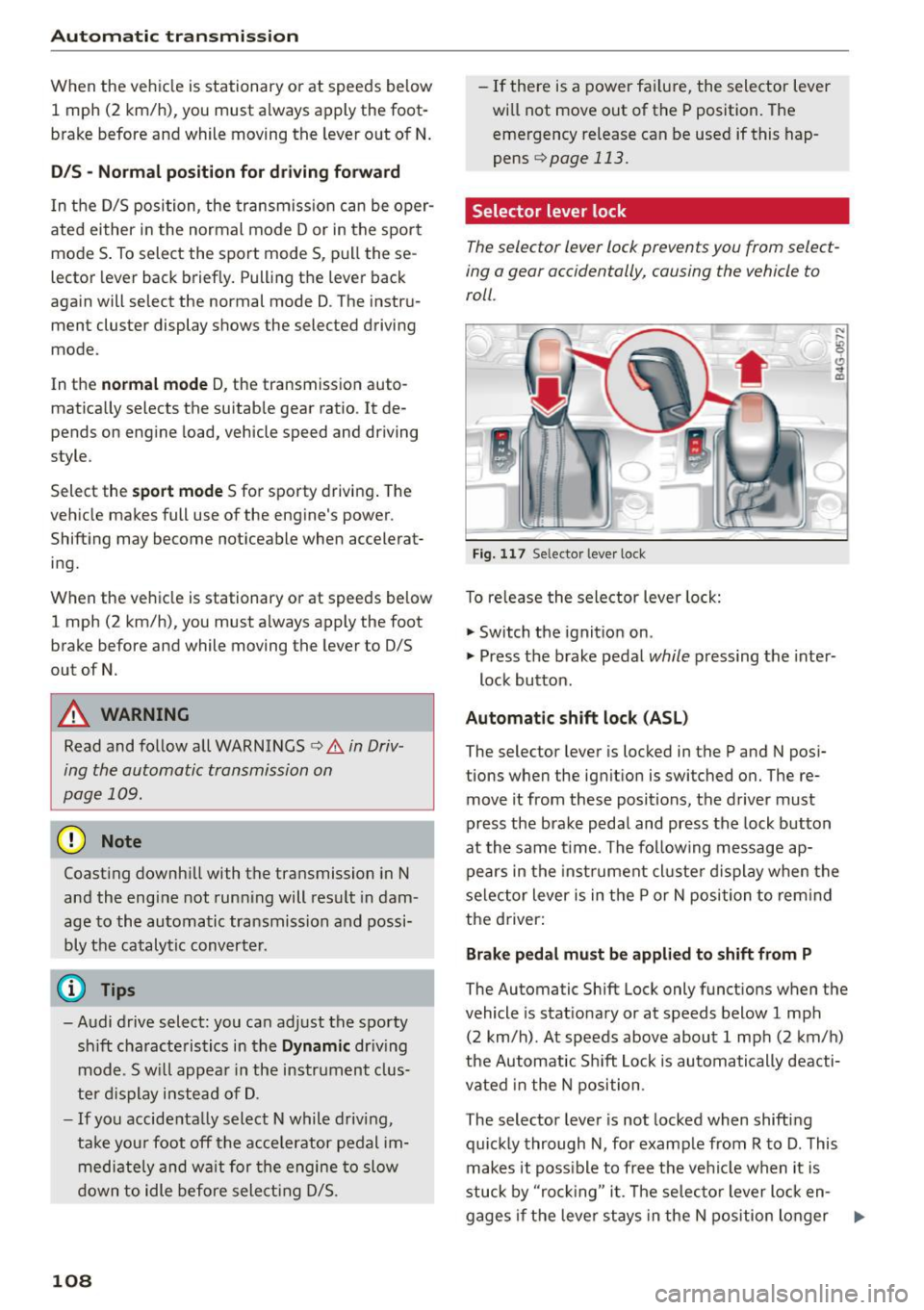
Selector lever lock
The selector lever lock prevents you from select
ing a gear accidentally, causing the vehicle to
roll .
Fig. 117 Selector lever lock
T o re lease the selector lever lock:
"' Switch the ignition on .
)
"' Press the brake pedal while pressing the inter-
lock button.
Automatic shift lock (ASL)
The selector lever is locked in the P and N posi
tions when the ignition is switched on. The re
move it from these positions, the driver must
press the brake pedal and press the lock button
at the same time. The following message ap
pears in the instr ument cluste r display when the
selector lever is in the P or N position to rem ind
the driver:
Brake pedal must be applied to shift from P
The Automatic Shift Lock only functions when the
vehicle is stat ionary or at speeds below 1 mph
(2 km/h) . At speeds above about 1 mph (2 km/h)
the Automatic Sh ift Lock is automatically deacti
vated in the N position .
The selector lever is not locked when shifting
quickly through N, for example from R to D. This
makes it poss ible to free the vehicle when it is
stuck by "ro ckin g" it. The selector lever lock en-
gages if the leve r stays in the N position longer ..,.
Page 111 of 294
M N <( (.J
'SI: ,...., \!) 1.1'1
N \!) ,....,
than 2 seconds when the brake pedal is not
pressed.
Lock button
The lock button in the selector lever handle pre
vents yo u from moving the se lector lever unin
tentionally while in some se lector lever positions .
The positions that require the lock button to be
pressed are marked in color in the illustration
¢fig. 117 .
Driving the automatic transmission
Starting the engine
.. The selector lever must be in P or N.
Starting off
.. Press and hold the brake pedal.
.. Press and ho ld the release button in the selec
tor lever handle, select the desired selector lev
er position such as D/S and release the button .
.. Wait briefly until the transmission has shifted
(you will feel a slight movement).
.. Remove your foot from the brake pedal and ac
celerate .
Stopping temporarily
.. Keep the vehicle stationary using the braking
pedal, for example at traffic lights.
.. Do not press the accelerator pedal when doing
th is.
.. To prevent the veh icle from rolling when you
start driving, set the parking brake when stop
ping on steep inclines¢,& .
.. Th e parking brake will re lease automatically
and the vehicle will start moving once you press
the accelerator peda l.
Stopping/parking
If the selector lever is not in the P position when
you open the driver 's door, the veh icle could roll.
The message
Transmi ssion : Car may roll! Shift
to park!
appears.
.. Press and ho ld the brake pedal unt il the vehicle
has come to a complete stop.
.. Apply the parking brake¢
page 78, Parking.
.. Select the P selector lever position ¢ ,&.
Automatic transmission
Stopping on an incline
.. Always press the brake pedal to hold the vehi
cle in place and prevent it from "ro lling back"
c::> ,& . Do not try to prevent the vehicle from
"rolling back" when a gear is engaged by in
creasing the engine speed ¢(D .
Starting on an incline
.. Activa te the parking brake.
.. With the driving gear selected, press the acce l
erator pedal carefu lly. The parking brake will re
lease automatica lly if your seat belt is fastened.
Under certain circumstances, such as driving in
the mountains, it may be useful to switch tempo
rarily to the manual shift program in order to ad
just the gears to the dr iv ing condit ions by hand
Q ,&. .
On s lopes, activate the parking brake first and
then move the selector lever to the P position.
This prevents too much stress from being placed
on the locking mechanism.
A WARNING
- The vehicle can also roll when the engine is
stopped.
- Unintended vehicle movement can cause se
rious injury .
- Never leave your vehicle with the engine
running while in gear. If you must leave your
vehicle when the engine is running, activate
the park ing brake and move the selector lev
er to P.
- Power is still transmitted to the wheels
when the engine is running at idle. To pre
vent the vehicle from "creep ing", you must
keep yo ur foot on the brake when the engine
is running and the se lector lever is in D/S or
R or "tiptronic" mode is selected.
- Do not press the accelerator pedal when
changing the se lector lever position while
the vehicle is stationary and the engine is
running .
- Never shift into R or P while driving.
- Before driving down a steep slope, reduce
your speed and shift into a lower gear with
"ti ptronic".
109
Page 112 of 294
Automatic transmission
-Do not ride the brakes or press the brake
pedal too often or too long when driving
down a hill. Constant braking causes the
brakes to overheat and substantially re
duces braking performance, increases brak
ing distance or causes complete failure of
the brake system .
- To prevent the vehicle from rolling back
when stopping on inclines, always hold it in
place with the brake pedal or parking brake.
- Never hold the vehicle on an incline with a
slipping clutch. The clutch opens automati
cally when it becomes too hot from the
overload . An indicator lamp
mJ illuminates
and a driver message appears¢
page 112
when the clutch is overloaded.
-If the engine must remain running, never
have any driving position engaged when
checking under the hood. Make sure these
lector lever has securely engaged and is
locked in P with the parking brake set
¢page 218. Otherwise, any increase in en
gine speed may set the vehicle in motion,
even with the parking brake applied.
@ Note
- When stopping on an incline, do not try to
hold the vehicle in place by pressing the ac
celerator pedal while a driving gear is se lected . This can cause the transmission to
overheat and can damage it . Activate the
parking brake or press the brake pedal to
prevent the vehicle from rolling.
- Allowing the vehicle to roll when the engine
is stopped and the selector lever is in N will
damage the transmission because it is not
lubricated under those circumstances.
@ Tips
For safety reasons, the parking brake is re
leased automatically only when the driver's
safety belt is engaged in the buckle.
110
· Hill descent control
Hill descent control assists the driver when driv
ing down hills .
Hill descent control is activated when the selec
tor lever is in the D or S posi tion and you press
the brake pedal. The transmission automatically selects a gear that is suitable for the incline . Hill
descent control tries to maintain the speed ach
ieved at the time of braking, within physical and
technical limitations. If may still be necessary to
adjust the speed with the brake pedal.
Hill descent control switches off once the hill lev
els out or you press the accelerator pedal.
On vehicles with a cruise control system*
¢
page 83, hill descent control is also activated
when the speed is set.
A WARNING
Hill descent control cannot overcome physical
limitations, so it may not be able to maintain
a constant speed under all conditions. Always be ready to apply the brakes.
Page 114 of 294
Automatic transmi ssion
DYNAMIC driving mode in drive select
¢page 102 .
• Press the brake pedal firmly with your left food
and hold it all the way down for at le ast 1 sec
ond.
• At the same time, press the gas peda l all the
way down w ith your r ight foot u ntil the engine
reaches and stays at a high R PM level.
• Remove your foot from t he b rake pedal w it hi n 5
seconds ¢,& .
A WARNING
-Always adapt you r driving to the traffic f low.
- Only use the La unch control program when
road and t raff ic condi tions a llow i t and oth
er drivers wi ll not be endangered or both
ered by yo ur driving and t he ve hicle's acce l
eration.
- Please note that the dr ive whee ls can sp in
and the vehicle can brea k away w hen spo rt
mode is switched on, especially when the
road is slippery.
- Once the vehicle has started moving, press
the
I .$ O FF l button briefly to turn the sport
mode off.
(D Tips
- The t ransmission tempe ratu re may inc rease
significantly after using the launch control
program. If that happens, the program may
not be available for a few minutes. It will be
ava ilable again after a coo l-down period .
- When accelerat ing using the launch contro l
program, all vehicle pa rts a re subject to
heavy loads. This can lead to increased wear .
Transmission malfunction
DD Transmission : Please press brake pedal and
s el ect gear again .
Press the brake pedal and se lect the desired se
lecto r leve r posit io n aga in . Yo u can then continue
d riving.
[O] Transmiss ion overhe ating: Please drive con
servativ ely.
112
The transm ission temperat ure has inc reased s ig
nificantly d ue to the sporty driving manner. Drive
i n a less sporty manne r until the temperature re
turns to the normal range and the indicator light
switches of.
DD Transmission malfunction: you can continue
driving
The re is a system mal func tion in the t ransm is
s ion . You may contin ue driving . Drive to yo ur au
thorized Audi dea ler or a uthorized Audi Se rvice
Fac ility soon to have the ma lfunction corrected.
DD Trans mission malfun ction : You can continue
driving with limited functionality
There is a system malfunct ion in the t ransm is
s io n. The t ransm ission is swi tching to eme rgency
mode. This mode on ly shifts in to cer tain gears or
will no longer shift at al l. The engine may stall.
D rive to an authorized A udi dealer o r authorized
Audi Service Facility immed iate ly to have the
malfunction corrected.
DD m Trans mission malfunction: No reverse
gear. You can continue driving
S tronic tra nsmission: The re is a system malfunc
tion in the tr ansmission . Th e transmission is
swi tching to emergency mode. This mode on ly
shifts into certain gears or will no longer shift at
a ll. The eng ine may stall. Yo u cannot engage the
r everse gea r. Drive to an aut hori zed Aud i dea ler
or a uthori zed Audi Service Facility immedia tely to
have the malfunct ion corrected .
DD Transmission malfunction: Stop veh icle and
shift to park.
Do not con tinue driving . Se lect the P selector lev
e r position and see an authorized A udi dealer or
a utho riz ed Aud i service facility for assistance .
([) Note
If the transmission has switched to eme rgen
cy mode, drive to you r aut ho rize d Aud i dea le r
i mmediately to have the ma lf u nction co rrect
ed.
Page 133 of 294
A WARNING ,~
Improper seating positions increase the risk
of serious personal injury and death whenever
a vehicle is be ing used.
- Always make sure that all vehicle occupants
stay in a proper seating position and are
properly restrained whenever the vehicle is
being used.
Driver's and front
passenger's footwell
Important safety instructions
Applies to vehicles: with knee airbags
A WARNING
Always make sure that the knee a irbag can in
flate without interference . Objects between
yourself and the airbag can increase the risk of injury in an accident by interfering with the
way the airbag deploys or by being pushed in
to you as the airbag deploys.
- No persons (chi ldren) or animals should ride
in the footwell in front of the passenger
seat. If the airbag deploys, this can result in
serious or fatal injuries.
- No objects of any k ind shou ld be carried in
the footwe ll area in front of the dr iver's or
passenger's seat. Bulky objects (shopp ing
bags, for example) can hamper or p revent
proper deployment of the airbag . Small ob
jects can be thrown thro ugh the vehi cle if
the a irbag deploys and injure you or you r
passenge rs .
Pedal area
Pedals
The pedals must always be free to move and
must never be interfered with by a floor mat or
any other object.
Make sure that all pedals move freely witho ut in-
~ terference and that noth ing prevents them from
j returning to their original pos it ions .
'SI:
~ Only use floor mats that leave the peda l area free 1.1'1
~ and can be secured with floor mat fasteners . ......
Drivin g s afet y
If a brake circuit fai ls, increased brake pedal trav
el is required to bring the vehicle to a full stop.
A WARNING
-Pedals that cannot move free ly can cause loss
of vehicle control and increase the risk of ser i
ous injury.
- Never p lace any objects in the driver's foot
well. An object could get into the pedal area
and interfere with pedal function. In case of
sudden braking or an accident, you would
not be able to b rake or accelerate!
- Always make sure that nothing can fall or
move into the d river's footwell.
Floor mats on the driver side
Always use floor mats that can be securely at
tached to the floor mat fasteners and do not in
terfere with the free movement of the pedals .
.. Make sure that the floor mats are properly se-
cured and cannot move and interfere with the
pedals¢ .&,.
Use only floor mats that leave the peda l area un
obstructed and that are firmly secured so that
they cannot slip out of position . You can obtain
su itable floor mats from your authorized Aud i
Dealer .
Floor mat fasteners are insta lled in your Audi.
Floor mats used in yo ur vehicle must be attached
to these fasteners. Properly sec uring the floor
mats will prevent them from s liding into posi
t ions that could interfere with the pedals or im
pair safe operation of your vehicle in other ways .
A WARNING ~
Pedals that cannot move freely can result in a
l oss of vehicle control and increase the risk of
se rious pe rsonal injury.
- Always ma ke sure that floor mats a re prop
erly secured .
- Never p lace or install floor mats or other
f loor cove rings in the vehicle that cannot be
properly secu red in p lace to prevent them
from slipp ing and in terfering wi th the ped-
als o r the ab ility to cont rol the vehicle.
~
1 3 1
Page 134 of 294
Driving safety
-Never place or install floor mats or other
floor coverings on top of already installed
floor mats. Additional floor mats and other coverings will reduce the size of the pedal
area and interfere with the pedals .
- Always properly reinstall and secure floor
mats that have been taken out for cleaning .
- Always make sure that objects cannot fall
into the driver footwell while the vehicle is
moving . Objects can become trapped under
the brake pedal and accelerator pedal caus ing a loss of veh icle control.
Storing cargo correctly
Loading the luggage compartment
All luggage and other objects must be properly
stowed and secured in the luggage compart
ment.
Loose items in the luggage compartment can
shift suddenly, changing vehicle handling charac
teristics. Loose items can also increase the risk of
serious personal injury in a sudden vehicle ma
neuver or in a collision.
.. Distribute the load evenly in the luggage com
partment.
.. Always place and properly secure heavy items in
the luggage compartment as far forward as
possible.
.. Secure luggage using the tie-downs provided
¢ page 63, Luggage compartment.
.,. Make sure that the rear seatback is securely
latched in place .
_& WARNING
Improperly stored luggage or other items can
fly through the vehicle causing serious per
sonal injury in the event of hard braking or an
accident. To help reduce the risk of serious
personal injury:
- Always put objects, for example, luggage or
other heavy items in the luggage compart
ment.
- Always secure objects in the luggage com
partment using the tie-down hooks and
suitable straps.
132
_& WARNING ~ -
Heavy loads will influence the way your vehi
cle handles. To help reduce the r isk of a loss
of control leading to serious personal injury:
- Always keep in mind when transporting
heavy objects, that a change in the center of
gravity can also cause changes in vehicle
handling:
- Always distribute the load as evenly as
possible .
- Place heavy objects as far forward in the luggage compartment as possible.
- Never exceed the Gross Axle Weight Rating
or the Gross Vehicle Weight Rating specified
on the safety compliance sticker on the left
door jamb. Exceeding permissible weight
standards can cause the vehicle to slide and
handle differently .
- Please observe information on safe driving
¢page 126.
_& WARNING
To help prevent poisonous exhaust gas from
being drawn into the vehicle, always keep the
rear lid closed wh ile driving .
- Never transport objects larger than those
fitting completely into the luggage area be
cause the rear lid cannot be fully closed .
- If you absolutely must drive with the rear lid open, observe the following notes to reduce
the risk of poisoning:
- Close all windows,
- Close the power roof*,
- Open all a ir outlets in the instrument pan-
el,
- Switch off the air rec irculat ion,
- Set the fresh air fan to the highest speed.
_& WARNING
Always make sure that the doors, all windows,
the power roof* and the rear lid are securely
closed and locked to reduce the risk of injury
when the vehicle is not be ing used.
- After closing the rear lid, always make sure
-
that it is properly closed and locked. ~
Page 189 of 294

M N <( (.J
'SI: ,...., \!) 1.1'1
N \!) ,....,
Intelligent Technology Notice about data
recorded by the Event
Data Recorder and
vehicle control modules
Event Data Recorder
This vehicle is equipped with an Event Data Re
corder (EDR). The main purpose of an EDR is to
record, in certain crash or near crash-like situa
tions, such as an a irbag deployment or hitting a
road obstacle, data that will assist in understand
ing how a vehicle's systems performed. The EDR
is designed to record data related to vehicle dy
namics and safety systems for a short period of
time, typically 30 seconds or less. The EDR in this
vehicle is designed to record such data as:
- How various systems in your vehicle were oper
ating;
- Whether or not the driver and passenger safety
belts were buckled/fastened;
- How far (if at all) the driver was depressing the
accelerator and/or brake pedal; and,
- How fast the vehicle was traveling.
These data can he lp provide a better understand
ing of the circumstances in which crashes and in
juries occur. NOTE: EDR data are recorded by your
vehicle only if a non-trivial crash situation occurs;
no data are recorded by the EDR under normal
driving conditions and no personal data (e .g.,
name, gender, age, and crash location) are re
corded. However, other parties, such as law en
forcement, could combine the EDR data with the
type of personally identifying data routinely ac
quired during a crash investigation.
To read data recorded by an EDR, special equip
ment is requ ired, and access to the vehicle or the
E DR is needed. In addition to the vehicle manu
facturer, other parties, such as law enforcement,
that have the special equipment , can read the in
formation if they have access to the vehicle or the
EDR.
Some state laws restrict the retr ieval or down
l oading of data stored by EDRs installed in a vehi
cle for the express purpose of retrieving data af-
Intelligent Technology
ter an accident or crash event without the own
er's consent.
A udi will not access the EDR and/or similar data
o r give it to others -
- unless the vehicle owner (or lessee if the vehi
cle has been leased) agrees; or
- upon the official request by the police; or
- upon the order of a court of law or a govern-
ment agency; or
- for the defense of a lawsuit through the judicial
discovery process .
- Audi may also use the data for research about
veh icle operation and safety performance or
provide the data to a third party for research
purposes without identifying the specific vehi
cle or information about the ident ity of its own
er or lessee and only after the recorded vehicle
data has been accessed.
Vehicle control modules
Your vehicle is also equipped with a number of
electron ic control modules for various vehicle
systems, such as eng ine management, emission
control, airbags, and safety belts.
These electronic control modules record data during norma l vehicle operation that may be
needed by trained technicians for diagnostic and
repair purposes. The recording capabil ity of these
modules is lim ited to data (no sound is reco rded).
Only a small amount of data is actua lly recorded
over a very limited period of time, or stored when
a system fau lt is detected by a contro l module.
Some of the data stored may relate to vehicle
speed, direction, or braking, as well as restraint
system use and performance in the event of a
crash . Stored data can also only be read and
downloaded w ith specia l equipment that is di
rectly connected to the vehicle.
(D Tips
Your vehicle may be equipped with Audi con
nect. Your use of certain Audi connect fea
tures requires wireless services that are pro
v id ed by a third party wire less telecommuni
cations provider . For detai ls regard ing how in
formation obtained through Audi connect is
collected, processed, transmitted, used, and ..,.
187
Page 190 of 294
Intelligent Technology
shared, p le a se see yo ur contract with the
wireless telecomm unications provider and the
"About Aud i connect" tab in your vehicle's
MMI:
! MENUI button> Audi connect > About
Audi connect .
Electronic Stabilization
Control (ESC)
Description
ESC helps to improve road holding and vehicle
dynamics to help reduce the probability of sk id
d ing and loss of veh icle control.
It works only
when the engine is runn ing. ESC detects certa in
d ifficult d riving situations, including when the ve
h icle is beginn ing to sp in (yaw) o ut of control and
he lps you to ge t the veh icle back u nder cont ro l b y
selec tively braking the whee ls, and/or reduc ing
engine power and providing steering assistance
to help hold the vehicle on the driver's i ntended
course. The indicator light
DJ in the instrument
cluster blinks when ESC is taking action to help
you control t he veh icle.
ESC has lim itations. It is important to remember
that ESC cannot overcome the laws of physics. It
will not a lways be ab le to he lp out under all con
d itions you may come up against. For example,
ESC may not always be able to help you master
situations where there is a sudden change in the
coefficient of friction of the road surface. Whe n
there is a section of d ry road tha t is s udden ly cov
ere d wi th wa ter, s lush or snow, ESC ca nnot per
form the same way it wou ld on the d ry s urface . If
the vehicle hydroplanes ( rides on a cushion of wa
ter instead of t he road surface), ESC wi ll not be
ab le to he lp you steer the veh icle because contact
with the pavement has been i nterrupted and the
ve hicle cannot be b raked or steered. Dur ing fast
cor ne ring, particula rly o n w inding roads, ESC
cannot a lways deal as eff ect ively wi th d iff icu lt
d riving situat ions than at lowe r speeds.
Always ad just your speed and dr iv ing style to
road, traffic and weather conditions. ESC ca nnot
over ride the vehicle's physical limi ts, increase t he
ava ilab le tract io n, or keep a vehi cle on t he road if
roa d de pa rture is a res ult o f driver in att enti on.
I nstead, ESC improves the poss ibility of keeping
188
the veh icle unde r control and on the road dur ing
extreme maneuve rs by using the dr iver's stee ring
i nputs to help keep the vehicle going in the in
tended direction. If yo u are traveling at a speed
that causes you to run off the road before ESC
can p rov ide any assistance, you may not experi
ence the benefits of ESC.
ESC is switc hed on all the time. In certain s itua
tions when you need less tracti on, you can switch
off ASR by press ing the button
[ru c:> page 189,
fig . 178. Be sure to sw itch ASR on aga in when
you no longer need l ess traction.
The following systems are integrated in the ESC:
Anti -lock braking system (ABS )
ABS prevents the whee ls from locki ng when brak
i ng . T he veh icle can st ill be stee red even during
hard braking. App ly steady pressure to the brake
pedal. Do not pump the pedal. A puls ing in the
brake pedal indicates that the system is acting to
stab ilize the veh icle.
Brake assist sy stem
The bra ke ass ist system can decrease braking dis
tance. It increases bra king power when the driver
presses the brake peda l quickly in emergency sit
uat ions. You must press and hold the b rake peda l
u nt il the dange rous situat io n is over . In vehicles
with adaptive cruise co ntro l*, the brake ass ist
system is more sensitive if t he d ista nce detected
to t he veh icle a head is too sma ll.
Anti-slip regulation (ASR)
ASR red uces eng ine power when the drive wheels
begin spin ning and adapts the force to the road
cond it ions . Th is makes it eas ier to sta rt, acce ler
ate a nd dr ive up incl ines.
Electronic differential lock (EDL)
EDL applies t he brakes to a whee l that starts
sp inning a nd tra nsfe rs the d rive power to the
othe r drivi ng whee ls. This function is not ava ila
ble at hig he r speeds.
In extreme cases, EDL automatically sw itches off
to keep the brake o n the braked whee l from over
hea ting. The vehicle is st ill work ing cor rect ly. EDL ..,.