emergency key AUDI A7 2016 Owners Manual
[x] Cancel search | Manufacturer: AUDI, Model Year: 2016, Model line: A7, Model: AUDI A7 2016Pages: 294, PDF Size: 73.82 MB
Page 32 of 294
Opening and closing
Opening and closing
Keys
Key set
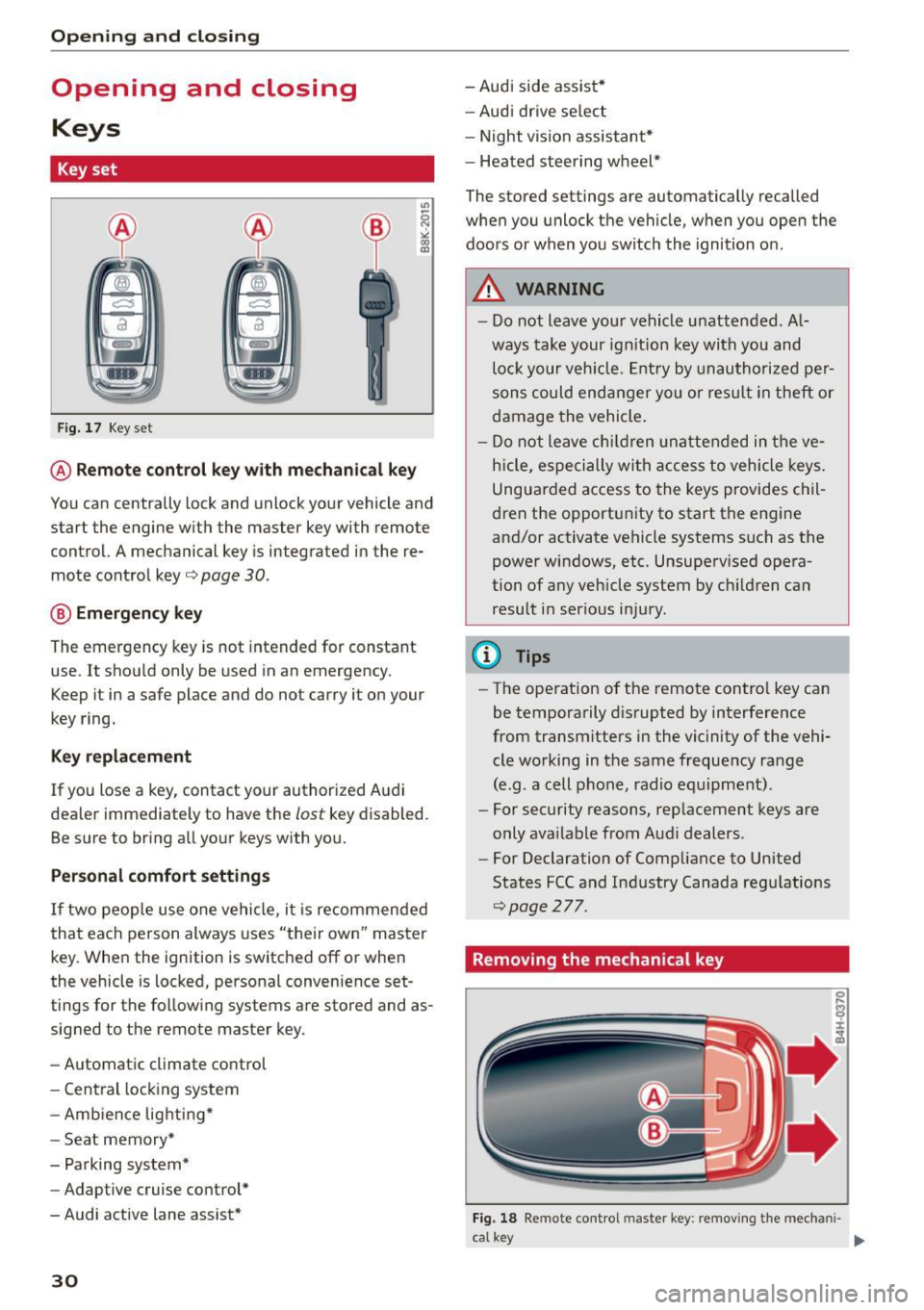
F ig . 17 Key set
@ Remote cont rol key w ith me chanical key
You can centrally lock and unlock your vehicle and
start the engine w it h the master key with remote
control. A mechanical key is integrated in the re
mote control key
o page 30 .
@ Eme rgen cy key
The emergency key is not intended for constant
use. It shou ld only be used in an emergency.
Keep it in a safe place and do not carry it on your
key ring.
K ey replacement
If you lose a key, contact your authorized A udi
dea ler immediately to have the
lost key disabled.
Be sure to bring all yo ur keys with you.
Personal comfo rt sett ings
If two peop le use one vehicle, i t is recommended
that each person always uses "their own" master
key. Whe n the ignition is switched off or when
the vehicle is locked, personal convenience set
tings for the fo llow ing systems are stored and as
signed to the remote master key.
- Automatic climate control
- Central lock ing system
- Amb ience lighti ng*
- Seat memory*
- Parking system*
- Adaptive cruise control*
- Audi active lane assist *
30
-Audi side assist *
- Aud i drive se lect
- Night vision assistant*
- Heated steering wheel*
The stored settings are automatically recalled
when you unlock the vehicle, when you open the
doors or when you switch the ignition on.
A WARNING
-
- Do not leave your vehicle u nattended. A l
ways take your ign ition key with you and
lo ck your vehicle. Entry by unau thori zed per
sons could end anger yo u or res ult in theft or
damage the vehicle .
- Do n ot leave ch ildren unattended in t he ve
h icle, especi ally wit h access to vehicle keys.
Ungua rded a ccess to the keys provides chil
dren t he opport unity to start the engine
and/or activate ve hicle systems such as the
power windows, etc. Unsupe rv ised ope ra
tion of any veh icle system by c hildren can
result i n serio us in ju ry .
(D Tips
- The operation o f the remote control key can
be temporarily d is rupted by interference
from transmitters in the vic inity of the vehi
cle working in the same freque ncy range
(e.g. a cell phone, radio e quipment).
- For security reasons, rep lacement keys are
only ava ilable from Audi dealers .
- For Declaration of Comp liance to United
States FCC and Industry Canada reg ulations
~page 277.
Removing the mechanical key
Fig. 18 Remote cont rol mas te r key: removing the mechani-
ca l key .,._
Page 33 of 294

M N <( I.J "". rl I.O
"' N I.O rl
.. Press the release button @¢fig . 18.
.. Pull the mechanica l key @ out of the master
key .
Using the mechanica l key, you can:
- lock and unlock the storage compartment on
the passenger's s ide ¢
page 60.
- lock and unlock the vehicle manually
¢ page 35.
-lock the front and rear passenger doors me
chanically ¢
page 36.
LED and batteries in the remote control key
Fig. 1 9 Remote control key: Remov ing the batte ry h olde r
LED in the remote cont rol key
The LED @informs you about the funct ion of th e
remote control key .
.. If you press a button qu ickly, the LED blinks
once.
.. If you press a button longer (convenience open
ing), the LED blinks several times .
.. If the LED does not blink, the remote control
key battery is dead. The
Ill indicator ligh t and
t h e m essage
Plea se change key batt ery appear.
Replace the ba tte ry.
Replacing the remote control key battery
.. Remove the emergency key¢ page 30 .
.,. Press the release butto n ® on the battery
holder and pull the battery ho lder out of the
master key in the direction of the ar row at the
same time.
.. Insert the new battery with the"+" facing
down.
.. Push the battery holde r carefully into the mas
ter key.
.. Install the mechanical key.
Open ing and clo sing
@) For the sake of the environment
Dead batteries must be d ispose d of using
methods that wi ll not harm the environment .
Do not d ispose of t hem in ho useho ld trash.
@ Tips
The replacement battery must meet the same
spec ificat ions as t he origina l battery .
Electronic immobilizer
The immobilizer helps to prevent unauthorized
use of your vehicle .
A compute r ch ip ins ide you r key au toma tically
deact ivates the electronic immobilizer when the
key is inside the vehicle . When yo u remove the
key from the vehicle, the electronic immob ilizer
is aut omatically activated once again.
A WARNING
-Always take the key with you when you leave
the veh icle. The key can disarm the electronic
engine immobilizer and permit an unauthor
i zed person to start the engine and enab le op
e ra ti on o f the ve hicle sys tems s uch as powe r
window or power s unroo f lead ing t o serious
personal injury .
@ Tips
- T he ve hicle cannot be started if an una u
tho riz ed key is used. The vehicle may not
s ta rt if another radio device s uch as a key
for ano ther ve hicle or a transpo nder is locat
ed on the key ring .
- F or Declara tion of Comp liance to United
States FC C and In du stry Canada reg ulations
¢page 277 .
Central locking
General description
The power locking system locks or unlocks all
doors and the rear lid simultaneously.
You can lock and unlock the vehicle centrally . Yo u
have the following choices:
111>
31
Page 34 of 294

Opening and closing
-Remote master key ¢ page 33,
-Door handles with convenience key*
¢page 34,
-Lock cylinder at the driver's door c::> page 35,
or
- Power locking switch inside
c::> page 35.
Selective unlocking
When you lock the vehicle, the power locking sys
tem will lock the doors and the rear lid. When un
locking, you can set in the MMI whether only the
driver's door or the entire vehicle should be un locked
c::> page 33.
Automatic locking
The automatic locking feature locks all the vehi
cle doors and the rear lid when you drive faster
than 9 mph (15 km/h) .
The car is unlocked again, when the opening
function in the power locking system switch or at
one of the door levers is actuated. The Auto Lock
function can be turned on and off in the MMI
c::> page 3 3.
Anti-theft alarm warning system
If the anti-theft alarm warning system detects a
break-in into the vehicle, acoustic and visual
warning signals are triggered.
The anti-theft warning system is activated auto
matically when you lock the vehicle. It is deacti
vated when unlocking using the remote key, with
the mechanical key, and when you switch the ig nition on .
The alarm also turns off when the alarm cycle has
expired.
Turn signals
When you unlock the vehicle , the turn signals
flash twice. When you lock the vehicle the turn signals flash once. If they do not flash, one of the
doors , the rear lid or the hood is not locked.
Unintentionally locking yourself out
In the following cases there safeguards to pre
vent you locking your remote master key in the
vehicle:
32 -
The vehicle does not lock with the central lock
ing switch
c::> page 35 if the driver's door is
open.
- On vehicles with convenience key*, if the most
recently used master key is in the luggage com
partment, the rear lid is automatically unlocked
again after it is closed.
Do not lock your vehicle with the
remote master
key or convenience key*
until all doors and the
rear lid are closed. In this way you avoid locking
yourself out accidentally.
Power side door closer*
The vehicle doors are equipped with a power side door closer. When closing a door, you only have
to let it fall lightly into the latch. The door will
then automatically close by itself
c::> ,&..
A WARNING
-When you lock your vehicle from outside,
nobody - especially children -should remain
inside the vehicle . Remember, when you
lock the vehicle from the outside the win
dows cannot be opened from the inside.
- When you leave the vehicle, always take the
ignition key with you. This will prevent pas
sengers (children, for example) from acci
dentally being locked in the vehicle should
they accidentally press the power locking
switch in the doors.
-
-Do not leave children inside the vehicle un
supervised. In an emergency it would be im
possible to open the doors from the outside
without the key.
- Applies to vehicles with power side door
closer*:
- When closing a door, make sure nothing
can interfere with the door . This could
cause serious personal injury.
- You can stop the door from closing at any
time by pulling on the inside or outside
door handle.
(D Tips
-In the event of a crash with airbag deploy
ment all locked doors will be automatically
Page 36 of 294

Opening and closing
It
depends on the settings in the MMI whether
the entire vehicle is un locked or only certain
doors
¢ page 33.
.&_ WARNING
Read and follow all WARNINGS¢.&. in Gener
al description on page 32.
(D Tips
- In order to make sure the locking function is
working, you should always keep your eye
on the vehicle to make sure it is properly
locked.
- Do not use the remote control if you are in
side the car, otherwise you may unintention
ally lock the vehicle, and then you would set
off the ant i-theft alarm when you try to
start the engine or open a door. In case this
happens anyhow, push the unlock button
ffi.
-The vehicle can only be locked when these
l ector lever is in the P posit ion.
- Use the panic funct ion only if you are in an
emergency situation .
Locking and unlocking with convenience
key
Applies to veh icles: w ith conven ie n ce key
The doors and the rear lid con be unlocked and
locked without operating the master key.
Fig. 21 Conve nien ce key: Locking the vehicle
Unlocking vehicle
• Take hold of the door hand le . The door is un
l ocked automatically.
• Pu ll the handle to open the door.
34
Locking vehicle
• Select the P selector lever position. Otherwise
the vehicle cannot be locked.
• To lock the vehicle, close the door and touch
the sensor in the door handle
once ¢ fig. 21. Do
not reach inside the door handle.
The vehicle can be locked and un locked at any
door. The master key must be within a range of
about 1.5 m from the appropriate door or the
rear lid. It makes no difference whether the mas
ter key is in your jacket pocket or in your brief
case .
It is not possib le to re-open the door for a brief
period directly after closing it. This allows you to
ensure that the doors are properly locked .
It depends on the settings in the MMI whether
the entire vehicle is unlocked or one of the doors
¢page 33.
.&_ WARNING
Read and follow all WARNINGS ¢.&. in Gener
al description on page 32 .
{!) Tips
If your vehicle has been standing for an ex
tended period, please note the following:
- The proximity sensors are deactivated after
a few days to save power. You then have to
pull on the door handle once to unlock the
vehicle and a second time to open the vehi
cle.
- To prevent the battery from being dis
charged and to preserve your vehicle's abili
ty to start for as long as possible, the ener
gy management system gradua lly switches
off unnecessary convenience functions.
It is
possible that you will not be able to unlock
your vehicle using these convenience func
tions.
- For Declaration of Compliance to United
States FCC and Industry Canada regulations
¢page 277.
Page 37 of 294

M N <( I.J "". rl I.O
"' N I.O rl
Operating locks with the key
In the event of a failure of the power locking sys
tem, the driver's door can be locked and un
locked at the lock cylinder.
• p.
Fig . 22 Key turns for opening and closing.
• Remove the mechanical key¢ page 30.
co
0 9 (!)
" ID
• Turn the mechanical key to position @¢ fig. 22
to unlock the driver's door .
• Turn the key to position @ to lock the driver 's
door ¢& .
A WARNING
Read and follow all WARNINGS¢&. in Gener
al description on page 32.
Locking and unlocking the vehicle from
inside
Fig. 23 Dr iver 's door: power locking switch
Open ing and clo sing
Fig. 2 4 Rear power locking sw itch
• Press the button~ to lock the vehicle¢& .
• Press the button@! to unlock the veh icle.
If you lock the vehicle using the power locking
switch, please note the followi ng:
- You cannot open the doors or the rear lid from
the
outside (increased security, for example
when you are stopped at a red light).
- The diodes i n the power locking switches illumi
nate when all the doors are closed and locked .
- Front doors: you can unlock and open the doors
from the inside by pulling on the door handle.
- Rear doors: pull the door hand le
once to re
lease the lock. Pull the handle
again to open
the door .
- If you have a crash and the airbag is activated,
the doors automatically unlock.
A WARNING
-- The power lock ing switch works with the ig-
n ition off and automatically locks the entire
veh icle when it is actuated.
- On a vehicle locked from the outside the
power locking system switch is inoperative.
- Locked doors make it more difficult for
emergency workers to get into the veh icle,
which puts lives at r is k . Do not leave anyone
be hind in the vehi cle, especially c hildren .
(0 Tips
Your ve hicle is locked a utomat ica lly at a speed
of9 mph ( 15 km/h)
¢page 31. You can un
l ock the vehicle again using the opening func
tion in the power lo cking system sw itch.
35
Page 38 of 294

Opening and closing
Emergency locking
Each door must be locked separately if the pow
er locking system fails.
Fig. 25 Door: Emergency locking
.,,
0 9 Cl
the passenger's door and the rear doors (only
visible when door is open) .
.. Remove the mechanical key
c::> page 30 .
.. Pull the cover cap out of the opening c::> fig. 25 .
.. Insert the key in the inside slot and turn it all
the way to the right (right door) or left (left
door).
Once the door has been closed, it can no longer
be opened from the outside . The door can be
opened from the inside by pulling the door han
dle. If the child safety lock in a rear door is acti
vated, you must first pull the door handle on the
inside. Then you can open the door from the out
side.
36
Luggage compartment
Lid
Automatic luggage compartment lid
The luggage compartment lid can be opened and
closed automatically.
Fig. 26 D river 's doo r: Ope ning the lu g ga ge compart men t
li d
-- -
' c::::s @
--
e,
Fig. 27 Luggage compar tme nt lid: @clos ing butto n,®
lock butto n (vehicles wit h convenience key *)
Opening the luggage compartment lid
.. Press and hold the~ button on the remote
control key for at least one second. Or
.. Pull the button ~ in the driver's door
c::> fig. 26
briefly . Or
.. Press the handle in the luggage compartment
lid .
Closing the luggage compartment lid
.. Pull the button~ in the driver's door until the
luggage compartmen t lid is closed
¢ .&_ . Or
.. Press the button in the luggage compartment
lid~
c::> fig. 2 7. The luggage compartment lid
will automatically close and lock
c::> .&_ . Or
.. Press and hold the button
la.I on the master key
until the luggage compartment lid is closed
(vehicles with convenience key*)
c::> .&_. Make
sure there is enough distance between you and .,..
Page 40 of 294

Opening and closing
- There are audio signals when closing the
luggage compartment lid with the remote
control key (vehicles with convenience key*)
or with the~ button in the driver's door.
- When the vehicle is locked, the luggage
compartment lid can be unlocked separately
by pressing the button
l a ! on the remote
control key. When the luggage compart ment lid is closed aga in, it locks automati
cally.
- You can close the luggage compartment lid
using the master key (vehicles with conven
i ence key*) up to a distance of approximate
l y 9 ft (3 m).
- The luggage compartment lid can be oper
ated by hand if the vehicle battery is low.
It
is necessary to use more force when doing
th is . Move the lid slowly to reduce the
amount of force needed.
Luggage compartment with movement
activated opening
Applies to veh icles: w ith conve nien ce key and senso r-contro l
led lugg age compart ment lid
Fig. 28 Rear of the veh icle : foot movement
Requirements You must be carrying your veh icle
key with you. You must be standing at the center
behind the luggage compartment lid. T he re
should be a distance of approximately 20 cm
from the rear of the vehicle. The ignition must be
switched off. Make sure you have firm footing.
.,. Swing yo ur foot back and forth below the
bumper ¢
fig. 28. Do not touch the bumper.
Once the system recognizes the movement, the
luggage compartment lid will open .
The luggage compartment lid will only open if
you make the movement as described. This pre-
38
vents the luggage compartment lid from opening
due to similar movements such as when you wa lk
between the rear of the vehicle and your garage
door.
General information
In some situat ions, the function is limited or
temporarily unavailable. This may happen if:
- the luggage compartment lid was closed be
forehand .
-you park close to a hedge and the branches
move back and forth under the veh icle for a
long period of time.
-you clean your vehicle, for example with a pres
sure washer or in a car wash.
- there is heavy rain.
- the bumper is very dirty, for example after driv- ing on salt-covered roads.
- there is interference to the radio signal from
the vehicle key, suc h as from cell phones or re
mote controls.
Luggage compartment lid emergency
release
The luggage compartment lid can be released in
an emergency from inside the luggage compart
ment.
Fig. 29 Inside of the lu ggage compartme nt: access to the
e m ergency release
.,. Remove the emergency key ¢ page 30 .
.,. Pry the cover out using the eme rgency key
~fig. 29 .
.,. Press the lever in the direction of the arrow to
release the luggage compartment lid.
Page 43 of 294
M N <( I.J "". rl I.O
"' N I.O rl
@ Ope ning /sliding ( versi on 2)
• To ope n the sunroof complete ly, press the
switch back to just before the second level.
• To close the sunroof completely, press the
switch forward briefly to the second level¢&, .
• To select an intermediate position, press/pull
the switch forward/back to the first level until
the desired position is reached .
The sun shade can be opened and closed by hand
when the roof is closed . The sun shade opens au
tomatically when the roof is opened.
You can still operate the s liding/ti lting sunroof
for about 10 minutes after the ignition is switch
ed off. The switch is deactivated once the driver's
or front passenger's door is opened .
A WARNING
Pay careful attention when closing the slid
ing/tilting sunroof -otherw ise ser ious injury
cou ld resu lt! Always take the ignition key with
you when leaving the vehicle.
0 Note
Always close your sliding/t ilting sunroof when
leaving your veh icle. Sudden rain can ca use
damage to the interior eq uipment o f your ve
hicle, part icularly the elect ron ic equipment.
a) Tips
- Fo r information on convenie nce opening, re
fer to¢
page 40.
- The sunroof will only open down to -20 °C
(-4 °F).
Sunroof power emergency closing
If the sun roof detec ts an object in its path when
it is clos ing, it w il l open again automatically. In
this case, you can close the roo f with the power
emergency closing fu nct io n.
• Wi thin five se cond s after the sunroof opens au
tomat ica lly, pull the switch unt il the roof
closes .
I f you le t go of the sw itch early, the s unroof will
ope n again.
Open ing and clo sing
Garage door opener
(Homelink)
Description
Applies to veh icles: w ith garage door opener (Homelink)
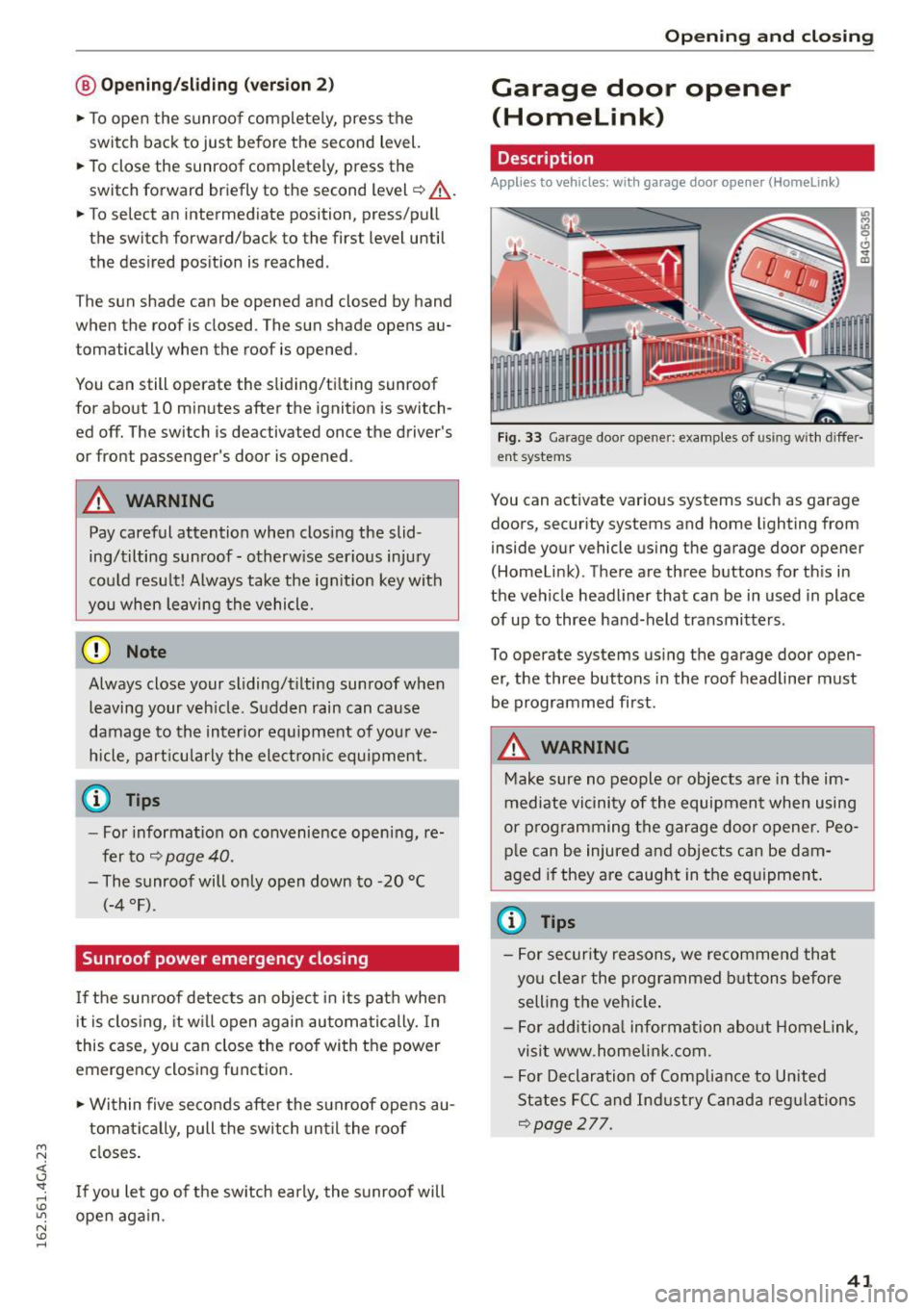
Fig. 33 Garage door opener: examples of using wit h differ·
ent systems
You can activate various systems such as garage
doors, security systems and home lighting from
inside your vehicle using the garage door opener
(Homeli nk). There are three buttons fo r th is in
the vehicle headliner that can be in used in place
of up to three hand-held transmitters .
To operate systems using the garage door open
er, the three buttons in the roof headliner must
be programmed first .
A WARNING
-Make sure no people or objects a re in the im-
mediate vicinity of the equipment when using
or p rog ramming the garage door opener. Peo
p le can be injured and objects can be dam
aged if they are caught in the eq uipment .
(¼} Tips
-For security reasons, we recomme nd that
yo u cle ar the programmed buttons before
selling t he vehi cle.
- For add itiona l information about Homelink,
visi t www .home link.com.
- For Declaration of Comp liance to United
States FC C and In dustry Canada reg ulations
¢page 277.
41
Page 81 of 294
M N <( (.J
'SI: ,...., \!) ..,.,
N \!) ,....,
A WARNING ,~
- Always take the vehicle key with you when
leaving the vehicle, eve n for a short period
of time. Th is applies partic ula rly whe n chil
dren remain in the vehicle. Otherw ise chi l
dren co uld start the engine, re lease the
p arki ng brake or oper ate elec trical eq uip
ment such as power windows, which in
creases the r is k of an accident .
- No one sho uld remain in the vehicle when i t
is locked, especia lly children . Locked doors
make it more difficult for emergency wo rk
ers to get into the vehicle, which puts lives
at risk.
Starting from a stop
The start assist function ensures that the park
ing broke is released automatically upon start
ing .
Stopping and setting the parking brake
,.. Pu ll the swi tch~ to se t the p ark ing b rake.
Starting and automatically releasing the
parking brake
-
,.. When you press the ac cele ra to r pedal, the park
ing brake is au tom atically re lease d and you r ve
hicle begins to move.
The par kin g b rake can be set if yo u must stop the
ve hicl e at a stop light or in traffic. The vehicle
does not h ave to be he ld wit h t he brake pedal.
The parking b rake elim inates the tendency to
creep when a se lector lever position is engaged.
The parking brake re leases automatically and the
vehicle beg ins to move as soon as you press the
accelerator peda l as usual.
Starting on slopes
When starting on in clin es, the hill start assist
p revents the vehicle from uni ntentiona lly ro lling
back. The braking force o f the parking brake is
not released until sufficient driving force has
been built up at the whee ls .
Dri ving
{!) Tips
Fo r safety reasons, the pa rking bra ke is re
l eased automatically only when the d river 's
safety be lt is engaged in the b uckle.
Starting to drive with a trailer
To prevent rolling bock unintentionally on on in
cline, do the following:
,.. Keep the sw itch pulled ~ and p ress the acce l
erator peda l. The parking brake stays applied
and prevents the vehicle from roll ing backward .
,.. You can re lease the switch
[21 once you are s ure
that you are transferring enough drivi ng force
to the wheels by pressing the accele rato r pedal.
Depend ing on the we ight of the rig (vehicle and
trailer) and the severity of the incline, you may
ro ll backwards as you start.
Emergency braking function
This is used if the conventional broke system
fails or locks up.
,.. To brake your ve hicle in an eme rgency, pull the
[21 switc h and hold it p ulled.
,.. As soon as you release the
[21 switch or acce ler-
ate, the b rak ing stops.
If you pu ll the switch «el) and hold it above a
speed of about 5 mph (8 km/h), the emergency
braking fu nction is i nitiated. The vehicle is braked
at all four whee ls by activati ng the hydrau lic
brake system. The brake perfo rmance is s imi lar
to maki ng an emergency stop~.&. .
In order not to act ivate the emergency braking by
mistake, an aud ib le warn ing tone (buzze r)
sounds when the~ switch is pulled . As soon as
the~ switch is released, or the acce le rator pedal
is depressed, eme rgency b raking stops .
A WARNING
Emergency br aking should only be used in an
emergen cy, when t he norma l brake ped al has
failed or the bra ke peda l is obstructed . Us ing
the parking brake to perfo rm emergency brak-
-
ing will slow yo ur vehicle down as if you had ~
79
Page 279 of 294
M N <( (.J
'SI: ,...., \!) 1.1'1
N \!) ,....,
means that you risk both a substantia l reduction
in the operational safety of your vehicle and an
increased wear of vehicle parts~.& .
Author ized Audi dealers w ill perform this work in
a professiona l and competent manner or , in spe
cial cases, refer you to a professional company
that spec ializes in such modifications.
A WARNING
Improper repairs and modifications can
change the way vehicle systems work and
cause damage to the veh icle and ser ious per
sonal injury .
If emergency repairs must be performed e lse
where, have the veh icle examined by an au
thorized Audi dealer as soon as possib le .
Declaration of
Compliance, Telecommu nication and Electronic
Systems
Radio Frequency Devices and Radiocommunica
tion Equipment User Manual Notice.
T he manufacturer is not responsible for any radio
or TV interference caused by unauthorized modi
fications to this equipment.
De vices
The fo llow ing devices each comply w ith FCC Part
15.19, FCC 15.21 and RSS-Gen Issue
1:
- Adaptive cruise control*
- Audi side assist*
- Cell phone package*
- Convenience key*
- Electronic immob ilizer
- Garage door opener (Home link)*
- Remote contro l key
FCC Part 15.19
This device complies with part 15 of the FCC
Rules . Operation is subject to the following two
conditions :
Co nsum er information
(1) This device may not cause harm ful interfe r
ence , and
(2) this device must ac cept any inte rfe rence re
ce ived, in clu ding in terference that may cause un
desired operation.
FCC Part 15.21
CAUT ION:
Changes or mod ificat ions not expressly approved
by the party responsible for compliance could
vo id the user's authori ty to ope rate the equ ip
me nt.
RSS-Gen Is sue 1
Operation is subject to the follow ing two condi
tions:
(1) this device may not ca use interference, and
(2) this devi ce must ac cep t any inte rference , in
clud ing interference that may cause undesired
operation of the device .
277