light AUDI A7 2017 Owner´s Manual
[x] Cancel search | Manufacturer: AUDI, Model Year: 2017, Model line: A7, Model: AUDI A7 2017Pages: 284, PDF Size: 72.29 MB
Page 30 of 284
Opening and clo sin g
@ Tips
- Do not leave valuables unattended in the ve
hicle . A locked vehicle is not a safe!
- The LED in the driver 's door rail blinks when
you lock the vehicle . If the LED lights up for
approximately 30 seconds after locking,
there is a ma lfunction in the central locking
system. Have the problem corrected by an
authorized Audi dealer or authorized Audi Service Fac ility.
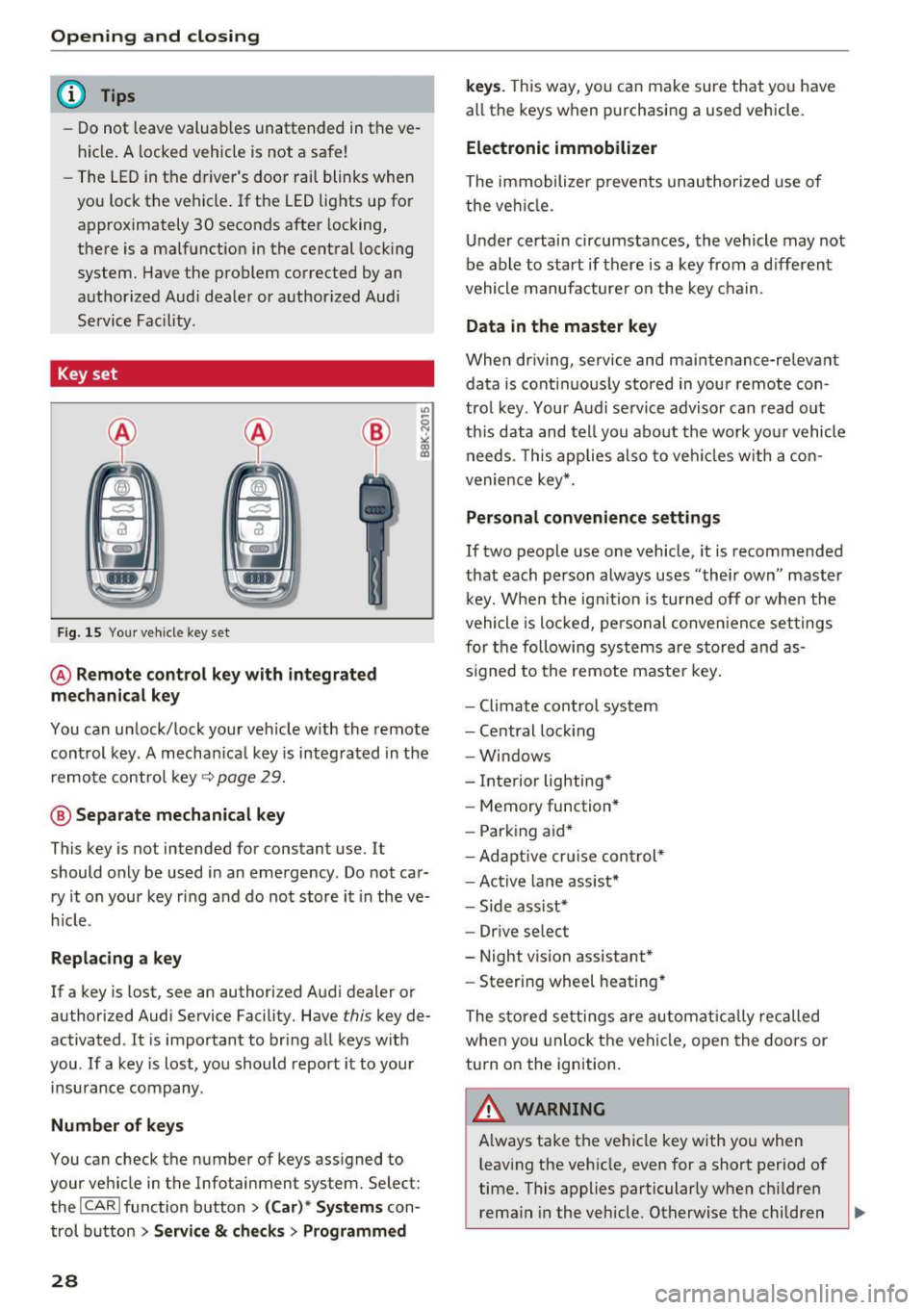
Key set
Fig. 15 You r veh icle key set
@ Remote control ke y with integr ated
mechanica l key
You can unlock/lock your veh icle w ith the remote
control key . A mechan ical key is integrated in the
remote control key~
page 29.
@ Separate mechanical ke y
This key is not intended for constant use. It
should only be used in an emergency . Do not car
ry it on your key ring and do not store it in the ve
h icle.
Replacing a ke y
If a key is lost, see an authorized Audi dealer or
authorized Audi Service Facility. Have
this key de
activated . It is important to bring all keys with
you . If a key is lost, you should report it to your
insurance company.
Number of key s
You can check the number of keys ass igned to
your veh icle in the Infotainment system. Select:
the !CAR !function button>
(C ar )* S yst e m s con
trol button
> Service & che cks > Programmed
28
k ey s. T his way, you can make sure that you have
all the keys when purchasing a used vehicle.
El ectronic immobiliz er
The immobilizer p revents unauthorized use of
the ve hicle.
Under certain circumstances, the vehicle may not
be able to start if there is a key from a d ifferent
vehicle manufacturer on the key chain.
Da ta in th e master key
When dr iving, service and maintenance-relevant
data is cont inuous ly stored in your remote con
trol key. Your A udi se rvice advisor can read out
th is data and tell you about the work yo ur vehicle
needs . This applies also to veh icles with a con
venience key *.
Personal convenience sett ings
If two people use one vehicle, it is recommended
that each person always uses "their own" master k ey. When the ign ition is turned off o r whe n the
vehicle is locked, personal conve nience set tings
for the following systems are stored and as
s igned to the remote maste r key .
- Climate cont rol system
- Central lock ing
- Windows
- Interior lighting*
- Memory function*
- Park ing aid*
- Ad aptive cru ise con trol *
- Ac tive lane assist*
- Side ass ist*
- Drive select
- Night vision assistant*
- Steering wheel heating *
The stored settings a re a utomat ica lly recalled
whe n you unlock t he vehi cle, open the doors or
turn on the ignition.
A WARNING
A lways take the vehicle key with you when
leaving the vehicle, even for a short period of
time. This applies particularly when child ren
rema in in the vehicle . Otherwise the children
-
Page 31 of 284
co
co
.... N
" N .... 0
00
<..:l 'SI'
could start the engine or operate electrical
equipment such as power windows.
(D Tips
- The operation of the remote control key can
be temporarily disrupted by interference
from transmitters near the vehicle working
i n the same frequency range (such as a cell
phone or radio equipment).
- Using the mechanical key, you can:
- Lock/unlock the glove compartment.
- Manually lock/unlock the vehicle
¢ page 32 .
-Mechanically lock the doors¢ page 32.
-For an explanation on conformity with the
FCC regulations in the United States and the
Industry Canada regulations, see
¢ page 267.
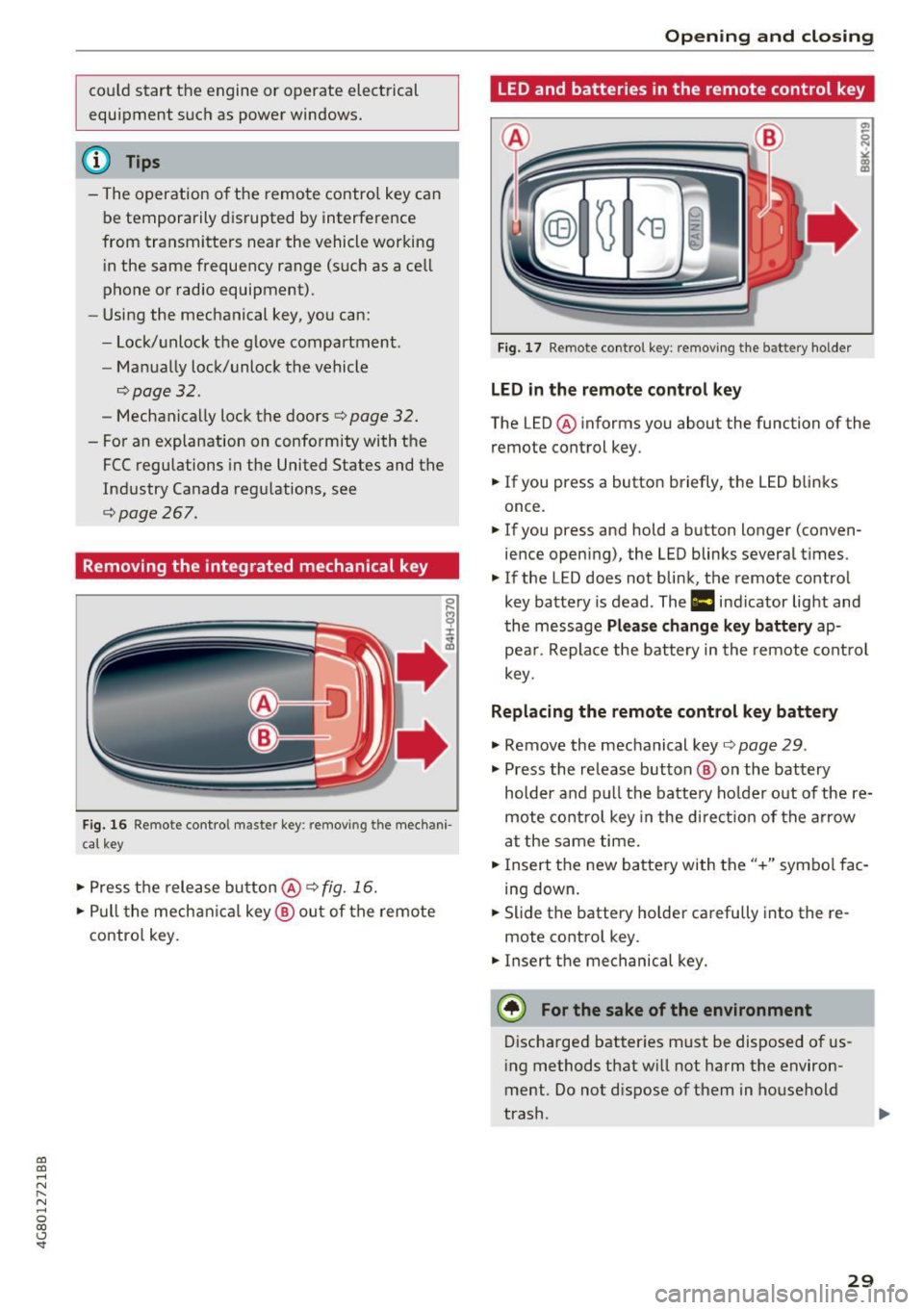
Removing the integrated mechanical key
Fig. 16 Remote contro l maste r key : remov ing t he mech ani
cal key
• Press the release button@¢ fig. 16.
• Pull the mechanica l key @ out of the remote
contro l key.
Open ing and closing
LED and batteries in the remote control key
Fig. 17 Remote control key: removing the battery holder
LED in the remote control key
The LED @ informs you about the function of the
remote control key.
• If you press a button briefly, the LED b links
once .
• If you press and hold a button longer (conven
ience opening), the LED blinks several times.
"' If the LED does not blink, the remote control
key battery is dead . The
1:1 indicator light and
the message
Please change key battery ap
pear . Replace the battery in the remote control
key.
Replacing the remote control key battery
"'Remove the mechanical key ¢page 29 .
"' Press the release button @ on the battery
holder and pull the battery ho lder out of the re
mote control key in the di rect io n of the arrow
at the same time.
• Insert the new battery with the"+" symbol fac
ing down.
• Slide the battery holder carefully into the re
mote control key.
"' Insert the mechanical key.
@) For the sake of the environment
Discharged batter ies must be disposed of us
ing methods that w ill not harm the environ
ment . Do not dispose of them in household
trash.
29
Page 33 of 284

co
co
.... N
" N .... 0
00
<.,;) 'SI"
key is in your jacket pocket or in your briefcase,
for example .
The door ca nnot be opened for a br ief period di
rect ly after loc king it. This way you have the op
portunity to check if the doors locked correctly.
The settings in the Infotainment system deter mine if the entire vehicle or only one of the doors
is unlocked when unlocking the vehicle
¢page 32.
WARNING .1!!!!!!!!!. !!..-
Read and heed a ll WARNINGS ~.& in Descrip
tion on page
2 7.
@ Tips
If your vehicle is left stand ing for a long peri
od of time, note the following:
- The proximity senso r switches off after a
few days to save energy. You then have to
pull once on the door handle to unlock the
vehicle and a second time to open it .
- The energy management system gradually
turns off unnecessary convenience functions
to prevent the vehicle battery from draining
and to maintain the vehicle 's abi lity to start
for as long as possible. You may not be able to unlock your vehicle using the convenience
key.
- For an explanation on conformity with the
FCC regulations in the United States and the
Industry Canada regulations, see
¢page 267.
Central locking switch
Fig. 20 Drive r's door: central loc king switch
Open ing and closing
Fig. 21 Rear doo r: ce ntra l locking sw it c h
"' To lock the vehicle, press the~ button ~,&. .
"' To unlock the vehicle, p ress the @l button .
When locking the vehicle with the central locking
switch, the following app lies:
- Opening the door and the luggage compart
ment lid from the
outside is not possible (for
security reasons, such as when stopped at a
light) .
- The L ED in the central locking switch turns on
when all doors are closed and locked.
-Applies to: front doors: you can open the doors
ind ividually from the inside by pulling the door
handle .
- Rear doors: to unlock the doors, pull on the
door ha ndle
one time . To open the doors, pull
on the door handle
again .
- In the event of a crash with a irbag deployment,
the doors unlock automat ically to allow access
to the vehicle.
A WARNING
-The central locking switch also works when
the ignition is switched off and automatical
ly locks the entire vehicle when the~ but
ton is pressed.
- The central locking switch is inoperative
when the vehicle is locked from the outside.
- Locked doors make it more difficult for
emergency workers to get into the vehicle,
which puts lives at r isk. Do not leave anyone
behind in the vehicle, especially c hildren .
@ Tips
Your vehicle locks automatically when it
reaches a speed of 9 mph (15 km/h) (Auto
31
Page 38 of 284

Opening and closing
Child safety lock
The child safety lock prevents the rear doors
from being opened from the inside and the rear
power windows from be operated .
Fig. 28 Sect ion of driver's doo r: c hil d safety lock butto ns
• To activate/deactivate the inner doo r handle
and the power w indow switch for the respective
rear door, press the left/right
[!I button in the
driver's door~
fig. 28. The ind icator light in the
button t urns on/blinks.
• To activate/deactivate the child safety lock on
both sides, you must press the
[±l buttons one
after the other.
.&_ WARNING
Always take the vehicle key with you when
leaving the vehicle, even for a short period of
time. This applies particularl y when children
remain in the vehicle. Otherwise children
could start the engine or operate electrical
equipment (such as power windows), which
increases the risk of an accident.
36
Power windows
Controls
The driver can control all power windows .
Fig. 29 D river 's doo r: power win dow controls
All power window switches are equipped with a
two -stage function :
Opening and closing the windows
a, ~ M 0 ::, a, m
• To open or close the window completely, press
the switch down or pull the switch up briefly to
the second level. The operat io n will stop if the
sw itch is pressed/pulled again .
• To select a position in between opened and
closed, press/pu ll the switch to the first level
until the desired window position is reached.
Power window switches
@ Left front door
@ Right front door
@ Left rear door
@ Right rear door
.&_ WARNING
-Always take the vehicle key with you when
leaving the vehicle, even for a short period
of time. This applies particularly when chil
dren remain in the vehicle. Otherwise chil
dren could start the engine or operate elec
tr ical equipment (such as power windows),
which increases the risk of an accident. The
power windows continue to function until
the driver's door or front passenger's door
has been opened.
- Pay careful attention when clos ing the win
dows. Pinching could cause serious injuries .
-
Page 40 of 284

Opening and clo sin g
• To close the sunroof comp letely, press the
switch forward briefly to the second level
c::> ,&. .
• To select an intermediate pos ition, press/pull
the switch forward/back to the first level until
the desired position is reached .
The sunshade can be opened and closed by hand
when the roof is closed. The sunshade opens au
tomatically when the roof is opened.
You can still operate the sliding/tilt ing sunroof
for about 10 minutes after the ignition is switch
ed off. The switch is deactivated once the driver's
or front passenger 's door is opened.
A WARNING
Pay careful attent ion when closing the slid
ing/t ilting sunroof -otherw ise ser ious injury
cou ld result! Always take the ign ition key with
you when leaving the vehicle .
@ Note
Always close your sliding/tilting sunroof when
leaving your veh icle. Sudden ra in can cause
damage to the interior equ ipment of your ve
hicle, particularly the electron ic equ ipment.
-
@ Tips
- For informat ion on convenience opening, re
fer to
<::.>page 37.
- The sunroof will only open down to -20 °C
(-4 °F) .
Sunroof power emergency closing
App lies to: vehicl es with sli d in g/ti lting sunroof
If the sunroof detects an object in its path whe n
it is closing, it w ill open again automatically. In
this case, you can close the roof with the power
emergency closing function.
• Within five seconds afte r the sunroof opens au
tomat ica lly, pull the switch unt il the roof
closes .
I f you let go of the sw itch early, the sunroof will
open again .
38
Garage door opener
(Homelink)
Description
App lies to: vehicles with garage door opener (Horne Link)
Fig. 31 Garage door opener: examples of usage for d iff er·
ent syste ms
With the garage door opener (Homelink), you
can activate systems such as the garage doors,
security systems or house lights from inside your
vehicle. Three buttons are integrated in the head
liner that can be programmed to up to three re
mote controls .
To be able to operate systems using the garage door opener, the buttons in the headliner must
first be programmed .
A WARNING
When operating or programming the garage
door opener, make sure that no people or ob
jects are in the a rea immediately s urrounding
the equipment . People can be injured or prop
erty can be damaged if st ruck when closing .
(D Tips
-For security reasons, we recommend that
you clear the prog rammed buttons before
sell ing the vehicle .
- For add itiona l information about Homel ink,
visit www.homelink .com .
- For an exp lanat ion on conform ity w ith the
FCC reg ulations in the Un ited States and the
Industry Canada regulat ions, see
<::.> page 267.
Page 42 of 284
Lights and Vision
Lights and Vision
Exterior lighting
Switching lights on and off
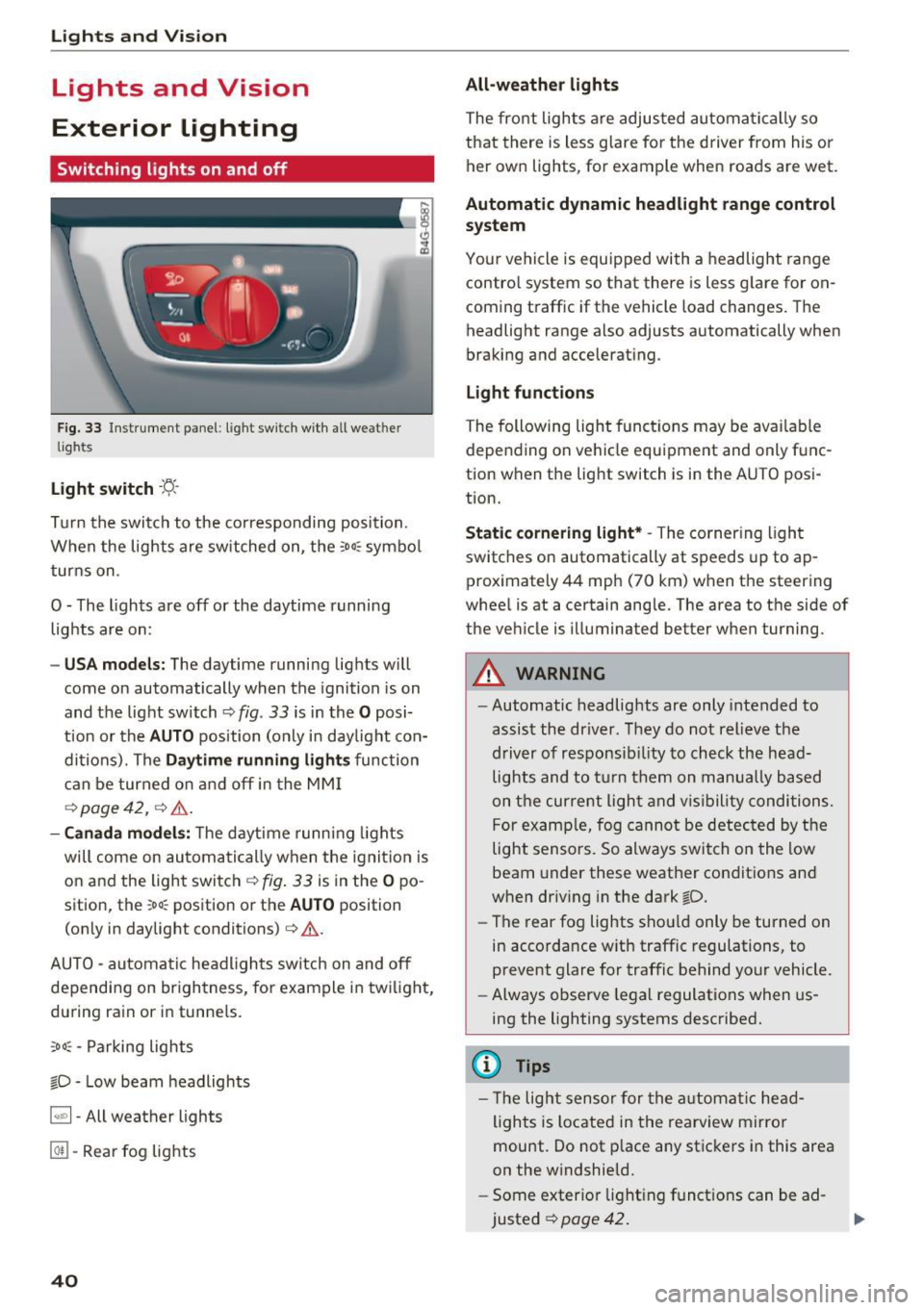
Fig. 33 Instrument panel: light sw itch w ith all weat her
lights
Light switch · 't/..·
T ur n the switch to the corresponding posi tion.
When the lights are sw itched on, the
:oo: symbol
turns on .
0 - The lights are off or the daytime running
lights are on:
- USA m odels: The daytime running lights will
come on automatically when the ignition is on
and the light switch¢
fig. 33 is in the O posi
t ion or the
AUTO position (only in day light con
dit ions). The
D aytime running light s function
can be turned o n and off in the MM I
r=:>page42, ¢ ,6 .
-Canada mo del s: T he d aytime runn ing lights
will come on automati cally when the ignit io n is
on and the ligh t swi tch
r=:> fig . 33 is in the O po
sition, the
;oo: position or the AUTO position
(on ly in daylight conditions)
¢ &.
AUTO -automatic headlights switch on and off
depending on br igh tness, for example i n tw ilig ht,
du ring rain or in tunnels.
;oo: -Parking lights
io -Low beam headlights
~ - All weather lights
@TI -Rear fog lights
40
All-weather lights
The front lights a re adjus ted au toma tically so
that there is less g lare fo r the d river from his o r
her own lights, for example when roads are wet .
Automatic dynamic headlight range control
system
Yo ur vehicle is equ ipped with a headlight range
contro l system so that there is less g lare for on
coming t raffic if the vehicle load changes. The
headlight range also adjusts automatically when
braking and accelerat ing .
Light funct ion s
The following light functions may be ava ilable
depending on ve hicle equipment and only func
tion when the light switch is in the AUTO posi
tion.
Static cornering light* -The cornering light
switches on automatically at speeds up to ap
proximately 44 mph (70 km) when the steering
whee l is at a certain angle. The area to the side of
the vehicle is illuminated better when turning.
A WARNING
-Automatic headlig hts are only intended to
assis t the driver. They do not relieve the
driver of responsib ility to check the head
lights and to t urn them on manua lly based
on t he cur re nt ligh t and v is ibility conditions.
F or examp le, fog cannot be detec ted by the
light sensors. So always switch on the low
beam under these weather conditio ns an d
when driv ing in the dark
io.
- The rear fog lights shou ld only be turned on
in accorda nce w ith traffic regulations, to
prevent glare for traffic behind your vehicle.
- Always observe legal regulations when us
ing the lighting systems described.
(D Tips
- Th e light senso r for the a utomat ic he ad
ligh ts is located in the rearview mirro r
mount . Do not p lace any stic kers i n this area
on the w indshield.
- Some exter ior light ing f unct ions can be ad
justed
¢ page 42 .
Page 43 of 284
co
co
.... N
" N .... 0
00
\.J '
lights are on and open the door, a warning
tone sounds.
- In cool or damp weather, the inside of the
headlights, turn signals and tail lights can
fog over due to the temperature difference
between the inside and outside. They will
clear shortly after switching them on. This
does not affect the serv ice life of the light
ing .
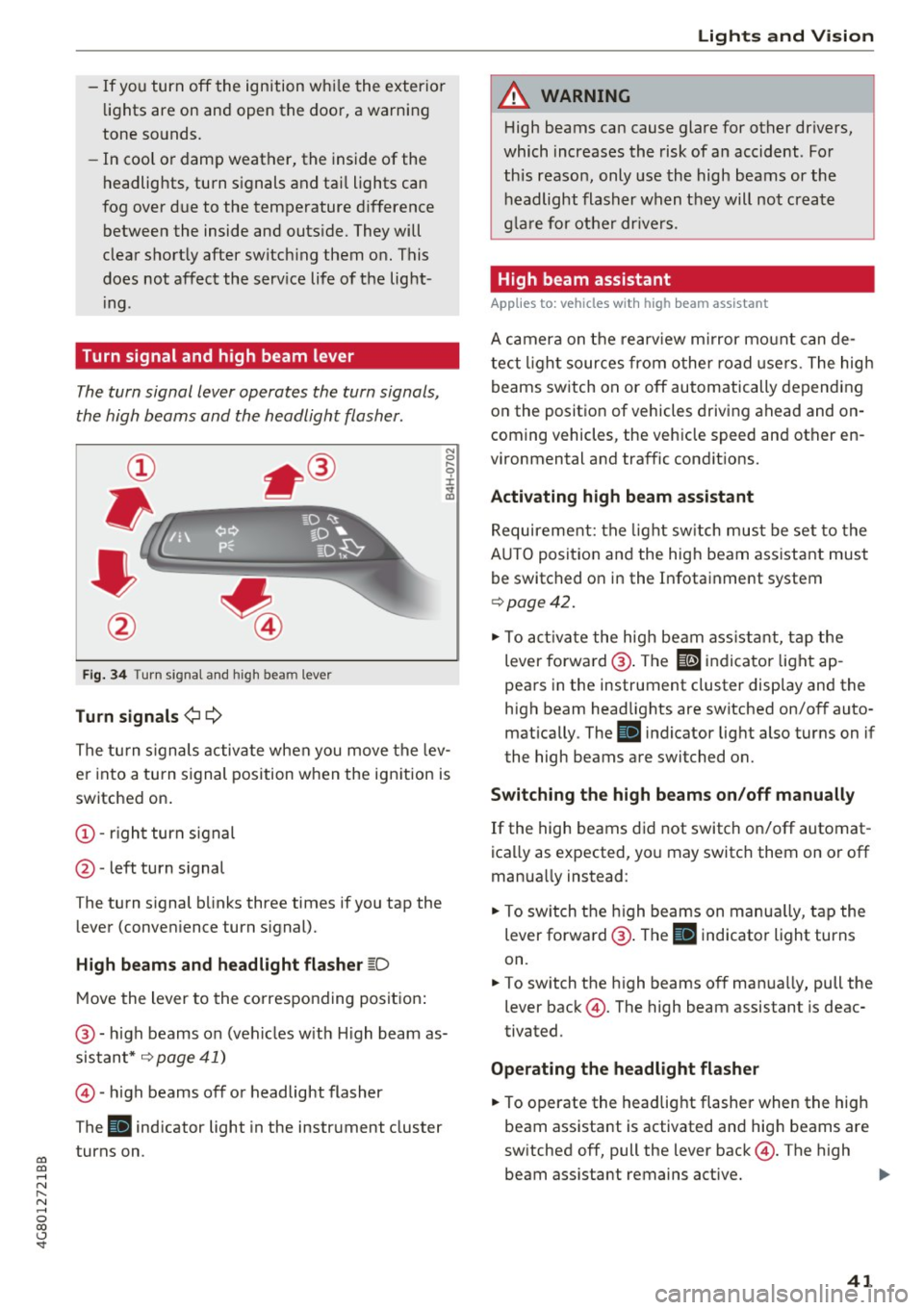
Turn signal and high beam lever
The turn signal lever operates the turn signals,
the high beams and the headlight flasher.
Fig. 34 Turn s ignal and h igh bea m lever
Turn signals¢¢
N
0
,-.. 0 ± .,. a,
The turn s ignals activate when you move the lev
er into a turn signal position when the ignition is
switched on.
@ -right turn signal
@ -left turn signal
The turn s ignal blinks three times if you tap the
lever (conven ience turn s ignal).
High beams and headlight flasher ~D
Move the lever to the corresponding position :
@ -high beams on (vehicles w ith H igh beam as
sistant*
~ page 41)
©-high beams off or headlight flasher
The
Bl indicator light in the instrument cluster
turns on.
Lights and Vision
A WARNING
High beams can cause glare for other drivers,
which increases the risk of an accident . For
this reason, only use the high beams or the
headlight flasher when they will not create
glare for other drivers .
High beam assistant
Applies to : vehicles wi th high beam assis tan t
A camera on the rearview mirror mount can de
tect light sources from other road use rs . The high
beams switch on or off automatically depending
on the position of vehicles driving ahead and on
coming vehicles, the veh icle speed and other en
vironmental and traffic cond it ions.
Activating high beam assistant
Requirement: the light switch must be set to the
A UTO posit ion and the high beam ass istant must
be switched on in the Infotainment system
~page 42 .
.. To activate the high beam assistant, tap the
lever forwa rd @ . The
El indicator light ap
pears in the instrument cluster display and the
high beam headlights are switched on/off auto matically . The
Bl indicator light also turns on if
the high beams are switched on.
Switching the high beams on/off manually
If the high beams did not switch on/off automat
ica lly as expected, you may switch them on or off
manua lly instead:
"' To switch the high beams on manually, tap the
lever forward @. The
Bl indicator light turns
on.
.. To switch the high beams off manually, pull the
lever back@. The high beam assistant is deac
tivated.
Operating the headlight flasher
.. To operate the headlight flasher when the high
beam assistant is activated and hig h beams are
switched off, pull the lever back@. The high
beam ass istant remains active. ..,
41
Page 44 of 284
Lights and Vision
Messages in the instrument clu ster display
Headlight a ssis t: System fault !
Drive to an authorized Aud i dealer or a uthorized
Aud i Serv ice Facility immediately to have t he
malfunct io n corrected. You can still switc h the
h igh beams on or off manually.
Headlight as sist: Unavailable No camera view
The camera view is blocked, for example by a
sticker or debris.
The senso r is located between the interior rear
view mirror and the windshield. Do not place any stickers in th is area on the windshield.
A WARNING
H igh beam assistant is only i ntended to assist
the driver . The dr iver is still responsible for
cont ro ll in g the head ligh ts a nd switc hing
t hem manually depend ing on light and v isibil
i t y condition s. It may be necessary to operate
th em m anually i n situ ations such as:
- In adve rse weathe r cond it ions s uch as fog,
he avy ra in, b low ing snow or sp raying wa te r.
- On roads w here oncoming traffi c may be
pa rtiall y obscu red, s uch as ex pressways.
- Whe n there are road users t hat do not have
s ufficient ligh ting, s uc h as bicycle rs o r
vehicles wi th dirty ta il lamps.
- In tight cu rv es and o n steep hills.
- In poorly lit areas .
- With strong reflectors , such as signs.
- If the area of the windshield near the senso r
is fogged over, dirty, icy or covered with a
sticker.
Adjusting the exterior l ighting
The funct ions are adjusted in the Infotainment
system.
~ Se lect : I CAR I functio n button> (Car) * Systems
contro l button > Vehicle settings > Exterior
light ing .
Automatic headlights
You can adj ust the fo ll ow ing settings in the Au
tomatic headlight s
menu:
42
Activation sensitivity -you can adjust if the
headlights switch on
Early , Medium or Late ac
cording to the sensit ivity of the light sensor.
Auto-dimming high beams * -yo u can switch t he
high beam assistant *
On and Off .
Daytime running lights*
USA models :
the daytime running lights can be
swi tched on/off. Select
On or Off .
Canada models:
this function cannot be sw itched
off . They act ivate automatically each time the ig
nit ion is switched on .
Coming home, Leaving home
The coming home function illuminates the area
outside the vehicle when you turn the ig nit ion off
and open the d river's door . To turn the function
o n, select
Lights when leaving car > On .
The leaving home illum inates the area outside
the vehicle when you unlock the vehicle . To turn
the function on, se lect
Lights when unlocking
car > On .
The coming home and leav ing home functions
on ly operate when it is dark and the light switch
i s in the
AUTO pos ition .
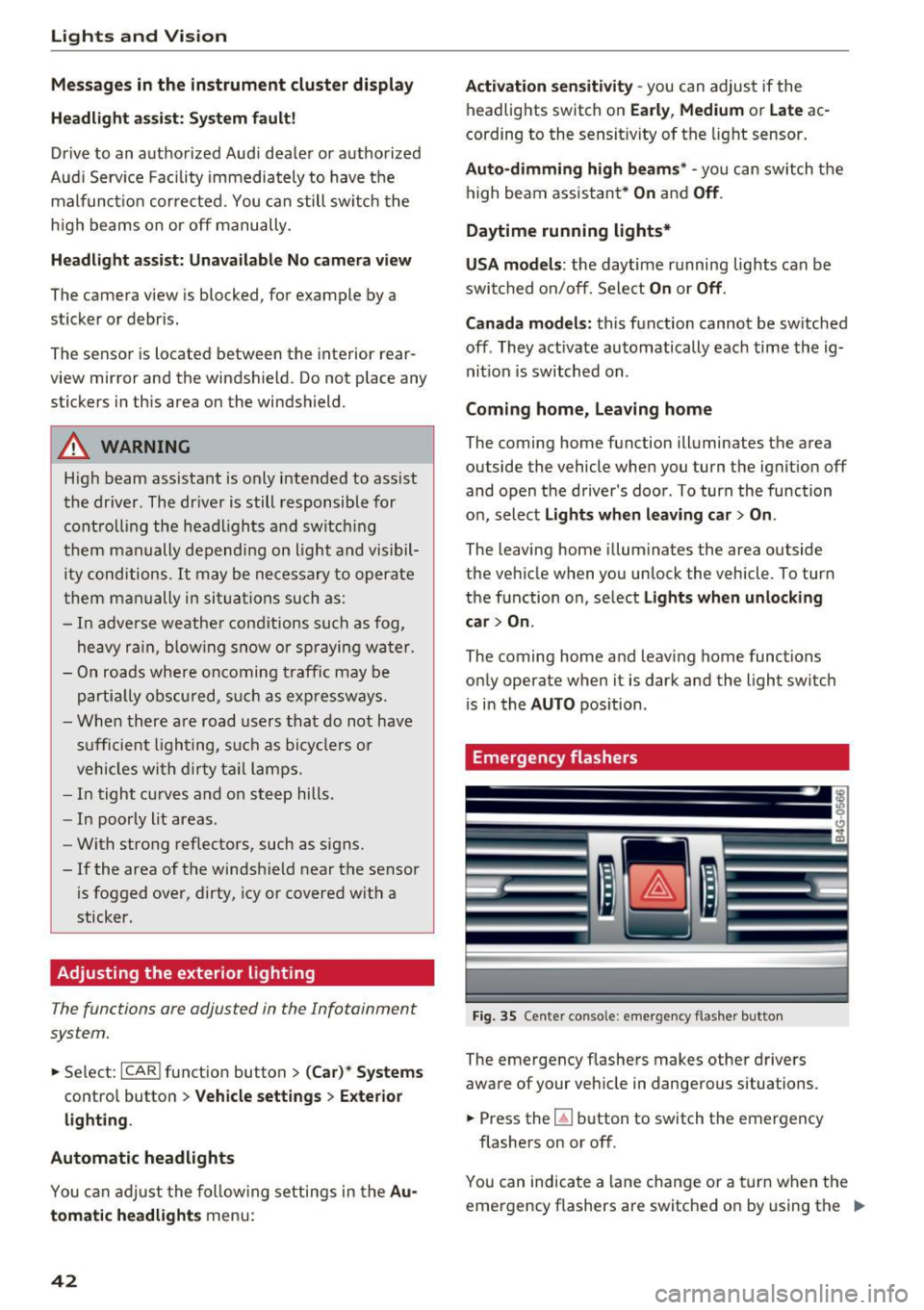
Emergency flashers
-------
Fig. 35 Cente r conso le : emergency f las her bu tton
The emergency flashe rs makes other d rivers
aware of your veh icle in dangerous situations.
~ Press the~ button to switch the emergency
flashers on or off .
You can indicate a lane change or a tur n w hen the
emergency flashers are switched o n by using the "'
Page 45 of 284
co
co
.... N
" N .... 0 co <.,;) 'SI'
turn signal lever. The emergency flashers stop
temporarily .
The emergency flashers also wo rk when the igni
tion is turned off .
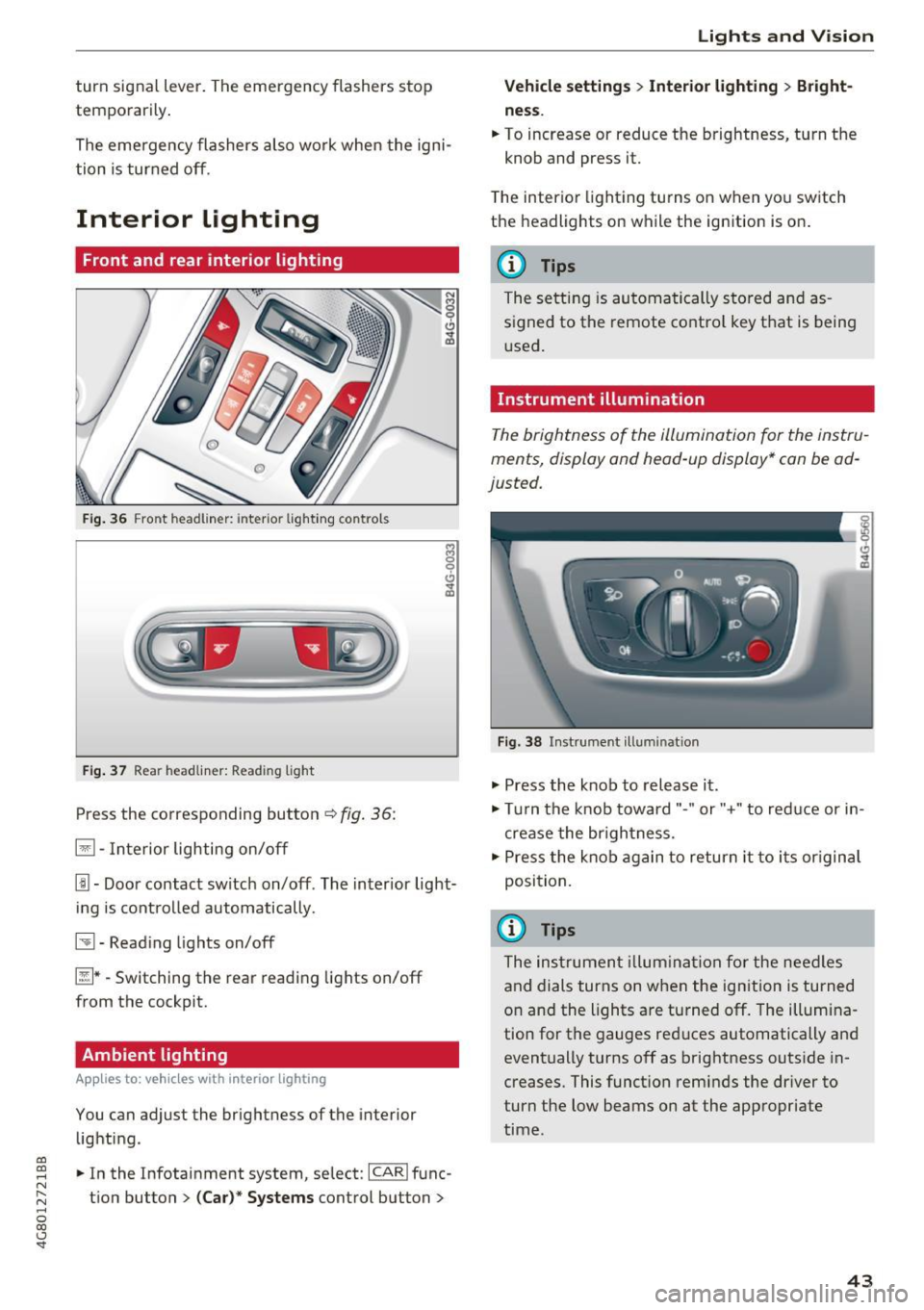
Interior Lighting
Front and rear interior lighting
Fig. 36 Fro nt hea dliner: inter io r light ing co ntro ls
F ig. 37 Rea r headliner: Read ing light
Press the corresponding button c:::> fig . 36:
El -Interior lighting on/off
I!!-Doo r contact switch on/off . The inter ior light
i ng is cont rolled automatically.
~ -Read ing lights on/off
~ * -Switching the rear read ing lights on/off
from the cockpit.
Ambient lighting
App lies to: vehicl es with interior lighting
You can adjust the brightness of the interior
lighti ng .
.. In the Infotainment system, se lect:
ICARI func
tion button
> (Ca r)* Systems control button >
Lights and V ision
Vehicle settings > Interior lighting > Bright
ne ss .
.. To increase or reduce the brightness, turn t he
knob and press it.
T he inter ior lighting tu rns on when yo u sw itch
the headlights on while the ignition is on .
(D Tips
The setti ng is au toma tically s to red and as
s igned to the remote cont ro l key t hat is being
u sed .
Instrument illumination
The brightness of the illumination fo r the instru
ments, display and head-up display* con be ad
justed.
Fig . 38 Instrument ill um ination
"' Press the knob to release it .
"' Tur n the knob toward"-" or"+" to red uce or in
crease the br igh tness.
.,. Press the knob again to return it to i ts or igin al
posi tion.
(D Tips
The ins trumen t illum ina tion for the need les
and dials turns on when the ignition is turned
on and the lights a re turned off. The illumi na
tion for the gauges red uces automatically and
eventually turns off as brightness outside in
creases. This funct ion rem inds the dr iver to
turn the low beams on at the appropriate
time .
43
Page 46 of 284

Lights and Vision
Vision
Adjusting the exterior mirrors
Fig. 39 Drive r's door: knob for the exterior mirrors
Turn the knob to the desired position:
Q/ P -adjusts the left/right exterior mirror.
M ove the knob in the desired direction.
®-Heat the mir ror glass depend ing on the o ut
side temperature .
~ -Folds the exterio r m irrors* . In the Infotain
men t sys tem, yo u can selec t if the mirrors fold in
automatically when you lock the vehicle
q page 32 .
Front passenger's exterior mirror tilt
function*
To help you see the curb w hen back ing into a
parking space, the surface of the mirror tilts
slightly. Fo r thi s to happen, the knob must be in
the posit io n for the front passenger's outside
mirror .
You can adjust the t ilted mi rror surface by turn
ing the knob in the desired direction. When you
move out of reverse and into anothe r gear, the
new mirror position is stored and assigned to the
key you are us ing.
The mirror goes back into its o rigina l position
once yo u drive forward faster than 9 mph
(15 km/h) or turn the ignition off.
A WARNING
Curved mirror surfaces (convex or aspheric*)
enlarge the field of vision . However, they
ma ke objects i n the mirror appear smaller
and farther away. Your may estimate i ncor-
44
rect ly w hen you use these mirro rs to gauge
your d istance from t he veh icles beh ind you
when chang ing lanes, which inc reases the risk
of an acc ident.
(D Note
- If the mi rror housing was moved by fo rce
( f or example, by runn ing into an object
when maneuvering the vehicle), the m irror
must be fo lded a ll the way in us ing the pow
er folding fu nction . T he m irror hous ing
must not be moved back into place by hand
because t his wo uld impair the func tion of
t he mir ror mechani sm.
- If you wash the vehicle in an automatic ca r
wash, you mus t fold t he ex ter ior mirro rs in
to reduce the r is k of damage to the m irro rs.
N ever fold power fo ld ing exterior mi rrors *
by hand . On ly fold them in and out using
the power controls .
(D Tips
-If the power adjusting func tion malfunc
tions, the glass in both mirrors can be ad
justed by p ressing on the edge of it by hand.
- The e xte rior m irro r settings are stored w it h
the memory fu nctio n* ¢
page 5 0.
Dimming the mirrors
Your vehicle is equipped with a manual or auto
matic* dimming rearview mirror.
Fi g. 40 A utomat ic dimming rearv iew mirr or*
Manual dimming rearview mirror
.,. Pull the lever on the bottom of the mirror back. Iii>-