wheel AUDI A7 2017 Owner´s Manual
[x] Cancel search | Manufacturer: AUDI, Model Year: 2017, Model line: A7, Model: AUDI A7 2017Pages: 284, PDF Size: 72.29 MB
Page 89 of 284

co
co
.-, N
" N .-, 0
00
<.,;) 'SI'
Boost, shifting and
engine oil temperature
indicators
Applies to: vehicles with boost, shifting and engine oil tem
peratu re indicators
Fig. 87 Instrument cluster: boost, shift ing and eng ine oil
temperature indicators
... Turn the menu thumbwheel on the steering
wheel until
Lap timer appears in the instru
ment cluster display.
@ Boost pressure indicator
The current engine load (meaning the current
boost pressure) is indicated by a bar .
@ Shifting indicator
The shifting indicator is on ly visible when shifting
gears in tiptronic mode ¢ page
79. Green LEDs
turn on as the engine RPMs increase. The LEDS
flash red at speeds near the RPM limit.
In vehicles with an activated head-up display
¢ page
24, the shifting indicator is shown in the
head-up display instead of the instrument clus
ter.
© Engine oil tempe rature indicator
If the engine oil temperature is below 140 °F
(60 °(), th<> I# symbol followed by three hy
phens"- - -" and the
0
( unit is shown.
The engine has reached its operating tempera
ture when the engine oil temperature is between
140
° F (60 °() and 248 °F (120 °() under normal
driving conditions. The engine oil temperature
may be higher if there is heavy engine load and
high temperatures outside. This is not a cause for
concern as long as the .¢ page
15 or Ill
Assist
¢ page 15 indicato r lights in the display do not
blink.
Lap timer
Introduction
Applies to: vehicles with lap timer
You can record and evaluate lap times with the
lap timer ¢ page
87, fig. 88. Th e time is meas
ur ed in m inutes, seconds and 1/10 seconds . The
hours are also shown when the lap time exceeds
60 minutes. The maximum individual measure
ment is 99 hours. A maximum of SO laps can be
recorded.
A WARNING
-Your focus shou ld always be on driving your
vehicle safe ly. As the driver, you have com
plete respons ibility for safety in traffic. Only
use the functions in such a way that you al
ways maintain complete control over your ve
hicle in all traffic situations .
@ Tips
You can retr ieve informat ion from the tr ip
computer wh ile the lap timer stopwatch is
r unning.
Opening the lap timer and recording times
Applies to: vehicles with lap timer
Fig. 88 Display: lap t imer
Opening the lap timer
... Turn the menu thumbwheel on the steering
wheel until
Lap timer appears in the instru
ment cluster display .
-
87
Page 90 of 284

Assist
Timing laps
.. To start timing, press the thumbwheel.
.. To stop t iming for this round, press the thumb
whee l again. This starts timing the next lap at
the same time. The last recorded t ime will
move up one line. The lap number is displayed
in front of the time measurement.
Di splaying intermediate time and pausing
timing
.. To display a split time, press the thumbwheel.
The timing continues to run in the background .
.. To interrupt the timing, for example to insert a
pause, press the thumbwheel.
.. To resume timing , press the thumbwheel
again.
If timing is paused, you can continue it later even
if you switch the ign ition off .
Evaluating , resuming or resetting timing
App lies to: ve hicles with lap timer
You can evaluate the fastest, slowes t and aver
age lap times .
Fig. 89 Display: eva lu ating a recorded time
.. To eval uate a recorded time (view the statis
tics), press the thumbwheel. The number of
laps driven, the fastest lap"+", the slowest lap
"-", and the average lap time "0" appear in the
display.
• To continue timing for additional laps, press
the thumbwheel.
.. To reset the timing to zero, press the thumb
whee l aga in. The lap timer switches off.
88
@ Tips
- Saved lap times cannot be individually de
leted from the total results.
- The saved lap timer va lues wi ll remain after
switching the ignition off.
Audi adaptive cruise
control
Description
Applies to: vehicles with Audi adapt ive cruise control
Fig. 90 Detectio n ra nge
The adaptive cru ise control system is a combina
tion of speed and dis tance regulation .
It assists
the driver by both regulating the speed and
maintaining a distance to the vehicle driving
ahead, within the limits of the system.
If the sys
tem detects and object ahead, adaptive cruise
control can brake and accelerate your vehicle .
This makes driving more comfortable both on
long stretches of highway and in stop-and-go
traffic .
What can adaptive cruise control do?
The adaptive cruise control system uses video, ra
dar and ultrasound. Objects driving ahead can be
recognized up to 650 feet (200 m) away.
On open roads with no traffic, it functions like a
cruise control system. The stored speed is main
tained . When approaching an object ahead, the
adaptive cruise control system automatically
brakes to match that object's speed and then
maintains the stored distance . As soon as the
system does not detect an object ahead, adaptive
cruise contro l accelerates up to the stored speed.
Ill>
Page 99 of 284

co
co
.... N
" N .... 0
00
<.,;) 'SI"
lines, the system c an also t ake into account other
objects such as guard rails . If they are detected in
close proximity to the veh icle, active lane assist
he lps prevent the vehicle from driving too close
to them. There is also passing assistance . The
system does not provide any corrective steering if
i t detects that you are passing another veh icle .
& WARNING
-The system wa rns the driver that the veh icle
is leav ing the lane using co rre ctive s teer ing.
T he driver is always respo nsible for kee ping
the vehicle within the lane .
- T he system can help you keep the vehicle in
th e lan e, but i t does not drive by itself. Al
w ays keep yo ur hands on the steering
whee l.
- Corrective steer ing may not o ccur in ce rtain
situations , su ch as during heavy bra king.
- T here m ay be cases where the came ra does
not recognize all lane ma rker lines . Correc
t ive steering can o nly take p lace on the side
of the veh icle where lane marker lines are
detected.
- Other road structures or objects could possi
bly be identified unintentiona lly as lane
marker lines . As a result, corrective steering
may be unexpected or may not occur.
- The camera view can be restricted, for ex ample by vehicles driv ing ahead or by rain,
snow, heavy spray or light shining into the
camera . This can result in act ive lane assist
not detec ting the lane marke r lines or de
tecting them incor rectly.
- Under certa in conditions suc h as rut s in the
road, a bank ed roadway o r crosswinds , the
co rrective stee ring a lone may not be enough
to keep the vehicle in the mi ddle of the lane.
- F or safety reasons, active lane assis t m ust
not be used when the re are poor roa d an d/
o r we athe r cond itions s uch a s slippery
roads, fog, grave l, heavy r ain, snow a nd the
potent ial for hydroplaning . Using active lane
assist under these conditions may increase
the risk of a crash.
A ss ist
Switching on/off
App lies to : veh icles w it h A udi act ive lane ass ist
Fi g. 10 1 Turn s ignal leve r: bu tto n fo r active lan e ass is t
Fig . 1 02 W inds hield: came ra w indow fo r active lane a ssist
.,. Press the button to sw itch the sys tem on and
off c'.>fig .101. The .or. indicator light in
the inst rument cluste r turns o n or off .
Indicator lights
• Ready: the indicator light turns on when the
system is ready for use. The system can now be
operated .
• Not ready : the indicator light turns on if the
system is switched on but is inoperable. This may
be due to the following reasons:
- There is no lane marker line .
- The relevant lane mar ke r li nes a re not detected
(for examp le, ma rkings in a construction zone
or because they are obstructed by snow, dirt,
water or light ing).
- The vehicle speed is be low the activation speed
of approximate ly 40 mph (65 km/h) .
- The la ne is too nar row or too wide .
- The curve is too narrow.
- The d river's hands are not on the steer ing
wheel.
97
Page 100 of 284

Ass is t
@ Tips
Make sure the camera's fie ld of view
¢
fig. 102 i s not obstructed by st ickers or any
thing else. For information on cleaning, refer
to¢
page 235.
View in instrument cluster display
A ppl ies to: ve hicles w ith Audi active lane assist
Fig . 1 03 Instrument cl uster: act ive lane ass ist is sw itc hed
on a nd prov id ing warn ings
Fi g. 10 4 Inst rument cluster: act ive la ne assist is sw itc hed
on but not ready to provide warnings
You can call up the active lane assist display us
ing the buttons in the multifunction steering
wheel ¢
page 21.
An addit iona l indicator appears in the Head -up
disp lay*.
White line(s) Active lane assist is activated and ready to p rov ide warnings.
Red line(s) Active lane assist warns you
(left or r ight) before leaving a lane
¢ fig. 103. In addit ion, the
steering wheel vibrates light ly.
Gray line(s) Active lane assist is activated,
b ut not ready to give warning
¢ fig . 104.
98
Messages in the instrument clu ster disp lay
If t he a ctive lane assist sw itches off automa tical
l y, the indicator light in the display turns off and
one of the fo llow ing messages appears:
Audi a ctive lane assi st : Currentl y unavailable.
No camera v iew
This message appears if the camera is unable to
de tect the lines. This could happe n if:
- The camera field of view¢
page 97, fig. 102 is
dirty or covered in ice . Clean th is area on the
w indshield.
- The camera fie ld of view is fogged over. Wait
until the fog has cleared before switch ing the
active la ne assist on aga in .
- T he system has been unable to detect the lanes
for an extended p eriod of t ime due to road con
ditions . Switch ac tive lane assist back on when
t he lines a re more visib le.
Audi a cti ve lane assi st: Currently unavailab le
There is a temporary act ive lane assist malfunc
tion. Try switc hing the active lane assist on again
later.
Audi a cti ve l ane assist: System fault!
D rive to an au thor ized A udi dealer or au thorized
Audi Service Facility immediate ly to have the
malfunction corrected.
Audi active lane a ssis t : Plea se take over steering
This message appears if you are not steer ing by
yourself .
If this is the case, active lane assist does
not switch off, b ut it is "not ready" to provide a
warning. The system can help you keep the vehi
cl e in the lane. However, you are responsible for
driv ing the vehicle and must steer it yourse lf .
Adjusting the vibration warning
App lies to: vehicles wit h Audi active la ne ass ist
.,. Select: the I CARI function button > (Car ) * Sys
tems
contro l button > Dri ver assistan ce > Audi
a ct ive lane assist .
Vibrat ion warning
You can swi tch the addit io nal vib ra ti on war ning
in the steering whee l on or off .
Ill-
Page 102 of 284

Ass is t
General information
Applies to: ve hicles w ith Audi side assis t
®
@
©
Fig. 107 Driving s ituations
~ A UD I
• 0 0 •
Fig. 108 Rear of the vehicle: pos it ion of the senso rs
Side assist functions at speeds above approxi
mately 19 mph (30 km/h).
@ Vehicles that are appro aching
In certain cases, a vehicle will be classified as
cr itica l for a la ne change even if it is still some
what far away. The faster a veh icle approaches,
the soo ner the d isplay in the exterior mirror w il l
turn on.
@ Vehicles traveling with you
Veh icles traveling with you are indicated in the
exterior m irror if they are classified as critical for
a lane change. All ve hicl es detected by side assist
100
are indicated by the time they enter your "blind
spot", at the latest .
© Vehicle s you are passing
If you slow ly pass a vehicle that side assist has
de tected (the diffe rence in speed between the
vehicle and your vehicle is less than 9 mph (15
km/h)), the display in the exterior mirror turns
on as soon as the vehicle enters your blind spot.
The display w ill not turn on if you quickly pass a
vehicle that side ass ist has detected (the differ
ence in speed is greater than 9 mph (15 km/h)) .
Functional limitations
The radar sensors are designed to detect the lef t
and right adjacent lanes when the road lanes are
the norma l width. In some situations, the display
i n the exterior mirror may turn on even though
there is no vehicle located in the area that is criti
ca l for a lane change. For example:
- If the lanes are n arrow or if your are d riving on
the edge o f you r lane . If th is is the case, the
system may have detected a vehicle in another
lane that is
not adjacent to your current lane.
- If you are d riving through a curve. Side assist
may react to a vehicle that is one lane over
from the adjacent lane .
- If side assist reacts to other objects (such as
high or disp laced guard rai ls) .
- In poor weather conditions. The side ass ist
functions are limited .
Do no t cover the rada r senso rs ¢
fig. 108 w it h
stickers, deposi ts, b icycle wheels or other ob
j ects, because they will impair the function . Do
not use side assist when towing a trailer. For in
format ion on cleaning, see
¢page 235.
_& WARNING
-Always pay attention to traffic and to the
area around your vehicle. Side assist cannot
replace a d river's attention . The driver alone
is always respo nsible for lane changes a nd
sim ila r driv ing maneuve rs .
- In some situations, the system may not function o r its function may be limited . For
examp le:
-
Page 103 of 284

co
co
.... N
" N .... 0
00
<..:l 'SI"
-If vehicles are approaching or being l.eft
behind very quickly. The display may not
turn on in time.
- In poor weather conditions such as heavy
rain, snow or heavy mist.
- On very wide lanes, in tight curves, or if
there is a rise in the road surface. Vehicles
in the adjacent lane may not be detected
because they are outside of the sensor
range.
- Audi side assist cannot detect all vehicles
under all conditions, which can increase the
risk of accidents.
- Please note that side assist only displays ap
proaching vehicles or vehicles in your blind
spot if your vehicle is traveling at least 19 mph (30 km/h).
- In certain situations, the system may not
work or its function may be limited . For ex
ample:
- The display may not turn on at the right
time if vehicles are approaching or passing
very quickly.
- In poor weather conditions, such as heavy
rain, snow or fog.
- In very wide lanes, in tight curves or when
there are slopes in the roadway, vehicles
in the neighboring lanes may not be de
tected because they are outside of the
sensor range .
(D Note
The sensors can be displaced by impacts or
damage to the bumper, wheel housing and
underbody. This can impair the system. Have
an authorized Audi dealer or authorized Audi
Service Facility check their function.
(D Ti ps
If the window glass in the driver's door or
front passenger's door has been tinted, the
display in the exterior mirror may be incor
rect.
- For an explanation on conformity with the
FCC regulations in the United States and the
Industry Canada regulations, see
¢page 267.
Assist
Switching on and off
App lies to : vehicles wi th Audi side ass ist
Fig. 109 Driver 's door : side assist button
"' Press the button to switch the system on and
off ¢.&. in General information on page 100 .
The LED in the button turns on when side assist
is switched on.
Adjusting the display brightness
App lies to: vehicles wi th Audi side ass ist
The display brightness can be adjusted in the In
fotainment system .
"' Select: the I CAR I function button > (Car)* Sys
tems control button > Driver assistance > Audi
side assis t.
The display brightness adjusts automatically to
the brightness of the surroundings, both in the
information and in the warning stage. In very
dark or very bright surroundings, the automatic
adjustment will set the display to the minimum
or maximum level. In such cases, you may notice
no change when adjusting the brightness, or the
change may only be noticeable once the sur
roundings change.
Adjust the brightness to a level where the display
in the information stage will not disrupt your
view ahead. If you change the brightness, the dis
play in the exterior mirror will briefly show the
brightness level in the information stage. The
brightness of the warning stage is linked to the
brightness in the information stage and is adjust-
ed along with the information stage . ..,
101
Page 104 of 284

Ass is t
@ Tips
- Side assist is not active whi le you are mak
i ng the adjustment.
- Your settings are automatically stored and
assigned to the remote control key being
used.
Messages
Applies to: vehicles with Audi side assist
If side ass ist switches off by itself, the LED in the
button turns off and a message will appear in the
instrument cluster display:
Audi s ide assi st: Curr ently un availabl e. No
s enso r vi sion
The radar sensor vis ion is impaired. Do not cover
the area in front of the sensors with bike wheels,
stickers, dirt or other objects . Clean the area in
front of the sensors, if necessary ¢
page 100,
fig . 108.
Aud i side as sist: Currently un avail able
Side assist cannot be switched on at th is time be
cause there is a malfunction (for example, the
battery charge level may be too low).
Aud i side a ssist: S ys tem fault!
The system cannot guarantee that it will detect
vehicles correctly and it has switched off. The
sensors have been moved or are faulty . H ave the
system checked by an authorized Audi dealer or
authorized Audi Service Facility soon .
Audi side assi st : Unav ailable wh en towing
Side assist switches off automatically when a fac
tory-installed trailer hitch is connected to the
electrical connector on the trailer. There is no
guarantee the system will switch off when using
a retrofitted tra iler hitch. Do not use side ass ist
when towing a trailer.
102
Night vision assist with
pedestrian and wild
animal detection
Description
Applies to : vehicles with night vision assist
The night vision assist con detect, highlight and,
if necessary, warn about pedestrians and large
wild animals.
Night vision assist with pedestrian and wild ani
mal detection assists you at night by us ing an in
frared camera to monitor the area in front of
your vehicle, within the limits of the system. It
can display objects up to a distance of approxi
mately 1000 feet (300 m). The thermal image
detected by the camera is shown in the instru
ment cluster disp lay. Warm areas appear lighter
and cold areas appear darker.
Highlighting detected pedestrians and wild
animals
Applies to: vehicles with n ight vis ion assist
Fig . 110 In stru men t cl ust er: yellow highlighted pedes ·
trians
Fig. 111 Instrument cl uster: symbol when the infrared im
age is not visible
Within the limits of the system, the night v is io n
ass ist can detect pedestr ians and wild animals ..,..
Page 105 of 284
co
co
.... N
" N .... 0
00
<..:l 'SI'
that are between approximately 32 ft (10 m) and
295
ft (90 m) in front of the vehicle and within
the detection zone . Within the limits of the sys
tem ¢
page 103, a pedestrian or w ild animal de
tected when the low beams are sw itched on is
highlighted in yellow¢
fig. 110 . Animal recogni
tion is not active w it hi n highly developed areas .
The system on ly de tects large wild anima ls s uch
as deer.
@ Tips
If another display such as navigation replaces
the image from the night v is ion assist the~.,
symbo l appea rs in a tab¢
fig. 111. You can
a ccess nigh t vision assist using the mul tifunc
t ion stee ring w heel buttons ¢
page 22 .
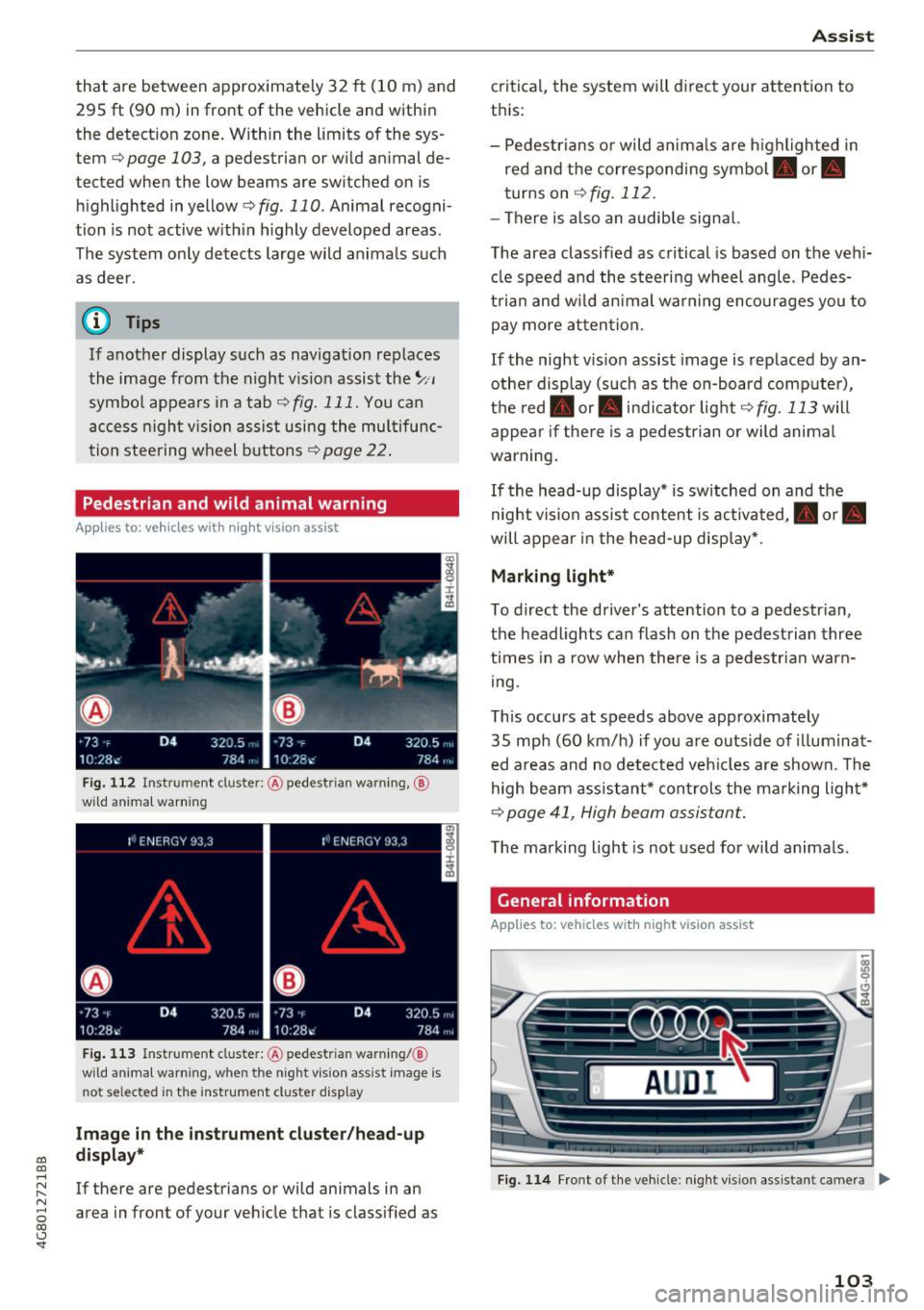
Pedestrian and wild animal warning
Applies to: vehicles with night vision assist
F ig . 11 2 Instru ment clust er: @ pede stri an warn ing ,@
wild animal warnin g
Fig . 11 3 In strument clus te r: @ pedest ria n warn ing/ @
wi ld an imal warning, when the nigh t vis ion a ssis t image is
n ot se lec ted in the instrument clust er dis p lay
Image in the inst rument clu ster /h ead -up
di spla y*
If there are pedestrians or wild animals in an
area in front of your veh icle that is class ified as
A ss ist
critica l, the system will d irect your attention to
t h is:
- Pedestrians or wild anima ls are h ighl ighted in
red and the corresponding symbol. or.
turns on
¢ fig. 112 .
-There is also an audib le signal.
T he area classified as critical is based on the vehi
cle speed a nd the steering wheel angle . Pedes
t rian an d w ild an imal warning encourages you to
pay more atten tion.
If the night vision assist image is replaced by an
othe r display (such as the on-board comp ute r),
t h e red . or. in d icator light ¢
fig . 113 will
appea r if the re is a pedestrian or wild animal
war ning .
If the head-up display* is sw itched on and the
night vis ion assist content is activated, . or.
will appe ar i n the head-up displ ay* .
Marking light*
To direct the driver's attention to a pedestr ian ,
the headlights can flash on the pedestrian three
t imes in a row whe n there is a pedestr ian warn
i ng .
This occurs at speeds above approximately
35 mph (60 km/h) if you are outside of illuminat
ed a reas and no de tected veh icles are shown. Th e
high beam assistant* con trols the ma rking ligh t*
¢ page 41, High beam assis tant.
T he ma rking light is not used for wild anima ls .
General information
Applies to: vehicles with night vision assist
Fig. 1 14 Front of the ve hicle : n ig h t v is io n as sist an t cam era ..,_
103
Page 108 of 284

Ass is t
depending on the s ituation. The distr ibution of
power varies from balanced (comfort) to sporty
(dynamic) depending on the selected mode. The
goal is a high leve l of agility and ability to accel
erate on curves. The veh icle is very responsive to
steer ing .
Cornering light*
The cornering light adapts the high beams to the
direction of the curve depending on the speed.
The pivot ing action and the lighting also adapt to
the mode.
Adaptive c ru ise contr ol*
The behavior when acce le rating can be adjusted
from comfortable to sporty, depending on the
drive select mode. Adaptive cruise control a lso
responds to the driving behavior of the veh icle
ahead in a more conservative or sporty manner.
Engine sound *
The engine sound adapts to the current mode
and can be subtle to sporty .
(D Note
Applies to: vehicles with adaptive air suspension
- Make sure there is enough clearance above
and below the veh icle when parking. The
height of the vehicle (ground clearance) can
change once it is parked due to tempera ture
fluctuations, changes to the load condit ions
and c hanges to the d riving modes.
- When transporting the veh icle on a car car
r ier, tra in, ship or by other means, only tie
the veh icle dow n at the running surfa ce of
the tires, w hic h is the outer circ umference .
Securing the vehicle at the axle compo
nents, suspension st ruts or towing eyes is
not permitted because the pressure in the
air suspension struts can change dur ing
transport . The vehicle may not be secured
sufficiently if this happens.
(D Tips
- In some models, the maximum vehicle
speed can only be reached in the auto and
dynam ic modes.
106
- The S se lector lever position a utomat ica lly
engages if the dynamic mode is selected.
- Applies to: vehicles with dynamic steering:
operating noise is heard when starting or
stopp ing the engine. Th is does not indicate
a problem.
Selecting the driving mode
F ig. 116 Infota inmen t: drive select
'" To select the mode, select the follow ing in the
Infota inment :
!CAR ! function b utton> Comfort ,
Auto , Dynamic or Individu al.
'" Applies to: vehicles with a ti.re'! button on the
steering wheel: press the button repeatedly un
til the desired mode appea rs in the instrument
cl uste r display.
You can change the driv ing mode when the vehi
cl e is stationary or while driv ing. If traff ic per
mits, afte r changing modes, briefly ta ke your
foot off the accelerator pedal so that the recently
selected mode is also activated fo r the engine.
Comf ort -prov ides a comfort -or iented vehi cle
setup and is suited fo r long drives on highways.
Auto -provides an overal l comfortab le yet dy
namic dr iv in g feel and is suited for everyday use.
Dynamic -gives the dr iver a sporty driving fee l
and is suited to a sporty d riving style .
Individual -¢ page 107.
A WARNING
Pay attention to traffic when ope rating the
d rive select to reduce the r is k of an accident.
-
Page 110 of 284

Parking systems
Parking systems
General information
Applies to: vehicles with parking system plus/rearview cam
era/peripheral camera
Depending on your vehicle's equipment , various
parking aids will help you when parking and ma
neuvering.
The
parking system plus assists you when park
ing by audibly and visually indicating objects de
tected
in front of and behind the vehicle
¢page 109.
The
rearview camera shows the area behind the
vehicle in the Infotainment system display. This
display assists you when you are cross or parallel parking
¢ page 110. The parking system plus
functions are also available
¢ page 109.
The
peripheral cameras assist you with parking
and maneuvering. You are aided by various cam
eras depending on the vehicle equipment level
¢ page 113. The parking system plus functions
are also available
¢ page 109.
A WARNING
-Always look for traffic and check the area
around your vehicle by looking at it directly
as well. The parking system cannot replace
the driver's attention. The driver is always responsible when entering or leaving a park
ing space and during similar maneuvers.
- Please note that some surfaces, such as
clothing, are not detected by the system .
-
-Sensors and cameras have blind spots in
which people and objects cannot be detect ed . Be especially cautious of small children
and animals.
- The sensors can be displaced by impacts or
damage to the radiator grille, bumper,
wheel housing and the underbody . The park
ing system may be impaired as a result.
Have an authorized Audi dealer or author
ized Audi Service Facility check their func
tion .
- Make sure the sensors are not obstructed by stickers, deposits or other materials. If they
are, the sensor function could be impaired.
108
For additional information on cleaning, see
¢page 235.
(D Note
-Some objects are not detected or displayed
by the system under certain circumstances:
- Objects such as barrier chains, trailer draw
bars, vertical poles or fences
- Objects above the sensors such as wall ex
tensions
- Objects with certain surfaces or structures
such as chain link fences or powder snow
- If you continue driving closer to a low ob
ject, it may disappear from the sensor range. Note that you will no longer be
warned about th is obstacle .
- Keep enough distance from the curb to re
duce the risk of damage to the rims .
(D Tips
-The system may provide a warning even
though there are no obstacles in the cover
age area in some situations, such as :
- certa in road surfaces or when there is tall
grass.
- external ultrasonic sources such as from
cleaning vehicles .
- in heavy rain, snow, or thick vehicle ex
haust.
- We recommend that you practice parking in
a traffic-free location or parking lot to be
come familiar with the system . When doing
this, there should be good light and weath
er conditions.
- You can change the volume and pitch of the
signals as well as the display
¢ page 118.
- Please refer to the instructions for towing a
trailer located in
¢page 118.
- What appears in the infotainment d isplay is
somewhat time-delayed.
- Th e sensors must be kept clean and free of
snow and ice for park aid to operate .