wheel AUDI A7 2017 Owner´s Manual
[x] Cancel search | Manufacturer: AUDI, Model Year: 2017, Model line: A7, Model: AUDI A7 2017Pages: 284, PDF Size: 72.29 MB
Page 113 of 284

co
co
.... N
" N .... 0
00
<.,;) 'SI"
-For objects that do not touch the ground,
such as the bumper of a parked vehicle, a
tra iler hitch or the rear of a truck. Do not
use the orientation lines in this case .
- If driven from a level surface onto an in
cline, or a downward slope.
- If driven toward protrud ing objects .
- If the vehicle is carrying too much load in
the rear.
- Applies to: vehicles with air s uspension: the
accuracy of the orientation lines and bl ue
surfaces decreases when the vehicle is raised/lowered
<=) page 105.
(D Note
-Always read and follow the applicable warn
ings
Q 0 in General information on
page 108 .
-The orange-colored orientation lines in the
Infotainment display show the vehicle path
based on the steering wheel angle . The
front of the vehicle swings out more than
the rear of the veh icle . Mainta in plenty of
distance so that an exterio r mirror or a cor
ner of t he ve hicle does not co llide w it h any
obstacles.
Switching on/off
Applies to : vehicles wit h rearv iew came ra
Switching on
.,. Shift into reve rse , or
.,. Press t he
P' #A bu tton in the cente r console
Q page 109, fig . 118 . A short conf irmation
tone sounds and the LED in the button turns
on.
Switching between the r earview camera and
optical di splay
.,. Press t he Graphic control button ®
Q page 111, fig. 123 to see the opt ica l display.
.,. Press the
Rear view contro l button to see the
rearview camera image.
Switching off
.,. Drive faster than 6 mph ( 10 km/h), or
.,. Press the P•
11A button, or
.,. Switch the ign ition off .
Parking systems
(D Tips
-The visua l display in the left part of the d is
play sho uld he lp you detect the critical veh i-
cle areas.
- You can change the vol ume and pitch of the
signa ls as well as the d isplay
Q page 118.
Perpendicular parking
Applies to : veh icles w it h rearv iew camera
This view may be used when parking in a garage
or in a parking space .
Fig. 1 23 In fota inme nt syste m: a im ing at a park in g space
Fi g. 124 Infot ainment syste m: alig ning t he vehicl e
.,. Turn the Infotainment system on and shift into
reverse gear .
.,. The orange orientation lines
(D show the direc
tion of trave l of the vehicle . Turn the steering
whe el unti l the orange orientation lines appear
in the parking space
Q fig. 123. Use the mark
ings @to help you es timate the distance to an
obs ta cl e. Each mar king represen ts approxi
mately 3 ft ( 1 m) . The blue area represents an
extens ion of the vehicle 's o utline by app roxi
mately 16 ft (5 meters) to the rear .
.,. Wh ile driving in reverse gear , adjust the steer-
ing wheel angle to fit the park ing space using ..,_
111
Page 114 of 284

Parking systems
the orange orientation lines for assistance
¢ A in General information on page 110, ¢0
in General information on page 111 . @ repre
sents the rear bumper. At the very latest, stop
the vehicle when the red orientation line©
borders an object .
Parallel parking
Appl ies to: ve hicles w ith rearview ca mera
This view may be used when parallel parking
along the side of a street.
F ig. 125 Infotainment: blue surfaces aligned in t he park·
ing space
Fig . 126 Infotainment: contact of the blue curved line with
the curb
Parking on the right is described here. It is identi
cal when parking on the left .
If there is an obstacle next to the parking space (such as a wall), refer to "Information for park ing
next to obstacles" ¢
page 112.
• Activate the turn signal.
• Position your vehicle next to a parked veh icle in
front of the desired parking space. The distance
to this vehicle should be approximately 3 ft . (1
m) .
112
• Tur n the Infotainment system on and shift into
reverse gear. The parking system is turned on
and the
Cross parking view is disp layed .
• Press the contro l button on the Infotainment
unit
(D ¢ fig. 125. The Parallel parking view is
displayed .
.,. Back up and align your veh icle so the blue area
@ borders on the rear end of the vehicle be
hi nd you o r o n the parking space line ¢.&.
in
General information on page 110,
¢0 in Gen
eral information on page 111.
The blue area
represents an extension of the vehicle's outline
by approximate ly 16 ft (5 meters) to the rear .
The long side of the blue area should be on the
curb. The ent ire blue area must fit into the
parking space .
.,. With the vehicle stopped, turn the steering
wheel to the right as far as it will go .
.,_ Back up into the parking spot. When the blue
curve ¢
fig. 126 is near the curb ¢.&. in Gener
al information on page 110,
stop the vehicle
¢ (i) in General information on page 111 .
.,. With the vehicle stopped, turn the steering
wheel to the left as far as it will go.
• Continue to back into the parking space until
the vehicle is parked parallel to the curb¢
A
in General information on page 110, ¢0 in
General information on page 111 .
@ repre
sents the rear bumper. At the very latest, stop
the vehicle whe n the red orientation line©
borders an object. Keep an eye on the front of
your veh icle wh ile doing this.
Parking next to obstacles
If there is an obstacle (such as a wall) next to the
parking space, position the vehicle so there is
more space on that side. Position the long side of
the blue surface so that there is sufficient space
from the obstacle. The surface must not be
touching . You will also need to start turning the
steering wheel earlier . The blue curve¢
fig. 126
must not touch the obstacle, but rather the re
shou ld be enough distance.
(D Note
Keep enough distance from the curb to re
duce the risk of damage to the rims.
Page 115 of 284

co
co
.... N
" N .... 0
00
<.,;) 'SI"
@ Tips
The left or ri ght orientation lines and surfaces
w ill be displayed, depending on the turn sig
nal being used.
Peripheral cameras
Introduction
Applies to: vehicles with peripheral cameras
W ith this equipmen t, the parking system p lus*
c::!;> page 109 is supplemented with various periph
e ral cameras.
Depending on vehicle equipment, you are prov id
ed with the following views: area around the ve
h icle, fro nt co rner view and rea r corner view, view
in front of the vehicle and behind the veh icle .
General information
Applies to: vehicles with peripheral cameras
);
Fig. 1 27 Loca tion of periphe ral came ras
The per ipheral came ras are located in the rad ia
tor gr ille and in the luggage compartment lid
¢ fig. 127 .
Make sure that the lenses are not cove red by de
posits or any other obstructions as it may impa ir
the system . Fo r information on cleaning, refer to
¢ page 235.
The accuracy of the orientation lines and the blue
surfaces is reduced if the adapt ive a ir suspen
sion * is fau lty, if the vehicle is lifted or if the
D y
namic mode is act ivated ¢ page 105.
Parking systems
A WARNING
--Always read and follow the applicab le warn-
i n gs ¢&.
in General information on
page 108 .
-If the position or the installat io n angle of a
camera was changed, for example after a
coll is ion, do not cont inue to use the system
for safety reasons. Have it c hec ked by a n au
thori zed A udi dealer or authorized A udi
Serv ice Facility .
- Use the
Rear mode and the Corner view
( rear )
mode only whe n the l uggage com
p ar tme nt lid is fully closed . Otherwise t he
image in the display will be incorrect .
- Th e vehicle surround ings a re shown using
the camera images . The vehicle image is
shown by the system. Objects and obstacles
above the camera are not disp layed .
- Camera lenses enlarge and distor t the field
of vision . The objects appear both a ltered
and inaccurate on the screen.
(D Note
- Alw ays read and fo llow the applicable warn
ings
¢ (Din General information on
page 108 .
- The Info tainmen t disp lay shows the direc
tion i n which the rear of t he ve hicle is travel
ing based on t he steering wheel ang le . The
front of the vehicle swings out more than
the rear of the vehicle. Maintain plenty of distance so that a n exte rior m irror or a cor
ner of the vehicle does not coll ide with any
obstacles.
(D Tips
The dr iver's door/front passenger's door/lug
gage compartment lid is open when the
((:'!) or
c:::::5 symbol appears and the co rresponding
a rea of t he d isp lay is grayed out .
113
Page 118 of 284
Parking system s
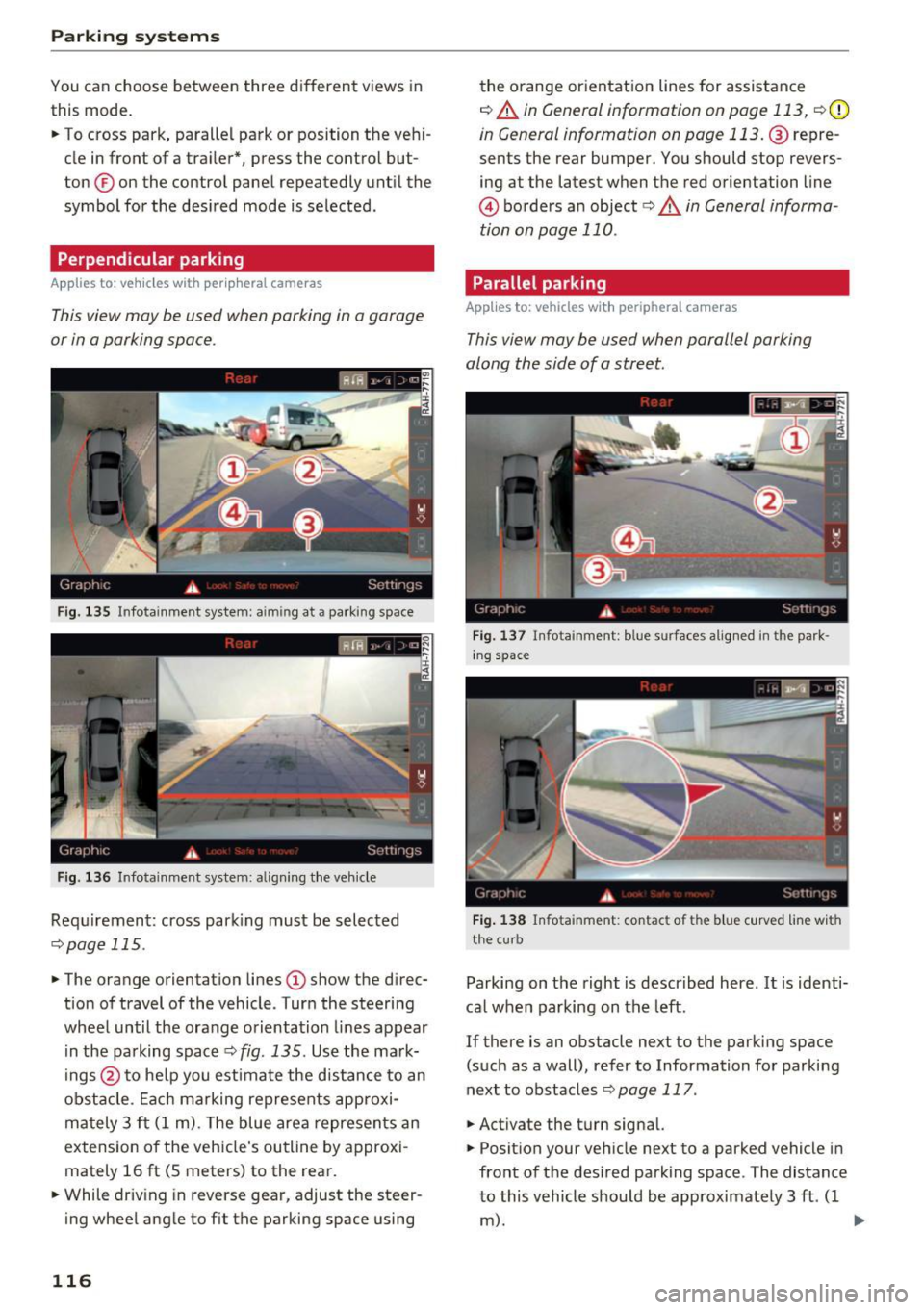
You can choose between three different views in
this mode.
.,. To cross park, parallel park or position the vehi
cle in front of a tra iler*, press the control but
ton ® on the contro l pane l repeatedly unt il the
symbol for the des ired mode is selected .
Perpendicular parking
Applies to: ve hicles w ith perip hera l cameras
This view may be used when parking in a garage
or in a parking space .
Fig . 135 Infotainment system: aiming at a parking space
Fig . 136 Infotainment system: aligning the veh icle
Requ irement: cross park ing must be selec ted
q page 115 .
.,. The orange orientation lines (D show the d irec
tion of travel of the vehicle . Turn the steering
wheel until the orange orientation lines appear i n the pa rking space
¢ fig. 135. Use the ma rk
ings @to he lp you estimate the distance to an
obstacle . Ea ch marking represents approxi
ma tely 3 ft (1 m). The blue area represents an
extension o f the vehicle's outline by approxi
mately 16
ft (S meters) to the rear.
.,. While driv ing in reverse gear, adjust the steer
ing wheel angle to f it the parking space using
116
the o range or ientation lines for assistance
q A in General information on page 113, q (D
in General information on page 113. @repre
sents the rear bumper. You should stop revers
ing at the latest when the red o rientation line
@ borders an object<=>.&. in General informa
tion on page 110.
Parallel parking
App lies to: vehicles wit h peripheral cameras
This view may be used when parallel parking
along the side of a street.
Fi g. 13 7 In fota inment: blue surfaces alig ned in the park
in g space
Fig. 138 Infota inment: contact of the blue c urved line w ith
the cu rb
Parking on the right is descr ibed here . It is identi
ca l when parking on the left.
If there is an obstacle next to the parking space (such as a wall), refer to Information fo r parking
next to obstacles
q page 117 .
.,. Activate the turn signal.
.,. Posit ion your veh icle next to a parked vehicle in
front of the des ired park ing space . The distance
to this vehicle should be approximate ly 3 ft. ( 1
m). ..,.
Page 119 of 284

co
co
.... N
" N .... 0
00
<.,;) 'SI"
.. Turn the Infotainment system on and shift into
reverse gear. The parking system must be
turned on and the
Cro ss pa rking view must be
displayed .
.. Press the control button on the Infotainment
unit @¢page
112, fig . 125 . The Parall el park
ing
view is displayed .
.. Back up and align your vehicle so the blue area
@ borders on the rear end of the vehicle be
hind yo u or on the parking space line
¢ ,&. in
General information an page 113, ¢(Din Gen
eral information on page 113 .
The blue area
represents an extens ion of the vehicle's out line
by approximately 16 ft (5 mete rs) to the rear .
The long side of the blue area should be on the curb . The entire blue area must f it into the
parking space .
.,. With the ve hicle stopped, turn the steer ing
wheel to the right as far as it will go .
.. Back into the park ing space until the b lue curve
¢
page 112, fig . 126 tou ches the curb¢,&. in
General information on pag e 113, ¢(Din Gen
eral information on page 113 .
Stop the vehicle.
.. With the vehicle stopped, tu rn the steering
whee l to the left as far as it will go .
.. Cont inue to back into the parking space unt il
the vehicle is parked parallel to the curb¢.&.
in General information on page 113, ¢(Din
General information on page 113.@
repre
sents the rea r bumpe r. At the very latest, stop
the vehicle when the red orientation line @
borde rs an object. Keep an eye on t he front of
your vehicle while doing this .
Parking next to obstacles
If
there is an obstacle (such as a wall) next to the
parking space, pos ition the vehicle so t here is
mo re spa ce on that side. Posi tion the long s ide of
the blue area so th at there is s ufficient space
from the object. The area must not be on the
curb . You will also need to start turning the
steer ing whee l earlier. The blue curve
¢
page 112, fig. 126 must not touch the obsta
cle, but rather there should be enough distance.
Parking systems
(D Tips
The left or right orientation lines and surfaces
will be d isp layed, depend ing on the turn sig
nal be ing used .
Trailer mode
Appl ies to : vehicles with peripheral cameras a nd trai le r hitch
This view assists you in positioning the vehicle in
front of a trailer .
Fig. 1 39 Infot ainme nt syste m: rear mode
Requireme nt: the trailer mode must be selected
¢ page 115 .
.. Now you can posit ion you r ve hicle in front of
the trailer
¢ &. in General information on
page 113, ¢(Din General information on
page 113 .
The orange orientat ion line indicates
th e expected path toward the trailer h itch . Use
t he bl ue lines to help you es timate the d istance
t o the trai ler hitch.
Setting the mode
Appl ies to : vehicles with peripheral cameras
.. Sele ct: !CAR ! function button> (Car )* Sy stem s
control button > Driver assistance > Pa rking
aid
> Front /re ar camera swit ching > Auto or
M anual.
Auto -
This view behind the vehicle (Rear mode)
is disp layed automatically when you shift into re
verse. This view in front of the vehicle
( Front
mode) is d isplayed automat ica lly when you shift
into the forward gears.
Manu al -When you switch the system on, the
view beh ind the veh icle
(Rear mode) is always
117
Page 122 of 284

Intelligent Technology
Intelligent Technology
Electronic Stabilization
Control (ESC)
Description
Elect ronic Stabilization Control (ESC) suppo rts
driver safety.
It red uces the risk of slipping and
improves dr iving stability. ESC detects crit ica l sit
uations such as the veh icle oversteering and un
dersteering or the wheels are sp inning. The vehi
cle is stabilized by app lying the brakes or reduc
ing engine torque. As soon as the ESC is active ly
regulat ing, the
D.1 indicato r light blin ks in the in
s trumen t clus ter.
The fo llow ing systems are integrated in the ESC :
Ant i-lock braking system (ABS)
ABS p revents the whee ls from locking whe n brak
ing. The vehicle can sti ll be steered even during
hard brak ing. Apply steady press ure to the brake
pedal. Do not pump the pedal. A puls ing in t he
b rake pedal indicates that the system is acting to
s tabilize the vehicle .
Br ake assist system
The brake assist system can decrease brak ing dis
tance . It increases brak ing power when the driver
presses the brake pedal q uick ly in emergency sit
uations . You must press and hold t he b rake pedal
until the dangerous sit uat io n is over . In veh icles
with adapt ive c ruise control*, the bra ke as sist
sy stem is more sensitive if t he di sta nce detec ted
t o the vehicle dr iv ing ahead is too small. On
ve hicl es with act ivated and f unct io ni ng night vi
sion assist*, the brake assist system can respond mo re sensit ively if there is a warning .
Anti-slip regulation (ASR)
ASR red uces eng ine power when the drive w heels
be gin sp inning an d adapts the force to the road
conditions. This makes it easie r to sta rt, acceler
ate and dr ive up h ills.
Electronic differential lock (EDL)
E DL a ppl ies the bra kes to a wheel tha t st art s
sp inning and tra nsfe rs t he dr ive powe r to t he
120
other driving whee ls. This func tion is no t ava ila
ble at hig her speeds.
I n extreme cases , EDL automat ic al ly swi tches off
to keep t he b rake o n the br aked wheel from ove r
heating. The ve hicle is still working correct ly. ED L
will switc h on again automatically when condi
tions have returned to normal.
Steering recommendation
The ESC he lps to s tabili ze th e vehicle by ch ang ing
t h e s teer ing torque.
I n veh icles with dynamic s teer ing*, ESC a lso
helps to stab ilize the s teeri ng in cr it ic al situ a
tions.
Selective wheel torque control
Se lective wheel to rque control is used when d riv
i ng on curves . The front whee l on the ins ide of
t h e curve or both whe els on the i nside of th e
cu rve are braked se lectively as needed. This al
l ows mo re pre cise driving in curves .
Automatic post -collision braking system
The "a utomat ic post -coll is io n braking system"
can help to reduce the risk of sl iding and of addi
tiona l co llisions after an acc iden t. If the a irbag
c on tro l modu le dete cts a collision above a cer tain
vehicle speed, the veh icle is braked by t he ESC.
The veh icle does not brake automatically if:
- the drive r presses the accelerator pedal, or
- the bra king force generate d by the pressed
brake pedal is greater than the b raking force
that would be in itiated by the system, or
- the ESC, the bra ke system or the vehicle elect ri
cal system are not functioning.
A WARNING
- The ESC and its integ rated systems can not
overcome the lim its imposed by natura l
p hys ica l laws. Th is is es pec ially i mpo rtan t
on s lippery or we t roads. If the system s be
g in a cting to s tabili ze yo ur vehicle, you
should immedi ately alte r your speed to
match the road and tra ffi c conditions. Do
not let the inc reased safety provided tempt
Page 123 of 284

co
co
.... N
" N .... 0
00
<..:l 'SI"
you into taking risks. This could increase
your risk of a collision.
- Please note the risk of a co llision increases
when driving fast, especially through curves
and on slippery or wet roads, and when driv
ing too close to objects ahead. The ESC and
its integrated systems cannot always pre
vent collisions -there is still a r isk of acci
dents!
- Press the accelerator pedal carefully when
accelerating on even, slippery surfaces such
as ice and snow. The drive wheels can spin
Switching on /off
Intelligent Technology
even when these control systems are instal
led and this can affect driving stability and
increase the risk of a collision.
(D Tips
- ABS and ASR only function correctly when
all four wheels are equipped with identical
tires. Different tire s izes can lead to a reduc
tion in engine power.
- You may hear noises when the systems de
scribed are working.
ESC turns on automatically when you start the engine .
Fig. 140 Center console: OFF ~ button
The following examples are unusual situations
where it may make sense to switch sport mode
on in order to allow the wheels to spin:
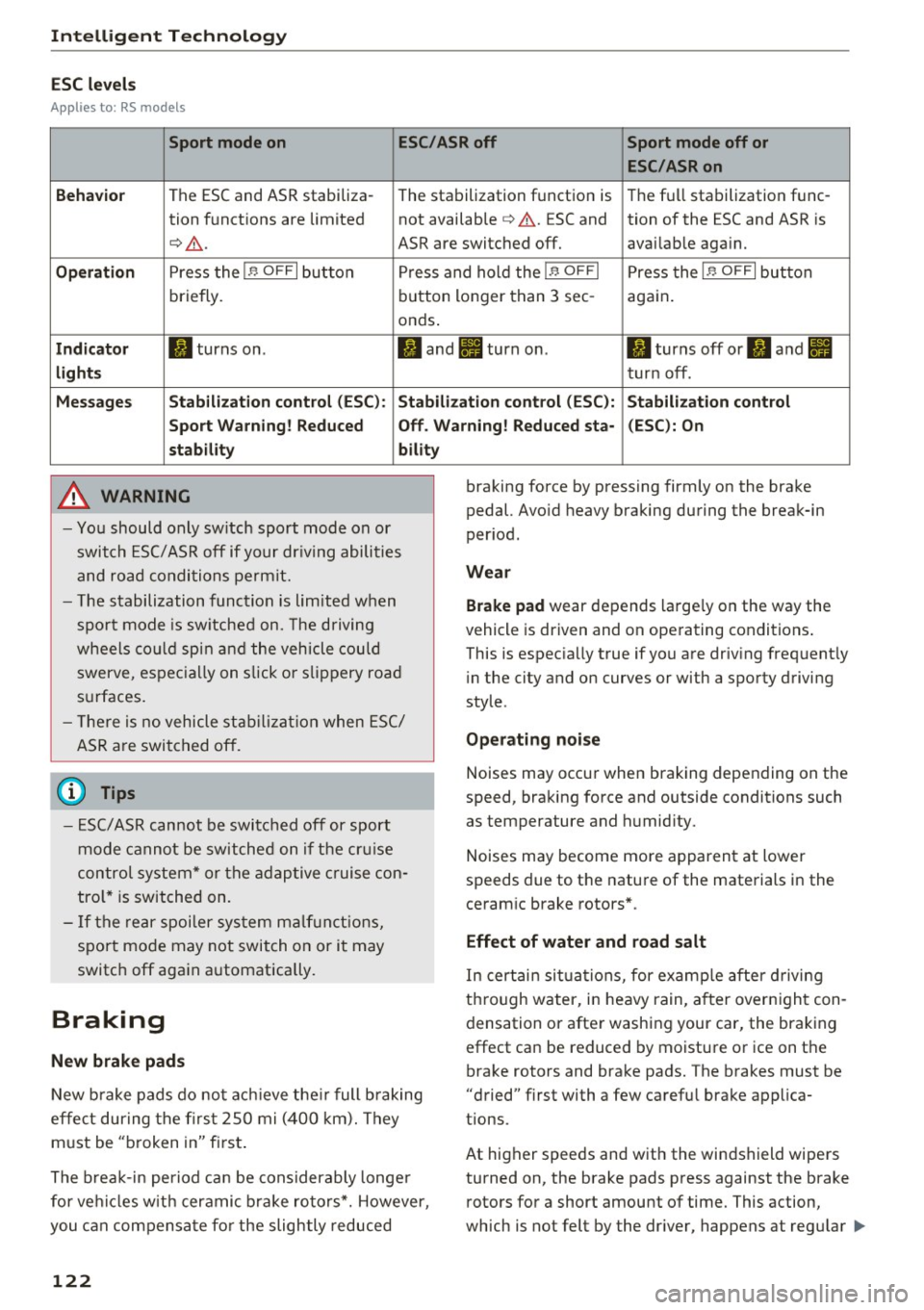
ESC levels
Sport mode on
- Rocking the vehicle to free it when it is stuck
-Driving in deep snow or on loose ground
- Driving with snow chains
Applies to: RS models: the ESC is designed to
function in levels. Depending on the level that is
selected, the stabil izat ion function of the ESC is
limited or switched off. The amount of stabiliza
tion control will differ depending on the level.
Sport mode off
Behavior
The ESC and ASR stabilization functions The
full stabilization function of the ESC
are limited
c::> & . and ASR is available again.
Operation Press the I~ OFF I button . Press the 1.$ OF FI button again .
Indicator Ill turns on. II turns off.
lights
Messa ges Stabilization control (ESC ): Sport Warn- Stabilization control (ESC): On
ing! Reduced stability
121
Page 124 of 284
Intelligent Technology
ESC levels
Ap plies to : RS models
Sport mode on ESC/ASRoff Sport mode off or
ESC /ASRon
Beha vior
The ESC and ASR stabiliza-
The stabilization function is The fu
ll stabilization func-
tion funct ions are limited not available
¢ ,& . ESC and tion of the ESC and ASR is
¢ .&. . ASR are switched off. availab le aga in.
Op eration Press the I.$ OFF I button P ress and hold the j.$ OF FI Press the I.$ OFF I button
briefly. b
utton longer than 3 sec- aga in .
onds .
Indicator II turns on . II and Ill turn on. II turns off or II and Ill
light s turn off .
Me ssage s Stabilization control (ESC ): S tabilization control (ESC ): Stabilization control
Sport Warn ing ! Reduced Off . Warning! Reduced sta - (ESC): On
stab ility bility
A WARNING
-Yo u should only sw itch sport mode on or
switch ESC/ ASR off if your dr iving abili ties
and road condi tions permit.
- T he stabilization func tion is limited w hen
spo rt m ode is sw itche d on. The driving
wheels co uld spi n and the vehicle could
swerve, espec ially on s lick or slippery road
s u rfaces.
- T here is no vehicle sta bilizat ion when E SC/
ASR a re swi tched off.
(D Tips
- ES C/ASR can not be switc hed off or sport
mode cannot be switche d on if the cr uise
contro l system * or the adap tive c ruise con
tro l* is switched on.
- If the re a r spoiler sys tem m alf unct ions,
sport mo de may not switch on or it may
switc h off aga in automatically.
Braking
New brake pads
New b rake pads do not ac hieve the ir full b raking
effe ct during the firs t 2S 0 mi (400 km). They
m ust be "broken in" fi rst .
The b rea k-in period ca n be considerably longe r
for ve hicles w it h cer amic b rake rotors*. However,
you can compensa te fo r the slightly reduced
122
braking force by pressing firmly on the brake
pedal. Avo id heavy braking during the break-in
per iod.
Wear
Brake pad
wear depends large ly on the way the
vehicle is driven and on ope rating conditions .
This is espec ia ll y true if you a re driv ing frequent ly
i n the city and on curves or with a sporty driving
sty le .
Ope rating noi se
Noises may occur when braking depending on the
speed, braking force and outside conditions such
as temperature and humid ity.
Noises may become mo re apparent at lower
speeds due to the nature of the materials in the
ceram ic brake rotors* .
Effect of water and road salt
In certain situa tions, for e xamp le after d riving
thro ugh water, in heavy rain, a fter over nigh t con
densation or after washing your car, the brak ing
effect can be reduced by moisture or ice on the bra ke rotors and brake pads. The brakes must be
"dried" f irst with a few ca refu l brake app lica
tions.
At higher speeds and with the windshield wipers
turned on, the brake pads press against the brake rotors for a short amount of time. This action,
wh ich is not felt by the dr iver, happens at regu lar .,..
Page 125 of 284
co
co
.... N
" N .... 0
00
\.J '
the brakes in wet weather.
The braki ng effect can also be red uced if you are
driving on salted roads and you do not apply the b rakes for long periods of time . The layer of salt
on the brake rotors and pads must be worn off
f irst when the brakes are app lied.
Due to its surface, the ceramic bra ke rotor* ab
sorbs moisture in certa in situations. There fore,
there will temporarily be less braking force than
when the brakes are dry . You can compensate for
this by pressing the brake pedal harder.
Cor rosion
L eaving the vehicle parked fo r long periods of
time, low mi leage and avoiding heavy braking
can contribute to corrosion on the brake rotors
and to dirty brake pads.
I f you usually avo id heavy braking or if there is
corrosion present , occasional heavy braking at
high speeds is recommended to clean the brake
rotors and pads
q ,& .
Brak e system malfunct ion
if you notice that the brake pedal travel has sud
denly increased, then a brake c ircui t in the dual
circuit brake system may have malfunctioned. Drive to an authorized Audi dea ler or a uthorized
Aud i Service Facility immediately to have the
problem corrected. On the way there, drive with
reduced speed and keep in mind that you w ill
need a longer distance to stop and you w ill need
to p ress the b rake pedal harde r.
L ow brake fluid level
When the brake fl uid level is low, malfunct ions in
the brake system may occur . The brake f lu id level
is electronically monitored.
Br ak e boost er
The brake booster amplifies the pressure you ap
p ly to the brake peda l. It only works when the en
g ine is running.
A WARNING
- Only apply the brakes for the purpose of
cleaning the brake system whe n road and
-
Intellig ent Technology
traffic conditions permit. You must not en
danger other road users. This increases the
risk of an accident.
- Never let the vehicle roll while the engine is
stopped because this increases the risk of an
accident.
- New brake pads do not ach ieve the ir full
braking effect during the first 250 m i
(400 km). They m ust be "broken in" first.
The break-in per iod ca n be cons iderably lon
ge r fo r vehicles with ceram ic brake rotors* .
H owever, you can compensate fo r the
slightly reduced braking force by pressi ng
fi rm ly on the brake pedal. Avo id heavy b rak
ing du ring the break -in pe riod.
- Ce rtain weathe r and ope rating condi tions
such as driving through water, dr iv ing in
heavy rain o r driv ing after was hing your ve
hicle can impa ir the effect iveness of the
brakes. In the winter, ice may build up on
the brake pads, rotors and drums . Check
these components by braking carefully. Ap
p lyi ng the brakes carefully several times
d ries the b rakes and removes ice build-up .
- The efficiency of the brakes can also be im
pa ired by dr iv ing for long stretches on roads
covered with sa lt without using the bra kes .
You can remove salt deposits from the
b rake rotors and pads by carefully applying
t he brakes several times .
- I f the fron t spoiler is damaged o r yo u install
another spoi ler, make su re the front wheel
b rakes are ven tilated properly . Othe rw ise,
the brake system co uld overheat, which re
duces their effectiveness .
- Fa ilure of a brake circuit impairs brak ing
pe rformance, which increases b raking dis
tance. Avo id driving the vehicle and have it
towed it to the nearest a uthorized Audi
deale r or authorized Aud i Serv ice Facility.
- I f the brake booster is not working, yo u w ill
have to p ress much harder on the brake
pedal to compensate fo r the lack of the
booster.
Q) Note
- Never let the brakes "rub" by pressing the
peda l lightly when braking is not actually
123
Page 126 of 284
Intelligent Technology
necessary. This causes the brakes to over
heat and increases bra king distance and
causes wear .
- Befo re driving downhi ll a long distance on a
steep hill, decrease your speed and select a
l ower gear. This makes use of the engine
braking effect and relieves the brakes. If
you need to brake additionally, b rake in in
t e rvals a nd not continuously .
(D Tips
-If the brake booster is not working, you
must press the brake pedal with much more
force than normal.
- If you retrofit you r vehicle with a front spoil
e r, whee l covers o r similar items , make sure
that the a ir flow to t he fron t wheels is not
i nte rr u pted . Othe rw ise the brake sys tem
ca n become too hot .
Electromechanical
steering, dynamic
steering
The electromechanical steering supports the
driver 's st eering movements.
Power steering adapts elec tronically based on
the vehicle speed .
Indicator light s and mes sage s
• Do not drive vehicle: steering defective
If thi s in dica tor light t urns o n and st ays o n and
t his mess age appears, t he power s teer ing m ay
have fai led.
St op the veh icle in a safe lo cat io n as soo n as pos
sib le. Do
not c ontinue dr iving. See an author ized
Aud i dealer o r auth o rize d Aud i Serv ice Facili ty for
assis tance.
(;:r,n Steering : Sy stem fault You can continue
driving
If the indicator lig ht tur ns on and the message
appears, the steering wheel may be mo re diff i
cul t to m ove or mo re sensit ive tha n usua l. The
s teer ing whee l may also be at an angle when
d riving s traight .
124
Drive slowly to an a uth orized Audi dea ler or au
thorized Audi Serv ice Facility to have the mal
funct ion corrected .
,Ion Dynamic steering: Initializing
If the indica to r li gh t is blinking and this message
appea rs, dy namic stee ring* is be ing initiali zed.
The steer ing whee l will be easy to move afte r
s ta rt ing t he en gine . Re- ini tializ ation mig ht be
necessary if the steering wheel was moved hard
to the left and r ight while the veh icle was not
moving . The d isp lay turns off if the in it ia li zation
was s uccessful.
(D Tips
- If the . or ,Ion indicato r light only stays on
f or a s ho rt time, you may cont inue driving .
- The dynamic stee ring stability systems
¢
page 1 20 are not ava ila bl e in the event of
a system mal function.
- For add itiona l information on dynamic
steering, re fer to
¢ page 105.
All wheel drive (quattro)
Applies to: vehicles with all wheel drive
In all wheel drive, all four wheels are powered.
General information
In all whee l drive, the dr iv ing power is divide d be
tween all four whee ls. This happens automatical
l y depending on yo ur driv ing behavior as we ll as
the cur rent road conditions . Also see
¢ page 120 , Electronic Stabilization Control
(ESC).
A center d ifferential distributes the driving powe r
varia bly to the front and rea r ax le. It wor ks to
gether w ith selective whee l torque contro l, w hich
activates w hen d riving through curves
¢ page 120 . With the sport d ifferent ial*, power
dis tribution to the rear wheels is var iable and can
be adjus ted wi th drive select¢
page 105 .
The all wheel drive concept is designed fo r high
engine power . Yo ur vehicle is except iona lly pow
erfu l and has excellent driving cha rac teristics
bot h un der normal d riving condi tions and on
snow and i ce. A lways read and follow safe ty pre-
c auti ons ¢
,&.. IJll-