audio AUDI A7 2020 Owner's Manual
[x] Cancel search | Manufacturer: AUDI, Model Year: 2020, Model line: A7, Model: AUDI A7 2020Pages: 310, PDF Size: 81.29 MB
Page 216 of 310
Media
Language”)
You can set the language manually. The language
and audio format options depend on the video
DVD.
Subtitles)
You can manually select subtitles for playback.
The languages available depend on the DVD.
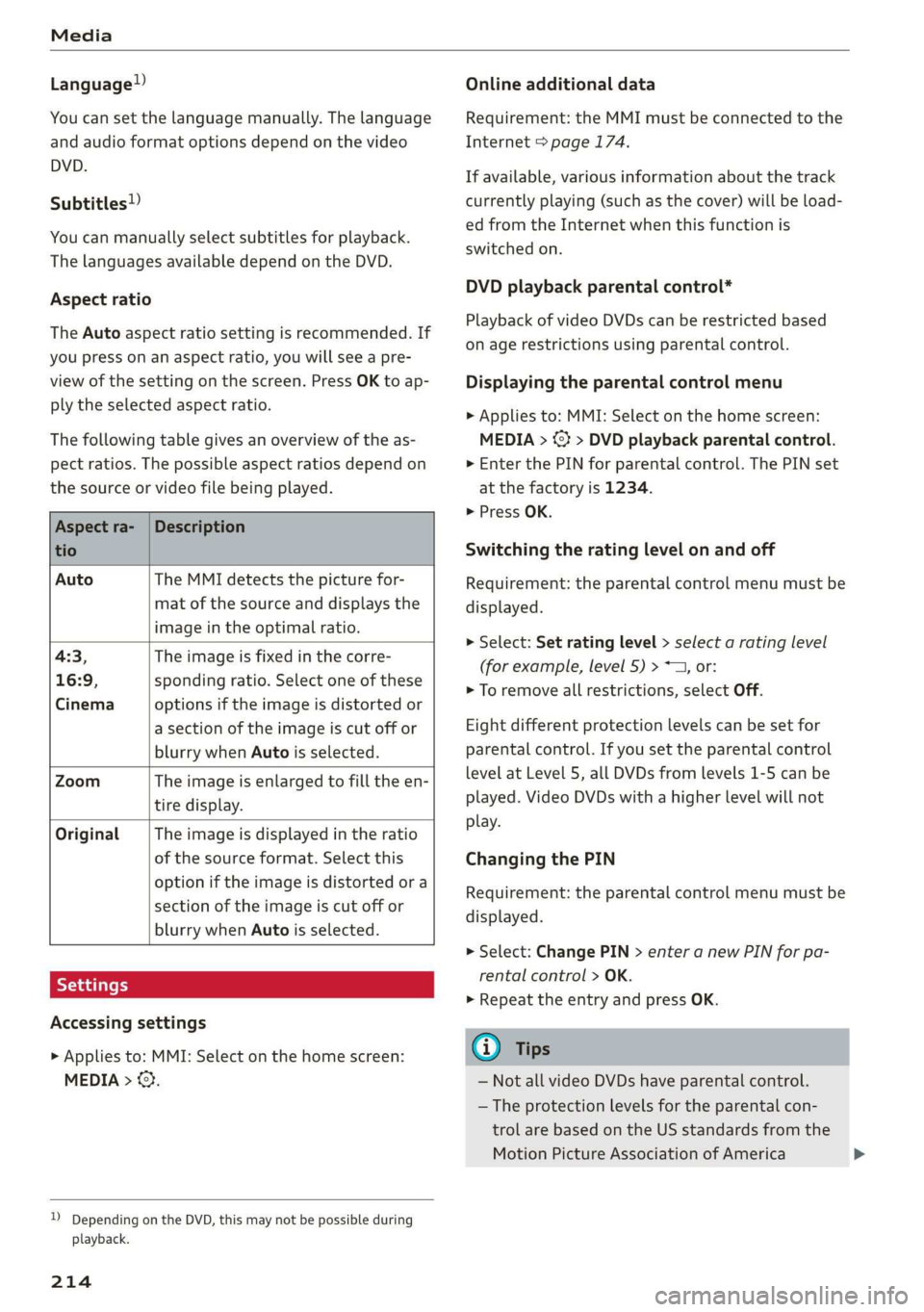
Aspect ratio
The Auto aspect ratio setting is recommended. If
you press on an aspect ratio, you will see a pre-
view of the setting on the screen. Press OK to ap-
ply the selected aspect ratio.
The following table gives an overview of the as-
pect ratios. The possible aspect ratios depend on
the source or video file being played.
Aspect ra- | Description
tio
Auto The MMI detects the picture for-
mat of the source and displays the
image in the optimal ratio.
4:3, The image is fixed in the corre-
16:9, sponding ratio. Select one of these
Cinema options if the image is distorted or
a section of the image is cut off or
blurry when Auto is selected.
Zoom The image is enlarged to fill the en-
tire display.
Original The image is displayed in the ratio
of the source format. Select this
option if the image is distorted or a
section of the image is cut off or
blurry when Auto is selected.
Accessing settings
> Applies to: MMI: Select on the home screen:
MEDIA > ©}.
)) Depending on the DVD, this may not be possible during
playback.
214
Online additional data
Requirement: the MMI must be connected to the
Internet > page 174.
If available, various information about the track
currently playing (such as the cover) will be load-
ed from the Internet when this function is
switched on.
DVD playback parental control*
Playback of video DVDs can be restricted based
on age restrictions using parental control.
Displaying the parental control menu
> Applies to: MMI: Select on the home screen:
MEDIA > <> DVD playback parental control.
> Enter the PIN for parental control. The PIN set
at the factory is 1234.
> Press OK.
Switching the rating level on and off
Requirement: the parental control menu must be
displayed.
> Select: Set rating level > select a rating level
(for example, level 5) > ~T, or:
> To remove all restrictions, select Off.
Eight different protection levels can be set for
parental control. If you set the parental control
level at Level 5, all DVDs from levels 1-5 can be
played. Video DVDs with a higher level will not
play.
Changing the PIN
Requirement: the parental control menu must be
displayed.
> Select: Change PIN > enter a new PIN for pa-
rental control > OK.
> Repeat the entry and press OK.
G) Tips
— Not all video DVDs have parental control.
— The protection levels for the parental con-
trol are based on the US standards from the
Motion Picture Association of America
Page 217 of 310
4K8012721BC
Media
(MPAA). Note that the age levels for video the incorrect PIN three times in a row. The
DVDs in European countries may differ.
— PIN entry for parental control will be locked dealer.
for approximately one minute if you enter
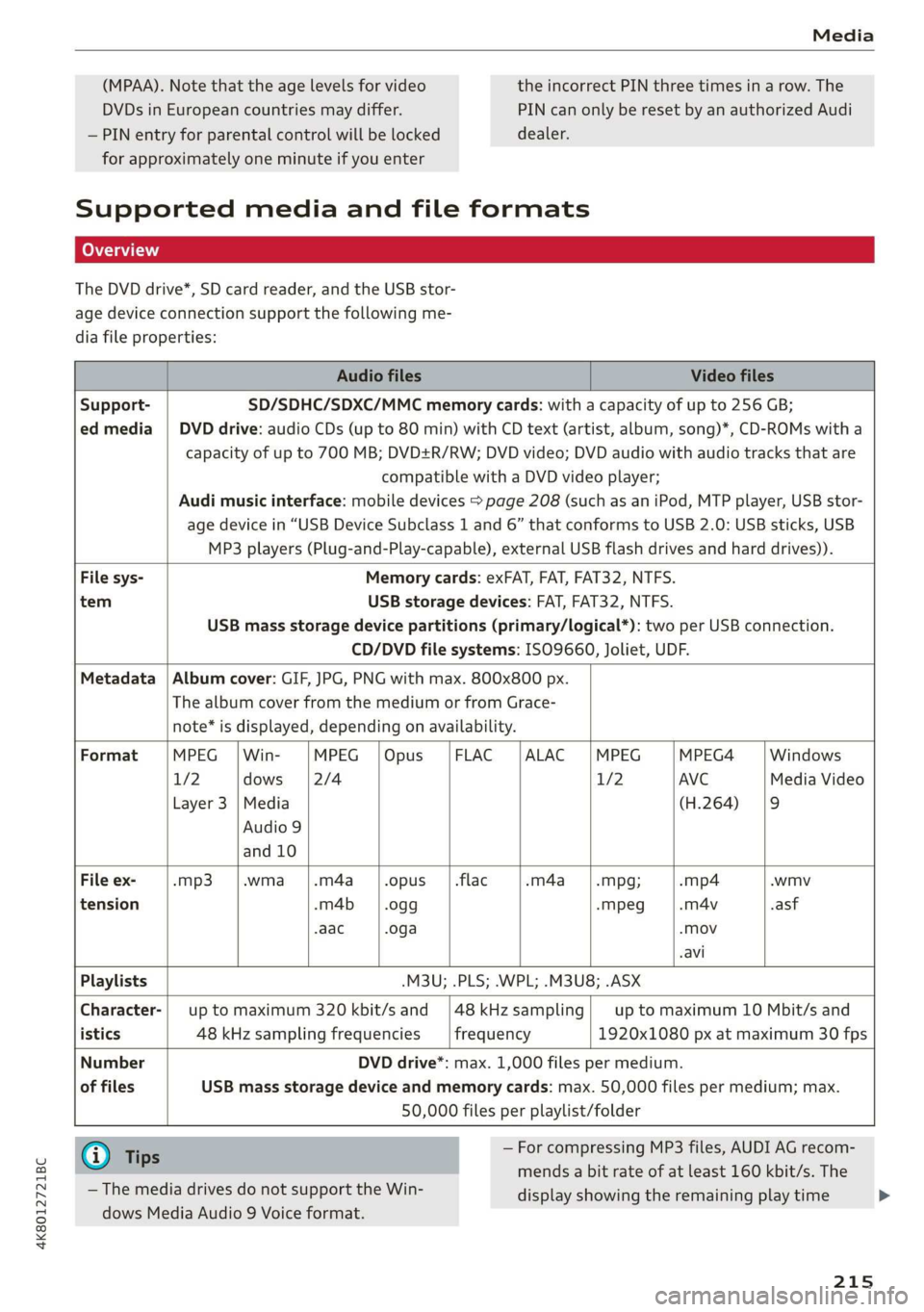
Supported media and file formats
Lea TN]
The DVD drive*, SD card reader, and the USB stor-
age device connection support the following me-
dia file properties:
PIN can only be reset by an authorized Audi
Audio files Video files
Support- SD/SDHC/SDXC/MMC memory cards: with a capacity of up to 256 GB;
ed media | DVD drive: audio CDs (up to 80 min) with CD text (artist, album, song)*, CD-ROMs with a
compatible with a DVD video player;
capacity of up to 700 MB; DVD+R/RW; DVD video; DVD audio with audio tracks that are
Audi music interface: mobile devices > page 208 (such as an iPod, MTP player, USB stor-
age device in “USB Device Subclass 1 and 6” that conforms to USB 2.0: USB sticks, USB
MP3 players (Plug-and-Play-capable), external USB flash drives and hard drives)).
File sys- Memory cards: exFAT, FAT, FAT32, NTFS.
tem USB storage devices: FAT, FAT32, NTFS.
CD/DVD file systems: ISO9660, Joliet, UDF.
USB mass storage device partitions (primary/logical*): two per USB connection.
Metadata | Album cover: GIF, JPG, PNG with max. 800x800 px.
The album cover from the medium or from Grace-
note* is displayed, depending on availability.
Format MPEG |Win- MPEG |Opus |FLAC |ALAC |MPEG MPEG4 Windows
1/2 dows |2/4 1/2 AVC Media Video
Layer 3 |Media (H.264) |9
Audio 9
and 10
File ex- -mp3 |.wma |.m4a_ |.opus__|.flac -m4a__—|.mpg; -mp4 .wmv
tension -m4b_— | .ogg -mpeg -m4v .asf
aac .oga -mov
-avi
Playlists -M3U; .PLS; .WPL; .M3U8; .ASX
Character-| up to maximum 320 kbit/s and |48kHzsampling| up to maximum 10 Mbit/s and
istics 48 kHz sampling frequencies frequency 1920x1080 px at maximum 30 fps
Number DVD drive*: max. 1,000 files per medium.
of files USB mass storage device and memory cards: max. 50,000 files per medium; max.
50,000 files per playlist/folder
@ Tips — For compressing MP3 files, AUDI AG recom-
mends a bit rate of at least 160 kbit/s. The
— The media drives do not support the Win-
dows Media Audio 9 Voice format.
display showing the remaining play time
215
>
Page 218 of 310
Media
may differ for audio files with variable bit
rate.
— Special characters (such as those in ID3 tag
information) may display differently or may
not always display, depending on the sys-
tem language.
Troubleshooting
— The manufacturer of the storage device can
provide information about its “USB Device
Subclass”.
— Some MTP player functions are not support-
ed, such as rating music tracks and video
playback.
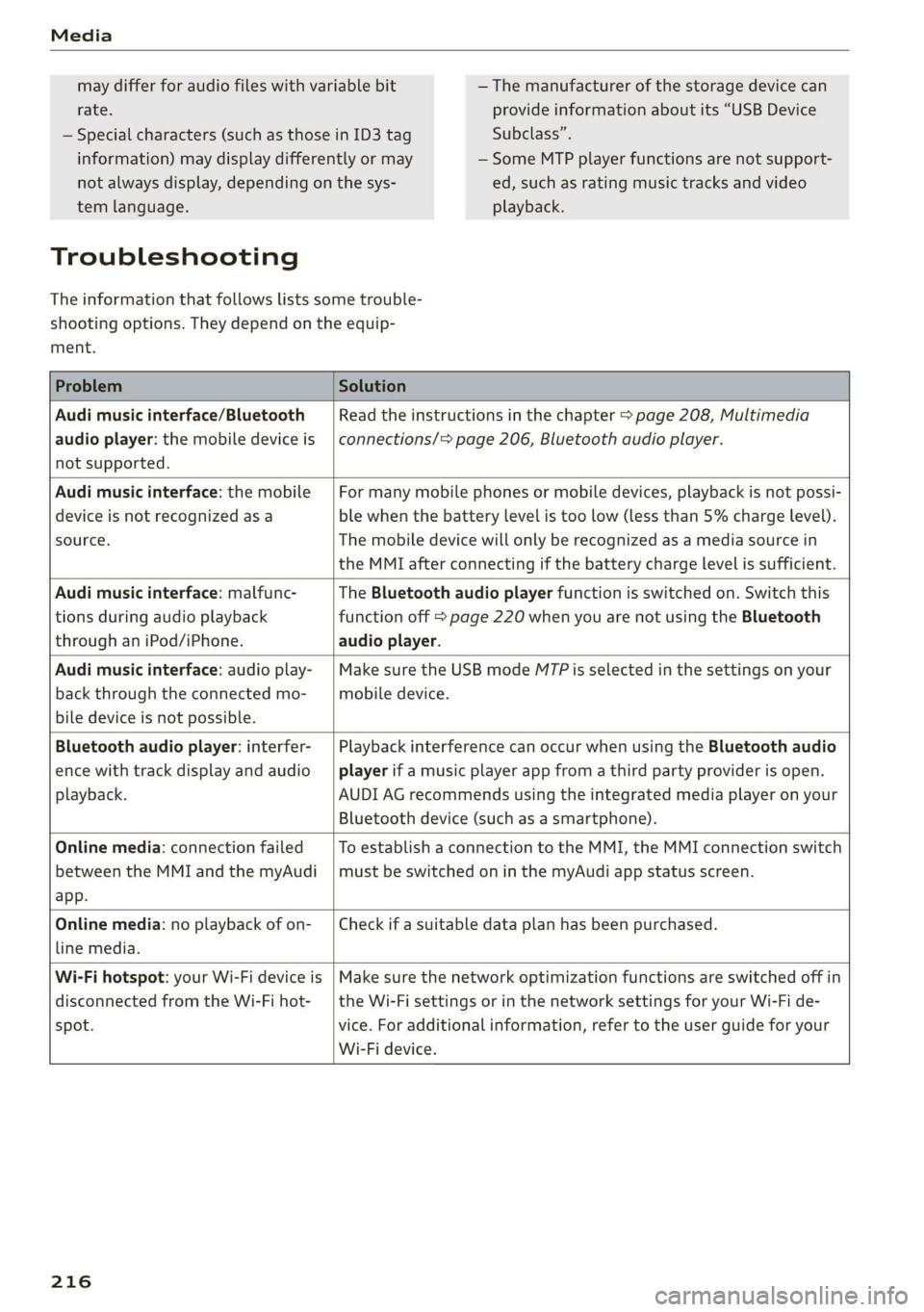
The information that follows lists some trouble-
shooting options. They depend on the equip-
ment.
Problem Solution
Audi music interface/Bluetooth
audio player: the mobile device is
not supported.
Read the instructions in the chapter > page 208, Multimedia
connections/> page 206, Bluetooth audio player.
Audi music interface: the mobile
device is not recognized as a
source.
For many mobile phones or mobile devices, playback is not possi-
ble when the battery level is too low (less than 5% charge level).
The mobile device will only be recognized as a media source in
the MMI after connecting if the battery charge level is sufficient.
Audi music interface: malfunc-
tions during audio playback
through an iPod/iPhone.
The Bluetooth audio player function is switched on. Switch this
function off > page 220 when you are not using the Bluetooth
audio player.
Audi music interface: audio play-
back through the connected mo-
bile device is not possible.
Make sure the USB mode MTP is selected in the settings on your
mobile device.
Bluetooth audio player: interfer-
ence with track display and audio
playback.
Playback interference can occur when using the Bluetooth audio
player if a music player app from a third party provider is open.
AUDI AG recommends using the integrated media player on your
Bluetooth device (such as a smartphone).
Online media: connection failed
between the MMI and the myAudi
app.
To establish a connection to the MMI, the MMI connection switch
must be switched on in the myAudi app status screen.
Online media: no playback of on-
line media.
Check if a suitable data plan has been purchased.
Wi-Fi hotspot: your Wi-Fi device is
disconnected from the Wi-Fi hot-
spot.
Make sure the network optimization functions are switched off in
the Wi-Fi settings or in the network settings for your Wi-Fi de-
vice. For additional information, refer to the user guide for your
Wi-Fi device.
216
Page 221 of 310
4K8012721BC
Additional settings
Additional settings
System settings
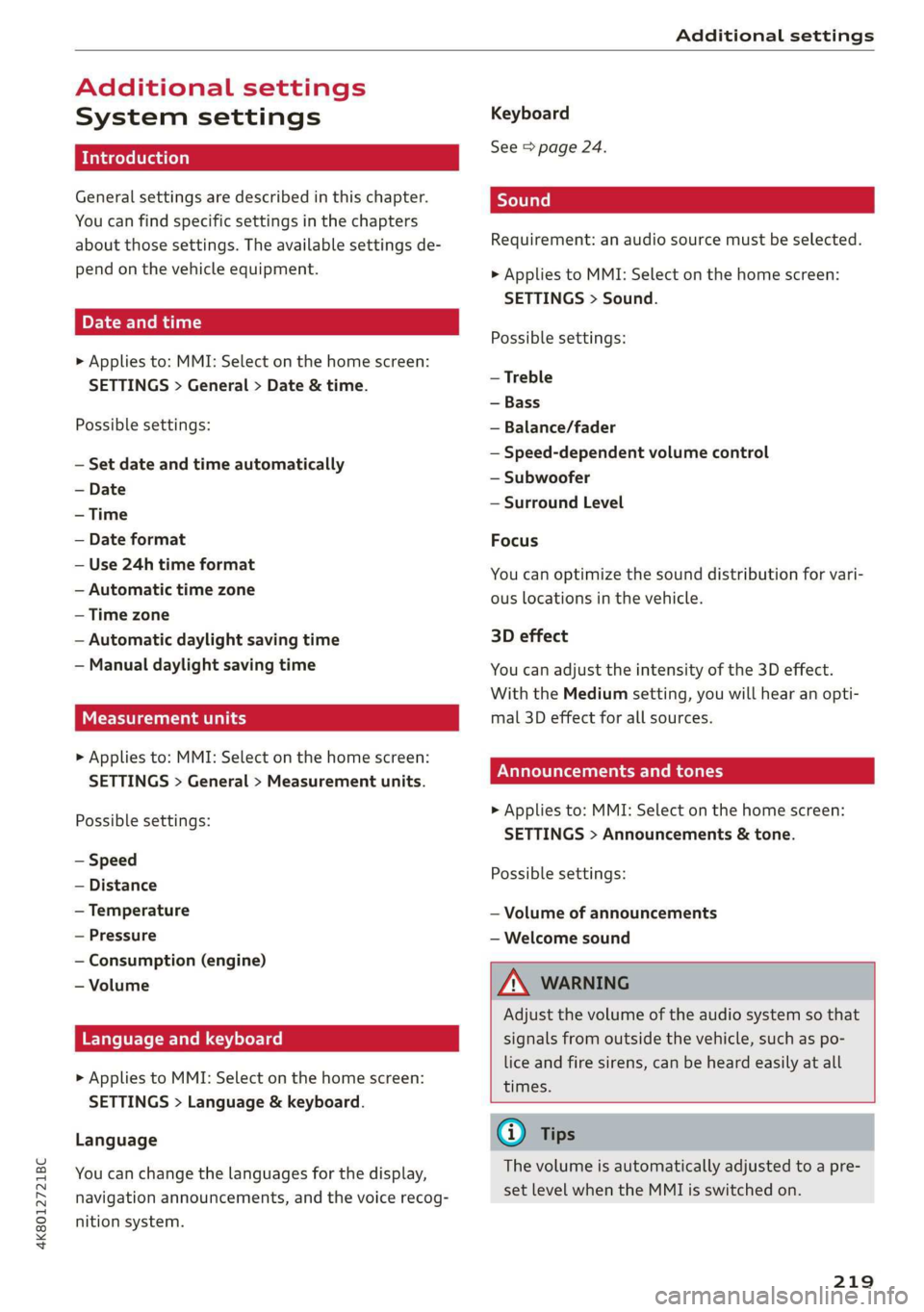
Introduction
General settings are described in this chapter.
You can find specific settings in the chapters
about
those settings. The available settings de-
pend on the vehicle equipment.
Date and time
> Applies to: MMI: Select on the home screen:
SETTINGS > General > Date & time.
Possible settings:
— Set date and time automatically
— Date format
— Use 24h time format
— Automatic time zone
— Time zone
— Automatic daylight saving time
— Manual daylight saving time
CERT Taal lat ae ay
> Applies to: MMI: Select on the home screen:
SETTINGS > General > Measurement units.
Possible settings:
— Speed
— Distance
— Temperature
— Pressure
— Consumption (engine)
— Volume
Language and keyboard
> Applies to MMI: Select on the home screen:
SETTINGS > Language & keyboard.
Language
You can change the languages for the display,
navigation announcements, and the voice recog-
nition system.
Keyboard
See > page 24.
Requirement: an audio source must be selected.
> Applies to MMI: Select on the home screen:
SETTINGS > Sound.
Possible settings:
— Treble
— Bass
— Balance/fader
— Speed-dependent volume control
— Subwoofer
— Surround Level
Focus
You can optimize the sound distribution for vari-
ous locations in the vehicle.
3D effect
You can adjust the intensity of the 3D effect.
With the Medium setting, you will hear an opti-
mal 3D effect for all sources.
Announcements and tones
> Applies to: MMI: Select on the home screen:
SETTINGS > Announcements & tone.
Possible settings:
— Volume of announcements
— Welcome sound
ZA\ WARNING
Adjust the volume of the audio system so that
signals from outside the vehicle, such as po-
lice and fire sirens, can be heard easily at all
times.
G@) Tips
The volume is automatically adjusted to a pre-
set level when the MMI is switched on.
219
Page 222 of 310
Additional settings
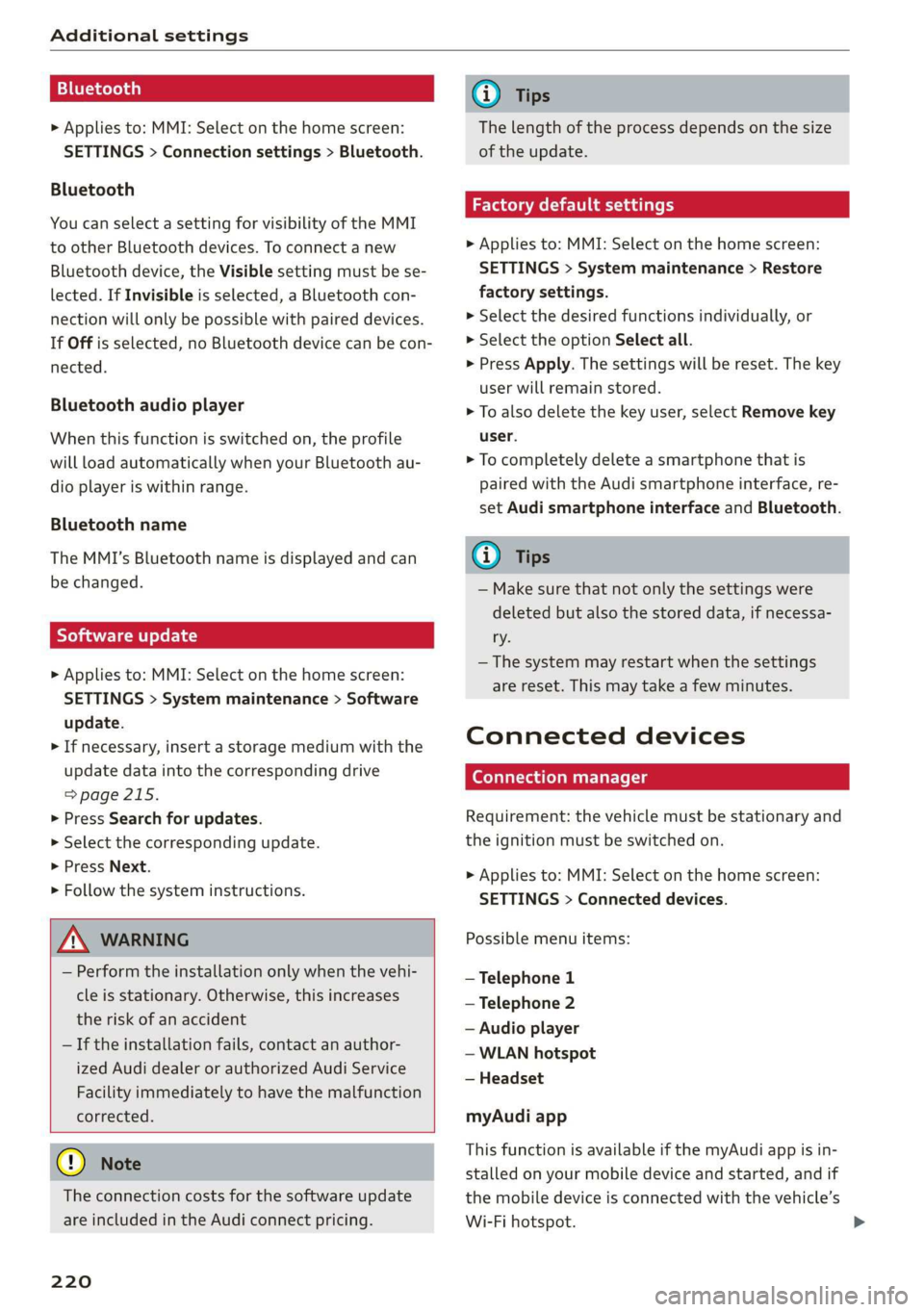
Bluetooth
> Applies to: MMI: Select on the home screen:
SETTINGS > Connection settings > Bluetooth.
Bluetooth
You can select a setting for visibility of the MMI
to other Bluetooth devices. To connect a new
Bluetooth device, the Visible setting must be se-
lected. If Invisible is selected, a Bluetooth con-
nection will only be possible with paired devices.
If Off is selected, no Bluetooth device can be con-
nected.
Bluetooth audio player
When this function is switched on, the profile
will load automatically when your Bluetooth au-
dio player is within range.
Bluetooth name
The MMI’s Bluetooth name is displayed and can
be changed.
Tyee M olor hd
> Applies to: MMI: Select on the home screen:
SETTINGS > System maintenance > Software
update.
> If necessary, insert a storage medium with the
update data into the corresponding drive
=>page 215.
> Press Search for updates.
> Select the corresponding update.
> Press Next.
> Follow the system instructions.
ZA\ WARNING
— Perform the installation only when the vehi-
cle is stationary. Otherwise, this increases
the risk of an accident
— If the installation fails, contact an author-
ized Audi dealer or authorized Audi Service
Facility immediately to have the malfunction
corrected.
() Note
The connection costs for the software update
are included in the Audi connect pricing.
220
G) Tips
The length of the process depends on the size
of the update.
Factory default settings
> Applies to: MMI: Select on the home screen:
SETTINGS > System maintenance > Restore
factory settings.
> Select the desired functions individually, or
> Select the option Select all.
> Press Apply. The settings will be reset. The key
user will remain stored.
> To also delete the key user, select Remove key
user.
> To completely delete a smartphone that is
paired with the Audi smartphone interface, re-
set Audi smartphone interface and Bluetooth.
G) Tips
— Make sure that not only the settings were
deleted but also the stored data, if necessa-
ry.
— The system may restart when the settings
are reset. This may take a few minutes.
Connected devices
(eye e Ts ( Us
Requirement: the vehicle must be stationary and
the ignition must be switched on.
> Applies to: MMI: Select on the home screen:
SETTINGS > Connected devices.
Possible menu items:
— Telephone 1
— Telephone 2
— Audio player
— WLAN hotspot
— Headset
myAudi app
This function is available if the myAudi app is in-
stalled on your mobile device and started, and if
the mobile device is connected with the vehicle’s
Wi-Fi hotspot.
Page 295 of 310

4K8012721BC
Index
A
A/C cooling mode............. ee eee eee ee
Accelerator pedal.............--00000005
also refer to Accelerator pedal...........
ACCeSSOFICS . 6... eee
Active lane assist
refer to Lane departure warning.........
refer to Lane guidance................
Adaptive cruise assist..............-000.
Cleaning the sensors...........00 ee eee
Predictive control....................
Adaptive dampers...........--0000-00-
Adaptive speed assist
refer to Adaptive cruise assist...........
Adjusting the air distribution.............
Adjusting the brightness.................
Adjusting the sound..............-...0-
Adjusting the temperature...............
Adjusting the vents ...........0 cece eens
Adjusting the volume..............000005
Adjusting the volume (announcements) ... .
Adjusting the welcome sound............
Airbag SySteM « » ene s ews 4 5 Hemme tee Eee
Air quality display................2.2.00.
Air suspension..............00.00-0008
Alarm system
refer to Anti-theft alarm system..........
Alignment pin (changing the wheel).......
All-weather lights...............-.00000.
Allseason tires... 2.2.00... 22020
All wheel drive
refer to quattro... 2... eee eee eee
Amazon Alexa integration
Média playback’: ¢ sos s ¢ wees ¢ 4 orem b eae
Operation « sion ss aac sv rere © omen wa ar
AMI
refer to Audi music interface...........
Android Auto
refer to Audi smartphone interface......
Anti-freeze
Windshield washer system.............
Anti-lock braking system. ........-....-.
Anti-Slip Regulation.................0..
Anti-theft alarm system...........-..00--
Anti-theft wheel bolts................0.
Apple CarPlay
refer to Audi smartphone interface...... 217
Aspect ratio (video) ..........-..00. 211,.213
ASR
refer to Anti-Slip Regulation............ 108
Audi adaptive light.................0005. 48
Audi connect
refer to CONNECt:. « s ccascs seas ieeeee oe 174
Audi connect Remote & Control
refer to Vehicle control services......... 176
Audirdrive seletticy: « + sven « x cee x ¢ neem ¢ 2 2 104
Audi music interface...............20-- 208
Audio files.......... 00.0000 c cece 209
Audi phone box............ 00: e eee eee 163
Audi presense......... 0... e ee eee eee 143
Messages ............ 0.02. e eee eee 146
Audi pre sense front.............--..0-- 144
Audi side assist
refer to Side assist. ...... 0.00.00 eee eee 147
Audi smartphone interface.............. 217
Legalinformation.................005 221
Audi virtual cockpit
refer to Instrument cluster.............. 12
AUTO
Automatic headlights.................. 48
Climate control system.............0005 86
Auto Lock (central locking) ............... 32
Automatic climate control system
refer to Climate control system.......... 85
Automatic luggage compartment lid.... 40,41
Automatic transmission............-.0005 92
Parking lock emergency release.......... 95
Automatic wipe/wash system............. 55
Average consumption................... 16
Average speed.... 2.2... - ee eee eee eee 16
B
Bag hooks... ..... cece eee eee eee eee 80
Battery
Charging (12 Volt vehicle battery)....... 239
Vehicle battery (12 Volt)............... 237
Winter operation (12 Volt vehicle battery) . 237
BOCK rOUEE sicccans + 2 woewene © o sirens © ¥ ecevonT «ones 190
293
Page 296 of 310
Index
Bluetooth
Audio player... . 2... cece eee eee eee eee 206
Connecting acellphone............... 161
Deleting adevice...............00000- 221
Device overview............--0-0 0 eee 220
Disconnecting a device................ 221,
Displaying profiles. « cies 2 save «2 owen ae 221,
Searching fora device................. 221
Selecting a device : seas ss seg ts ees so: 221
Specifying a favorite.................. 221
BoOStss « « cosy: ¢ ¢ eyes 5 © sees § o Rewn ¢ a ees ¢ e 16
Boost pressure indicator................. 16
Brake fluid
New brake pads..............---000-- 100
Break-in security feature..............0.. 35
Breaking in
New brake pads..............-..00005 100
New tires « ¢ cvs + sie +e ctees ss ees es 248
Browser
refer to Mediacenter................0. 210
Bulb replacement...............000-005 281
Business. address): « s scx ¢ < swaw « x ome gee 191,
C
California Proposition 65 Warning........ 228
Batteryspecificie. «swine s vaaney o ownc oes 237
Galllist « cosas « s sess = i secu = 2 am = a8 165, 167
CaM@raS css « = ees 5 2 cee + & otters os ees es 116
LOGCALIONS sa, «+ veces oe 5 consents » x aamsens © 5 eewens 117
Capacities
Fueltank............ 20. 291
Washer fluid reservoir...............0 291
Cargonet........... 0... eee eee eee eee 83
Car key... eee eee eee 36
Car phone
Serial number (IMEI) .............0.006 172
SWItChING OMfessc <6 weww = awe a 2 mire «2 171
Capwashls « oaws 2 ¢ eau « 2 mame «x eee & 2 cee 261
Catalytic converter’; esos << weg ee ees se ee 227
294
Cell phone
refer to Telephone.............e eee eee 161
Cell phone compartment
refer to Audi phone box............... 163
Central
locking ...... 0. cece eee eee eee 32
AUTO LOCK: » geese + sunems 2 seene & 3 donee & = Be 32
Convenience key « sscsu © cvenesie © erase wo vnscem 37,
Convenience opening and closing......... 43
Luggage compartment lid............... 39
Mechanically unlocking and locking....... 35
Messages... 1.6... ce eee cece eee eee 34
Remote control keys: ss esas ss eves os ees 37
SettN's 6 e wanes a a saws «wo ones vo meen + 8 o8TH 33
Vehicle key... 6... ccc ee eee eee eee 37
Central locking switch................0-. 34
Ceramic brakesicicns x + sxcceie +o nessa 3 0 eres ¥ 6 « 100
Certificationies « 6 evar se enare a ears +e ewe 289
Changing light bulbs................... 281
Charging
refer to Power SOUrCES ...... eee eee eee 79
Charging the battery (mobile devices) . 163, 208
Child safety lock
Climate control system controls in the rear. 42
Power windows.........---00 eee eee eee 42
Rear doorSies 5 « aecw sa cams 3 cam 4 x ae a 42
Child safetyis@ats): se cous ye sews x 2 wren av we 73
Securing to the top tether anchor........ 77
Securing with a safety belt.............. 76
Securing with LATCH............-.-+--- 7
CIGSNING « sacze & s aes & s dae +e Sees te ee 261
Cleaning Alcantara...............00000. 264
Cleaning artificial leather............... 264
Cleaning carbon components........ 263, 264
Cleaning COMmtrols®. « scsi « x sro < « onmvess #6 vie 264
Cleaning decorative parts/trim........... 263
Cleaning exhaust tail pipes.............. 263
Cleaning plastic parts.................. 264
Cleaning textiles.................20005 264
Climate control system...........--..0-- 85
Climate control system controls in the rear
Child safety lok « seyoic 2 x ewe + saree 2 meee 2 42
Closing
Automatic luggage compartment lid...... 40
Convenience closing..............-.05. 43
HOG s « 2 seve y 5 meen ¢ 2 etme § eee OE ree 229
Luggage compartment lid............... 39