phone AUDI A7 2020 Service Manual
[x] Cancel search | Manufacturer: AUDI, Model Year: 2020, Model line: A7, Model: AUDI A7 2020Pages: 310, PDF Size: 81.29 MB
Page 220 of 310

Audi smartphone interface
— You cannot connect any mobile devices via — AUDI AG merely provides access to third
Bluetooth when an Apple CarPlay connec- party services through the MMI and does
tion is active. not assume any responsibility for the con-
— Usage of the Audi smartphone interface de- tent of these services.
pends on the availability of services through
third party providers.
Troubleshooting
Applies to: vehicles with Audi smartphone interface
The information that follows lists some trouble-
shooting options. They depend on the equip-
ment.
Problem Solution
Audi smartphone
interface cannot be
opened.
Check the battery charge level on your smartphone.
Check the USB cable and use a different one if necessary.
Check if Android Auto or Apple CarPlay is available in the country where the vehi-
cle is being operated.
Android Auto: check if the Android Auto app is installed on your smartphone.
Connecting the
smartphone to the
MMI failed.
Make sure that you are using the correct USB adapter and check if the USB
adapter is connected correctly to your smartphone and the Audi music interface
=> page 208.
Apple CarPlay: check if Apple CarPlay is activated on your iPhone.
Android Auto: check in the Android Auto app if Android Auto permits new
vehicles.
Wireless connection: open the settings for Bluetooth and CarPlay on your
iPhone. Remove your vehicle. Open the connection manager in the MMI
= page 220. Delete your iPhone in the Telephone 1 and Audi smartphone inter-
face submenus. Repeat the connection process. Restart the MMI > page 20. Re-
start your iPhone.
The smartphone is
not automatically
detected.
Make sure that you are using the correct USB adapter and check if the USB
adapter
is connected correctly to your smartphone and the Audi music interface
=> page 208.
Check if the requirements needed to connect a smartphone have been met.
218
Page 222 of 310
Additional settings
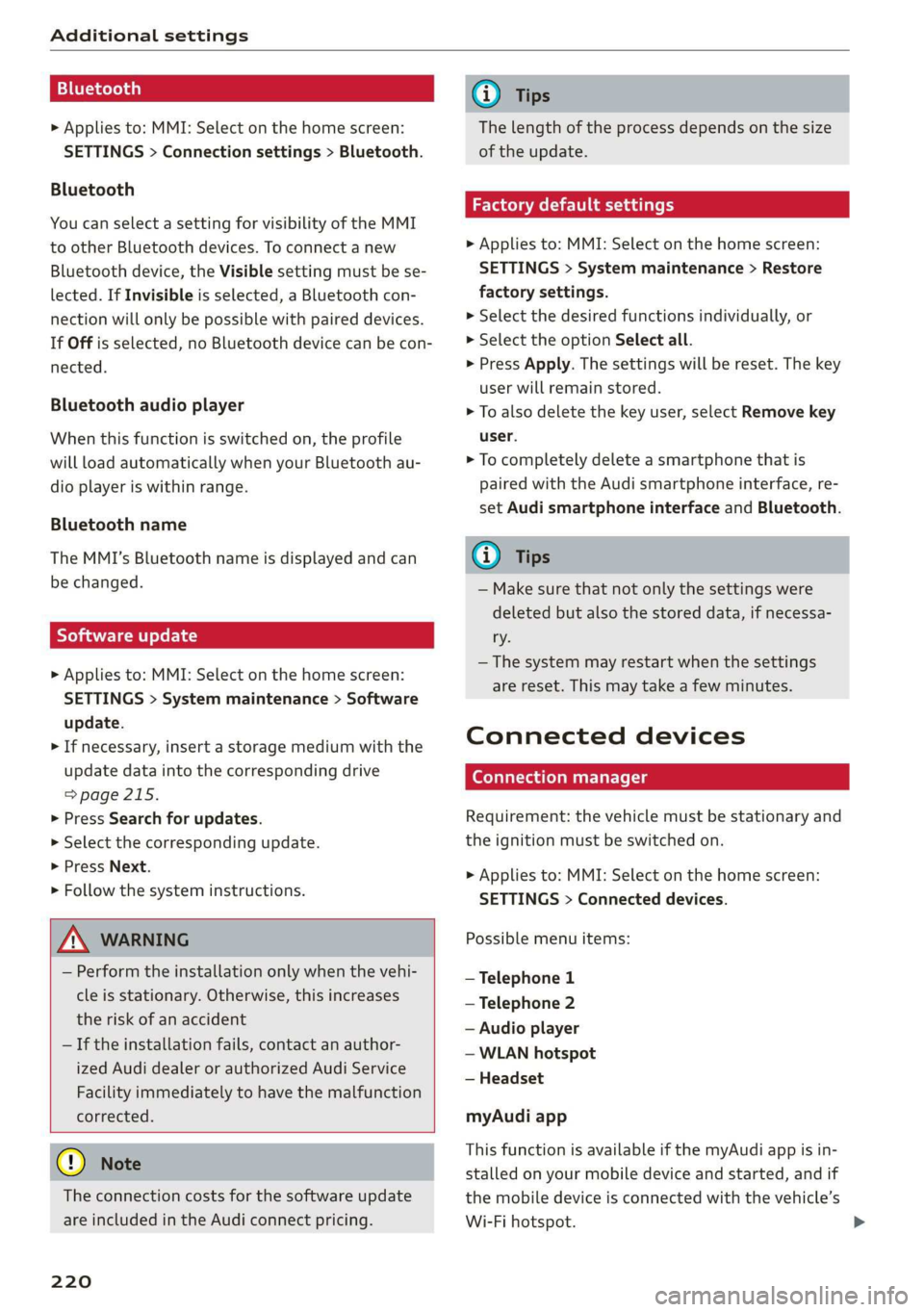
Bluetooth
> Applies to: MMI: Select on the home screen:
SETTINGS > Connection settings > Bluetooth.
Bluetooth
You can select a setting for visibility of the MMI
to other Bluetooth devices. To connect a new
Bluetooth device, the Visible setting must be se-
lected. If Invisible is selected, a Bluetooth con-
nection will only be possible with paired devices.
If Off is selected, no Bluetooth device can be con-
nected.
Bluetooth audio player
When this function is switched on, the profile
will load automatically when your Bluetooth au-
dio player is within range.
Bluetooth name
The MMI’s Bluetooth name is displayed and can
be changed.
Tyee M olor hd
> Applies to: MMI: Select on the home screen:
SETTINGS > System maintenance > Software
update.
> If necessary, insert a storage medium with the
update data into the corresponding drive
=>page 215.
> Press Search for updates.
> Select the corresponding update.
> Press Next.
> Follow the system instructions.
ZA\ WARNING
— Perform the installation only when the vehi-
cle is stationary. Otherwise, this increases
the risk of an accident
— If the installation fails, contact an author-
ized Audi dealer or authorized Audi Service
Facility immediately to have the malfunction
corrected.
() Note
The connection costs for the software update
are included in the Audi connect pricing.
220
G) Tips
The length of the process depends on the size
of the update.
Factory default settings
> Applies to: MMI: Select on the home screen:
SETTINGS > System maintenance > Restore
factory settings.
> Select the desired functions individually, or
> Select the option Select all.
> Press Apply. The settings will be reset. The key
user will remain stored.
> To also delete the key user, select Remove key
user.
> To completely delete a smartphone that is
paired with the Audi smartphone interface, re-
set Audi smartphone interface and Bluetooth.
G) Tips
— Make sure that not only the settings were
deleted but also the stored data, if necessa-
ry.
— The system may restart when the settings
are reset. This may take a few minutes.
Connected devices
(eye e Ts ( Us
Requirement: the vehicle must be stationary and
the ignition must be switched on.
> Applies to: MMI: Select on the home screen:
SETTINGS > Connected devices.
Possible menu items:
— Telephone 1
— Telephone 2
— Audio player
— WLAN hotspot
— Headset
myAudi app
This function is available if the myAudi app is in-
stalled on your mobile device and started, and if
the mobile device is connected with the vehicle’s
Wi-Fi hotspot.
Page 223 of 310
4K8012721BC
Additional settings
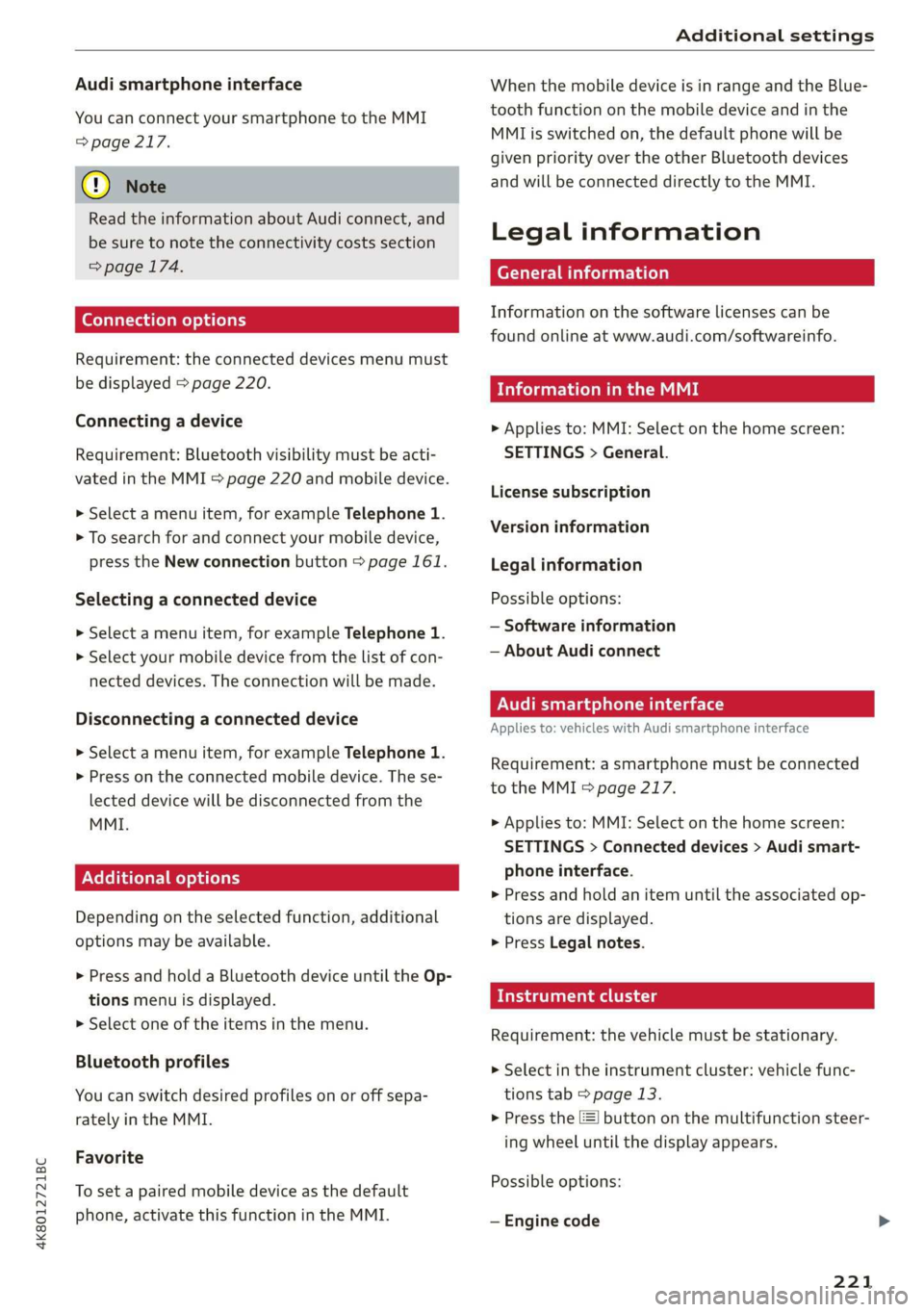
Audi smartphone interface
You can connect your smartphone to the MMI
=> page 217.
@) Note
Read the information about Audi connect, and
be sure to note the connectivity costs section
=> page 174.
Connection options
Requirement: the connected devices menu must
be displayed > page 220.
Connecting a device
Requirement: Bluetooth visibility must be acti-
vated in the MMI & page 220 and mobile device.
> Select a menu item, for example Telephone 1.
> To search for and connect your mobile device,
press the New connection button > page 161.
Selecting a connected device
» Select a menu item, for example Telephone 1.
> Select your mobile device from the list of con-
nected devices. The connection will be made.
Disconnecting a connected device
> Select a menu item, for example Telephone 1.
> Press on the connected mobile device. The se-
lected device will be disconnected from the
MMI.
Additional options
Depending on the selected function, additional
options
may be available.
> Press and hold a Bluetooth device until the Op-
tions menu is displayed.
> Select one of the items in the menu.
Bluetooth profiles
You can switch desired profiles on or off sepa-
rately in the MMI.
Favorite
To set a paired mobile device as the default
phone, activate this function in the MMI.
When the mobile device is in range and the Blue-
tooth function on the mobile device and in the
MMI is switched on, the default phone will be
given priority over the other Bluetooth devices
and will be connected directly to the MMI.
Legal information
General information
Information on the software licenses can be
found online at www.audi.com/softwareinfo.
ieee mm awe
> Applies to: MMI: Select on the home screen:
SETTINGS > General.
License subscription
Version information
Legal information
Possible options:
— Software information
— About Audi connect
ON ae lad el MU Tale)
Applies to: vehicles with Audi smartphone interface
Requirement: a smartphone must be connected
to the MMI S page 217.
> Applies to: MMI: Select on the home screen:
SETTINGS > Connected devices > Audi smart-
phone interface.
> Press and hold an item until the associated op-
tions are displayed.
> Press Legal notes.
aati lg
Requirement: the vehicle must be stationary.
> Select in the instrument cluster: vehicle func-
tions tab > page 13.
> Press the EE] button on the multifunction steer-
ing wheel until the display appears.
Possible options:
— Engine code
221
Page 283 of 310
4K8012721BC
Fuses and bulbs
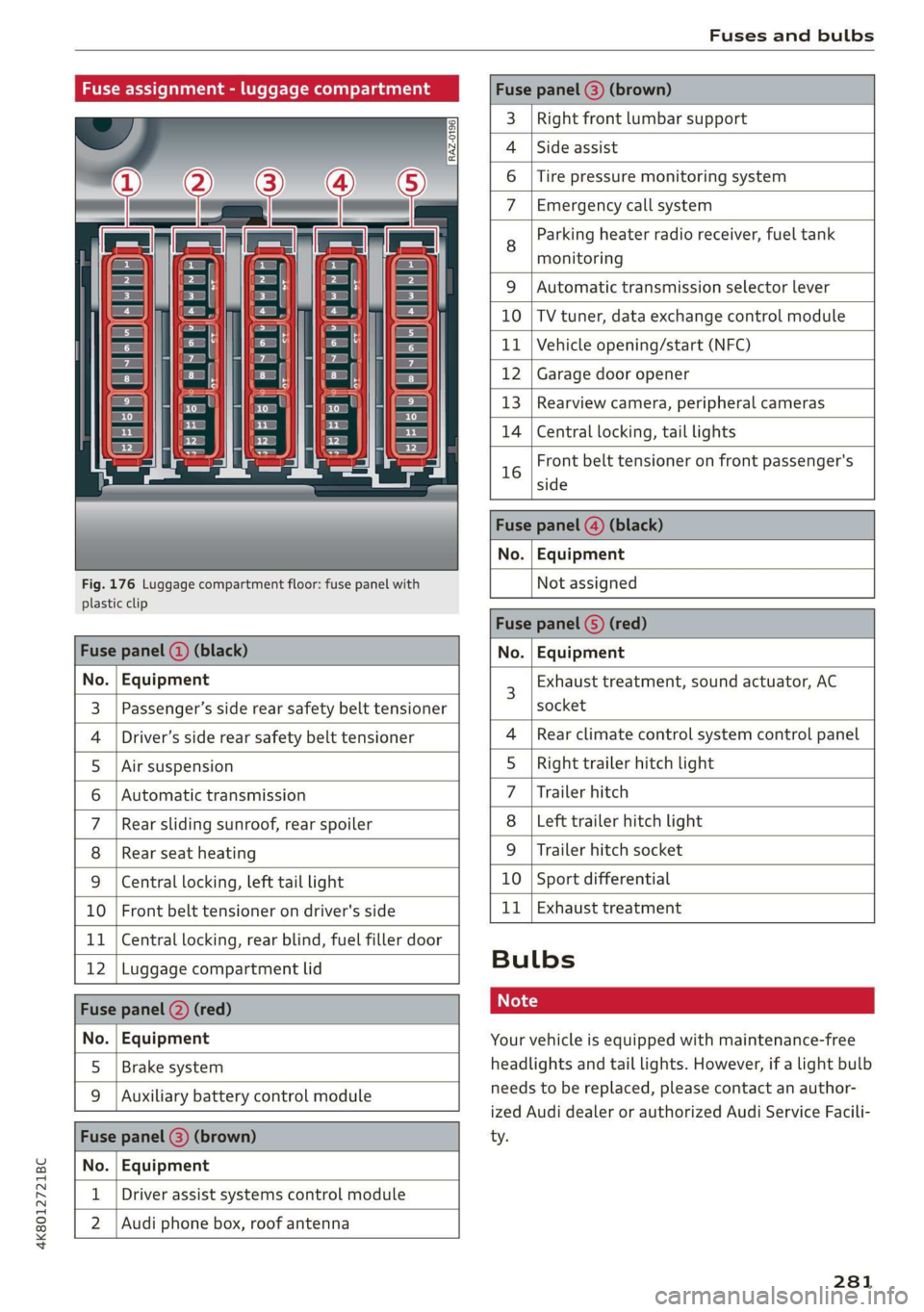
Fuse assignment - luggage compartment
[RAZ-0196
Cen
5
cs
i
-
fr) =)
ea
Fig. 176 Luggage compartment floor: fuse panel with
plastic clip
Fuse panel (@) (brown)
3 | Right front lumbar support
Side assist
4
6 |Tire pressure monitoring system
7 Emergency call system
Parking heater radio receiver, fuel tank
8 ae
monitoring
9 |Automatic transmission selector lever
10 |TV tuner, data exchange control module
11 | Vehicle opening/start (NFC)
12 | Garage door opener
13 | Rearview camera, peripheral cameras
14 | Central locking, tail lights
Front belt tensioner on front passenger's
16 side
Fuse panel @) (black)
No. | Equipment
Not assigned
Fuse panel (5) (red)
Fuse panel ( (black) No. | Equipment
No. | Equipment
Passenger’s side rear safety belt tensioner
Driver’s side rear safety belt tensioner
Air suspension
Automatic transmission
Rear sliding sunroof, rear spoiler
Rear seat heating
W}@O;N|
AD)
Mm)
BR)
Ww
Central locking, left tail light
10 | Front belt tensioner on driver's side
11 | Central locking, rear blind, fuel filler door
12 | Luggage compartment lid
Fuse panel (2) (red)
No. | Equipment
5 | Brake system
Auxiliary battery control module
Fuse panel (3) (brown)
No. | Equipment
Driver assist systems control module
2 |Audi phone box, roof antenna
Exhaust treatment, sound actuator, AC
socket
Rear climate control system control panel
Right trailer hitch light
Trailer hitch
Left trailer hitch light
Trailer hitch socket
10 | Sport differential
11 | Exhaust treatment
WOl/oOIN|
un]
Bulbs
Your vehicle is equipped with maintenance-free
headlights and tail lights. However, if a light bulb
needs to be replaced, please contact an author-
ized Audi dealer or authorized Audi Service Facili-
ty.
281
Page 286 of 310

Data privacy
Adjusting individual privacy settings
In the MMI, you can adjust individually which da-
ta should be transmitted from the vehicle. If you
switch on a data category, the data will be trans-
mitted.
@) Note
You are responsible for all precautions taken
for data protection, anti-virus protection, and
protection against loss of data on mobile de-
vices that are used to access the Internet
through the Wi-Fi hotspot.
@ Tips
— The following interfaces are not affected by
changes to the privacy settings: Bluetooth,
Bluetooth Low Energy (BLE), Wi-Fi, Audi
smartphone interface (ASI), Near Field
Communication (NFC), charging communi-
cation (high-voltage system), Electronic Toll
Collect (ETC), On-Board Diagnostic System
(OBD) if equipped.
— If the maximum privacy settings are switch-
ed on, your vehicle may not receive security
updates and certificates for establishing an
encrypted connection, depending on vehicle
equipment. In order to receive security up-
dates and certificates, switch the maximum
privacy settings off for at least ten minutes
every six months. Make sure that your vehi-
cle is connected to the Internet. A symbol in
the MMI status bar indicates if the required
data connection is available > page 22.
— If the transmission of data is limited, it will
have the following effects on the exchange
of data for Audi connect services and emer-
gency calls, if equipped:
— The emergency call function will remain
available without restrictions and will con-
tinue to transmit data.
— If an online roadside assistance call is ini-
tiated, no data will be transmitted, but a
call will be made.
— If the Geofencing Alert, Speed Alert,
and/or Valet Alert services have been acti-
vated by the key user, then they will re-
284
main available without restrictions and
continue to transmit data.
— Stored destinations (favorites, last desti-
nations) are only stored in the vehicle. If
you allow transmission of data again,
these destinations will be synchronized via
the myAudi account. To prevent synchroni-
zation of destinations, delete the destina-
tions before you allow data to be trans-
mitted again.
Applies to: vehicles with Audi connect Infotainment
AUDI AG collects, uses, stores and shares your
personal information, such as contact data, vehi-
cle data, usage data, driving data and precise ge-
olocation, in order to provide you with the prod-
ucts and services you have purchased or request-
ed, and for a number of other purposes, for ex-
ample, to track quality issues, to performance
and safety, to meet our internal compliance or le-
gal requirements and to market to customers
and potential customers. For a more complete
list of the data we collect, how we use it and with
whom we share it, please visit your Audi nation-
al/sales region website at www.audi.com.
The collection, use and sharing may vary depend-
ing on your model and model year, your subscrip-
tion status, or the service offering. For example,
collection, use and sharing may vary between
Audi connect services, if you have designated a
key user, or if you are driving a model equipped
with persistent data logging. Please review the
complete Privacy Statement to understand our
data handling practices with respect to a particu-
lar service.
You can find additional information about our da-
ta privacy practices in your MMI.
> Applies to: MMI: On the home screen, select:
SETTINGS > General > Legal notes > About
Audi connect.
Information about our privacy practices in con-
junction with the mobile Audi connect applica-
tion can be found in the Application’s Privacy
Statement.
Page 290 of 310

Accessories and technical changes
Service Facility, who will perform the work ac-
cording to Audi factory specifications. Only
Audi Genuine Parts are used when Audi ex-
perts perform repair or service procedures.
Failure to use Audi Genuine Parts or Audi Gen-
uine Accessories or performing repairs incor-
rectly may result in severe vehicle damage,
such as corrosion.
Accessories and parts
Consult with an authorized Audi dealer or author-
ized Audi Service Facility before purchasing ac-
cessories or replacement parts. We recommend
that you have your vehicle serviced by an author-
ized Audi dealer or authorized Audi Service Facili-
ty and that Audi Genuine Parts and Audi Genuine
Accessories are used.
Audi does not endorse the use of products and
accessories that it has not evaluated, even if the
product is approved by a certified testing agency
or government agency.
ZA WARNING
— Installing unapproved accessories or incor-
rect replacement parts can cause vehicle
damage and can increase the risk of an acci-
dent.
— Never attach accessories, such as telephone
holders or cup holders, to the airbag covers
or within the airbag deployment zone, be-
cause this increases the risk of injury if the
airbag deploys.
— Do not use a license plate bracket different
from the one installed by the factory in the
front of the vehicle, because it may impair
the function of some systems.
@) Note
A correctly-installed exterior antenna is re-
quired for operating radio equipment in the
vehicle. Otherwise, the increased electromag-
netic waves can cause malfunctions in the ve-
hicle. Observe the regulations in the country
where the vehicle is being operated and the
instructions from the radio equipment manu-
facturer.
288
Reporting Safety Defects
Applicable to U.S.A.
If you believe that your vehicle
has a defect which could cause a
crash or could cause injury or
death, you should immediately in-
form the National Highway Traffic
Safety Administration (NHTSA) in
addition to notifying
Audi of America, Inc.
2200 Ferdinand Porsche Drive
Herndon, VA 20171
If NHTSA receives similar com-
plaints, it may open an investiga-
tion, and if it finds that a safety
defect exists in a group of
vehicles, it may order a recall and
remedy campaign. However,
NHTSA cannot become involved in
individual problems between you,
your dealer, or Audi of America,
Inc.
To contact NHTSA, you may call
the Vehicle Safety Hotline toll-
free at 1-888-327-4236 (TTY: 1-
800-424-9153); go to http://
www.safercar.gov;
Page 291 of 310

4K8012721BC
Accessories and technical changes
or write to:
Administrator NHTSA
1200 New Jersey Ave.,
S.E. West Building
Washington, DC
20590.
You can also obtain other infor-
mation about motor vehicle safe-
ty from http://www.safercar.gov.
Applicable to Canada
If you live in Canada and you be-
lieve that your vehicle has a de-
fect that could cause a crash, in-
jury or death, you should immedi-
ately inform Transport Canada,
Defect Investigations and Recalls.
You should also notify Audi Cana-
da.
Canadian customers who wish to
report a safety-related defect to
Transport Canada, Defect Investi-
gations and Recalls, may either
call Transport Canada toll-free at:
Tel.: 1-800-333-0510 or
Tel.: 1-819-994-3328 (Ottawa re-
gion and from other countries)
TTY for hearing impaired:
1-888-675-6863
or contact Transport Canada by
mail at:
Transport Canada
Motor Vehicle Safety Investiga-
tions Laboratory
80 Noel Street
Gatineau, QC
J8Z OA1
For additional road safety infor-
mation, please visit the Road
Safety website at:
English:
http://www.tc.gc.ca/eng/
motorvehiclesafety/menu.htm
French:
http://www.tc.gc.ca/fra/
securiteautomobile/menu.htm
Declaration of
compliance for telecom-
munications equipment
and electronic systems
The manufacturer is not liable for radio malfunc-
tions that are caused by unauthorized changes to
the equipment.
Equipment
The following equipment complies with FCC sec-
tion 15 and RSS-Gen:
— Adaptive cruise assist*
— Remote control key
— Cell phone package*
— Garage door opener (HomeLink)*
— Intersection assistant*
— Side assist*
— Exit warning*
— Rear cross traffic assist*
— WLAN hotspot*
289
Page 295 of 310

4K8012721BC
Index
A
A/C cooling mode............. ee eee eee ee
Accelerator pedal.............--00000005
also refer to Accelerator pedal...........
ACCeSSOFICS . 6... eee
Active lane assist
refer to Lane departure warning.........
refer to Lane guidance................
Adaptive cruise assist..............-000.
Cleaning the sensors...........00 ee eee
Predictive control....................
Adaptive dampers...........--0000-00-
Adaptive speed assist
refer to Adaptive cruise assist...........
Adjusting the air distribution.............
Adjusting the brightness.................
Adjusting the sound..............-...0-
Adjusting the temperature...............
Adjusting the vents ...........0 cece eens
Adjusting the volume..............000005
Adjusting the volume (announcements) ... .
Adjusting the welcome sound............
Airbag SySteM « » ene s ews 4 5 Hemme tee Eee
Air quality display................2.2.00.
Air suspension..............00.00-0008
Alarm system
refer to Anti-theft alarm system..........
Alignment pin (changing the wheel).......
All-weather lights...............-.00000.
Allseason tires... 2.2.00... 22020
All wheel drive
refer to quattro... 2... eee eee eee
Amazon Alexa integration
Média playback’: ¢ sos s ¢ wees ¢ 4 orem b eae
Operation « sion ss aac sv rere © omen wa ar
AMI
refer to Audi music interface...........
Android Auto
refer to Audi smartphone interface......
Anti-freeze
Windshield washer system.............
Anti-lock braking system. ........-....-.
Anti-Slip Regulation.................0..
Anti-theft alarm system...........-..00--
Anti-theft wheel bolts................0.
Apple CarPlay
refer to Audi smartphone interface...... 217
Aspect ratio (video) ..........-..00. 211,.213
ASR
refer to Anti-Slip Regulation............ 108
Audi adaptive light.................0005. 48
Audi connect
refer to CONNECt:. « s ccascs seas ieeeee oe 174
Audi connect Remote & Control
refer to Vehicle control services......... 176
Audirdrive seletticy: « + sven « x cee x ¢ neem ¢ 2 2 104
Audi music interface...............20-- 208
Audio files.......... 00.0000 c cece 209
Audi phone box............ 00: e eee eee 163
Audi presense......... 0... e ee eee eee 143
Messages ............ 0.02. e eee eee 146
Audi pre sense front.............--..0-- 144
Audi side assist
refer to Side assist. ...... 0.00.00 eee eee 147
Audi smartphone interface.............. 217
Legalinformation.................005 221
Audi virtual cockpit
refer to Instrument cluster.............. 12
AUTO
Automatic headlights.................. 48
Climate control system.............0005 86
Auto Lock (central locking) ............... 32
Automatic climate control system
refer to Climate control system.......... 85
Automatic luggage compartment lid.... 40,41
Automatic transmission............-.0005 92
Parking lock emergency release.......... 95
Automatic wipe/wash system............. 55
Average consumption................... 16
Average speed.... 2.2... - ee eee eee eee 16
B
Bag hooks... ..... cece eee eee eee eee 80
Battery
Charging (12 Volt vehicle battery)....... 239
Vehicle battery (12 Volt)............... 237
Winter operation (12 Volt vehicle battery) . 237
BOCK rOUEE sicccans + 2 woewene © o sirens © ¥ ecevonT «ones 190
293
Page 296 of 310
Index
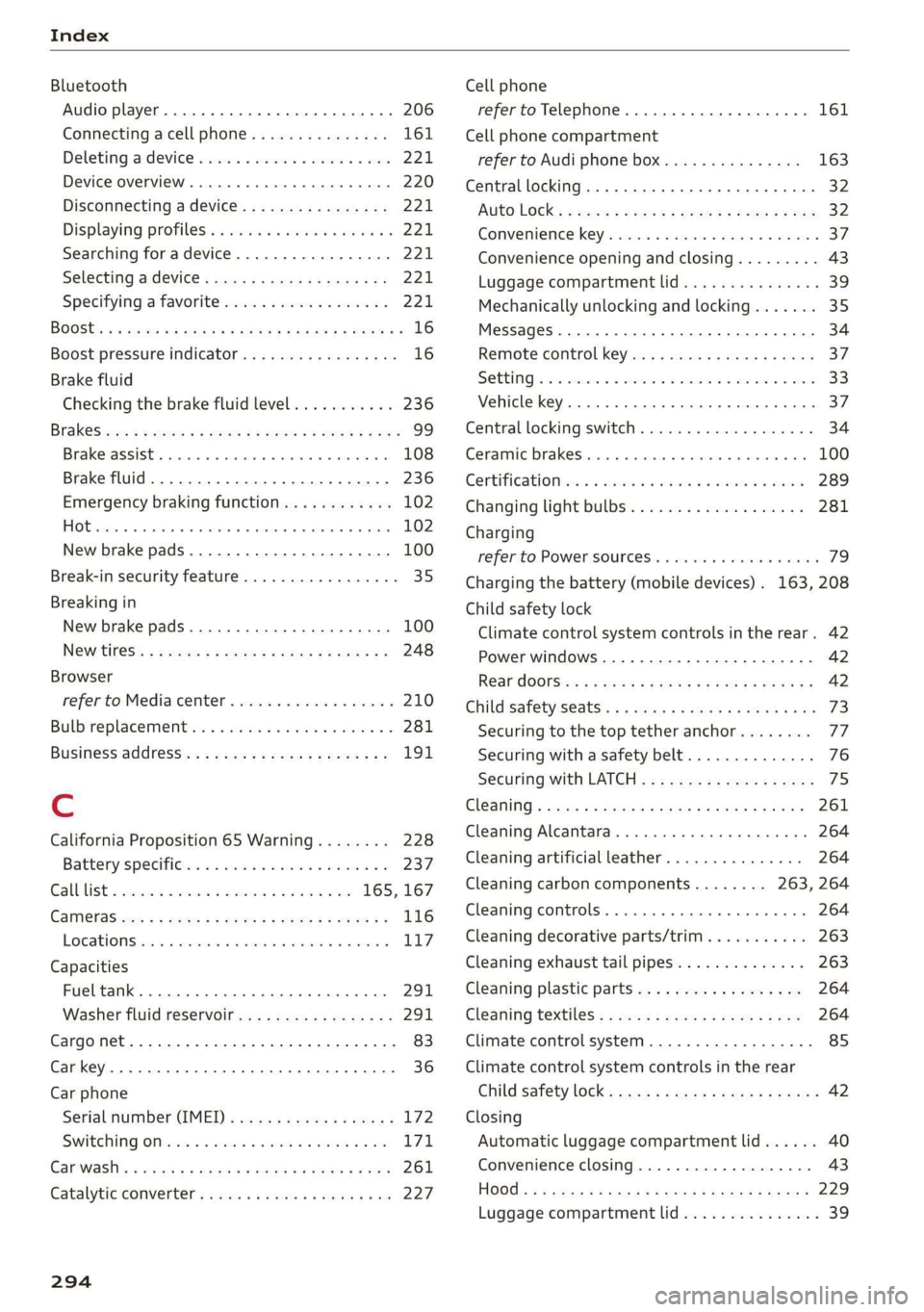
Bluetooth
Audio player... . 2... cece eee eee eee eee 206
Connecting acellphone............... 161
Deleting adevice...............00000- 221
Device overview............--0-0 0 eee 220
Disconnecting a device................ 221,
Displaying profiles. « cies 2 save «2 owen ae 221,
Searching fora device................. 221
Selecting a device : seas ss seg ts ees so: 221
Specifying a favorite.................. 221
BoOStss « « cosy: ¢ ¢ eyes 5 © sees § o Rewn ¢ a ees ¢ e 16
Boost pressure indicator................. 16
Brake fluid
New brake pads..............---000-- 100
Break-in security feature..............0.. 35
Breaking in
New brake pads..............-..00005 100
New tires « ¢ cvs + sie +e ctees ss ees es 248
Browser
refer to Mediacenter................0. 210
Bulb replacement...............000-005 281
Business. address): « s scx ¢ < swaw « x ome gee 191,
C
California Proposition 65 Warning........ 228
Batteryspecificie. «swine s vaaney o ownc oes 237
Galllist « cosas « s sess = i secu = 2 am = a8 165, 167
CaM@raS css « = ees 5 2 cee + & otters os ees es 116
LOGCALIONS sa, «+ veces oe 5 consents » x aamsens © 5 eewens 117
Capacities
Fueltank............ 20. 291
Washer fluid reservoir...............0 291
Cargonet........... 0... eee eee eee eee 83
Car key... eee eee eee 36
Car phone
Serial number (IMEI) .............0.006 172
SWItChING OMfessc <6 weww = awe a 2 mire «2 171
Capwashls « oaws 2 ¢ eau « 2 mame «x eee & 2 cee 261
Catalytic converter’; esos << weg ee ees se ee 227
294
Cell phone
refer to Telephone.............e eee eee 161
Cell phone compartment
refer to Audi phone box............... 163
Central
locking ...... 0. cece eee eee eee 32
AUTO LOCK: » geese + sunems 2 seene & 3 donee & = Be 32
Convenience key « sscsu © cvenesie © erase wo vnscem 37,
Convenience opening and closing......... 43
Luggage compartment lid............... 39
Mechanically unlocking and locking....... 35
Messages... 1.6... ce eee cece eee eee 34
Remote control keys: ss esas ss eves os ees 37
SettN's 6 e wanes a a saws «wo ones vo meen + 8 o8TH 33
Vehicle key... 6... ccc ee eee eee eee 37
Central locking switch................0-. 34
Ceramic brakesicicns x + sxcceie +o nessa 3 0 eres ¥ 6 « 100
Certificationies « 6 evar se enare a ears +e ewe 289
Changing light bulbs................... 281
Charging
refer to Power SOUrCES ...... eee eee eee 79
Charging the battery (mobile devices) . 163, 208
Child safety lock
Climate control system controls in the rear. 42
Power windows.........---00 eee eee eee 42
Rear doorSies 5 « aecw sa cams 3 cam 4 x ae a 42
Child safetyis@ats): se cous ye sews x 2 wren av we 73
Securing to the top tether anchor........ 77
Securing with a safety belt.............. 76
Securing with LATCH............-.-+--- 7
CIGSNING « sacze & s aes & s dae +e Sees te ee 261
Cleaning Alcantara...............00000. 264
Cleaning artificial leather............... 264
Cleaning carbon components........ 263, 264
Cleaning COMmtrols®. « scsi « x sro < « onmvess #6 vie 264
Cleaning decorative parts/trim........... 263
Cleaning exhaust tail pipes.............. 263
Cleaning plastic parts.................. 264
Cleaning textiles.................20005 264
Climate control system...........--..0-- 85
Climate control system controls in the rear
Child safety lok « seyoic 2 x ewe + saree 2 meee 2 42
Closing
Automatic luggage compartment lid...... 40
Convenience closing..............-.05. 43
HOG s « 2 seve y 5 meen ¢ 2 etme § eee OE ree 229
Luggage compartment lid............... 39
Page 299 of 310

4K8012721BC
Index
Favorites
Bluetooth ........ cece eee eee eee 221
NavViGatiGnis « = snes 5 2 anes 2 ¥ aes & 2 Ree 185
RadiObes. cs scwas x awsome. w cecteee we v cmermes om ow 200
Telephone .......... 0. cece e eee eee 166
Federal Communications Commission (FCC) . 289
File formats (media drives).............. 215
Fog QWINKOWS) seve @ 2 sans 2 samme « % wteneen 3 8 see 87
Folding the rear seats................004. 82
Footwell temperature..............--00. 88
For the sake of the environment
Disposing of engine oil................ 233
Fueling. ...... 0... e cece eee eee 224
L@AKSias x s nase ¢ s owe R ¥ HaleG GE Ra EL Ee 228
Fragrance... 2... ee eee eee eee 87, 88
Free text search
MéGiais « werws 5 ¢ ame 9 2 eeyee 8 eR a 2 REY 213
RadiGice. x x ssw x wenn wo comune x x awonoue a ot oo 200
also refer to Intelligent search.......... 183
Freeze protection
Coolant.................0.00 0 eee eee 234
Front center armrest.............---0 ee 62
Front collision warning
refer to Audi pre sense front............ 143
Front passenger’s seat adjustment
FRONb:: » nevos x 2 eves 4 2 eae ¢ 8 eeu oy eS oe 62
REAP cosives os seswecs = a samece a amare 2 9 tere © 6 ane 61
UCL: sxssies a a: amncasa «a wenuane 4 i asennish a a enaware wo oma 223
Additives ........ 0... 224
GUrENE CONSUMPUION ¢ wows « ¢ mews s 2 ors 6 a 16
Fuelidisplay ssscco os anvave uv ances av wauen a a oe 12
Fuel tank capacity...............00005 291
Ga@SOliNg = eng: « s same 5 2 eeeG Ge ee ge ee 223
Reducing fuel consumption............. 97
Fueling
Fueltillerdoor:. « . mscns = 9 ssw + omens « sens 224
Fuel filler door emergency release....... 226
Fuel tank capacity... ....... eee eee eee 291
With reserve canister (emergency fueling) . 226
G
Garage door opener.............--002 eee 45
Garment hOOKS sce s «soci ee emacs « o arenene oe one 80
Gasolin@sas « < seus « + eww ov eens 2 2 ewe sve 223
Additives..... 0.0.2... cece eee eee 224
Gasoline mixture... ..... ccc eee ee eee 223
GAWR
refer to Gross Axle Weight Rating (GAWR) . 292
Gears... eee 92
Glossary of tire and loading terminology... 244
Glove compartment.............-..0000- 80
Gross Axle Weight Rating (GAWR)........ 292
Gross Vehicle Weight Rating (GVWR)...... 292
GVWR
refer to Gross Vehicle Weight
Rating (GVWR)... 1.6... cee eee eee 292
H
Handsfree....................0000000, 162
Hamds:Free:Profiles. . conor so cmos «a aerate 2 162
Head-up display
Adjusting ........ 00... cece eee eee 26
Adjusting the brightness................ 53
Operating ’s « s wseow & wins wo mmm 6 © swans 6 8 a 26
Headlight range control.................. 48
Headlights
Cleanings « x icra wo wewane a cows 2 8 aoene @ os 262
Headlight range control................ 48
WashersysSteltl: « « gems « x ams x Ran ss pew 55
Head restraints
AGJUStING vce © & sro 2 2 wie 2 8 ween Bo ae 63, 64
Removing and installing................ 64
Heated rear window..............0000008 87
Heated steering wheel wc. «oxi vv omen «x we 88
F@Ati NG iscccas 2 © ceswone < w anos = x mec @ o aweae W o88 85
HFP
refer to Hands Free Profile............. 161
High beams
High beam assistant................00. 49
Highway lights....... 0... cee eee eee eee 48
Hill descenticomtrol.. © sscies o « scene © x sensors ss 102
Hill holdiassist « sesso « = sews + 2 meee o weve + 2 92
Home
refer to Home address................ 191
Hometaddressin « o sciviws « avexsuore o svete a 6 aiuene 191
HomeLink
refer to Garage door opener............. 4S
HOMMESGCREOM Ss « « cesceve oo sews aw sees we 8 eneee a 19
HORM: & acsive oo scsi wo conaess a a: avanire @ 8 swarm @ arene 6
Hotspot
refer to Wi-Fi...........0.-. cee eee eee 178
297