steering wheel AUDI A7 2020 Workshop Manual
[x] Cancel search | Manufacturer: AUDI, Model Year: 2020, Model line: A7, Model: AUDI A7 2020Pages: 310, PDF Size: 81.29 MB
Page 200 of 310
![AUDI A7 2020 Workshop Manual Radio
Radio
Opening the radio
Cet Sted
7 a P Leh
M
a aan HD2
Wt | The Rock Band
@ 102.9 FM-HDC HD3
Se ea
Ce Cite
Coleen y-\>) (0119)
0}
RAZ-0324
(ole) Me ar aT]
Pea
The Rock Band -](/img/6/57597/w960_57597-199.png "AUDI A7 2020 Workshop Manual Radio
Radio
Opening the radio
Cet Sted
7 a P Leh
M
a aan HD2
Wt | The Rock Band
@ 102.9 FM-HDC HD3
Se ea
Ce Cite
Coleen y-\>) (0119)
0}
RAZ-0324
(ole) Me ar aT]
Pea
The Rock Band -")
Radio
Radio
Opening the radio
Cet Sted
7 a P Leh
M
a aan HD2
Wt | The Rock Band
@ 102.9 FM-HDC HD3
Se ea
Ce Cite
Coleen y-\>) (0119)
0}
RAZ-0324
(ole) Me ar aT]
Pea
The Rock Band - Numero uno
(ole IT
Cece
(ley a Os
Fig. 134 Upper display: SiriusXM channel list
Depending on the vehicle equipment, the radio
may support the FM, AM, and SiriusXM (satellite
radio) frequency bands. Using the HD Radio re-
ceiver also allows you to receive radio stations on
the FM and AM bands in digital format.
Depending on the station list, the following in-
formation may be displayed:
@ Station list
Shows the station that is currently playing.
The station list updates automatically.
@ Stations
Depending on availability, the station name
as well as program information, for example,
may
be displayed.
@ HD Radio technology
FM/AM stations that can be received by digi-
tal radio are marked with the HD Radio tech-
nology symbol H).
If reception quality declines, the radio auto-
matically switches to the analog FM/AM sta-
tion depending on availability.
@ Additional stations
Digital HD Radio stations may contain multi-
ple additional stations. If you lose reception,
198
the additional stations will be muted since
they can no longer be received.
© Radio ID
Your radio ID and contact data for your satel-
lite radio provider are displayed.
© Channel number
@ Smart Favorite
See > page 201.
Adjusting the radio using the MMI
> Applies to: MMI: To set a frequency band, select
on the home screen: RADIO > Source a fre-
quency band.
> Applies to: MMI: To set a station, select on the
home screen: RADIO > Source > select a sta-
tion list > select a station.
> To select a frequency, follow the instructions
under > page 200, Free text search.
Adjusting the radio using the multifunction
steering wheel
Requirement: radio mode must be on.
>» Select the Radio/Media tab using the multi-
function steering wheel.
> To switch between radio and media, select the
button > Switch to radio/Switch to media.
> Turn the left thumbwheel to display the station
list.
> To switch to a different source, press the
button.
> To select a station or a source, turn and press
the left thumbwheel.
(i) Tips
— Contact the SiriusXM* provider if you would
like to receive satellite programming.
— Buildings, tunnels, bridges, open areas, oth-
er vehicles or objects on the vehicle roof can
affect reception.
— Satellite radio is not available in Alaska and
Hawaii.
— Applies to: multifunction steering wheel:
Depending on the selected function, opera-
tion through the MMI may be required.
Page 211 of 310

4K8012721BC
Media
Never leave mobile devices in the vehicle in
extremely high or low temperatures.
@ Tips
— Always follow the information found in
=> page 79.
— When you switch the ignition off, the USB
ports are still supplied with power until the
energy management intervenes.
— Do not use an additional adapter cable or
USB extension cable to connect mobile devi-
ces to the Audi music interface that already
have a cable or that must be connected with
a USB adapter cable (> page 208, fig. 137).
Using an additional adapter or US extension
cable may impair functionality.
— Functionality is not guaranteed for mobile
devices that do not conform to the USB 2.0
specification.
— USB hubs are not supported.
— Video playback through the Audi music in-
terface is not supported on Apple and MTP
devices (such as smartphones).
— iPod or iPhone malfunctions also affect the
operation of the MMI. Reset your mobile de-
vice in these situations.
— Audi recommends updating the iPod or
iPhone software to the latest version. Refer
to your mobile device owner's manual for
more information.
— The USB adapter on the Audi music inter-
face will support iPod touch or iPhone devi-
ces from the 5th generation or newer with
the lightning connector.
— For more information about the Audi music
interface and supported devices, check the
Audi database for mobile devices at www.
audi.com/mp3 or contact an authorized
Audi dealer or authorized Audi Service Fa-
cility.
Playing media
The following sources can be selected depending
on the vehicle equipment:
— Amazon Alexa > page 207.
—SD card > page 205.
— USB > page 208.
— DVD drive > page 206.
— Connect external device: you can connect ex-
ternal devices via Bluetooth and use the Blue-
tooth audio player > page 206, or you can con-
nect
an external device directly to the Audi mu-
sic interface > page 208.
— Connect online media > page 207.
Accessing media
Playing media files using the MMI
> Applies to: MMI: Select on the home screen:
MEDIA > Source > a source. Depending on the
connected device or online media service*, the
symbol for a source may change. The device
name may be displayed (for example: my-
Phone).
> Select a track from the categories in the media
center > page 210.
Playing media files using the multifunction
steering wheel
Requirement: a media drive must contain media
files > page 209.
> Select the Radio/Media tab using the multi-
function steering wheel.
> Turn the left thumbwheel to display the play-
list.
> To switch to a different source, press the
button.
> To select a media file or a source, turn and
press the left thumbwheel.
> To switch between radio and media, select the
[=] button > Switch to radio/Switch to media.
(i) Tips
— For safety reasons, the video image is only
displayed when the vehicle is stationary. On-
ly the sound from the video plays while driv-
ing.
— Applies to: multifunction steering wheel:
Depending on the selected function, opera-
tion through the MMI may be required.
209
Page 252 of 310

Wheels
not permitted can lead to ve-
hicle damage or accidents.
—If you install wheel covers on
the vehicle, make sure they al-
low enough air circulation to
cool the brake system. If they
do not, this could increase the
risk of an accident.
Tire wear and damage
B4H-0415
a
Fig. 154 Tire profile: treadwear indica-
tor
Tire wear
Check the tires regularly for wear.
—Inflation pressure that is too low
or high can increase tire wear
considerably.
—Driving quickly through curves,
rapid acceleration, and heavy
braking increase tire wear.
—Have an authorized Audi dealer
or authorized Audi Service Facili-
) Obey any applicable regulations in the
country where the vehicle is being oper-
ated.
250
ty check the wheel alignment if
there is unusual wear.
—Have the wheels rebalanced if an
imbalance is causing noticeable
vibration in the steering wheel.
If you do not, the tires and other
vehicle components could wear
more quickly.
Treadwear indicator
Original equipment tires contain
treadwear indicators in the tread
pattern, which are bars that are
1/16 in (1.6 mm) high and are
spaced evenly around the tire per-
pendicular to the running direc-
tion > fig. 154. The letters “TWI”
or triangles on the tire sidewall
indicate the location of the tread-
wear indicators.
The tires have reached the mini-
mum tread depth !) when they
have worn down to the treadwear
indicators. Replace the tires with
new ones > A.
Tire rotation
Rotating the tires regularly is rec-
ommended to ensure the tires
wear evenly. To rotate the tires, >
Page 258 of 310
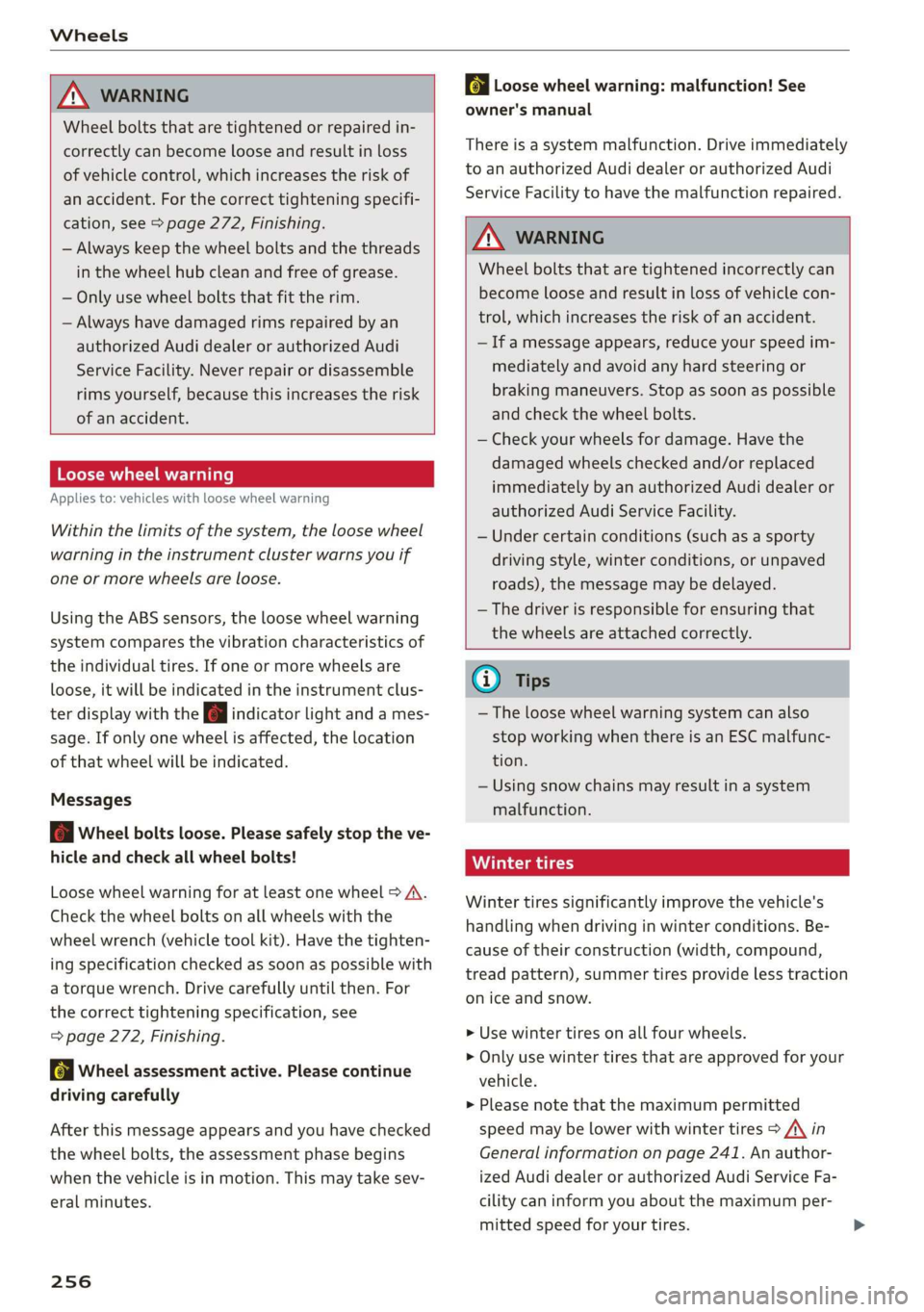
Wheels
ZA WARNING
Wheel bolts that are tightened or repaired in-
correctly can become loose and result in loss
of vehicle control, which increases the risk of
an accident. For the correct tightening specifi-
cation, see > page 272, Finishing.
— Always keep the wheel bolts and the threads
in the wheel hub clean and free of grease.
— Only use wheel bolts that fit the rim.
— Always have damaged rims repaired by an
authorized Audi dealer or authorized Audi
Service Facility. Never repair or disassemble
rims yourself, because this increases the risk
of an accident.
Loose wheel warning
Applies to: vehicles with loose wheel warning
Within the limits of the system, the loose wheel
warning in the instrument cluster warns you if
one or more wheels are loose.
Using the ABS sensors, the loose wheel warning
system compares the vibration characteristics of
the individual tires. If one or more wheels are
loose, it will be indicated in the instrument clus-
ter display with the fi indicator light and a mes-
sage. If only one wheel is affected, the location
of that wheel will be indicated.
Messages
fi Wheel bolts loose. Please safely stop the ve-
hicle and check all wheel bolts!
Loose wheel warning for at least one wheel > A\.
Check the wheel bolts on all wheels with the
wheel wrench (vehicle tool kit). Have the tighten-
ing specification checked as soon as possible with
a torque wrench. Drive carefully until then. For
the correct tightening specification, see
=> page 272, Finishing.
fl Wheel assessment active. Please continue
driving carefully
After this message appears and you have checked
the wheel bolts, the assessment phase begins
when the vehicle is in motion. This may take sev-
eral minutes.
256
fi Loose wheel warning: malfunction! See
owner's manual
There is a system malfunction. Drive immediately
to an authorized Audi dealer or authorized Audi
Service Facility to have the malfunction repaired.
Z\ WARNING
Wheel bolts that are tightened incorrectly can
become loose and result in loss of vehicle con-
trol, which increases the risk of an accident.
— If a message appears, reduce your speed im-
mediately and avoid any hard steering or
braking maneuvers. Stop as soon as possible
and check the wheel bolts.
— Check your wheels for damage. Have the
damaged wheels checked and/or replaced
immediately by an authorized Audi dealer or
authorized Audi Service Facility.
— Under certain conditions (such as a sporty
driving style, winter conditions, or unpaved
roads), the message may be delayed.
— The driver is responsible for ensuring that
the wheels are attached correctly.
G) Tips
— The loose wheel warning system can also
stop working when there is an ESC malfunc-
tion.
— Using snow chains may result in a system
malfunction.
Winter tires significantly improve the vehicle's
handling when driving in winter conditions. Be-
cause of their construction (width, compound,
tread pattern), summer tires provide less traction
on ice and snow.
> Use winter tires on all four wheels.
> Only use winter tires that are approved for your
vehicle.
>» Please note that the maximum permitted
speed may be lower with winter tires > A\ in
General information on page 241. An author-
ized Audi dealer or authorized Audi Service Fa-
cility can inform you about the maximum per-
mitted speed for your tires.
Page 262 of 310

Wheels
= page 260. In some cases, you must drive for
several minutes after storing the pressures until
the indicator light turns off. If the indicator light
does turn off or turns on again after a short peri-
od of time, drive to an authorized Audi dealer or
authorized Audi Service Facility immediately to
have the malfunction corrected.
ZA WARNING
— If the tire pressure indicator appears in the
display, reduce your speed immediately and
avoid any hard steering or braking maneu-
vers. Stop as soon as possible and check the
tires and their pressure.
— The driver is responsible for maintaining the
correct tire pressure. You must check the
tire pressure regularly.
— Under certain conditions (such as a sporty
driving style, winter conditions, or unpaved
roads), the tire pressure monitoring system
indicator may be delayed.
@) Tips
— The tire pressure monitoring system can al-
so stop working when there is an ESC mal-
function.
— Using snow chains may result in a system
malfunction.
— The tire pressure monitoring system in your
Audi was calibrated with “Audi Original
Tires” > page 248. Using these tires is rec-
ommended.
Storing tire pressures
Applies to: vehicles with Tire Pressure Monitoring System in-
dicator
If the tire pressure changes or a tire is replaced,
it must be confirmed in the MMI.
> Before storing the tire pressures, make sure the
tire pressures in all four tires meet the speci-
fied values and are adapted to the load
=>page 251.
> Switch the ignition on.
> Applies to: MMI: Select on the home screen:
VEHICLE > Settings & Service > Tire pressure
monitoring > Store tire pressure > Yes, store
now.
260
G) Tips
Do not store the tire pressures if snow chains
are installed.
Page 278 of 310

Emergency assistance
release before towing the vehicle
=>page 95.
— Switch Audi pre sense* off > page 146 when
loading the vehicle onto a vehicle carrier,
train, ship, or other type of transportation,
or when towing the vehicle. This can prevent
an undesired intervention from the pre
sense* system.
— Follow the local legal regulations for tow-
ing.
Read and follow the important information under
=>page 275.
Preparations
> Only secure the towing cable or tow bar at the
designated towing loops > page 276,
=> page 277.
> Make sure the towing cable is not twisted. Oth-
erwise it could disconnect from the towing loop
while towing.
> Switch the emergency flashers on in both
vehicles > page 52. However, do not do this if it
prohibited by law.
Towing vehicle (front)
> Only start to drive when the towing cable is
taut.
> Press the brake pedal very carefully.
> Avoid sudden braking or driving maneuvers.
Vehicle being towed (rear)
> Make sure the ignition is switched on so that
the steering wheel is not locked and so that you
can use the turn signals, the horn, and the
windshield wipers if needed > A\.
> Switching it off before the vehicle has stopped
may impair the function of the brake booster
and power steering. You would then need to
use more force to steer and brake the vehicle.
> Release the parking brake > page 101.
> Select the “N” selector lever position.
> Make sure the towing cable is always taut.
276
A WARNING
Never tow a vehicle using a tow bar or towing
cable if the vehicle does not have electrical
power.
Front towing loop
Fig. 170 Front bumper: installing the towing loop
The threaded opening for the towing loop is lo-
cated on the right side of the front bumper.
> Remove the towing loop from the vehicle tool
kit > page 267.
> Press the cap inward with brief, strong pressure
=> fig. 170. The cap will loosen from the bump-
er.
> Tighten the towing loop in the threaded open-
ing until it stops and then tighten it with a
wheel wrench.
> After using, place the towing loop back in the
vehicle tool kit.
ZX WARNING
If the towing loop is not tightened until it
stops when installing, the threads may be
pulled out when towing the vehicle and result
in an accident.
G) Tips
Depending on the model, the shape of the
cover can vary.
Page 281 of 310

4K8012721BC
Fuses and bulbs
This can cause damage to the electrical sys-
tem and increases the risk of fire.
oO Note
If a new fuse burns out again shortly after you
have installed it, have the electrical system
checked as soon as possible by an authorized
Audi dealer or authorized Audi Service Facili-
ty:
G@) Tips
— The following table does not list fuse loca-
tions that are not used.
— Some of the equipment listed in the follow-
ing tables applies only to certain model ver-
sions or certain optional equipment.
Fig. 174 Left side of the cockpit: fuse panel with plastic
clip
Fuse panel
6 |Volume control
7 |Instrument cluster
8 |Front MMI display
9 |Steering wheel heating
Fuse
No. | Equipment
2 |MMI Infotainment system control module
3 | Audi music interface
4 |Head-up display
5 Climate control system, fragrance system,
lonizer
9 |Steering column lock
Fuse panel
order
RAZ-0195} [i
and @) is in the opposite
on right-hand drive vehicles.
No. | Equipment
Steering column adjustment
CD/DVD player
Steering column electronics
WM)
Bl)
WlnN
Light switch, switch panels
No. | Equipment
2 |Engine components
Engine components
4 | Engine components
279
Page 282 of 310
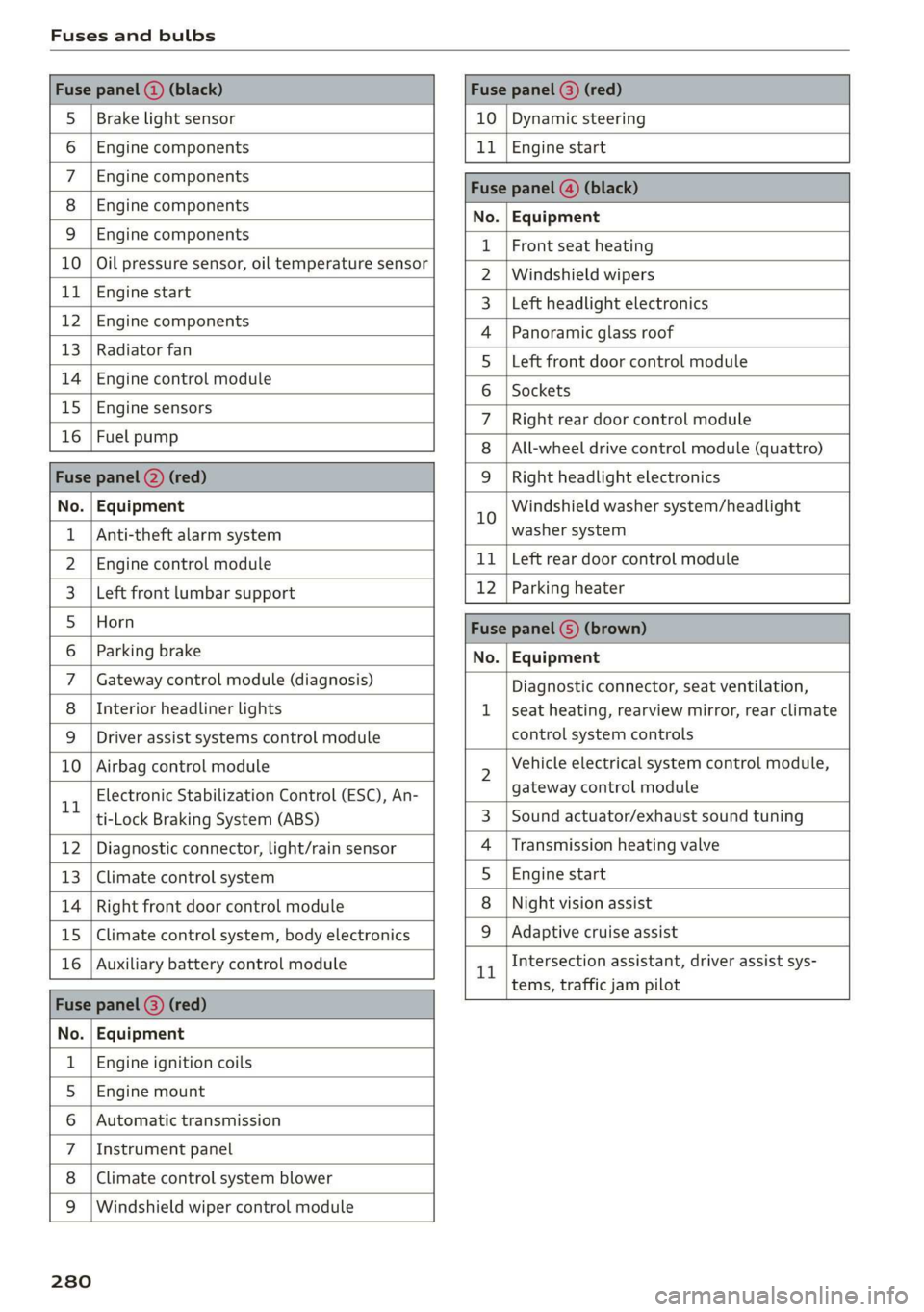
Fuses and bulbs
Fuse panel () (black) Fuse panel © (red)
S_ | Brake light sensor 10 | Dynamic steering
6 |Engine components 11 | Engine start
7 | Engine components Fase Parevauacn
8 | Engine components Na: Equipment
3_|Engine components 1 |Front seat heating
10 | Oil pressure sensor, oil temperature sensor 2 |Windshield wipers
ub BGI start 3 |Left headlight electronics
12 engine components 4 |Panoramic glass roof
13 | Radiator fal 5 |Left front door control module
14 | Engine control module 6 | sackats
15 |Engine sensors 7 |Right rear door control module
26 | ROBLBUTGD 8 | All-wheel drive control module (quattro)
Fuse panel (2) (red) 9 |Right headlight electronics
No. | Equipment 10 Windshield washer system/headlight
1 | Anti-theft alarm system washer system
2. |Engine control module 11 | Left rear door control module
3. | Left front lumbar support 12 | Parking heater
5_|Horn Fuse panel (5) (brown)
6 |Parking brake No. | Equipment
7 | Gateway control module (diagnosis) Diagnostic connector, seat ventilation,
8 | Interior headliner lights 1 |seat heating, rearview mirror, rear climate
9 | Driver assist systems control module control system controls
10 | Airbag control module 2 Vehicle electrical system control module,
11 Electronic Stabilization Control (ESC), An- gateway control module
ti-Lock Braking System (ABS) 3 | Sound actuator/exhaust sound tuning
12 | Diagnostic connector, light/rain sensor 4 |Transmission heating valve
13 | Climate control system 5 |Engine start
14 | Right front door control module 8 | Night vision assist
15 | Climate control system, body electronics 9 |Adaptive cruise assist
16 | Auxiliary battery control module 1 Intersection assistant, driver assist sys-
= tems, traffic jam pilot
Fuse panel (2) (red)
No. | Equipment
1 | Engine ignition coils
5 | Engine mount
6 |Automatic transmission
7 |Instrument panel
8 | Climate control system blower
9 |Windshield wiper control module
280
Page 298 of 310
Index
DriversySteim 5 cscs «x sevens © 5 eswanes 6 ¥ wumees 97,99
Audi drive select.............0 eee eee 104
Driving down hills.............2--0000- 102
DrivingprogKraims. » « swewcs + + snes oo mtmsen @ 93,139.
Driving through water................0. 103
DriVING TIMes + 3 secur so ceswen + wees s aaaeER a oo 16
Driving tips
Driving through water................. 103
Efficient driving. ..........00..ee eee eee 97
Uphill and downhill................... 102
Driving up hills: =z sees ¢ 2 sees ae ewan es es 102
Dust filter
refer to Pollutant filter..............0.. 88
DVD drive (media drives)................ 206
Dynamic all-wheel steering.............. 106
E
E-mail
Message options «. 2 6 cs. s seven se ees e 170
SettingS 0... . 0... c eee eee eee eee 170
EDL
refer to Electronic Differential Lock...... 108
EDR
Event Data Recorder wi .2 os ecce se eecee es 282
Efficiency assist... 0... eee eee 128
Electrical system. .........-.0 0 eee ee eee 236
Electromechanical parking brake......... 101
Electronic Differential Lock.............. 109
Electronicimmobilizetiiec:. . 2 sive «6 cess «2 one 37
Electronic Stabilization Control........... 108
Embedded SIM Gard « savers « « sways x 2 cawa 9 oa 175
EM@rgency assist sans « x asas 5 aaven ss news s L51,
Emergency assistance..............+-0. 267
Emergency braking function............. 102
Emergency call............200005. 167, 180
Emergency flashers..............--0000- 52
Emergency fueling.............--..000- 226
Emergency: Mode viic = + saree 2 waren oo tere 2 96
Emergency operation
Doors... 2... ee eee 35)
Fueltilledoor's « + saws & 3 naan & s aes a § me 226
Luggage compartment lid............... 41
Panoramic glass roof.............000005 44
Emissions control system.............. 227
Energy COMSUMERS! 5 sia oo wend 6 saan ao ave 17
296
Energy Managements os sce 6 eevee wo wise so 97
Engine
Breakingin.......... 0... cee eee eee eee 97
GCOOlSNE + acas 3 < seam Blais 2 a eae,8 © Game 234
Emergency Sto piss: os sess oo scons 2 susan @ 2 one 90
Jump starting ........ cece eee eee 273
Start/Stop system.............-00 ee eee 98
Starting/Stopping)=. +s mces ss sees s eres s 90
Engine compartment
Opening and closing the hood.......... 229
Overview... 22.2... eee eee eee 230
Safety precautions.............eee sees 227
Engine oil
ACAING « scr © 2 seems 2 o ewe a 2 even & eee 230
CHANGING ns + vsnnas ov ensues « & enetane ww venues © 233
Checking oillevel.............2--000-- 230
CONSUMPTION is x sas oe caw oo wees oo we 230
Indicator light...........-...2.0000 02 231
Replacement interval..............00. 240
Temperature display................0-5 16
Engine sound
Audi drivesselectis « wcsne ss seinen a esawew ¥ ive 104
Enginesstartisystem ecco s aco 6 2 eases 6 & weve 91
Engine stop
refer to Start/Stop system.............. 98
Entry/exitilightingjen: « «cence m 2 owas a a amnion a 51
Enithy aSSistance:: + 2 sowie so sew 6 © eee oo coe 61
also refer to Exit assistance............. 61
Environment
Unleaded gasoline................2.0. 223
eSIM
refer to Embedded SIM card............ 175
Event Data Recorder (EDR).............. 282
Exit assistance... 0.6... eee eee 61
Exit warning ................00 000 eee 149
Exterior lighting.................02.-005 48
EXteriOn MIPKONS scisane os serene oo vemos wanes 4 @ 53
Folding settings...............-.000005 33
External voice operation................. 28
F
Factory default settings
Multi Media Interface................. 220
Fast forwarding and rewinding (media file). 209
Fast forwarding (media files)............ 209
FaStrOute’s « cocces 2s swan 2 0 aren © 9 sane © rans 183
Page 299 of 310

4K8012721BC
Index
Favorites
Bluetooth ........ cece eee eee eee 221
NavViGatiGnis « = snes 5 2 anes 2 ¥ aes & 2 Ree 185
RadiObes. cs scwas x awsome. w cecteee we v cmermes om ow 200
Telephone .......... 0. cece e eee eee 166
Federal Communications Commission (FCC) . 289
File formats (media drives).............. 215
Fog QWINKOWS) seve @ 2 sans 2 samme « % wteneen 3 8 see 87
Folding the rear seats................004. 82
Footwell temperature..............--00. 88
For the sake of the environment
Disposing of engine oil................ 233
Fueling. ...... 0... e cece eee eee 224
L@AKSias x s nase ¢ s owe R ¥ HaleG GE Ra EL Ee 228
Fragrance... 2... ee eee eee eee 87, 88
Free text search
MéGiais « werws 5 ¢ ame 9 2 eeyee 8 eR a 2 REY 213
RadiGice. x x ssw x wenn wo comune x x awonoue a ot oo 200
also refer to Intelligent search.......... 183
Freeze protection
Coolant.................0.00 0 eee eee 234
Front center armrest.............---0 ee 62
Front collision warning
refer to Audi pre sense front............ 143
Front passenger’s seat adjustment
FRONb:: » nevos x 2 eves 4 2 eae ¢ 8 eeu oy eS oe 62
REAP cosives os seswecs = a samece a amare 2 9 tere © 6 ane 61
UCL: sxssies a a: amncasa «a wenuane 4 i asennish a a enaware wo oma 223
Additives ........ 0... 224
GUrENE CONSUMPUION ¢ wows « ¢ mews s 2 ors 6 a 16
Fuelidisplay ssscco os anvave uv ances av wauen a a oe 12
Fuel tank capacity...............00005 291
Ga@SOliNg = eng: « s same 5 2 eeeG Ge ee ge ee 223
Reducing fuel consumption............. 97
Fueling
Fueltillerdoor:. « . mscns = 9 ssw + omens « sens 224
Fuel filler door emergency release....... 226
Fuel tank capacity... ....... eee eee eee 291
With reserve canister (emergency fueling) . 226
G
Garage door opener.............--002 eee 45
Garment hOOKS sce s «soci ee emacs « o arenene oe one 80
Gasolin@sas « < seus « + eww ov eens 2 2 ewe sve 223
Additives..... 0.0.2... cece eee eee 224
Gasoline mixture... ..... ccc eee ee eee 223
GAWR
refer to Gross Axle Weight Rating (GAWR) . 292
Gears... eee 92
Glossary of tire and loading terminology... 244
Glove compartment.............-..0000- 80
Gross Axle Weight Rating (GAWR)........ 292
Gross Vehicle Weight Rating (GVWR)...... 292
GVWR
refer to Gross Vehicle Weight
Rating (GVWR)... 1.6... cee eee eee 292
H
Handsfree....................0000000, 162
Hamds:Free:Profiles. . conor so cmos «a aerate 2 162
Head-up display
Adjusting ........ 00... cece eee eee 26
Adjusting the brightness................ 53
Operating ’s « s wseow & wins wo mmm 6 © swans 6 8 a 26
Headlight range control.................. 48
Headlights
Cleanings « x icra wo wewane a cows 2 8 aoene @ os 262
Headlight range control................ 48
WashersysSteltl: « « gems « x ams x Ran ss pew 55
Head restraints
AGJUStING vce © & sro 2 2 wie 2 8 ween Bo ae 63, 64
Removing and installing................ 64
Heated rear window..............0000008 87
Heated steering wheel wc. «oxi vv omen «x we 88
F@Ati NG iscccas 2 © ceswone < w anos = x mec @ o aweae W o88 85
HFP
refer to Hands Free Profile............. 161
High beams
High beam assistant................00. 49
Highway lights....... 0... cee eee eee eee 48
Hill descenticomtrol.. © sscies o « scene © x sensors ss 102
Hill holdiassist « sesso « = sews + 2 meee o weve + 2 92
Home
refer to Home address................ 191
Hometaddressin « o sciviws « avexsuore o svete a 6 aiuene 191
HomeLink
refer to Garage door opener............. 4S
HOMMESGCREOM Ss « « cesceve oo sews aw sees we 8 eneee a 19
HORM: & acsive oo scsi wo conaess a a: avanire @ 8 swarm @ arene 6
Hotspot
refer to Wi-Fi...........0.-. cee eee eee 178
297