brake AUDI A8 2011 User Guide
[x] Cancel search | Manufacturer: AUDI, Model Year: 2011, Model line: A8, Model: AUDI A8 2011Pages: 302, PDF Size: 76.07 MB
Page 56 of 302
54 Seat s a nd s tor ag e
Seats and storage
General recommen
dations
Why is your seat adjustment so
important?
The safety belts and the airbag system can
only provide maximum protection if the front
seats are correctly adjusted.
There are various ways of adjust ing the front
seats to provide safe and comfortable support
for the driver and the front passenger. Adjust
you r seat prope rly so that :
- you can easily and quick ly reach all the
switches and controls in the instrument
panel
-your body is prope rly supported thus reduc
ing physical stress and fatigue
- the safety be lts and airbag system can offe r
maximum protection
¢ page 145 .
In the following sec tions, you will see exactly
how you can best adjust you r seats .
There are special regulations and instructions
for insta lling a child seat on the front pas
senger's seat. Always fo llow the information
regarding child safety provided in
q page 169, Child Safety .
A WARNING
Incorrect seating position of the driver and
all other passengers can result in serious
personal injury.
- Always keep your feet on the floor when
the vehicle is in motion -never p ut your
feet on top of the instrument panel, out
of the w indow or on top of the seat cush
ion . Th is app lies especially to the passen
gers .
If your seating position is incorrect,
you increase the r isk of injury in the case
of sudden braking or an acc ident.
If the
airbag infla tes and the seating position
is incorrect, this could resul t in personal
injury or even death.
- It is important for bo th the driver and
front passenger to keep a distance of at least 10 inches (25 cm) between them
selves and the steering wheel and/or in
strument panel. If you're s itting any
closer than th is, the a irbag system can
not protect you properly . In addition, the
front seats and head restraints must be
adjusted to your body height so that they
can give you max imum protect ion.
- Always try to keep as much distance as
pos sible between yourself and the steer
ing wheel o r instrument panel.
- Do not adjust the driver's o r front pas
senger's seat whi le the vehicle is moving.
Your sea t may move unexpected ly, caus
ing sudden loss of vehicle control and
personal injury . If you adjust yo ur seat
while the veh icle is moving, yo u are out
of posit ion.
Driver's seat '
The correct seat position is important for safe
and relaxed driving.
We recommend tha t you adjus t the dr iver's
seat in the fo llowing manner :
"' Adjust th e seat in fore and aft direction so
t ha t you can eas ily push the peda ls to the
floor wh ile keeping your knees sl igh tly bent
q A in Why is your seat adjustment so im
portant? on page 54.
"' Adjust the backrest so that when you sit
w ith your back agains t th e backrest, you can
still g rasp the top of the steering wheel.
"' Adjust the head restraint so the upper edge
is as even as poss ible with the top of your
head . If that is not poss ible , try to adjust
the head restraint so that it is as close to
t his pos it ion as possib le
q page 61.
A WARNING
Neve r place any objects in the dr iver's foot
well. An object could get into the pedal
area and interfere with pedal function . In
case of sudden braking or an acc ident, you
would not be able to brake or accelerate .
Page 73 of 302

A WARNING ,~ ~
When driving, do not leave any hard ob
jects on the rear w indow shel f or allow
your pet to s it on the shelf. They could be
come a hazard for veh icle occupants in the
event of sudden braking or a crash.
([) Note
Make sure abrasive objects do not damage
the heating w ires for the rear window de
fogger.
{1) Tips
- A vent slot is located between the shelf
and the rear window. Do not b lock the
vent with any items you may place on the
rear w indow shelf.
- Do not place bulky items on the rear w in
dow shelf as they could restrict o r block
the driver's vis ion in the rear view mirro r.
Additional storage
There are a variety of storage compartments
and fasteners in various places in the vehicle.
- Storage compartments in the doors
- Net in the front passenger footwell
- Eyeglasses compartment in the headliner
(near the rearview m irror)
- Storage compartments under the center
armrests
- Compartments* on the back of the front
seat backrests
- Garment hooks over the rear doors
- Compartment in the center console with
pass-through)* (rear)
- Compartment behind the rear center arm
rest (in vehicles without the pass-through*
or refr igerator*)
- Bag hooks in the luggage compartment
A WARNING
-
- Always remove objects from the instru
ment panel. Any items not stored could
slide arou nd inside the vehicle while driv
ing or when accelerating or when apply-
S eat s an d sto rage 71
ing the brakes or when driving around a
corner.
- When you are driving make sure that
anyth ing you may have placed in the cen
ter conso le or other storage locations
cannot fall out into the footwells. In case
of sudden braking you would not be able
to b ra ke or accelerate .
- Any art icles of clothing that you have
hung up must not inte rfere wit h the dr iv
er's view. The coat hooks are des ign ed
only fo r ligh twe ight clot hing. Neve r hang
any cloth ing wi th hard, po in ted o r heavy
objects in the po ckets on the coat hoo ks .
During s udden braking or in an accident -
especia lly if the airbag is deployed -
these objects co uld inj ure any passen
gers inside the vehicle.
- To reduce the risk of perso nal inju ry in an
accident or s udden stop, always keep the
glove compartment closed wh ile driving.
- Read and follow a ll WARNINGS
c::> page 165 , Important safety instruc
tions on the side airbag system.
- Hang clothes in such a way that they do
not impair the driver's vision.
- The coat hooks must only be used for
lightweight clothing. Do not leave any
heavy or sharp edged objects in the pock
ets which may interfere with the s ide cur
tain airbag deployment and can ca use
pe rsonal injury in a crash .
- Do not use coat hangers for hanging cloth ing on the coat hooks as th is can in
terfere with prope r deployment of the
side curta in a irbags in an acc ident.
- Do not hang heavy objects on the coat
hooks, as they co uld cause perso nal i n
ju ry in a sudden stop.
(D Note
Objects located on the rear shelf that rub
against the rea r window could damage the
heating wires for the rear window defog
ger.
Page 81 of 302

the stored position as soon as you switch on
the ignition.
Starting and stopping
the engine
Starting the engine
This button switches on the ignition and
starts the engine.
Fig. 80 Center console: S TART ENGINE S TOP b utton
" Step on the brake pedal¢&_ .
.. Press on the !START ENGINE STOP I button
¢ fig. 80 -the engine w ill start .
By pressing the
I START ENGINE STOP I button
without depressing the brake pedal, the igni tion is on and switched off by pressing it
again.
After a cold engine is started, there may be a
brief period of increased noise because oil
pressure must first build up in the hydraulic
valve adjusters. This is normal and not a cause
for concern.
If the engine should not start immediately,
the starting process is automatically stopped
after a short time. Repeat starting procedure.
Driver message in the instrument cluster
display
Press brake pedal to start engine
This message appears if you press the
I START ENGINE S TOP I button to start the en
gine and do not depress the brake pedal. The
engine can only be started if the brake pedal is depressed.
!! Convenience key: Is key not in the vehi
cle?
On the road 79
This message appears along with thee sym
bol if the master key is removed from the ve
hicle with the eng ine running.
It is intended
to remind you (e.g . when changing drivers)
not to continue the journey without the mas
ter key.
If the master key is no longer in the veh icle,
you cannot switch on the ignition after stop
ping the engine and you also cannot start the
engine again . Moreover, you cannot lock the
vehicle from the outside with the key.
Shift to P, otherwise vehicle can roll away.
Doors do not lock if lever is not in
P.
This message appears for safety reasons
along with an audible warning tone if the
P
selector lever position is not engaged when
stopping the engine with the
I START ENGINE STOP I button. Select the P se
lector lever position . Otherwise the vehicle
cou ld roll and it cannot be locked .
Key not recognised. Hold back of key against
marked area . See owner's manual.
If the indicator light turns on and this mes
sage appears, there is a malfunction
¢ page 80.
Steering lock
The steering locks when you turn the engine
off using the
I START ENGINE STOP I button
and open the driver's door. The locked steer ing helps prevent vehicle theft.
A WARNING
- Never allow the engine to run in confined
spaces - danger of asphyx iation.
- Never turn off the engine until the vehi
cle has come to a complete stop.
- The brake booster and power steering
only work when the engine is running. If
the engine is off, you have to use more
force when steering or braking. Because
you cannot steer and brake as you usual
ly would, this could lead to crashes and
serious injuries.
Page 82 of 302
80 On the road
(D Note
-Avoid hig h engine rpm, fu ll throttle and
heavy engine loads unti l the engine has
reached operating temperat ure -other
wise you risk eng ine damage.
- The engine cannot be started by pushing
or towing the vehicle.
- If the engine has been under heavy load
for an extended period, heat b uilds up in
the engine compartment after the en
gine is switched off - there is a risk of
damaging the engine . Allow the eng ine
to run at idle for about 2 minutes before
switching it off.
@ Tips
If you open the driver's door with the igni
tion on, a buzzer sounds and the message
Igniti on is on appears in the instrument
cluster display. Sw itch the ignition off .
Stopping the engine
• Bring your vehicle to a complete stop.
.. Move the se lector lever to the
P or N pos i
t ion .
.. Pre ss the I STAR T ENGINE ST OP I button
r:> page 79, fig. 80 .
Emergency off
If necessary, the engine can be switched off
with the selector lever in the
R , D or S posi
tions . The engine stops if you press the
I S TAR T ENGINE ST OP ! button at speeds be low
6 mph (10 km/h).
A WARNING
- Never turn off the eng ine unti l the vehi
cle has come to a complete stop.
- The brake booster and power steer ing
only work when the engine is runn ing .
If
the engine is off, you have to use more
force when steering or braking. Because
you cannot steer and brake as you usua l
ly wo uld, this could lead to crashes and
serious injuries. -
For safety reasons, you should a lways
park your vehicle w ith the selector lever
in P . Otherwise, the vehicle could inad
vertently roll away .
- After the engine has been switched off,
the radiator fan can cont inue to run for
up to 10 minutes -even with the ignition
sw itched off. It can also sw itch on again
after some time if the coolant tempera
ture rises as the result ofa heat bu ildup
or if the engine is hot and the engine
compartment is additionally heated by
the sun's rays .
(D Note
Do not stop the eng ine immedia tely after
hard o r extended driving. Keep the engine
running for approximate ly two minutes to
prevent excessive heat bui ld-up.
Starting the engine if there is a
malfunction
It may not be possible to start the engine un
der certain circumstances, for example if the
battery in the vehicle key is drained, if inter
ference is affected the key or if there is a sys
tem malfunction.
"' ij
:c
-- --- -~
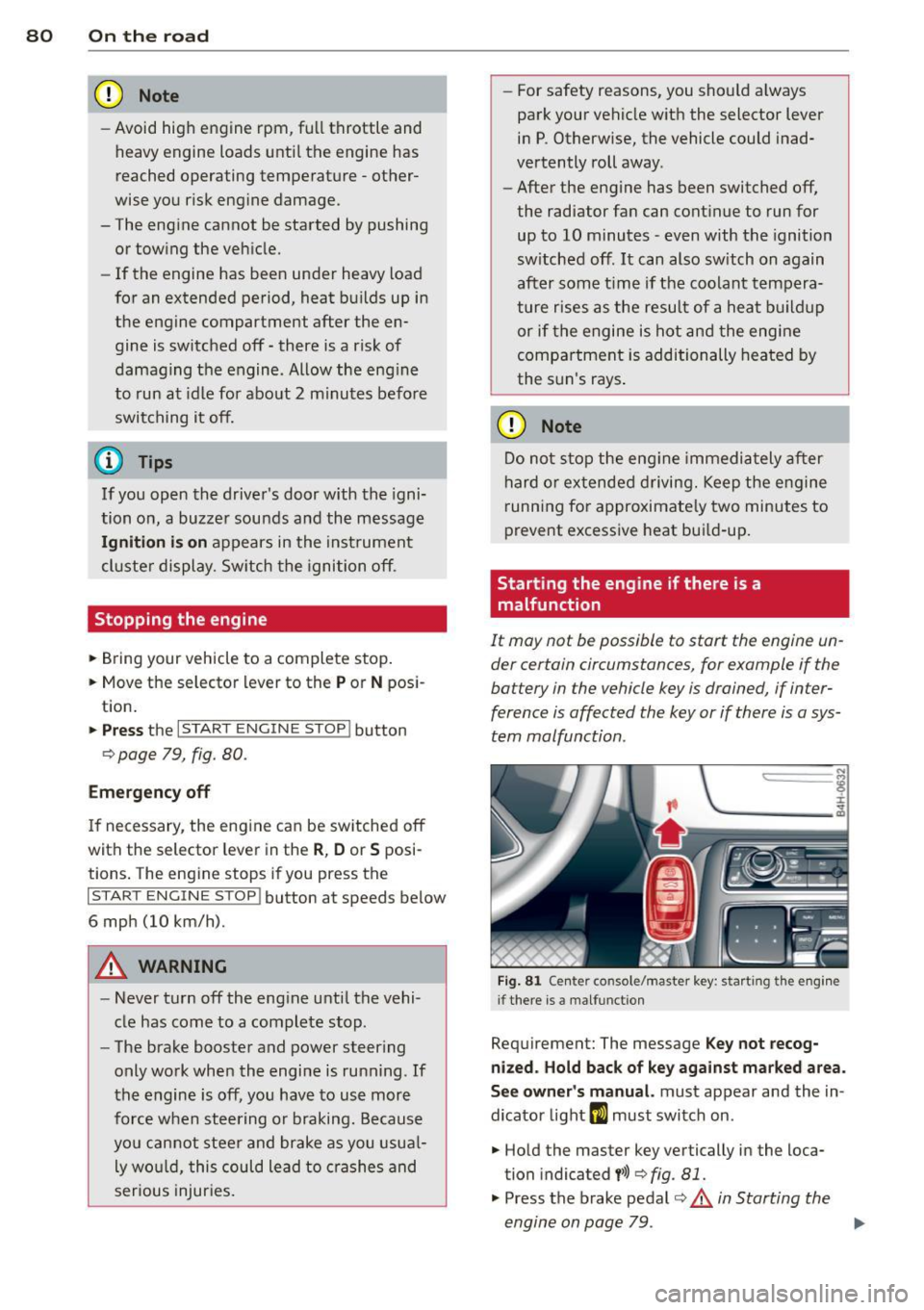
Fig . 81 Ce nter co nsole/master key: start ing the e ngin e
i f there is a malfunct ion
Requirement: The message K ey not recog
niz ed . Hold back of ke y again st ma rked are a.
See o wner's manual.
must appear and the in
dicator light
m must switch on .
.. Hold the master key vertically in the loca
tion indicated
y >>) <=> fig . 81.
• Press the brake pedal r=> & in Starting the
engine on page 79 .
IJ>,
Page 83 of 302

.. Press the !START ENGINE STOPI button. The
engine will start.
.. Drive to your author ized Audi dealer imme
diately to have the malfunction corrected .
@ Tips
You can view the message again by press
ing the
! START ENGINE STOPI button.
Electromechanical
parking brake
Operation
The electromechanical parking brake replaces
the hand brake.
Fig. 82 Center console: Park ing brake
.. Pull on the switch<®> c> fig . 82 @to apply
the parking brake. The indicator light in the
switch illuminates.
.. Step on the brake pedal or the accelerator
pedal and press the switch <®> at the same
t ime to release the parking brake. The indi
cator light in the switch goes out.
Your vehicle is equipped with an electrome
chan ical parking brake. The parking brake is
designed to prevent the vehicle from roll ing
un intent ionally and replaces the hand brake.
In addition to the normal functions of a tradi
tional hand brake, the electromechanical parking brake provides various convenience
and safety functions.
When starting from rest
-The integral starting assist helps you when
driving by automatically releasing the park
i ng brake
c> page 82, Starting from rest.
On the road 81
- When start ing on inclines, the starting as
sist prevents the vehicle from unintentional
ly rolling back. The braking force of the
parking brake is not released until sufficient
driving force has been built up at the
wheels.
Emergency brake function
An emergency brake ensures that the vehicle
can be slowed down even if the
normal brakes
fail
c> page 83, Emergency braking.
Indicator lights
-If the parking brake is closed with the igni
tion
switched on the indicator lights come
on - (USA mode ls)/ . (Canada models)
in the instrument cluster and the switch.
- If the parking brake is closed with the igni
tion
switched off the indicator lights come
on - (USA models)/ . (Canada models)
in the instrument cluster and the switch for
about 20 seconds .
A WARNING
Do not press the accelerator pedal inadver
tently if the veh icle is stationary but the
engine is running and a gear is selected .
Otherwise the vehi cle w ill start to move
immediately and could result in a crash.
(D Note
If the symbol . in the display or the indi
cator light
11111 (USA models)/ . (Cana
da models) in the instrument cluster flash
es, there is a malfunction in the brake sys
tem. Please refer to the detailed descrip
tion of the indicator lights
c>page 14.
- If the indicator light -(USA mod-
els)/ . (Canada models) or
Im turns
on, there may be a malfunction in the
parking brake
c> page 15.
{I) Tips
-Yo u can app ly the parking brake at any
time -even with the ignition switched
off. The ignition must be on in order to
release the parking brake.
Page 84 of 302

82 On the road
-Occasiona l noises when the parking
brake is applied and re leased are norma l
and are not a cause for concern .
- When the vehicle is parked, the parking
brake goes through a se lf-test cycle at
regular intervals. Any assoc iated noises
are norma l.
Parking
Various rules apply to prevent the parked ve
hicle from rolling away accidentally.
P ar king
,. Stop the vehicle w ith the foot brake.
,. Pull the switch© to apply the parking
brake.
,. Se lect the
P se lector lever position
9 page 112.
,. Turn the eng ine off q _&. .
In addition on incline s and grad es
,. Turn the steering whee l so that your vehicle
wi ll ro ll against the curb in case it should
start to move .
A WARNING
-When you leave your veh icle -even if on
ly briefly -always take the ignition key
with you. This applies particularly when children remain in the veh icle. Otherw ise
the ch ildren could sta rt t he engine, re
lease the p arking brake or operate e lec
trical equipment (e .g. power windows) .
T he re is the risk of an accident.
- When the vehicle is loc ked, no one -par
t icu la rly not children sho uld remain in
the vehicle . Locked doors make it more
difficult for emergency workers to get in
to the vehicle -putt ing lives at risk.
Start ing from rest
The starting assist function ensures that the
parking brake is released automatically upon starting.
Stopping and appl ying par kin g brake
,. Pull the switch© to apply the parking
brake.
St arting and automatic ally rel easi ng the
parking b rake
,. When you start to dr ive as usual, the park
ing brake is automat ically released and your
veh icle beg ins to move.
When stopping at a traffic signal or stopping in city traffic, the parking brake can be ap
plied . The vehicle does not have to be held
with the footbrake . The parking brake elimi
nates the tendency to creep w ith a dr ive range
engaged. As soo n as you d rive off as usual,
the pa rking brake is re leased automatically
and the vehicle s tarts to move.
Sta rting on slopes
When starting on inclines, the starting assist
prevents the veh icle from u nintent ionally roll
i ng back. The braking fo rce of the par kin g
brake is not re leased unti l su ff ic ient d riving
f orce has been built up a t the wheels.
(D Tips
Fo r safety reasons, the pa rking bra ke is re
l eased automatically o nly when t he d riv
er's safety belt is engaged in the buckle.
Starting off with a trailer
To prevent rolling back unintentionally on an
incline, do the following:
,. Keep the sw itch(®) pulled and depress the
accelerator. The pa rking brake stays applied
and p revents the vehicle from roll ing back
ward .
,. You can release the switch© once you are
sure that you are developing enough for
ward momentum at the whee ls as you de
press the acce lerator.
Page 85 of 302
Depending on the weight of the r ig (vehicle
and trai ler) and the severity of the incline, you
may roll backwards as you start. You can pre
vent roll ing backwards by holding the parking
brake switch(®) pulled out and accelerating -
just as you would when starting on a hill with
a conventional hand brake.
Emergency braking
In the event that the conventional brake sys
tem fails or locks.
... In an emergency, pull the switch(®) and
continue to pull it to slow your vehicle down
with the parking brake.
... As soon as you release t he sw itch (®) or ac-
ce lerate, the braking p rocess stops.
If you pull the sw itch(®) and hold it above a
speed of about 5 mph (8 km/h), t he emergen
cy braking fu nction is in itiated . The vehicle is
b raked at all four wheels by activating the hy
d ra u lic bra ke system. The b rake performance
i s simi lar to making an emergency stop
c::> &. .
In order not to activate the emergency brak
ing by m ista ke, an audible warning tone (b uz
z er) sou nds when the switch®> is pulled. As
soon as the switch(®) is released, or the acce l
erator pedal is dep ressed, emergency brak ing
stops .
A WARNING
Emergency braking should only be used i n
an emergency, when the normal foot brake
has failed or the brake pedal is obstructed.
Using the parking brake to perform emer
gency braking will slow you r vehicle down
as if you had made a fu ll brake applicat ion.
T he laws of physics can not be s uspended
even w ith ESP and its associated compo
nents (ABS, ASR, EDL). In corners and
when road or weather conditions are bad,
a full brake application can cause the vehi
cle to skid or the rear end to break away -
r isking an accident.
On th e ro ad 83
Speed warning system
Introduction
The speed warning system helps you to stay
under a specified maximum speed .
The speed warning system warns you if you
are exceeding the maximum speed that you
have set. You will hear a warning tone when
you r speed exceeds the stored value by ap
proximately 3 mph (3 km/h) . An indicator
li ght . (USA
models) ;a (Canada mode ls) in
the instr ument cluster d isp lay al so tur ns on at
the same time. The indicator light . /.
turns off when the speed decreases be low the
stored maxim um speed .
Se tting a t hreshold is recommended if you
would like to be rem inded w hen you reach a
certain maximum speed. Situations where you
may want to do so incl ude driv ing in a co untry
with a genera l speed limit or if there is a
specified maximum speed for winter tires.
(D Tips
Even though your vehicle is eq uipped w ith
a speed warn ing system, you sho uld still
watch the speedometer to make sure you
are not dr iv ing faster than the speed limit.
Setting the threshold
You can set, change and delete the threshold
in the MMI.
... Select: !CAR ! function button > Car systems
contro l button > Dri ver ass ist > Speed warn
ing .
You can set any threshold between 20 mph
(30 km/h) and 150 mph (240 km/h) . Sett ings
can each be adjusted in increments of 5 mph
(10 km/h).
Page 86 of 302

84 On the road
Cruise control
Switching on
The cruise control system makes it possible to
drive at a constant speed starting at 20 mph
(30 km/h).
0
f
®t
0
Fig. 83 Control lever w it h set butt on
Fig . 84 D is pl ay: Selected speed
"' Pull the lever to position (D c::> fig. 83 to
switch the system on.
"' Drive at the speed you wish to set.
"'Press button@to set that speed .
I :i:. ... a,
The stored speed and the ind icator light
[ij;W~1~ (US models) / 0 (Canadian models) ap
pear in the instrument cluster display
c:;, fig. 84 . The display may vary, depending on
the type of display in your vehicle . The indic a
tor light . in the instrument cluster also illu
minates.
The speed is kept constant
via an engine out
put adjustment or active brake intervention .
8_ WARNING
-Always pay attention to traffic even when
the cruise control is switched on . You are
always responsible for your speed and
the distance between your vehicle and
other vehicles. -
For safety reasons, the cruise contro l
should not be used in the city, in stop
and-go traffic, on twisting roads and
when road conditions are poor (such as ice, fog, gravel, heavy rain and hydro
plan ing) - risk of accident.
- Turn off the cruise control temporarily when enter ing turn lanes, highway exit
lanes or in construction zones .
- Please note that inadvertently "resting" your foot on the accelerator pedal causes
the cruise control not to brake. This is
because the cruise control is overridden
by the drive r's acceleration.
- If a brake system malfunction such as
overheating occurs when the cruise con
trol system is switched on, the braking
function in the system may be switched
off . The other cruise control functions re
main active as long as the indicator light
m:lmi (US models)/ . (Canadian mod
els) is on.
(D Tips
The brake lights illuminate as soon as th e
brakes decelerate automatically.
Changing speed
"' Press lever in the 0 or O direction
c::>page 84, fig. 83 to increase or decrease
your speed.
"' Release the lever to save that speed .
Change speed in increments of 1 mph (1 km/
h) by lightly press ing the lever. If you keep the
lever pressed down , you will alter your speed
in 5 mph (10 km/h) increments .
You can also press the accelerator pedal down
to increase your speed, e .g. if you want to
pass someone . The speed you saved earlier
will resume as soon as you release the acceler
ator pedal.
If, however, you exceed your saved speed by
6 mph (10 km/h) for longer than 5 minutes,
the cruise control will turn off temporari ly.
The green symbol in the display
c> page 84, .,..
Page 87 of 302

fig. 84 is replaced with a white symbol. The
saved speed remains the same.
Presetting your speed
You con preset your desired speed while the
vehicle is not moving .
.,. Swit ch on the ignition .
.,. Pull lever into posit ion @ ~
page 84,
fig . 83 .
... Press the lever in the 0 or 0 direction to
increase or decrease your speed .
.,. Re lease the lever to save that speed.
This function makes it possible, for example,
to save the speed you want before driving on
the highway . Once on the highway, activate
the cruise control by pull ing the lever toward
@.
Switching the system off
Temp orar y de activation
.,. Press the brake pedal, or
... Press the lever into pos it ion @ (not clicked
into p lace)
c:;, page 84, fig . 83, or
.,. Drive for longe r than 5 minutes at more
than 5 mph (10 km/h) above the sto red
speed.
Switching off compl etely
.,. Press lever into position @(clicked into
place), or
.,. Switch the ign ition off.
The system reta ins the saved speed if you de
activate the cr uise control tempo rarily . To re
sume the saved speed, release the brake ped
a l and pull the lever to position@.
Sw itch ing the ign ition off erases the saved
speed .
A WARNING
You should only return to the saved speed
if it is not too fast for the current traffic
condi tions - risk of an ac ciden t!
On th e ro ad 85
Page 88 of 302

86 Adaptive cruise control and braking guard
Adaptive cruise control
and braking guard
Introduction
Applies to vehicles: with adaptive cruise co ntrol
The adaptive cruise control system assists the
driver by regulating vehicle speed and helping
to maintain a set distance to the vehicle
ahead, within the limits of the system . If the
system detects a moving vehicle up ahead,
adaptive cruise control can brake and then ac
celerate your vehicle. This helps to make driv
ing more comfortable both on long highway
stretches and in stop -and-go traffic.
Audi braking guard can warn you about an im pending collision with a vehicle up ahead that
is slower or has slowed down and start slow
ing your vehicle down with the brakes
<::> page 92.
Adaptive cruise control and Audi Braking
Guard have technical limitations that you
must know, so please read this section care
fully, understand how the system works and
use them properly at all times.
General information
General information
Applies to vehicles: with Adapt ive cruise contro l
Fig. 85 Front of th e ve hicle : senso rs a nd video camera
The areas that contain the radar and ultrason
ic sensors and the video camera
c::> fig . 85
must never be covered by stickers, or other
things or coated with dirt, insects, snow or ice
that will interfere with the Adaptive cruise
control system and Audi braking guard . Re
move snow with a hand brush and remove ice with a de-icing spray that does not contain
solvents.
The function of the Adaptive cruise control
system and Audi braking guard is limited un
der some conditions.
- Objects can only be detected when they are
within sensor range
c::> page 88, fig. 88 .
-The system has a limited ability to detect
objects that are a short distance ahead, off
to the side of your vehicle or moving into
your lane from the front or moves into your
lane from the side.
- When driving through curves
r=;> page 87.
-Some kinds of vehicles are hard to detect;
for examp le motorcycles, vehicles with high
ground clearance or overhanging loads mab
be detected when it is too late or they may
not be detected at all.
- Stationary objects
c::> page 87.
A WARNING
Improper use of the adaptive cruise con
trol can cause collisions, other accidents
and serious personal injury. -
-Never let the comfort and convenience
that adaptive cruise control and Audi
braking guard offer distract you from the
need to be alert to traffic conditions and
the need to remain in full control of your
vehicle at all times,
- Always remember that the adaptive
cru ise control and Audi braking guard
have lim its -they will not slow the vehi
cle down or maintain the set distance
when you drive towards an obstacle or
something on or near the road that is not
moving, such as vehicles stopped in a
traffic jam, a stalled or disabled vehicle.
If registered by the radar sensors, vehi
cles or obstacles that are not moving can
trigger a collision warning and if con
firmed by the video camera, an acute col lision warning.
- Always remember that the adaptive
cruise control cannot detect a vehicle
that is driving towards you in your traffic
lane and that it cannot detect narrow
~