instrument cluster AUDI A8 2011 User Guide
[x] Cancel search | Manufacturer: AUDI, Model Year: 2011, Model line: A8, Model: AUDI A8 2011Pages: 302, PDF Size: 76.07 MB
Page 48 of 302

46 Clear vision
instrument cluster illuminates when the
high beams are on.
- The
headlight flash er works only as long as
you hold the lever - even if there are no
lights turned on. The indicator light. in
the instrument cluster illuminates when you
use the headlight flasher.
(D Note
Do not use the high beam or headlight
flasher if you know that these could blind
oncoming traffic .
Interior lights
Front and rear interior lighting
Fig. 38 Headliner: Front interior l ig hts
Fig. 39 Rear headliner : Reading light
Press the appropriate button ¢ fig. 38:
§} -Interior lighting on/off
I]-Door contact switch. The interior lighting
turns on automatically when you unlock the
vehicle, open a door or switch the ignition off.
The interior lighting turns off several seconds
after you close the doors, when you lock the
vehicle or when you switch the ignition on.
When a door is open, the light turns off after
a few minutes.
L:!l -Reading lights on/off
~ - Switching the rear reading lights on/off
from the cockpit.
IREAR MODEt* - Sw itch ing the rear reading
lights on/off from the cockpit : press the
I REAR MODE i button and then the appropriate
button
L:!l in the cockpit .
Ambience lighting
Applies to vehicles: wi th ambience lig htin g
You can select a color profile and brightness
for the ambience lighting in various areas of
the vehicle, called zones.
Turning ambience lighting on
.,. Select in the MMI: ICARI function button >
Car systems control button > Vehicle set
tings > Interior lighting > On.
Adjusting/turning off the brightness
.,. Select in the MMI: ICARlfunction button>
Car systems control button > Vehicle set
tings > Interior lighting
> Brightnes s .
.,. Turn the knob to the desired vehicle area
and press the knob. The bar that appears in
dicates the selected brightness .
.,. To increase or reduce the brightness, turn
the knob and press it.
Selecting a color profile*
.,. Select in the MMI: ICARlfunction button>
Car systems control button > Vehicle set
tings > Interior lighting > Color profile.
The ambience lighting turns on when the
function is activated in the MMI and when you
turn the headlights on while the ignition is switched on.
Adjusting the brightness
You can adjust the brightness for the four
zones
Front top, Front footwell, Rear top and
Rear footwell or for All areas at the same
time . ..,.
Page 81 of 302

the stored position as soon as you switch on
the ignition.
Starting and stopping
the engine
Starting the engine
This button switches on the ignition and
starts the engine.
Fig. 80 Center console: S TART ENGINE S TOP b utton
" Step on the brake pedal¢&_ .
.. Press on the !START ENGINE STOP I button
¢ fig. 80 -the engine w ill start .
By pressing the
I START ENGINE STOP I button
without depressing the brake pedal, the igni tion is on and switched off by pressing it
again.
After a cold engine is started, there may be a
brief period of increased noise because oil
pressure must first build up in the hydraulic
valve adjusters. This is normal and not a cause
for concern.
If the engine should not start immediately,
the starting process is automatically stopped
after a short time. Repeat starting procedure.
Driver message in the instrument cluster
display
Press brake pedal to start engine
This message appears if you press the
I START ENGINE S TOP I button to start the en
gine and do not depress the brake pedal. The
engine can only be started if the brake pedal is depressed.
!! Convenience key: Is key not in the vehi
cle?
On the road 79
This message appears along with thee sym
bol if the master key is removed from the ve
hicle with the eng ine running.
It is intended
to remind you (e.g . when changing drivers)
not to continue the journey without the mas
ter key.
If the master key is no longer in the veh icle,
you cannot switch on the ignition after stop
ping the engine and you also cannot start the
engine again . Moreover, you cannot lock the
vehicle from the outside with the key.
Shift to P, otherwise vehicle can roll away.
Doors do not lock if lever is not in
P.
This message appears for safety reasons
along with an audible warning tone if the
P
selector lever position is not engaged when
stopping the engine with the
I START ENGINE STOP I button. Select the P se
lector lever position . Otherwise the vehicle
cou ld roll and it cannot be locked .
Key not recognised. Hold back of key against
marked area . See owner's manual.
If the indicator light turns on and this mes
sage appears, there is a malfunction
¢ page 80.
Steering lock
The steering locks when you turn the engine
off using the
I START ENGINE STOP I button
and open the driver's door. The locked steer ing helps prevent vehicle theft.
A WARNING
- Never allow the engine to run in confined
spaces - danger of asphyx iation.
- Never turn off the engine until the vehi
cle has come to a complete stop.
- The brake booster and power steering
only work when the engine is running. If
the engine is off, you have to use more
force when steering or braking. Because
you cannot steer and brake as you usual
ly would, this could lead to crashes and
serious injuries.
Page 82 of 302
80 On the road
(D Note
-Avoid hig h engine rpm, fu ll throttle and
heavy engine loads unti l the engine has
reached operating temperat ure -other
wise you risk eng ine damage.
- The engine cannot be started by pushing
or towing the vehicle.
- If the engine has been under heavy load
for an extended period, heat b uilds up in
the engine compartment after the en
gine is switched off - there is a risk of
damaging the engine . Allow the eng ine
to run at idle for about 2 minutes before
switching it off.
@ Tips
If you open the driver's door with the igni
tion on, a buzzer sounds and the message
Igniti on is on appears in the instrument
cluster display. Sw itch the ignition off .
Stopping the engine
• Bring your vehicle to a complete stop.
.. Move the se lector lever to the
P or N pos i
t ion .
.. Pre ss the I STAR T ENGINE ST OP I button
r:> page 79, fig. 80 .
Emergency off
If necessary, the engine can be switched off
with the selector lever in the
R , D or S posi
tions . The engine stops if you press the
I S TAR T ENGINE ST OP ! button at speeds be low
6 mph (10 km/h).
A WARNING
- Never turn off the eng ine unti l the vehi
cle has come to a complete stop.
- The brake booster and power steer ing
only work when the engine is runn ing .
If
the engine is off, you have to use more
force when steering or braking. Because
you cannot steer and brake as you usua l
ly wo uld, this could lead to crashes and
serious injuries. -
For safety reasons, you should a lways
park your vehicle w ith the selector lever
in P . Otherwise, the vehicle could inad
vertently roll away .
- After the engine has been switched off,
the radiator fan can cont inue to run for
up to 10 minutes -even with the ignition
sw itched off. It can also sw itch on again
after some time if the coolant tempera
ture rises as the result ofa heat bu ildup
or if the engine is hot and the engine
compartment is additionally heated by
the sun's rays .
(D Note
Do not stop the eng ine immedia tely after
hard o r extended driving. Keep the engine
running for approximate ly two minutes to
prevent excessive heat bui ld-up.
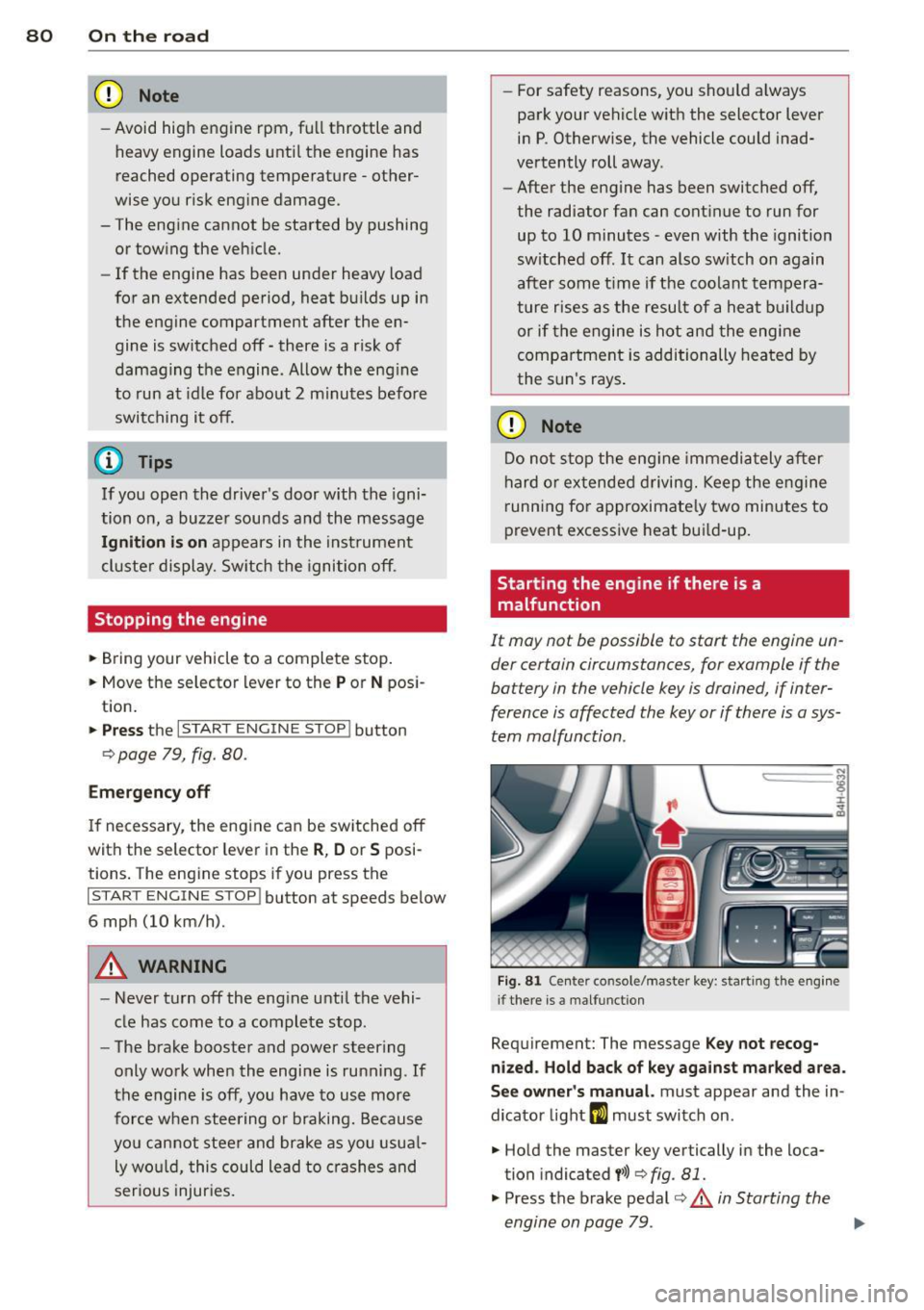
Starting the engine if there is a
malfunction
It may not be possible to start the engine un
der certain circumstances, for example if the
battery in the vehicle key is drained, if inter
ference is affected the key or if there is a sys
tem malfunction.
"' ij
:c
-- --- -~
Fig . 81 Ce nter co nsole/master key: start ing the e ngin e
i f there is a malfunct ion
Requirement: The message K ey not recog
niz ed . Hold back of ke y again st ma rked are a.
See o wner's manual.
must appear and the in
dicator light
m must switch on .
.. Hold the master key vertically in the loca
tion indicated
y >>) <=> fig . 81.
• Press the brake pedal r=> & in Starting the
engine on page 79 .
IJ>,
Page 83 of 302

.. Press the !START ENGINE STOPI button. The
engine will start.
.. Drive to your author ized Audi dealer imme
diately to have the malfunction corrected .
@ Tips
You can view the message again by press
ing the
! START ENGINE STOPI button.
Electromechanical
parking brake
Operation
The electromechanical parking brake replaces
the hand brake.
Fig. 82 Center console: Park ing brake
.. Pull on the switch<®> c> fig . 82 @to apply
the parking brake. The indicator light in the
switch illuminates.
.. Step on the brake pedal or the accelerator
pedal and press the switch <®> at the same
t ime to release the parking brake. The indi
cator light in the switch goes out.
Your vehicle is equipped with an electrome
chan ical parking brake. The parking brake is
designed to prevent the vehicle from roll ing
un intent ionally and replaces the hand brake.
In addition to the normal functions of a tradi
tional hand brake, the electromechanical parking brake provides various convenience
and safety functions.
When starting from rest
-The integral starting assist helps you when
driving by automatically releasing the park
i ng brake
c> page 82, Starting from rest.
On the road 81
- When start ing on inclines, the starting as
sist prevents the vehicle from unintentional
ly rolling back. The braking force of the
parking brake is not released until sufficient
driving force has been built up at the
wheels.
Emergency brake function
An emergency brake ensures that the vehicle
can be slowed down even if the
normal brakes
fail
c> page 83, Emergency braking.
Indicator lights
-If the parking brake is closed with the igni
tion
switched on the indicator lights come
on - (USA mode ls)/ . (Canada models)
in the instrument cluster and the switch.
- If the parking brake is closed with the igni
tion
switched off the indicator lights come
on - (USA models)/ . (Canada models)
in the instrument cluster and the switch for
about 20 seconds .
A WARNING
Do not press the accelerator pedal inadver
tently if the veh icle is stationary but the
engine is running and a gear is selected .
Otherwise the vehi cle w ill start to move
immediately and could result in a crash.
(D Note
If the symbol . in the display or the indi
cator light
11111 (USA models)/ . (Cana
da models) in the instrument cluster flash
es, there is a malfunction in the brake sys
tem. Please refer to the detailed descrip
tion of the indicator lights
c>page 14.
- If the indicator light -(USA mod-
els)/ . (Canada models) or
Im turns
on, there may be a malfunction in the
parking brake
c> page 15.
{I) Tips
-Yo u can app ly the parking brake at any
time -even with the ignition switched
off. The ignition must be on in order to
release the parking brake.
Page 86 of 302

84 On the road
Cruise control
Switching on
The cruise control system makes it possible to
drive at a constant speed starting at 20 mph
(30 km/h).
0
f
®t
0
Fig. 83 Control lever w it h set butt on
Fig . 84 D is pl ay: Selected speed
"' Pull the lever to position (D c::> fig. 83 to
switch the system on.
"' Drive at the speed you wish to set.
"'Press button@to set that speed .
I :i:. ... a,
The stored speed and the ind icator light
[ij;W~1~ (US models) / 0 (Canadian models) ap
pear in the instrument cluster display
c:;, fig. 84 . The display may vary, depending on
the type of display in your vehicle . The indic a
tor light . in the instrument cluster also illu
minates.
The speed is kept constant
via an engine out
put adjustment or active brake intervention .
8_ WARNING
-Always pay attention to traffic even when
the cruise control is switched on . You are
always responsible for your speed and
the distance between your vehicle and
other vehicles. -
For safety reasons, the cruise contro l
should not be used in the city, in stop
and-go traffic, on twisting roads and
when road conditions are poor (such as ice, fog, gravel, heavy rain and hydro
plan ing) - risk of accident.
- Turn off the cruise control temporarily when enter ing turn lanes, highway exit
lanes or in construction zones .
- Please note that inadvertently "resting" your foot on the accelerator pedal causes
the cruise control not to brake. This is
because the cruise control is overridden
by the drive r's acceleration.
- If a brake system malfunction such as
overheating occurs when the cruise con
trol system is switched on, the braking
function in the system may be switched
off . The other cruise control functions re
main active as long as the indicator light
m:lmi (US models)/ . (Canadian mod
els) is on.
(D Tips
The brake lights illuminate as soon as th e
brakes decelerate automatically.
Changing speed
"' Press lever in the 0 or O direction
c::>page 84, fig. 83 to increase or decrease
your speed.
"' Release the lever to save that speed .
Change speed in increments of 1 mph (1 km/
h) by lightly press ing the lever. If you keep the
lever pressed down , you will alter your speed
in 5 mph (10 km/h) increments .
You can also press the accelerator pedal down
to increase your speed, e .g. if you want to
pass someone . The speed you saved earlier
will resume as soon as you release the acceler
ator pedal.
If, however, you exceed your saved speed by
6 mph (10 km/h) for longer than 5 minutes,
the cruise control will turn off temporari ly.
The green symbol in the display
c> page 84, .,..
Page 93 of 302

Adaptive cruise control and braking guard 91
Setting the distance and driving
program
Applies to vehicles: with adaptive cruise co ntrol
Fig. 93 Operating leve r: sett ing the distance
The distance at which the adaptive cruise con
trol follows a vehicle in front is determined by
time interva ls. A time interval to a vehicle in
front is estab lished and maintained. This pro
duces a speed-dependent inte rval. The higher
the speed, the greater the safety interval in
yards (meters)¢ ,&.
Setting the distance
~ Tap the switch to d isplay the current set dis
tance
¢fig. 93.
~ To increase or reduce the distance by incre
ments, tap the switch again to the left or
right. The distance between the two vehicles
will change in the instrument cluster dis
play.
Setting the driving program
~ Select in the MMI: !CAR ! function button >
Car Systems control button > Driver assist >
adaptive cruise control > Driving program .
Setting the distance
When approaching a movi ng veh icle up ahead,
the adaptive cruise contro l system automati
cally brakes to match that object's speed and
then maintains the stored distance. When this happens, the actual distance may briefly be
less than the stored distance. If the veh icle
ahead accelerates, adaptive cruise control will
also accelerate up to the stored speed.
The higher the speed, the greater the distance
in yards (meters) ¢&. . The
Distance 3 setting
is recommended. The distances
provided are specified va lues.
Depending on the driving situation and the
how the vehicle ahead is driving, the actual
distance may be more or less than these tar
get distances.
,;:::::;, _c::::, ___ Distance 1: This setting corre-
sponds to a distance of 92 feet/28 meters
when traveling at 62 mph (100 km/h), or a
time interval of 1 second.
,;:::::;, __ c::::, __ Distance 2: This setting corre
sponds to a distance of 118 feet/36 meters
when traveling at 62 mph (100 km/h), or a
t ime interval of 1.3 seconds.
,;:::::;, ___ ,;:::::;,_ Distance 3: This setting corre-
sponds to a distance of 164 feet/SO meters
when traveling at 62 mph (100 km/h), or a
time interval of 1.8 seconds.
,;:::::;, ____ c::::, Distance 4: This setting corre-
sponds to a distance of 210 feet/64 meters
when traveling at 62 mph (100 km/h), or a
t ime interval of 2.3 seconds.
Setting the driving program
You can select Dynamic, Standard or Comfort
driving programs. Depending on the selected
driving program and distance, driving behav
ior when accelerating will vary from dynamic
to comfortable.
.&_ WARNING
Following other vehicles too closely in
creases the risk of coll is ions and ser ious
personal injury.
- Sett ing short d istances to the traffic
ahead reduces the time and distance
availab le to bring your vehicle to a safe
stop and makes it even more necessary
to pay close attention to traffic.
-
-Always obey applicable traffic laws, use
good judgment, and select a safe follow
ing d istance for the traff ic, road and
weather conditions .
(0 Tips
-Distance 3 is set automat ically ea ch time
you switch the ignition on. ..,.
Page 94 of 302

92 Adaptive cruise control and braking guard
-Your standard settings are automatically
stored and assigned to the remote con
trol key being used .
Audi braking guard
Description
Applies to vehicles: wit h adapt ive c ru ise control
Fig. 94 Instrument cluster: approach warn ing
Audi brak ing guard uses radar sensors and a
video camera . It is active at speeds above
about 6.2 mph (10 km/h) and also works
within system limits when adaptive cruise control is switched off.
On vehicles with aAdaptive cruise control and
Audi side assist (Audi pre sense plus), system
functions also engage when a co llision is im
minent
¢page 188.
What can Audi braking guard do?
When detected in time, the system can assess
situations when a vehicle ahead brakes sud
denly or if your own veh icle is traveling at a
h igh speed and approaching a vehicle up
ahead that is moving more slowly. Audi brak
ing guard does not react if it cannot detect
the situation.
The system advises you of various kinds situa tions :
- The
distance warning is given if you are too
close to the vehicle ahead for a long time. If
the vehicle ahead brakes sharply, you will not be able to avoid a coll is ion. The ind icator
light
I i n the d isplay comes on. Take imme
diate action to avoid the coll is ion and in
crease the distance to the vehicle up ahead. -
The
approach warning is given when a de
tected vehicle up ahead in your lane is mov
ing much more slowly that you are or if it
brakes sharp ly. When this warning is given,
it may only be possible to avoid a collision
by swerving or braking sharp ly . The indicator
light
I and the symbol in the disp lay will
warn you about the danger
c:> fig. 94 . You
w ill also hear an acoustic signal.
If you do not react fast enough or do not react
at all to the situation, Aud i braking guard w ill
intervene by braking and the message
braking
guard intervention
w ill appear.
- If a coll is ion is imminent, the system will
first provide an
acute warning by brak ing
sharply .
- If you do not react to the acute warning, Au
di braking guard will brake w ith increased
force in severa l stages to reduce the speed
in a possible collisio n. On ve hicles w ith
adaptive cruise contro l and Audi side assist
(Audi pre sense plus), the system can brake
with increasing force up to maximum decel
eration shortly before a sensed collision
¢ page 188.
- If
the Audi braking g uard senses that you
are not braking hard enough when a colli
sion is imminent, it can increase the braking
force.
Audi braking guard takes the driver's reaction
time into consideration in order to provide
timely warnings. The system reaction time de creases automatically in some situations, for
example when it detects accelerator pedal use
or steering input . The Audi braking guard in
tervent ion stops in certa in situations, for ex
amp le if you press the accelerato r pedal to
pass the vehicle moving ahead of you in your
lane.
Which functions can be controlled?
You can switch Audi braking guard and the
distance/approach warning on or off in the
M M I c:> page 93, Settings in the MMI.
Page 97 of 302
Audi lane assist Lane assist
De scription
App lies to vehicles: with la ne ass ist
Lane assist helps you keep your vehicle in your
lane.
Lane assist uses a camera to detect lane boun
dary lines . If the system detects that your ve
hicle is about to cross a detected lane boun
dary line, the steering wheel
vibrates to alert
the driver . Lane assist is operable when the
line marking the lane is detected on at least
one side of the veh icle. This is ind icated by a
g reen indicator light. in the instrument
cluster.
If the system is in active standby mode and
the turn signal is activated before driving over
the bounda ry line, the warn ing does not occur
since the system allows for intentional lane
changes.
The system is designed for driv ing on free
ways and expanded highways and thus works
only at speeds of 40 mph (65 km/h) or more.
A WARNING
- Lane assist will not keep your vehicle in
your lane . The system only warns the
driver when the vehicle is leaving the
lane . The driver is always responsible for
keeping the vehicle in the lane .
- The camera is not able to detect all lane
boundary lines and in some cases might
also detect lane structures or objects as
boundary lines . This can lead to incorrect
warnings or wa rnings tha t fail to go off
at all.
- The camera's visibility can be impaired by
vehicles ahead of you, for instance, or by
rain, snow, heavy spray o r light sh in ing
into the camera lens. Th is can cause lane
assist to fa il to detect boundary lines.
Audi lane a ssis t 95
Act ivating and deactivating
App lies to vehicles: wit h lane assist
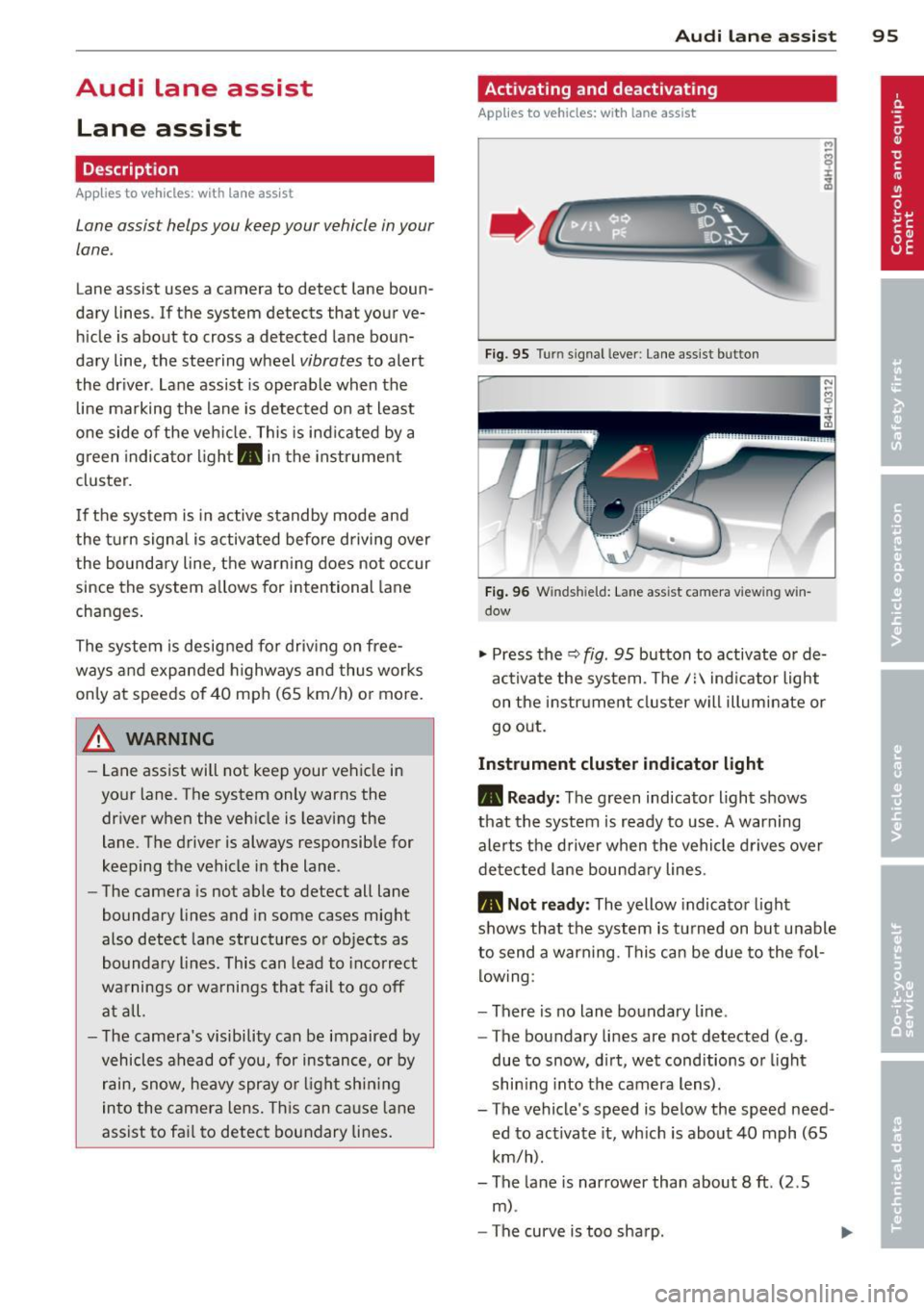
Fig. 95 Turn sign al lever: Lane assist button
Fig . 96 W inds hield: La n e ass ist camera vi ewing w in
dow
"' Press the Q fig . 95 button to activate or de
ac tivate the system . The/: indicator light
on the instr ument cluster will illuminate or
go out.
Instrum ent clu ster ind icat or light
• Rea dy:
The green indicator light shows
that the system is ready to use.
A warning
alerts the driver when the vehicle drives over
detected lane bounda ry lines.
• Not r ea dy: The yellow indicator light
shows that the system is turned on but unable
to send a warning. This can be due to the fol low ing :
- There is no lane boundary line .
- The boundary lines are not detected (e.g .
due to snow, d irt, wet conditions or l ight
shin ing into the camera lens) .
- The vehicle 's speed is below the speed need
ed to activate it, which is about 40 mph (65
km/h).
- The lane is narrower than about 8
ft. (2 .5
m) .
-The curve is too sharp .
Page 98 of 302

96 Audi lane assist
Messages in the instrument cluster
display
When the lane assist turns off automatically,
the instrument cluster indicator goes out and
one of the following messages appears on the
display:
Audi lane assist not available: Currently no
sensor vision
This message appears when the camera can
no longer function because it cannot detect
the boundary lines. This may be due to the
following:
- T he exterior side of the camera viewing win
dow
r:!:> fig. 96 is covered with dirt or ice.
Clean this part of the windshield.
- The camera viewing window is fogged up on
the inside. In this case, wait until the fog
disappears before turning lane assist on
again.
- The system was unab le to detect boundary
lines over an extended period of time due to
road conditions (such as snow-covered
lanes). Do not turn lane assist on again until
the lines can be more easily detected.
Audi lane assist not available
A temporary malfunction is preventing lane
assist from operating. Try turning on lane as
sist again at a later t ime.
Audi lane assist: system fault
The system should be checked by an author
ized Audi dealer or other qualified workshop.
(D} Tips
-Make sure that the camera v iewing win
dow
r:!:> fig. 96 is not covered by st ickers
or similar objects.
- Always keep the camera viewing window
clean . This can usually be done by oper
at ing the w indshield wipers.
Lane assist display in the instrument
cluster
Applies to vehicles: with lane assist
Fig. 97 Display: lane assist is switched on and is warn
ing
Fig. 98 Instrument cluster: lane assist is sw itc hed on
but not ready to provide warn ings
You can call up the lane assist display using
the buttons in the mu ltifunction steering
wheel
r:!:> page 2 3.
When lane assist is switched on, the system
indicates which lines are detected by display
ing solid lines on the left and/or r ight side of
you r vehicle:
- white solid line: lane assist is sw itched on
and ready to provide warnings on the side
that is ind icated
- red solid line (left or right): lane assist is
warning you that you are about to leave your lane
¢fig. 97 .
- unf illed lines: lane assist is switched on but
is not ready to provide warnings
r:!:> fig . 98.
Message s in the instrument cluster
display
When the lane assist turns off automatically,
the instrument cluster indicator goes out and
o ne of the following messages appears on the
display: ..,.
Page 106 of 302

104 Audi side assist
right of your travel lane, depending on wheth
er you drive in the center of your lane or closer
to the edge.
If you drive in narrow lanes, s ide ass ist's de
tection a rea may a lso include other lanes -es
pecia lly if you tend to drive on the edge of
your lane¢
fig. 108. Under these cond it ions ,
vehicles can also be detected that are two lanes away, and side assist then could switch
between the informat ional and warn ing stage
signals .
When driving in very w ide lanes, vehicles in
the adjacent lane may not be detected be
cause they are not inside the detection area.
Notes
Messages in instrument cluster display
Applies to vehicles: with side assis t
If side assist turns off automatically, the indi
cator light on the button wi ll go out and you
will see a message in the instrument cluster
d isplay:
Audi side assist: not available. sensors
blocked
The side assist sensors are built into the rear
bumper on the left and right (not visible on
the outside)
¢ page 98, fig. 99 . To ensure that
you do not adversely affect the way side assist
functions, foreign objects (such as stickers or
b icycle racks) should not be attached to the
a rea on the rear bumper where the sensors
are located. If side assist functions are ad
ve rsely affected, you will see this message in
the instrument cluster display. Remove any
thing that may be blocking the sensors .
If no vehicl e is detected for a longer period of
time while driving, side assist will also switc h
off a utomatica lly.
Audi side assist currently not available
If there is a temporary problem (such as the
ve hicl e's battery charge being low), s ide ass ist
cannot be activated tempo rari ly.
Audi side assist: system fault
Have the system checked by an authorized Au
di dealer or qualified workshop.
Audi side assist: not available when
towing
The radar senso r's view is limited when tow
ing a trai le r. F or vehicles with a factory instal
l ed towing hitch or a trailer hitch that was in
sta lled later according to factory specifica
tions, side assist is automatically deactivated as soon as the electrical connection to the
trailer's electrical socket is made, and this sta
tus message appears in the instrument clus
ter display . Deactivation cannot be guaran
teed when using a retrofitted towing hitch
that was
not installed acco rding to facto ry
specifications.
Safety tips
Appl ies to vehicles : wi th side assist
The side assist detection may be limited when
driv ing aro und narrow street corners, on hilly
streets, and under poor weather cond itions.
It is possible that the radar sensors may also
detect other objects, such as high or stag
gered guardrails .
Side assist does not measure actual lane
width. The system assumes a fixed lane width.
Detection in the left and right lanes is based
o n this ass umed lane width . When driving on
narrow roads or when driv ing to the left or
right of the center of a trave l lane, it is poss i
ble that vehicles will be detected that are
not
in the lane next to the lane you are using.
A WARNING
- Improper reliance on the side assist sys
tem can cause collis ions and serious per
sonal injury:
- Never rely on ly on side assist when
changing lanes .
- Always check rear view mirrors to make
sure that it is sa fe to change lanes.
- Side assist cannot detect all vehicles un-
der all conditions- danger of accident! ..,.