warning AUDI A8 2011 Owner's Manual
[x] Cancel search | Manufacturer: AUDI, Model Year: 2011, Model line: A8, Model: AUDI A8 2011Pages: 302, PDF Size: 76.07 MB
Page 29 of 302
Instrument s and warning /indicator lights 2 7
sounds. After about S seconds the display
switches back to normal.
Calling up th e service schedules
If or when an oil change or inspe ct io n is due,
can be shown in the MM I disp lay by select ing
the servi ce inte rva l disp lay in the car menu .
Select the
I CA R I function button > Car s ys
tems
contro l button > Servicing & chec ks >
Service interval d isplays.
Resetting the service interval display
Your au thori zed A udi dealer w ill reset the cor
responding service sched ule after per forming
the approp riate service on yo ur vehicle. You
also have the possib ility to reset the o il
change sched ule after having performed an
oil change accord ing to Audi specifications.
Select the
I CAR I function button > Car sys
tems
control bu tton > Servicing & checks >
Service interval display s > Reset oil change
interval.
CJ) Note
If you disconnect the battery termina ls , no
calc ulations can be made for the service
interval display d uring this tim e and no
service remi nder w ill appea r. Remembe r
t h at observ ing the prope r serv ice intervals
is v ita lly impo rtant to ex tend ing the life o f
your veh icle , particu larly the engine, a nd
maintaining its va lue . Even if t he mileage
driven is low, the maximum period of one
year from one service to the next must not
be exceeded.
{!) Tips
- Do not reset the display between o il
changes, otherw ise the display will be i n
cor rect.
- The information in the Service Reminder
r ema ins stored even when the vehicle
battery is discon nected .
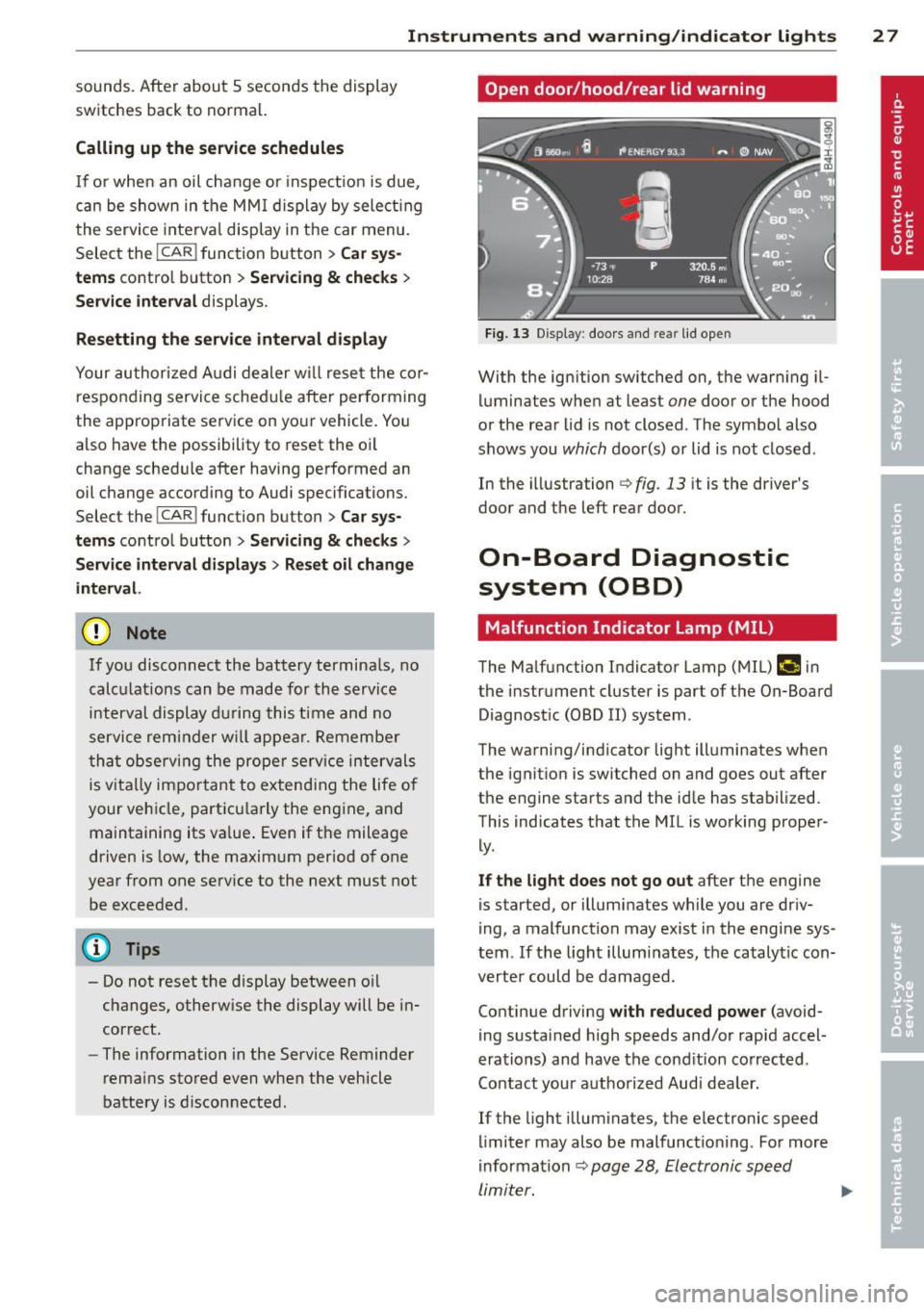
Open door /hood /rear lid warning
Fi g. 13 Display : doo rs a nd re ar lid open
With the ign ition switched on, the warn ing il
luminates when at least
one door or the hood
or the rear lid is not closed . The symbo l also
shows you
which door(s) or lid is not closed .
In the illustrati on
i:> fig . 13 it is the driver's
door and the left rear door.
On-Board Diagnostic
system (OBD)
Malfunction Indicator Lamp (MIL )
The Ma lfunction Indicator Lamp (MIL) fllllij in
the instrument cluster is part of t he On-Board
Diagnost ic (OBD II) system.
The warning/indicator light ill uminates when
the ignitio n is switched on and goes out after
the engine starts and the id le has stabilized.
This indicates that the MIL is working proper
ly .
If the light does not go out after the engine
is started, or illuminates while you are driv
i ng, a malfunction may exis t in the engi ne sys
tem . If the light illumi nates, the catalyt ic con
verter could be damaged .
Contin ue d riving
with reduced power (avoid
i ng s ustai ned h igh speeds and/or rapid accel
erations) and have the cond ition co rrected .
Contact your aut horized Aud i dea le r.
If the light illum inates, the electronic speed
li miter may also be malfunct io ni ng . For more
i nformation
~ pag e 28, Electronic speed
limiter. ...,
Page 30 of 302
28 Instrum ents a nd w arning /indic ato r ligh ts
An imp rop erl y cl ose d fu el filler cap m ay also
c a u se t he MIL l igh t to illumin ate
c:> page220.
On-Board Diagnostics
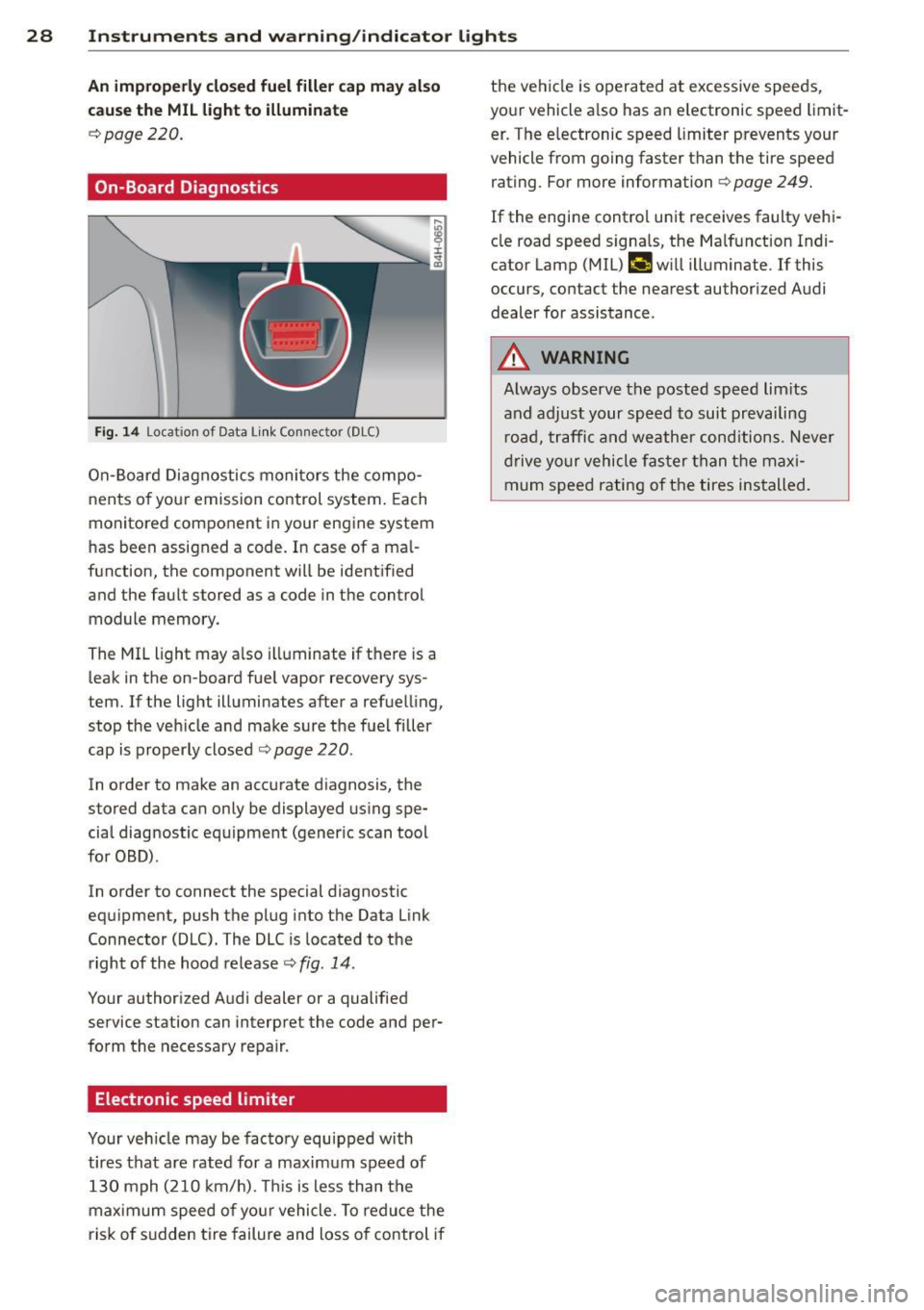
Fig. 14 Locat io n of Data Link Co nnec tor (DLC)
On-Board Diagnostics monitors the compo
nents o f your emission control system. Each
monitored component in your engine system
has been assigned a code. In case of a mal
function, the component will be identified
and the fault stored as a code in the control module memory.
The MIL light may a lso illuminate if there is a
leak in the on-board fue l vapor recovery sys
tem. If the light illuminates after a refuelling,
stop the veh icle and make sure the fuel filler
cap is properly closed
c:> page 220.
In order to make an accurate diagnosis, the
stored data can only be displayed using spe
cial diagnostic equipment (generic scan tool
for OBD) .
In order to connect the special diagnostic
equipment, push the plug into the Data Link
Connector (DLC). The DLC is located to the right of the hood release
c:> fig . 14.
Your authorized Audi dealer or a qualified
service station can interpret the code and per
form the necessary repair .
Electronic speed limiter
Your vehicle may be factory equipped with
tires that are rated for a maximum speed of 130 mph (210 km/h). This is less than the
maximum speed of your vehicle. To reduce the
risk of s udden tire failure and loss of control if the vehicle is operated at excessive speeds,
your vehicle a lso has an e lectronic speed limit
er . The e lectronic speed limiter prevents your
vehicle from going faster than the tire speed
rating. For more information
c:> page 249.
If the engine control unit receives faulty vehi
cle road speed signals, the Ma lfunction Indi
cator Lamp (MIL)
(lllli$ will illuminate . If this
occurs, contact the nearest authorized Audi
dealer for assistance .
_&. WARNING
-Always observe the posted speed lim its
and adjust your speed to suit prevailing r oad, traffic and weather cond itions. Never
drive your vehicle faster than the maxi mum speed rating of the tires installed.
-
Page 31 of 302
Opening and closing Keys
Key set
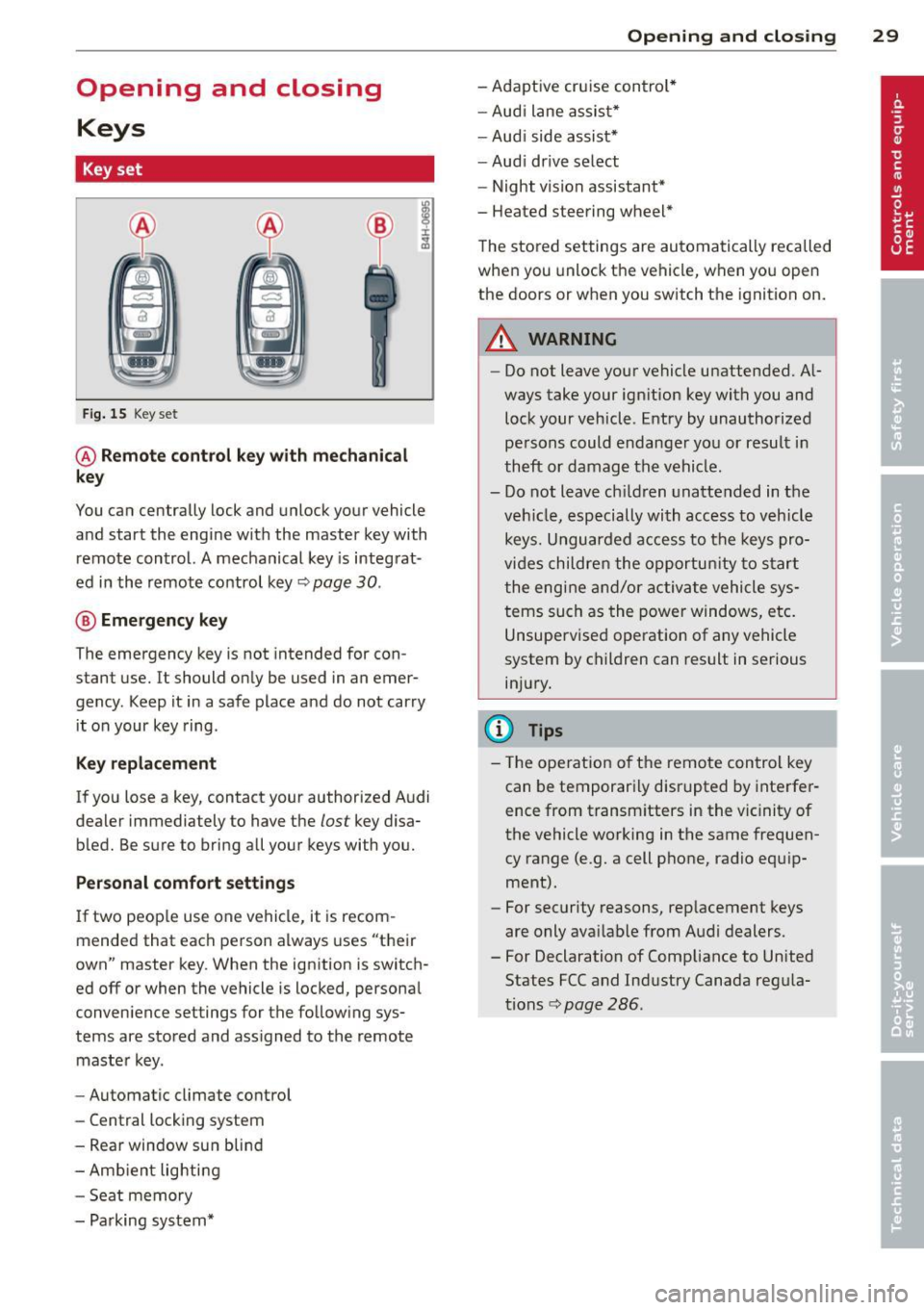
Fig. 15 Key set
@ Remote control key with mechanical
key
You can centrally lock and unlock your vehicle
and start the engine with the master key with
remote control. A mechanical key is integrat
ed in the remote control key¢
page 30.
® Emergency key
The emergency key is not intended for con
stant use.
It should only be used in an emer
gency. Keep it in a safe place and do not carry
it on your key ring .
Key replacement
If you lose a key, contact your authorized Audi
dealer immediately to have the
lost key disa
bled. Be sure to bring all your keys with you.
Personal comfort settings
If two peop le use one vehicle, it is recom
mended that each person always uses "their
own" master key . When the ignition is switch
ed
off or when the vehicle is locked, personal
conven ience settings for the follow ing sys
tems are stored and ass igned to the remote
master key.
- Automatic climate control
- Central locking system
- Rear window sun blind
- Amb ient lighting
- Seat memory
- Parking system*
Opening and closing 29
- Adaptive cruise control*
- Audi lane assist*
-Audi side assist*
-Audi drive select
- Night vision assistant*
- Heated steering wheel*
The stored settings are automatically recalled
when you unlock the vehicle, when you open
the doors or when you switch the ignition on.
A WARNING
---Do not leave your vehicle unattended. Al-
ways take your ignition key with you and
lock your vehicle . Entry by unauthorized
persons could endanger you or result in
theft or damage the vehicle.
- Do not leave ch ildren unattended in the
veh icle, especially with access to vehicle
keys. Unguarded access to the keys pro
vides children the opportunity to start
the engine and/or activate vehicle sys
tems such as the power windows, etc.
Unsupervised operation of any vehicle
system by children can result in serious
injury.
(!} Tips
- Th e operation of the remote control key
can be temporarily disrupted by interfer
ence from transm itters in the vic inity of
the vehicle working in the same frequen
cy range (e.g. a cell phone, radio equip
ment).
- For security reasons, replacement keys
are only ava ilable from Audi dealers.
- For Declaration of Compliance to United States FCC and Industry Canada regu la
tions¢
page 286.
Page 32 of 302
30 Opening and clo sing
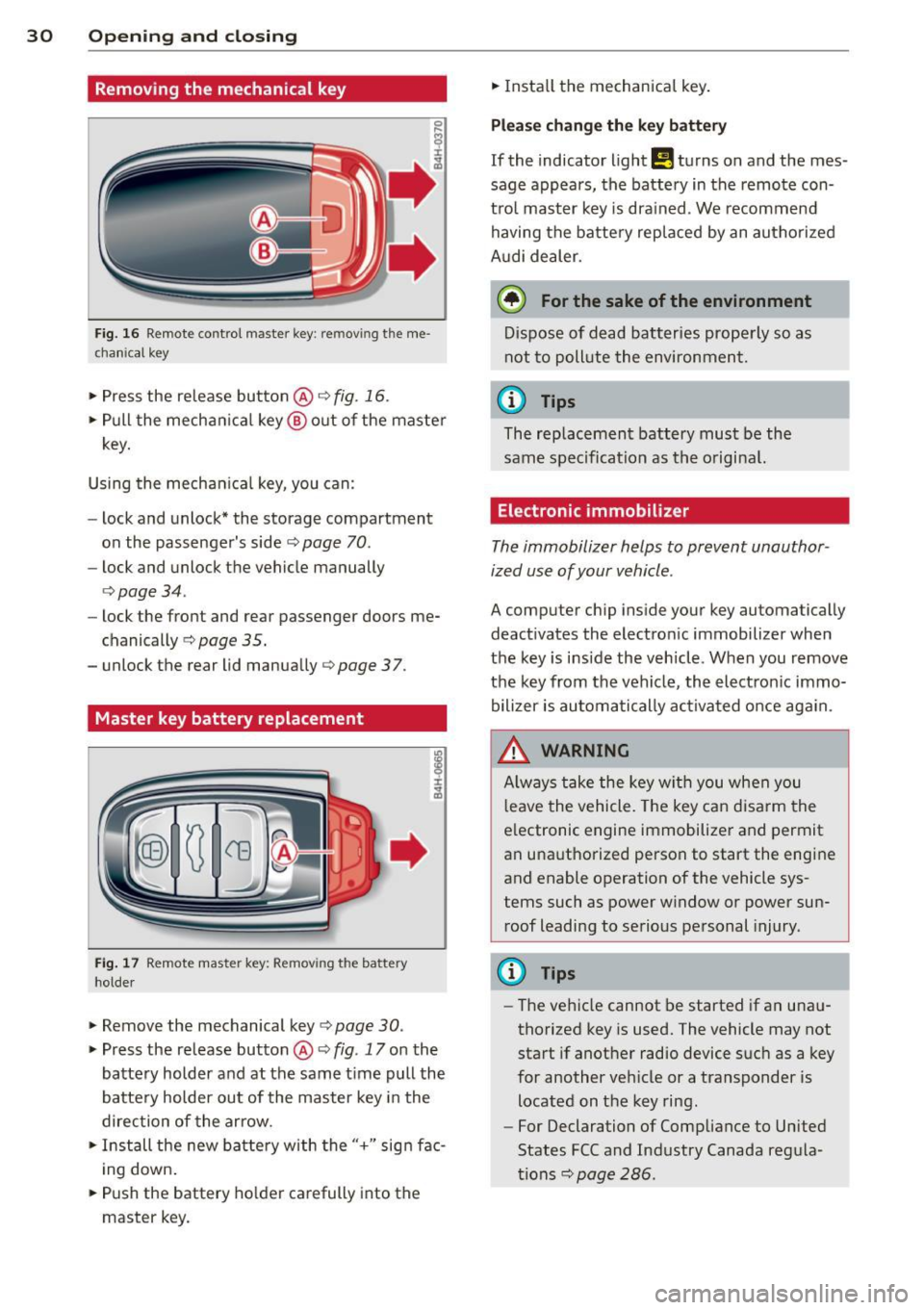
Removing the mechanical key
Fig. 16 Remote control master key: removing the me
chanica l key
> Press the release button @ r:::> fig. 16.
• Pull the mecha nica l key @ out of the master
key.
Using the mechan ica l key, you can:
- lock and unlock* the storage compartment
on the passenger's sider:::>
page 70.
-lock and unlock the vehicle manually
r:::>page34.
-lock the front and rear passenger doors me
chanically
r:::> page 35.
- unlock the rear lid manually r:::> page 3 7.
Master key battery replacement
Fig. 17 Remote master key: Removing the battery
holde r
• Remove the mechanical key r:::> page 30.
> Press the release button @ r:::> fig. 17 on the
battery holder and at the same t ime pull the
battery holder out of the master key i n the
direction of the arrow.
• Install the new battery with the"+" sign fac
i ng down.
• Push the battery holder carefully into the
master key. •
Insta ll the mechanica l key .
Please ch ange the k ey battery
If the indicator light!! turns on and the mes
sage appears, the batte ry in the remote con
tro l master key i s drained. We recommend
having the battery replaced by an autho rized
A udi dealer.
@) For the sake of the environment
Dispose of d ead batteries properly so as
not to pollute the environment.
(D Tips
The replacement battery must be the
same spec ification as the o riginal.
Electronic immobilizer
The immobilizer helps to prevent unauthor
ized use of your vehicle .
A computer chip inside your key automatically
deact ivates the electron ic immobilizer when
the key is inside the veh icle. When you remove
the key from the vehicle, the ele ct ron ic immo
bilizer is automati cally activated once aga in.
.8_ WARNING
A lways take the key w ith you when you
l eave the vehicle. The key can disa rm the
e lectronic engine immobilizer and permit
an unauthorized person to start the engine
and enable operation of the vehicle sys
tems such as power window or power sun roof leadi ng to se rious pe rsonal injury.
@ Tips
- The ve hicle cannot be started if an una u
thorized key is used. The vehicle may not start if another radio device s uch as a key
for another ve hicle or a transponder is
located on the key ring.
- For Declaration of Compliance to United
States FCC and Industry Canada regula
tions r:::>
page 286.
Page 33 of 302

Power locking system
General description
The power locking system locks or unlocks all
doors and th e re ar l id simultan eously.
Yo u ca n lo ck and un lock t he vehicle centrally.
Y ou have the following ch oices:
- Remote master key ¢
page 32,
-Door handles with convenience key*
¢ page 33 ,
-Lock cylinder at the dr iver's door
¢ page 34, or
- Power loc king swi tch inside ¢
page 34.
Selective unlocking
When they are closed, the door and rear lid
are locked. When unlocking, you can set in t he
M MI whether only the driver's door or the en
tire veh icle sho uld be un locked
¢ page 32.
Automatic locking
The automat ic locking featu re locks all the ve
h icle doo rs and the rear lid when you drive
faster tha n 9 mph ( 15 km/h) .
The car is un locked again, when the opening
function in the power locking system sw itch
or at one of the door leve rs is actuated . The
Auto Lock function can be turned on and off in
the MMI
¢ page 32 .
Anti-theft alarm warning system
If the anti-theft alarm warning system de
tects a break -in in to the ve hicle, acoustic and
v isua l warning sig nals are triggered .
The anti -theft warning system is activated a u
tomatically when you lock the vehicle . It is de
activated when un locking using the remote
key, with t he mechanical key, and when you
sw itch the ignition o n.
The alarm also turns off whe n the alarm cycle
has expired .
Tu rn signal s
W hen you unlock the vehicle, the tur n signa ls
flash twice, when you lock it once . If they do
Opening and clo sin g 31
not flash, one of the doo rs, the rear lid o r the
hood is not locked.
Unint entionally locking yourself out
In the fo llow ing cases there safeg ua rds to
preve nt yo u loc king you r remo te mas ter key in
the ve hicl e:
- The vehi cle does not loc k w ith th e cent ral
lo cki ng swit ch¢
page 34 if the d rive r's
do or is open.
- On ve hicles with co nvenience key*, if the
most re cen tly used maste r key is in the lug
g age compartmen t, the rear lid is automat i
cally un locked again after it is closed
¢ page 35.
Do not lock your ve hicle with the remote ma s
ter key
un til all doo rs and t he rear lid are
closed. In this way yo u avoid locking yourse lf
out acc identally .
Power side door closer*
T he veh icle doo rs a re equipped with a powe r
s ide doo r closer . W hen clos ing a door, you o n
l y have to le t it fa ll light ly in to the latch. fhe
doo r will then automatically close by itself
~ .& -
A WARNING
--When you lock yo ur vehicle from o utside,
nobody - espec ia lly children - should re
main inside the vehicle. Remember,
when yo u lock the vehicle from the out
side the wi ndows cannot be o pened from
the inside.
- W hen you leave the ve hicle , always take
the ignition key w ith you . Th is w ill pre
vent pass enge rs (c hildren, for e xample)
fr om accidenta lly being lo cked in the ve
hicle sho uld they accident ally pres s the
power locking sw itch in the doors.
- Do n ot leave childr en inside the vehicle
unsupe rv ised . In an emergen cy it would
be imposs ible to open the doors from
the o utside wit hout t he key .
- App lies to vehi cles w ith power side doo r
closer *:
Page 35 of 302
.. Push the red I PANIC I button to activate the
panic function. The horn sounds and the
turn s ignals flash. Push the red
I PANIC ! but
ton again to deactivate the panic function.
If the vehicle is unlocked and no door, the rear
lid or the hood is opened within 60 seconds,
the vehicle locks itself again automatically.
This feature prevents the vehicle from being
accidentally left unlocked over a long period
of t ime .
It depends on the settings in the MMI wheth
er the entire vehicle is unlocked or only cer
tain doors
¢ page 32.
A WARNING
Read and follow all WARNINGS Q &. in
General description on page
31.
@ Tips
-In order to make sure the locking func
tion is working, you should always keep
your eye on the vehicle to make sure it is
properly locked .
- Do not use the remote control if you are
i nside the car, otherwise you may unin
tentionally lock the vehicle, and then you
would set off the anti-theft alarm when
you try to start the engine or open a
door. In case this happens anyhow, push
the un lock button @.
- The vehicle can only be locked when the
selector lever is in the
P position.
- Use the panic function only if you are in
an emergency situation.
Opening and closing 33
Locking and unlocking with convenience
key
Applies to vehicles: wi th convenience key
The doors and the rear lid can be unlocked
and locked without operating the master key.
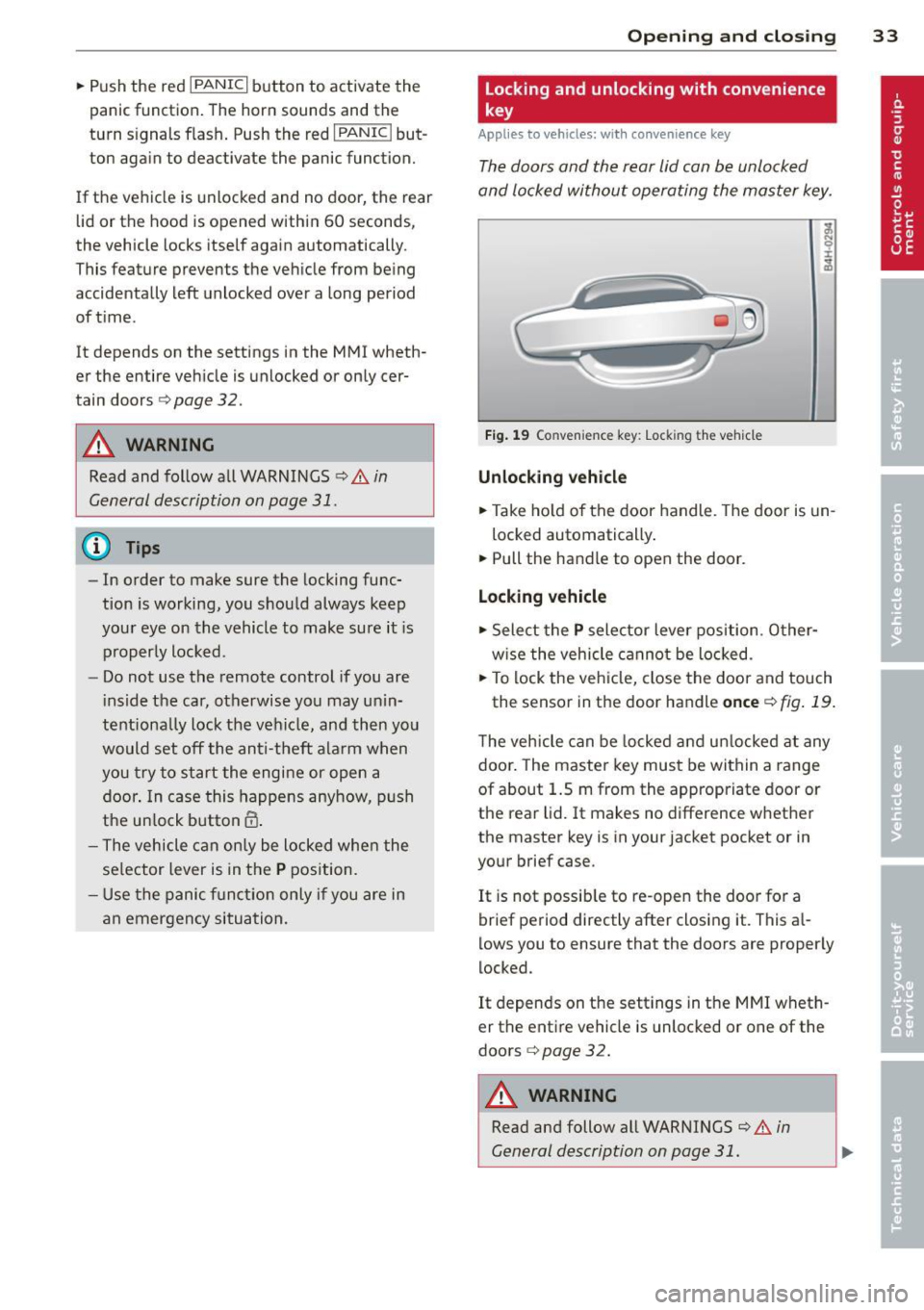
Fig. 19 Co nvenienc e key : Lock ing th e vehicle
Unlocking vehicle
.. Take ho ld of the door handle. The door is un-
locked automatically .
.. Pull the handle to open the door.
Locking vehicle
.. Select the P selector lever position . Other
w ise the vehicle cannot be locked.
.. To lock the veh icle, close the door and touch
the sensor in the door handle
once ¢ fig . 19.
The vehicle can be locked and unlocked at any
door. The master key must be within a range
of about 1.5 m from the appropriate door or
the rear lid. It makes no difference whether
the master key is in your jacket pocket or in
your brief case.
It is not possible to re-open the door for a
brief period directly after closing it. This a l
lows you to ensure that the doors are properly
locked.
It depends on the settings in the MMI wheth
er the entire vehicle is unlocked or one of the
doors
¢ page 32.
A WARNING ~ -
Read and follow all WARNINGS ¢&. in
General description on page
31.
Page 36 of 302

34 Opening and clo sing
@ Tips
If your vehicle has been standing for an ex
tended period, please note the following:
- The proximity sensors are deactivated af-
ter a few days to save power. You then
have to pull on the door handle once to
unlock the vehicle and a second time to
open the vehicle.
- To prevent the battery from being dis
charged and to preserve your vehicle's
ability to start for as long as possible,
the ene rgy management system gradu
ally switches off unnecessary conven i ence fun ct ions.
It is possible that you
will not be able to unlock your vehicle us
i ng these conven ience f unctions.
- For Declarat ion of Compliance to United
States FCC and Indus try Canada regul a
tions¢
page 286.
Operating locks with the key
In the event of a failure of the power locking system, the driver's door con be locked and
unlocked at the lock cylinder.
Fig. 2 0 Key turns for opening and closing .
.. Remove the mechanical key¢ page 30.
.. Turn the key to the left to unlock the driver 's
door .
.. Turn the key to the r ight to lock the driver's
doo r¢
/1. .
_& WARNING
Read and follow all WARNINGS r:::;, & in
General description on page 31.
Locking and unlocking the vehicle from
inside
Fig. 21 Drive r's door; power lock ing switch
Fi g. 22 Rear power locking switch
.. Press the button@ to lock the vehicle¢ /1..
.. Press the button al to unlock the vehicle
r:::;,ffg. 21, ¢ fig . 22 .
If you lock the vehicle using the power locking
switch, please note the followi ng:
- You cannot open the doors or the rear lid
from the
outside ( increased security, for ex
ample when you are stopped at a red light).
- The diodes in the power locking switches il-
luminate when all the doors are closed and
locked .
- You can un lock and open the doors from the
inside by pulling on the door handle .
- If you have a crash and the airbag is activat
ed, the doors automatically unlock.
_& WARNING
--The power lock ing switch works with the
ignit io n off and a utomat ica lly locks the
e ntire veh icle when it is actuated.
- On a vehicle locked from the outside the
power locking sys tem switch is inopera
tive.
Page 37 of 302

-Locking doors from the inside can help
prevent inadvertent door opening during
an acc ident and can also prevent unwant
ed entry from the outside. Locked doors
can, however, delay ass istance to vehicle
occupants and hold up rescue efforts
from the outside in an acc ident or other
emergency.
@ Tips
Your vehicle is locked automatically at a speed of 9 mph (15 km/h) ¢
page 31. You
can unlock the vehicle again us ing the
open ing funct ion in the power lock ing sys
tem sw itch.
Emergency locking
Each door must be locked separately if the
power locking system fails.
Fig . 23 Door: E mergency lock ing
An emergency lock is located on the front end
of the passenger 's door and the rear doors
(on Ly visible when door is open).
• Remove the mechanical key
Q page 30.
• Pull the cover cap out of the opening
¢fig . 23.
• Insert the key in the inside slot and turn it
all the way to the right (right door) or left
(left door) .
Once the door has been closed, it can no lon
ger be opened from the outside. The door can
be ope ned from the ins ide by pulling the door
h andle. If the chi ld safety lock in a rear door is
activated, you m ust first pull the door handle
on the inside. Then you can open the door
from the outs ide .
Op enin g an d clos ing 35
Rear lid
Opening/closing the rear lid
Fig. 24 Driver 's door: remote rear lid release
am
A U Dl
F ig . 25 Pos it ion of lock and handle in the rear lid
Opening th e rea r lid
• Press the
• To open the rear lid, press and hold the
,c:::5
button on the remote control master key for
at least one second. Or
• Pull the button
fig . 24 briefly . Or
• Press the handle in the rear lid
Q fig. 25.
Closing the re ar lid
• Pull the rear lid down and allow it to drop
gently. The lid is then closed automatically
¢& .
The sett ings in the MMI determine if the rear
lid can be opened using the handle¢
page 32.
A WARNING
--After closing the rear lid, always pull up
on it to make sure that it is properly
closed. Otherwise it co uld open suddenly
when the vehicle is moving.
~
Page 39 of 302

If you pull light ly on its handle , the rea r lid
will close .
You can manually stop the automatic open ing/closing of th e luggage compa rtm ent lid .
Th e automatic clos ing process begins if you
push down on the rear lid .
A WARNING
- After closing the rear lid, always pull up
on it to make sure that it is properly
closed. O therwise it could open sudden ly
when the vehicle is moving .
- To help prevent poisonous exhaust gas
from being drawn into the vehicle, al
ways keep the rear lid closed while driv
ing . Never transport objects larger than
those which fit completely into the lug
gage area, because then the rear lid can
not be fu lly closed .
- Never leave you r vehicle unatte nded es
pecially wi th the rea r lid left open. A
child could cr awl into the ca r th rough the
l u ggage compartment and pull the lid
shut, becom ing trapped and unab le to
get out . To reduce the risk of persona l in
jury, never let children p lay in or around
your vehicle . Always keep the rear lid as
well as the vehicle doors closed when not
in use .
- Never close the rear lid inattentively or
without checking fi rst . Al though the
closing force of the rear lid is lim ited,
you can st ill ser iously injure yourself or
others.
- Always ensure that no one is w ith in
range of the rear lid when it is mov ing, in
par ticu lar close to t he h inges and the up
per and lower edges -fingers or hands
can be p inched.
- Never try to inte rfe re with the rear lid or
help it when it is being opened or closed
automatically .
(D Tips
- If there is a mechanical problem with au
tomatic closing for the rea r lid or there is
an obstruction, it opens again immed i-
Openin g an d clos ing 3 7
ately. Check to see why the rear lid co uld
not be closed before attempting to close
it again.
- The following applies to vehicles equip
ped with the Convenience key * feature: if
the remote control key is left in the lug
gage compartment, luggage compart
ment w ill automa tically unlock i tself af
ter you lock the vehicle . Th is prevents
you from unintentionally lock ing your
key in the l uggage compartme nt.
- When the vehicle is loc ked, the rear lid
can be unlocked separately by p ress ing
the button
cs on the mas ter key . When
t he rear lid is closed again, it locks au to
matically.
- Yo u can close the rear lid using t he mas
ter key (veh icles with convenience key *)
up to a distance of app roximately 3 me
ters.
Rear lid emergency release
If the central locking system fails, the rear lid
can b e opened at the lock cylinder .
AUD.1
Fig. 27 Re ar lid : m echan ic a l key in t he loc k cy linde r
.,. Remove the mechani cal key q page 30.
.,. In ser t t he key in the lock cylinder aspic
tured .
.,. Tu rn the key approximately 45° to the right
q fig. 27. The rear lid opens q .& .
In this position the key cannot be pulled out
of the lock cy linder .
A WARNING
-After closing the rear lid, always p ull up
on it to make sure t hat it is p roperly
Page 41 of 302

Power windows
Controls
The driver can control all power windows.
Fig. 30 Section of the driver's door: Controls
All power window switches are provided with
a two-pos ition function:
Opening the windows
"' Press the switch to the first stop and hold it
until the window reaches the desired posi
tion.
"' Press the switch briefly to the
second stop
to automatically open the window .
Closing the windows
"' Pull the switch to the first stop and hold it
until the window reaches the desired posi
t ion.
"' Pull the switch briefly to the
second stop to
automatical ly close the window.
Power window switches
@ Driver's door
@ Passenger's door
© Left rear door
@ Right rear door
® Safety button (or two safety buttons in ve
hicles with power child safety locks
<=>page38)
Child safety lock
When the safety button® c:> fig. 30 is press
ed, the LED in the button lights up. The fol
l owing features are switched off:
- The power windows in the rear doors,
Opening and closing 39
- The buttons for the power sun shades* in
the side windows,
- The buttons for the power sun shade* in the
rear window,
- Front passenger power seat adjustment*
button.
&_ WARNING ~
- When you leave your vehicle -even if on-
ly briefly - always take the ignit ion key
with you. This applies particularly when
children remain in the vehicle. Otherwise
the children could start the engine or op
erate electrical equipment (e.g. power
windows). The power windows are func
tional until the driver's door or passeng
er 's door has been opened.
- Be careful when closing the windows.
Check to see that no one is in the way, or
serious injury could result!
- When locking the vehicle from outside,
the vehicle must be unoccupied since the
windows can no longer be opened in an
emergency .
(j) Tips
- The driver can lower or ra ise the power
sun shades* in the sid e windows by using
switches © and @.
- After the ignition has been switched off,
the windows can st ill be opened or
closed for about 10 minutes. The power
windows are not switched off until the
driver's door or passenger's door has
been opened.
What to do after a malfunction
The one-touch open and close function must
be reactivated if the battery has been discon
nected.
"' Pull and ho ld the power window switch until
the window is fully closed.
"' Release the switch and then pull it again for
at leas t one second.